
Weather and News AI Agent: Build a Voice Assistant



Build a weather and news AI agent with speech, location-aware tools, fresh source-backed updates, testing steps, and code-first or no-code paths.
Weather and News AI Agent: Build a Voice Assistant
What if one spoken briefing could answer “What’s the weather?” and “What’s happening?” without making you switch between apps? That simple idea is the starting point for a Weather and News AI Agent: a voice assistant that combines live information with a short, useful spoken update.
The prompt has timely appeal. A Hacker News snapshot supplied for this guide, dated September 2026 but not independently verified, described a “weatherman who also tells me the news” post with 19 points and two comments after 27.8 hours. The number is modest, but the product question is compelling: people want information delivered in the moment and format that suits them. A voice agent can make a morning briefing hands-free, while traveling, or when checking several sources would be inconvenient.
The key to building one is not asking a language model to “know” today’s forecast or headlines. Instead, give it separate tools for weather and news, then let it retrieve current results, interpret the request, and explain what it found. A reliable flow captures speech, identifies whether the user wants weather, news, or both, resolves the location, calls the relevant tools, and turns their results into a concise spoken answer. If the location is unclear—“Will it rain here?” or “What’s the weather in Springfield?”—the assistant should ask a follow-up rather than guess.
This guide will show how to assemble that flow using a code-first setup, a no-code voice-agent builder, or a Home Assistant-oriented approach, without assuming one provider is required. For weather, you’ll see why geocoding matters: Open-Meteo’s geocoding API returns fields such as coordinates and timezone, which can then guide a location-based forecast request. You’ll also need to check the API’s current usage and licensing terms and handle forecast timestamps in the correct timezone. For news, a distinct retrieval tool can return headlines and source details so the assistant can attribute information instead of presenting a vague summary as fact.
Finally, we’ll cover the parts that make a demo trustworthy: saying when the data was retrieved, naming its sources, keeping the spoken update brief, and offering a useful follow-up. OpenAI’s voice-agent guidance describes speech-to-speech and chained designs as distinct approaches; the right choice depends on how much control you need over transcription, tool calls, and responses. Platforms such as CallMissed, which offers voice agents and a managed voice-agent WebSocket, are part of the broader move toward practical, tool-connected assistants.
How do you build a voice agent that gives weather and news updates?

A weather-and-news voice agent needs a speech interface, separate tools for current weather and headlines, and a response layer that clearly states where and when its information was retrieved. This design turns “What’s the weather?” and “What’s happening?” into one spoken briefing—without requiring the listener to switch between apps.
The Hacker News idea of a “weatherman who also tells me the news” is a useful product prompt, not evidence of demand: the September 2026 snapshot in the brief reported 19 points and two comments after 27.8 hours, but those figures were not independently verified. The build challenge is reproducible: retrieve current facts with tools, then summarize them without presenting guesses as live information.
What is the architecture for a weather and news voice agent?
Use a staged flow so the assistant can distinguish a request from the data needed to answer it:
- Capture speech and convert it to text, or process audio through a speech-to-speech system.
- Classify the request as weather, news, or both. “Will it rain this afternoon?” needs weather; “What’s happening?” needs news.
- Resolve the location for weather. If “here” has no reliable location context, or the user names an ambiguous place, ask a clarifying question.
- Call the relevant tools and keep their results separate, including source names and retrieval times.
- Summarize verified results, speak a concise answer, and offer a useful follow-up such as a more detailed forecast.
OpenAI’s voice-agent guidance describes speech-to-speech and chained designs as distinct approaches. A chained system makes transcription, tool use, and response generation easier to inspect; speech-to-speech can make conversation more direct. Choose based on how much control and visibility your application needs.
How should the weather tool handle location and time?
Build weather lookup as two steps: geocode the place, then request its forecast. Open-Meteo’s geocoding API returns fields including coordinates and timezone; its forecast API uses a location to retrieve forecast data. Pass the returned coordinates to the forecast request rather than asking the language model to infer a location.
Preserve the timezone and forecast timestamps through the whole pipeline. “Rain at 3 p.m.” is useful only if 3 p.m. refers to the user’s local time. Before launch, check Open-Meteo’s current usage and licensing terms for your application. In the spoken answer, identify the forecast source and say when it was retrieved.
How should the news tool keep headlines trustworthy?
Make news retrieval a separate tool, not a model-generated answer based on memory. Return a small set of current headlines with publication or update times and source names; then instruct the assistant to summarize only those results. If the tool returns no suitable stories, say so instead of inventing a headline.
For example, a useful briefing might say: “For Pune, the forecast retrieved at 7:10 a.m. local time calls for afternoon rain. Here are two headlines from [source names]. Want the full forecast or more detail on either story?” The exact wording should depend on the tools’ actual results.
Can you build it with code, no-code tools, or Home Assistant?
Yes. A code-first build can connect speech input and output to two function-calling tools. A no-code build can use an agent builder’s instructions, knowledge, and custom tools. For a Home Assistant-oriented setup, connect the same retrieval-and-response sequence to the voice assistant or automation environment you already use; verify that its tool and speech integrations support your chosen services.
As of September 2026, CallMissed offers a no-code builder for voice agents and a managed voice-agent WebSocket, alongside custom REST tools—one example of infrastructure that can support the voice and tool layers without requiring a single provider for weather or news.
Which prerequisites and setup choices do you need?
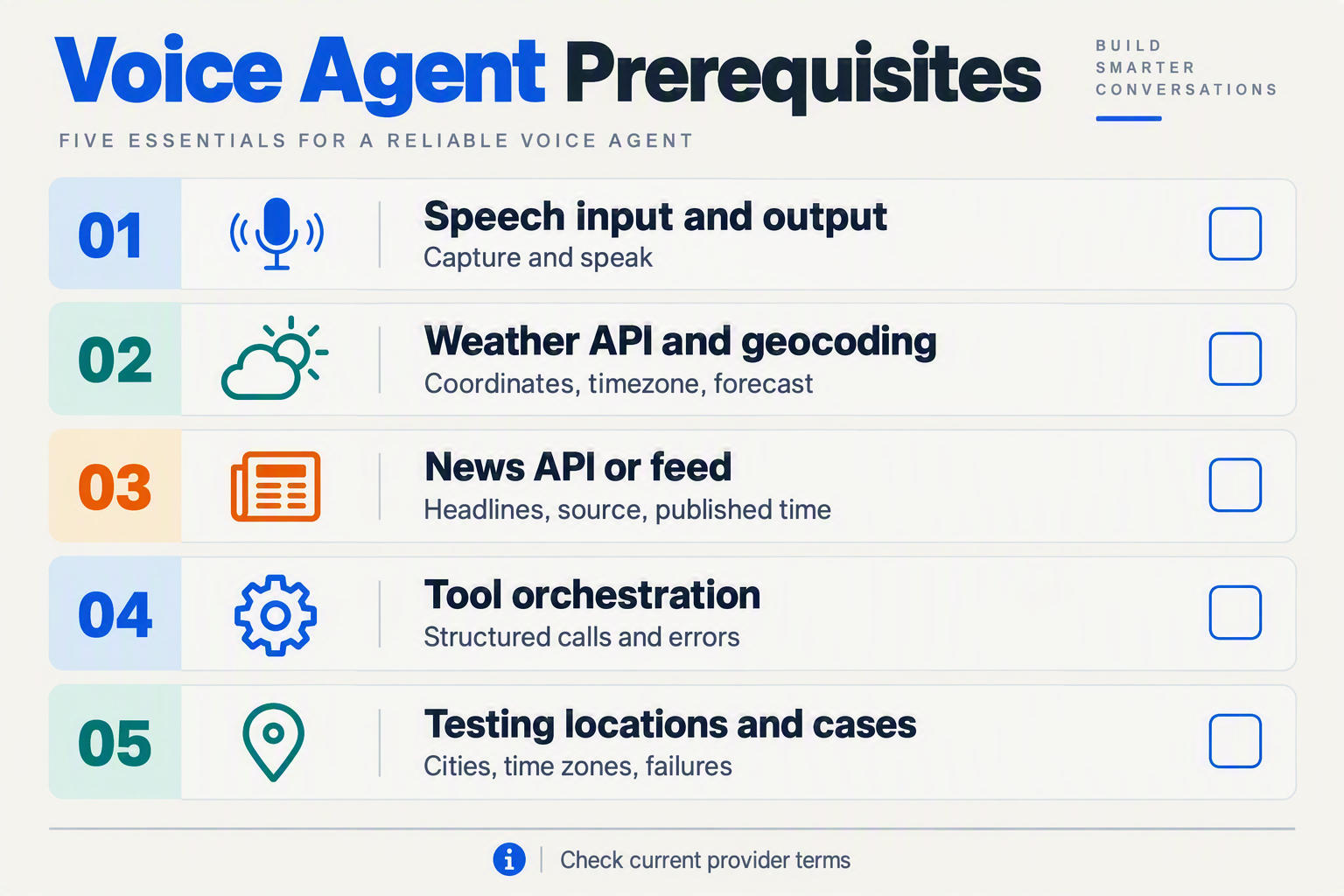
What do you need before building a weather-and-news voice agent?
Before connecting speech input to speech output, choose how the agent will handle voice, which services supply weather and news, how it will resolve locations, and where it will run. Keep weather and news as separate tools so the agent can retrieve each result independently and explain its sources.
| Setup choice | What to prepare | Practical consideration |
|---|---|---|
| Voice interface | Microphone input, speech processing and spoken output | OpenAI’s voice-agent guidance distinguishes speech-to-speech from chained designs; a chained flow offers explicit steps for transcription, tool calls and response generation. |
| Weather tool | Geocoding plus a forecast request | Open-Meteo’s geocoding API returns fields including coordinates and timezone; its forecast API supports location-based forecasts. |
| News tool | A separate search or news retrieval service | Return headline text and source details so the agent can attribute what it says rather than blur reporting and summary together. |
| Location handling | A default location or a clarification step | “Here” may need a known user location, while an ambiguous city name should trigger a question before the forecast request. |
| Runtime and build path | A code-first app, no-code builder or Home Assistant setup | Pick based on how much control you need over tools, prompts and deployment—not on an assumption that one provider is required. |
| Freshness and response rules | Retrieval timestamps, source attribution and a length limit | Preserve the data’s timezone and retrieval time, then state them clearly in the spoken briefing. |
Check the weather provider’s current usage and licensing terms before deployment. Pass the geocoded timezone through to the forecast request, and interpret forecast timestamps in that timezone; otherwise, a valid result can still be confusing when spoken to someone in a different region.
For news, decide what the tool returns before writing the agent prompt. A useful result should include enough source information to identify where a headline came from. Set a rule that the agent must not invent missing details or present a generated summary as a direct quote.
Choose a voice architecture that matches the experience you want:
- Speech-to-speech can support a more direct conversational flow. OpenAI’s voice-agent documentation describes its Realtime API as a browser-first starting point.
- Chained processing separates speech recognition, reasoning and speech generation. That makes each stage easier to inspect and gives you an explicit place to validate tool results.
- No-code setup can speed up agent configuration, while a code-first build offers control over API calls and error handling. CallMissed, for example, offers a no-code voice-agent builder and a managed voice-agent WebSocket; these are options, not requirements, as of September 2026.
- Home Assistant-oriented setup can keep the interaction within a home-automation environment, but plan how your weather and news tools will be called and how their results will reach the voice interface.
Whichever path you choose, prepare a short response policy: ask for a city when location is unclear, say when results were retrieved, name news sources, and offer a follow-up such as “Would you like the afternoon forecast?” That small amount of setup makes a combined briefing more useful than simply reading two API responses aloud.
Which architecture and build path should you choose?
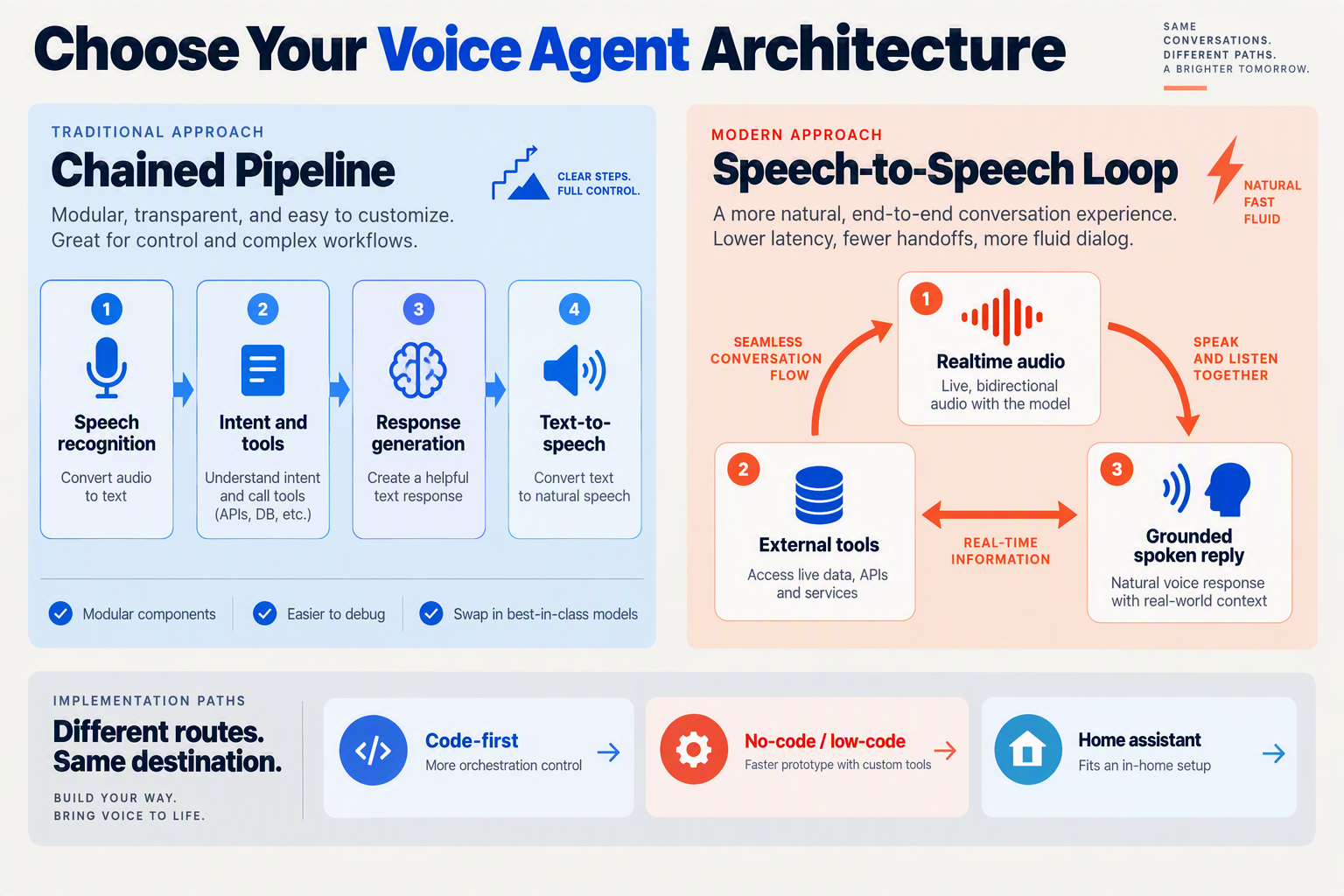
Choose the build path that gives you the right balance of response speed, control over tool calls, and ease of maintenance. Regardless of the interface, keep weather and news as separate tools: each should return current, structured results that the agent can summarize rather than relying on the model’s stored knowledge.
What should the voice-agent architecture do?
A reliable weather-and-news agent follows a clear sequence:
- Capture the request through a microphone or phone call, then determine whether the person wants weather, news, or both.
- Resolve the location for weather. If “here” has no known location or a place name is ambiguous, ask a brief follow-up instead of guessing.
- Call the relevant tools. Send coordinates and the requested time period to a weather service; query a separate news source for recent headlines.
- Summarize the returned results without adding unsupported details. Include the forecast period, retrieval time, and news source names.
- Speak a short answer and offer a focused follow-up, such as “Would you like the afternoon forecast?”
Keep the tool responses structured—for example, separate temperature, precipitation chance, forecast timestamp, headline, and publisher fields. That makes it easier to check what the agent says and to avoid mixing a forecast with a headline summary.
How should weather and news tools handle fresh information?
For weather, use geocoding before forecasting: Open-Meteo’s geocoding API returns fields including coordinates and timezone, while its forecast API supports location-based forecasts. Pass the resolved coordinates to the forecast request, preserve the returned timestamps, and present them in the location’s timezone. Before deploying, check Open-Meteo’s current usage and licensing terms.
Keep news retrieval separate from the weather lookup. Have the news tool return headline text, publisher, and publication time where available; then instruct the agent to name its sources and distinguish reported facts from its own summary. A useful spoken briefing might give one sentence on the forecast, two headlines with publishers, and a clear indication of when the information was retrieved. If a tool fails or returns stale data, the agent should say so rather than improvise.
Which build path fits your project?
Code-first is a strong fit when you need precise control over routing, tool validation, and testing. OpenAI’s voice-agent guidance describes speech-to-speech and chained designs as distinct approaches: speech-to-speech can make conversation feel more natural, while a chained flow gives developers clearer checkpoints for transcription, tool calls, and spoken output. Test both against your needs; there is no single provider requirement.
No-code can shorten the setup for a prototype or a team that wants to adjust prompts and call behavior without building every control from scratch. CallMissed offers a no-code voice-agent builder with custom REST tools, so a team can connect distinct weather and news endpoints while keeping those tools responsible for retrieving current information.
Home Assistant-oriented builds can make sense when the agent belongs in a home setup. Use Home Assistant as the interface or orchestration layer, and expose weather and news retrieval as separate actions. This path can be convenient for a household, but still needs explicit location handling, source attribution, and freshness checks.
Whichever path you choose, test ambiguous locations, unavailable tools, different timezones, and requests for just weather or just news. Those cases reveal whether the agent is genuinely useful—not merely fluent.
How do you build the weather and news tools step by step?
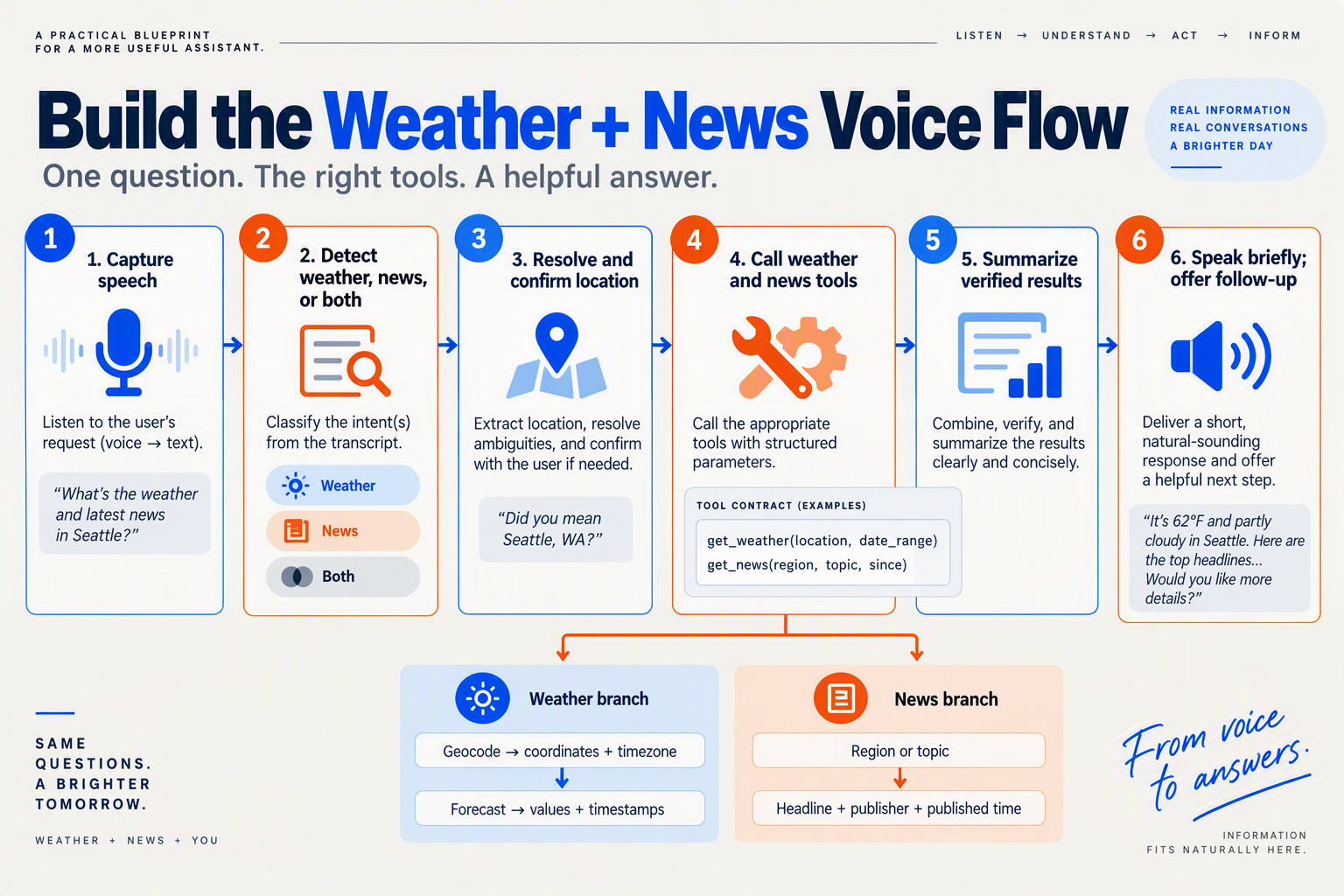
A reliable weather-and-news voice agent captures speech, identifies the request, resolves the location, retrieves current results through separate tools, and speaks a concise, sourced answer. The Hacker News “weatherman who also tells me the news” idea supplied for this guide is a useful product prompt; its reported 19 points and two comments after 27.8 hours were not independently verified in the available search results.
What should the agent do before calling either tool?
- Capture the request. Use speech-to-text followed by a language model, or a speech-to-speech setup. OpenAI’s voice-agent guidance describes these as distinct design approaches; a chained pipeline gives developers more control over transcription and tool calls.
- Identify the intent. Route “Will it rain tomorrow?” to weather, “What’s happening?” to news, and “Give me my morning briefing” to both. Separate tools make it easier to retrieve and explain each type of information independently.
- Resolve the location. Use a saved, user-approved location when available. If the user says “here” but no location is available—or names a place with multiple matches—ask a brief follow-up instead of guessing.
- Retrieve, summarize, and speak. Pass tool results to the response step rather than relying on the model’s memory. Include the retrieval time, forecast period, and news sources, then offer a relevant follow-up.
How do you build the weather tool?
Make weather lookup a two-stage operation: geocode the place, then request its forecast. Open-Meteo’s geocoding API returns fields including coordinates and timezone, and its forecast API supports location-based forecasts. Pass the chosen coordinates and timezone into the forecast request, and preserve timestamps so “this evening” is interpreted locally rather than in the server’s timezone.
A practical tool can accept a location and forecast_period, then return the matched place, timezone, forecast values, and retrieval time. If geocoding finds several plausible locations, ask the user which one they mean. Before deployment, check Open-Meteo’s current usage and licensing terms and verify its current API parameters.
How do you build the news tool?
Give news its own retrieval function. It should accept a topic or general request and return a small set of current headlines, timestamps, and source names. The agent should summarize only what those results support: “Two outlets report…” is more useful than an unattributed claim that “the news says.”
Keep publication time separate from retrieval time. If results are old, sparse, or unavailable, say so rather than presenting them as breaking news. For a combined briefing, select a few relevant items and identify their sources aloud.
How can you implement and test the full flow?
Choose a build path that fits your stack:
- Code-first: Connect a voice interface to intent routing and two tool functions. Test ambiguous places, no-result responses, stale headlines, timezones, and requests for weather and news together.
- No-code: Configure an agent’s prompt, tools, and call settings in a visual builder, then connect weather and news endpoints as custom REST tools. As of September 2026, CallMissed offers a no-code voice-agent builder with custom REST tools and a managed voice-agent WebSocket—one example of a platform approach that does not require a particular speech provider.
- Home Assistant-oriented: Use an existing voice pipeline and expose weather and news retrieval as separate actions or scripts. Check that the pipeline passes location and timestamps correctly before asking the model to summarize.
Finally, test the spoken experience aloud. Aim for a brief answer that states the location, forecast period, data freshness, and news sources—and lets the user ask for detail without turning the first response into a bulletin.
How can you make live spoken updates clearer and safer?
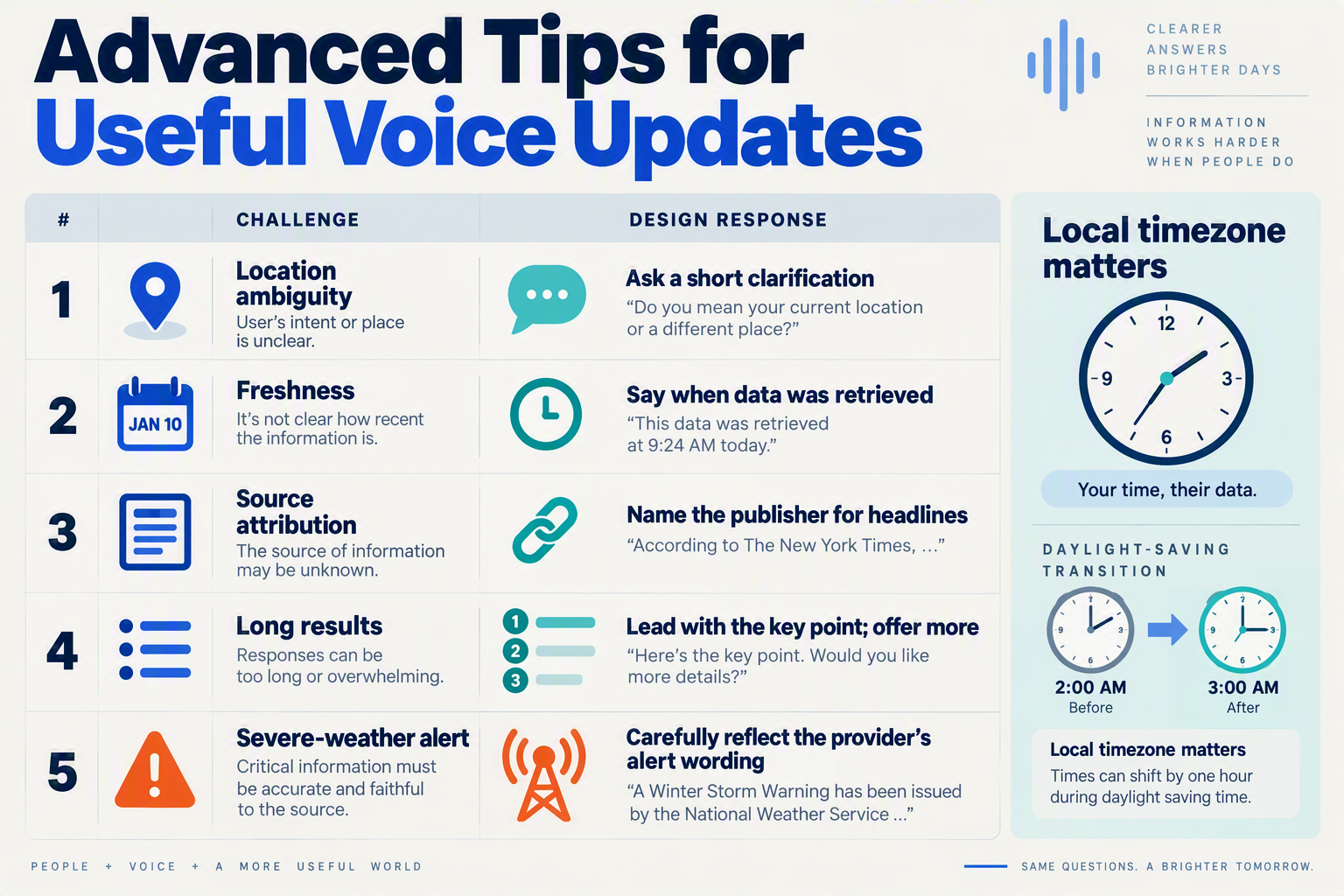
Treat every spoken update as a time-stamped summary of retrieved information, not as an answer the model can safely invent. Clear source attribution, careful location handling and a short fallback when data is missing help listeners understand what the agent knows—and what it does not.
What should the agent say when information is uncertain?
Use the weather and news tools as separate evidence sources, and keep each result’s location, source and retrieval time attached to it through summarization. OpenAI’s voice-agent guidance describes speech-to-speech and chained designs as distinct approaches; either can support a briefing, but a chained flow makes it easier to inspect the transcript, tool results and final wording before speech generation.
| Risk or confusion | Implementation safeguard | Example spoken behavior |
|---|---|---|
| Ambiguous location | Geocode the place name; ask which location the user means if multiple results remain | “Do you mean Springfield, Illinois, or Springfield, Massachusetts?” |
| Forecast timezone mismatch | Pass the selected location’s timezone through to forecast interpretation; don’t treat local forecast times as the caller’s time | “That rain forecast is for 3 p.m. local time in Pune.” |
| Stale or missing data | Retain the retrieval time; say when a tool fails or returns no usable result | “I couldn’t retrieve the latest forecast, so I can’t confirm whether it will rain.” |
| Unattributed headlines | Keep the publisher or source with each news item and attribute it in the spoken summary | “The Associated Press reports…” |
| Overlong or blended answer | Separate weather from headlines; lead with the requested item and offer more detail | “It’s 28 degrees with a chance of rain. Would you like the top headlines too?” |
Open-Meteo’s geocoding API returns fields including coordinates and timezone, while its forecast API supports location-based forecasts. Developers should check Open-Meteo’s current usage and licensing terms before deployment, and preserve forecast timestamps and timezone information so that a correct forecast is not spoken at the wrong local time. For news, use a distinct retrieval tool that returns both headline text and source details; if it returns no source, don’t present the claim as verified.
How can you keep the spoken briefing concise and useful?
Set a response budget in the agent’s instructions: give the requested update first, include the relevant location and freshness, then offer one follow-up. For example: “For Jaipur, the forecast retrieved at 7:10 a.m. local time shows rain likely this afternoon. I can also read the top two headlines.” Don’t combine unrelated stories into a confident-sounding narrative or imply that a forecast is certain.
Before publishing, test edge cases—not just the happy path:
- “What’s happening here?” with no location available.
- A place name that matches several locations.
- A failed weather or news request.
- Headlines with missing source information.
- A request for a forecast period the weather tool did not return.
Keep these checks provider-neutral: a code-first agent, a no-code builder or a Home Assistant setup can all enforce the same rules around tool results and spoken wording. CallMissed, for example, offers a no-code voice-agent builder with versioning, publish and rollback, alongside evaluation suites—useful capabilities when teams want to review changes to an agent’s behavior before deploying them. A trustworthy briefing is not just fluent; it makes its limits easy to hear.
What common mistakes should you avoid?
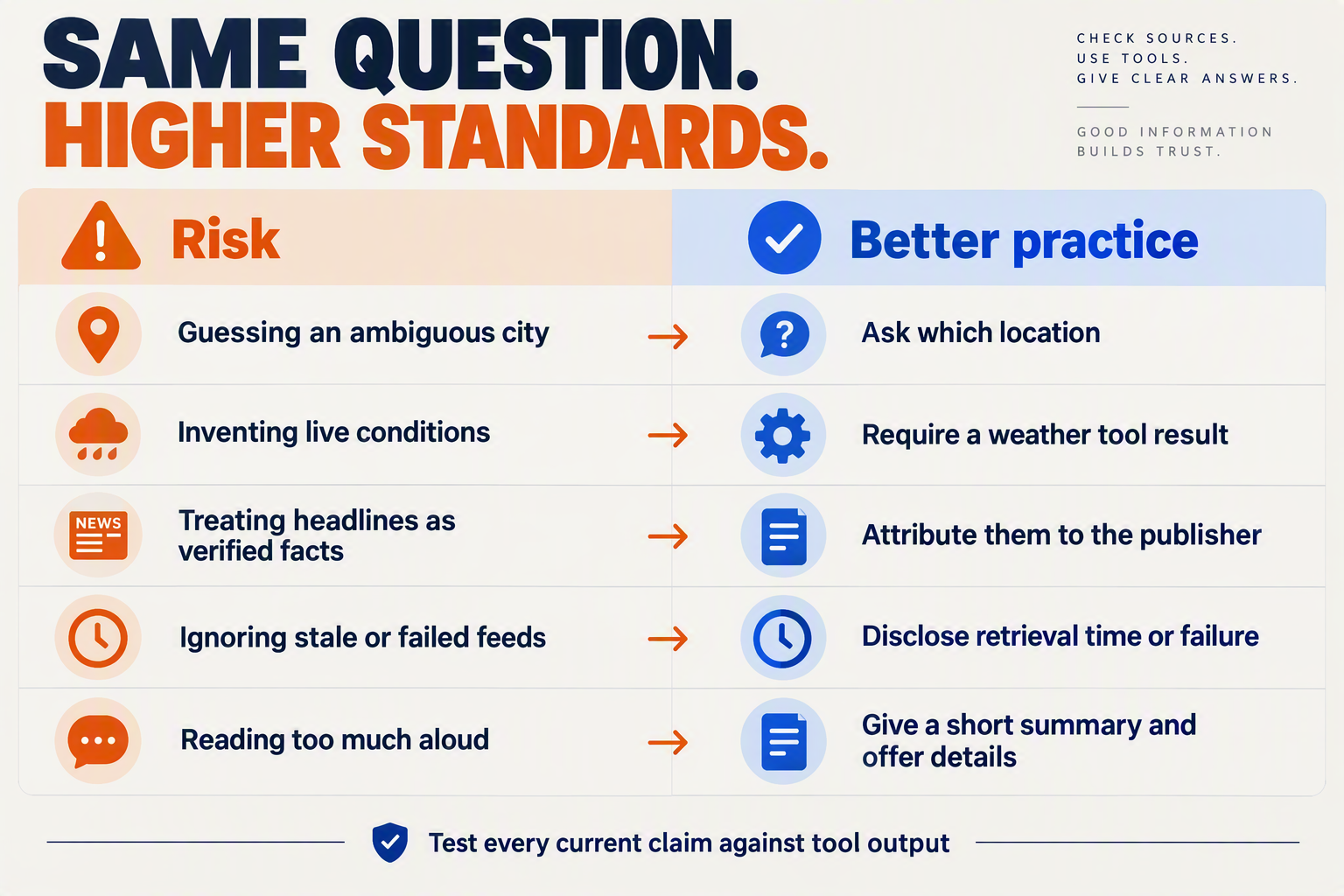
What common mistakes should you avoid when building a weather-and-news voice agent?
The biggest reliability failures come from guessing missing context, blending tool results without checking them, or speaking as if retrieved information were guaranteed to be current. Treat the “weatherman who also tells me the news” idea as a useful product prompt—not proof of demand: the September 2026 Hacker News snapshot supplied for this guide showed 19 points and two comments after 27.8 hours, a figure that was not independently verified.
| Common mistake | Why it causes trouble | Better approach | Quick check |
|---|---|---|---|
| Guessing an unclear location | “Here” may not identify a location, and Springfield could refer to multiple places. A wrong location makes an otherwise accurate forecast misleading. | Use geocoding results to identify possible matches. Ask the user to choose or confirm when the match is ambiguous; use device location only when available and permissioned. | Test “What’s the weather in Springfield?” and confirm the agent asks which one. |
| Treating the model as the source of live facts | A language model can produce plausible-sounding but outdated forecasts or headlines when retrieval fails or is skipped. | Route weather questions to a forecast tool and news questions to a separate news tool. Summarize only the returned results. | Disable each tool in turn and ensure the agent says it could not retrieve that information instead of improvising. |
| Losing timezone or timestamp context | Forecast periods can be described as “today” or “tonight” incorrectly if timestamps are interpreted in the server’s timezone. | Open-Meteo’s Geocoding API returns fields including coordinates and timezone; use the resolved timezone when requesting and presenting forecast periods. Check Open-Meteo’s current usage and licensing terms before deployment. | Test a location far from the server’s timezone and verify the spoken day and time. |
| Presenting headlines without attribution | Listeners cannot tell which publication reported a claim or how fresh it is. | Keep headline, publisher, and retrieval time together. Attribute claims aloud—for example, “Reuters reports…”—and distinguish a reported fact from the agent’s summary. | Confirm each spoken headline names its source and does not merge separate reports into one claim. |
| Hiding stale or failed data | A cached forecast or failed news request can sound current if the agent gives no timestamp or warning. | Include a short freshness cue such as “Forecast retrieved at 7:10 a.m. local time.” If retrieval fails or data is old, say so and offer to try again. | Simulate a timeout and check whether the response clearly signals the problem. |
| Giving a long, overloaded briefing | A detailed weather report followed by several headlines is hard to follow in audio and delays the useful answer. | Lead with the requested essentials, then offer a follow-up: “Want the hourly forecast or more headlines?” Keep weather and news sections distinct. | Ask for both, then check that the answer is concise and each topic is easy to distinguish. |
How can you test the agent before launch?
Run spoken tests across weather-only, news-only, and combined requests. Include ambiguous places, unusual time zones, noisy or code-mixed speech, empty tool responses, and conflicting news results. OpenAI’s voice-agent guidance distinguishes speech-to-speech from chained designs; whichever approach you choose, verify that tool results—not fluent wording—control factual claims.
A useful release check is whether the agent can do three things consistently: ask when it lacks context, identify where and when information came from, and admit when retrieval failed. Those safeguards turn a clever demo into a briefing people can assess and trust.
Frequently Asked Questions
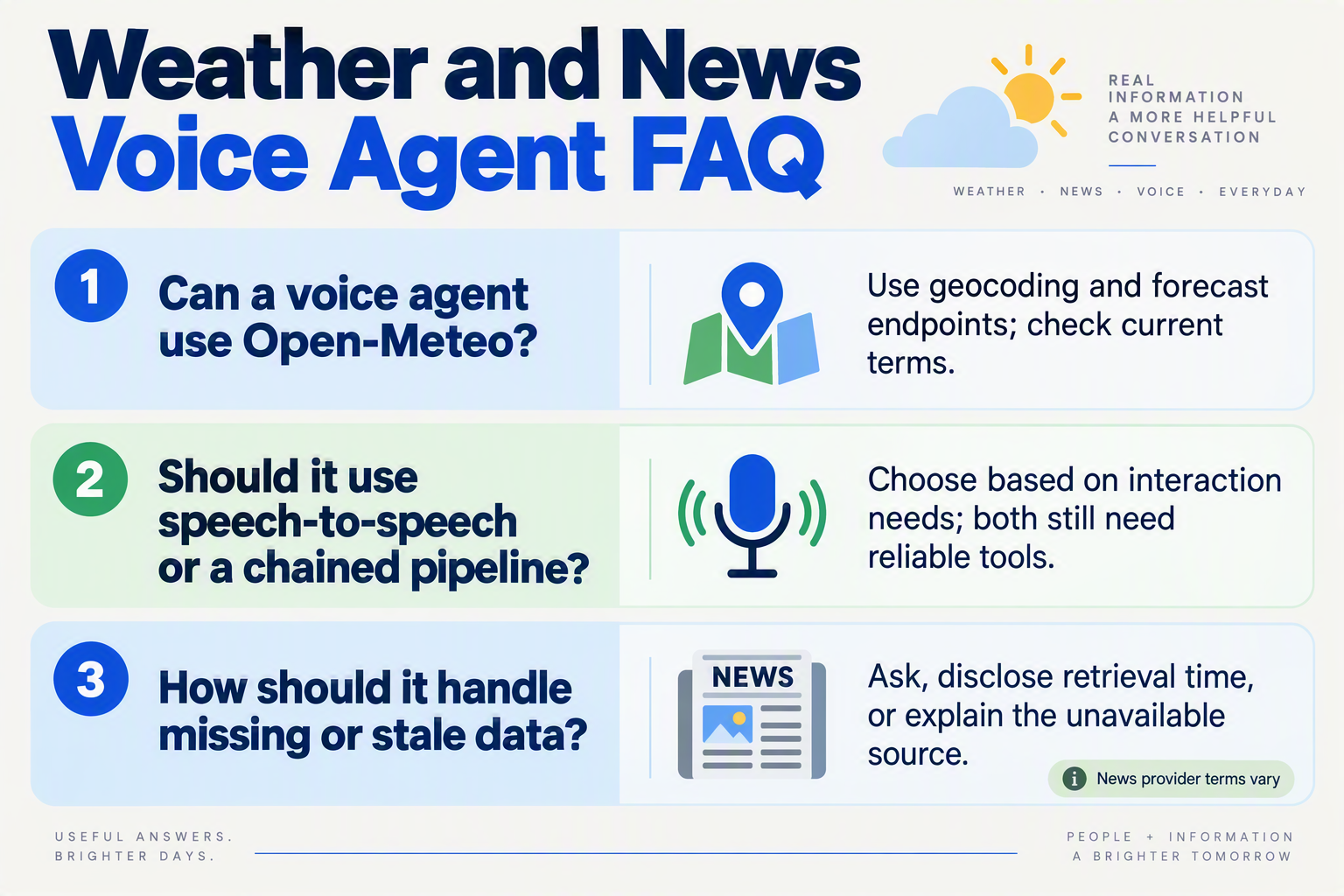
Can a weather and news voice agent use Open-Meteo for forecasts?
How should a voice agent handle live news updates?
What is the basic architecture for a weather and news voice agent?
How should a voice agent resolve an unclear weather location?
How can a weather and news voice agent communicate whether its information is current?
Can I build a weather and news voice agent without writing all the voice infrastructure myself?
What should you test and explore next?
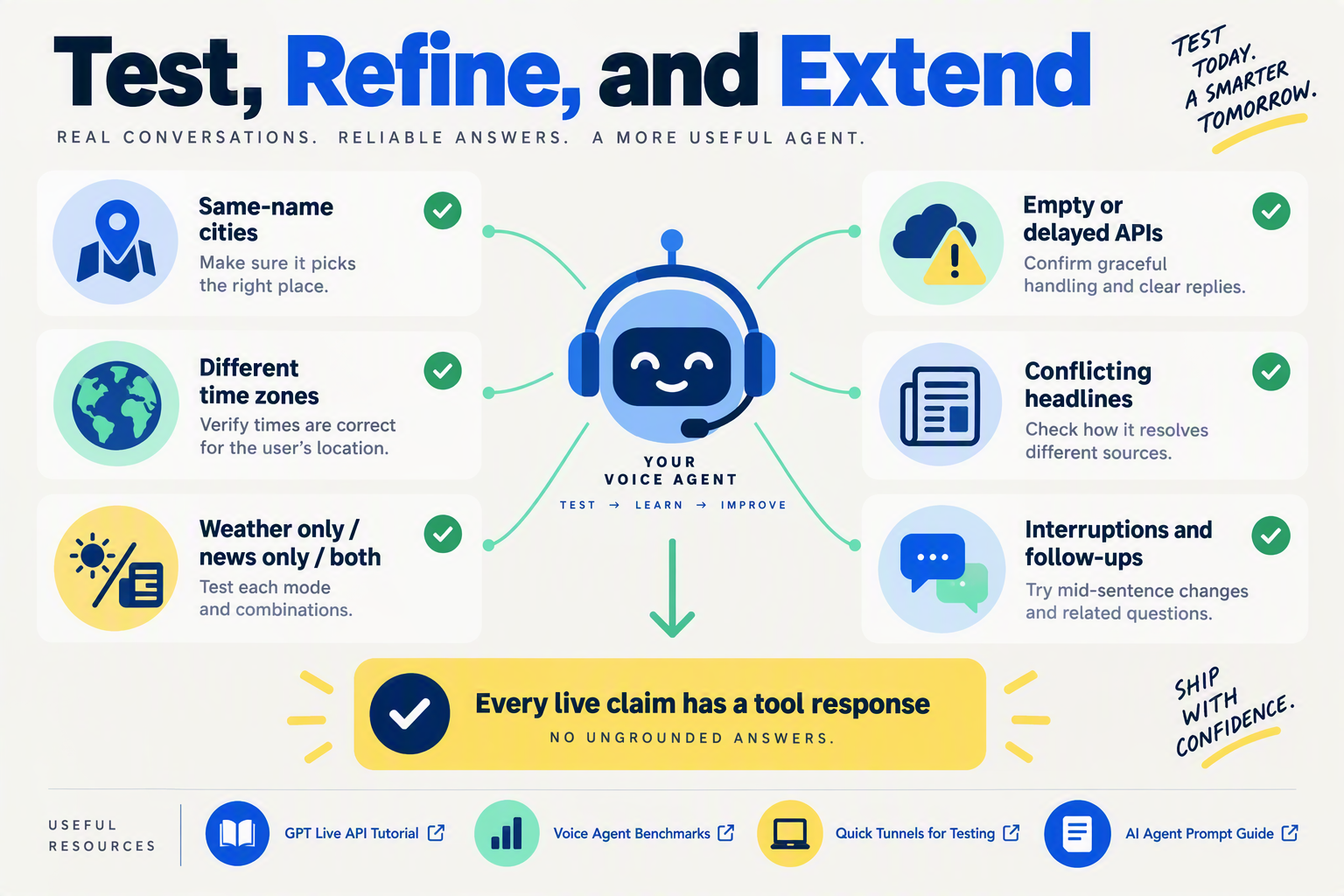
What should you test before sharing a weather-and-news voice agent?
Test whether the agent gives correct, current, clearly attributed answers when the request is incomplete—not just whether it works for a perfectly phrased demo. Start with a small set of repeatable scenarios, then listen to the spoken responses and inspect the tool results behind them.
Try these cases:
- Weather only: “Will it rain in Pune this afternoon?” Check that the agent resolves the intended location, uses the right local time, and reports the forecast’s retrieval or valid time.
- News only: “What’s happening today?” Confirm that the news tool returns identifiable sources and that the spoken summary preserves attribution rather than turning a headline into an unsupported claim.
- Combined briefing: “Give me the weather and top news.” Verify that a failure in one tool does not lead the agent to invent an answer for that topic.
- Ambiguous location: “Is it cold in Springfield?” The agent should ask which Springfield rather than guess.
- Stale or unavailable data: Simulate a timeout or old result. The assistant should say what it could not verify and offer a useful next step.
For weather, Open-Meteo’s geocoding API returns fields including coordinates and timezone, while its forecast API supports location-based forecasts. Test that the forecast request uses the resolved coordinates and that timestamps are interpreted in the location’s timezone. Before deployment, check Open-Meteo’s current usage and licensing terms; do not assume that an example configuration automatically fits your use case.
How can you compare code-first, no-code, and Home Assistant approaches?
Choose the path that makes the behavior easiest for you to inspect and maintain. OpenAI’s voice-agent guidance describes speech-to-speech and chained designs as distinct options: a chained design can make transcription and tool calls easier to inspect, while speech-to-speech may suit a more direct audio interaction. Prototype the same test requests in whichever approaches you are considering, then compare tool-call visibility, interruption handling, and how naturally the agent speaks.
- Code-first: Keep weather and news as separate tools with clear input and output fields. Log the location selected, retrieval time, source names, and any error so you can reproduce a bad answer.
- No-code: Use an agent builder to define the prompt, tools, and fallback behavior, then test each tool independently before combining them. As of September 2026, CallMissed offers a no-code voice-agent builder with custom REST tools and a managed voice-agent WebSocket—one option among several, not a required provider.
- Home Assistant-oriented: Explore this path if the briefing belongs in a home setup. Test how it behaves when the intended location differs from the configured home location, and make that choice explicit to the user.
What should the spoken briefing include?
Keep the result short enough to follow by ear: weather first, then a few attributed headlines, followed by one optional question such as “Would you like the forecast for tonight?” State when information was retrieved and name the news sources. If a source has no timestamp or attribution, omit it or explain the limitation rather than implying certainty.
The Hacker News snapshot supplied for this guide reported 19 points and two comments after 27.8 hours for the “weatherman who also tells me the news” idea; those figures were not independently verified. Treat that post as a product prompt, not proof of demand. A more useful next experiment is to let a few intended users try the same briefing and note which details they ask to repeat, clarify, or hear less often.
Conclusion
A useful weather-and-news voice agent does not guess what is happening; it retrieves current information, checks the user’s intent and location, then delivers a clear, sourced briefing. The Hacker News “weatherman who also tells me the news” idea is a timely product prompt—the vote and comment figures in the supplied snapshot were not independently verified—but the durable lesson is the system design.
- Capture speech and identify the request: determine whether the listener wants weather, news or both, and ask for clarification when the location is ambiguous.
- Use separate retrieval tools: geocode a place before requesting its forecast, and fetch headlines with source details. Check Open-Meteo’s current usage and licensing terms, and handle forecast times in the location’s timezone.
- Make the answer trustworthy and useful: state when information was retrieved, name its sources, keep the spoken update concise and offer a relevant follow-up.
- Choose a build path that fits: code-first, no-code and Home Assistant-oriented approaches can implement the same core flow without locking the design to one provider.
As speech-to-speech and chained voice systems evolve, watch for better control over tool use, timing and natural spoken responses. CallMissed offers a no-code voice-agent builder and a managed voice-agent WebSocket for developers exploring this shift. What would make a combined briefing useful enough to become part of your daily routine? Explore CallMissed to learn more about AI communication infrastructure.
Related Reading
- Offline AI Voice Assistant Mac: What Laya Actually Proves
- Qwen 3.8 Voice Agent Benchmarks: A Builder’s Guide
- GPT Live 1 API Tutorial: Build a Full-Duplex Agent
Sources
Discussion
Related Posts



Ready to automate customer conversations?
Launch AI voice agents and WhatsApp bots with CallMissed — one API, 22+ Indian languages.