
Offline AI Voice Assistant Mac: What Laya Actually Proves


Learn what Laya’s M4 demo proves, how to measure an offline AI voice assistant on Mac, and where latency, privacy, and reliability claims need testing.
Offline AI Voice Assistant Mac: What Laya Actually Proves
What if a Mac could make 45 decisions per second without sending them to the cloud—but that still told you almost nothing about how fast a voice conversation feels? That distinction is at the heart of the “Offline AI Voice Assistant Mac” conversation gaining attention after a Hacker News post about Laya (OS Jev) running on an M4.
In the operator-provided snapshot, the post had 41 points and six comments after 1.9 hours. That is a moment-in-time observation, not a lasting ranking: later search results showed different snapshots. The technical claim is just as specific. Search results characterize Laya as running offline through Core ML on a Mac M4 at 45 decisions per second. They do not establish 45 tokens, spoken utterances, or complete voice-agent turns per second. And while an underlying gist is available, the supplied snippets do not reveal enough implementation detail or benchmark methodology to independently verify that figure.
Why does the claim matter? Local inference could reduce dependence on network round trips and keep some processing on the device—useful possibilities for responsiveness and data locality. But a model’s decision throughput is not the same as conversational latency. A voice interaction also involves capturing audio, detecting when someone is speaking, transcribing speech, preparing and generating a response, coordinating tools, converting text to speech, and playing the audio. Any of those stages can add delay or require network access.
This article separates what the demo suggests from what it leaves unanswered. We’ll look at why a small, specialized model may be useful for well-defined tasks without assuming it can handle open-ended conversation, and what builders should measure next: cold-start time, time to the first partial transcript, time to the first audio response, and end-to-end turn latency under realistic conditions. We’ll also consider which components can run locally and which may still depend on cloud services.
The broader shift is toward choosing where each part of a voice system runs, rather than treating “offline” as an all-or-nothing label. Platforms such as CallMissed offer real-time voice sessions over an API and SDK, illustrating the complementary networked side of that design space. Laya’s reported number is an intriguing signal—but the useful question is what a complete, measured voice experience can do on-device.
Does Laya’s M4 demo prove that offline voice AI is ready?
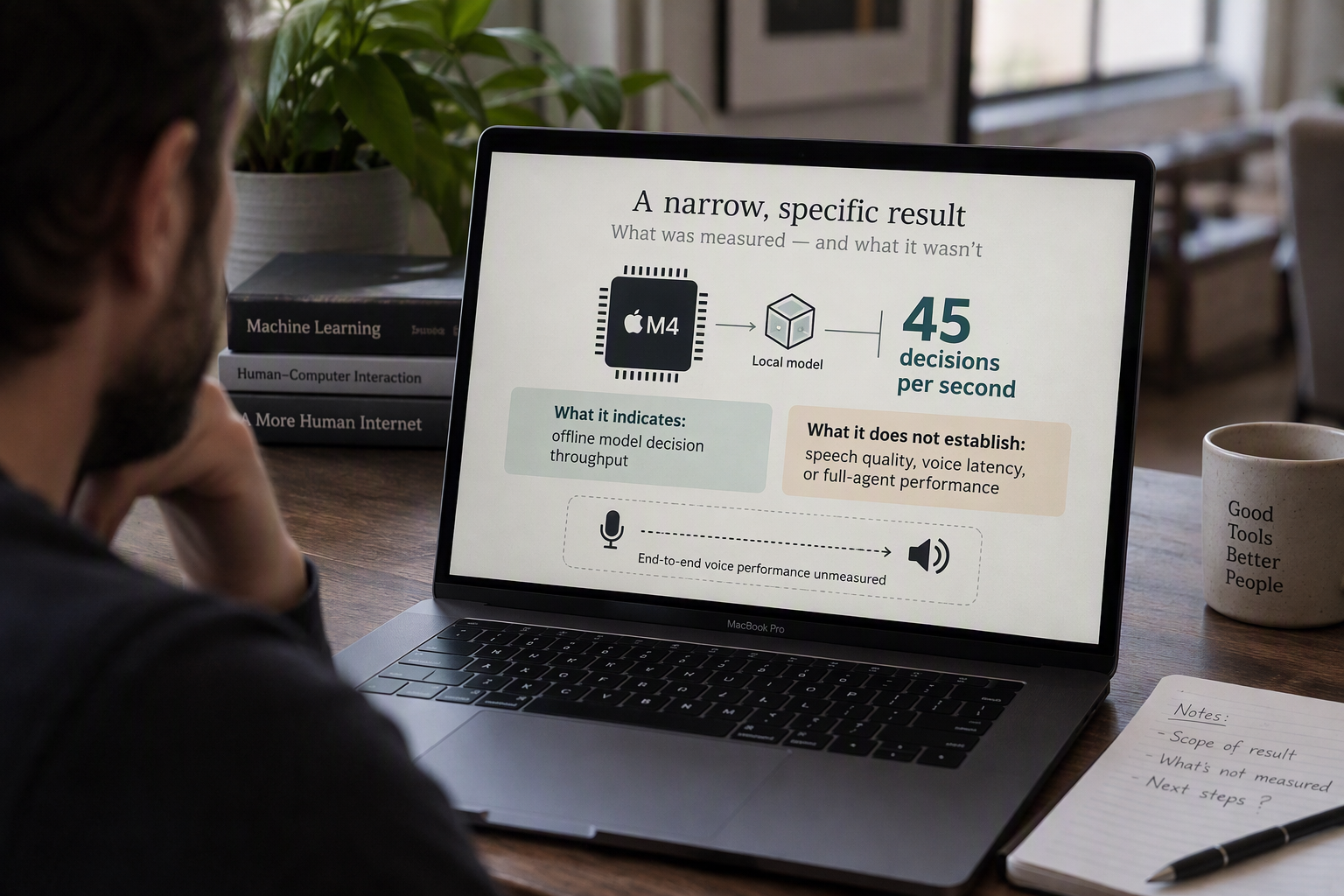
No. The Laya demo is a signal that a particular model can make decisions locally on a Mac M4; it does not establish that an offline voice assistant is fast, natural, or reliable end to end. The distinction is between model throughput and the time a person actually waits for a spoken reply.
What does “45 decisions per second” tell us?
Search results describe Laya running offline through Core ML on a Mac M4 at 45 decisions per second. That wording matters: the reported rate is decisions, not tokens, spoken utterances, or complete voice-agent turns. The available snippets do not specify enough about the task, model configuration, measurement procedure, or test conditions to independently verify the number.
The operator-provided Hacker News snapshot showed 41 points and six comments after 1.9 hours. That is a moment-in-time observation, not evidence of a lasting ranking or technical validation; other search-result snapshots showed different figures. Hacker News discussion also points to a potential use case: a commenter suggested Laya may suit deterministic tasks trained on examples better than zero-shot tasks. That is a useful distinction to test, not proof of performance across either category.
Why isn’t decision speed the same as voice-agent speed?
A responsive conversation depends on more than the model’s decision rate. The full path may include capturing audio, detecting speech, recognizing words, preparing and generating a response, invoking tools, synthesizing speech, and playing audio. Some of these stages may run locally; others may require a network connection or separate services.
Even if the decision stage completes quickly, a slow first transcript, tool call, or audio-generation step can dominate the user’s wait. Conversely, local processing could avoid a network round trip for the stages that genuinely run on-device. The demo’s headline number does not tell us which stages are local, how much time each takes, or whether the system remains usable when disconnected.
What should builders measure next?
A useful evaluation should define the task and report the conditions, not just a single throughput figure. For a voice assistant, record:
- Cold-start time and whether model loading is included.
- Time to first partial transcript, then time to a final transcript.
- Time to first audible response, including speech generation and playback.
- End-to-end turn latency across realistic prompts, including tool use where relevant.
- Quality and failure rates on both trained, repeatable tasks and unfamiliar requests.
- Offline behavior: which features keep working without a network connection, and what stops.
Report distributions, such as median and slower-tail results, rather than only the fastest run. Repeat tests under documented device and workload conditions so readers can distinguish a reproducible result from a best-case demonstration.
The practical conclusion is narrower—and more useful—than “offline voice AI is ready.” Laya’s reported result makes local decision-making on an M4 worth investigating. Whether that can deliver a complete, private, responsive voice experience remains an empirical question about the entire system, not one model-stage number.
What did the Laya Core ML post actually report?

The Laya post reports a narrow performance claim: 45 decisions per second on a Mac M4, running offline through Core ML. It does not, from the evidence available here, establish how quickly Laya completes a spoken conversation or how well it handles open-ended voice requests.
What exactly did the Laya post claim?
The Hacker News item is titled “Laya (OS Jev) on Mac M4 CoreML Offline (45 decisions per second).” Search results describe a developer demonstration of Laya running locally on an M4 using Apple’s Core ML framework. “Offline” indicates that the reported run did not rely on a cloud connection for that demonstration; it does not show that every component of a voice assistant can operate offline.
The unit is decisions per second. It should not be silently converted into tokens per second, spoken replies per second, or completed voice-agent turns per second. Those are different measurements, and the available search snippets do not define precisely what counted as a decision.
The Hacker News gist is available, but the supplied snippets do not expose enough implementation detail or benchmark methodology to independently validate the 45 figure. They do not specify the exact task, model configuration, test set, timing procedure, or whether the measurement includes any audio processing.
What did commenters say about Laya’s likely role?
The discussion points toward specialization, not a general-purpose voice benchmark. One Hacker News commenter said Laya could make sense for “much more deterministic tasks where you have some training data,” while cautioning that it may be less capable than Jev in “zero shot cases.” That is a commenter’s assessment, not a reported test result.
Another Hacker News comment proposed creating a dataset with Jev, then training Laya on that set to handle the remaining work. Taken together, these comments suggest a possible design pattern: use a broader model to generate or label examples, then train a smaller model for a narrower, repeatable decision task. Whether that approach works depends on the task and evaluation; the comments do not establish an accuracy or speed advantage.
The operator-provided Hacker News snapshot recorded 41 points and six comments after 1.9 hours. That is a time-specific observation of the post’s early attention, not a durable ranking or evidence of technical validity.
What information would make the result reproducible?
A useful report would define the decision task and show how performance changes across representative inputs. For builders evaluating offline voice AI, the next measurements should cover more than the model’s decision loop:
- Task and quality: What counts as a decision, and how often does Laya make the correct one?
- Test conditions: Which Mac M4 configuration, model version, Core ML settings, and test dataset were used?
- Timing: What were the cold-start time and per-request latency, including variation across repeated runs?
- Voice pipeline: How long did audio capture, speech recognition, orchestration, and speech output take?
Until those details are available, the post is best read as an intriguing local-inference report—not proof of 45 complete conversations per second or of a fast, private, end-to-end voice assistant.
How do Core ML, MLX, and voice-agent latency differ?
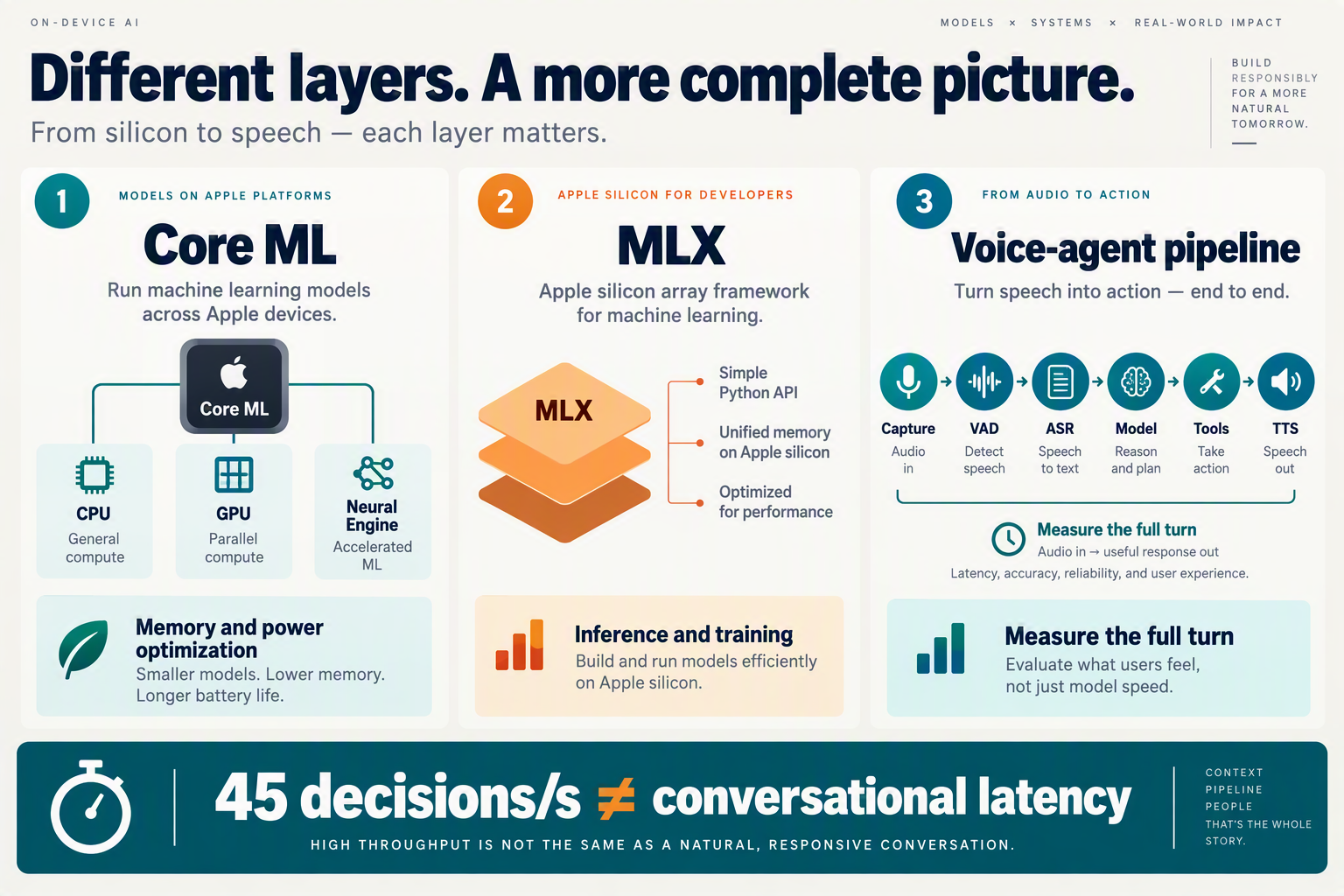
What does Core ML measure compared with MLX?
Core ML and MLX are Apple machine-learning technologies, while voice-agent latency is an end-to-end user experience measure. A benchmark for one model runtime cannot, by itself, show how quickly a complete voice assistant hears a person and speaks back.
As of September 2026, Hacker News search results characterize Laya as running offline through Core ML on a Mac M4 at 45 decisions per second. The results do not specify enough about the task, model configuration, or benchmark method to independently validate that figure. More importantly, “decisions per second” is not a measure of tokens, spoken utterances, or complete voice turns.
| Term or stage | What it describes | What a measurement can show | What it does not prove |
|---|---|---|---|
| Core ML | Apple’s framework for running machine-learning models in apps across supported Apple hardware | How a particular model performs in a Core ML setup | That the full assistant works offline or responds quickly |
| MLX | Apple’s machine-learning framework for working with models on Apple silicon | Model behavior and performance in an MLX implementation | That results transfer directly to Core ML or another runtime |
| Model throughput | A model’s processing rate, expressed in the benchmark’s chosen unit | How many specified operations—such as the reported “decisions”—occur per second | How long a person waits for a spoken answer |
| Voice-agent pipeline | Audio capture, speech recognition, model inference, orchestration, speech generation, and playback | Where time is spent across a complete interaction | That every stage runs locally or avoids network delays |
| Networked tools and services | Remote APIs, external search, or other cloud-connected components | The added time and availability requirements of those dependencies | That local inference makes the entire agent offline |
Why isn’t model throughput the same as voice-agent latency?
A conversation is a sequence of stages, not a single model call. Even if a local model processes its assigned task quickly, the system may still need to detect speech, transcribe it, generate a response, invoke a tool, synthesize audio, and begin playback. A cloud-dependent tool can add network round trips; a local model does not remove that dependency.
For a useful comparison, builders should report separate timings rather than one headline rate:
- Cold-start time: how long the app or model takes to become ready.
- Time to first partial transcript: when the system first displays or uses recognized speech.
- Time to first audio: when the user begins hearing the reply.
- End-to-end turn latency: the elapsed time from the end of the user’s speech to the assistant’s response, with the measurement conditions stated.
These measures answer different questions. For example, a system might produce a partial transcript quickly but take longer to speak because response generation or audio playback is the bottleneck.
The practical takeaway is that Core ML and MLX describe ways to run or work with models; neither is a voice-agent latency benchmark. Laya’s reported 45 decisions per second is an interesting, narrow performance claim, but a reproducible voice demo would also need to identify the task and model, disclose whether speech recognition and text-to-speech are local, and measure the complete interaction under stated conditions.
What must an end-to-end offline voice-agent architecture include?
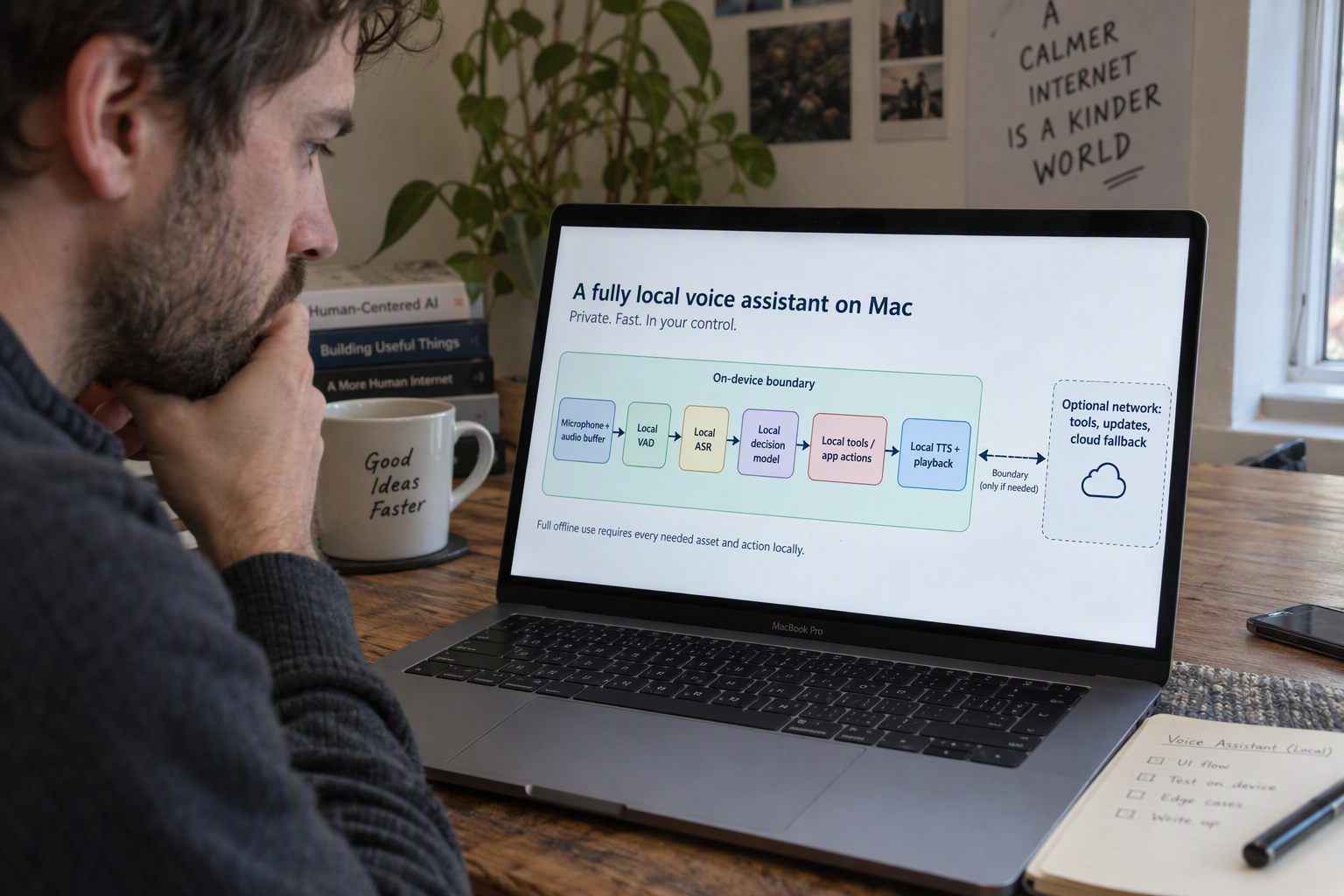
An end-to-end offline voice-agent architecture needs more than a fast local model: it must capture and process audio, manage the conversation, produce speech, and handle interruptions and failures without relying on a network. “Offline” should describe a tested system boundary, not just where one model runs.
Which components must work locally?
A practical offline path includes the full sequence from microphone input to audible response. If a required stage silently calls a cloud service, the agent may stop working when connectivity disappears.
At minimum, builders should account for:
- Audio input and voice activity detection: Capture microphone audio, detect speech and pauses, and let the user interrupt playback.
- Speech recognition: Convert speech to text locally, or define clearly when transcription is sent to a service.
- Dialogue and task logic: Interpret the request, track conversation state, and decide whether to answer or take an action. A specialized model may suit bounded, repeatable tasks better than open-ended requests.
- Tools and data: Keep essential knowledge and actions available locally, or disclose which tasks need a server, account, or internet connection.
- Speech output and playback: Generate or retrieve spoken responses locally, then manage streaming, audio-device changes, and cancellation.
The Hacker News discussion around Laya includes a suggestion to use it for more deterministic tasks with training data, rather than assuming strong zero-shot performance. That is a useful architectural distinction: a narrow local decision-maker can handle a defined workflow while a broader assistant or remote service handles requests outside its scope.
What should happen when the device is offline—or overheats?
Offline-first design needs explicit behavior for failure, not just a successful demo path. If a tool is unavailable, the agent should explain that, offer a local alternative, or defer the action; it should not imply that an external task succeeded. Builders should also test permission denial, audio-device changes, long sessions, limited memory, and sustained workloads that may affect performance.
Data locality also requires deliberate choices. Specify what audio, transcripts, and conversation state remain on the Mac, how long they are retained, and whether diagnostic data leaves the device. Running inference locally can reduce network dependence, but it does not by itself prove that the whole application is private or offline.
What measurements prove the complete experience?
The reported Laya claim remains narrow: search results characterize it as running through Core ML on a Mac M4 at 45 decisions per second. Hacker News snippets do not establish the task definition or a reproducible benchmark, much less the performance of a complete voice-agent turn.
Measure the actual user journey under repeatable conditions:
- Cold-start time and time to first partial transcript.
- Time from the end of speech to the first audible response.
- Full turn latency, interruption handling, and task success.
- Behavior across repeated turns, sustained use, and network loss.
Report the Mac model, OS, model version, audio configuration, workload, and whether any stage used the network. Platforms such as CallMissed, which offers real-time voice sessions over an API and SDK, represent a networked option in the same design space—not evidence that an offline implementation works. The useful comparison is not “local or cloud” in isolation; it is which measured architecture completes the intended conversation reliably, and what it requires to do so.
How should builders measure latency, privacy, and sustained performance?
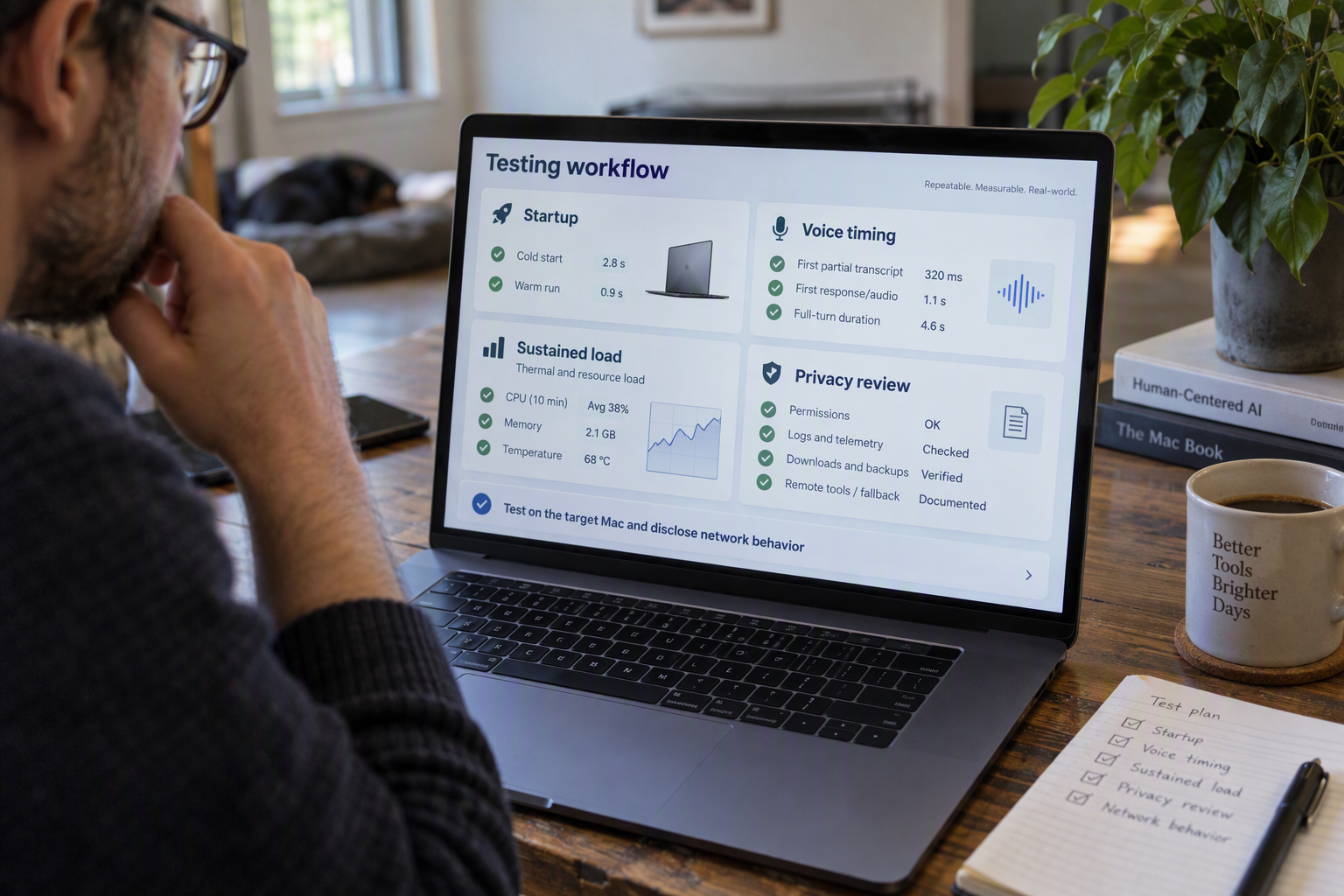
Measure a voice agent from microphone input to audible reply, then repeat the test long enough to expose privacy leaks and performance drift. The reported 45 decisions per second for Laya on a Mac M4 is a useful throughput clue, but the available Hacker News search results do not establish conversational latency, the underlying task, or a reproducible benchmark.
Which latency metrics should builders report?
Report cold-start time, time to first partial transcript, time to first audible response, and end-to-end turn latency separately. A fast model decision does not show how long a user waits while the system captures audio, detects speech, transcribes, generates a response, runs tools, synthesizes speech, and plays it back.
For each metric, publish the median and a high-percentile result, such as p95, rather than a single best run. Also record failures, interruptions, and timeouts. Test at least:
- A short command and a longer, multi-sentence request.
- Quiet speech and speech with background noise.
- A tool-using turn as well as a response that needs no external action.
- Warm runs and the first run after launching the app.
Keep the test conditions visible: Mac model, power mode, model and runtime versions, audio settings, and whether the system has network access. The Laya claim is specifically described in search results as 45 decisions per second on a Mac M4 using Core ML offline; it should not be restated as 45 tokens, spoken replies, or complete turns per second.
How can builders test whether a voice pipeline is actually private?
Treat privacy as a data-flow question, not a label. “Offline inference” does not prove that every part of an application is offline: speech recognition, speech generation, analytics, crash reporting, or tool calls might still contact a server.
During a test, inspect network activity and document which components run locally, which make requests, what data each request contains, and whether audio or transcripts are retained. Run the same scripted interactions with the network disabled. Note what still works, what fails, and whether the interface clearly explains the loss of functionality. A local model can improve data locality, but builders should verify the entire path from microphone to playback.
How do you measure sustained performance on a Mac?
Run repeated interactions for a fixed period, not just a brief demo, and log latency, errors, memory use, and temperature or other available thermal indicators over time. Repeat on battery and while plugged in if the target device will be used both ways. Compare early and late results: a system that starts quickly but slows down, drops audio, or exhausts memory may not be suitable for a long session.
For a fair comparison, keep prompts, audio clips, and device settings constant, and report the number of runs and any excluded failures. The supplied Laya snippets do not expose enough benchmark methodology to independently validate the 45-decisions-per-second figure, so reproducible test details matter as much as the headline number.
Builders can also compare local-only designs with hybrid systems, where selected steps use a network service. As of September 2026, CallMissed offers real-time voice sessions over an API and SDK—a networked option that illustrates this different design choice, not a substitute for measuring what runs locally.
What do the demo, Apple documentation, and community comments establish?
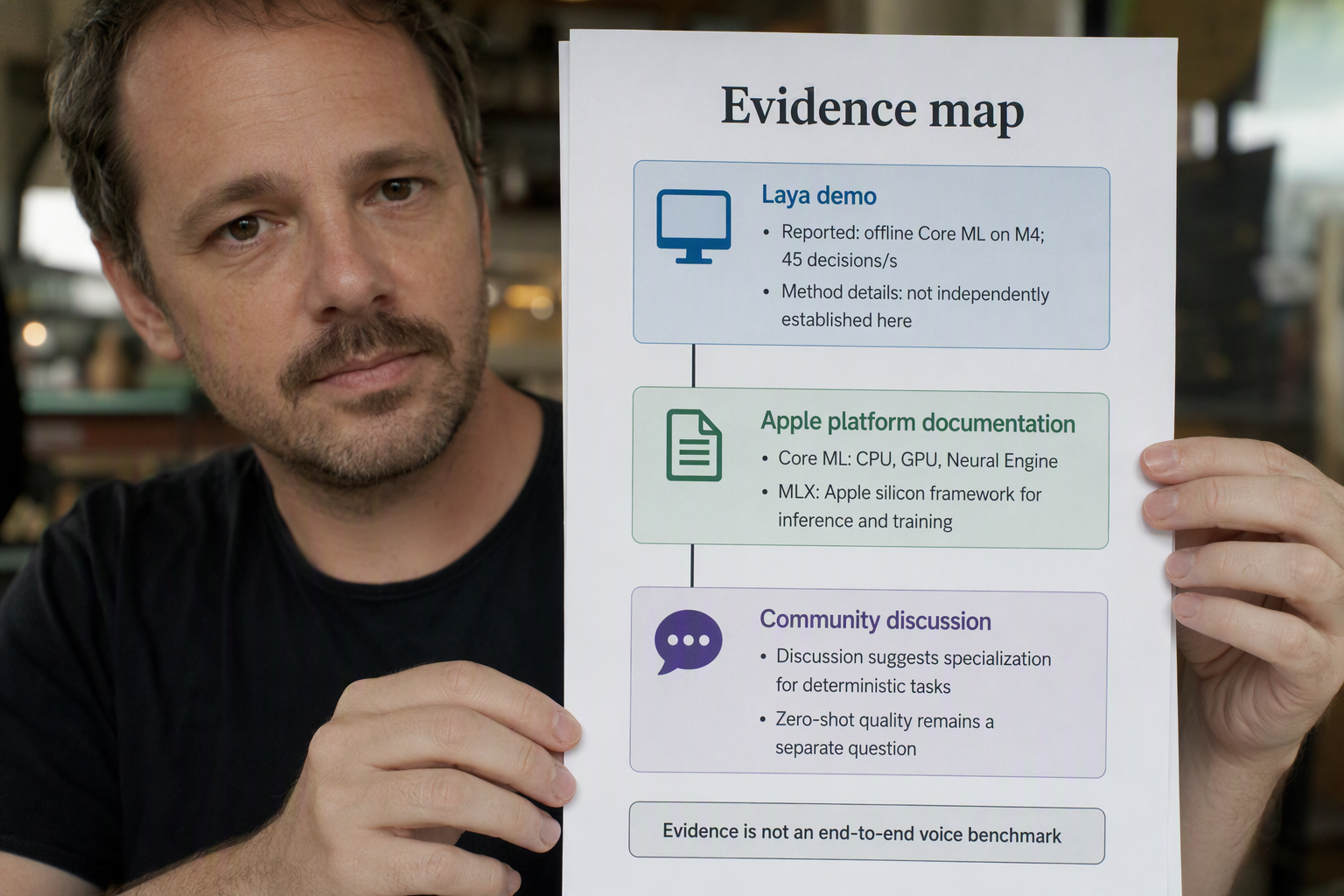
As of September 2026, the available evidence supports a narrow conclusion: search results describe Laya running offline through Core ML on a Mac M4 at 45 decisions per second, while community comments suggest where a specialized model might fit. Neither establishes end-to-end voice performance, and the material provided here does not include enough Apple documentation or benchmark detail to independently verify the demo’s number.
What does the demo establish?
The demo’s reported result is a useful signal that Laya can perform a particular kind of local inference on an M4 Mac. But 45 decisions per second means decisions, not 45 tokens, spoken replies, or complete voice-agent turns. The available search snippets do not specify the decision task, model configuration, test conditions, or benchmark method; an underlying gist is referenced, but those details are not exposed in the material here.
That limits what the figure can tell builders. It does not show how the system handles noisy speech, how long a person waits for a response, or whether the same result holds across different inputs and repeated runs. Nor does “offline” alone establish that every stage of a voice interaction runs locally.
What can Apple documentation and community comments tell us?
Apple’s Core ML documentation is useful for understanding the framework and how machine-learning models can be used on Apple platforms. Framework documentation is not a validation of Laya’s specific benchmark: it cannot, by itself, confirm the reported rate, the model’s accuracy, or the quality of a conversational experience.
The supplied Hacker News comments offer practical hypotheses about model fit. One commenter says Laya is better suited to “much more deterministic tasks where you have some training data” and “won't be as good as Jev for zero shot cases.” Another suggests using Jev to create a set, training Laya on it, and letting Laya handle the remaining work. These are community observations, not controlled comparisons—but they point to a plausible design pattern: use a more capable model to generate or label examples, then specialize a smaller model for a bounded task.
What would a builder still need to measure?
A voice agent’s perceived speed depends on the whole turn, not just inference throughput. Audio capture, voice activity detection, speech recognition, model prefill and generation, tool orchestration, text-to-speech, and playback can each affect the delay—and some may still depend on network services.
A credible evaluation should report, at minimum:
- Cold-start time and repeated-run performance.
- Time to first partial transcript and time to a usable final transcript.
- Time to first audio response and complete end-to-end turn latency.
- Task accuracy across representative inputs, including failures and edge cases.
- Which stages run locally, which use the network, and what happens when connectivity is lost.
The Hacker News snapshot supplied for this story—41 points and six comments after 1.9 hours—records interest at one moment, not lasting consensus or technical proof. The demo is worth investigating; the next step is reproducible, task-specific testing that measures what users actually experience.
Which deployment path fits your use case: local, hybrid, or managed?
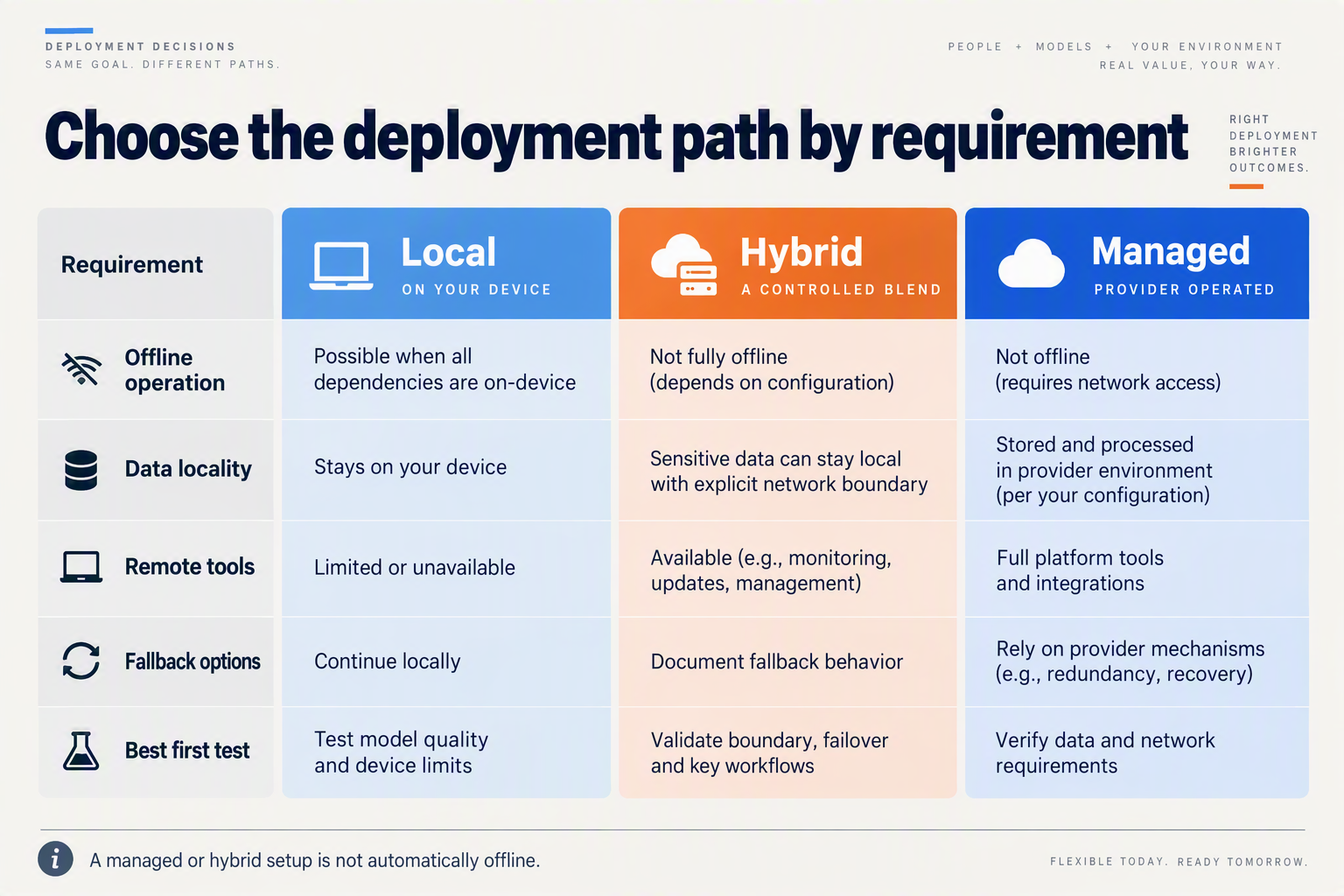
Choose local deployment when the task is narrow, predictable, and must work without a network; choose hybrid when privacy or responsiveness matters for some steps but the workflow also needs cloud models or tools; choose managed when you need to ship a complete service without operating every component yourself. The Laya Mac demo can inform the local option, but its reported speed alone is not enough to select a production architecture.
Which deployment path fits a privacy-sensitive or offline task?
| Decision factor | Local | Hybrid | Managed |
|---|---|---|---|
| Good fit | Fixed commands, classification, or other well-defined tasks | Private or latency-sensitive steps combined with cloud reasoning or tools | Broad voice-agent workflows where a provider handles hosted infrastructure |
| Data handling | Audio or task data can stay on the device if the full pipeline is local | Keep selected processing local; send only necessary steps or data to network services | Data is processed through hosted services; check provider and jurisdiction requirements |
| Connectivity | Can operate without a network only if speech, model, tools, and audio output are also available locally | Some functions may continue offline; cloud-dependent steps need connectivity | Requires access to the managed service for its hosted functions |
| Task flexibility | Best when behavior is bounded and tested; open-ended requests can be a harder fit | Can route predictable work locally and complex requests to cloud components | Useful when the agent needs hosted models, integrations, or centralized orchestration |
| What to validate | Device-specific cold start, accuracy, sustained performance, and complete user experience | Which steps fall back gracefully, and what happens when the network is unavailable | End-to-end response time, service fit, data controls, and operating costs |
Use the table as an architecture guide, not a benchmark. Hacker News search results describe Laya running offline through Core ML on a Mac M4 at 45 decisions per second, but that figure does not establish how well it handles your task or how quickly a person hears a reply. The operator-provided snapshot recorded 41 points and six comments after 1.9 hours; that is a time-specific observation, not a stable ranking. Search results showed different snapshots, and the available descriptions do not provide enough implementation detail or benchmark methodology to independently validate the performance claim.
When does a hybrid voice architecture make sense?
Hybrid is often the practical middle ground when a device can handle a defined first step—such as routing a request or recognizing a local command—but the interaction may need a cloud model, external data, or a business tool. The key design choice is what happens when the connection drops: can the agent give a limited local response, queue work, or explain that the requested action is unavailable?
Test that behavior alongside normal operation. Record cold-start time, time to first partial transcript, time to first audio response, and end-to-end turn latency under realistic conditions. Also test accuracy on representative accents, background noise, interruptions, and requests outside the agent’s expected scope.
When is managed infrastructure the better fit?
Managed infrastructure can reduce the amount of voice and model plumbing a team must operate, but it makes network access and provider capabilities part of the design. As of September 2026, CallMissed offers real-time voice sessions over an API and SDK, a networked option for developers building voice experiences. Compare that approach with local and hybrid designs using the same test tasks, privacy requirements, failure cases, and latency measurements—rather than treating a single model-throughput number as a deployment verdict.
Frequently Asked Questions
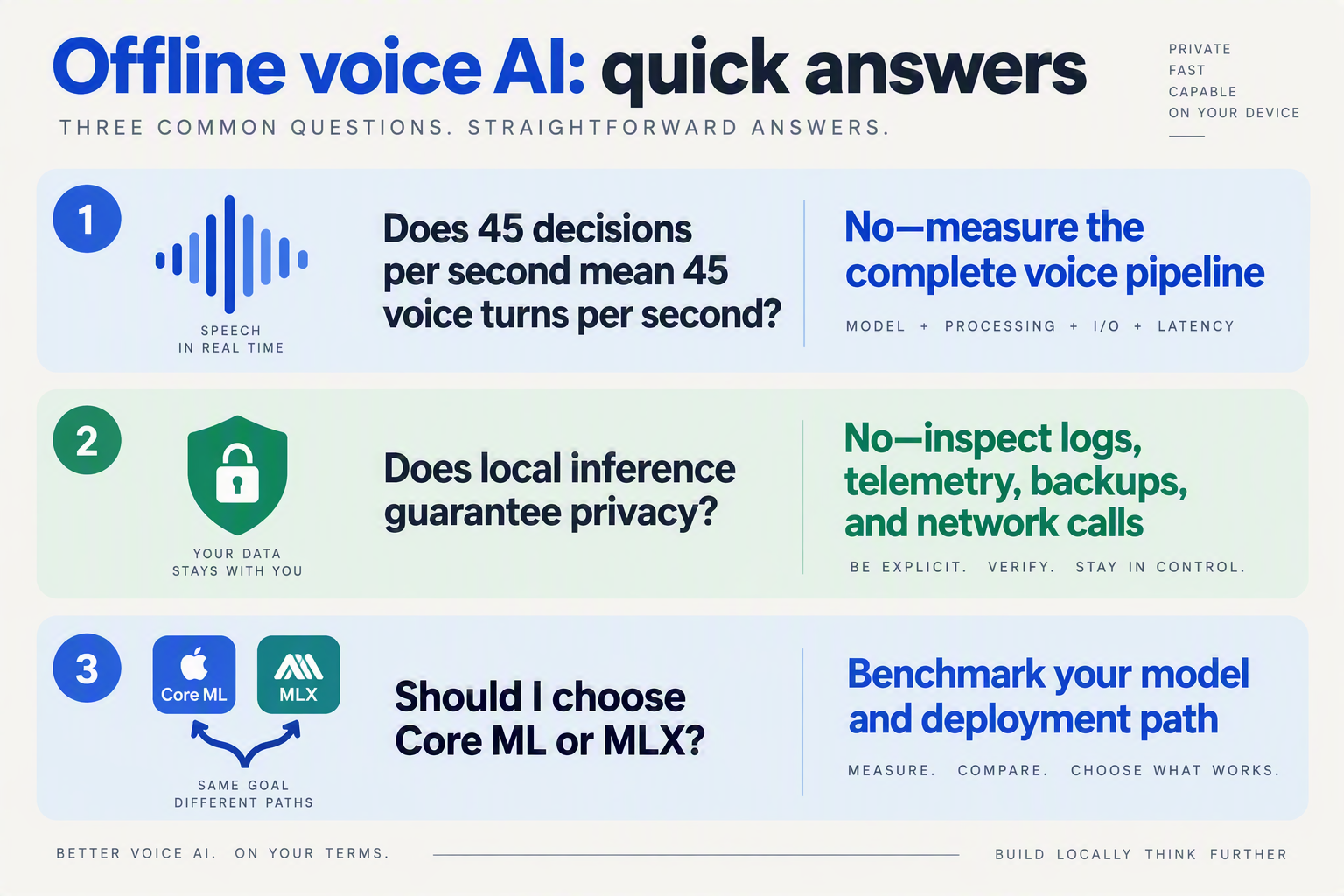
What does Laya’s 45 decisions per second mean for an offline AI voice assistant on Mac?
Can an offline AI voice assistant on Mac work without an internet connection?
Does Laya’s Mac M4 demo prove that offline voice assistants respond quickly?
Is Laya better suited to specific tasks than open-ended voice conversations?
What should developers benchmark before shipping an offline voice assistant on Mac?
Should a production voice assistant run entirely offline or use a hybrid design?
Conclusion
Laya’s Mac M4 demo is an intriguing signal, not proof that offline voice assistants are ready for everyday conversations. The Hacker News snapshot supplied for this article showed 41 points and six comments after 1.9 hours—a moment-in-time measure, not a lasting ranking. Search results describe Laya running offline through Core ML at 45 decisions per second, but don’t establish voice quality, end-to-end latency, or a reproducible benchmark.
For builders, the distinction is practical: model throughput is only one part of the time a person waits for a spoken answer. A complete voice turn can include audio capture, speech detection and recognition, model generation, tool coordination, text-to-speech, and playback. Local inference may reduce network dependence and keep some processing on-device, but other stages may still need network access.
The key takeaways are:
- Treat “45 decisions per second” narrowly: it does not mean 45 tokens, utterances, or full voice turns per second.
- Measure the whole interaction: report cold-start time, first partial transcript, first audio response, and end-to-end turn latency under realistic conditions.
- Expect hybrid designs: the next step may be deciding which tasks run locally and which rely on networked services.
Watch for reproducible benchmarks that describe the model, task, and test conditions—not just a headline number. CallMissed offers real-time voice sessions over an API and SDK, representing one part of this evolving design space. What would you need to measure before trusting an offline assistant with a real conversation?
Related Reading
- Qwen 3.8 Voice Agent Benchmarks: A Builder’s Guide
- GPT-6 Sol vs GPT-6 Astra: Is Sol Actually Real in 2026?
- Cloudflare Quick Tunnels for AI Voice API Testing
Sources
Discussion
Related Posts

Ready to automate customer conversations?
Launch AI voice agents and WhatsApp bots with CallMissed — one API, 22+ Indian languages.