Cactus Whistle: 16.9 MB ASR for Voice-Agent Builders


Explore Cactus Whistle with an audio-preparation guide, reproducible CPU test plan, and practical trade-offs for local voice-agent deployment.
Cactus Whistle: 16.9 MB ASR for Voice-Agent Builders
A speech-recognition model small enough to fit in a 16.9 MB file could change where voice agents listen—not just how they respond. As of October 2026, Cactus Compute describes Cactus Whistle as CPU-based speech-to-text software requiring no GPU, bringing automatic speech recognition (ASR) closer to phones, wearables, robots, and other devices that cannot assume powerful hardware or reliable connectivity.
The timing matters. Voice-agent builders are deciding which parts of a conversation should run locally and which belong in the cloud. Speech recognition sits at that boundary: uploading audio introduces network dependence, while processing it locally creates opportunities to keep raw recordings on the device. A smaller model makes that architectural choice worth investigating, although file size alone cannot establish accuracy, responsiveness, or production readiness.
The developer interest is substantial: the supplied Hacker News trend snapshot for October 2026 records 701 points and 143 comments for “Whistle: Speech to Text in 16.9 MB.” That attention signals an engineering question: can compact ASR become a useful component in real voice-agent systems, rather than merely an impressive download?
What could Cactus Whistle change for voice-agent builders?
According to Cactus Compute’s Needle GitHub documentation, available in October 2026, Whistle accepts 16 kHz mono audio, processes up to 30 seconds in one pass, and uses windows for longer recordings. The same documentation lists seven supported languages: English, German, French, Spanish, Italian, Dutch, and Polish. Those details matter more than the headline size when planning microphone capture, multilingual support, and long-form transcription.
Cactus Compute’s October 2026 promotional materials claim roughly 9× smaller files and 6× greater speed than Whisper base, while saying Whistle “mostly beats” that model. Treat those as vendor-reported comparisons—not guarantees for your devices, accents, background noise, or conversational workload.
For builders, the practical questions are:
- Deployment: What does CPU-only recognition enable on the hardware your users actually own?
- Accuracy: How do names, domain terminology, accents, and noisy rooms affect transcription?
- Conversation design: Can the surrounding pipeline support interruption handling and timely responses?
- Architecture: When should local recognition hand off to cloud models or managed services?
As of October 2026, CallMissed offers speech recognition in 22 Indian languages plus English, illustrating why language coverage remains a separate architectural consideration from model compactness.
This article examines Whistle’s runtime, input constraints, keyword biasing, and reported benchmarks, then translates them into deployment decisions. The goal is not to crown a winner, but to identify where compact ASR earns its place.
What could Cactus Whistle mean for voice agents? Compact CPU speech recognition, not a complete agent
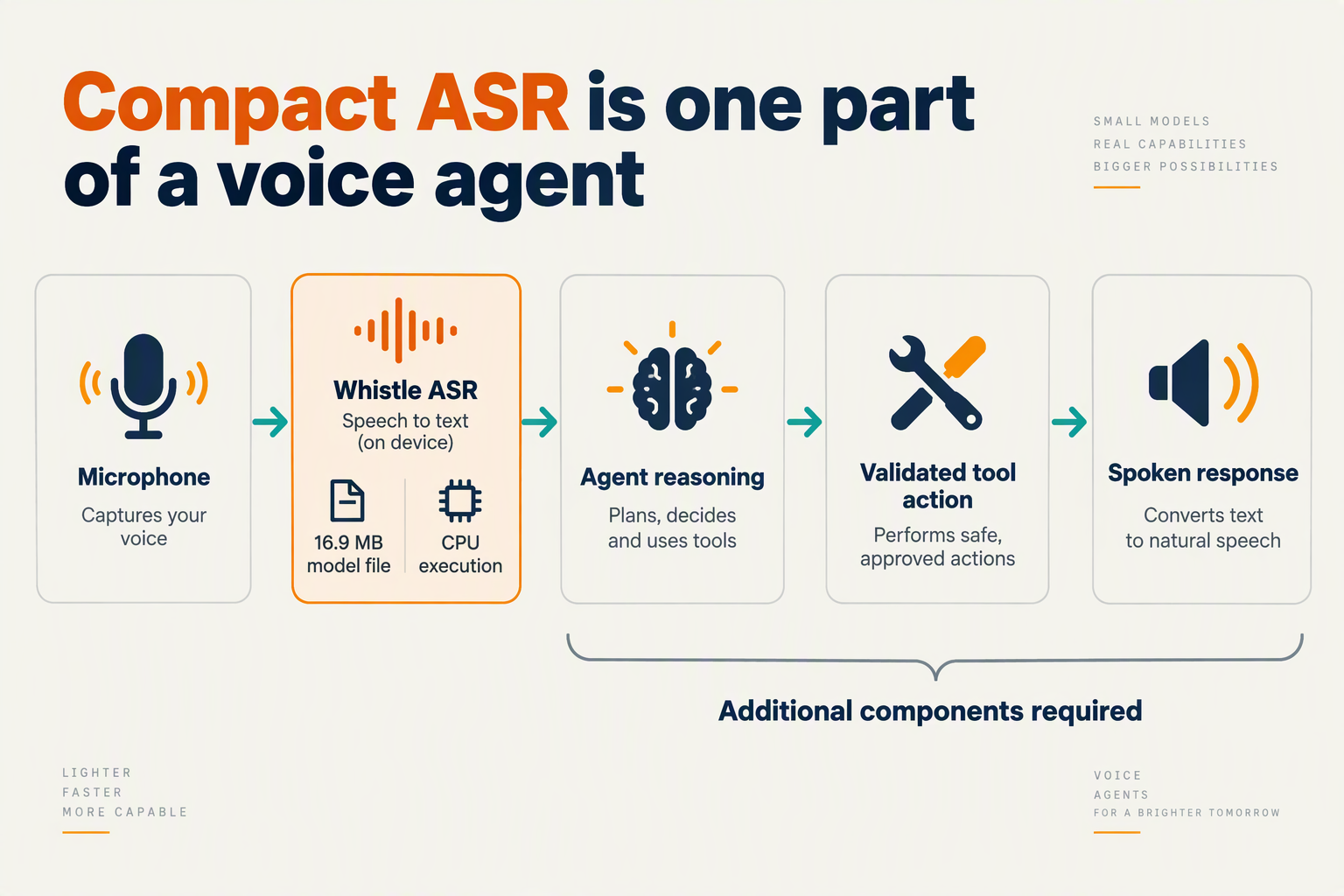
Cactus Whistle could make local speech recognition a practical front end for voice agents, especially where GPU availability or network connectivity is constrained. It is not a complete agent: converting speech into text still leaves intent interpretation, tool execution, response generation, and spoken playback to other components.
Where does Whistle fit in a voice-agent architecture?
As of October 2026, Cactus Compute’s release announcement says Whistle loads into the same C++ engine as Needle and runs on the CPU “with no dependencies.” That describes the advertised model runtime—not a guarantee that a finished application needs no audio drivers, microphone permissions, networking libraries, or deployment work.
The useful architectural distinction is between recognition and action. A recognizer can transcribe “move my appointment to Friday,” but another component must identify the appointment, check availability, request confirmation, and update the calendar.
A hybrid voice agent could follow this sequence:
- Capture audio locally: Obtain microphone access and prepare audio for recognition.
- Transcribe with Whistle: Turn the spoken request into text on the device.
- Interpret and act: Send the transcript to an application or language model with authorized tools.
- Return a spoken response: Generate speech through a separate text-to-speech system.
Local transcription therefore changes the placement of one processing stage. It does not automatically make the entire conversation offline.
Does a compact model mean a lightweight production system?
No. Model-file size is not total application memory, and CPU compatibility is not proof of acceptable performance on every CPU.
Inside the Loop’s coverage, read on October 6, 2026, discusses Whistle’s runtime and platform targets alongside its release and benchmark material. Builders should preserve that distinction: a deployment decision requires measurements of the complete application, not just the downloadable artifact.
Before selecting hardware, measure:
- Peak memory: Include the loaded model, working buffers, audio capture, and surrounding application.
- Sustained processing: Test repeated utterances rather than one successful transcription.
- Battery and thermal effects: Evaluate continuous listening separately from occasional commands.
- Turn completion: Measure the interval from the user finishing a request to the agent delivering a useful response.
These tests answer different questions. Fast transcription can coexist with a slow tool call; a small recognizer can coexist with a memory-heavy application.
What would this change in a real deployment?
Consider a warehouse worker asking a handheld device to locate an item. Local ASR could avoid uploading the audio for that recognition step, while a server still checks inventory and permissions. The privacy benefit is narrower than “everything stays on-device”: transcripts, identifiers, and tool requests may still leave the device.
RuntimeWire’s reporting, available as of October 2026, identifies keyword biasing and word timestamps among Whistle’s on-device capabilities. Those features merit testing against warehouse vocabulary and timing requirements, but neither establishes reliable item identification without application-level validation.
For cloud-connected workflows, the surrounding infrastructure remains important. As of October 2026, CallMissed supports custom REST tools and knowledge bases built from text, web pages, and PDFs—examples of capabilities that sit beyond transcription, rather than evidence of a verified Whistle integration.
The opportunity is selective local processing: move recognition closer to the microphone where testing supports it, while designing the rest of the agent around accuracy, permissions, connectivity, and recovery.
What does the October 2026 source snapshot report about Whistle?
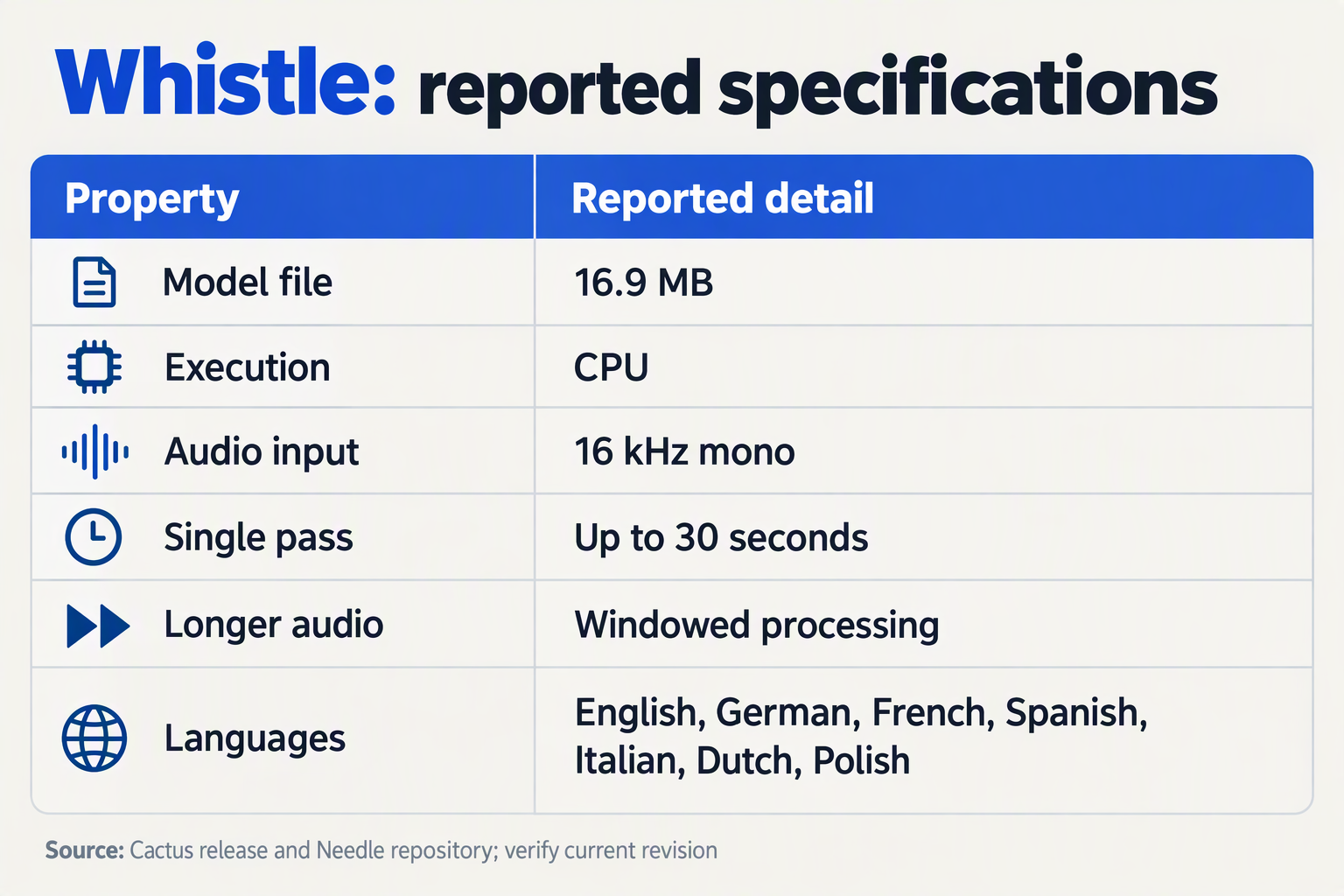
The October 2026 source snapshot reports that Cactus Whistle is a compact, CPU-based speech-recognition model integrated with Cactus Compute’s Needle runtime, with developer features including keyword biasing and word timestamps. The snapshot establishes the documented capabilities and available integration paths, but does not establish independently verified accuracy, memory consumption, or end-to-end voice-agent latency.
What do the Whistle sources actually document?
The table separates first-party specifications, secondary reporting, and community implementation details. All entries describe the supplied October 2026 snapshot; they should not be read as a claim that every implementation has been independently tested.
| Area | Reported detail | Named source | Builder implication |
|---|---|---|---|
| Model packaging | One 16.9 MB model file | Cactus Compute release post, October 2026 snapshot | Small download size; total runtime memory remains a separate measurement. |
| Runtime | CPU execution, “no dependencies,” and the same C++ engine as Needle | Cactus Compute release post, October 2026 snapshot | Inspect the runtime and build requirements for your target device. |
| Audio processing | 16 kHz mono; one pass up to 30 seconds, windowed beyond that | Cactus Compute’s Needle GitHub documentation, October 2026 snapshot | Match microphone capture and test transcription across window boundaries. |
| Language coverage | English, German, French, Spanish, Italian, Dutch, and Polish | Cactus Compute’s Needle GitHub documentation, October 2026 snapshot | Confirm that the documented language set matches your audience. |
| Developer controls | Keyword biasing and word timestamps | RuntimeWire, October 2026 snapshot | Evaluate vocabulary handling and alignment against your application’s needs. |
| Community integration | Docker packaging, a phone recording page, and an HTTP API with an OpenAI-compatible endpoint | PrietoAmigo/whistle GitHub repository, October 2026 snapshot | A possible prototyping route, distinct from the first-party runtime. |
Which Whistle claims need careful interpretation?
Source provenance matters as much as the specification. Cactus Compute’s release post describes the model and runtime directly. RuntimeWire adds reporting about developer-facing capabilities, while PrietoAmigo/whistle documents a separate community wrapper.
Those distinctions prevent several common architectural mistakes:
- Model size is not working memory. The file-size figure does not quantify peak RAM, temporary buffers, application overhead, or the complete installation footprint.
- CPU support is not universal device readiness. Listing phones, wearables, robots, automotive systems, and microcontrollers as intended applications does not demonstrate performance on every processor in those categories.
- Windowed transcription is not proof of streaming behavior. Processing longer recordings in windows does not, by itself, establish partial-transcript delivery or interruption handling.
- API compatibility has a scope. The community repository’s OpenAI-compatible endpoint does not establish compatibility across every OpenAI audio feature.
Likewise, Cactus Compute’s promotional phrase “mostly beats Whisper base,” present in the October 2026 snapshot, is a vendor comparison—not a substitute for inspecting benchmark tasks, hardware, and decoding settings.
How should builders use this snapshot?
Treat the source snapshot as a test-plan starting point, rather than a production acceptance report:
- Verify the implementation: distinguish the first-party Needle runtime from any community deployment layer.
- Exercise the documented controls: test keyword biasing with product names and inspect timestamp alignment.
- Measure the missing system properties: record peak memory, transcription delay, and errors on representative audio.
Inside the Loop identifies its Whistle source review as October 6, 2026. That is a useful provenance date, but it is not automatically the model’s release date. Keeping publication, review, and measurement dates separate makes the resulting evaluation more reproducible—and more trustworthy.
How do you prepare 16 kHz mono audio and verify Whistle runs locally?
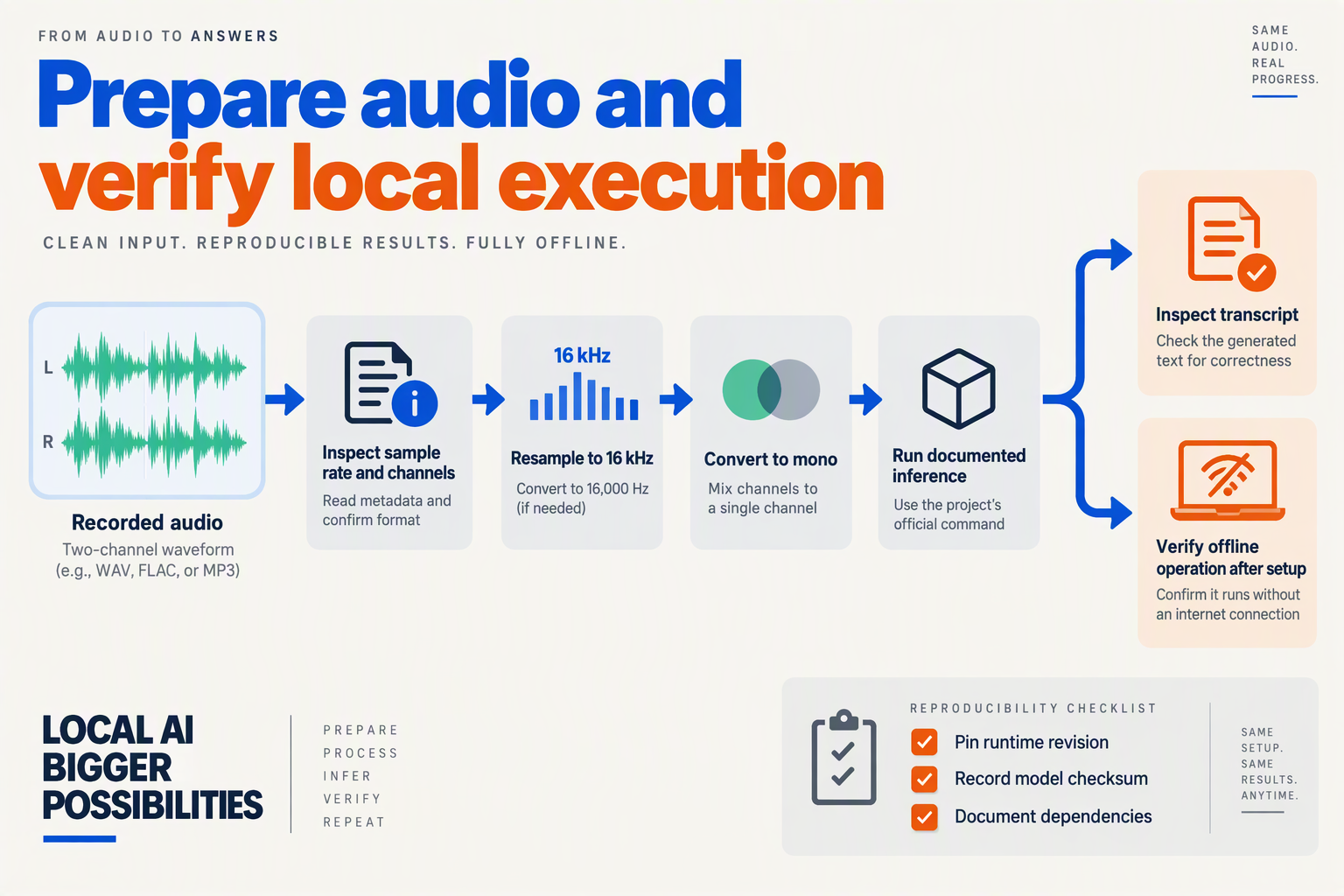
Prepare Whistle input by converting recordings to 16 kHz, single-channel audio, then inspect the resulting file before transcription. To verify local execution, provision the model and runtime first, disconnect external networking, and confirm that a new recording still produces a transcript.
How do you convert a recording to 16 kHz mono audio?
Cactus Compute’s Needle GitHub documentation, available in October 2026, specifies 16 kHz mono input for Whistle speech-to-text. Treat audio preparation as a separate pipeline stage: changing a filename or declaring a sample rate does not resample the underlying recording.
For a reproducible test, use FFmpeg to create an uncompressed WAV file:
ffmpeg -i recording.m4a \
  -ac 1 -ar 16000 -c:a pcm_s16le \
  whistle-input.wav
Here, -ac 1 converts the recording to one channel, -ar 16000 resamples it, and pcm_s16le writes 16-bit PCM audio. PCM WAV is a practical test format, not an additional Whistle requirement established by the supplied documentation; check the current runtime example for accepted file containers and sample representations.
Keep the original recording. Resampling cannot restore missing speech, remove clipping, or recover a speaker obscured by noise. If stereo channels contain different speakers, inspect them before downmixing: combining channels can reduce intelligibility.
How do you check the audio before running Whistle?
Use FFprobe to inspect the converted file rather than trusting the conversion command:
ffprobe -v error -select_streams a:0 \
  -show_entries stream=sample_rate,channels,codec_name \
  -show_entries format=duration \
  -of default=noprint_wrappers=1 \
  whistle-input.wav
Check these fields:
- Sample rate:
16000. - Channels:
1. - Codec:
pcm_s16le, matching this preparation example. - Duration: Start with a short, clearly spoken clip.
Cactus Compute’s Needle documentation states, as of October 2026, that Whistle processes recordings up to 30 seconds in one pass, with windowing beyond that length. Begin below that boundary to isolate setup problems, then test longer recordings separately for missing or repeated words around window boundaries.
Listen to the converted file, too. A valid header does not establish that the recording contains intelligible speech.
How can you prove Whistle transcribes without a cloud service?
Cactus Compute’s October 2026 release describes Whistle as running in the same C++ engine as Needle, on the CPU. Use the official repository’s current installation and transcription example; an unofficial wrapper’s HTTP endpoint does not, by itself, prove where inference happens.
Follow this verification sequence:
- Provision while online. Download the runtime, model, and any required build dependencies. Record the repository revision and model checksum.
- Establish a baseline. Transcribe the prepared clip using the documented invocation and save the output.
- Disable external networking. Block outbound traffic or disconnect the device. If using a local HTTP wrapper, retain loopback access.
- Test fresh speech. Record a new phrase after disconnection, convert it, and transcribe it. This helps rule out previously cached output.
- Inspect execution. Check process activity and attempted network connections, and repeat after restarting the runtime.
An offline transcript demonstrates that that tested configuration can recognize speech locally. It does not prove that an entire voice agent is offline: language-model reasoning, tool calls, telemetry, and speech synthesis require separate checks.
How would you connect Whistle to Needle with validated tool calls and safe error handling?
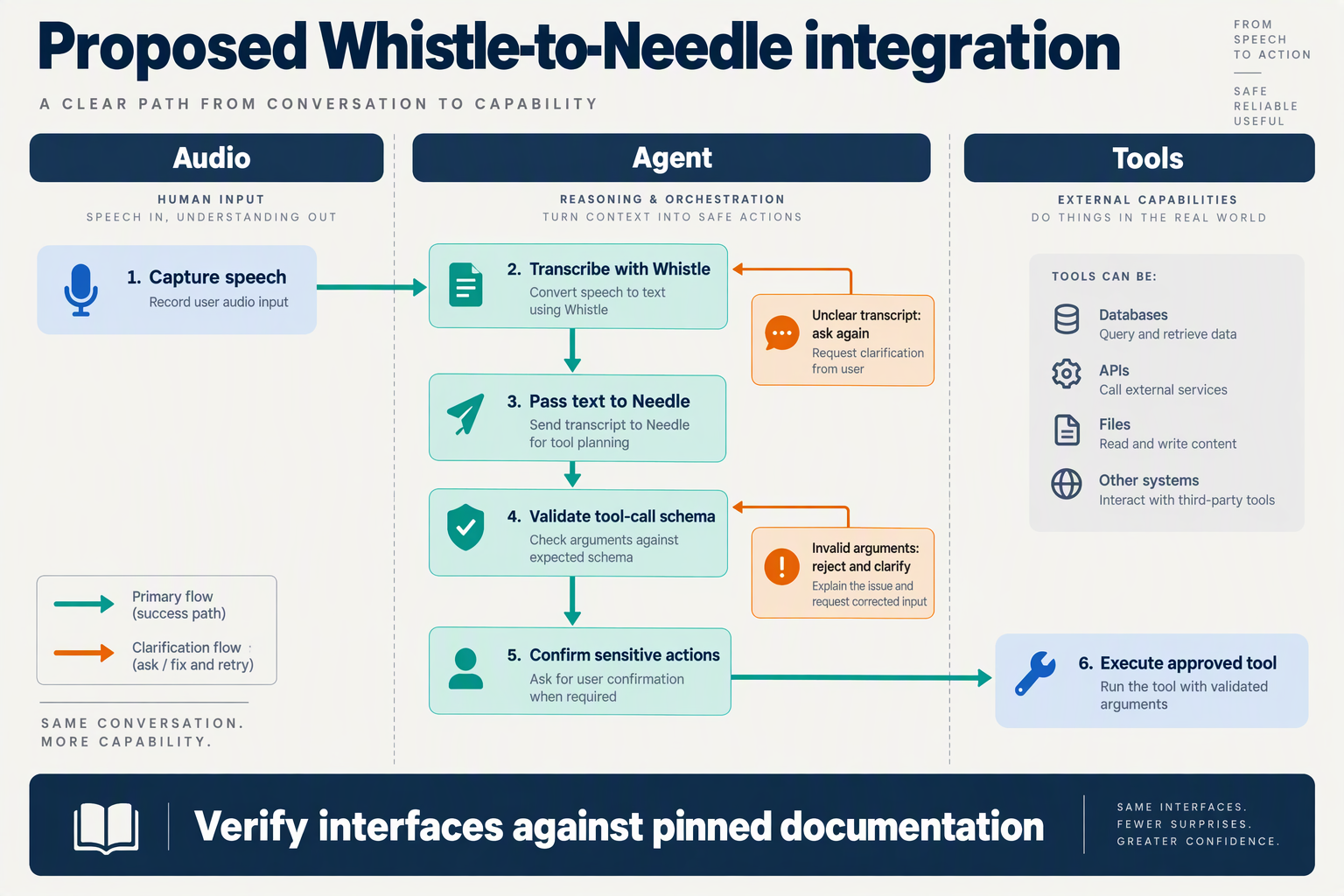
Connect Cactus Whistle to Cactus Needle through a guarded pipeline: transcribe speech, generate a proposed tool call, validate it in application code, and execute only an authorized action. Treat both the transcript and Needle’s output as untrusted inputs—not permission to change a device, account, or customer record.
How should Whistle pass a transcript to Needle?
According to Cactus Compute’s Whistle release materials available in October 2026, Whistle “loads into the same C++ engine as Needle.” Cactus Compute’s Needle GitHub documentation, available in October 2026, describes support for tool calls, structured extraction, and embeddings. That makes a local speech-to-action pipeline worth exploring, but sharing an engine does not establish an automatic, production-safe connection between recognition and execution.
Use an application-controlled sequence:
- Transcribe the utterance: Pass captured audio to Whistle and retain the resulting text.
- Construct a bounded request: Give Needle the transcript, relevant application state, and only the tools available for that task.
- Generate a proposal: Ask for a tool name and structured arguments rather than executable code.
- Validate independently: Check the proposal against your application’s schema, permissions, and business rules.
- Execute and report: Run the approved operation and return its actual result to the conversation.
These are recommended integration boundaries, not a claim that the supplied documentation exposes a particular orchestration API.
What should validated tool calls check?
Schema validation is necessary, but authorization is separate. A correctly formatted instruction can still target the wrong account or request an action the speaker cannot perform.
For a hypothetical appointment assistant, “move my appointment to Friday afternoon” should produce a rescheduling proposal—not an immediate calendar write. The application should check:
- Tool allowlist: Is
reschedule_appointmentavailable in this session? - Argument types: Are identifiers, dates, and time zones valid?
- Ownership: Does the authenticated user control that appointment?
- Business constraints: Is the requested slot available?
- Ambiguity: Which Friday, and what does “afternoon” mean?
- Confirmation: Has the user approved the specific change?
Resolve record identifiers from trusted application state where possible. Do not let model-generated arguments choose credentials, arbitrary network destinations, or unrestricted database queries.
How should a voice agent handle recognition and execution errors?
Separate transcription uncertainty, invalid proposals, and tool failures because each needs a different recovery path. A misunderstood date calls for clarification; an authorization failure calls for refusal; a network timeout calls for checking whether the operation completed.
Recommended handling includes:
- Ambiguous speech: Repeat the consequential detail and ask for confirmation.
- Malformed output: Reject it without execution; allow only bounded regeneration attempts.
- Unavailable tools: Explain the limitation without inventing a successful outcome.
- Timeouts: Check operation status before retrying a write.
- Duplicate requests: Use application-managed idempotency keys where the destination supports them.
Log validation decisions and execution outcomes, while minimizing retained transcripts and sensitive arguments. Never speak “your appointment is changed” until the tool confirms success.
Where could cloud tools fit into this pipeline?
Local recognition and cloud execution can remain separate architectural choices. As of October 2026, CallMissed’s verified product fact sheet lists custom REST tools and MCP server connections for its agents, illustrating the broader role of external tools in voice workflows—not a documented Whistle–CallMissed integration.
Whether execution happens locally or remotely, the same principle holds: models propose; trusted application code authorizes and executes. Compact ASR changes where listening happens, not who should control consequential actions.
How should you benchmark Whistle vs Whisper Base vs Moonshine Tiny on the same CPU?
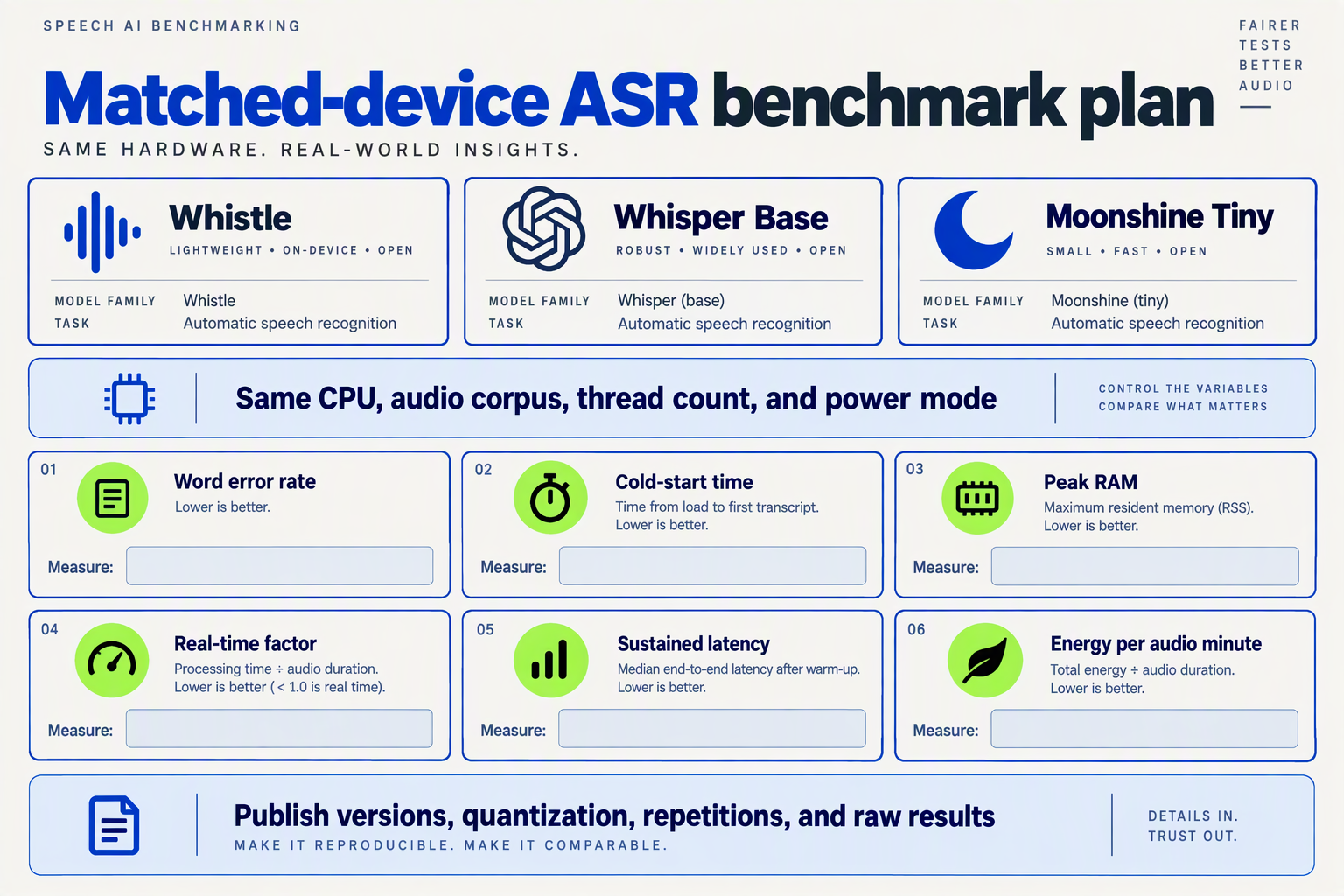
Benchmark Cactus Whistle, OpenAI Whisper Base, and Moonshine Tiny using identical audio, one CPU configuration, and reproducible decoding settings. Compare transcription quality, processing time, memory, and conversation-level latency separately: a smaller download does not automatically mean a better voice-agent component.
How do you make the CPU comparison fair?
Create a benchmark manifest that another developer could reproduce. For an October 2026 evaluation, record:
- Hardware: CPU model, core count, RAM, operating system, power mode, and whether the device is plugged in.
- Software: Model checkpoint, runtime version or commit, quantization, thread count, and decoding configuration.
- Audio: Dataset version, sample rate, channel count, clip duration, and reference transcripts.
- Execution: Warm-up procedure, repetition count, and whether loading and preprocessing are included.
Disable GPU acceleration for every contender. Run models sequentially rather than competing for CPU resources, and keep background workloads consistent.
Use two tracks: a controlled comparison with matched thread budgets and comparable decoding settings, followed by a deployment comparison using each runtime’s documented optimizations. If numerical precision differs, disclose that difference instead of presenting the result as a pure architecture comparison.
Which audio should you test?
Start with a shared English test set, then evaluate additional languages only after verifying support for each exact checkpoint. According to Cactus Compute’s Needle documentation available in October 2026, Whistle supports seven languages; that does not establish equivalent coverage for Whisper Base or Moonshine Tiny.
Build the workload around actual voice-agent risks:
- Short commands: “Cancel my appointment” versus “Confirm my appointment.”
- Entity-heavy speech: Names, addresses, product codes, and spoken numbers.
- Difficult acoustics: Background conversations, microphone distance, and clipped speech.
- Conversational turns: Hesitations, corrections, silence, and longer utterances.
Include both clean recordings and consented, representative production samples. Keep a held-out test set: selecting settings on the same clips used for reporting can inflate apparent quality.
Cactus Compute’s October 2026 Needle documentation specifies 16 kHz mono audio and single-pass processing up to 30 seconds for Whistle. Standardize input preparation, but test longer recordings separately and disclose each model’s segmentation strategy.
Which metrics reveal the best voice-agent fit?
Report word error rate (WER) alongside operational metrics, not a single winner score.
- Accuracy: WER = (substitutions + deletions + insertions) ÷ reference words. Apply identical transcript normalization and publish the rules.
- Task correctness: Score whether critical names, amounts, and intents survive transcription.
- Speed: Measure real-time factor: processing seconds divided by audio seconds. An illustrative result of 0.20 means processing a 10-second clip in 2 seconds—not a measured result for these models.
- Responsiveness: Report median and p95 utterance-end-to-final-transcript latency, separating endpoint detection from recognition.
- Resource use: Measure peak resident memory, model-loading time, and sustained performance under repeated use.
Do not label a model “streaming” merely because a wrapper divides audio into chunks. Measure partial-result latency and revision behavior only where the tested pipeline actually exposes partial transcripts.
Finally, publish per-category results, repeated-run variability, and failures—not just averages. Evaluate keyword biasing separately from the unbiased baseline, using the same permitted vocabulary information wherever supported. The useful conclusion is conditional: which configuration meets your accuracy and latency budget on your target CPU, rather than which model wins a promotional chart.
What happens to long recordings, window boundaries, and conversational turn-taking?
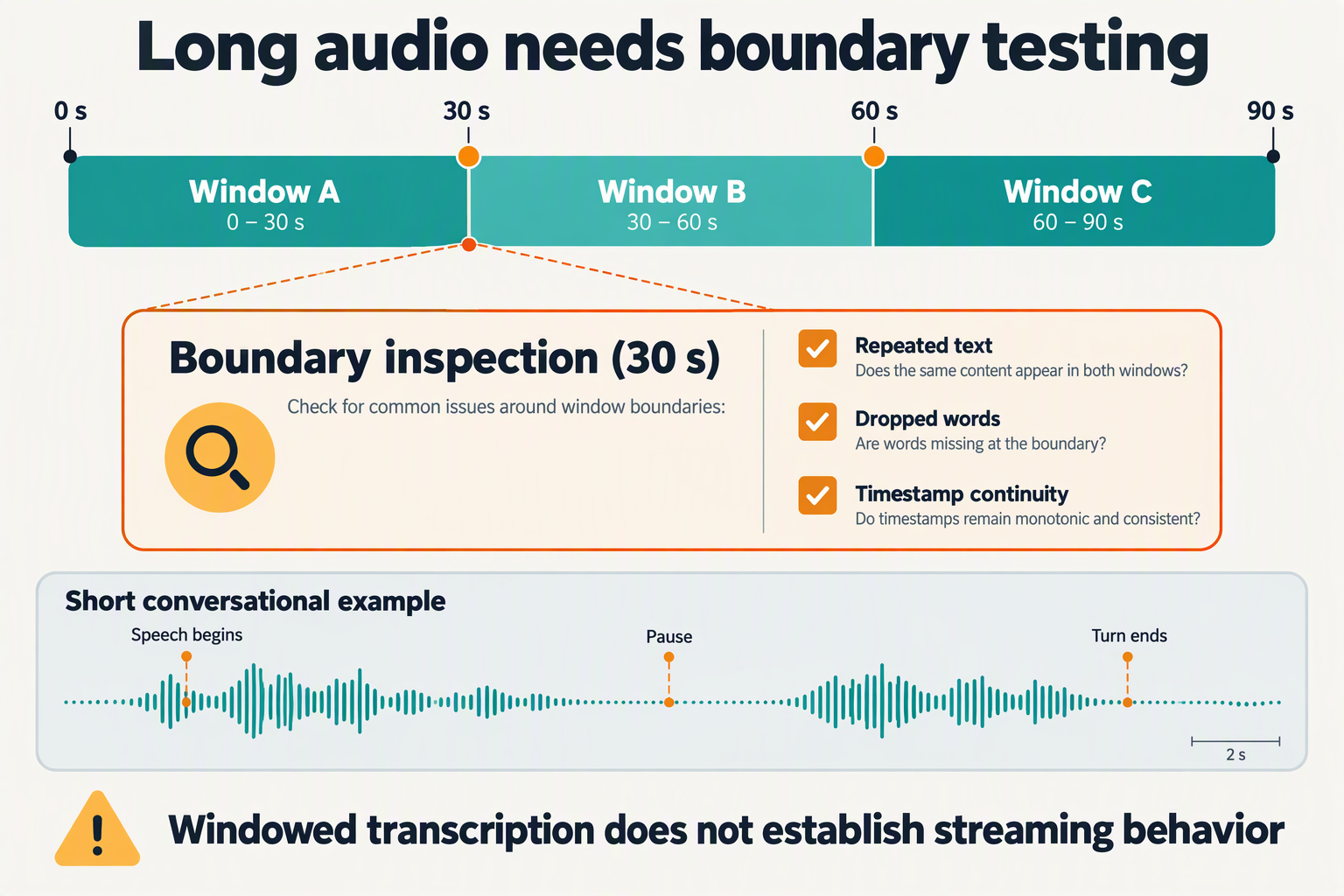
Long recordings make window stitching important; live conversations add a separate challenge: deciding when someone has finished speaking. Whistle’s ability to transcribe longer audio does not, by itself, establish incremental streaming, reliable endpoint detection, or interruption handling.
How does Whistle handle recordings longer than 30 seconds?
Cactus Compute’s Needle GitHub documentation, available as of October 2026, describes Whistle as accepting audio “of any length,” with one pass up to 30 seconds and windowed processing beyond that. For builders, “any length” describes supported input handling—not a promise that an entire recording receives uninterrupted conversational context.
Consider a hypothetical two-minute customer recording. Dividing it into four 30-second windows would satisfy the documented single-pass limit, but a sentence could cross any boundary. “Please change my delivery address to…” might end one window, while the address begins the next.
The engineering question is therefore not just whether transcription completes. It is whether the assembled transcript preserves names, numbers, and sentence continuity. The supplied documentation does not establish Whistle’s precise overlap or stitching behavior, so builders should verify those details rather than assume seamless results.
What should developers test at window boundaries?
Boundary accuracy deserves its own evaluation, separate from average transcription accuracy. A transcript can look broadly correct while losing the one word that determines a customer’s request.
Use a repeatable test sequence:
- Position critical phrases across boundaries. Include order numbers, addresses, negations, and corrections such as “Tuesday—sorry, Thursday.”
- Compare against an intact reference transcript. Check omissions, repeated words, punctuation, and changed meaning.
- Evaluate overlap if your pipeline supports it. Reprocessing a short shared segment may preserve context, but requires deduplication and additional computation.
- Check timestamp alignment. Confirm that stitched timestamps refer to the original recording rather than restarting with each window.
RuntimeWire’s reporting, available as of October 2026, identifies word timestamps among Whistle’s capabilities. Timestamps can help align adjacent results, but their presence alone does not prove accurate boundary reconciliation or identify different speakers.
For long recordings, track:
- Boundary omissions: speech missing where windows meet.
- Duplicate text: repeated words introduced during stitching.
- Timing drift: timestamps that become misaligned with the recording.
- Meaning-changing errors: particularly amounts, dates, and negations.
Does windowed transcription solve conversational turn-taking?
No. An audio window is a processing unit; a conversational turn is a decision about whether the user has finished. The documented 30-second single-pass limit is neither a required waiting period nor a published response-latency figure.
A voice-agent pipeline typically needs additional logic for speech detection, silence thresholds, transcript finalization, and barge-in—allowing the user to interrupt the agent. A pause during “My account number is…” should not necessarily trigger a response; a short “Stop” may require immediate action.
Builders should measure end-of-speech-to-response delay, false turn endings, and interruption recovery separately from transcription throughput. Faster recognition helps, but cannot compensate for poor turn decisions.
As of October 2026, CallMissed offers real-time voice sessions through an API and SDK, illustrating the broader session layer voice agents require beyond ASR. That is not evidence of a Whistle integration: compact recognition and conversation orchestration remain distinct components that must be tested together.
Which language, noise, privacy, and device constraints matter before deployment?
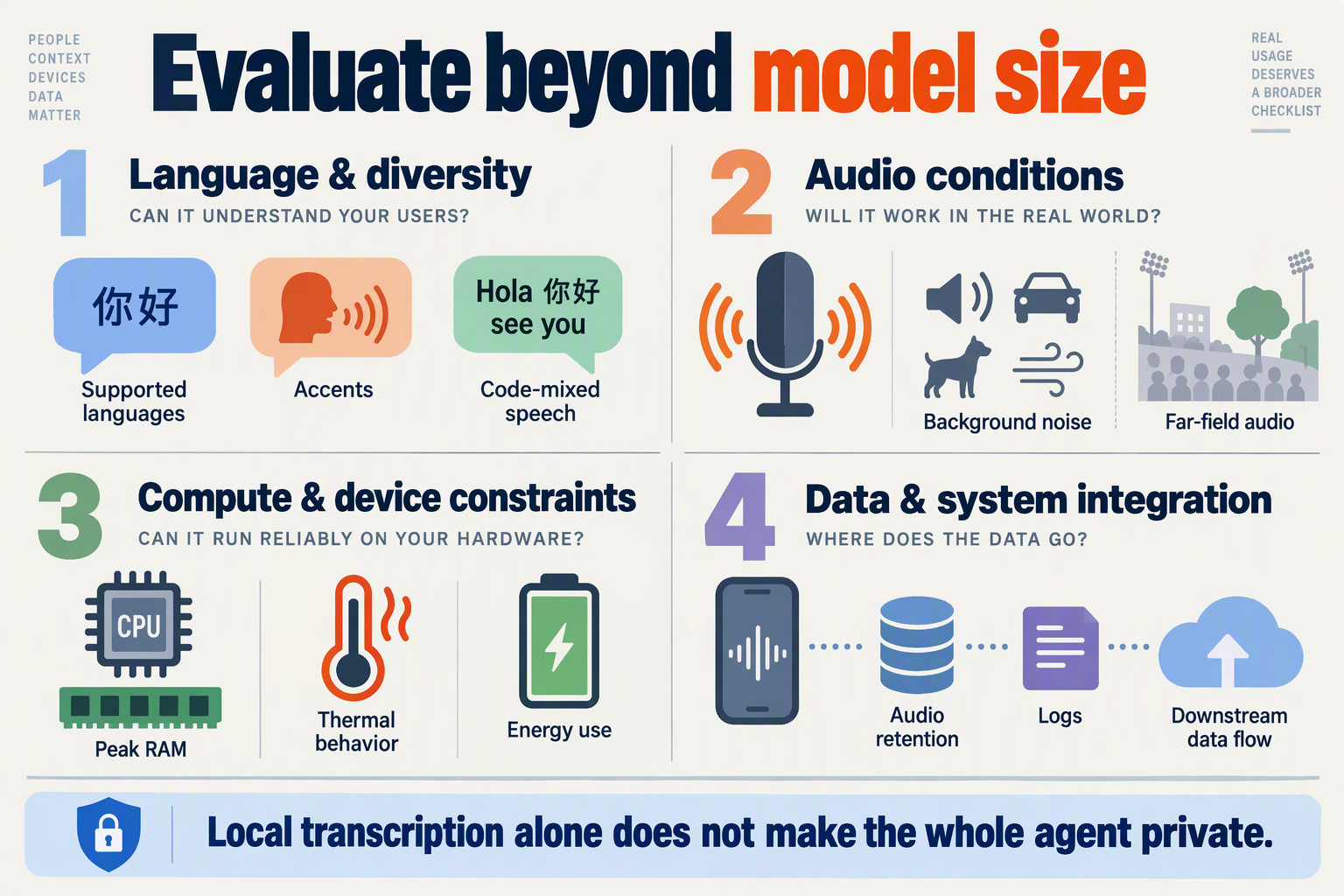
Before deploying Cactus Whistle, validate language coverage, noisy-audio accuracy, end-to-end data handling, and sustained performance on your lowest-spec target device. As of October 2026, the supplied sources establish Whistle’s input requirements and supported languages, but do not establish accuracy across every accent, acoustic environment, or hardware configuration.
Does Whistle support your users’ languages and accents?
Cactus Compute’s Needle GitHub documentation lists seven supported languages as of October 2026: English, German, French, Spanish, Italian, Dutch, and Polish. Treat that list as a deployment boundary—not evidence that unsupported languages or mixed-language conversations will work reliably.
Language support also does not establish equal performance across regional accents. An English-speaking customer reading an address, switching languages, or naming a local business creates a different recognition challenge from clean, single-language dictation.
Build a test set around:
- Regional accents and differences in speaking pace.
- Code-switching, especially within addresses and product names.
- Critical entities, including appointment dates, amounts, and reference numbers.
- Repair attempts, such as “No, I said fifteen, not fifty.”
For Indian-language workflows, a separate recognition path may be necessary. According to CallMissed’s verified product facts, as of October 2026, CallMissed supports speech recognition in 22 Indian languages plus English, including code-mixed speech such as Hinglish. That illustrates why compactness and language coverage should be evaluated independently.
How should you test background noise and microphone quality?
Test task completion, not just readable transcripts. A transcription can look convincing while misrecognizing the single number that determines an order or booking.
Cactus Compute’s Needle documentation specifies 16 kHz mono audio as of October 2026. Validate the complete capture and conversion path: a correctly formatted file can still contain clipping, weak speech, echo, or competing voices.
Use paired recordings of the same utterances in quiet and realistic conditions:
- Record near and far from the microphone.
- Add representative traffic, television, fan, and office noise.
- Test speakerphone echo and overlapping speech.
- Score both overall transcription errors and critical-field accuracy.
For example, a booking agent should separately measure whether it captures the correct date and time. Define confirmation rules for consequential actions rather than assuming fluent-looking text is correct.
Does local speech recognition guarantee privacy?
Local ASR can reduce raw-audio transmission, but it does not make the entire voice agent private. Trace what happens after transcription: text may still reach a cloud language model, analytics system, application log, or customer database.
Deployment topology matters, too. The PrietoAmigo/whistle GitHub project describes a Docker-based recording interface and HTTP API as of October 2026; a local model accessed through a server is not necessarily running on the user’s device.
Document:
- Where audio and transcripts are processed.
- Whether recordings, crash reports, or logs retain sensitive content.
- Who can access stored data and when it is deleted.
- What consent and retention rules apply to your use case.
Which device limits should block deployment?
Model-file size is not peak runtime memory. Measure memory usage, CPU contention, battery drain, and thermal behavior while the rest of the application is active.
Cactus Compute’s Needle documentation states that Whistle processes up to 30 seconds in one pass, with windowing beyond that, as of October 2026. Test long sessions and window boundaries explicitly, alongside cold starts and repeated short turns.
Set release gates on the weakest supported device: acceptable recognition accuracy, stable sustained operation, and predictable failure handling. Those results—not the download size—should determine whether Whistle is ready for your voice agent.
What do the release authors and independent developers actually substantiate?
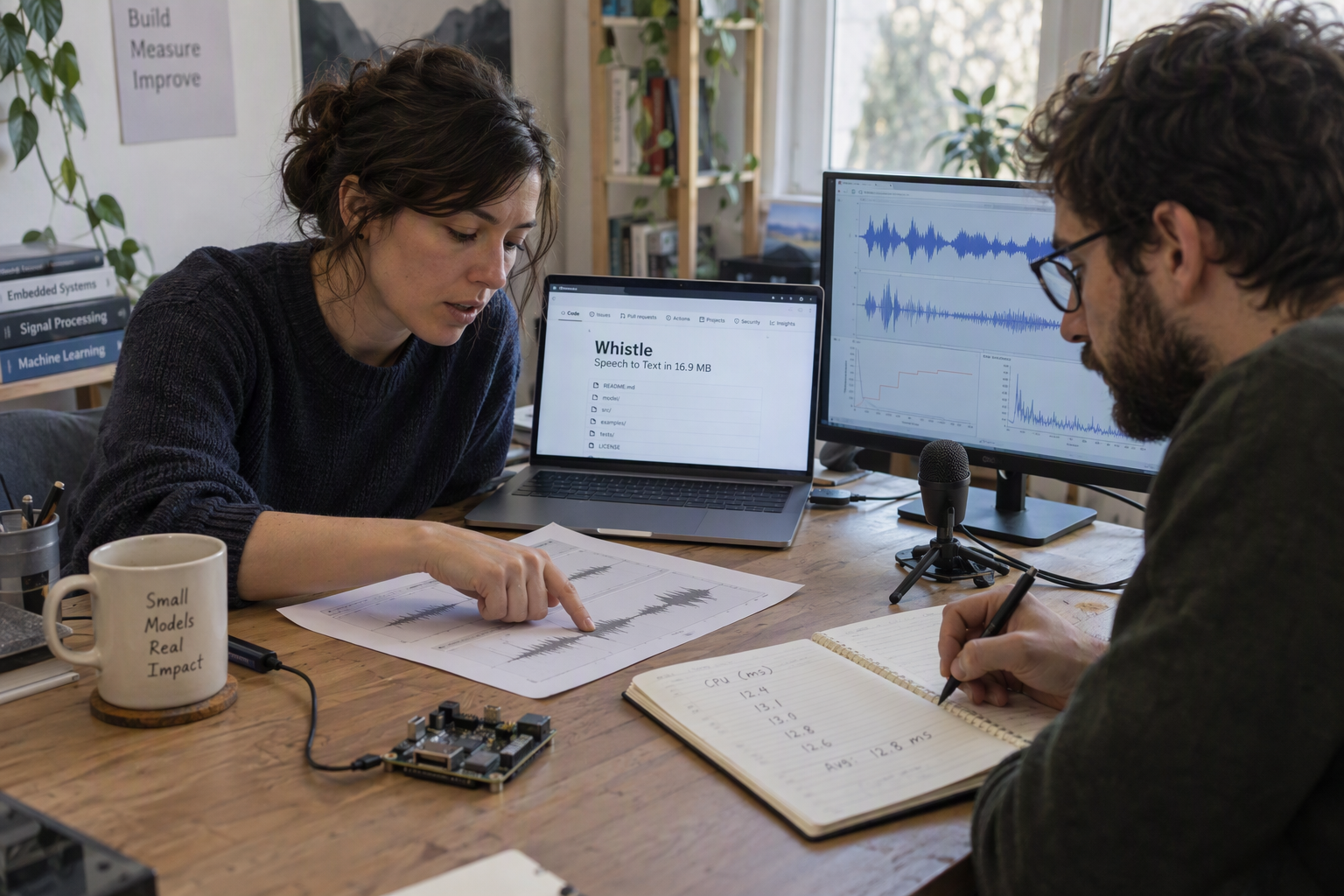
The release authors substantiate Whistle’s published deployment specifications; independent developers provide evidence of integration work, not independently verified performance superiority. As of October 2026, the supplied sources support a distinction between documented capabilities, vendor-reported benchmarks, and community-built wrappers.
What do Cactus Compute’s primary sources establish?
Cactus Compute’s release article describes Whistle as “one 16.9 MB file” that runs on a CPU and loads into the same C++ engine as Needle, according to the release materials available in October 2026. The cactus-compute/needle GitHub documentation supplies operational constraints, while the Cactus-Compute/whistle Hugging Face listing provides another published model reference.
These sources establish what Cactus Compute says it has released and how developers are instructed to use it. They do not, by themselves, prove reliable operation across every advertised device category.
Read the evidence in three layers:
- Published specifications: Model packaging, supported inputs, language coverage, and runtime instructions are concrete claims developers can inspect and test.
- Author-reported performance: Cactus Compute’s October 2026 promotional materials claim approximately 9× smaller files and 6× greater speed than Whisper base. Those comparisons need their measurement conditions before they become purchasing or architecture criteria.
- Deployment aspirations: References to wearables, automotive systems, and microcontrollers describe intended applications—not proof that every device in those categories has sufficient memory, compute, or power.
The phrase “mostly beats Whisper base,” used by Cactus Compute in its October 2026 promotional materials, is particularly important to unpack. “Mostly” does not identify the winning datasets, losing cases, decoding settings, or accuracy–speed trade-offs in the supplied excerpts.
What does the independent developer wrapper actually demonstrate?
The PrietoAmigo/whistle GitHub repository, listed in the October 2026 research context, describes a Docker container, a phone recording page, and an HTTP API with an OpenAI-compatible endpoint. That is useful evidence of an independent integration approach: packaging local recognition behind interfaces application developers already understand.
However, a repository description is not a controlled benchmark or an assurance that its implementation is production-ready.
For a voice-agent builder, the wrapper suggests a practical experiment:
- Record a representative customer utterance through the phone interface.
- Submit the recording through the HTTP endpoint.
- Check transcription correctness, request behavior, and failure handling.
- Measure the complete path rather than attributing wrapper or network overhead to Whistle itself.
API compatibility and recognition quality are separate properties. As of October 2026, CallMissed’s developer AI API offers OpenAI-compatible audio transcription endpoints; a similarly labeled community endpoint still requires testing for request fields, response formats, and errors before an application can treat the interfaces as interchangeable.
Which claims still need independent verification?
Inside the Loop’s October 6, 2026 research references include the release, usage guidance, runtime repository, and a rendered benchmark chart. RuntimeWire’s supplied coverage discusses keyword biasing and word timestamps. These reports help locate capabilities and explain the release, but the supplied excerpts do not establish independently reproduced accuracy or latency results.
Before committing, ask for:
- Accuracy evidence: Named datasets, normalization rules, and results for relevant accents and terminology.
- Runtime evidence: Hardware, thread count, decoder settings, and cold versus warm execution.
- System evidence: Peak memory, sustained power use, and behavior on long or interrupted recordings.
The defensible conclusion is narrow but useful: Whistle has documented deployment characteristics and independent integration activity; broader performance claims remain something builders should reproduce on their own workloads.
When should you choose local ASR, a hybrid design, or CallMissed’s hosted voice agents?
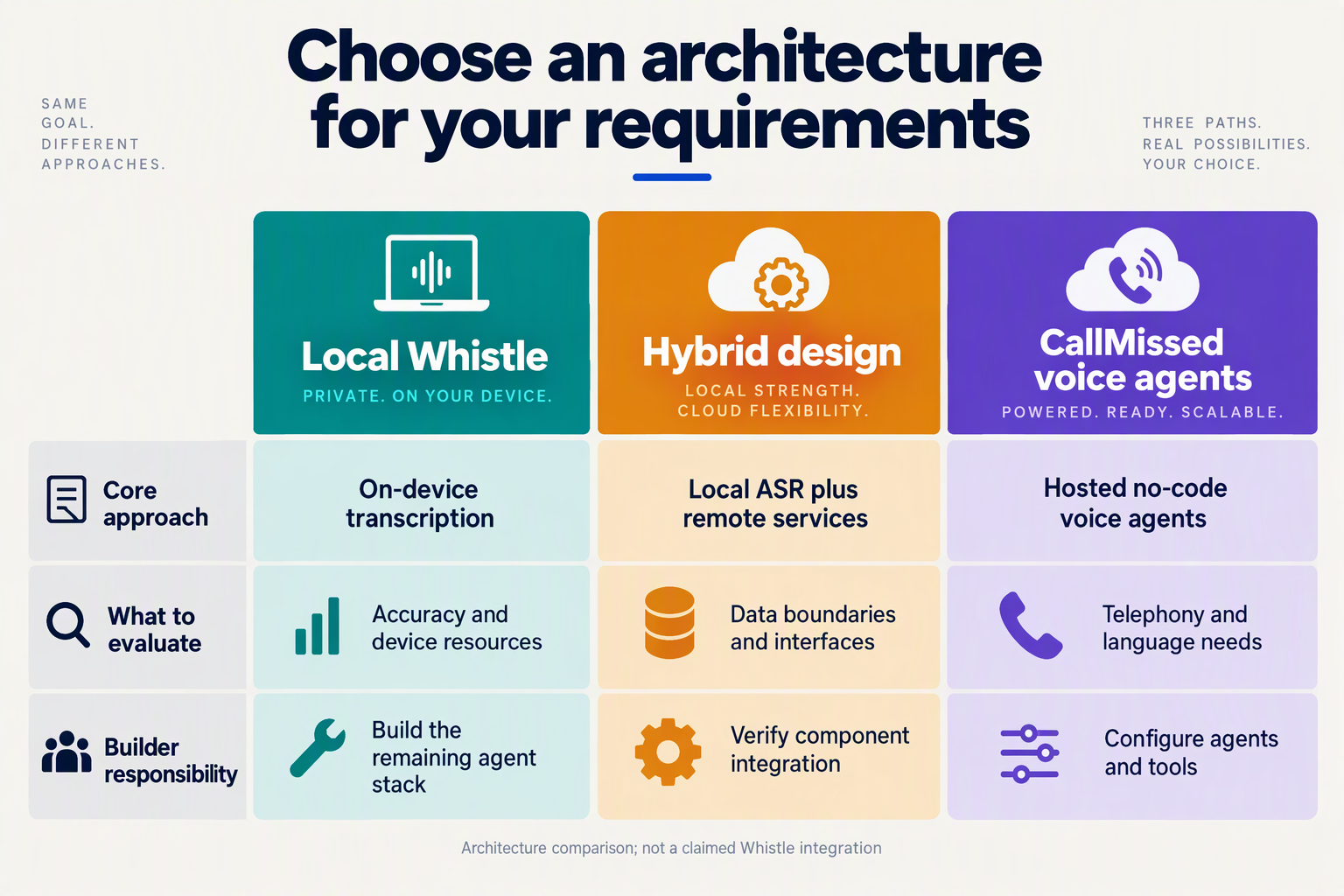
Choose local ASR when offline transcription or keeping raw audio on-device is essential; choose hybrid ASR when local recognition is useful but cloud assistance remains acceptable. Choose CallMissed’s hosted voice agents when your priority is operating customer conversations across phone or web channels rather than maintaining the speech pipeline yourself.
These choices address different layers of the system. A compact recognizer produces text; a production voice agent also needs turn-taking, response generation, speech synthesis, tools, and operational oversight.
Which voice-agent architecture fits your requirements?
The following decision matrix reflects documentation and verified product information available as of October 2026. Hybrid entries describe architectural options—not a documented Whistle-to-hosted-service integration.
| Requirement | Starting choice | Why it fits | What to validate |
|---|---|---|---|
| Transcription during connectivity loss | Local ASR | Recognition need not depend on an audio upload | Device performance and whether downstream tasks also work offline |
| Raw audio must remain on-device | Local ASR | Local processing can avoid sending recordings elsewhere | Logging, backups, telemetry, and application permissions |
| On-device capture with cloud reasoning | Hybrid design | Send locally produced text to a remote reasoning service | Transcript errors, text privacy, and network failure behavior |
| Local recognition struggles with certain utterances | Hybrid design | A separately implemented cloud path can provide another transcription attempt | Routing criteria, consent, added delay, and duplicate processing |
| Customer calls need tools and supervision | Hosted voice agents | Managed call handling can include REST tools and supervisor controls | Carrier setup, escalation procedures, and workflow correctness |
| Team needs a predictable voice-stack rate | Hosted voice agents | Flat per-minute pricing bundles recognition, language model, and voice | Call duration distribution, minimum billing, and separate carriage costs |
The decisive question is what your team wants to own. Local deployment gives you control over audio processing, but also makes device testing, updates, and recognition failures your responsibility. Hosted deployment shifts more of the conversational stack into a managed platform, while retaining dependence on connectivity.
How should you design a useful hybrid boundary?
A hybrid design should have an explicit handoff rule, not simply “use the cloud when needed.” For example, a field-service application could transcribe a technician’s note locally, then send the text for summarization once connectivity returns.
For Whistle specifically, Cactus Compute’s Needle documentation available in October 2026 specifies one-pass processing up to 30 seconds, with windowing for longer audio. That makes segmentation and transcript assembly concrete implementation concerns—not evidence of complete live-agent turn handling.
Before deployment:
- Define the payload: Decide whether the remote service receives text, audio, or both.
- Define the trigger: Consider user-requested retries, unsupported languages, or failed task validation; do not assume a calibrated confidence score is available.
- Define failure behavior: Specify what happens when recognition succeeds but the network or downstream tool fails.
When does a hosted voice stack make economic sense?
According to CallMissed’s verified product information, as of October 2026, Standard voice agents cost ₹4/min, Expressive costs ₹5/min, and Best latency costs ₹6/min, including speech recognition, the language model, and voice. These plans have a 30-second minimum per connected call, with phone carriage billed separately; calls that never connect cost nothing.
Compare those rates against the total cost of ownership, not merely a local model’s download size. Include engineering time, device support, monitoring, and incident response. Prefer local ASR when its constraints match the product; prefer managed conversations when operating the entire voice workflow is the larger challenge.
Frequently Asked Questions
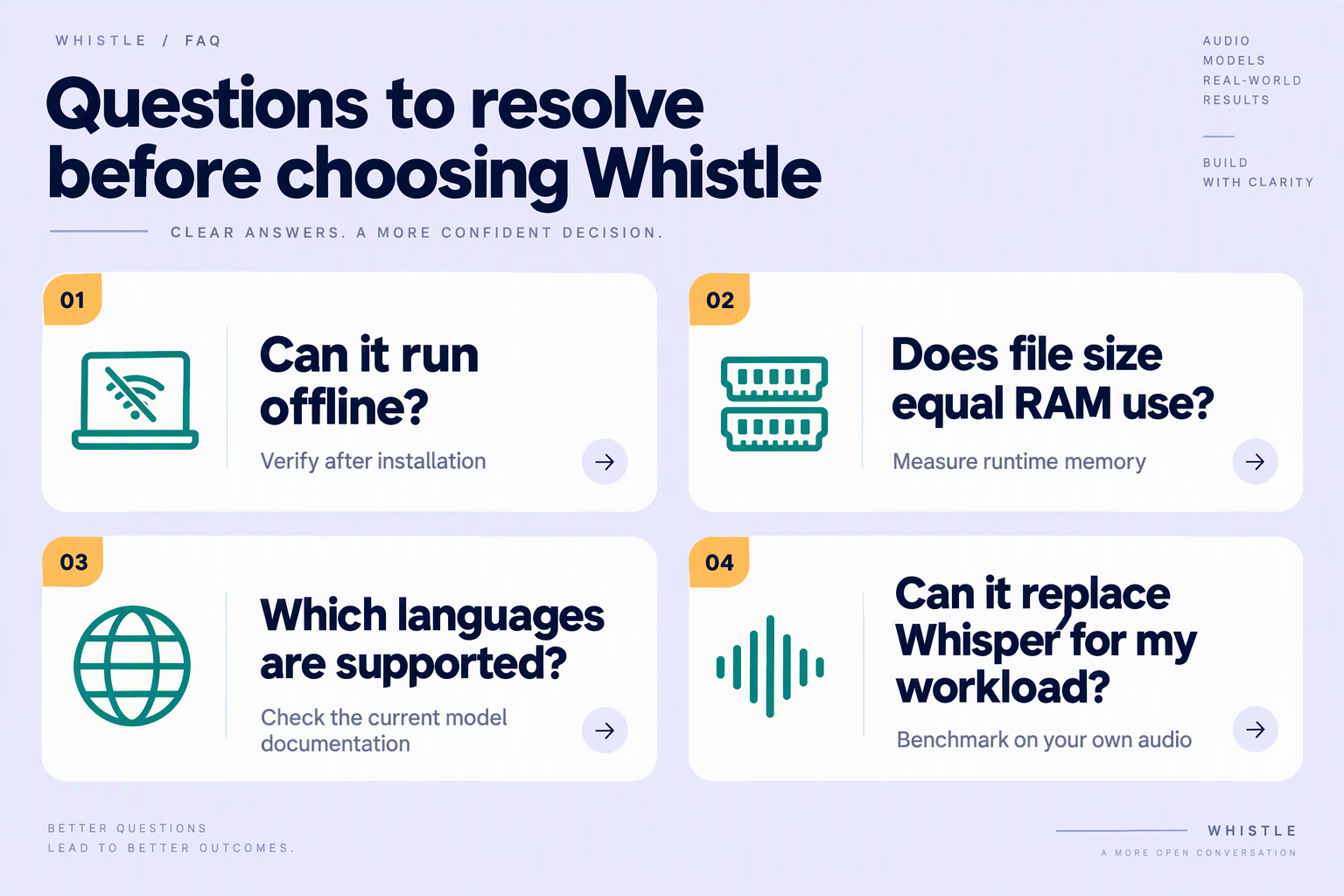
Does Whistle speech-to-text work offline?
Is Whistle’s 16.9 MB size its RAM requirement?
Does Whistle speech-to-text support Hindi or Hinglish?
Can Whistle speech-to-text replace OpenAI Whisper?
What audio format and recording length does Whistle accept?
Is Whistle a complete real-time voice-agent system?
Conclusion
Compact ASR could give voice-agent builders more control over where speech is processed, but small model size is not proof of production readiness. Cactus Whistle makes local recognition worth evaluating; the decisive questions remain accuracy, device performance, language coverage, and how recognition fits into the wider conversation pipeline.
Four takeaways should guide that evaluation:
- Treat compactness as an architectural opportunity, not a performance guarantee. According to Cactus Compute’s October 2026 release materials, Whistle occupies a single 16.9 MB file and runs on a CPU without requiring a GPU. That opens possibilities for phones, wearables, robots, and other constrained devices. Local processing also creates opportunities to keep raw audio on-device and reduce network dependence, although builders must verify what the complete application actually sends elsewhere.
- Design around the documented input and language constraints. Cactus Compute’s Needle GitHub documentation, available in October 2026, specifies 16 kHz mono audio, processing of up to 30 seconds per pass, and windowing for longer recordings. The documentation lists seven languages: English, German, French, Spanish, Italian, Dutch, and Polish. Microphone capture, longer conversations, and multilingual requirements therefore deserve explicit testing rather than assumptions based on the download size.
- Separate vendor benchmarks from conversational results. Cactus Compute’s October 2026 promotional materials report roughly 9× smaller files and 6× greater speed than Whisper base, while saying Whistle “mostly beats” that model. Those are vendor-reported comparisons, not promises for a particular device or workload. Builders should test accents, background noise, names, and domain terminology—and assess whether the surrounding pipeline supports interruption handling and timely responses.
- Choose local and cloud components according to the job. Compact recognition does not remove the need to consider language coverage or managed services. As of October 2026, CallMissed offers speech recognition in 22 Indian languages plus English, making the AI customer-communication platform worth exploring when regional-language support is part of a voice-agent strategy. The useful question is which component meets each requirement, not whether every stage must run in the same place.
What should voice-agent builders watch next?
Watch for evidence that connects Whistle’s compact design to dependable results on representative devices and real conversational audio. Keyword biasing, windowed transcription, and reported benchmarks matter most when their practical effects are measured against the application’s requirements.
The forward-looking opportunity is a more deliberate division between local listening and cloud capabilities, rather than an automatic replacement of one architecture with another. Whistle gives builders a concrete reason to revisit that boundary.
Which part of your voice-agent pipeline would you move on-device first—and what evidence would justify the change?
Related Reading
- Claude Haiku 5.5 latency: Voice-Agent Evaluation Guide
- AI voice agent data privacy: Questions Before Deployment
- Missed sales calls: An AI voice agent guide for India