Cloudflare Quick Tunnels for AI Voice API Testing


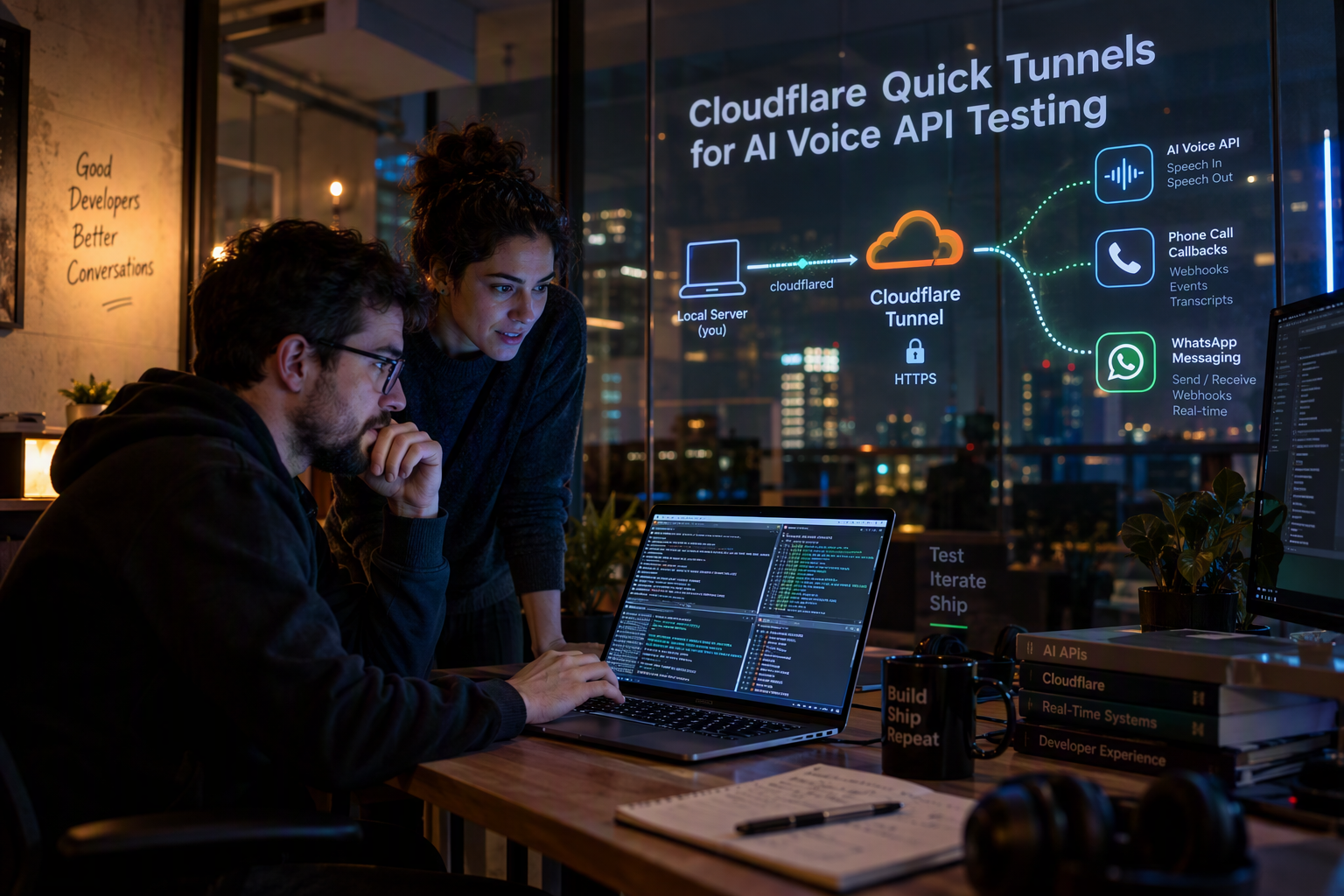
Use Cloudflare Quick Tunnels to expose localhost, test AI voice and messaging webhooks, handle callbacks, and know when to upgrade.
Cloudflare Quick Tunnels for AI Voice API Testing
What if your AI voice agent could receive real phone-call webhooks from your laptop in under a minute, with no signup, no DNS change, and no open ports? That is why Cloudflare Quick Tunnels are suddenly useful for testing AI voice and messaging APIs: Cloudflare describes trycloudflare.com as a way to “put localhost on the Internet” with free encrypted HTTPS, and the topic hit Hacker News on September 22, 2026 with 16 points and 13 comments in 1.1 hours, signaling fresh developer interest.
The timing makes sense. AI communication products now depend on fast webhook loops: inbound call events, speech-to-text callbacks, WhatsApp message status updates, function-call responses, CRM handoffs, and real-time agent session events. Waiting for staging infrastructure just to test whether /webhook/call-status receives the right payload slows down teams that are already iterating on prompts, latency, voices, tools, and fallback logic. Quick Tunnels give developers a disposable public HTTPS URL for a local service, which is exactly what voice and messaging API testing often needs.
There is an important caveat: Cloudflare Quick Tunnels are for development, not production. Cloudflare’s documentation states that Quick Tunnels have a hard limit of 200 in-flight requests, and Cloudflare’s Sandbox tunnel docs describe trycloudflare.com as a debug aid with no uptime guarantee. That distinction matters for AI voice workloads because a single test can involve multiple moving parts: a call connect event, media session setup, transcription events, tool calls, call-ended callbacks, and recording or summary webhooks.
This guide will show you how to use cloudflared Quick Tunnels to expose a local API server, register the generated HTTPS URL with a voice or messaging provider, test webhook signatures and payloads, debug callback timing, and know when to move from a Quick Tunnel to a persistent Cloudflare Tunnel or Zero Trust setup. We will also cover practical gotchas such as changing tunnel URLs, concurrent request limits, HTTPS-only callbacks, and why long-running streams need extra care.
Platforms such as CallMissed fit into this broader trend because developers can test AI communication flows locally against capabilities like a Twilio-compatible Calls API, web voice sessions, WhatsApp Business messaging, and AI voice-agent workflows before promoting integrations to production.
How do Cloudflare Quick Tunnels help test AI voice and messaging APIs?
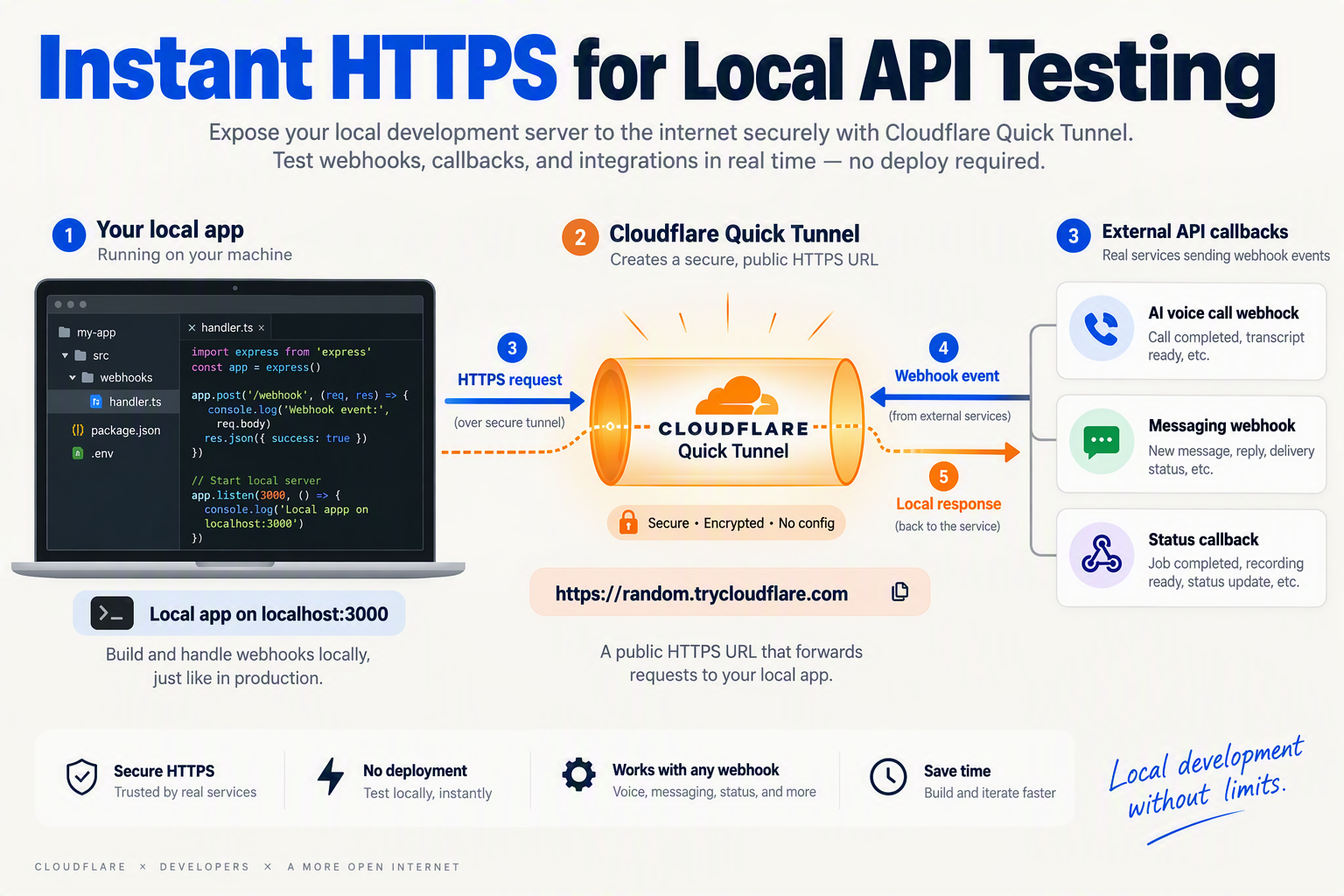
Cloudflare Quick Tunnels help developers test AI voice and messaging APIs by giving a local webhook server a temporary public HTTPS URL, so providers can send real callbacks to code running on a laptop. That makes it practical to validate call events, WhatsApp status updates, transcription callbacks, and tool-call webhooks before deploying a staging environment.
What problem do Quick Tunnels solve for AI API testing?
AI communication APIs are event-heavy: your app rarely just sends one request and gets one response. A realistic test often includes:
- Inbound event delivery — a call starts, a WhatsApp message arrives, or a user opens a chat.
- Agent orchestration — the AI voice or messaging agent chooses a prompt, tool, language, or fallback.
- Webhook callbacks — the provider sends call status, message status, transcription, recording, or summary data.
- Your backend response — your local API updates a CRM, triggers a workflow, or returns instructions.
Cloudflare says Quick Tunnels can “put localhost on the Internet” with “No account, DNS, or open ports required,” according to the Cloudflare Quick Tunnels page. For developers, the practical benefit is speed: instead of deploying every webhook change to staging, you run your API locally and point the voice or messaging platform at the generated trycloudflare.com URL.
How does this improve the webhook development loop?
A Quick Tunnel turns a local endpoint such as:
http://localhost:3000/webhooks/call-statusinto a public HTTPS endpoint such as:
https://random-name.trycloudflare.com/webhooks/call-statusThat matters because many communication providers require public HTTPS callback URLs. With Cloudflare Quick Tunnels, a developer can test:
- Call lifecycle webhooks: ringing, answered, completed, missed, failed.
- AI voice events: transcript segments, tool calls, handoff decisions, call summaries.
- Messaging callbacks: WhatsApp message received, delivered, read, failed, or replied.
- CRM workflows: lead creation, ticket updates, notes, follow-up tasks.
- Signature validation: whether webhook signing and timestamp checks work locally.
Cloudflare’s own positioning makes the use case clear: Quick Tunnels are built for short-lived testing, not infrastructure planning. Cloudflare One docs state that Quick Tunnels have a hard limit of 200 in-flight requests, which is enough for many developer tests but not a production concurrency model.
Why are Quick Tunnels especially useful for AI voice APIs?
Voice APIs are harder to test than simple REST APIs because timing matters. A bug may appear only when a call connects, when a speech-to-text event arrives late, or when an AI tool call overlaps with a hangup event.
For example, a developer testing CallMissed, the AI customer-communication platform, could expose a local webhook while working with capabilities such as its Twilio-compatible Calls API, AI voice-agent workflows, call recordings, transcripts, and AI call notes. The same local testing pattern applies when building around WhatsApp Business messaging through the official Meta Cloud API, where callbacks and template events need to be verified before going live.
A Quick Tunnel helps answer practical questions quickly:
- Did the provider reach my endpoint?
- Did my route parse the payload correctly?
- Did webhook authentication pass?
- Did my backend respond within the provider’s timeout?
- Did my AI agent trigger the right tool or handoff path?
What should developers not use Quick Tunnels for?
Quick Tunnels are not a replacement for production Cloudflare Tunnel or Cloudflare Zero Trust. Cloudflare’s Sandbox tunnel documentation describes trycloudflare.com as a debug aid with no uptime guarantee, and Cloudflare also notes Sandbox tunnels have no Server-Sent Events support.
That means Quick Tunnels are best for:
- Local development
- Webhook debugging
- Demo environments
- Payload inspection
- Early API integration tests
They are not appropriate for production phone numbers, customer-facing WhatsApp flows, high-concurrency call traffic, or long-running streaming workloads. Use them to prove the integration path; then promote stable endpoints to persistent infrastructure.
What prerequisites do you need before using cloudflared?
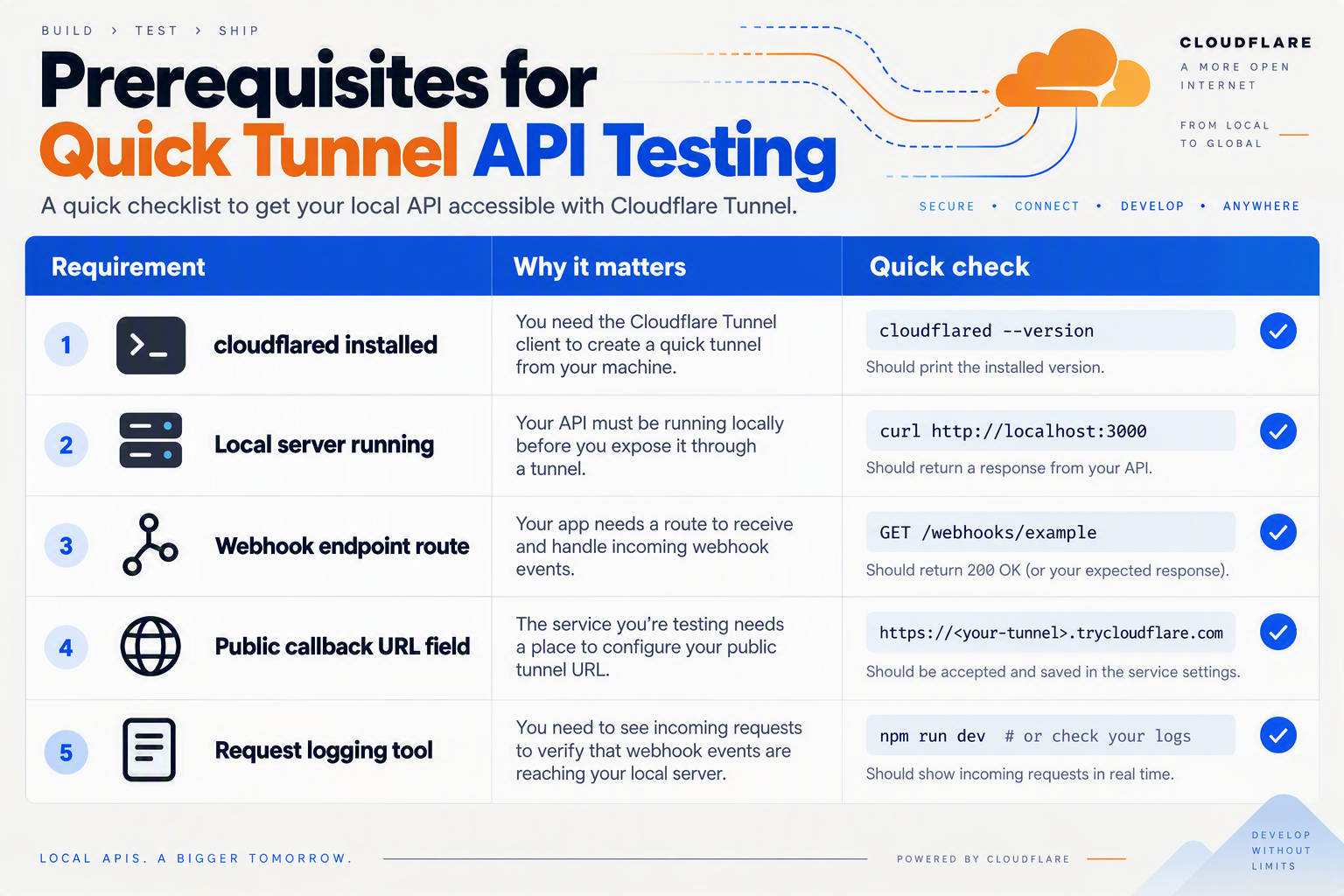
Before you run cloudflared Quick Tunnels, you need a local API service, a webhook-capable voice or messaging provider, and enough logging to verify every callback. You do not need a Cloudflare account, DNS setup, or open inbound ports, because Cloudflare describes Quick Tunnels as a way to “put localhost on the Internet” with free encrypted HTTPS.
What should be ready before you start?
| Prerequisite | Why you need it | Quick check | Watch out |
|---|---|---|---|
| cloudflared installed | The cloudflared CLI creates the Quick Tunnel from your machine to Cloudflare. | Run cloudflared --version in your terminal. | Use Quick Tunnels for testing only; Cloudflare’s Sandbox tunnel docs describe trycloudflare.com as a debug aid with no uptime guarantee. |
| Local API server running | Your AI voice or messaging API needs a local endpoint such as /webhook/call-status or /webhook/messages. | Confirm http://localhost:3000/health or similar returns 200 OK. | If the local server is down, the public tunnel URL will still exist but callbacks will fail. |
| Webhook provider access | You need somewhere to paste the generated trycloudflare.com HTTPS URL. | Open the provider dashboard or API settings for callback URLs. | Some providers require HTTPS, which Quick Tunnels provide by default. |
| Test phone, WhatsApp, or messaging event | Realistic events prove that callbacks, signatures, retries, and payload parsing work. | Prepare one inbound call, one message, or one status update. | AI communication flows often trigger several callbacks per user action. |
| Logs and request inspection | Voice and messaging bugs are usually timing or payload-shape issues, not just HTTP failures. | Log headers, body, timestamp, request ID, and response code. | Avoid logging secrets, full tokens, or production customer data. |
| Concurrency expectations | Quick Tunnels are not designed for load testing. | Estimate how many simultaneous webhook requests your test can create. | Cloudflare’s Quick Tunnels documentation states a hard limit of 200 in-flight requests. |
What do you not need for Cloudflare Quick Tunnels?
You do not need to buy a domain, configure DNS records, expose your router, or open firewall ports. Cloudflare’s trycloudflare.com page says Quick Tunnels require “No account, DNS, or open ports”, which is why they are useful for fast webhook testing.
That simplicity is the point: a developer can run a local Node.js, Python, Go, or Java server and expose it through a temporary HTTPS URL. For AI voice and messaging APIs, that means the first test can happen before a staging deployment exists.
What should your local webhook server support?
Your local service should support the same basic behavior you expect in staging:
- Fast 2xx responses so webhook providers do not retry unnecessarily.
- Raw body access if the provider signs webhook payloads.
- Structured logging for headers, payload fields, response codes, and timing.
- Idempotency handling because providers may retry the same event.
- Separate routes for call events, message events, recordings, summaries, and tool callbacks.
If you are testing CallMissed, for example, the same local workflow can apply to AI communication features such as a Twilio-compatible Calls API, web voice sessions, WhatsApp Business messaging via the official Meta Cloud API, and AI voice-agent events. As of September 2026, CallMissed supports inbound and outbound calls, call recordings, transcripts, AI call notes, and webhook integrations, so a local tunnel is useful for validating event handling before production rollout.
What limits should you plan around?
Cloudflare Quick Tunnels are excellent for development, but they are not a staging or production substitute. Cloudflare’s Quick Tunnels documentation states that Quick Tunnels have a 200 in-flight request hard limit, and Cloudflare’s Sandbox tunnel docs state there is no uptime guarantee for trycloudflare.com tunnels.
That matters for AI voice and messaging API tests because one conversation can create many events: call started, call answered, transcription partials, tool calls, message delivery updates, call ended, recording ready, and summary generated. Use Quick Tunnels to validate behavior, not to prove production scale.
How do you start a Quick Tunnel and make localhost public without opening ports?
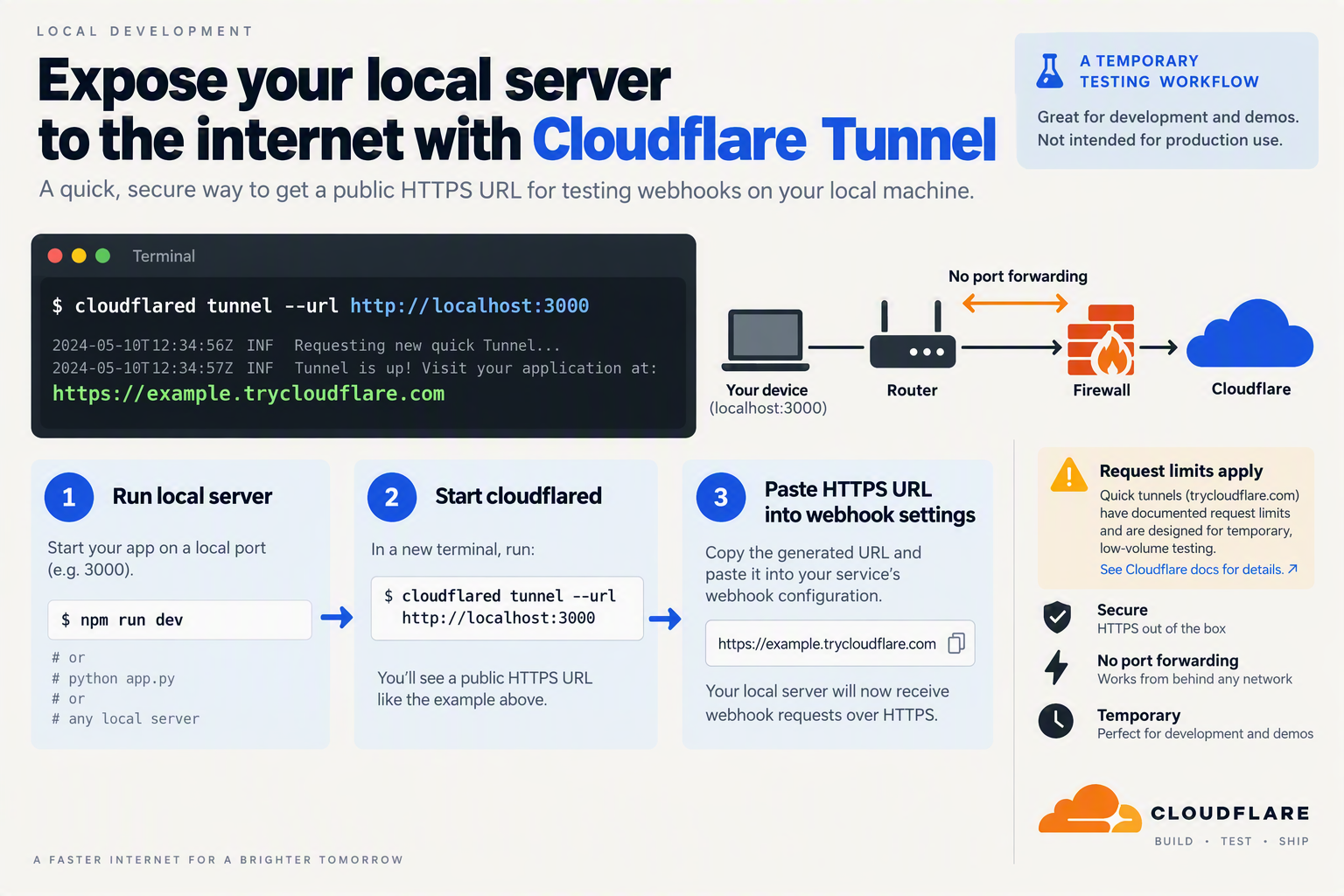
You start a Cloudflare Quick Tunnel by running cloudflared tunnel --url http://localhost:PORT; Cloudflare returns a temporary https://*.trycloudflare.com URL that forwards public traffic to your local server. No router port forwarding is required because cloudflared creates an outbound connection from your machine to Cloudflare.
What do you need before running a Quick Tunnel?
You need two things: a local API server and the cloudflared command-line tool. Cloudflare describes Quick Tunnels as a way to “put localhost on the Internet” with free encrypted HTTPS, no account, no DNS, and no open ports.
For a webhook test, your local service might expose endpoints like:
POST /webhook/call-statusPOST /webhook/message-statusPOST /webhook/transcriptionPOST /webhook/tool-resultGET /healthz
A minimal local server can run on any framework: Express, FastAPI, Flask, Rails, Laravel, Spring Boot, or Go’s net/http. The important part is that it listens on a local port, for example 3000, 5000, or 8000.
How do you expose localhost with cloudflared?
Run your local API first:
npm run dev
# Example: local server listening on http://localhost:3000
Then start the Quick Tunnel:
cloudflared tunnel --url http://localhost:3000cloudflared will print a temporary public URL similar to:
https://example-random-name.trycloudflare.comUse that generated HTTPS URL as the base URL for your webhook configuration:
https://example-random-name.trycloudflare.com/webhook/call-statusFor AI voice and messaging API testing, the workflow is usually:
- Run your local webhook server on
localhost. - Start the Quick Tunnel with
cloudflared tunnel --url. - Copy the generated trycloudflare.com URL.
- Paste it into your provider dashboard or API config.
- Trigger a real event, such as an inbound call, WhatsApp message, or status callback.
- Inspect local logs to verify headers, payloads, retries, and response codes.
How do you use the public URL with AI voice and messaging APIs?
Treat the Quick Tunnel URL as your temporary webhook host. For example, if you are testing an AI voice callback locally, configure the provider to call:
https://example-random-name.trycloudflare.com/webhook/voiceIf you are testing messaging events, use:
https://example-random-name.trycloudflare.com/webhook/messagesWith platforms such as CallMissed, developers can test local integrations against communication workflows like a Twilio-compatible Calls API, web voice sessions, WhatsApp Business messaging, and AI voice-agent callbacks before moving the same endpoints to staging or production.
A practical test checklist:
- Confirm your endpoint returns 2xx quickly.
- Log the full request body and headers during development.
- Verify webhook signature validation, if your provider signs callbacks.
- Test duplicate delivery and retry behavior.
- Keep the tunnel process running while the provider sends callbacks.
What should you watch for when making localhost public?
Cloudflare One docs state that Quick Tunnels currently have a hard limit of 200 in-flight requests. That is enough for most local webhook testing, but it is not designed for sustained production traffic or large concurrent test runs.
Cloudflare’s Sandbox tunnel docs also describe trycloudflare.com as a debug aid with no uptime guarantee. In practice, that means you should expect the generated URL to be disposable: if you stop and restart the tunnel, you may need to update the webhook URL in your API provider settings.
Use Quick Tunnels for fast local validation; move to a persistent Cloudflare Tunnel or production ingress when the endpoint becomes part of a shared staging environment.
How do you test webhook callbacks for AI voice calls and messages step by step?
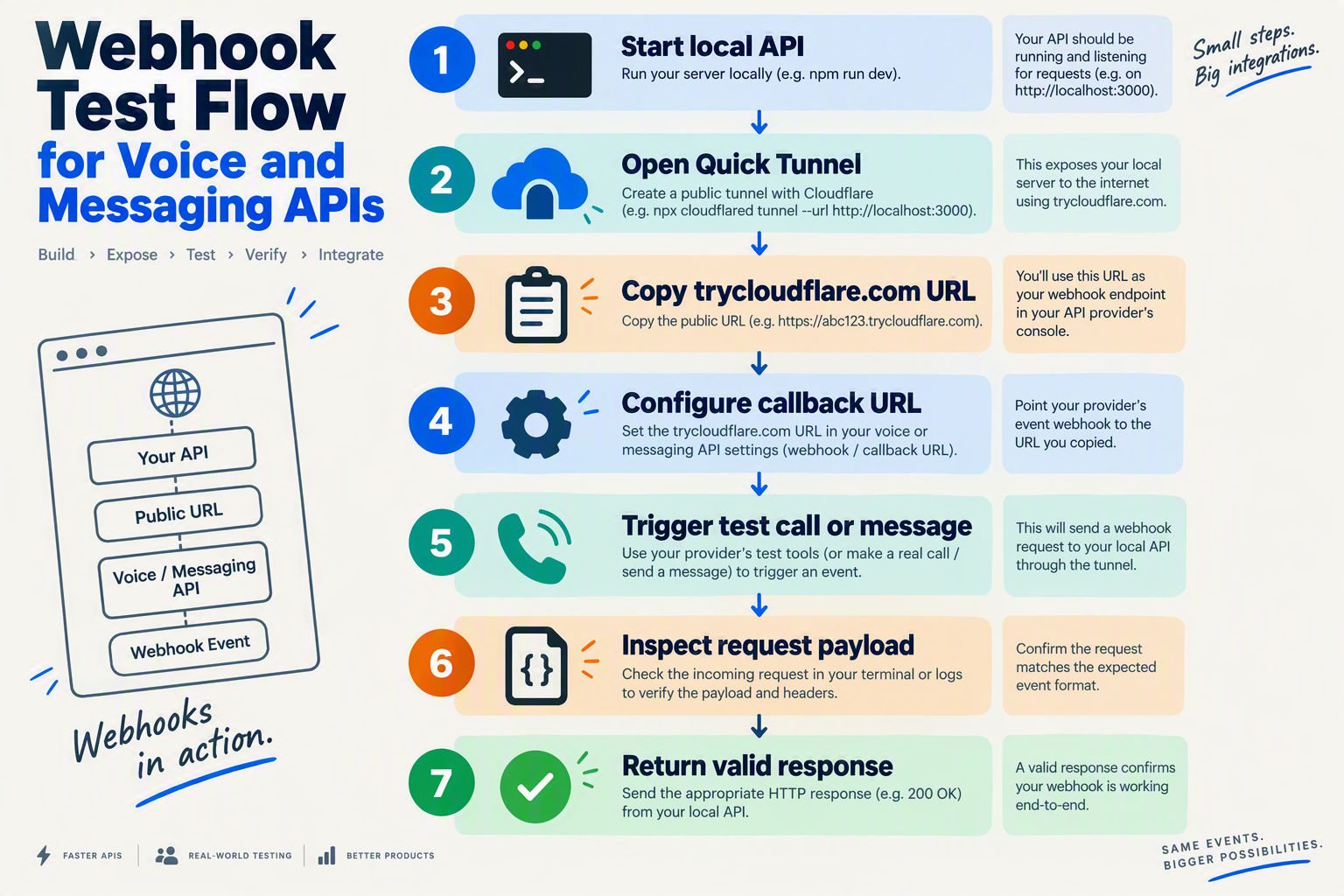
Testing webhook callbacks for AI voice calls and messages means exposing your local server with a Cloudflare Quick Tunnel, registering the temporary HTTPS URL in your provider dashboard, triggering a real event, and inspecting the payload, signature, timing, and retry behavior. Cloudflare says Quick Tunnels can “put localhost on the Internet” with no account, DNS, or open ports required, which makes them well-suited to short webhook test loops.
What local webhook server should you start with?
Start with the smallest possible webhook receiver: one endpoint for call events and one endpoint for message events. Keep the first test boring so you can isolate tunnel, routing, and provider configuration issues before debugging your AI logic.
For example, a local Node.js server might expose:
import express from "express";

const app = express();
app.use(express.json({ type: "*/*" }));

app.post("/webhooks/calls", (req, res) => {
  console.log("CALL WEBHOOK:", JSON.stringify(req.body, null, 2));
  console.log("HEADERS:", req.headers);
  res.status(200).json({ ok: true });
});

app.post("/webhooks/messages", (req, res) => {
  console.log("MESSAGE WEBHOOK:", JSON.stringify(req.body, null, 2));
  console.log("HEADERS:", req.headers);
  res.status(200).json({ ok: true });
});

app.listen(3000, () => console.log("Webhook test server on :3000"));
Run it locally:
node server.jsThen confirm the endpoint works before involving Cloudflare:
curl -X POST http://localhost:3000/webhooks/calls \
  -H "Content-Type: application/json" \
  -d '{"event":"local_test"}'
How do you expose localhost with a Cloudflare Quick Tunnel?
Once your local server responds, start cloudflared against the same port:
cloudflared tunnel --url http://localhost:3000Cloudflare Quick Tunnels generate a temporary trycloudflare.com HTTPS URL. Cloudflare’s Quick Tunnels documentation states that the feature is subject to a hard limit of 200 in-flight requests, so treat this as a development tunnel, not a load-test target.
Your callback URLs will look like:
- Voice call webhook:
https://random-name.trycloudflare.com/webhooks/calls - Messaging webhook:
https://random-name.trycloudflare.com/webhooks/messages
Copy the full URL exactly. A new Quick Tunnel usually means a new hostname, so any provider dashboard value from a previous session may be stale.
How do you register the callback URL with your AI voice or messaging provider?
Add the generated HTTPS URL wherever your provider asks for webhooks, callbacks, or status URLs. In an AI communication workflow, that may include:
- Inbound call event URL for ringing, answered, completed, or failed events.
- Voice agent session URL for real-time or post-call events.
- Recording/transcript callback URL for call artifacts.
- Message webhook URL for inbound WhatsApp, SMS, or chat events.
- Delivery status URL for sent, delivered, read, or failed message updates.
For example, developers using CallMissed’s Twilio-compatible Calls API can test call webhook handling locally by pointing callback configuration at the Quick Tunnel URL, while teams testing WhatsApp flows can use the same pattern for message and status callbacks.
How do you trigger and verify real webhook events?
After saving the callback URL, generate a real event from the provider:
- Place a test inbound call to the configured number.
- Send a WhatsApp or chat message to the business account.
- Trigger a template message status update.
- End the call to force post-call callbacks such as summaries or transcripts.
- Run a tool call inside the AI agent and check whether the callback arrives.
In your terminal, verify four things:
- HTTP status: return
200quickly unless you intentionally want retries. - Payload shape: confirm event names, IDs, timestamps, caller/message identifiers, and metadata.
- Headers: inspect signature headers, content type, request IDs, and user agent.
- Ordering: voice events may arrive as multiple callbacks, so do not assume every provider sends events in the same sequence.
How do you test webhook signatures and retries safely?
Do not skip signature validation just because this is local. Add logging for the raw body and signature header, then validate the provider’s HMAC or verification scheme before processing the event.
Use these test cases:
- Send a valid webhook and confirm signature verification passes.
- Modify the body locally and confirm verification fails.
- Return
500once and confirm the provider retries. - Return slowly and check whether the provider times out.
- Send duplicate event IDs and confirm your handler is idempotent.
Cloudflare’s Sandbox tunnel documentation describes trycloudflare.com as a debug aid with no uptime guarantee, so any failed callback should be interpreted carefully: check your app, the tunnel process, and the provider retry log before blaming business logic.
How can you use Quick Tunnels with CallMissed during local AI agent prototyping?
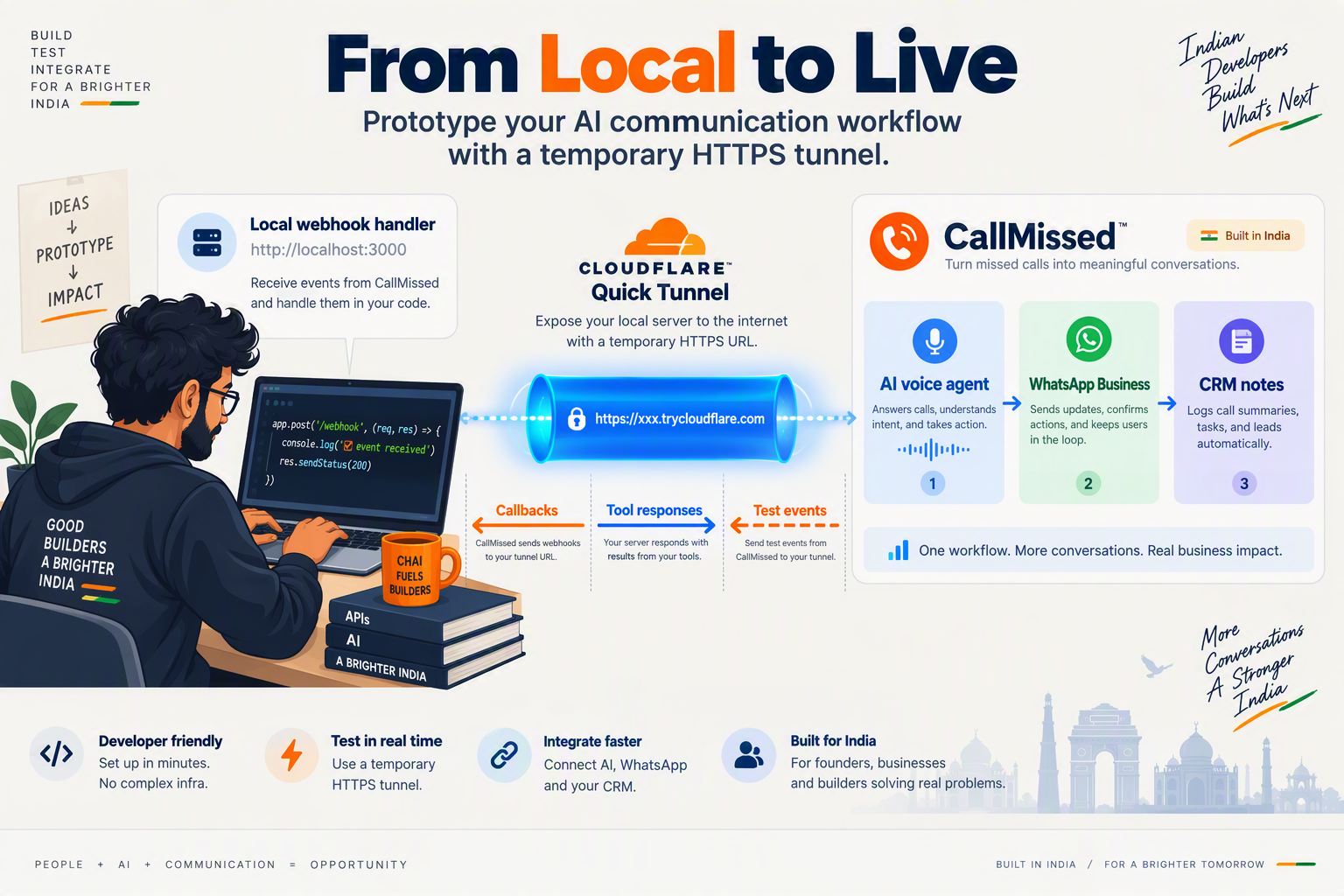
You can use Cloudflare Quick Tunnels with CallMissed by running your AI agent webhook server locally, exposing it with cloudflared tunnel --url, and pasting the temporary HTTPS URL into the CallMissed callback, tool, or integration field you want to test. This is ideal for short prototyping loops because Cloudflare says Quick Tunnels can “put localhost on the Internet” with no account, DNS, or open ports required.
What should you prototype locally first?
Start with flows where seeing the raw webhook payload matters more than production stability. As of September 2026, good CallMissed prototyping candidates include:
- Twilio-compatible Calls API callbacks: test call status events while keeping your existing Twilio-style local handler shape.
- AI voice-agent tools: expose a local REST endpoint that a CallMissed agent can call during a conversation.
- Web voice and chat sessions: test local session handlers before embedding the web widget or wiring a production backend.
- WhatsApp Business messaging flows: validate webhook-style logic for templates, inbox handoff, commerce, or WhatsApp Flows.
- CRM and support automations: test how local code receives transcripts, AI call notes, action items, dispositions, or follow-up data.
CallMissed is useful in this workflow because its platform combines AI voice agents, a Twilio-compatible Calls API, WhatsApp Business through the official Meta Cloud API, and developer-facing AI APIs. The Quick Tunnel simply gives those cloud callbacks a temporary route back to your laptop.
How do you connect a local webhook to CallMissed?
A minimal local loop looks like this:
- Run your local server, for example on port
3000.
   npm run dev
# local webhook: http://localhost:3000/webhooks/callmissed- Start a Cloudflare Quick Tunnel to that port.
cloudflared tunnel --url http://localhost:3000- Copy the generated
trycloudflare.comHTTPS URL.
https://example-random-name.trycloudflare.com- Register the full callback URL in the CallMissed flow you are testing.
https://example-random-name.trycloudflare.com/webhooks/callmissed- Trigger a real event: place a test call, send a WhatsApp message, run an agent tool call, or simulate a CRM handoff.
- Inspect the local logs for headers, payload shape, timing, retries, and error responses.
Cloudflare’s Quick Tunnel documentation states that Quick Tunnels have a hard limit of 200 in-flight requests, so keep tests small and controlled. Cloudflare’s Sandbox tunnel documentation also describes trycloudflare.com as a debug aid with no uptime guarantee, which makes it suitable for prototyping but not production callbacks.
What should your local handler log?
For AI voice and messaging APIs, log more than just the request body. A useful local debug print includes:
- Timestamp for callback ordering.
- Request path and method to catch misconfigured routes.
- Headers for content type, signatures, and provider metadata.
- Raw body for webhook verification.
- Parsed JSON for business logic.
- Response status code so you can see whether retries are caused by your handler.
For example:
app.post("/webhooks/callmissed", express.raw({ type: "*/*" }), async (req, res) => {
  console.log("time", new Date().toISOString());
  console.log("path", req.path);
  console.log("headers", req.headers);
  console.log("rawBody", req.body.toString());

  res.status(200).json({ ok: true });
});
Using the raw request body is especially important when you later add webhook signature verification, because many signing schemes depend on the exact byte payload rather than a re-serialized JSON object.
What are the main gotchas during CallMissed testing?
The biggest gotcha is that Quick Tunnel URLs change. If you stop and restart cloudflared, update the URL in CallMissed before your next test.
Also watch for:
- HTTPS-only callback expectations: Quick Tunnels solve this by giving you a public HTTPS URL.
- Long-running responses: respond quickly with
200 OK, then process heavier work asynchronously. - Concurrent tests: Cloudflare documents a 200 in-flight request limit for Quick Tunnels.
- Production leakage: never use a disposable
trycloudflare.comURL in live customer workflows. - Team confusion: label local endpoints clearly, such as
/webhooks/callmissed-dev.
For production, move the same handler behind a persistent Cloudflare Tunnel, Cloudflare Zero Trust configuration, or a deployed API service. For local AI agent prototyping, however, Quick Tunnels give you the fastest path from “I changed my webhook code” to “a real CallMissed voice or messaging event just hit my laptop.”
What advanced tips improve Quick Tunnel tests for real-time APIs?
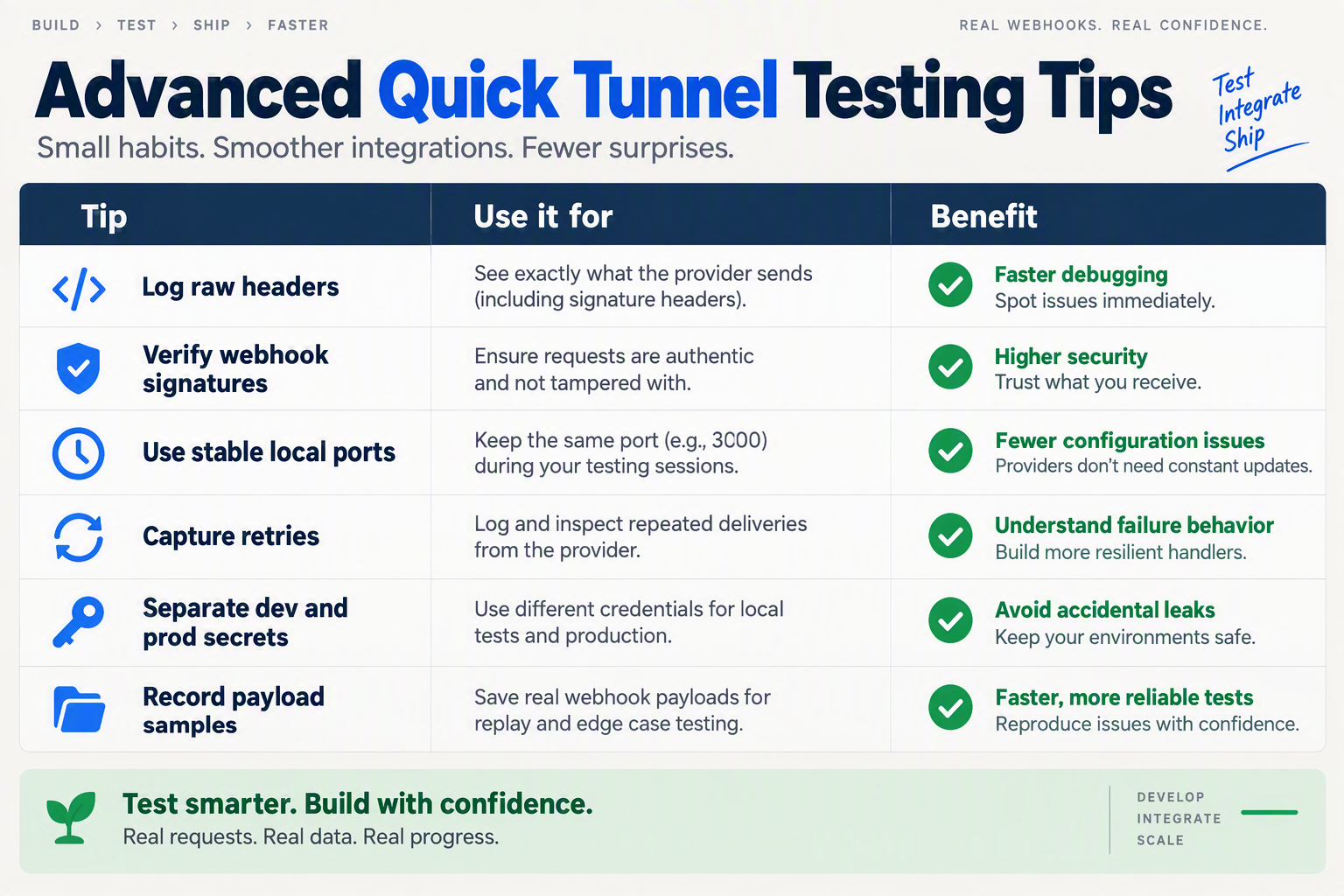
Advanced Quick Tunnel testing is mostly about controlling volatility: treat the trycloudflare.com URL as disposable, keep webhook state replayable, and separate short webhook callbacks from long real-time streams. Cloudflare says Quick Tunnels can “put localhost on the Internet” without an account, DNS, or open ports, but Cloudflare’s Quick Tunnels documentation also states a hard limit of 200 in-flight requests.
Which advanced Quick Tunnel practices matter most?
| Advanced tip | Why it matters for real-time APIs | Practical setup | Watch for |
|---|---|---|---|
| Externalize the tunnel URL | Quick Tunnel hostnames change when the tunnel restarts, so hardcoding breaks callbacks. | Store PUBLIC_BASE_URL=https://your-random.trycloudflare.com in .env and inject it into webhook registration scripts. | Stale callback URLs in voice, WhatsApp, CRM, or test provider dashboards. |
| Log raw webhook bodies | Signature verification often requires the exact request body before JSON parsing. | Capture rawBody, headers, timestamp, and request ID for every callback. | Failed HMAC checks caused by body mutation or middleware ordering. |
| Replay event payloads locally | AI call flows produce multi-step events that are hard to reproduce manually. | Save call-start, transcription, tool-call, message-status, and call-ended payloads as fixtures. | Debugging only from live calls, which slows prompt and tool iteration. |
| Cap concurrency below 200 | Cloudflare documents a 200 in-flight request hard limit for Quick Tunnels. | Load test at small batches such as 10, 25, and 50 concurrent callbacks before larger runs. | Rejected or delayed requests that look like provider webhook failures. |
| Avoid SSE-dependent tests | Cloudflare Sandbox tunnel docs state that trycloudflare.com has no Server-Sent Events support. | Prefer webhook callbacks or WebSocket-specific tests where supported by your API. | Mistaking tunnel limitations for bugs in your streaming implementation. |
| Promote stable flows to named tunnels | Cloudflare positions Quick Tunnels as debugging infrastructure, not production infrastructure. | Move repeat demos, QA environments, and team test URLs to persistent Cloudflare Tunnel or Zero Trust. | Demo failures from changed URLs or no uptime guarantee. |
How should you structure webhook tests?
Use one public Quick Tunnel URL per local service, then route internally by path. For example, expose http://localhost:3000 and keep separate endpoints such as:
/webhooks/calls/status/webhooks/calls/transcript/webhooks/messages/whatsapp/webhooks/tools/result/webhooks/recordings/ready
This pattern makes logs easier to filter and avoids mixing call lifecycle events with messaging callbacks. For AI voice and messaging APIs, the most useful log line is not just “200 OK”; it is a structured record containing the event type, provider request ID, contact ID, call ID or message ID, timestamp, signature result, and processing time.
For platforms such as CallMissed, the same discipline applies when testing local integrations against a Twilio-compatible Calls API, WhatsApp Business flows, or AI voice-agent webhooks: keep callback paths explicit, preserve raw payloads, and replay real events before deploying.
What should you test before trusting the result?
Run a small checklist every time the Quick Tunnel URL changes:
- Health check: confirm
GET /healthworks through thetrycloudflare.comURL. - Webhook verification: send a signed test payload and confirm signature validation passes.
- Timeout behavior: intentionally delay the handler and observe retry behavior.
- Duplicate delivery: send the same event twice and confirm idempotency.
- Failure path: return
500once and verify retry logging. - Concurrency: simulate parallel events but stay well below Cloudflare’s documented 200 in-flight request limit.
The important distinction is that Quick Tunnels validate integration behavior, not production reliability. Cloudflare Community and Cloudflare Sandbox documentation describe account-less trycloudflare.com tunnels as having no uptime guarantee, so a passing Quick Tunnel test should be treated as a development milestone—not a launch readiness signal.
When should you move from Quick Tunnels to Cloudflare Tunnel or Zero Trust?
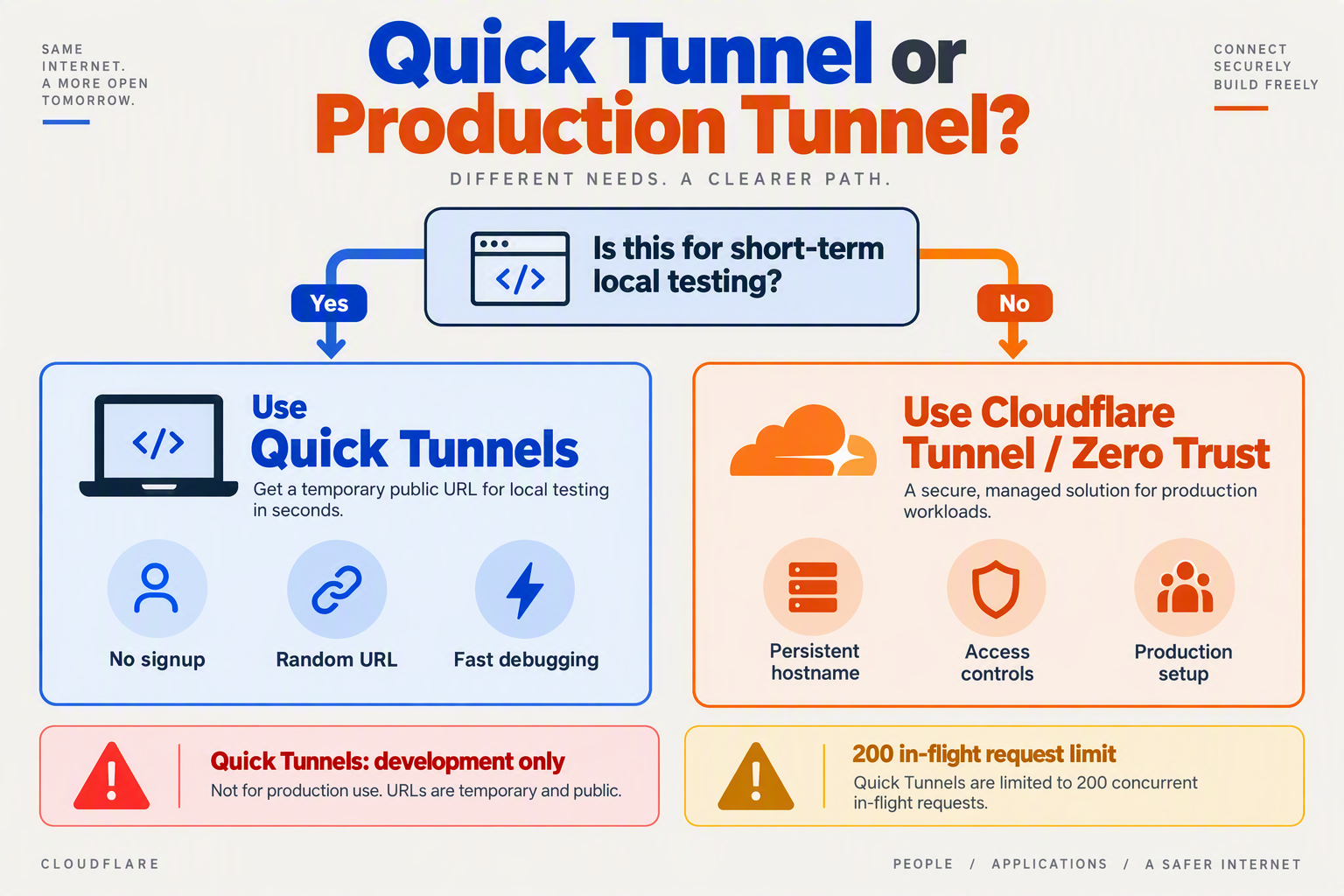
Move from Cloudflare Quick Tunnels when your test URL becomes part of a shared workflow, carries real customer data, needs predictable availability, or must survive restarts. Keep Quick Tunnels for disposable local webhook testing; use a persistent Cloudflare Tunnel or Cloudflare Zero Trust when the endpoint starts behaving like infrastructure.
What are the practical signs that Quick Tunnels are no longer enough?
Cloudflare Quick Tunnels are ideal while you are proving that an AI voice or messaging integration works end to end. They are less suitable once other systems depend on the URL.
Move up when you need:
- A stable callback URL
Quick Tunnel URLs are temporary. If your voice provider, WhatsApp webhook configuration, CRM integration, or teammate’s test script needs the same URL tomorrow, a persistent tunnel is cleaner.
- Production-like reliability
Cloudflare’s Sandbox tunnel docs describe trycloudflare.com as a debug aid with “No uptime guarantee.” That is acceptable for a laptop test, but not for a demo, QA environment, or live webhook route.
- Higher concurrency headroom
Cloudflare’s Quick Tunnels documentation states that Quick Tunnels have a hard limit of 200 in-flight requests. For AI voice APIs, concurrency can rise quickly because one call may generate multiple callbacks: call status, recording, transcript, tool execution, agent summary, and follow-up events.
- Security controls beyond a random URL
A random HTTPS URL is convenient, but it is not the same as access policy, identity, auditability, or environment-level controls. If the local endpoint can expose transcripts, customer phone numbers, WhatsApp payloads, or CRM records, treat the tunnel as security-sensitive.
When is a persistent Cloudflare Tunnel the right next step?
Use a persistent Cloudflare Tunnel when you still want to expose a private service without opening inbound ports, but you need a repeatable hostname and a setup that resembles staging.
A good rule: if you have pasted the same Quick Tunnel URL into more than one external dashboard, you probably wanted a persistent tunnel instead.
Persistent Cloudflare Tunnel is a better fit for:
- Staging webhooks such as
/webhook/call-status,/webhook/whatsapp, and/webhook/recording-ready. - Team QA where multiple developers, prompt engineers, or support leads test the same AI agent.
- Demo environments for investors, customers, or internal stakeholders.
- Regression testing where providers must call the same HTTPS endpoint repeatedly.
- Longer-running development branches that last days or weeks, not minutes.
For example, a team testing CallMissed’s Twilio-compatible Calls API locally might start with a Quick Tunnel to validate one inbound call callback. Once the team is comparing call scoring, transcripts, AI call notes, or CRM handoff behavior across several test calls, a persistent endpoint becomes easier to operate.
When should you add Cloudflare Zero Trust?
Add Cloudflare Zero Trust when the tunnel protects systems that should not be reachable by anyone who finds the URL. This is especially important for AI communication APIs because webhook payloads often contain personally identifiable information, message content, or operational metadata.
Zero Trust becomes relevant when:
- You need identity-aware access for internal dashboards or webhook inspection tools.
- You are exposing a developer admin panel, not just a single webhook receiver.
- You want environment separation for dev, staging, and production.
- Logs, recordings, transcripts, or CRM timelines are visible behind the tunnel.
- Contractors, agencies, or customers need limited access to test environments.
Do not wait until production to think about this. AI voice and messaging systems blur the line between “test” and “real” because a single webhook may include actual customer language, call disposition, order context, or support history.
What migration path should teams follow?
A simple path works best:
- Quick Tunnel for first local proof: “Can the provider reach my laptop?”
- Persistent Cloudflare Tunnel for shared staging: “Can the team test the same endpoint reliably?”
- Cloudflare Zero Trust for controlled access: “Who is allowed to reach this service?”
- Production ingress for live workloads: “Is this endpoint monitored, secured, and owned?”
Cloudflare Quick Tunnels are powerful because they remove friction at the start. The moment the endpoint needs stability, repeatability, or access control, graduate to Cloudflare Tunnel or Zero Trust.
What common mistakes break Cloudflare Quick Tunnels webhook testing?
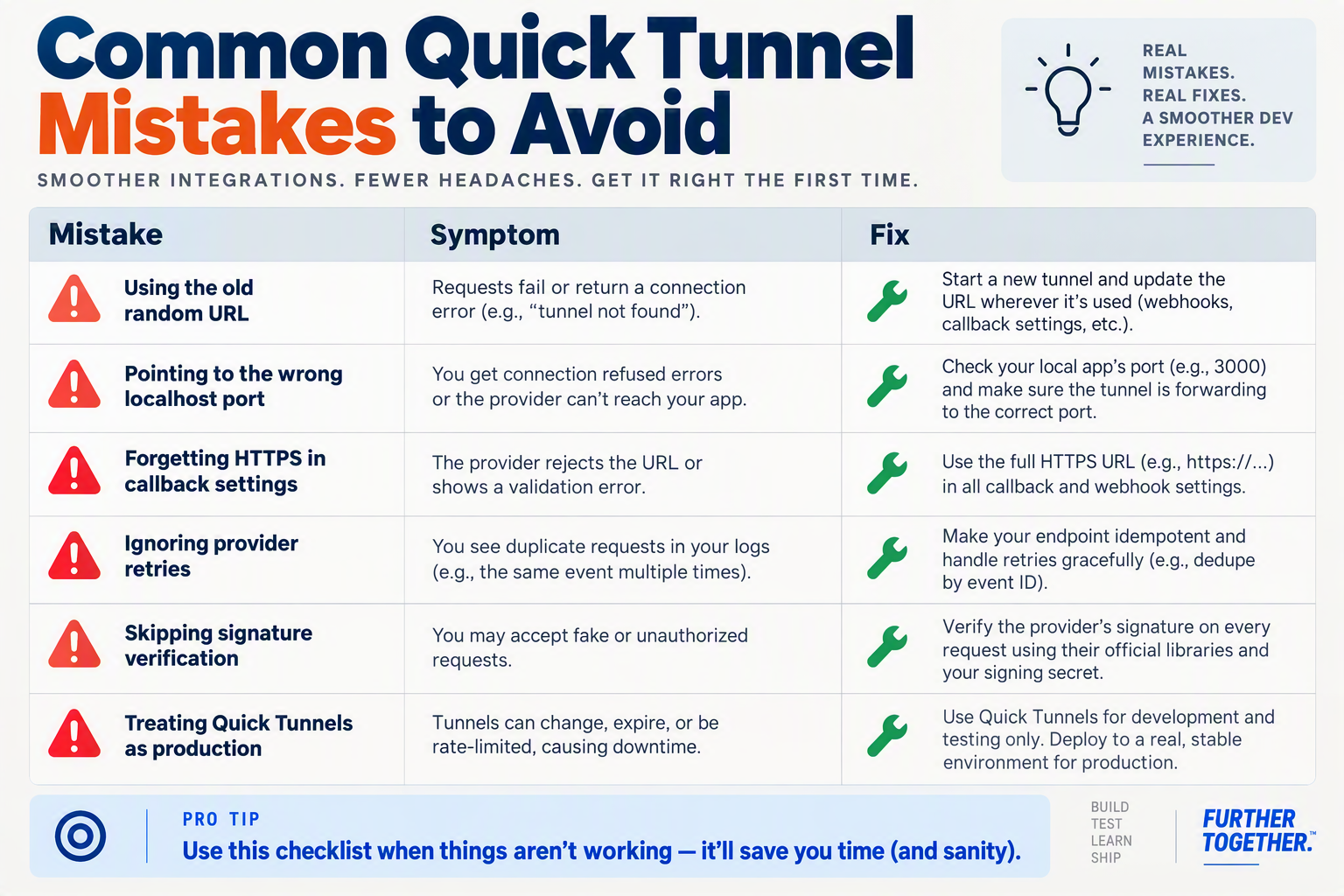
Most Cloudflare Quick Tunnels webhook failures come from treating a temporary development tunnel like stable infrastructure. The fastest fix is to check the generated URL, local port, HTTPS callback requirements, concurrency, and streaming assumptions before blaming the AI voice or messaging API.
Which Quick Tunnel mistakes cause webhook tests to fail?
Cloudflare says Quick Tunnels can “put localhost on the Internet” with no account, DNS, or open ports required, but the trycloudflare.com URL is disposable. Hacker News interest on September 22, 2026 — 16 points and 13 comments in 1.1 hours — reflects how useful this is for developers, but the same speed creates easy-to-miss testing mistakes.
| Mistake | Symptom in webhook testing | Why it happens | Fix |
|---|---|---|---|
Reusing an old trycloudflare.com URL | Provider returns timeout, 404, or signature retries never arrive | Every Quick Tunnel generates a temporary public URL | Copy the new HTTPS URL into the voice, WhatsApp, or messaging webhook settings after every restart |
Pointing cloudflared at the wrong local port | Tunnel opens, but callbacks hit the wrong app or fail with connection errors | Local API runs on localhost:3000, while tunnel targets localhost:8000, or vice versa | Start with a health route such as /health, then run curl https://your-url.trycloudflare.com/health |
| Testing production-scale traffic | Some callbacks succeed, others fail under load | Cloudflare docs state that Quick Tunnels have a hard limit of 200 in-flight requests | Use Quick Tunnels for functional tests; move load, soak, or queue testing to a persistent Cloudflare Tunnel or staging endpoint |
| Assuming uptime or stable availability | Webhooks fail midway through a demo or long test session | Cloudflare Sandbox tunnel docs describe trycloudflare.com as a debug aid with no uptime guarantee | Do not use Quick Tunnels for production, customer demos, or long-running QA windows |
| Using Server-Sent Events through trycloudflare.com | Streaming updates do not arrive or disconnect unexpectedly | Cloudflare Sandbox tunnel docs state “No Server-Sent Events” for trycloudflare.com tunnels | Use normal webhook POST callbacks for Quick Tunnel tests; use a different setup for SSE-dependent flows |
| Ignoring raw-body signature validation | Webhook signature checks fail even though the payload looks correct | JSON middleware may mutate the request body before verification | Capture the raw body before parsing JSON, then verify the provider signature against that exact byte sequence |
How should you debug a broken AI voice webhook?
Start with the transport layer, not the AI logic. A voice-agent test can include a call-start event, media setup, transcription callback, tool-call result, call-ended event, recording callback, and summary payload; if the tunnel URL is stale, every downstream step looks broken.
Use this quick sequence:
- Confirm the local server works with
curl http://localhost:PORT/health. - Confirm the public tunnel works with
curl https://SUBDOMAIN.trycloudflare.com/health. - Log method, path, headers, and body size before running business logic.
- Return a fast 2xx response and move slow AI work to a queue or async handler.
- Record timestamps for provider send time, tunnel receive time, and local handler completion.
Cloudflare’s 200 in-flight request limit matters for AI communication APIs because retries can amplify concurrency. A failed webhook may trigger provider retries while new call or message events continue arriving, so a small local test can become noisy quickly.
What mistakes are specific to voice and messaging APIs?
Voice and messaging systems are stricter than ordinary form webhooks. Providers often expect HTTPS callbacks, fast acknowledgements, exact paths, and valid signatures; a tunnel hides none of those requirements.
For example, when testing a Twilio-style call flow or a WhatsApp Business message status callback, avoid changing multiple variables at once. Keep the prompt, model, and business logic stable while you verify the route, tunnel, and payload contract. As of September 2026, platforms such as CallMissed expose developer-friendly communication surfaces including a Twilio-compatible Calls API and WhatsApp Business workflows, so Quick Tunnels are useful for local integration testing before moving to a persistent environment.
The rule of thumb: Quick Tunnels are excellent for “does my webhook receive the real event?” testing, not for “will this run reliably in production?” testing.
Frequently Asked Questions
What are Cloudflare Quick Tunnels used for in AI voice and messaging API testing?
Are Cloudflare Quick Tunnels safe to use for production webhooks?
How do I test AI voice webhooks locally using cloudflared Quick Tunnels?
cloudflared tunnel --url http://localhost:PORT, copy the generated trycloudflare.com HTTPS URL, and paste it into your voice API provider’s webhook configuration. For example, a developer testing a CallMissed Twilio-compatible Calls API integration could point call-status, recording, transcript, or agent-event callbacks to the temporary tunnel URL while validating local code paths.Why does my Quick Tunnel URL keep changing during webhook testing?
cloudflared exits, or you create a new session, you should expect a new public URL and update webhook settings in your provider dashboard or test script.What limits should developers know before using Cloudflare Quick Tunnels for webhook testing?
When should I upgrade from Cloudflare Quick Tunnels to Cloudflare Tunnel or Zero Trust?
What resources and next steps help you ship safer API tests?
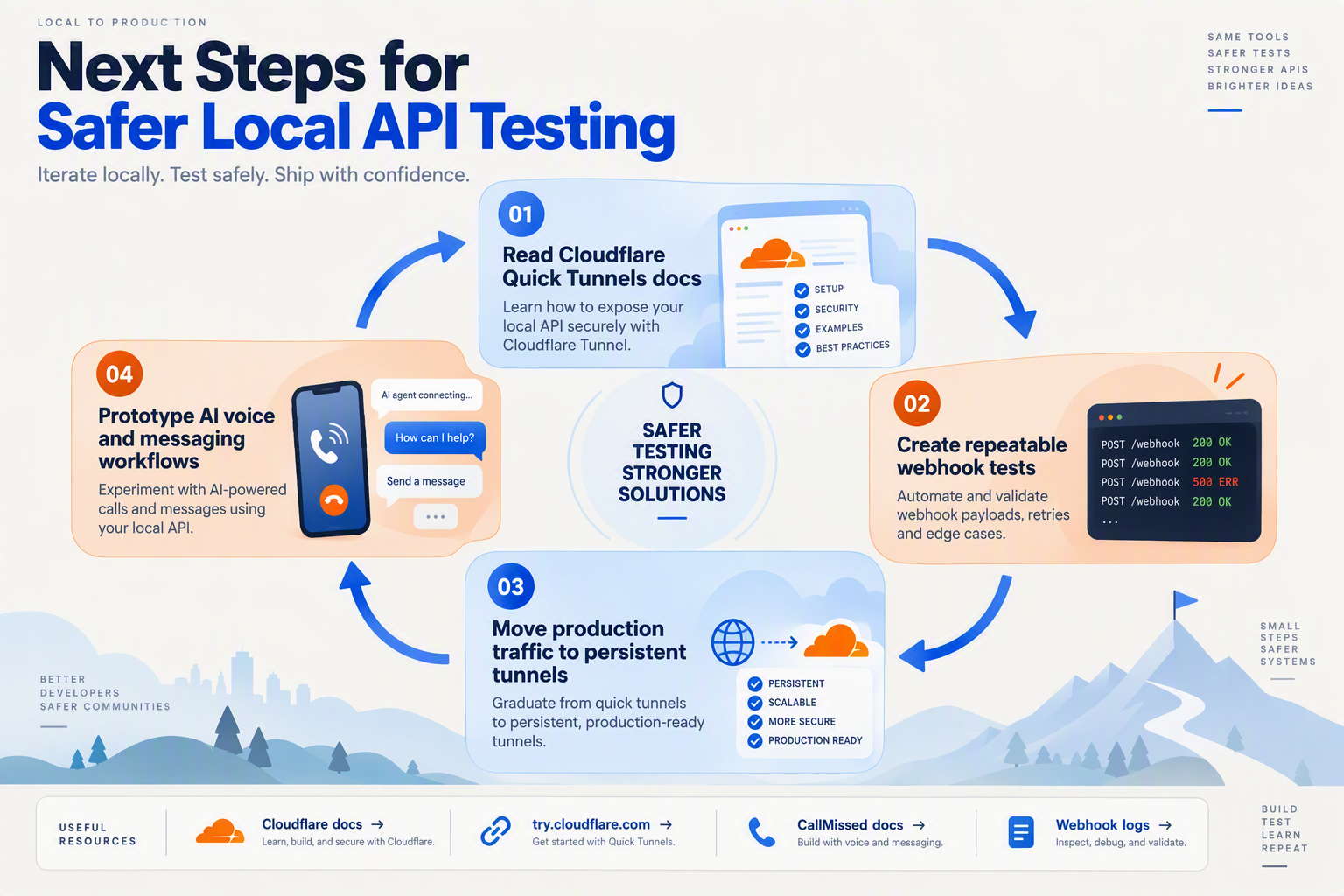
Ship safer API tests by treating Cloudflare Quick Tunnels as a short-lived development tool, then graduating validated webhook flows into persistent tunnels, staging infrastructure, and monitored production endpoints. The safest next step is to turn what you tested locally into a repeatable checklist: payload validation, signature verification, retries, timeouts, concurrency limits, and rollback.
Which Cloudflare resources should you bookmark?
Use Cloudflare’s own docs as the source of truth when deciding whether a tunnel is suitable for a test or a release.
- Cloudflare Quick Tunnels docs: Cloudflare states that Quick Tunnels have a hard limit of 200 in-flight requests, which matters if your AI voice test triggers multiple callbacks per call.
- Cloudflare trycloudflare.com page: Cloudflare describes Quick Tunnels as a way to “put localhost on the Internet” with free encrypted HTTPS, no account, no DNS, and no open ports.
- Cloudflare Sandbox tunnel docs: Cloudflare positions trycloudflare.com as a debug aid with no uptime guarantee, and the Sandbox docs also note no Server-Sent Events support.
- Cloudflare Zero Trust / named Tunnel docs: Use these when your endpoint needs stable hostnames, access policies, team ownership, and production-like reliability.
The September 22, 2026 Hacker News thread reaching 16 points and 13 comments in 1.1 hours is a useful signal that developers are actively revisiting this workflow, but Cloudflare’s documented limits should drive your architecture decisions.
What should your final local testing checklist include?
Before you call a Quick Tunnel test “done,” verify the behavior that usually breaks AI voice and messaging integrations in production:
- Webhook authenticity
- Validate provider signatures.
- Reject unsigned or malformed requests.
- Log the exact canonical string used for verification.
- Event ordering
- Confirm your app handles out-of-order callbacks.
- Make call, message, and transcript events idempotent.
- Store provider event IDs where available.
- Timeout behavior
- Return fast
2xxresponses when the provider expects acknowledgment. - Move slow LLM, CRM, or database work into background jobs.
- Test provider retry behavior by intentionally returning
500.
- Concurrency and backpressure
- Remember that Cloudflare documents a 200 in-flight request cap for Quick Tunnels.
- Simulate several concurrent calls or message threads.
- Confirm your local server does not block on one long-running AI request.
- Streaming assumptions
- Do not assume every tunnel mode supports every streaming pattern.
- Cloudflare Sandbox tunnel docs specifically mention no Server-Sent Events.
- Test WebSocket or realtime media paths separately from ordinary webhooks.
How should teams move from Quick Tunnels to safer releases?
A practical release path looks like this:
- Step 1: Local proof
- Use a Quick Tunnel for fast webhook iteration.
- Capture real payloads and save fixtures.
- Write automated tests from those fixtures.
- Step 2: Shared staging
- Move the same handlers to a stable staging URL.
- Add environment-specific signing secrets.
- Enable request logs, replay tools, and alerting.
- Step 3: Production hardening
- Use persistent infrastructure instead of trycloudflare.com.
- Document retry, timeout, and idempotency rules.
- Add dashboards for callback failures and latency spikes.
For AI communication platforms, this discipline is especially important because one “call” can produce many events: call started, media connected, transcript chunks, tool calls, handoff, recording, summary, and disposition.
How does this apply to CallMissed API testing?
For teams building with CallMissed, Quick Tunnels are useful for validating local integrations before deployment. CallMissed supports a Twilio-compatible Calls API, real-time voice sessions over an API and SDK, WhatsApp Business through the official Meta Cloud API, and outbound webhooks with per-agent event subscriptions, so local callback testing can cover realistic voice and messaging flows.
A good next experiment is simple: expose your local /webhooks/callmissed endpoint with cloudflared, trigger one inbound call or WhatsApp test flow, verify the payload, then promote the same handler to staging only after signature checks, retries, and idempotency pass. That keeps Quick Tunnels where they belong: fast for development, disciplined before production.
Conclusion
Cloudflare Quick Tunnels are becoming a practical default for early-stage AI voice and messaging API testing: fast enough for local webhook loops, simple enough for experiments, and clearly bounded as a development tool rather than production infrastructure.
Key takeaways:
- Quick Tunnels make localhost reachable over HTTPS with no signup, DNS change, or open ports, which is ideal for testing voice-call webhooks, WhatsApp callbacks, transcription events, and tool-call payloads.
- They are temporary by design. Cloudflare documents a 200 in-flight request limit, and trycloudflare.com has no uptime guarantee, so production workloads should move to persistent Cloudflare Tunnel or Zero Trust setups.
- AI communication testing is webhook-heavy. A single voice-agent flow may involve call status, media setup, speech-to-text, function calls, CRM updates, summaries, and recordings.
- The current developer interest is real. Cloudflare Quick Tunnels reaching Hacker News on September 22, 2026 with 16 points and 13 comments in 1.1 hours shows renewed demand for faster local API testing.
What to watch next is how teams standardize the path from disposable tunnel testing to secure, observable production AI communication infrastructure.
To explore how AI communication is evolving, check out CallMissed — an AI communication infrastructure platform with voice agents, WhatsApp Business workflows, and a Twilio-compatible Calls API for testing and scaling real customer interactions. What could your team ship faster if every webhook loop took minutes instead of days?
Related Reading
- Voice Agent API With LiveKit Support: Verified 2026 Comparison
- Voice Agent API with LiveKit Support: 2026 Comparison and Verdict
- Voice Agent API With LiveKit Support: OpenAI Realtime vs LiveKit Agents