How to Write Prompts for AI Agents: Support Guide 2026



Learn how to write prompts for AI support agents that cut escalations, protect PII, and answer accurately — with templates, metrics, and guardrails.
How to Write Prompts for AI Agents: Support Guide 2026
On September 17, 2026, security researcher Thomas Ptacek published "How to Write with an LLM" — and the essay rocketed to the top of HackerNews, pulling in 550 points and 360 comments within 42 hours. The advice was deliberately contrarian: open the LLM, then close it, and pick up a pen. Writers everywhere nodded along. But customer support teams don't get that luxury. The AI agent is already on the phone, already in the WhatsApp inbox, already drafting replies while a customer waits — and whether it sounds helpful or robotic, whether it escalates at the right moment or digs the hole deeper, comes down to one skill: how to write prompts for AI agents.
That skill is having a moment. The HackerNews thread captured a genuine shift: as one commenter noted, a "style guide provided to the LLM that it can match" was the difference between output that reads like a machine and writing that reads like a person. The same principle applies to customer support with far higher stakes. A vague prompt produces vague answers — an agent that guesses, hallucinates, or worse, argues with an already-frustrated customer. A well-structured prompt produces consistent tone, answers grounded in your actual knowledge base, and clean handoffs to a human when the conversation goes sideways.
The problem: most prompt guidance online is shallow. Copy-paste greeting templates, a few bullet points, nothing repeatable. What's missing is an end-to-end framework — how to define the agent's persona and guardrails, wire in knowledge bases and tools, handle the agentic loop of tool calling, and write escalation logic so the AI knows when to stop and hand off to a person.
That's exactly what this guide covers. You'll learn the prompt structure we use for production support agents, working templates for common scenarios, and an iterate-and-test workflow to optimize prompts against real conversations. Platforms like CallMissed, which let businesses build AI voice and chat support agents, make prompt quality the single biggest lever between an agent that resolves issues and one that creates them.
By the end, you'll have a methodology — not just prompts to copy, but a way to write, test, and refine them as your support operation evolves.
What makes a good prompt for an AI customer-support agent?

A good prompt for an AI customer-support agent gives the model four things: a defined role and mandate, hard guardrails, a bounded source of truth, and explicit escalation logic. Miss any one of those layers and the agent improvises — and improvisation is what turns a routine billing question into an angry call.
Why support prompts are not writing prompts
The HackerNews thread around Thomas Ptacek's "How to Write with an LLM" — 550 points and 360 comments within 42 hours of its September 17, 2026 publication — advised writers to draft first and use the model as an editor. Support teams can't work that way: the prompt isn't a drafting aid, it's the agent's operating system, loaded fresh on every call and every chat. One commenter in that same thread captured the stakes, warning that an "LLM paragraph will register to much of your audience not as writing but as output." For a customer waiting on a support line, that robotic output is the entire brand experience.
The four layers of a production support prompt
Most copy-paste templates stop at a greeting and a bullet list of FAQs. A prompt that survives production contact with real customers is built from four layers:
- Role and mandate. Who the agent is, what it resolves, and what it must never attempt. Example: "You are the billing agent for a SaaS company. Resolve invoice and payment questions from the knowledge base. Never promise refunds."
- Guardrails. Hard limits the model cannot cross: no invented policies, no fabricated SLA promises, no arguing with a frustrated customer, no decisions that require human approval.
- Source of truth. Which knowledge base to answer from, which tools it may call (order lookup, CRM records, web search), and an explicit instruction to say "I don't know" when the source doesn't contain the answer.
- Escalation logic. Specific, triggerable conditions for a human handoff: a second or third failed attempt, frustration language from the customer, an out-of-scope request, or anything involving money beyond a set threshold.
A good prompt is engineered for failure modes
Each layer maps to a specific failure. A missing role produces off-topic answers. Missing guardrails produce hallucinated policies — the agent invents a refund policy that doesn't exist. A missing source of truth produces confident wrong answers. And missing escalation logic produces the worst outcome of all: an agent that keeps trying, and failing, while a customer gets angrier. In markets like India, where customers switch between English, Hindi, and code-mixed Hinglish mid-sentence, the prompt should also specify language expectations — CallMissed's speech recognition covers 22 Indian languages precisely because support conversations refuse to stay in one language.
A good prompt is a testable prompt
Finally, a good prompt is one you can measure. The teams that iterate fastest treat prompts like code: version them, evaluate them, and A/B test them against real conversations. Platforms such as CallMissed support exactly this workflow — eval suites, A/B experiments, and call scoring against your own QA rubrics — so a prompt change is judged on resolution quality, not on how the reply reads in isolation.
What do you need before writing AI support-agent prompts?
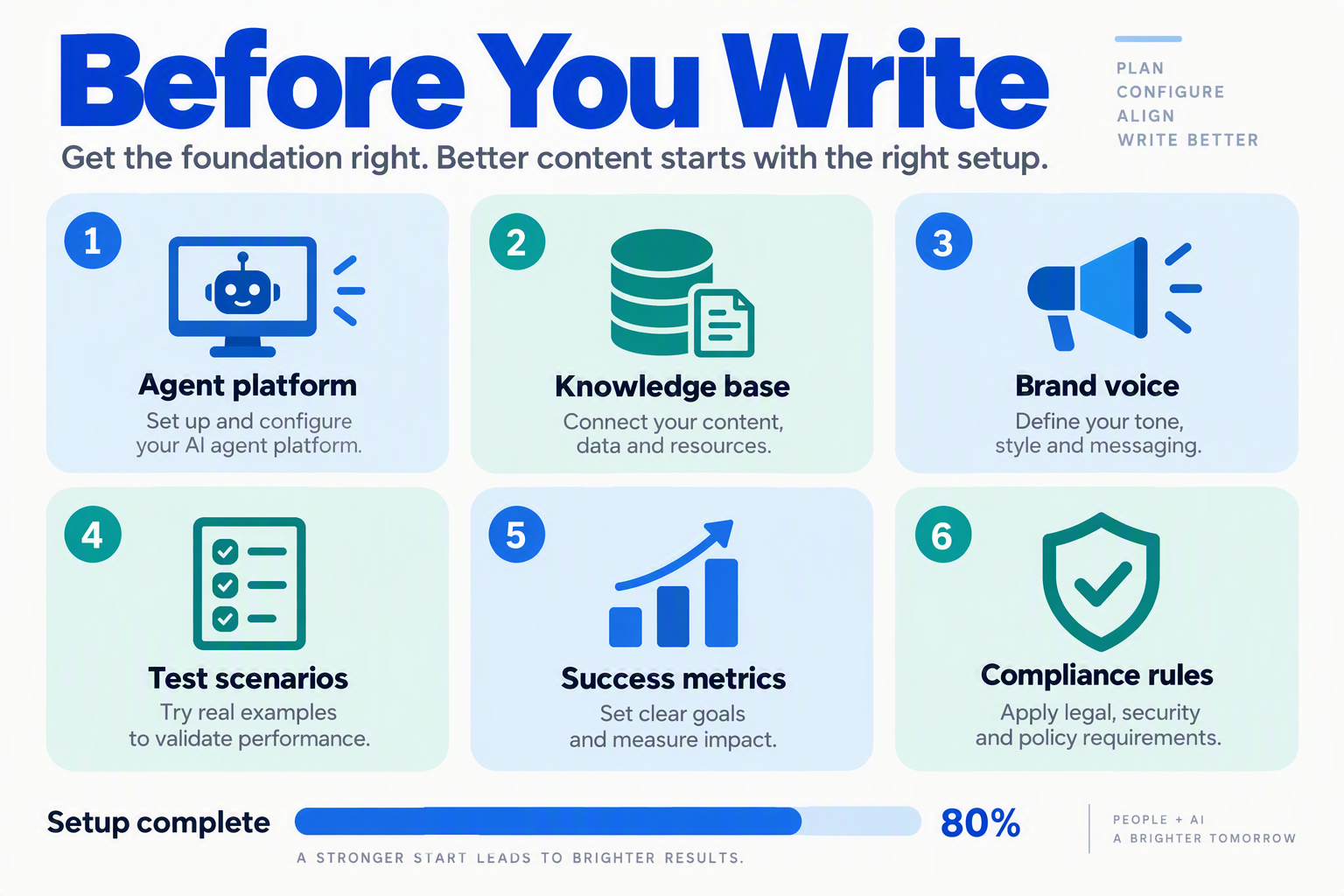
Before you write a single prompt, assemble the assets the prompt will reference: a knowledge base, a tone guide, a tool list, an escalation plan, and real conversation data to evaluate against. The prompt is the agent's operating manual — and an operating manual is useless if the systems it points to don't exist yet.
Section 1 defined what a good prompt must contain: role, guardrails, source of truth, escalation logic. This section is the checklist you gather before writing those layers. Skipping it is the most common reason prompts fail in production: the model has nothing grounded to answer from, no tool to resolve the issue, and no defined moment to stop and hand off to a human.
The prerequisite checklist for support-agent prompts
The table below lists what you need before writing prompts for an AI customer-support agent, why each item matters, and how to prepare it.
| Prerequisite | What it is | Why you need it | How to prepare it |
|---|---|---|---|
| Knowledge base | FAQs, product docs, policies, past resolutions in text, PDF or web-page form | Grounds the agent in facts so it stops hallucinating answers | Export support documentation and upload it to a RAG store — platforms like CallMissed ingest text, web pages and PDFs directly |
| Brand voice & tone guide | The style, vocabulary and constraints your company writes in | One HackerNews commenter on Ptacek's essay said a "style guide provided to the LLM that it can match" was the difference between machine-sounding and human-sounding output | Pull 10–15 real replies from your best human agents and distill their patterns |
| Tool & API list | Functions the agent can call: CRM lookup, order status, refunds, appointment booking | Turns the agent from a talker into a resolver | Map each tool to a trigger phrase, then expose them as REST tools or MCP servers |
| Escalation & handoff plan | The exact conditions under which a human agent takes over | Keeps the AI from digging a hole when a customer is angry or the issue is novel | Define trigger keywords and confidence rules; test the handoff with your support team |
| Evaluation data | Recorded or pasted real conversations, both good and bad | Gives you a benchmark to measure prompt changes against | Collect 20–30 transcripts and score them against a rubric before touching the prompt |
| Language & localization specs | The languages your customers actually speak | Support in the wrong language reads as negligence, not convenience | Check which regions need code-mixed speech like Hinglish before choosing voice and language models |
Knowledge base first
The single biggest prerequisite is the knowledge base. A prompt can instruct an agent to "answer from internal docs only," but if the docs are outdated, incomplete, or missing, that instruction is empty. CallMissed, the Indian AI communication platform, lets teams build a knowledge base from text, web pages and PDFs and attach it to a voice or chat agent — so the grounding layer exists before the prompt does. Spend the time here: a current, structured knowledge base is worth more than any prompt technique in this guide.
Decide the handoff before you write the prompt
The second prerequisite is the human handoff. Decide in advance which topics or phrases transfer the conversation to a person — refund thresholds, legal complaints, repeated failures. In CallMissed's shared inbox, switching the AI off hands the thread to a human, so the mechanism is straightforward; the hard part is defining the rules. Write them down, share them with your support leads, and only then encode them in the prompt.
With these six items in hand, you're ready for the actual prompt structure — the focus of the next section.
How do you write a support-agent prompt step by step?
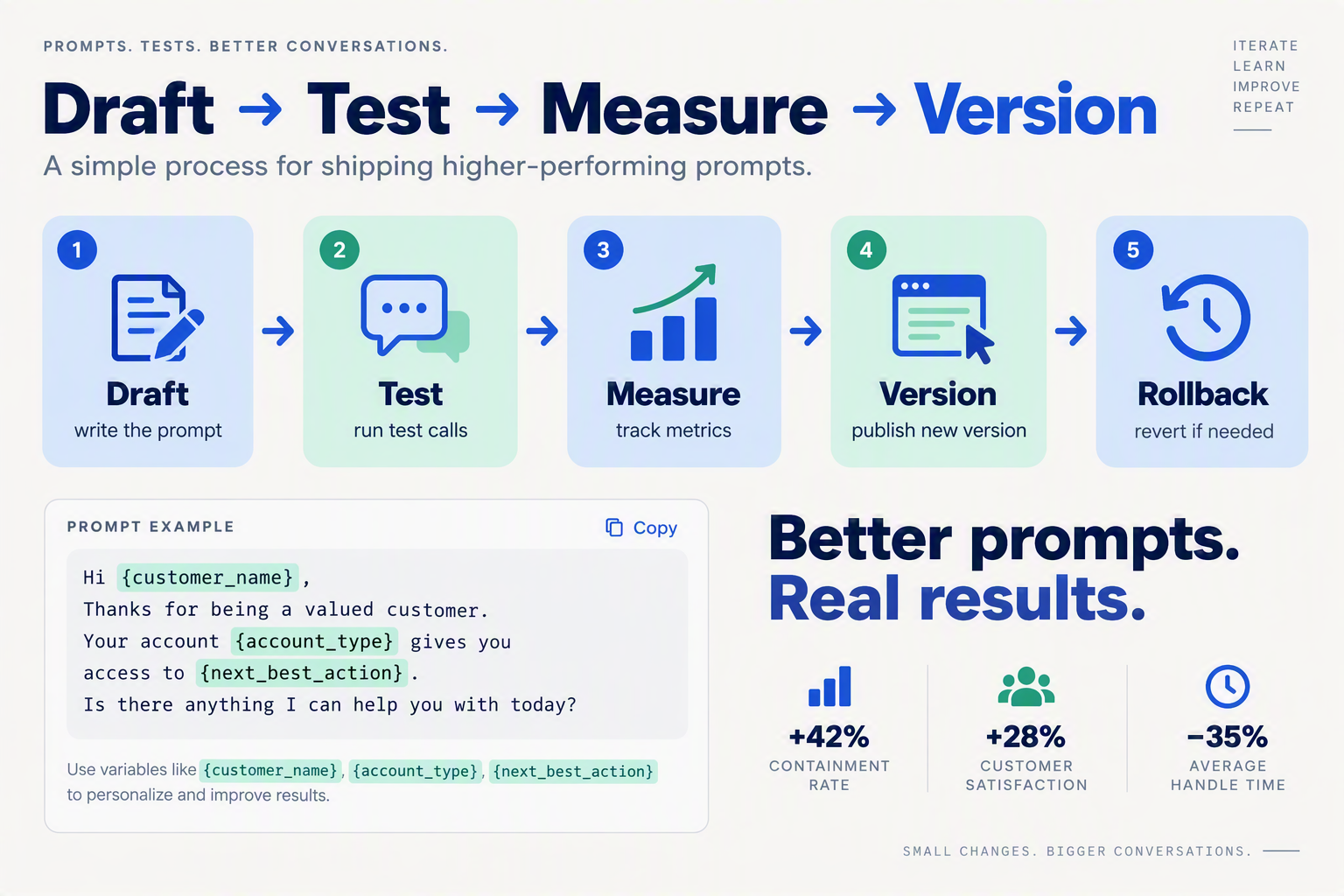
Writing a support-agent prompt is a five-step process: define the job, lock the voice, bound the facts, declare the tools, and write the exits. Do those in order and the model can improvise safely; skip one and it will improvise dangerously.
Step 1: What is the agent's job — really?
The HackerNews commenters around Thomas Ptacek's "How to Write with an LLM" — 550 points and 360 comments within 42 hours of its September 17, 2026 publication — kept circling back to one idea: a "style guide provided to the LLM that it can match" was the difference between machine output and human-sounding writing. That's true for support, but a style guide only works once the agent knows what its job actually is.
Start with one sentence: "You are the first-line support agent for [product], resolving account, billing and order issues." Then list what is in scope and — just as importantly — what is not. A prompt that says "help with anything" produces an agent that helps with anything, including the things that get companies into regulatory trouble. Write the constraints as hard rules: never promise a refund you can't issue, never invent a policy, never share internal data.
Step 2: How do you write a voice the model can match?
Ptacek's essay advised writers to draft first and let the LLM edit; support agents can't draft first because the customer is already waiting. But the style-guide insight carries straight over. Write three to five concrete rules: "Reply in under 40 words per message. Match the customer's language. Never use emoji. Stay one degree calmer than the customer." Then include one before-and-after example pair in the prompt itself — a single few-shot example communicates more than ten adjectives ever will.
Step 3: Where does the agent's knowledge come from?
A support agent shouldn't answer from memory; it should answer from your knowledge base. Platforms like CallMissed, built for AI voice and chat support agents, let you attach a knowledge base built from text, web pages and PDFs, so the model grounds every reply in your actual policies. Bind the retrieval explicitly: "Answer only from the knowledge base. If the answer isn't there, say so and offer to hand off." Unbounded agents hallucinate policies; bounded agents escalate instead.
Step 4: Which tools can the agent call — and when?
Modern support agents don't just chat — they take actions. List every tool the agent may call (check order status, issue a refund, schedule a callback) with exact parameters, and describe the loop: call the tool, read the result, decide the next step. Most prompt guides skip this, which is why agents guess when to act instead of knowing. Write one rule into every tool description: "Call this tool instead of guessing."
Step 5: When should the agent stop and hand off?
The most important lines in any support prompt say when to stop: the customer is angry, the question is out of scope, a tool errored, or the agent tried twice without resolving. Write the handoff verbatim — "I can see this needs a human. Let me connect you" — and make sure the platform can actually execute it. CallMissed, for example, supports human-handoff queues and squads that pass a live call between agents, but the prompt has to trigger them.
Finally, treat the prompt as a hypothesis, not a deliverable. Run it against a dozen real past conversations, score the outcomes against a QA rubric, and iterate — version the prompt so you can publish and roll back. The best-written prompt is still a draft until real conversations prove it.
How do prompts control tool calling, handoffs, and escalation?
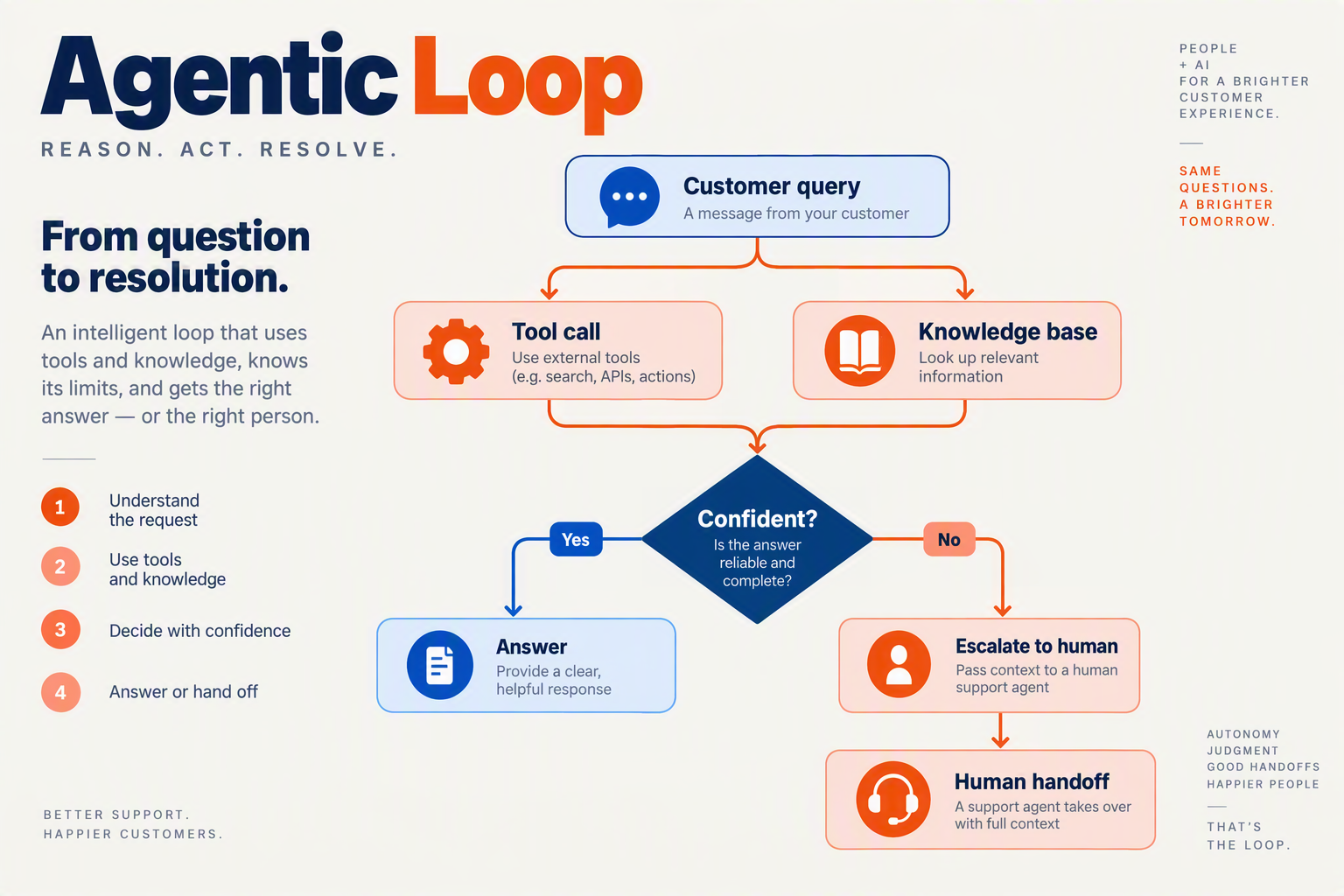
Prompts control tool calling, handoffs, and escalation by turning the agent's judgment into explicit, testable rules: which tools it may reach for, what conditions trigger a transfer, and what counts as a case it cannot win alone. Get those rules wrong, and the agent either never asks for help or escalates every mildly unhappy customer.
The agentic loop: your prompt is a tool-use policy
When a customer asks "where's my order?", the agent doesn't answer from memory — it enters an agentic loop: the model decides a tool is needed, calls it, reads the result, and continues. The prompt is where you control that loop. List the tools the agent can use (order lookup, knowledge-base search, refund issuance, CRM update) and, just as importantly, state when each is appropriate. "Always look up the order before quoting a delivery date" beats "be helpful" because it stops the model from guessing.
Function schemas tell the model what a tool does; the prompt tells it when to use one. The same insight from the HackerNews thread on Thomas Ptacek's "How to Write with an LLM" applies here — a commenter noted that a style guide the model could match was the difference between machine output and writing that sounds human. Tool discipline works the same way. A support agent wired to a RAG knowledge base and a refund tool will happily refund a customer who never paid, unless the prompt says: "Verify payment status before issuing a refund."
Writing handoff conditions into the prompt
Handoffs are just tool calls with a human on the other end. Platforms like CallMissed support agent squads — where one agent hands a live call to another — and a human-handoff queue that switches the AI off and passes the thread to a person. Your prompt decides when either fires.
Good handoff rules are specific and observable:
- "Transfer to a billing specialist if the customer asks about an invoice older than 90 days."
- "If the customer asks twice to speak to a human, hand off immediately."
- "If the customer's tone is clearly frustrated and the same question has been asked three times, transfer."
Vague instructions like "escalate when needed" make agent behavior unpredictable — and the customer can't tell whether they're talking to a bot or a human who has no idea what the bot just promised.
Making escalation logic explicit
Escalation deserves its own rules because it's the highest-stakes tool in the prompt. Define what counts as unresolvable: issues outside the knowledge base, account-security questions, legal requests, or a resolution attempt that failed twice. Then give the agent a default path — an escalate_to_human tool that passes a one-line summary along, so the handoff is a clean transfer instead of a cold restart where the customer repeats everything.
One pattern that works in production is a three-strike rule: the agent attempts a resolution, the customer rejects it, and the third failure triggers escalation with a transcript summary attached. CallMissed's live call monitoring — where a supervisor can listen, whisper, or barge in — shows why the prompt should also state when a human might need to take over mid-call. Escalation isn't a failure of the prompt; it's the prompt working as designed.
How do you ground prompts in a knowledge base to prevent hallucinations?
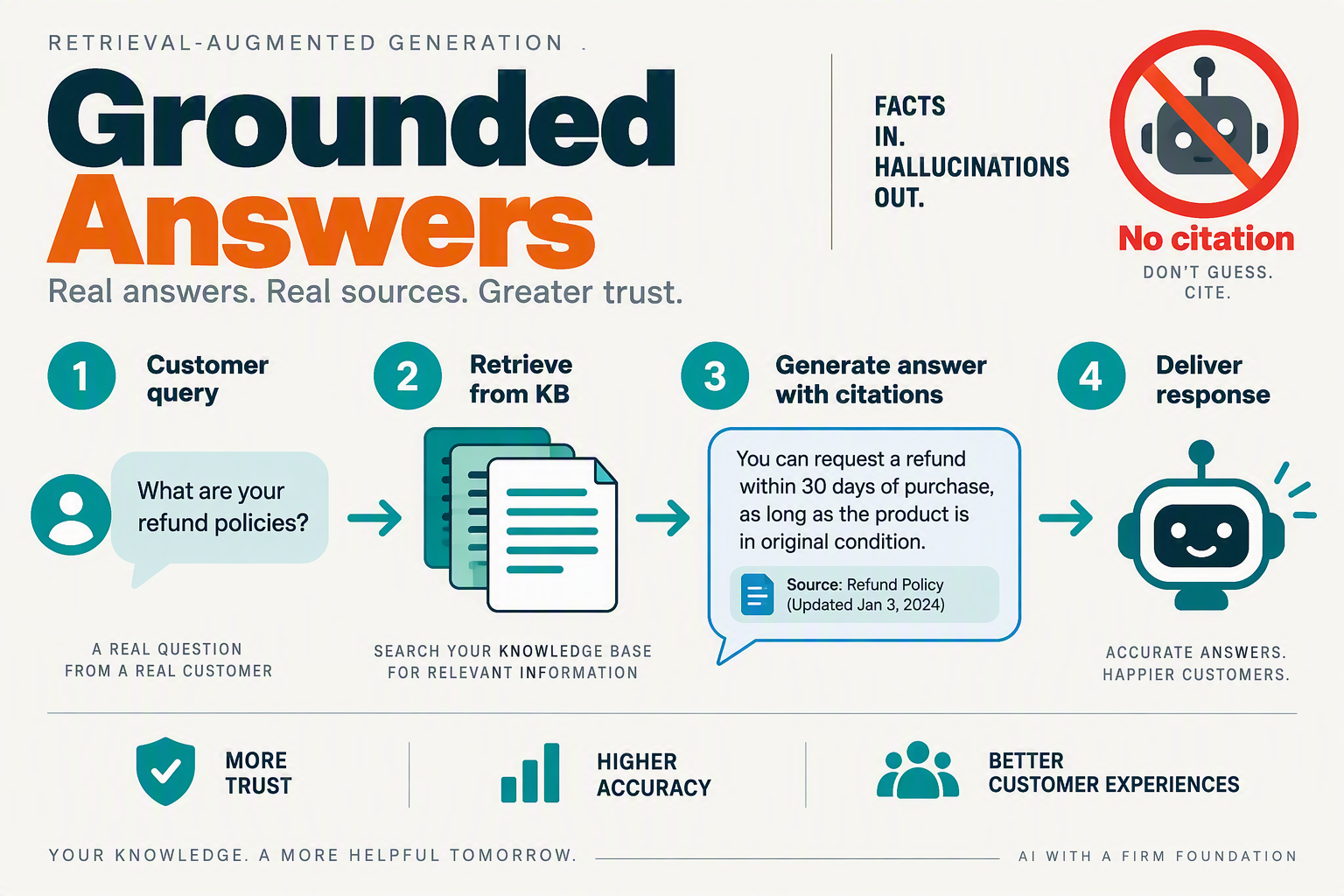
You prevent hallucinations by giving the agent a bounded source of truth — a knowledge base it is explicitly required to cite — and by writing the prompt so that "I don't know" is a safe, well-defined answer instead of a failure the model tries to improvise around.
Why the model's memory is not your source of truth
An LLM does not remember your return policy; it generates text that sounds like a return policy. That distinction is the entire hallucination problem. Thomas Ptacek's "How to Write with an LLM" essay — 550 points and 360 comments on HackerNews within 42 hours of its September 17, 2026 publication — told writers to draft first and treat the model as an editor. Support agents don't get that luxury: every customer query is a fresh draft, and the model will happily produce a confident, wrong answer if the prompt lets it. Grounding is the only remedy.
Three grounding rules to bake into every support prompt
- Restrict answers to retrieved context. Write an explicit instruction: "Answer only from the knowledge-base snippets provided below. If the information is not in the snippets, do not guess." This turns retrieval-augmented generation (RAG) into a hard constraint rather than a suggestion.
- Make uncertainty an explicit branch. Give the agent a scripted fallback: "If no snippet answers the question, say: 'I'm not sure about that — let me connect you with a specialist,' and trigger the human-handoff flow." When uncertainty is a designed output instead of an error, the model stops hallucinating to save face.
- Require a source for every claim. Instruct the agent to name the document or section it relied on. This won't just reassure customers — it gives your QA team a fast way to audit which knowledge-base gaps are causing wrong answers.
Retrieval quality is a prompt-adjacent job
A great prompt cannot rescue a stale knowledge base. If your policies changed last month but the PDF uploaded last year, the agent will cite the PDF happily. Keep the knowledge base fresh, split documents into focused chunks (a 40-page policy PDF retrieves poorly as one block), and version your knowledge base just like you version your prompt — publish the new version, keep the old one for rollback. Platforms like CallMissed let support teams build agents with a knowledge base that ingests text, web pages and PDFs, and version agents with publish-and-rollback, which makes this workflow practical for non-engineers.
Test for hallucinations before customers do
Grounding rules only work if you verify them. Build an eval set of the queries most likely to trigger hallucination: out-of-scope questions ("Can you recommend a restaurant?"), edge cases ("What if my package arrives damaged on a public holiday?"), and questions your knowledge base doesn't cover at all. Run each against the agent and check that the fallback triggers. CallMissed's platform includes eval suites and A/B experiments for exactly this loop, so you can compare a stricter grounding prompt against a looser one on real conversation data before you ship it.
One more thing worth remembering from that HackerNews thread: the commenter who succeeded with a "style guide provided to the LLM that it can match" was writing prose, not policy. In customer support, grounding comes first and style second — a perfectly charming answer that invents a refund policy is still a hallucination.
How do you set guardrails for abusive customers, off-topic chats, and PII?
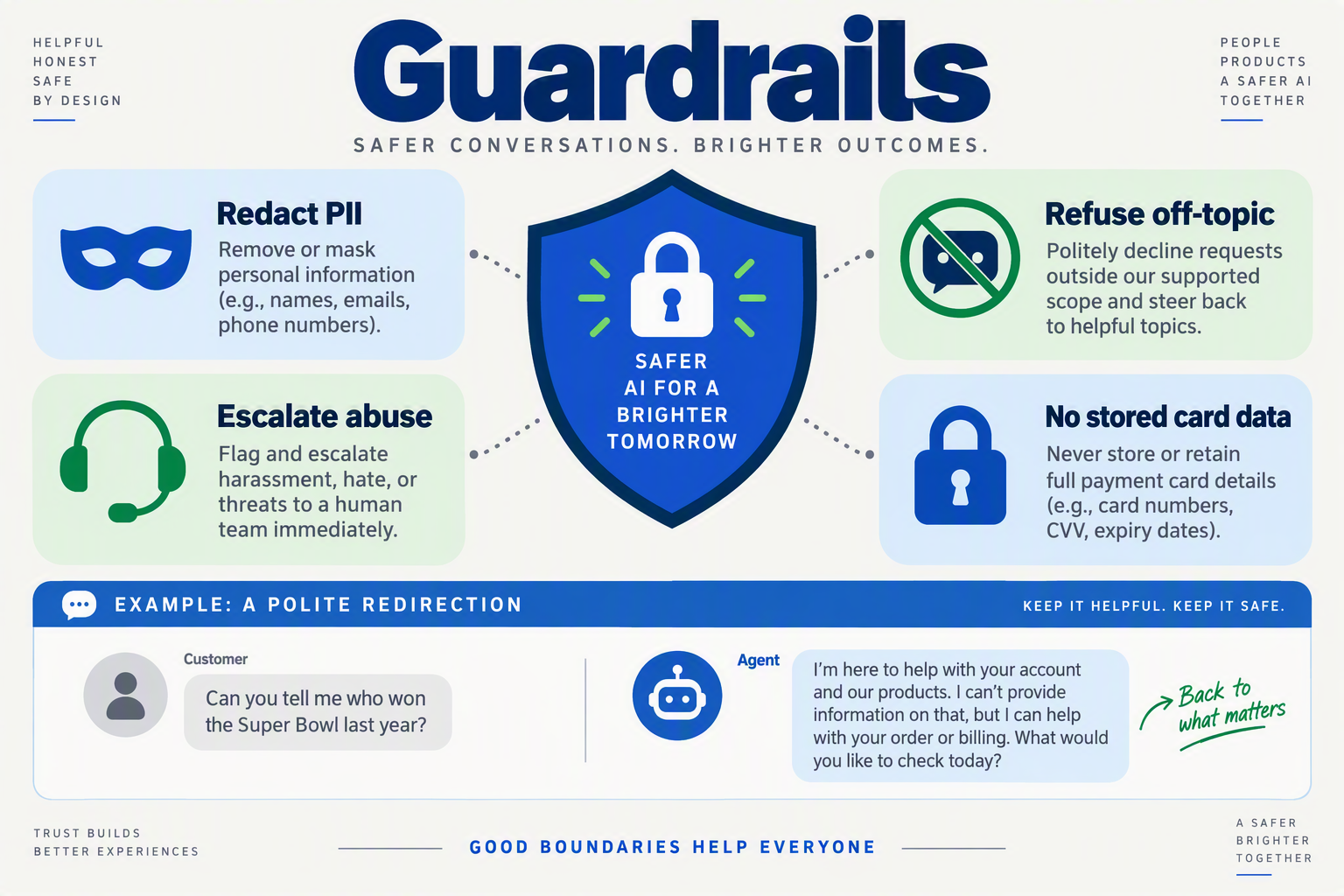
Guardrails live in three layers: the system prompt, the tools the agent can actually call, and the platform settings around recording and data. Write them as hard constraints — "never," "always," "must not" — not as suggestions, and validate them with adversarial test inputs before the agent takes its first live call.
Guardrails for abusive customers: de-escalate, don't argue
An LLM trained to be agreeable has two failure modes with a hostile customer: it apologizes excessively, or it mirrors the hostility. Both make the interaction worse. The guardrail has to specify behavior, tone, and the escape hatch:
If the customer uses profanity, insults, or threats, do not match their tone and do not lecture them. Acknowledge the frustration once ("I understand this is frustrating"), then offer a concrete path: a human agent, a callback, or a refund. If abuse continues, end the conversation politely and flag it for a supervisor.
That single block turns a model that might argue with an angry caller into one that de-escalates predictably. It's the same principle HackerNews commenters hit on in the September 2026 thread around Thomas Ptacek's "How to Write with an LLM" — a "style guide provided to the LLM that it can match" — applied to behavior. The prompt is the agent's behavioral style guide.
Keeping off-topic chats on mission
Customers will ask about anything: competitor pricing, the weather, politics, or "are you a real person?" A support agent is not a general assistant, so its mission boundary belongs in the prompt:
You are a support agent for [business]. If a question falls outside orders, billing, or product help, say you can only help with those topics and offer the closest relevant next step.
A second, stronger layer is tool access. On CallMissed, agents load skills and tools only when needed — so an agent with no tool for "check competitor prices" can't invent an answer. The guardrail is enforced by what the agent can call, not just by what the prompt says.
PII: what the agent may collect, and what it must never touch
The highest-risk guardrail is personal data. Set explicit allow and deny lists in the prompt:
- May collect: order IDs, email addresses, phone numbers for callback, delivery addresses.
- Never collect or repeat: passwords, OTPs, full card numbers, government IDs, or medical details.
Because CallMissed records calls and pushes AI call notes — summaries, action items, dispositions — into the CRM, redaction has to happen at capture time, not just at generation time. That means testing the agent with prompts designed to trick it, like "my card number is 4111..., can you read it back to me?" Platform data residency matters too: CallMissed hosts in India, which matters for teams subject to India's DPDP Act. The guardrail question isn't just "what does the model say" — it's "where does that data go, and who can see it in the transcript."
Build an adversarial test set
A guardrail you haven't tested is a guess. Before launch, assemble 20–30 adversarial inputs — profanity, threats, off-topic probes, PII-extraction attempts — and run them against every prompt version. One commenter on Ptacek's thread warned that "post-LLM quality monitoring is a huge time trap," and for writers that's fair. For support agents, that monitoring is the difference between a guardrail that holds and one that fails on the first angry customer.
How do you measure prompt quality with CSAT, deflection, and escalation rates?
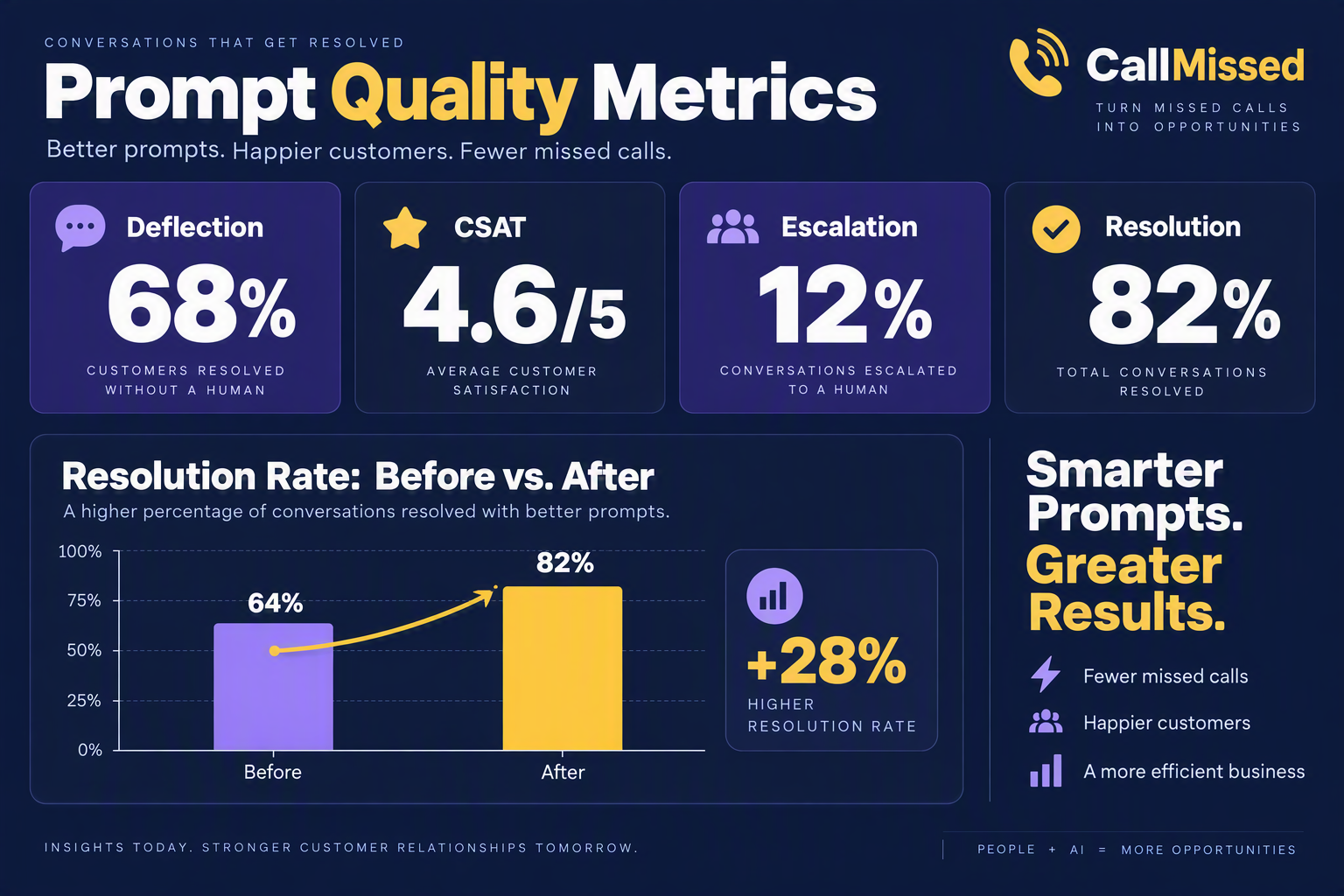
Start with CSAT, deflection, and escalation — read as a set
You measure prompt quality with three numbers — CSAT, deflection rate, and escalation rate — read together, plus repeat-contact rate as a check on all three. No single one of them tells the truth alone: a prompt that deflects more calls but tanks satisfaction is a false win, and a prompt that escalates early isn't necessarily worse — it may just be honest about its limits.
| Metric | Definition | What it signals | Warning sign |
|---|---|---|---|
| CSAT | Post-interaction survey score (typically 1–5) | Whether customers liked the outcome | Score drops while deflection rises |
| Deflection rate | % of conversations resolved with no human handoff | How much volume the AI truly absorbs | Deflection up, CSAT down |
| Escalation rate | % handed to a human, bucketed by reason | Whether guardrails and limits are working | Escalating for the wrong reasons |
| Repeat-contact rate | Customers re-contacting within 24–72 hours | Hidden (silent) escalations | Creeping up despite high deflection |
Define each metric before you change a single word
The numbers are only comparable if everyone defines them the same way. A "deflected" conversation should require three conditions: no human handoff, a resolved disposition, and no repeat contact within 24–72 hours. Without the third condition, repeat contacts quietly inflate your deflection rate. Escalation rate should be bucketed by cause — customer asked for a human, the agent hit a guardrail, or the agent judged itself out of depth — because only the last two are actually about prompt quality. Escalation is not failure; it's your guardrails working.
Run prompt changes like product experiments
Baseline all three metrics for two weeks, change exactly one variable in the prompt (tone, guardrail, escalation threshold, knowledge-base instructions), and measure for another two weeks. The prompt is the cheapest product change you'll ever ship, and it deserves the same A/B discipline as a feature release. Tools that support this natively — CallMissed's agent console includes A/B experiments, eval suites, and call scoring against your own QA rubrics — let you test a candidate prompt on recorded calls before it ever talks to a live customer.
Read the set, not the single number
The combination of metrics tells the real story. Deflection up with CSAT flat or better means the prompt is working. Deflection up with CSAT down means you've optimized for containment, not service — customers are being brushed off. Escalation up with CSAT up often means the AI is recognizing its limits earlier, which is a prompt win, not a regression. Repeat-contact rate creeping up means your deflection number is lying to you.
Watch the qualitative signals that explain the numbers
Metrics tell you whether a prompt change worked; transcripts tell you why — and why is where your next prompt edit comes from. Track the share of calls ending with an unresolved action item, sentiment in the transcript, and customer verbatim around handoffs. One commenter on the September 2026 HackerNews thread for "How to Write with an LLM" (marcelo-earth) warned that post-LLM quality monitoring becomes a huge time trap — which is exactly right if you review every transcript by hand. The fix is rubric-based automated scoring: grade each call against the same criteria a supervisor would use, and only pull up the calls that score badly for human review.
What can support prompts learn from 'How to Write with an LLM'?
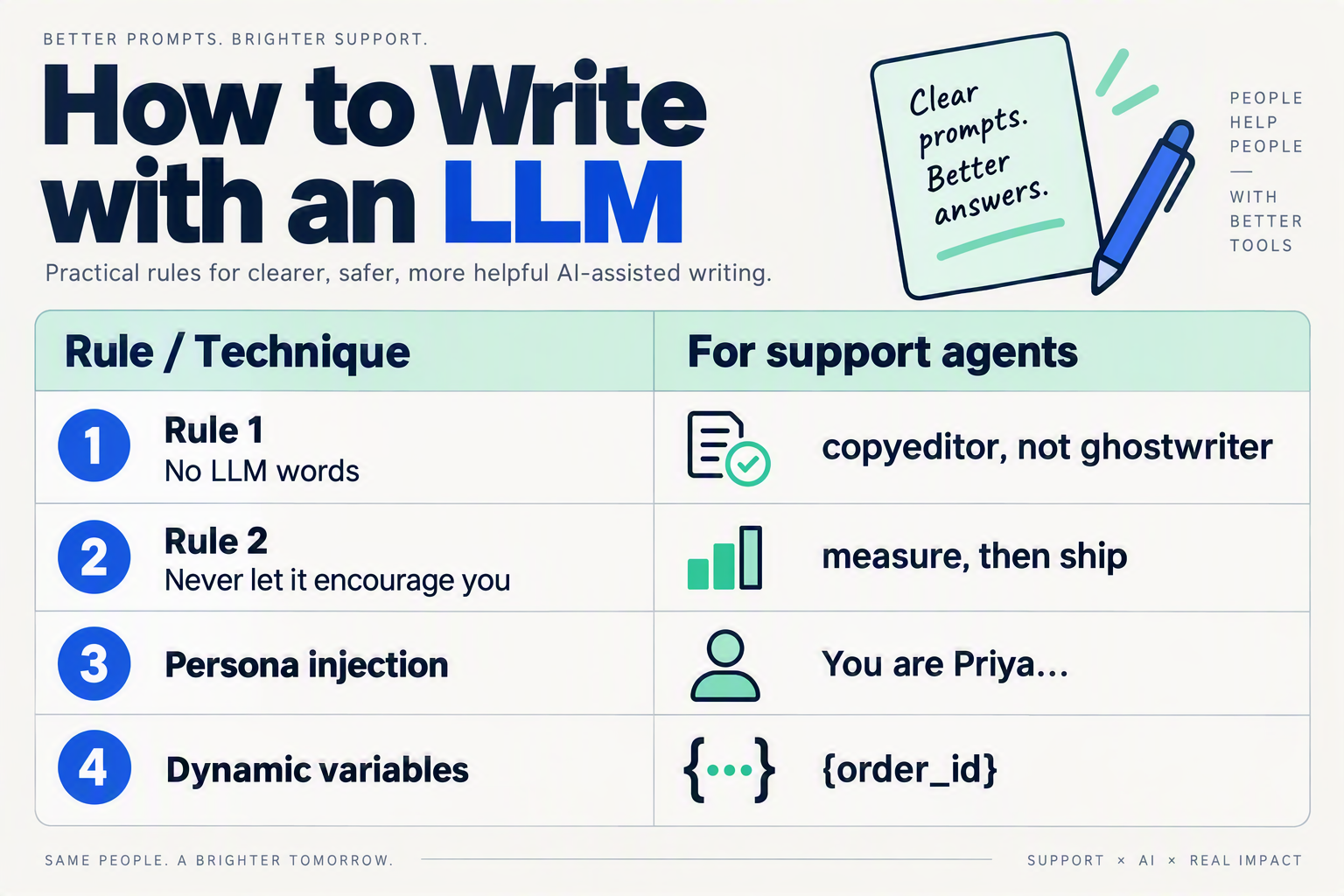
Thomas Ptacek's "How to Write with an LLM" tells writers to draft first and let the model edit — and buried in that contrarian advice is the most useful support-prompt lesson of the year. The model should match your voice, not invent one. Translated to customer support, Ptacek's rules map onto prompt design almost one-to-one: write your voice first, ban the model's default "output" register, and build quality checks into the prompt loop instead of reviewing every reply by hand.
| Ptacek's rule | For writers | For support prompts | Payoff |
|---|---|---|---|
| "Open the LLM, close it, pick up a pen" | Draft in your own voice; use the model as an editor | Write the style guide and sample replies before the system prompt | The agent inherits your voice instead of inventing one |
| "LLM paragraph registers as output" | AI prose reads as output, not writing | Add a banned-phrases list and style rules: contractions, short sentences | Customers hear a person, not a template |
| "A style guide the LLM can match" | Explicit style guides measurably improve output | Embed brand voice, tone and do/don't lists in the system prompt | Consistent tone across phone, WhatsApp and chat |
| "Create a communication persona" | Give the model a defined persona | Specify role, mandate and escalation limits explicitly | The agent knows when to answer and when to hand off |
| "Post-LLM quality monitoring is a time trap" | Manual review of output doesn't scale | Use eval suites, QA-rubric call scoring and A/B tests | Catch drift without reading every transcript |
How does "write first" apply to support prompts?
Ptacek's three-step rule from his September 17, 2026 essay — "open up the LLM, close the LLM, pick up a pen and write" — assumes the human has a voice worth matching. Support teams that skip the drafting step get an agent that improvises a personality mid-call. The fix is to draft the voice first: a one-page style guide covering how your team actually phrases refunds, apologizes, and explains policy. That's the same "style guide provided to the LLM that it can match" move a HackerNews commenter credited for fixing machine-sounding output.
Why is the "LLM register" a support liability?
One comment in the thread warned that "LLM paragraph will register to much of your audience not as writing but as output." In support, "output" reads as canned, and canned reads as uncaring — the worst impression when a customer is already frustrated. A banned-phrases list plus hard style rules (contractions allowed, short sentences, no hedging) force the agent out of its default register.
Where should prompt-quality checks live?
A HackerNews commenter called post-LLM quality monitoring "a huge time trap" — accurate for support too, because reading every AI reply manually doesn't scale. The sustainable pattern is to put the checks where the prompts live. Platforms such as CallMissed ship eval suites, call scoring against your own QA rubrics, and A/B experiments in the agent console
What common prompt-writing mistakes break AI support agents?
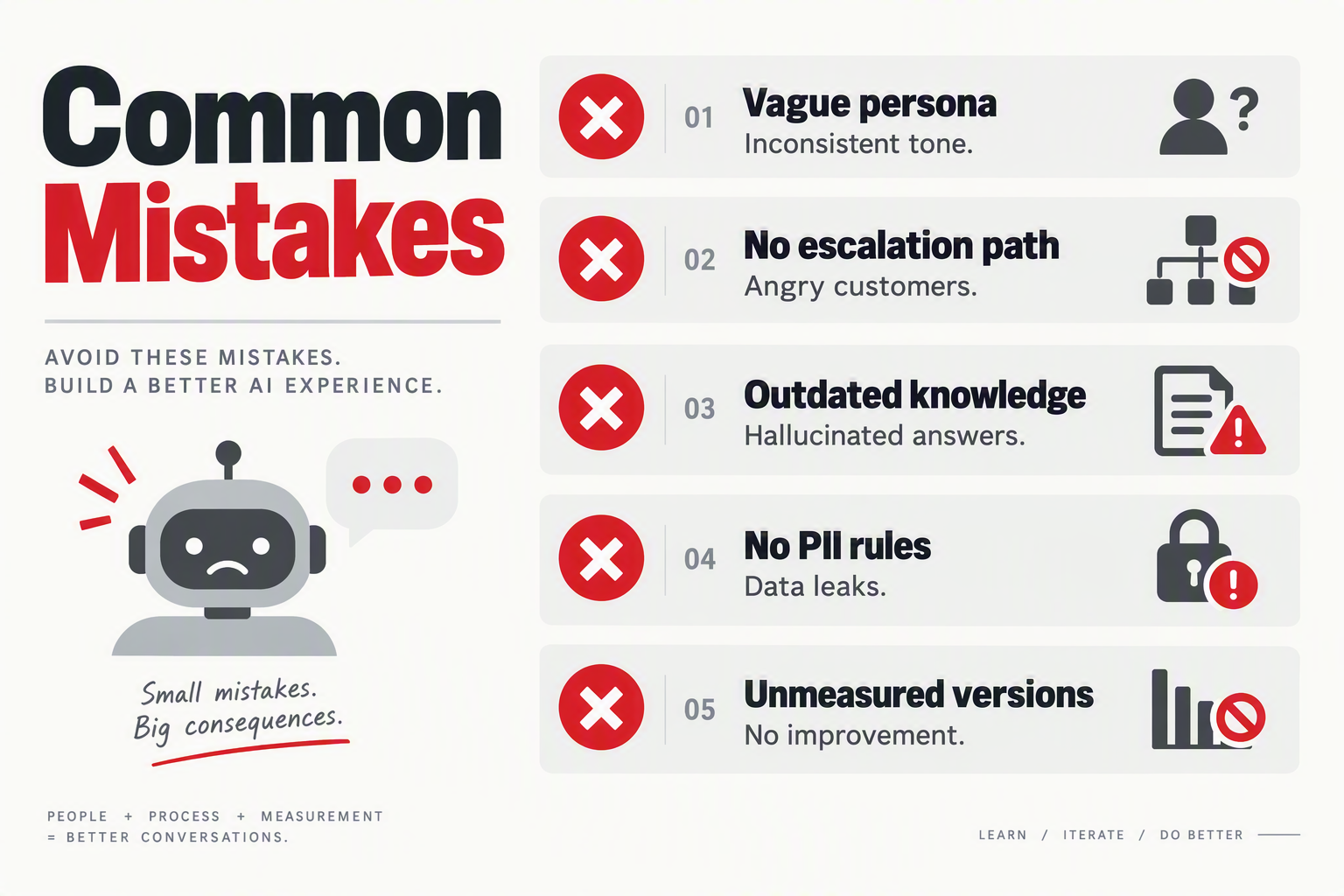
Most AI support-agent failures trace back to six repeatable prompt mistakes: a missing role mandate, absent guardrails, an unbounded knowledge source, buried escalation rules, contradictory instructions, and no tool-failure handling. Fix those six and you eliminate most conversations that end in customer anger, refund disputes, or a dead-end bot.
The six mistakes that break support agents
The table below maps each mistake to the symptom you'll hear on a live call, the mechanism that breaks the agent, and the fix. Treat it as a pre-launch checklist before you publish any agent prompt.
| Mistake | Symptom on a live call | Why it breaks the agent | The fix |
|---|---|---|---|
| No role or mandate defined | Replies read like a generic chatbot, not your brand | The model has no anchor for tone, authority, or scope | Open with the agent's role, goal, and a one-line tone definition |
| Guardrails left out | Agent promises refunds or discounts it can't honor | LLMs default to being agreeable over being accurate | Add explicit "never say / never promise" rules |
| Knowledge base not wired in | Answers come from training data, not your policies | The model hallucinates confident but wrong answers | Scope every answer to a named knowledge base (RAG) |
| Escalation logic missing | Agent argues with a frustrated customer for minutes | No instruction on when to stop and hand off to a human | Define escalation triggers: anger, legal topics, repeated failure |
| Contradictory instructions | The same question gets different answers per session | Conflicting rules leave the model guessing which to follow | Keep one source of truth; resolve conflicts during testing |
| Tool-call failure ignored | Agent repeats a dead API call or falls silent | No fallback phrasing for when tools error or time out | Add a fallback script and a retry limit to the prompt |
The most expensive mistake is the one you can't see
Prompt bloat — pasting every policy and FAQ into the system prompt — quietly dilutes the instructions that matter. Models pay disproportionate attention to the most recent and most emphatic lines, so a critical guardrail buried on line 40 of a 60-line prompt gets ignored in practice. The fix echoes the insight that drove the HackerNews thread around Thomas Ptacek's "How to Write with an LLM" essay: a top commenter noted that a "style guide provided to the LLM that it can match" was the difference between machine-sounding output and writing that reads like a person. Treat your support prompt as that style guide plus an operating manual — not as a policy dump.
Contradictory instructions are the silent twin of prompt bloat. A prompt that says "always escalate billing disputes" in one section and "resolve all billing questions yourself" in another forces the model to guess which rule wins — and guessing is how you get an agent that promises a refund on Monday and refuses it on Tuesday.
Test mistakes out before customers find them
Every mistake in the table is catchable before it reaches a customer. Run a red-team session where you feed the agent the six hardest conversations from your ticket history and check the replies against your guardrails. Platforms like CallMissed add versioning with publish and rollback plus A/B experiments, so you can test a prompt fix on a slice of live calls before committing. In production support, a prompt bug isn't a typo — it's a customer relationship. The table is the checklist; the eval run is the proof.
What are the most common questions about writing AI support-agent prompts?

How do I write prompts for AI agents in customer support?
What is the best structure for a customer-service agent prompt?
How long should an AI support-agent prompt be?
How do I stop an AI support agent from hallucinating policies and prices?
How do I test and improve prompts for AI support agents?
When should an AI support agent escalate a conversation to a human?
Conclusion
Ptacek's HackerNews moment proved that LLMs need a writer — someone to set the style, the rules, and the stopping point. For customer support teams, the prompt is that writer's hand on the agent, and this guide has shown you how to keep it steady.
The key takeaways:
- A support prompt is an operating manual: role, guardrails, a bounded knowledge base, and explicit escalation logic — skip any layer and the agent improvises.
- Ground every answer in your real source of truth (RAG, tools, CRM data) so the agent can't hallucinate its way through a billing dispute.
- Design the agentic loop deliberately — tool calls, handoffs, and the exact moment the AI should stop and pass the customer to a human.
- Treat prompts like code: version them, test them against real conversations, and iterate with eval suites and A/B experiments.
What to watch for: as agents grow more autonomous, prompt quality will converge with software engineering — versioned prompt libraries, CI-style testing, and prompt-as-code governance will become standard practice in support operations.
The question worth asking: if your support agent's prompt were versioned and tested like production code, would your customers notice the difference? To explore how AI communication is evolving, check out CallMissed — an AI infrastructure platform powering voice agents and multilingual chatbots for businesses.
Related Reading
- Voice Agent API With LiveKit Support: Verified 2026 Comparison
- Voice Agent API with LiveKit Support: 2026 Comparison and Verdict
- Voice Agent API With LiveKit Support: OpenAI Realtime vs LiveKit Agents