Switch LLM providers without rewriting your agent code



Switch LLM providers using a stable API interface, runnable Python examples, configuration diffs, compatibility tests, and troubleshooting.
Switch LLM providers without rewriting your agent code
What if switching your agent’s LLM required changing configuration—not rewriting its tool calls, memory handling, and application logic? Switch LLM providers through an OpenAI-compatible gateway, and you can often keep the same SDK and request structure while changing the base URL, credentials, and model identifier.
The important qualifier is often. API compatibility can preserve your integration code; it does not guarantee identical model behavior, supported parameters, or tool-calling reliability. The practical goal is to separate your agent’s workflow from the provider serving its requests—then verify that each replacement model meets your requirements.
That distinction matters as teams gain more model choices. In the research provided for this November 2026 guide, addROM describes LiteLLM as an OpenAI-compatible gateway supporting more than 100 LLMs. A shared interface makes that expanding catalogue useful without requiring a separate integration for every provider. But choosing a model still means balancing task quality, response speed, price, and operational requirements.
As of November 2026, CallMissed’s developer AI API provides OpenAI-compatible and Anthropic-compatible endpoints, with one API key and balance covering 146 models, including 44 general-purpose LLMs, illustrating how platforms are making provider access a configuration concern rather than a repeated integration project.
How do you switch between LLM providers without changing your code?
Start by keeping provider-specific settings outside your agent’s business logic. Infro’s SDK configuration guide explains that Python’s OpenAI client accepts base_url, while the Node client accepts baseURL, letting an existing client target a compatible service.
For example, a support agent should not need a new ticket-search function merely because you replace its underlying model. Its conversation loop and tool definitions can stay in place when the replacement supports the same interface; the endpoint, authentication, and model selection become deployment settings.
This guide will show you how to:
- Externalize configuration so provider changes do not spread through your codebase.
- Choose compatible endpoints for the API operations your agent actually uses.
- Check feature support, including streaming, structured outputs, and function calling.
- Test model behavior against representative conversations before switching production traffic.
- Plan fallbacks without assuming every model can handle every request.
You will also learn where “drop-in replacement” stops being literal: an accepted request can still produce different tool arguments, longer answers, or weaker instruction-following. The durable strategy is stable application interfaces plus model-specific evaluation—not pretending that every LLM is interchangeable. That combination lets you change providers deliberately while protecting the workflows your users depend on.
Use a shared API interface and configure the endpoint, credentials, and model outside your application logic. Initial integration may require code changes; subsequent provider switches can be configuration-only when both providers support the features you use.
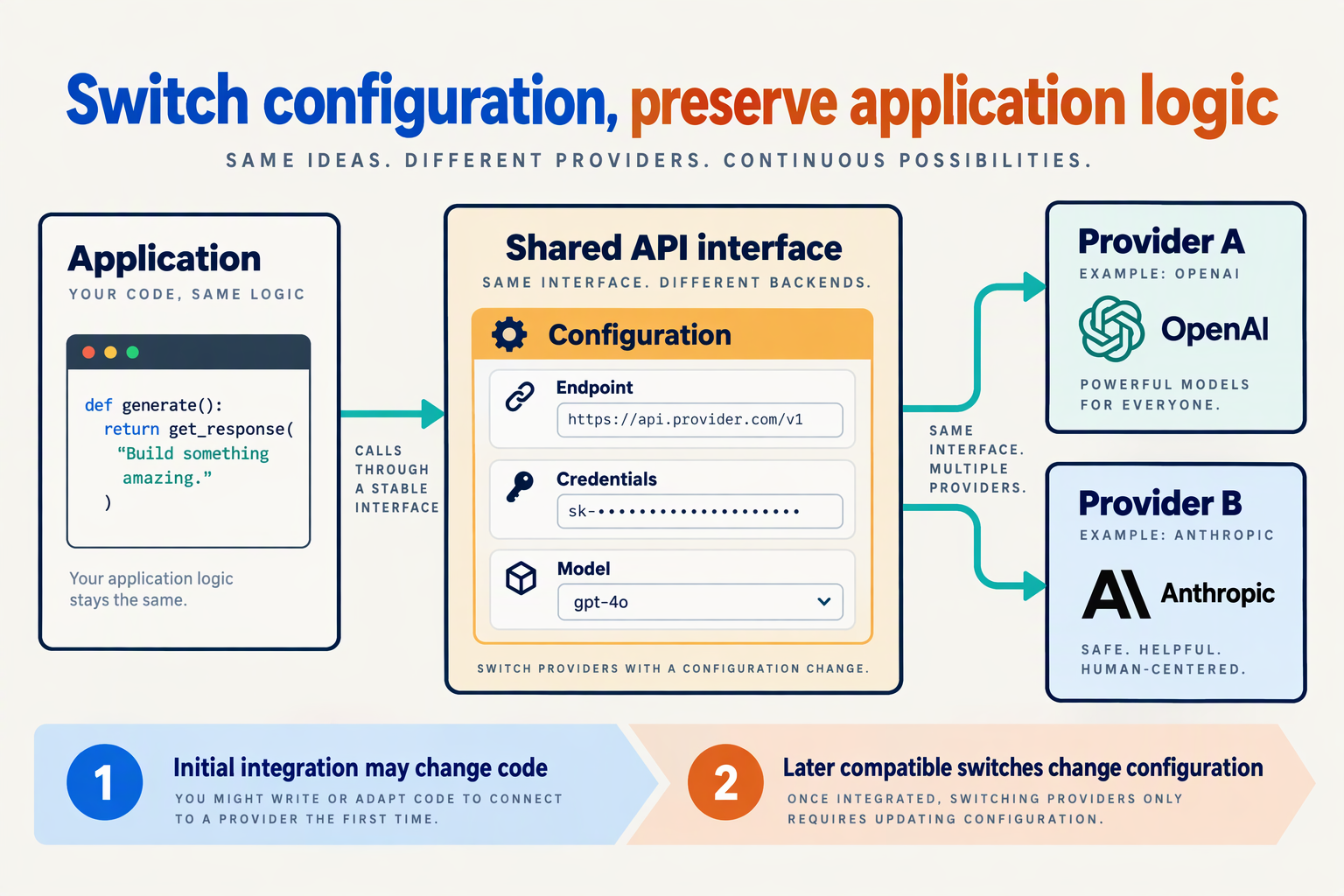
Switch between LLM providers without changing your application code by configuring a shared API client through environment variables or deployment settings. This usually requires an initial refactor; later switches can be configuration-only if the replacement supports the API operations and features your application uses.
Which LLM settings should live outside your application code?
Separate connection settings from the workflow that processes messages, retrieves knowledge, and executes tools. Your application should read these settings rather than hard-code them:
- Base URL: The API root of your provider or gateway.
- API key: A credential supplied through a secret manager or protected environment variable.
- Model identifier: The exact model name recognized by the destination service.
Use application-owned names such as LLM_BASE_URL, LLM_API_KEY, and LLM_MODEL. These names make the configuration independent of any particular provider.
As referenced in this November 2026 guide, Infro’s SDK configuration guide documents base_url for the OpenAI Python client and baseURL for the Node client. Those constructor settings are the connection point; the surrounding application does not need to know which company serves the request.
What does a configuration-driven OpenAI client look like?
Create the client once at your application’s integration boundary, then keep provider settings out of individual request handlers:
import os
from openai import OpenAI

client = OpenAI(
    base_url=os.environ["LLM_BASE_URL"],
    api_key=os.environ["LLM_API_KEY"],
)

model = os.environ["LLM_MODEL"]

def answer_question(question: str) -> str:
    response = client.chat.completions.create(
        model=model,
        messages=[{"role": "user", "content": question}],
    )
    return response.choices[0].message.content or ""
This example deliberately uses a basic text request. It demonstrates configuration portability, not proof that every model supports your production agent.
To switch destinations:
- Update
LLM_BASE_URLto the destination’s documented API root. - Replace
LLM_API_KEYwith a credential accepted by that destination. - Set
LLM_MODELto a supported model identifier. - Restart or redeploy the application so it loads the new configuration.
- Run a representative request before routing production traffic.
When switching models behind the same gateway, the endpoint and credential may remain unchanged; only the model setting needs updating.
BerriAI’s LiteLLM documentation, referenced in November 2026, warns against appending operation-specific paths to the base URL because the client adds the relevant endpoints. Follow the destination’s documented root rather than adding /chat/completions yourself.
When is a provider switch genuinely configuration-only?
A switch is configuration-only when both destinations honor the contract your code actually uses. Matching the basic request format is insufficient if your application also depends on structured outputs, tool calls, streaming events, or a particular response object.
Keep that contract explicit:
- Operation: Chat Completions and Responses are separate API operations.
- Inputs: Check message roles, image inputs, and tool schemas.
- Outputs: Check response parsing, tool arguments, and streaming handling.
As of November 2026, CallMissed’s developer AI API offers OpenAI-compatible Chat Completions and Responses endpoints, plus Anthropic-compatible /v1/messages endpoints. Choose the interface matching your existing integration; compatibility with one API family does not automatically make another family interchangeable.
The practical boundary is simple: configuration selects the destination; an adapter handles incompatible interfaces. If a replacement requires different request construction or response parsing, make that change in the adapter—not throughout your application’s business logic.
What do I need before switching LLM providers?
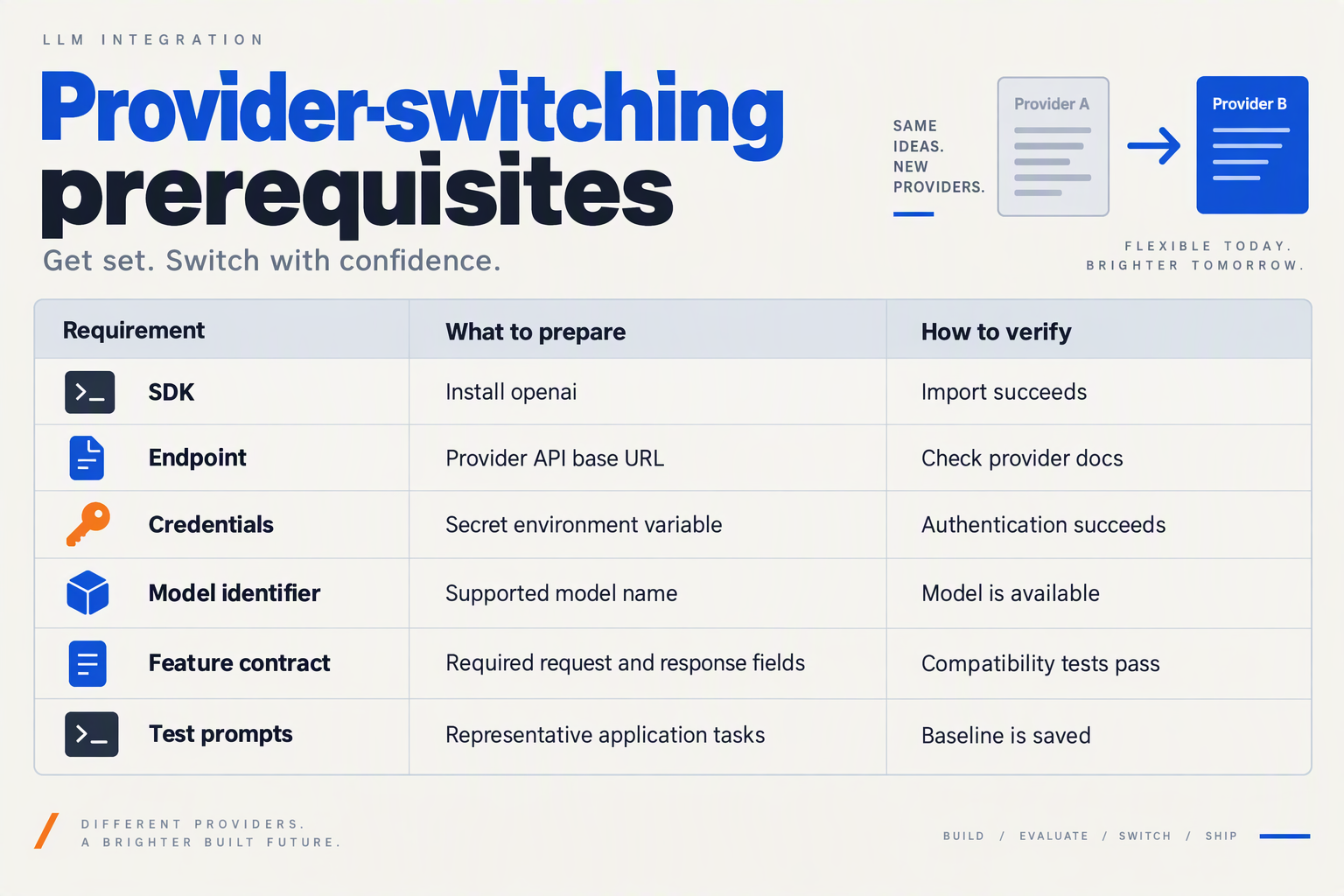
Before switching LLM providers, you need a compatible API contract, working credentials, a model-feature checklist, and a repeatable acceptance test. Configuration-only switching is realistic when the replacement supports the operations your application already uses—not merely the same chat endpoint.
What should your LLM migration checklist include?
Use this checklist before changing production settings. The API configuration details reflect Infro’s SDK guide and BerriAI’s LiteLLM documentation reviewed for this November 2026 guide; the validation steps are practical recommendations.
| Prerequisite | What to prepare | Readiness check |
|---|---|---|
| API contract | Inventory Chat Completions, Responses, embeddings, or other operations your app uses. | The destination supports every required operation. |
| Endpoint and credentials | Obtain the gateway base URL, API key, and authorized model identifier. | A minimal request succeeds from your deployment environment. |
| Model capabilities | List required tools, structured outputs, streaming, vision, and context capacity. | The selected model supports your actual request payloads. |
| Configuration boundary | Put endpoint, credentials, and model selection in deployment settings. | Switching settings requires no business-logic edits. |
| Acceptance tests | Save representative prompts, expected tool actions, and output schemas. | The replacement passes your predefined quality checks. |
| Operational controls | Define timeouts, spending limits, logging, and rollback settings. | You can detect failures and restore the previous configuration. |
Endpoint correctness is a prerequisite, not a cosmetic detail. In documentation reviewed in November 2026, BerriAI’s LiteLLM instructions warn against appending an operation path such as /v1/embedding to the configured base URL because the client adds the relevant endpoint itself.
Check the destination’s documented API root rather than copying a complete request URL into your SDK settings.
How do you check whether your application is actually portable?
Trace one successful request through your application and identify every provider assumption. Besides the model name, inspect message roles, tool schemas, response parsing, token-limit parameters, and exception handling.
In Infro’s SDK guide reviewed in November 2026, the OpenAI Python client accepts base_url, while the Node client accepts baseURL. Those configuration options establish endpoint portability; they do not prove that your chosen model supports every parameter.
Look especially for:
- Provider-owned state: stored conversation identifiers or files that the destination cannot access.
- Model-specific inputs: unsupported image formats, reasoning settings, or output constraints.
- Response assumptions: code expecting a particular tool-call structure or usage field.
If these assumptions are embedded throughout your application, address that coupling before treating migration as a configuration change.
What should you test before switching production traffic?
Build a small, representative evaluation set rather than relying on one successful greeting. For a support agent, include a factual knowledge question, a ticket-lookup tool call, a missing-information exchange, and a request that should be declined.
A practical pre-switch sequence is:
- Replay saved requests against the candidate model.
- Validate outputs mechanically, including JSON parsing and required tool arguments.
- Compare task outcomes, response time, and observed cost against your own acceptance thresholds.
- Exercise failure handling with invalid credentials, timeouts, and unavailable models.
As of November 2026, CallMissed’s verified developer API capabilities include caller-chosen fallback models, usage logs, and request logs—useful building blocks for this operational checklist. However, a fallback still needs to satisfy the original request’s capability requirements.
Your readiness standard should be concrete: the same application workflow completes correctly, failures remain observable, and rollback is available. A successful API response alone is not sufficient evidence that switching providers is safe.
Should I use an OpenAI-compatible gateway, LLM proxy, library, or Dapr?
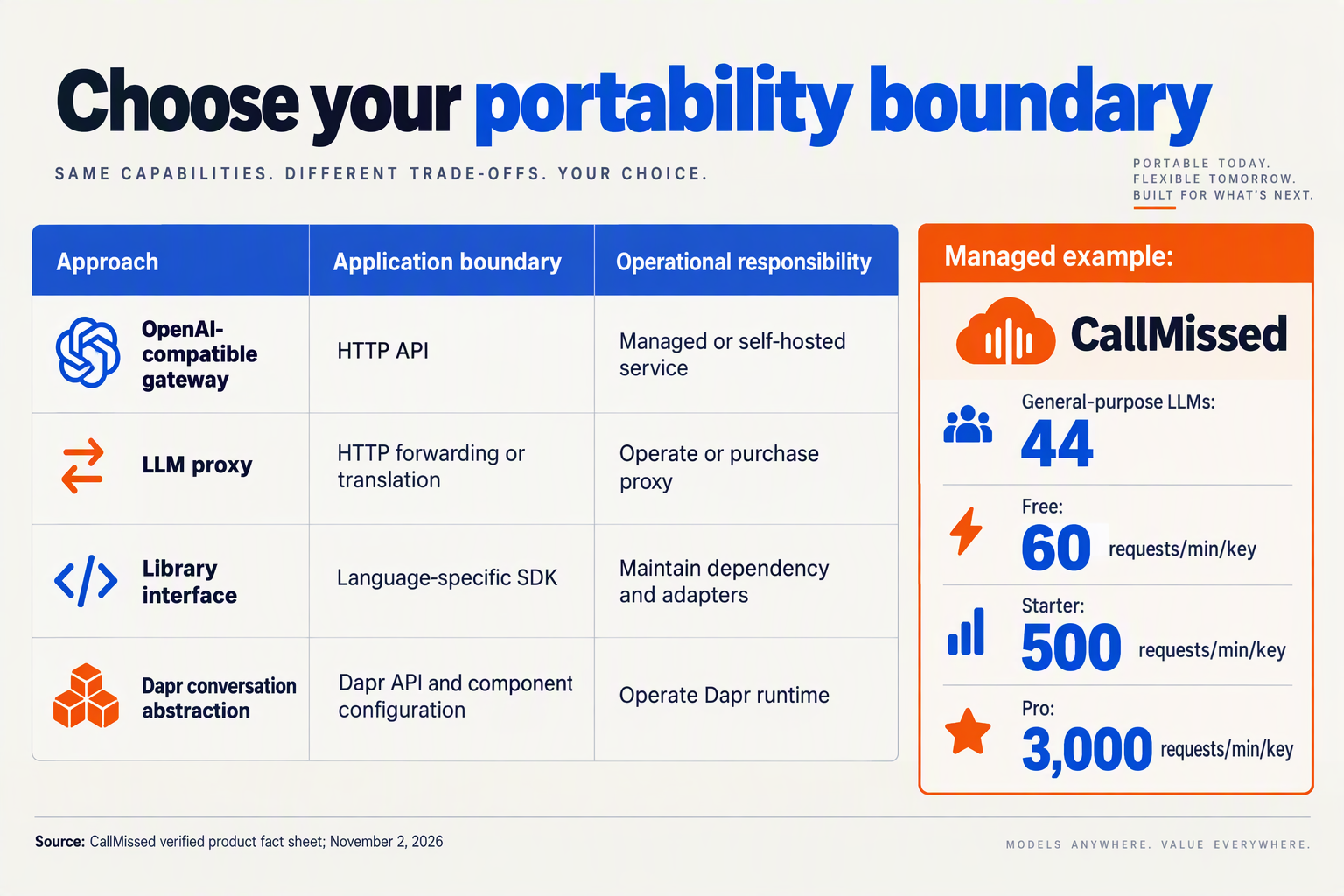
Use an OpenAI-compatible gateway when your priority is switching LLM providers with minimal application changes; choose a library when you want abstraction inside your codebase. A self-hosted LLM proxy suits teams that need to operate the routing layer themselves, while Dapr is worth considering when provider access belongs within a broader distributed-application architecture.
These categories overlap: a gateway can run as a proxy, and a library can call that gateway. The useful distinction is where provider-specific adaptation lives—and who operates it.
Which LLM abstraction should I choose?
The following decision guide is framed as of November 2026. “Migration impact” means the initial integration effort, not a guarantee that every subsequent model swap requires zero changes.
| Approach | Best fit | Migration impact | Main trade-off |
|---|---|---|---|
| Managed OpenAI-compatible gateway | Existing OpenAI SDK applications | Usually configuration changes for supported operations | Gateway dependency; verify endpoint coverage |
| Self-hosted LLM proxy | Teams needing control over routing infrastructure | Point clients at the proxy; configure providers centrally | Your team owns deployment and operations |
| In-process LLM library | Applications needing code-level provider adapters | Adopt the library’s interface first | Library dependency and upgrade management |
| Dapr-based abstraction | Distributed applications already using Dapr | Integrate with the applicable abstraction first | Validate component capabilities and deployment fit |
| Direct provider SDKs | Workloads needing provider-native features | Separate integrations or application-owned adapters | More provider-specific maintenance |
A gateway preserves the client-facing API; a library changes the interface your application depends on. That distinction matters more than whether a product calls itself a “router,” “proxy,” or “AI platform.”
How are LiteLLM’s proxy and library options different?
As described by addROM in the research supplied for this November 2026 guide, LiteLLM is both an open-source AI gateway and a Python SDK. Those are two deployment choices, not interchangeable integration patterns.
With a proxy, multiple applications can share a centrally operated endpoint. With an in-process library, each application imports the abstraction and carries its dependency through deployment.
BerriAI’s LiteLLM documentation, consulted for this November 2026 guide, specifically warns: “Do NOT add anything additional to the base url e.g. /v1/embedding.” The documentation explains that the OpenAI client adds the relevant operation endpoints automatically. That is a concrete example of why configuration conventions still matter behind a common interface.
When should I consider Dapr instead of a gateway?
Consider Dapr when your team already uses it and wants LLM access to follow the same application-infrastructure pattern. Do not introduce a broader runtime solely to avoid changing one provider integration without weighing the additional operational work.
Before choosing a Dapr-based route, verify the supported components and request features against current documentation. The supplied research does not establish Dapr’s provider coverage or feature parity, so those should not be assumed.
What should I check before committing?
Evaluate the boundary you actually need:
- List required operations: chat, embeddings, streaming, tool calls, or structured output.
- Choose the operating model: managed endpoint, self-hosted service, or application dependency.
- Test a representative workflow: include tool execution and failure handling, not just text generation.
For example, as of November 2026, CallMissed’s developer AI API supports caller-chosen fallback models, usage and request logs, and bring-your-own provider keys. These are useful gateway-selection criteria because they address routing control and troubleshooting—not merely request compatibility.
- Choose a gateway for a stable network boundary.
- Choose a library for application-level abstraction.
- Choose Dapr for architectural alignment, not an assumed shortcut.
How do I make the initial OpenAI Python integration portable?
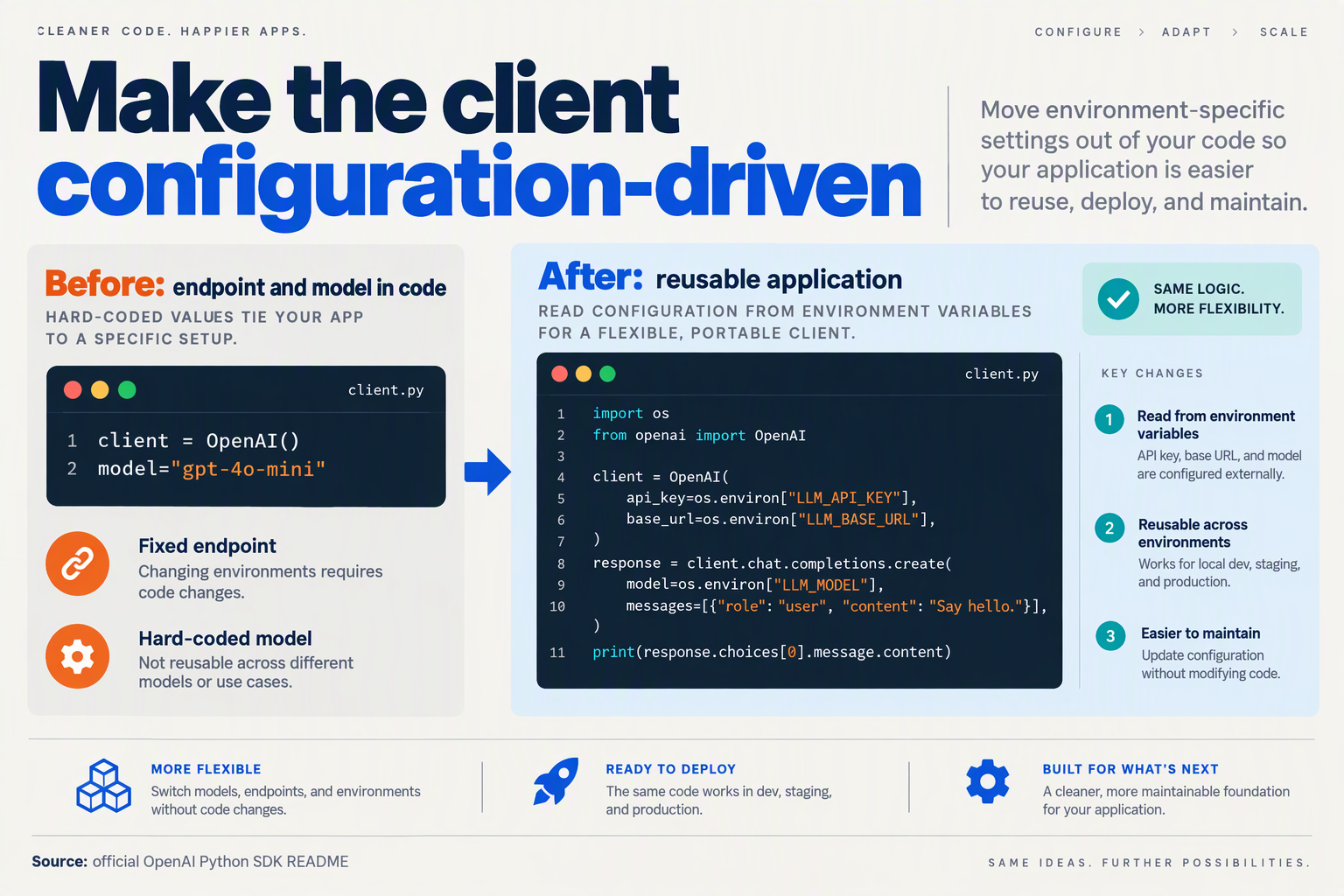
Make your initial OpenAI Python integration portable by constructing the client once from environment variables and keeping the model identifier outside your application logic. Your conversation code should depend on a small, stable interface—not a provider’s hostname, credentials, or model naming scheme.
How should I configure the OpenAI Python client?
Infro’s SDK configuration guide, included in the November 2026 research, documents two Python options: pass base_url to OpenAI(...) or set OPENAI_BASE_URL. Explicit constructor configuration makes the dependency visible and easier to test.
Start with three deployment settings:
OPENAI_BASE_URL: the provider’s documented OpenAI-compatible API root.OPENAI_API_KEY: the credential accepted by that endpoint.LLM_MODEL: an exact model identifier supported by that service.
Keep credentials in your deployment’s secret manager; do not commit them to source control. Requiring these variables also prevents an accidentally missing setting from silently selecting an unintended endpoint or model.
# llm.py
import os
from openai import OpenAI

MODEL = os.environ["LLM_MODEL"]

client = OpenAI(
    base_url=os.environ["OPENAI_BASE_URL"],
    api_key=os.environ["OPENAI_API_KEY"],
    timeout=30.0,
    max_retries=2,
)

def generate_reply(messages):
    response = client.chat.completions.create(
        model=MODEL,
        messages=messages,
    )
    content = response.choices[0].message.content
    if content is None:
        raise ValueError("Expected a text reply")
    return content
Here, the timeout and retry count are example application settings, not performance guarantees. The wrapper deliberately handles text-only replies; an agent using tools needs a richer return contract that preserves tool calls rather than treating missing text as an error.
What should stay outside my business logic?
Your support workflow should call generate_reply(messages) without knowing which provider serves the request. Store conversation history in your application, and pass it into the wrapper explicitly.
For example, changing the model behind a refund assistant should not require editing its order lookup, refund eligibility rules, or ticket-writing code. Keep those deterministic operations separate from model inference.
Use this initial setup sequence:
- Install and pin a tested OpenAI Python SDK version in your dependency file.
- Centralize client creation in one module instead of constructing clients throughout the application.
- Load endpoint, secret, and model settings from the deployment environment.
- Run a smoke test that sends a short message and checks the returned text before starting the full agent.
Avoid adding provider-specific request fields to this first implementation. Introduce optional capabilities behind an explicit configuration layer when your workflow actually needs them.
What base URL mistakes should I avoid?
Use the documented API root, not a complete operation URL. BerriAI’s LiteLLM documentation, supplied for this November 2026 guide, warns against appending operation paths to the base URL because the OpenAI client adds the relevant endpoint. Check whether the service’s documented root already includes a version prefix.
As of November 2026, CallMissed’s developer AI API supports OpenAI-compatible endpoints, allowing existing SDK integrations to switch through base-URL configuration, with the appropriate credentials and model selection.
The portability boundary is straightforward: configuration selects the service; your wrapper defines the application contract. Before changing production settings, verify that the destination supports your chosen operation and returns the fields your wrapper expects.
How do I switch providers using only environment-variable changes?
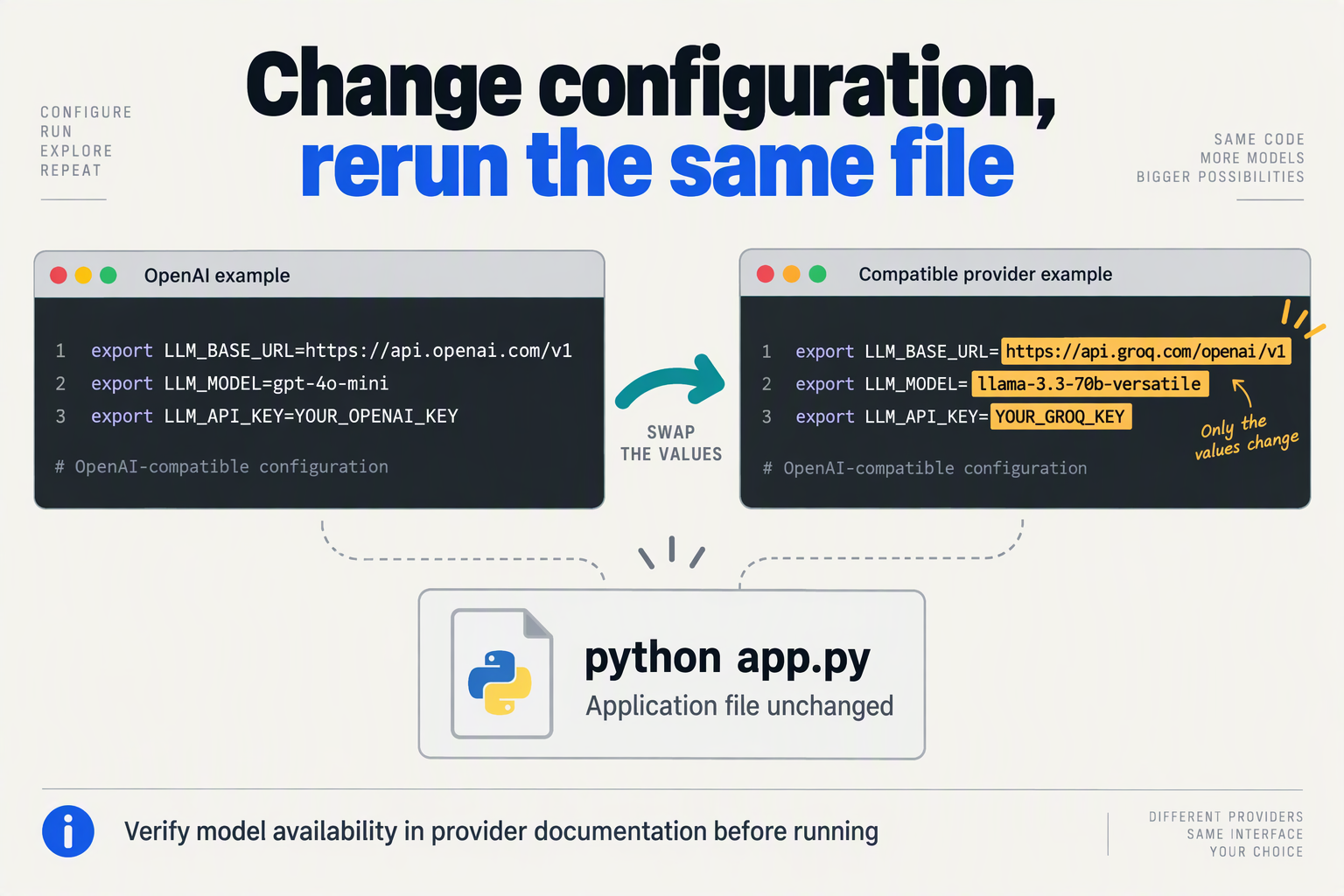
Switch LLM providers using only environment-variable changes by loading the endpoint, API key, and model identifier from configuration rather than hardcoding them. This requires a one-time configuration setup; subsequent switches need no application-code edits, provided the replacement endpoint supports the API operations you use.
Which environment variables should control your LLM provider?
Use three settings with distinct responsibilities:
OPENAI_BASE_URLselects the OpenAI-compatible API endpoint.OPENAI_API_KEYsupplies credentials accepted by that endpoint.LLM_MODELselects the model identifier advertised by the provider or gateway.
As documented by Infro’s SDK configuration guide, consulted for this November 2026 guide, the OpenAI Python SDK supports OPENAI_BASE_URL as an alternative to passing base_url directly.
LLM_MODEL is an application-defined variable, not a setting the OpenAI SDK automatically applies. Your request code must read it explicitly. Likewise, a .env file does nothing unless your application, framework, or deployment tooling loads it.
What does an environment-configured Python client look like?
Configure the client once, keeping the request independent of a particular provider:
import os
from openai import OpenAI

client = OpenAI(
    api_key=os.environ["OPENAI_API_KEY"],
    base_url=os.environ["OPENAI_BASE_URL"],
)

response = client.chat.completions.create(
    model=os.environ["LLM_MODEL"],
    messages=[
        {"role": "user", "content": "Reply with: connection works"}
    ],
)

print(response.choices[0].message.content)
Using os.environ[...] makes missing configuration fail immediately rather than silently selecting an unintended default. This example deliberately uses Chat Completions; it does not establish compatibility with the Responses API, embeddings, or audio endpoints.
Set the initial configuration through your deployment environment or shell:
export OPENAI_BASE_URL="$PROVIDER_A_BASE_URL"
export OPENAI_API_KEY="$PROVIDER_A_API_KEY"
export LLM_MODEL="$PROVIDER_A_MODEL"
python app.py
The PROVIDER_A_* variables are placeholders for values supplied by your provider and secret-management system—not literal endpoint or model names.
How do you switch providers without editing that code?
Replace the configuration values and start a new application process:
export OPENAI_BASE_URL="$PROVIDER_B_BASE_URL"
export OPENAI_API_KEY="$PROVIDER_B_API_KEY"
export LLM_MODEL="$PROVIDER_B_MODEL"
python app.py
For a deployed service:
- Update deployment configuration with the replacement endpoint and model.
- Inject the appropriate secret through your secret manager.
- Restart or redeploy the workers so they construct clients with the new settings.
- Run a smoke test before directing normal traffic to the replacement.
Changing environment variables in a terminal does not reconfigure an already-running worker. Keep the previous configuration available for rollback, and never commit API keys to source control.
Which configuration mistakes can break the switch?
Use the provider’s documented API root, not a complete operation URL. BerriAI’s LiteLLM documentation, consulted in November 2026, explicitly warns against appending operation-specific paths because the client adds the relevant endpoints itself.
Other common mistakes include:
- Sending the old provider’s key to the new endpoint.
- Reusing a model identifier the replacement does not recognize.
- Assuming identical support for tools, structured outputs, or streaming.
A gateway can reduce the number of settings that change. As of November 2026, CallMissed’s developer AI API supports OpenAI-compatible endpoints and one API key across its model catalogue; switching supported models through that gateway can therefore leave the endpoint and credentials unchanged.
The practical rule is simple: configuration selects the provider; compatibility determines whether the unchanged request still works.
How do I verify chat, streaming, tools, and structured outputs still work?
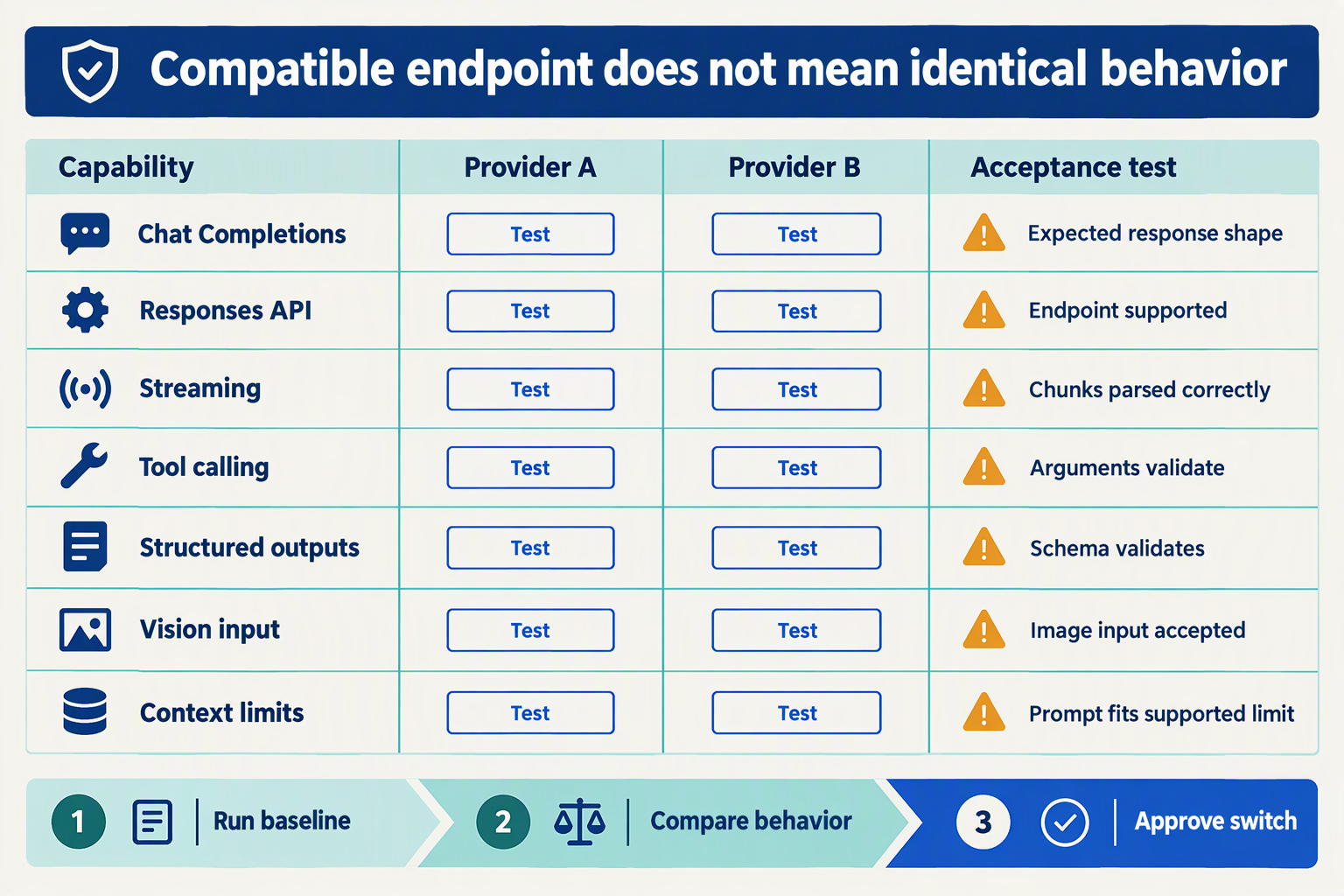
Verify a provider switch by running the same regression suite against the current and replacement models, covering chat responses, streamed events, tool execution, and schema validation. Passing means your application completes its workflows correctly—not merely that the new endpoint returns HTTP 200.
What should an LLM compatibility test suite include?
Create a version-controlled set of representative requests with explicit pass/fail assertions. Keep the prompts, tool definitions, schemas, and application code unchanged; vary only deployment configuration.
Start with these four checks:
- Chat: Replay a multi-turn support conversation containing a system instruction, a customer question, and a follow-up referencing earlier information. Assert that the SDK can read the response, the assistant retains relevant context, and required instructions remain satisfied. Compare task outcomes rather than exact wording.
- Streaming: Send the same request with streaming enabled and consume it through your production handler. Assert that incremental content arrives, the stream terminates cleanly, and the assembled response is usable. Test cancellation, interrupted connections, and empty-content events so the interface does not freeze or render missing values.
- Tools: Give the model a
lookup_orderfunction requiring anorder_id. Check that the requested tool exists, arguments parse and validate, your application executes the function, and the model uses the returned result correctly. Include a missing-ID case: the assistant should request clarification rather than invent an identifier.
- Structured outputs: Request a support-ticket object with required fields such as
category,priority, andsummary. Parse the response and validate it against your actual JSON Schema, including enum values, required properties, and disallowed extra fields.
Valid JSON is not the same as schema-valid output. An object can parse successfully while omitting a required field or returning "urgent" where your application accepts only "low", "medium", or "high".
How do you catch compatibility failures that happy-path tests miss?
Add negative cases alongside successful conversations:
- Tool safety: The model must not trigger a refund tool when the customer only asks about refund policy.
- Streamed tool arguments: If your application streams tool calls, verify that argument fragments assemble correctly before execution.
- Refusals and truncation: Confirm your parser handles an incomplete or refused response without treating it as a completed business action.
- Unsupported parameters: Check whether required settings are accepted, rejected, or silently ineffective.
Use the same API operation your application actually calls. A successful Chat Completions test does not establish compatibility with the Responses API.
In the documentation supplied for this November 2026 guide, BerriAI’s LiteLLM documentation says the OpenAI client automatically adds the relevant endpoints. If a test fails before model execution, inspect URL construction and SDK configuration before diagnosing model behavior.
What evidence should you require before switching production traffic?
Record the model identifier, test date, request configuration, validation result, and failure details for every case. Separate interface failures—such as unreadable stream events—from behavior failures, such as choosing the wrong tool.
As of November 2026, CallMissed’s developer AI API lists streaming, function calling, and structured outputs among its capabilities, according to the CallMissed fact sheet. Treat gateway-level support as a starting point, then verify the particular model and request combination your workflow needs.
Run critical cases repeatedly because model responses can vary. Require every safety-critical assertion to pass, and set workload-specific quality thresholds before testing—not after seeing the results. This makes switching LLM providers a measurable release decision rather than a hopeful configuration change.
How can I switch LLM providers without rewriting agent code?
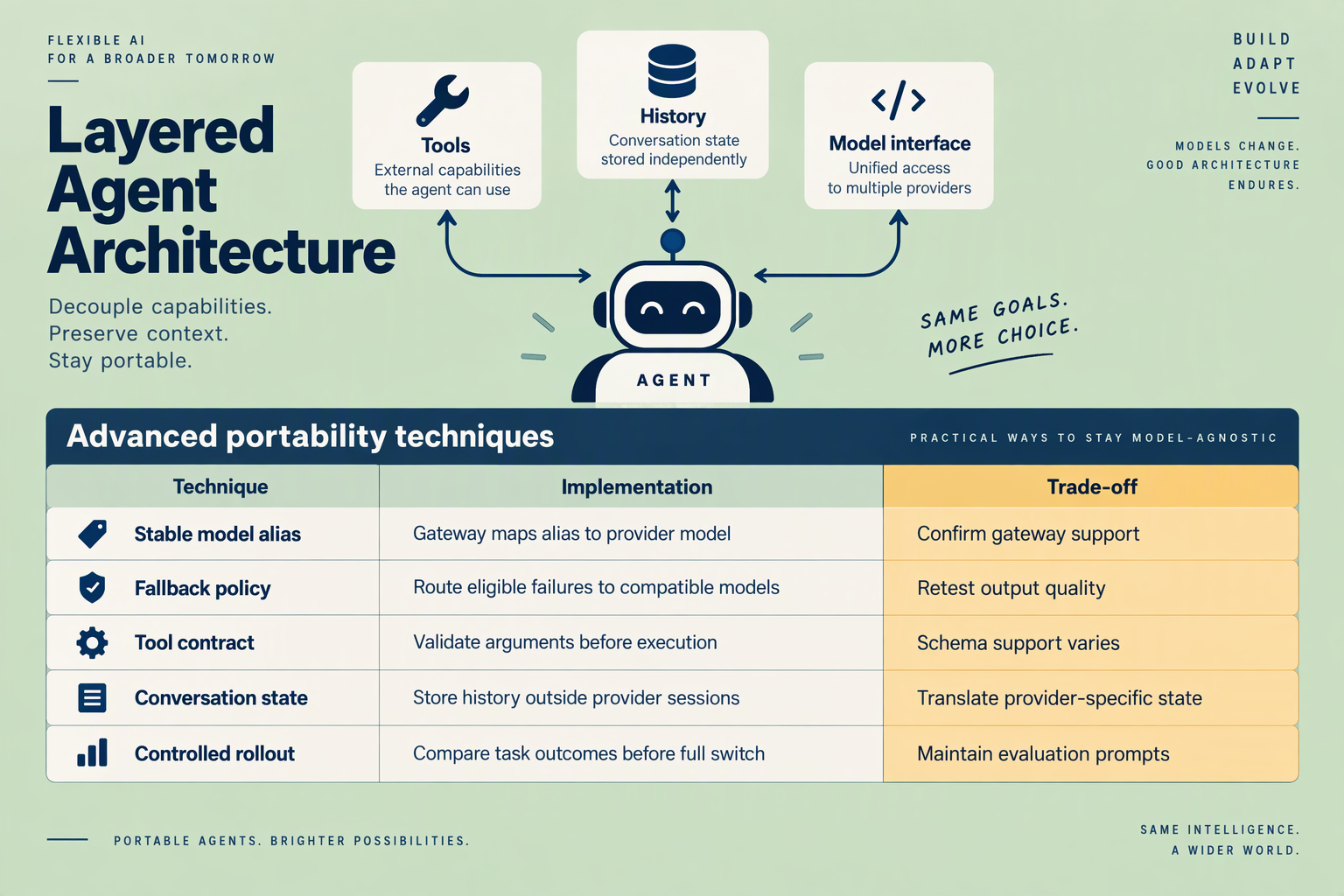
You can switch LLM providers without rewriting agent code by keeping tool execution, memory storage, and workflow rules in your application, while routing model requests through a compatible interface. The replacement model must support your agent’s API operations and behavioral requirements—not merely accept the same request format.
What should stay unchanged when you switch an agent’s LLM?
Treat the model as a replaceable decision-making component, not the owner of your application state. Your application should validate proposed actions, execute tools, and persist results regardless of which provider generates the next response.
The following migration checklist separates stable agent components from the configuration and compatibility checks required for a provider switch.
| Agent component | Keep unchanged | Configure or verify | Main migration risk |
|---|---|---|---|
| Model connection | SDK-facing client interface | Endpoint, credentials, model ID | Unsupported API operation |
| Tool execution | Function implementations and permissions | Tool schemas and argument handling | Invalid or unauthorized actions |
| Conversation memory | Database and retrieval logic | Supported message roles and context budget | Missing or truncated history |
| Structured responses | Application schema and validation | Model support for constrained output | JSON that fails validation |
| Streaming interface | Application event contract | Provider stream-event mapping | Broken partial-response handling |
| Recovery workflow | Retry limits and escalation rules | Eligible fallback models | Repeated actions after retries |
Interface compatibility is necessary, but agent-contract compatibility determines whether the switch is safe. A model that produces valid text can still be unsuitable for an agent that must reliably choose tools and preserve state.
How do you keep tool calls and memory provider-independent?
Use a small application-owned boundary between model output and real-world actions:
- Normalize the model response. Convert supported responses into your own representation of text, tool requests, and completion status.
- Validate before execution. Check tool names, arguments, permissions, and required user approvals.
- Persist authoritative state externally. Store confirmed outcomes in your database rather than relying on the model to remember them.
- Return tool results consistently. Let the compatibility layer serialize those results for the selected API.
Consider a support agent with lookup_order and create_ticket tools. Switching models should not change either function; it should trigger tests of whether the replacement selects the correct tool, supplies valid arguments, and avoids creating duplicate tickets after a timeout.
For endpoint configuration, Infro’s guide, reviewed for this November 2026 section, documents base_url for Python’s OpenAI client and baseURL for Node. BerriAI’s LiteLLM documentation also cautions against appending operation-specific paths such as /v1/embedding to the base URL, because the client adds the relevant endpoint.
What should you test before changing production traffic?
Run the same agent test cases against both models, including:
- Ambiguous requests: Does the agent ask for clarification?
- Tool failures: Does it report failure rather than invent success?
- Long conversations: Are earlier constraints preserved?
- Interrupted requests: Can recovery avoid duplicate side effects?
As of November 2026, CallMissed’s verified developer API fact sheet lists function calling, structured outputs, caller-chosen fallback models, stored prompts, and usage and request logs. These capabilities provide useful infrastructure for provider switching, but teams must still verify support for each selected model.
Keep a versioned deployment record pairing the model identifier, prompt version, tool schema, and evaluation results. That makes rollback a controlled configuration change—not an emergency rewrite of the agent.
Which mistakes break configuration-only provider switching?
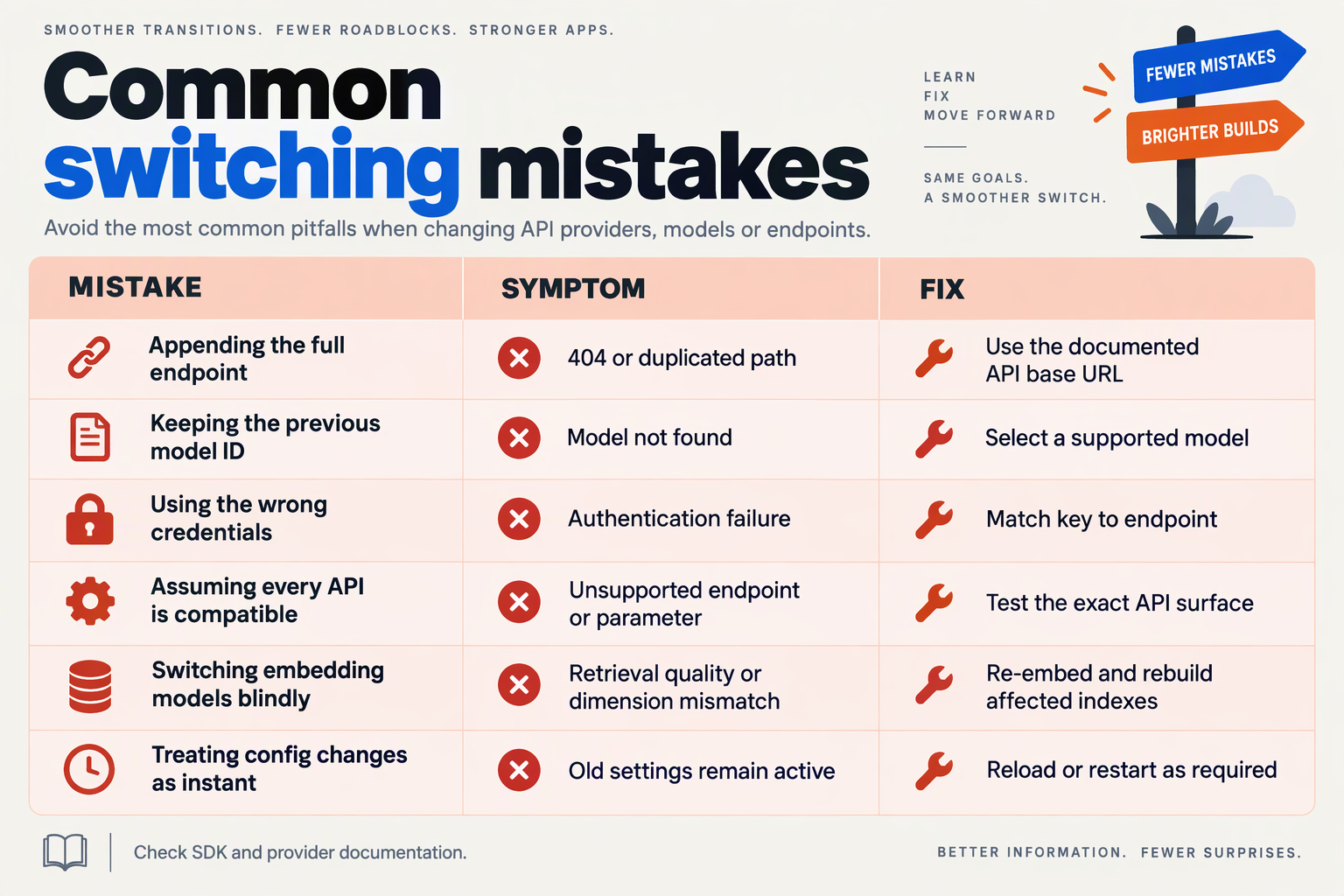
Configuration-only provider switching breaks when provider assumptions remain embedded in request construction, response parsing, or operational settings. To switch LLM providers without changing your code, treat each replacement as a compatibility contract—not merely a new endpoint—and reject configurations that cannot satisfy that contract.
Which configuration mistakes cause provider switches to fail?
For this November 2026 guide, Infro’s SDK configuration reference distinguishes Python’s base_url from Node’s baseURL. BerriAI’s LiteLLM documentation on GitHub also warns against appending an operation-specific path such as /v1/embedding to the base URL, because the OpenAI client adds the relevant endpoint.
These details illustrate a broader problem: configuration can be syntactically valid while still pointing the application at the wrong interface.
| Mistake | What breaks | Safer configuration | Verification |
|---|---|---|---|
| Using an operation URL as the base URL | The SDK constructs an incorrect request path. | Use the documented API root, including any required version prefix. | Inspect the final request URL. |
| Changing credentials but retaining the old model ID | The destination cannot resolve the model, or selects an unintended target. | Deploy endpoint, secret reference, and model ID together. | Confirm the requested model is available. |
| Treating API compatibility as feature parity | Tool calls, structured outputs, or image requests fail despite basic chat working. | Define required capabilities for each model configuration. | Exercise every required operation. |
| Passing provider-specific parameters unconditionally | Requests are rejected, or unsupported options have no effect. | Maintain validated parameter profiles outside business logic. | Check accepted fields and resulting behavior. |
| Assuming identical response and streaming shapes | Parsers miss tool arguments, completion signals, or usage data. | Keep a stable internal response contract with boundary validation. | Replay complete and interrupted streams. |
| Configuring an incompatible fallback | Recovery routes a request to a model unable to handle its inputs or tools. | Restrict fallback lists to capability-compatible models. | Force primary failure and inspect recovery. |
A gateway’s model catalogue is not a promise that every model supports every operation. As of November 2026, CallMissed’s verified developer API offers OpenAI-compatible and Anthropic-compatible endpoints plus caller-chosen fallback models; those capabilities provide routing flexibility, but teams still need to validate the selected models against their application requirements.
How do you catch hidden assumptions before deployment?
Use a configuration preflight that tests the actual workflow, not just whether the model responds to “hello”:
- Validate the configuration bundle. Check endpoint format, credential availability, model identifier, required capabilities, and parameter profile together.
- Run a representative transaction. For a support agent, test a ticket lookup, tool-result ingestion, and final customer-facing answer.
- Exercise failure paths. Simulate a timeout or unavailable primary model, then verify fallback behavior and error reporting.
A concrete failure case: your primary model accepts an image attachment, but the configured fallback supports only text. Automatic routing cannot make that request compatible; the system must choose a suitable fallback or return a controlled error.
When does switching actually require code changes?
Code changes are necessary when the replacement cannot meet your existing application contract and no configured adapter closes the gap. For example, if downstream logic expects validated tool arguments but the replacement produces only prose, changing the model identifier is insufficient.
Before approving a switch, record:
- Required behavior: tool selection, argument validity, and output format.
- Operational limits: timeout policy, retry budget, and maximum input size.
- Rollback criteria: specific failures that restore the previous configuration.
The practical standard is not “the request succeeded.” It is “the same workflow completed correctly, including its failure paths.”
Frequently Asked Questions
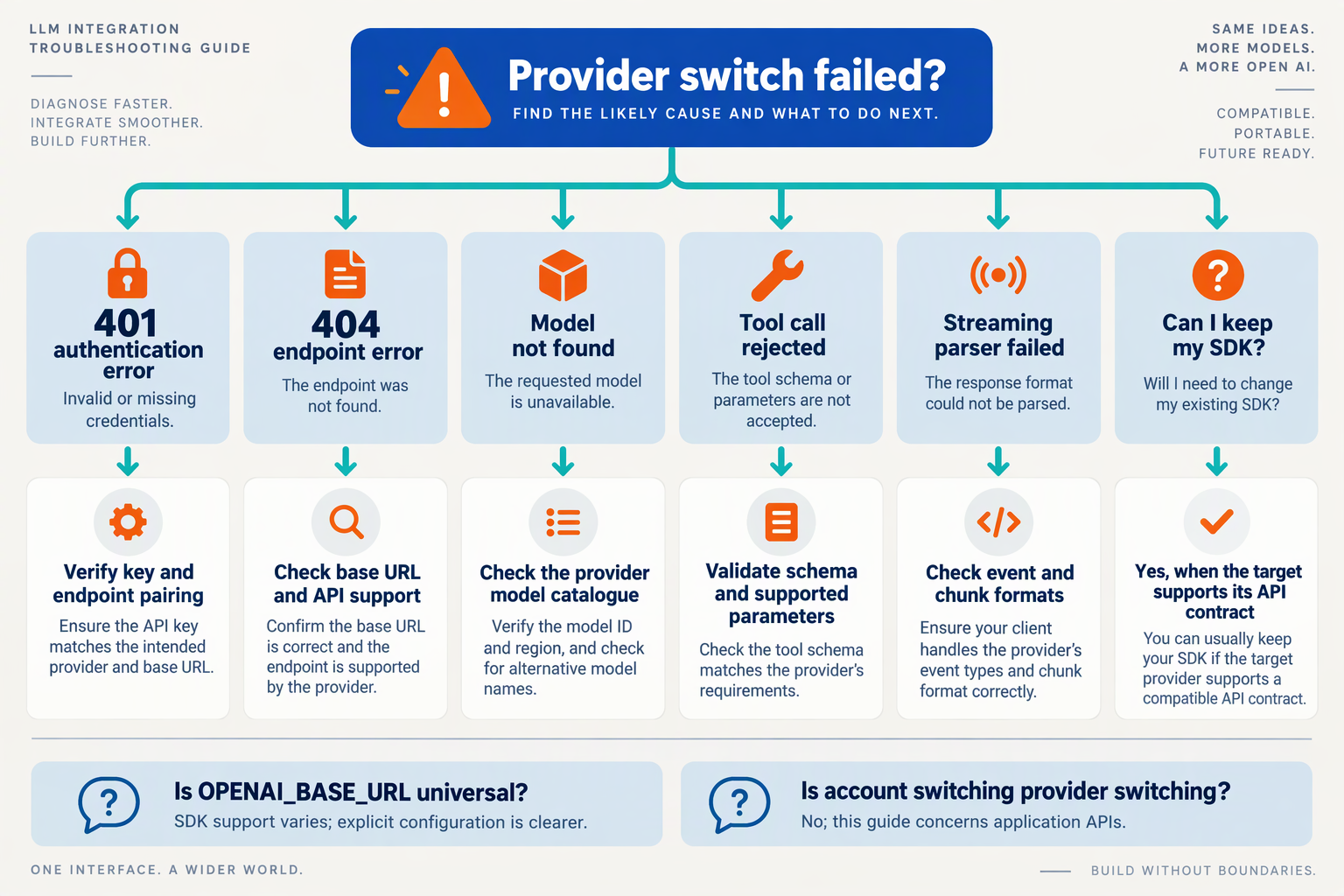
How do I switch between LLM providers without changing my code if I get a 401 error?
base_url and api_key: changing only the endpoint can leave the wrong credentials attached.How do I switch between LLM providers without changing my code if I get a 404 error?
/v1/v1, avoid using /chat/completions as the base URL, and confirm that your destination supports the operation—not merely an OpenAI-shaped request.Why does my replacement LLM return “model not found” or “unsupported parameter”?
Why do tool calls break after switching LLM providers?
Why does streaming work with one LLM provider but fail with another?
Should I retry failed requests when switching LLM providers?
Which official resources should I check before deploying a provider switch?
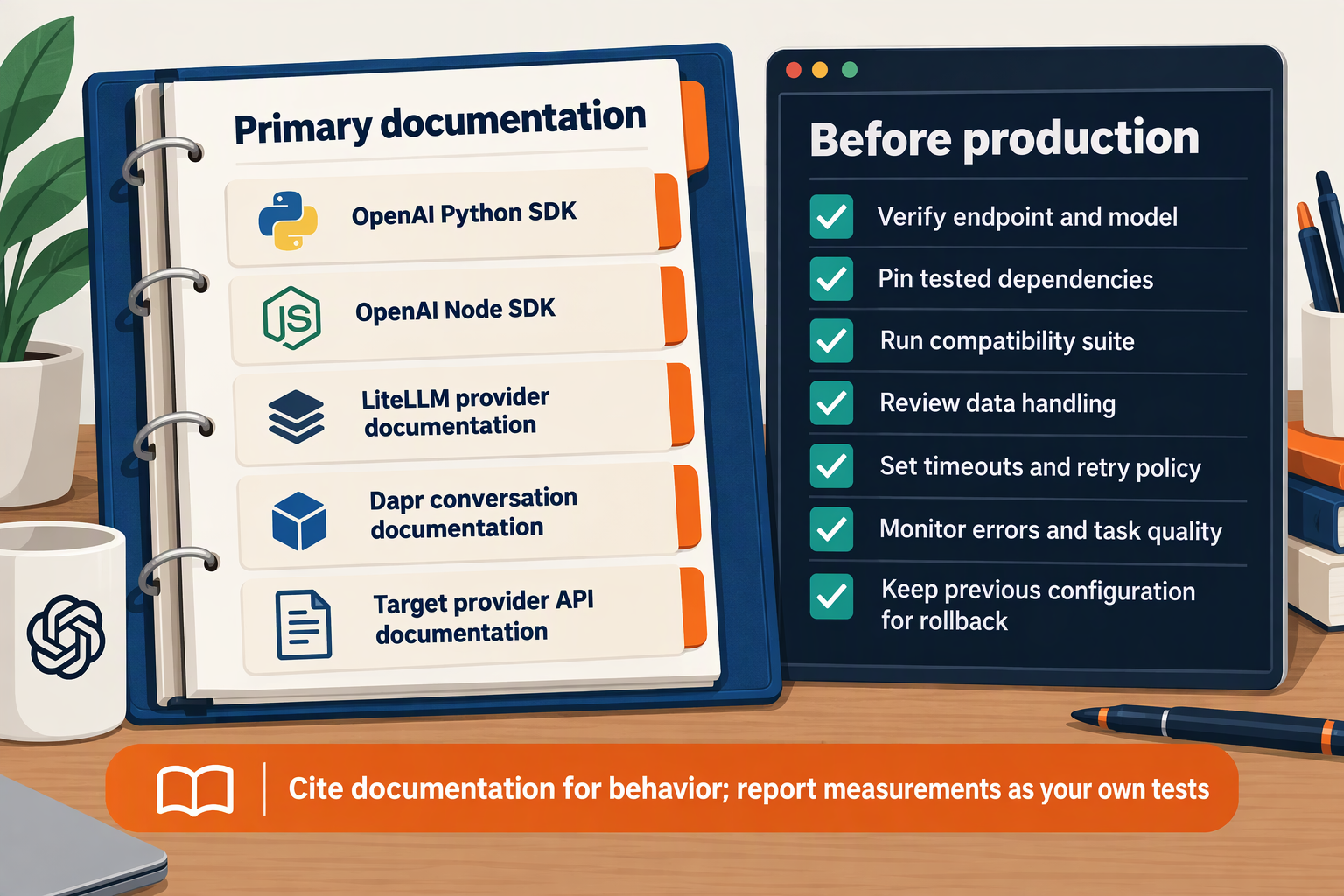
Before deploying a provider switch, check the official SDK repository, the gateway’s compatibility documentation, and the destination provider’s model documentation, changelog, and service policies. These sources establish whether your existing integration is supported—not merely whether a request succeeds.
Which SDK documentation should you trust?
For an OpenAI SDK integration, start with OpenAI’s openai/openai-python repository or the corresponding official JavaScript SDK repository. Check documentation against your installed SDK version, rather than assuming examples from the latest branch match your deployment.
For this November 2026 deployment review, distinguish the official OpenAI repository supplied in the research from the similarly named goofy-bytes-heaven/openai-python repository. A fork can contain useful examples, but it is not the authoritative source for upstream SDK behavior.
Inspect these items before release:
- Endpoint support: Does your SDK version expose the operation you use?
- Retries and timeouts: Could SDK retries combine with gateway retries and multiply attempts?
- Error handling: Can your application distinguish authentication failures, rate limits, and unavailable models?
- Streaming behavior: What events, exceptions, and connection-cleanup responsibilities should your application expect?
Record the package version and documentation revision with your deployment. That makes a later failure reproducible.
Which gateway documentation matters most?
Read the gateway’s provider-specific compatibility page, not just its homepage. Marketing descriptions establish scope; technical documentation establishes request requirements and exceptions.
In the BerriAI LiteLLM documentation provided for this November 2026 guide, the OpenAI-compatible provider page explicitly warns: “Do NOT add anything additional to the base url e.g. /v1/embedding.” The page explains that the OpenAI client adds the relevant endpoints automatically. This is a concrete example of why copying a full operation URL into an SDK configuration can break an otherwise compatible integration.
As of November 2026, CallMissed’s verified developer API documentation covers OpenAI-compatible and Anthropic-compatible endpoints, alongside caller-chosen fallback models, usage logs, and request logs. For a CallMissed deployment, consult those endpoint references to establish the supported request contract before relying on compatibility assumptions.
What should you verify with the destination provider?
Use the destination provider’s official model reference, release notes, pricing documentation, and data-handling policies to answer four questions:
- Is the exact model identifier available? Check access requirements and any announced retirement or replacement.
- Are required features supported together? Verify the combination your workflow needs, such as streaming plus tool calls—not just each feature separately.
- What operational limits apply? Confirm context limits, output limits, quotas, and billing rules for your account.
- Where does request data go? Review retention, processing locations, and contractual requirements, including the gateway’s role.
Treat unresolved documentation gaps as deployment risks. Ask for clarification rather than interpreting silence as support.
What evidence should accompany the production switch?
Create a short deployment evidence record containing the review date, SDK version, gateway configuration, exact model identifier, documentation revisions, and test results. For a November 2026 release, record the actual review day—not simply “latest.”
The practical answer to “how do I switch between LLM providers without changing my code?” is to preserve a documented interface and change configuration only after verifying the replacement’s contract. Official documentation establishes what should work; your evaluations establish whether it works for your application.
Conclusion
You can switch LLM providers without changing your agent code by using an OpenAI-compatible gateway and keeping the endpoint, credentials, and model identifier in configuration. That approach preserves supported SDK calls and application workflows—but API compatibility is not a guarantee of equivalent model behavior.
The durable lesson is to separate what your agent does from which model powers it. A support agent’s ticket-search function, conversation loop, and memory handling should not require a rewrite whenever you change providers, provided the replacement supports the interfaces those workflows depend on.
Keep these four takeaways at the center of your migration plan:
- Externalize provider configuration. Store the base URL, API key, and model identifier outside business logic so switching providers becomes a deployment change rather than a codebase-wide edit. Infro’s SDK configuration guide, referenced for this November 2026 guide, identifies
base_urlfor Python’s OpenAI client andbaseURLfor Node’s client. Those settings provide the connection point; they do not resolve differences in model capabilities.
- Verify the operations your agent actually uses. An OpenAI-compatible endpoint is useful only if it supports your required request patterns and features. Check streaming, function calling, structured outputs, and supported parameters before treating a replacement as drop-in compatible. A basic chat response passing a smoke test does not establish that a tool-using agent will behave correctly.
- Evaluate behavior before moving production traffic. Reuse representative conversations to compare instruction-following, tool arguments, answer quality, response speed, and cost. For a support workflow, check whether the replacement chooses the right ticket-search tool and supplies valid arguments—not merely whether it returns a fluent answer. Keep the application interface stable while making model acceptance depend on evidence.
- Choose fallbacks deliberately. A fallback model needs to support the request it receives, including its tools and output requirements. Treat fallback selection as another compatibility and evaluation decision, not simply a list of available model names. Otherwise, a successful request can still produce an unusable result.
Looking ahead, watch how consistently gateways and models support the features your agents rely on. Broader model access becomes valuable when teams can compare replacements without repeatedly rebuilding integrations; dependable switching still requires model-specific testing.
As of November 2026, CallMissed’s developer AI API offers OpenAI-compatible and Anthropic-compatible endpoints, with one API key and balance covering 146 models, including 44 general-purpose LLMs, according to CallMissed’s verified product facts. Readers can explore CallMissed as one practical example of configuration-based provider access.
Start with one representative workflow: can your next provider switch pass its existing tests without changing the agent’s application logic?
Related Reading
- unified LLM API gateway: Claude, Gemini and GPT Compared
- vLLM tool call parsing: Practical Agent Accuracy Checks
- Dessa Speech-Only Voice Model: Voice-Agent Developer Guide