vLLM tool call parsing: Practical Agent Accuracy Checks



Improve vLLM tool call parsing with configuration checks, parser diagnostics, tool-choice examples, and tests for correct tool selection.
vLLM tool call parsing: Practical Agent Accuracy Checks
What if your agent’s “reasoning failure” is actually a tool call lost between the model output and your application? vLLM tool call parsing is a critical checkpoint: before changing models or rewriting prompts, verify that your serving stack turns generated tool requests into the structured calls your agent expects.
That distinction matters because a broken tool interaction can contaminate everything that follows. Ubicloud’s “Fixing Tool-Call Accuracy in vLLM” explains that inaccurate tool calls cause a model to build up “nonsensical context,” leading to lower-quality results. A failed lookup, malformed argument, or missing tool response can therefore look like poor reasoning—even when the original problem sits in the integration.
For this October 2026 guide, the supplied Hacker News snapshot records 39 points and 5 comments for Ubicloud’s article. That is a modest but concrete signal of developer interest, not a benchmark of vLLM reliability. The practical question behind that attention is more important: why can an open-weight model perform well in evaluations yet disappoint inside a working agent?
The vLLM Blog offers a useful historical example. In its October 28, 2025 investigation of Kimi K2 tool calling, the vLLM project identified a chat-template issue involving add_generation_prompt; explicitly declaring that parameter allowed vLLM to pass it correctly. The post recommends Kimi K2 models with chat templates updated after commit 94a4053eb8863059dd8afc00937f054e1365abbd. The lesson is specific: model quality, template compatibility, and parser behavior are separate things to test.
What should developers check before blaming the model?
This guide turns that distinction into a practical debugging workflow:
- Check the serving configuration: confirm that the selected tool-call parser matches the model and that the required tool-calling settings are enabled.
- Inspect the chat template: verify how tool definitions, assistant generation prompts, and tool results enter the conversation.
- Compare raw and parsed output: distinguish a model that never requested a tool from a parser that failed to extract one.
- Validate execution end to end: check tool names, argument schemas, returned results, and subsequent agent behavior.
- Build regression cases: test ordinary calls, malformed arguments, streaming responses, and multi-turn interactions before deploying changes.
As of October 2026, CallMissed’s developer AI API offers OpenAI-compatible endpoints, function calling, and usage and request logs—capabilities relevant to teams building and inspecting tool-enabled agents.
You will learn to separate generation errors, parsing errors, and execution errors, then measure each rather than treating every unsuccessful task as one accuracy problem. Start with observable evidence, not another prompt rewrite.
How do you improve vLLM tool-call accuracy? Verify configuration, parsing, and execution separately
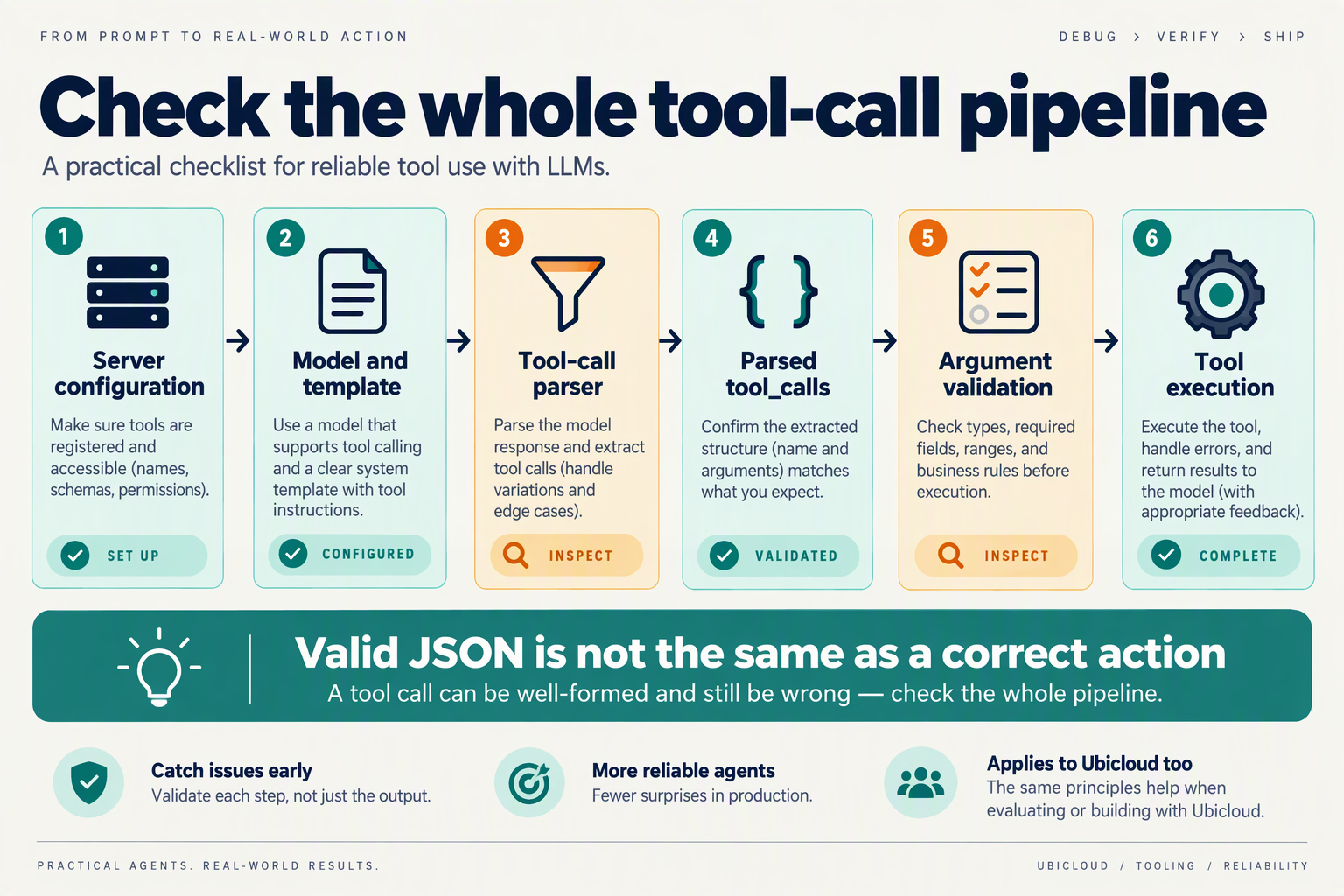
Improve vLLM tool-call accuracy by testing three boundaries independently: how the server receives the request, how generated text becomes a structured tool call, and how your application executes that call. A successful HTTP response is not proof that all three worked.
How do you establish a reproducible vLLM tool-calling test?
Start with a single-tool fixture whose expected behavior is unambiguous. For example, define lookup_order with one required string argument, order_id, and ask: “Look up order ORD-1042.” Use a stubbed response rather than a production system so network failures cannot obscure the initial diagnosis.
Record the following alongside each test:
- Serving artifacts: vLLM version, model revision, tokenizer revision, chat template, and launch arguments.
- Request settings: tool definition,
tool_choice, sampling parameters, and whether streaming is enabled. - Observed outputs: generated output where accessible, the API’s
tool_calls, validation results, and execution outcome.
For this October 2026 workflow, pin those artifacts before changing anything. Otherwise, a model update and a parser change can land together, leaving you unable to explain which affected reliability.
Which configuration checks isolate serving problems?
Confirm that your installed vLLM version supports the intended model, parser, and tool-choice mode. For automatic tool selection, inspect settings such as --enable-auto-tool-choice and --tool-call-parser; do not assume an OpenAI-compatible request automatically configures the server.
In the GuideLLM documentation supplied for this October 2026 guide, the vLLM project lists parser examples including hermes for Qwen/Hermes, llama3_json for Llama 3.x, and mistral for Mistral. Treat these as starting points, not universal mappings: verify the exact model variant against your installed release.
Use a controlled sequence:
- Send the fixture without streaming.
- Confirm the server accepts the tool schema and requested tool-choice mode.
- Inspect the rendered prompt, where available, to verify that tool definitions reached the model.
- Change only one configuration variable before rerunning.
How do you distinguish parsing errors from execution errors?
Compare evidence across the boundary rather than labeling every failure “bad reasoning.”
- Generation failure: the model never emits the expected tool request, or chooses the wrong tool.
- Parsing failure: recognizable tool-call content appears in generated output, but the API omits or incorrectly extracts the structured call.
- Validation failure: a parsed call exists, but its arguments violate your schema.
- Execution failure: a valid call reaches the executor, but authorization, connectivity, or business logic prevents completion.
Ubicloud’s article, supplied as context for this October 2026 guide, warns that inaccurate calls create “nonsensical context.” The practical implication is to stop invalid calls before their results—or invented substitutes—enter the conversation.
What should you measure before changing the model?
Measure stage-specific success rates, not just final task completion. In a hypothetical 100-request fixture run, suppose 90 requests generate the intended call, 81 parse correctly, and 72 execute successfully. Generation success is 90%; parsing success among intended calls is 90%; execution success among correctly parsed calls is about 88.9%.
Those are illustrative calculations, not published vLLM benchmarks. Their value is diagnostic: they reveal separate losses that one end-to-end score hides.
Finally, verify that each tool result returns with the matching tool-call identifier and that the next assistant turn uses it correctly. Fix the earliest failing boundary, then rerun the unchanged fixture before expanding into streaming and multi-turn tests.
What prerequisites and model-to-parser checks should you record before testing?
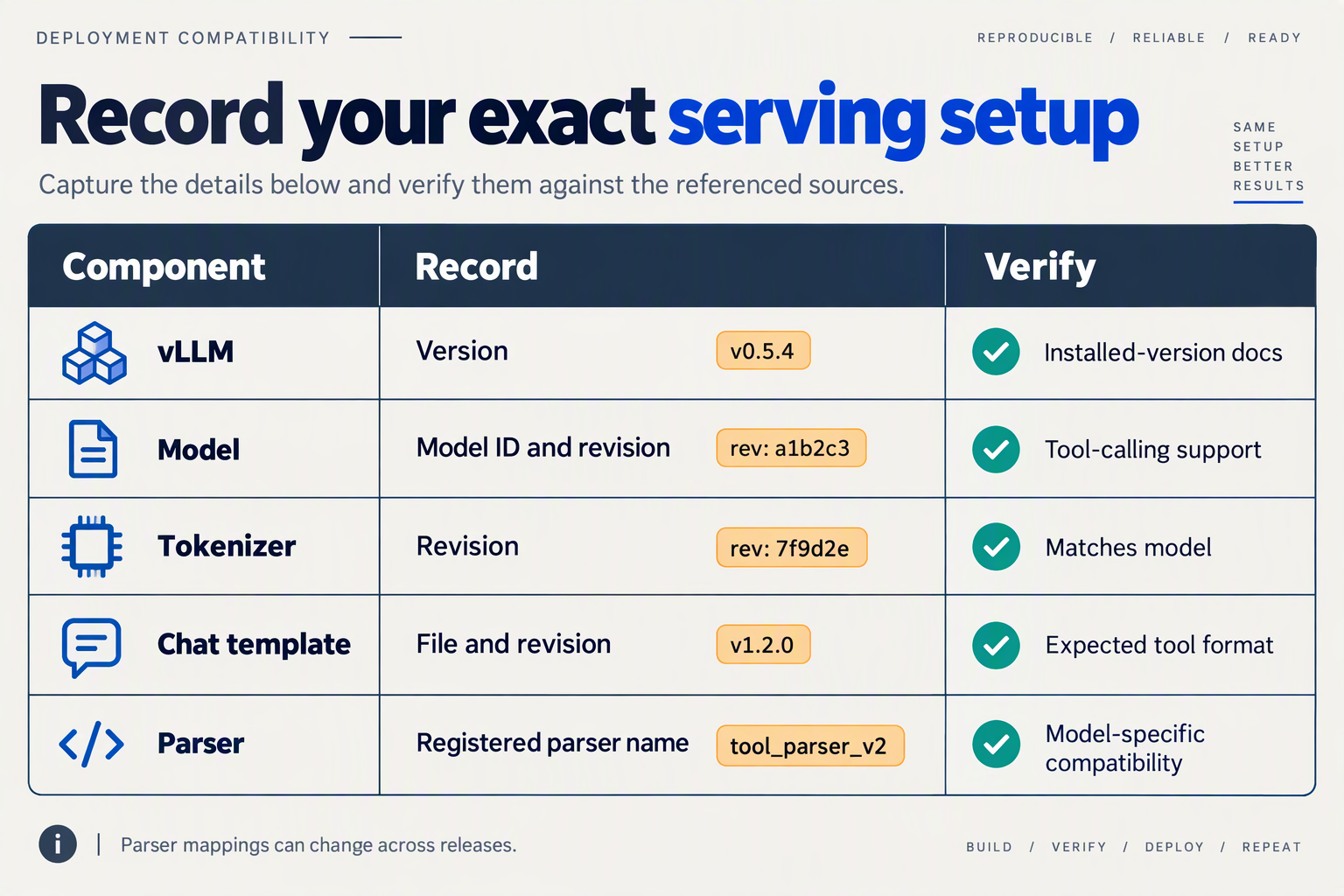
Record a reproducible serving manifest before testing: the exact model revision, vLLM build, tokenizer and chat template, parser, startup flags, and request settings. For this October 2026 checklist, treat compatibility as a property of that complete configuration—not something guaranteed by a model family name.
What belongs in a vLLM tool-calling test manifest?
The following six checks establish whether two test runs are genuinely comparable. Save the manifest alongside your test inputs and captured responses, rather than relying on deployment notes that may change later.
| Prerequisite | Record before testing | Model-to-parser check | Evidence to save |
|---|---|---|---|
| Model identity | Repository, revision, quantization | Confirm the exact checkpoint supports the intended tool-call format | Resolved model configuration |
| Serving build | vLLM version or commit, container digest | Check parser availability in that installed release | Version output and launch command |
| Parser selection | Exact parser name and any custom plugin | Match the parser to the checkpoint’s output format | Parser configuration |
| Tokenizer and template | Tokenizer revision, template source and hash | Check tool definitions, control tokens, and assistant prefix | Rendered test prompt |
| Tool-calling controls | Startup flags, request tool_choice, tool schemas | Verify automatic, required, or named-tool behavior separately | Complete request payload |
| Generation and transport | Temperature, token limit, seed if supported, streaming mode | Check for truncation and differences between streamed and complete responses | Raw output and parsed calls |
A parser label is a starting hypothesis, not proof of compatibility. GuideLLM Docs lists common examples: hermes for Qwen/Hermes, llama3_json for Llama 3.x, and mistral for Mistral. Those supplied documentation examples are useful for the October 2026 checklist, but they are not a universal compatibility matrix: confirm the exact checkpoint and installed vLLM release before choosing one.
How do you verify that the chat template matches the parser?
Inspect one rendered conversation containing a tool definition, an assistant tool request, and a corresponding tool result. The parser must recognize the format the model actually emits; changing the parser cannot repair a prompt that teaches the model a different serialization.
The vLLM Blog’s October 28, 2025 investigation recommends Kimi K2 models with chat templates updated after commit 94a4053eb8863059dd8afc00937f054e1365abbd. Use that historical finding as a concrete revision check for relevant Kimi K2 deployments, not as evidence that every later checkpoint or serving build is automatically correct.
Before accepting the template, verify:
- Tool visibility: the rendered prompt contains the intended tool names and argument definitions.
- Generation boundary: the assistant prefix appears where expected, including the handling of
add_generation_prompt. - Result placement: tool responses retain the identifiers and conversation structure expected by the selected template.
What should the first preflight test prove?
Use a harmless fixture such as lookup_order, with one required string argument, order_id. Ask for the status of a known test order and return a fixed mock result rather than contacting production systems.
Run these checks in sequence:
- Confirm the request reaches the intended model and configuration.
- Confirm the raw generation contains a recognizable tool request.
- Confirm parsing preserves the tool name and argument value.
- Confirm the application associates the mock response with the correct call.
Keep this preflight separate from task-quality scoring. A passing fixture establishes basic integration readiness; it does not establish tool-call accuracy across realistic workloads.
How do you fix the error that auto tool choice requires --enable-auto-tool-choice and --tool-call-parser?
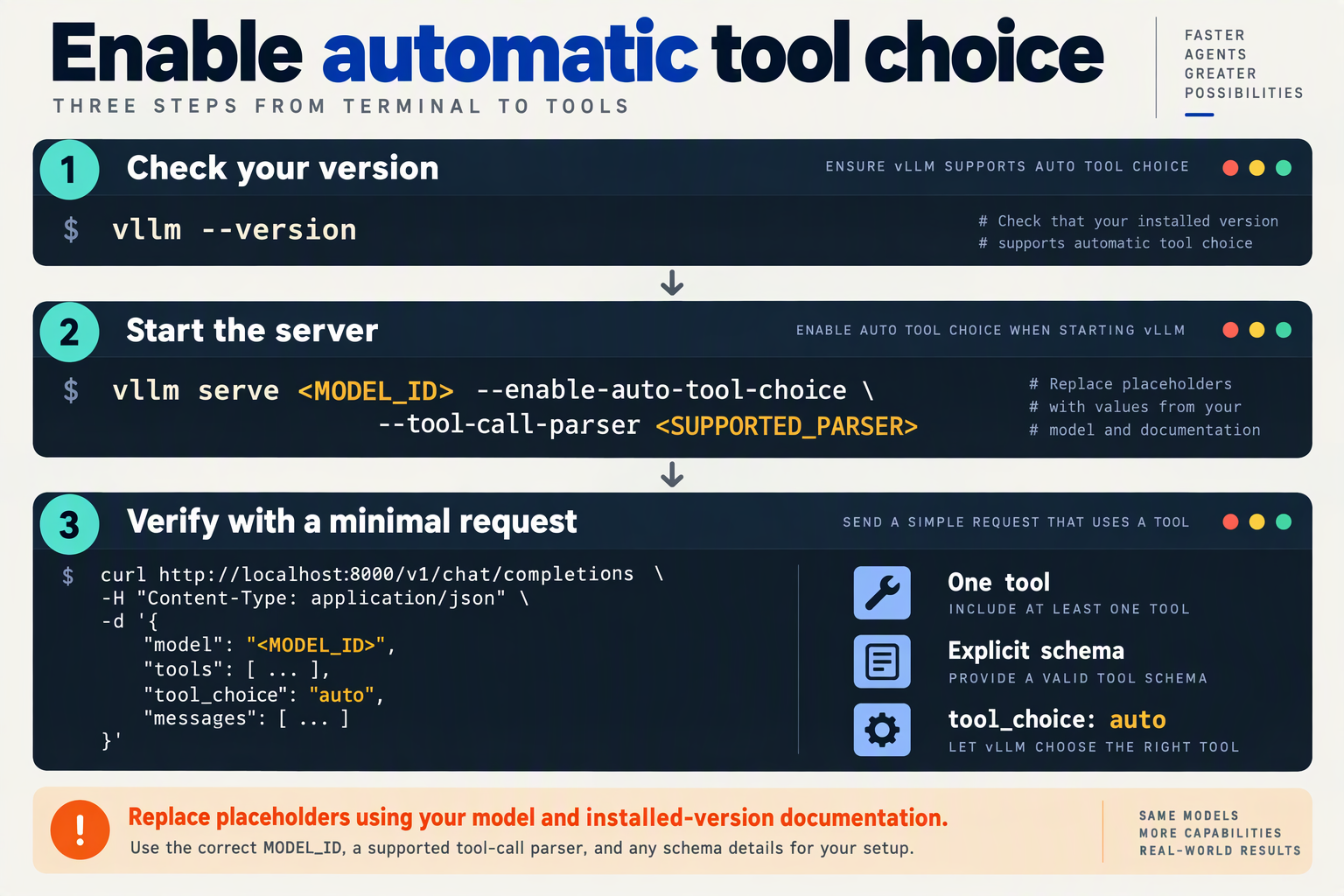
Fix this error by restarting the vLLM server with both --enable-auto-tool-choice and a model-compatible --tool-call-parser. Setting "tool_choice": "auto" in your client request is not enough: the server must also be configured to interpret the model’s tool-call output.
Where do you add the required vLLM flags?
Add the flags to the command that launches your OpenAI-compatible vLLM server—not to your Python SDK configuration or request body. For an illustrative Qwen2.5 deployment using the hermes parser:
vllm serve Qwen/Qwen2.5-7B-Instruct \
  --enable-auto-tool-choice \
  --tool-call-parser hermes
Confirm compatibility with your installed vLLM version and exact model before copying this command. The two settings have different responsibilities:
--enable-auto-tool-choiceenables requests where the model decides whether to call a tool.--tool-call-parserselects the parser that extracts structured tool calls from the model’s generated output.
If you deploy through Docker, Kubernetes, or a process manager, update the actual container arguments or service configuration. Editing a local command will not change an already-running production server.
After restarting, inspect the startup logs and deployment configuration to confirm that the intended process received both arguments.
Which tool-call parser should you choose?
Choose a parser for the model’s tool-calling format, not simply its parameter count or API compatibility.
The GuideLLM documentation supplied for this October 2026 guide lists common parser examples: hermes for Qwen/Hermes, llama3_json for Llama 3.x, and mistral for Mistral. Treat these as starting points rather than universal mappings across every model revision.
Use this verification sequence:
- Identify the exact checkpoint: record the model repository and revision.
- Check your installed vLLM release: verify which parser names it supports.
- Check the model’s chat template: confirm that tool definitions and generated calls use the format your parser expects.
- Preserve the working configuration: record the model revision, vLLM version, parser, and any template override together.
A parser mismatch can remove the configuration error while still producing missing or malformed tool calls. Server acceptance is not an accuracy benchmark.
How do you verify that automatic tool choice works?
Send a minimal, non-streaming request with one tool and an explicit task:
{
  "model": "Qwen/Qwen2.5-7B-Instruct",
  "messages": [
    {
      "role": "user",
      "content": "Use get_weather to check the weather in Bengaluru."
    }
  ],
  "tools": [
    {
      "type": "function",
      "function": {
        "name": "get_weather",
        "parameters": {
          "type": "object",
          "properties": {
            "city": {"type": "string"}
          },
          "required": ["city"]
        }
      }
    }
  ],
  "tool_choice": "auto"
}
Submit this payload to /v1/chat/completions. Inspect choices[0].message.tool_calls for get_weather, then parse its arguments string as JSON and verify the city. Automatic selection permits a text response, so a missing call requires investigation rather than immediately proving parser failure.
As of October 2026, CallMissed’s developer AI API supports OpenAI-compatible endpoints, function calling, and usage and request logs. For gateway-based integrations, distinguish client request settings from the underlying serving configuration: these vLLM flags belong to the server operator.
Once the error disappears, test tool execution separately. vLLM returning a structured call does not mean your application executed the function or returned its result.
How do you trace tool call parsing from vLLM response to a completed agent turn?
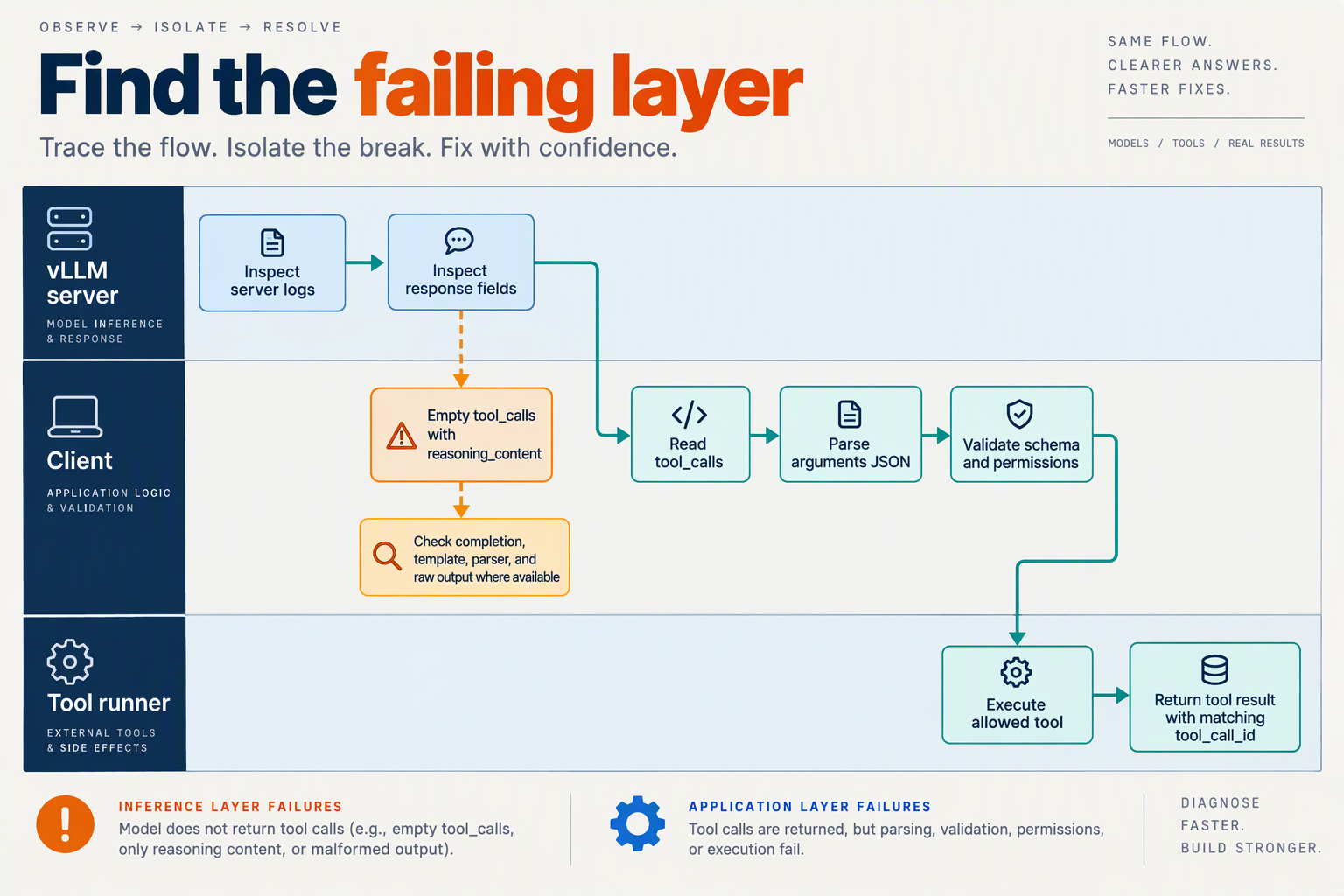
Trace one agent turn across every boundary: generated output, parsed tool call, validated arguments, tool execution, returned tool message, and the assistant’s continuation. Give these events a shared trace ID so you can identify the first divergence instead of treating an unsuccessful answer as a single “model accuracy” failure.
What should you record at each tool-call boundary?
For this October 2026 debugging workflow, capture a structured event at each step. Record model and serving versions alongside the trace, and redact credentials and sensitive argument values.
- Generation: Capture the generated text before tool parsing, if your instrumentation exposes it. Preserve delimiters and whitespace; normalizing output can hide the evidence.
- Parsing: Record the extracted tool-call ID, function name, argument string, and parser errors. Keep raw and parsed representations distinguishable.
- Validation: Record whether arguments decode as JSON and satisfy the tool’s schema. Separate missing fields, incorrect types, and unknown tool names.
- Execution: Record the dispatched function, start and end times, status, and sanitized result. An accepted call is not proof that the tool succeeded.
- Conversation update: Capture the assistant tool-call message and the corresponding tool-result message actually submitted to the next model request.
- Continuation: Record whether the assistant answers, requests another tool, or stops unexpectedly.
A completed tool invocation is not necessarily a completed agent turn. The turn ends when the assistant produces the intended user-facing response or reaches an explicitly defined terminal state.
How do you trace streaming tool calls without losing arguments?
For streaming responses, retain both the individual deltas and the assembled call. Argument strings can arrive in fragments; attempting to decode each fragment as complete JSON creates false parsing failures.
Use these practical checks:
- Assemble deltas by tool-call index within the response, retaining the call ID when supplied.
- Keep multiple calls separate rather than concatenating every argument fragment into one buffer.
- Validate the assembled arguments before dispatch, unless you have deliberately implemented an incremental validation strategy.
- Record interrupted streams and length-limited responses as incomplete, not automatically as parser defects.
Also capture the finish reason when available. It provides supporting evidence, but does not replace checking that the call is complete and executable.
What does a successful end-to-end trace look like?
Consider an illustrative lookup_order tool with a required string field, order_id:
- The model requests
lookup_orderwith{"order_id":"ORD-1042"}. - The parser extracts a call ID, function name, and unchanged arguments.
- Validation accepts the arguments, and the dispatcher invokes the registered function.
- The tool returns
{"status":"shipped"}. - In a Chat Completions-style conversation, the application appends a tool message whose
tool_call_idmatches the assistant’s call. - The next assistant response explains that the order has shipped.
Change step five to attach the wrong call ID or omit the result, and successful execution no longer establishes a healthy conversation. This illustrates Ubicloud’s warning, cited in the supplied October 2026 research context, that inaccurate tool interactions can accumulate “nonsensical context.”
How should you classify the first failure?
Assign the failure to its earliest observable boundary: generation, parsing, validation, execution, message assembly, or continuation. Replay downstream stages with a known-good input to test them independently.
As of October 2026, CallMissed’s developer AI API provides OpenAI-compatible endpoints, function calling, and usage and request logs. Those capabilities can support application-side investigation, but request logs should not be assumed to expose vLLM’s internal pre-parser output; instrument that boundary separately when debugging a self-hosted deployment.
How do auto, required, named-function, and none tool choices differ?
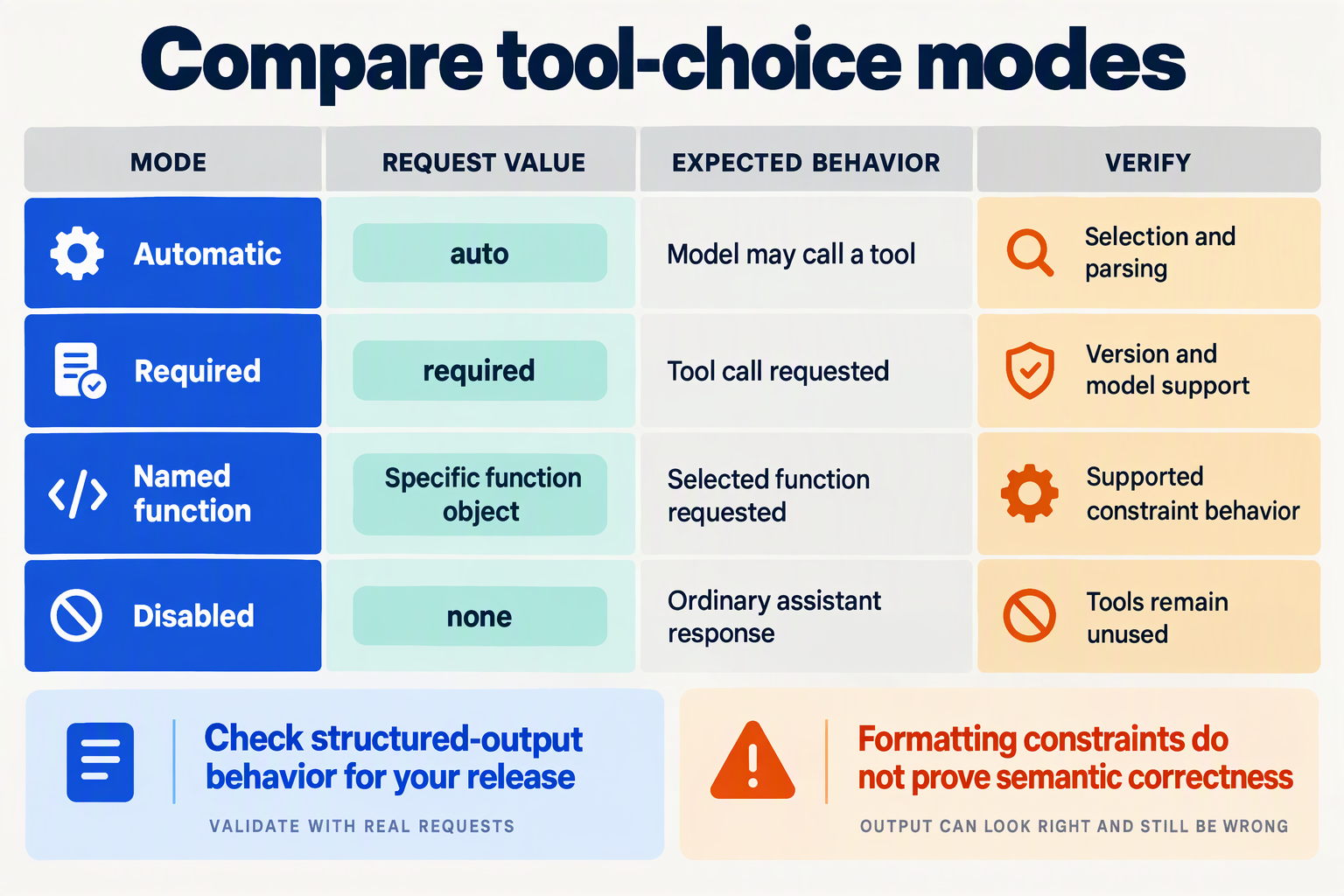
auto lets the model decide whether to call a tool; required demands at least one tool call; a named-function choice selects a specific function; and none prohibits structured tool calls. For vLLM tool-call accuracy, these modes need separate tests: a correct direct answer under auto would fail the contract under required.
As of October 2026, treat these as request-level contracts, not guarantees that every vLLM release, model, and parser supports them identically. Record your deployed version and verify supported behavior before comparing results.
What does each tool-choice mode require?
| Mode | Request value | Expected behavior | Useful test |
|---|---|---|---|
| Auto | "auto" | Model chooses a direct answer or tool call | Does a lookup-dependent question trigger the appropriate tool? |
| Required | "required" | One or more tool calls; not necessarily exactly one | Does the response contain a valid call to an allowed tool? |
| Named function | {"type":"function","function":{"name":"lookup_order"}} | Model calls the specified function | Is the name exactly lookup_order, with valid arguments? |
| None | "none" | No structured tool calls | Does the response avoid tool_calls, even when tools are supplied? |
Tool choice controls selection, not execution permission. Even a correctly named call must pass application-side validation and authorization before your agent runs it. Schema-compliant arguments can still contain the wrong order identifier or request an action the user cannot authorize.
How should developers test the four modes?
Use a read-only function such as lookup_order, accepting an order_id string, and a fixed prompt: “Check the status of order ORD-1042.” Keep the model, tool schema, conversation, and generation settings unchanged while varying only tool_choice.
- Test
auto: Expect a lookup when the answer requires external order data. A direct answer is contractually allowed, but an invented order status is still a task failure. - Test
required: Check that at least one allowed tool call appears. Do not mark the test successful merely because the response contains JSON. - Test the named function: Require the exact function name and validate the arguments. This isolates argument generation from the model’s decision about which tool to select.
- Test
none: Require no structured calls. Text saying “I would check the order” is not an executable tool invocation.
Add a second prompt that needs no external information, such as “Explain what an order status means.” This checks whether auto can avoid unnecessary calls rather than measuring only its willingness to invoke tools.
Why should accuracy be reported separately by mode?
Ubicloud’s “Fixing Tool-Call Accuracy in vLLM,” supplied for this October 2026 guide, connects inaccurate tool interactions with degraded downstream context. A single combined score can hide whether your problem is selection, formatting, or argument correctness.
Report separate checks:
- Contract compliance: Did the response obey the requested mode?
- Schema validity: Do arguments parse and match the function schema?
- Semantic accuracy: Are the argument values correct for the request?
- Execution outcome: Did the validated call retrieve the intended result?
GuideLLM’s tool-calling documentation identifies model-specific parsers including hermes, llama3_json, and mistral. For your October 2026 test record, capture the actual parser alongside each result: changing tool choice can exercise different serving paths, so success with a forced function does not establish reliable auto behavior.
How do you measure correct tool selection and arguments instead of just valid JSON?
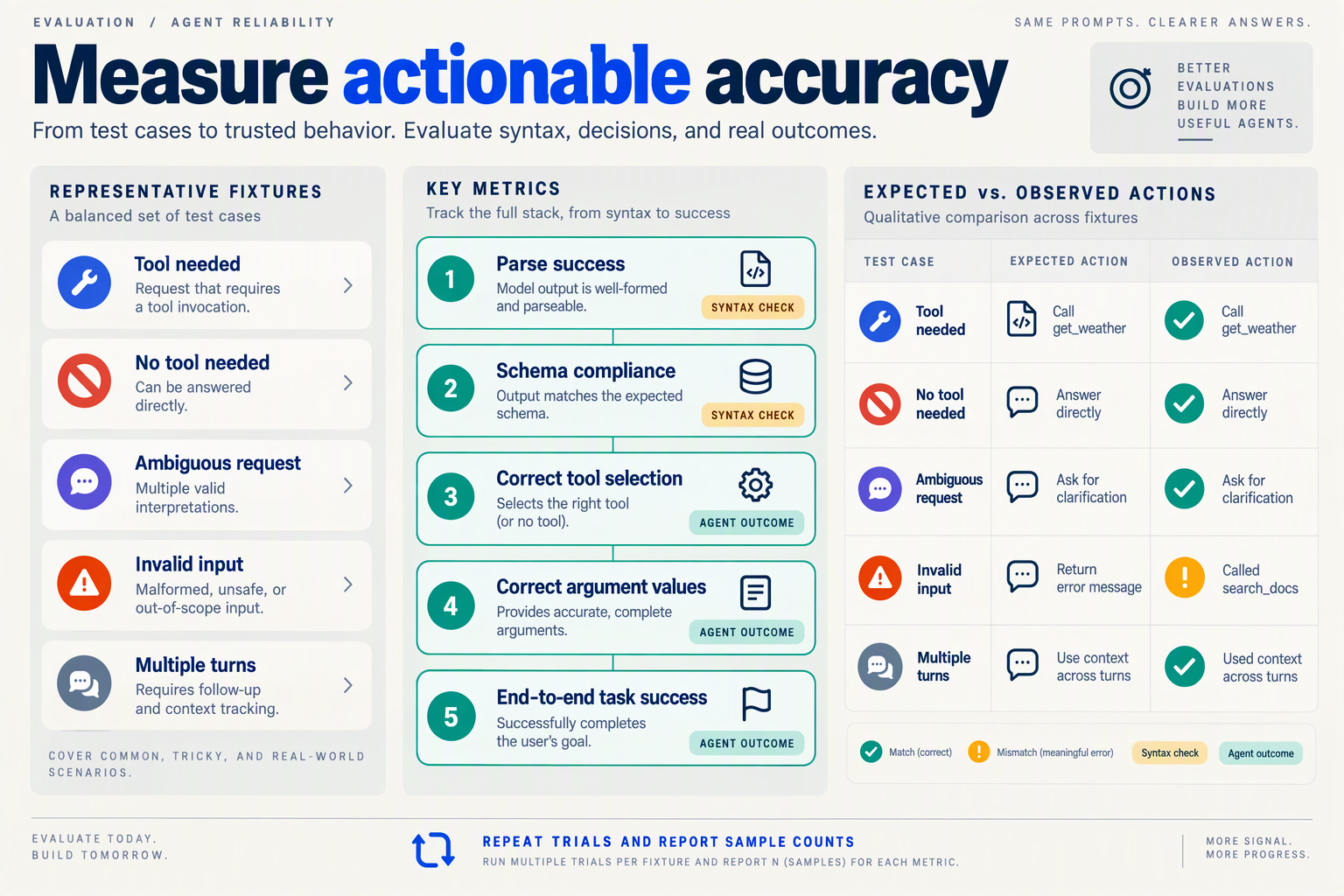
Measure tool-selection accuracy, argument correctness, and task completion separately, using labeled test cases with explicit success criteria. Valid JSON only proves that an output can be decoded; it does not prove the agent chose the right action or supplied values that match the user’s intent.
What should a tool-calling evaluation case contain?
Build a versioned evaluation set around actual workflows rather than isolated formatting prompts. Each case should specify:
- Input and context: the user request, conversation history, available tools, and relevant permissions.
- Expected action: an acceptable tool, a permitted set of alternatives, or explicitly no tool call.
- Argument constraints: required values, allowed ranges, identifiers, and rules for omitted fields.
- Expected outcome: the observable result that makes the task successful.
For example, “Check order ORD-1842” might require get_order(order_id="ORD-1842"). Calling cancel_order with that same identifier is valid JSON and potentially schema-valid, but semantically wrong.
Include ambiguous requests where clarification is the correct response. Otherwise, your evaluation can reward guessing instead of safe, accurate behavior.
Which metrics distinguish valid JSON from correct tool use?
Report a small scorecard rather than one undifferentiated “accuracy” percentage:
- Parse success: the share of outputs intended as tool calls that the serving stack successfully extracts.
- Schema validity: the share of extracted calls with recognized tool names, required fields, and valid types.
- Tool-selection accuracy: the share of labeled decisions that select an acceptable tool—or correctly avoid calling one.
- Argument correctness: the share of expected calls whose arguments satisfy the case’s semantic constraints.
- End-to-end success: the share of tasks that reach the expected outcome after execution and any subsequent turns.
Always publish denominators. Argument accuracy calculated only on correctly selected tools can look excellent while hiding frequent selection failures. Pair that conditional metric with a joint metric: cases where both tool selection and arguments are correct divided by all cases requiring a tool.
For an illustrative October 2026 evaluation—not a published benchmark, suppose 100 requests require one call each: 98 outputs parse, 94 satisfy schemas, 86 select the correct tool, and 78 also contain correct arguments. The joint tool-and-argument accuracy is 78%, not the 98% parsing rate.
How do you judge arguments without brittle string matching?
Use field-aware assertions, not raw JSON equality. Object-key order is irrelevant, while changing an order identifier is consequential.
For each argument, define the comparison deliberately:
- Identifiers and enums: usually require exact matches.
- Dates and times: normalize equivalent representations while checking timezone meaning.
- Numbers: allow tolerances only when the application permits them.
- Optional fields: distinguish legitimate omission from invented values.
- Free text: use a rubric or human review when multiple formulations are acceptable.
Execute calls against deterministic fixtures or a sandbox. A successful HTTP response is not sufficient: verify that the requested record was retrieved or the intended state changed.
How should you compare vLLM changes fairly?
Keep prompts, tool schemas, fixtures, and generation settings fixed while comparing model, parser, or template versions. Track streaming and non-streaming results separately, and retain case-level failures for inspection.
Ubicloud’s article, reviewed for this October 2026 guide, warns that inaccurate calls create “nonsensical context.” That makes multi-turn outcome checks essential: a correctly formatted first call can still derail the remaining workflow. Repeat uncertain cases and report variation rather than treating one successful run as proof of reliability.
Which advanced checks help with templates, streaming, and regression testing?
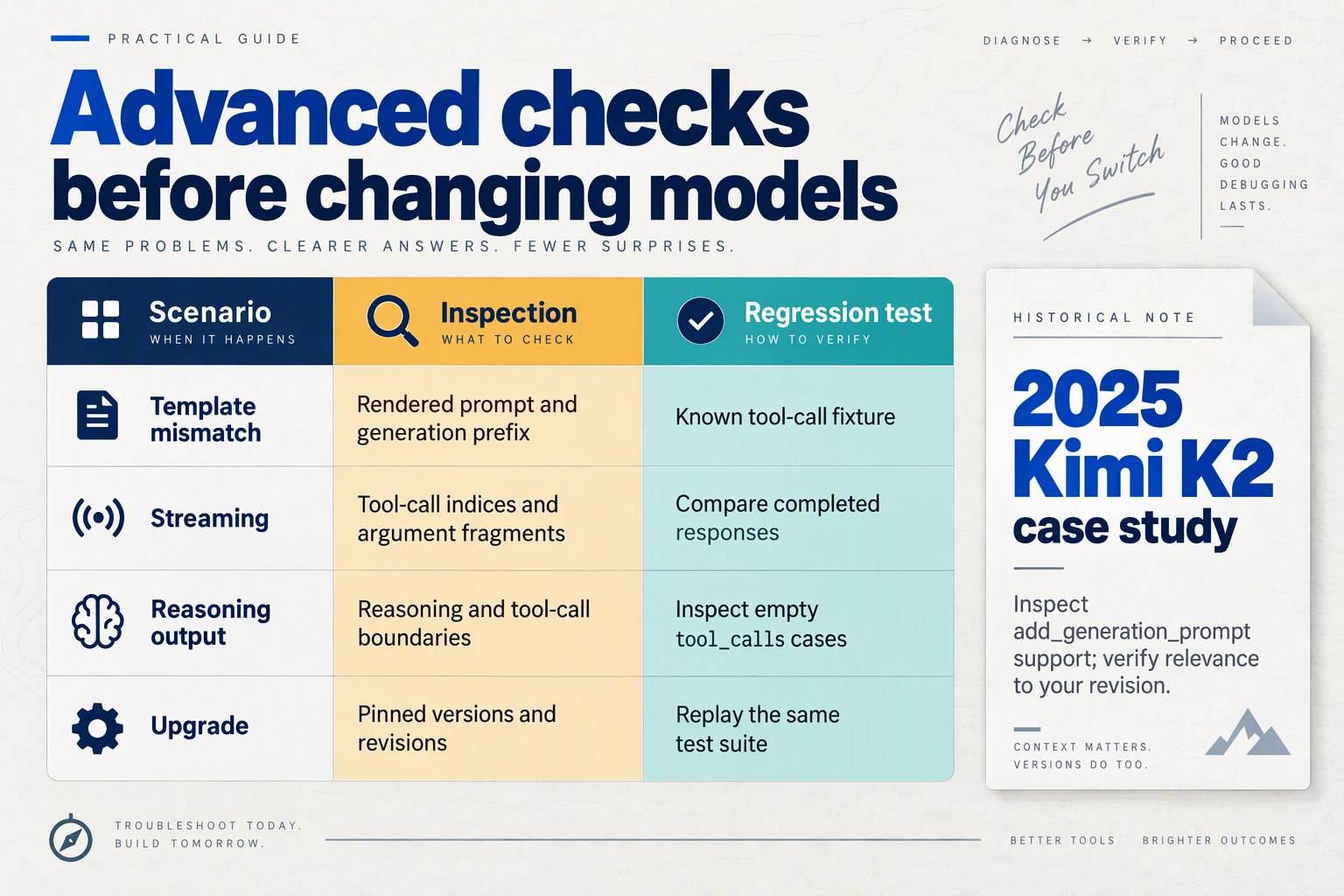
Advanced checks should verify the rendered conversation, incremental tool-call assembly, and behavior across pinned serving versions. For vLLM tool-call accuracy, test these boundaries independently: a valid final response does not prove that streaming works, and a passing single-turn test does not prove that tool results survive subsequent turns.
Which advanced checks belong in a tool-calling regression suite?
Use the following checklist for an October 2026 test plan. These are recommended acceptance checks, not measured vLLM performance results.
| Check | Test method | Passing condition | Failure evidence |
|---|---|---|---|
| Template rendering | Snapshot rendered prompts with tools, without tools, and after tool results | Expected roles, tool definitions, and generation markers appear | Missing markers or misplaced tool results |
| Template parameters | Render with add_generation_prompt enabled and disabled | The parameter produces the intended assistant prefix | Identical or incorrectly terminated prompts |
| Streaming assembly | Reconstruct calls from deltas using call index and ID when available | Complete names and arguments survive fragmented chunks | Truncated JSON, merged calls, or duplicate execution |
| Multiple tool calls | Request two independent lookups when the model supports multiple calls | Arguments and results remain attached to the correct call | Cross-wired IDs or swapped arguments |
| Multi-turn continuity | Execute a tool, append its result, then request a follow-up | The model uses the correct result and conversation history | Repeated calls or answers based on unrelated output |
| Version regression | Replay fixtures before changing model, tokenizer, template, or parser | Required assertions pass; differences are reviewed | Previously passing cases fail after an upgrade |
The historical reason to inspect template parameters is concrete: the vLLM Blog reported on October 28, 2025, that explicitly declaring add_generation_prompt allowed vLLM to pass the parameter correctly, fixing the primary source of failed Kimi K2 tool calls. Turn that finding into a rendered-prompt assertion rather than assuming every template update preserves behavior.
How should developers test streamed tool-call arguments?
Test the assembled call, not each chunk as if it were complete JSON. A streamed argument fragment can legitimately end halfway through a key, string, or escaped character.
For example, a synthetic lookup fixture might split {"city":"Bengaluru"} across several deltas. Your consumer should concatenate the appropriate fragments, then validate the completed arguments before execution.
Include these boundary cases:
- Fragmented names and arguments: ensure concatenation does not overwrite earlier content.
- Interleaved calls: maintain separate accumulators for each call.
- Interrupted streams: mark unfinished calls as incomplete; do not execute partial arguments.
- Retries after interruption: use application-level deduplication where repeated execution could cause side effects.
Compare streaming and non-streaming runs using the same fixture and generation settings. Investigate differences, but do not require identical wording when sampling can vary; assert tool selection, argument validity, and task-relevant outcomes instead.
How do you make regression results actionable?
Build fixtures from production failure patterns, then run this sequence:
- Pin the environment: record vLLM version, model revision, tokenizer, template hash, parser, and generation settings.
- Separate failure categories: report rendering, parsing, schema-validation, execution, and task-completion failures independently.
- Set explicit release gates: require critical fixtures to pass and review changed behavior before rollout.
As of October 2026, CallMissed’s developer AI API supports streaming, function calling, and usage and request logs, making these checks relevant to integrations using its OpenAI-compatible endpoints too. Gateway-level evidence does not replace serving-level diagnosis: retain client-side delta traces and execution records so a failed fixture identifies the broken boundary rather than merely reporting “agent failed.”
Which common mistakes make tool-call accuracy look better than it is?
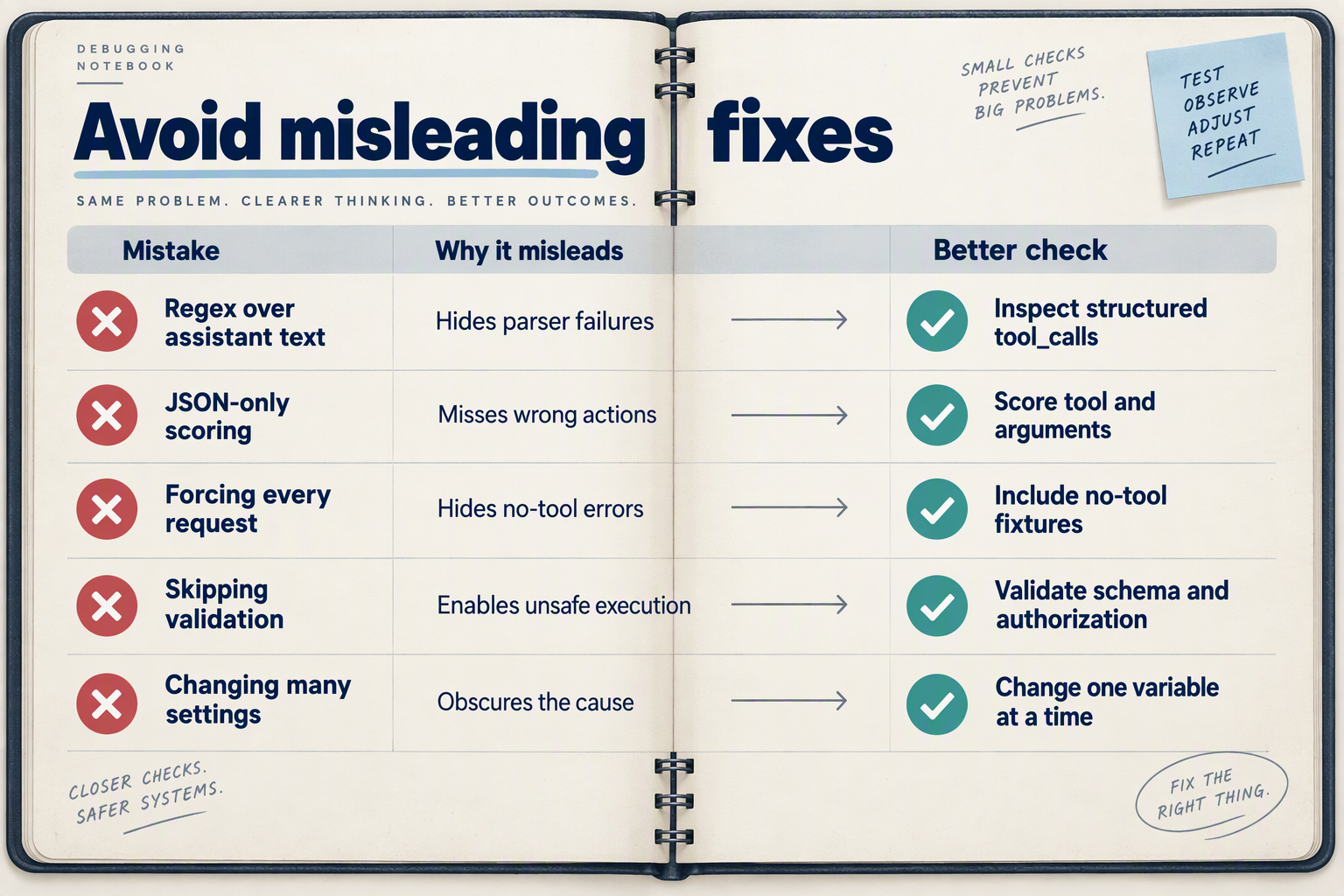
Tool-call accuracy looks better than it is when evaluations count valid JSON as success, discard failed requests, or hide retries behind a single passing result. Measure whether the agent selected the right tool, supplied correct arguments, and completed the intended task—not merely whether the response parsed.
Which evaluation mistakes inflate tool-call accuracy?
Use this October 2026 evaluation checklist to audit your scoring rules before comparing models or serving configurations. These are measurement pitfalls, not reported vLLM benchmark results.
| Common mistake | Why the score looks better | What to measure instead | Practical check |
|---|---|---|---|
| Counting valid JSON as success | Structurally valid arguments can reference the wrong customer or date | Schema validity and argument correctness | Compare argument values against case-specific expectations |
| Excluding errors and timeouts | Failed attempts disappear from the denominator | Success across all eligible test cases | Assign every case a terminal outcome |
| Hiding retries | An eventual success masks unreliable first attempts | First-attempt and retry-assisted success separately | Record attempt count and retry policy |
| Testing only forced calls | The model never has to decide whether a tool is needed | Correct call and correct abstention rates | Include cases requiring no tool |
| Scoring only the first call | Later calls can use incorrect intermediate results | Complete trajectory and final task success | Evaluate dependent, multi-step tasks |
| Using only familiar examples | Repeated prompts conceal sensitivity to realistic variation | Performance on held-out cases and slices | Hold out entities, phrasing, and tool combinations |
Parsing success is an intermediate metric, not an outcome metric. Ubicloud’s “Fixing Tool-Call Accuracy in vLLM,” supplied for this October 2026 guide, warns that inaccurate calls leave the model building on “nonsensical context.” An evaluation that stops at the first accepted call misses that downstream damage.
How should retries and failures affect the denominator?
Keep the original test-case count fixed, and report retries as a separate operating condition. Otherwise, a configuration can appear more accurate simply because its hardest failures were removed or repeatedly attempted.
Consider this illustrative October 2026 example, not a published benchmark:
- 100 cases enter an evaluation; 80 succeed initially, 10 succeed after retries, and 10 remain unsuccessful.
- First-attempt task success is 80%; retry-assisted task success is 90%.
- Dropping the final failures produces a misleading 100% success rate among retained cases.
Retries may be a sensible production choice, but they change cost and response time. Report the retry limit alongside the result, and distinguish model-call retries from tool-execution retries.
What makes a tool-calling comparison trustworthy?
Freeze the test set and scoring rubric before changing the serving stack. Record the model revision, vLLM version, template revision, parser, sampling settings, and whether requests stream; otherwise, an apparent improvement may reflect changed test conditions.
Then publish three complementary views:
- Component correctness: tool selection, argument validity, and argument meaning.
- End-to-end success: whether the requested task actually completed.
- Failure distribution: errors grouped by task type, language, and interaction length.
The vLLM Blog’s October 28, 2025 investigation is titled “Chasing 100% Accuracy,” but that title should not be treated as a universal reliability guarantee.
As of October 2026, CallMissed’s developer AI API provides function calling and usage and request logs. Those logs can support an evaluation workflow, but developers still need task-specific assertions and execution evidence: a logged request is not proof of a correct outcome.
Frequently Asked Questions
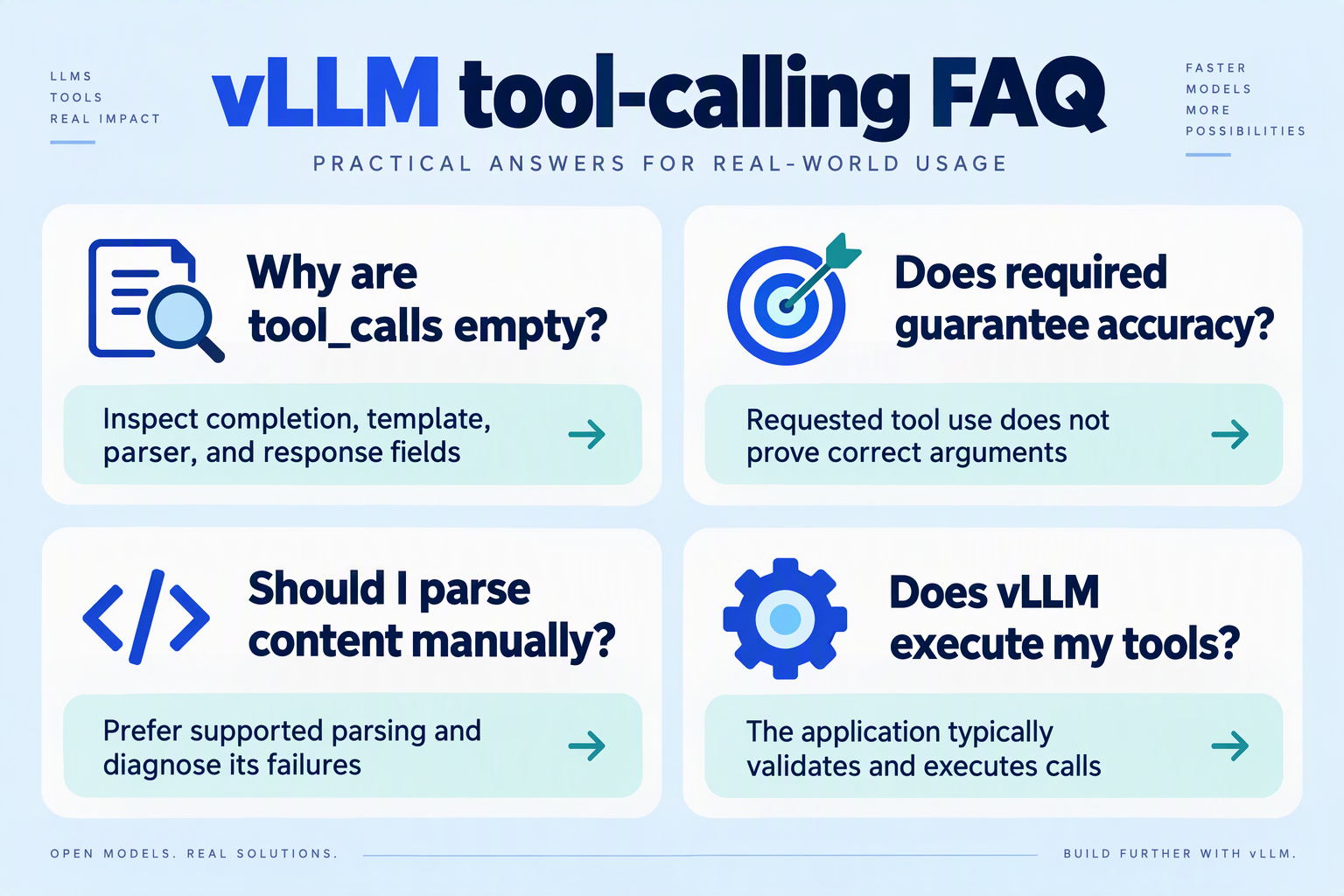
Why does vLLM tool call parsing return empty `tool_calls` alongside `reasoning_content`?
tool_calls field means the response contains no extracted structured tool request; reasoning_content alone does not prove that the model generated an executable call. Distinguish three possibilities: the model only discussed calling a tool, generation stopped before the call completed, or the reasoning and tool parsers handled the output incompatibly. For your October 2026 deployment, inspect the raw completion and termination metadata before deciding whether to change the prompt, parser configuration, or output-token budget.Does `tool_choice: "required"` guarantee accurate tool calls in vLLM?
required constrains the response to include tool calling rather than an ordinary answer. A schema-valid request can still select the wrong customer, invent an identifier, or pass an inappropriate date. Verify support in your pinned October 2026 deployment, then separately test structural validity, argument correctness, authorization, and whether the executed call actually advances the user’s task.Why does vLLM tool call parsing work without streaming but fail with streaming?
How can I tell whether a tool call is valid but semantically wrong?
get_order call with an invented order ID should fail your application’s correctness checks even if JSON validation passes. Ubicloud’s article, supplied for this October 2026 guide, warns that inaccurate calls create “nonsensical context,” making execution-result checks and clarification paths important safeguards against downstream reasoning errors.What should a vLLM tool-calling regression test record?
Can an OpenAI-compatible gateway eliminate vLLM tool-calling errors?
Which resources should you use next, and where can CallMissed fit in agent development?

Use vLLM’s documentation, GuideLLM’s tool-calling guide, and the vLLM Blog to turn debugging findings into reproducible tests; use Ubicloud’s investigation to understand why serving-layer mistakes can undermine agent quality. CallMissed can fit alongside that workflow as an OpenAI-compatible developer API for testing model integrations—not as a replacement for diagnosing a self-hosted vLLM deployment.
Which vLLM resources should you read next?
For your October 2026 implementation review, prioritize resources by the question you need answered rather than reading every article sequentially:
- vLLM documentation: “Does my deployed configuration support this model?” Consult documentation matching your installed release. Record the applicable parser, template requirements, and supported request options in your deployment notes; documentation for a different release is not proof that your configuration behaves identically.
- GuideLLM’s tool-calling guide: “How should I exercise the serving interface?” The supplied GuideLLM documentation identifies parser examples including
hermes,llama3_json, andmistral. Treat those as starting points for checking model compatibility, not interchangeable settings or a complete compatibility matrix. - The vLLM Blog’s Kimi K2 investigation: “What does a well-documented failure analysis look like?” The vLLM Blog’s October 28, 2025 article provides a concrete, historical example of tracing tool-call failures to chat-template handling. Read it for its investigative method, rather than assuming its model-specific fix applies universally.
- Ubicloud’s “Fixing Tool-Call Accuracy in vLLM”: “Why does this matter for agent outcomes?” Ubicloud explains that inaccurate tool calls can create “nonsensical context.” That observation connects serving correctness to downstream task quality without establishing a universal failure rate.
Read each source with your deployment manifest beside you: model revision, vLLM version, template revision, parser selection, and request settings. This makes it easier to distinguish an applicable recommendation from an interesting but unrelated example.
What should you build after reading those resources?
Build a small portable agent test harness, not another collection of manual prompts. Its purpose is to compare integrations while keeping the task and execution rules stable.
For example, define a read-only lookup_order tool with an order_id argument and a fixed test response. Run the same customer request through each serving path, then save:
- The request payload and returned tool-call structure.
- The arguments received by the application.
- The tool result supplied to the model.
- The final answer and any unsupported claims.
Keep provider-specific adapters separate from your tool executor. Otherwise, changing an SDK, schema, and model simultaneously makes any improvement difficult to attribute. Passing this harness demonstrates correctness on those cases—not general production reliability.
Where can CallMissed fit without obscuring vLLM debugging?
According to CallMissed’s verified product fact sheet, as of October 2026, its developer AI API provides 134 models through one API key and balance, including 40 general-purpose LLMs; 21 catalogue models are available on the free tier. Its OpenAI-compatible endpoints, function calling, structured outputs, and usage and request logs are relevant to building that portable integration layer.
Existing OpenAI SDK integrations can use the gateway by changing the base URL, but API compatibility does not establish identical model behavior or tool-call accuracy. Validate each selected model against your own harness. Keep self-hosted vLLM traces for serving-layer diagnosis, and use alternative API paths to explore integration choices without claiming that a successful comparison proves the original parser defect is fixed.
Conclusion
Improving vLLM tool-call accuracy starts with checking the serving pipeline—not assuming the model needs better prompts. Separate generation, parsing, and execution failures so that each fix addresses an observed problem rather than an unsuccessful task in the abstract.
Ubicloud’s “Fixing Tool-Call Accuracy in vLLM” captures why this matters: inaccurate tool interactions can leave a model building on “nonsensical context.” Once that happens, downstream answers may look like reasoning failures even though the first break occurred between a generated request and the application executing it. The practical lesson is to inspect that boundary before changing models.
Keep these four checks at the center of your debugging workflow:
- Verify configuration and template compatibility. Confirm that the tool-call parser matches the model and that the required serving settings are enabled. Inspect how the chat template presents tool definitions, assistant generation prompts, and returned results; these are separate compatibility checks, not evidence of model quality.
- Compare raw output with parsed calls. Determine whether the model actually requested a tool before investigating extraction failures. A missing request and a request lost during parsing require different fixes, so preserve that distinction when reviewing unsuccessful agent runs.
- Validate execution through the next agent turn. Check the selected tool name, argument schema, execution result, and how that result enters the conversation. A successfully parsed request is only one checkpoint: the agent must receive usable information and continue appropriately.
- Make regression cases part of every change. Retest ordinary calls, malformed arguments, streaming responses, and multi-turn interactions before deployment. Measure generation, parsing, and execution errors separately so that an apparent improvement does not simply move the failure elsewhere.
The vLLM Blog’s October 28, 2025 Kimi K2 investigation provides a concrete reminder: explicitly declaring add_generation_prompt allowed vLLM to pass that chat-template parameter correctly. That historical fix supports a durable engineering principle—test the model, template, and parser together rather than treating any one component as a guarantee.
Looking ahead from October 2026, watch for chat-template updates and parser-behavior changes, then rerun the same regression cases against each update. The supplied October 2026 Hacker News snapshot recorded 39 points and 5 comments for Ubicloud’s article: evidence of developer interest, not a reliability benchmark.
For developers exploring this trend, CallMissed’s developer AI API, as of October 2026, offers OpenAI-compatible endpoints, function calling, and usage and request logs—relevant capabilities for building and inspecting tool-enabled agents.
Before your next prompt rewrite, trace one failed interaction end to end: did the model fail to request the tool, the parser fail to extract it, or the application fail to complete it?
Related Reading
- Voice Agent Prompt Injection Testing: Tool-Call Checks
- Dessa Speech-Only Voice Model: Voice-Agent Developer Guide
- AI Voice Agent CRM Integration India: Zoho, HubSpot & More