AI Voice Agent CRM Integration India: Zoho, HubSpot & More


AI voice agent CRM integration India guide: sync transcripts, outcomes and lead scores to Zoho, HubSpot, LeadSquared and Sheets with webhooks.
AI Voice Agent CRM Integration India: Zoho, HubSpot & More
What happens to a lead after your AI voice agent hangs up? If the answer is "someone copies it from a transcript into Zoho later," your AI voice agent CRM integration India setup has a gap. A voice agent can qualify a caller in Hindi, Tamil or Hinglish, but that work only helps if the outcome reaches the CRM your sales team uses.
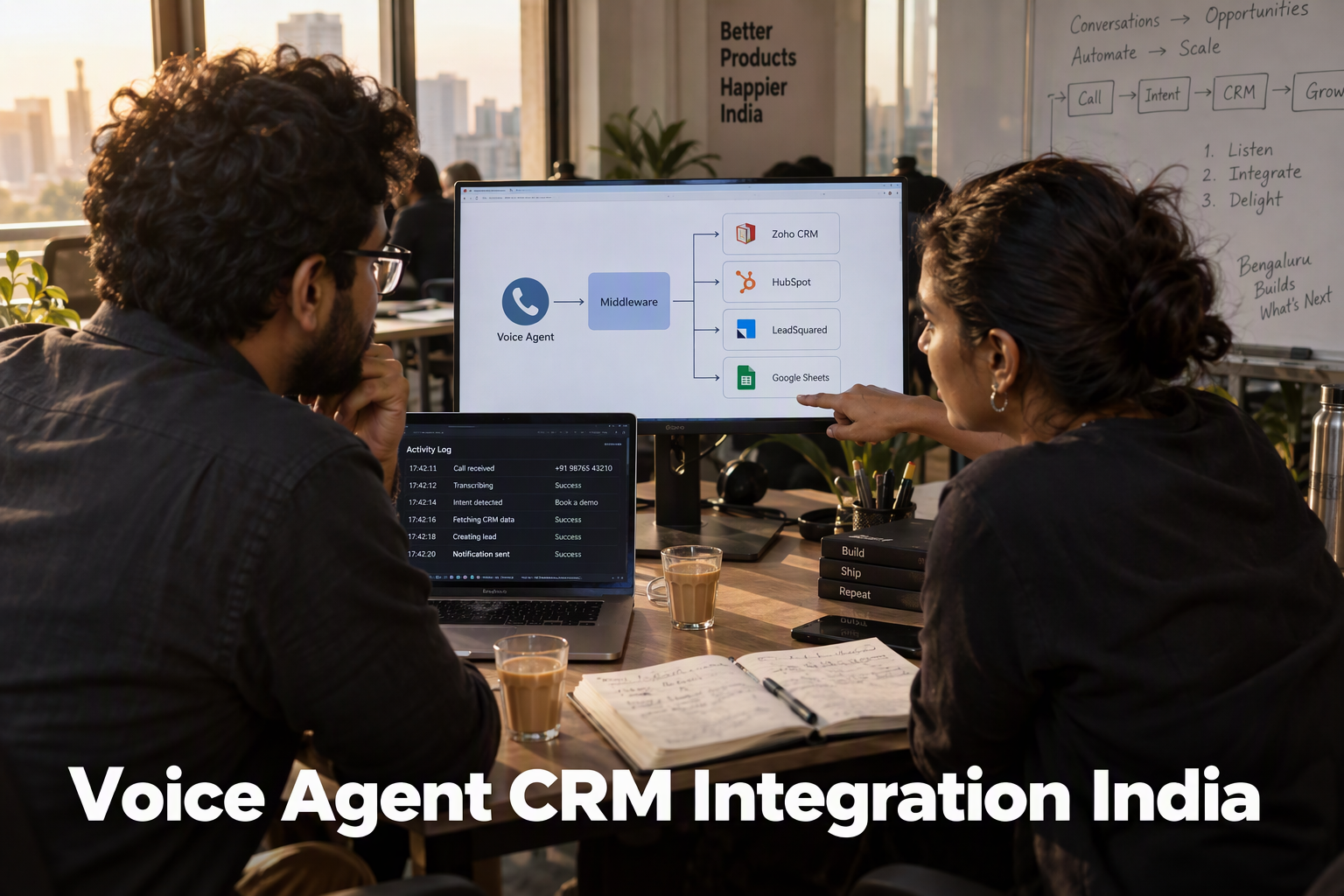
Most CRMs don't accept raw voice-platform webhooks directly. The usual architecture has a middle layer, such as a small server, a serverless function or an automation tool. It receives the event from your voice platform, checks it, transforms the fields and calls the CRM's own API. As of October 2026, Zoho's documentation describes CRM API v8, which uses OAuth 2.0 and accepts up to 100 records per insert call. Its Upsert Records endpoint takes a duplicate_check_fields array and updates a matching record or creates a new one. Those fields must be ones Zoho supports for duplicate checks in that module, or ones you have configured as unique. You can't assume phone number or an external ID will work.
That leads to a design point many guides skip. A stable contact identity, such as a normalized phone number or a CRM record ID, is separate from a call-event ID, which identifies one call and helps you avoid processing the same delivery twice. Keeping the two apart is how a repeat caller updates one record instead of creating several.
In this AI voice agent CRM integration India guide, you will learn how to:
- Choose trigger events, and why you must confirm event names, payload fields and timing with your provider before building.
- Map call outputs such as summary, disposition and action items to CRM fields.
- Set up Zoho OAuth with a Self Client and configure upsert safely.
- Connect HubSpot, LeadSquared and Google Sheets through your middleware.
- Test and monitor deliveries so failures don't go unnoticed.
Platforms like CallMissed, an Indian AI voice platform, support this pattern. They offer a HubSpot integration, AI call notes that can be pushed to a CRM, and outbound webhooks with per-agent event subscriptions. Check CallMissed's documentation for the exact event names and payload schema.
You don't need to be a senior engineer, but you should be comfortable with API authentication and reading JSON. If not, plan to involve an engineer or technical partner.
How do you connect an AI voice agent to your CRM in India?
The most reliable way to connect an AI voice agent to your CRM is to send a webhook when a call ends, normalise the payload in a small middle layer, and write it to the CRM with an upsert keyed on a unique field. An upsert reduces duplicates only when the CRM supports the field you match on and your writes are concurrency-safe. It doesn't make duplicates impossible. As of October 2026, there are three routes.
What are the ways to connect a voice agent to a CRM?
- Native integration: The voice platform talks to the CRM directly, which is the least effort but only works for supported CRMs. CallMissed lists HubSpot among its built-in integrations, and its AI call notes (summary, action items, disposition, follow-up) can be pushed to the CRM. Before relying on it, verify which scopes it requests and how its fields map to your HubSpot properties.
- Webhook straight to the CRM API: This works only if the CRM accepts the payload shape and authentication method the webhook can send. That is rare, because most CRM APIs expect their own JSON structure and OAuth tokens.
- Webhook to a middle layer: The webhook hits Make, Zapier, n8n or a Google Apps Script, which reshapes the data, handles authentication and calls the CRM. For Zoho, LeadSquared and Google Sheets, this is normally the practical route.
Why is a middle layer common for Zoho?
Zoho CRM uses OAuth 2.0. According to Zoho's CRM API v8 documentation, requests carry an Authorization: Zoho-oauthtoken header, and access tokens are short-lived. A plain webhook can't refresh one, so a middle layer stores the refresh token and mints new access tokens.
For a single-organisation server integration that you own, a Self Client registered in the Zoho API Console is one option. Browse AI's help centre, for instance, describes it as the simplest client type for server-based use. Treat that as a convenient pattern, not a universal Zoho recommendation, and choose the client type that fits your security and multi-tenant needs.
What does the end-to-end flow look like?
The flow has five stages. Trigger names and payload keys below are illustrative. The CallMissed fact sheet does not document specific event names, so check the actual events and payload in your webhook settings and docs before mapping.
- Trigger: The agent finishes a call and emits an event, for example "call ended".
- Payload: The webhook delivers JSON, which might include a phone number, summary, disposition, action items and a call ID.
- Mapping: Translate those keys into CRM field names. Zoho's v8 docs state you must use field API names in the input, not on-screen labels.
- Write with deduplication: Zoho's Upsert Records endpoint takes a
duplicate_check_fieldsarray. It updates a matching record and inserts one if none matches. - Confirmation: Log the CRM's response so a failed write is visible, not silent.
How do you avoid duplicate contacts?
Treat the phone number as a candidate lookup value, not a guaranteed identity. Family members share numbers, and carriers recycle them. Prefer a stable contact or external ID, stored in a field configured as unique, and use the phone number to find likely matches.
Three cautions apply:
- Confirm supported match fields. Don't assume Zoho's
duplicate_check_fieldsaccepts Phone or Mobile. Zoho's insert docs say duplicates are checked on unique fields, so confirm the supported fields in the v8 docs and your account configuration. Third-party guides point to the reserved External_ID field or a custom field with a unique constraint. - Make writes concurrency-safe. Webhook retries or near-simultaneous calls can both pass a "does it exist?" check. Use the call ID as an idempotency key and serialise writes per contact where you can.
- Normalise first. Convert numbers to one format such as E.164, so
98123 45678becomes+919812345678. Otherwise one person can appear as two leads.
Which approach should an Indian business start with?
Start with the fewest moving parts. On HubSpot, try the native integration first and verify its scope and mapping. For Zoho, LeadSquared or Sheets, use webhooks through middleware. If your agent speaks code-mixed Hinglish, keep the summary in the language your sales team reads and store the transcript link in a separate field.
Platforms like CallMissed support this pattern with outbound webhooks and per-agent event subscriptions, so each agent can send only the events your CRM needs. The next section covers choosing those events.
What do you need before connecting a voice agent to a CRM?
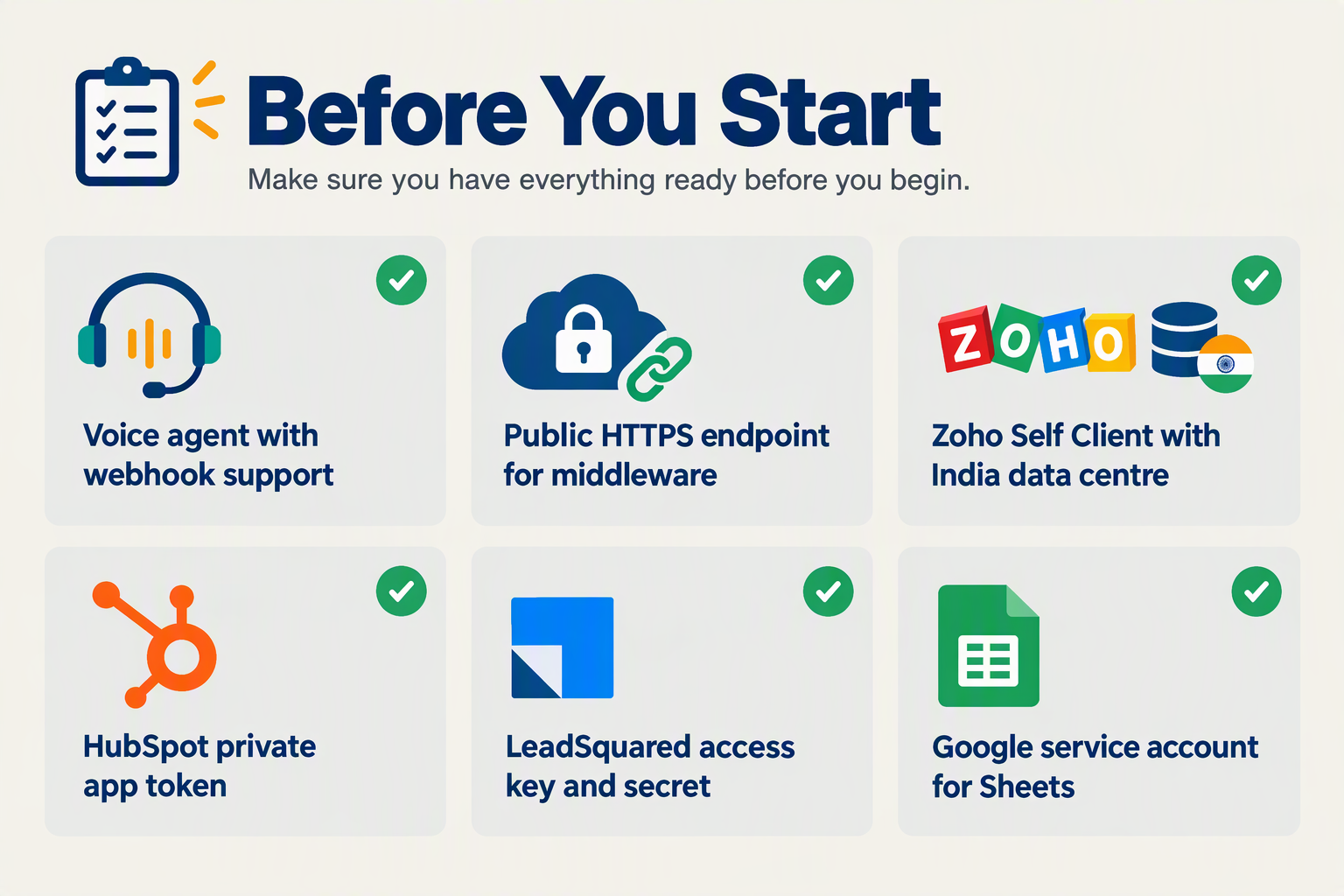
You need seven things before connecting a voice agent to a CRM: a webhook-capable voice platform, CRM admin access, least-privilege credentials, a field map, a unique contact key, a secured receiving endpoint, and a safe test setup. Check the webhook events and payload first, because they decide what your field map can hold. This checklist is current as of October 2026.
What is the pre-integration checklist?
| Requirement | What to prepare | Why it matters |
|---|---|---|
| Webhook-capable voice platform | Outbound webhooks with per-agent event subscriptions. Confirm the exact event names, payload schema, signature or secret support and retry behaviour in your provider's docs. | Your receiver must parse and verify what actually arrives, not what you assume. |
| CRM admin access | A user who can create API clients, custom fields and unique constraints | Without it you cannot create credentials or the matching field. |
| Least-privilege credentials | Zoho Self Client with narrow scopes, a HubSpot private app token, LeadSquared access and secret keys | Limits damage if a key leaks. |
| Field map | Call outputs paired with exact CRM field API names | Prevents rejected or misfiled data. |
| Unique contact key | A configured unique contact field, such as a normalised phone number like +919876543210 | Lets an upsert update repeat callers instead of duplicating them. |
| Secured endpoint | Middleware or a restricted deployment that validates a shared secret or signature | Stops unauthenticated callers writing personal data to your CRM or sheet. |
| Test environment | A sandbox, or 5 to 10 dummy contacts | Keeps bad data out of live pipelines. |
Which credentials does each CRM need?
For Zoho CRM, register a "Self Client" in the Zoho API Console, which the Browse AI Help Center describes as the simplest client type for server-to-server work. Generate a grant token with only the scopes you need, such as ZohoCRM.modules.leads.ALL, then exchange it for a refresh token.
Your OAuth setup depends on the data centre where your Zoho account is hosted, not on your nationality or office location. Confirm which data centre your account uses, then use the api_domain returned in the token response for API calls. India-hosted accounts typically use .in domains, but verify this against your own account. A wrong domain fails authentication.
For the others:
- HubSpot: a private app token with contact write scopes. Logging calls or other activities likely needs more scopes, so verify them in HubSpot's current documentation.
- LeadSquared: an access key and secret key from your account's API settings.
- Google Sheets: an Apps Script web app URL is not a credential, and anyone holding a publicly deployed URL may be able to call it. Restrict the deployment, or route calls through middleware that checks a shared secret. Never accept unauthenticated writes of caller personal data.
How should you prepare your field map?
Zoho's Insert Records documentation for API v8 states that you must use only field API names in the input, and allows a maximum of 100 records per call. A screen label like "Lead Status" is not an API name, so copy exact names from your CRM's field settings.
Map these call outputs, and confirm each exists in your webhook payload:
- Phone number in E.164 format, for example +919876543210
- Call summary in a long-text or notes field
- Disposition, such as interested, callback or not interested
- Action items or follow-up date
- Language the caller spoke
CallMissed, the AI voice agent platform, produces AI call notes covering summary, action items, disposition and follow-up, and can send events through outbound webhooks. Language and phone number are not guaranteed note fields, so take them from call metadata, agent variables or a custom extraction step, and verify the provider-specific schema before mapping.
Why do you need a unique key before you start?
Zoho's Upsert Records endpoint takes a duplicate_check_fields array: a matching record is updated, and otherwise a new one is inserted. Supported duplicate-check fields vary by module and API version, so check Zoho's docs for yours.
Use a configured unique contact field, such as a phone number normalised to +919876543210 or your own contact ID. Do not use the call ID or event ID, because every call generates a new one and each repeat caller would become a duplicate record. Normalise formats like "98765 43210" and "09876543210" to one standard before every write.
How does a voice agent read from and write to your CRM?

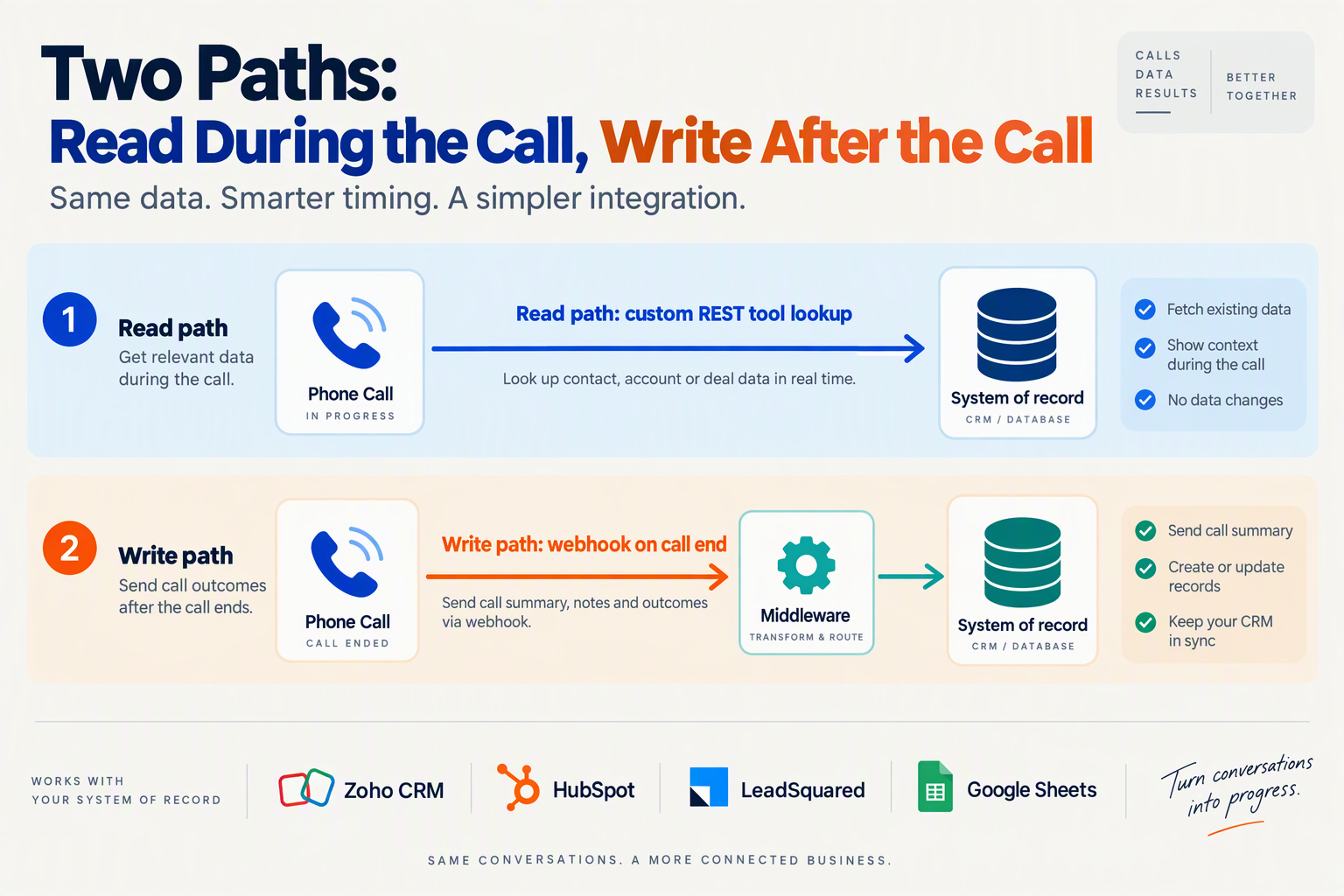
A voice agent reads from your CRM by calling a lookup endpoint during the conversation, and writes to it through a webhook handled after the call ends. Two identities must stay separate. The contact identity is a stable key that decides which CRM record to update. The call/event identity is a unique ID that stops the same call activity from being delivered twice. Most teams should build the write path first, because it delivers value on day one.
How does a voice agent read CRM data during a call?
The agent looks up the caller so it can greet a returning customer or skip questions the CRM already answers. There are two mechanisms:
- Custom REST tools: The agent calls an HTTP endpoint mid-call and uses the result in its reply. CallMissed, the Indian AI voice platform, supports custom REST tools and variables for this.
- MCP servers: CallMissed can connect to any MCP server by URL so its tools work on calls. Community connectors such as AnythingMCP's Zoho CRM wrapper expose 10 tools over Zoho CRM API v8 with OAuth refresh-token authentication.
Should the agent get direct CRM access?
No. Point the REST tool at narrowly authorized middleware you control, not at the CRM with broad credentials. Expose only actions like "find contact by phone" and "create contact if none exists". The middleware should return only the fields the agent needs, such as name, deal stage and owner.
The same caution applies to MCP. A connector that exposes tools for leads, deals and notes gives the model wide reach, so scope the OAuth permissions to the minimum.
The CRM remains the source of truth. Per-contact memory, which CallMissed offers, can carry conversational context between calls. It is not an authoritative replacement for CRM identity or permissions, so never use it to decide who someone is or what they may see.
How does a voice agent write call results to your CRM?
- Event fires: Your voice platform emits a webhook. CallMissed lets you subscribe each agent only to the events you need.
- Payload arrives: Your endpoint receives JSON. Names like
call_id,phone,summaryanddispositionare illustrative, not a documented CallMissed schema. Check the actual payload in your account. - Fields are mapped: Zoho's documentation says you must use only Field API names in the input, so "Lead Status" in the UI may be
Lead_Statusin your payload. Verify the real names in your org, especially for custom fields. - Contact is upserted, then the activity is logged: Update or create the person first, then attach the call note.
Confirm that the event you subscribe to fires only once the transcript and AI call notes (summary, action items, disposition) are ready. If it fires at hangup, your handler may receive empty fields and need a delayed retry or a second event.
Why must contact keys and call IDs stay separate?
Upsert prevents duplicate leads from repeat callers. According to Zoho's CRM API v8 documentation, as of October 2026, the Upsert Records API checks the duplicate-check fields you specify, updates the record if it exists and inserts it if it does not. Zoho's Insert Records API also checks duplicates on unique fields and accepts at most 100 records per call.
Use a stable contact key for that match, such as a normalized phone number in a consistent format, a CRM record ID, or an ID from your own system. Never store each call ID as the contact dedupe key. Every call would then create a new contact.
Use the call or event ID only for idempotency. Keep a delivery log and skip any event ID you have already processed. That makes webhook retries safe.
Which Zoho fields can you match on?
Don't assume Phone or the reserved External_ID field works in every module or org. AI Productivity's Zoho guide suggests External_ID or a custom field with a unique constraint for external sync. Zoho's documentation says duplicate checks rely on unique fields. Check your module's field metadata, and if no suitable unique field exists, create a custom one. Then pass it in duplicate_check_fields.
What does authentication look like?
Zoho uses OAuth 2.0, with an Authorization: Zoho-oauthtoken <access token> header on each request. Browse AI's setup guide recommends a Self Client for server-to-server use. Store the refresh token securely and renew access tokens automatically.
The next section covers trigger events and field mapping in detail.
How do you sync call data to Zoho, HubSpot, LeadSquared and Google Sheets?
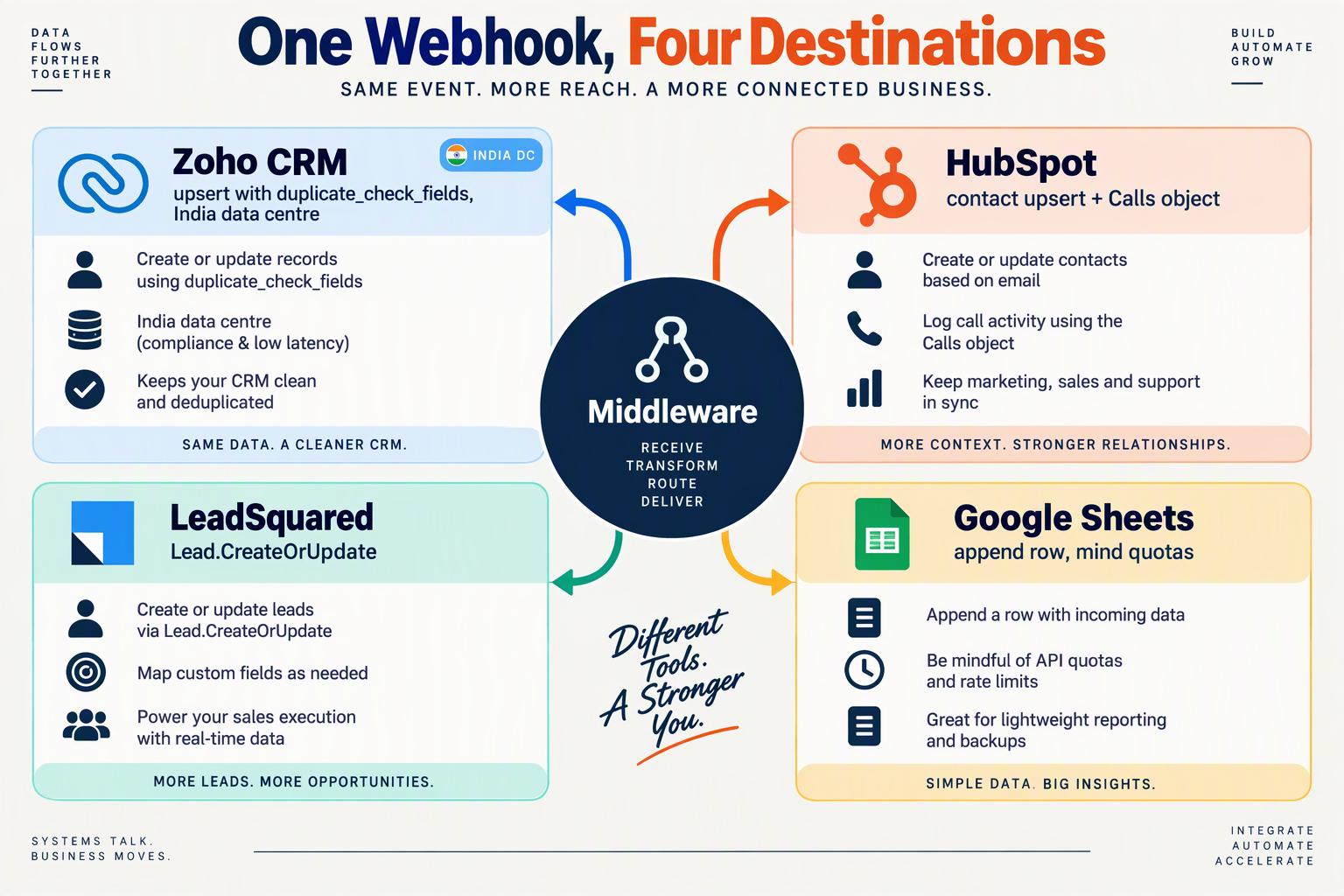
You sync call data by sending each finished call to middleware that normalises the payload, then writes it to each CRM with that destination's own matching rule. The payload can be shared, but the write semantics differ per destination. As of October 2026, treat every endpoint below as something to confirm against current vendor docs.
What should the webhook payload look like?
This is an illustrative middleware-normalized shape. It is not CallMissed's documented webhook schema or event names. Your middleware maps the raw provider event into it.
{
  "event_id": "evt_01HXYZ7K3Q",
  "call_id": "call_8f2a91",
  "occurred_at": "2026-10-23T14:32:10+05:30",
  "contact_ref": "contact_55021",
  "phone": "+919812345678",
  "transcript_ref": "https://your-store.example/transcripts/call_8f2a91",
  "summary": "Asked about the Pro plan and wants a demo.",
  "disposition": "interested",
  "lead_score": 72,
  "next_step": "Send pricing and book demo",
  "follow_up_at": "2026-10-25T11:00:00+05:30"
}
lead_score is a business qualification score from a rubric you agree on. It is not an automatically verified CallMissed output. Before building, verify the raw provider schema, the available events, the authentication method and whether AI call notes are ready when the event fires. Do not assume an event called "call completed" exists. CallMissed offers outbound webhooks with per-agent event subscriptions, so check which events your agent can subscribe to.
How do you sync call data to Zoho CRM?
POST to /crm/v8/Leads/upsert on the API domain returned with your token. India accounts typically use the .in data centre, so don't hard-code .com. According to Zoho's CRM API v8 documentation, duplicates are checked on unique fields, and you must use field API names only.
- Put a supported unique custom key (such as your
contact_ref) induplicate_check_fields. Don't assume Mobile is eligible; confirm that in your org. - Include required fields (Leads typically need a last name, but verify yours).
- Send
Authorization: Zoho-oauthtoken <token>and refresh tokens automatically.
How do you sync call data to HubSpot?
Use Contacts search, then update or create, or an upsert on an eligible unique identifier. HubSpot's phone property isn't unique by default, so two near-simultaneous webhooks can both miss the search and create duplicates. Serialise writes per contact, or key on a unique identifier.
Then log the call with the Calls object, associated to the contact, rather than only overwriting contact properties. Verify the required properties and private-app scopes in current HubSpot docs. CallMissed also lists HubSpot as a built-in integration, so check the native route first.
How do you sync call data to LeadSquared?
Look at Lead.CreateOrUpdate or Capture Lead. Both depend on a region-specific API host and on a matching field configured in your account, such as phone or a custom key. Verify the exact method, payload and authentication in LeadSquared's current documentation. Then map disposition to a stage or custom field and summary to a note or activity.
How do you sync call data to Google Sheets?
Use authenticated middleware calling the Sheets API spreadsheets.values.append, or a secured Apps Script web app. Don't expose an open script URL.
- Append one row per call, keyed by
call_id, and keep that tab append-only. - Build a separate contact view tab (for example, a query by phone) rather than overwriting rows in the log. Don't append and overwrite the same range at once.
- Expect quotas. On HTTP 429, retry with exponential backoff.
- Protect against concurrency with a single writer queue, or an Apps Script lock.
What goes wrong most often?
- Unnormalised numbers create the duplicates upsert should prevent.
- Display labels instead of API names get requests rejected.
- Expired tokens need automatic refresh.
- Silent failures need alerts. Log every non-2xx response, as the final section covers.
Which call fields should map to which CRM fields?
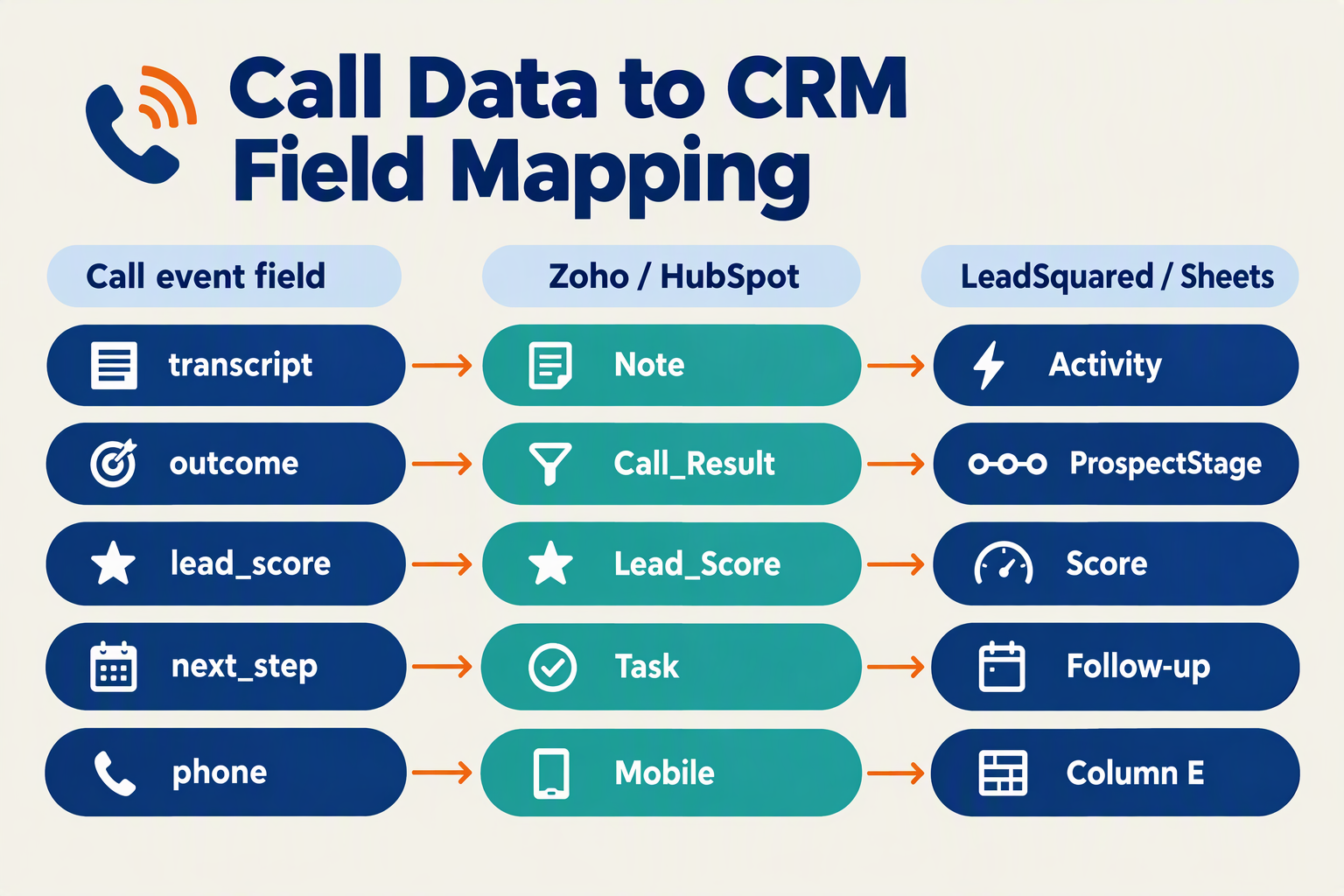
The safest mapping uses a stable contact ID as the unique match key, writes each call to a separate call or activity record keyed by call_id, and stores the lead stage, a numeric business score and the next step as distinct fields. Every destination name below is an illustrative candidate to verify against your own account, because custom fields and layouts differ.
Which call fields map to which CRM fields?
CallMissed, the Indian AI voice platform, generates AI call notes (summary, action items, disposition, follow-up), plus recordings, transcripts and QA call scoring. Confirm which of these your webhook payload actually carries. If a field is missing, add a lookup step or leave it out.
| Call output | Zoho CRM (candidate) | HubSpot (candidate) | LeadSquared (candidate) | Google Sheets |
|---|---|---|---|---|
| Contact: stable contact ID (unique key) | Custom unique field or External_ID | Custom unique property | Custom field | Column A |
| Contact: phone (E.164) | Phone / Mobile | phone | Phone | Phone column |
| Contact: name | First_Name, Last_Name | firstname, lastname | FirstName, LastName | Name columns |
| Contact: stage / disposition | Lead_Status | hs_lead_status | ProspectStage | Status column |
| Contact: business lead score | Custom number field | Custom number property | Custom number field | Score column |
Activity: call_id / event_id | Call record, custom ID field | Call engagement, custom property | Activity custom field | One row per call |
| Activity: summary, transcript reference | Note or call description, link | Note, link | Activity note, link | Summary, link columns |
| Activity: next step, follow-up time | Task with due date | Task | Task | Next-step column, ISO 8601 with offset |
Why separate contact attributes from call history?
Contact fields describe the person and change rarely. Calls, notes and tasks describe events and accumulate. Writing a summary into a contact field overwrites the last call's context with the next one.
- Contact record: ID, phone, name, stage, business score.
- Call or activity record:
call_id/event_id, summary, transcript link, outcome. - Task: next step, with a timezone-aware due time (for example
2026-10-24T11:00:00+05:30) so a follow-up never lands a day early.
Storing call_id on every call record lets you detect duplicate webhook deliveries.
Is phone number a safe match key?
Not by default. Zoho's Insert Records documentation says duplicates are checked on unique fields and that input must use Field API names. The Upsert endpoint takes a duplicate_check_fields array, and one developer guide (aiproductivity.ai, 2026) suggests External_ID or a custom field with a unique constraint for external sync. Phone and Mobile are not guaranteed to be eligible, so use a field your account supports for duplicate checks.
Phone numbers also get shared by families and shops, and telecom operators recycle them. Normalize to E.164 (+919876543210), but treat the number as an attribute, and use your own contact ID to decide who a record is.
What should go in Zoho's Last_Name?
Zoho requires Last_Name on Leads, but do not paste the whole spoken name into it. Use the actual surname where known. For unknown surnames, apply a required-field policy your team has approved, such as a documented placeholder, and review those records later.
Is a QA score the same as a lead score?
No. CallMissed call scoring grades a call against your QA rubrics (did the agent follow the script?). A business lead score measures buyer intent or fit. Map only the latter to the CRM's numeric lead-score field. If you want the QA score too, give it its own field on the call record.
How should dispositions be validated?
Agree on 5-6 values (Interested, Callback requested, Not interested, Wrong number, No answer, Needs human). Then validate each against the module's field metadata, allowed values and account rules before sending. A translation step should map your values to the CRM's picklist options, and failures should be logged rather than silently dropped.
Per-agent webhook event subscriptions let a lead-qualification agent send different events from a support agent. Event names here are illustrative, so verify the exact ones in the CallMissed docs.
How do you handle duplicates, retries and testing?
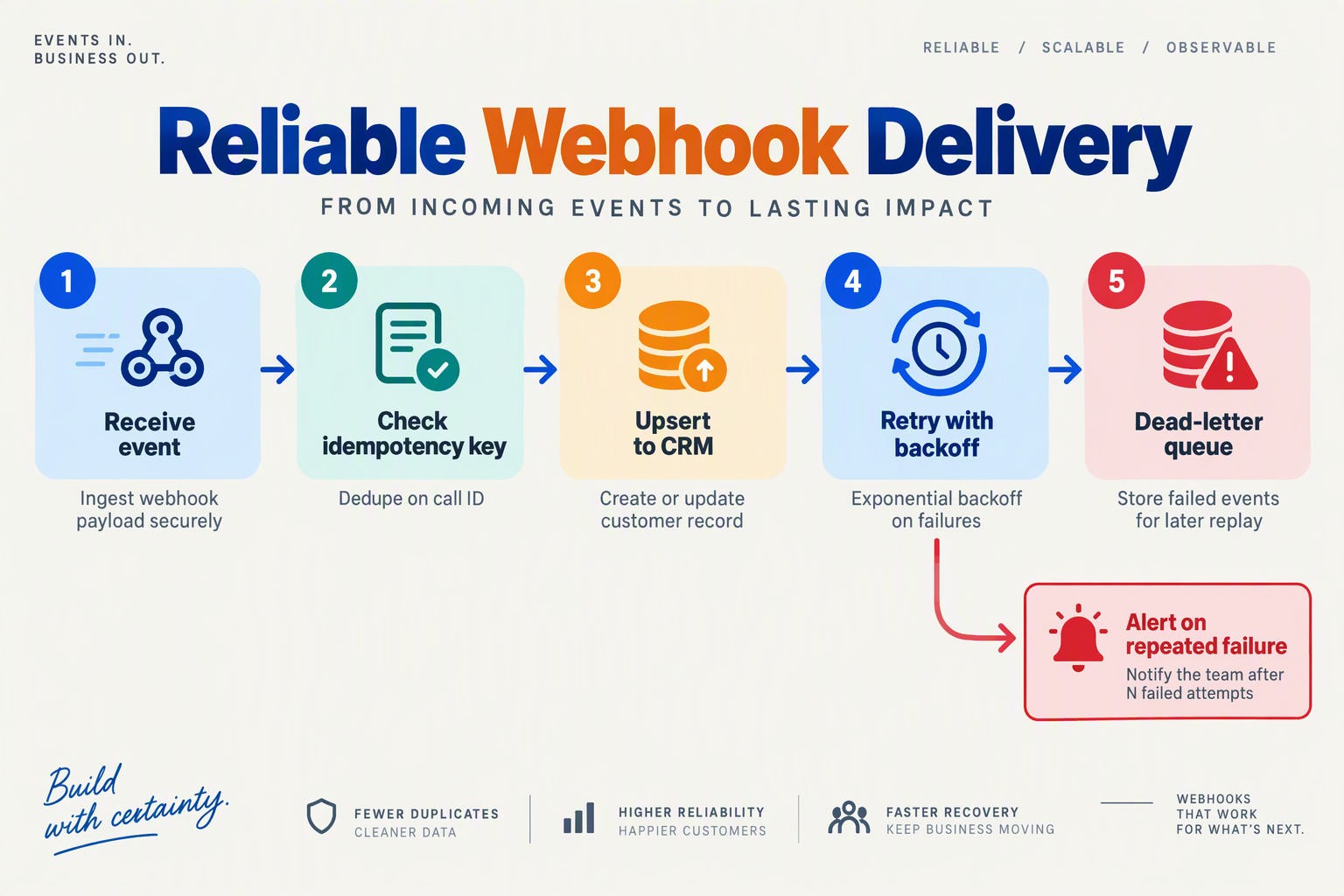
The safest approach is to acknowledge a webhook only after it is authenticated and durably stored, then let a background worker apply the CRM writes idempotently. Assume every delivery is at-least-once, so duplicates, retries and out-of-order events are normal. As of October 2026, Zoho's CRM API v8 documentation says duplicates are checked on every insert call based on unique fields, and that up to 100 records can be written per call. That protects contacts only if you configure the match field. It does nothing for call activities.
What should happen when a webhook fails, repeats or races?
| Situation | Cause | Safe handling | Retry? |
|---|---|---|---|
| Same event delivered twice | Sender retried after a timeout | Insert event_id (or call_id + event type) into a ledger with a unique constraint; skip if it exists | No-op |
| Two copies arrive at once | Concurrent deliveries | Rely on the constraint or a row lock, not a read-then-write check; the loser reads existing state | No |
| Contact written, activity failed | Partial success | Store per-step status; resume at the failed step; mark completed only after every required write succeeds | Yes |
| 429 rate limit | CRM throttling | Wait for Retry-After; otherwise use bounded exponential backoff with jitter | Yes |
| 5xx or network error | Transient CRM fault | Same bounded backoff, with a maximum attempt count | Yes |
| 401 | Expired access token | Refresh once, retry once; if it fails again, alert | Once |
| 400 or 403 | Wrong field API name, bad data type, missing scope | Record a sanitised, actionable error; fix, then replay | No |
| Your database is down | Persistence outage | Return a 5xx so the sender retries; never return 200 | Sender |
How do you acknowledge a webhook safely?
- Authenticate: verify the signature or shared secret using your voice platform's documented method.
- Persist: write the raw event to a durable queue or table.
- Acknowledge: return 2xx only after step 2 succeeds.
- Process asynchronously: a worker applies the CRM writes.
What identifies a contact versus a call?
Use two separate keys. The delivery key (event_id, or call_id plus event type) prevents processing the same event twice.
The contact key needs a stable identity, such as a verified email or an internal contact ID mapped to the CRM record ID. Do not assume a phone number is unique, because family members and shared lines exist. If you match on phone, normalise to E.164 and confirm it is configured as a duplicate-check field.
Keep the call ID in the call activity and your ledger, not in a lead's External_ID. A second call from the same person must create a second activity on the same contact.
What happens after retries run out?
Move the event to a dead-letter queue and alert an operator. Replay goes through the same ledger, so already-completed steps are skipped and no duplicates appear. Log sanitised metadata only (event ID, step, status code, attempt count, timestamp), never full response bodies.
How should you test it?
Run these tests with synthetic calls, or with a controlled, authenticated receiver. Never send real caller PII to a public inspection URL.
- Deliver one event twice and confirm one contact and one activity.
- Make a second, distinct call from the same synthetic contact and confirm two activities, one contact.
- Send events out of order, and fail the activity write after the contact write, then confirm recovery.
- Simulate a 429 with
Retry-After, and simulate a persistence outage to confirm a non-2xx response.
Platforms such as CallMissed offer outbound webhooks with per-agent event subscriptions, so you can point one test agent at a staging receiver. Verify the current event names, retry behaviour and signing method in the CallMissed docs before you build against them.
What mistakes break voice agent CRM syncs?
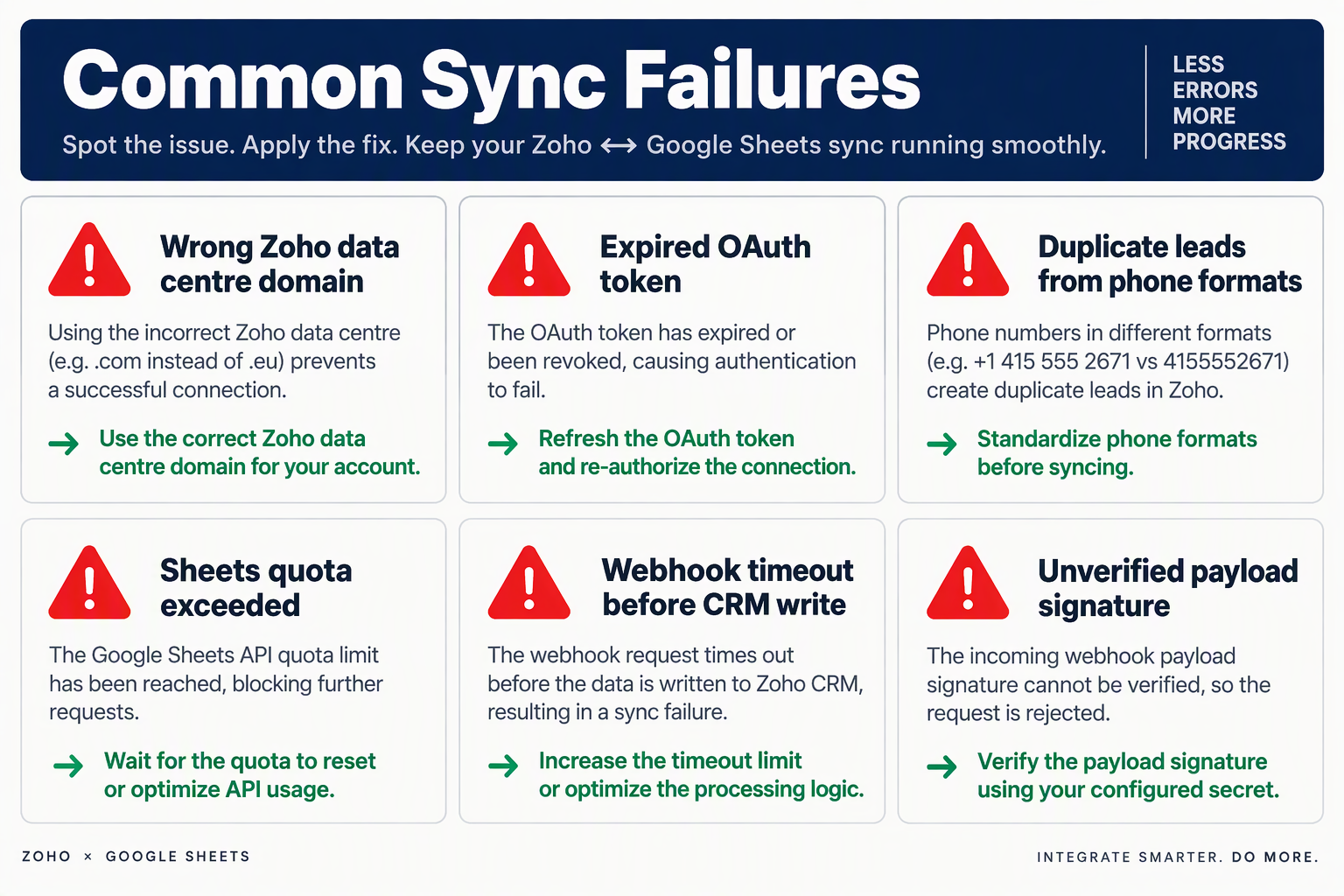
The mistakes that most often break voice agent CRM syncs are an unstable contact match key, an unsupported Zoho duplicate-check field, a wrong regional endpoint, and webhook handlers that treat any HTTP 2xx as success. Others are acknowledging a webhook before it is safely stored, racing concurrent writes, and exposing an unauthenticated Google Sheets endpoint. Each is avoidable once you know where it bites.
What are the most common voice agent CRM sync mistakes?
| Mistake | What goes wrong | Fix |
|---|---|---|
| Contact key built from call ID | Every call looks like a new contact, so duplicates multiply | Key contacts on something stable across calls, such as a normalised E.164 phone number (+91…) or the CRM's own record ID |
| Call ID used for nothing else | Webhook retries create duplicate notes or activities | Use the call ID only to dedupe call, activity and event records |
Assuming any field works for duplicate_check_fields | The request is rejected or matches nothing | Use only fields your Zoho org supports for duplicate checks, such as a unique-configured custom field. Don't assume phone or a reserved External_ID is eligible |
| Hard-coded API domain or accounts URL | Valid credentials return auth or "not found" errors | Read api_domain from the token response and use the accounts endpoint for your data centre |
| Display labels instead of field API names | Fields stay blank or the write fails | Zoho's V8 docs say to use only Field API names in the input |
| Treating HTTP 2xx as success | Failed records go unnoticed | Inspect each record's result in the response body |
| Acknowledging before storing | A crash after the 200 loses the event for good | Persist the payload durably, then acknowledge |
| Concurrent writes for one contact | Two near-simultaneous events race and create duplicates or clobber each other | Serialise by contact key or use a queue |
| Overwriting call history | A later call replaces earlier notes | Append notes or activities per call and update only summary fields |
| Open Google Sheets endpoint | Anyone with the URL can write rows | Require a secret token or signed request, and restrict access |
Why does the contact key matter so much?
Zoho's V8 documentation says duplicates are checked on every insert call using unique fields. Insert may therefore reject a duplicate rather than create one, but you still shouldn't rely on that. Use Upsert Records with duplicate_check_fields pointing at a field your org has configured and verified as eligible.
The contact key must survive from the first call to the tenth. A call ID is new each time, so it belongs on the call record only.
How should you handle errors and logging?
Zoho's API can return HTTP 200-level responses with per-record failure details, so read each record's result. Then classify the failure:
- Retry with backoff: timeouts, rate limits and 5xx responses.
- Refresh and retry once: expired access tokens.
- Don't retry, route to review: validation errors, bad field names and unsupported duplicate-check fields.
Log sanitised metadata only, such as call ID, module, status and error code. Keep phone numbers, transcripts and tokens out of logs and alerts.
Does Zoho's 100-record limit apply everywhere?
No. Zoho's V8 Insert Records documentation sets a maximum of 100 records per insert call. Don't assume that figure applies to other Zoho endpoints, to HubSpot, LeadSquared or Sheets, or to other limits. Check each platform's current documentation before chunking a backlog replay.
What should you check before going live?
- Replay one webhook twice. Confirm one contact and one call activity.
- Send two calls from one number. Verify earlier history survives.
- Fire two events at once for the same contact and look for races.
- Kill the handler mid-request. Confirm the event was stored before acknowledgement.
- Verify your webhook subscriptions. Platforms like CallMissed offer outbound webhooks with per-agent event subscriptions. The event names in any example are illustrative, so confirm in your console which events each agent actually sends before mapping them.
What about DPDP, call consent and what to verify with any provider?

Phone numbers, voice recordings and call transcripts can all contain personal data, so a voice-agent-to-CRM pipeline should be reviewed against India's Digital Personal Data Protection (DPDP) Act, 2023. This is general information, not legal advice. As of October 23, 2026, check the current Gazette notifications and official DPDP commencement and rules with counsel, rather than relying on a blog's summary of timelines.
Does the DPDP Act apply to your AI voice agent calls?
It depends on your facts, and counsel should assess it. Not every call is automatically in scope. Territorial scope, your role as the party deciding the purpose of processing, and the lawful route for processing all matter.
Where the law applies, the questions are practical:
- Notice: what do you tell callers, and in which language?
- Lawful route: is your basis for processing consent, or something else the law permits?
- Security and retention: what safeguards apply, and how long do recordings, transcripts and CRM notes stay?
What is the difference between disclosure and consent?
Treat these as separate layers:
- Prudent disclosure: opening with "You're speaking with an AI assistant, and this call may be recorded" is good practice. It is not necessarily a blanket legal requirement in every case.
- Affirmative consent: where your counsel concludes consent is the right route, you need to collect it for real, not assume it.
- Evidence: keep a versioned notice, a timestamp and the call ID. A single
consent_givenboolean in the CRM is rarely enough evidence by itself.
How should you handle opt-outs and outbound calls?
Opt-out enforcement is something you design and verify in your own CRM and dialing tools. Mapping a "do not contact" disposition into Zoho, HubSpot, LeadSquared or Sheets does nothing unless the system that places calls actually checks it. Test this: mark a test contact as opted out and confirm the next call attempt is blocked.
For outbound commercial calls, assess TRAI, DND and DLT applicability with counsel and your carrier. Consent alone may not settle whether a call is permitted. On WhatsApp, Business Calling lets businesses call customers who have given permission, and Meta does not charge for calls customers start.
How do you minimise data in webhooks?
Send the CRM only what it needs. CallMissed, an Indian AI voice platform, offers outbound webhooks with per-agent event subscriptions, so each agent can post only the events your systems use.
- Prefer the summary, disposition and action items over full transcripts.
- Use narrow OAuth scopes. Zoho's Upsert Records documentation lists module-level scopes as well as ALL, which gives full access.
- Restrict Google Sheets to named accounts, not "anyone with the link."
- Keep webhook secrets and refresh tokens in a secrets manager.
What should you verify with any voice AI provider?
Get answers in writing from CallMissed or any vendor.
- Hosting and subprocessors: CallMissed states its platform is hosted in India. Still ask which subprocessors, including speech and language model providers, handle audio and text, and where.
- Retention and deletion: ask what can be deleted, by whom and how. Do not assume controls exist.
- Certifications: request documents for any claimed. Do not infer them from "secure."
- Contract: confirm a data processing agreement and breach-notification terms.
- Exact webhook events and schema: get the event names and field-level payload definitions.
- Signature and authentication: confirm how you verify that a request is genuine.
- Retries and event ordering: ask what happens on failure, and whether events can arrive duplicated or out of order.
- Delivery logs: check whether you can see attempts and failures, and what personal data those logs store.
- Transcript readiness: confirm whether the transcript exists when the call-end event fires, or arrives in a later event.
- Native integration mapping: ask which fields map natively, for example HubSpot, and which need webhook-based mapping, as with Zoho, LeadSquared or Sheets.
- Access: check role-based access to recordings, and whether supervisor features like live monitoring need disclosure.
What should you check before go-live?
- Counsel has confirmed the current DPDP position and your lawful route.
- The opening line and any consent step match that advice, with versioned notice and timestamps stored.
- Opt-outs demonstrably block dialing in your own systems.
- Payloads carry no unnecessary fields, and scopes and secrets are locked down.
- Retention and deletion procedures cover the voice platform, CRM and spreadsheets.
Run this during the testing stage, not after launch.
Frequently Asked Questions
How do I connect an AI voice agent to Zoho CRM in India?
Authorization: Zoho-oauthtoken header. Zoho's documentation covers the API side (Self Client OAuth, the Insert and Upsert Records endpoints), not a ready-made voice-provider-to-Zoho flow, so the webhook-to-Zoho hop is yours to build. OAuth scopes, data-centre domain and unique fields are specific to your Zoho account, so confirm them in your own org as of October 2026.Do I need to write code for a voice agent CRM integration?
Which webhook events should I send to the CRM?
How do I stop duplicate leads when the same customer calls twice?
duplicate_check_fields, and its Insert Records API checks duplicates on unique fields and accepts up to 100 records per call. A normalized phone number alone doesn't guarantee uniqueness, and it doesn't protect against two simultaneous webhooks for the same caller. Confirm which fields your Zoho module supports as unique, and serialize or lock writes per contact.Can a voice agent write clean CRM data from Hinglish or regional-language calls?
How do I know if a CRM write failed, and what should I retry?
Where should you go next after your first CRM sync works?

After your first CRM sync works, the best next steps are to make delivery durable, tie each contact to a stable identity, measure call quality, and then add connected workflows. A working webhook proves the pipeline. Production traffic is what exposes duplicates, lost events and silent failures.
How do you make the sync production-ready?
Treat the first working sync as a prototype and add these safeguards before real traffic:
- Persist before you acknowledge. Write the incoming webhook payload to a durable queue or database, then return a success response. Process it afterwards. If you ack first and the CRM call fails, the event is gone.
- Retry with bounds. Use exponential backoff with a maximum attempt count. After that, move the event to a dead-letter queue (DLQ) for review instead of retrying forever or dropping the lead.
- Handle partial results. Batch writes can succeed for some records and fail for others. Zoho's Insert Records documentation, for example, allows up to 100 records per call and checks duplicates against unique fields. Read the per-record status in each response and requeue only the failures.
- Make concurrent writes safe. Two events for the same contact can arrive at once, such as a call ending while a follow-up updates. Serialise processing per contact key, or rely on a unique constraint so the second write updates the first.
- Refresh tokens automatically. Zoho access tokens expire, so exchange the refresh token for a new one in code rather than pasting a token by hand.
What should you use as the duplicate key?
Use a stable contact or business identifier, such as a normalised phone number or your own customer ID, in a field your CRM supports as a unique duplicate-check field. Zoho's Upsert Records endpoint takes a duplicate_check_fields array and inserts or updates based on a match. One third-party guide, aiproductivity.ai, describes an External_ID field, but don't assume every org has a reserved field of that name. Configure a custom unique field and check your module's documentation.
Keep the call or event ID separate. Record it on a Call activity, note or custom-module record, and in an idempotency ledger that tells you whether you have already processed an event. Keying contacts on call ID would create a new lead for every call.
How do you know when the sync has gone quiet?
Alert on the gap between expected and actual events, not on a fixed time window. Compare webhook volume against your usual call volume for that day and hour, and against the number of completed calls in your voice platform. A quiet Sunday and a silent Monday morning need different thresholds. Also alert when the DLQ grows.
Can the agent use CRM data during calls?
Yes. The REST lookups covered earlier let the agent fetch context mid-call, and you can extend this through the Model Context Protocol (MCP). According to AnythingMCP, its Zoho CRM connector wraps Zoho CRM API v8 and exposes 10 tools covering leads, contacts, accounts, deals, tasks and notes, with OAuth refresh-token authentication. Platforms like CallMissed can attach any MCP server by URL so its tools work on live calls, and per-contact memory carries context between conversations. Test lookups and writes against a sandbox org first.
How do you know the agent is improving?
A synced record shows that a call happened, not that it went well. CallMissed offers call scoring against your own QA rubrics, eval suites, A/B experiments and metric alerts. Compare the dispositions in your CRM with what the transcripts show. If "interested" leads rarely convert, tighten the qualification prompt.
What can you connect beyond the CRM?
These are workflows to build and verify using documented integrations. None of them happens automatically.
- Calendars: Cal.com and Google Calendar integrations can support booking. Test that the booking tool fires and that the CRM task gets the right time.
- WhatsApp follow-ups: Confirm customer permission and an approved template, then test what triggers the message. CallMissed supports the official Meta Cloud API. Outbound calling is single calls and click-to-call, not automated campaigns.
- Shopify context: Shopify orders and abandoned-cart data can inform the agent once you wire and test the lookup.
- Built-in CRM: For small teams, CallMissed's built-in CRM with deals, tasks and lead scoring can reduce the need for external sync. It won't replace middleware if your team already runs on Zoho, HubSpot or LeadSquared.
What is the simplest next step?
Add the durable queue and idempotency ledger, then set an expected-traffic alert. Before changing anything, check your CRM's current API version, field names and rate limits in its documentation.
Conclusion
Connecting a voice agent to a CRM comes down to disciplined plumbing. The key takeaways:
- Route through authenticated middleware. Zoho, HubSpot, LeadSquared and Google Sheets don't all accept an arbitrary voice webhook payload directly. A small layer (Make, Zapier, n8n or Apps Script) reshapes the data and writes it through the destination API.
- Upsert on a supported unique field. As of October 2026, Zoho CRM API v8's Upsert Records endpoint takes a
duplicate_check_fieldsarray. It only helps if the field is supported and writes are concurrency-safe, so phone number alone isn't a universal fix. Keep a separate call or event ID as an idempotency key for call history. - Accept durably before acknowledging. Store the event, then return success. Use bounded retries and a dead-letter queue for failures.
- Test both cases. Replay the same event, then send a distinct call from the same contact. Trigger names and payload keys are illustrative, so verify them with each provider.
Looking ahead, in-call integration is already available: CallMissed agents can use custom REST tools to read or write your systems mid-conversation. Watch for teams pairing that with post-call webhooks. Live context then comes from your tools, and the CRM stays a clean record.
CallMissed offers AI call notes, a HubSpot integration and per-agent webhooks. You can start in the console or read the docs.
If the same call event arrived twice tonight, would your CRM show one record or two?
Related Reading
- AI Voice Agent for Insurance India: Rules and Cost (2026)
- AI Voice Agent vs IVR in India: Replace, Keep or Combine
- AI Voice Agent for Clinics India: Hindi Booking Guide 2026