How to Test an AI Voice Agent: Hinglish QA Checklist


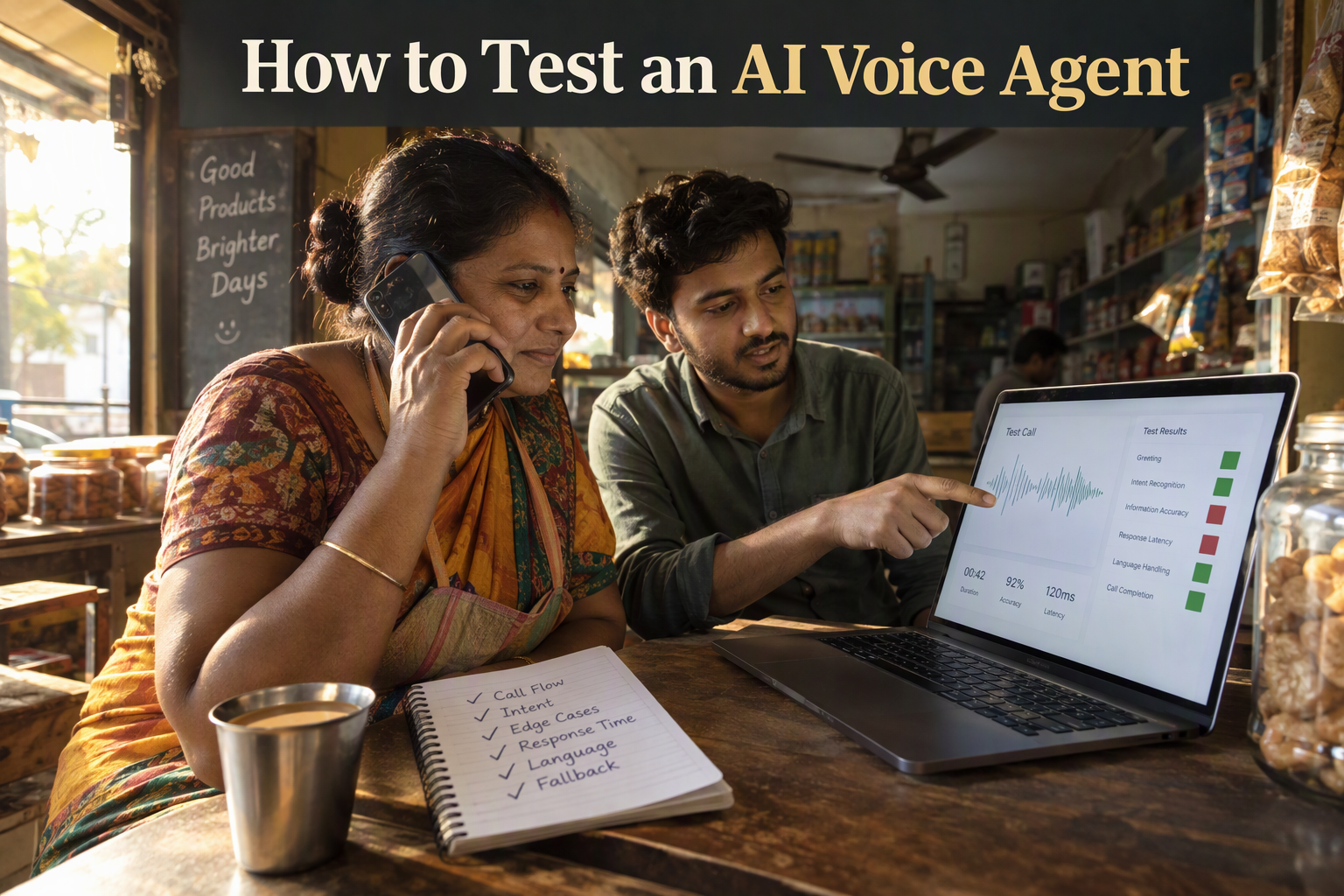
Learn how to test an AI voice agent before launch: a Hinglish test set, repeat-run pass rates and a one-page scorecard with a go/no-go rule.
How to Test an AI Voice Agent: Hinglish QA Checklist
Knowing how to test an AI voice agent is the difference between a demo that impresses and a live line that loses customers in the first few seconds. Humans leave a gap of only about 200 milliseconds between conversational turns, according to the EdgeAI Blog, which cites the cross-linguistic study by Stivers et al. (PNAS, 2009) covering 10 languages. Your agent is judged against that instinct on every call.
As of October 2026, the benchmarks are tight. BitBytes rates anything under 300 ms as excellent, and VideoSDK's 2026 architecture guide sets an engineering target of roughly 800 to 1,000 ms from the end of the caller's sentence to the first syllable of the reply. A DEV Community write-up of 30+ stack benchmarks chases a ~400 ms comfort zone. Teams are also testing on real phone lines now. Codebridge placed 499 recorded live calls across four architecture types, including speech-to-speech models, a custom STT→LLM→TTS cascade and managed platforms, rather than trusting a notebook demo.
Latency is only one part of the picture, though. In India, callers don't speak in tidy, single-language sentences. They say "mera order kal tak aa jayega na?" mid-sentence, switch between Hindi and English, read out phone numbers digit by digit and talk over the agent. A test script written in clean English will pass an agent that fails in production.
This guide gives you a practical pre-launch QA process built for that reality. You will learn how to:
- Measure response latency the way callers experience it, not the way a dashboard averages it
- Stress-test Hinglish and code-mixed speech, names, numbers and noisy lines
- Check conversation quality, including interruptions, silences and graceful fallbacks
- Verify knowledge and tool use, so the agent answers from your data and takes the right actions
- Score every test call on a simple scorecard with clear go-live thresholds
Platforms like CallMissed reflect this shift: they pair speech recognition across 22 Indian languages plus English, including code-mixed Hinglish, with call scoring against your own QA rubrics, so testing becomes a repeatable step rather than a last-minute scramble.
Here is the checklist for how to test an AI voice agent, starting with the numbers that matter most.
How do you test an AI voice agent before going live?
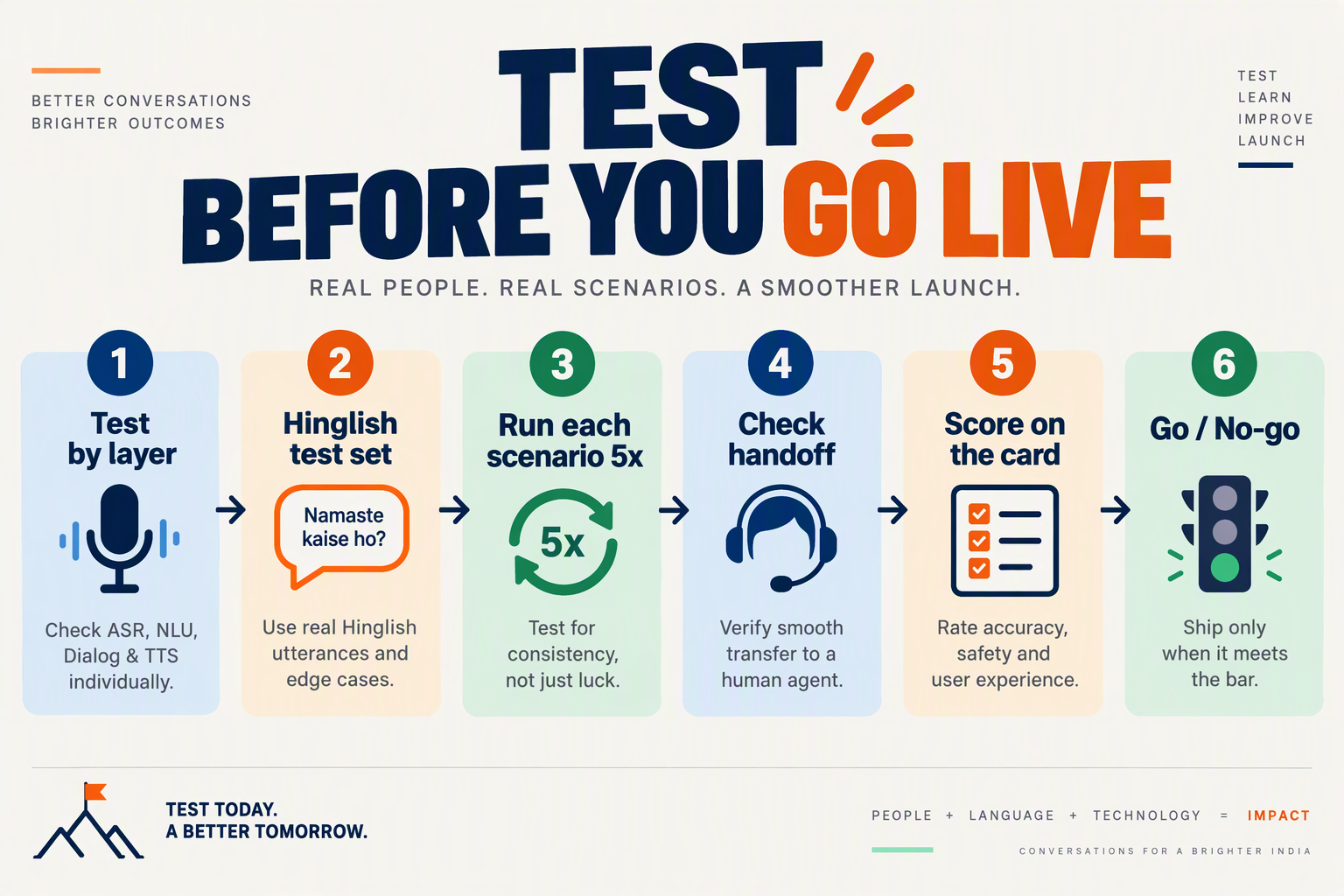
You test an AI voice agent before going live by running it through five staged passes (latency, language, conversation, knowledge and tools, then scoring) on a real phone line, and shipping only when every pass clears a threshold you set in advance. Treat launch as a gate, not a date.
What are the five stages of how to test an AI voice agent before launch?
- Latency pass: Place calls and time the gap between the caller's last word and the agent's first syllable. Record the spread, not just the average.
- Language pass: Run Hinglish, code-mixed phrases, names, phone numbers, addresses and noisy-line audio.
- Conversation pass: Interrupt the agent, stay silent, mumble, change your mind mid-sentence and ask off-topic questions.
- Knowledge and tools pass: Check that answers match your documents and that bookings, lookups and CRM updates actually fire.
- Scoring pass: Grade every call on one scorecard and compare the totals to your go-live thresholds.
The later sections of this guide cover each pass in depth. Run them in this order, because a slow or misheard agent makes the later results hard to interpret.
Why test on a real phone line instead of a notebook demo?
Phone audio adds codecs, carrier jitter and background noise that a browser demo never exercises. Codebridge's benchmark of 499 recorded live calls across four architecture classes shows why teams now measure on live lines rather than trusting lab numbers.
Component benchmarks also mislead. MarkTechPost's August 2026 time-to-first-token (TTFT) benchmark describes TTFT as "the right entry point and the wrong finish line", since a fast model response still has to pass through speech recognition, synthesis and the telephony hop before the caller hears anything.
Overlap failures are another reason. Bitontree describes the pattern: a caller finishes, hears nothing, says "hello?", and the agent starts speaking at that same moment, so both talk at once. You only catch this by listening to real calls.
How many test calls do you need?
There is no universal standard, so treat this as a working rule of thumb. Aim for at least 50 scripted calls spread across your top call intents, and review the slowest 10% of replies as closely as the median. Callers remember the awkward pauses, not the average.
Build the script from real traffic where you can. Pull common questions from your WhatsApp chats, support tickets or past call logs, and add edge cases on top.
What should your test script cover?
- Happy paths: The three to five requests that make up most of your volume
- Code-mixed phrasing: Sentences like "mera order kal tak aa jayega na?" that switch language mid-sentence
- Structured data: Phone numbers, PIN codes, order IDs and spelled-out names
- Hostile conditions: Traffic noise, speakerphone, weak signal and fast talkers
- Out-of-scope asks: Questions the agent should decline or hand to a human
- Tool-dependent requests: Anything that needs a calendar, order system or CRM
Keep this script in version control and rerun it after every prompt or model change. In CallMissed's builder, for example, agents have versioning with publish and rollback, plus eval suites and A/B experiments, so you can test a draft against the same script and publish only when it passes. The same discipline works on any platform: change one thing, rerun the script, compare the scores.
Next, the first and most visible number: how to measure latency the way callers feel it.
What do you need before you start testing?
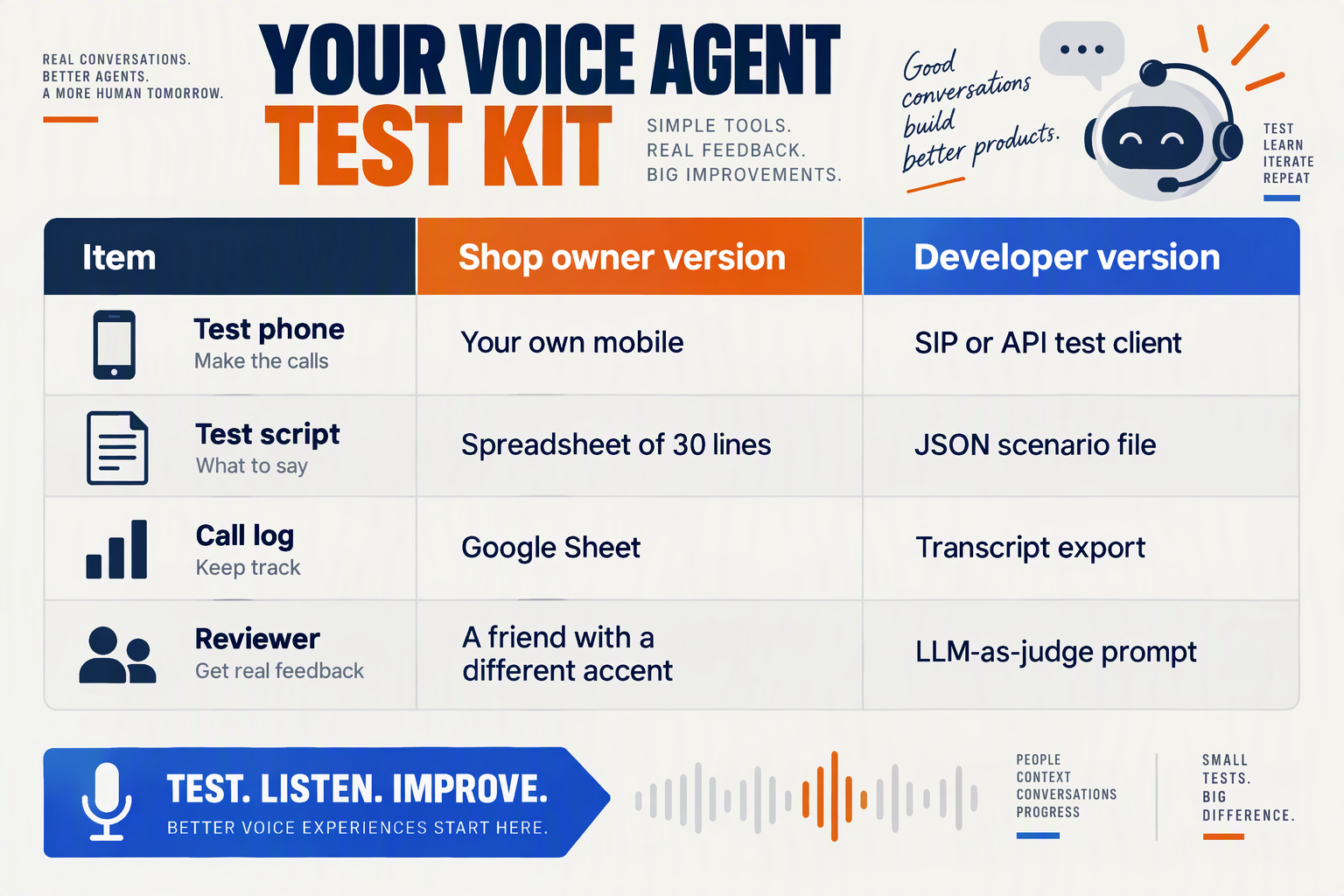
You need six things before the first test call: a frozen agent version, a real phone line, a scenario script, a populated knowledge base with sandboxed tools, a written scorecard with thresholds, and a recording setup. Skipping any one means you can't tell whether a failure came from the agent or from your test setup.
What is the pre-test checklist for an AI voice agent?
| Prerequisite | What to prepare | Why it matters |
|---|---|---|
| Frozen agent version | Lock the prompt, voice, language and settings. Change nothing mid-round. | Results are only comparable if the agent stays constant between runs. |
| Real phone path | Test over the actual carrier route on at least two handsets, one on mobile data and one on a weak signal. | Codebridge's benchmark used 499 recorded live calls because notebook demos hide telephony delay. |
| Scenario script | 30-50 scripted calls: Hinglish, names, digits, interruptions, silences and off-topic questions. | Covers the failure modes that clean English scripts never trigger. |
| Knowledge and tools | Final knowledge base plus test accounts or a sandbox for every REST tool or integration. | Lets you check answers against source documents without touching live customer data. |
| Scorecard and thresholds | Pass marks written down before testing, such as a latency target and a task-completion rate. | Stops teams from lowering the bar after seeing results. |
| Recording and transcripts | Call recordings and transcripts switched on for every test call. | You can't diagnose a bad turn you can't replay. |
Why freeze a version before you test?
Voice agents change behavior with small prompt edits. If you tweak a greeting between call 12 and call 13, your latency and accuracy numbers are no longer one dataset.
Use versioning so every round maps to a named build. CallMissed's agent builder supports versioning with publish and rollback, which lets you test a draft, record the result, and revert if a prompt change makes things worse.
Who should make the test calls?
Don't let only the builder test. People who wrote the prompt unconsciously speak in the phrases it expects.
- Two or three native Hindi/English code-mixers who haven't seen the script
- At least one speaker from a different region, since accents and vocabulary shift across states
- One person in a noisy setting, such as a street, a car or a kitchen
- One reviewer who only scores, so judging stays separate from calling
How much does a test round cost?
Budget it in minutes. Using CallMissed's published rates as of October 2026, the Standard plan is ₹4 per minute, Expressive is ₹5 and Best latency is ₹6, with a 30-second minimum per call and no charge for a call that never connects. Phone carriage is billed separately.
A round of 100 one-minute calls therefore comes to roughly ₹400 to ₹600 in agent charges, before carriage. The 1,000 free credits on signup (1 credit = ₹1) cover a meaningful first round.
Test on the tier you plan to launch with. Latency and voice quality differ between tiers, so a pass on Standard doesn't guarantee the same experience on another.
What should you write down before call one?
Write your thresholds now. BitBytes calls under 300 ms excellent, and VideoSDK's 2026 guide targets roughly 800 to 1,000 ms for the full loop. Decide which line your use case needs.
Next, we apply that decision to the first pass: measuring latency the way callers actually hear it.
Where should you start: which layer is failing?
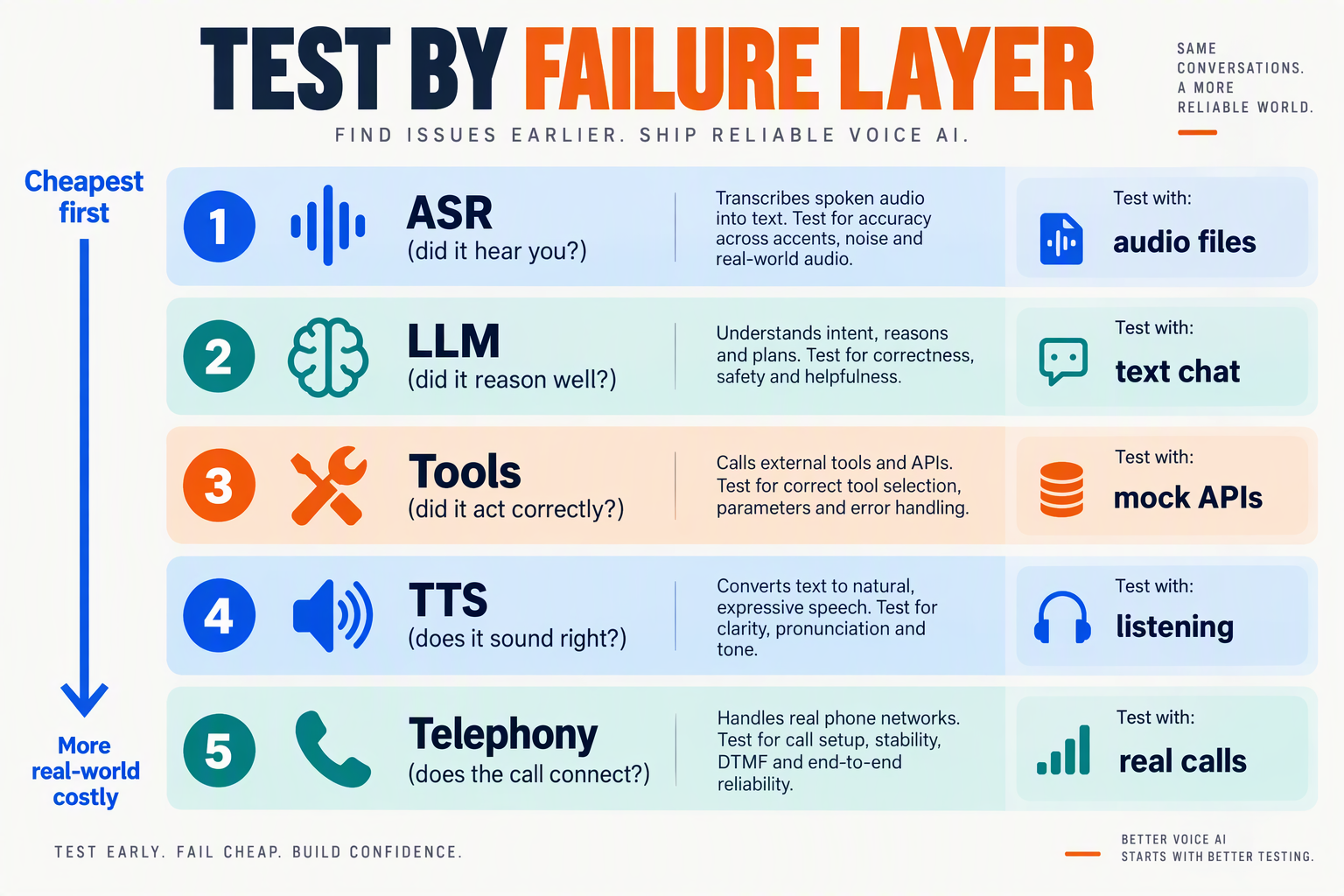
Start by listening to a recording and matching the symptom to a pipeline layer: telephony, speech recognition (STT), the language model (LLM), text-to-speech (TTS) or your tools. Fixing the wrong layer is the most common way teams waste a week of testing.
Why does a voice agent fail at the layer you didn't expect?
A voice agent is a chain, and the caller hears only the sum. MarkTechPost's August 2026 benchmark of low-latency inference APIs describes it as "a latency budget with a language model inside it," where every stage spends milliseconds the user can hear. The same logic applies to accuracy: an error in an early stage is passed on, unnoticed, to every stage after it.
The same article calls time to first token (TTFT) "the right entry point and the wrong finish line." A fast model can still sit inside a slow or inaccurate pipeline. Codebridge reached a similar conclusion by placing 499 recorded live calls across four architecture types. Real calls expose behaviour that a single-component benchmark hides.
How do you map a symptom to a layer?
Pull the transcript and the audio for one failing call, then read them side by side.
- Transcript is wrong, audio is clear → STT. The agent heard "Rahul" as "rule" or dropped half of a Hinglish phrase. Every later answer will look like a model problem, but the model was fed bad input.
- Transcript is right, answer is wrong → LLM or knowledge base. The agent misread the intent, invented a policy, or ignored the document you uploaded. Check the prompt and retrieval before swapping models.
- Answer is right, delivery is wrong → TTS. Look for mispronounced names, digits read as one long number, flat tone, or English words in a Hindi accent that confuses the listener.
- Everything is right but the reply comes late → latency across stages. Compare timestamps for end of speech, transcript final, first token and first audio. The biggest gap is your target.
- Agent talks over the caller, or both stop at once → turn detection. Bitontree describes this exact moment: the caller says "hello?" just as the agent starts speaking, and both collide.
- Right answer, but the order was never created → tool call. Check the request payload, the response and the error handling, not the wording.
What should you check first on a brand-new agent?
Run the same ten-sentence script through the layers separately before you judge the whole call:
- Transcript accuracy: Read the STT output without listening to the audio. Mark every wrong word, especially names, digits and code-mixed phrases.
- Text-only answers: Paste the correct transcript into the chat version of the agent. If the answers are still wrong, voice is not the problem.
- Audio-only playback: Listen to the TTS output on a phone speaker, not studio headphones.
- Timestamps: Log the gap at each handoff so one slow stage cannot hide behind a decent average.
This order matters because the cheapest fix usually sits upstream. A prompt edit costs nothing. A TTS voice swap costs a retest of every call.
How does tooling help you isolate layers?
You need per-call transcripts, recordings and the ability to swap one component at a time. On CallMissed, for example, every call produces a recording and transcript, and teams that build a custom stack pay each component (STT, LLM, TTS) by the second with no minimum. That makes it cheap to change one layer and rerun the same script. As of October 2026, that one-variable-at-a-time habit is what separates a diagnosis from a guess.
Once you know which layer is weakest, begin with latency, since it affects every call.
What belongs in a Hinglish and Indian-accent test set?
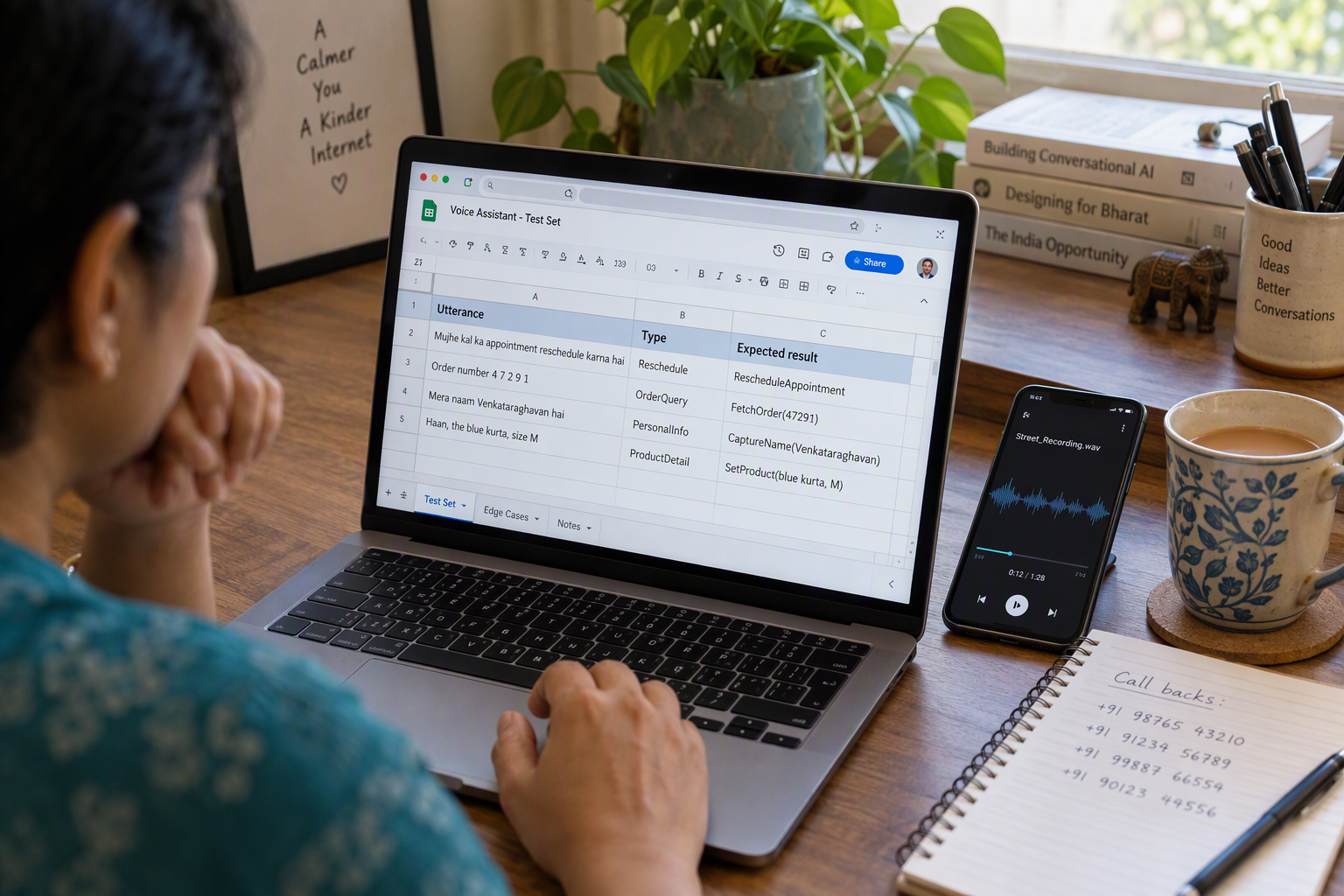
A Hinglish and Indian-accent test set should contain real, recorded phone audio that mixes Hindi and English mid-sentence, covers regional accents, and includes the hard-to-transcribe items your business depends on: names, numbers, addresses and product terms. If your test set sounds like a clean English script read aloud, it will not predict how callers behave.
What categories should the test set cover?
Build the set around the places speech recognition and language models break most often:
- Code-mixed sentences: Utterances that switch language mid-clause, such as "mera order kal tak aa jayega na?" or "refund process kitne din mein hoga?" Write them in the way your customers actually speak, not in textbook Hindi.
- Romanised and native-script variants: The agent's transcript and your knowledge base may use Devanagari, Roman script or both. Test that "kal", "कल" and "tomorrow" all resolve to the same intent.
- Names and places: Indian first names, surnames, society names and city-district combinations. Include ones the text-to-speech voice must also say back correctly.
- Digits and identifiers: Ten-digit mobile numbers read in groups ("98765, 43210"), pairs, or "double nine", plus order IDs, PIN codes and amounts like "dhai hazaar" or "paanch sau".
- Accents beyond Hindi: Speakers whose first language is Tamil, Telugu, Bengali, Marathi or Punjabi speaking Hinglish or Indian English.
- Hostile audio: Traffic, a TV in the background, speakerphone, weak mobile signal and a caller moving between rooms.
How many calls, and from whom?
Aim for variety over volume. A practical starting set is 40 to 60 scripted calls, with each category above covered by several different speakers. Use at least a mix of genders, age groups and regions, because a model that handles one voice well can still stumble on another. This is a recommended starting point, not a published benchmark. Scale it up for high-stakes flows like payments or medical bookings.
Why record on real phone lines?
Phone audio is narrowband and compressed, which changes how speech recognition behaves compared with a laptop microphone. That is why benchmark teams test live. Codebridge, for example, placed 499 recorded live calls across four architecture types instead of relying on a demo environment. Do the same: dial your agent from real mobile numbers on different networks, and save the recordings and transcripts.
How do you keep the test set useful over time?
- Tag every call with its category, speaker, language mix and noise level, so a failure points to a pattern rather than an anecdote.
- Save the transcript beside the audio and mark the correct expected values (the right phone number, the right name) so you can check errors against ground truth.
- Add every production miss to the set after launch. A real caller who confused the agent is your best new test case.
- Re-run the whole set whenever you change the prompt, voice or language model.
Platforms such as CallMissed can support this loop: its speech recognition covers 22 Indian languages plus English, including code-mixed speech like Hinglish, and its call scoring runs against your own QA rubrics. Note that text-to-speech voices cover 10 Indian languages plus English, so check pronunciation separately if you need a language outside that list.
With the test set built, the next step is deciding how to judge each call.
How do you run the QA checklist step by step?
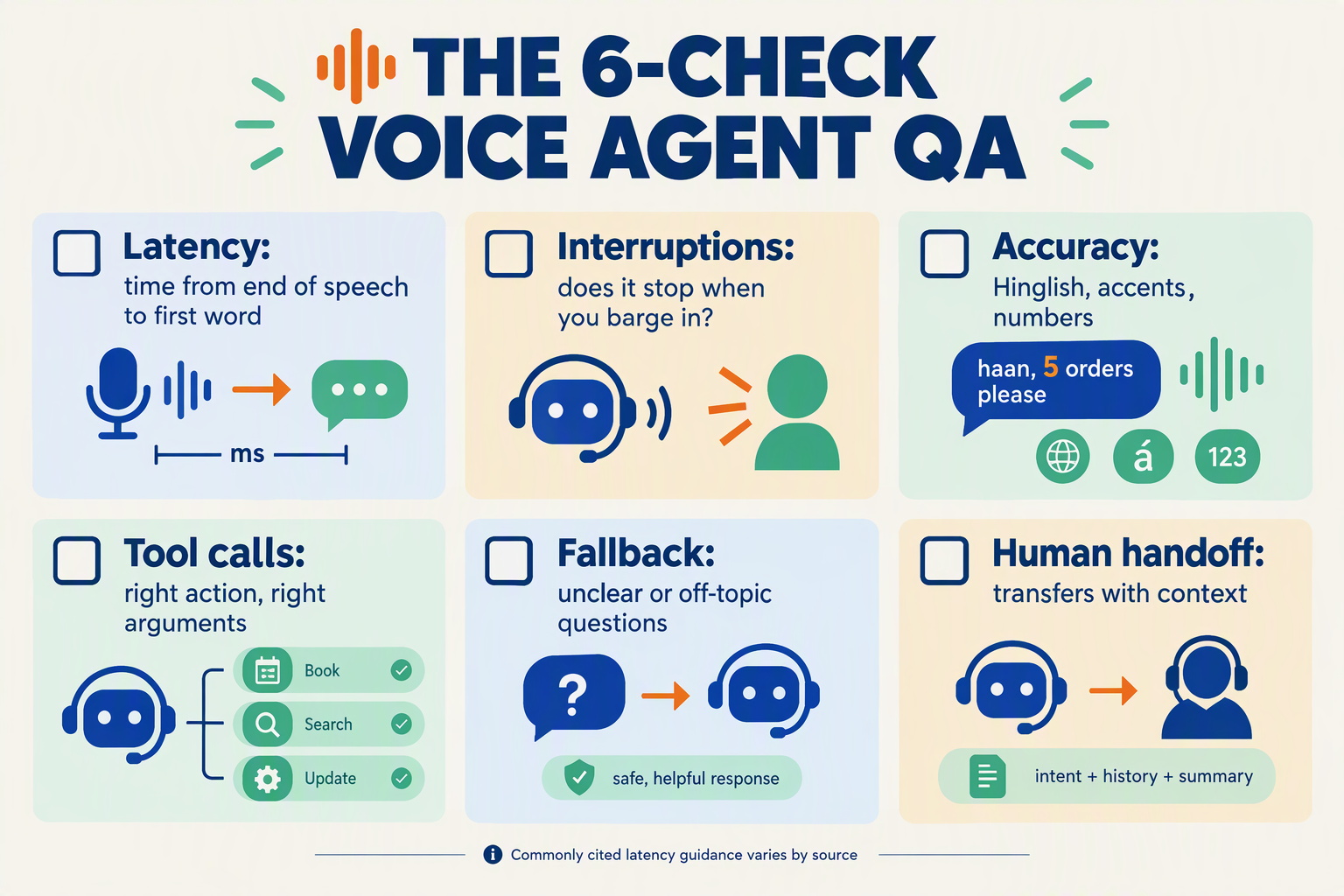
You run the QA checklist by freezing one agent version, writing a fixed call sheet, running the five passes in order on a real phone line, logging every call, and re-running the full sheet after every fix. The order matters. A latency problem can masquerade as a conversation problem, so clear the mechanics before you judge the dialogue.
Step 1: How do you set up the test environment?
Freeze a single agent version before you place any call, so results are comparable. Use the same phone path your customers will use, not a browser demo. Codebridge's benchmark of 499 recorded live calls across four architecture types shows why: real telephony behaves differently from a notebook.
Before call one, confirm:
- One published version with a name or number you can roll back to
- A real number (rented or via your own carrier) plus the web widget if you will deploy one
- Recording and transcripts switched on for every test call
- Two or three testers with different accents, devices and environments (quiet room, street, moving vehicle)
Step 2: What goes on the call sheet?
Write the sheet once and reuse it. Each row is one scripted call with an expected outcome:
- Happy path: the top 3 to 5 reasons customers call, spoken naturally
- Hinglish variants: the same intents phrased in Hindi, English and mixed, such as "mera order kal tak aa jayega na?"
- Hard inputs: 10-digit mobile numbers, order IDs, pincodes, unusual names
- Disruptions: interrupting mid-sentence, 5 seconds of silence, background noise
- Off-script: questions outside the knowledge base, abusive language, a request for a human
- Tool calls: a booking, a lookup, a CRM update, each with a known right answer
Aim for several variants per intent. A single clean pass proves little.
Step 3: In what order do you run the passes?
Run latency first, then language, conversation, and knowledge and tools. Time every call from the caller's last word to the agent's first syllable. Compare the spread against the thresholds from earlier, such as BitBytes' sub-300 ms "excellent" band and VideoSDK's roughly 800 to 1,000 ms engineering ceiling.
Note which turns are slow. Turns that trigger a tool call or knowledge lookup are usually slower than plain chat, so tag them separately.
Step 4: How do you log and score each call?
Score each call immediately, while the recording is fresh. Use a sheet with one row per call:
| Field | What to record |
|---|---|
| Call ID and tester | Who called, from where |
| Pass and scenario | Latency, language, and so on |
| Result | Pass, partial or fail |
| Failure note | Quote the exact turn |
| Severity | Blocker, major or minor |
Tools like CallMissed can shorten this step. The platform records and transcribes calls, and its call scoring runs against your own QA rubrics. Its pricing also keeps short test calls cheap: as of October 2026, voice agent plans bill a 30-second minimum per call, and a call that never connects costs nothing. Phone carriage is billed separately.
Step 5: How do you fix, re-run and sign off?
Fix blockers first, publish a new version, then re-run the entire sheet, not only the failed rows. A prompt tweak that repairs one Hinglish phrase can quietly break a number-reading turn. Keep the previous version available for rollback.
Sign off only when every pass meets the thresholds you set before testing began. If you move the goalposts after seeing results, the scorecard stops meaning anything.
How many times should you run each scenario, and how do you score it?
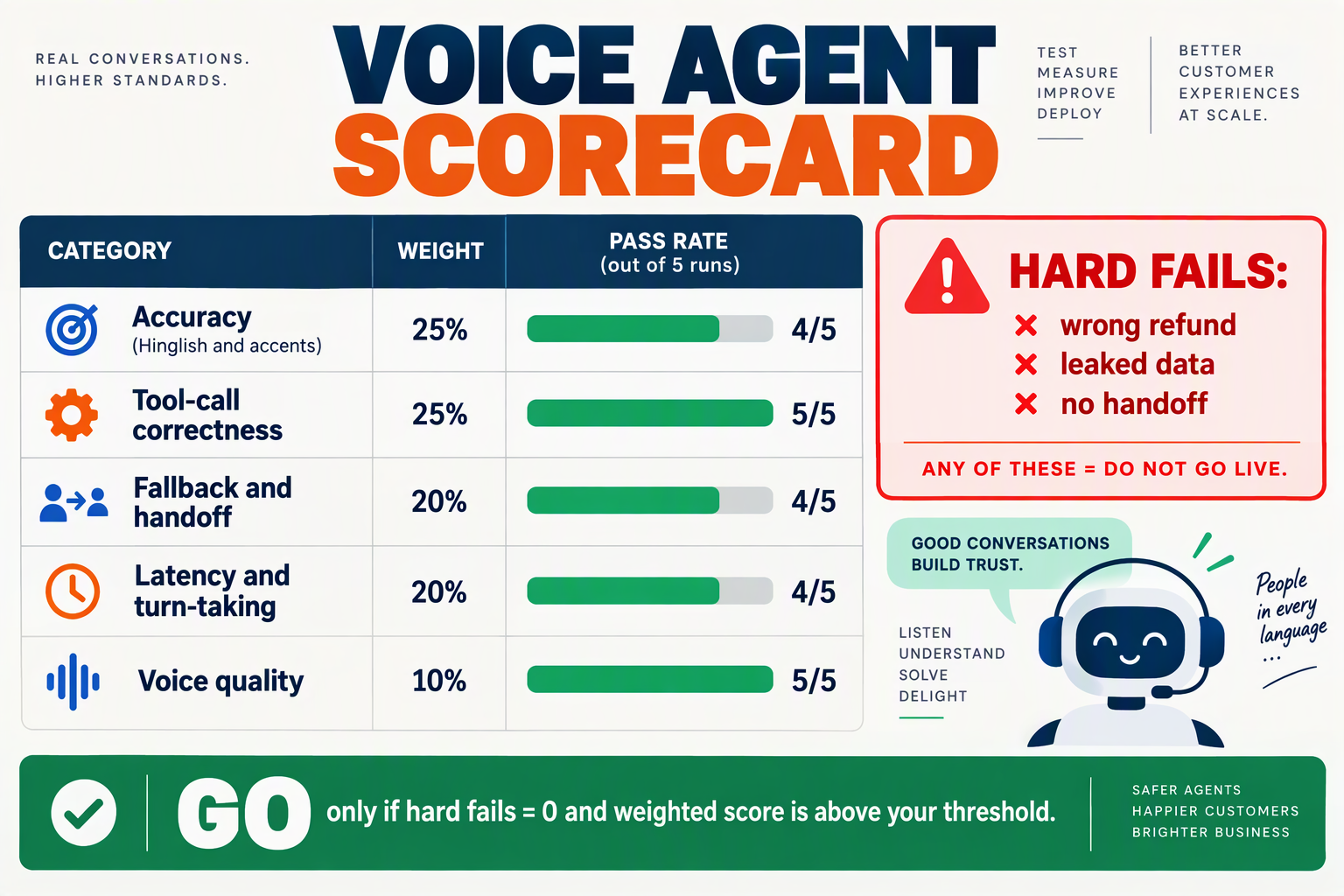
You should run each scenario at least 5 times, and 10 times for anything involving Hinglish, numbers or tool calls, then score every call against the same rubric. Voice agents are non-deterministic, so one clean call proves little. A scenario that passes 1 time in 1 can still fail 3 times in 10.
How many times should you run each scenario?
Match the run count to the risk. These are suggested starting points as of October 2026, not an industry standard:
- Critical scenarios (5 to 10 runs): booking, payment or order-status flows, and any call that writes to a CRM or triggers a tool.
- Hinglish and code-mixed scenarios (10 runs): vary the caller, accent, speaking pace and line quality, because the same sentence behaves differently across voices.
- Latency checks (20+ calls): a handful of calls hides the slow tail. Codebridge's benchmark placed 499 recorded live calls across four architecture classes for this reason, and your own sample can be far smaller while still showing the spread.
- Edge cases (3 runs): silence, interruptions and out-of-scope questions need fewer runs, since failures here tend to be consistent.
Change one variable per run, such as the voice, the phrasing or the background noise, so a failure points to a cause.
How do you score each test call?
Score each call 0, 1 or 2 on every criterion (0 = fail, 1 = partial, 2 = clean pass), then weight the categories:
- Task completion (30%): Did the caller get what they called for?
- Language understanding (25%): Did the agent catch code-mixed phrases, names and digit strings correctly?
- Latency (15%): Was the gap before the first syllable inside your target? VideoSDK's 2026 guide puts the engineering ceiling at roughly 800 to 1,000 ms, while BitBytes rates under 300 ms as excellent.
- Conversation handling (15%): Did it recover from interruptions, silence and misheard words?
- Knowledge and tool accuracy (15%): Were answers grounded in your data, and were the right actions taken?
Track the 95th-percentile latency alongside the median. Callers remember the one awkward pause, not the average.
What counts as a go-live pass?
Set the gate before you test, so a deadline can't move it. A reasonable default:
- Overall weighted score of 85% or higher across all runs.
- No category below 70%.
- Zero critical failures. A wrong price, a wrong digit written to the CRM, or a missing human handoff is an automatic fail, however good the average looks.
- Critical scenarios passing at least 9 of 10 runs.
If a run fails, fix the cause, then rerun the full scenario set, not just the failing call. A prompt tweak that repairs one Hinglish case can quietly break another.
How can you make scoring repeatable?
Manual listening works for the first pass, but it doesn't scale across 10 runs of every scenario. Platforms such as CallMissed support this with transcripts, call scoring against your own QA rubrics, eval suites and A/B experiments. You can encode the scorecard above once and apply it to every test call and every prompt version.
Keep a log of scores per version. A rising trend across versions tells you more than any single passing call.
Which advanced tips make voice agent tests more reliable?
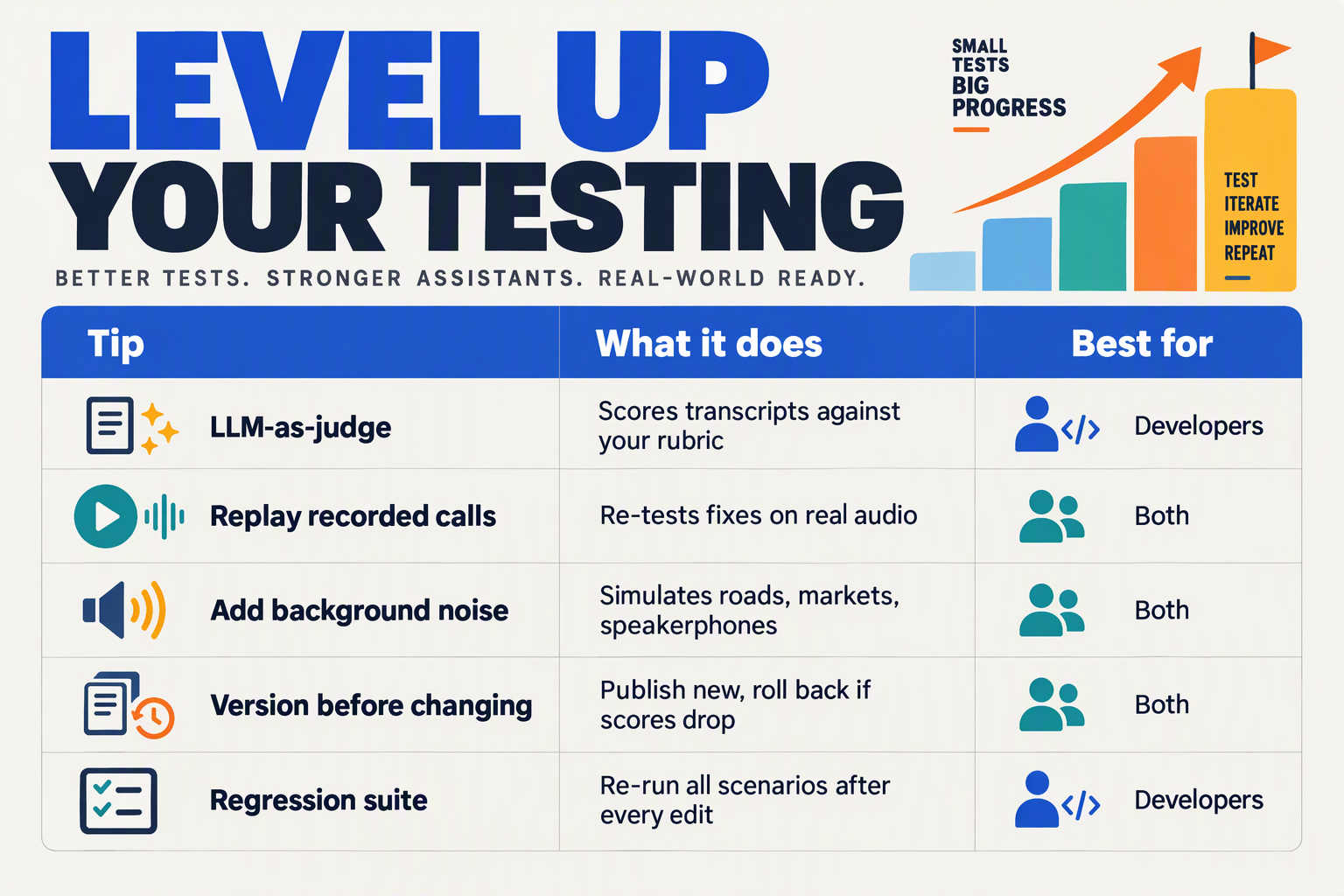
Test reliability comes from controlling variables: the same scripts, the same phone path and enough repeated calls that one lucky or unlucky run cannot decide your launch. As of October 2026, these are the habits that separate a trustworthy pre-launch test from a one-off demo.
Which advanced tips make voice agent tests more reliable?
| Tip | What to do | Why it improves reliability |
|---|---|---|
| Test on real phone lines | Place calls over the actual carrier route, on mobile and landline, not just a browser widget | Codebridge placed 499 recorded live calls across four architecture classes rather than relying on lab demos, because network and carrier hops add delay a notebook never shows |
| Report percentiles, not averages | Run 30 or more calls per scenario and log the median and the slowest 5% | One 3-second pause ruins a call even when the mean looks fine |
| Measure the full turn | Time from the caller's last word to the agent's first syllable | MarkTechPost calls time to first token "the right entry point and the wrong finish line" because speech recognition and voice synthesis add their own milliseconds |
| Freeze a golden call set | Keep 20 to 50 scripted calls (Hinglish, numbers, interruptions) and replay them after every prompt or voice change | You can tell a real regression from random variation |
| Vary callers and conditions | Use native speakers from different regions, cheap handsets, speakerphone and street noise | Accents and audio quality change speech recognition accuracy more than most prompt edits |
| Change one variable at a time | Alter the prompt, the voice or the model separately, never together | Any score movement can be traced to a single cause |
How many test calls are enough?
There is no universal number, but treat any scenario with fewer than about 30 calls as anecdotal. Latency varies call to call, so the slow tail only appears with volume. The DEV Community write-up of 30+ stack benchmarks found that weekly model updates can shift behaviour, which means a test that passed last month needs re-running.
Should you score calls yourself or automate it?
Do both. Have two reviewers independently score the same 10 recordings on your scorecard, then compare. If they disagree on what "good fallback" means, your rubric is vague, not your agent.
Once the rubric is stable, automate it. CallMissed, for example, offers call scoring against your own QA rubrics, plus eval suites and A/B experiments, so the golden set can be re-run and compared after each change. It also keeps call recordings and transcripts, so a failed call can be replayed instead of argued about.
What benchmark should the latency target be?
Pick your target before testing, not after. The published reference points differ by what they measure:
- Under 300 ms: BitBytes' "excellent" tier, matching the natural human gap.
- About 400 ms: the comfort zone the DEV Community benchmarks chase.
- 800 to 1,000 ms: VideoSDK's 2026 engineering ceiling for end-to-end response.
A sensible approach is to set the ceiling as your hard fail and the comfort zone as your goal. Record both in the scorecard so launch decisions are not renegotiated under deadline pressure.
How do you keep results comparable over time?
Version everything. Tag each test run with the prompt version, voice, model and date. Platforms with versioning, including CallMissed's publish and rollback, make it easy to retest a specific build and revert if a "better" prompt scores worse on your Hinglish set.
Which testing mistakes cause voice agents to fail after launch?
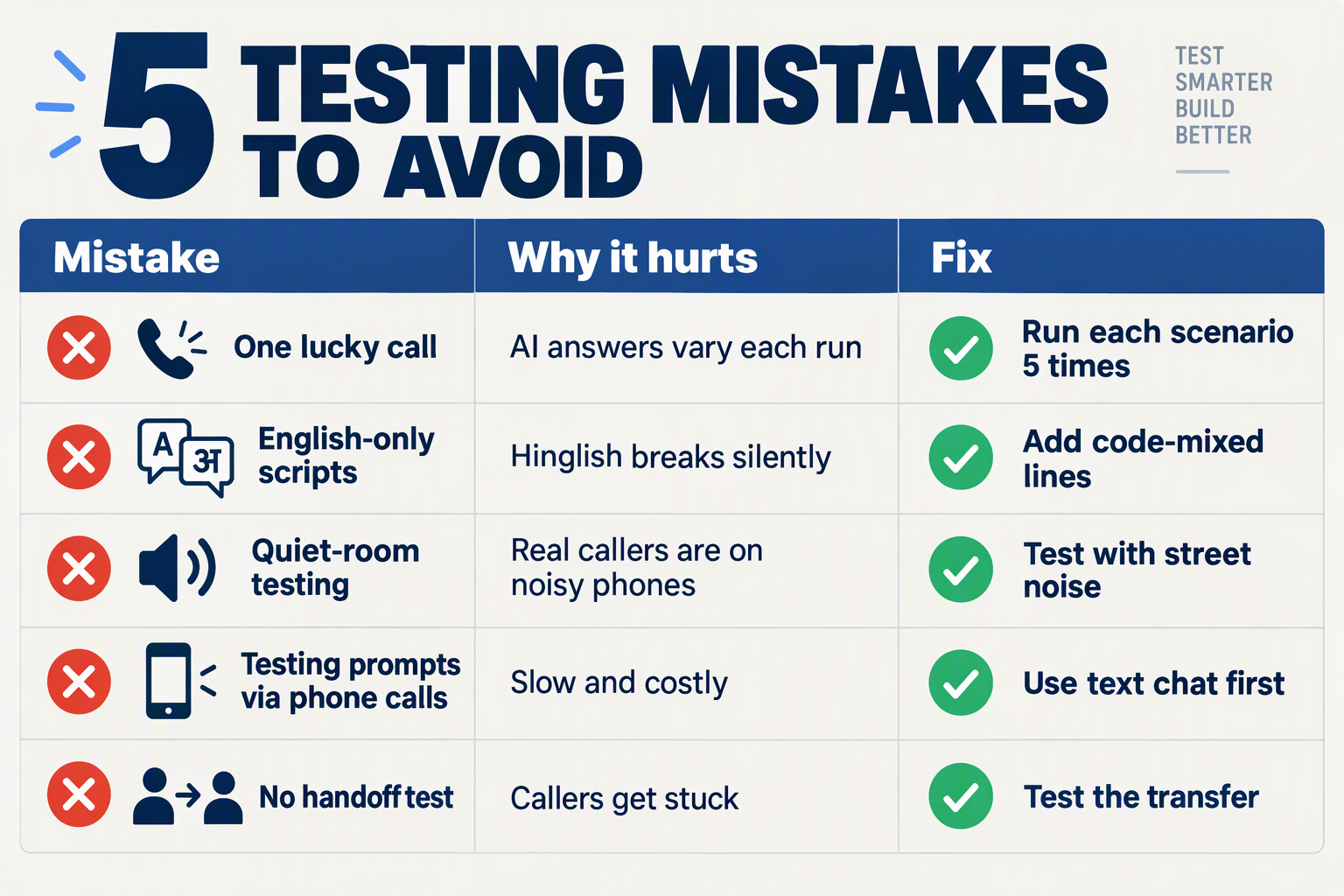
The testing mistakes that most often cause voice agents to fail after launch are measuring latency in the wrong place, testing off the phone network, using clean-English scripts, skipping interruptions, covering only the happy path, and not re-testing after edits. Each is cheap to catch before launch and expensive to discover on a live line.
What are the most common voice agent testing mistakes?
| Mistake | Why it fails in production | Fix before launch | Scorecard check |
|---|---|---|---|
| Judging latency by model speed alone | MarkTechPost's TTFT benchmark calls time to first token "the right entry point and the wrong finish line." Callers hear the whole chain: STT, LLM, TTS and the phone network. | Time end-to-end, from the caller's last word to the agent's first syllable. | Latency spread, not average |
| Testing in a browser, not on a phone line | Codebridge ran 499 recorded live calls across four architectures rather than trusting lab runs, because telephony adds delay and audio loss. | Run most test calls over a real number. | Pass rate on live-line calls |
| Using clean, single-language scripts | Real callers mix Hindi and English, spell names and read digits aloud. | Add code-mixed prompts, noisy audio and several accents. | Hinglish intent and entity accuracy |
| Never interrupting the agent | Bitontree describes the failure: the caller says "hello?" just as the agent starts speaking, and both talk at once. | Barge in, stay silent, and talk over the agent on purpose. | Interruption recovery |
| Testing only the happy path | Out-of-scope questions and failed tool calls expose invented answers. | Ask things the knowledge base cannot answer and break a tool on purpose. | Fallback and hallucination rate |
| Editing the prompt without re-testing | A small wording fix can silently break a flow that passed last week. | Re-run the same test set after every change. | Regression delta vs. last version |
Why do these mistakes slip through?
Most come from testing the agent as software rather than as a phone call. A dashboard average hides the slow calls that callers remember, and a quiet office hides the noise, accents and overlap of a real line.
The thresholds also move. As of October 2026, BitBytes rates under 300 ms as excellent, while VideoSDK's 2026 architecture guide sets a practical ceiling of about 800 to 1,000 ms. Decide which target applies to your use case and write it on the scorecard before the first test call. Otherwise the team will quietly relax the bar to match whatever the agent delivers.
How do you avoid regressions after launch?
Treat your test calls as a fixed set you replay, not a one-off exercise.
- Freeze a core set of 20 to 30 calls covering Hinglish, interruptions, tool use and out-of-scope questions.
- Re-run the set after every prompt, voice, knowledge base or tool change.
- Compare scores to the previous version and block the release if any category drops below its threshold.
- Keep a rollback ready so a bad change is reversed in minutes, not hours.
CallMissed supports this loop with prompt versioning (publish and rollback), eval suites, A/B experiments and call scoring against your own QA rubrics, so the same checks can run on every version. Other platforms offer similar tooling, and a spreadsheet works for a small first launch. What matters is that the replay actually happens.
What should you do after go-live?
Launch is not the end of testing. Use live call monitoring and transcripts for the first week, and add every real failure to your frozen set. Production calls are the best source of new test cases.
Frequently Asked Questions

How do you test an AI voice agent before going live?
What is a good response latency for an AI voice agent?
How many test calls do you need before launching a voice agent?
How do you test an AI voice agent for Hinglish and code-mixed speech?
What should a voice agent QA scorecard include?
Can you keep testing after the AI voice agent goes live?
What should you do next after your agent passes the scorecard?
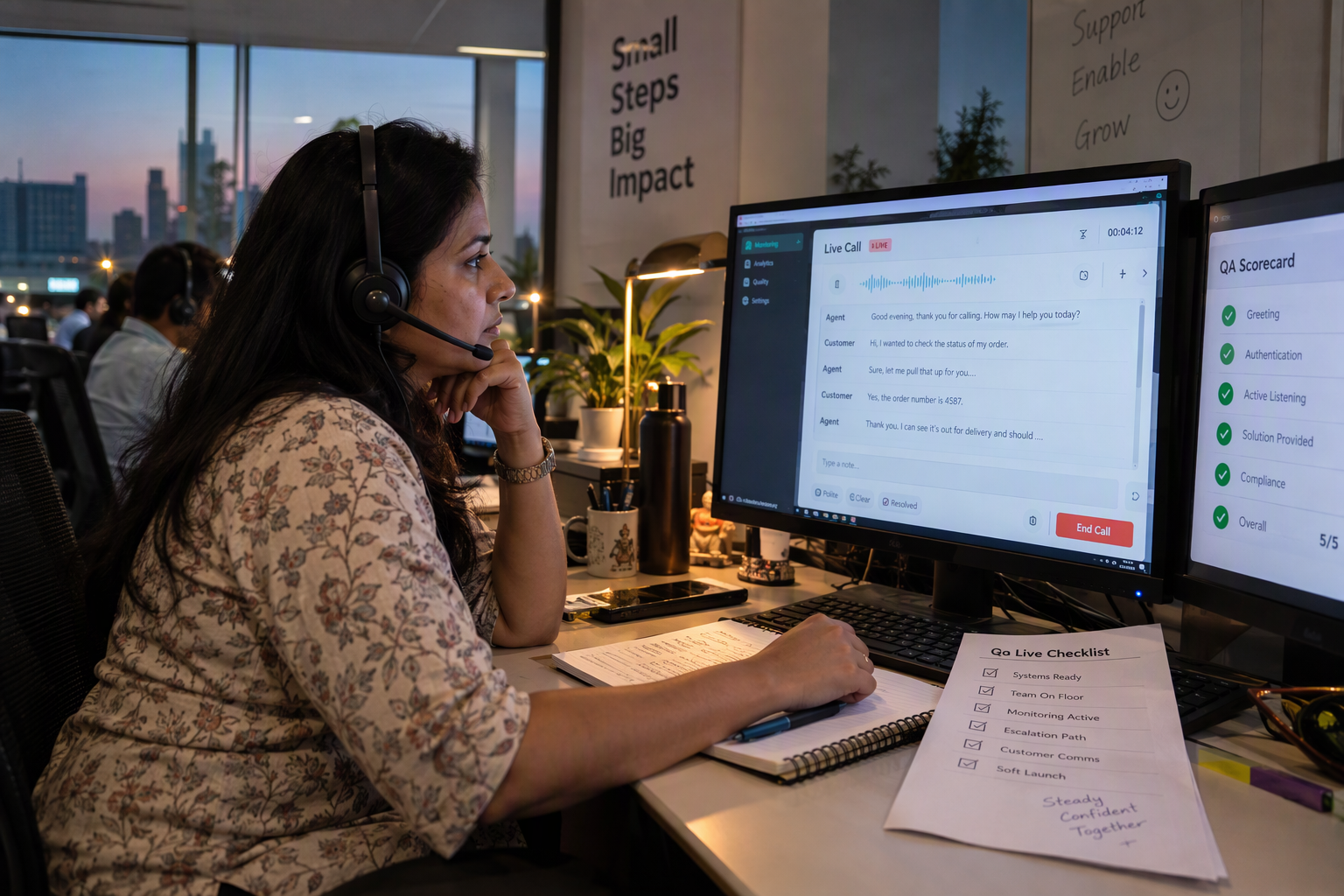
After your agent passes the scorecard, launch it to a small slice of real traffic, watch live calls closely, and feed every failure back into your test set. Passing the scorecard means the agent is ready for a controlled release, not that testing is over.
What does a safe soft launch look like?
Start with a limited, low-risk call type, such as order-status questions, rather than your full inbound line. Keep a human-handoff path open so any caller can reach a person.
- Pick a narrow scope. Route one intent or one number to the agent first.
- Set a stop rule. Decide in advance what triggers a rollback, such as a failed tool action or a wrong answer on a policy question.
- Ship a versioned build. Publish the tested version so you can roll back in one step if live calls misbehave. CallMissed's agent builder supports versioning with publish and rollback for exactly this.
- Watch the cost. A pilot on CallMissed's Standard plan runs ₹4/min (as of October 2026), with a 30-second minimum per call, so a small rollout is cheap to run.
What should you monitor in the first two weeks?
Lab numbers are a snapshot. Codebridge's benchmark of 499 recorded live calls across four architecture types shows how much latency varies by stack, and your own line will show variation too. MarkTechPost makes a similar point: time to first token is "the right entry point and the wrong finish line," because every stage of the pipeline spends milliseconds the caller can hear.
Track these on real calls:
- Latency spread: Look at your slowest calls, not the average. Compare them against the 800 to 1,000 ms engineering target from VideoSDK's 2026 guide.
- Hinglish misses: Collect the phrases the agent mis-heard, such as names, digit strings and mid-sentence language switches.
- Handoff rate and reasons: Every transfer to a human tells you what the agent cannot yet do.
- Tool failures: Check that bookings, lookups and CRM updates actually completed.
Supervisors can use live call monitoring to listen in, whisper to a human, or barge in. Platforms like CallMissed also add call recordings, transcripts and AI call notes, so you can review a call without sitting through it.
How do you keep the scorecard alive after launch?
Treat your scorecard as a regression suite that grows over time. Each live failure becomes a new test case, especially the Hinglish phrasing you could not have predicted when writing the script.
- Re-run the full scorecard after any change to the prompt, voice, language model or knowledge base. A small prompt edit can quietly break a tool call.
- Score live calls against your rubric. CallMissed's call scoring runs against your own QA rubrics, so the same criteria you used pre-launch apply to production.
- Set metric alerts for drops in score or spikes in handoffs, so you hear about problems before customers complain.
- A/B test one change at a time. Compare a faster voice tier or a revised greeting on a share of calls, then keep the winner.
- Hold a weekly review. Listen to a sample of calls, including the high-scoring ones, to confirm the scorecard still reflects what callers care about.
What is the next step?
Expand traffic in stages once two clean weeks of live scores match your pre-launch thresholds, adding one intent at a time. Keep the human fallback permanently, and keep your test set growing. Launch is the start of the loop, and the agents that stay good are the ones retested on every change.
Conclusion
Testing an AI voice agent is a gate, not a date: you launch only when every stage clears a threshold you set in advance.
Key takeaways:
- Measure latency like a caller does. Humans leave a gap of about 200 ms between turns, so track the spread of delays on a real phone line, not just the dashboard average.
- Test the Hinglish you will actually hear. Code-mixed sentences, names, digit-by-digit phone numbers and noisy audio expose failures that clean English scripts hide.
- Check conversation, knowledge and tools together. Interruptions, silences, fallbacks, answers from your own data and correct actions all decide whether a call succeeds.
- Score every call. A simple scorecard with clear go-live thresholds makes QA repeatable.
Looking ahead, watch how latency targets keep tightening, since BitBytes already rates under 300 ms as excellent, and how more teams benchmark on live calls, as Codebridge did with 499 of them. Expect QA to move from a one-time launch checklist to continuous regression testing every time a model or prompt changes.
To explore how AI communication is evolving, check out CallMissed, an AI infrastructure platform whose voice agents recognise 22 Indian languages plus English, including code-mixed Hinglish, and can score calls against your own QA rubrics.
So when your next prompt or model update ships, will you be able to prove the agent is still ready for the line?
Related Reading
- Hold-to-Talk Voice Assistant: Business Agent UX Guide
- Cactus Whistle: 16.9 MB ASR for Voice-Agent Builders
- Claude Haiku 5.5 latency: Voice-Agent Evaluation Guide