Hold-to-Talk Voice Assistant: Business Agent UX Guide



Use a Hold-to-Talk Voice Assistant to test clearer turn-taking, compare input modes, and design business agents with safer approvals and handoffs.
Hold-to-Talk Voice Assistant: Business Agent UX Guide
What if a better business voice agent starts not with a smarter model, but with a button users can release? A Hold-to-Talk Voice Assistant makes one decision explicit: the user, rather than a silence detector, decides when a spoken instruction is complete.
That interaction is attracting attention in the October 2026 research snapshot through Hacker News’ “Show HN: Atticus – Hold-to-talk voice assistant for macOS that runs on Claude -p.” According to the Atticus GitHub documentation available in that snapshot, users hold Control–Option–Space, speak, and release to submit an instruction; the assistant runs on a Claude Pro or Max plan without requiring an API key.
The business lesson is bigger than a Mac shortcut. When an employee dictates an account update or a customer explains a complicated booking request, a pause does not necessarily mean “I’m finished.” Treating hesitation as submission can turn a useful assistant into an interruption machine.
What can business voice agents learn from hold-to-talk?
Atticus provides a concrete interaction comparison. Its GitHub documentation, surfaced in the October 2026 context, describes two shortcut behaviors: hold mode submits on release, while toggle mode starts listening on the first press and submits on the second. In toggle mode, pauses keep the assistant listening.
Those choices expose a design trade-off: holding a key offers a clear boundary, but sustained physical input may be inconvenient or inaccessible. Toggle controls reduce that burden, yet require unmistakable listening indicators and an obvious way to cancel.
The supplied Atticus documentation also says that when speech finalization takes too long, the assistant offers partial text for review. That is a valuable recovery pattern—not evidence of any particular latency benchmark.
For businesses, the opportunity is to design around user control, recoverability, and action risk, rather than merely making conversation sound natural. As of October 2026, CallMissed supports no-code voice agents, an embeddable web voice-and-chat widget, and speech recognition in 22 Indian languages plus English—capabilities that make interaction design relevant across both deployment surfaces and regional audiences.
This guide will show you how to:
- Choose the right turn-taking model: hold-to-talk, toggle-to-talk, or open conversation.
- Make system state visible: distinguish listening, transcription, processing, and execution.
- Prevent consequential mistakes: confirm sensitive actions and let users correct captured instructions.
- Evaluate the complete experience: measure premature submissions, corrections, task completion, and accessibility.
The goal is not to copy a desktop shortcut onto every channel. It is to preserve its central promise: users should know when they are being heard—and when their words become actions.
What can business voice agents learn from Atticus? Clear turns, visible states, and deliberate actions
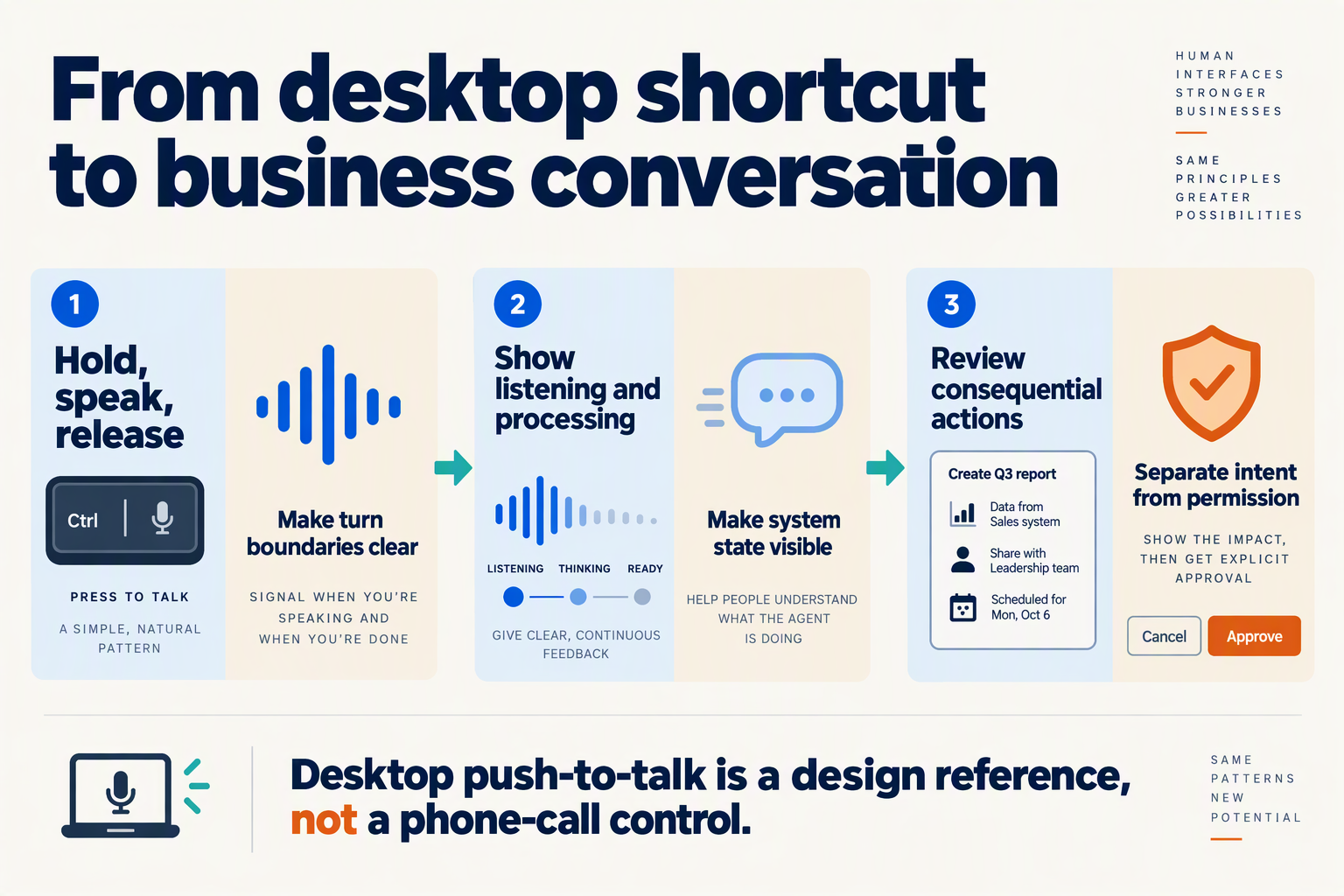
Business voice agents can learn three design principles from Atticus: make turn boundaries explicit, distinguish system states, and separate understanding from permission to act. The practical lesson is to create an interaction contract—not to transplant a macOS keyboard shortcut into every customer conversation.
How should a voice agent separate speaking from authorization?
A user finishing an utterance means “process this instruction,” not necessarily “execute every consequential action.” Business workflows should distinguish capturing intent, resolving ambiguity, and authorizing execution.
Consider a customer saying: “Move my appointment to Friday—actually, Friday afternoon, if the same consultant is available.” The agent should retain the correction, check availability, and present a specific proposed change before committing it.
A useful sequence is:
- Capture: Accept the complete request without acting on an unfinished phrase.
- Resolve: Identify the appointment, intended Friday, consultant, and available slot.
- Confirm: Ask, “Move your appointment to Friday at 3 p.m. with the same consultant?”
- Execute: Update the booking only after the required authorization.
- Report: State whether the change succeeded, failed, or remains pending.
Confirmation should be proportional to risk. Reading opening hours rarely needs another approval; cancelling an order or sending a message to a customer usually deserves a clearer checkpoint. Requiring confirmation for everything creates friction and can encourage users to approve prompts without checking them.
What states should a business voice agent make visible?
A business voice interface should communicate what is happening and whether the user can still intervene. “Working…” is too vague when the system might be transcribing speech, checking a calendar, or modifying a record.
For a proposed web or desktop implementation, distinguish:
- Listening: Speech is being captured; users can continue or cancel.
- Transcribing: Captured speech is becoming text; no business action has started.
- Interpreting: The agent is resolving intent and missing information.
- Awaiting approval: A specific action is ready for review.
- Executing: An authorized tool operation is underway.
- Completed or failed: The interface reports the actual outcome.
On telephone calls, replace visual indicators with brief spoken cues when useful: “I’m checking availability” communicates more than unexplained silence. Avoid announcing every internal step; excessive narration can become another form of interruption.
Cancellation also needs an honest boundary. Before execution, cancellation can discard the proposal. After execution, the system may need a reversal workflow rather than implying that “stop” automatically undoes a completed transaction.
What should teams log and verify before deployment?
Atticus’s GitHub documentation, available in the October 2026 research snapshot, says, “Every exact command is in the ask log.” For business agents, the transferable principle is traceability: connect the captured instruction, interpreted intent, approval, tool request, and result.
The same October 2026 GitHub documentation states, “Audio never leaves your Mac.” That claim concerns Atticus’s audio handling; it should not be generalized into a claim that all assistant data remains local.
As of October 2026, CallMissed supports custom REST tools, call transcripts, and evaluation suites, according to its verified product fact sheet. Those capabilities provide practical building blocks for testing whether an agent captured a correction, requested appropriate approval, and reported a tool failure accurately.
The acceptance test is straightforward: can the user tell what the agent heard, what it proposes, and what it actually changed? If those answers differ, the interface should make the difference explicit.
What do you need to set up Atticus on macOS?
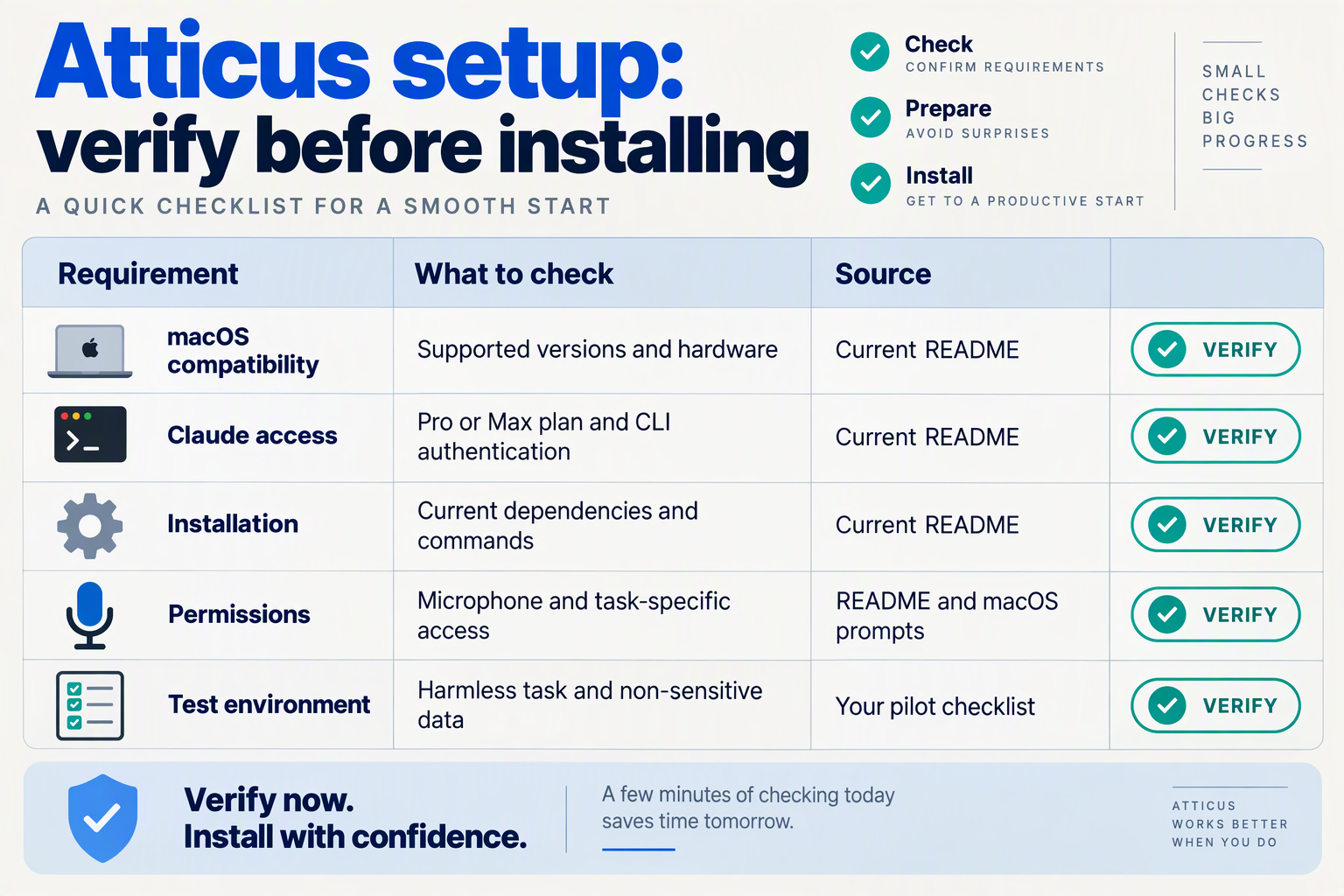
To set up Atticus, you need a Mac, access to a Claude Pro or Max plan, and a working Claude command-line environment for the assistant’s claude -p workflow. Atticus’s GitHub documentation in the October 2026 research snapshot says no API key is required, but the supplied excerpts do not specify a minimum macOS version or an exact installation command.
What should you check before installing Atticus?
Use this checklist to separate documented capabilities from prerequisites you still need to verify. “Free assistant” does not mean “no subscription dependency”: Atticus’s GitHub description calls the software free while specifying that it runs on your Claude plan, as of October 2026.
| Setup item | What the context establishes | What to check |
|---|---|---|
| Mac environment | Atticus is a macOS assistant | Confirm supported macOS versions in the repository |
| Claude account | GitHub specifies Claude Pro or Max; no API key | Check your account’s plan and sign-in |
| Claude command line | The Hacker News listing identifies claude -p | Verify the CLI works before testing voice |
| Audio input | GitHub says audio never leaves your Mac | Test your microphone and review permission prompts |
| Shortcut configuration | Settings supports hold or toggle behavior | Check for conflicts with existing shortcuts |
| In-app interaction | GitHub names Peekaboo for clicking inside apps | Review its setup and requested permissions if needed |
The Hacker News “Show HN” listing, supplied in the October 2026 context, identifies Claude’s -p workflow as the execution mechanism. However, the excerpts do not establish a Claude CLI version, processor requirement, memory minimum, or package-manager command. Check the repository’s current installation instructions rather than treating a generic Mac setup guide as authoritative.
How should you test Atticus after setup?
Start with a harmless task before allowing broader desktop actions. This is a recommended validation sequence, not a documented Atticus installer procedure:
- Check the execution path. Confirm that your Claude command-line environment can accept a simple text request before troubleshooting speech.
- Test microphone capture. Speak a short, unambiguous instruction and inspect any text available for review.
- Check shortcut conflicts. Make sure another application does not intercept the configured keyboard combination.
- Try a reversible task. Opening an application is a safer first test than sending a message or changing files.
- Inspect the action record. Atticus’s GitHub excerpt, available in October 2026, says every exact command appears in the ask log; use that record to compare your intent with the attempted command.
This sequence helps isolate failures: an account problem, an audio problem, and an execution problem should not all look like “the voice assistant failed.”
Does local audio mean the entire assistant runs locally?
No—local audio handling is not proof of fully local processing. Atticus’s GitHub documentation in the October 2026 snapshot states, “Audio never leaves your Mac,” but that statement does not establish where every transcript, prompt, screen-derived input, or execution result is processed.
For a business deployment, separately review:
- Audio handling: where recordings are captured and retained.
- Model inputs: what text or contextual information reaches the model.
- Action permissions: which applications and files the assistant can affect.
The broader design lesson is to distinguish these layers. As of October 2026, CallMissed’s developer AI API provides usage and request logs and caller-chosen fallback models—relevant capabilities when building a business agent whose execution path needs to be observable. Neither capability replaces a separate review of permissions and data handling.
How do you start with a harmless hold-to-talk task?

Start with a read-only, easily checked task: ask the hold-to-talk voice assistant to find an approved help article and summarize it without changing records or contacting anyone. A harmless pilot should make mistakes cheap to detect and contain—not merely choose a request that sounds simple.
What makes a first voice task genuinely low-risk?
The Hacker News description of Atticus in the October 2026 research snapshot gives “a simple browser search” as one example of a spoken task. For a business pilot, narrow that idea further: search a small, approved knowledge collection rather than the unrestricted web.
A useful starting request is: “Find our returns policy and explain the deadline.” Use a sandbox containing fictional policies, with no customer data or production credentials.
Select tasks with these properties:
- No write access: the assistant cannot update accounts, delete files, or change settings.
- No external communication: it cannot send emails, messages, or customer notifications.
- A verifiable answer: a reviewer can compare the response with a named source document.
- A bounded scope: the assistant searches only the approved collection.
- A safe failure: missing or conflicting information produces a clarification, not an invented answer.
“Read-only” is not automatically harmless: retrieving confidential information can still cause harm. Limit both what the assistant can access and where its answer appears.
How do you run a harmless hold-to-talk pilot?
Use this illustrative exercise before connecting business systems:
- Prepare the source. Create a fictional policy stating that unused items can be returned within 14 days. Mark it clearly as test material, not an actual business policy.
- Define the permitted action. Allow document retrieval and summarization only. Disable tools that send messages or modify records.
- Speak a realistic request. Try: “What’s the return deadline for an unused item?”
- Check the response. The assistant should report the fictional 14-day deadline and identify the policy it used.
- Introduce ambiguity. Ask: “Can I return it next week?” Without a purchase date, the assistant should request clarification rather than decide eligibility.
- Test the boundary. Say: “Great, approve the refund.” The assistant should explain that refund approval is outside this pilot’s permissions.
This sequence tests more than transcription accuracy. It checks whether the system distinguishes answering a question from taking an action.
As of October 2026, CallMissed supports knowledge bases built from text, web pages, and PDFs, alongside custom REST tools. Those capabilities support a staged approach: begin with knowledge retrieval, then introduce action tools only after defining their permissions and review requirements.
What should you measure before expanding the pilot?
Record the spoken request, captured instruction, retrieved source, answer, and any attempted tool use. Atticus’s GitHub documentation in the October 2026 snapshot states, “Every exact command is in the ask log”—a useful reminder that reviewing proposed actions matters alongside reviewing answers.
Track:
- Answer correctness: did the response match the approved document?
- Clarification quality: did missing details trigger an appropriate question?
- Boundary compliance: did prohibited actions remain blocked?
- Correction effort: could the user recover without restarting the task?
Do not treat a fluent demonstration as proof of readiness. Expand scope only when ordinary requests, ambiguous instructions, and deliberately out-of-scope commands all behave predictably.
How do you walk through capture, transcript review, approval, and results?
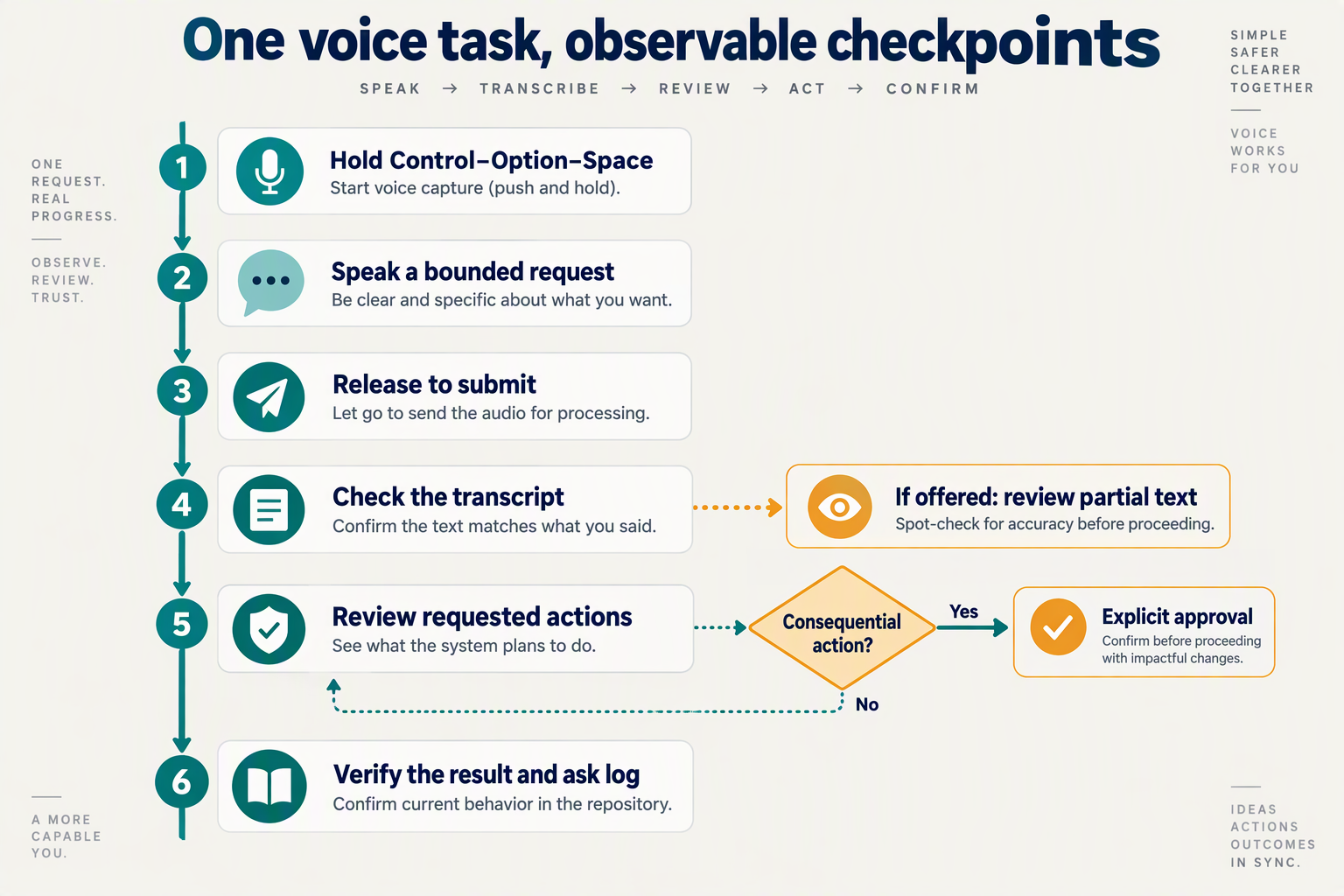
Walk users through four distinct checkpoints: capture the request, review what was understood, approve the proposed action, and verify the result. Releasing a hold-to-talk control should end recording—not automatically authorize every action the instruction might imply.
Use a single booking example to design and test the entire journey: “Move Priya Shah’s consultation to Friday afternoon, and send her the updated details.”
What should users see while capturing a voice request?
Show that recording is active and provide a clear escape route. Display a listening indicator, a short instruction such as “Release to finish,” and a cancel control that discards the request.
In the October 2026 research snapshot, Atticus’s GitHub documentation describes hold mode as submitting when the shortcut is released. For a business workflow, treat that submission as the start of interpretation, with execution governed by a separate authorization policy.
- Start: Acknowledge microphone activation visually; optionally add an audible cue.
- Capture: Show provisional text if available, clearly marked as unfinished.
- Finish: Change the status to “Preparing transcript.”
- Cancel: Discard captured input without triggering business tools.
Avoid leaving the listening indicator active after capture ends: users should not have to guess whether additional speech will enter the request.
How should users review and correct the transcript?
Separate the transcript from the assistant’s interpretation. The transcript answers “What did you hear?”; the interpretation answers “What are you proposing to do?”
For the booking example, display:
- Captured words: “Move Priya Shah’s consultation to Friday afternoon…”
- Proposed details: Selected customer, existing appointment, intended calendar date, and available time.
- Unresolved information: Which Friday? Which afternoon slot? Which communication channel?
Atticus’s GitHub documentation, available in the October 2026 snapshot, says that delayed speech finalization can expose partial text for review. Apply that recovery pattern without presenting incomplete text as authoritative: label it “Partial transcript—please check.”
Let users edit text, repeat a phrase, or abandon the request. Correcting “Priya” to another customer must also invalidate the proposed appointment selection; otherwise, the interface can display corrected words while retaining the wrong action.
What exactly should users approve before execution?
Ask users to approve a specific action, not a vague summary. “Proceed?” is weaker than “Move Priya Shah’s consultation to Friday, 16 October 2026, at 3:00 p.m. IST and send the updated details by WhatsApp.”
Separate approvals when actions have different consequences:
- Calendar change: Show the old and new appointment times.
- Customer message: Preview the recipient, channel, and message.
- Changed details: Require renewed approval if any approved value changes.
Use controls such as “Confirm reschedule” and “Edit details” rather than ambiguous “Yes” and “No” buttons.
As of October 2026, CallMissed supports custom REST tools, Google Calendar integration, and AI call notes pushed to the CRM. These capabilities can support the workflow, but teams must design the approval gate before tool execution.
How should the assistant report results and failures?
Report confirmed outcomes separately from attempts. Only say “Appointment updated” after the calendar system confirms success.
If rescheduling succeeds but messaging fails, show both outcomes explicitly and offer a message-only retry. Do not repeat the calendar change.
Finish with a concise receipt: what changed, what was sent, what remains unresolved, and the next available action. That makes the interaction auditable—and prevents a confident voice response from concealing an incomplete task.
Should you choose Hold to talk or Press to toggle?
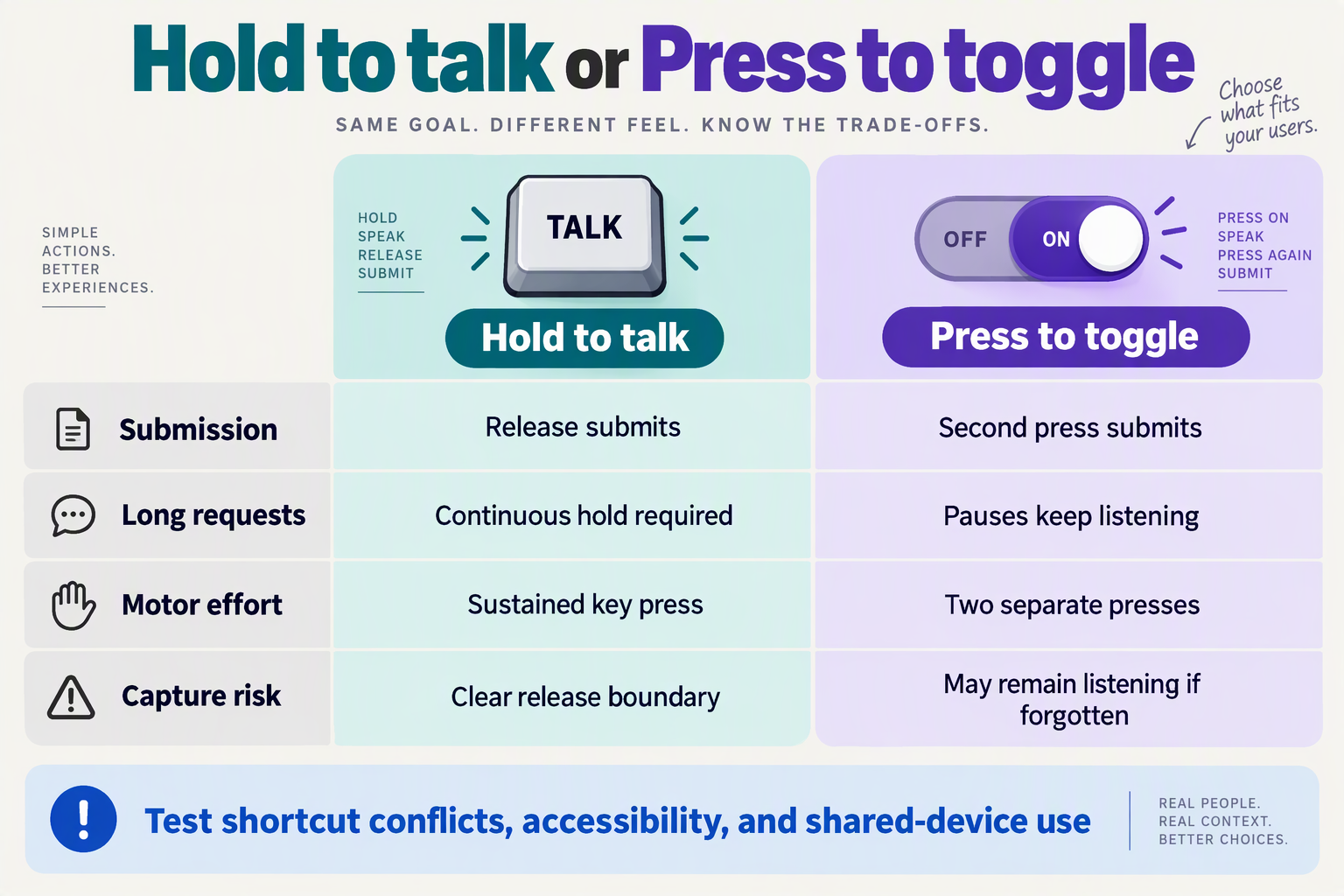
Choose hold-to-talk for short, deliberate commands when maintaining a keypress is comfortable; choose press-to-toggle for longer dictation or when sustained input creates an accessibility barrier. Neither is universally safer: the right choice depends on the task, the user’s physical context, and how clearly the interface shows that recording is active.
According to the Atticus GitHub documentation in the October 2026 research snapshot, hold mode submits on release, while toggle mode starts listening on the first press and submits on the second. That distinction should guide your interaction design—not become a blanket rule for every business voice agent.
How do hold-to-talk and press-to-toggle compare?
The following table translates Atticus’s documented controls into business design recommendations, rather than measured performance claims.
| Decision factor | Hold-to-talk | Press-to-toggle | Business design implication |
|---|---|---|---|
| Submission boundary | Release submits | Second press submits | Label the finishing action explicitly |
| Short instructions | One continuous gesture | Two separate presses | Consider hold for quick, bounded tasks |
| Long dictation | Requires sustained input | No sustained keypress | Consider toggle for detailed notes |
| Pauses while speaking | Keep holding through pauses | Pauses keep listening | Explain that silence need not submit |
| Physical accessibility | Sustained input may be difficult | Separate presses may be easier | Offer alternatives and test with users |
| Likely error to test | Accidental early release | Forgetting recording is active | Provide cancellation and transcript review |
Explicit submission is not action approval. Whether someone releases a key or presses it again, completing an utterance should not automatically authorize a consequential operation such as sending a customer message or changing a booking.
Which mode fits common business tasks?
Match the control to the work being performed, not simply to the device category:
- Quick CRM lookup: Hold-to-talk is a reasonable starting point for “Find the account for Priya Shah,” provided the user can comfortably maintain the control.
- Detailed case notes: Toggle can accommodate someone consulting documents or organizing a longer explanation without holding a shortcut.
- Shared reception workstation: Either mode needs a conspicuous recording indicator and clear session boundaries; toggle especially needs protection against forgotten listening.
- Customer phone conversation: Do not assume desktop gestures transfer to telephony. Preserve understandable turn-taking through channel-appropriate controls instead.
As of October 2026, CallMissed provides real-time voice sessions over an API and SDK, alongside an embeddable web voice-and-chat widget. For teams building a custom interaction layer around those capabilities, the useful lesson is to evaluate capture controls separately from the underlying voice agent—not assume either shortcut behavior is a built-in feature.
How should you test the default before rollout?
Run a small task-based comparison using the same instructions and representative users:
- Include short and long tasks. Test a lookup, a multi-part update, and an instruction containing a deliberate pause.
- Observe recovery. Introduce an early release or forgotten second press, then check whether users can recognize and correct the mistake.
- Measure outcomes by mode. Track premature submissions, unintended recording duration, cancellation success, corrections, and task completion.
The Atticus GitHub documentation, available in the October 2026 snapshot, says delayed speech finalization can trigger partial-text review. Treat that as a recovery pattern worth testing, not a latency benchmark.
Choose the default that produces fewer consequential errors for your users, while keeping an accessible alternative available.
How can you apply these lessons to business voice agents with CallMissed?
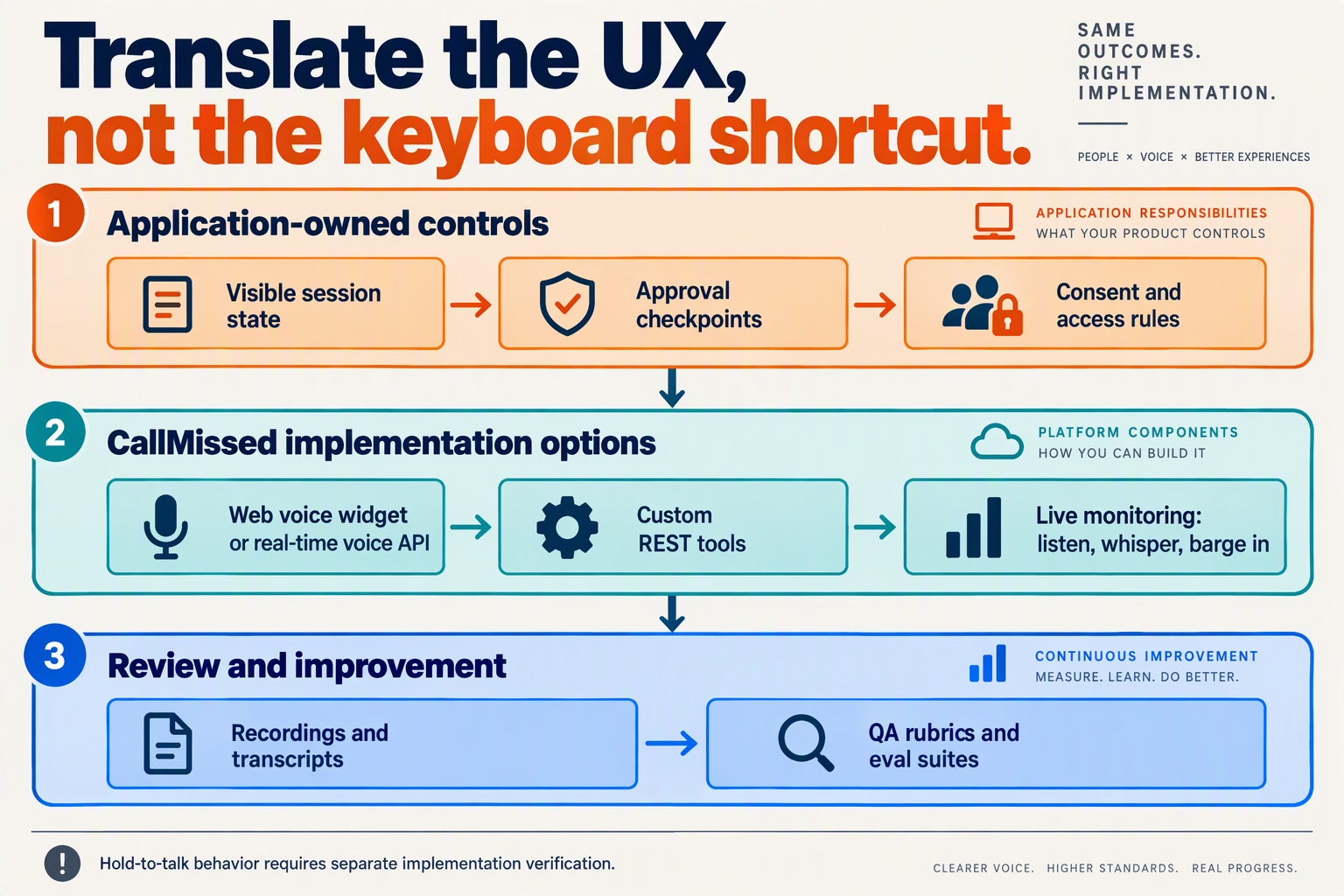
Apply the hold-to-talk lesson by separating capturing an instruction, confirming its meaning, and executing an action. As of October 2026, CallMissed’s no-code agent builder, custom REST tools, and evaluation suites provide building blocks for this workflow; a desktop-style hold-to-talk control would require a separately designed interface, not an assumed native feature.
How do you turn a spoken request into a safe business workflow?
Start with one bounded task, such as rescheduling an appointment. The October 2026 Atticus GitHub documentation describes hold mode as submitting on release and toggle mode as submitting on a second press. For business agents, translate that explicit boundary into a transaction boundary: understanding a request must not automatically authorize a change.
Configure the workflow in four steps:
- Collect the request: Capture the appointment, preferred date, and customer identity.
- Resolve ambiguity: Ask whether “next Friday” means the intended calendar date, and clarify the time zone where relevant.
- Read back the proposed change: “Move your appointment to Friday, 23 October, at 3 p.m.?”
- Execute after confirmation: Call the scheduling tool only after an unambiguous approval, then report the tool’s actual result.
As of October 2026, the platform supports custom REST tools, variables, and integrations with Cal.com and Google Calendar. Those capabilities support this design, but confirmation and authorization rules still need deliberate configuration. Enforce permissions in the business system as well as in the agent’s instructions.
How should web and telephone experiences differ?
Use the same action policy across channels, but do not force the same interaction mechanics onto each channel.
- Custom web interface: If you build hold-to-talk controls around an API-based voice experience, provide keyboard and touch alternatives, cancellation, and clear submission feedback. Validate the session API’s behavior before promising release-to-submit semantics.
- Telephone agent: Replace the physical button with explicit conversational checkpoints: “Tell me the full change you need; I’ll confirm it before updating anything.”
- Human escalation: Route unresolved or sensitive requests to a person rather than repeatedly asking the customer to rephrase.
As of October 2026, the platform offers real-time voice sessions through an API and SDK, keypad menus, agent squads that transfer live calls, and supervisor monitoring with listen, whisper, and barge-in controls. These are different tools for preserving customer control—not interchangeable substitutes for a hold-to-talk button.
How can you test quality and estimate operating cost?
Evaluate completed business outcomes, not just convincing speech. As of October 2026, the platform provides transcripts, call scoring against custom QA rubrics, evaluation suites, A/B experiments, and agent versioning with publish and rollback.
Build a test set containing:
- Pauses during an account number or appointment explanation.
- Corrections such as “Tuesday—sorry, Thursday.”
- Refusal to approve the proposed action.
- A scheduling tool failure after confirmation.
Measure premature actions, correction success, task completion, and escalation quality. These are recommended evaluation measures, not published performance figures.
According to the CallMissed fact sheet, as of October 2026, Standard voice agents cost ₹4 per minute, covering speech recognition, the language model, and voice, with phone carriage billed separately. A four-minute connected call therefore costs ₹16 before carriage; use actual pilot call durations to budget, rather than assuming that faster responses necessarily produce shorter or better calls.
Which advanced techniques improve responsiveness and measurable outcomes?
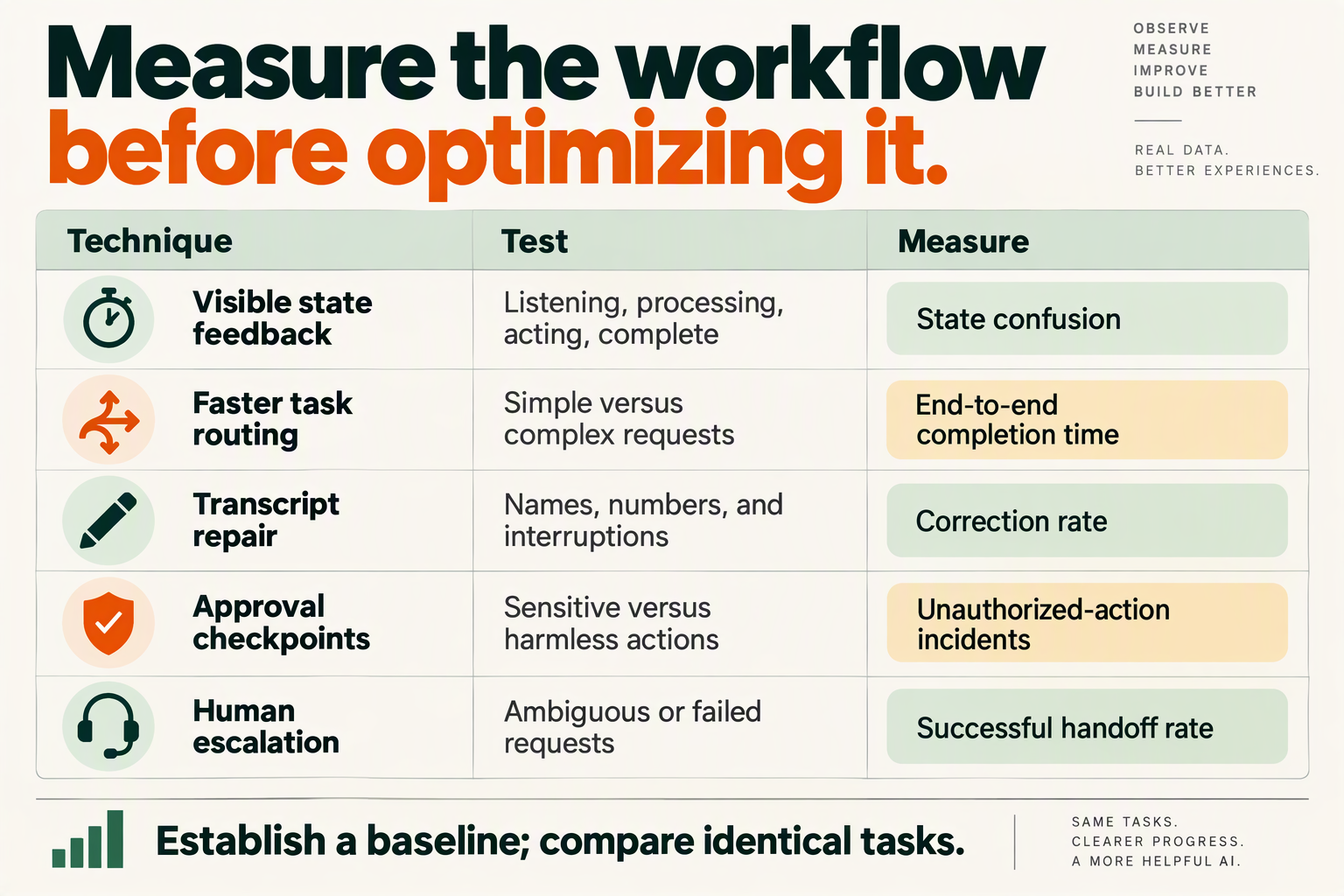
Pre-warmed execution, narrowly scoped shortcuts, streamed responses, and risk-aware tool routing can improve responsiveness—but only if evaluations show faster successful completion without more errors. For a hold-to-talk voice assistant, measure the interval from release to useful feedback separately from the time required to finish the business task.
Which advanced techniques should you test first?
The October 2026 research context includes a GitHub pull request in bettercallzaal/ZAOOS that explicitly credits Atticus with “pre-warm and learned-shortcut patterns.” That attribution identifies promising engineering ideas, not a published latency benchmark; the supplied sources provide no measured speedup.
The following table translates those patterns into business-agent experiments. These are proposed implementation techniques, not claims that Atticus implements every item.
| Technique | Business application | Measure | Main trade-off |
|---|---|---|---|
| Pre-warm execution | Initialize a model client or worker before submission | Release-to-first-feedback, p50/p95 | Idle resource cost; stale sessions |
| Verified shortcuts | Route an explicit “open account” command to a narrow handler | Routing accuracy; completion time | Ambiguous phrasing can misroute |
| Stream useful feedback | Acknowledge processing before a slow lookup finishes | First-feedback latency; abandonment | Premature speech can imply success |
| Parallel read-only tools | Fetch availability and customer preferences concurrently | Tool duration; task completion | Rate limits; inconsistent snapshots |
| Cache stable context | Reuse policy text while fetching current order data | Cache hit rate; stale-answer rate | Invalidation and privacy requirements |
| Risk-aware model routing | Use lighter processing for lookup; deeper reasoning for exceptions | Cost per success; escalation rate | Classification mistakes |
Start with the slowest measured stage rather than deploying all six techniques simultaneously. Pre-warming will not fix a slow booking API, and faster speech generation will not fix repeated transcription corrections.
How do you prevent faster execution from becoming unsafe execution?
Separate recognition, planning, and commitment. A shortcut should identify a narrow action, not bypass authorization or treat a familiar phrase as permanent consent.
For example, “show my next appointment” can enter a read-only route. “Move my next appointment” needs a fresh availability check and confirmation of the proposed change before commitment. Cache general scheduling policy, but retrieve appointment status from the current system of record.
For streaming, distinguish an acknowledgment from a result:
- Safe acknowledgment: “I’m checking available appointments.”
- Result after verification: “Tuesday at 10:00 is available.”
- Commitment after confirmation: “Your appointment has been moved.”
Atticus’s GitHub documentation, in the October 2026 context, says “Every exact command is in the ask log.” The transferable principle is traceability: retain enough execution detail to diagnose an incorrect action, with appropriate access controls and retention limits.
Which metrics prove that the changes helped?
Instrument submission, transcript finalization, first feedback, tool completion, and task outcome. Report p50 and p95 latency, but pair both with completion, correction, and unauthorized-action rates.
- Create a baseline across languages, task types, and noisy conditions.
- Change one technique and compare matched traffic or randomized groups.
- Keep outcome guardrails so faster failures never count as improvements.
As a hypothetical example—not an Atticus benchmark—reducing first-feedback time from 1.2 seconds to 0.8 seconds is a 33% reduction. It is not a win if users subsequently need more corrections.
As of October 2026, CallMissed supports eval suites and A/B experiments for voice agents; its developer API also supports response caching and caller-chosen fallback models, according to the CallMissed fact sheet. Those capabilities support experimentation, but their impact must be measured on the actual workflow rather than assumed.
What mistakes make desktop and business voice workflows unsafe?
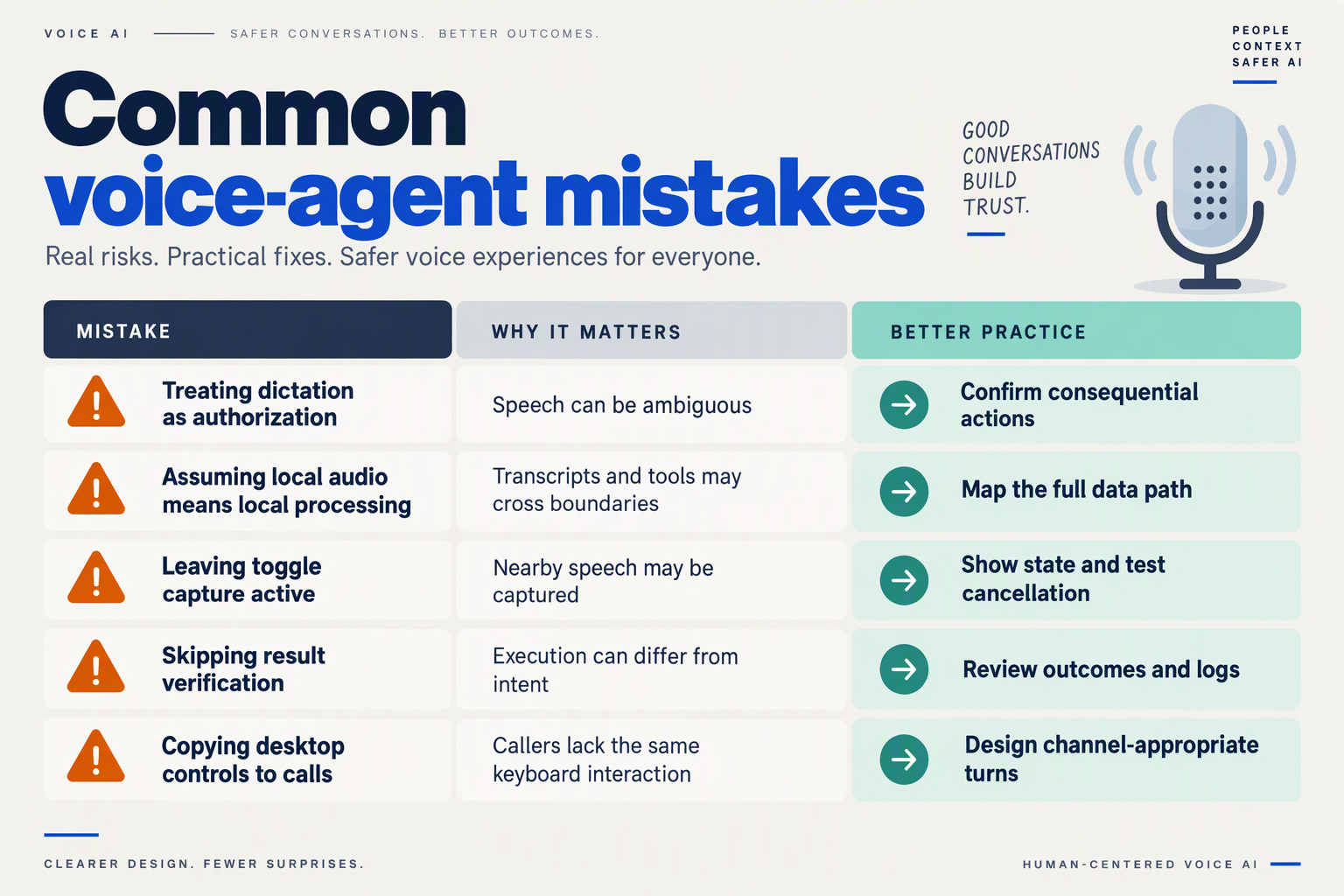
Desktop and business voice workflows become unsafe when captured speech is treated as permission to act, tool access exceeds the task, or sensitive information travels farther than users expect. Hold-to-talk clarifies when an instruction ends; it does not establish identity, authorization, or consent to every downstream action.
Which voice workflow mistakes create the greatest risk?
The October 2026 Atticus GitHub documentation says, “Every exact command is in the ask log.” That provides a useful accountability pattern, but a command record alone cannot prevent an unauthorized action or establish whether execution succeeded.
Use this checklist to separate interaction convenience from execution safety:
| Unsafe mistake | Desktop example | Business consequence | Safer design |
|---|---|---|---|
| Treating submission as authorization | Releasing the shortcut immediately sends a message | An unverified caller changes account details | Check identity and permissions separately |
| Giving tools excessive access | A search task can also delete files | A booking agent can modify unrelated CRM records | Restrict tools and record access by task |
| Trusting retrieved instructions | A webpage tells the assistant to run a command | A knowledge document redirects a customer-data request | Treat retrieved content as data, not authority |
| Assuming local audio means total privacy | Audio stays local, but transcripts enter another service | Customer details appear in prompts or logs | Map every data destination and retention rule |
| Retrying without checking results | A timed-out action executes twice | Duplicate bookings or repeated messages | Use idempotency keys and verify action status |
| Recording commands without outcomes | The log shows intent but not the resulting change | Staff cannot establish what actually happened | Record approval, execution status, and affected records |
These are recommended controls, not claims that Atticus or any particular business platform implements every safeguard.
Does local audio processing make a voice assistant private?
Local audio processing protects one part of the data path, not necessarily the whole workflow. In the October 2026 research snapshot, the Atticus GitHub documentation states, “Audio never leaves your Mac.” Read that as an audio-specific statement—not proof that transcripts, screen content, file excerpts, or tool results never reach external services.
For a business deployment, inventory:
- Capture: microphone audio and any accompanying screen or account context.
- Inference: text and other information submitted to the model.
- Execution: arguments delivered to connected tools.
- Retention: transcripts, action logs, recordings, and diagnostic data.
Apply access controls and retention decisions at each stage. Hosting location matters, but it does not replace an explicit data-flow review.
How should teams prevent duplicate or unauthorized actions?
Separate the workflow into three gates:
- Interpret: produce a proposed action with explicit fields.
- Authorize: verify that the user may perform that action on that record.
- Execute: submit once, capture the result, and reconcile uncertain outcomes.
For example, “Move my appointment to Friday” should resolve the customer, appointment, date, and timezone before any calendar write. If the tool times out, check whether the appointment changed before retrying; another conversational acknowledgment is not evidence of completion.
As of October 2026, CallMissed supports custom REST tools, CRM record timelines, and live supervisor monitoring with listen, whisper, or barge-in capabilities, according to its verified product fact sheet. Those capabilities provide integration and oversight options; implementers should still enforce authorization and duplicate-action protection in connected systems.
The governing principle is simple: a voice instruction expresses intent; a verified, permitted tool result establishes what happened.
Frequently Asked Questions
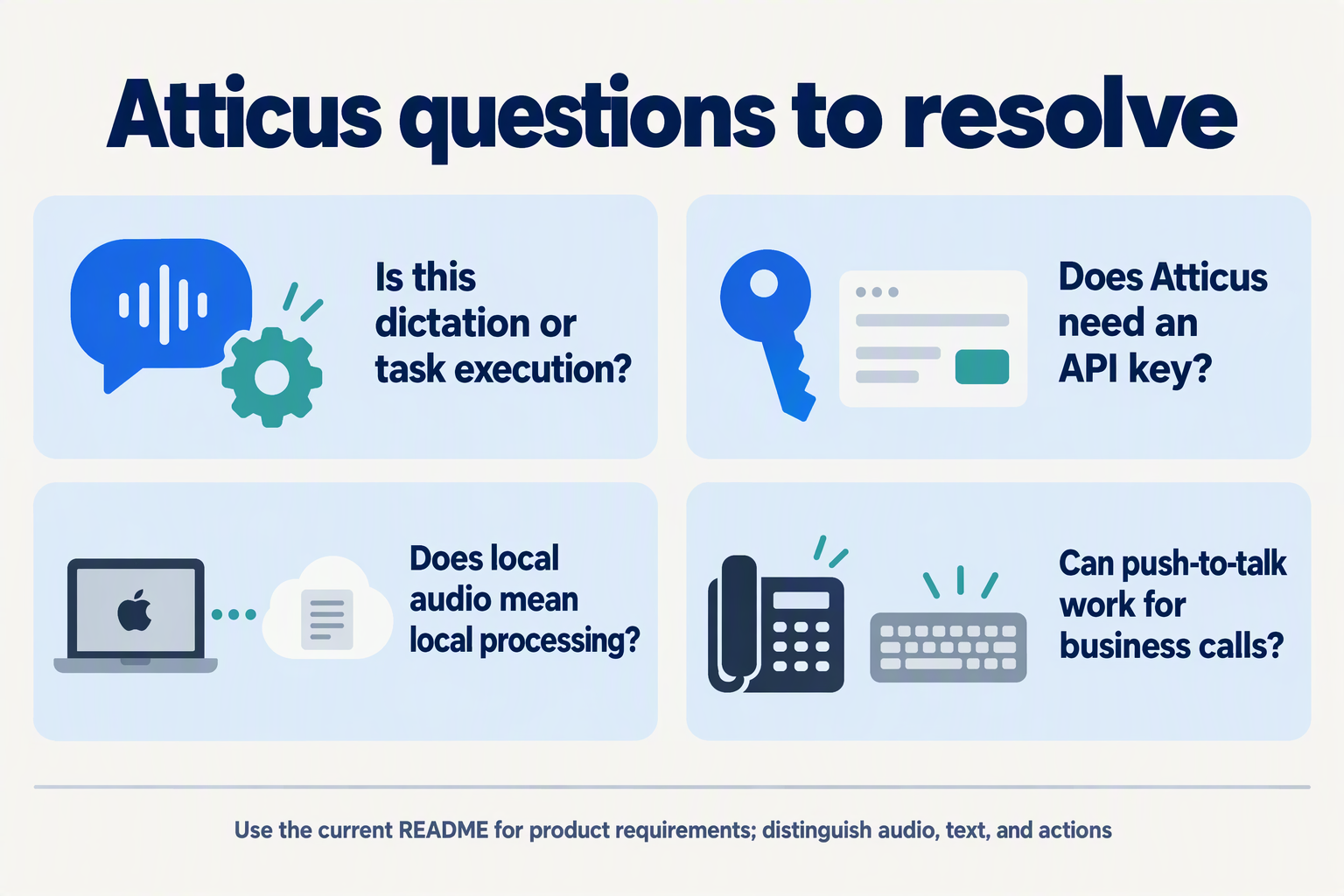
Is Atticus a hold-to-talk voice assistant or just a dictation app?
Does Atticus need an Anthropic API key or a Claude subscription?
claude -p rather than requiring a separate API-key integration. The repository describes Atticus as free, but that does not mean the required Claude subscription is free. For business procurement, separate the assistant’s software cost from account access, subscription terms, and deployment requirements; “no API key” is an authentication distinction, not a complete cost estimate.Does Atticus audio stay local, and does that make the assistant fully offline?
Can I use a hold-to-talk voice assistant without continuously holding a shortcut?
Does Atticus ask permission before deleting files or sending messages?
How should businesses adapt a hold-to-talk voice assistant for customer workflows?
Where should you verify Atticus details and plan your next pilot?
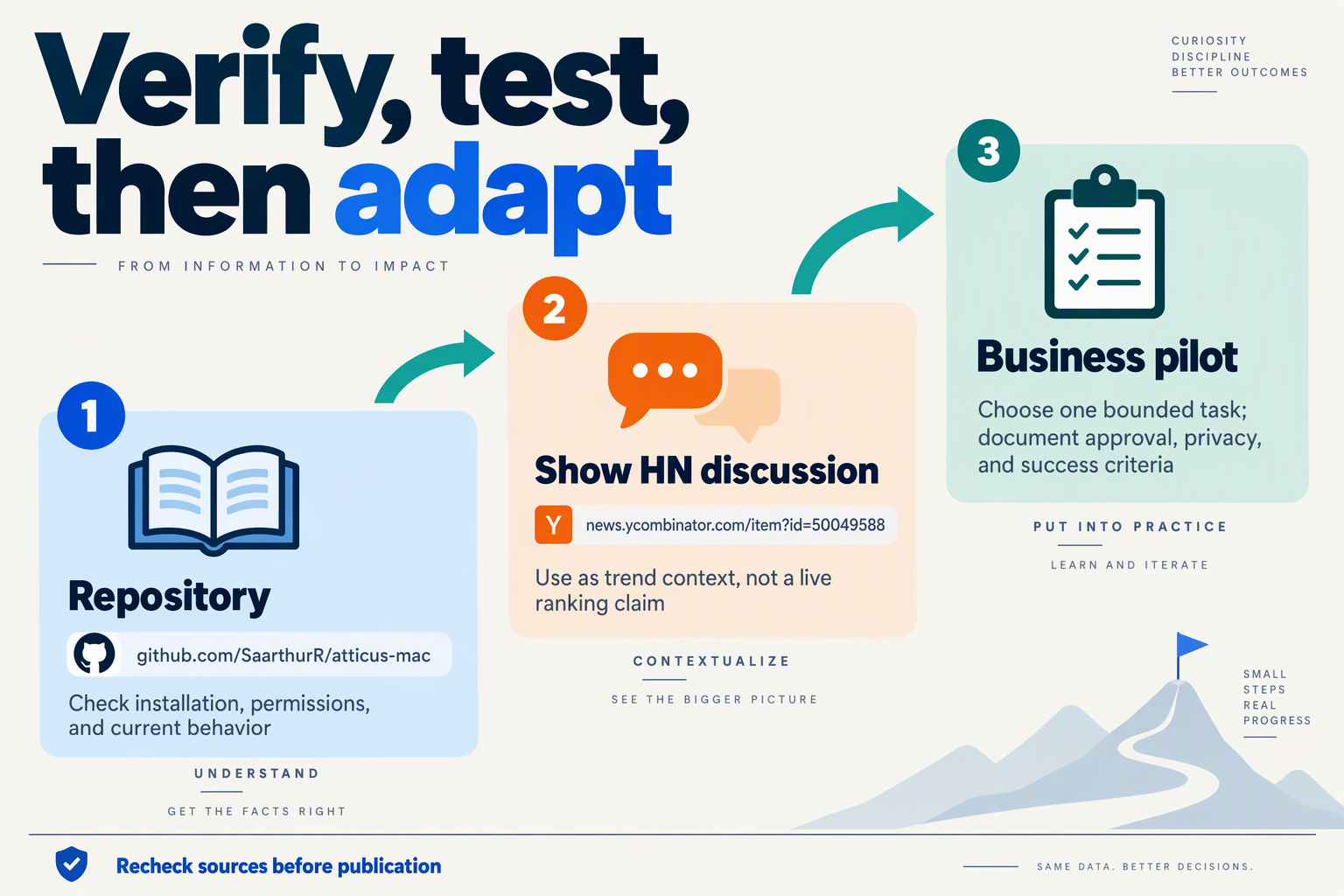
Verify Atticus in the SaarthurR/atticus-mac GitHub repository, then use the Hacker News discussion to identify questions worth testing—not as proof of production readiness. For your next business voice-agent pilot, choose one bounded workflow, record the software versions and permissions, and define success before inviting users.
Where should you verify Atticus features and requirements?
The October 2026 research snapshot identifies the Atticus GitHub repository as the primary source for installation instructions and documented behavior. The Hacker News submission, titled “Show HN: Atticus – Hold-to-talk voice assistant for macOS that runs on Claude -p,” provides launch context and community discussion; it does not establish reliability benchmarks.
Use this source hierarchy:
- Atticus GitHub documentation: Check current setup requirements, shortcut settings, dependencies, and permission behavior.
- Repository code and issues: Investigate how documented safeguards are implemented and whether reported problems affect your workflow.
- Official Claude documentation: Separately verify the applicable account requirements, execution permissions, and current terms.
- Hacker News comments: Collect test ideas and usability concerns, then reproduce them yourself.
According to the Atticus GitHub documentation surfaced in the October 2026 snapshot, Atticus runs on a Claude Pro or Max plan without requiring an API key. Verify that requirement again before installation rather than treating a search-result excerpt as a permanent product specification.
Which claims need closer inspection before a business pilot?
Start with data handling and action permissions, because desktop convenience does not automatically translate into business approval.
The Atticus GitHub documentation in the October 2026 snapshot states, “Audio never leaves your Mac.” That is an audio-specific claim—not evidence that transcripts, prompts, screen content, or tool outputs remain local. Trace those data paths separately before using customer records or confidential information.
The same GitHub snapshot mentions an ask log containing exact commands. Inspect what the log records, where it is stored, who can access it, and how long it persists; do not assume that a command log is a complete compliance audit trail.
For each finding, record:
- The source and verification date.
- The installed version or commit.
- The behavior you observed.
- Any unresolved question that blocks deployment.
How should you plan the next voice-agent pilot?
Use a narrow task such as drafting an internal follow-up note for human review, rather than immediately enabling customer messages or irreversible account changes.
- Define the boundary. Specify allowed inputs, permitted tools, excluded data, and actions requiring approval.
- Create repeatable scenarios. Include hesitation, cancellation, transcription errors, permission refusal, and unavailable tools.
- Compare interaction options. Run equivalent tasks with the controls available on your chosen surface; do not assume a desktop shortcut transfers directly to telephone calls.
- Measure outcomes. Track completed tasks, premature submissions, corrections, approval failures, and time to a usable result.
- Set the expansion gate. Agree on acceptable results and rollback conditions before reviewing the pilot.
As of October 2026, CallMissed supports eval suites, A/B experiments, and call scoring against a team’s own QA rubrics, providing evaluation capabilities for business voice-agent pilots. Those capabilities support testing; they do not establish that a particular interaction design will succeed.
The next step is not a wider launch. It is a documented, reproducible trial that shows where user control improves outcomes—and where the workflow still needs safeguards.
Conclusion
A Hold-to-Talk Voice Assistant offers a practical lesson for business agents: users should control when an instruction ends and understand when it becomes an action. Better voice UX depends on clear boundaries, visible states, and recoverable mistakes—not simply a more capable model.
Hacker News’ October 2026 “Show HN: Atticus” discussion brings that lesson into focus. According to the Atticus GitHub documentation available in the October 2026 snapshot, hold mode submits on release, while toggle mode submits on a second press and continues listening through pauses. These are useful design choices, not a universal prescription for every business channel.
The guide’s four takeaways provide a practical foundation:
- Choose turn-taking around the task and the user. Hold-to-talk makes the submission boundary explicit, but sustained input can be inconvenient or inaccessible. Toggle-to-talk reduces that physical burden, while open conversation may suit other situations. The right choice is the one that lets users finish complicated instructions without fighting the interface. Do not mistake a hesitation during an account update or booking request for permission to proceed.
- Make every system state understandable. Listening, transcription, processing, and execution should remain distinguishable. Users need to know whether the assistant is still hearing them, interpreting their words, or carrying out a request. An obvious cancellation path is especially important when toggle controls keep listening through pauses. Clear feedback should accompany the interaction rather than leave users guessing whether another press will stop recording or submit their instruction.
- Build recovery into consequential actions. Let users review and correct captured instructions, and require confirmation where mistakes carry meaningful consequences. The Atticus GitHub documentation in the October 2026 snapshot describes offering partial text for review when speech finalization takes too long. That pattern demonstrates recoverability; it does not establish a latency benchmark. The business lesson is to preserve a usable next step when recognition or finalization does not go as expected.
- Evaluate the complete experience. Track premature submissions, corrections, task completion, and accessibility together. A natural-sounding interaction is not enough if users repeatedly repair misunderstood requests. Compare interaction modes against the same tasks, and use those results to decide where explicit controls genuinely help. Success means users can complete their work confidently, not merely that the assistant responds fluently.
What should businesses watch next?
Watch whether emerging voice interfaces make user-controlled turn-taking and correction easier across deployment surfaces and languages. As of October 2026, CallMissed offers no-code voice agents, an embeddable web voice-and-chat widget, and speech recognition in 22 Indian languages plus English—capabilities readers can explore when applying these lessons.
Before expanding your voice-agent rollout, ask: Can users tell when they are being heard—and stop a mistaken instruction before it becomes an action?
Related Reading
- Weather and News AI Agent: Build a Voice Assistant
- Cactus Whistle: 16.9 MB ASR for Voice-Agent Builders
- Claude Haiku 5.5 latency: Voice-Agent Evaluation Guide