
How to Stream Speech to Text in Production: Guide


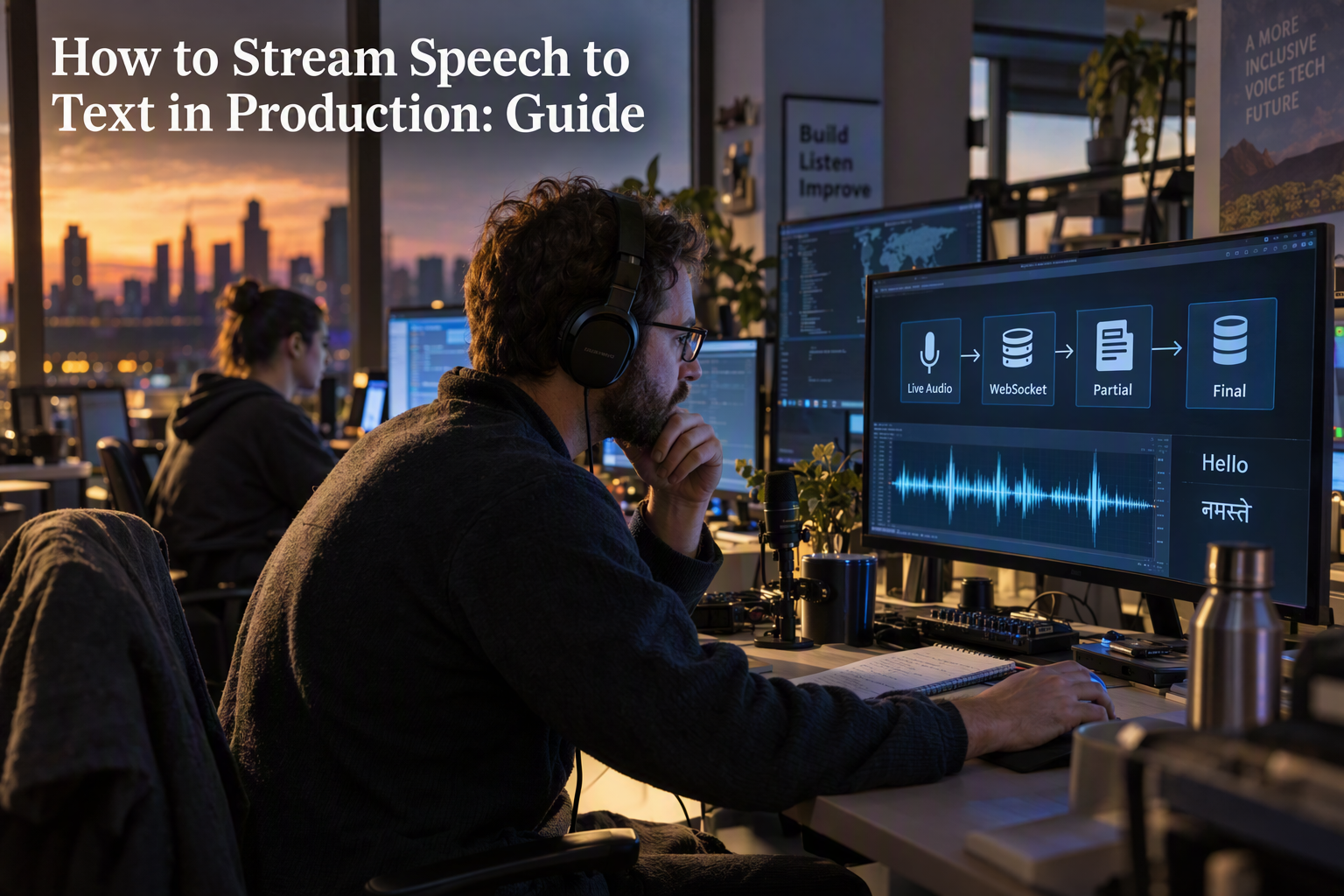
Learn how to stream speech to text in production with WebSockets, audio buffering, partial results, reconnection, observability, and cost controls.
How to Stream Speech to Text in Production: Guide
How do production voice systems turn an unbroken audio stream into usable text without waiting for the speaker to finish? To stream speech to text in production, capture audio in small frames, send those frames over a long-lived WebSocket connection, process partial and final transcripts separately, and design for reconnects, backpressure, observability, and provider failure from the beginning.
This architecture matters because real-time transcription is not the same as uploading a completed recording. A streaming speech-recognition system must continuously transcribe audio from streaming input while balancing time to first transcript, accuracy, network reliability, and operating cost. Deepgram’s streaming speech-recognition guidance describes sub-300-millisecond latency as an achievable target for responsive applications, but production performance depends on the entire pipeline: microphone capture, encoding, transport, inference, and UI rendering.
This practical guide explains how to build that pipeline step by step. You will learn how to:
- Capture microphone audio efficiently with browser APIs and an
AudioWorklet. - Convert audio into a provider-compatible format, such as linear PCM.
- Maintain a WebSocket session for a realtime transcription API.
- Distinguish interim results from finalized transcript segments.
- Handle silence, speaker pauses, connection drops, retries, and graceful shutdown.
- Apply authentication, rate limits, logging, latency measurement, and privacy controls.
- Scale stateful streaming connections without losing session context.
The guide also examines an important production trade-off: sending audio directly from a browser to a speech provider reduces server load, while routing audio through your backend gives you stronger control over credentials, policy enforcement, redaction, and audit logs. AWS’s real-time Amazon Transcribe example similarly emphasizes extracting transcription results and determining whether each result is partial or final—logic that should exist in your application rather than being treated as a UI detail.
For teams building voice agents, CallMissed provides an AI API with audio transcription support and access to 45 speech-to-text models through one API key and balance, as of September 2026. The broader implementation principles remain the same whether you use a managed realtime transcription API, a self-hosted model, or a multi-provider architecture.
By the end, you will have a clear reference design, implementation patterns, measurable production safeguards, and a troubleshooting checklist for building reliable real-time transcription instead of a demo that works only on a quiet local network.
How do you stream speech to text in production?
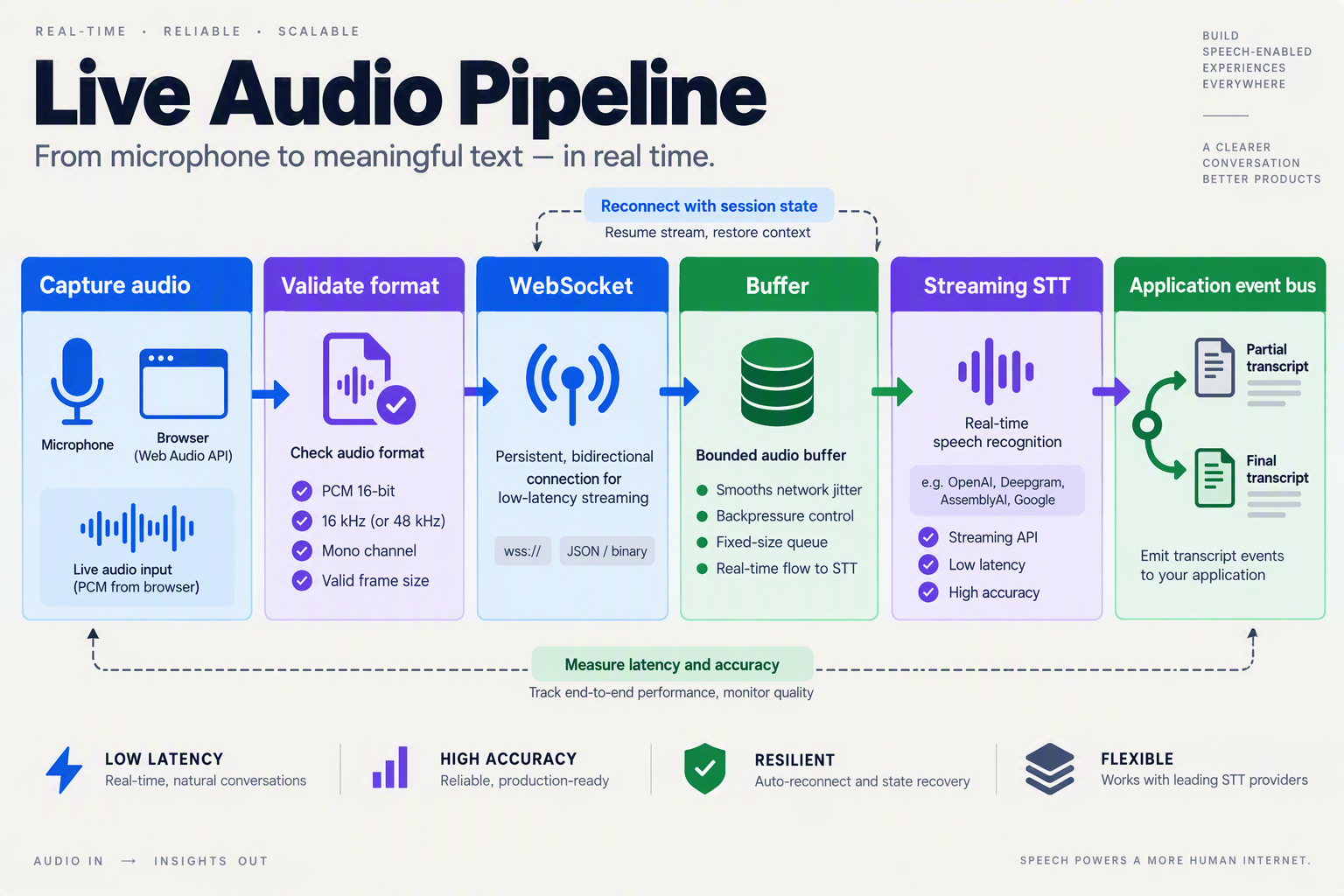
To stream speech to text in production, capture audio in small frames, send those frames over a long-lived WebSocket, and process interim and final transcripts as different events. Add reconnects, backpressure, authentication, latency metrics, and graceful shutdown before treating the implementation as production-ready.
What does a production streaming speech-to-text pipeline look like?
Use this sequence:
- Capture microphone or telephony audio.
- Convert it to the format required by the realtime speech-to-text API.
- Open one authenticated WebSocket per live session.
- Send binary audio frames continuously.
- Render interim text provisionally and commit only finalized text.
- Close the stream explicitly when the speaker stops or the call ends.
Deepgram reports that streaming speech recognition can achieve sub-300-millisecond latency, but that figure applies to the complete pipeline only when capture, encoding, network transport, inference, and rendering are all tuned.
| Pipeline component | Practical production target | What to measure |
|---|---|---|
| Audio frame duration | 20–100 ms | Frame size and send interval |
| Time to first transcript | Under 300 ms target | Capture-to-first-result |
| WebSocket reconnect | Exponential backoff | Attempts and recovery time |
| Interim-result buffer | One mutable segment | Revision frequency |
| Final transcript persistence | On final event | Segment ID and timestamp |
These are engineering starting points, not universal guarantees. Test them with your users’ devices, networks, languages, and audio sources.
How do you send streaming audio over WebSocket?
A provider-neutral browser pattern looks like this. Adapt the message schema to your selected API; many services accept binary PCM frames and return JSON transcript events.
const ws = new WebSocket("wss://stt.example.com/v1/stream");

ws.onopen = () => {
  ws.send(JSON.stringify({
    type: "start",
    encoding: "linear16",
    sample_rate: 16000,
    language: "en"
  }));
};

function sendAudio(int16Pcm) {
  if (ws.readyState !== WebSocket.OPEN) return;
  ws.send(int16Pcm.buffer);
}

ws.onmessage = ({ data }) => {
  const event = JSON.parse(data);
  const text = event.transcript ?? "";

  if (event.is_final === true) {
    commitTranscript(text);
  } else {
    renderInterim(text);
  }
};

function stopStream() {
  if (ws.readyState === WebSocket.OPEN) {
    ws.send(JSON.stringify({ type: "stop" }));
    ws.close(1000, "session complete");
  }
}
Use an AudioWorklet rather than deprecated callback-based audio processing for browser capture. Keep the worklet focused on collecting and downsampling samples; perform network transmission on the main thread or a dedicated worker.
How should interim and final transcripts be stored?
AWS’s Amazon Transcribe WebSocket example explicitly distinguishes partial results from final results. Store interim text in a replaceable UI buffer, but append final text to an immutable segment list with a session ID, sequence number, and provider timestamp.
For multilingual applications, CallMissed’s developer AI API supports audio transcription and provides access to 45 speech-to-text models through one API key and balance, as of September 2026. That can simplify provider selection, but your application should still normalize each provider’s events into one internal schema.
FAQ: What commonly breaks in production?
Should the browser connect directly to the speech provider?
What happens when the WebSocket disconnects?
How do I prevent memory growth?
Should interim text be saved to the database?
How do I measure real-time transcription quality?
What do you need before building a production streaming STT pipeline?
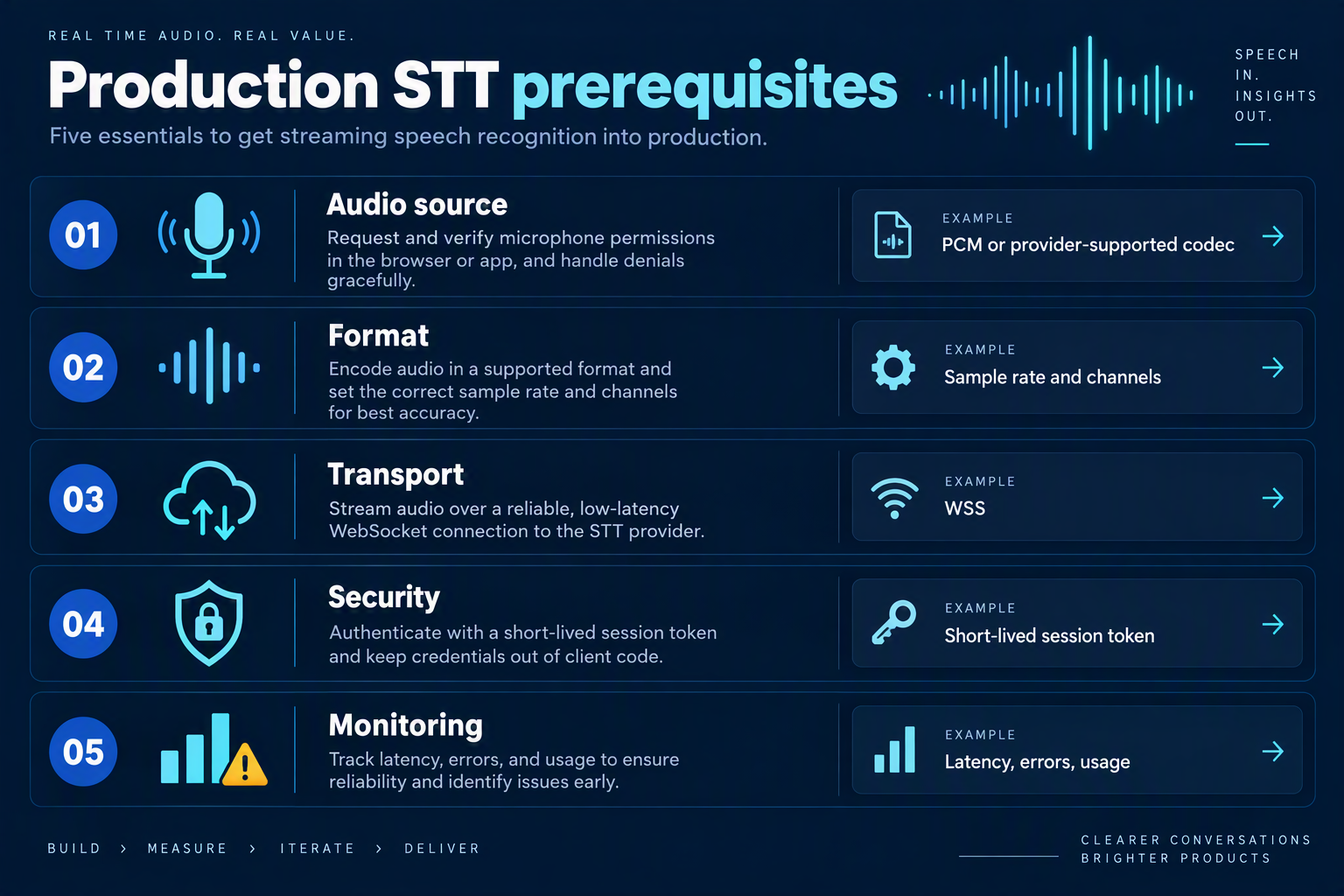
A production streaming speech-to-text (STT) pipeline needs five things before implementation: a stable audio format, a long-lived transport, an explicit interim/final transcript contract, operational safeguards, and a measurable latency and accuracy target. Prepare these decisions first; otherwise provider-specific code tends to hide failures until real users encounter them.
What should you define before connecting a realtime speech-to-text API?
Use the following as a pre-build checklist. The values are practical starting points, not universal limits—confirm the accepted encoding, frame size, and termination messages in your selected provider’s documentation.
| Requirement | Recommended starting choice | Why it matters | Acceptance check |
|---|---|---|---|
| Audio format | Mono, 16-bit linear PCM, 16 kHz; send binary frames | PCM avoids browser codec surprises and is widely supported for voice STT | Provider accepts frames without decode errors |
| Frame cadence | 20–40 ms per frame; avoid large buffered chunks | Smaller frames improve responsiveness; excessively tiny frames increase overhead | Measure time from capture to first interim result |
| Transport | One authenticated WebSocket per live session | Streaming speech recognition requires ordered, bidirectional delivery | Audio and transcript events remain correlated |
| Transcript state | Store interim text separately from finalized segments | Interim text can change; final text should be append-only | Revisions do not duplicate or corrupt the transcript |
| Failure handling | Reconnect with capped exponential backoff and session IDs | Mobile networks and browsers can drop stateful connections | A reconnect is visible, bounded, and safely terminates |
| Observability and privacy | Record timings, provider errors, model, locale, and consent state | Production debugging needs evidence without retaining unnecessary audio | Logs identify slow, failed, or non-consented sessions |
Which audio and language decisions affect production accuracy?
Choose the input conditions before choosing a model. Microphone audio, telephone audio, and browser playback can have different sample rates, noise profiles, and clipping behavior. Define whether your system must support:
- Language and locale: Set the expected language explicitly when possible. For Indian-language applications, CallMissed supports speech recognition in 22 Indian languages plus English, including code-mixed speech such as Hinglish, as of September 2026.
- Turn detection: Decide whether the provider detects end-of-speech or your application sends an explicit “end of utterance” event. Do not finalize text merely because one interim message appears stable.
- Domain vocabulary: Prepare product names, acronyms, and proper nouns for provider vocabulary hints or downstream correction. Test these terms with real recordings rather than clean synthetic speech.
- Speaker behavior: Establish whether diarization, profanity filtering, punctuation, timestamps, or word-level confidence is required. These options can affect latency, output shape, and cost.
What production targets should you measure?
Define a baseline before load testing. Track time to first transcript, interim-update delay, finalization delay, audio duration, reconnect rate, provider error rate, and word error rate on a labeled test set. Deepgram’s streaming speech-recognition guidance describes sub-300-millisecond latency as an achievable target, but the measured value must include capture, encoding, network, inference, and rendering—not just provider processing.
A provider abstraction also reduces migration risk. For example, CallMissed offers 45 speech-to-text models through one API key and balance as of September 2026, allowing a team to compare models while keeping application-level session and transcript logic consistent. Still, verify each model’s streaming protocol and output semantics before switching it into a live path.
What security controls are required before launch?
Use short-lived client authorization or a backend relay rather than exposing a permanent provider secret in browser code. Enforce per-user session limits, maximum audio duration, origin checks, consent capture, and TLS-only transport. Store transcript data only as long as the product requires, redact sensitive fields before analytics, and make audio retention an explicit configuration—not an accidental default.
How do you start a realtime speech-to-text API integration?
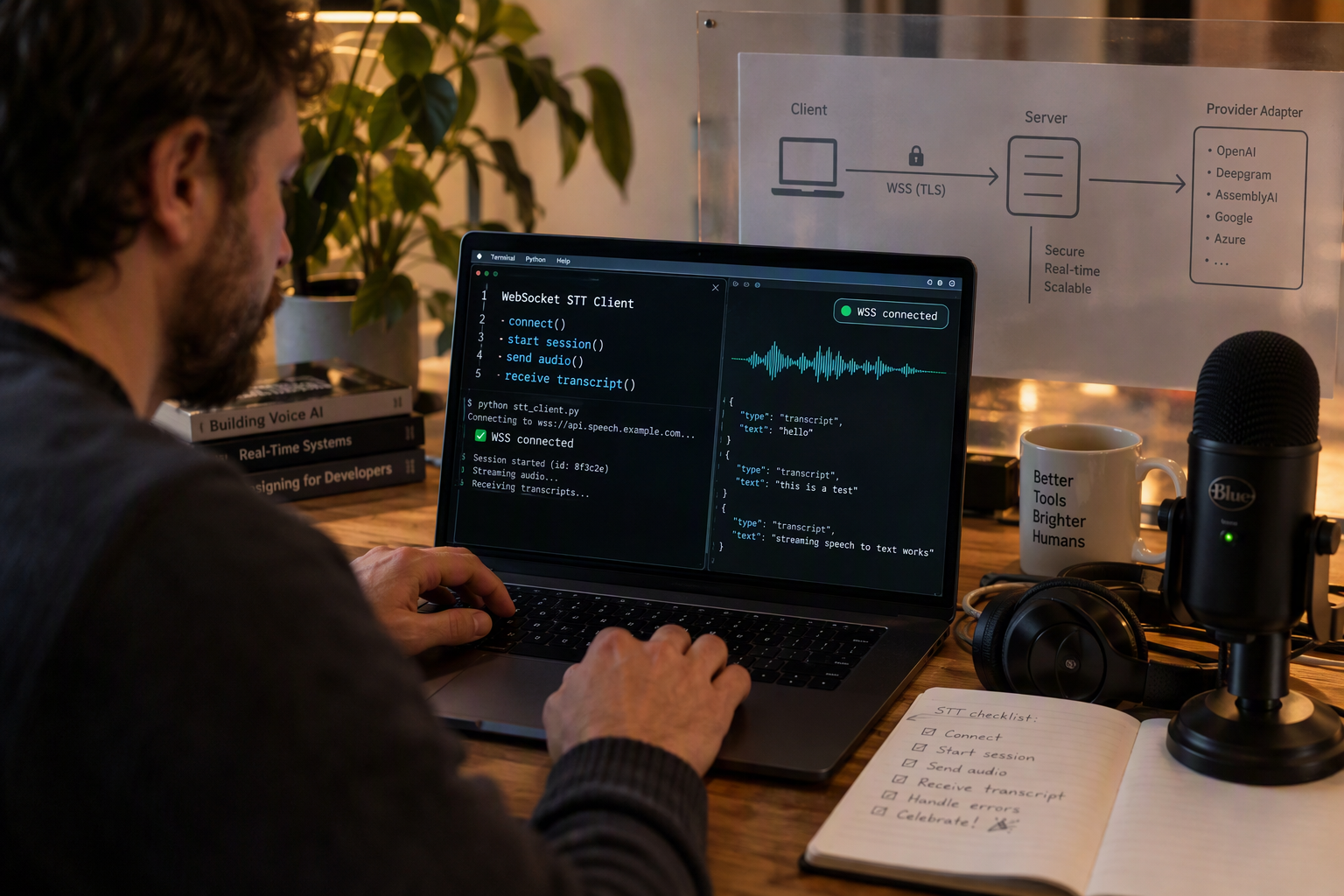
To start a realtime speech-to-text API integration, create an authenticated WebSocket session, stream provider-compatible audio frames, and handle transcript events continuously. Keep interim text separate from final segments, then add reconnect logic, bounded buffering, metrics, and graceful shutdown before calling the integration production-ready.
What should the realtime transcription architecture contain?
Use this sequence for a browser, call, or device audio pipeline:
- Capture audio with an
AudioWorklet, telephony stream, or device SDK. - Normalize the format required by the speech provider, commonly mono linear PCM at the provider’s supported sample rate.
- Open one WebSocket per live session and authenticate without exposing permanent provider secrets in browser code.
- Send binary audio frames while the speaker is talking.
- Parse transcript events and replace interim text rather than appending it permanently.
- Commit final segments to your transcript store, search index, CRM, or voice-agent context.
- Close the stream explicitly after the final audio frame and provider completion event.
AWS’s Amazon Transcribe WebSocket example specifically extracts transcription text and determines whether each result is partial or final. That distinction should drive application state, not merely visual styling.
How do you implement the WebSocket client?
The following provider-neutral pattern shows the event lifecycle. Adapt the message names and audio encoding to your selected realtime speech-to-text API:
const ws = new WebSocket("/api/transcription-session");
ws.binaryType = "arraybuffer";

let interim = "";

ws.onopen = () => {
  ws.send(JSON.stringify({
    type: "start",
    language: "en-IN",
    encoding: "linear16",
    sampleRate: 16000
  }));
};

function sendAudio(pcmFrame) {
  if (ws.readyState === WebSocket.OPEN && ws.bufferedAmount < 256_000) {
    ws.send(pcmFrame); // ArrayBuffer containing one PCM frame
  } else {
    console.warn("Audio backpressure: pause or drop safely");
  }
}

ws.onmessage = ({ data }) => {
  const event = JSON.parse(data);

  if (event.type === "transcript") {
    if (event.isFinal) {
      saveFinalSegment(event.text, event.start, event.end);
      interim = "";
    } else {
      interim = event.text;
      renderLiveTranscript(interim);
    }
  }

  if (event.type === "error") reportTranscriptionError(event);
};

function stop() {
  if (ws.readyState === WebSocket.OPEN) {
    ws.send(JSON.stringify({ type: "stop" }));
    ws.close(1000, "complete");
  }
}
The backend should create the upstream provider connection, validate session parameters, enforce quotas, and relay only the events the client needs. Direct browser-to-provider streaming can reduce server bandwidth, but a backend proxy provides stronger control over authentication, logging, redaction, and provider failover.
Which speech-to-text API capabilities should you compare?
| Capability | Why it matters in production | Verified reference |
|---|---|---|
| Partial and final events | Enables responsive text without duplicate committed segments | AWS Amazon Transcribe guidance |
| WebSocket streaming | Maintains a continuous audio session | Sarvam Streaming API documentation |
| Sub-300 ms target | Useful benchmark for responsive applications | Deepgram streaming guidance |
| Speech recognition coverage | Determines language and code-mixed support | CallMissed, 45 STT models, as of September 2026 |
CallMissed’s developer AI API provides one key and balance across 45 speech-to-text models, alongside OpenAI-compatible audio transcription endpoints. For Indian-language applications, CallMissed supports speech recognition in 22 Indian languages plus English, including Hinglish, as of September 2026.
What should you test before production launch?
Test packet loss, delayed frames, silence, long pauses, browser suspension, malformed audio, provider timeouts, and duplicate final events. Measure time to first transcript, final-segment latency, reconnect rate, dropped-frame rate, and word error rate using the same recordings across providers.
Troubleshooting FAQ
Why does the transcript contain duplicate words?
Why does audio back up in the browser?
bufferedAmount, bound the queue, and pause capture or apply a documented drop policy.How do you stream audio over WebSockets and handle partial and final transcripts?
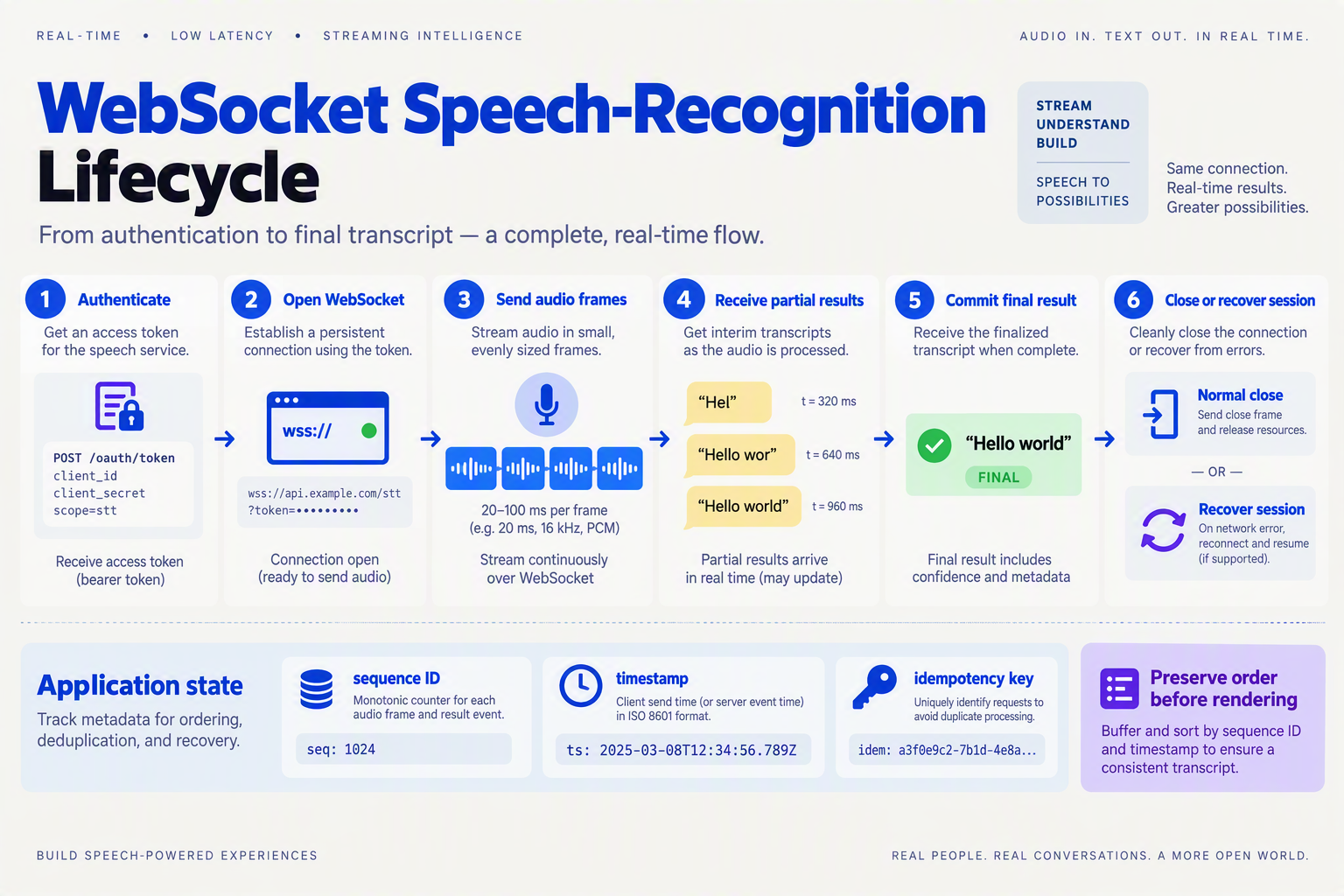
Open one authenticated WebSocket per live audio session, send small, consistently encoded audio frames, and treat each provider message as an event rather than a complete transcript. Render partial transcripts as replaceable text, commit only final transcripts to durable state, and close or reconnect sessions using explicit lifecycle messages.
What audio should you send over the WebSocket?
Use a predictable format agreed with the realtime speech-to-text API. A practical browser configuration is 16 kHz, mono, 16-bit linear PCM; at that format, a 20-millisecond frame contains 320 samples and 640 bytes of audio, calculated as 16,000 × 0.02 × 2.
const ws = new WebSocket("wss://stt.example.com/v1/stream");

ws.onopen = () => {
  ws.send(JSON.stringify({
    type: "start",
    encoding: "linear16",
    sample_rate_hz: 16000,
    channels: 1,
    language: "en"
  }));
};

function sendPcmFrame(arrayBuffer) {
  if (ws.readyState === WebSocket.OPEN && ws.bufferedAmount < 256_000) {
    ws.send(arrayBuffer); // Binary PCM frame
  }
}
The bufferedAmount check is a basic backpressure guard. If the socket buffer grows, pause or drop capture according to your product’s tolerance; silently queuing unlimited audio eventually increases latency and memory use.
| Component | Production decision | Reference value or rule |
|---|---|---|
| Frame duration | Small enough for responsive updates | 20 ms, calculated example |
| PCM payload | 16-bit mono at 16 kHz | 640 bytes per 20-ms frame, calculated |
| Partial transcript | Replace current segment | Never append blindly |
| Final transcript | Commit once | Store with session and segment IDs |
| Responsiveness target | Measure end to end | Deepgram describes sub-300 ms as achievable |
Deepgram’s streaming speech-recognition guidance identifies sub-300-millisecond latency as an achievable target, but measure microphone capture, network transfer, inference, and rendering separately rather than assuming the provider’s processing time is your total latency.
How should you process partial and final transcript events?
Maintain a committed transcript plus one mutable interim segment. AWS’s real-time Amazon Transcribe example explicitly extracts results and determines whether each result is partial or final; the same separation should drive your application state.
let committed = "";
let interim = "";

ws.onmessage = ({ data }) => {
  const event = JSON.parse(data);
  if (event.type !== "transcript") return;

  const text = event.text.trim();

  if (event.is_final === true) {
    committed += (committed ? " " : "") + text;
    interim = "";
    saveFinalSegment({
      sessionId: event.session_id,
      segmentId: event.segment_id,
      text
    });
  } else {
    interim = text;
  }

  renderTranscript(`${committed}${interim ? " " + interim : ""}`);
};
Use session_id and segment_id (or the provider’s equivalent) for idempotency. Providers differ in field names and message schemas, so normalize incoming events into an internal shape such as { text, is_final, session_id, segment_id, received_at }.
How do you close and recover a production stream?
Send an explicit end-of-input event, wait briefly for final results, then close cleanly. On unexpected closure, reconnect with exponential backoff and mark the session as degraded; do not pretend that missing audio was transcribed.
- Limit retries, for example five attempts, with jittered delays.
- Record the last acknowledged audio timestamp.
- Re-authenticate on every new WebSocket.
- Emit metrics for time to first partial, finalization delay, reconnects, dropped frames, and provider errors.
- Apply retention, encryption, and access controls to audio and transcripts.
What commonly breaks in real-time transcription?
Why does the transcript duplicate words?
Why is latency increasing during a call?
bufferedAmount, frame production rate, network RTT, and provider processing time. Backpressure, oversized frames, or a slow event loop commonly cause queue growth.What happens when the WebSocket disconnects?
Should final transcripts be written immediately?
Can one WebSocket serve many calls?
Which production techniques improve latency, reliability, and cost?
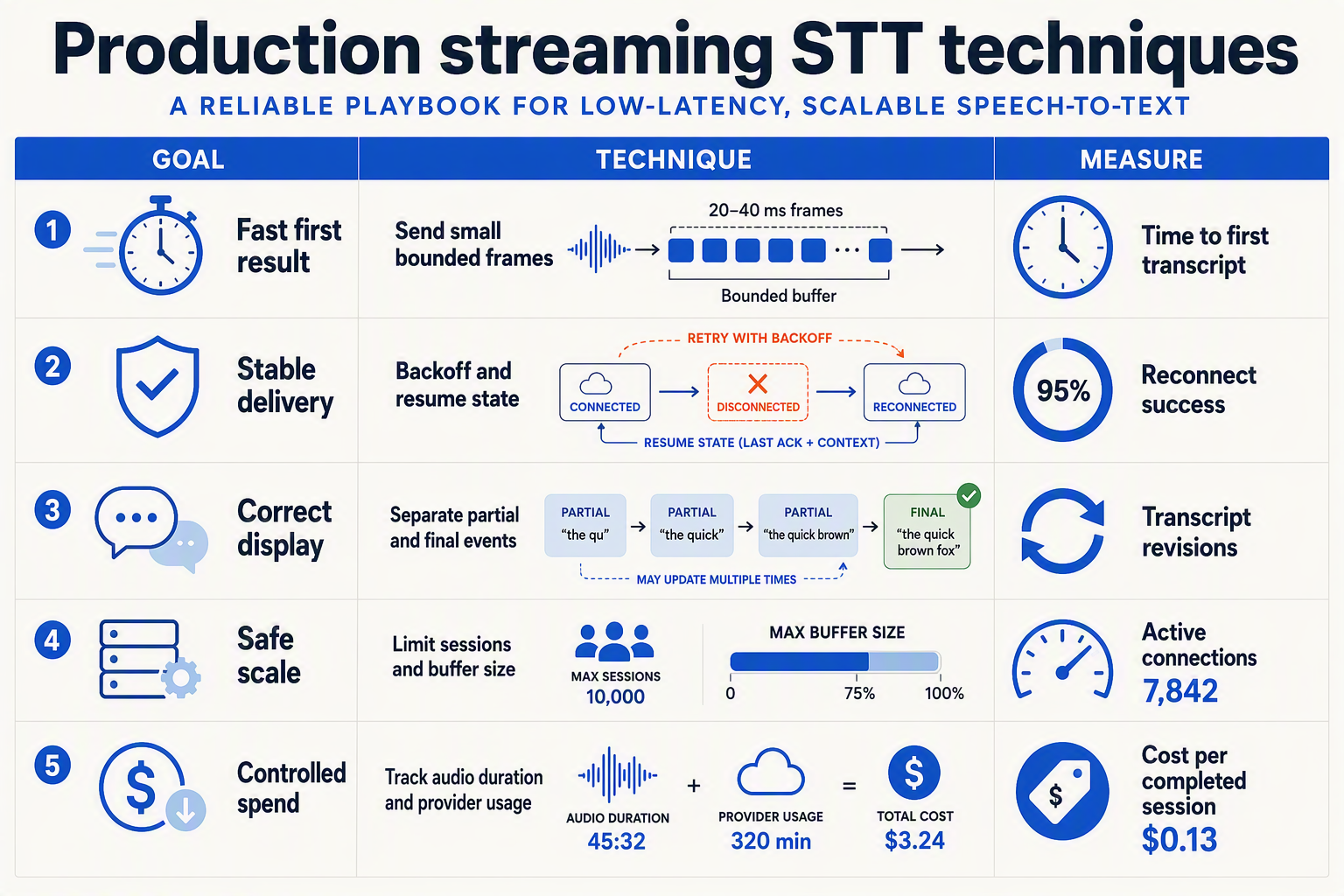
To stream speech to text in production, optimize the complete path—not only the speech model. Keep audio frames small enough for responsive delivery, prioritize finalized text over unstable interim text, and instrument connection health, latency, usage, and provider errors.
The most effective production techniques are bounded buffering, adaptive backpressure, session-aware retries, provider fallbacks, and measurable cost controls. Deepgram describes sub-300-millisecond latency as an achievable target for responsive streaming speech recognition, but your measured latency must include capture, encoding, network transfer, inference, and rendering.
Which production techniques improve real-time transcription performance?
Use the following as an implementation checklist. The latency figures below are engineering targets or published provider guidance—not guarantees for every network, device, or model.
| Technique | Production implementation | Why it helps | Measure or specification |
|---|---|---|---|
| Bound audio buffering | Queue only a limited amount of encoded audio; pause or shed noncritical work when the provider falls behind | Prevents memory growth and stale transcripts during congestion | Track queue depth, frame age, and dropped-frame count |
| Separate interim and final text | Render interim results as replaceable text; commit only finalized segments to storage, search, CRM, or agent actions | Avoids duplicate messages and prevents unstable words from triggering workflows | Track finalization delay and interim-to-final replacement rate |
| Measure end-to-end latency | Timestamp capture, send, provider response, finalization, and UI display as separate stages | Shows whether delay comes from the browser, network, provider, or application | Deepgram identifies sub-300 ms as an achievable streaming target; measure your own p50 and p95 |
| Reconnect with session state | Use exponential backoff with jitter, an idempotent session ID, and a clear policy for replaying unacknowledged audio | Reduces failures from brief network or provider disconnects without duplicating transcript segments | Record reconnect count, recovery time, and audio that could not be replayed |
| Control model and usage cost | Select models by language, accuracy, and latency needs; stop streams promptly after call termination or extended silence | Prevents high-cost inference from continuing after the user has stopped speaking | Compare cost per audio minute, error rate, and finalization latency by model |
| Route through a resilient provider layer | Normalize transcript events and keep provider-specific adapters behind one interface | Makes fallback possible without rewriting UI or business logic | Test provider failure, malformed events, and authentication errors in staging |
How should a production system handle provider failure?
Do not automatically retry every failed WebSocket. First classify the error:
- Authentication or configuration errors: fail fast and alert; retries will not fix an invalid key or unsupported audio format.
- Transient network errors: reconnect with increasing delays and jitter.
- Provider overload or rate limiting: apply backpressure, retry after the provider’s guidance, or route new sessions to a fallback.
- Session expiration: create a new session and mark the transcript boundary clearly.
A fallback should preserve the application’s event contract—for example, interim, final, error, and closed—even when providers use different field names or finality signals. AWS’s real-time Amazon Transcribe example specifically emphasizes extracting results and determining whether each result is partial or final, making that distinction part of the backend contract rather than a UI-only feature.
For teams evaluating a provider abstraction, CallMissed’s developer AI API lists 45 speech-to-text models as of September 2026, with one API key and balance across its model catalogue. Treat model selection as an observable policy: log the selected model, language, duration, transcript confidence where available, and fallback reason so cost and quality decisions are evidence-based.
What common mistakes break streaming speech recognition in production?
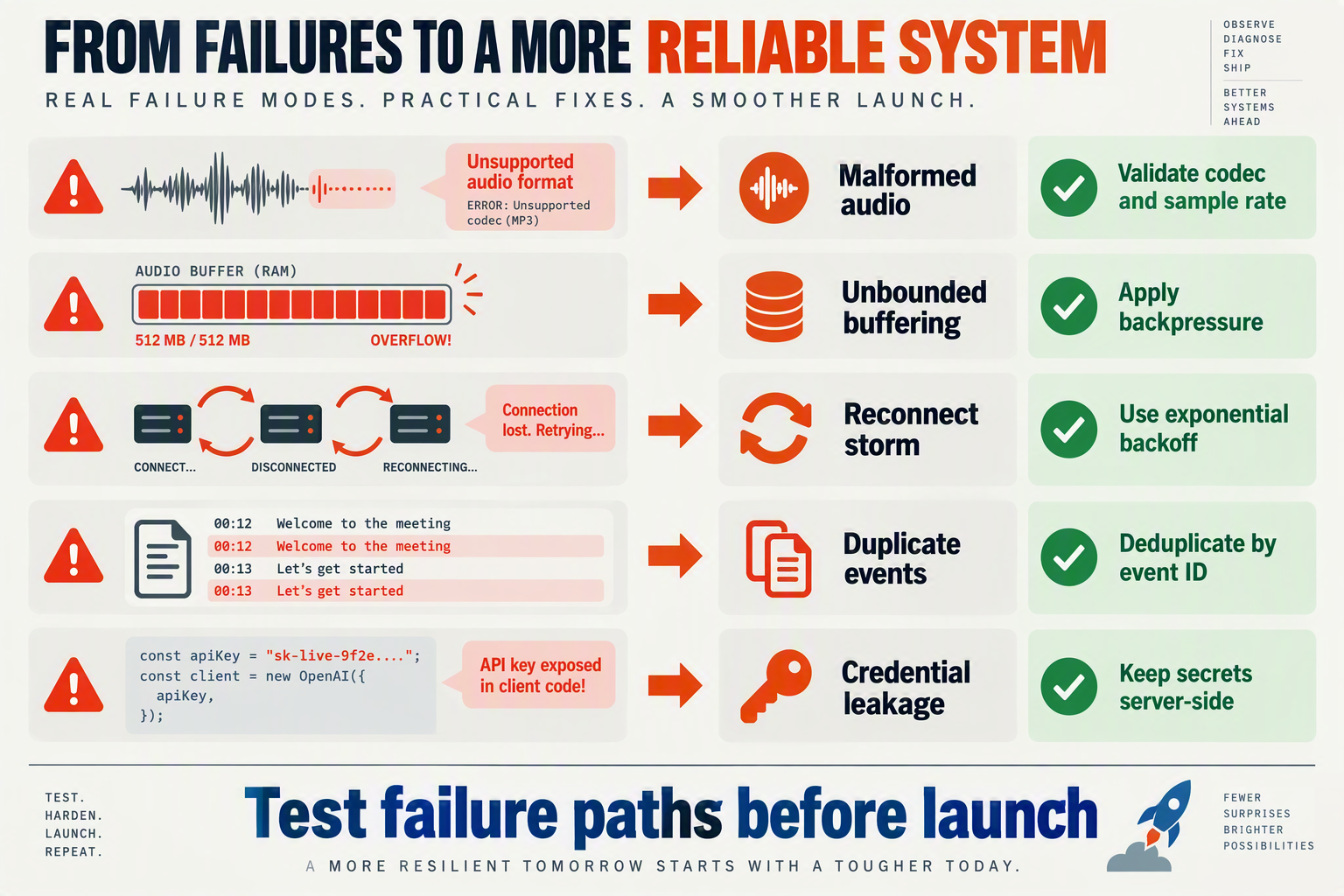
Streaming speech recognition usually fails in production for state, timing, and lifecycle reasons, not because the transcription model cannot recognize speech. Prevent failures by treating interim text as replaceable state, preserving session context during reconnects, bounding audio queues, and measuring each stage of the pipeline separately.
Which production mistakes break streaming speech recognition?
| Mistake | Typical symptom | Production fix | Verification check |
|---|---|---|---|
| Persisting interim text as final text | Duplicate words, rewritten phrases, or incorrect CRM notes | Keep interim results in a replaceable buffer; commit text only when the provider marks a segment final | Replay tests with pauses, corrections, and repeated words |
| Ignoring backpressure | Memory growth, increasing latency, or audio arriving after the speaker has stopped | Use a bounded queue, monitor send-buffer size, and define a drop or degradation policy for overloaded sessions | Alert when queue depth or oldest-frame age crosses its limit |
| Reconnecting without session state | Missing words, duplicated segments, or transcripts in the wrong order | Assign every audio frame and transcript segment a sequence or timestamp; reconcile results after reconnect | Kill the WebSocket during speech and compare the recovered transcript |
| Treating silence as a network failure | Unnecessary reconnects or premature call termination | Separate voice-activity, provider keepalive, and connection-timeout logic; send the provider’s required keepalive messages | Test quiet periods longer than the expected pause duration |
| Closing the stream abruptly | The last spoken words never appear as final text | Stop capture, flush queued audio, request stream termination, then wait for the provider’s final event | Confirm the final segment arrives before closing the socket |
| Exposing provider credentials in the browser | Unauthorized usage, quota exhaustion, or inability to enforce policy | Prefer short-lived session authorization or proxy the connection through a backend that applies authentication and limits | Attempt reuse of expired credentials and inspect rejected requests |
AWS’s real-time Amazon Transcribe example explicitly extracts transcription results and determines whether each result is partial or final; production applications should make that distinction part of their data model, not merely a display decision. A final transcript event should be immutable, while an interim event should be safely replaceable.
How should you test a streaming speech-to-text pipeline?
Use failure-oriented tests rather than testing only a quiet microphone on a stable network:
- Inject network interruption while audio is arriving. Verify reconnection, ordering, and whether the system marks an uncertain interval for review.
- Delay transcript events artificially. The UI should remain responsive without displaying stale text as final.
- Fill the outbound queue by throttling the provider connection. Confirm that memory remains bounded and that the application emits an overload metric.
- Test multilingual and code-mixed speech, including accents, domain terminology, and overlapping speakers.
- Terminate at arbitrary points, including during a pause and immediately after the final audio frame.
Deepgram describes sub-300-millisecond latency as an achievable target for responsive streaming speech recognition, as of September 2026; measure time to first interim transcript and time to finalization separately instead of reporting one blended latency number. Telnyx’s WebSocket lifecycle documentation likewise treats connection, audio frames, transcript messages, and shutdown as distinct stages.
For a multi-provider design, record provider name, model, audio format, session ID, sequence range, interim-to-final delay, reconnect count, and error code. Platforms such as CallMissed can provide audio transcription through one API key across 45 speech-to-text models, as of September 2026, which can simplify controlled fallback experiments—but application-level buffering, ordering, privacy, and shutdown logic still belong in your production architecture.
What should you monitor when streaming audio to text at scale?

To stream speech to text in production, monitor every stage of the live pipeline: audio capture, WebSocket transport, provider processing, transcript quality, and resource usage. The most useful dashboard connects time to first transcript, finalization delay, error rate, dropped audio, reconnects, and cost per audio minute—not just whether the socket is open.
Which metrics should a production transcription system track?
Measure both user-visible latency and pipeline health. Deepgram’s streaming speech-recognition guidance identifies sub-300 milliseconds as an achievable target for responsive applications, but your measurement should cover the complete path from captured audio to rendered text.
| Metric | What to measure | Starting alert threshold | Why it matters |
|---|---|---|---|
| Time to first transcript | Audio capture to first interim result | >500 ms for 5 minutes | Detects slow startup or provider delay |
| Interim update latency | Time between audio frame and partial result | >300 ms p95 | Predicts whether live captions feel responsive |
| Finalization delay | Interim result to final transcript | >1,500 ms p95 | Reveals endpointing or silence-detection problems |
| Audio delivery gap | Missing or late frame duration | >250 ms per session | Indicates browser, network, or backpressure failure |
| WebSocket reconnect rate | Reconnects per 100 sessions | >2% | Exposes unstable networks or provider incidents |
Treat these as initial SLOs, not universal limits. Establish a baseline by language, device, codec, network type, and provider; then alert on deviations from that baseline.
What should you log for each streaming session?
Create a session record with a generated ID and avoid putting raw audio or transcript text into ordinary application logs. Log structured metadata such as:
- Provider, model, language, codec, sample rate, and channel count.
- Connection start, first audio frame, first interim result, final result, and shutdown timestamps.
- Bytes sent, audio seconds received, provider events, reconnect count, and close code.
- Interim-to-final replacement count, empty-result count, and transcript confidence when available.
- Consent state, retention policy, tenant ID, and a hash of the call or conversation ID.
A useful derived metric is audio-time coverage:
audio_time_covered = seconds_successfully_transcribed / seconds_receivedA falling value can reveal silent frame loss even when the WebSocket remains connected. AWS’s real-time Amazon Transcribe example explicitly distinguishes partial from final results; count both event types so a UI that appears functional cannot hide finalization failures.
How can you detect backpressure before users notice?
Keep a bounded audio queue and record its maximum depth. If the queue grows continuously, stop accepting unlimited frames: reduce capture load, slow producers, or terminate the session safely. Never silently discard frames; count dropped bytes and expose them as an alertable metric.
For multi-provider systems, record the selected model and fallback reason. CallMissed’s developer AI API provides one API key and balance across 45 speech-to-text models, as of September 2026, which can simplify comparative monitoring without changing application authentication.
What should a troubleshooting FAQ answer?
Why is time to first transcript suddenly high?
Why do interim words keep changing?
Why are transcripts missing words?
Should raw audio be logged?
How do I distinguish provider failure from a user network failure?
Frequently Asked Questions
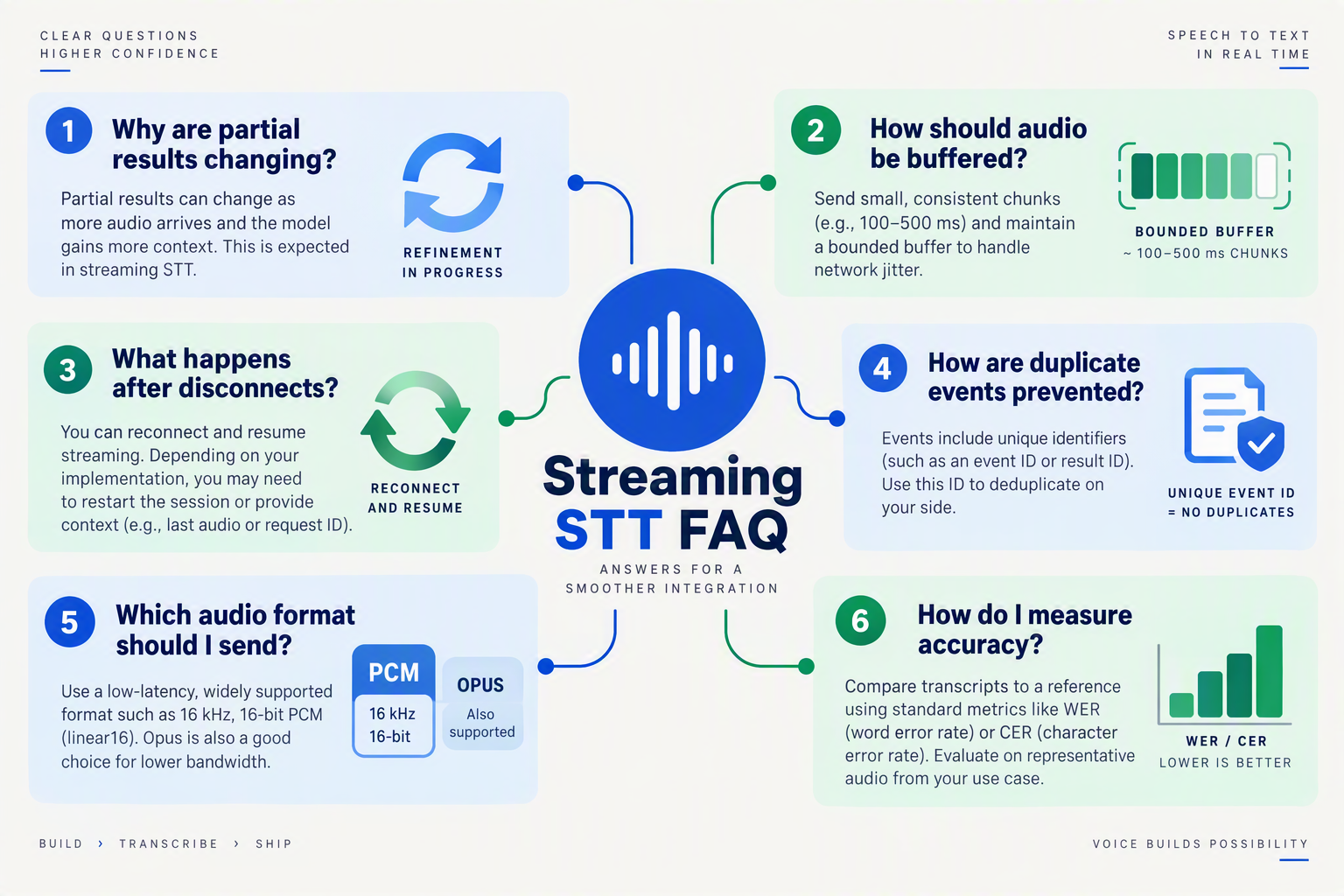
To stream speech to text in production, verify audio format, transport health, transcript-event handling, and provider behavior independently. Most failures come from malformed or delayed audio frames, incorrect treatment of interim results, lost WebSocket state, or missing observability—not from the speech model alone.
Why is my streaming speech-to-text connection open but producing no transcript?
How should I handle partial and final results in real-time transcription?
What causes high latency when I stream speech to text in production?
How do I recover from a dropped realtime speech-to-text API WebSocket?
Why is my transcription inaccurate even though the audio stream is continuous?
How should production systems handle silence, backpressure, and graceful shutdown?
Where can you find the right SDKs, APIs, and production test plan?

Use a WebSocket-based realtime speech-to-text API, send correctly encoded audio frames continuously, and treat interim and final transcripts as separate events. For production, choose an SDK or API with explicit session controls, then test latency, accuracy, reconnects, backpressure, provider errors, and privacy before release.
Which SDK or API should you evaluate first?
Start with APIs that document the complete WebSocket lifecycle: authentication, audio-frame format, transcript events, keep-alives, finalization, and graceful shutdown. AWS’s Amazon Transcribe example explicitly checks whether each result is partial or final, while Deepgram describes sub-300-millisecond latency as an achievable target for streaming speech recognition.
| Evaluation criterion | Production question | Example fact or target | Source |
|---|---|---|---|
| Time to first transcript | How quickly does useful text arrive? | Under 300 ms is an achievable target | Deepgram |
| Speech recognition coverage | Does the API support your audience? | 22 Indian languages plus English | CallMissed, as of September 2026 |
| Model access | Can you test alternatives without rewrites? | 45 speech-to-text models | CallMissed, as of September 2026 |
| API rate limits | Can your sessions scale safely? | Free: 60 requests/minute per key | CallMissed, as of September 2026 |
For teams comparing providers, test at least one managed realtime transcription API, one regional-language option, and one fallback path. CallMissed’s developer AI API provides one key and balance for 45 speech-to-text models, with OpenAI-compatible audio transcription endpoints; this can simplify model evaluation, although your realtime WebSocket provider may still require its own streaming protocol.
How do you structure a production test harness?
Test with recorded fixtures and live sessions. Keep audio files representing quiet speech, background noise, accents, code-switching, interruptions, long pauses, overlapping speakers, packet loss, and changing microphone quality.
A minimal provider-adapter interface keeps application code independent from a vendor’s event schema:
type TranscriptEvent = {
  text: string;
  isFinal: boolean;
  receivedAt: number;
};

interface StreamingSttProvider {
  connect(): Promise<void>;
  sendAudio(frame: Buffer): void;
  onTranscript(fn: (event: TranscriptEvent) => void): void;
  finalize(): Promise<void>;
  close(): Promise<void>;
}
Record these measurements for every session:
- Time to first interim transcript
- Time from audio capture to each final segment
- Final transcript accuracy, measured with word error rate
- Reconnect count, dropped frames, and provider error rate
- Audio duration, API cost, and maximum buffered bytes
Use a fixed test set for regression comparisons. A model that produces faster interim text but substantially worse final accuracy may be unsuitable for customer support, compliance, or voice-agent actions.
How should you test failures before launch?
Inject failures deliberately rather than waiting for real incidents:
- Close the WebSocket during speech and verify bounded reconnect attempts.
- Delay server responses to test backpressure and memory limits.
- Send malformed or silent audio frames and confirm safe rejection.
- Expire credentials and verify that secrets are not exposed to clients or logs.
- End a session mid-utterance and confirm the application marks incomplete text correctly.
What are common streaming speech-to-text problems?
Why do interim transcripts keep changing?
How do I prevent a reconnect from losing context?
What audio format should I send?
How do I measure real-time transcription latency?
When should I use a backend relay?
Conclusion
A production real-time transcription system is an event-driven pipeline: capture audio in small frames, encode it in a provider-compatible format, stream it over a persistent WebSocket, and treat interim and final transcripts as separate application events. Reliability matters as much as recognition accuracy—reconnects, backpressure, graceful shutdown, authentication, logging, privacy controls, and measurable latency must be designed before launch.
Key takeaways:
- Use browser APIs and
AudioWorkletfor efficient capture, then transcribe audio from streaming input rather than waiting for a complete recording. - Maintain explicit session state so pauses, connection drops, retries, and finalization do not duplicate or lose transcript text.
- Measure the full pipeline—from microphone capture through UI rendering—not just model inference. Deepgram reports that sub-300-millisecond latency is achievable for responsive streaming speech recognition, while actual performance depends on every stage.
- Follow AWS’s Amazon Transcribe pattern: identify whether each result is partial or final, and keep that decision in application logic rather than treating it as a display detail.
As realtime speech-to-text APIs mature, watch for better multilingual recognition, more efficient WebSocket scaling, and tighter integration with voice-agent workflows. As of September 2026, CallMissed offers audio transcription through one API key and access to 45 speech-to-text models, providing one route for teams evaluating multi-model production architectures.
To explore how AI communication is evolving, check out CallMissed. Which part of your streaming pipeline—latency, reliability, cost, or privacy—should you measure first?
Related Reading
- Best Text to Speech API for Hindi in 2026: Pricing, Benchmark, and Production Trade-offs
- Best Speech-to-Text API for Indian Languages: 2026
- Best Text to Speech API for Hindi in 2026: 7 Options Compared
Sources
Discussion
Related Posts

Ready to automate customer conversations?
Launch AI voice agents and WhatsApp bots with CallMissed — one API, 22+ Indian languages.