WhatsApp Business API for Customer Support: India 2026


Use WhatsApp Business API for Customer Support to set up Indian-language workflows, estimate costs, and manage reliable human handoffs.

WhatsApp Business API for Customer Support: India 2026
What happens when a customer’s “Where is my order?” message becomes a refund dispute—and your WhatsApp bot keeps repeating the tracking link? The WhatsApp Business API for Customer Support helps teams automate conversations, but reliable support requires more than fast replies: it needs clear ownership, useful business data, and a dependable route to a person.
For Indian customer-experience teams, that distinction matters in November 2026. A customer might begin in English, switch to Hindi or Hinglish, send an order number, and expect the conversation to continue without starting again. Automating the greeting is straightforward. Resolving the issue across languages, systems, and shifts is the real operational challenge.
There is also a clock behind every conversation. Bird’s WhatsApp customer-service-window documentation describes a 24-hour window following a customer’s message, an important planning constraint for this November 2026 guide. Teams must distinguish replies within that window from proactive follow-ups that require approved templates. A delayed refund update is therefore not just a service problem; it can change the messaging workflow your team needs.
Costs deserve equally careful treatment. WhatsApp Business Platform Pricing, published by Meta, is the reference point for messaging charges; provider subscriptions, AI usage, and human handling must be budgeted separately. This guide will not assume that every automated interaction is free—or that reducing message volume automatically improves customer experience. Instead, it will show how to build a cost model with explicit assumptions and dated rates.
Platforms such as CallMissed, an India-hosted AI customer-communication platform, illustrate this shift: as of November 2026, CallMissed combines official Meta Cloud API connectivity, knowledge-base chatbot agents, a live shared inbox, and permission-based WhatsApp Business Calling.
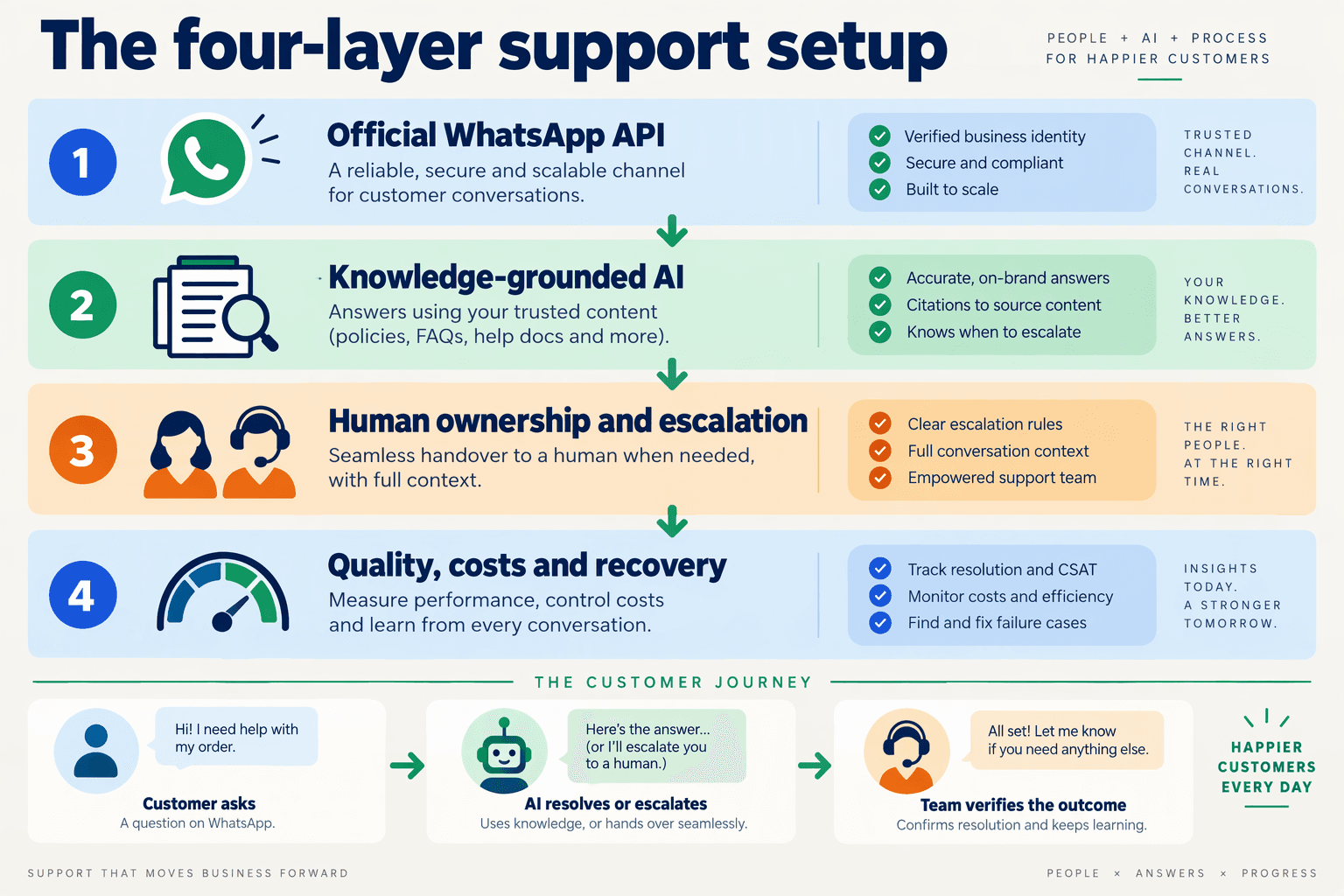
This practical WhatsApp customer support automation India playbook will walk through four connected layers:
- Channel and policy: account setup, customer permissions, templates, and service-window handling.
- AI and knowledge: grounded answers, multilingual testing, and rules for stopping automation when confidence is insufficient.
- Human operations: routing, conversation ownership, escalation, and handoffs that preserve context.
- Business systems and recovery: order lookups, CRM updates, duplicate-event handling, and fallback procedures when integrations fail.
You will also learn which outcomes to measure: resolution rate, repeat contacts, escalation quality, and cost per resolved issue—not merely how many messages a bot sends.
The goal is a support operation that knows when to answer, when to retrieve information, and when to step aside. That is what turns WhatsApp automation from a convenient interface into dependable customer support.
How do Indian teams automate WhatsApp support? Connect the API, ground AI, enable handoffs, and measure results
Indian teams automate WhatsApp support by connecting the official WhatsApp Business Platform, grounding AI responses in approved knowledge and live business data, assigning human escalation owners, and measuring completed resolutions. Start with one repeatable support workflow—not every customer query—and expand only after testing its failure paths.
How do you connect the WhatsApp Business API to a support workflow?
1. Define the workflow before configuring the channel. For an initial rollout, choose a bounded task such as order-status lookup: identify the customer, retrieve the relevant order, explain the status, and escalate exceptions.
Create a deployment checklist with explicit owners:
- Channel administrator: manages account access and messaging configuration.
- Integration owner: connects incoming messages to the order system and records delivery failures.
- Support lead: approves responses, escalation rules, and operating hours.
- Policy owner: checks customer permissions and proactive-message templates.
Build service-window handling into the workflow rather than relying on agents to remember it. Bird’s customer-service-window documentation describes a 24-hour window after a customer message, the rule referenced for this November 2026 implementation guide. Store the latest customer-message timestamp so a delayed update can take the appropriate messaging route.
Use Meta’s WhatsApp Business Policy and WhatsApp Business Platform Pricing as your November 2026 policy and charging references; do not treat a provider’s subscription price as the complete operating cost.
How do you ground WhatsApp AI answers in reliable information?
2. Separate explanations from transactions. A knowledge base can explain a return policy; an order-system lookup should establish whether a particular purchase is eligible.
For each automated intent, specify:
- Approved knowledge: policy text with an owner and review date.
- Required data: order status, payment status, or return eligibility.
- Allowed actions: what the assistant may retrieve or change.
- Stop conditions: missing records, conflicting policies, failed integrations, or a request for a person.
For example, “My parcel says delivered, but I haven’t received it” should trigger an exception workflow—not another tracking-link response. If a lookup fails, the assistant should state that it cannot verify the status and transfer the case rather than invent an explanation.
Test the same intent in English, Hindi, Hinglish, and the regional languages your customers actually use. Evaluate whether meaning and escalation decisions remain consistent, not merely whether the wording sounds fluent.
How do you hand a WhatsApp conversation to a human?
3. Make the transfer an operational event. Assign an owner, stop automated replies, and pass the customer’s issue, verified data, attempted actions, and unresolved question to the receiving agent.
As of November 2026, CallMissed’s verified product fact sheet lists a human-handoff queue where switching AI off hands the thread to a person, alongside support tickets and SLA policies. These capabilities illustrate the infrastructure needed; teams must still define routing and response expectations.
Test transfers during staffed hours, after hours, and integration outages. A handoff without an available owner is a pending case, not a resolution.
How do you measure whether WhatsApp automation works?
4. Measure outcomes by intent. Track:
- Verified resolution rate: resolved cases divided by eligible cases.
- Repeat-contact rate: customers returning about the same issue.
- Handoff completeness: transfers containing the required context.
- Cost per resolution: messaging, provider, AI, and human-handling costs divided by resolved issues.
As an illustrative calculation—not an industry benchmark—360 verified resolutions from 500 eligible cases equals 72%. Review the unresolved cases before expanding automation; that is where missing knowledge, weak integrations, and unclear ownership become visible.
What accounts, permissions, policies, and support assets do you need?
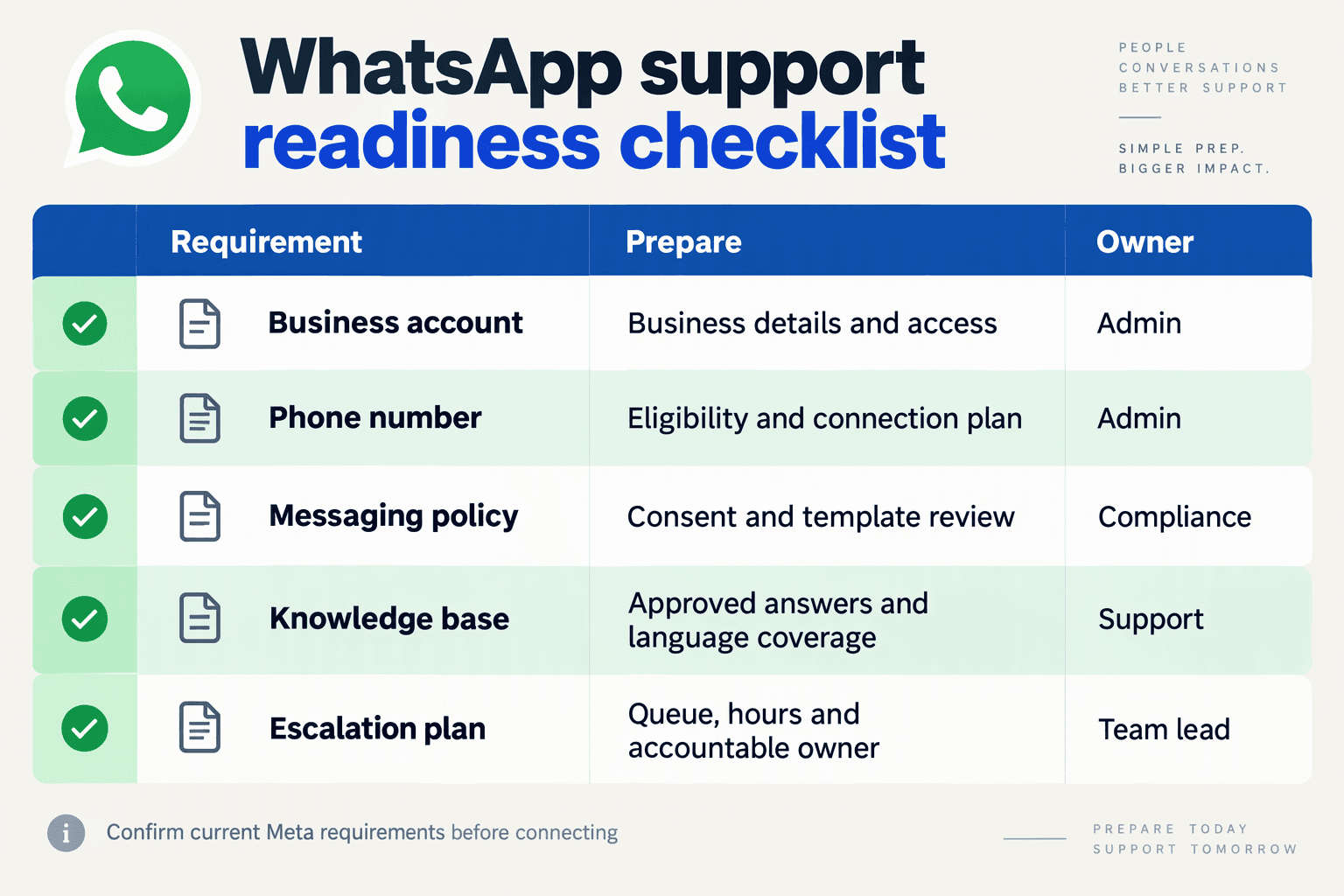
You need a WhatsApp Business Platform account, controlled administrator access, documented customer permissions, approved messaging workflows, and a maintained support knowledge base before automating customer conversations. For this November 2026 playbook, treat these as launch requirements with named owners—not tasks to complete after the bot goes live.
What belongs on your WhatsApp automation readiness checklist?
Use this checklist to prepare the WhatsApp Business API for Customer Support. The evidence column describes what your team should demonstrate internally; it is not a claim that Meta mandates every operational safeguard.
| Requirement | What to prepare | Suggested owner | Readiness evidence |
|---|---|---|---|
| Business account and number | WhatsApp Business Account, business profile, and a phone number you can verify; check existing-number onboarding options | Business administrator | Account and number onboarding completed |
| Access and credentials | Authorized administrators, integration credentials, secure storage, and a documented recovery contact | IT/security | Access reviewed; credentials kept out of shared documents |
| Customer permissions | Permission records appropriate to each outreach use case, withdrawal handling, and separate calling-permission checks | Compliance/CX | Permission source and status retrievable |
| Message templates | Submitted templates for follow-ups, with tested variables and language variants | CX operations | Approval status checked before use |
| Policy and privacy controls | Messaging-policy review, restricted-use screening, privacy notice, and retention rules | Legal/security | Review recorded with an owner and date |
| Support assets | Approved answers, order/refund procedures, escalation contacts, and integration field definitions | Support lead | Versioned knowledge pack tested against real scenarios |
Meta’s WhatsApp Business Policy is the policy reference for this November 2026 readiness review. Use WhatsApp for Business’s Frequently Asked Questions to check account and onboarding questions, rather than assuming every existing number follows the same setup path.
What permission records should support teams retain?
Keep enough evidence to explain why a customer is receiving a message, without collecting unnecessary personal information. A practical permission record includes:
- Source: checkout, website form, customer conversation, or another documented collection point.
- Scope: the communication purpose the customer agreed to.
- Timestamp and wording: when permission was captured and what was presented.
- Current status: active, withdrawn, or requiring review.
Do not treat an order-related interaction as blanket permission for promotional outreach. Zendesk’s proactive WhatsApp workflow documentation is a useful implementation reference when designing outbound support follow-ups; check the applicable permission and template requirements before enabling them.
Which support assets make an AI agent safe to launch?
Prepare decision-ready knowledge, not just a folder of FAQs. Each article should identify its owner, review date, applicable products, exceptions, and the point at which a person must take over.
For example, a refund asset should explain eligibility, required evidence, the approved processing-time wording, and escalation conditions. It should distinguish “refund requested” from “refund completed” so the agent cannot mistake a customer’s request for a confirmed transaction.
For Indian support teams, include English, Hindi, and relevant regional-language terminology, plus common Hinglish expressions. Store authoritative policy meaning alongside translations; inconsistent refund wording across languages creates avoidable disputes.
How do you verify readiness before going live?
Run three launch checks:
- Account check: demonstrate authorized access, message delivery, and credential recovery.
- Permission check: demonstrate that withdrawn permission prevents the corresponding outreach.
- Support check: test an order query, a disputed refund, and an unavailable backend.
The launch criterion is straightforward: every automated action should have a valid permission basis where required, an authoritative information source, and an accountable human fallback.
How do you connect WhatsApp and start a small support pilot with CallMissed?
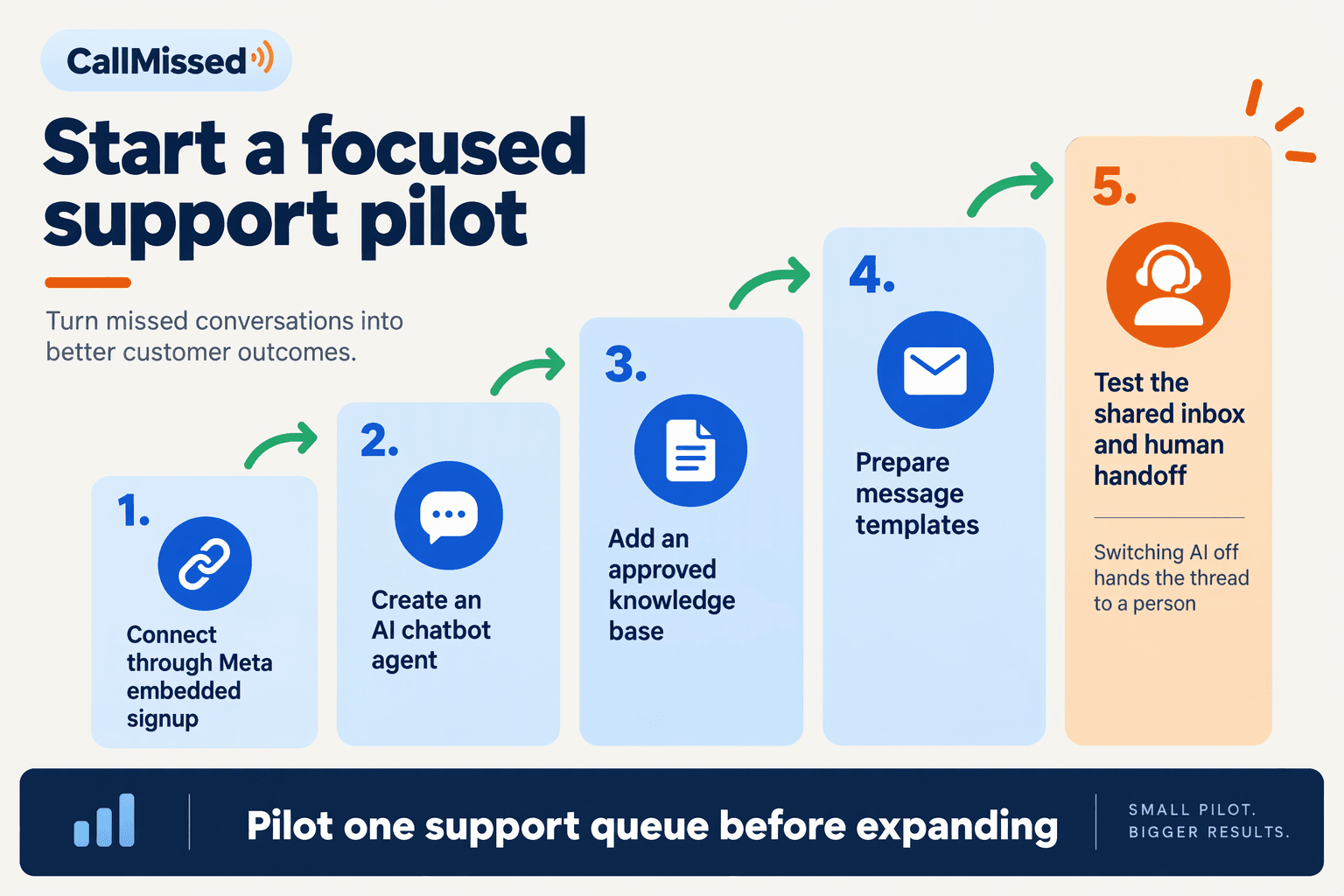
Connect your WhatsApp Business account through CallMissed’s Meta embedded signup, then configure a knowledge-base AI chatbot and test a tightly scoped support workflow before admitting live customers. Start with routine questions and a staffed handoff route—not refunds, payment disputes, or unrestricted automation.
What should you prepare before connecting WhatsApp?
Treat account connection as the beginning of the pilot, not proof that support is ready. Prepare these inputs before starting:
- Account access: identify the person authorised to connect your business’s WhatsApp account through Meta.
- Approved support content: collect current delivery policies, return conditions, support hours, and escalation contacts.
- Pilot ownership: name one support lead responsible for reviewing answers and one person responsible for account or integration problems.
- A narrow scope: choose questions the bot can answer from verified information without changing an order or promising compensation.
For example, a retailer could begin with delivery-policy explanations and return eligibility guidance. Live order status should remain outside scope until a tested order-data integration is available; a policy document cannot tell the bot where a particular parcel is.
Review customer-contact practices against Meta’s WhatsApp Business Policy during your November 2026 setup. Treat account permissions, customer permissions, and support-content approval as separate checks.
How do you connect the account and configure the chatbot?
As of November 2026, CallMissed’s verified product capabilities include official Meta Cloud API connectivity through embedded signup, AI chatbot agents with an AI-generated prompt and knowledge base, and a live shared inbox.
Use those capabilities in this sequence:
- Connect the WhatsApp Business account. Complete the Meta embedded-signup flow with the authorised account owner. Confirm that a test customer message reaches the connected support workspace.
- Create the chatbot’s instructions. Review the AI-generated prompt rather than accepting it unchecked. Specify supported topics, prohibited promises, and when the bot should stop answering.
- Add approved knowledge. Supply concise, current policy content. Resolve contradictory return periods or delivery promises before testing.
- Rehearse human takeover. The platform’s human-handoff queue transfers a thread to a person when the AI is switched off. Have a support agent practise that action and confirm they can continue the conversation.
- Test follow-up handling. Decide which updates require a template and who approves their use.
Bird’s customer-service-window documentation identifies a 24-hour window following a customer’s message, a constraint used in this November 2026 pilot plan. Include a delayed-response test rather than checking only immediate replies.
What should a small support pilot look like?
Use a proposed five-working-day pilot, not an assumed industry benchmark. Limit participation to a manageable customer cohort during staffed hours, and expand only after reviewing actual conversations.
Build a test set that includes:
- A straightforward delivery-policy question.
- A Hindi or Hinglish question expressing the same intent.
- An ambiguous return request with missing details.
- A refund dispute that requires a person.
- A customer who explicitly asks for a human.
- A question the knowledge base cannot answer.
For each case, record answer accuracy, unsupported promises, handoff completion, and human correction required. Treat any invented order status or refund commitment as a blocker for expansion.
Finally, record messaging, platform, AI, and human-handling costs separately. Meta’s WhatsApp Business Platform Pricing is the reference for messaging charges as of November 2026; do not infer the pilot’s total cost from message volume alone.
How do you build an order-status workflow from first message to human resolution?
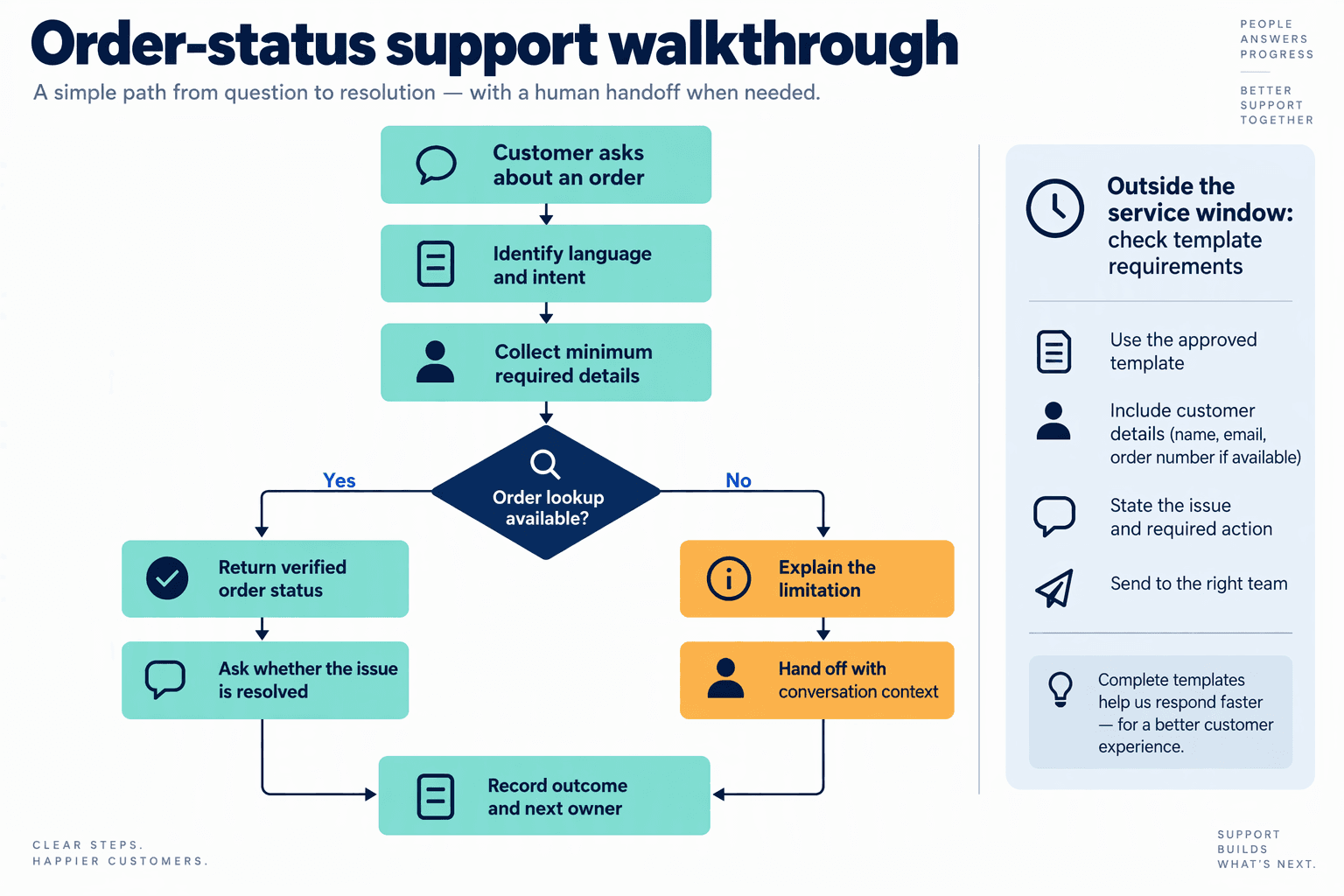
Build an order-status workflow as a controlled sequence: identify the request, verify access, retrieve order data, explain the next step, and transfer ownership when automation cannot resolve the issue. The bot should never treat “tracking link sent” as equivalent to “customer problem solved.”
What should happen after the first “Where is my order?” message?
For this November 2026 implementation example, use the following sequence as a workflow specification—not as a claimed industry benchmark.
- Classify the request without overcommitting. Distinguish a routine tracking query from “marked delivered but not received,” a cancellation request, or a refund dispute. If the message is ambiguous, ask one focused question rather than presenting a long menu.
- Verify access before revealing order details. Match the WhatsApp contact against the commerce system using your approved identity-checking process. If the number does not match the order, route the customer through additional verification; an order number alone should not automatically unlock an address or purchase history.
- Retrieve structured order information. Request the order ID, fulfilment status, carrier, tracking URL, latest shipment event, event timestamp, and available delivery estimate. Keep order status, shipment status, and refund status separate: “fulfilled” does not necessarily mean “delivered.”
Store the lookup result with its retrieval time. If the carrier provides no delivery estimate, say so explicitly rather than allowing the AI agent to invent one.
How should the bot turn order data into a useful answer?
- Explain the result and offer an appropriate next action. Use business-system data for transactional facts and the approved knowledge base for policy explanations.
An illustrative response might read:
“Your order ending 4821 has shipped. The latest carrier update shows it reached the Jaipur sorting centre this morning. No revised delivery estimate is available yet. Would you like the tracking link, or should I ask support to investigate?”
The important distinction is between reporting an event and promising an outcome. A scan at a sorting centre does not justify “Your parcel will arrive today.”
As of November 2026, CallMissed supports Shopify order integrations, custom REST tools, knowledge-base chatbot agents, and a live shared inbox. These capabilities provide building blocks for this workflow; teams still need to configure verification, exception handling, and resolution rules.
- Branch on exceptions instead of repeating the answer.
- Delivered but missing: open an investigation path rather than resend tracking.
- Cancellation or refund: check eligibility and approval requirements before promising action.
- Order-system timeout: acknowledge that the lookup failed; do not describe it as “order not found.”
- Customer asks for a person: stop the automated troubleshooting loop.
What makes a human handoff complete?
- Transfer context and assign ownership. The handoff record should contain verified identity status, order reference, customer intent, retrieved events and timestamps, actions already attempted, and the reason for escalation. Tell the customer what happens next, using a response-time commitment only when your team can honour it.
Bird’s customer-service-window documentation describes a 24-hour window following a customer message, a constraint used in this November 2026 workflow. Record the window’s expiry alongside the case so delayed updates follow the appropriate approved-template process.
Before launch, test a routine shipment, a missing delivered parcel, an identity mismatch, and an integration failure. Close the case only when the requested information or agreed remedy has been delivered—not merely when the bot finishes its script.
How much could WhatsApp support automation cost in India?
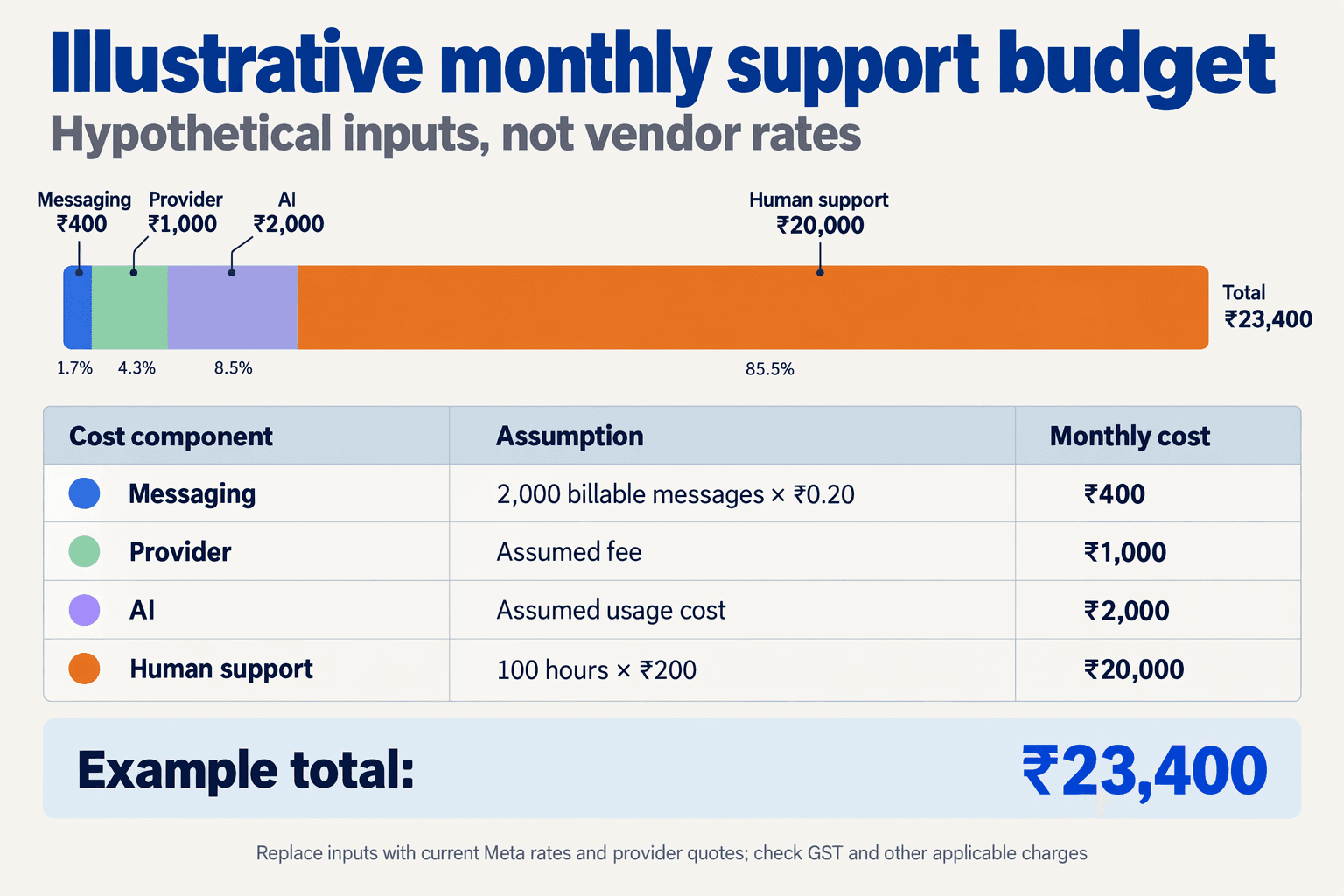
WhatsApp support automation costs in India should be budgeted as five separate items: Meta messaging charges, platform fees, AI usage, integration upkeep, and human handling. For a November 2026 budget, calculate cost per resolved issue, rather than treating a subscription price as the complete cost.
What should a WhatsApp automation budget include?
Use these five budget lines to make provider quotes comparable:
- Meta messaging charges: Estimate chargeable messages by category and recipient market using Meta’s WhatsApp Business Platform Pricing. Record the applicable rate and its effective date; do not apply one assumed price to every support message.
- Platform fees: Include subscriptions, inbox access, additional seats where charged, and any provider markup. Ask whether quoted messaging charges include Meta’s fee or sit above it.
- AI usage: Budget for generating replies and retrieving knowledge. Longer conversations, repeated requests, and larger prompts can change consumption even when ticket volume stays constant.
- Integration and maintenance: Include order-system connections, monitoring, knowledge updates, and troubleshooting. Separate initial implementation from recurring upkeep.
- Human handling: Count escalations, exception reviews, and quality checks—not just the time agents spend typing replies.
For this November 2026 planning exercise, Meta’s published pricing is the reference for channel charges, while the provider’s quote determines additional commercial fees. The supplied research identifies the pricing source but does not provide verified India per-message rates, so inserting a specific Meta tariff here would create false precision.
What would a worked monthly cost example look like?
Consider a team handling 1,000 support issues per month. The following November 2026 scenario uses illustrative planning assumptions, not market benchmarks or a vendor quotation:
- Platform subscription: ₹2,000
- AI consumption: ₹1,500
- Recurring integration upkeep: ₹1,000
- Issues requiring human handling: 300, assuming 70% are resolved without an agent
- Human handling: six minutes per escalated issue, valued at ₹5 per minute
Under these assumptions, human handling costs 300 × 6 × ₹5 = ₹9,000. The monthly operating total is therefore ₹13,500, plus Meta messaging charges and applicable taxes, excluding initial setup.
If all 1,000 issues are resolved, the illustrative cost per resolved issue is:
(₹13,500 + Meta messaging charges) ÷ 1,000
Before messaging charges and taxes, that equals ₹13.50 per resolved issue. If only 800 issues are resolved, the same base spending becomes approximately ₹16.88 per resolution—showing why message volume alone is a weak efficiency measure.
Treat the ₹9,000 labour figure as allocated operating cost, not guaranteed cash savings. Automation may release agent capacity without reducing payroll.
How should teams compare platform pricing?
Compare equivalent workloads, not headline plans. As of November 2026, CallMissed’s verified pricing lists Starter at ₹999 per month, with 550 credits in the first month and 500 thereafter; one credit equals ₹1, credits never expire, and there are no seat fees. CallMissed also provides official Meta Cloud API connectivity, AI chatbot agents, and a live shared inbox.
Included credits are usage allowance, not proof that every WhatsApp interaction is covered. Ask providers to clarify which activities consume credits and which charges are separate.
Before approving a budget:
- Validate billable events against expected support workflows.
- Measure escalation time using a representative pilot.
- Recalculate after launch using resolved issues, repeat contacts, and actual invoices.
The useful target is not the cheapest automated reply. It is a lower, explainable cost for resolving the customer’s problem.
How do you test Hindi, Hinglish, regional languages, and escalation thresholds?
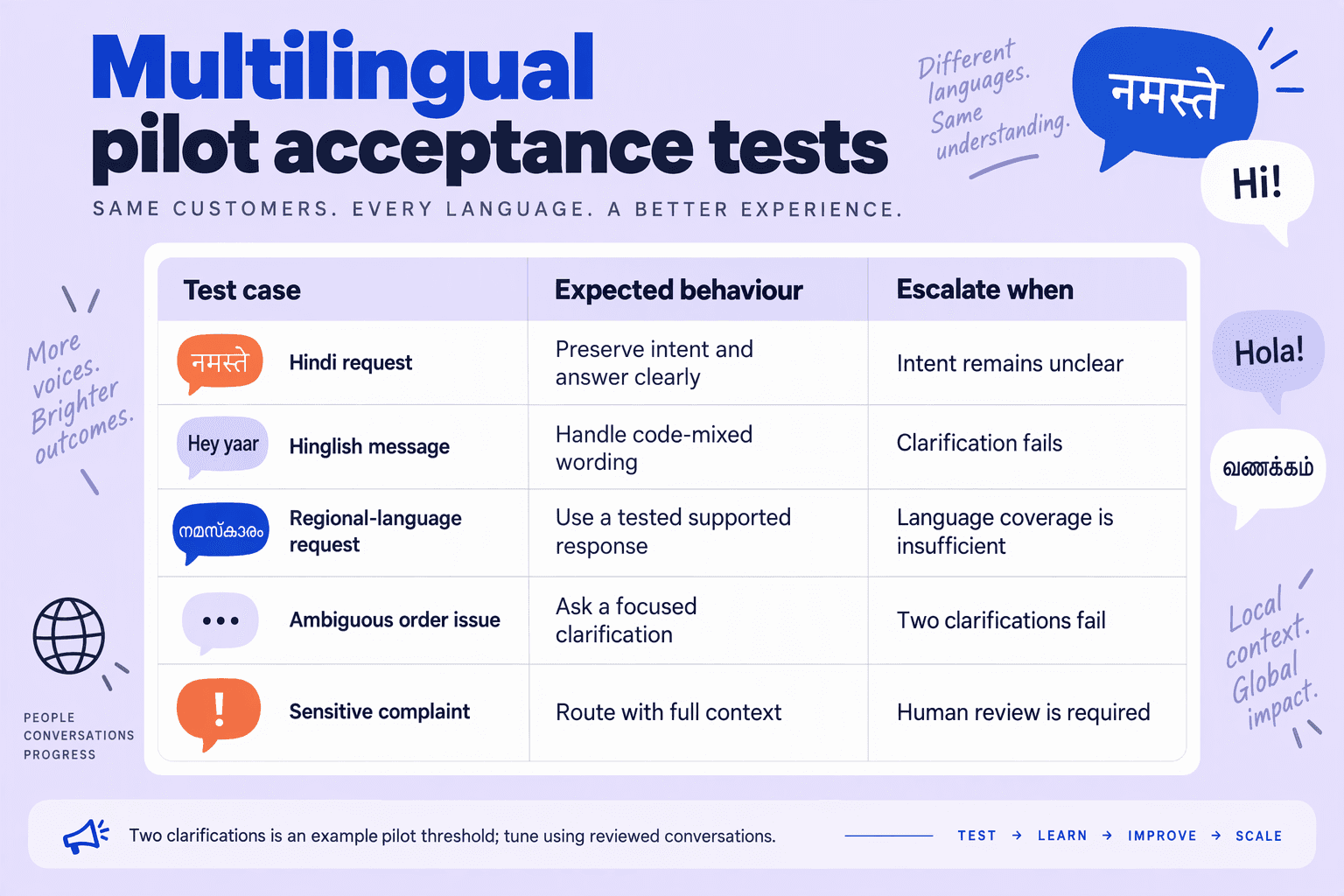
Test Hindi, Hinglish, and regional-language conversations against the same support outcomes: correct intent, accurate business data, safe actions, and a usable human handoff. Set escalation thresholds using reviewed test results, not an AI model’s unsupported claim that it is “confident.”
What should a multilingual WhatsApp test matrix include?
For this November 2026 playbook, the following matrix is a proposed acceptance framework—not a published industry benchmark. Build cases from anonymised support conversations, with native-speaking reviewers checking meaning, tone, and the action taken.
| Test area | Example input | Expected behaviour | Proposed release gate |
|---|---|---|---|
| Hindi intent | “मेरा रिफंड कब आएगा?” | Recognise refund-status intent; retrieve available status | ≥95% correct intent |
| Hinglish and spelling | “mera refund abhi tak nhi aya” | Understand informal spelling without changing the request | ≥95% correct intent |
| Regional languages | Tamil, Bengali, or Marathi equivalents of a delivery complaint | Preserve meaning; answer in the requested language | ≥95% reviewer-approved responses per language |
| Language switching | English greeting → Hindi complaint → English order ID | Retain context and preserve the identifier exactly | 100% identifier preservation |
| Ambiguity and failed lookup | “Paise nahi aaye”; order lookup unavailable | Ask a useful clarification; disclose lookup failure | Zero invented payment statuses |
| Escalation | “Agent se baat karao”; repeated unresolved complaint | Stop automated resolution and queue a person | 100% explicit-agent-request routing |
Do not average away weak languages. A strong English result cannot compensate for incorrect refund handling in Tamil. Test negation, amounts, dates, names, and order IDs separately: misunderstanding “refund nahi chahiye” can reverse the customer’s intention.
How should you set measurable escalation thresholds?
Use observable signals before probabilistic scores. A model-generated “90% confidence” is not necessarily a calibrated probability; compare any confidence signal with reviewer-labelled outcomes before using it for routing.
Recommended starting rules for November 2026 are:
- Immediate handoff: an explicit request for a person, suspected account compromise, or an action outside the bot’s authorised scope.
- Clarification limit: escalate after two unsuccessful clarification attempts rather than repeatedly rephrasing the same question.
- Evidence failure: if a required order or payment lookup fails, explain the limitation and route the unresolved issue—never infer a successful transaction.
- Language failure: offer a language-capable agent when the customer’s meaning remains unclear; do not force English as the default escape route.
As of November 2026, CallMissed’s verified product facts describe a human-handoff queue in which switching the AI off hands the thread to a person. Test that transition explicitly: the operational requirement is that automation stops and a person receives the unresolved context, not merely that an “escalated” label appears.
How do you validate results before launch?
- Create a held-out test set. Keep evaluation conversations separate from examples used to tune prompts.
- Score by language and intent. Record intent accuracy, unsupported-answer rate, successful handoff, and identifier preservation.
- Replay multi-turn failures. Include corrections, language switches, unavailable integrations, and messages arriving after a delay.
According to Bird’s customer-service-window documentation, the WhatsApp customer service window lasts 24 hours after a customer’s message, a rule referenced in this November 2026 guide. Include a delayed-handoff test that checks whether the eventual reply requires an approved template.
Finally, release each language only when it meets its own gates. Treat any fabricated refund status or ignored human-agent request as a blocker, even when overall accuracy looks high.
What happens when webhooks duplicate, CRM lookups fail, or the AI cannot answer?
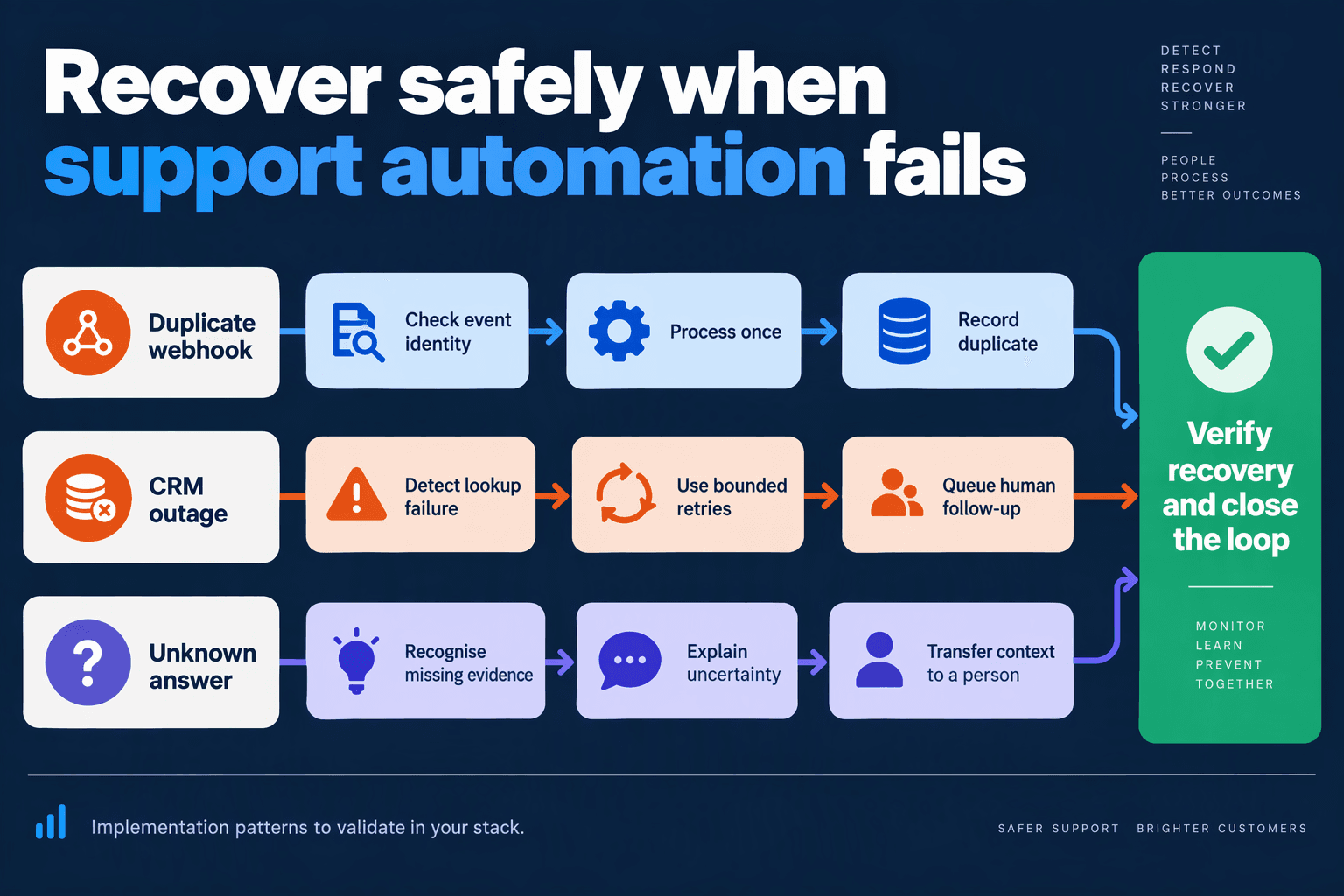
Duplicate webhooks should not create duplicate actions; failed CRM lookups should pause data-dependent answers; unanswered questions should move to a named human owner. Reliable WhatsApp customer support automation in India needs a recovery path that preserves context without inventing order statuses, repeating refunds, or leaving customers in an unowned queue.
How do you prevent duplicate WhatsApp webhooks from triggering actions twice?
Design webhook processing around idempotency: receiving the same event again must not repeat its business effect. Treat this as an implementation requirement, not an assumed feature of your provider.
- Persist before acknowledging. Validate the webhook and durably record or enqueue it before returning a successful acknowledgement.
- Identify the event precisely. Deduplicate incoming messages using the account identifier and message identifier. For delivery-status events, also distinguish the status; “delivered” and “read” are different updates.
- Protect business actions separately. Give each refund request, ticket creation, or CRM update an action key. A duplicate message must not create a second refund request.
- Record completion. Track whether processing is pending, completed, or failed so recovery workers can resume safely.
Use a database uniqueness constraint or equivalent atomic control—not just an in-memory check that disappears when a server restarts. If an external system supports idempotency keys, pass the action key through to that system too.
What should the bot say when a CRM or order lookup fails?
A failed lookup means “the system could not retrieve the answer,” not “the order does not exist.” Separate timeouts, authentication failures, and genuine no-match results before deciding what to tell the customer.
A useful fallback is: “I couldn’t retrieve your order details just now. I’ll pass this conversation to support so you don’t need to explain it again.”
For this November 2026 implementation, define a bounded recovery policy:
- Read-only lookups: retry transient failures with increasing delays and jitter.
- Authentication or permission errors: alert the integration owner rather than retrying continuously.
- Writes with uncertain outcomes: reconcile the result before retrying; a timeout does not prove that a refund request failed.
- Repeated failures: pause calls to the failing integration and route affected conversations to support.
Store failed work in a dead-letter queue for controlled investigation and replay. Keep customer-facing messages separate from internal error details, credentials, and diagnostic logs.
When should the AI stop answering and hand off?
Escalate when the knowledge base lacks an answer, required business data is unavailable, the customer requests a person, or the next action exceeds the bot’s authority. Do not treat the model’s self-reported confidence as sufficient evidence that an answer is correct.
The handoff should include:
- The customer’s request and preferred language.
- Verified facts, missing information, and failed lookup attempts.
- Actions already completed and actions still pending.
- A named owner or queue, priority, and next-update deadline.
As of November 2026, CallMissed provides a live shared inbox and a human-handoff queue; switching the AI off hands the thread to a person. Teams still need explicit ownership and recovery procedures around those capabilities.
How do you test whether recovery actually works?
Before launch, replay a webhook, interrupt a CRM lookup, simulate an uncertain write, and ask a question absent from the knowledge base. Verify one business action, no invented answer, preserved context, and visible ownership.
For November 2026 planning, Bird’s WhatsApp customer-service-window documentation specifies a 24-hour window following a customer’s message. Include window expiry in outage tests: a delayed follow-up may require an approved template rather than an ordinary reply.
Which messaging-window, template, privacy, and ownership mistakes should you avoid?
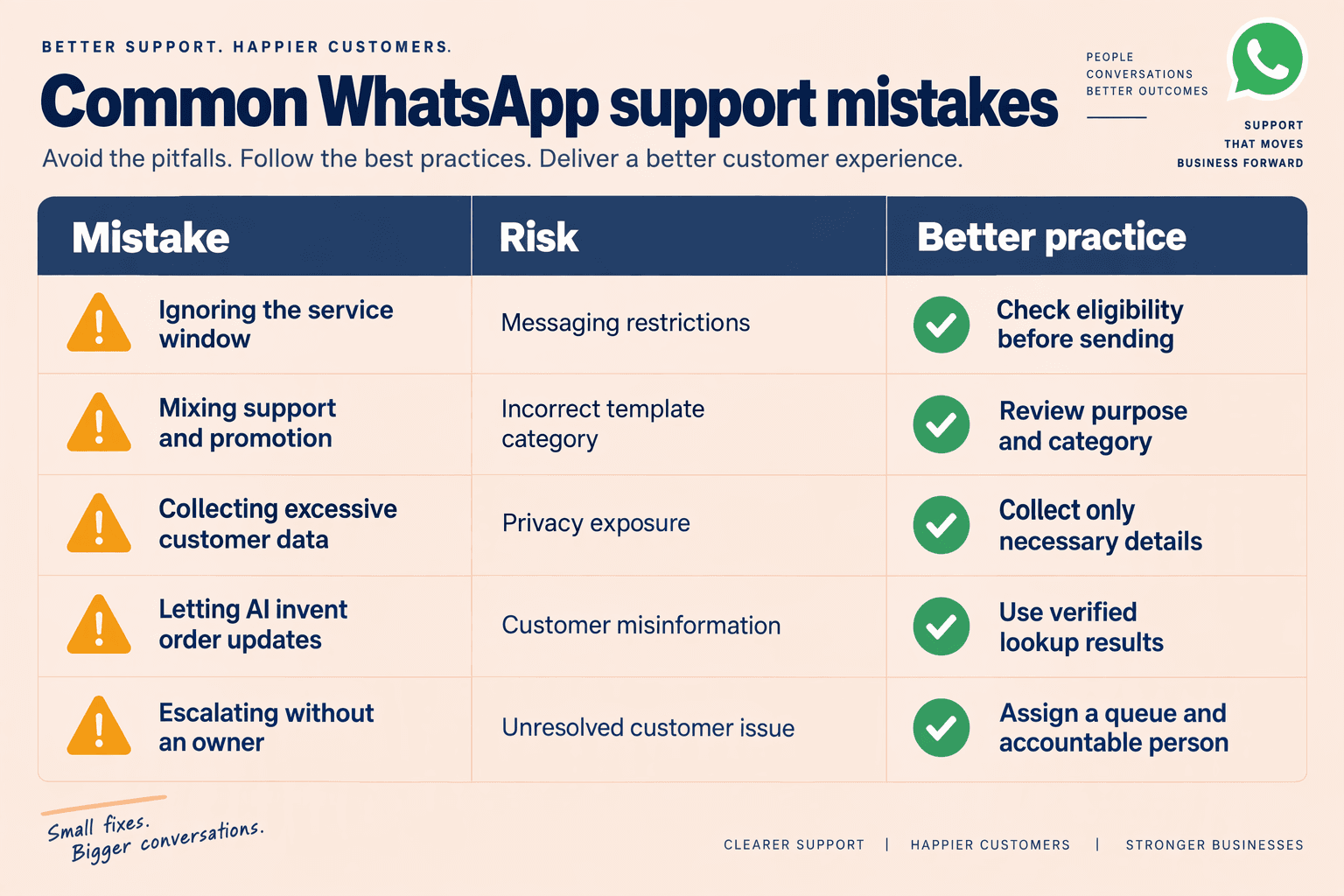
Avoid six mistakes: sending free-form follow-ups after the service window closes, misusing templates, assuming permission, exposing customer data, leaving escalations unassigned, and letting a vendor control your WhatsApp assets. For WhatsApp customer support automation in India, turn each risk into a send-time check or a clearly assigned operational responsibility.
Which WhatsApp mistakes need explicit safeguards?
For this November 2026 playbook, Bird’s customer-service-window documentation specifies a 24-hour window following a customer’s message. Track that customer-message timestamp—not the last bot reply, ticket update, or agent assignment.
Meta’s WhatsApp Business Policy and WhatsApp Business Platform Pricing are the reference points for permission requirements and messaging charges respectively. Template approval, customer permission, and message pricing are separate checks; passing one does not establish the others.
| Mistake | Why it matters | Required safeguard | Accountable owner |
|---|---|---|---|
| Measuring the window from the last business reply | A bot response does not restart the customer-service clock. | Recalculate eligibility from the latest customer message immediately before sending. | Messaging engineering |
| Treating every approved template as suitable | Approval does not make promotional content appropriate for a refund update. | Match the approved template and category to the actual purpose; validate variables before sending. | Template administrator |
| Assuming an order supplies blanket permission | A purchase is not evidence of permission for every future WhatsApp interaction. | Record permission source, scope, and withdrawal; check eligibility before proactive contact. | CX operations |
| Copying entire customer records into prompts | Unnecessary addresses, identifiers, and payment details increase exposure. | Retrieve only task-relevant fields; restrict transcript access and define retention. | Security/privacy lead |
| Leaving a human handoff in a shared queue | Visibility is not ownership; multiple agents may reply, or nobody may act. | Assign one owner, an acceptance deadline, and a backup for each escalation. | Support team lead |
| Letting an agency control all account assets | Losing administrator access can complicate provider changes and incident recovery. | Document business-account and number ownership, administrator access, and an exit procedure. | Business administrator |
Treat these roles as responsibilities, not necessarily separate hires. A small Indian support team can combine roles, but every control still needs a named person and a backup.
How should you test messaging-window and template failures?
Test the decision to send, not just the wording of the reply. A message composed while the window is open may sit in a queue until after it closes.
Use this pre-launch sequence:
- Create a boundary case: place a customer message just inside the 24-hour window, then delay delivery until outside it.
- Check the fallback: prevent the free-form send and select an appropriate approved template, subject to permission and applicable policy.
- Validate the payload: reject empty variables, incorrect order references, and unnecessary personal information.
- Record the decision: log the customer-message timestamp, selected template, eligibility result, and responsible workflow.
Zendesk’s guidance on proactively contacting WhatsApp users provides a useful operational reference alongside Bird’s window documentation. Verify current Meta requirements before deployment rather than treating a provider workflow as the policy authority.
What does safe ownership look like after escalation?
A refund dispute needs both conversation ownership and system ownership. The receiving agent should see the issue, completed checks, pending action, and next update deadline—not an unrestricted dump of the customer’s CRM record.
As of November 2026, CallMissed supports Meta-synced message templates and a human-handoff queue where switching the AI off hands the thread to a person. Those capabilities support the workflow; teams must still define who accepts the handoff and when.
- Conversation owner: accountable for the next customer update.
- Account owner: accountable for access, permissions, and provider changes.
- Privacy owner: accountable for data access, retention, and incident handling.
India-hosted infrastructure can inform deployment choices, but hosting location alone does not establish privacy compliance. Review the complete data flow, including AI providers, integrations, exports, and human access.
Frequently Asked Questions
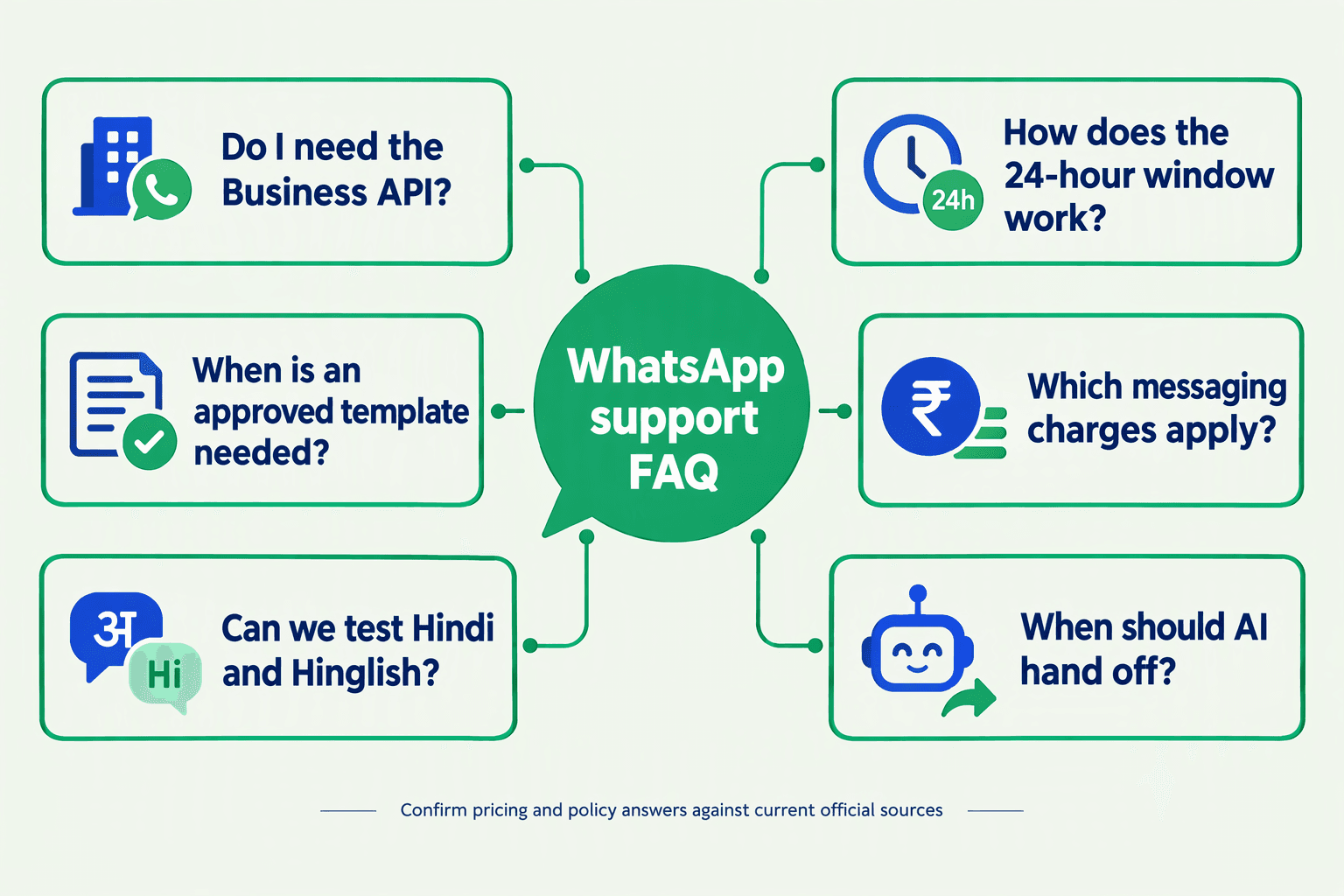
Is the API required for WhatsApp customer support automation in India?
How does the WhatsApp 24-hour customer service window work?
Can a support team send a WhatsApp refund update after 24 hours?
When should AI hand off in WhatsApp customer support automation in India?
How much does WhatsApp Business API customer support automation cost in India?
How should Indian support teams test Hindi, Hinglish, and regional-language WhatsApp bots?
Which official resources and launch checks should your team use next?
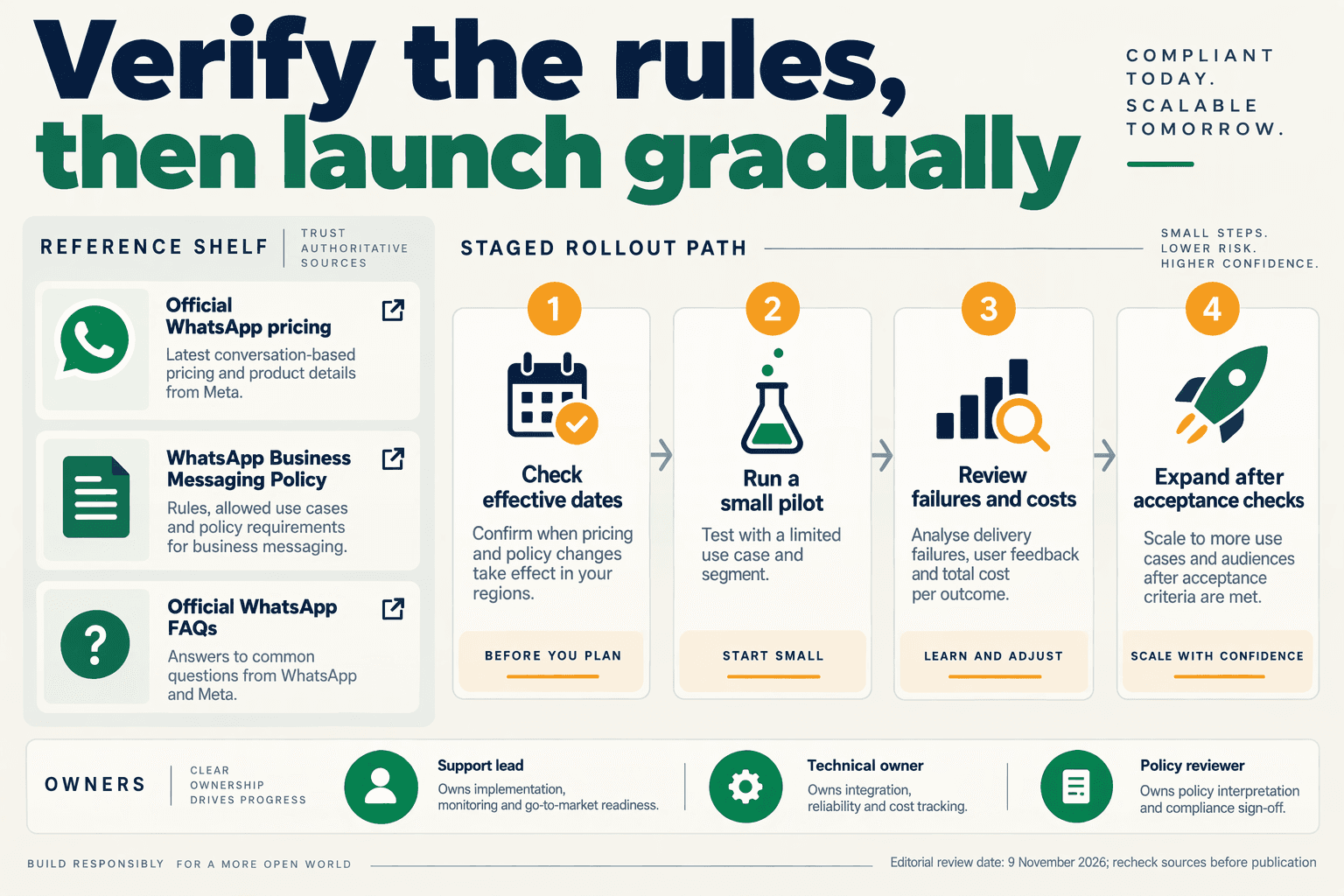
Use Meta’s WhatsApp Business Platform Pricing, Business Policy, and official FAQ as your primary references, then validate provider-specific workflows against your own configuration. Before launching, require evidence that messaging permissions, escalation, integrations, billing, and recovery work—not just that the bot answers a demonstration question.
Which WhatsApp resources should support teams bookmark?
For this November 2026 launch checklist, maintain a shared reference register with each document’s publisher, purpose, owner, and last-review date. Separate platform rules from provider implementation guidance:
- Meta — WhatsApp Business Platform Pricing: Use this to verify applicable messaging charges before approving your budget. Record the rate assumptions used rather than copying an undated estimate into a spreadsheet.
- Meta — Business Policy: Make this the starting point for reviewing permitted business activity and messaging practices. Assign a compliance owner to resolve uncertainties before enabling affected workflows.
- Meta — WhatsApp for Business FAQ: Use the official FAQ for product clarification; translate relevant answers into internal operating procedures.
- Bird — customer-service-window documentation: Use this as supplementary operational guidance when testing whether replies and follow-ups take the correct messaging path.
- Zendesk — proactively contacting users on WhatsApp: Consult this workflow guide if your support operation uses Zendesk. Provider-specific instructions should not be treated as universal platform behaviour.
Salesforce publishes a WhatsApp message-credit rate card labelled November 2026 in the supplied research. Use that document only when assessing Salesforce-related charges; do not substitute a provider’s rate card for Meta’s platform pricing. Similarly, AiSensy’s fee documentation can inform an AiSensy cost review, but not another provider’s invoice.
What must pass before WhatsApp support automation goes live?
Turn the earlier playbook into a release acceptance checklist, with an owner and recorded result for every item:
- Account and access: Confirm the intended business account, production number, administrator access, and permissions. Ensure departing staff can lose access without disrupting operations.
- Messaging eligibility: Test an immediate reply and a delayed follow-up. Bird’s customer-service-window documentation describes a 24-hour window after a customer message, as referenced in this November 2026 guide; include boundary cases in acceptance testing.
- Answer safety: Run approved examples covering tracking, refunds, ambiguous requests, and mixed-language messages. Fail the release if the agent invents order status or promises an unauthorised refund.
- Human ownership: Demonstrate that an escalation reaches a staffed queue, retains context, and cannot remain silently unassigned.
- Integration recovery: Replay a duplicate event and simulate an unavailable order system. Verify that neither test creates duplicate actions or falsely confirms completion.
- Financial reconciliation: Match test usage to billing records. Keep Meta messaging charges, provider fees, AI usage, and human handling separate.
As of November 2026, CallMissed offers official Meta Cloud API connectivity, a live shared inbox, and a human-handoff queue. Teams using these capabilities should still prove the full escalation path with a real test conversation.
Who should approve launch and review changes?
Require sign-off from support operations, engineering, and the policy or compliance owner. Begin with a limited scope, such as order-status enquiries, and expand only after reviewing unresolved cases and recovery failures.
Keep three launch artefacts accessible:
- A dated source-and-pricing register.
- Test transcripts with pass/fail decisions.
- A rollback runbook naming the on-duty decision-maker.
The final launch question is simple: Can your team explain what happens when automation cannot safely resolve the customer’s problem? If the answer is documented, tested, and owned, the playbook is ready for controlled production use.
Conclusion
The WhatsApp Business API for Customer Support becomes dependable when automation, business data, and human ownership work together. For Indian teams planning beyond November 2026, the priority is not simply answering faster—it is resolving issues across languages, systems, and shifts without making customers repeat themselves.
The practical takeaway is to build and improve four connected layers:
- Make policy part of the workflow. Track customer permissions, approved templates, and the customer-service window alongside conversation status. Bird’s customer-service-window documentation describes a 24-hour window following a customer’s message, the planning constraint used in this November 2026 guide. A refund update delayed beyond that window needs an appropriate messaging workflow, not just another automated reply.
- Ground AI in useful knowledge and business data. A tracking link may answer an order-status question, but it cannot resolve every delivery complaint or refund dispute. Test English, Hindi, Hinglish, and relevant regional-language conversations against realistic support scenarios. Define when the bot should retrieve information, ask for clarification, or stop and escalate rather than continue an unhelpful loop.
- Give every conversation an accountable owner. Routing and handoff rules should preserve the customer’s request, order details, and actions already attempted. Measure escalation quality and repeat contacts alongside resolution rate. A bot that sends fewer messages but leaves the customer stranded has not improved support; neither has a handoff that forces the customer to explain the problem again.
- Budget for resolution and plan for failure. Meta’s WhatsApp Business Platform Pricing is the reference for messaging charges in this November 2026 guide; provider subscriptions, AI usage, and human handling belong in separate cost assumptions. Include duplicate-event handling, integration outages, and fallback procedures in the operating playbook. Evaluate cost per resolved issue, not message volume alone.
What should Indian support teams watch next?
Watch how consistently AI can move from answering questions to supporting complete, recoverable workflows. Multilingual accuracy, context-preserving handoffs, and reliable order or CRM lookups will remain more useful evaluation criteria than an impressive demonstration. As policies and pricing change, revisit dated assumptions rather than treating the initial setup as permanent.
Platforms such as CallMissed are worth exploring within that shift. As of November 2026, CallMissed combines official Meta Cloud API connectivity, knowledge-base chatbot agents, a live shared inbox, and permission-based WhatsApp Business Calling—capabilities relevant to connecting automation with customer-support operations.
Start with one common journey, such as “Where is my order?”, and test its exceptions before expanding. When that conversation becomes a refund dispute, does your workflow know who should take responsibility next?
Related Reading
- WhatsApp Business API providers: India SMB Guide 2026
- LLM comparison 2026: Best Models for Customer Support
- Kimi K3 API Pricing: Customer Support LLM Comparison