WhatsApp customer support automation: India playbook



Use WhatsApp customer support automation to set up compliant flows, handle Hindi and mixed-language queries, and route complex cases to agents.
WhatsApp customer support automation: India playbook
What if your most important WhatsApp automation decision is not which chatbot to choose, but when to stop automating? WhatsApp customer support automation works when routine questions get useful answers and difficult cases reach a person without forcing customers to repeat themselves.
For Indian support teams, that means designing around real conversations: an order-status request in Hinglish, a refund question with an attached screenshot, or a delivery complaint that needs human judgment. The goal is not simply fewer agent replies. It is a support journey that remains clear when language, urgency, and customer expectations change.
The economics make workflow design especially important. Meta’s developer pricing documentation dates the WhatsApp Business Platform’s move to per-message charging to July 1, 2025, with charges determined by message category and market. For teams planning in October 2026, that historical change is a reason to check current pricing rather than budget from older conversation-based assumptions.
According to Meta’s WhatsApp Business Platform pricing page, referenced for this October 2026 guide, a customer message opens a 24-hour customer service window during which businesses can respond with service messages at no charge. That does not make an entire support operation free: platform subscriptions, integrations, and human handling still require budgeting.
Automation also comes with a boundary. Meta’s WhatsApp Business Messaging Policy, referenced for this October 2026 guide, permits automated responses within the service window but requires “prompt, clear, and direct escalation paths.” A chatbot that answers quickly but traps a customer in a loop misses that requirement—and the purpose of customer support.
As of October 2026, CallMissed supports this approach through the official Meta Cloud API, combining WhatsApp AI chatbot agents, a live shared inbox, and human handoff.
What will this India-focused WhatsApp support playbook help you build?
This guide takes setting up WhatsApp customer support automation from account access to practical operating decisions. You will learn how to:
- Establish WhatsApp Business API access and distinguish onboarding requirements from chatbot configuration.
- Choose initial workflows, such as order tracking and common policy questions, before automating sensitive exceptions.
- Structure knowledge-backed answers and test language preferences, including mixed-language customer messages.
- Plan customer opt-in, message templates, service-window handling, and escalation routes around Meta’s requirements.
- Evaluate outcomes through resolution quality, repeat contacts, handoff context, and message costs—not response speed alone.
The guiding principle is straightforward: automate the predictable, preserve context, and make human help easy to reach. Start with one workflow, test exceptions, then expand.
Automate WhatsApp support with API access, verified answers and human handoff
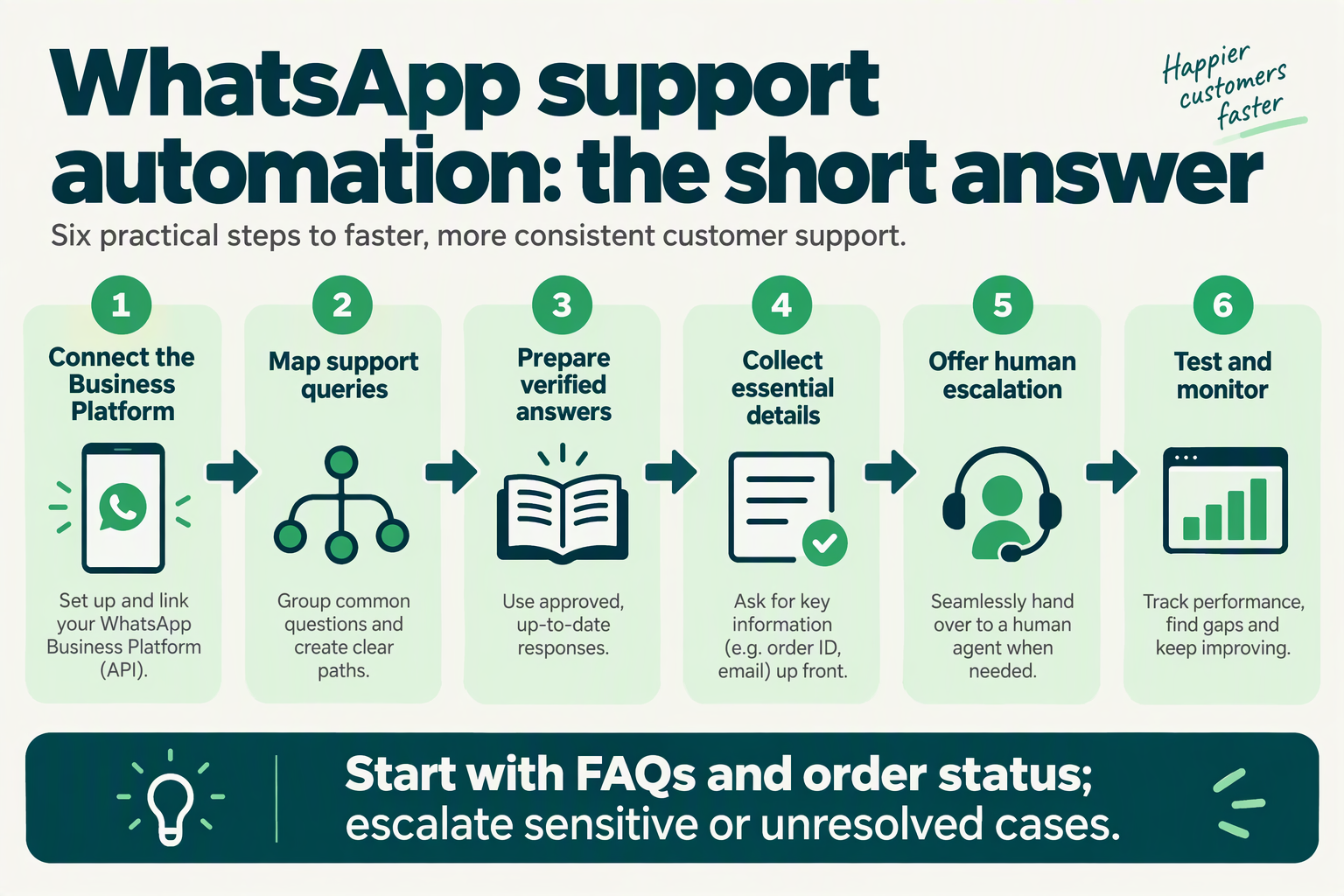
Build WhatsApp support automation around three connected layers: official API access, answers grounded in approved information, and a reliable route to a human agent. Treat these as one workflow: a connected chatbot is not ready for customers until it can distinguish an answer it can verify from a case it must escalate.
How do you get WhatsApp Business API access for support?
Start by separating account onboarding from support configuration. Connecting a WhatsApp Business account establishes the messaging channel; it does not define refund rules, connect order records, or decide who handles exceptions.
For an October 2026 implementation, use this setup checklist:
- Assign an account owner. Identify who manages the business account, onboarding permissions, and ongoing access.
- Choose an official integration route. Evaluate direct Meta Cloud API integration or a platform using that API against your engineering capacity.
- Connect the support workspace. Decide where incoming conversations appear and which team owns them.
- Test the complete journey. Send a customer message, check the automated response, and confirm that an agent can take over.
As of October 2026, CallMissed connects WhatsApp Business accounts through Meta embedded signup and provides AI chatbot agents with a knowledge base and a live shared inbox. Its human-handoff queue lets teams switch the AI off and hand the thread to a person.
Keep outbound permissions separate from technical access. According to Meta’s developer guidance on WhatsApp opt-in, referenced for this October 2026 guide, businesses must obtain opt-in before messaging people on WhatsApp. An API connection is not customer consent.
How do you make a WhatsApp customer support chatbot give verified answers?
Give the chatbot a small, maintained source of truth, rather than every document your company has ever produced. “Verified answers” should mean answers traceable to an approved policy or an authorised record—not simply fluent text.
For your first workflow, prepare:
- Approved policy content: delivery coverage, cancellation conditions, refund steps, and support hours.
- Live-data boundaries: which questions require an order lookup rather than a knowledge-base answer.
- Exception rules: missing records, conflicting information, disputed payments, and requests outside policy.
- Ownership and review dates: a named person responsible for keeping each source current.
For example, “Where is my order?” requires current order information. A delivery-policy document can explain normal timelines, but cannot establish whether a particular parcel has shipped.
For Indian customers, test equivalent questions in English, Hindi, and Hinglish where relevant to your audience. Language flexibility must not change the underlying policy: “refund kab milega?” and “When will my refund arrive?” should follow the same verification rules.
When should WhatsApp automation hand a conversation to a person?
Escalate when the customer requests a person, the available evidence cannot support an answer, or the next action requires human judgment. Configure these triggers before launch—not after customers discover a conversational dead end.
Consider a customer saying, “Payment cut gaya, order confirm nahi hua.” The workflow should collect only the necessary reference information, check an authorised source if available, and escalate if the payment and order records cannot be reconciled. It should not invent a confirmation or promise a refund.
Make the handoff operationally useful by defining:
- Destination: the responsible queue or support team.
- Context: the customer’s request, checks completed, and unresolved issue.
- Ownership: who monitors waiting conversations.
- Customer message: what happens next, without an unsupported response-time promise.
Before launch, test successful answers, missing information, explicit human requests, and failed lookups. Expand automation only when both resolution and escalation work.
What do Indian support teams need before setup?
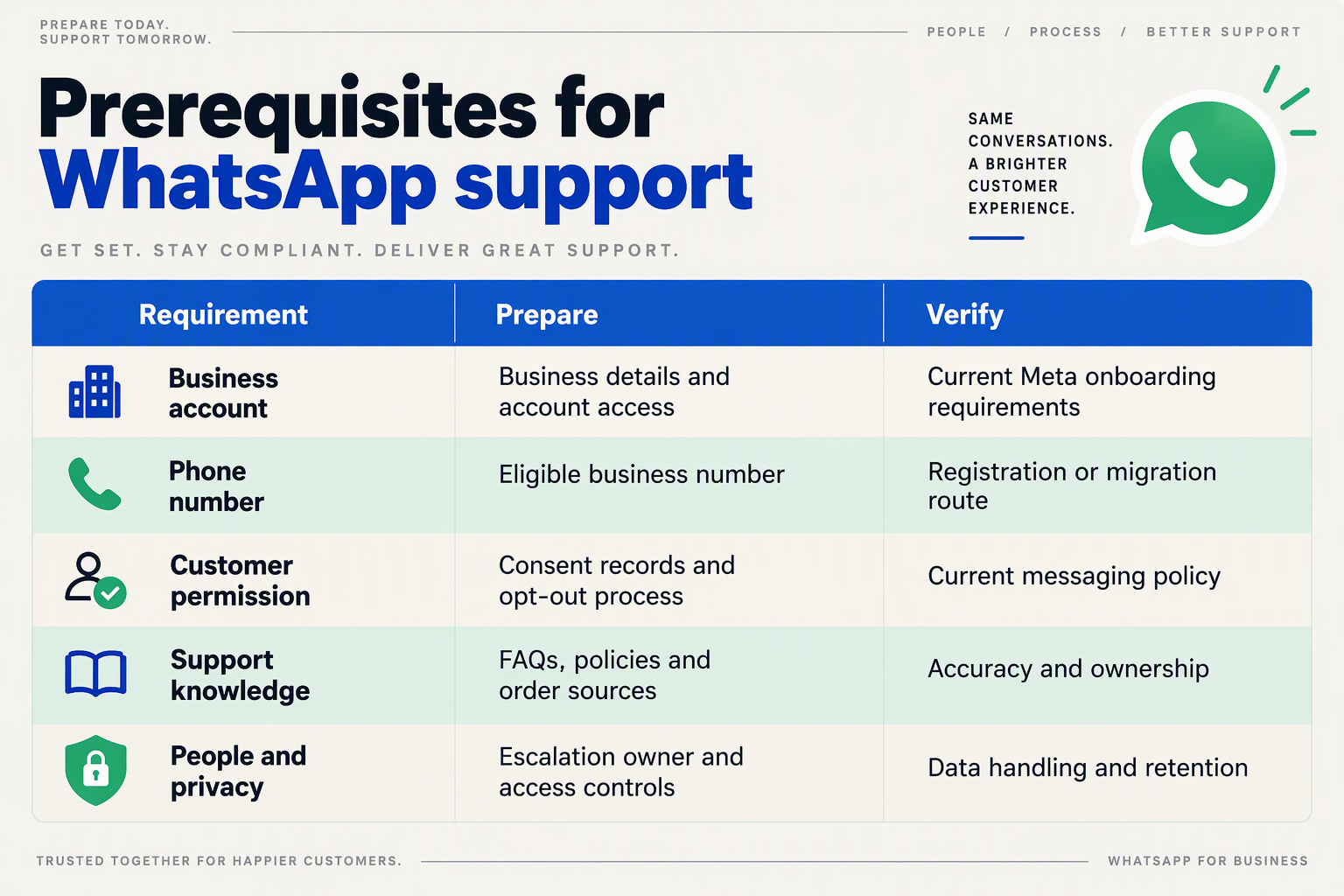
Indian support teams need account ownership, a number-onboarding plan, permission records, approved support content, integration access, and a staffed escalation route before setting up WhatsApp customer support automation. Use the checklist below for your October 2026 rollout; distinguish Meta’s messaging requirements from the operational preparation that makes a chatbot useful.
What should your WhatsApp automation setup checklist include?
These six checks help separate “we can connect WhatsApp” from “we are ready to support customers.”
| Prerequisite | Prepare before setup | Readiness check |
|---|---|---|
| Account ownership | Identify the administrator responsible for the Meta business account and WhatsApp Business account. | The owner can sign in and authorize onboarding without sharing personal credentials. |
| Business phone number | Decide which number customers will use; document its current WhatsApp use and confirm the applicable onboarding or migration path. | The team can complete the required verification and has assessed any service disruption. |
| Customer permissions | Record how permission is collected for business-initiated messages, alongside the customer’s contact details. | Staff can retrieve the permission record and process a request to stop messages. |
| Support knowledge | Collect current delivery, cancellation, refund, warranty, and escalation policies. | Each answer has an owner, an effective date, and a clear exception route. |
| System access | Identify the order-management, helpdesk, or CRM records needed for the first workflow. | Test access returns only the information needed to answer the customer’s request. |
| Human operations | Assign inbox ownership, working hours, escalation categories, and backup coverage. | A test handoff reaches a named person or queue with the conversation context. |
Treat this as a readiness checklist, not a universal Meta approval checklist. Account-specific onboarding steps should be confirmed in Meta’s setup flow before committing to a launch date.
What permissions and content should you prepare first?
According to Meta for Developers’ “Get opt-in for WhatsApp” guidance, referenced for this October 2026 guide, businesses must obtain opt-in before messaging people on WhatsApp. Do not treat an existing CRM phone number as sufficient evidence of permission.
Prepare a record that captures:
- Permission source: checkout, website form, or another documented collection point.
- Customer expectation: what messages the person agreed to receive.
- Withdrawal handling: who updates the record when a customer asks to stop messages.
Keep support content equally traceable. A refund policy copied from an old document can produce a confident but incorrect answer; attach an effective date and policy owner rather than relying on an unreviewed FAQ dump.
For Indian audiences, prepare reviewed examples in the languages customers actually use. Test Roman-script Hindi and mixed-language requests separately from formal Hindi; successful translation alone does not establish that the chatbot understood the support intent.
How can you check readiness before connecting the chatbot?
Run one dry-run workflow before onboarding: a customer asks where an order is, supplies an identifier, and receives either a verified status or a clear next step.
- Confirm how the customer’s identity will be checked before disclosing order details.
- Test missing identifiers, unavailable records, and conflicting policy information.
- Route an unresolved case to the assigned support owner.
As of October 2026, CallMissed offers Meta embedded signup for connecting a WhatsApp Business account and WhatsApp AI chatbot agents with a knowledge base. Those capabilities provide a setup path, but your team still needs to supply accurate policies, appropriate access, and operational ownership.
Launch only when the exception path works—not merely when the chatbot produces an answer.
How do you get WhatsApp Business API access and connect CallMissed?
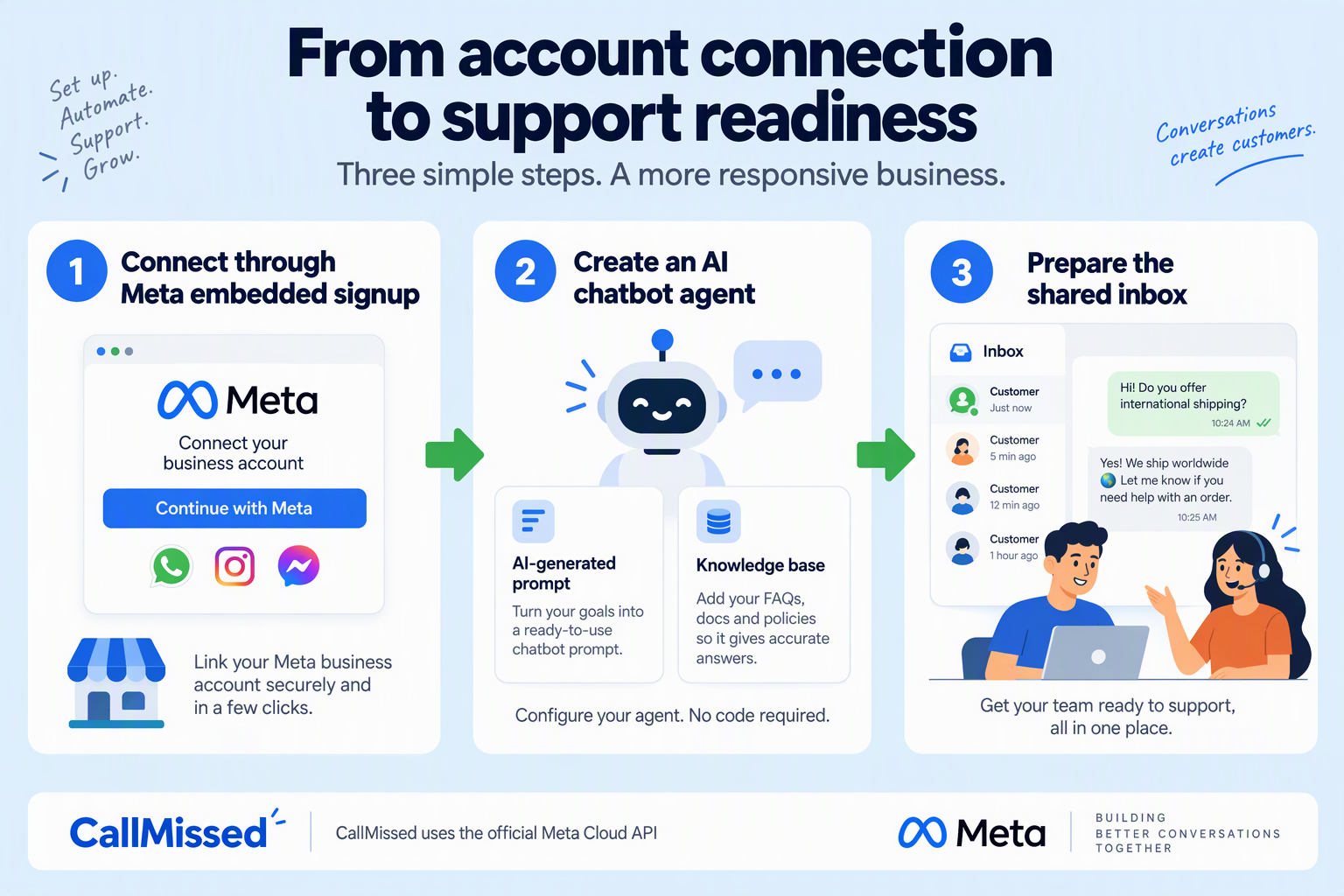
Get WhatsApp Business API access through Meta’s official onboarding flow, then connect the approved business account to your support platform. As of October 2026, CallMissed supports account connection through Meta embedded signup, so begin with that guided flow rather than treating API access and chatbot setup as the same task.
The key distinction is simple: Meta onboarding establishes your messaging account; support configuration determines how customers receive answers. Completing the first does not automatically make the second ready for production.
What should you prepare before requesting WhatsApp Business API access?
For an October 2026 rollout, prepare an onboarding checklist before starting Meta’s flow:
- Business account access: Have the person authorised to manage your Meta business assets available.
- Business details: Gather your business name, website, contact details, and any documentation Meta requests.
- Phone-number ownership: Confirm that your team controls the intended number and can complete the verification steps presented.
- Existing WhatsApp usage: Identify whether that number already serves customers through another app or platform.
- Operational ownership: Assign one person responsibility for onboarding and another for support-workflow approval.
Do not assume an existing WhatsApp number can be connected without changes. Check the migration or coexistence options presented for your account before moving a live support number; eligibility and onboarding requirements can vary.
Likewise, embedded signup is an onboarding route, not a guarantee of approval. Follow Meta’s account-specific requirements rather than relying on a universal activation timeline.
How do you connect the account and configure the chatbot?
Use this sequence to keep account setup separate from customer-facing automation:
- Start the platform’s WhatsApp connection flow. Complete Meta embedded signup with an authorised business administrator.
- Select or create the required business assets. Follow the prompts for the WhatsApp Business account and intended phone number.
- Complete the requested checks. Resolve verification, permissions, or account-status issues before proceeding.
- Confirm the connection. Check that the intended business account—not a test or unrelated account—is connected.
- Configure one support workflow. Start with a narrow task, such as answering delivery-policy questions, rather than activating every possible use case.
As of October 2026, CallMissed’s verified WhatsApp capabilities include AI chatbot agents with an AI-generated prompt and knowledge base, message templates synced with Meta, and a live shared inbox. Use those components deliberately: review the generated instructions, supply approved policy content, and decide which conversations should reach a person.
For example, a delivery-policy assistant can explain published delivery estimates. A customer reporting a missing parcel should follow an exception path instead of receiving the same policy answer repeatedly.
What should you test before opening the channel to customers?
Treat successful onboarding as the start of testing, not the end of implementation. Run a small acceptance checklist:
- Inbound receipt: Send a customer message and confirm it reaches the correct support workspace.
- Answer accuracy: Ask a policy question, then compare the response with your approved source material.
- Unknown-answer behaviour: Ask something absent from the knowledge base; check that the assistant does not invent a policy.
- Human escalation: Request a person and confirm the conversation reaches the designated team.
- Outbound compliance: Review consent and template requirements before sending business-initiated messages.
Meta’s WhatsApp Business Messaging Policy, referenced for this October 2026 guide, requires “prompt, clear, and direct escalation paths” when businesses use automation. Make escalation a launch requirement—not a feature to add after customers encounter problems.
How do you build an order-status support flow step by step?
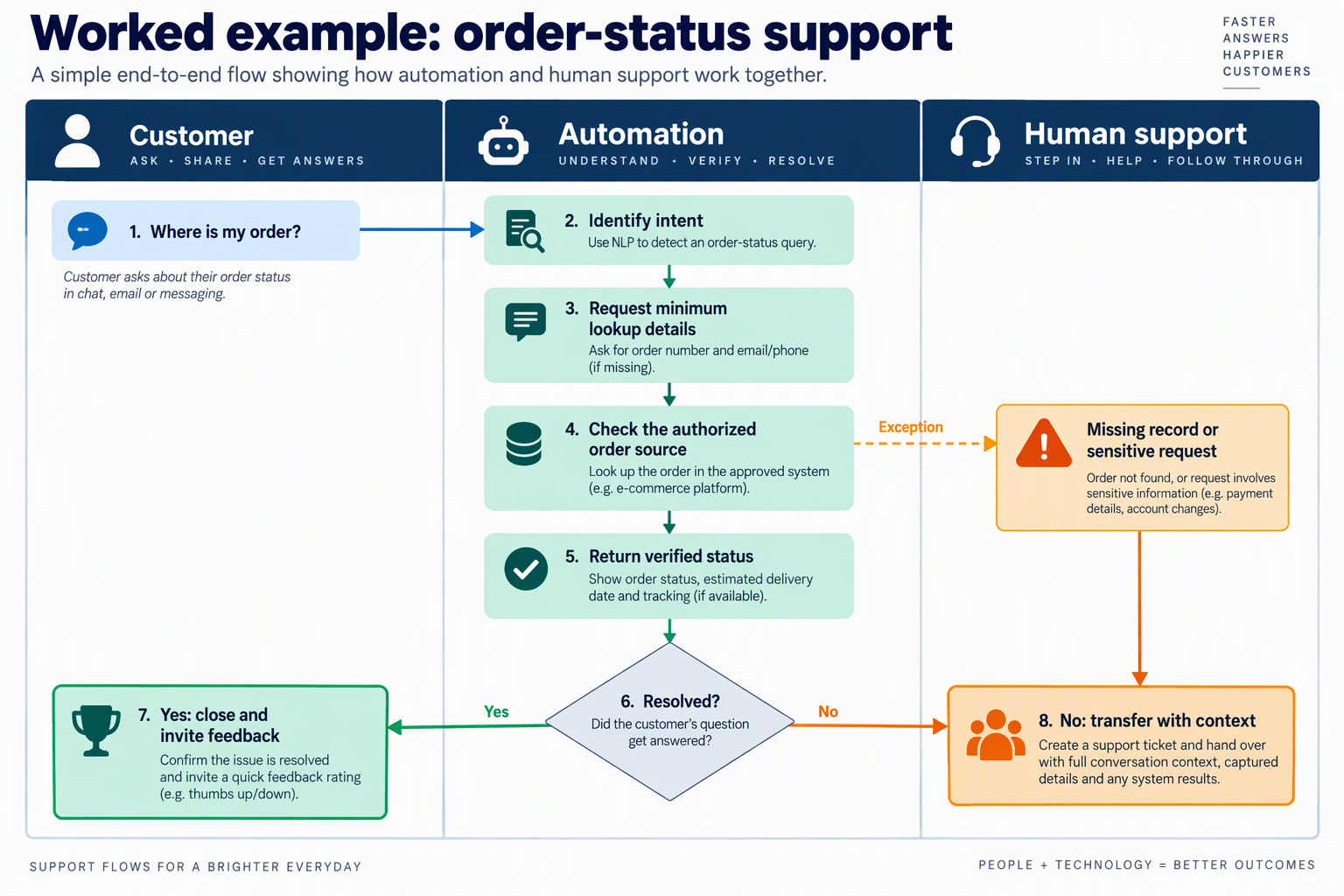
Build an order-status support flow by collecting an order reference, verifying the customer, retrieving live fulfilment data, and returning a clear next step. Keep missing records, disputed deliveries, and unavailable tracking data on explicit exception paths rather than asking the chatbot to improvise.
How do you identify the order without exposing customer data?
- Define the entry point and minimum information.
Start with messages such as “Where is my order?” or “Mera order kab aayega?” Ask for the order ID first, while preserving the customer’s language preference. Avoid requesting a full address, payment details, or identity documents for a routine tracking enquiry.
Suggested reply: “Please share your order number so I can check its latest status. If you don’t have it, choose Find my order or Talk to support.”
- Verify ownership before showing order details.
An order number identifies a record; it does not necessarily prove ownership. Match the WhatsApp sender to the contact information associated with the order, or use your business’s approved verification process when those details differ.
Set clear branches:
- Verified match: proceed to lookup.
- Different registered number: offer secure verification or human help.
- No order reference: use an approved recovery route.
- Repeated failed attempts: stop automated lookup and escalate.
How do you turn live order data into a useful WhatsApp reply?
- Connect the flow to your source of truth.
Retrieve fulfilment status from your commerce or order-management system—not a static FAQ. Define the fields the flow needs: order reference, fulfilment state, latest tracking event, event timestamp, tracking link, and estimated delivery date when available.
As of October 2026, CallMissed lists Shopify integrations covering orders, products, and customers, alongside WhatsApp AI chatbot agents through the official Meta Cloud API. Teams should still validate how their chosen order source maps into the support workflow before launch.
- Translate system statuses into customer-facing answers.
Use a controlled response structure: current status → latest update → next action. Treat order-system text as data, not instructions, and never invent an arrival date.
Illustrative test case: a verified customer asks, “Order CM-1048 abhi tak nahi aaya.” The order system reports “shipped,” with a carrier scan dated October 9, 2026, but no delivery estimate.
A suitable reply is: “Aapka order CM-1048 dispatch ho chuka hai. Latest tracking update October 9 ka hai. Delivery date abhi available nahi hai. Aap tracking dekh sakte hain ya support se baat kar sakte hain.”
How do you handle exceptions and test the flow before launch?
- Make exceptions actionable.
Separate “order not found” from “system unavailable”: the first may need corrected information; the second needs a retry or support route. Route delivered-but-not-received complaints, cancellation requests, and payment disputes to the appropriate team with the verification result, lookup result, and customer’s concern attached.
Meta’s WhatsApp Business Messaging Policy, referenced for this October 2026 guide, requires “prompt, clear, and direct escalation paths” when using automation. Implement that requirement as a visible support option, not an instruction customers must guess.
- Test outcomes, not just successful lookups.
Before launch, test Hindi, English, and Hinglish requests; invalid references; mismatched contacts; split shipments; stale tracking; and system timeouts. Check that each route produces either a trustworthy answer or a useful handoff.
Record lookup success, repeat enquiries, incorrect disclosures, and exception handoff completion. Set targets from your own pilot baseline rather than assuming faster replies mean resolved orders.
How should Hindi, regional-language and Hinglish queries be handled?
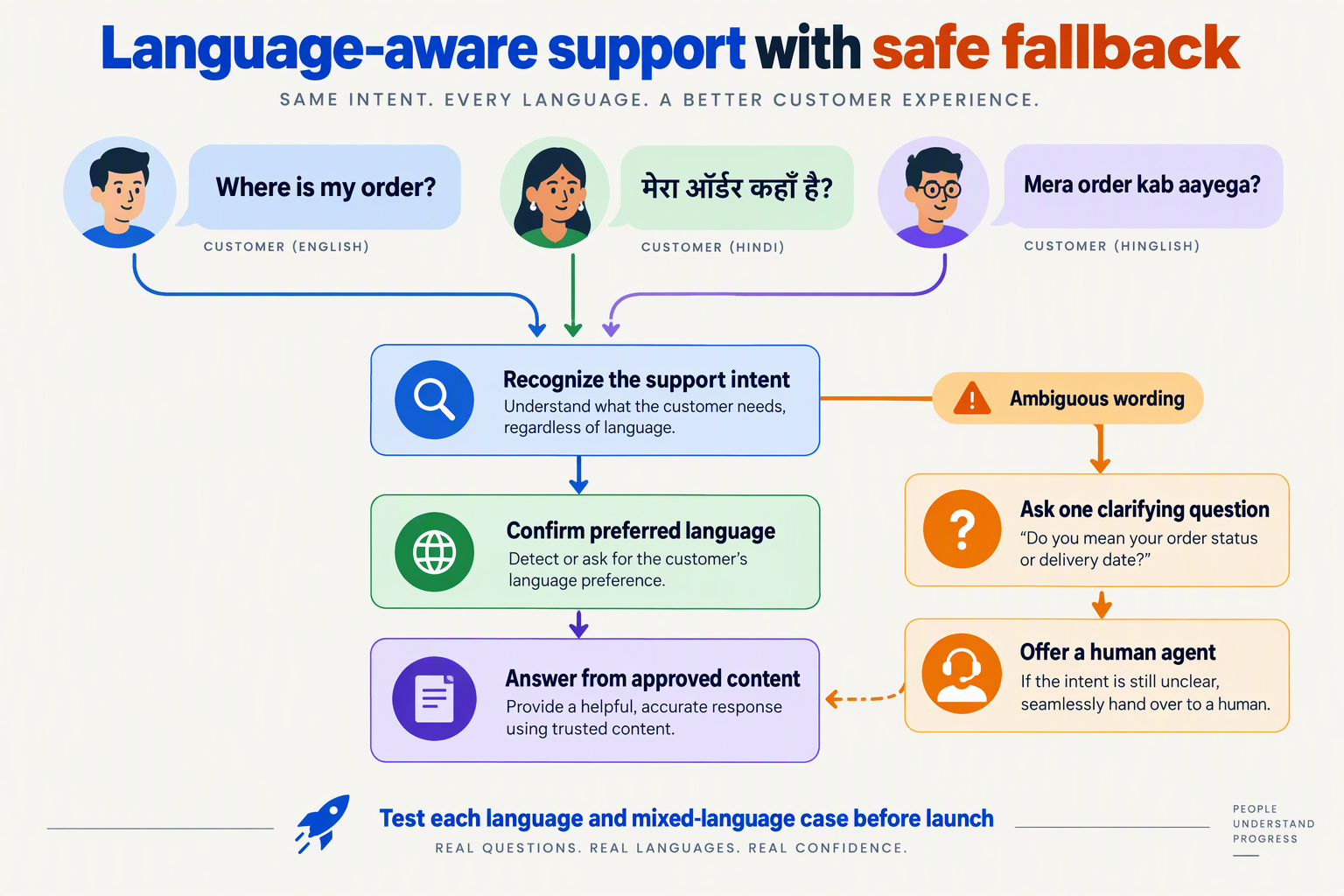
Handle Hindi, regional-language and Hinglish queries by following the customer’s preferred language and script, preserving meaning, and clarifying ambiguity before taking action. A WhatsApp customer support chatbot should not force English or treat mixed-language messages as errors.
How should a WhatsApp chatbot identify language preferences?
For an October 2026 implementation, design language selection around the conversation—not the customer’s name, location or phone number. A message such as “Mera refund kab aayega?” signals Roman-script Hindi, but does not necessarily mean the customer wants replies in Devanagari.
Use this sequence:
- Start with the customer’s language and script. Reply to clear Hinglish in simple Hinglish; reply to Hindi written in Devanagari in Hindi.
- Offer a lightweight correction. For example: “Hindi, English ya kisi aur language mein help chahiye?”
- Retain the stated preference in conversation context. Avoid asking again after every message.
- Allow switching at any point. “English mein batao” should change the reply language without restarting the support workflow.
Avoid presenting a long language menu before understanding a straightforward request. Language selection should reduce effort, not become another obstacle.
How do you handle Hinglish without changing the customer’s meaning?
Separate intent recognition from reply generation. First establish what the customer means; then retrieve the relevant order information or approved policy; finally compose the answer in the preferred language.
Consider this illustrative message:
“Payment kat gaya but order show nahi ho raha.”
This describes a payment debit with a missing order—not automatically a refund request. The next step should investigate the payment/order mismatch rather than promise reimbursement.
Build test cases around:
- Romanisation variants: “nahi,” “nai” and “nahin.”
- Mixed vocabulary: “Refund initiate hua kya?”
- Negation: “Cancel mat karna” means do not cancel.
- Ambiguous requests: “Order change karna hai” needs clarification about what should change.
Keep order IDs, amounts, dates and product names unchanged. Never translate identifiers or turn an uncertain status into a definite promise.
How should regional-language answers stay consistent with support policies?
Use one approved policy source with reviewed language versions, rather than letting each language develop different refund rules or delivery commitments.
Maintain a glossary for terms such as “refund initiated,” “replacement approved” and “business days.” Have fluent reviewers check whether translations preserve operational meaning, especially for eligibility conditions and exclusions.
A useful answer pattern is:
- State the verified status.
- Explain what that status means.
- Give the approved next step.
- Ask one clarifying question if needed.
Treat WhatsApp calls separately from text translation. According to CallMissed’s verified product fact sheet, as of October 2026, CallMissed supports speech recognition in 22 Indian languages plus English, including Hinglish, and can connect WhatsApp Business calls to an AI voice agent. That speech capability does not establish equivalent translation quality for every written language; test chat and voice independently.
When should language uncertainty trigger human help?
Escalate when repeated clarification fails, the customer requests a language the workflow cannot reliably support, or ambiguity could change a payment, cancellation or complaint outcome.
Meta’s WhatsApp Business Messaging Policy, referenced for October 2026, requires automated support to offer “prompt, clear, and direct escalation paths.” For multilingual handling, pass the human agent the original message, any machine translation, language preference and unresolved question. Label translations as machine-generated, and measure successful resolution by language—not just overall chatbot performance.
How much does WhatsApp support automation cost in India?
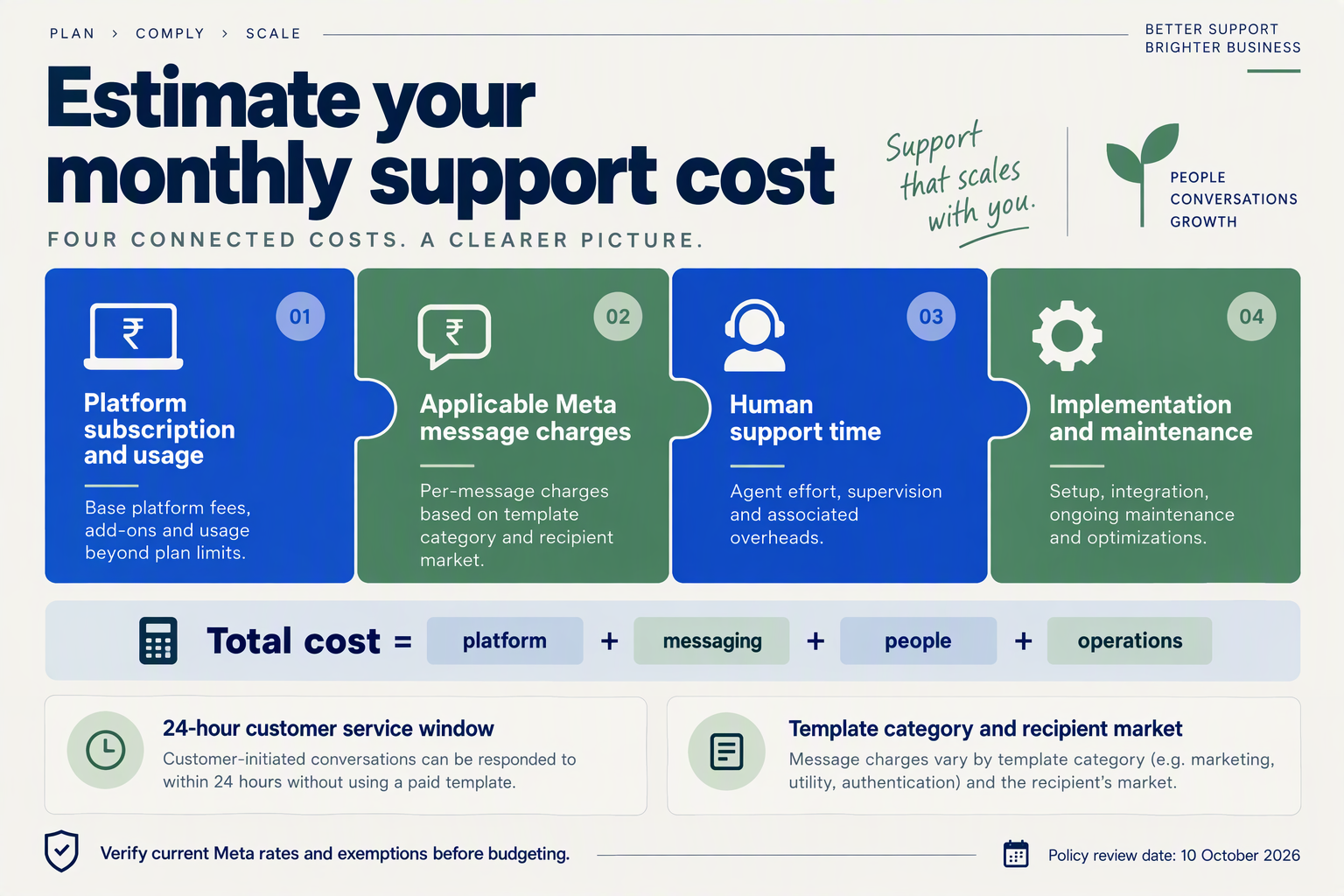
WhatsApp support automation in India costs more than the chatbot subscription: budget for Meta messaging charges, platform and AI usage, integrations, and human support. For an October 2026 rollout, calculate these separately rather than treating a headline monthly price as your total operating cost.
What charges belong in your WhatsApp automation budget?
Build your budget around four cost layers:
- Meta messaging charges: Chargeable messages depend on category and recipient market. Meta’s developer pricing documentation dates the switch to per-message charging to July 1, 2025; use the current India rate card, not an older conversation-based calculator.
- Platform and AI charges: Check subscriptions, usage credits, chatbot consumption, shared-inbox access, and any provider markup on Meta charges.
- Implementation and maintenance: Include connecting order systems, preparing knowledge content, testing workflows, and updating answers when policies change.
- Human handling: Budget for escalations, quality reviews, and staffing during peak periods. Automation does not eliminate exception handling.
Ask providers whether quoted prices include taxes, setup, integrations, and messaging charges. A low subscription can still produce a higher total bill if essential capabilities are separately billed.
Which WhatsApp support messages affect your bill?
Count chargeable messages, not just customer conversations. One support case might require no chargeable outbound messages, while another might need several templates after the customer stops responding.
According to Meta’s WhatsApp Business Platform pricing page, referenced for October 2026, customer messages open a 24-hour customer service window in which businesses can send service messages at no charge. That distinction matters financially: an order-status answer delivered during an active support exchange has a different cost profile from a later template notification.
For forecasting, separate:
- Customer-initiated exchanges handled within the service window.
- Follow-up templates sent after the window closes.
- Marketing and authentication messages, rather than grouping everything under “support.”
The supplied research contains conflicting utility-message pricing snippets. Do not use an unverified ₹0.115 figure as the current India tariff; confirm the applicable category, window treatment, and rate directly with Meta before approving the budget.
How can you estimate a monthly automation bill?
Use this planning formula:
Monthly cost = platform fees + billable AI usage + chargeable Meta messages + implementation allocation + human handling + applicable taxes.
Consider an illustrative October 2026 budget, not a vendor quote:
- 10,000 support cases per month.
- 2,000 chargeable template messages.
- An assumed template rate of ₹0.15 solely for arithmetic.
- Estimated messaging spend: 2,000 × ₹0.15 = ₹300, excluding every other cost layer.
Replace that assumed rate with Meta’s verified tariff. Then model normal demand and peak demand separately: sale-day follow-ups can increase message volume even when customer numbers remain unchanged.
What should Indian teams check in a platform quote?
As of October 2026, CallMissed’s verified pricing lists Starter at ₹999/month, Pro at ₹4,999/month, and Enterprise at ₹20,000/month, with pay-as-you-go usage and no seat fees. CallMissed also provides WhatsApp AI chatbot agents and a live shared inbox through the official Meta Cloud API; request a workflow-specific estimate rather than assuming the subscription covers all usage.
Compare quotes using cost per resolved support case, alongside repeat-contact rate and resolution quality. A cheaper automated reply is not a saving if it creates another conversation, a frustrated customer, and additional agent work.
Which advanced tactics improve resolution and QA?
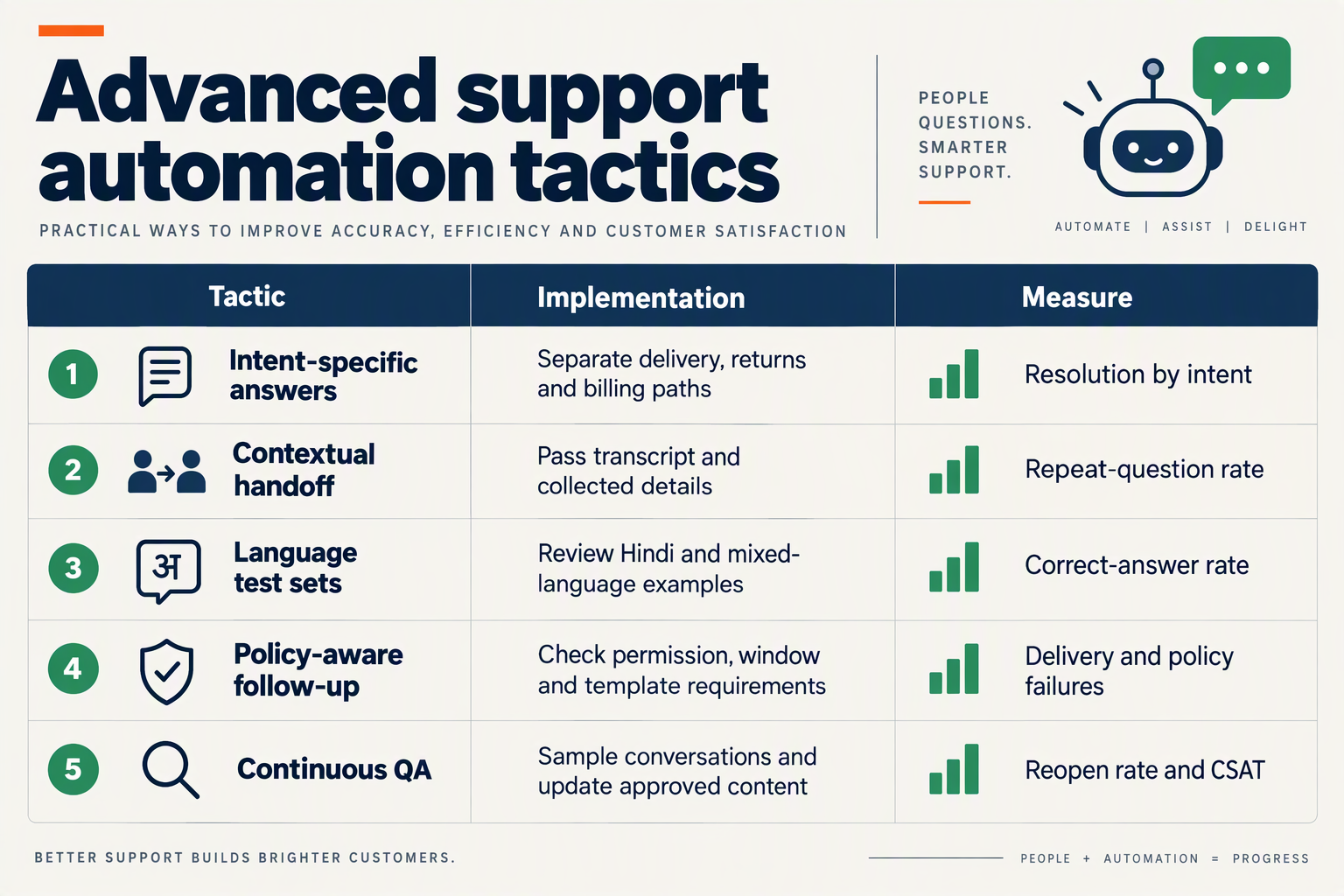
Advanced WhatsApp customer support automation improves resolution when teams verify outcomes, preserve evidence, and test difficult cases—not just fluent answers. The most useful QA tactics combine risk-based review, repeat-contact tracking, and regression tests that expose failures before more customers encounter them.
Which advanced WhatsApp support tactics should teams prioritise?
Use this table as an October 2026 implementation checklist. The checks below are recommended operating practices, not published industry benchmarks or claims that every platform provides these capabilities automatically.
| Tactic | Implementation step | QA check | Main trade-off |
|---|---|---|---|
| Evidence-backed answers | Link policy answers to an approved knowledge entry; retrieve live order details separately. | Does the answer match the applicable policy and order record? | Requires maintained content and reliable integrations. |
| Action verification | Confirm an operation succeeded before announcing completion. | Is there a success response or reference ID? | Adds checks but prevents false confirmations. |
| Risk-based review | Prioritise refund disputes, payment issues, and repeated failures for review. | Did the workflow recognise the risk and route correctly? | Uses more human capacity on complex cases. |
| Language regression tests | Test equivalent requests in English, Hindi, Hinglish, and relevant regional languages. | Are intent, amounts, dates, and next steps preserved? | Requires language-capable reviewers. |
| Repeat-contact analysis | Connect later messages to the original support issue. | Did the same unresolved problem return? | Needs consistent issue tagging. |
| Controlled workflow releases | Compare revised prompts against a fixed test set before rollout. | Did an improvement introduce another failure? | Slows deployment but makes changes auditable. |
How do you distinguish a completed action from a convincing answer?
Treat answer correctness and task completion as separate QA dimensions. A chatbot can accurately explain cancellation policy while failing to cancel an eligible order.
For example, when a customer writes, “Order cancel kar do,” the workflow should:
- Identify the correct order and check eligibility.
- Request confirmation where appropriate.
- Execute the cancellation through the authorised integration.
- Report completion only after receiving a successful result.
If the operation times out, say that cancellation is not yet confirmed. Retrying a write operation also requires safeguards against duplicate actions; conversational confidence is not transaction evidence.
What should a WhatsApp support QA scorecard measure?
Use a short scorecard with critical failures separated from stylistic issues:
- Factual accuracy: Were policy details, amounts, and order status correct?
- Action integrity: Did the reported action actually succeed?
- Privacy: Did the workflow avoid exposing another customer’s information?
- Resolution quality: Was the next step clear, and did the issue remain resolved?
- Escalation quality: Could the receiving agent act without reconstructing the conversation?
Meta’s WhatsApp Business Messaging Policy, referenced for this October 2026 guide, requires “prompt, clear, and direct escalation paths” when businesses use automation during the customer service window. Turn that requirement into a testable scenario: ask for a person after an unsuccessful automated answer and verify the actual routing, not merely the chatbot’s promise.
How can teams improve QA without reviewing every conversation?
Review a random sample alongside all flagged high-risk cases; random sampling alone can miss uncommon but costly failures. Maintain a fixed regression set containing ambiguous requests, stale policy questions, failed integrations, and code-mixed messages.
As of October 2026, CallMissed provides a live shared inbox, human handoff, agent assist, support tickets, SLA policies, and CSAT surveys—useful operational building blocks for this review loop. Pair satisfaction feedback with repeat-contact analysis: a polite answer or positive survey does not, by itself, prove that the underlying issue was resolved.
Which WhatsApp automation mistakes should teams avoid?
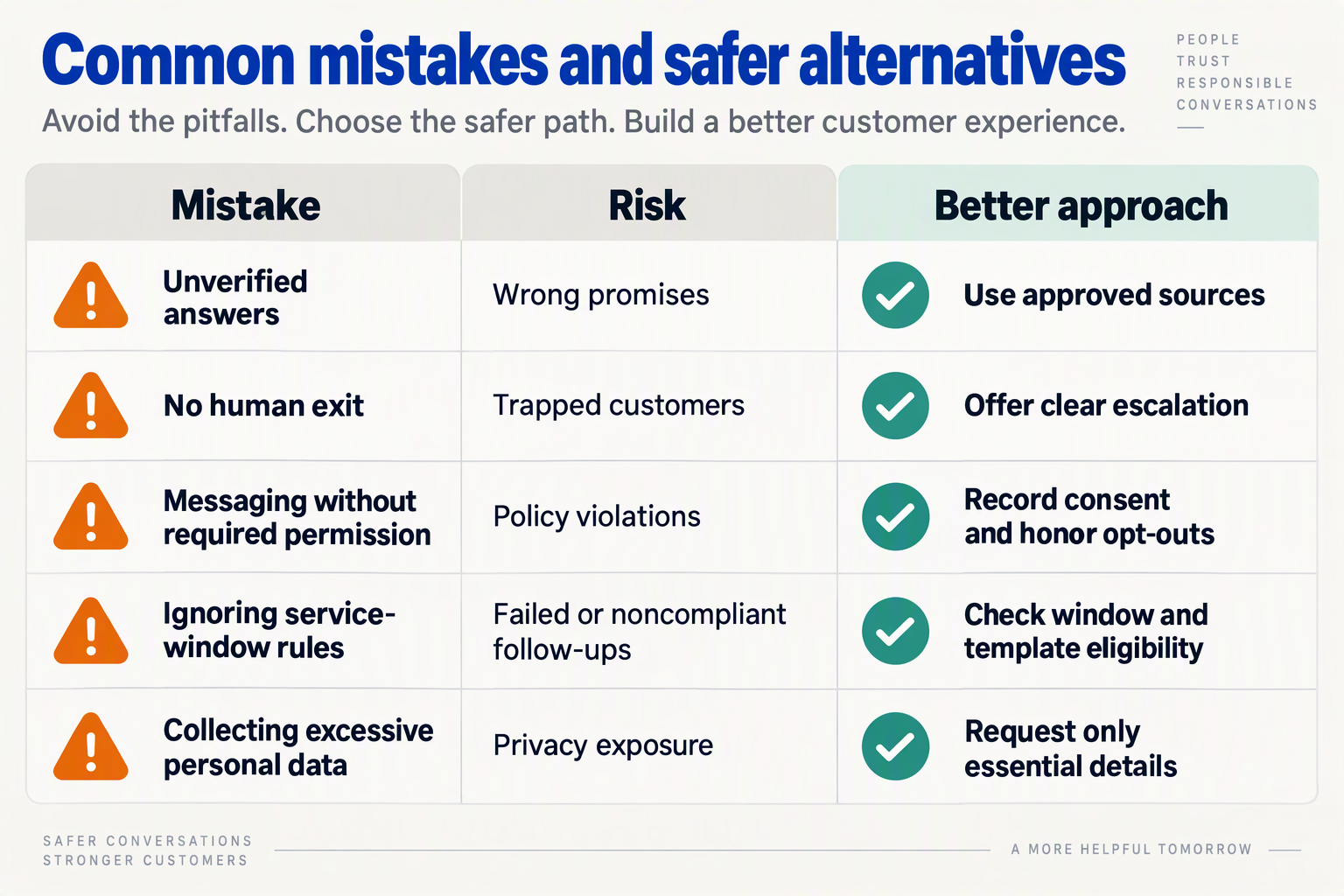
The biggest WhatsApp customer support automation mistakes are treating permission, escalation, and answer accuracy as setup tasks rather than ongoing controls. Avoid them by testing failure scenarios—not just successful conversations—and assigning a human owner to every exception.
For Indian support teams, the practical question is: what happens when an integration fails, a customer switches languages, or a routine delivery query becomes a refund dispute? Use this checklist to audit workflows before expanding automation.
| Mistake | What goes wrong | Prevention | Test before launch |
|---|---|---|---|
| Treating a phone number as permission | Support contact details become an unsolicited messaging list. | Record permission for business-initiated messaging; keep promotional outreach separate from support workflows. | Can the team retrieve the permission record for a sampled recipient? |
| Ignoring service-window expiry | A delayed reply follows the wrong messaging path. | Check window status before sending; route messages outside the window through the applicable approved-template process. | Delay a queued reply until after the window closes. |
| Letting AI invent policy exceptions | A chatbot promises refunds or delivery dates without evidence. | Ground answers in approved policies and current order data; escalate unsupported requests. | Ask for a refund that the published policy excludes. |
| Retrying failed actions blindly | Customers receive duplicate messages or repeated order actions. | Use duplicate-action safeguards, bounded retries, and a manual exception queue. | Submit the same request twice and simulate a timeout. |
| Routing solely by keywords | “Refund nahi chahiye” is mistaken for a refund request. | Evaluate intent, negation, and conversational context; confirm consequential actions. | Test Hindi-English mixtures, spelling variations, and negative statements. |
| Measuring only response speed | Fast answers conceal unresolved cases and repeated contacts. | Review resolution quality, repeat contacts, and escalation outcomes alongside speed. | Audit completed conversations against the actual customer outcome. |
How should teams test permission and service-window failures?
Meta’s opt-in documentation, referenced for this October 2026 guide, requires businesses to obtain opt-in before messaging people on WhatsApp. A useful operational safeguard is to store the permission source and timestamp, rather than relying on an agent’s memory or an imported spreadsheet.
According to Meta’s WhatsApp Business Platform pricing page, referenced in October 2026, a customer message opens a 24-hour customer service window. Test the boundary explicitly: a workflow that succeeds immediately may need different handling when an integration delay pushes the reply beyond that window.
What should happen when the chatbot cannot safely resolve a request?
Define stop conditions around missing evidence and consequential actions. For example, if an order lookup fails, the chatbot should explain that it cannot verify the status—not confidently substitute an estimated delivery date.
Meta’s WhatsApp Business Messaging Policy, referenced in October 2026, requires “prompt, clear, and direct escalation paths.” Test that requirement with frustrated messages and repeated clarification failures, not only an exact “talk to an agent” command.
As of October 2026, CallMissed provides a live shared inbox and a human-handoff queue; switching the AI off hands the thread to a person. Teams still need to define who owns that queue and how unresolved cases are followed up.
What should a weekly automation review include?
Review a small, varied sample of conversations:
- Accuracy: Did the answer match the policy and available order data?
- Action safety: Did retries create duplicates or unintended changes?
- Customer effort: Did the customer repeat information or return with the same problem?
- Escalation ownership: Did a person actually pick up the exception?
Expand automation only when these checks show reliable outcomes—not merely faster replies.
Frequently Asked Questions
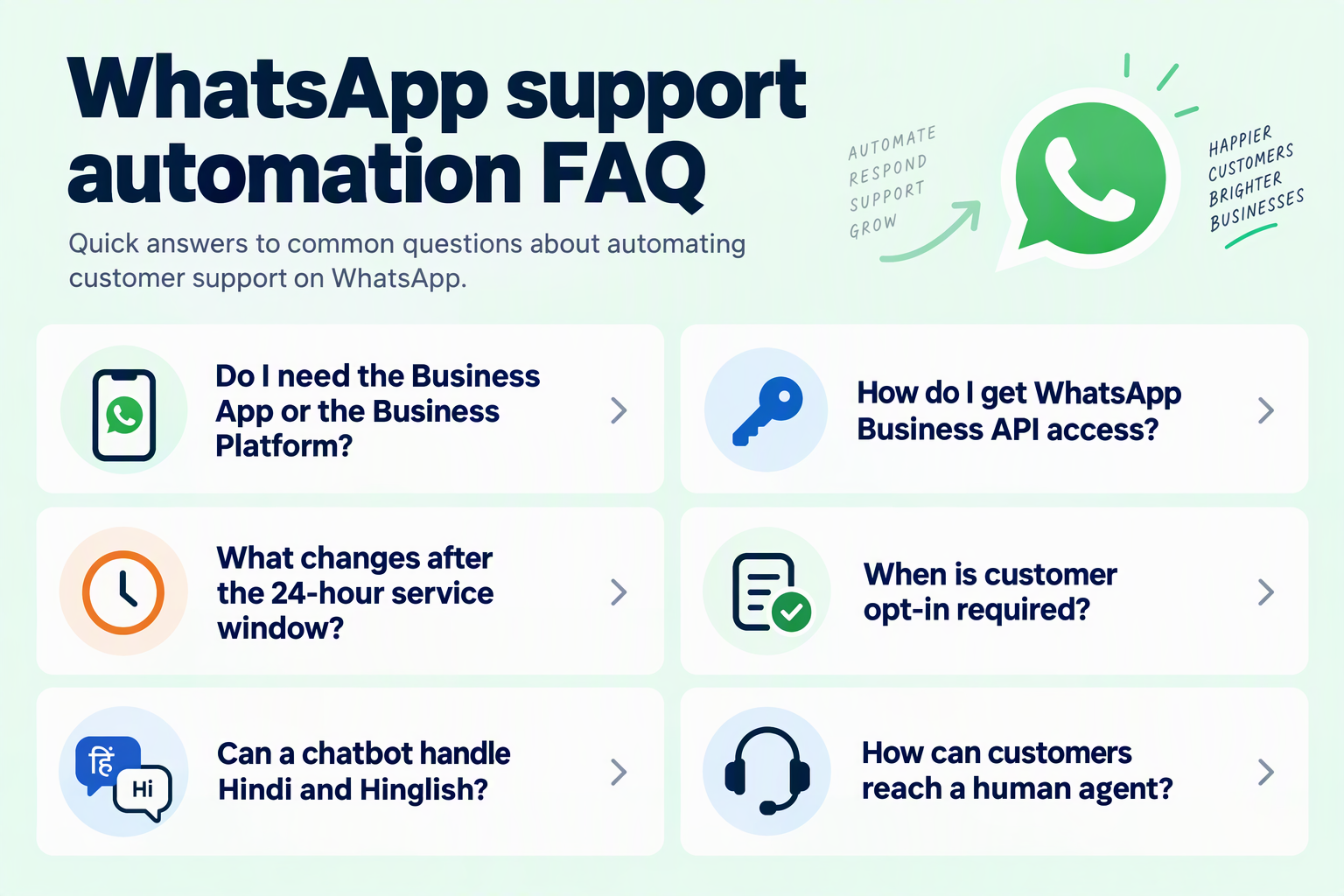
How much does WhatsApp customer support automation cost in India?
Can WhatsApp customer support automation replace human agents completely?
Do customers need to opt in before a business sends WhatsApp messages?
How should a WhatsApp support chatbot handle Hindi, Hinglish, and regional languages?
How can a WhatsApp chatbot avoid giving incorrect refund or order information?
Can customers call an AI support agent directly through WhatsApp?
Which official resources and launch checks should you use next?
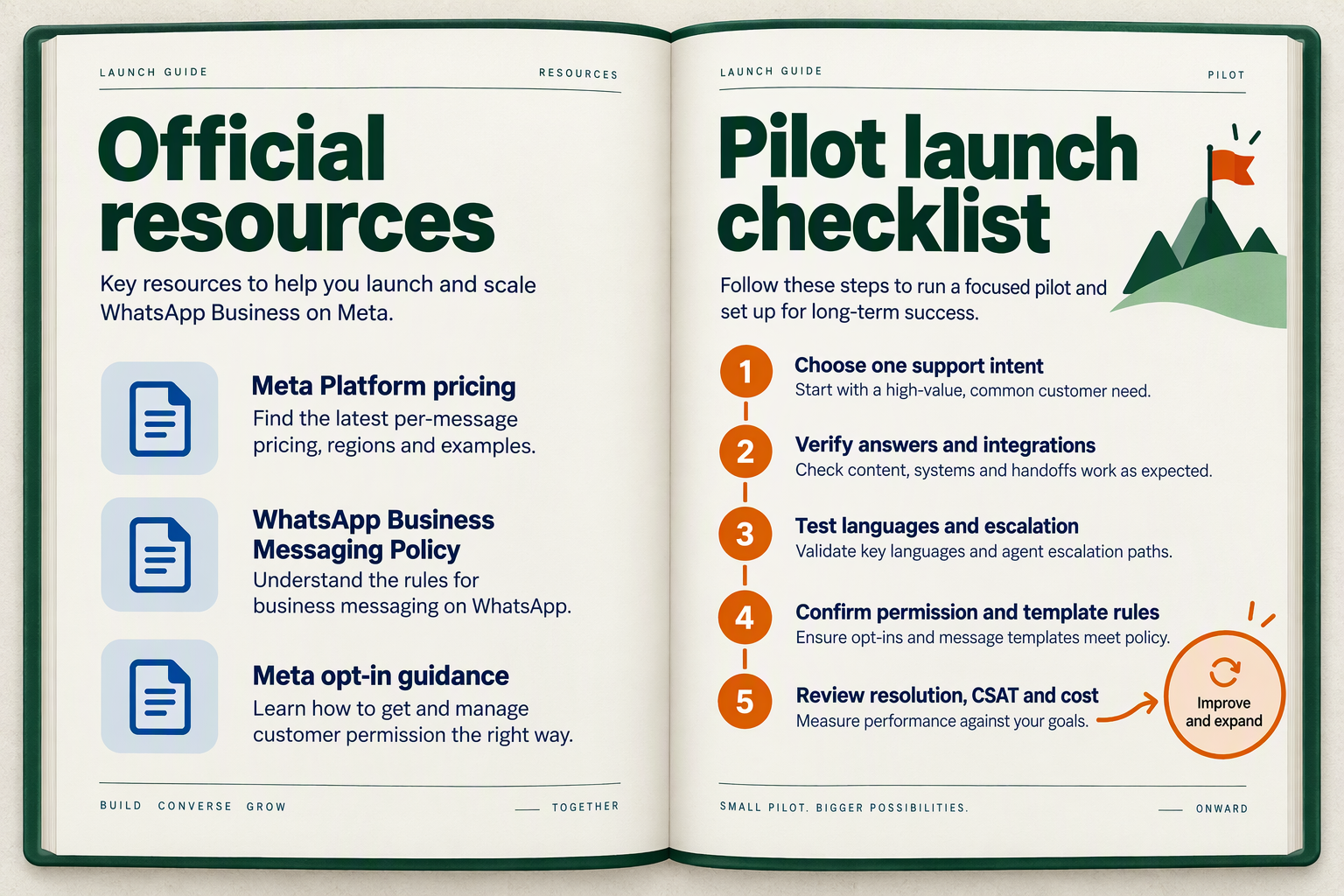
Use Meta’s official pricing documentation, WhatsApp Business Messaging Policy, and opt-in guidance as your launch references, then approve a controlled pilot against a written checklist. For an October 2026 launch, record when each source was reviewed and assign an owner to resolve policy, billing, or support-readiness gaps.
Which official WhatsApp resources should your team bookmark?
Keep a small launch reference register, rather than relying on vendor tutorials or search snippets alone. Each entry should identify the source, your implementation decision, the reviewer, and the review date.
- Meta’s WhatsApp Business Platform pricing documentation: Check the applicable market, message category, and current charging rules before approving your budget. Meta dates the platform’s move to per-message charging to July 1, 2025; treat that as historical context, not a substitute for checking October 2026 rates.
- Meta’s WhatsApp Business Platform pricing page: Use this to validate service-window handling. According to Meta’s pricing page, referenced for this October 2026 guide, a customer message opens a 24-hour customer service window in which service messages can be sent at no charge.
- Meta’s WhatsApp Business Messaging Policy: Make escalation a launch requirement. The policy, referenced for this October 2026 guide, requires “prompt, clear, and direct escalation paths” when businesses use automated responses within the service window.
- Meta for Developers’ “Get opt-in for WhatsApp” guidance: Review how permission is collected before business-initiated messaging. Meta’s guidance, referenced for this October 2026 guide, states that businesses must obtain opt-in before messaging people on WhatsApp.
When sources appear inconsistent, flag the uncertainty rather than encoding an unverified assumption into your chatbot or cost forecast.
What checks should block a WhatsApp automation launch?
For setting up WhatsApp customer support automation, use evidence-based approval: a check passes only when someone can demonstrate the expected behaviour.
- Account and access: Confirm the intended business account and number are connected, and that authorised staff can access the support workspace. Document who owns configuration changes.
- Permission and templates: Trace a sample customer’s consent record to the intended outbound message. Confirm the required template is available before testing that workflow.
- Billing boundaries: Test messages inside and outside the service window. Document the expected message category and charge treatment, then reconcile available billing records during the pilot.
- Answer quality: Run your selected support workflow against normal requests, ambiguous questions, and missing order details. Require the bot to acknowledge uncertainty instead of inventing an answer.
- Human escalation: Ask explicitly for a person, then trigger an unresolved complaint. Check that the receiving agent gets usable context and that customers receive a clear next step when staff are unavailable.
- Recovery ownership: Name the person authorised to pause automation. Rehearse the fallback process before real customers depend on it.
As of October 2026, CallMissed provides WhatsApp AI chatbot agents, a live shared inbox, and a human-handoff queue through the official Meta Cloud API. Those capabilities support the checklist, but your team must still validate its configuration and operating procedures.
How should you approve the first live pilot?
Launch one bounded workflow with a named support owner, review interval, and stop conditions. An invented refund commitment, failed escalation, or unexplained charge should trigger investigation—not expansion.
Close the pilot with a short decision record: what passed, what failed, what changed, and who approved the next scope. Scale WhatsApp customer support automation only when the evidence shows customers can complete the task or reach someone who can help.
Conclusion
WhatsApp customer support automation works best when it automates predictable requests, preserves context, and makes human help easy to reach. For Indian support teams planning in October 2026, the next step is not to automate every conversation: it is to build one dependable workflow, test its exceptions, and expand only when resolution quality holds up.
Keep four priorities at the centre of your playbook:
- Start with a narrow, useful workflow. Establish WhatsApp Business API access, then choose a repeatable task such as order tracking or common policy questions. Keep onboarding separate from chatbot configuration: account access does not guarantee useful answers. A successful first workflow should answer routine requests accurately and recognise when a refund dispute or delivery complaint needs human judgment.
- Design for real customer conversations. Build knowledge-backed answers and test language preferences, Hinglish messages, and requests involving screenshots. Preserve the customer’s question and relevant context when handing over to an agent, rather than asking the customer to restart. The practical test is whether support remains understandable when language, urgency, or expectations change—not whether the chatbot can produce a fluent reply.
- Treat compliance and pricing as operating rules. Meta’s pricing documentation dates the WhatsApp Business Platform’s shift to per-message charging to July 1, 2025; October 2026 budgets should therefore use current rates, not older conversation-based assumptions. According to Meta’s pricing page, referenced for this October 2026 guide, customer messages open a 24-hour service window for service replies at no charge. Plan opt-in, templates, and escalation around Meta’s requirements, while budgeting separately for platform costs, integrations, and human handling.
- Measure completed support, not just fast responses. Track resolution quality, repeat contacts, handoff context, and message costs together. A quick answer that creates another contact is not necessarily an improvement. Meta’s WhatsApp Business Messaging Policy, referenced for this October 2026 guide, requires “prompt, clear, and direct escalation paths”—a useful standard for both compliance and customer experience.
Looking ahead, watch for changes to Meta’s pricing and messaging policies, alongside how reliably AI handles mixed-language questions and exceptions. Expand automation only when testing shows that customers still receive accurate answers and a clear route to a person.
As of October 2026, CallMissed brings together WhatsApp AI chatbot agents, a live shared inbox, and human handoff through the official Meta Cloud API. It is a platform worth exploring as your team develops this approach—not as a substitute for careful workflow design.
Choose one support workflow to improve next: can your team resolve it automatically—and recognise exactly when to stop?
Related Reading
- Omnichannel Customer Communication: 2026 AI Receptionist Scripts and WhatsApp Automation
- AI Agent Access Control: A Customer-Support Safety Guide
- Least Privilege for AI Agents: Customer Support Guide