Cost per resolved ticket: An LLM Support Evaluation Guide



Cost per resolved ticket reveals true AI support value. Compare models with realistic tickets, quality thresholds, and fully loaded costs.
Cost per resolved ticket: An LLM Support Evaluation Guide
What if an LLM that costs one-fifth as much per token makes your support operation more expensive? Cost per resolved ticket, not token price, is the metric that reveals whether a cheaper model actually saves money while helping customers get their problems solved.
The question matters as model pricing becomes harder to separate from performance claims. In the supplied research for October 2026, OpenAI describes GPT-6.1 Sol as offering “near-Astra intelligence for a fifth of the price.” DataCamp’s pricing summary, included in that October 2026 research, lists Sol at $2 per million input tokens and $10 per million output tokens, versus Astra’s $10 and $50 respectively. That is a compelling reason to test a new model—not proof that it belongs in your support queue.
There is encouraging task-level evidence, too. The New Stack comparison included in the October 2026 research reports that GPT-6.1 Sol cost 18% of Astra’s cost on its tested workloads. But coding and CI-triage results cannot establish customer-support resolution quality. Explaining a refund policy, checking an order, and recognizing when to escalate require a different evaluation.
What should a customer-support LLM evaluation measure?
Start with a deceptively simple question: Did the customer’s issue actually get resolved? A fluent answer, a closed conversation, or an avoided handoff does not necessarily qualify. Your benchmark needs a resolution definition that accounts for factual accuracy, policy compliance, completed actions, and repeat contact within a defined window.
Then measure the entire workflow rather than the model invoice alone:
- Model costs: input, output, retries, and fallback calls.
- System costs: retrieval, tool execution, and supporting infrastructure.
- Human costs: escalation, review, and correction.
- Quality outcomes: successful resolutions, reopened tickets, and consequential errors.
Consider a hypothetical test of 1,000 tickets. Model A costs $100 to run but generates $900 in human follow-up and resolves 700 tickets: $1.43 per resolved ticket. Model B costs $200 to run, generates $400 in follow-up, and resolves 800: $0.75 per resolved ticket. The more expensive model is cheaper operationally.
As of October 2026, CallMissed’s developer API supports caller-chosen fallback models and usage and request logs, capabilities relevant to evaluating multi-model support workflows.
This guide will show you how to build a representative ticket dataset, score resolution quality, calculate fully loaded costs, and compare candidates under consistent conditions. You will also learn how to separate genuinely useful savings from apparent savings that merely shift work back to customers or human agents.
How do you evaluate an LLM's cost and quality for customer support?
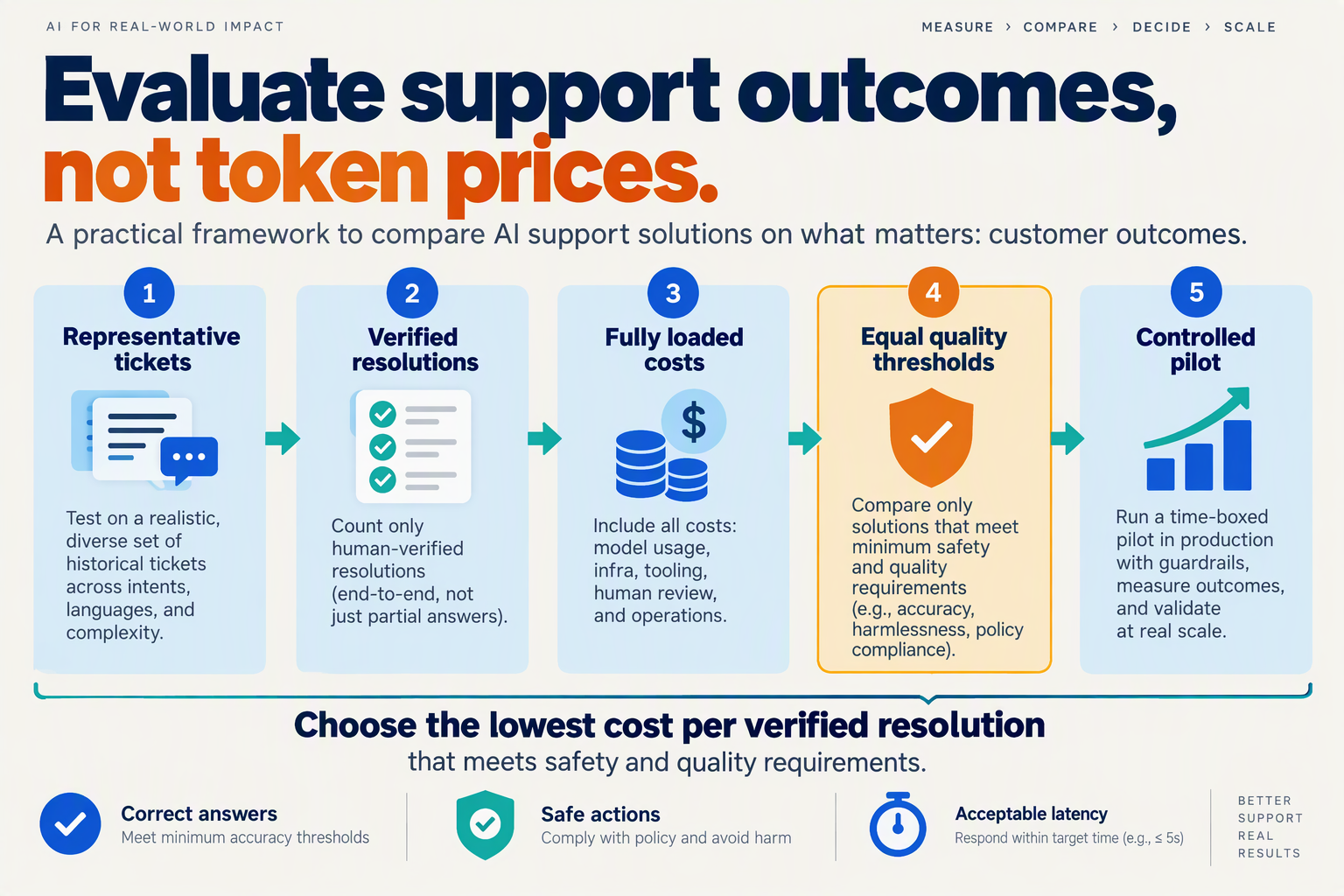
Evaluate an LLM for customer support with a controlled, ticket-based comparison: define acceptable outcomes, test candidates under identical conditions, and select the lowest-cost workflow that passes your quality requirements. Treat model benchmarks as shortlisting evidence—not as a substitute for testing your policies, tools, and customer conversations.
What should you decide before testing a support LLM?
Write a one-page evaluation contract before running experiments. This prevents teams from changing the definition of success after seeing an attractive price or impressive demonstration.
Specify four decisions:
- Scope: Which issues can the model handle—order tracking, billing explanations, troubleshooting, or account changes?
- Authority: Which actions may it execute, and which require customer confirmation or human approval?
- Quality gates: Which failures disqualify a candidate regardless of its average score?
- Operating limits: What response-time, spending, and escalation constraints must the workflow meet?
For example, a retailer might permit automated order-status checks but require human approval for refunds outside the published policy. A model that confidently grants an unauthorized refund has failed the evaluation, even if the customer initially appears satisfied.
Set these rules with support operations, finance, and security—not just the engineering team.
How do you make an LLM comparison fair?
Keep the support environment constant so differences reflect model performance rather than unequal access to information.
Give every candidate the same:
- Policy documents and knowledge-base snapshot.
- Customer history and permitted account data.
- Tool definitions, permissions, and simulated tool responses.
- Task instructions, retry budget, and completion criteria.
Record the model identifier, test date, prompt version, generation settings, and enabled reasoning configuration. Run repeated trials on ambiguous or high-risk tickets; one successful response does not establish reliable behavior.
Use two comparison tracks. A controlled track holds the surrounding workflow fixed. An optimized track allows model-specific prompting or routing, but records the engineering effort and additional costs. Otherwise, a carefully tuned candidate can appear inherently better than an untuned alternative.
As of October 2026, CallMissed’s developer API offers OpenAI-compatible and Anthropic-compatible endpoints, plus reasoning effort control and structured outputs. These capabilities can support a consistent integration layer, although equivalent API access does not make different models behave identically.
Which benchmark claims matter for customer support?
Translate each published claim into a support-specific hypothesis.
In the supplied October 2026 research, Artificial Analysis lists GPT-6.1 Sol (Max) at 63 output tokens per second, versus 59 output tokens per second for GPT-6 Astra (Max). That throughput comparison suggests a responsiveness test, but it does not establish faster completed support interactions.
Measure time to a useful answer and time to completed action separately. Retrieval delays, tool calls, clarification questions, and retries can outweigh token-generation speed.
Similarly, OpenAI’s October 2026 research description emphasizes GPT-6.1 Sol’s capabilities in agentic coding, computer use, and professional work. Test whether those capabilities transfer to your actual support tasks rather than assuming they do.
How should you choose the winning model?
Apply quality gates first, economic ranking second. A low cost per resolved ticket cannot compensate for unacceptable privacy violations or unauthorized actions.
Among candidates that pass, compare cost and outcomes by ticket category—not only as a blended average. A practical result may be a routing policy: use a lower-cost model for routine questions, and escalate sensitive or uncertain cases. Choose the workflow your evidence supports, not the model with the strongest launch headline.
Does GPT-6.1 Sol's claimed one-fifth price mean cheaper support resolutions?
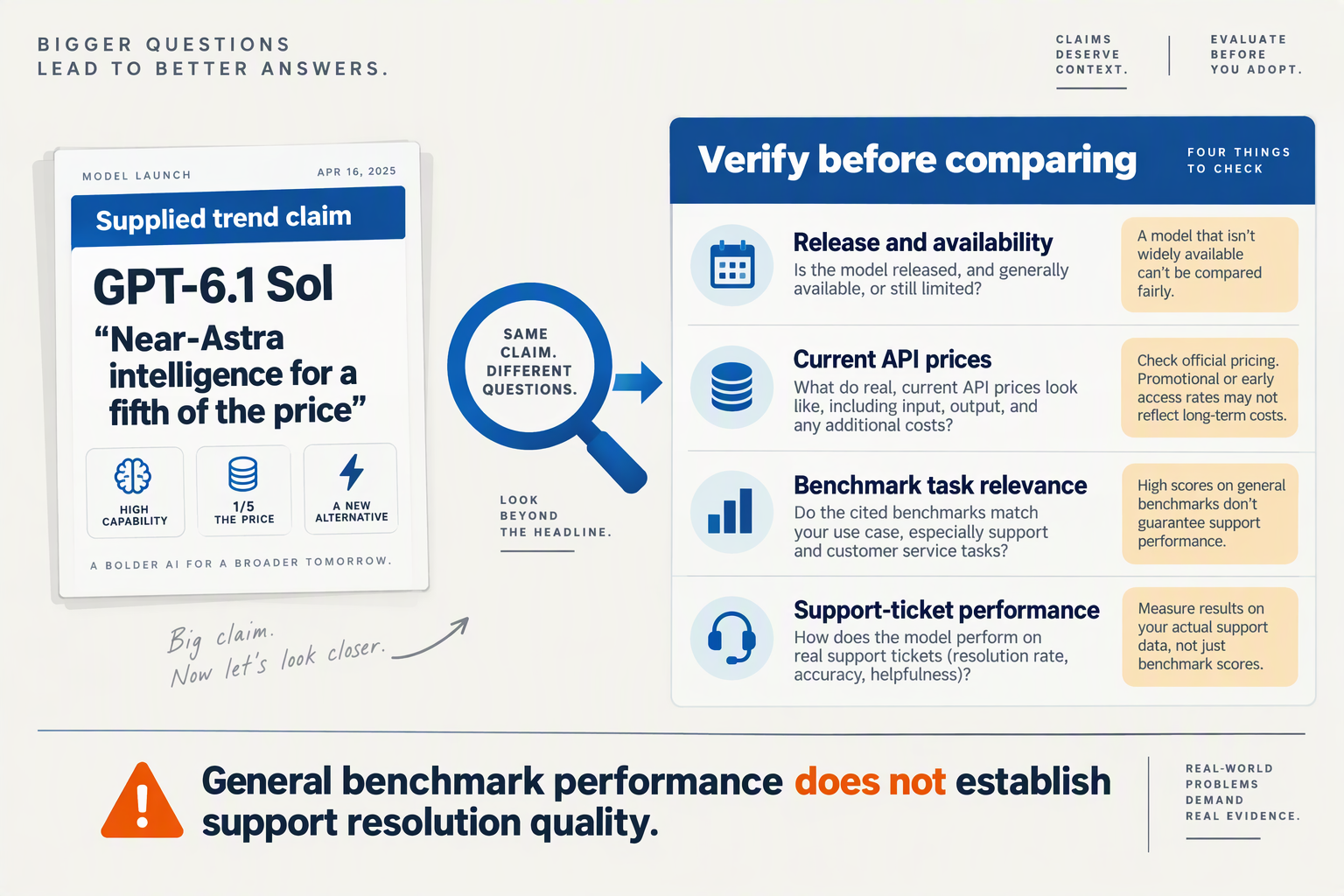
Not automatically: GPT-6.1 Sol’s claimed one-fifth token price means cheaper support resolutions only if additional retries, escalations, and unresolved cases do not consume the savings. Treat the discount as a hypothesis to test against your support workload—not as an equivalent reduction in operating costs.
What does “one-fifth the price” actually measure?
In the supplied October 2026 research, OpenAI describes GPT-6.1 Sol as delivering “near-Astra intelligence for a fifth of the price.” That statement combines a capability comparison with a token-price comparison; neither establishes a customer-support resolution rate.
The distinction matters because support conversations consume different amounts of input and output. A model might need longer conversation histories, more retrieval context, or additional turns to complete the same request.
For a hypothetical October 2026 evaluation, assume each ticket consumes 4,000 input tokens and 1,000 output tokens, with no caching or retries:
- GPT-6.1 Sol: Using DataCamp’s supplied October 2026 rates of $2 per million input tokens and $10 per million output tokens, the model cost is $0.014 per ticket.
- GPT-6 Astra: Using DataCamp’s supplied October 2026 rates of $10 per million input tokens and $50 per million output tokens, the model cost is $0.070 per ticket.
- Difference: Under these assumptions, Sol saves $0.056 per ticket, or $56 across 1,000 tickets.
That is an 80% reduction in the modeled token bill—not necessarily an 80% reduction in support expenditure.
How much extra human work would erase the savings?
Divide the model savings by the cost of additional human intervention to calculate an initial break-even escalation budget.
Suppose, purely for this worked example, each additional escalation costs $7. The $56 saved across 1,000 tickets would pay for only eight extra escalations. An escalation-rate increase of 0.8 percentage points would therefore erase the token savings, assuming all other costs and successful resolutions remain unchanged.
Use this sequence:
- Calculate token savings using measured token consumption, not identical consumption assumed indefinitely.
- Price additional interventions, including agent handling time and correction work.
- Compare successful resolutions, because equal expenditure with fewer resolved tickets is still worse economics.
The shortcut is useful for screening candidates. Your final decision should still use cost per resolved ticket, especially when resolution rates differ.
Can retries and fallback calls eliminate the discount?
Yes. At one-fifth the token rates, five equivalent Sol attempts consume the same model budget as one Astra attempt—before additional retrieval or tool costs. This is a mathematical illustration, not a claim about either model’s observed behavior.
For a fallback workflow, count both calls: a failed Sol attempt followed by Astra is not priced like Astra alone. Record whether the first attempt contributed useful work or simply added expense.
The New Stack’s comparison in the supplied October 2026 research reports Sol costing 18% of Astra’s cost on its tested workloads. That supports testing Sol, but coding and CI-triage workloads cannot establish support-specific savings.
The practical conclusion is conditional: Sol is cheaper for your support operation when its measured workflow savings survive the cost of mistakes, recovery, and unresolved demand. A lower token invoice is the starting evidence—not the verdict.
What prerequisites and evaluation settings should you prepare?
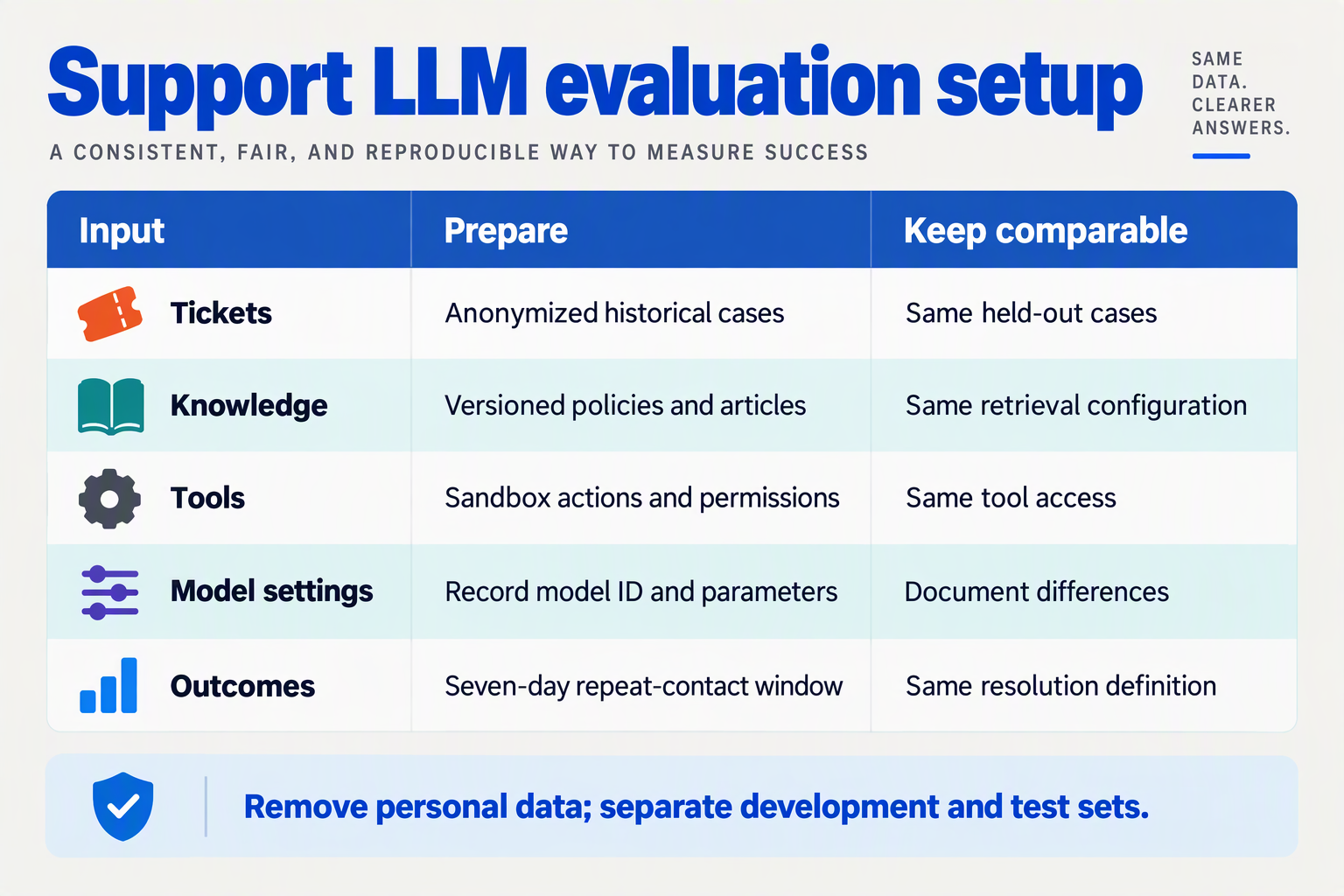
Prepare a versioned support-ticket test set, a frozen support environment, and a written evaluation configuration before comparing LLMs. Every candidate should receive the same evidence, permissions, and scoring rules; otherwise, differences in retrieval or tool access can masquerade as differences in model quality.
What prerequisites belong in your evaluation checklist?
Use this checklist to make the experiment reproducible. The settings below are recommended evaluation controls, not published industry benchmarks.
| Prerequisite | What to prepare | Setting to record | Why it matters |
|---|---|---|---|
| Ticket dataset | De-identified conversations covering common and high-risk issues | Dataset version, sampling window, issue categories | Prevents cherry-picked comparisons |
| Reference evidence | Approved policies, product documentation, and expected actions | Knowledge snapshot date and policy versions | Establishes what counts as a correct answer |
| Tool sandbox | Mock order lookup, refund, and account-management endpoints | Permissions, response fixtures, failure cases | Tests actions without affecting customers |
| Model configuration | Exact model identifier and supported generation controls | Temperature, reasoning effort, output limit | Makes results repeatable |
| Workflow limits | Shared retrieval, retry, timeout, and fallback rules | Tool-call budget and escalation conditions | Prevents unequal resources from skewing results |
| Scoring and logging | Review rubric, blinded outputs, and request traces | Reviewer instructions and cost fields | Connects quality judgments to auditable execution |
Keep development tickets separate from the held-out evaluation set. Adjust prompts on the development set, then lock them before the scored run; otherwise, you risk measuring how closely the system was tuned to known answers.
Which model settings should stay consistent?
Hold the support workflow constant, but do not assume identical parameter values produce equivalent behavior across models. Reasoning controls, sampling options, and output limits can have different meanings or may not be supported.
- Establish a shared baseline: use the same system instructions, conversation history, retrieved passages, and tool schemas.
- Record model-specific differences: document unsupported controls and any substitutions rather than silently changing the setup.
- Separate tuning from testing: if you optimize each candidate, give each the same development budget and report tuned results separately from the baseline.
This distinction matters for the current pricing trend. In the supplied October 2026 research, OpenAI describes GPT-6.1 Sol as delivering “near-Astra intelligence for a fifth of the price,” but that claim does not specify your support workflow’s reasoning settings, retrieval quality, or escalation rules.
As of October 2026, CallMissed’s OpenAI-compatible developer API supports reasoning effort control, structured outputs, and usage and request logs. These capabilities can help standardize integrations and capture evaluation evidence, although supported settings still need checking for each selected model.
How should you configure latency and safety tests?
Measure end-to-end task time, not just token generation speed. According to Artificial Analysis’s comparison supplied for October 2026, GPT-6.1 Sol (Max) produces 63 tokens per second versus GPT-6 Astra (Max) at 59 tokens per second; those figures do not include your retrieval, tool execution, or retry delays.
Before running the benchmark, specify:
- Timing boundaries: start at ticket submission and stop at the completed answer or confirmed action.
- Failure handling: define what happens when a lookup times out or returns conflicting information.
- Safety boundaries: require authorization before sensitive actions and escalation when evidence is insufficient.
For example, a sandbox refund ticket should include both an eligible order and an ineligible order. A model that responds quickly but refunds both has failed the prerequisite safety test—not earned a cheaper resolution.
How do you get started with a reproducible multi-model test?
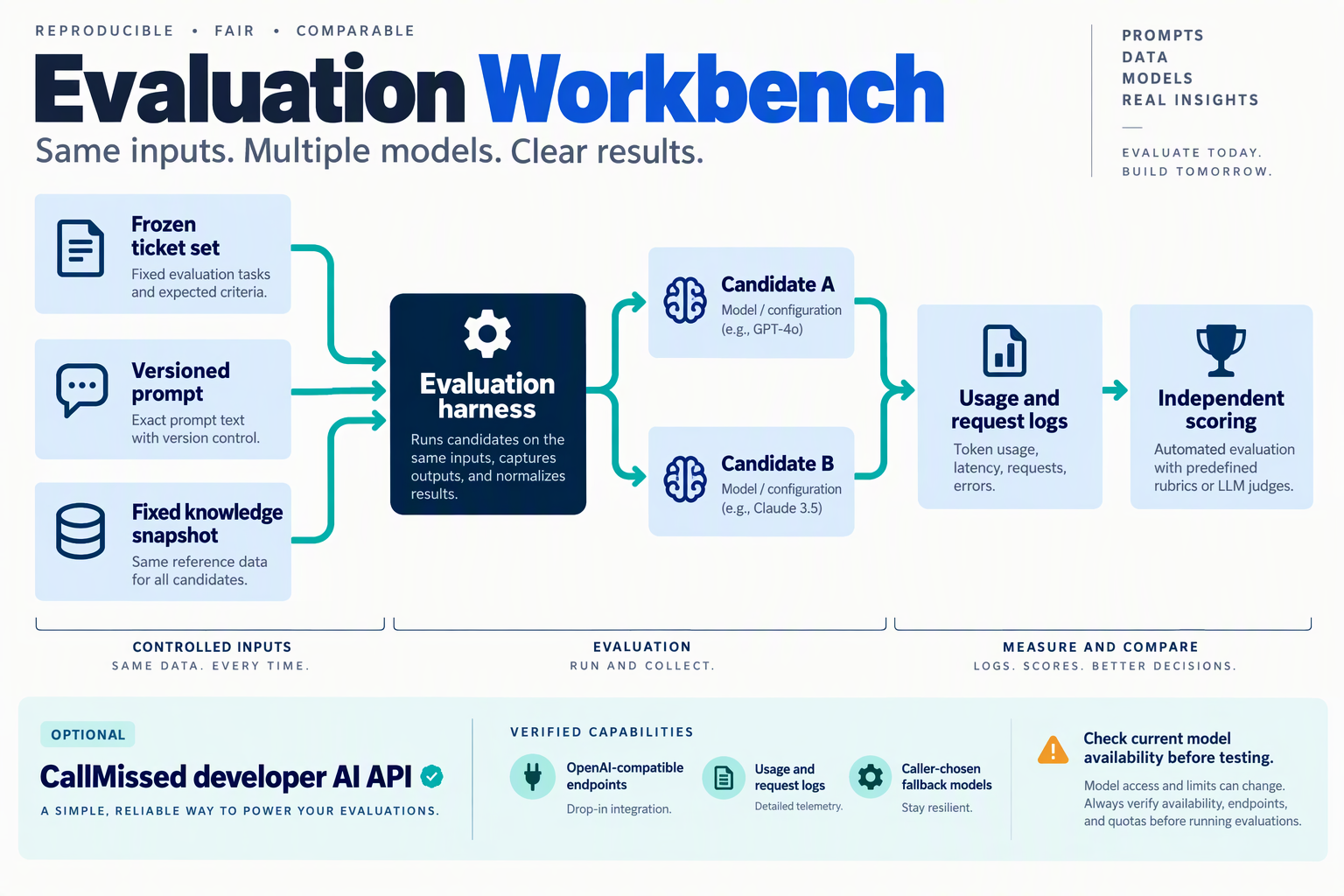
Start with a versioned evaluation bundle: a fixed ticket dataset, frozen knowledge sources, shared tool fixtures, and a configuration file for each candidate model. Run every model against the same cases, preserve the complete traces, and make the experiment reproducible—even though individual generations may vary.
What should your first multi-model test include?
Use three candidates: your current production model, the lower-cost challenger, and a higher-capability reference. This separates “cheaper than our baseline” from “good enough for our customers.”
OpenAI’s October 2026 material describes GPT-6.1 Sol as delivering “near-Astra intelligence for a fifth of the price.” Treat that claim as a reason to include Sol in an experiment, not as the experiment’s expected conclusion.
Build the first run around a manageable, explicitly labeled pilot dataset. For example, 100 historical tickets can help debug your harness; that is a proposed starting size, not a statistically validated benchmark.
- Assign stable case IDs. Keep customer messages, relevant account state, and expected outcomes together.
- Remove unnecessary personal information. Replace identifiers consistently so order lookups and other dependencies still work.
- Freeze the evidence. Save the policy documents, retrieval results, and simulated tool responses used for each case.
- Separate development from evaluation. Tune prompts on development tickets, then lock them before running the held-out test.
Do not use historical agent replies as unquestioned ground truth. A reply may sound helpful while contradicting the policy that applied to that ticket.
Which settings must stay consistent across models?
Keep the support task and available evidence constant, while recording unavoidable differences between model APIs. Identical parameter names do not necessarily produce equivalent behavior across providers.
Create a run manifest containing:
- Model identity: provider, exact model identifier, version where available, and execution date.
- Instructions: system prompt version, tool schemas, and knowledge snapshot.
- Generation controls: temperature, output limit, reasoning settings, timeout, and retry policy.
- Infrastructure: SDK version, concurrency, region where known, and cache configuration.
- Accounting: dated prices, token usage, tool charges, and fallback activity.
Use the same customer-facing timeout and action permissions. Record output limits rather than assuming equal token caps represent equal computational effort.
As of October 2026, CallMissed’s OpenAI-compatible developer API provides usage and request logs, reasoning effort control, and caller-chosen fallback models. Those capabilities can support a comparison harness, but the harness should still preserve its own configuration and scoring records.
How do you replay tickets without changing the experiment?
For an order-status case, return the same simulated shipment state to every candidate. If one model calls get_order twice and another calls it once, preserve that difference: it is part of workflow efficiency, not noise to erase.
Run cases in randomized order and repeat selected cases to expose variability. Keep cold-cache and warm-cache results separate, and disable fallbacks when measuring a candidate alone; evaluate the production fallback workflow in a separate run.
What should you save before comparing results?
Save messages, retrieved evidence, tool calls, errors, timing, usage, and reviewer scores under each case ID. Blind reviewers to model names, and predefine how disagreements will be resolved.
Artificial Analysis’s comparison supplied for October 2026 reports output speeds of 63 tokens per second for GPT-6.1 Sol (Max) and 59 for GPT-6 Astra (Max). Your harness should additionally measure end-to-end ticket latency: retrieval, tool execution, and retries can outweigh generation speed.
The deliverable is a rerunnable evidence package—not a leaderboard screenshot—from which quality scores and cost per resolved ticket can be calculated consistently.
How do you benchmark tickets and verify genuine resolutions step by step?
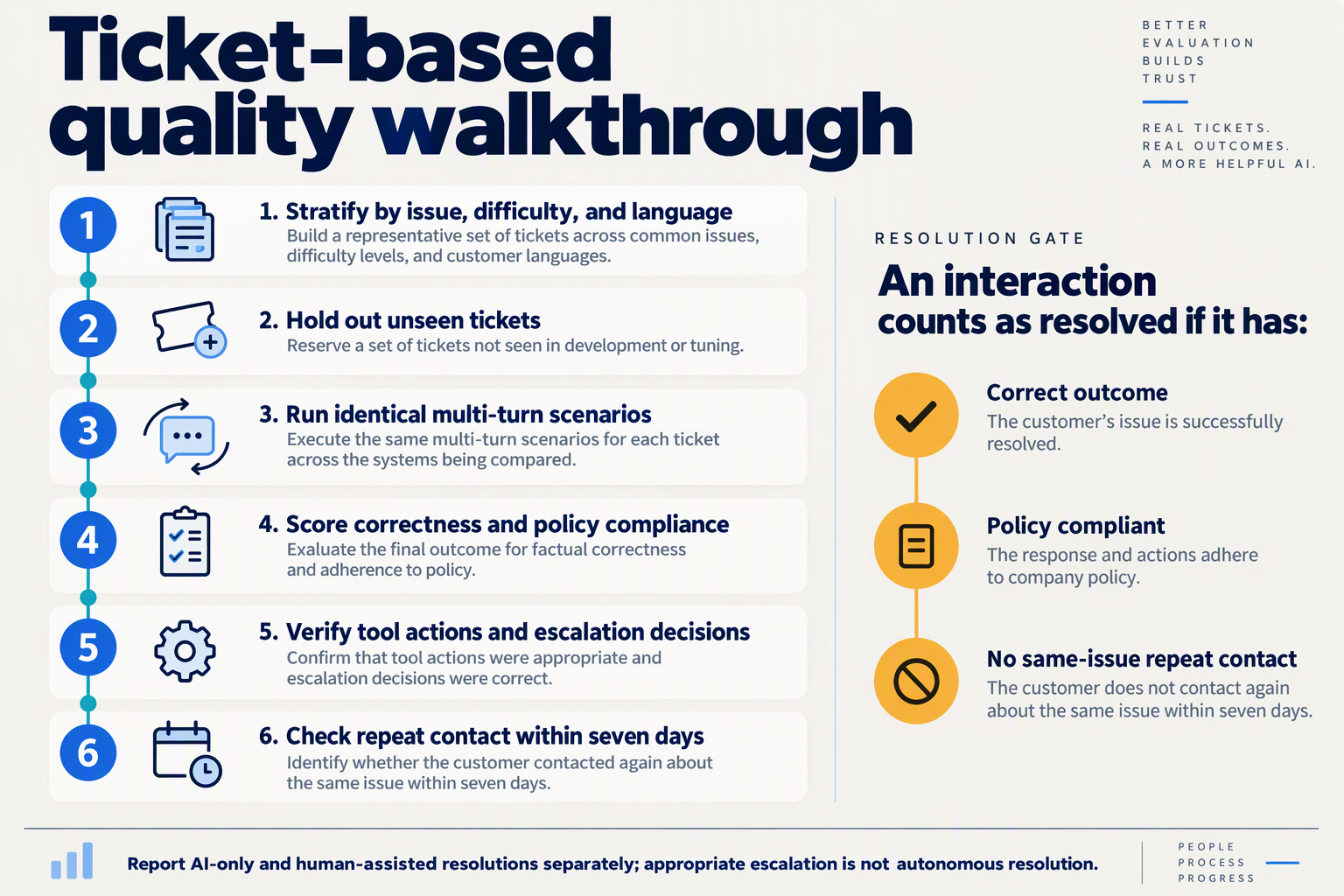
Benchmark support tickets by replaying the same customer scenarios under controlled conditions, then verify outcomes against tool records and customer follow-up—not the model’s claim that it helped. Separate offline task completion from confirmed resolution, which requires evidence that the problem stayed solved.
How do you create a reproducible support-ticket benchmark?
- Freeze a representative test set. Sample historical tickets across your actual support mix: billing, delivery, account access, cancellations, and policy exceptions. Include difficult cases such as missing information, contradictory messages, and requests that require escalation. Remove personal information and keep evaluation tickets separate from prompt-development examples.
- Create an outcome card for each ticket. Record the customer’s goal, available account state, applicable policy, permitted actions, and evidence required for success. For example, “Where is my refund?” should require the correct refund status and expected timing—not merely a reassuring response. Label cases where a safe handoff is the correct outcome; do not count those as autonomous resolutions.
- Lock the comparison conditions. Give each candidate the same conversation history, knowledge-base snapshot, tool permissions, and action budget. Record the model identifier, evaluation date, prompt version, sampling settings, timeout, and retry policy. If a model needs a different prompt, treat that as a separate configuration rather than silently changing the experiment.
Speed is a secondary measure, not a resolution verdict. In the supplied October 2026 research, Artificial Analysis lists GPT-6.1 Sol (Max) at 63 output tokens per second, compared with 59 for GPT-6 Astra (Max). Those figures do not establish which model correctly processes a cancellation or identifies an unauthorized refund request.
What evidence proves that an AI support ticket was resolved?
- Execute actions in an isolated environment. Use a sandbox or resettable account state so one candidate’s actions cannot affect another’s test. Preserve tool inputs, outputs, errors, and final state.
For a cancellation ticket, your evidence checklist might include:
- Authorization: Was the requester permitted to cancel?
- Policy compliance: Was the cancellation allowed?
- Execution: Did the order system confirm the change?
- Communication: Did the answer accurately describe what happened?
- Safety: Were unrelated orders and account settings unchanged?
A response saying “Your order is cancelled” fails if the cancellation tool returned an error. Conversely, asking for necessary verification may be correct even though the ticket remains unresolved.
- Score independently, then adjudicate disagreements. Hide model names from reviewers and use a fixed rubric covering factual accuracy, policy compliance, action completion, and escalation appropriateness. Automated checks can validate account state and required fields; human reviewers should assess ambiguity and consequential mistakes. An LLM judge can assist, but should not be the sole authority validating another model’s success.
How do you verify resolutions after the benchmark?
- Run a limited live pilot with a predefined follow-up window. Offline replay establishes task completion, not whether a real customer’s problem stayed solved. In a hypothetical October 2026 pilot, you might check for same-issue repeat contact over seven days; choose the window according to your workflow rather than treating seven days as an industry standard.
Track outcomes as confirmed resolved, failed, escalated, or pending verification. Audit a sample of apparently successful tickets, because customer silence alone is weak evidence.
Finally, calculate cost per resolved ticket using confirmed resolutions, while reporting pending cases separately. Compare candidates on the same tickets, publish results by ticket category, and investigate critical failures before allowing a lower average cost to determine deployment.
How do you calculate cost per resolved ticket, including human escalation?
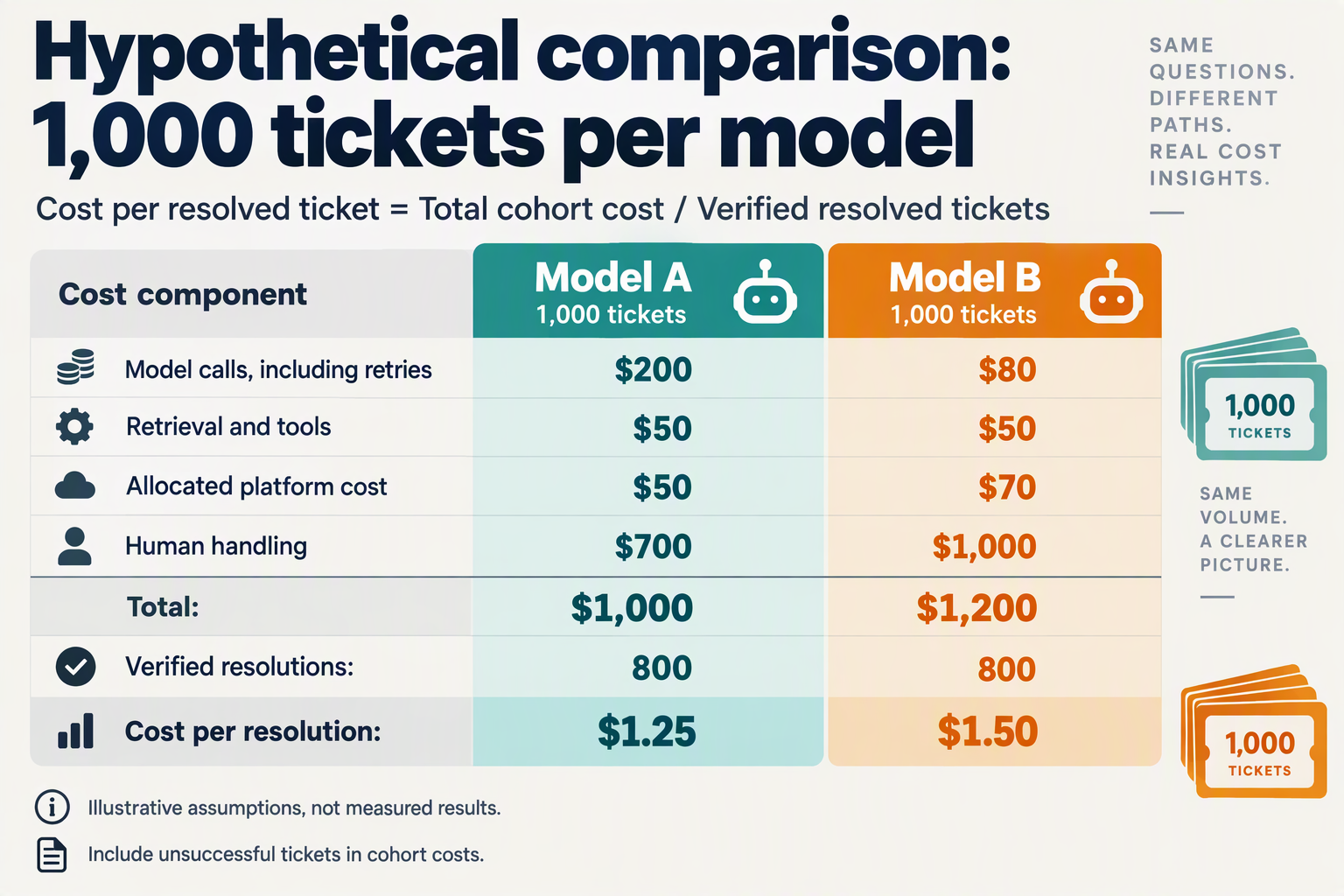
Calculate cost per resolved ticket by dividing all support-workflow costs—including human escalation—by the number of unique tickets successfully resolved within your chosen follow-up window. Count both AI-only and human-assisted resolutions, but include the costs of unsuccessful tickets in the numerator.
What belongs in the cost-per-resolved-ticket formula?
Use this formula for each model on the same evaluation cohort:
Cost per resolved ticket = (model + retrieval + tools + infrastructure + human handling + review and rework costs) ÷ verified resolved tickets
Keep the accounting boundaries consistent:
- Model costs: every input and output token, including retries, fallback calls, and conversation summarization.
- Workflow costs: retrieval, paid tool calls, and allocated infrastructure or platform charges.
- Human costs: escalation handling, reading the conversation, completing actions, and documenting the outcome.
- Quality-control costs: production review, corrections, and handling reopened issues.
Separate one-time benchmark setup costs from recurring operating costs. Otherwise, a candidate tested with more intensive manual review may appear intrinsically more expensive when the difference comes from your evaluation process.
For AI customer support pricing: per-resolution vs per-seat, translate both billing models into this common denominator. A vendor’s billable “resolution” is not automatically your verified resolution, and seat subscriptions still belong in the cost allocation.
How do you calculate the cost of human escalation?
Estimate escalation cost from actual handling time multiplied by a fully loaded hourly labor rate, not salary alone. Include benefits and applicable overhead, and measure whether the AI handoff makes the human agent’s work shorter or longer.
For a hypothetical October 2026 evaluation:
- Test 1,000 unique tickets.
- Record 300 escalations, averaging 12 minutes of human work.
- Assume a fully loaded labor rate of $30 per hour.
- Calculate human escalation cost: 300 × 12 ÷ 60 × $30 = $1,800.
Suppose model calls cost $120, retrieval and infrastructure cost $80, and additional review and rework cost $200. Total cost is $2,200.
If 900 unique tickets achieve verified resolution—including human-assisted outcomes—cost per resolved ticket is $2,200 ÷ 900 = $2.44.
Do not count a reopened ticket as another successful resolution. Attach its additional costs to the original issue and assess its final outcome after the follow-up window. Also avoid double-counting rework minutes already included in human handling.
When do cheaper tokens stop saving money?
Lower token prices stop helping when additional escalation, rework, or unsuccessful outcomes outweigh the model savings.
According to DataCamp’s pricing summary in the supplied October 2026 research, OpenAI GPT-6.1 Sol costs $2 per million input tokens and $10 per million output tokens. At those rates, a hypothetical uncached interaction using 6,000 input tokens and 1,000 output tokens costs $0.022, before retries, tools, and human assistance.
Compare that with the worked example’s $6 human escalation cost. If a cheaper candidate saves $40 across 1,000 tickets, just seven additional escalations at $6 each consume $42 and erase the savings—even before accounting for changed resolution rates.
Report three figures together:
- Total cohort cost
- Verified resolution rate
- Cost per verified resolved ticket
This prevents an apparently inexpensive model from winning merely because it closes conversations prematurely or shifts unresolved work to human agents.
How do you compare equal-quality models and pricing sensitivity?
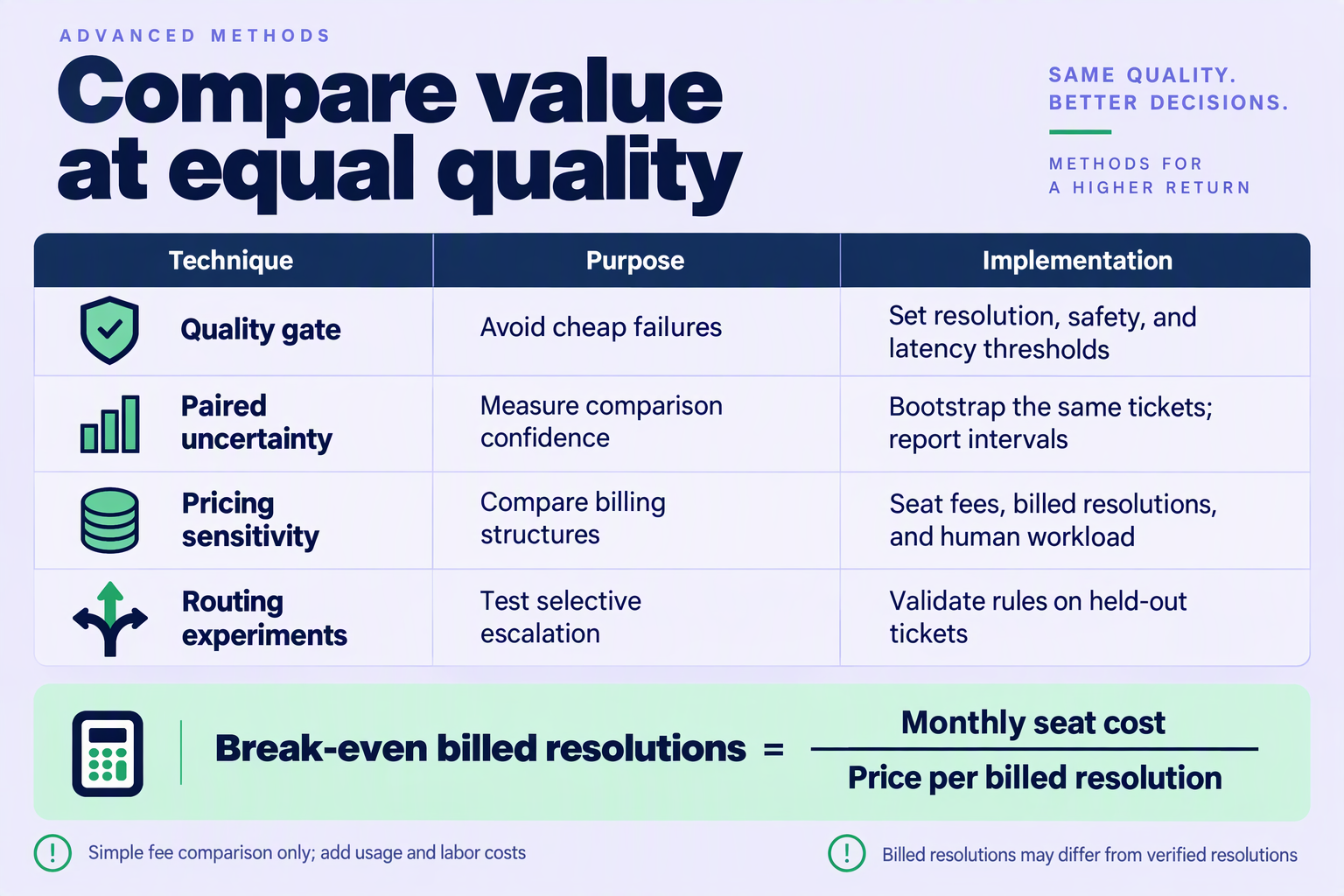
Compare models only after they meet the same support-quality threshold, then test whether the cheaper candidate remains cheaper when token usage, retries, and human review change. “Equal quality” should mean equivalent customer outcomes within a predefined tolerance—not similar scores on a general-purpose benchmark.
How do you establish equal quality before comparing prices?
Use your existing ticket benchmark to define a non-inferiority margin: the largest deterioration your business would accept in exchange for savings. For example, a hypothetical evaluation might allow a one-percentage-point reduction in verified resolution rate, while allowing no additional high-severity policy violations.
- Set the margin before testing. Choosing it afterward invites justification of whichever model looks cheapest.
- Compare matched tickets. Evaluate both models on the same cases and examine the confidence interval around their outcome difference.
- Check important segments separately. Equivalent overall results can conceal weaker performance on refunds, regional-language conversations, or account-access issues.
If the confidence interval extends beyond your acceptable margin, the result is inconclusive, not evidence of equal quality. Collect more cases or restrict deployment to ticket categories where equivalence is supported.
The October 2026 research includes OpenAI’s description of GPT-6.1 Sol as providing “near-Astra intelligence for a fifth of the price.” That claim motivates a comparison; your support-specific quality threshold determines whether the advertised price advantage is usable.
How sensitive are savings to changes in operating costs?
Build a sensitivity table around cost per resolved ticket, holding quality constant initially. The following hypothetical October 2026 planning example assumes 1,000 incoming tickets, 800 verified resolutions, $300 in other operating costs, and $8 per additional human review.
The reference model costs $200 in model usage plus $300 in other costs: $500 total, or $0.625 per resolved ticket. These are illustrative assumptions, not published model prices or CallMissed benchmarks.
| Candidate scenario | Model spend | Extra review cost | Total cost | Cost/resolution |
|---|---|---|---|---|
| Baseline | $100 | $0 | $400 | $0.500 |
| Model spend doubles | $200 | $0 | $500 | $0.625 |
| Model spend falls 25% | $75 | $0 | $375 | $0.469 |
| 10 additional reviews | $100 | $80 | $480 | $0.600 |
| 15 additional reviews | $100 | $120 | $520 | $0.650 |
Here, 13 additional reviews erase the candidate’s savings: $100 of initial savings divided by $8 per review gives a break-even point of 12.5 reviews. The table assumes those reviews preserve the same 800 verified resolutions; if resolution quality changes, recalculate the denominator too.
Which pricing assumptions should you stress-test?
Vary assumptions that can realistically change in production:
- Input/output mix: longer answers can increase spending even when ticket volume stays constant.
- Cache eligibility: test an uncached case rather than assuming every repeated instruction receives discounted pricing.
- Retries and fallbacks: include every model invocation required to reach an acceptable answer.
- Review workload: price the intervention needed to maintain equivalent quality.
As of October 2026, CallMissed’s developer API provides OpenAI-compatible endpoints, enabling existing SDK integrations to change the base URL rather than requiring a complete rewrite. That can simplify comparative testing, although prompts, tool behavior, and quality still require validation.
Choose the candidate whose savings survive plausible adverse assumptions—not merely the model with the lowest advertised token rate.
Which mistakes distort AI customer support evaluation?
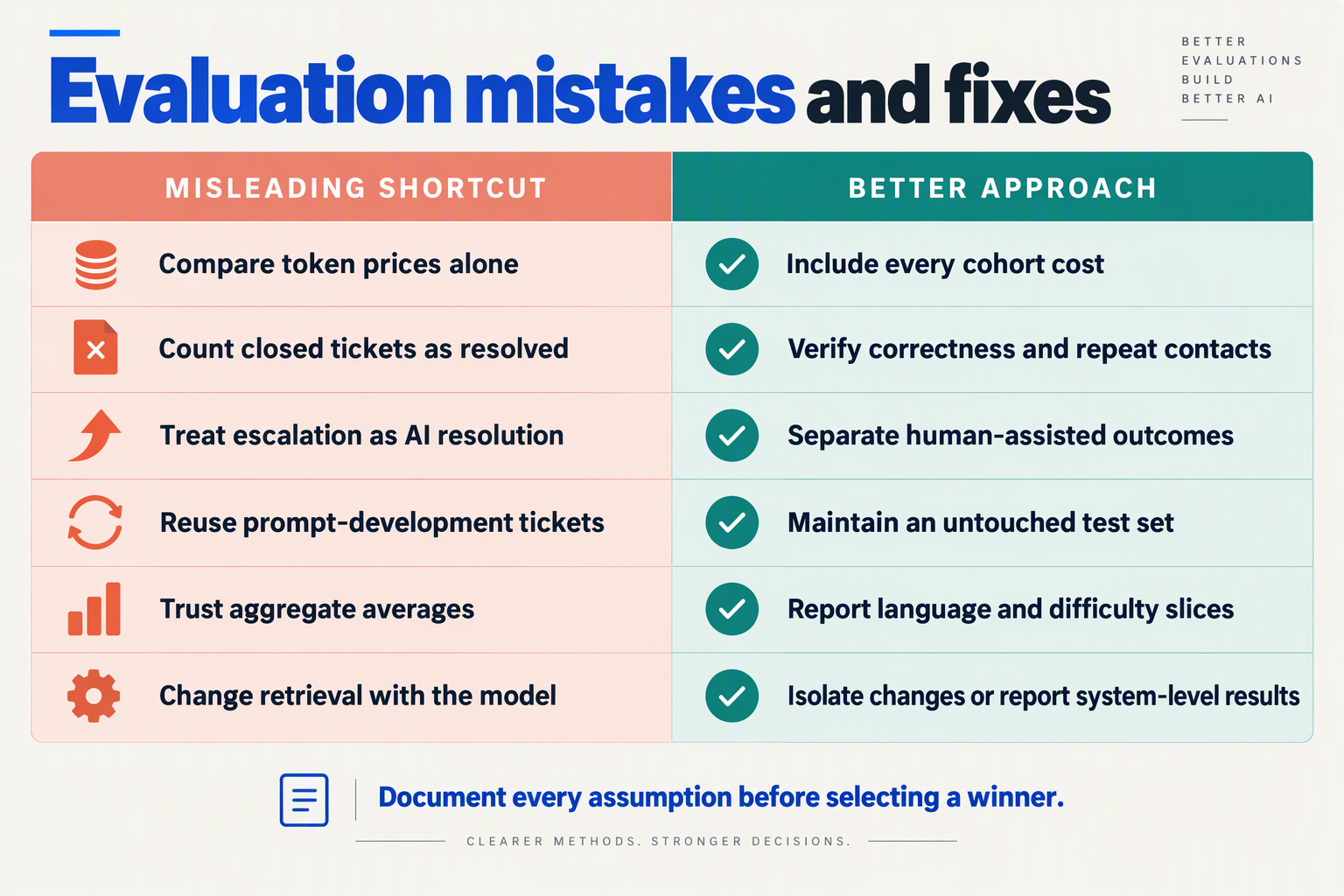
The biggest mistakes in AI customer support evaluation are contaminated test data, biased scoring, unrealistic tool access, and comparisons that change several variables at once. These errors can make a cheaper LLM look production-ready while hiding failures that customers and support agents will absorb.
Which evaluation mistakes make an LLM look better than it is?
Use this checklist to audit the benchmark before accepting its results. Each mistake affects either the credibility of the quality score or the reliability of cost per resolved ticket.
| Mistake | How it distorts results | Warning sign | Corrective step |
|---|---|---|---|
| Test-set leakage | Prompts are tuned to answers already seen during development. | Excellent replay scores; weaker results on fresh tickets. | Keep a sealed holdout set and remove near-duplicate conversations. |
| Unblinded grading | Reviewers reward a familiar model or persuasive writing. | Scores change when model names are revealed. | Hide model identity and randomize answer order. |
| Averaging unlike tickets | Easy, frequent requests conceal failures in consequential cases. | Strong overall scores but poor refund or account-access handling. | Report results separately by intent, risk, and language. |
| Changing multiple settings | Retrieval, prompts, or reasoning settings drive an apparent model advantage. | Candidates use different knowledge snapshots or tool permissions. | Freeze shared settings; document necessary model-specific differences. |
| Testing only successful tools | Idealized integrations hide recovery failures. | Every simulated order lookup returns clean data. | Inject timeouts, empty results, stale records, and permission errors. |
| Stopping after a promising run | Random variation becomes a claimed improvement. | Testing ends immediately after the preferred model takes the lead. | Set sample size and decision rules before running comparisons. |
A useful diagnostic: if the result cannot survive anonymized grading, fresh tickets, and realistic tool failures, treat the apparent advantage as provisional.
Why can model speed comparisons mislead support teams?
Generation speed is not the same as customer-visible response time. Retrieval, tool calls, retries, and time to first token can matter more than how quickly a model streams its final answer.
In the supplied October 2026 comparison, Artificial Analysis reports 63 tokens per second for GPT-6.1 Sol (Max), versus 59 tokens per second for GPT-6 Astra (Max). Those figures describe the listed configurations; they do not establish which model completes a support workflow faster.
Avoid comparing one candidate’s low-effort configuration with another candidate’s maximum-reasoning configuration without labeling the difference. Run two clearly separated tracks:
- Controlled comparison: hold shared prompts, tools, knowledge, and output limits constant.
- Deployment comparison: optimize each candidate independently, then compare the complete configurations you would actually deploy.
As of October 2026, CallMissed’s developer API offers stored prompts, reasoning effort control, and usage and request logs. Those capabilities can help document evaluation configurations, but reviewers still need to define and enforce the comparison protocol.
How do you prevent evaluator bias before launch?
An LLM judge can accelerate review, but its verdict should not become unquestioned ground truth. Fluent explanations can conceal an incorrect policy interpretation or an action that never completed.
- Calibrate the rubric: have human reviewers independently score a shared sample and resolve disagreements.
- Validate automated grading: compare judge decisions with human labels, especially for consequential errors.
- Preserve an audit trail: retain the ticket, retrieved evidence, tool results, answer, and grading rationale.
The aim is not a leaderboard winner. It is a decision that remains defensible when the model encounters unfamiliar customers, imperfect integrations, and genuinely difficult support requests.
Frequently Asked Questions
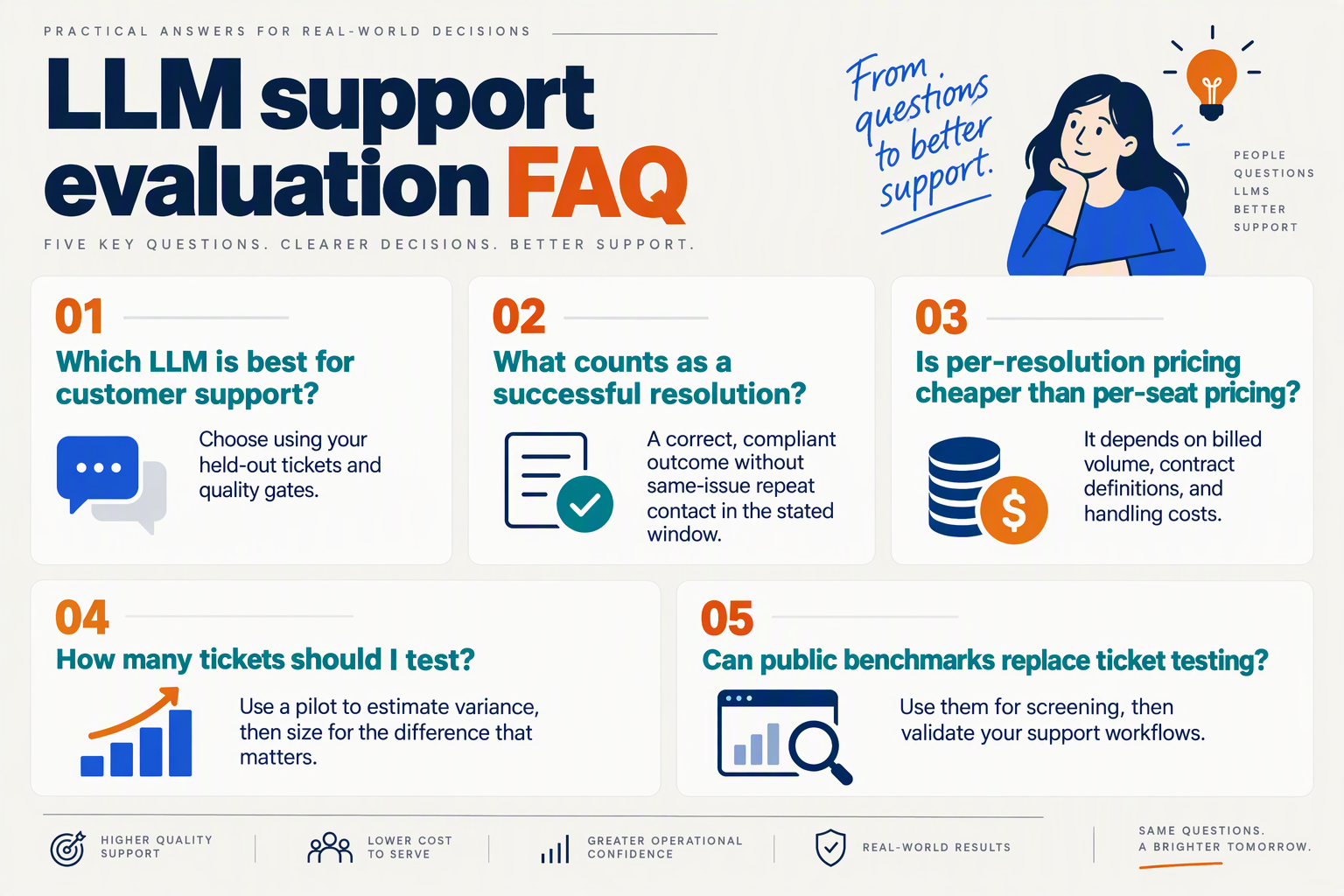
How do I calculate cost per resolved ticket for an AI support chatbot?
Does GPT-6.1 Sol’s lower token pricing mean a lower cost per resolved ticket?
How should teams interpret LLM quality benchmarks?
What resolution rate should I expect from an LLM customer support benchmark?
Can coding benchmarks predict GPT-6.1 Sol’s customer support quality?
How should teams compare pricing and deployment options?
Is per-resolution or per-seat AI customer support pricing cheaper?
How can I compare cost per resolved ticket across multiple LLM providers?
Which resources and next steps turn your benchmark into a deployment decision?
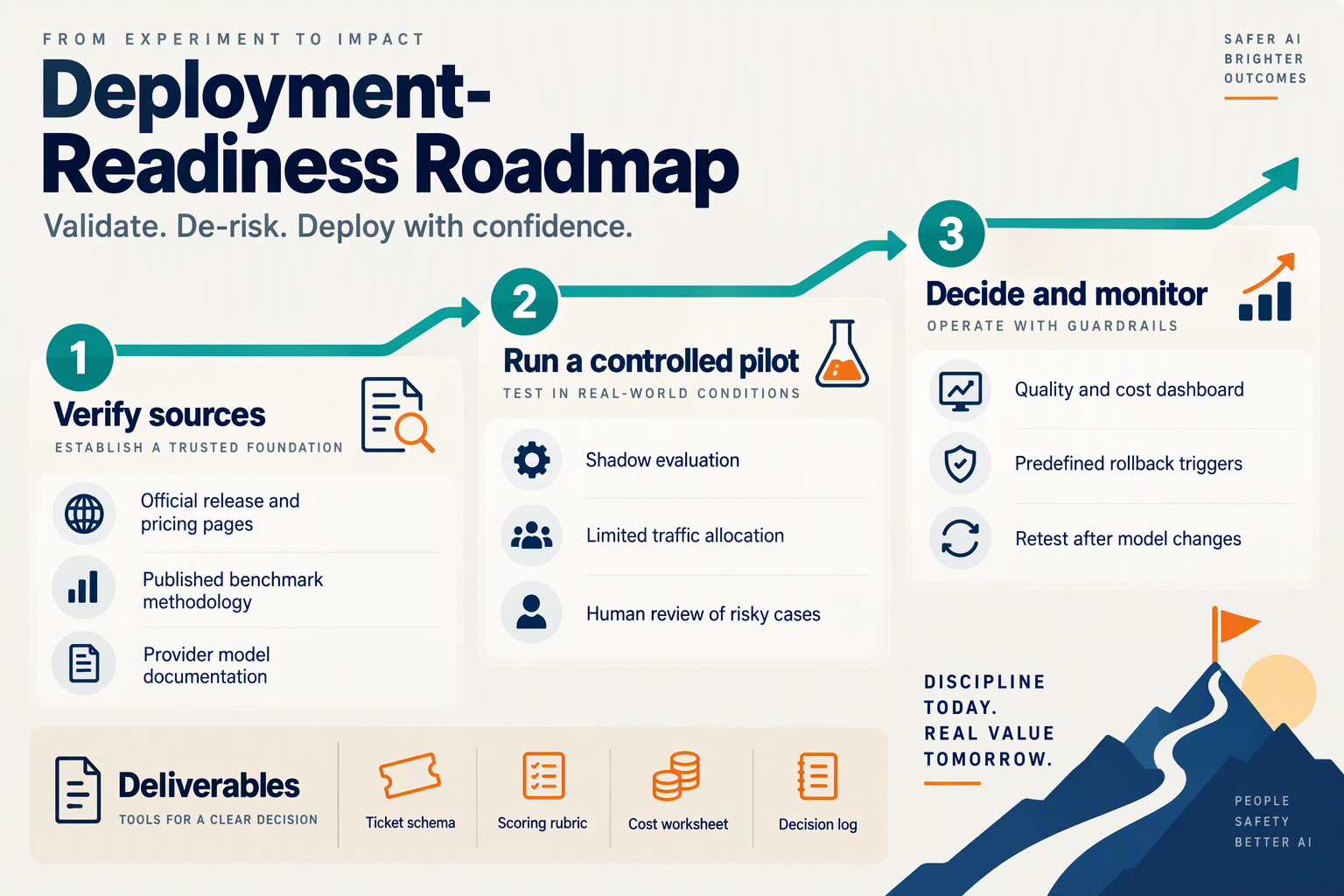
Turn your benchmark into a deployment decision with a versioned evidence pack, explicit approval criteria, and a reversible pilot. External comparisons help you shortlist models; your support-ticket results determine whether to deploy, restrict, or reject a candidate.
Which resources should you use to validate your benchmark?
Use each resource for the question it can actually answer—not as a substitute for customer-support evidence.
- Provider announcements: OpenAI’s announcement, included in the October 2026 research, describes GPT-6.1 Sol as delivering “near-Astra intelligence for a fifth of the price.” Treat that positioning as a hypothesis to test against your support workflows.
- Independent performance comparisons: Artificial Analysis’s comparison in the October 2026 research lists GPT-6.1 Sol (Max) at 63 output tokens per second, versus 59 for GPT-6 Astra (Max). Generation throughput is useful context, but it does not establish end-to-end response time when retrieval and tools are involved.
- Workload-specific reporting: The New Stack’s comparison in the October 2026 research reports Sol costing 18% of Astra’s cost on its tested workloads. Read the workload and methodology before applying that result to refund requests or account-access problems.
- Your operational records: Combine benchmark outputs with billing exports, tool traces, reviewer judgments, and subsequent customer contacts. These establish whether apparent savings survive real support operations.
Archive the source snapshots and retrieval dates. A comparison is difficult to reproduce if the underlying price, model configuration, or evaluation procedure changes.
What should your deployment decision document contain?
Create a short decision record that someone outside the evaluation team can audit. Include:
- Scope: approved ticket categories, languages, channels, and excluded actions.
- Configuration: model identifier, prompt revision, knowledge snapshot, tool permissions, and fallback rules.
- Evidence: cost per resolved ticket, quality outcomes, sample sizes, uncertainty, and results for important customer segments.
- Decision: deploy, deploy with restrictions, extend testing, or reject—with a named owner and review date.
Make trade-offs explicit. For example, a hypothetical candidate might pass order-status handling but fail refund-policy interpretation. The defensible decision is restricted deployment for order-status requests, not averaging both categories into a reassuring overall score.
As of October 2026, CallMissed’s developer AI API offers stored prompts, structured outputs, and OpenAI-compatible endpoints. Those capabilities can support a consistent evaluation harness, although compatibility alone does not guarantee equivalent behavior across models.
How should you move from benchmark to production?
Use a staged release rather than switching the entire queue:
- Run in shadow mode. Generate candidate responses without sending them to customers; compare proposed answers and actions with actual outcomes.
- Start a bounded pilot. Limit exposure to approved categories and retain human review for consequential actions.
- Set stop conditions before launch. Define which policy violations, unauthorized actions, or sustained quality declines trigger suspension or rollback.
- Review after outcomes mature. Allow the chosen repeat-contact window to close before declaring a resolution successful.
- Expand only where evidence supports it. Re-evaluate after changes to prompts, knowledge, tools, or model versions.
The final question is not whether GPT-6.1 Sol matches a headline benchmark. It is whether your documented configuration resolves the right customer problems at an acceptable cost—and whether your team can detect and reverse failures.
Conclusion
Choose the LLM that delivers reliable resolutions at the lowest fully loaded cost—not the lowest token price. Cost per resolved ticket connects model spending to what customers and support teams actually need: accurate answers, completed actions, and fewer problems returning to the queue.
OpenAI’s description of GPT-6.1 Sol as delivering “near-Astra intelligence for a fifth of the price,” included in the October 2026 research, makes the model worth evaluating. It does not establish that Sol will resolve your customers’ issues more economically. The difference depends on how the model handles your policies, retrieval, tools, retries, and escalation decisions.
Keep four takeaways at the center of your evaluation:
- Define resolution before measuring savings. A closed ticket is not necessarily a solved problem. Require factual accuracy, policy compliance, completed actions where applicable, and no repeat contact within your chosen window. Otherwise, apparent efficiency can simply mean customers have stopped asking—or are returning through another channel.
- Count the entire workflow. Include input and output tokens, retries, fallback calls, retrieval, tool execution, infrastructure, and human review or correction. A cheaper model can become the more expensive option when its answers require additional intervention. The useful comparison is total operational cost divided by successful resolutions.
- Compare candidates under consistent conditions. Use a representative ticket dataset and apply the same resolution criteria to each model. Refund questions, order checks, and escalation-sensitive cases deserve their own evidence; strong coding or CI-triage performance cannot establish customer-support quality.
- Read cost and quality together. In the guide’s hypothetical example, the model with $200 in model costs achieved $0.75 per resolved ticket, while the model costing $100 achieved $1.43. The lesson is not that expensive models always win, but that human follow-up and resolution outcomes can reverse the apparent ranking.
What should support teams watch for next?
Watch whether lower-priced models maintain their savings once retries, fallback calls, reopened tickets, and human correction enter the calculation. The New Stack comparison included in the October 2026 research reported GPT-6.1 Sol costing 18% of Astra’s cost on its tested workloads; your support benchmark must determine whether comparable savings survive your own quality requirements.
As of October 2026, CallMissed’s developer AI API offers caller-chosen fallback models alongside usage and request logs. Readers can explore CallMissed as a platform for examining multi-model workflows while keeping evaluation grounded in observable costs and outcomes.
Before your next model switch, run the ticket-based comparison: does the cheaper model reduce cost per resolved ticket—or merely move the bill to your customers and human agents?
Related Reading
- LLM evaluation for customer support: An SMB Test Plan
- LLM for intent classification: A Support Routing Guide
- Kimi K3 API Pricing: Customer Support LLM Comparison