How to connect your LLM: A Developer Voice & Chat Guide



Learn to connect your LLM to a shared voice and chat backend with streaming, tool calls, secure sessions, retries, and measurable costs.

How to connect your LLM: A Developer Voice & Chat Guide
What happens when your chatbot gives a useful answer—but your voice agent keeps talking after the caller interrupts? To connect your LLM successfully, you need more than an API key: you need a conversation layer that coordinates model responses, audio, tools, and state across both voice and chat.
That distinction matters because a working demo can hide a fragile integration. A text interface can display an answer as tokens arrive; a voice interface must also decide when to speak, when to stop, and what the conversation history should retain after an interruption. If those decisions diverge, the same backend can produce two very different customer experiences.
As of November 2026, OpenAI’s developer documentation includes dedicated guides for the Realtime API, voice agents, WebRTC, and Realtime with tools, making transport and tool integration explicit parts of the implementation landscape. The practical question is no longer simply “Which model should I call?” It is “How should my application manage the conversation around that model?”
Model choice also makes connection architecture important. According to CallMissed’s verified product information, as of November 2026, CallMissed’s developer AI API provides 159 models through one API key and balance, including 21 free-tier models, with OpenAI-compatible and Anthropic-compatible endpoints—a concrete example of the move toward reusable connection layers.
But compatibility is a starting point, not a production guarantee. Developers still need to check whether their selected model supports the streaming, tool calls, structured outputs, or audio behavior their application requires. They also need to distinguish a failed request from a completed action whose response never reached the user.
What will you learn about connecting an LLM to voice and chat?
This LLM API integration guide follows a shared-backend approach: keep conversation logic reusable, then adapt delivery to each channel. You will learn how to:
- Connect and authenticate: configure server-side credentials, choose endpoints, and keep provider secrets out of browser clients.
- Stream responses: deliver text incrementally and select an audio transport appropriate to your application.
- Coordinate conversations: handle interruptions, reconnects, and consistent voice-and-chat history.
- Use tools safely: validate arguments, control permissions, and prevent retries from duplicating actions.
- Measure production behavior: track response timing, usage costs, failures, and recovery through repeatable tests.
Imagine a customer checking an order by chat, then asking a follow-up by voice. The goal is not merely two interfaces that call a model. It is one coherent conversation, with predictable behavior when networks, tools, or models fail.
How do you connect your LLM to voice and chat through one shared backend?
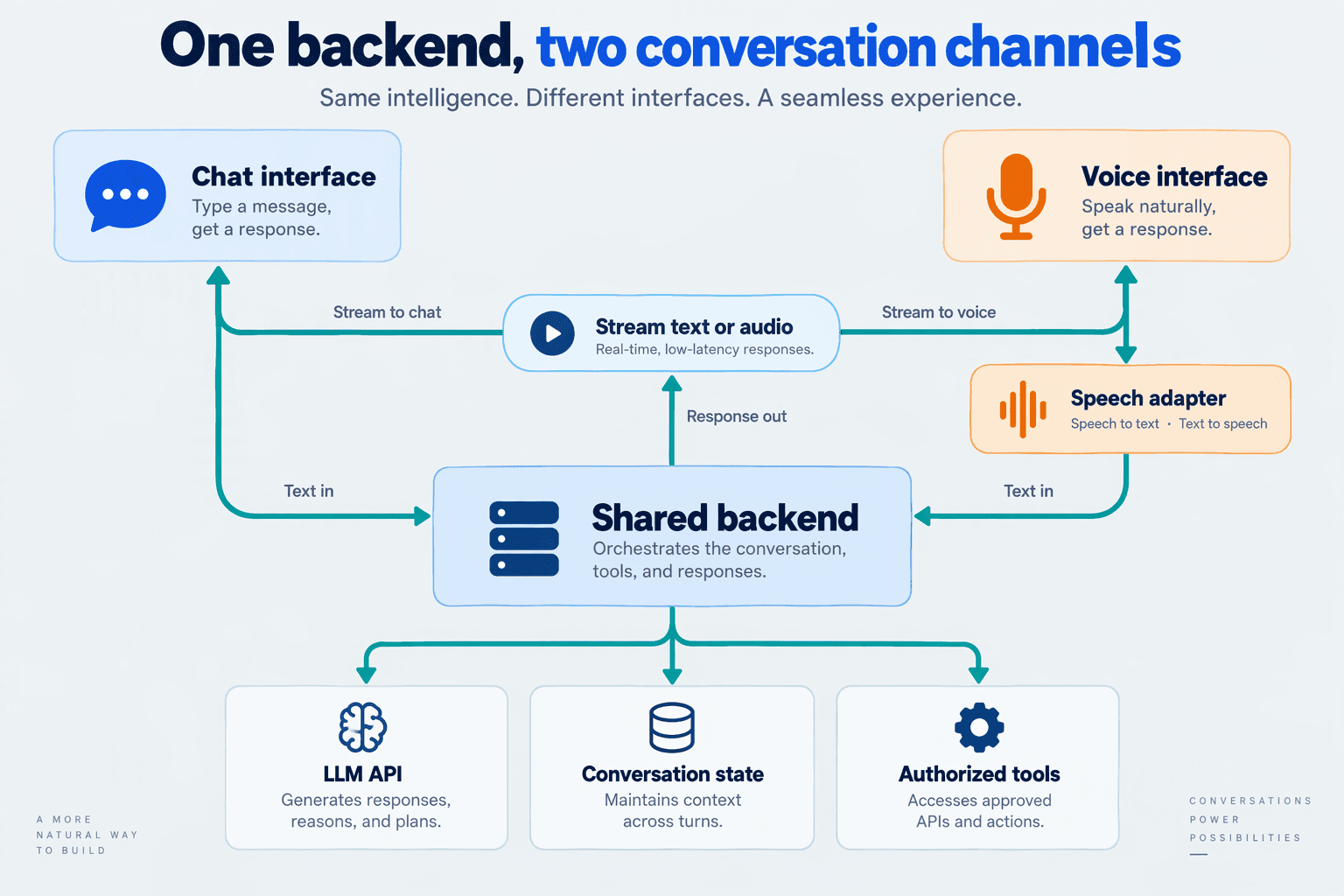
Connect your LLM through a shared conversation service, with separate adapters for chat and voice. Keep identity, conversation state, tool execution, and model routing in that service; let each adapter handle its channel’s input, output, and transport.
What should the shared backend own?
A practical architecture separates three responsibilities:
- Channel adapters: accept chat messages or voice-session events and deliver text or audio.
- Conversation service: authorizes the user, loads history, selects instructions, coordinates tools, and records conversation events.
- Model adapters: translate application requests into the selected provider’s API format and normalize responses.
The logical flow is:
Chat client ── Chat adapter ──┐
                             ├── Conversation service ── Model adapter
Voice client ─ Voice adapter ┘            │
                                State store + tool executor
This diagram describes control flow, not a requirement to proxy every audio packet through your application server. As of November 2026, OpenAI’s Realtime API documentation describes WebRTC and WebSocket connection options; choose the media path separately from the backend’s authorization and conversation responsibilities.
For an initial implementation, these boundaries can be modules within one application. You do not need three independently deployed services to achieve reusable conversation logic.
How do you represent voice and chat consistently?
Define an internal event contract instead of making provider response objects your database schema. A useful starting point is:
{
  "conversation_id": "conv_104",
  "turn_id": "turn_008",
  "event_id": "evt_021",
  "channel": "voice",
  "type": "user_input_committed",
  "text": "Where is my order?"
}
The identifiers have different jobs: conversation_id links the history, turn_id groups one exchange, and event_id identifies a particular event. Your application can use event identifiers to detect repeated deliveries without treating identical customer messages as duplicates.
Distinguish provisional input from committed input. A partial speech transcript can change, whereas a submitted chat message is usually ready for processing. Likewise, generating an assistant response and delivering that response are separate events.
Do not require every voice model to pass through speech-to-text, text generation, and text-to-speech. Support either a chained pipeline or native audio interaction behind the same conversation-service boundary.
How do you keep the model connection provider-neutral?
Expose application-level operations such as start_response, cancel_response, and submit_tool_result. Implement those operations in provider-specific adapters, with explicit capability checks for streaming, audio, and tool use.
As of November 2026, CallMissed’s verified product information lists OpenAI-compatible and Anthropic-compatible endpoints, allowing existing SDK integrations to use a changed base URL. That can simplify the connection layer, but your application should still validate each selected model’s capabilities rather than assume identical behavior.
Keep provider credentials server-side. When a browser connects directly to an audio provider, use that provider’s supported client-session authorization mechanism—not a permanent API key embedded in frontend code.
How does a customer move between chat and voice?
Consider an authenticated customer who checks an order in chat and then opens a voice session:
- Resolve identity: verify that the new session belongs to the same customer.
- Attach conversation context: load relevant order details and prior committed exchanges.
- Execute shared tools: use the same authorized order-lookup function for either channel.
- Adapt delivery: show the result as text or render it as speech.
The key boundary is shared business behavior, channel-specific delivery. A voice session should not need a second implementation of order permissions, customer lookup, or escalation rules merely because its output is audio.
What prerequisites and setup do you need before integrating an LLM API?
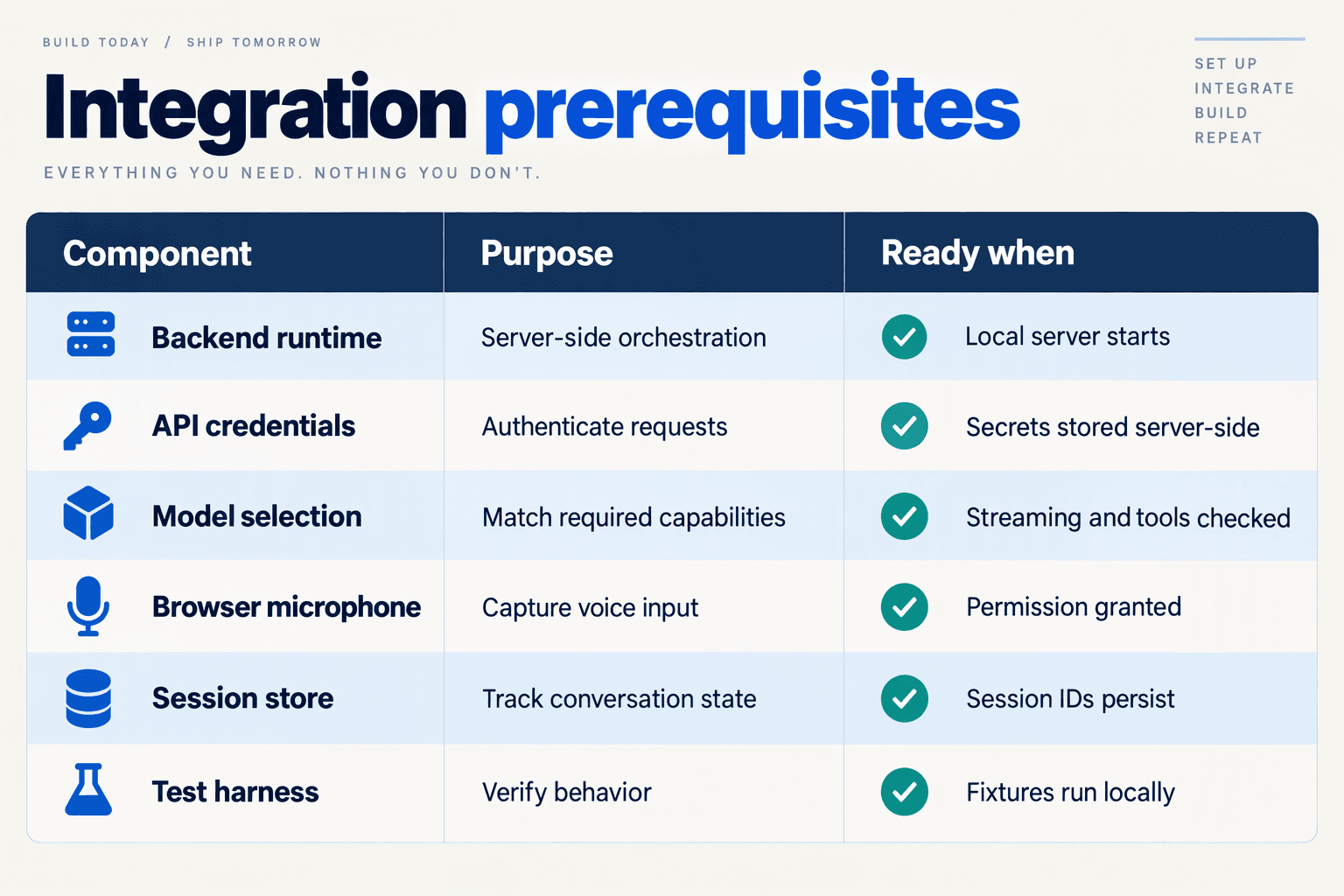
Before integrating an LLM API, you need a server-side runtime, securely stored credentials, a verified model capability list, and a transport plan for chat and voice. Define configuration, usage limits, and a small acceptance-test suite before connecting customer-facing interfaces.
Use the November 2026 setup checklist below as a readiness gate—not just a list of accounts to create.
What should your LLM integration checklist include?
| Prerequisite | What to prepare | Readiness check |
|---|---|---|
| Backend runtime | A supported Python or Node.js runtime, dependency lockfile, and separate development configuration | A local server starts reliably and dependencies install reproducibly |
| Credentials and access | Server-side API key, secret storage, and separate development and production credentials where supported | No provider secret appears in browser code, repository history, or logs |
| Endpoint and model | Base URL, endpoint family, model identifier, and required capability checklist | The selected model passes a minimal request and each required feature test |
| Channel transport | HTTP streaming for chat; an appropriate WebRTC or WebSocket path for voice | Text arrives incrementally; audio connects with the expected format |
| Tools and state | Validated tool schemas, test data, session identifiers, and a conversation-storage policy | Tool access is scoped and sessions remain isolated |
| Operational controls | Timeouts, concurrency limits, usage budgets, redacted logs, and failure fixtures | Authentication, throttling, and timeout failures produce controlled responses |
A Python service and a Node.js service can both work; choose based on your team’s existing deployment and asynchronous-I/O experience. Avoid introducing a second backend language solely because a tutorial uses it.
How do you verify model and transport compatibility?
Create a capability checklist for the exact model and endpoint, rather than assuming every feature advertised by a provider is available everywhere. Test streaming, tool calling, structured output, and audio support separately when your product requires them.
As of November 2026, OpenAI’s developer documentation lists separate guides for Realtime API, WebRTC, Realtime conversations, and Realtime with tools. Treat those as distinct implementation references: a successful text-completion request does not validate your voice-session setup.
For voice, record the expected audio encoding, sample rate, channel count, and event format from your chosen transport’s documentation. A mismatched audio format can break a connection even when authentication and model selection are correct.
Which configuration values should you define first?
Keep deployment-specific settings outside application logic:
- Connection: provider base URL, secret reference, and model identifier.
- Request controls: timeout, output limit, and maximum concurrent requests.
- Conversation controls: session expiry and history-retention policy.
- Observability: request identifiers, usage reporting, and log-redaction rules.
Set limits from your provider’s documented allowance, not from guesswork. According to CallMissed’s verified product information, as of November 2026, CallMissed’s developer AI API allows 60 requests per minute per Free-tier key and 500 requests per minute per Starter-tier key. These are request limits, not guarantees of simultaneous voice-session capacity.
What should pass before you connect the interface?
Run these acceptance checks against synthetic conversations:
- Basic response: a minimal request returns the expected response shape.
- Required capabilities: streaming and tool schemas behave as your adapter expects.
- Controlled failure: invalid credentials, throttling, and timeouts produce safe application errors.
- Voice readiness: microphone permission, audio playback, and disconnect cleanup work.
Use a fake order lookup before granting access to live customer records. That keeps initial debugging focused on integration behavior rather than production permissions or irreversible actions.
How do you start streaming chat with OpenAI-compatible APIs such as CallMissed?
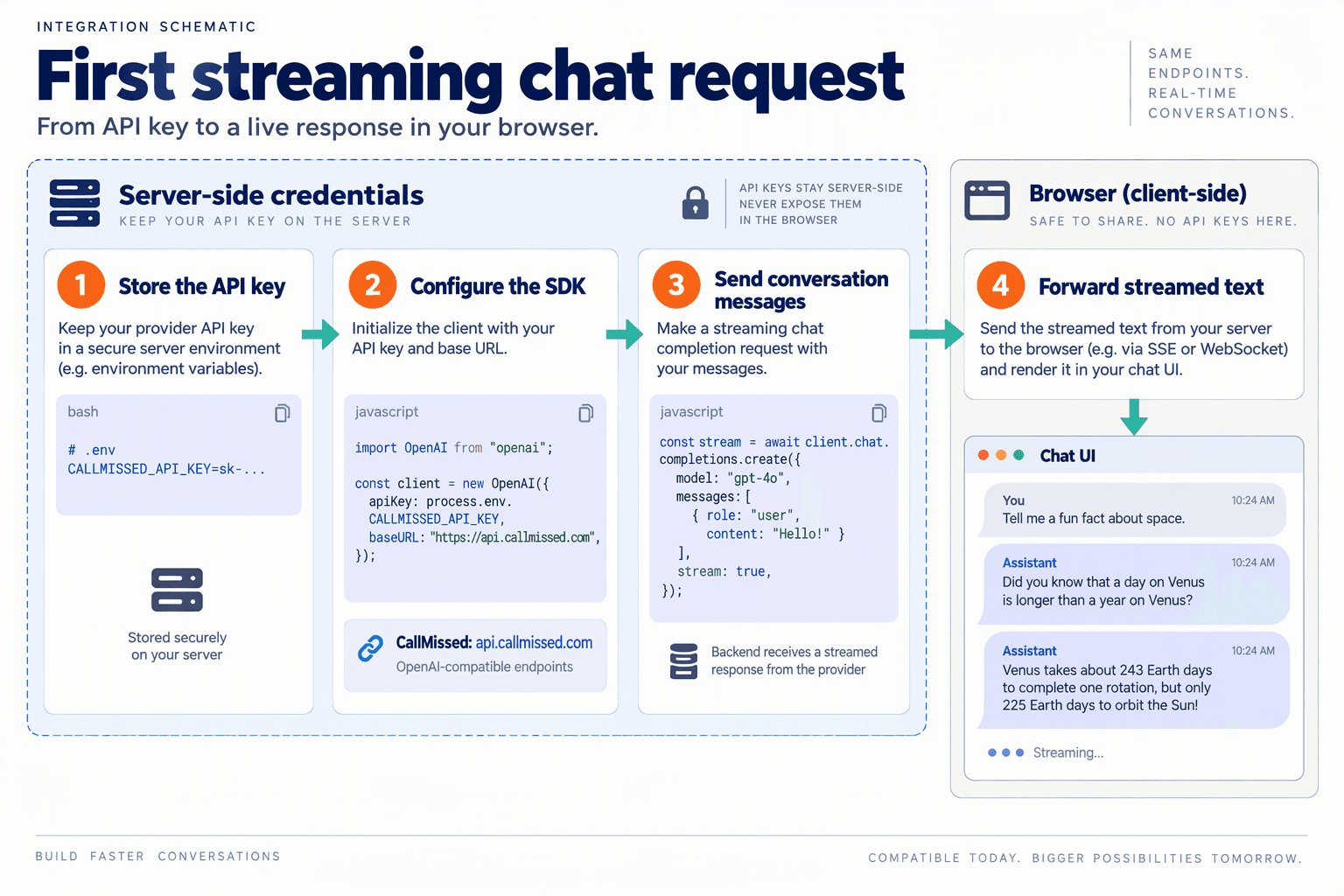
Start streaming chat by configuring an OpenAI-compatible SDK on your backend, setting stream=True, and forwarding incremental text to your client. Treat each stream as one assistant turn: accumulate its text, detect completion, and distinguish an interrupted response from a successful answer.
According to CallMissed’s verified product information, as of November 2026, CallMissed’s developer AI API supports OpenAI-compatible chat completions and streaming, allowing existing SDK integrations to work by changing the base URL. Use the documented API base URL and a supported model identifier rather than assuming that every provider accepts the same model names.
How do you make your first streaming chat request?
Use the Python openai SDK with a configurable endpoint. The example below exposes a minimal FastAPI route and forwards text as Server-Sent Events (SSE); install openai, fastapi, and an ASGI server first.
Set LLM_API_KEY, LLM_BASE_URL, and LLM_MODEL in your server environment. LLM_BASE_URL must include the API prefix required by your provider’s documentation.
import json
import os

from fastapi import FastAPI
from fastapi.responses import StreamingResponse
from openai import AsyncOpenAI
from pydantic import BaseModel

app = FastAPI()
client = AsyncOpenAI(
    api_key=os.environ["LLM_API_KEY"],
    base_url=os.environ["LLM_BASE_URL"],
)

class ChatInput(BaseModel):
    message: str

def event(name, payload):
    return (
        f"event: {name}\n"
        f"data: {json.dumps(payload)}\n\n"
    )

@app.post("/chat/stream")
async def chat(body: ChatInput):
    stream = await client.chat.completions.create(
        model=os.environ["LLM_MODEL"],
        messages=[
            {"role": "system", "content": "Answer clearly and briefly."},
            {"role": "user", "content": body.message},
        ],
        stream=True,
    )

    async def generate():
        finish_reason = None
        try:
            async for chunk in stream:
                if not chunk.choices:
                    continue
                choice = chunk.choices[0]
                if choice.delta.content:
                    yield event("delta", {"text": choice.delta.content})
                if choice.finish_reason is not None:
                    finish_reason = choice.finish_reason

            if finish_reason is None:
                yield event("error", {"message": "Incomplete stream"})
            else:
                yield event("done", {"finish_reason": finish_reason})
        except Exception:
            yield event("error", {"message": "Generation failed"})
        finally:
            await stream.close()

    return StreamingResponse(
        generate(), media_type="text/event-stream"
    )
This is a single-turn text example, not a complete conversation service. Add application authentication, input limits, conversation retrieval, and server-side error logging before exposing the route publicly.
How should the browser consume streamed text?
Call this POST endpoint with fetch() and read response.body incrementally. The browser’s native EventSource interface is not suitable for sending this JSON POST body.
Your client should:
- Check the HTTP status before reading the stream.
- Decode incrementally, retaining partial SSE frames between reads.
- Append
deltatext to the current assistant message. - Inspect
done.finish_reasonrather than treating every termination as success. - Mark errors or cancellations as incomplete, preserving already displayed text.
A network chunk is not necessarily one SSE event, and one model delta is not necessarily one word. Test your parser with frames split across arbitrary byte boundaries, including multibyte characters.
What should you verify before adding voice output?
Measure time to first visible text separately from total response duration. Streaming can improve perceived responsiveness without making the complete generation faster.
Do not send every delta directly to text-to-speech: buffer speakable phrases, and keep generated text distinct from audio actually played. As of November 2026, OpenAI’s developer documentation treats Realtime conversations and voice agents as dedicated integration topics; a text stream alone does not implement an interactive audio session.
How do you add voice step by step using WebRTC, WebSocket, or a speech pipeline?
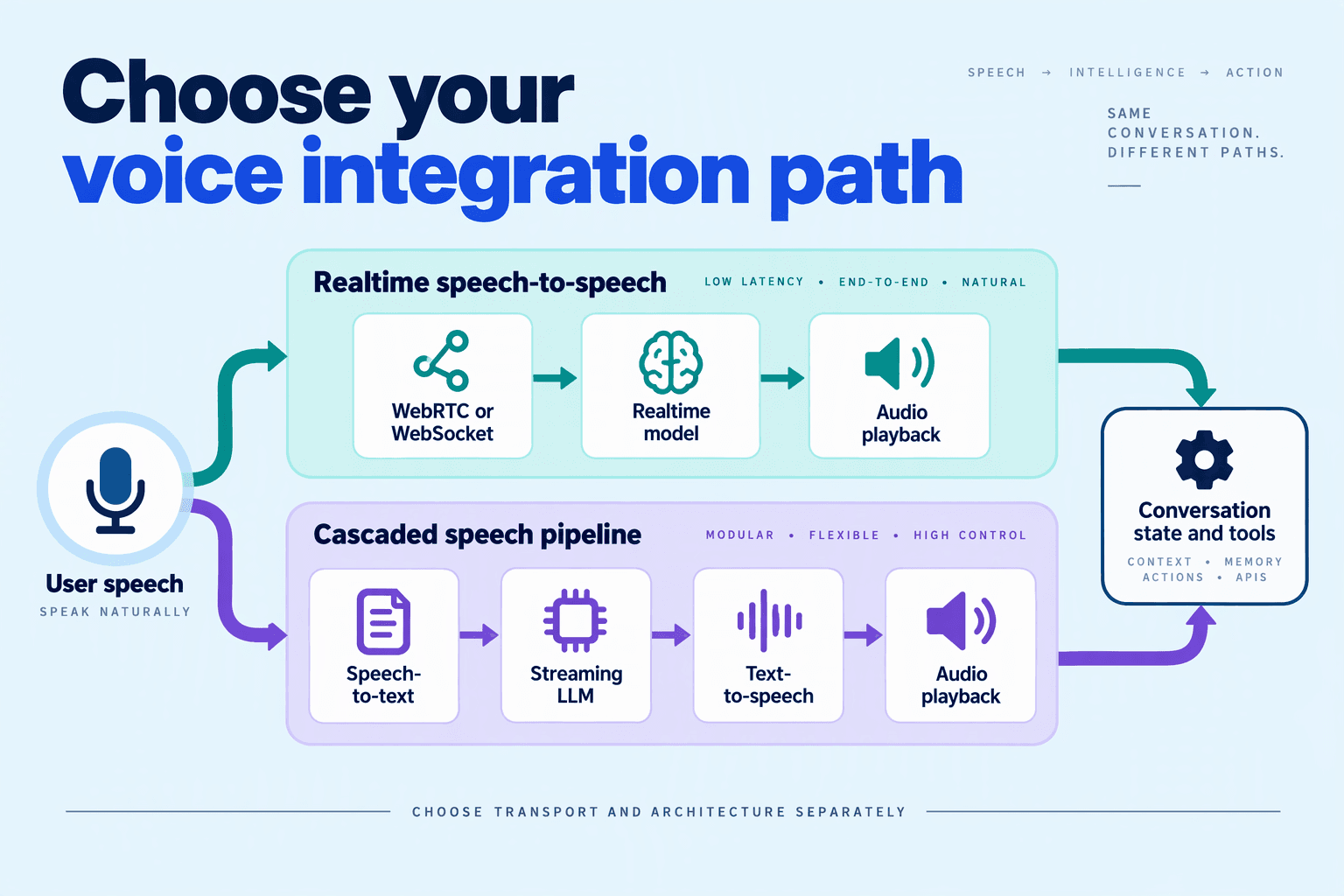
Add voice by choosing a transport, connecting microphone or telephony audio, and coordinating playback with conversation state. Use WebRTC for browser-native realtime audio, WebSocket for server-controlled audio streams, or a speech-to-text → LLM → text-to-speech pipeline when you need independent control over each component.
As of November 2026, OpenAI’s developer documentation covers WebRTC, realtime conversations, and voice-agent architectures. These provide useful implementation references, but check your chosen provider’s event schema, audio formats, and authentication requirements before adapting examples.
How do you choose between WebRTC, WebSocket, and a speech pipeline?
Make the choice around your application’s audio boundary—not simply its preferred model.
- WebRTC: A practical starting point for browser voice experiences because it provides media transport and remote audio playback.
- WebSocket: Useful when your backend receives audio from another system or needs to control audio forwarding. Your application must manage framing, buffering, and playback coordination.
- Speech pipeline: Choose separate speech recognition, language-model, and speech-synthesis services when component selection and intermediate text matter more than a tightly integrated speech-to-speech session.
These approaches are not mutually exclusive: a browser can send audio over WebRTC to infrastructure that runs a speech pipeline.
How do you connect realtime audio step by step?
- Create an authorized session. Have your shared backend authenticate the user and apply conversation settings. Keep permanent provider credentials server-side; use a provider-supported short-lived credential or server-mediated session setup for browser access.
- Connect the selected transport. For WebRTC, capture microphone audio, add its track to a peer connection, exchange the session description through the documented flow, and attach received audio to a playback element. Use a data channel for supported control events. For WebSocket, establish the connection from your backend and implement the provider’s session and audio-event protocol.
- Configure audio explicitly. Match encoding, sample rate, and channel count to the endpoint’s requirements. If a telephony source supplies a different format, decode or resample before forwarding; do not assume arbitrary audio bytes are interchangeable.
- Set turn handling. Decide whether voice activity detection or an explicit user action ends a turn. Treat “audio received,” “turn complete,” and “response requested” as distinct states, even when the provider automates their transitions.
According to CallMissed’s verified product information, as of November 2026, CallMissed’s developer AI API offers a managed voice-agent WebSocket, including a Deepgram Voice Agent-compatible endpoint—another integration option for teams choosing a server-side audio boundary.
How do you build a speech pipeline and handle interruptions?
- Connect the three stages. Send incoming audio to speech recognition, pass the finalized utterance into your shared LLM conversation, and stream suitable response segments into text-to-speech. Avoid synthesizing every individual token: incomplete phrases can produce unnatural speech. Track partial transcripts separately from committed turns.
- Implement barge-in across the whole chain. When the user interrupts, cancel ongoing generation where supported and stop or clear queued playback. Track what audio actually played; preserve conversation history that reflects what the user heard, rather than blindly retaining the full generated answer. OpenAI’s realtime-conversations documentation is the relevant reference for its provider-specific interruption behavior as of November 2026.
- Test observable outcomes. Record speech-end time, first audible response, playback-stop time, and disconnects. Test interruptions during speech and tool execution, microphone denial, and reconnects. A successful connection is only the first milestone; a coherent conversation is the acceptance criterion.
How do you synchronize chat and voice state, handle interruptions, and recover connections?
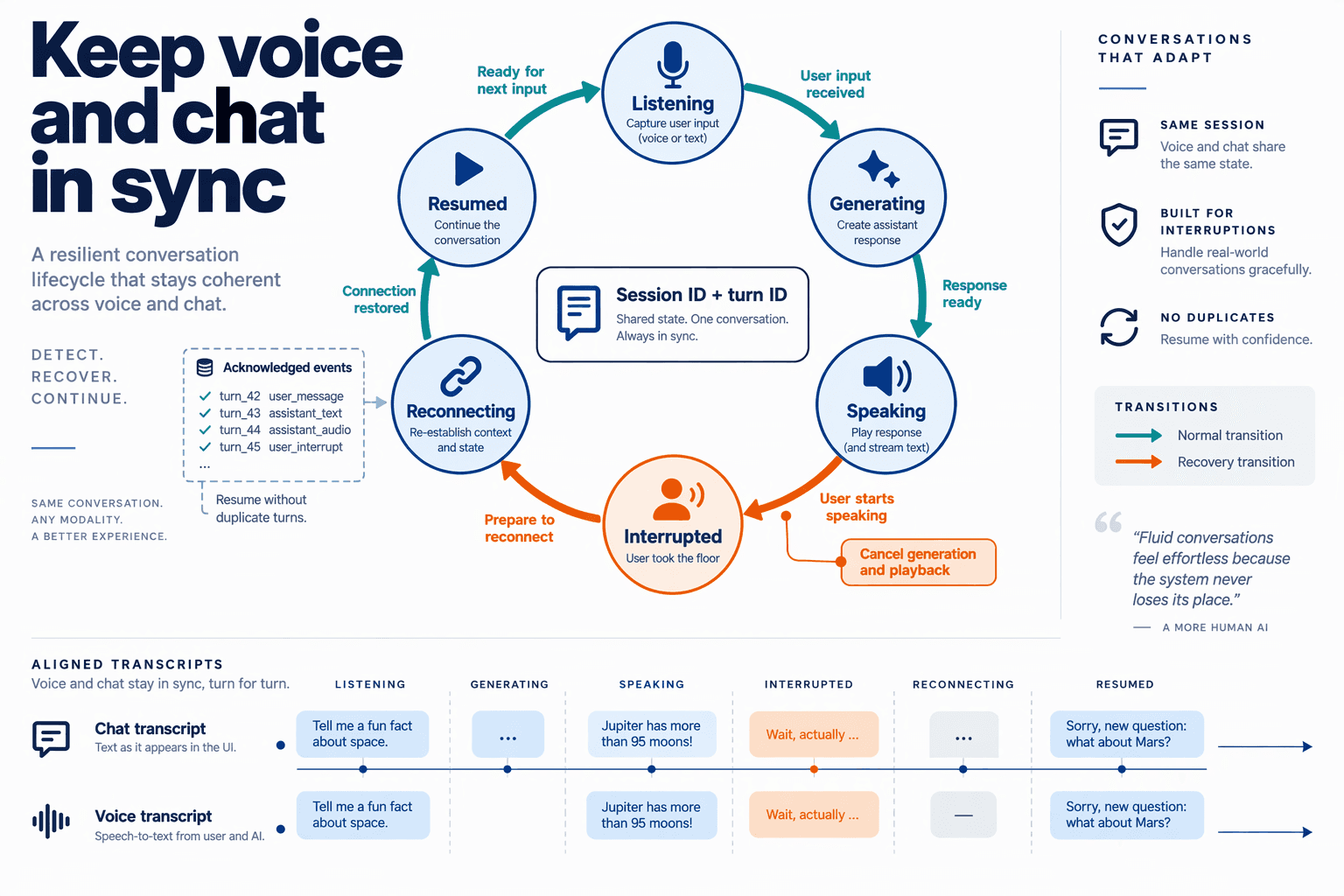
Synchronize chat and voice through a server-owned conversation log, and track model generation separately from what the user actually received. Handle interruptions by stopping playback, cancelling obsolete generation, and reconciling conversation history; recover connections from acknowledged checkpoints rather than blindly replaying requests.
What conversation state should chat and voice share?
Keep one canonical conversation record, with channel-specific delivery metadata. A chat message displayed on screen and an audio response generated by the model are not equivalent: the caller may hear only part of that response.
For this LLM API integration guide, use these application-level fields:
- Conversation and turn IDs: connect messages across chat, voice, and reconnects.
- Event sequence number: establish server-authoritative ordering.
- Response ID and generation epoch: identify the current response and reject stale chunks.
- Delivery checkpoint: record acknowledged text delivery or the last confirmed audio playback position.
- Action status: distinguish pending, completed, failed, and unknown tool outcomes.
Store these fields durably where recovery requires them; an active socket is not a database. If chat and voice accept input simultaneously, explicitly choose whether to queue turns or let a new turn supersede the current response.
As of November 2026, OpenAI’s Realtime conversations documentation describes conversation items and response events, providing a concrete reference for mapping provider events into your application’s state model. Keep your canonical log independent of those provider-specific event names.
How should a voice agent handle interruptions?
Barge-in means the user starts speaking while the assistant is talking. Treat it as a coordinated state transition, not merely a muted speaker.
- Stop local playback immediately. Clear queued audio so buffered speech does not continue.
- Cancel the active response where supported. Advance the generation epoch and discard late chunks associated with the interrupted response.
- Reconcile the assistant turn. Retain the portion played to the caller, not the entire generated answer.
- Process the new input. Generate the next response against the reconciled conversation.
As of November 2026, OpenAI’s Realtime conversations documentation covers response cancellation and audio-item truncation. Check the selected transport’s behavior before implementing manual handling: playback management differs between server-managed transports and application-managed audio.
For example, suppose an assistant generates, “Your order shipped yesterday and arrives Friday,” but the caller interrupts after “shipped yesterday.” Do not treat “arrives Friday” as information already communicated. Preserve the full output separately for diagnostics if needed, while keeping user-facing history faithful to delivery.
Stopping speech also does not undo a completed tool action. An order cancellation that succeeded remains a business fact, even if its spoken confirmation was interrupted.
How do you recover a disconnected session safely?
Reconnect the transport, then recover application state. Do not assume a new WebSocket or WebRTC connection automatically restores the previous provider session.
Use a recovery handshake containing the conversation ID and last acknowledged event sequence. The server should authenticate access, return missing committed events, and either resume a supported session or initialize a new one from reconciled history.
- Retry connection attempts with bounded exponential backoff and jitter.
- Deduplicate input using stable client message IDs.
- Check uncertain actions against persisted execution records before retrying.
- Expose recovery status so users know whether to wait or repeat their request.
Test disconnects during speech, immediately after tool execution, and while switching channels. The acceptance criterion is consistent history and no duplicate business action—not merely a socket that reconnects.
How do you measure latency, cost, and failure recovery with reproducible integration tests?
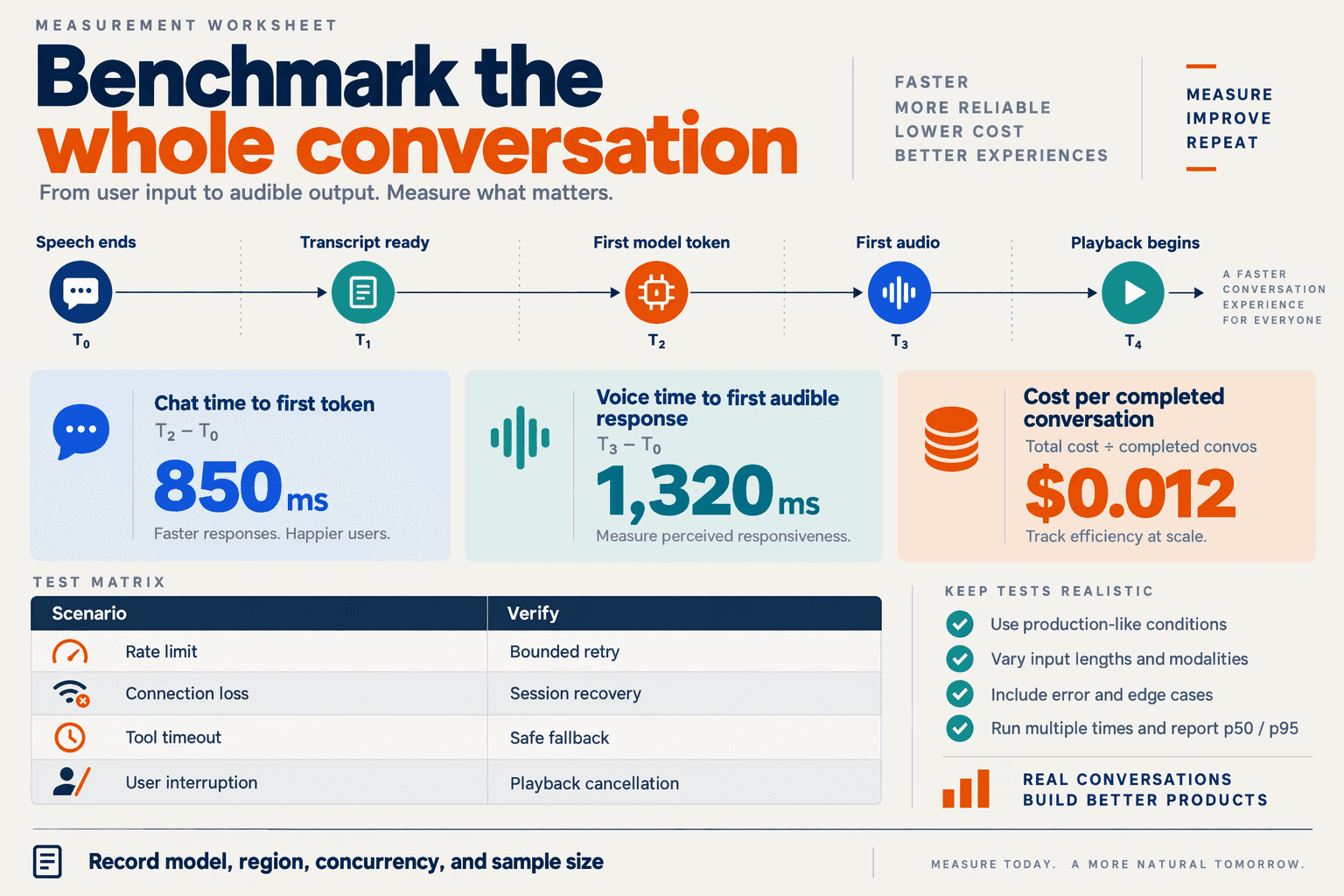
Measure latency, cost, and failure recovery with versioned conversation fixtures, timestamped events, and controlled fault injection—not a stopwatch around one successful API call. Run the same scenarios through your shared backend’s chat and voice adapters, then compare percentile timings, total usage, and recovery outcomes.
How do you make LLM integration tests reproducible?
Create a test manifest that pins the model identifier or available snapshot, prompt version, tool schemas, generation settings, SDK version, deployment region, and audio format. Record cache state and concurrency because a warm, single-user test is not comparable to a cold test under load.
Use two complementary test suites:
- Deterministic replay tests: Replay recorded provider events and scripted tool responses to check conversation state, cancellation, and retry logic.
- Live integration tests: Send fixed conversations to real endpoints to measure network behavior, usage, and output variability.
Keep fixtures synthetic or anonymized. Include an order-status conversation, a tool-assisted booking, a caller interruption, and a dropped connection. Even with fixed settings, live model responses can vary; assert valid schemas, correct state transitions, and permitted actions rather than exact wording.
Which latency metrics matter for voice and chat?
Separate provider response time from user-perceived latency. OpenAI’s developer documentation, referenced as of November 2026, provides separate guides for Realtime conversations, voice agents, and WebRTC; your measurements should likewise distinguish conversation processing from delivery.
Capture these timestamps with monotonic clocks:
- Chat time to first visible text: User submits a message → the interface renders meaningful response text.
- Voice response latency: Detected end of user speech → the client starts playing the response.
- Interruption stop latency: The client detects an interruption → playback actually stops.
- Tool latency: Tool dispatch → validated result becomes available to the conversation.
- Recovery latency: Injected failure → useful interaction resumes.
Measure client-visible events locally; subtracting timestamps from unsynchronized machines produces misleading results. Report p50, p95, sample count, and failure rate, separated by channel, concurrency, and tool use. Count timeouts explicitly instead of quietly excluding them.
How do you calculate cost per successful conversation?
Add all billed components: model input and output, audio processing, speech synthesis where applicable, tools, and transport charges. Include retries, fallbacks, and abandoned sessions.
Use this calculation:
Cost per successful conversation = total test-run spend ÷ conversations meeting the success criteria.
For an illustrative November 2026 test—not a provider benchmark—₹240 spent across 100 attempts with 80 successful conversations means ₹3 per successful conversation, not ₹2.40.
As of November 2026, CallMissed’s verified product information lists usage and request logs, response caching, and caller-chosen fallback models in its developer AI API. Those capabilities can support measurement and recovery, but tests should still reconcile recorded usage with billing and separate cached requests from uncached requests.
How do you test failure recovery without duplicating actions?
Inject failures at specific boundaries rather than randomly breaking everything:
- Return a rate-limit response before generation starts.
- Disconnect the stream after partial output.
- Time out a tool after its external action has committed.
- Interrupt voice playback while a tool result arrives.
Assert that retries are bounded, partial answers do not become completed turns, and reconnects preserve coherent history. For a booking timeout, verify the existing transaction using an idempotency key or status lookup before retrying.
Gate releases on deterministic correctness; use repeated live runs to evaluate latency and cost against explicitly chosen budgets, not unsupported “industry-standard” thresholds.
Which advanced techniques improve reliability, tool safety, and operating costs?
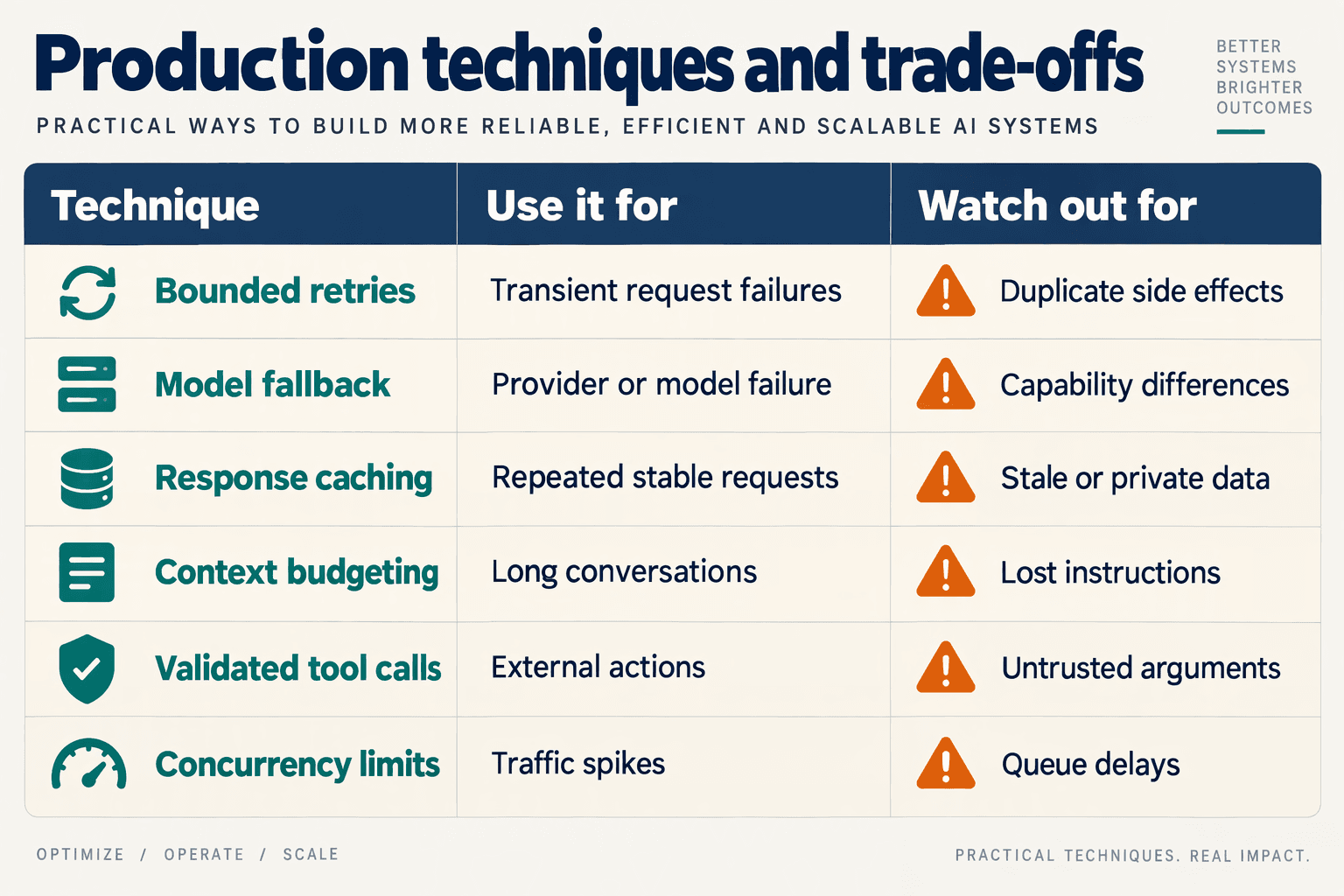
Bounded retries, durable action records, least-privilege tools, scoped caching, model routing, and failure-injection tests improve reliability, tool safety, and operating costs. Apply these controls in the shared backend so voice and chat inherit the same safeguards, even when delivery or conversation timing differs.
As of November 2026, OpenAI’s developer documentation includes separate guides for Realtime conversations and Realtime with tools. That separation is useful architecturally: generating a response and executing a business action require different recovery rules.
Which advanced controls should you implement first?
The following table provides implementation recommendations, not provider guarantees or measured benchmarks.
| Technique | Implementation | Main benefit | Important limit |
|---|---|---|---|
| Bounded retries | Retry eligible transient failures with jitter, an attempt cap, and a deadline | Contains temporary failures | Never blindly replay writes |
| Durable action ledger | Record an action ID, arguments, status, and result | Helps reconcile uncertain outcomes | Requires downstream reconciliation |
| Least-privilege tools | Enforce identity, permissions, schemas, and confirmation server-side | Limits unauthorized actions | Valid JSON is not authorization |
| Circuit breakers | Pause calls to failing dependencies; probe recovery | Prevents cascading failures | Distinguish tool and model failures |
| Scoped response caching | Key entries by tenant, permissions, model, and knowledge version | Avoids repeated inference | Exclude sensitive or changing answers |
| Budget-aware routing | Select an eligible model; cap tokens and tool steps | Controls operating costs | Test quality before switching models |
Prioritize action safety before inference savings. A cheaper response is not a successful optimization if the agent creates an incorrect booking or exposes another customer’s information.
How do you prevent tool calls from causing duplicate actions?
Treat every consequential tool invocation as a small transaction with an explicit state machine. A timeout means the outcome may be unknown—not that the action failed.
For example, consider a calendar booking:
- Prepare: create a durable action ID and validate the customer’s permission, requested slot, and required confirmation.
- Execute: pass an idempotency key if the calendar service supports one, and record the returned booking identifier.
- Reconcile: after a timeout, query the downstream system before deciding whether execution can safely resume.
An application-side ledger alone cannot guarantee exactly-once execution across an external service. If the service provides neither idempotency nor a reliable lookup, route uncertain outcomes to review rather than automatically retrying.
Treat retrieved documents and tool results as untrusted data, not permission to change application policy. The supplied research identifies OWASP’s Top 10 for LLM Applications 2026 as a security reference; use it to structure threat review alongside endpoint-specific tests.
How do you reduce costs without weakening reliability?
Set a per-turn resource budget covering model tokens, tool invocations, and elapsed time. An illustrative starting policy might allow two tool steps and one fallback attempt; these are configuration examples, not published performance benchmarks.
- Route by capability: use a lower-cost model only after it passes the relevant task evaluations.
- Cache selectively: reuse stable public answers, not account-specific balances or order status.
- Stop wasted work: cancel obsolete generation when supported, while independently reconciling any business action already started.
As of November 2026, CallMissed’s verified developer API supports caller-chosen fallback models, response caching, usage logs, and request logs. These capabilities provide building blocks; developers must still define eligibility rules, cache boundaries, and recovery policies.
Finally, inject tool timeouts, permission failures, and model outages into tests. Measure cost per successfully resolved task, not merely cost per request: repeated failures can make inexpensive inference operationally expensive.
What common mistakes cause insecure or unreliable voice and chat integrations?
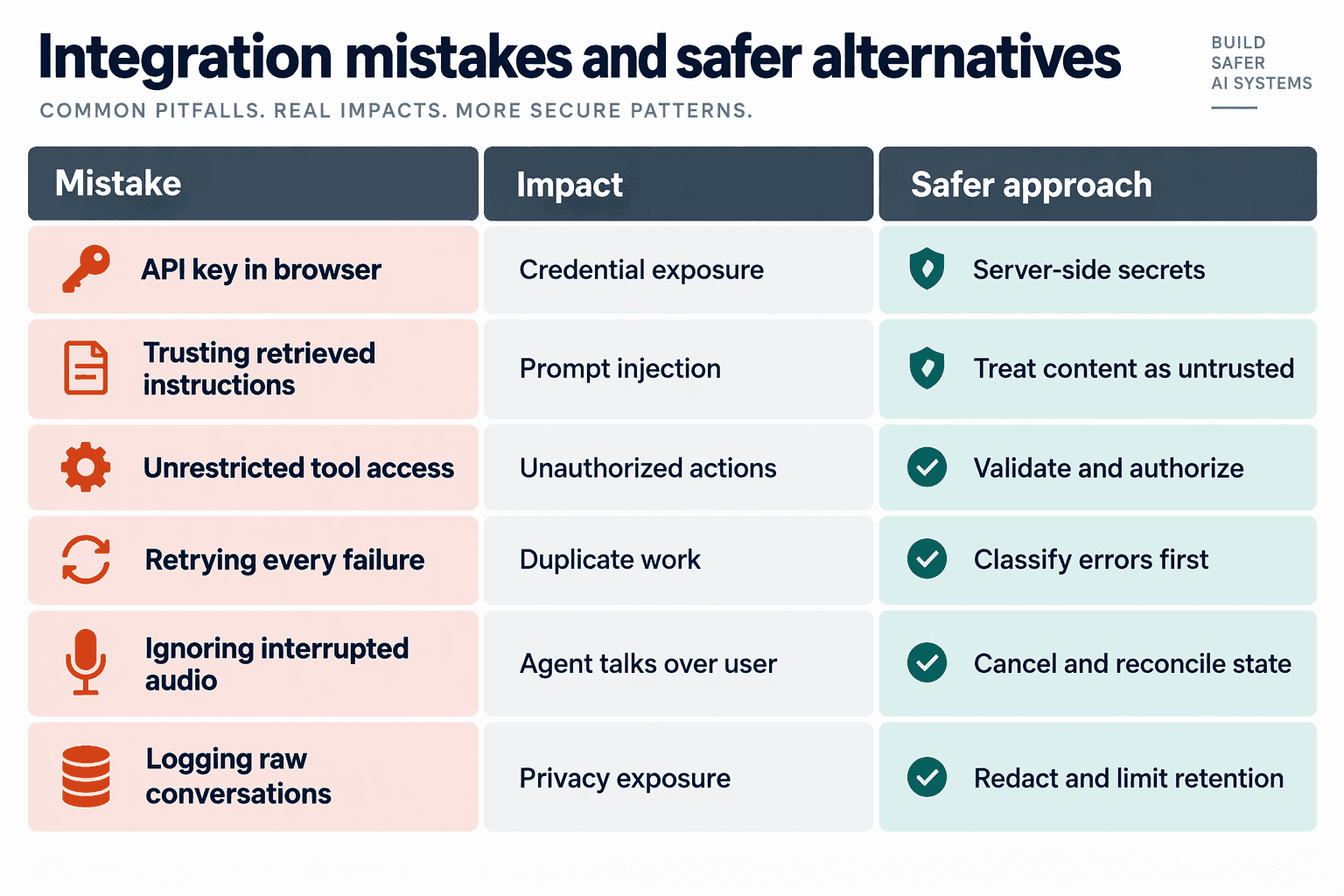
The most dangerous mistakes in LLM API integration are treating model output as authorization, retrying actions without checking their outcome, and assuming streamed speech matches conversation history. Secure, reliable voice and chat products enforce permissions and track execution state independently of the model.
Use the following checklist to review the shared backend—not just whether the chatbot answers correctly.
Which integration mistakes should developers check before launch?
| Mistake | Failure scenario | Required safeguard | Test before release |
|---|---|---|---|
| Trusting retrieved content as instructions | An uploaded document tells the agent to reveal private records or invoke a tool. | Treat retrieved text as untrusted data; enforce tool permissions outside the prompt. | Insert malicious instructions into a test document and verify that access remains blocked. |
| Accepting model-supplied identity | A caller supplies another customer’s account ID and receives their order details. | Bind tool access to authenticated identity and tenant scope, not generated arguments. | Request a record belonging to another test tenant. |
| Retrying an ambiguous tool outcome | A booking succeeds, but a timeout causes the backend to create another booking. | Persist an operation ID; check downstream status before retrying writes. | Drop the response after a successful write and verify that only one booking exists. |
| Retaining speech the user never heard | An interrupted answer remains complete in history, so the agent assumes instructions were delivered. | Distinguish generated, delivered, and cancelled output in conversation state. | Interrupt playback and inspect the next response’s assumptions. |
| Switching models without capability checks | A fallback returns ordinary text where the application requires validated tool arguments. | Define a capability contract; validate output and fail safely when requirements are unmet. | Force the primary model to fail during a tool-assisted turn. |
| Logging everything by default | Transcripts, credentials, or sensitive tool results enter broadly accessible logs. | Redact sensitive fields; restrict access and define retention rules. | Submit synthetic secrets and confirm they do not appear in telemetry. |
Why are prompts insufficient as a security boundary?
A prompt can guide behavior, but application code must decide what an agent may access or change. A polite request, a retrieved document, and a tool response can all contain instructions; none should expand the user’s permissions.
For example, an order-status tool should derive the customer’s permitted account scope from the authenticated session. If the model supplies an account_id, the backend should verify it against that scope rather than treating the argument as proof of ownership.
The supplied research identifies OWASP’s Top 10 for LLM Applications 2026 as a security-review reference. Its search listing does not provide detailed findings, so use the published document directly rather than attributing unsupported rankings or statistics to OWASP.
How should developers test recovery across voice and chat?
Test failure boundaries, not only successful conversations. As of November 2026, OpenAI’s developer documentation separates Realtime conversations, WebRTC, and Realtime with tools, making those useful reference points for reviewing conversation, transport, and tool behavior.
Run a repeatable sequence:
- Inject a failure: disconnect audio, delay a tool response, or reject a model request.
- Inspect persisted state: check which output was delivered and which actions actually completed.
- Verify recovery: confirm that reconnects do not repeat writes or resurrect cancelled speech.
As of November 2026, CallMissed’s verified product information lists caller-chosen fallback models, structured outputs, and request logs for its developer AI API. These capabilities support recovery workflows, but developers must still validate fallback compatibility and control what their application records.
Release criterion: every injected failure should produce a known outcome—completed, safely cancelled, or explicitly unresolved—not an apparently successful answer hiding an uncertain action.
Frequently Asked Questions
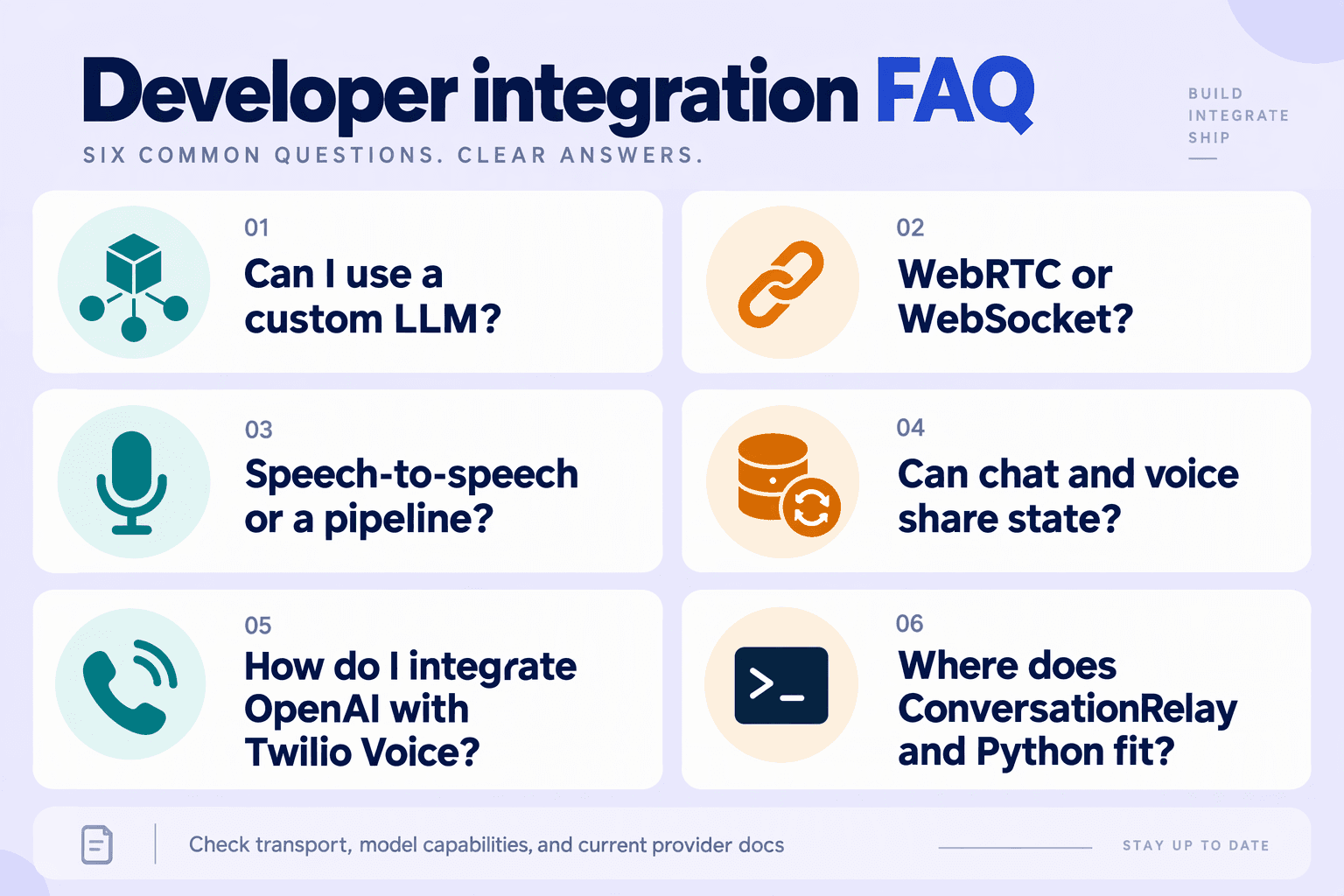
Can you connect your LLM to voice and chat if it is custom or self-hosted?
Should you use WebRTC or WebSocket to connect your LLM to browser voice?
How do you integrate OpenAI with Twilio Voice for a phone-based AI agent?
Can you use ConversationRelay and Python with a custom LLM?
Can you connect your LLM through a gateway without rewriting your existing SDK integration?
How should developers compare LLM integrations before launching a voice product?
Which documentation and deployment checks should you use next?
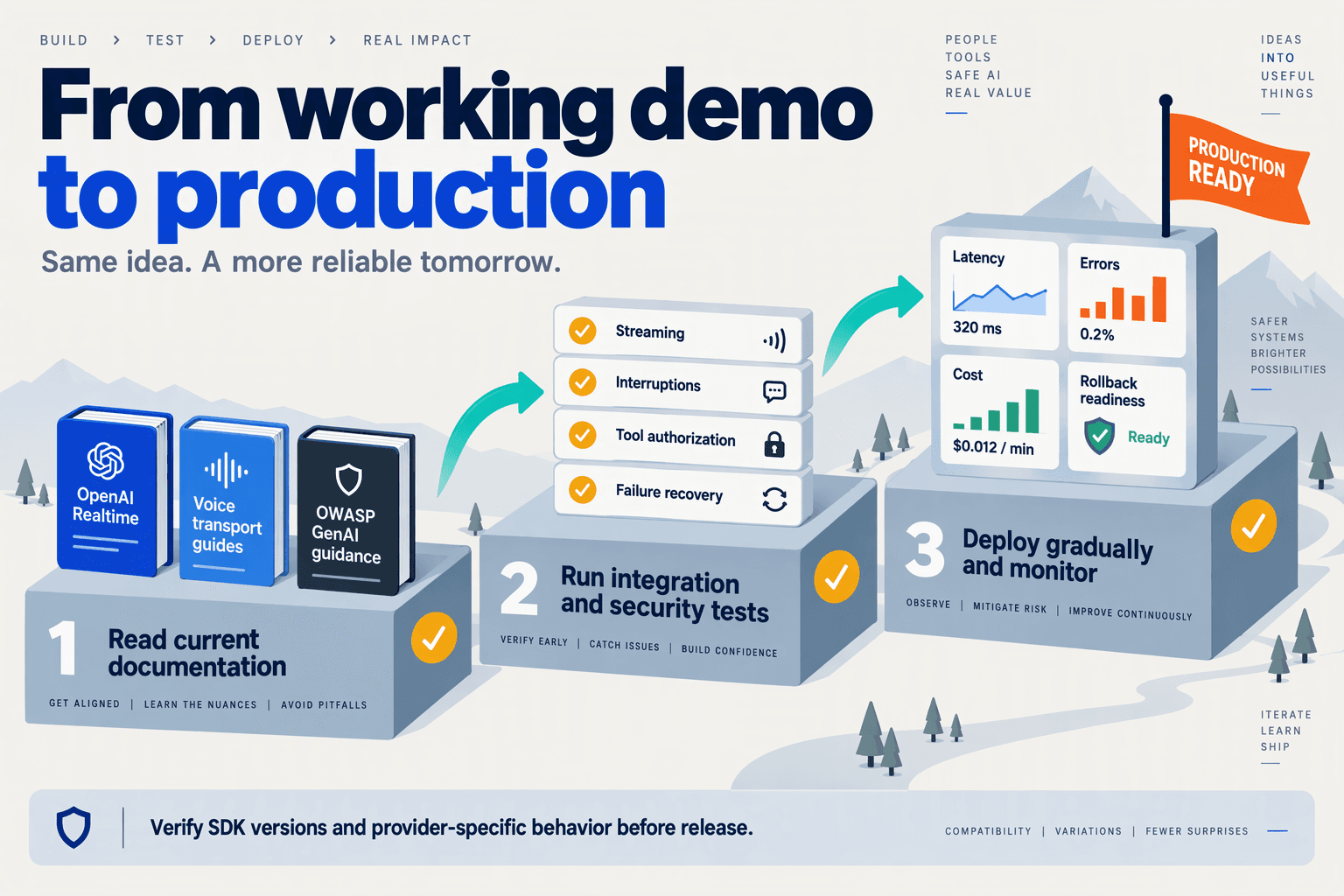
Use official API documentation, a versioned integration checklist, and a staged deployment gate before releasing your voice and chat product. The next step is to turn the behaviors covered in this LLM API integration guide into repeatable acceptance tests—not another successful demo.
Which documentation should developers bookmark?
As of November 2026, OpenAI’s developer documentation includes Getting started with the Realtime API, Voice agents, Realtime conversations, Realtime with tools, and WebRTC. Read the guide that matches your transport and workflow, then verify the endpoint reference rather than assuming a tutorial covers every production constraint.
Create a small documentation register alongside your application:
- Endpoint contract: record the API version, selected model, supported request fields, response events, and error formats.
- Transport contract: record connection setup, authentication, session lifecycle, and reconnect behavior.
- Tool contract: document argument schemas, authorization rules, timeouts, and whether an operation changes external state.
- Operational contract: capture applicable rate limits, billing units, data-handling requirements, and escalation contacts.
For security review, the supplied research identifies OWASP’s Top 10 for LLM Applications 2026 as a relevant reference. Use it to structure threat review, but supplement it with tests against your actual tools, permissions, and customer-data flows.
For a provider-neutral integration, consult the gateway documentation as well as model-provider references. According to CallMissed’s verified product information, as of November 2026, CallMissed supports OpenAI-compatible and Anthropic-compatible endpoints, caller-chosen fallback models, and usage and request logs. Those capabilities make endpoint compatibility, fallback configuration, and log inspection concrete items to verify during deployment.
What should block a production deployment?
Block release when a failed conversation can cause an unauthorized action, an unreconciled transaction, or an unobservable failure. Passing a happy-path conversation is necessary, but insufficient.
Use these release gates:
- Credentials: browser bundles, client logs, and repositories contain no long-lived provider secrets; credential rotation has been tested.
- Action safety: a repeated or timed-out tool request cannot silently create duplicate bookings, orders, or other mutations.
- Conversation integrity: an interrupted voice response does not leave history claiming the caller heard content that was never played.
- Failure visibility: traces distinguish model errors, transport failures, tool failures, and delivery failures without exposing sensitive content.
- Fallback compatibility: the configured fallback passes the application’s required schema and tool tests—not merely a basic text prompt.
- Recovery: operators can disable a problematic tool or revert the deployment without rebuilding the application.
Define thresholds from your own service objectives. A chat response-time target should not automatically become a voice turn-taking target.
How should you run the final deployment check?
Run one versioned release rehearsal against the same candidate build in both channels:
- Freeze the configuration. Record the application revision, model identifier, prompt version, tool schemas, and deployment settings.
- Replay representative journeys. Include successful requests, permission denials, ambiguous inputs, and channel switching where supported.
- Inject failures. Test disconnects, throttling, slow tools, interrupted audio, and unavailable models.
- Review measured outcomes. Separate successful completion, duplicate actions, recovery time, and cost per completed task.
- Canary and verify rollback. Start with limited exposure and expand only when predefined gates pass.
The final deliverable is an evidence-backed release decision: documented contracts, reproducible tests, measured behavior, and a rehearsed recovery path. That is what turns an LLM connection into dependable communication infrastructure.
Conclusion
To connect your LLM reliably, build a shared conversation backend—not just two interfaces that call the same model. Voice and chat should reuse authentication, tool controls, and conversation state while handling streaming and delivery differently.
The central lesson of this guide is that API compatibility starts the integration; conversation coordination makes it usable. A successful request does not necessarily mean the customer heard the answer, and a disconnected session does not necessarily mean a tool action failed. Your backend must preserve those distinctions.
Keep these four takeaways at the center of your implementation:
- Connect securely and verify capabilities. Keep provider credentials server-side, configure the appropriate endpoints, and check the selected model’s actual support for streaming, tools, structured outputs, and audio. Treat a compatible API format as an integration convenience, not proof that every model will behave identically across your voice and chat workflows.
- Separate shared logic from channel delivery. Reuse conversation rules and tool orchestration, but adapt text streaming and audio transport to their respective interfaces. Chat can display arriving tokens; voice must coordinate when speech begins, when it stops, and how an interruption changes the history retained for the next response.
- Make recovery safe and state explicit. Plan for interruptions, reconnects, and responses that never reach the user. Validate tool arguments, enforce permissions, and prevent retries from duplicating completed actions. When a customer moves from an order question in chat to a follow-up by voice, both channels should reflect the same verified conversation state.
- Measure behavior beyond the demo. Track response timing, usage costs, failures, and recovery with repeatable integration tests. Exercise interrupted answers and uncertain tool outcomes alongside successful requests. The useful benchmark is not simply whether the model responds, but whether the application remains coherent when a network connection, model request, or tool fails.
What should developers watch next in voice and chat integration?
Watch how model compatibility and realtime conversation controls evolve together. As of November 2026, OpenAI’s developer documentation includes dedicated guidance for the Realtime API, voice agents, WebRTC, and realtime tools, underscoring the importance of transport and orchestration alongside model selection.
Reusable connection layers are also worth exploring. According to CallMissed’s verified product information, as of November 2026, CallMissed provides 159 models through one API key and balance, including 21 free-tier models, with OpenAI-compatible and Anthropic-compatible endpoints. Developers can explore CallMissed as one option for this shared-backend approach while still validating each selected model’s capabilities.
Before expanding your integration, test one conversation across chat, voice, interruption, and recovery: does your backend preserve what actually happened—or only what it hoped would happen?
Related Reading
- Integrating LLM APIs: A Developer Guide to Voice and Chat
- Dessa Speech-Only Voice Model: Voice-Agent Developer Guide
- WhatsApp voice AI integration: Developer Setup Guide