Integrating LLM APIs: A Developer Guide to Voice and Chat



Integrating LLM APIs securely helps you ship streaming chat and voice with server-side keys, interruption handling, and reliable retries.
Integrating LLM APIs: A Developer Guide to Voice and Chat
What happens when your chatbot answers correctly—but your voice assistant keeps talking after the customer interrupts? Integrating LLM APIs means more than sending a prompt and displaying a response: developers need to coordinate authentication, streaming, conversation state, tool execution, and, for voice, the timing of an actual conversation.
The architectural choices matter now because chat and voice increasingly share application logic while requiring different delivery mechanisms. As of October 2026, the supplied OpenAI Realtime API documentation describes browser connections over WebRTC and server connections over WebSocket, with support for audio turns, tools, interruptions, and handoffs. That changes the integration question from “Which model should I call?” to “Which responsibilities belong in my backend, client, and realtime session?”
Consider a customer asking a shopping assistant, “Where’s my order?” In chat, the application can stream text while a tool retrieves delivery information. In voice, the same application must also manage microphone input, play audio, and stop playback when the customer says, “Actually, cancel that.” A successful model response is only one part of a successful interaction.
As of October 2026, CallMissed’s verified fact sheet lists 141 models, including 46 general-purpose LLMs and 24 realtime voice-agent models, accessible through one API key and balance, illustrating how unified LLM API providers can simplify access across chat and voice workloads.
This guide takes that broader access question into a practical implementation plan. You’ll learn how to:
- Build a secure chat foundation: keep API keys for authentication on the backend, stream responses to the client, and maintain conversation state.
- Choose a voice architecture: compare a speech-to-text → LLM → text-to-speech pipeline with realtime speech integration, including cancellation and interruption handling.
- Connect models to application actions: use function calling and schema-constrained outputs without confusing generated data with authorization to execute an operation.
- Prepare for production failures: handle rate limits, retries, disconnects, and fallback behavior without duplicating side effects.
- Estimate conversation costs: account for model usage, speech processing, and session behavior rather than comparing headline token prices alone.
As of October 2026, OpenAI’s supplied Structured Outputs documentation describes responses constrained by a supplied JSON Schema. That is useful for predictable application data, but schema compliance does not establish whether an order exists or whether a user may cancel it.
The goal is a reusable foundation for building chatbots and voice products: start with one working conversation, then add the controls that make it safe, observable, and economical under real traffic.
How do you integrate LLM APIs into a voice and chat application?
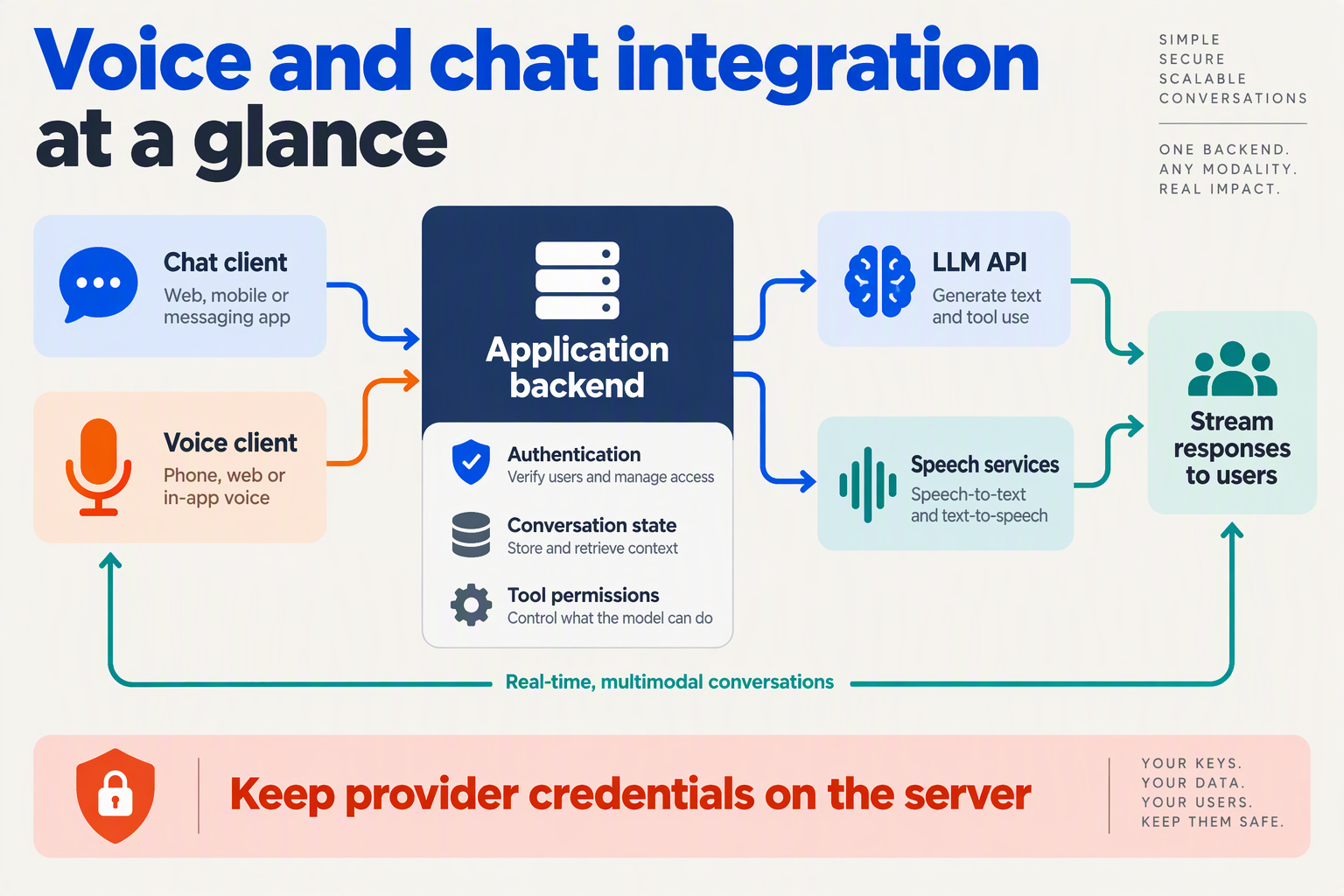
Integrate LLM APIs by placing a conversation orchestrator between your application and the model: it authenticates users, manages conversation state, routes tool requests, and delivers responses through chat or voice adapters. Build one backend workflow, then give each channel its own input, output, and cancellation controls.
What should your first working LLM integration include?
Start with a narrow task, such as checking an order’s delivery status. Define an application-level request contract rather than exposing a provider’s entire API directly to clients:
{
  "conversation_id": "conv_123",
  "turn_id": "turn_007",
  "channel": "chat",
  "message": "Where is order ORD-42?"
}
Derive the customer’s identity from the authenticated session—not from a customer ID submitted in this payload. The backend should verify access to conversation_id before loading its history.
Implement the first conversation in this order:
- Authenticate the application user. Keep long-lived provider API keys in backend secrets, separate from user credentials.
- Assemble model input. Combine instructions, relevant conversation history, and permitted tool definitions.
- Start the model request. Translate provider events into a stable application event format.
- Execute authorized tools. Validate arguments and check permissions before querying an order system.
- Deliver and persist the result. Store the completed response, tool outcome, and turn status.
This separation lets you change providers without changing your application’s customer identity or authorization model.
As of October 2026, CallMissed’s verified fact sheet lists OpenAI-compatible and Anthropic-compatible endpoints, allowing existing SDK integrations to switch through a base-URL change. Compatibility simplifies connectivity; developers should still test the selected model’s streaming, tool, and output behavior.
How do chat and voice share the same backend?
Share business logic, not necessarily transport code. Your order lookup, permission checks, and conversation records should work regardless of whether the customer types or speaks.
Use channel adapters around that shared core:
- Chat adapter: accepts text and renders streamed text updates.
- Speech pipeline adapter: sends recognized text to the orchestrator and converts the response into speech.
- Realtime adapter: coordinates audio-session events with application tools and conversation records.
As of October 2026, OpenAI’s Realtime API documentation describes WebRTC connections for browsers and WebSocket connections for servers. Choose the transport for the client environment rather than assuming your chat streaming endpoint can also handle realtime audio.
For browser voice sessions, keep permanent credentials server-side. As of October 2026, OpenAI’s WebRTC documentation describes ephemeral tokens for browser connections; issue session credentials only after authenticating the application user.
How should you track responses and interruptions?
Give every turn an explicit lifecycle: accepted → generating → completed, with separate cancelled and failed states. Include conversation_id and turn_id in application events so clients can distinguish current output from delayed events belonging to an earlier turn.
For example, normalize delivery events into:
response.delta: append text to the active response.response.completed: finalize the turn.response.cancelled: stop displaying or playing that response.tool.completed: record the application action’s result.
If the customer interrupts an order-status answer, stop audio playback immediately, request generation cancellation, and reject subsequent output for the cancelled turn. Cancellation does not undo a tool action: an order cancellation already committed by your backend remains committed.
Your first integration is ready to expand when one authenticated conversation completes correctly—and an interrupted conversation leaves both the interface and backend state consistent.
What prerequisites and API keys for authentication do you need?
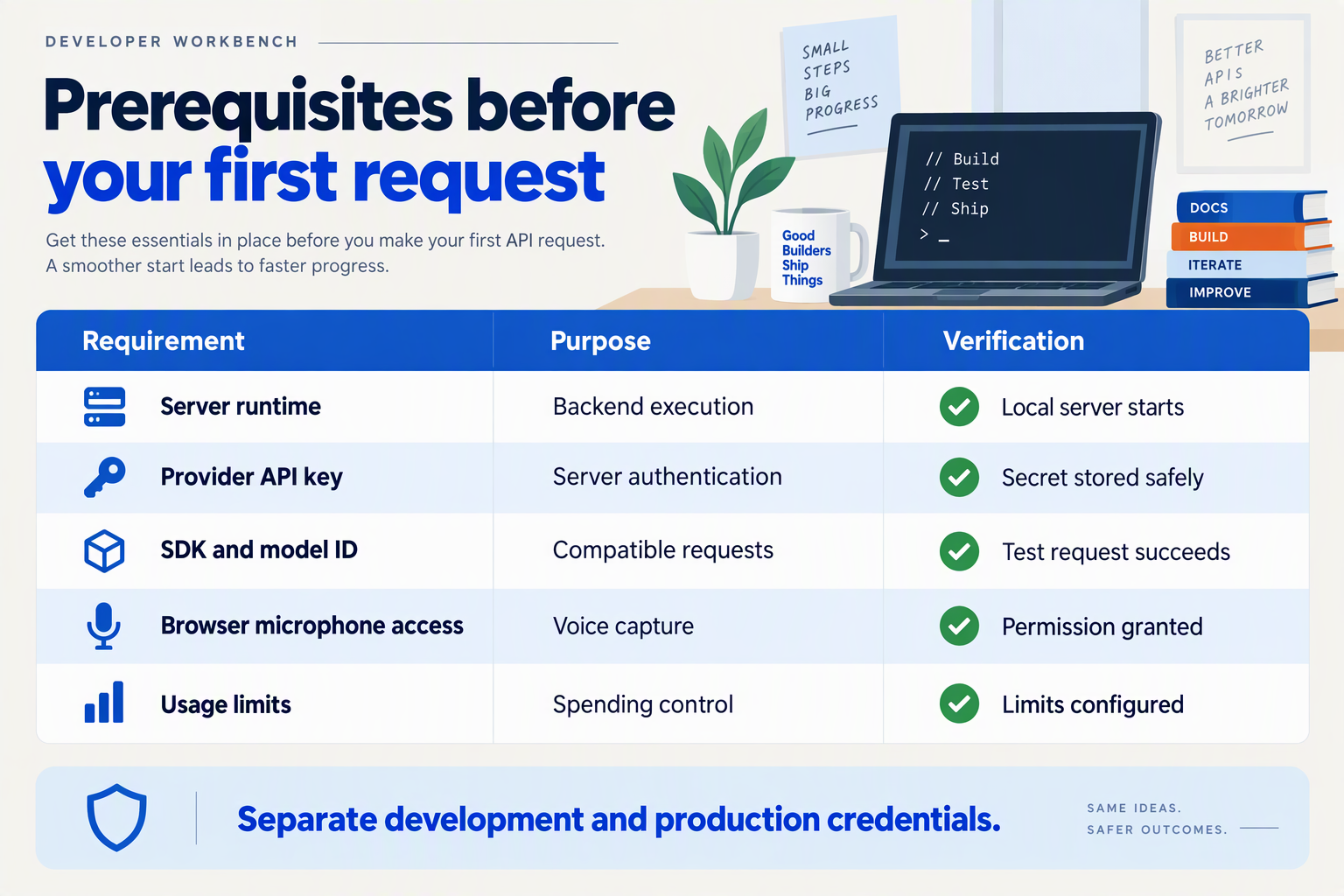
You need a provider account with an enabled usage balance, a server-side API key, an SDK or HTTP client, and a backend that authenticates your users before calling the model. For browser-based voice, you also need microphone permission and a secure session setup that does not expose your long-lived provider key.
What should you prepare before your first LLM API request?
Use this checklist to separate development prerequisites from production safeguards. Your application’s user authentication and the provider’s API authentication are different trust boundaries: a valid provider key does not establish which customer may access an order or start a paid voice session.
| Prerequisite | Chat requirement | Voice requirement | Readiness check |
|---|---|---|---|
| Provider account | Enable model access and usage funding | Confirm access to the chosen audio model | Account can make a test request |
| Provider API key | Store in backend secrets | Keep long-lived keys on the server | Key absent from client bundles |
| SDK or HTTP client | Configure endpoint and supported request format | Add the required realtime transport | Minimal request succeeds |
| Application authentication | Identify the user before model access | Authenticate before creating a session | Anonymous abuse is blocked |
| Browser permissions | Usually no microphone access needed | HTTPS and microphone permission | Recording works on target devices |
| Usage controls | Set request and spending limits | Add session-duration and concurrency controls | Limits are tested before release |
For LLM integration in applications, choose a runtime your team can operate reliably rather than changing languages just to match a tutorial. Pin dependency versions, keep separate development and production credentials, and verify the exact authentication headers in your selected provider’s documentation.
Which API keys and tokens belong on the backend?
Long-lived API keys belong in a secret manager or server-side environment variables, not browser JavaScript, mobile application packages, source control, or request logs. A frontend environment-variable prefix does not make a secret safe; many build tools embed those values in downloadable assets.
As of October 2026, OpenAI’s WebRTC documentation describes ephemeral tokens for browser Realtime API connections. Follow the selected provider’s documented connection flow: your backend authenticates the user and establishes or authorizes the session, while the browser receives only the session-specific material it needs.
A practical setup sequence is:
- Create a development credential and store it outside the repository.
- Configure the backend endpoint and the provider’s required authentication mechanism.
- Make one minimal request to confirm model access and account funding.
- Redact credentials from logs, including errors and diagnostic traces.
- Test credential rotation before depending on the integration in production.
Do not assume every OpenAI-compatible service supports identical realtime authentication, token lifetimes, or session endpoints. Compatibility with chat requests is not proof of compatibility with browser voice-session setup.
What limits should you check before inviting users?
Check both provider quotas and your own application limits. As of October 2026, OpenAI’s Rate limits documentation defines rate limits as restrictions on how often a user or client can access its services within a specified period; inspect the limits applicable to your actual account and model.
As of October 2026, CallMissed’s verified fact sheet lists default per-key limits of 60 requests per minute on Free, 500 on Starter, 3,000 on Pro, and 10,000 on Enterprise. Those figures help size request traffic, but they should not be treated as concurrent voice-session guarantees.
Before launch, test these failure paths:
- Invalid credentials: return a controlled error without revealing secrets.
- Exhausted quota: reject or defer work rather than retrying indefinitely.
- Unauthorized session creation: block the request before incurring model usage.
How do you get started with unified LLM API providers such as CallMissed?
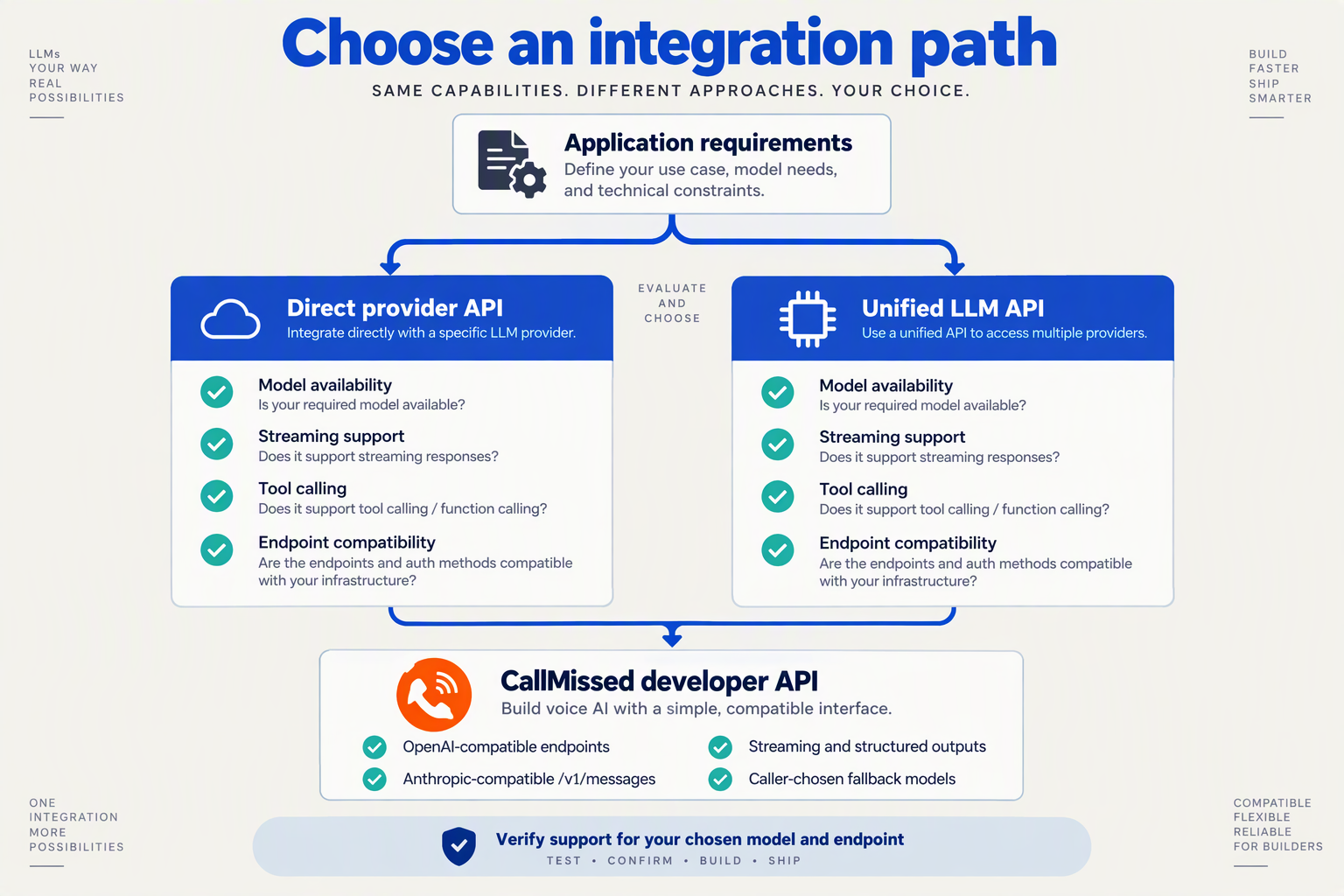
Start with one backend-mediated chat request, then test streaming and model substitution before adding voice. Unified LLM API providers simplify access, but your application still needs to verify each model’s capabilities, error behavior, and suitability for the conversation.
What should you configure before your first API request?
As of October 2026, CallMissed’s verified fact sheet lists OpenAI-compatible endpoints for chat completions, Responses API, embeddings, images, and audio, alongside an Anthropic-compatible /v1/messages endpoint. Existing SDKs can work by changing the base URL, making compatibility a practical starting point for integrating LLM APIs.
Configure three values on your server:
- API key: load it from a secret manager or server-side environment variable.
- Base URL: use the provider’s documented API base URL.
- Model identifier: copy an available identifier from the provider’s catalogue rather than assuming upstream names work unchanged.
Keep these settings separate from application logic. That lets you change a model or endpoint without rewriting your order-support workflow.
How do you make a minimal compatibility test?
Use a small request with a predictable task before connecting databases, retrieval, or tools. For example, this Python smoke test uses the OpenAI SDK with deployment-supplied configuration:
import os
from openai import OpenAI

client = OpenAI(
    api_key=os.environ["LLM_API_KEY"],
    base_url=os.environ["LLM_BASE_URL"],
)

response = client.chat.completions.create(
    model=os.environ["LLM_MODEL"],
    messages=[{
        "role": "user",
        "content": "Explain order tracking in one sentence."
    }],
)

print(response.choices[0].message.content)
Install the SDK and set all three environment variables before running the example. This tests basic chat compatibility—not realtime voice, tool execution, or every SDK feature.
Next, repeat the request with streaming enabled and verify that your backend can forward incremental text to the client. Treat missing content, unexpected response shapes, and interrupted streams as test failures rather than silently displaying an empty answer.
How should you choose your first model and usage budget?
Choose one model for a narrow workload, such as answering delivery-policy questions. Evaluate it against representative prompts before trying to optimize across an entire catalogue.
As of October 2026, CallMissed’s verified fact sheet specifies 1,000 free signup credits, with one credit equal to ₹1, and a default Free-tier limit of 60 requests per minute per API key. These are useful starting constraints, but credits do not establish a universal per-request price; costs depend on the selected model and usage.
For an initial evaluation:
- Create a fixed set of normal, ambiguous, and unsupported questions.
- Record answer quality, response time, usage, and failures.
- Change only the model identifier and rerun the same cases.
- Compare cost per successful task, not just cost per request.
What should you verify before extending the integration to voice?
A shared API surface does not guarantee identical model capabilities. Check streaming, function calling, structured outputs, and audio support for each selected model.
Keep chat generation and voice-session transport behind separate application interfaces. A working chat-completions request does not establish that the same connection can carry microphone audio.
Before expanding, test invalid credentials, unavailable models, and rate-limit responses. OpenAI’s rate-limit documentation, supplied for this October 2026 guide, defines limits as restrictions on access within a specified period; design your application to queue or reject excess work rather than retry indefinitely.
How do you build streaming chat step by step with server-side authentication?
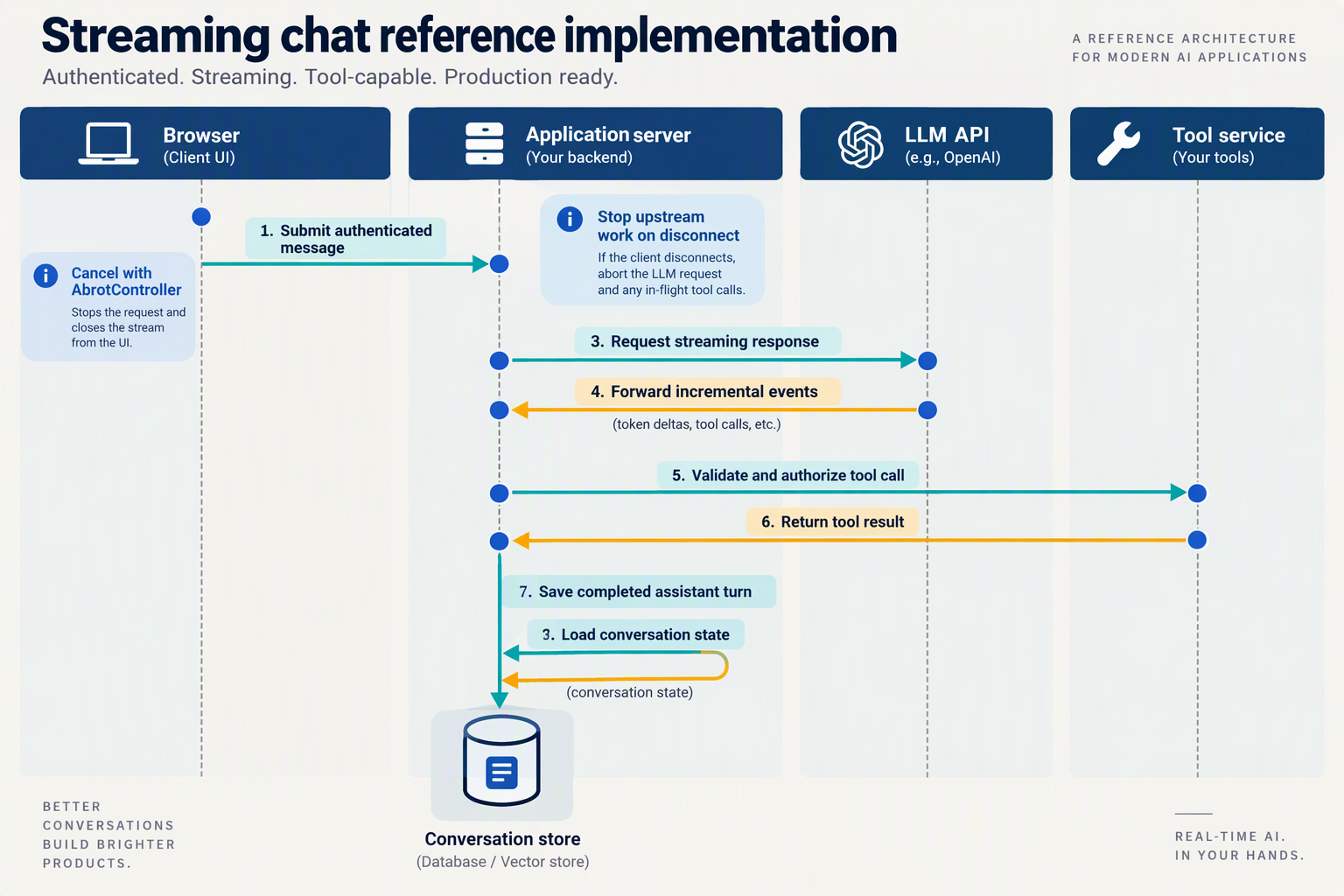
Build streaming chat by sending authenticated browser requests to your backend, then forwarding model output incrementally to the browser. Keep the provider API key server-side, and make your backend responsible for conversation access, input limits, cancellation, and saving completed replies.
How do you authenticate a streaming chat request?
Start with a same-origin POST /api/chat endpoint. Authenticate the application user with your existing session middleware; the provider credential authenticates your backend to the LLM service, not the person using your chatbot.
Before opening a model stream:
- Verify conversation ownership using the authenticated user ID.
- Validate the message and enforce request-size and per-user usage limits.
- Apply CSRF protection when using cookie-based authentication.
- Load conversation history server-side, including your trusted system instructions.
Do not accept a browser-supplied user ID as proof of ownership, or let client-submitted messages introduce privileged system instructions.
How do you stream model output from the backend?
Use an SDK’s streaming interface, then translate provider events into a small application protocol. Newline-delimited JSON (NDJSON) works with a streaming fetch() response and lets you distinguish text, completion, and errors.
This Express route assumes an initialized OpenAI-compatible client, session and CSRF middleware, and application-specific validation and database helpers. loadAuthorizedHistory must reject unauthorized access before streaming begins.
app.post("/api/chat", requireSession, verifyCsrf, async (req, res) => {
  const controller = new AbortController();
  res.on("close", () => controller.abort());

  const send = event =>
    res.write(JSON.stringify(event) + "\n");

  try {
    const { conversationId, message } = validateChatInput(req.body);
    const history = await loadAuthorizedHistory(
      req.user.id, conversationId
    );

    const stream = await client.chat.completions.create({
      model: process.env.CHAT_MODEL,
      messages: [...history, { role: "user", content: message }],
      stream: true
    }, { signal: controller.signal });

    res.setHeader("Content-Type", "application/x-ndjson");
    res.setHeader("Cache-Control", "no-store");
    res.flushHeaders();

    let answer = "";
    let finishReason;

    for await (const chunk of stream) {
      const choice = chunk.choices[0];
      const text = choice?.delta?.content;
      if (text) {
        answer += text;
        send({ type: "delta", text });
      }
      if (choice?.finish_reason) finishReason = choice.finish_reason;
    }

    await saveTurn(req.user.id, conversationId, {
      message, answer, finishReason
    });
    send({ type: "done", finishReason });
    res.end();
  } catch (error) {
    if (controller.signal.aborted) return;
    if (!res.headersSent) {
      res.status(502).json({ error: "Chat request failed" });
    } else {
      send({ type: "error", message: "Response interrupted" });
      res.end();
    }
  }
});
This example handles text-only chat; tool-call streaming needs separate event handling. Validation and authorization helpers should return appropriate client-error statuses rather than the example’s generic upstream-failure response.
As of October 2026, CallMissed’s verified fact sheet lists OpenAI-compatible chat completions and streaming, allowing developers to retain this SDK pattern while configuring CallMissed’s base URL and server-held credentials.
How should the browser handle partial responses and cancellation?
Send the message with fetch(), then read response.body through a reader and a streaming TextDecoder. Network chunks do not necessarily align with JSON records: retain an incomplete line between reads and parse only complete newline-delimited events.
delta: append text to the current assistant bubble.done: finalize the bubble and record the finish reason.erroror unexpected EOF: mark the answer incomplete.- Stop button: abort the browser request with
AbortController.
Test a disconnect halfway through a reply and verify that the backend cancels its upstream request. Also configure reverse proxies to avoid response buffering.
As of October 2026, OpenAI’s supplied Rate limits documentation describes limits on request frequency. Your application therefore needs its own admission controls before opening streams—not just error handling after provider limits are reached.
How do you add voice with STT–LLM–TTS or realtime sessions and handle interruptions?
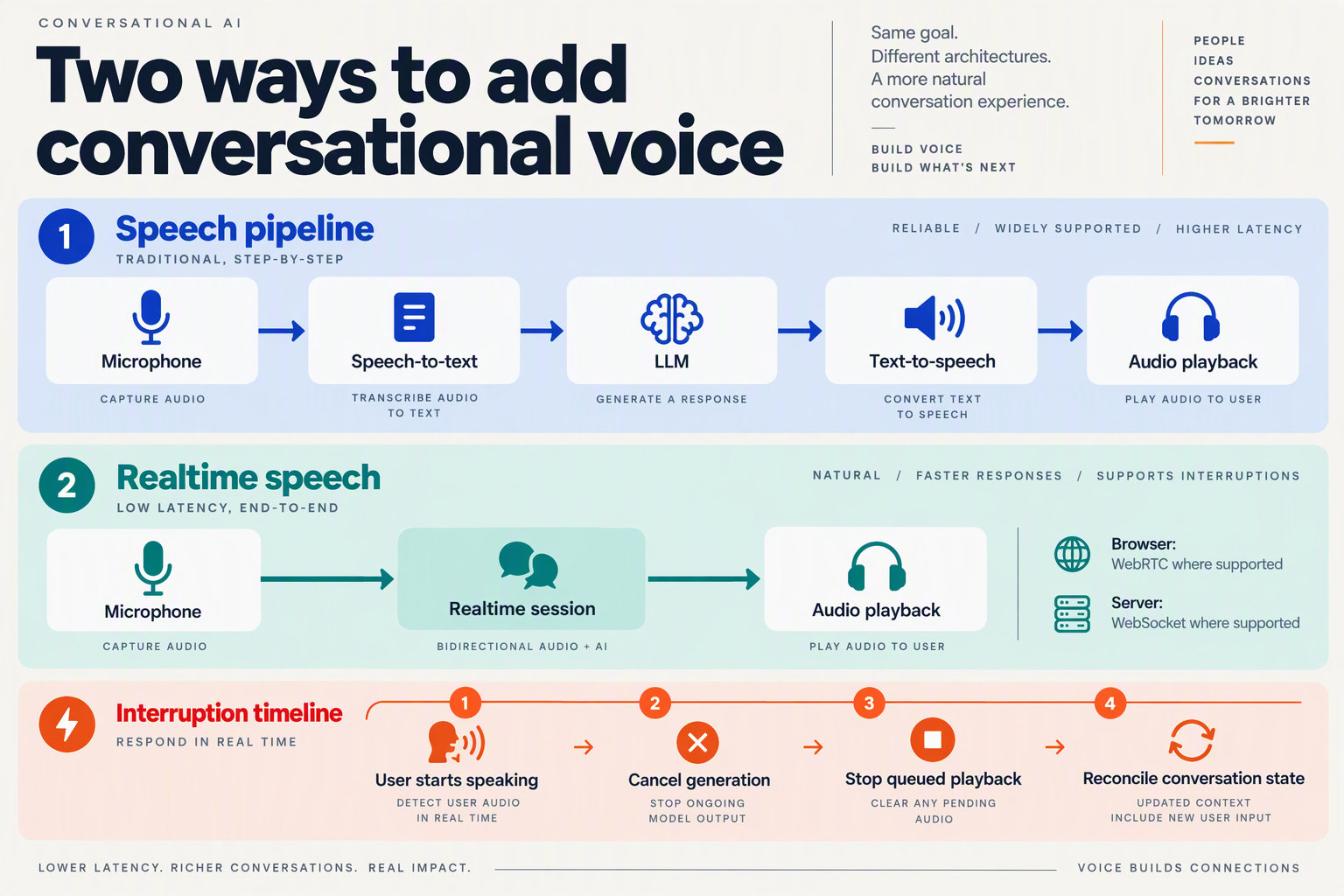
Add voice by choosing either a speech-to-text → LLM → text-to-speech (STT–LLM–TTS) pipeline or a realtime audio session. In both architectures, interruptions must stop audible output, cancel obsolete generation, and reconcile conversation history with what the user actually heard.
When should you use STT–LLM–TTS instead of realtime audio?
Use STT–LLM–TTS when you need independent control over transcription, model selection, and speech synthesis. Your existing chat backend becomes the middle stage: transcribed speech enters the same conversation and tool workflow, while generated text feeds a speech synthesizer.
A practical streaming pipeline is:
- Capture microphone audio and send it to streaming STT.
- Detect the end of the user’s turn, then submit the transcript to the LLM.
- Accumulate meaningful text chunks, such as complete clauses, rather than synthesizing every token separately.
- Stream synthesized audio into a bounded playback queue.
The trade-off is orchestration: transcription, generation, synthesis, and playback each introduce buffering and failure boundaries. Aggressive end-of-turn detection improves responsiveness but can cut off a speaker who pauses mid-sentence.
Choose realtime audio when conversational turn-taking is central to the product. As of October 2026, OpenAI’s Realtime API documentation describes browser connections over WebRTC and server connections over WebSocket, with support for audio turns, tools, interruptions, and handoffs. Realtime integration moves more coordination into the session, but your application still owns playback behavior, authorization, and business state.
For developers evaluating managed connections, CallMissed’s verified fact sheet lists a managed voice-agent WebSocket, including a Deepgram Voice Agent-compatible endpoint, as of October 2026. Confirm the selected endpoint’s event semantics rather than assuming chat-completions compatibility also defines audio behavior.
How do you handle barge-in without leaving stale audio or history?
Barge-in means the user starts speaking while the assistant is talking. Treat it as a coordinated state transition, not merely a microphone event.
When speech begins:
- Stop playback immediately and discard queued assistant audio.
- Cancel the active response using the provider’s supported mechanism; in a pipeline, also stop pending TTS work.
- Reject late output belonging to the interrupted response.
- Update conversation state to reflect the assistant content actually played, not the full generated answer.
Track a response identifier and playback position separately. A provider finishing generation does not mean the user finished hearing the response.
For example, suppose the assistant generates, “Your order arrives Friday. Would you like tracking details?” but the customer interrupts after “Friday.” Retaining the unheard question can make the next answer assume context the customer never received. Use provider-supported truncation where available; otherwise maintain application-side records of generated versus delivered content.
What should you test before shipping voice integration?
Instrument the conversation as distinct stages: speech start, turn end, first model output, first playable audio, playback stop, and cancellation acknowledgement. Measure observed timings rather than assuming “realtime” guarantees a particular latency.
Run these tests:
- Interrupt during both generation and buffered playback.
- Speak over the assistant with background noise present.
- Disconnect and reconnect without replaying stale audio.
- Interrupt while a tool request is executing.
Finally, distinguish response cancellation from transaction cancellation. Stopping an assistant’s speech does not undo an order update already committed by your backend. Keep transaction outcomes explicit so the resumed conversation reports what actually happened.
Which advanced patterns preserve state through retries, failover, and tool calls?
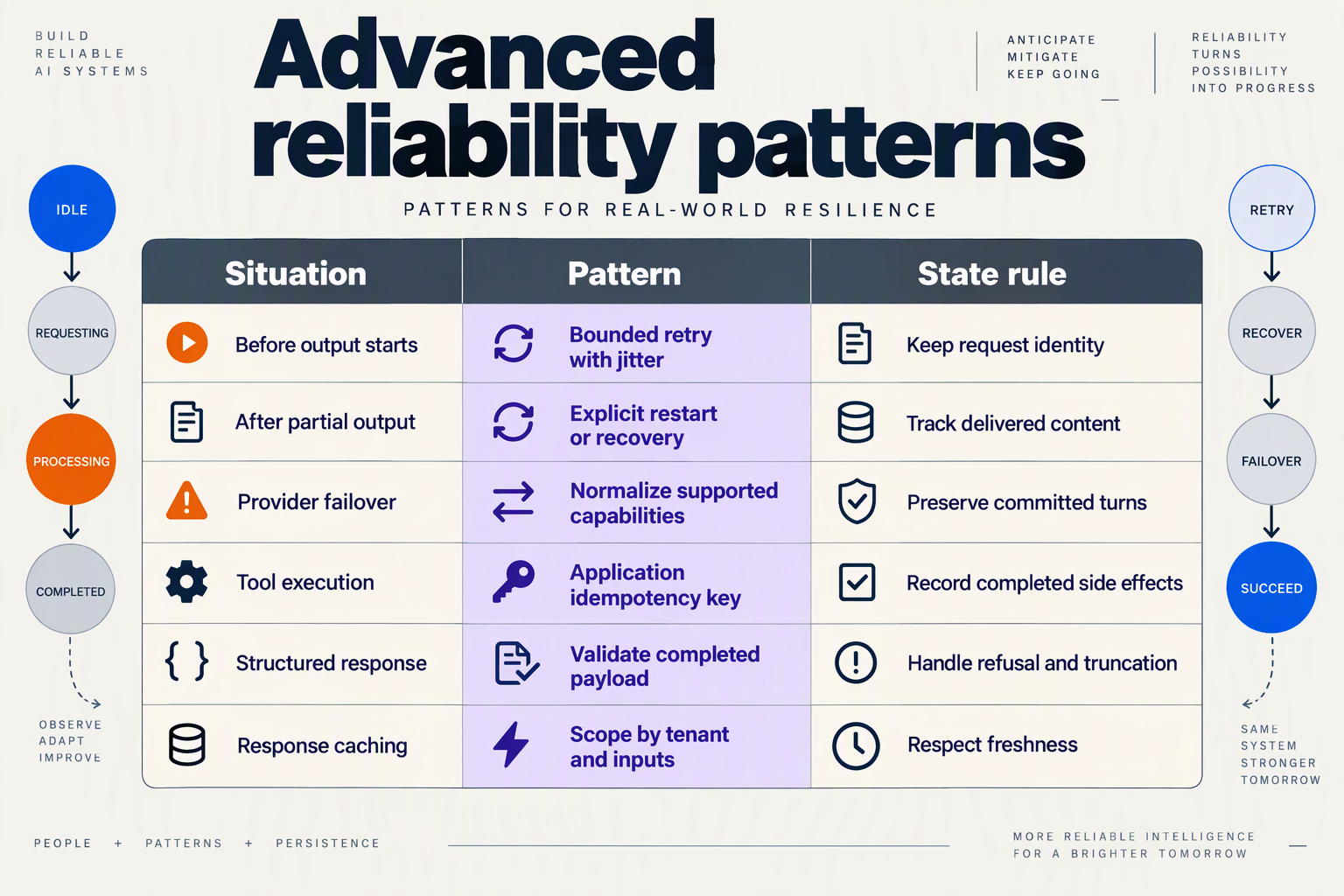
Durable conversation checkpoints, bounded retries, and idempotent tool execution preserve state across failures. Keep your application’s conversation ledger authoritative: a provider session or streamed response alone cannot tell you whether an action completed or which words a voice customer actually heard.
Which state-management patterns should developers implement?
Use these patterns together when integrating LLM APIs; each protects a different boundary between generation, execution, and delivery.
| Pattern | State to persist | Recovery rule | Failure prevented |
|---|---|---|---|
| Conversation checkpoint | Committed turns, summary, tool results | Rebuild context from the latest checkpoint | Lost conversation history |
| Bounded retry | Attempt count, deadline, request fingerprint | Back off with jitter; stop at deadline | Retry storms |
| Idempotent tool execution | Operation key, arguments, execution status | Reuse the key; return the recorded result | Duplicate business actions |
| Provider failover | Canonical messages, tool schemas, selected model | Check compatibility before replay | Invalid fallback requests |
| Stream reconciliation | Response ID, delivery status, completed text | Separate partial output from committed turns | Duplicate or contradictory replies |
| Voice interruption checkpoint | Turn ID, playback progress, cancellation status | Record what was heard; cancel stale output | Context based on unheard speech |
These are application-level safeguards, not guarantees implied by API compatibility. As of October 2026, OpenAI’s supplied Rate limits documentation defines limits as restrictions on access within a specified period; retry scheduling should therefore respect provider limits rather than immediately repeating every failed request.
How do you retry tool calls without repeating an action?
Assign a stable operation key to each intended business action before execution. Store the validated arguments and execution status in a durable ledger, and enforce uniqueness so concurrent retries cannot execute the same operation independently.
Consider an order cancellation:
- Record intent: associate
cancel:order-482:request-91with the authorized cancellation request. - Execute once: pass that key to the downstream service if the service supports idempotency.
- Persist the outcome: save the cancellation result before asking the model to explain it.
- Recover carefully: if the connection fails after submission, query the order status or reconcile the operation before retrying.
A timeout means “outcome unknown,” not “action failed.” Without downstream idempotency or reconciliation, automatic retries of payments, bookings, or cancellations can duplicate side effects.
As of October 2026, OpenAI’s supplied Structured Outputs documentation describes JSON Schema-constrained responses. Schema conformity helps define an action’s arguments, but your backend must still verify authorization, business rules, and whether that action already ran.
How should failover and voice reconnection restore context?
Maintain a provider-neutral conversation representation and translate it through provider adapters. Preserve user intent, completed tool results, and unresolved operations; do not assume provider-specific response identifiers or realtime sessions transfer between models.
Before failover, check:
- Capability compatibility: tools, structured outputs, modality, and context capacity.
- Execution status: resolve pending side effects before requesting another action.
- Delivery status: distinguish generated content from content displayed or played.
As of October 2026, CallMissed’s verified fact sheet lists caller-chosen fallback models, function calling, structured outputs, and request logs in its developer AI API. These capabilities support a fallback architecture, while durable business-state recovery remains an application responsibility.
For voice, checkpoint what the customer heard—not merely what the model generated. As of October 2026, OpenAI’s supplied Realtime API documentation describes audio turns, tools, and interruptions. After a disconnect or interruption, cancel stale playback and restore completed actions plus confirmed conversational context; restarting an entire response risks repeating both speech and instructions.
How do you benchmark latency and calculate cost per chat or voice conversation?
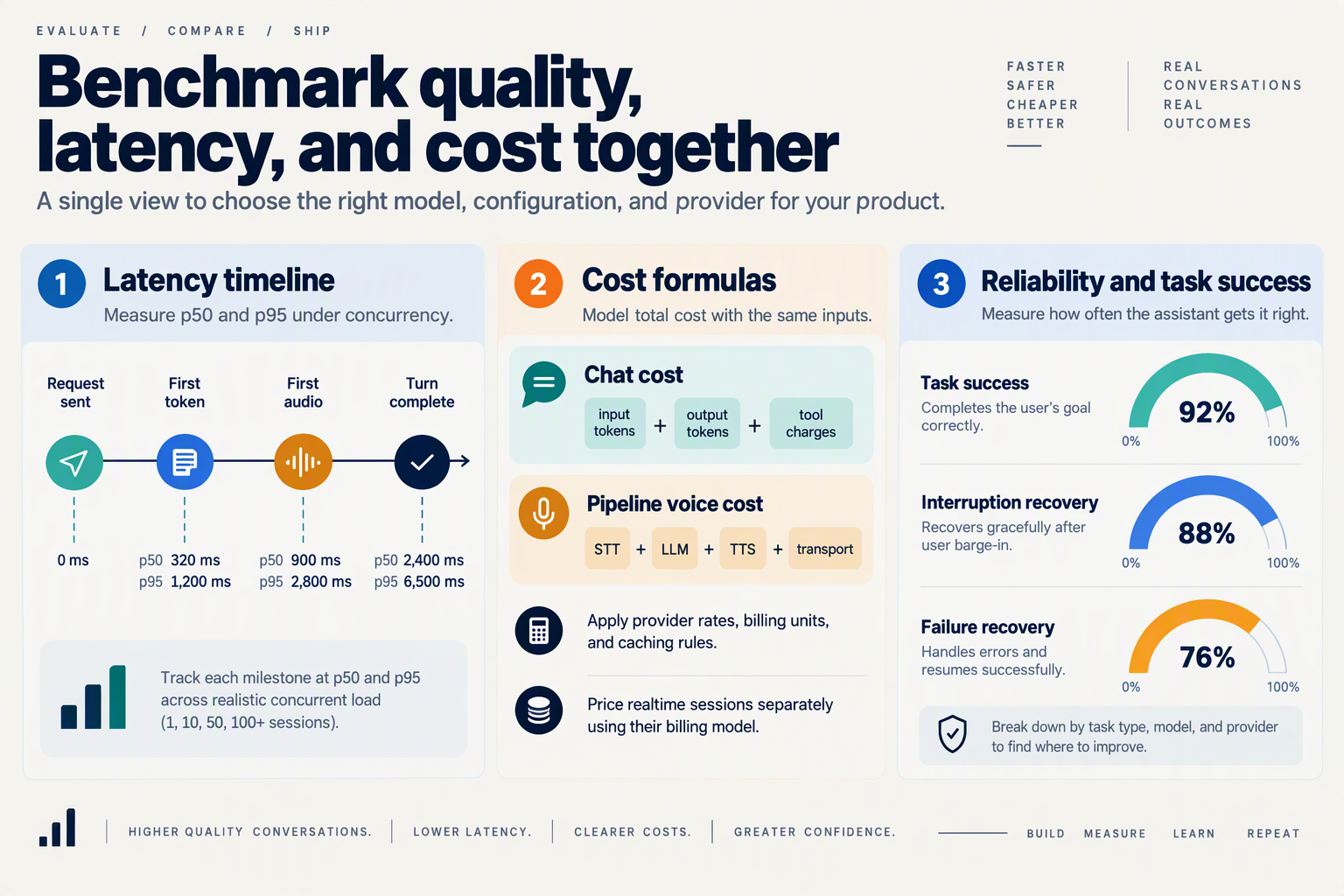
Benchmark end-to-end latency, not just model response speed, and calculate cost per completed conversation, not just cost per API request. For chat, measure when useful text appears; for voice, measure the gap between the caller finishing and hearing the agent’s first audible response.
Which latency metrics should developers measure for chat and voice?
Instrument the application boundary as well as individual API calls. A fast model can still produce a slow conversation when tool execution, network transit, speech processing, or playback buffering adds delay.
Capture these metrics for each conversation:
- Chat time to first token (TTFT): request submission to the first streamed token received by your application.
- Time to useful answer: user submission to the first actionable content displayed—not a generic acknowledgment.
- Voice response gap: end of the user’s speech to the first audible agent response, including endpoint detection.
- Interruption latency: detected interruption to playback stopping on the client.
- Tool latency and total turn duration: record tool execution separately so model latency does not hide backend bottlenecks.
As of October 2026, OpenAI’s Realtime API documentation describes audio turns, tools, and interruptions over WebRTC or WebSocket. Consequently, a voice benchmark should exercise those behaviors rather than measure only connection establishment or text generation.
Use client-side timestamps for perceived latency and server-side spans for diagnosis. Avoid subtracting timestamps from different machines unless their clocks are synchronized.
How do you run a realistic LLM API benchmark?
Build a fixed test set from representative tasks, then compare configurations against the same inputs and completion criteria.
- Separate workloads: test short answers, long conversation histories, tool-backed requests, and multilingual turns.
- Exercise voice conditions: include silence, background noise, interrupted responses, and slow tool calls.
- Vary concurrency: measure isolated sessions and realistic simultaneous traffic.
- Report distributions: publish p50, p95, and p99, sample counts, failures, and task-success rates—not averages alone.
Record model identifiers, configuration, region, connection method, and test date. Compare cold connections with established sessions, and cached requests with uncached requests, separately.
As of October 2026, OpenAI’s Rate limits documentation defines rate limits as restrictions on API access within specified periods. Include throttled requests in production-style results: excluding them can make a configuration look faster and cheaper than users actually experience.
How do you calculate cost per completed conversation?
For chat, aggregate usage across every turn:
Chat cost = input-token charges + output-token charges + tool charges + separately billed infrastructure.
Use the provider’s applicable rates for cached input and other separately priced usage. Count retries and fallback requests when they incur charges, and include repeated conversation history in input usage.
For a modular voice pipeline:
Voice cost = speech-recognition charges + LLM charges + speech-generation charges + transport charges + infrastructure.
For realtime audio models, use their actual audio/text billing units rather than assuming a per-minute rate. Verify how silence, cancelled generation, and session duration affect billing.
As of October 2026, CallMissed’s verified fact sheet lists a Standard voice-agent rate of ₹4/minute, covering speech recognition, the language model, and voice, with a 30-second minimum per call and phone carriage billed separately. At that rate, an illustrative connected three-minute call costs ₹12 before carriage; a ten-second connected call costs ₹2 before carriage.
Finally, calculate total workload spend ÷ successfully completed conversations. Keep failed attempts in the numerator, and define success explicitly—for example, retrieving the correct order status—so inexpensive but unsuccessful interactions do not distort the comparison.
What common mistakes break secure, reliable chat and voice integrations?
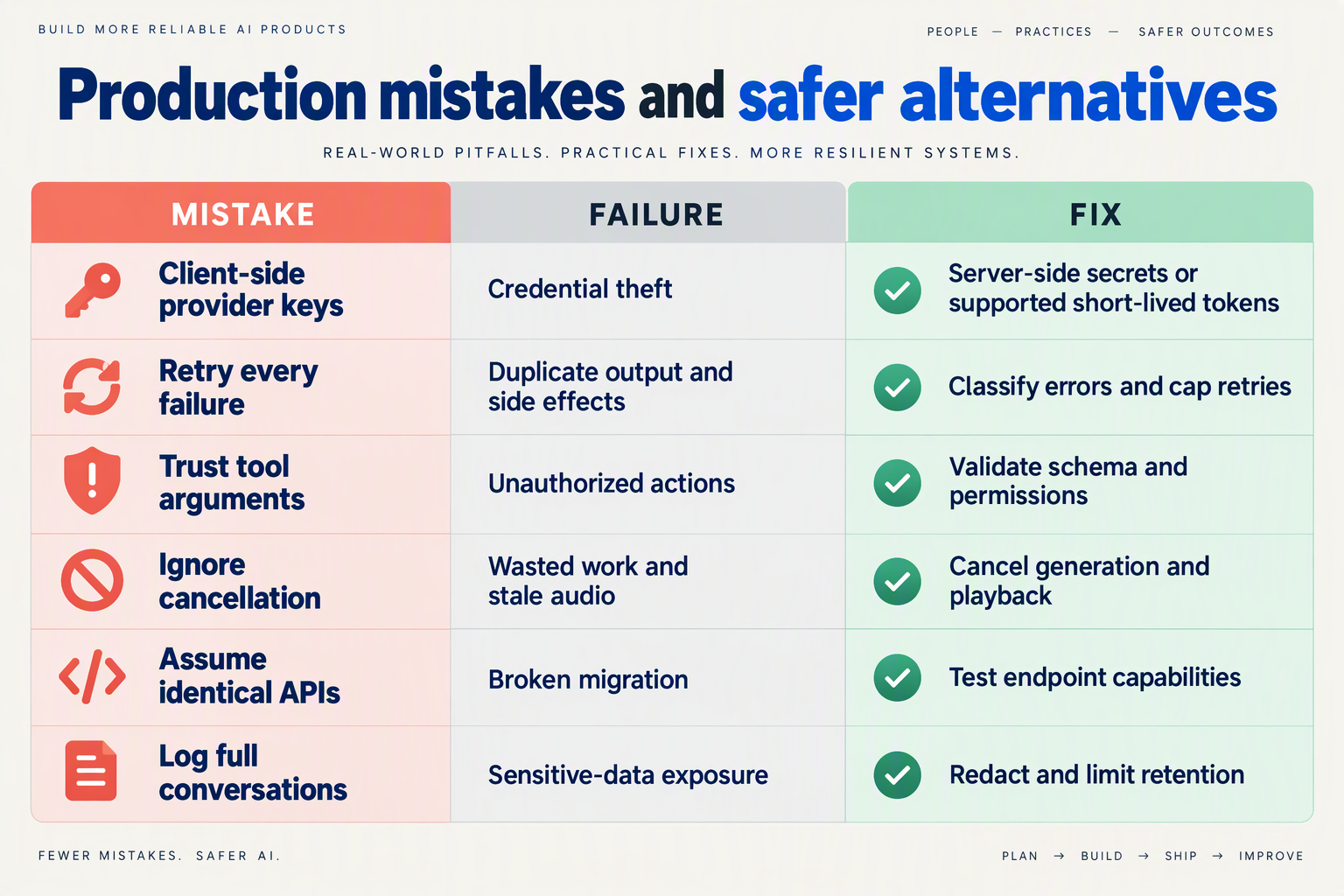
The most damaging mistakes in LLM API integration are treating model output as permission, retrying actions blindly, and allowing disconnected or interrupted sessions to keep working. Secure, reliable chat and voice products need explicit boundaries for credentials, tool execution, cancellation, and recovery—not just successful model responses.
Which integration mistakes should developers check before release?
Use this table as a release checklist. Each test should verify application behavior, not merely whether the provider returns a successful response.
| Mistake | What breaks | Safer implementation | Test before release |
|---|---|---|---|
| Shipping permanent API keys to clients | Browser code, mobile bundles, or logs expose reusable credentials. | Keep permanent credentials server-side; issue supported short-lived credentials for client realtime sessions. | Inspect client assets and network traces for permanent secrets. |
| Trusting tool arguments as authorization | Valid JSON triggers an action against another customer’s records. | Validate arguments, authenticate the user, and enforce record-level permissions in backend tools. | Request cancellation of an order owned by another account. |
| Retrying side effects blindly | A timeout produces duplicate bookings, payments, or messages. | Assign an operation ID; record execution status and deduplicate repeats. | Drop the connection after execution but before acknowledgement. |
| Stopping audio without cancelling work | Old responses continue generating or trigger tools after interruption. | Cancel generation where supported; discard stale events and reconcile playback with conversation state. | Interrupt during speech and during a pending tool call. |
| Switching models without compatibility checks | Fallback changes tool behavior, output shape, or modality support. | Test fallback models against required schemas, tools, and audio capabilities. | Force the primary model to fail mid-conversation. |
| Logging complete payloads by default | Transcripts, personal data, and credentials spread into monitoring systems. | Redact sensitive fields; restrict access and define retention periods. | Inspect logs from a conversation containing personal information. |
Why can valid JSON still produce an unsafe action?
As of October 2026, OpenAI’s supplied Structured Outputs documentation describes model responses constrained by a supplied JSON Schema. That controls structure; it does not establish ownership, consent, or business eligibility.
For an order-cancellation tool, separate three checks:
- Shape: Does the request contain the expected order identifier?
- Authority: Does the authenticated customer own that order?
- Business rule: Is cancellation still allowed at its current fulfillment stage?
Run these checks inside the backend operation. A prompt saying “only cancel the customer’s orders” is guidance to the model, not an access-control mechanism.
How should retries and fallbacks behave under load?
As of October 2026, OpenAI’s supplied Rate Limits documentation defines rate limits as restrictions on how often a user or client can access services within a specified period. Treat throttling as a scheduling problem: queue eligible work, apply bounded backoff with jitter, and stop retrying when the interaction deadline expires.
As of October 2026, CallMissed’s verified fact sheet lists default per-key limits of 60 requests per minute on Free, 500 on Starter, 3,000 on Pro, and 10,000 on Enterprise, plus caller-chosen fallback models. Those limits are planning inputs—not guarantees that every fallback fits your application’s contract.
What should a voice failure drill verify?
As of October 2026, OpenAI’s supplied Realtime API documentation describes audio turns, tools, interruptions, and handoffs. Test these as coordinated application events:
- Interrupt during playback: old audio must not resume.
- Disconnect after a tool executes: reconnecting must not repeat the action.
- Receive a late response: stale events must not overwrite the active turn.
The release criterion is consistent user-visible state: what the assistant says, what the backend did, and what the interface displays must agree.
Frequently Asked Questions
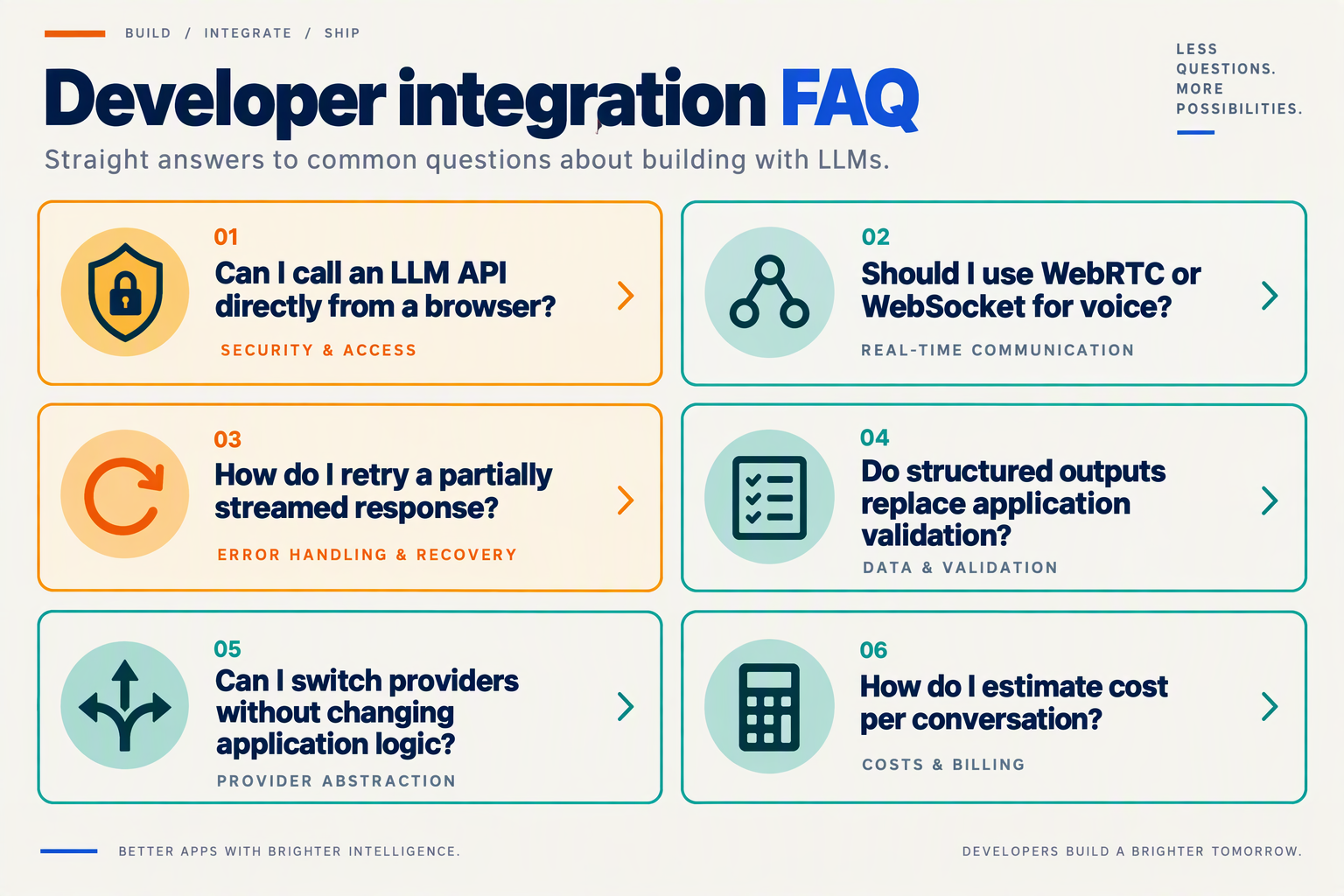
Can I use browser-side API keys when integrating LLM APIs for voice and chat?
Can I switch providers without rewriting my LLM API integration?
How do I troubleshoot slow responses when integrating LLM APIs into voice products?
Do structured outputs make LLM-generated tool calls safe to execute?
How should I handle LLM API rate limits without duplicating customer actions?
How much conversation history should a chatbot or voice agent send to an LLM?
Which documentation and release checks should you use next?
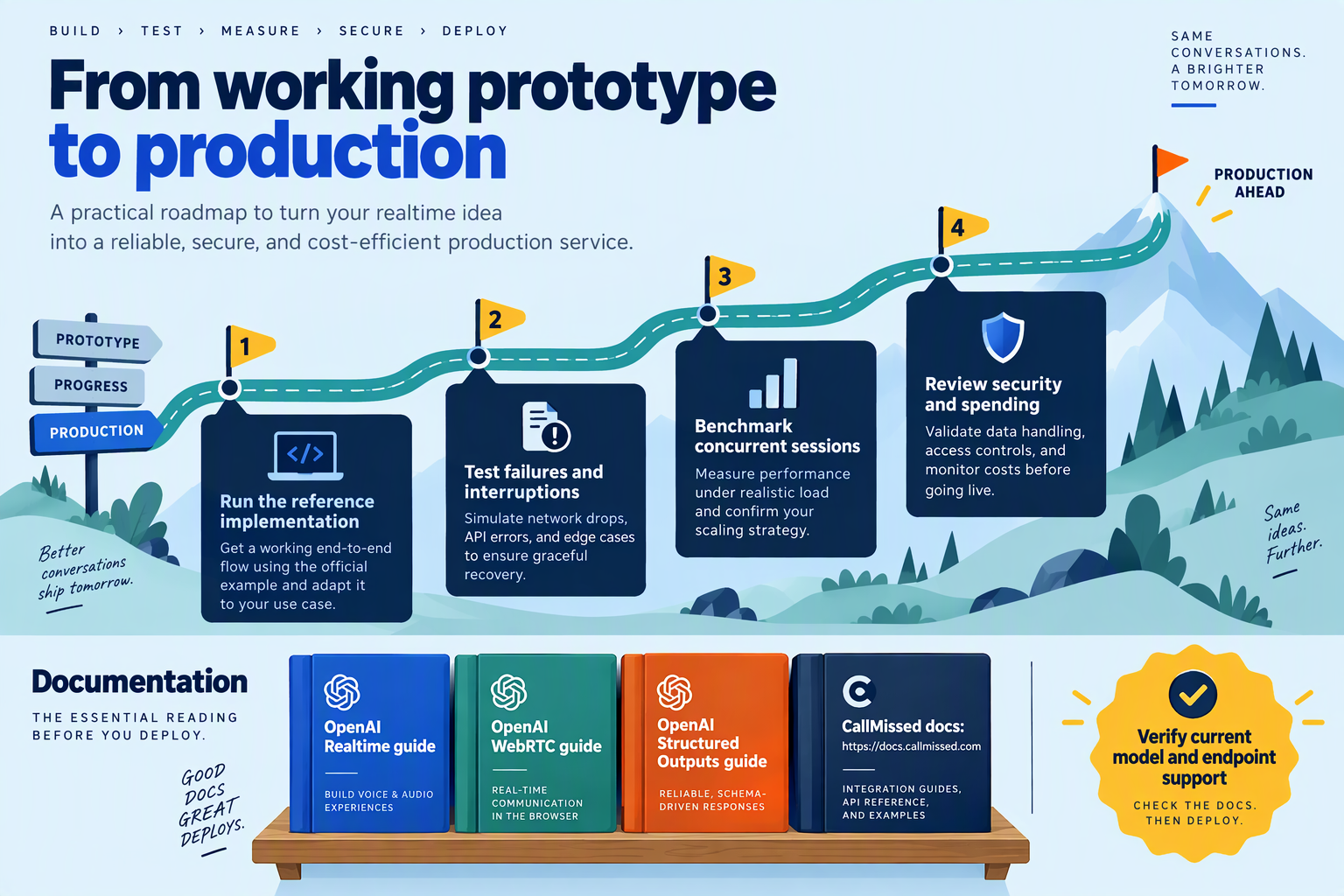
Use official API documentation as your implementation contract, then gate each release on compatibility, security, conversation behavior, and recovery tests. For this LLM API integration guide, the next step is to turn documentation into a versioned checklist—not simply bookmark more tutorials.
Which API documentation should developers read first?
Read the documentation for the exact endpoint, model, and transport you intend to deploy. A working chat-completions example does not establish that the same integration supports realtime events or identical tool behavior.
Prioritize these sources:
- OpenAI Realtime API and WebRTC guides: As of October 2026, OpenAI’s supplied Realtime documentation describes browser connections over WebRTC and server connections over WebSocket. Check session setup, event definitions, authentication, and lifecycle behavior against your implementation.
- OpenAI Structured Outputs guide: As of October 2026, OpenAI’s supplied documentation describes output constrained by a supplied JSON Schema. Review the supported schema requirements and response-handling guidance before changing your application’s data contract.
- OpenAI Rate Limits guide: As of October 2026, OpenAI defines rate limits as restrictions on API access within a specified period. Verify the limits applicable to your account rather than borrowing assumptions from a sample application.
For gateway integrations, consult both the gateway documentation and relevant model documentation. As of October 2026, CallMissed’s verified fact sheet lists OpenAI-compatible and Anthropic-compatible endpoints, plus caller-chosen fallback models; developers should check the documented endpoint and selected model rather than assume every model exposes identical capabilities.
How should you use community reports and troubleshooting threads?
Treat community discussions as test-case discovery, not authoritative specifications. The supplied OpenAI Community results include discussions about WebRTC security and structured-output parsing failures, but those reports do not establish current platform guarantees or failure rates.
Convert a relevant report into a reproducible investigation:
- Record the endpoint, model identifier, SDK version, and sanitized request.
- Reproduce the behavior in a minimal application.
- Compare the result with official documentation.
- Add a regression test if the issue affects your product.
This approach separates a genuine integration defect from an outdated example, application bug, or account-specific configuration.
What should block a voice or chat release?
Block release when a critical user journey fails, even if individual API requests succeed. Use the following release gates as a practical starting point:
- Contract gate: A saved set of representative requests still produces responses your application can consume.
- Security gate: Browser bundles, telemetry, and error messages expose no long-lived provider credentials.
- Action gate: Repeated or interrupted requests cannot execute the same consequential operation twice.
- Conversation gate: Chat cancellation and voice interruption leave both the interface and backend in a consistent state.
- Recovery gate: Rate limiting, disconnects, and unavailable dependencies produce a bounded recovery path or clear user-facing failure.
- Observability gate: A failed interaction can be traced without unnecessarily retaining sensitive conversation content.
Define measurable acceptance thresholds from your own baseline. The supplied sources do not provide a universal latency or reliability target for your product.
What should you record before promoting an update?
Create a release manifest containing the model identifier, SDK version, prompt revision, tool schemas, configuration, and documentation review date. Include the test results and the previous known-good configuration.
Before promotion, review available official changelogs and deprecation notices, then test the proposed change on representative conversations. Roll out narrowly, compare against your baseline, and expand only when the evidence supports it: successful LLM integration in applications is a maintained contract, not a one-time connection.
Conclusion
Integrating LLM APIs successfully means building a reliable conversation system—not simply connecting an application to a model. Chat and voice can share conversation state and tool logic, but voice also requires careful coordination of audio, interruptions, cancellation, and session recovery.
The practical lesson is to start with one working conversation, then strengthen the boundaries between the model, your backend, and the client. A correct answer matters, but so does stopping playback when a customer interrupts, protecting credentials, and ensuring a retried request does not repeat an action.
Four takeaways should guide your implementation:
- Build a secure, reusable chat foundation. Keep API keys on the backend, stream responses to the client, and manage conversation state explicitly. These responsibilities remain important when the same application logic supports a voice interface.
- Choose voice architecture around conversational behavior. Compare a speech-to-text → LLM → text-to-speech pipeline with realtime speech integration based on your application’s needs. As of October 2026, OpenAI’s Realtime API documentation describes browser connections over WebRTC and server connections over WebSocket, alongside audio turns, tools, interruptions, and handoffs. Your implementation must coordinate those capabilities with playback and cancellation.
- Separate generated data from permission to act. Function calling and schema-constrained responses help connect models to application workflows. As of October 2026, OpenAI’s Structured Outputs documentation describes responses constrained by a supplied JSON Schema; that constraint does not establish whether an order exists or whether its cancellation is authorized.
- Design reliability and economics together. Handle rate limits, retries, disconnects, and fallbacks without duplicating side effects. Estimate conversation costs across model usage, speech processing, and session behavior rather than treating headline token prices as the complete bill.
What should developers watch as voice and chat integration evolves?
Watch how realtime interfaces and unified model access affect the division of responsibilities between backend services, clients, and conversation sessions. The useful question is not just whether a newer model responds well, but whether your architecture can accommodate different models while preserving state, safe tool execution, and predictable interruption handling.
As of October 2026, CallMissed’s verified fact sheet lists 141 models, including 46 general-purpose LLMs and 24 realtime voice-agent models, accessible through one API key and balance. Developers can explore CallMissed as one practical example of unified access for voice and chat workloads, while evaluating those integration responsibilities independently.
Your next step is concrete: test one complete conversation, including an interruption, a failed tool request, and a retry. Can your application recover safely—and can you explain what that conversation actually costs?
Related Reading
- Mercury 2.5 Diffusion LLM: 770 tok/s and Voice Latency
- Best LLM for Voice Agents in 2026: GPT-6 vs Claude
- Voice Agent API & Phone Numbers API: CallMissed Developer Guide