
Reliable AI Workflows: Why Prompts Aren’t Enough for Support


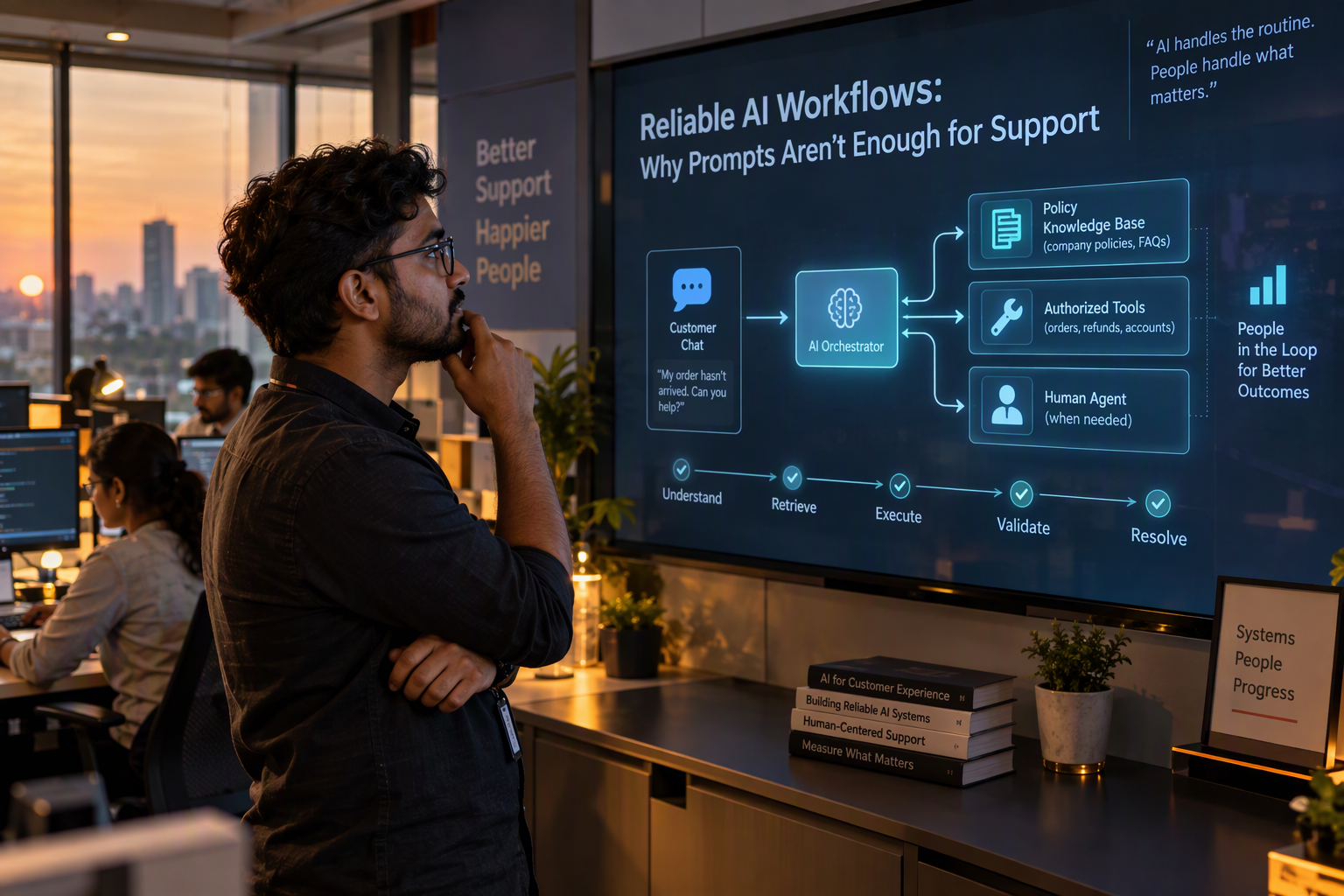
Learn how to build reliable AI workflows for support with tool controls, human handoffs, repeatable evaluations, and production monitoring beyond prompt writing.
Reliable AI Workflows: Why Prompts Aren’t Enough for Support
What if the biggest risk in an AI support system isn’t a bad prompt, but the workflow around it? That question is gaining urgency as teams move beyond chat demos and put AI into customer-facing support, where a plausible answer can still be wrong, incomplete, or sent at the wrong moment.
The distinction matters: a prompt tells a model how to respond, but it cannot guarantee that the model has the right customer context, uses the correct tool, follows a policy, or recognizes when a person should take over. Reliable AI support depends on a wider system—one that supplies relevant information, limits what the agent can do, checks outcomes, and makes failures visible. In other words, Why Prompts Aren’t Enough is not an argument against prompt engineering. It is a case for treating prompts as one component of an operational workflow.
This is especially relevant now. On September 20, 2026, Hacker News Digest featured “Prompts Aren’t Real: Why Optimizing LLM Agents Means Measuring, Not Writing,” marked with 101 points. The discussion reflects a practical shift: as AI agents interact with tools and changing context, teams cannot judge reliability by how elegant the instruction sounds. They need to test what the system actually does across realistic situations—and keep measuring as models, knowledge, and customer needs change.
For a support team, that could mean an AI agent checks an order before answering a delivery question, uses approved knowledge rather than guessing, and routes an unusual billing issue to a human with the conversation intact. Each step reduces a different failure mode. The trade-off is complexity: more tools and decision paths create more things to configure and evaluate. A dependable workflow therefore needs clear permissions, useful fallback behavior, and monitoring—not simply a longer system prompt.
Platforms such as CallMissed bring workflow capabilities into support operations, including a shared inbox, human handoff, AI call notes, and evaluation suites. Those pieces point to a broader industry direction: AI support is becoming less about producing a single polished answer and more about coordinating context, actions, and escalation.
In this article, we’ll unpack why prompts alone break down in real support environments, what building blocks make AI workflows more reliable, and how to evaluate them with concrete scenarios. The goal is not to make every interaction autonomous. It is to make each interaction predictable enough to trust—and to know when the system should stop and ask a person.
Why aren’t prompts enough to make AI support reliable?

A prompt cannot make AI support reliable by itself because it does not control everything the system sees or does. Reliability depends on the whole interaction: changing customer context, connected tools, permissions, workflow rules, and how the system handles uncertainty or failure.
What can go wrong even when a prompt is clear?
A prompt is an instruction, not a guarantee that an agent will apply the right information at the right time. Customer records change, policies are updated, and a conversation may contain details that conflict with older knowledge. If the workflow does not retrieve and verify current information, a well-written instruction can still produce a confident but outdated answer.
The same gap appears when the agent needs to take action. Telling an AI to “follow the refund policy” does not itself establish whether it can issue a refund, what evidence it must check, or what to do if the order record is missing. Those decisions need defined tools and permissions—not just persuasive wording.
Why does support need more than one instruction?
Real support requests often combine several tasks: identify the customer, understand the issue, look up relevant records, apply a policy, and decide whether to respond or escalate. If any dependency fails, the final answer may sound polished while being operationally wrong.
The Hacker News discussion around “Prompts aren’t Real” captured one architectural alternative: “provide my AI with tools, instead of providing me an AI that uses your tools,” according to a commenter on the September 20, 2026 Hacker News thread. The distinction matters in support. A workflow should make the relevant context and approved actions available to the agent, while limiting what it can do and defining what happens when a tool returns incomplete information.
More tools do not automatically mean more reliability. Each tool introduces its own possible failure: stale records, permission errors, timeouts, or ambiguous results. A dependable system needs fallback paths—for example, ask a clarifying question, retry within defined limits, or route the case for human review rather than improvise.
What makes a support workflow dependable?
Treat reliability as a set of observable behaviors, not as a prompt-writing exercise. Teams can make those behaviors explicit by defining:
- Inputs: Which customer, order, or policy information should be retrieved, and how current must it be?
- Allowed actions: Which tools can the AI use, and which decisions require approval?
- Failure handling: What should happen when data is missing, a tool fails, or the customer’s request falls outside policy?
- Evaluation: Which realistic cases should be tested, including edge cases and changing information?
- Review: How will the team spot recurring mistakes and update the workflow?
This also changes what teams should measure. Instead of asking only whether an answer sounds helpful, test whether the agent used the right source, completed the permitted action, and escalated appropriately across representative scenarios.
Platforms such as CallMissed offer evaluation suites and call scoring against a team’s own QA rubrics, alongside workflow features such as agent tools and human handoff. These capabilities reflect a broader principle: the prompt can set intent, but the workflow has to make correct behavior possible, testable, and reviewable.
What does a reliable AI support workflow do beyond prompting?
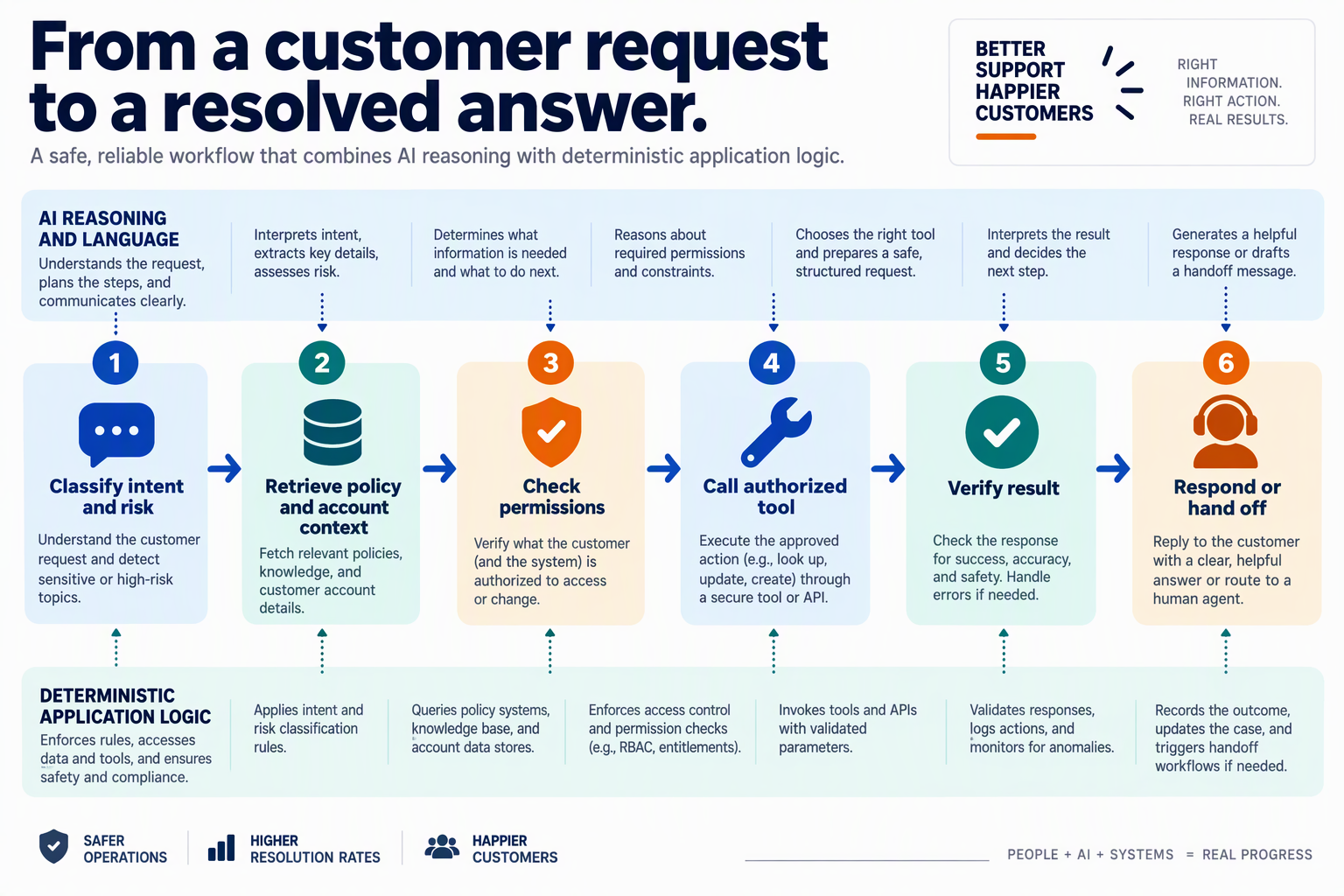
A reliable AI support workflow does more than generate an answer: it gathers the right context, applies rules to decisions and actions, and defines what happens when the AI should not proceed. The prompt remains important, but the workflow makes the behavior repeatable across real customer cases.
What should an AI support workflow do before answering?
It should assemble the minimum context needed for the request, then identify which sources are authoritative. For a delivery question, that might mean retrieving the customer’s order status and checking the current delivery policy—not asking the model to infer either from a vague message.
A practical workflow separates information by purpose:
- Customer and case context: who is asking, what they have already tried, and which order or account they mean.
- Approved knowledge: current policies, product documentation, and answers the business has reviewed.
- Action permissions: which records the AI may read or change, and under what conditions.
- Decision rules: when to answer, ask a clarifying question, take an approved action, or hand the case to a person.
This structure helps prevent an answer from sounding confident while being based on stale or incomplete information. It also makes it easier to change a policy or connected system without rewriting every instruction.
How should the workflow control actions and handoffs?
Treat each AI action as a defined step with an expected result. For example, an order-status flow can look up an order, confirm that it belongs to the customer, provide the status, and stop if the records do not match. A refund request might require a policy check or human review rather than letting the model improvise a commitment.
Design the fallback path as deliberately as the normal path:
- Clarify when the customer’s request or identity is ambiguous.
- Retry or use an approved alternative if a connected source is temporarily unavailable.
- Hand off to a human when the case involves an exception, sensitive decision, or unresolved uncertainty.
- Preserve the conversation and relevant findings so the customer does not have to start over.
The handoff is part of service quality, not a failure to automate. A good workflow makes the boundary visible: what the AI can resolve, what it must not decide, and what information the next person needs.
How can teams tell whether the workflow is reliable?
Test complete customer scenarios, not just individual prompt responses. Include ordinary requests as well as missing order details, conflicting records, policy exceptions, tool errors, and cases where a human should take over. Track whether the workflow reached the right outcome, used an approved source, and handed off at the right point.
The shift toward this approach is reflected in a Hacker News Digest entry dated September 20, 2026: the discussion of “Prompts Aren’t Real” was listed with 101 points. One Hacker News comment captured the tool-centered idea: “provide my AI with tools, instead of providing me an AI that uses your tools.” The practical implication is to measure what the system does with its context and tools—not just how persuasive its answer sounds.
As of September 2026, CallMissed supports this broader workflow model with a shared inbox, human-handoff queue, Shopify integration for order data, and evaluation suites for testing agent behavior. These capabilities illustrate how support teams can connect knowledge, operational actions, and review rather than relying on prompt wording alone.
What changed in the prompts-versus-measurement debate?
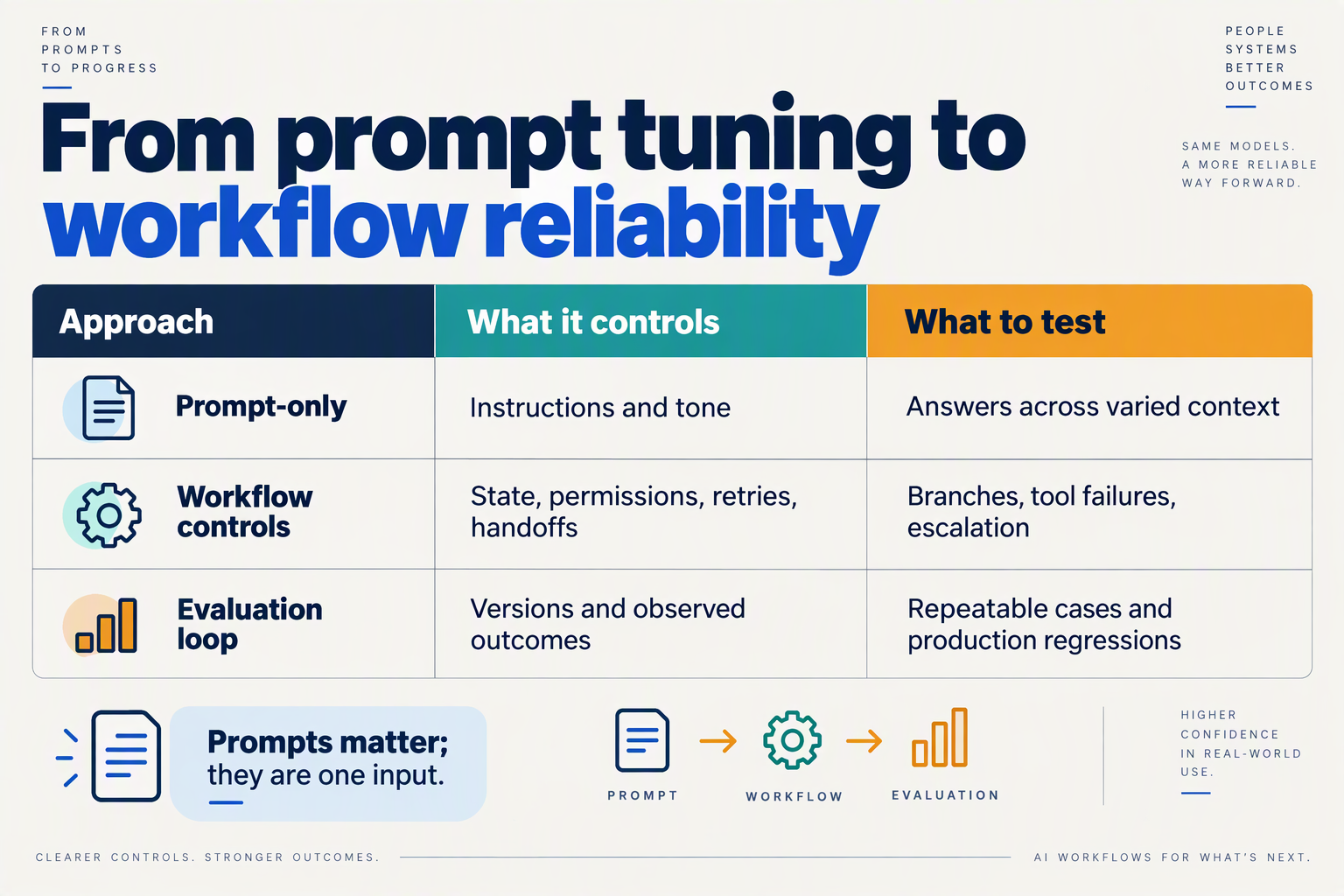
Why has the debate shifted from prompt craft to measurement?
The debate has shifted because an AI support agent’s behavior depends on more than its written instructions: it also depends on context, tools, and the conditions of each interaction. A prompt can set expectations, but measurement shows whether the complete workflow follows them in practice.
On September 20, 2026, Hacker News Digest reported that a discussion titled “Prompts Aren’t Real: Why Optimizing LLM Agents Means Measuring, Not Writing” had 101 points. That figure reflects engagement in the digest, not a benchmark of AI performance. The Hacker News discussion captured an alternative design idea: “provide my AI with tools, instead of providing me an AI that uses your tools.” For support teams, the practical question is not whether prompts matter, but whether the system reliably reaches the right outcome.
| Dimension | Prompt-first approach | Measurement-led approach | Support example |
|---|---|---|---|
| Primary question | Is the instruction clear? | Does the workflow behave correctly? | Does it verify an order before answering a delivery question? |
| Evidence | Prompt review and isolated examples | Results across representative scenarios | Test routine, delayed, and missing-order cases |
| Failure visibility | Errors may look like plausible answers | Failures are recorded and categorized | Track unsupported answers separately from handoff failures |
| Change management | Edit wording when behavior slips | Retest after changes to prompts, tools, or knowledge | Check that a new refund rule does not break shipping answers |
| Success criteria | The response sounds helpful | The response meets defined outcome and policy checks | Correct answer, approved action, or timely human escalation |
What should a support team measure?
A useful evaluation starts with specific, observable outcomes—not a vague target such as “be helpful.” For a delivery workflow, a team might check whether the agent identifies the customer’s order, retrieves the relevant status, communicates only what the data supports, and hands off when the record is unavailable. The test should also include cases where the customer provides incomplete or conflicting information.
A practical cycle is:
- Define the expected outcome for each scenario, including when the agent must stop or escalate.
- Run a consistent set of test conversations against the current workflow and record where it passes or fails.
- Change one component at a time—such as instructions, knowledge, or tool behavior—then rerun the tests.
- Review real interactions for new failure patterns and update the test set accordingly.
This approach makes trade-offs visible. A stricter policy check might reduce unsupported answers but increase handoffs; a new knowledge source might improve coverage while introducing outdated or conflicting information. Teams should track both whether an answer is correct and whether the workflow takes the appropriate action.
How does this change AI support operations?
It makes evaluation part of ongoing operations rather than a one-time launch check. CallMissed, for example, offers evaluation suites, call scoring against a team’s own QA rubrics, and agent analytics; those capabilities reflect the broader shift toward examining behavior and outcomes, not just refining prompts. As of September 2026, the central lesson of the prompts-versus-measurement debate is straightforward: keep prompts purposeful, but trust evidence from tested workflows over confidence in wording alone.
Which controls make AI agent workflows safer and more dependable?
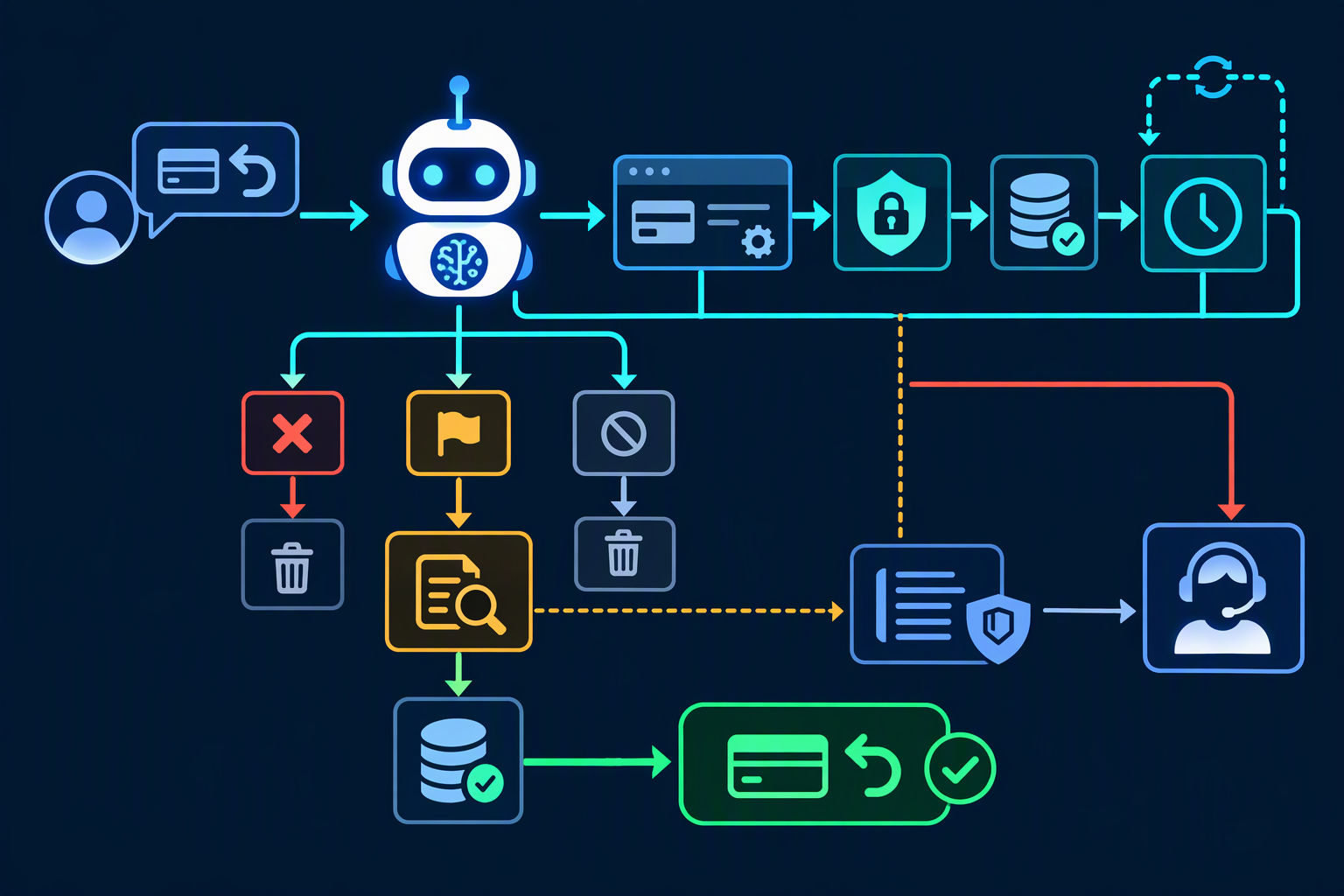
Safer, more dependable AI support workflows use bounded permissions, trusted context, explicit escalation rules, and continuous evaluation. These controls limit what an agent can do, help it act on relevant information, and make it easier to detect when the workflow needs a human.
How should teams limit what an AI support agent can do?
Give the agent only the tools and permissions required for its task, and define which actions require confirmation or human approval. A delivery-status agent might be allowed to look up an order and explain its status, but not cancel the order or issue a refund without a separate authorization step.
Use workflow rules to make important boundaries explicit:
- Read before write: retrieve account or order data before proposing a change.
- Confirm consequential actions: require customer confirmation or staff approval before changing an order or account.
- Restrict tools by task: do not expose unrelated actions to an agent handling routine questions.
- Define stop conditions: escalate when required information is missing, the request falls outside policy, or a tool fails.
This approach complements prompt instructions: the prompt can describe the policy, while permissions and workflow steps help enforce it.
How can context and human escalation reduce support failures?
The agent needs the right information at the right point in the conversation, plus a clear route to a person when it cannot resolve the issue. A knowledge base, customer record, and conversation history can reduce unsupported guesses; a human handoff can prevent the system from repeatedly improvising when those sources are insufficient.
For example, if a customer disputes a charge, the agent could collect the relevant details, check approved support guidance, and then transfer the conversation to a billing specialist if the case requires judgment. The handoff should preserve the conversation context so the customer does not have to start again.
CallMissed’s support platform includes a shared inbox, a human-handoff queue, and an AI agent that can use a knowledge base built from text, web pages, and PDFs. As of September 2026, its voice-agent tools also include live call monitoring, where a supervisor can listen, whisper, or join a call. These are examples of controls that connect automation to human oversight rather than treating autonomy as the goal.
How should teams test and monitor AI support workflows?
Test complete scenarios—not just individual prompt responses—and keep checking performance after changes to models, tools, or support policies. A workflow may answer correctly in a simple test but fail when a customer gives incomplete information, changes their request, or encounters a tool error.
A practical evaluation set can include:
- Routine cases: Can the agent resolve common questions using approved information?
- Boundary cases: Does it refuse or escalate requests outside its authority?
- Failure cases: Does it handle missing records or unavailable tools without inventing an answer?
- Handoff cases: Does the person receiving the case get enough context to continue?
Hacker News Digest reported that “Prompts Aren’t Real: Why Optimizing LLM Agents Means Measuring, Not Writing” had 101 points on September 20, 2026. That discussion is not a reliability benchmark, but it reflects the operational point: agent behavior needs to be measured in context, not inferred from prompt quality alone.
As of September 2026, CallMissed offers evaluation suites, A/B experiments, call scoring against custom QA rubrics, and metric alerts. Teams can use controls like these to inspect real workflow outcomes, find recurring failure patterns, and refine the system without assuming that a single prompt edit will solve every problem.
Which metrics show whether an AI support workflow is actually reliable?

Reliable AI support is measured by whether the workflow completes the right task safely, uses the right information and tools, and escalates appropriately—not by how convincing its answers sound. A useful scorecard combines customer outcomes with checks on the steps that produce them.
Which outcome metrics matter most?
Start with verified resolution rate: the share of eligible conversations where the customer’s issue is actually resolved, confirmed through an observable result or follow-up—not merely marked “resolved” by the AI. Pair it with repeat-contact rate and reopen rate. A bot that closes more chats but prompts customers to return with the same problem is not improving support.
Track time to resolution and customer satisfaction (CSAT) alongside those measures. These metrics expose trade-offs: faster handling is not a win if customers receive incomplete answers, and high automation is not a win if satisfaction falls. Compare results by issue type, channel, language, and customer segment so an overall average does not conceal a weak workflow for a particular group.
How can teams measure whether the workflow takes correct actions?
Measure the individual steps between a question and its outcome:
- Grounding quality: In audited conversations, did the answer match approved knowledge and the customer’s actual context?
- Tool accuracy: Did the agent select the correct tool, supply valid inputs, and correctly interpret the result?
- Action completion: Did the intended change—such as checking an order or updating a record—actually happen?
- Policy compliance: Did the workflow avoid actions it was not authorized to take?
- Escalation quality: Did it hand off uncertain or sensitive cases when required, without unnecessarily routing routine questions to a person?
For example, in a delivery-status workflow, count a success only when the agent checks the correct order, communicates the verified status, and routes exceptions to a human with enough conversation context to continue. Track missed escalations separately from total escalation rate; a low handoff rate alone can reward an agent for keeping difficult cases it should not handle.
How should reliability metrics be reviewed over time?
Use a repeatable evaluation set covering routine requests, ambiguous questions, policy edge cases, tool failures, and escalation scenarios. Review both aggregate results and individual failures after changes to models, knowledge sources, or workflow rules. The Hacker News Digest on Zeli reported that “Prompts Aren’t Real: Why Optimizing LLM Agents Means Measuring, Not Writing” received 101 points on September 20, 2026—a timely signal of interest in evaluating agent behavior, rather than treating prompt wording as the outcome.
As of September 2026, CallMissed offers evaluation suites, agent analytics, metric alerts, call scoring against a team’s own QA rubrics, and AI call notes that can include summaries, action items, dispositions, and follow-ups. Those capabilities can support a measurement loop; teams still need to define what “resolved,” “correct,” and “safe to automate” mean for their own support operation.
A practical review sequence is:
- Define the customer outcome and the workflow’s safety limits.
- Measure outcomes and step-level errors by issue type and channel.
- Inspect failures, update the workflow, then rerun the same evaluations.
That keeps reliability tied to observable behavior—not a single accuracy score or a polished transcript.
What does current guidance say about testing agent behavior?

Current guidance is to test what an AI support agent does across realistic situations, not to judge reliability by how persuasive its prompt sounds. The September 20, 2026 Hacker News Digest listed “Prompts Aren’t Real: Why Optimizing LLM Agents Means Measuring, Not Writing” with 101 points, reflecting a developer discussion that favors measuring agent behavior in context over treating prompts as stable guarantees.
What should an AI support team test?
Test the complete workflow: the customer’s request, the context available to the agent, the tools it can use, and what happens when it cannot safely finish. A refund question, for example, is not passed just because the reply sounds polite. The test should check whether the agent looks up the right order, follows the refund policy, avoids claiming an action it did not take, and hands off when the case falls outside its authority.
Build a set of representative scenarios that includes both routine and difficult cases:
- Expected paths: Does the agent retrieve the relevant account or order details and give an answer grounded in approved information?
- Tool failures: If a lookup fails or returns incomplete data, does the agent explain the limitation rather than guess?
- Policy boundaries: Does it decline actions it is not authorized to take?
- Ambiguity and escalation: Does it ask a useful follow-up question or route the conversation to a person when needed?
- Changing context: Does it still behave correctly when customer details, knowledge, or workflow rules change?
The Hacker News discussion summarized by Hacker News Digest on September 20, 2026 included the suggestion, “provide my AI with tools,” so it can bring in needed context. Tools can improve an agent’s access to information, but they also introduce new failure modes; evaluation should verify both the information retrieved and the action taken with it.
How do teams turn tests into ongoing quality control?
Start by writing down what “pass” means for each scenario. A practical scorecard might check factual accuracy, correct tool use, policy compliance, appropriate escalation, and clear customer communication. Keep examples of failures, including near misses, so teams can see whether a change fixes one problem while creating another.
Then run the same test set whenever the prompt, model, knowledge base, connected tools, or workflow changes. Add cases based on real, reviewed support interactions, while removing or protecting sensitive customer data. In production, track outcomes such as failed lookups, escalations, and corrections by human agents; use those signals to identify new tests. Testing is not a one-time launch gate because the system’s inputs and dependencies can change.
What does current evidence not tell us?
The September 20 Hacker News Digest item is evidence of an active engineering conversation, not a formal standard or controlled study. Its 101-point listing does not prove that one testing method is universally effective, so teams should validate their own workflows and report their own results rather than borrow unsupported benchmarks.
As of September 2026, CallMissed offers evaluation suites and A/B experiments for AI voice agents, alongside call scoring against a team’s own QA rubrics. These capabilities illustrate a broader operational shift: prompts are still useful, but dependable support requires repeatable tests and observable behavior.
How can teams test, launch, and expand a support workflow?
What should each rollout gate prove?
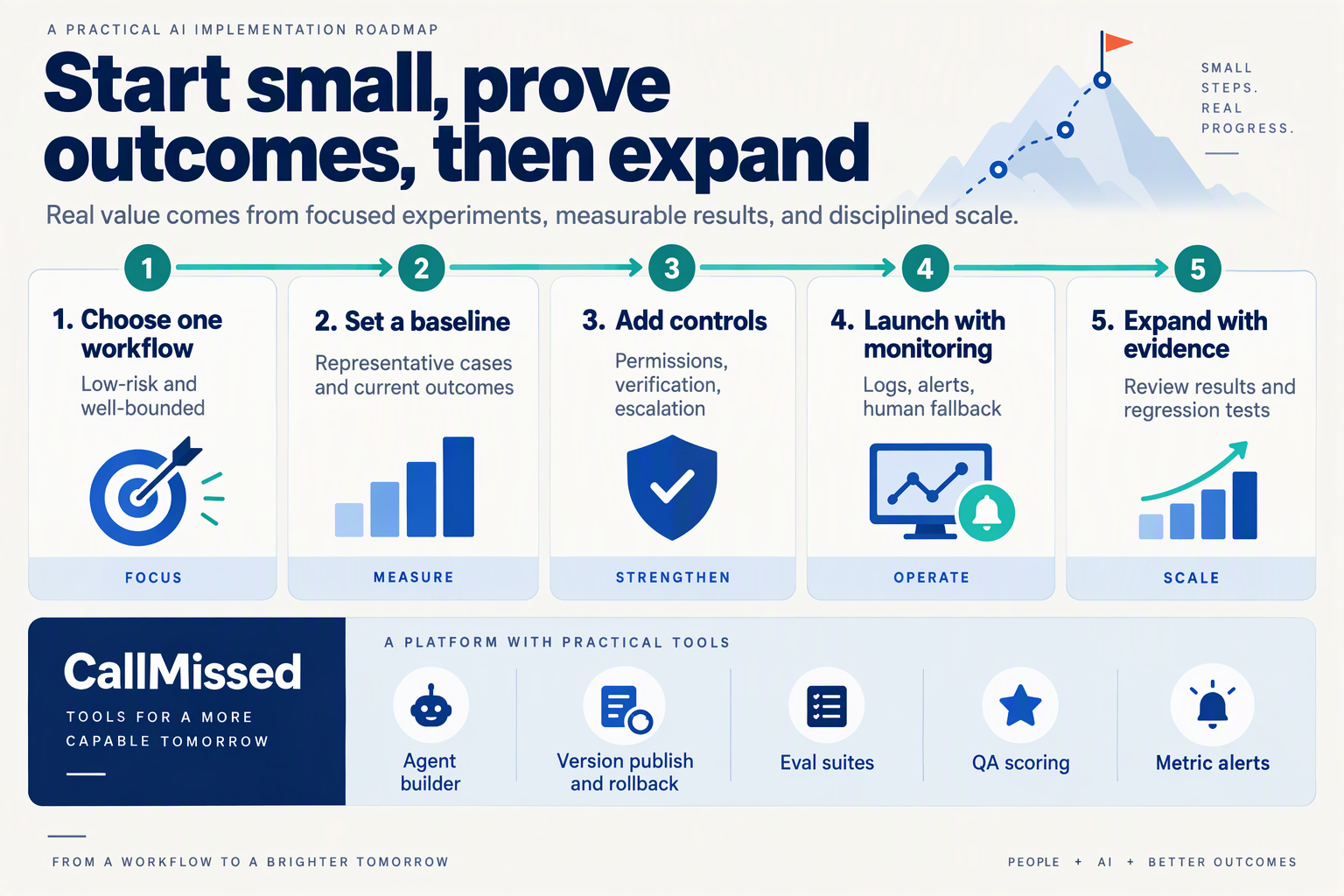
Teams can test, launch, and expand an AI support workflow by moving through explicit gates: validate realistic cases, limit the initial release, review outcomes, and widen access only when the workflow meets team-defined quality and safety criteria. This makes the launch decision about observed behavior—not whether the prompt sounds convincing.
| Stage | What to test or do | Evidence to review | Gate to proceed |
|---|---|---|---|
| Define scenarios | Select common requests and high-impact edge cases, such as order-status questions, refunds, and unclear billing disputes. | A scenario set with expected answers, permitted actions, and escalation conditions. | Each case has a clear expected outcome and an owner for resolving failures. |
| Run evaluations | Test the workflow with varied customer wording, missing details, and relevant knowledge or tool inputs. | Passes and failures against the team’s own QA rubric; examples of incorrect or incomplete actions. | High-risk errors have been fixed or routed to a human rather than left to model judgment. |
| Test changes | Compare workflow versions when changing instructions, tools, or knowledge sources. | Side-by-side results on the same scenarios, including regressions. | The new version improves the intended behavior without introducing unacceptable failures elsewhere. |
| Launch narrowly | Release to a limited channel, request type, or internal group, with a clear human takeover path. | Conversation reviews, handoffs, and unresolved cases from the initial release. | Staff can take over cases that the AI cannot safely complete, with context preserved. |
| Monitor live use | Review outcomes regularly and watch for recurring failure patterns as real requests vary. | Transcripts, quality scores, analytics, and alerts against operational thresholds set by the team. | There is a documented response for failures, and owners can correct the workflow or pause it. |
| Expand carefully | Add more request types, tools, or customer segments one change at a time. | Evaluation results for the new scope and comparisons with the existing workflow. | The expanded workflow passes the same checks before it handles the new work. |
The table is a sequence, not a one-time checklist. For example, a team might first test whether an agent answers delivery questions using current order data, then check that it does not invent a delivery date when that data is unavailable. The launch gate should specify what happens in the second case—such as asking a clarifying question or handing the conversation to a person.
The need for operational evaluation is reflected in current developer discussion: Hacker News Digest’s September 20, 2026 listing of “Prompts Aren’t Real” showed 101 points, a sign of interest in measuring agent behavior rather than treating prompt edits as the whole process. That attention is not itself evidence that a particular workflow is safe; teams still need their own representative tests and review criteria.
How can teams scale without losing control?
Expand by request type or workflow capability, rather than turning on every possible action at once. A support team could begin with read-only answers, then evaluate a limited action such as creating a ticket, and only later consider more consequential steps. Each added tool or decision path introduces new failure modes, so it should have its own test cases and rollback plan.
As of September 2026, CallMissed supports evaluation suites and A/B experiments, along with call scoring against a team’s own QA rubrics and agent analytics. These capabilities can help teams compare versions and inspect performance; the team still needs to define what counts as acceptable behavior. A practical operating loop is to review failures, update the workflow, rerun affected scenarios, and expand only after the revised version passes its gate.
Frequently Asked Questions
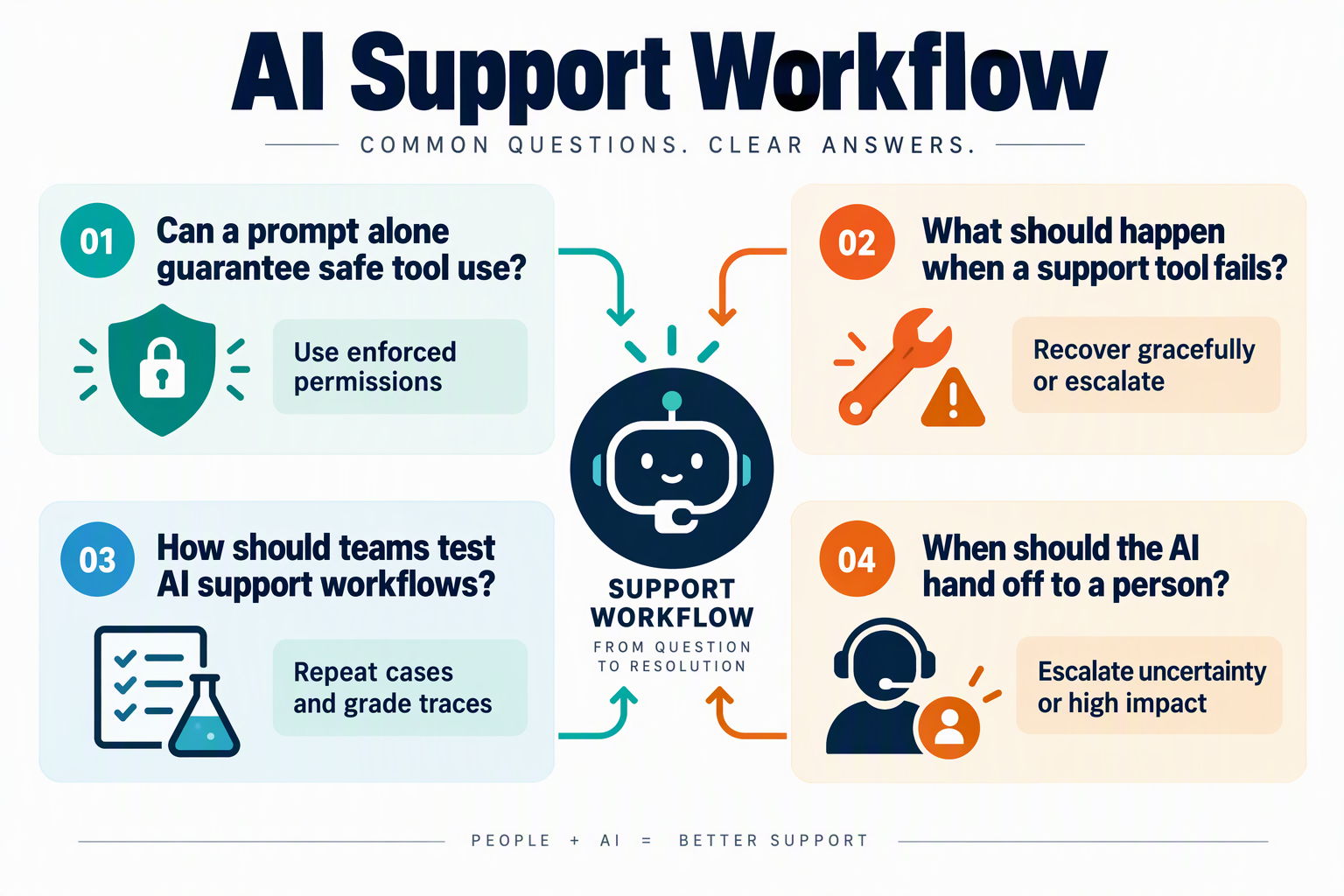
What are reliable AI support workflows, and how do they differ from prompts?
How can AI support workflows use company knowledge without giving outdated answers?
When should an AI support agent hand a conversation to a human?
How do teams test reliable AI support workflows before launch?
How can teams prevent an AI support agent from taking unauthorized actions?
What should teams monitor in reliable AI support workflows after deployment?
Conclusion
Reliable AI support depends on more than a well-written prompt: it needs the right customer context, safe tool use, clear escalation paths, and evaluation of what the system actually does. A convincing answer is not necessarily a correct or timely one.
The discussion is gaining attention: Hacker News Digest featured “Prompts Aren’t Real: Why Optimizing LLM Agents Means Measuring, Not Writing” on September 20, 2026, with 101 points. For support teams, the practical lesson is to design around the whole interaction—not just the model’s instructions.
- Prompts guide responses; workflows govern actions. Customer context, connected tools, permissions, and fallback behavior all shape the outcome.
- Useful automation includes a way to stop. An unusual billing issue, for example, may need a human to take over with the conversation intact.
- Reliability must be evaluated in practice. Test realistic scenarios and keep measuring as models, knowledge, and customer needs change.
Looking ahead, watch how teams make agent actions and handoffs measurable without adding unnecessary complexity. CallMissed brings capabilities such as a shared inbox, human handoff, AI call notes, and evaluation suites into support operations—part of a broader shift toward coordinated AI workflows. Explore CallMissed to see how AI communication infrastructure is evolving. The goal isn’t to automate every interaction; it’s to know when AI can help and when it should ask a person.
Related Reading
- How to Write Prompts for AI Agents: Support Guide 2026
- Five-Day Banking India: Can Support Stay Available?
- AI Agent Human Oversight Rules for Customer Support
Sources
Discussion
Related Posts



Ready to automate customer conversations?
Launch AI voice agents and WhatsApp bots with CallMissed — one API, 22+ Indian languages.