GPT Image 2.5 Flare vs Sunburst: Key Differences


Compare GPT Image 2.5 Flare vs Sunburst on speed, editing precision, workflow fit and value using OpenAI’s September 2026 evidence.
GPT Image 2.5 Flare vs Sunburst: Key Differences
What if the right image model depends less on raw quality than on whether you need speed or pixel-level editing control? The GPT Image 2.5 Flare vs GPT Image 2.5 Sunburst decision became immediately relevant on September 8, 2026, when OpenAI released both models for image generation and editing through two developer surfaces: the Image API and the Responses API image-generation tool. OpenAI’s changelog positions Flare for fast, high-quality everyday creation, while Sunburst targets workflows where editing precision matters most. That distinction can materially affect ecommerce retouching, campaign variants, diagrams, social assets, and high-precision brand work. This comparison examines speed, output quality, reference fidelity, editing accuracy, production fit, and practical selection criteria—without relying on invented benchmark scores or pricing. Platforms such as CallMissed’s OpenAI-compatible gateway also reflect the broader shift toward accessing image and language models through unified developer infrastructure.
Which model wins: GPT Image 2.5 Flare or Sunburst?
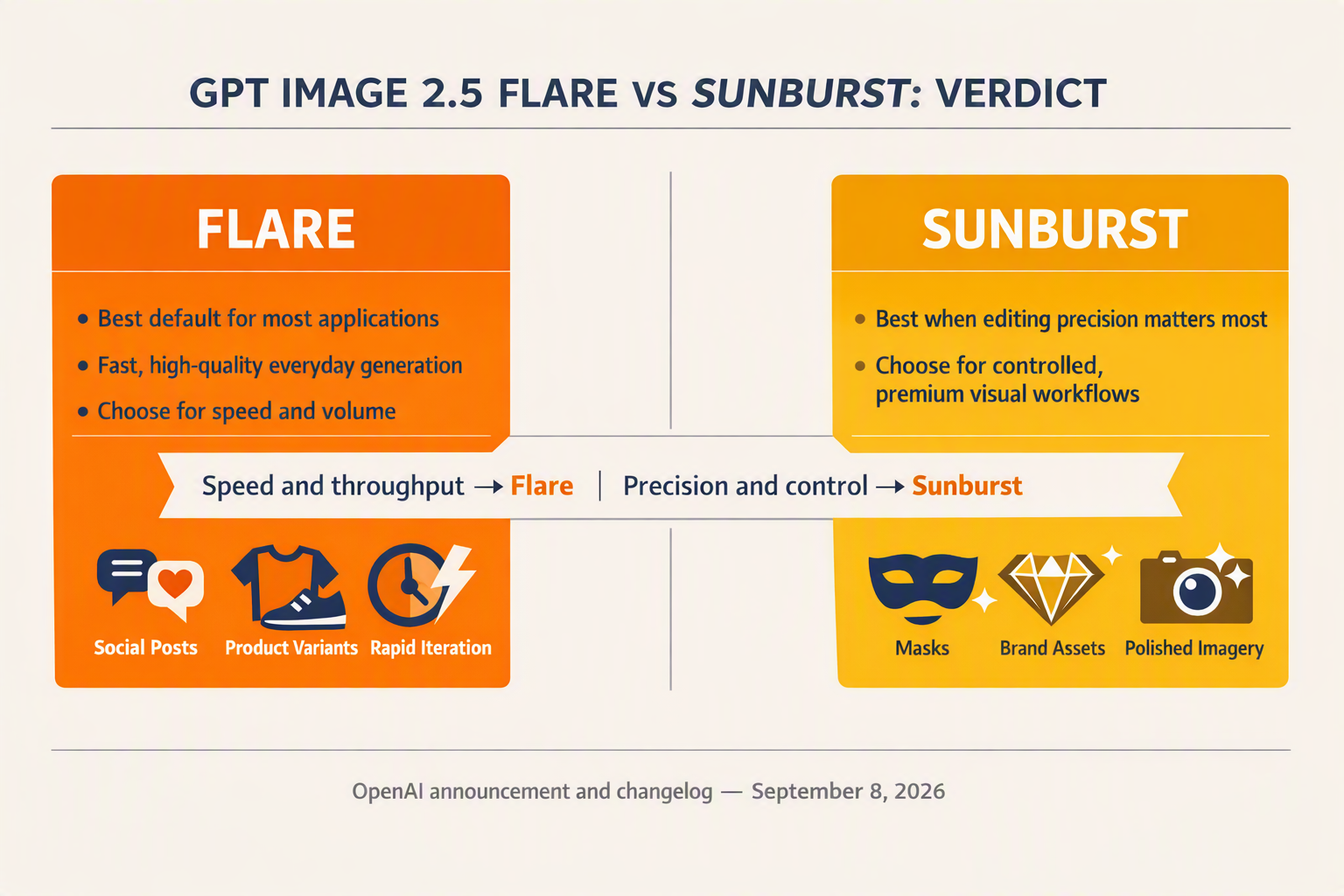
There is no universal winner: GPT Image 2.5 Flare wins for throughput-oriented creation, while GPT Image 2.5 Sunburst wins when an edit must preserve exact visual details. OpenAI provides no public benchmark or pricing evidence that makes either model categorically superior.
The evidence-led verdict
- GPT Image 2.5 Flare: Choose Flare for high-volume social posts, rapid concept exploration, campaign variants, thumbnails, and routine product imagery; OpenAI’s September 8, 2026 changelog explicitly describes Flare as the option for “fast, high-quality everyday image generation.”
- GPT Image 2.5 Sunburst: Choose Sunburst for selective ecommerce retouching, packaging corrections, diagram revisions, branded compositions, and other tasks where unintended changes are costly; OpenAI’s September 8, 2026 guidance says Sunburst is for workflows “where editing precision matters most.”
- Speed winner — Flare: OpenAI explicitly associates Flare with fast generation, making it the evidence-backed default when teams need dozens of alternatives, short review cycles, or low-friction experimentation; however, OpenAI has not published verified latency, images-per-minute, or percentile-response figures for this comparison.
- Editing-control winner — Sunburst: Sunburst has the stronger documented fit when a prompt should alter one constrained element—such as replacing a product background without changing the product, revising diagram labels, or adjusting campaign copy while retaining composition, typography, and brand assets.
- General quality — no proven winner: OpenAI calls Flare “high-quality,” but the September 8 announcement does not report side-by-side human-preference scores, prompt-adherence rates, typography accuracy, or resolution-specific quality results; Sunburst’s precision positioning should not be misrepresented as proof of universally better-looking outputs.
- Reference fidelity — test Sunburst first: Creative teams relying on reference products, people, logos, layouts, or packaging should begin evaluation with Sunburst because precision is its stated advantage, then measure identity preservation and accidental-change rates against Flare using the same prompts, inputs, masks, and output settings.
- Production default — route by workload: A practical pipeline can send first-pass concepts and bulk campaign variants to Flare, then route approved assets requiring localized corrections to Sunburst; developers should record model name, prompt version, generation settings, latency, retry count, reviewer acceptance, and cost once official pricing is available.
- Final selection rule: Use Flare when iteration speed and output volume dominate; use Sunburst when preserving non-target regions matters more than rapid generation. Until OpenAI publishes comparable benchmarks, teams should avoid unsupported “X-times faster” claims and run representative tests across ecommerce edits, diagrams, social assets, and high-precision brand work.
How do GPT Image 2.5 Flare and Sunburst compare feature by feature?
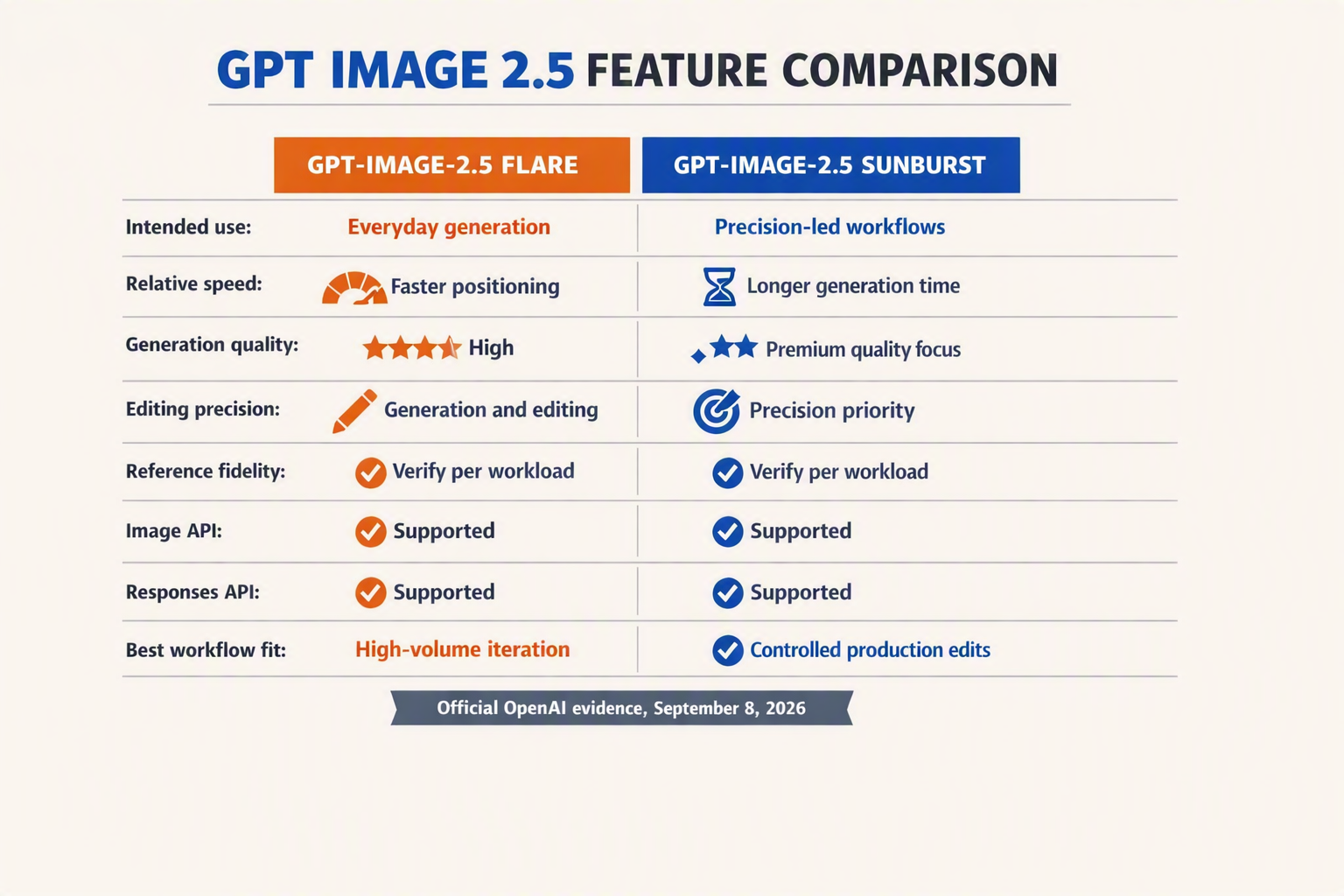
OpenAI’s September 8, 2026 changelog draws a narrow but consequential distinction: GPT Image 2.5 Flare prioritizes fast everyday generation, while GPT Image 2.5 Sunburst prioritizes editing precision. Both support image generation and editing through the Image API and the Responses API image-generation tool.
| Feature | GPT Image 2.5 Flare | GPT Image 2.5 Sunburst | Evidence-based implication |
|---|---|---|---|
| Intended use | Everyday image creation | Precision-sensitive workflows | Match the model to the cost of an imperfect edit |
| Speed | Explicitly positioned as fast | No comparative latency disclosed | Flare is the documented choice for rapid iteration |
| Generation quality | Described as high-quality | No superiority claim published | OpenAI provides no comparative quality score |
| Editing precision | Supports editing, but is not precision-led | Recommended where precision matters most | Sunburst suits tightly constrained modifications |
| API availability | Image API and Responses API | Image API and Responses API | Teams can keep the same OpenAI developer surfaces |
| Best-fit workloads | Social assets, thumbnails, campaign variants | Ecommerce edits, diagrams, branded compositions | Route jobs by workflow rather than assuming one default |
What the table means in production
- Flare: OpenAI’s September 8, 2026 changelog calls it suitable for “fast, high-quality everyday image generation,” supporting high-throughput ideation and variant creation.
- Sunburst: OpenAI recommends it for workflows “where editing precision matters most,” making it the safer documented fit for changing one element while preserving the rest.
- Reference fidelity: OpenAI’s supplied announcement does not publish comparative identity-preservation, layout-retention, or reference-similarity scores, so neither model has a proven numerical advantage.
- Campaign variants: Use Flare when a creative team needs many social formats, visual directions, or headline treatments quickly; reserve Sunburst for final corrections where composition must remain stable.
- Ecommerce and diagrams: Sunburst better matches background replacements, packaging-text fixes, label revisions, and localized diagrams because these tasks penalize unintended visual changes.
- API parity: Both models work through two documented surfaces—the Image API and Responses API—so developers can implement workload-based routing without adopting separate integration patterns.
- Unpublished specifications: OpenAI’s September 8, 2026 changelog does not provide model-specific prices, latency percentiles, resolution limits, or benchmark scores; production teams should validate those variables with representative test sets.
How should teams test speed, quality, editing precision and reference fidelity?
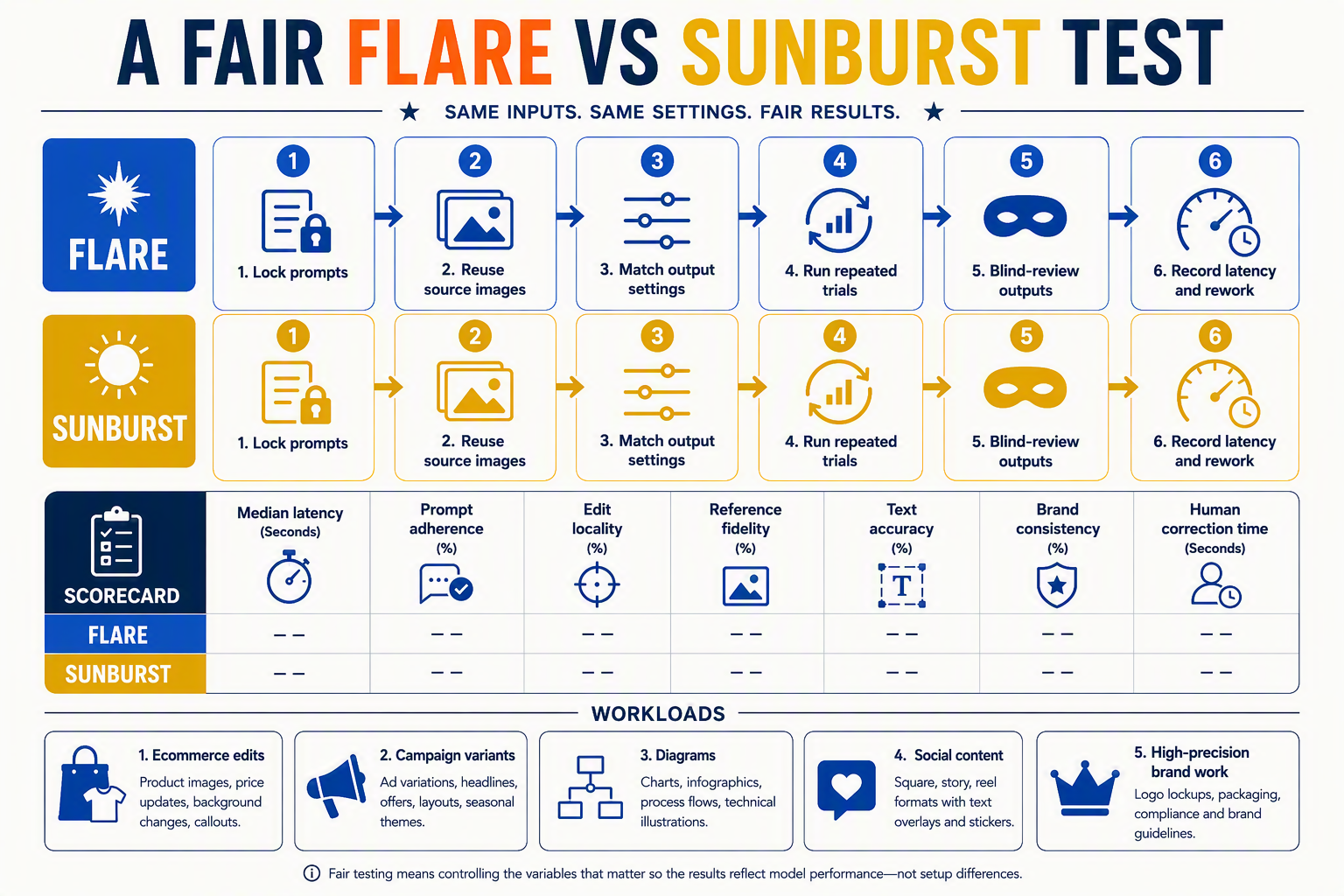
Test GPT Image 2.5 Flare and GPT Image 2.5 Sunburst on the same production-like prompt suite, using repeated API runs and blinded human review. OpenAI’s September 8, 2026 changelog provides intended-use guidance—not public latency, quality, or fidelity scores—so teams should generate their own comparable evidence.
Build a controlled evaluation
- Test set: Use at least 50 representative jobs, split across ecommerce edits, campaign variants, diagrams, social assets, and high-precision brand compositions.
- API parity: Run both models through the same surface—the Image API or the Responses API image-generation tool—with identical prompts, source images, masks, output settings, retries, and region.
- Speed: Record end-to-end latency for every request and report median, p90, and p95 latency, timeout rate, and successful images per minute; OpenAI’s September 8, 2026 changelog calls Flare “fast” but publishes no numerical latency benchmark.
- Quality: Have at least three blinded reviewers score prompt adherence, composition, visual defects, text rendering, and production readiness on a fixed 1–5 rubric; randomize model labels and output order.
- Editing precision: Create single-change tasks—replace only a background, alter one package label, or revise one diagram node—and measure requested-change success plus unintended-change rate; OpenAI explicitly recommends Sunburst where “editing precision matters most.”
- Reference fidelity: Compare products, logos, people, layouts, and brand colors against source images; score identity preservation, geometry drift, logo deformation, color error, and unchanged-region similarity.
- Flare workload: Batch-generate social posts, thumbnails, and 10–20 campaign variants per concept to test whether Flare’s documented everyday-generation positioning translates into useful throughput.
- Sunburst workload: Run constrained ecommerce retouching and branded-layout edits where every unrequested pixel change can trigger rework; track acceptance without manual correction.
Make the decision reproducible
- Weighted score: Apply workload-specific weights—for example, speed 40% for social production or editing precision 50% for packaging—and retain prompts, seeds where supported, API settings, outputs, reviewer scores, and failure logs for regression testing.
How much do Flare and Sunburst cost, and which offers better value?
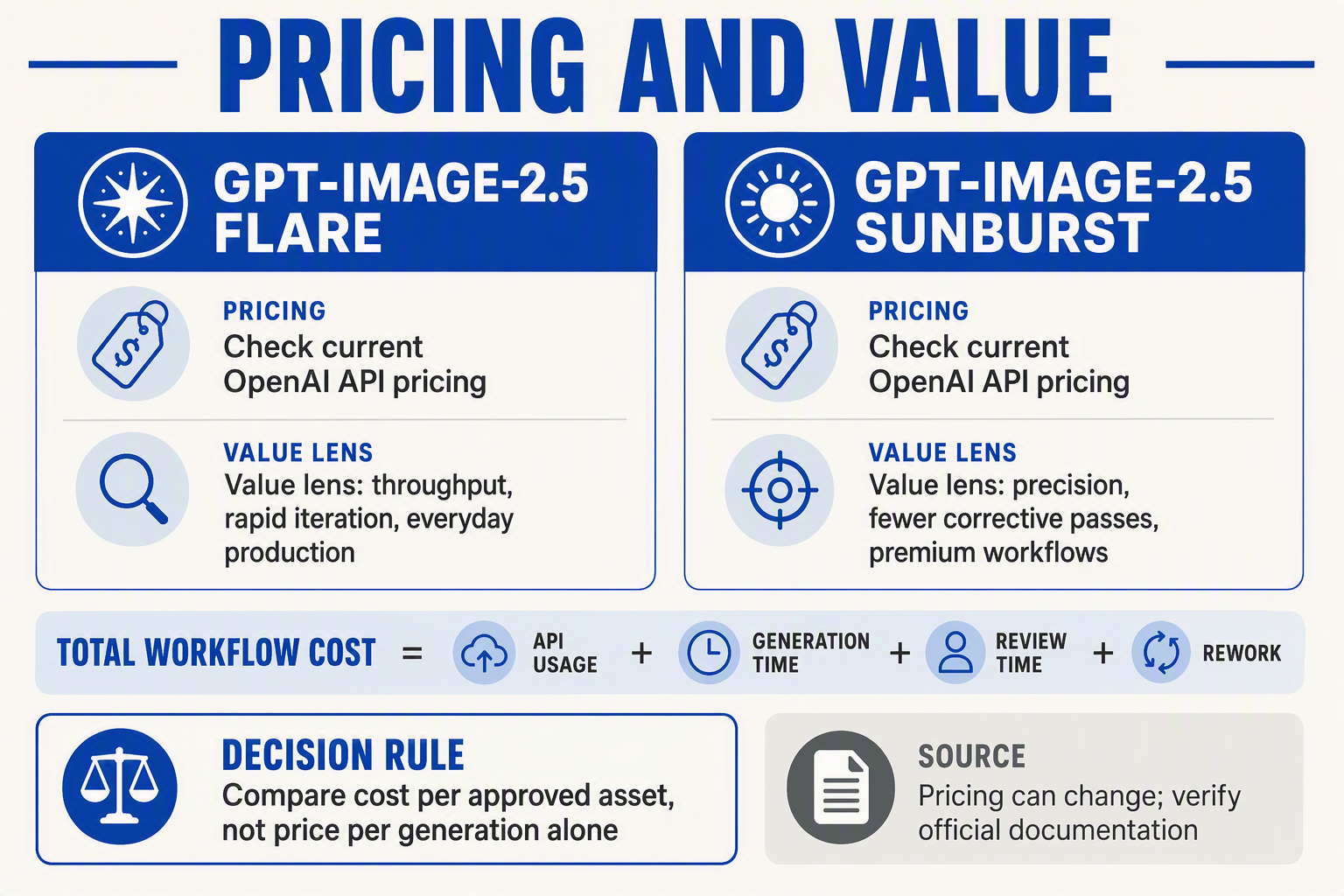
OpenAI had not published model-specific prices for GPT Image 2.5 Flare or GPT Image 2.5 Sunburst in its September 8, 2026 announcement and changelog. Flare is therefore the likely value choice for iteration-heavy workloads, while Sunburst offers better operational value when precise edits reduce costly rework.
Cost and value comparison
| Cost or value factor | GPT Image 2.5 Flare | GPT Image 2.5 Sunburst | Practical implication |
|---|---|---|---|
| Published API price | Not disclosed | Not disclosed | No evidence-based per-image comparison yet |
| Intended value | Fast everyday generation | Precision-focused editing | Match spend to workflow risk |
| High-volume variants | Strong fit | Possible, but not its stated priority | Flare suits rapid campaign exploration |
| Constrained ecommerce edits | Usable for editing | Stronger documented fit | Sunburst may reduce unintended product changes |
| Diagram or packaging revisions | Speed-oriented option | Precision-oriented option | Sunburst may lower manual correction time |
| Cost predictability | Requires live pricing and usage tests | Requires live pricing and usage tests | Benchmark complete jobs, not one request |
- Flare: OpenAI’s September 8, 2026 changelog calls Flare “fast, high-quality everyday image generation,” supporting its use for social assets, thumbnails, and numerous campaign variants.
- Sunburst: OpenAI’s September 8, 2026 changelog recommends Sunburst where “editing precision matters most,” making avoided rework its clearest potential source of value.
- Direct cost: OpenAI’s release evidence supplies no per-image, token, resolution, quality-tier, or editing surcharge figures for either model.
- Developer test: Measure cost per approved asset, including retries, latency, reviewer time, and manual corrections—not merely API cost per generation.
- Creative-team test: Run the same 50–100 representative tasks through both models and record acceptance rate, edit leakage, turnaround time, and total requests.
- Procurement rule: Do not infer that Flare is cheaper because it is faster, or that Sunburst costs more because it is precision-oriented; wait for documented pricing or billing data.
What are the pros and cons of GPT-Image-2.5 Flare and Sunburst?
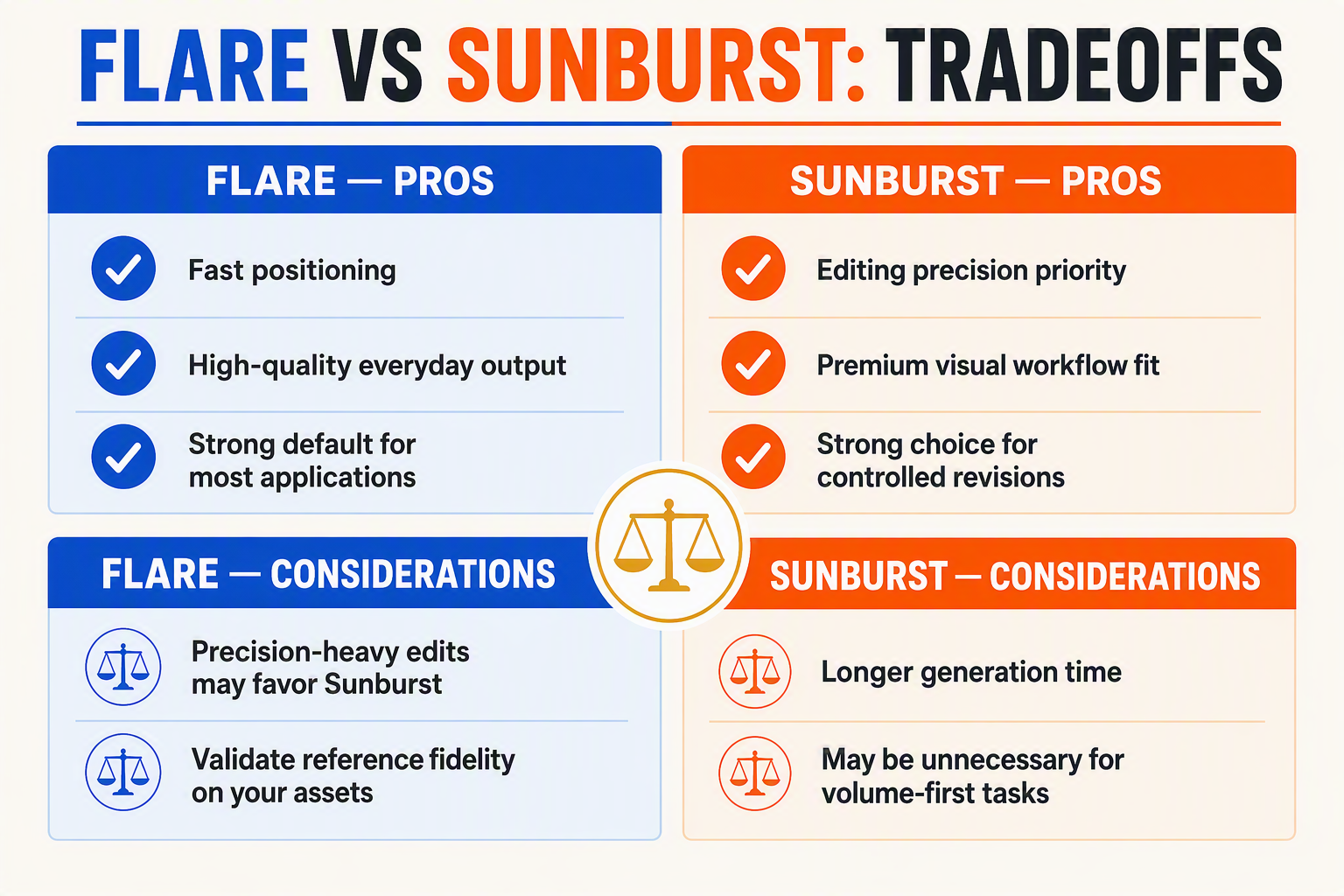
OpenAI’s September 8, 2026 changelog defines a clear trade-off: GPT Image 2.5 Flare prioritizes fast everyday production, while GPT Image 2.5 Sunburst prioritizes precise editing. The principal limitation is evidence depth—OpenAI has not published comparative latency, fidelity, resolution, or pricing data.
Pros-and-cons comparison
| Criterion | GPT Image 2.5 Flare | GPT Image 2.5 Sunburst | Practical implication |
|---|---|---|---|
| Primary advantage | “Fast, high-quality everyday image generation,” according to OpenAI’s September 8, 2026 changelog | Designed for workflows “where editing precision matters most,” according to the same changelog | Match the model to throughput or edit sensitivity |
| Main drawback | OpenAI does not claim that Flare provides Sunburst-level editing precision | OpenAI does not position Sunburst as the faster option | Neither model leads on every workload |
| Production fit | Social assets, thumbnails, ideation, routine product scenes, and campaign variants | Packaging corrections, selective retouching, diagrams, and tightly controlled brand assets | Separate bulk creation from precision-edit queues |
| Editing risk | Less evidence-backed for edits where every untouched element must remain stable | Better documented fit for constrained changes | Use Sunburst when unintended variation creates rework |
| API availability | Image API and Responses API image-generation tool | Image API and Responses API image-generation tool | Existing OpenAI API workflows can evaluate both surfaces |
| Evidence gaps | No published latency, throughput, quality, fidelity, or price comparison | No published latency, throughput, quality, fidelity, or price comparison | Benchmark with representative production inputs |
- Flare pro: Creative teams can use Flare for broad exploration because OpenAI explicitly associates the model with speed and everyday generation, including workflows that require many candidate images.
- Flare con: “High-quality” is a qualitative product description, not a comparative benchmark; OpenAI’s September 8, 2026 materials provide no human-preference score, typography-accuracy rate, or reference-fidelity percentage.
- Sunburst pro: Sunburst is the safer evidence-led choice when changing one diagram label, correcting packaging text, or retouching a product while preserving composition and brand elements.
- Sunburst con: OpenAI has not released verified latency percentiles or images-per-minute figures, so teams cannot assume Sunburst will meet high-volume service-level objectives without testing it.
- Both models: OpenAI released Flare and Sunburst for generation and editing through two developer surfaces—the Image API and the Responses API image-generation tool—on September 8, 2026.
- Selection rule: Route disposable drafts and bulk variants to Flare; route approved assets, constrained ecommerce edits, and precision-sensitive revisions to Sunburst, then validate cost, latency, text rendering, and reference preservation using an internal test set.
Which GPT Image 2.5 model should you choose for each production workflow?
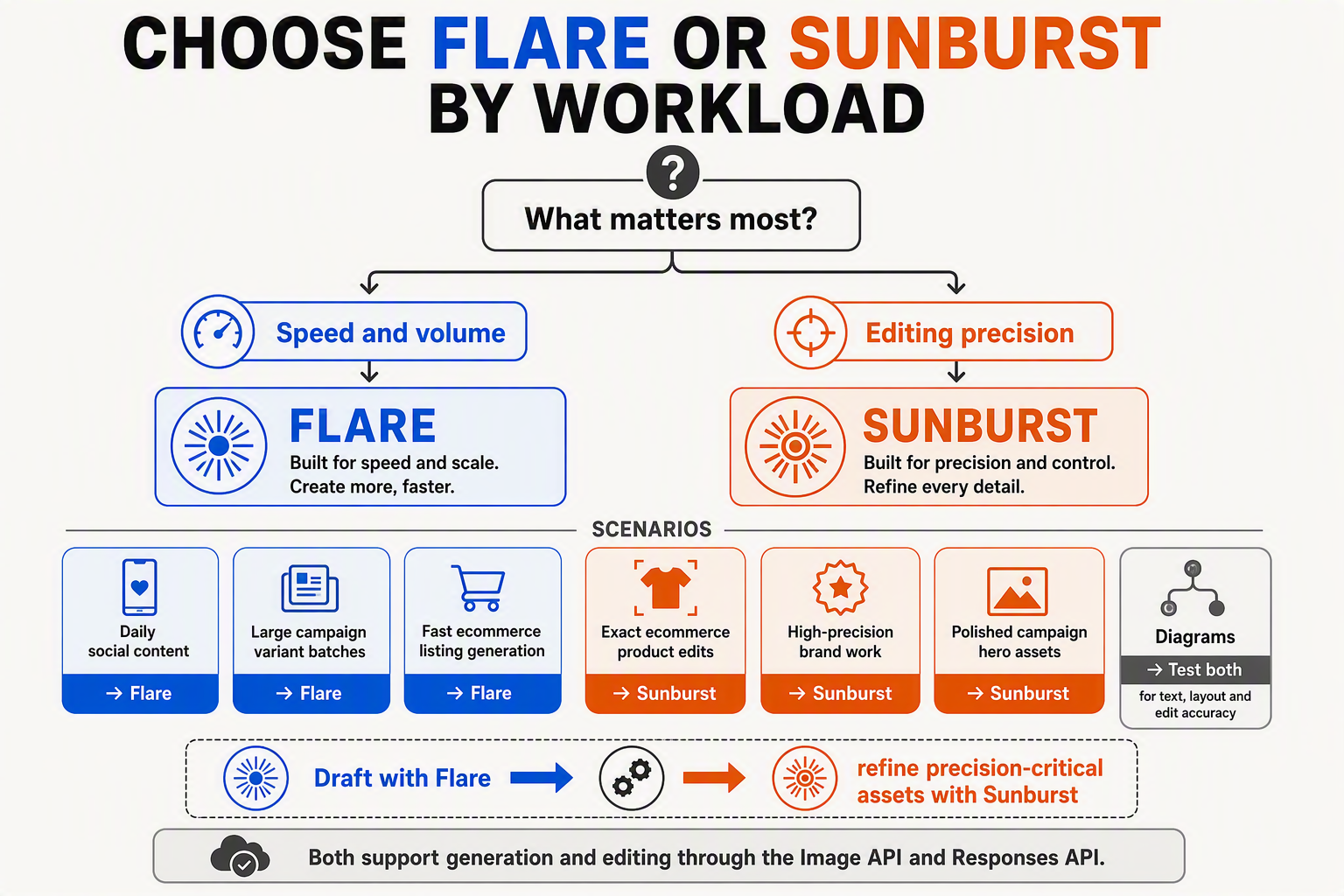
Choose GPT Image 2.5 Flare for fast, high-quality everyday generation, and choose GPT Image 2.5 Sunburst when editing precision is the primary requirement. OpenAI’s September 8, 2026 changelog states that both models support image generation and editing through the Image API and the Responses API image-generation tool.
Workflow recommendations
- High-volume social content — Flare: Use GPT Image 2.5 Flare for routine posts, thumbnails, event graphics, and rapid aspect-ratio concepts. OpenAI described Flare on September 8, 2026 as designed for “fast, high-quality everyday image generation,” making it the evidence-backed default when output volume and iteration speed matter.
- Campaign ideation and variants — Flare: Choose Flare for broad creative exploration, such as generating 30 visual directions, testing multiple compositions, or producing channel-specific variants. If the workflow later requires narrowly constrained revisions to approved artwork, move that editing stage to Sunburst.
- Selective ecommerce retouching — Sunburst: Use GPT Image 2.5 Sunburst for tasks such as replacing a background, removing an object, changing a garment colour, or revising packaging. OpenAI recommends Sunburst for workflows “where editing precision matters most.” Teams may hypothesize that Sunburst will better preserve product shape, labels, and composition during these edits, but should validate that assumption using representative catalogue assets.
- Diagrams and instructional assets — Sunburst: Prefer Sunburst when changing one label, arrow, icon, callout, or highlighted region while attempting to leave the rest of a diagram unchanged. Editing precision is directly relevant here because an otherwise attractive redraw can still introduce factual or layout errors.
- High-precision brand production — Sunburst: Use Sunburst for approved key art, branded compositions, packaging, and reference-led edits where the brief specifies narrow changes. Brand teams should test whether logos, typography, colour relationships, and character identity remain sufficiently stable; OpenAI’s changelog does not provide a published reference-fidelity benchmark establishing that outcome.
- Routine product-image generation — Flare: Select Flare for creating new lifestyle scenes, merchandising concepts, seasonal treatments, and catalogue variations when rapid throughput is more important than tightly constrained editing.
A practical production selection rule
- Start with Flare for generation-heavy queues. Make Flare the default for ideation, rapid reviews, disposable drafts, and routine creative production.
- Route precision-sensitive edits to Sunburst. Escalate when acceptance criteria specify changing only a defined element or region, such as a package colour, diagram label, background, or campaign detail.
- Validate reference preservation internally. Create a test set containing real products, logos, layouts, characters, and multilingual text. Compare both models for unintended changes, edit compliance, reviewer acceptance, and revision count rather than assuming that “editing precision” guarantees exact reference fidelity.
- Keep routing configurable. Because OpenAI made both GPT Image 2.5 models available for generation and editing across two developer surfaces—the Image API and the Responses API image-generation tool—on September 8, 2026, developers can implement policy-based model selection within one application.
OpenAI has not supplied model-specific latency figures, prices, reference-fidelity scores, or human-preference benchmarks in the cited changelog. Consequently, Flare-for-speed and Sunburst-for-precision is the supported starting rule, while production decisions should depend on tests using each team’s actual assets and quality thresholds.
What should developers know about Image API and Responses API implementation?
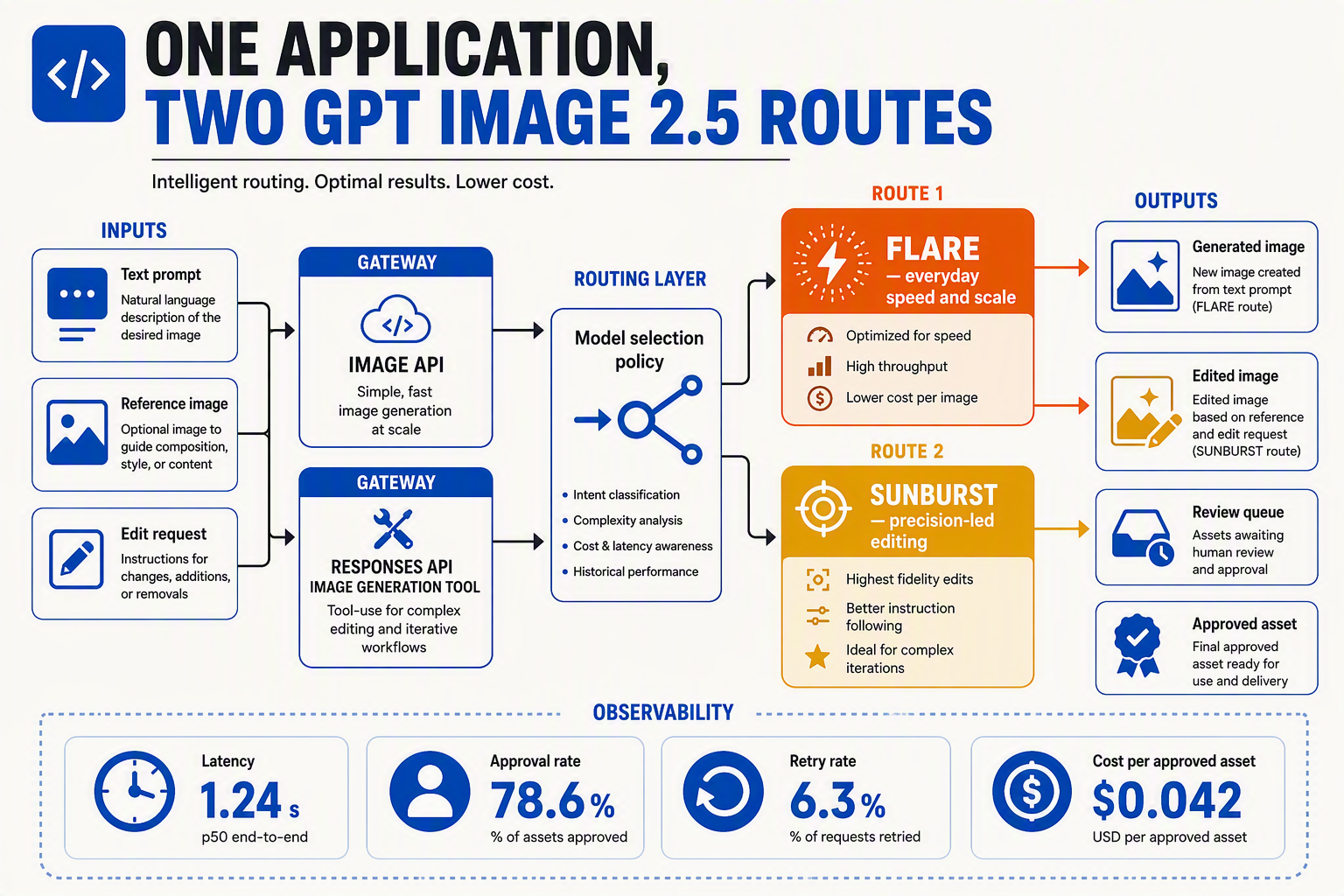
Both models are available through OpenAI’s Image API and the Responses API image-generation tool, so implementation should follow the workflow—not assumed quality differences. Use the Image API for focused image jobs and the Responses API when image creation belongs inside a multimodal interaction.
Implementation checklist
- Shared availability: OpenAI’s September 8, 2026 API changelog confirms that GPT Image 2.5 Flare and GPT Image 2.5 Sunburst both support image generation and editing through two developer surfaces: the Image API and the Responses API image-generation tool. Keep the selected model configurable rather than hard-coding it across application logic.
- Image API: Prefer the Image API for discrete operations such as generating social assets, editing ecommerce photography, producing campaign variants, or revising diagrams. This architecture makes it easier to treat each request as a production job with its own prompt, reference assets, output settings, retry policy, moderation status, and stored result.
- Responses API: Prefer the Responses API image-generation tool when a language model must interpret conversation, reason over text or images, and decide when to generate or edit an asset. A creative assistant could gather brand requirements, inspect a reference image, request clarification, and then invoke image generation within the same response workflow.
- Model routing: Route routine creation and rapid variant production to Flare, while sending tightly constrained edits to Sunburst. OpenAI’s September 8, 2026 changelog describes Flare as supporting “fast, high-quality everyday image generation” and recommends Sunburst where “editing precision matters most”; applications can expose this as
fastandprecisionmodes without claiming unsupported latency guarantees.
- Reference handling: Preserve original files, masks, prompts, dimensions, and asset identifiers for every edit so teams can compare output against the source. For ecommerce products, packaging, diagrams, and branded layouts, automated checks should detect unwanted changes to logos, labels, colors, composition, or untouched regions before an image reaches production.
- Evaluation and fallback: Run both models against a representative test set rather than relying on model positioning alone—such as 50 social variants, 25 product-background edits, and 25 diagram corrections. Measure task completion, human approval, unintended-change frequency, retry rate, end-to-end latency, and cost per accepted asset; these are workload-specific test sizes and metrics, not OpenAI-published benchmarks.
- Production controls: Implement timeouts, bounded retries, idempotency at the application layer, request logging, versioned prompts, and human review for consequential brand edits. OpenAI’s cited release materials do not provide comparative prices, numerical latency, rate limits, or quality scores for Flare and Sunburst, so developers should retrieve current account-specific limits and pricing from official API documentation rather than embedding assumptions.
Frequently asked questions about GPT Image 2.5 Flare vs Sunburst
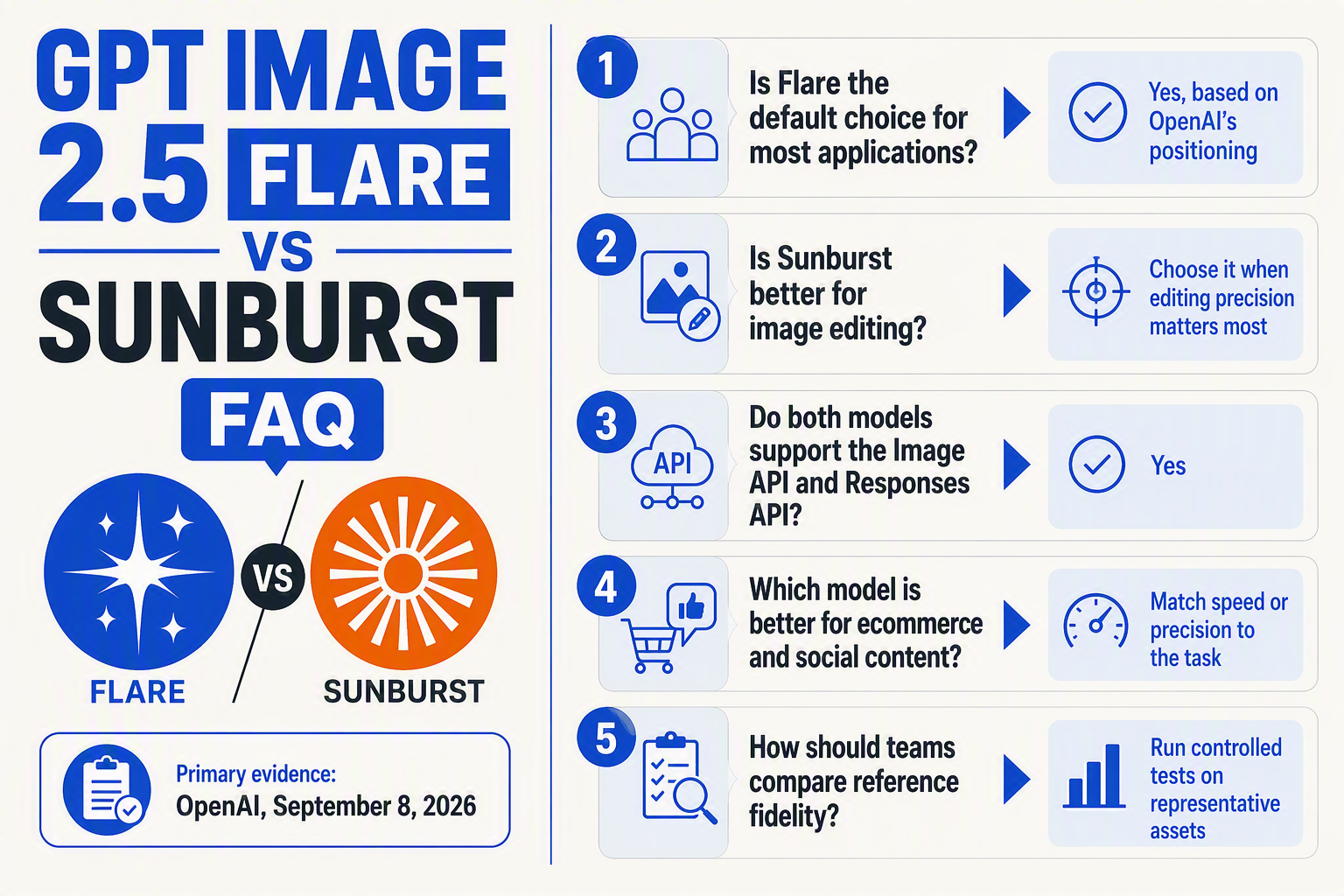
What is the main difference in GPT Image 2.5 Flare vs Sunburst?
Which model should be the default choice?
Is GPT Image 2.5 Flare faster than Sunburst?
Which model offers better editing precision?
Should I use the Image API or the Responses API for GPT Image 2.5 Flare vs Sunburst?
How can I verify GPT Image 2.5 Flare vs Sunburst pricing?
How should developers migrate to GPT Image 2.5 Flare or Sunburst?
How should teams test GPT Image 2.5 Flare vs Sunburst before production?
Sources
- OpenAI API Changelog — primary source for the September 8, 2026 release, intended-use guidance, latency claim, supported tasks, and API availability (developers.openai.com/api/docs/changelog).
- OpenAI Platform Changelog — official release entry and supporting product documentation (platform.openai.com/docs/changelog).
Conclusion
The choice is workload-driven: Flare prioritises production speed, while Sunburst prioritises editing precision.
- Choose Flare for social content, campaign variants, thumbnails, and rapid iteration.
- Choose Sunburst for ecommerce retouching, diagrams, packaging, and brand-sensitive edits.
- Treat overall quality and reference fidelity as workload-specific because OpenAI published no comparative benchmarks or pricing on September 8, 2026.
- Test both through the Image API or Responses API using representative assets.
Watch for verified latency, fidelity, and cost data as adoption grows. Explore unified model access through CallMissed—then ask: which failure costs your team more, slower generation or imprecise edits?
Related Reading
- Claude Fable 5.1 vs GPT-6 Astra Pricing: Real API Costs in 2026
- Claude Fable 5.1 vs GPT-6 Astra for Coding: 2026 Evidence-Led Comparison
- Claude Fable 5.1 vs GPT-6 Astra: 2026 Knowledge-Work Test