
AI Agent Orchestration Layer: Enterprise Support Blueprint


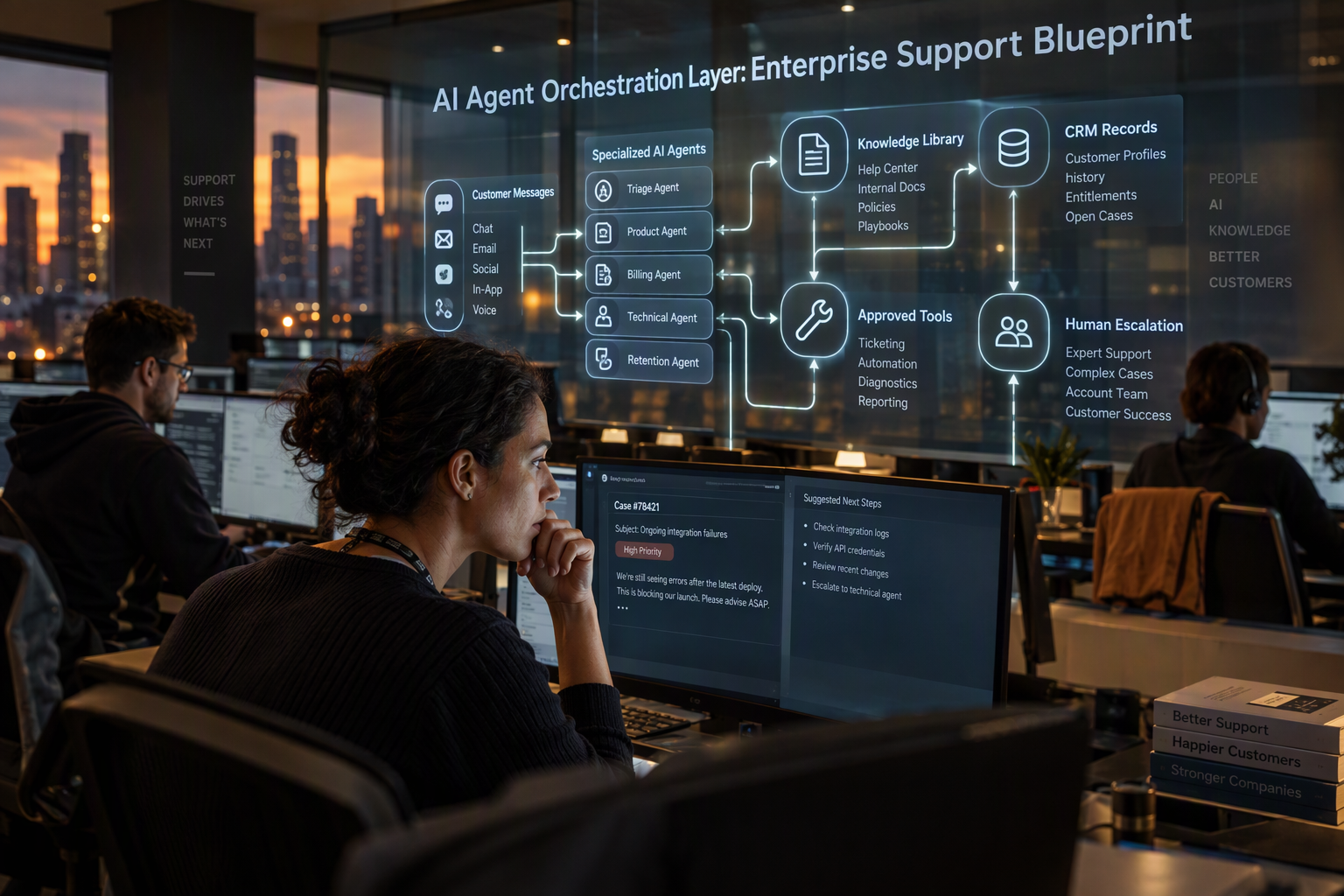
Learn how an AI agent orchestration layer connects support channels, knowledge, tools and people—with safety controls, handoff rules, metrics and a phased rollout.
AI Agent Orchestration Layer: Enterprise Support Blueprint
By the end of 2026, 40% of enterprise applications are forecast to include autonomous agents—a sharp reason to ask whether your support operation is ready to coordinate them. Gartner’s forecast, cited in AetherLink’s 2026 enterprise orchestration analysis, signals a shift beyond experimenting with individual AI tools: businesses must make agents, people, customer data and business systems work together reliably.
That is the challenge AI agent orchestration addresses. A support agent may need to identify a customer, retrieve an order, check a policy, resolve a routine issue and document the outcome—or recognize when the request requires a person. Without a shared workflow, these steps can become disconnected: agents may lack context, repeat work or take action without a clear handoff. Adding more capable models does not automatically solve those operational problems; coordination, permissions, escalation paths and oversight matter just as much.
The urgency comes with a caution. Pronix’s 2026 guide reports a Gartner forecast that more than 40% of agentic AI projects could be canceled by the end of 2027, highlighting the risk of deploying agents without centralized oversight or cost controls. For customer support leaders, the lesson is practical: design the workflow before multiplying the agents. Define what each agent can do, which systems it may access, when it should ask for approval, and how a human can take over.
This blueprint will show how to design an enterprise support orchestration layer around those decisions. It will cover how to divide work among specialized agents, route cases by intent and risk, connect knowledge and customer records, preserve context across channels, and measure outcomes such as resolution quality and successful human handoffs. It will also examine guardrails—including permissions, monitoring, testing and fallback behavior—that help teams move from a promising pilot to an operation they can manage.
Platforms such as CallMissed reflect this shift by supporting agent handoffs, live call monitoring, call scoring and analytics as part of AI-enabled customer communication. The goal is not autonomy at any cost; it is a support system where every agent has a defined role, every action has an appropriate boundary, and customers can reach a person when they need one.
What is an AI agent orchestration layer for customer support?
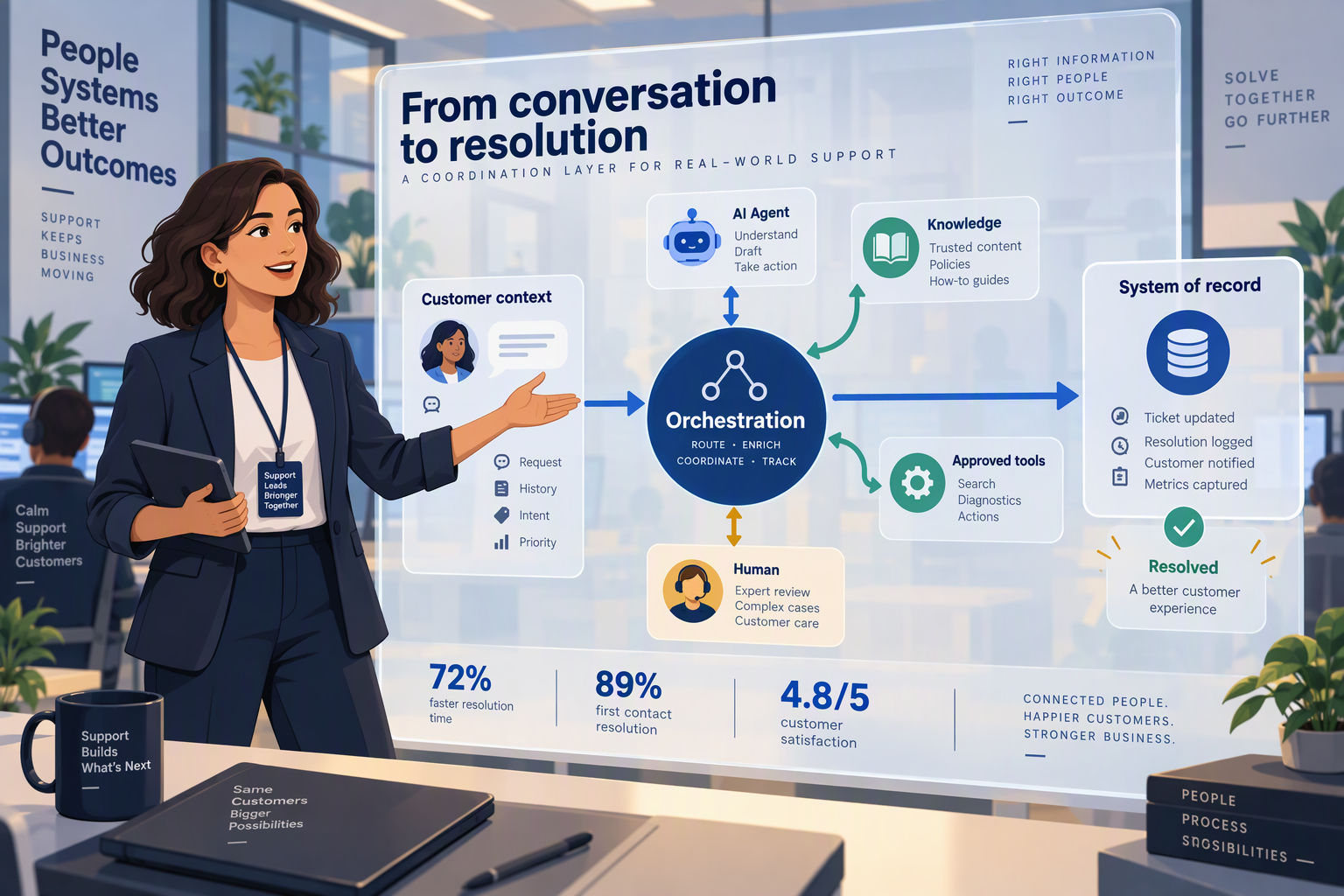
An AI agent orchestration layer for customer support is the control plane that coordinates agents, people, business systems and workflow rules to move a customer request from intake to a verified outcome. It determines what happens next, what information and tools each agent may use, and when the workflow should pause for human review.
How is orchestration different from an AI agent?
An AI agent performs a task; the orchestration layer manages how that task fits into a wider support process. A returns agent, for example, might interpret a request and check eligibility. Orchestration decides whether to retrieve the order record first, which policy source is authoritative, whether a refund needs approval, and how to hand the case to a person if something does not match.
That distinction matters as deployments grow. Gartner’s forecast, cited in AetherLink’s 2026 enterprise orchestration analysis, is that 40% of enterprise applications will feature autonomous agents by the end of 2026. More agents do not automatically create a reliable service operation: the workflow must connect their decisions to permissions, systems of record and accountable owners.
What does a support orchestration layer coordinate?
A useful layer ties together five elements:
- Routing: Classifies the request and sends it to the right agent, queue or human team.
- Context: Supplies relevant conversation history, customer details, orders and approved knowledge.
- Tools and permissions: Defines which actions an agent can take, such as checking an order or drafting a response, and where approval is required.
- Handoffs: Transfers the case with its context intact when another agent or a person needs to take over.
- Oversight: Records outcomes and makes it possible to review decisions, failures and escalation patterns.
These elements turn isolated model calls into an operating workflow. They also make it easier to set different rules for low-risk questions—such as store hours—and higher-impact requests involving billing, account access or exceptions to policy.
What happens in a practical orchestration workflow?
Consider a customer asking where a delayed order is. The orchestration layer can route the message to an order-support agent, provide the relevant customer and order context, and let the agent retrieve the latest status through an approved integration. If the order record is missing or the customer disputes the result, the workflow can pass the conversation to a human with the lookup and prior messages attached.
A blueprint should make each transition explicit:
- Trigger: What message or event starts the workflow?
- Decision: Which intent, risk or missing information changes the route?
- Action: Which agent or system performs the next step?
- Exit condition: What counts as resolved, and what requires escalation?
This is the practical meaning of centralized coordination—not one model making every decision, but a managed sequence with defined boundaries and a clear path to human judgment.
Where do communication platforms fit?
Communication platforms can provide important workflow components without necessarily replacing an enterprise’s broader orchestration architecture. As of September 2026, CallMissed supports agent squads that hand a live call from one agent to another, live monitoring where a supervisor can listen, whisper or barge in, and call notes that can be pushed to a CRM. These capabilities illustrate how routing, human oversight and post-call documentation can be connected in customer communications.
Why do fragmented support workflows need coordination?

Fragmented support workflows need coordination because a customer issue rarely stays inside one tool, team, or channel. Without an orchestration layer, each step can lose context, duplicate work, or take action without the checks the next step requires.
What goes wrong when support steps are disconnected?
A request such as “cancel my order and refund the payment” may require a support workflow to identify the customer, retrieve the order, check the cancellation policy, confirm eligibility, process the next action, and record the result. If those steps sit in separate systems or belong to isolated agents, the customer may have to repeat information, while staff must piece together what has already happened.
The failure is not necessarily that an individual agent cannot answer a question. It is that no shared process ensures the right task happens next. Common symptoms include:
- Repeated work: Two agents ask for the same details or check the same record.
- Missing context: A human receives an escalation without the conversation history or actions already taken.
- Uncontrolled actions: An agent proceeds without confirming that the customer, policy, or permission requirements are satisfied.
- Unclear ownership: A case moves between teams without a defined next owner or completion condition.
Each issue can lengthen resolution and undermine trust, even when the underlying AI model is capable.
Why does support need a shared workflow?
A coordinated workflow connects each task to its required context, tools, and decision rules. It can route a request to a specialist agent, give that agent access only to relevant information, and set conditions for asking a person to review or take over. This makes the process—not just the individual response—something a support leader can inspect and improve.
For example, an orchestration design for an order issue could follow this sequence:
- Classify the customer’s intent and identify the relevant account or order.
- Retrieve the applicable order details and policy.
- Resolve the request only if the required conditions are met.
- Escalate exceptions to a human with the conversation and prior actions attached.
- Record the outcome so the next interaction starts with useful context.
This is not a requirement to create an agent for every step. Some actions may be handled by existing software, fixed rules, or a human. The important design question is how the workflow passes information and responsibility between them.
Innoflexion’s 2026 enterprise GenAI architecture analysis describes the broader shift from selecting a model as the central decision to coordinating models and workflows. For customer support, that means evaluating whether the full process is reliable: Can the system retrieve the right record? Does it stop when information is missing? Can a person see what the agent did?
How can teams make coordination operational?
Start by mapping a small number of high-volume customer journeys. For each one, document the required systems, permissions, handoff conditions, and evidence of completion. Then test exceptions—not only the routine path—such as conflicting account details, missing order data, or a customer who asks for a human.
Platforms can support parts of this design. As of September 2026, CallMissed offers agent-to-agent live-call handoffs through Squads, supervisor options to listen, whisper, or barge in, and call recordings, transcripts, and AI call notes. Those capabilities illustrate how coordination can connect automated work with human oversight; enterprise teams still need to define the workflow rules and boundaries around them.
Which orchestration capabilities matter most?
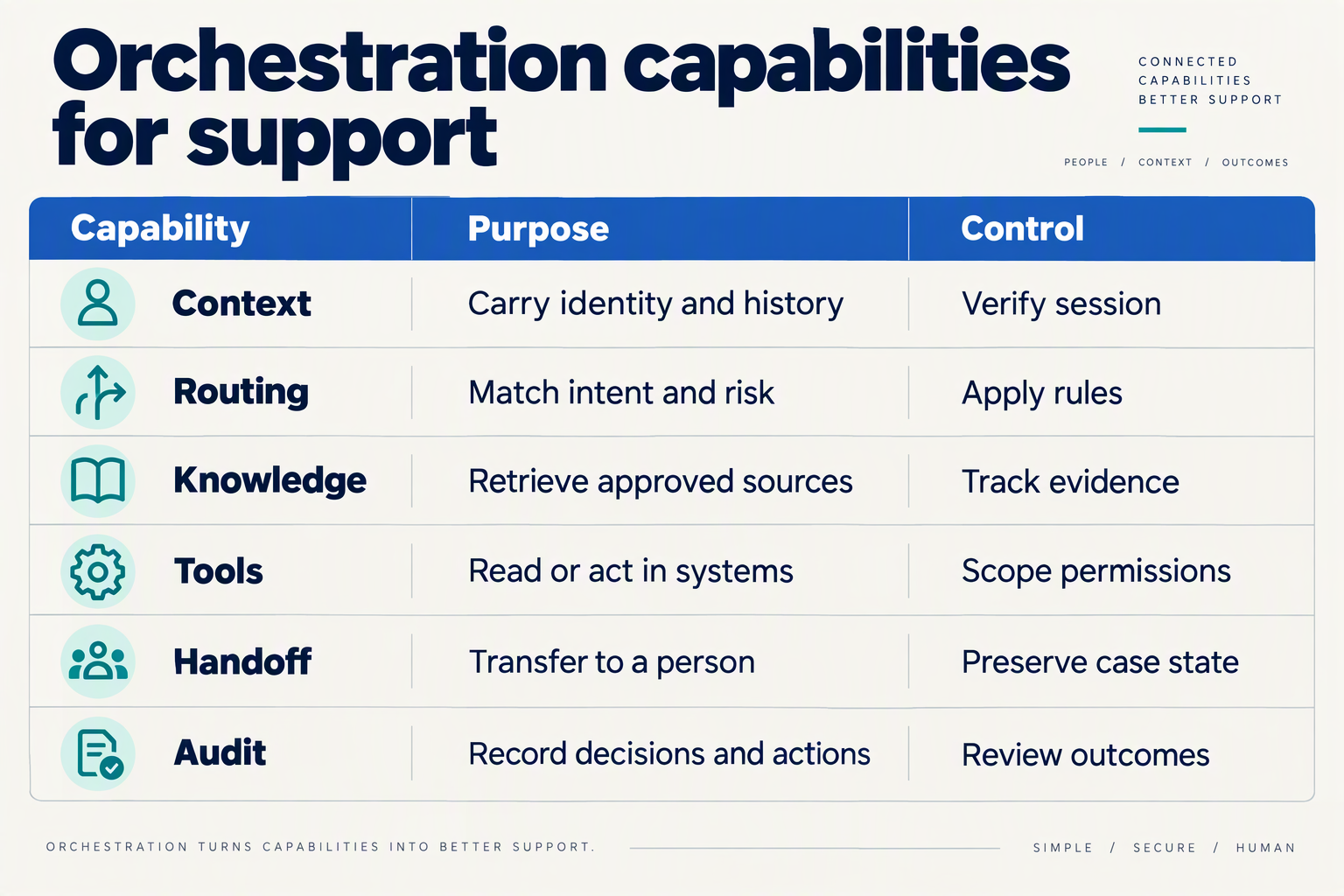
The most important AI agent orchestration capabilities are controlled routing, shared context, bounded tool access, reliable human escalation, and measurable quality. Together, they let a support workflow move from customer intent to a documented outcome without leaving ownership or next steps ambiguous.
Which orchestration capabilities should an enterprise support workflow include?
Use the table as a design checklist: define what the workflow must do, then specify what evidence shows it did so correctly.
| Capability | Design requirement | Evidence to capture | Example in customer support |
|---|---|---|---|
| Intent-based routing | Assign each request to an agent or queue using its intent, complexity, and risk | Route selected, reason, and time to assignment | Send a delivery-status question to an order-support agent; route a disputed charge for review |
| Shared customer context | Carry relevant conversation, contact, and case details between workflow steps | Context passed, records consulted, and any missing fields | Provide the next agent with the order number and steps already taken |
| Bounded tool use | Give each agent access only to the actions needed for its role; require approval for consequential actions | Tool called, inputs, result, and approval status | Allow an agent to look up an order, but require a person to approve a refund outside policy |
| Human escalation | Set clear triggers and transfer ownership with context intact | Escalation reason, receiving queue, and handoff outcome | Escalate a safety concern or repeated failure rather than asking the customer to start again |
| Monitoring and quality | Review conversations against defined quality criteria and identify workflow failures | Transcript, disposition, quality score, and review result | Check whether the agent followed policy and whether the final response resolved the request |
| Recovery and fallback | Specify what happens when a tool, model, or information source is unavailable | Failure type, retry or fallback path, and final status | Pause an order change if the system cannot verify the customer or retrieve the order |
The handoff contract deserves particular attention: specify what information the receiving person or agent needs, who owns the case after transfer, and whether the customer has been told what will happen next. A handoff is successful only when the next participant can continue without making the customer repeat essential details.
How should teams put these capabilities into practice?
Start with one high-volume workflow, such as order-status questions, and document its normal path and exceptions. Then assign an owner to each decision point and test situations where the workflow must stop, including missing customer details, conflicting policy information, failed integrations, and requests that require human judgment.
A practical sequence is:
- Map the workflow: List the customer’s request, required information, permitted actions, and completion condition.
- Define boundaries: Record which tools an agent may use and which actions require a person’s approval.
- Test handoffs and failures: Verify that escalation preserves useful context and that unavailable systems do not lead to unsupported answers.
- Review outcomes: Track resolution quality, escalation reasons, and recurring workflow failures—not just the number of automated interactions.
Language coverage can also affect routing design. As of September 2026, CallMissed supports speech recognition in 22 Indian languages plus English, including code-mixed speech such as Hinglish; that is a speech-recognition capability, not a claim about text-to-speech coverage. For voice workflows, CallMissed also supports agent-to-agent live-call handoffs, call monitoring, recordings, transcripts, call notes, and scoring against a team’s own QA rubrics. Those capabilities illustrate how orchestration can connect routing with supervision and review; enterprises still need to define their policies, permissions, and success measures.
How should an enterprise support orchestration architecture work?
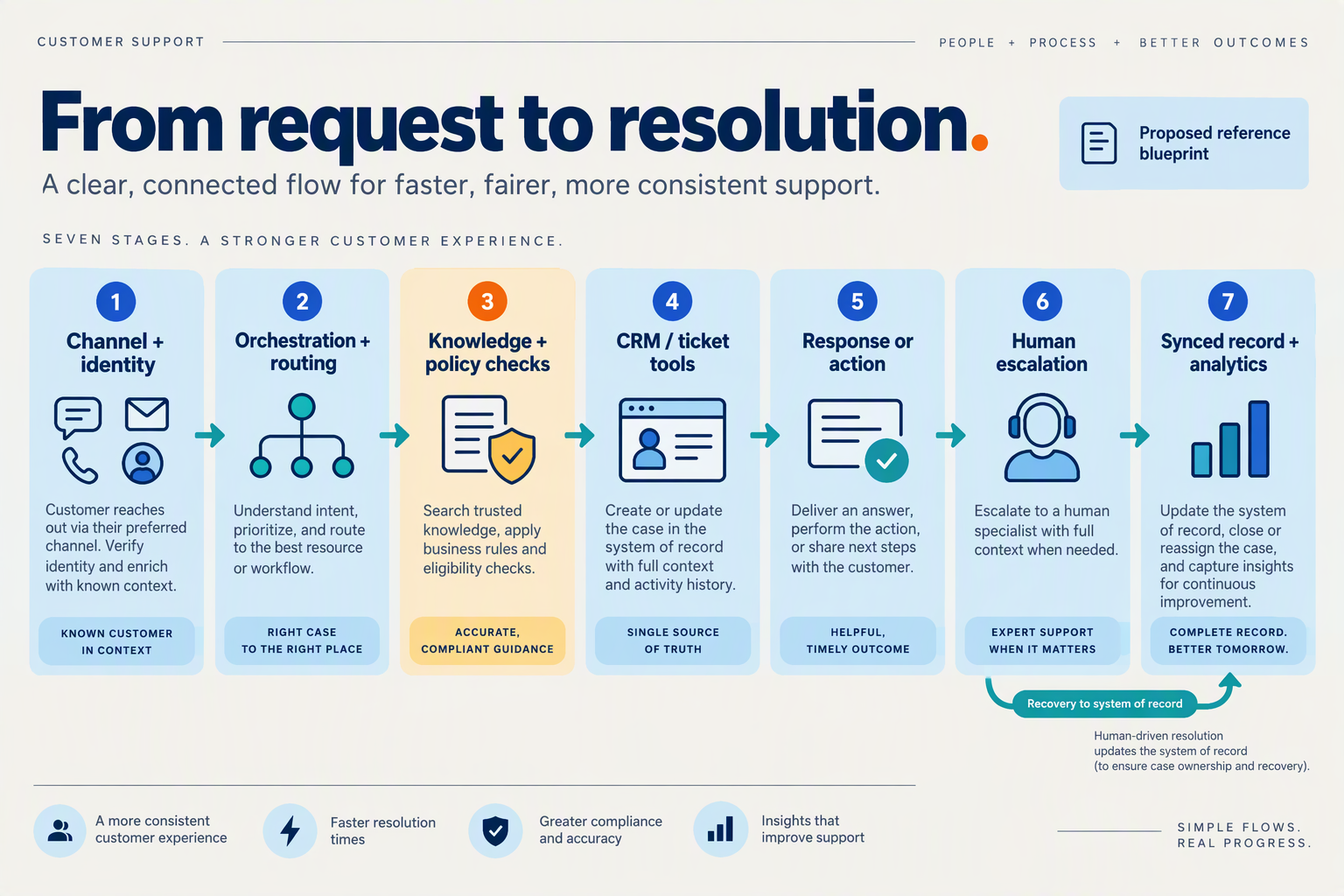
An enterprise support orchestration architecture should act as a control plane between customer channels, specialized agents, business systems and human teams. It should route each request according to intent and risk, provide only the context and permissions needed for the task, and record what happened from intake through resolution.
What are the core layers of a support orchestration architecture?
Design the system as connected layers with explicit responsibilities—not as a collection of agents that independently decide what to do next:
- Channel and identity layer: Accept requests from channels such as phone, chat and messaging, then associate each interaction with the right customer record where possible.
- Orchestration layer: Classify intent, assess risk, choose the next workflow step and apply rules for retries, approvals and escalation.
- Agent and tool layer: Assign bounded tasks to specialist agents—for example, policy lookup, order status or case summarization—and connect them to approved systems through controlled tools or APIs.
- Context layer: Retrieve relevant knowledge and customer history, while preserving a concise case record that downstream agents and people can use.
- Governance and observability layer: Log decisions and tool calls, monitor performance, and support review, testing and rollback.
This separation makes it easier to update one component without silently changing the whole support process. It also clarifies whether a failure came from intent classification, missing data, an unavailable business system or an agent’s response.
How should a support request move through the system?
Use a predictable workflow with decision points rather than giving an agent unrestricted authority to plan every step. For an order-delay inquiry, the orchestrator might:
- Identify the customer and retrieve the relevant order.
- Check the order status and the applicable delivery policy using approved tools.
- Resolve the request if the evidence supports a clear, permitted answer.
- Route exceptions—such as conflicting records, a refund request above the agent’s authority or an upset customer—to a human with the case context attached.
- Record the answer, actions taken and any follow-up needed.
Define escalation triggers before launch. Useful triggers include low confidence, repeated tool errors, sensitive account changes, policy exceptions, customer requests for a person and a workflow exceeding its allowed number of steps. A handoff should transfer context, not just the conversation: include the customer’s intent, verified facts, actions already attempted and the reason for escalation.
How should permissions and human oversight be built in?
Give each agent the least privilege needed for its task. A knowledge agent may read policy documents; an order agent may retrieve order details but require approval before changing or refunding an order. Require human approval for consequential actions until testing and governance establish that a narrower set can safely run without it.
Support staff also need a practical way to intervene. CallMissed, for example, supports a human-handoff queue for inbox conversations and lets supervisors listen to, whisper into or join live calls. These controls illustrate how orchestration can preserve human involvement within the workflow rather than treating escalation as an afterthought.
Beyond Tomorrow reported in April 2026 that Gartner forecast 40% of enterprise applications would feature autonomous agents by the end of 2026, up from fewer than 5% in 2025. At that scale, teams need operational measures alongside automation rates: resolution quality, repeat contacts, tool failures, escalation reasons and successful handoffs. Review these measures by workflow and customer segment, then use the findings to adjust routing rules, permissions and agent instructions.
What boundaries make autonomous customer service operations safer?
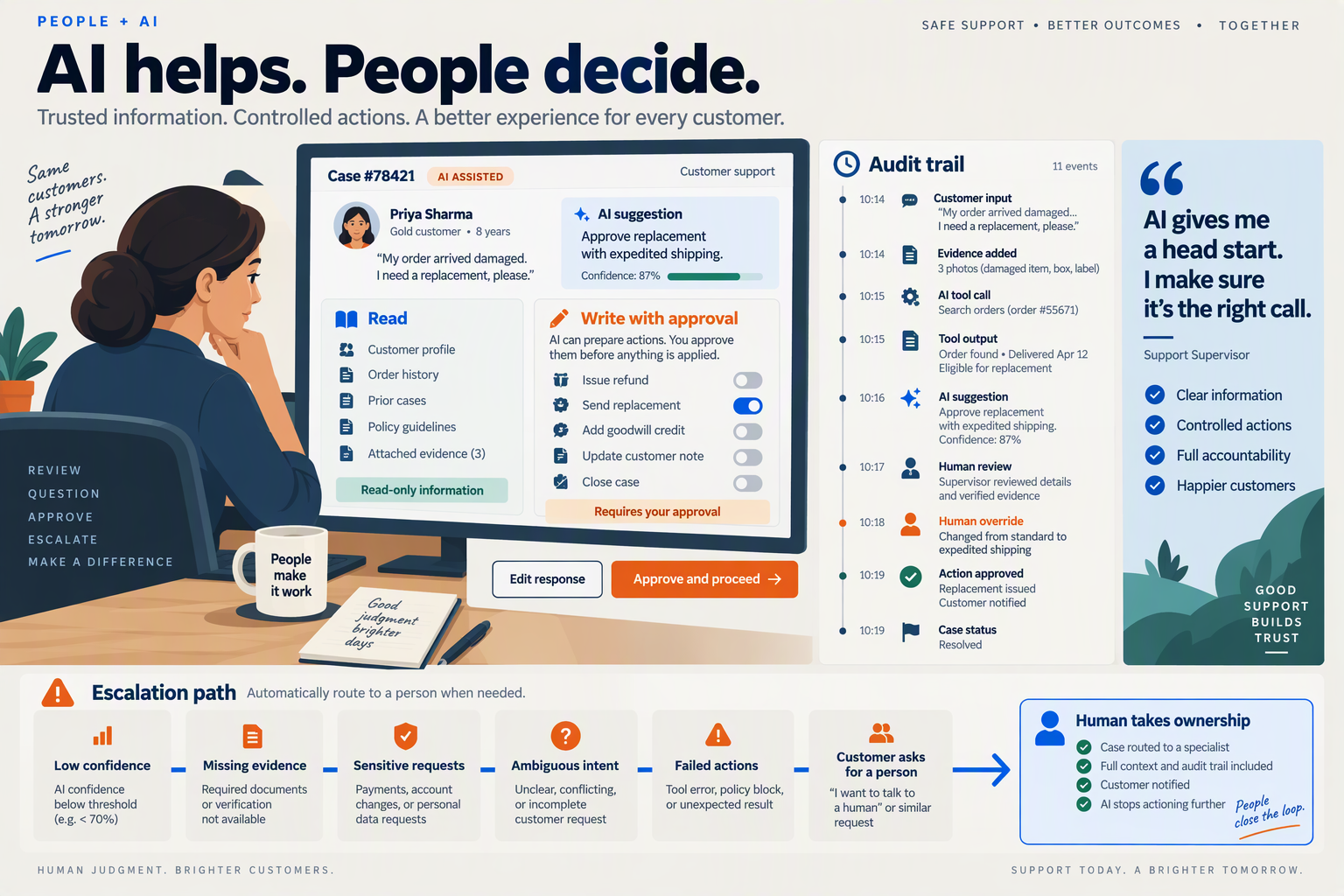
Autonomous customer service is safer when agents have narrowly defined permissions, explicit approval thresholds, reliable escalation paths, and human oversight. Treat autonomy as a set of bounded actions—not a blanket permission to resolve every request.
Which actions should a customer service agent be allowed to take?
Set permissions by task and risk. An agent that can explain a return policy does not automatically need permission to issue a refund, change an account, or disclose personal data. Keep these scopes separate, and require the workflow to verify identity before exposing sensitive account details.
A practical policy divides actions into three levels:
- Low risk: Answer from approved knowledge, summarize a case, or collect details. The agent can proceed independently.
- Moderate risk: Update a record or initiate a reversible request. The agent can act only after checking required fields and policy conditions.
- High risk: Make an irreversible or financially significant change, handle a disputed identity, or respond to a legal or safety concern. Pause for human approval or transfer the case to a person.
Define the limits in operational terms: which tools are available, what data can be read or changed, and which conditions block an action. If a request falls outside those limits, the agent should explain that it is handing the case to a human—not improvise a workaround.
When should an AI support agent hand off to a person?
Escalation should be triggered by risk and uncertainty, not just by a customer asking for a human. Set clear handoff conditions, such as failed identity checks, conflicting account information, repeated unsuccessful attempts, policy exceptions, or a customer expressing distress.
Preserve the conversation summary, verified facts, steps already taken, and the reason for escalation. That gives the human a useful starting point and reduces the chance that the customer has to repeat the issue. MarketIntelo’s multi-agent orchestration market segmentation lists customer support automation as a distinct application area; in practice, that makes clear workflow ownership—not simply adding more agents—central to deploying it responsibly.
How can teams monitor autonomous support safely?
Monitoring needs to cover both individual interactions and workflow behavior. Review samples for factual accuracy, policy compliance, appropriate escalation, and whether the final action matched the customer’s request. Track practical measures such as escalation rate, unresolved cases, repeat contacts, and errors requiring correction; investigate changes instead of optimizing for deflection alone.
As of September 2026, CallMissed supports live call monitoring in which a supervisor can listen, whisper, or barge in, as well as call scoring against a team’s own QA rubrics. Its voice-agent builder also includes versioning with publish and rollback. These features can support oversight and controlled changes, but teams still need to define their own permission rules, approval thresholds, and review procedures.
How should enterprises test boundaries before launch?
Test normal requests and edge cases before expanding an agent’s access. Include incomplete information, conflicting instructions, unusual policy exceptions, and attempts to get the agent to act beyond its assigned role. For each test, specify the expected behavior: answer, ask a clarifying question, request approval, or hand off.
Start with a limited workflow, review outcomes, and adjust the rules before granting additional tools or actions. The safest operating principle is simple: when the agent cannot verify that an action is permitted and appropriate, it should stop and escalate.
How should teams measure workflow fragmentation and govern risk?
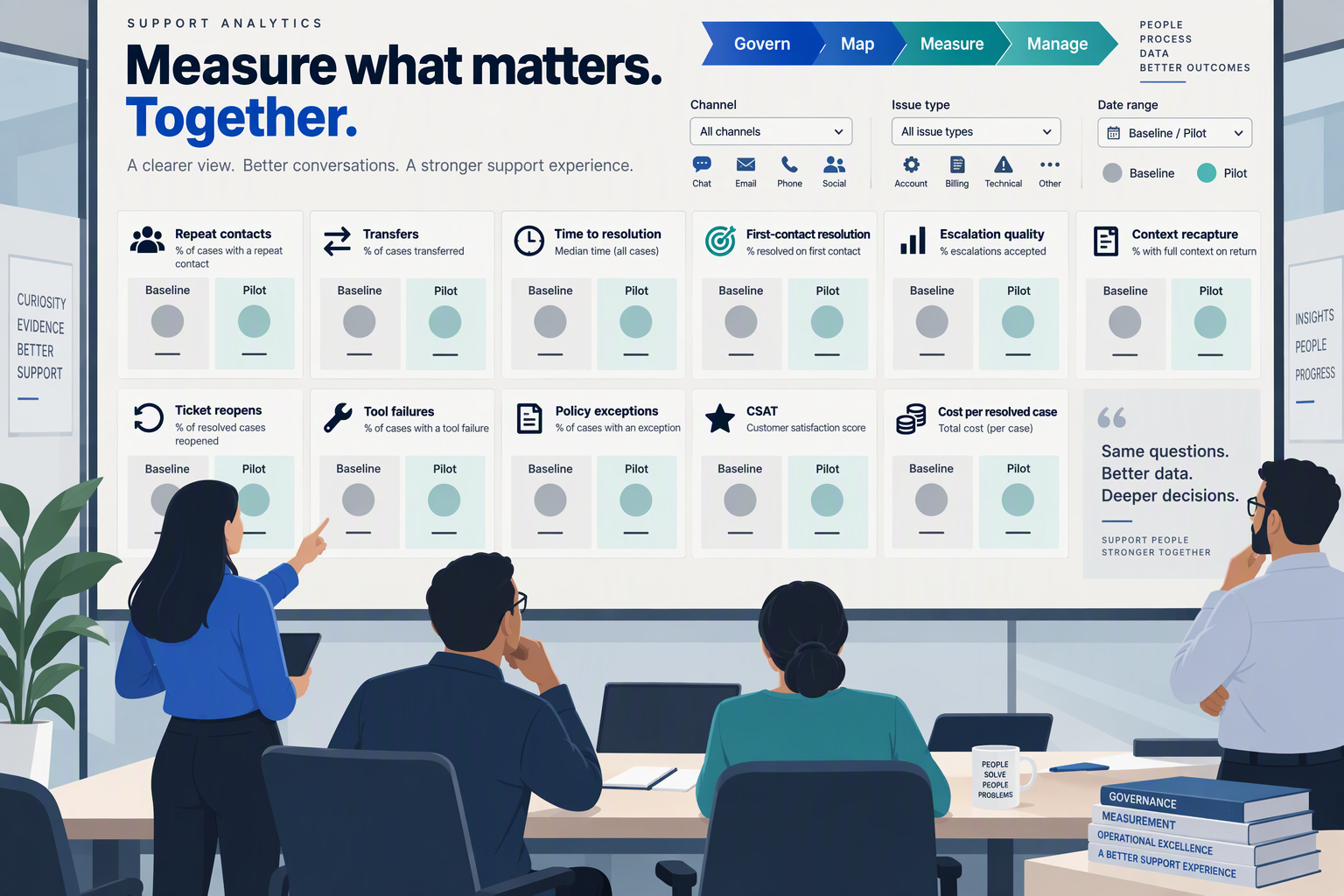
Workflow fragmentation is best measured by tracing a customer request across agents, channels, systems and human handoffs, then counting where context or control breaks down. Govern the resulting risks with explicit permissions, escalation rules, audit trails and recurring tests—not a single “automation rate” target.
Which metrics reveal fragmentation in a support workflow?
Measure the end-to-end journey, not each agent in isolation. A workflow can appear fast at one step while creating repeat contacts or manual repair work elsewhere. Establish a baseline for each issue type and channel, then track:
- Handoff rate: the share of cases transferred between agents, systems or people. Break this down by reason; a transfer caused by a planned approval is different from one caused by missing context.
- Context-loss rate: cases where the next handler lacks information already supplied, such as the customer’s order number or troubleshooting steps. Record whether the customer had to repeat information.
- Rework and loop rate: cases where an agent repeats a tool call, revisits a completed step or sends the request back to a previous queue.
- Resolution quality: verified resolution, reopen rate, customer satisfaction and policy compliance, viewed alongside time to resolution.
- Exception and escalation rate: requests routed to a person because of uncertainty, permissions, sensitive data or a policy boundary. Review whether these escalations were appropriate, not merely whether they declined.
For example, if an order-status workflow retrieves the right order but fails to pass the order ID to the reply agent, the failure belongs in the orchestration record—not just the response-quality score. Instrument each transition with a case ID, agent and tool invoked, relevant decision, outcome, and whether a person intervened. This makes fragmentation visible across the whole workflow.
How should teams govern agent risk?
Set governance rules before expanding an agent’s authority. For every workflow, document its owner, permitted data and tools, actions it may take without approval, and conditions that require a human. Use least-privilege access: an agent that can explain a refund policy may not need permission to issue a refund.
A practical control set includes:
- Risk-based routing: send low-impact, reversible tasks through automation; require review for high-impact, uncertain or policy-sensitive actions.
- Human takeover: define who receives an escalation, what context accompanies it and how automation pauses. Test the handoff from the customer’s perspective.
- Auditability: retain decision traces and tool outcomes so teams can investigate errors and distinguish model mistakes from workflow or integration failures.
- Pre-release and ongoing evaluation: test representative cases, edge cases and prompt or tool changes; use sampled reviews and customer outcomes to catch drift.
- Fallback behavior: specify what happens when a system is unavailable, confidence is inadequate or required customer data is missing. A safe pause is preferable to an unsupported action.
Gartner’s forecast, cited in AetherLink’s 2026 enterprise orchestration analysis, says 40% of enterprise applications will include autonomous agents by the end of 2026. That forecast makes governance a scaling requirement: teams need controls that travel with the workflow as agents and integrations are added.
How can teams turn measurement into action?
Assign an owner to each metric and review trends by workflow, channel and risk tier. Investigate recurring context loss or unnecessary handoffs before adding another agent; the underlying issue may be missing data access, unclear routing or a weak escalation rule. Set targets only after baselining, and balance efficiency measures with resolution quality and customer impact.
As of September 2026, CallMissed supports live call monitoring, call scoring against a team’s own QA rubrics, agent analytics and metric alerts—capabilities that fit a broader operational model of observing, evaluating and improving AI-enabled support. The objective is not to eliminate every handoff, but to make each one visible, purposeful and safe.
What should teams do first?
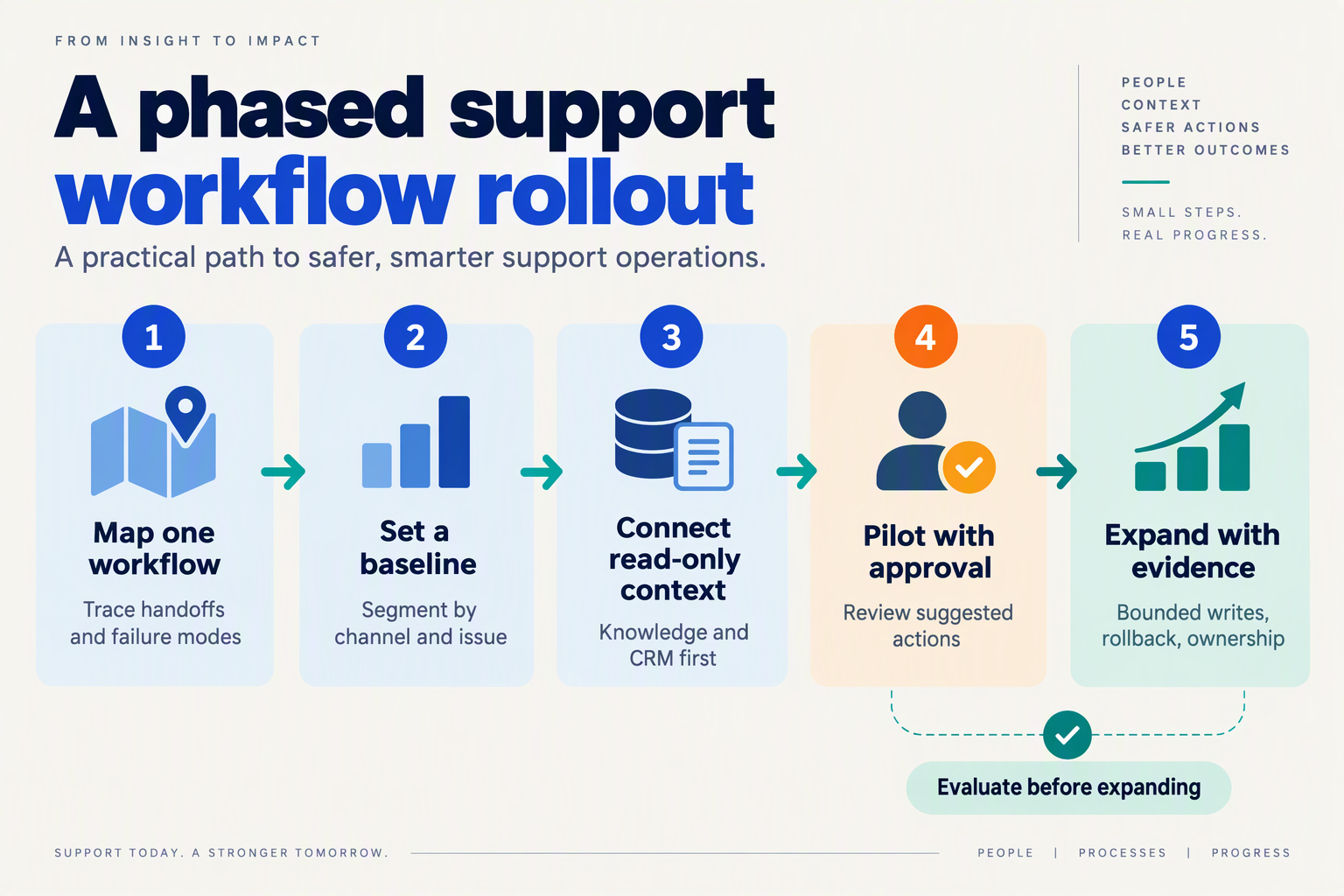
Start with one customer journey, one accountable owner and a measurable launch gate—not a fleet of agents. Before automating support work, map the current process, decide what an agent may do, and define when a person must take over.
What should an enterprise support team define before its first AI agent pilot?
Use this sequence to turn a broad automation idea into a bounded workflow. The rows are practical recommendations, not a vendor-specific implementation plan.
| Step | What to do | Concrete output | Launch gate |
|---|---|---|---|
| 1. Choose a workflow | Select a frequent, clearly bounded request, such as checking an order status or answering a policy question. | Scope statement covering customer intent, start point and desired outcome. | The task can be completed with available, approved information and tools. |
| 2. Map the current process | Document the steps, systems, exceptions and existing human handoffs. | Current-state flow, including failure and escalation paths. | Support and operations owners agree the map reflects actual practice. |
| 3. Assign agent roles | Give each agent a narrow responsibility; specify permitted tools, data access and actions. | Role and permission matrix, including actions requiring approval. | Each action has an owner and a defined boundary. |
| 4. Set human handoffs | Define triggers such as low confidence, missing information, a policy exception or a customer request for a person. | Escalation rules and the context the receiving employee needs. | A human can take over without making the customer repeat the issue. |
| 5. Test and monitor | Test routine cases, edge cases and failure behavior; review conversations and outcomes. | Evaluation set, quality rubric and monitoring plan. | The team can identify incorrect answers, unsafe actions and failed handoffs. |
| 6. Expand deliberately | Review results with support, operations and technical owners before adding intents or tools. | Go/no-go decision and prioritized next workflow. | Expansion is based on measured outcomes, not a successful demo alone. |
Which measures should determine whether the pilot expands?
Choose a small set of measures before launch so the team can distinguish useful automation from activity that merely looks efficient. Track resolution quality, human-handoff success, repeat contact or reopen rate, and time to resolution. Pair outcome measures with guardrail checks: whether the agent used an approved source, stayed within its permissions, and escalated when the workflow required it.
Gartner’s forecast, cited in AetherLink’s 2026 enterprise orchestration analysis, says 40% of enterprise applications will feature autonomous agents by the end of 2026. That forecast makes disciplined pilots more relevant, not less: the objective is to establish a repeatable operating model before adding more agent-driven workflows. Pronix’s 2026 guide also cites Gartner’s forecast that more than 40% of agentic AI projects could be canceled by the end of 2027. Treat that as a warning to set ownership, oversight and cost controls early—not as a reason to automate every support task.
How can teams make the first workflow observable?
Keep the initial workflow narrow enough for a person to review its decisions and intervene. Store the customer context needed for escalation, make tool use visible to the responsible team, and test what happens when information is unavailable or the request falls outside policy. Capture both successful resolutions and near misses; those examples help refine the workflow before its scope grows.
As of September 2026, CallMissed offers agent-to-agent live-call handoffs, supervisor monitoring, call scoring against custom QA rubrics and agent analytics. These capabilities illustrate how teams can build review and escalation into customer communication workflows; they do not replace the need to define permissions, test criteria and accountable owners for each deployment. Start with one workflow, verify its boundaries in practice, and expand only when the evidence supports the next step.
What do governance guidance and product examples tell support leaders?
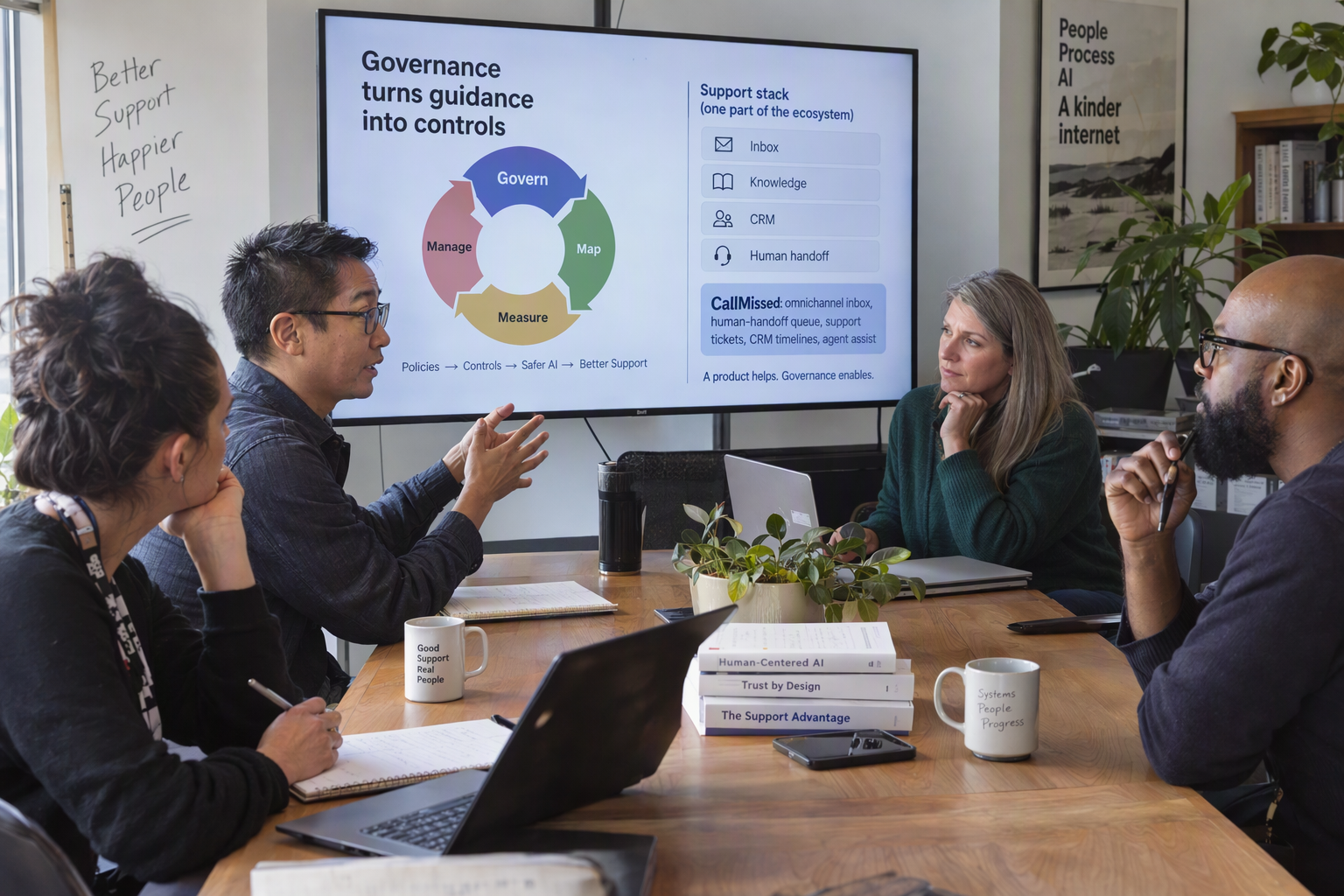
Governance guidance and product examples point to the same operating principle: orchestrate bounded actions, make decisions observable, and keep human intervention available. Enterprise support leaders should define who owns each workflow, what each agent may access or change, and what evidence is needed before a case is closed.
What governance controls should support leaders put in place?
Governance should be built into the workflow rather than added as a policy document after launch. Pronix’s 2026 enterprise guide identifies inadequate centralized oversight and rising compute costs as risks in agentic AI projects. For support teams, that means setting both decision boundaries and operational limits before increasing an agent’s autonomy.
A practical control plan should specify:
- Scope: Which intents can an agent resolve, and which must go to a person?
- Permissions: Which knowledge sources, customer records, and business tools can each agent use?
- Approval rules: Which actions—such as changing an account or issuing a consequential decision—require human confirmation?
- Handoff conditions: What uncertainty, customer request, or workflow failure triggers escalation?
- Evidence and review: What records, transcripts, evaluations, and quality criteria let a supervisor audit the outcome?
- Cost and fallback rules: When should a workflow stop, switch to a lower-cost path, or route to a human?
This turns “human in the loop” into an operational design: the system has a defined point to pause, a person with enough context to take over, and a record of what happened before the handoff.
What product examples make those controls concrete?
Product capabilities can illustrate how governance becomes part of everyday support operations. CallMissed, an AI customer-communication platform, supports agent versioning with publish and rollback, which gives teams a way to manage changes to agent behavior. Its call tools also include squads that hand a live call from one agent to another, plus supervisor monitoring to listen, whisper, or barge in. These are examples of workflow and oversight mechanisms—not a substitute for an organization’s access policies or approval rules.
A support team could, for example, route a routine delivery-status question to an AI agent with access to relevant order information, then transfer a disputed or unclear case to a human. The receiving person can use the call context rather than restarting the conversation. CallMissed also provides recordings, transcripts, AI-generated call notes, scoring against a team’s own QA rubrics, analytics, evaluation suites, and A/B experiments—capabilities that can help teams review quality and test changes. These product facts are current as of September 2026.
How should teams evaluate an orchestration approach?
Innoflexion’s 2026 enterprise architecture analysis describes a shift in emphasis from choosing a model to coordinating agents and workflows. For support leaders, the useful test is therefore not simply whether an agent can answer a question, but whether the complete process behaves predictably.
Before expanding a pilot, examine a sample of real cases and ask whether the right agent handled each request, whether escalation happened when expected, and whether the resulting record supports review. Track resolution quality alongside handoff success and operating cost. A product can supply useful controls, but the enterprise must still define its own risk thresholds, review ownership, and acceptable outcomes.
Frequently Asked Questions
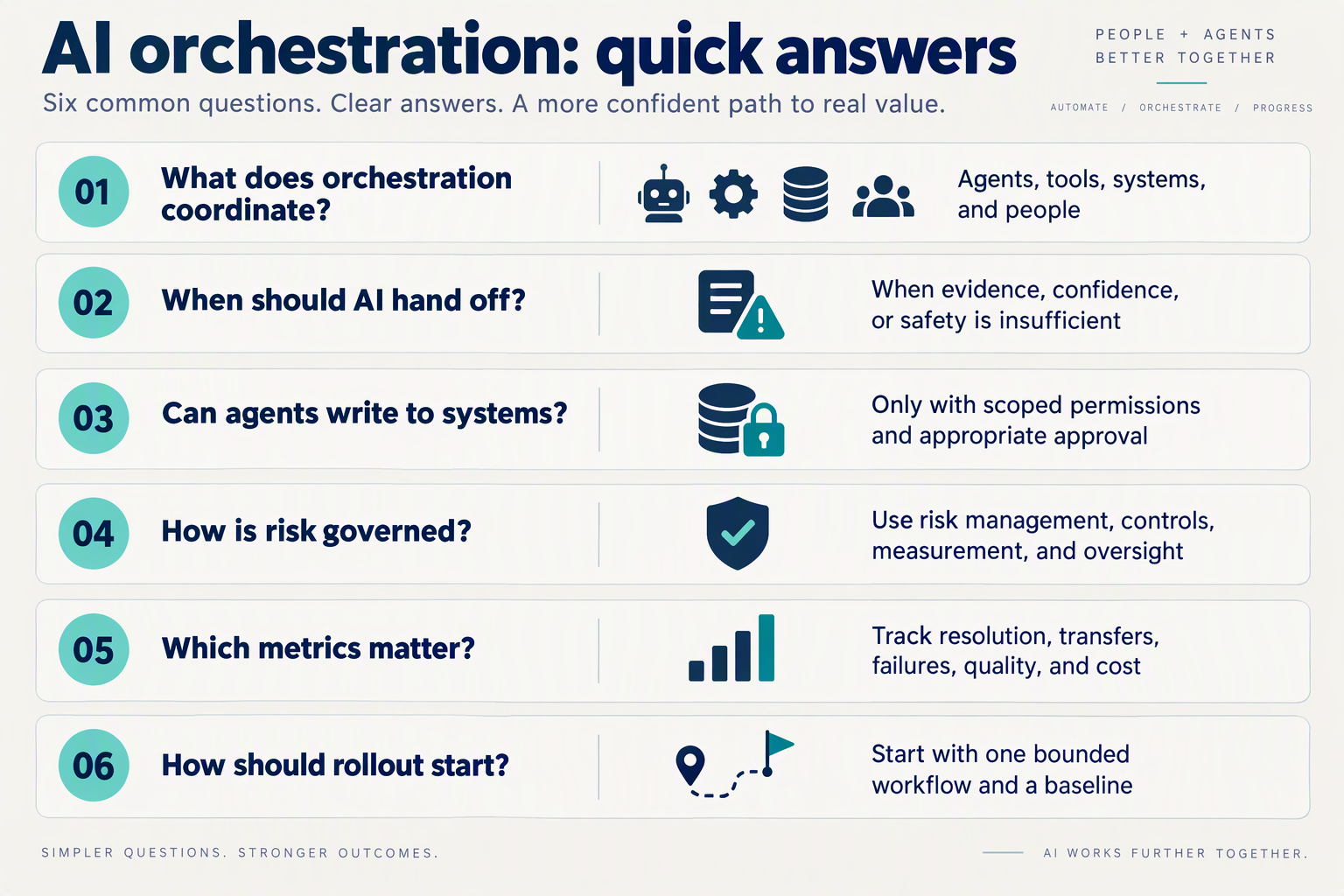
What is AI agent orchestration in customer support?
How many AI agents should a customer support team use?
How does AI agent orchestration decide when to hand a case to a human?
What systems should an AI support orchestration workflow connect to?
How should enterprises measure AI agent orchestration performance?
How can teams pilot AI agent orchestration without disrupting support?
Conclusion
Enterprise support will scale with AI agents only when orchestration makes their work controlled, connected and accountable. Gartner’s forecast, cited in AetherLink’s 2026 analysis, says 40% of enterprise applications will include autonomous agents by the end of 2026; Pronix’s 2026 guide cites Gartner’s warning that more than 40% of agentic AI projects could be canceled by the end of 2027. Together, these forecasts make workflow design—not simply adding agents—a priority.
A practical support blueprint comes down to four principles:
- Give each agent a defined role and limit its access to the systems and actions needed for that work.
- Route requests by intent and risk, with clear approval points and reliable human handoffs.
- Connect knowledge and customer context so work can continue across steps and channels without needless repetition.
- Monitor and test outcomes, including resolution quality, fallback behavior and successful escalation.
Looking ahead, watch how enterprises turn isolated pilots into workflows with measurable outcomes and meaningful human oversight. CallMissed offers voice and chat agents, agent handoffs, live call monitoring, call scoring and analytics—capabilities that reflect this broader move toward coordinated customer communication. To explore the trend, visit CallMissed.
As your support operation adds AI, are its roles, boundaries and handoffs clear enough for customers and staff to trust the result?
Related Reading
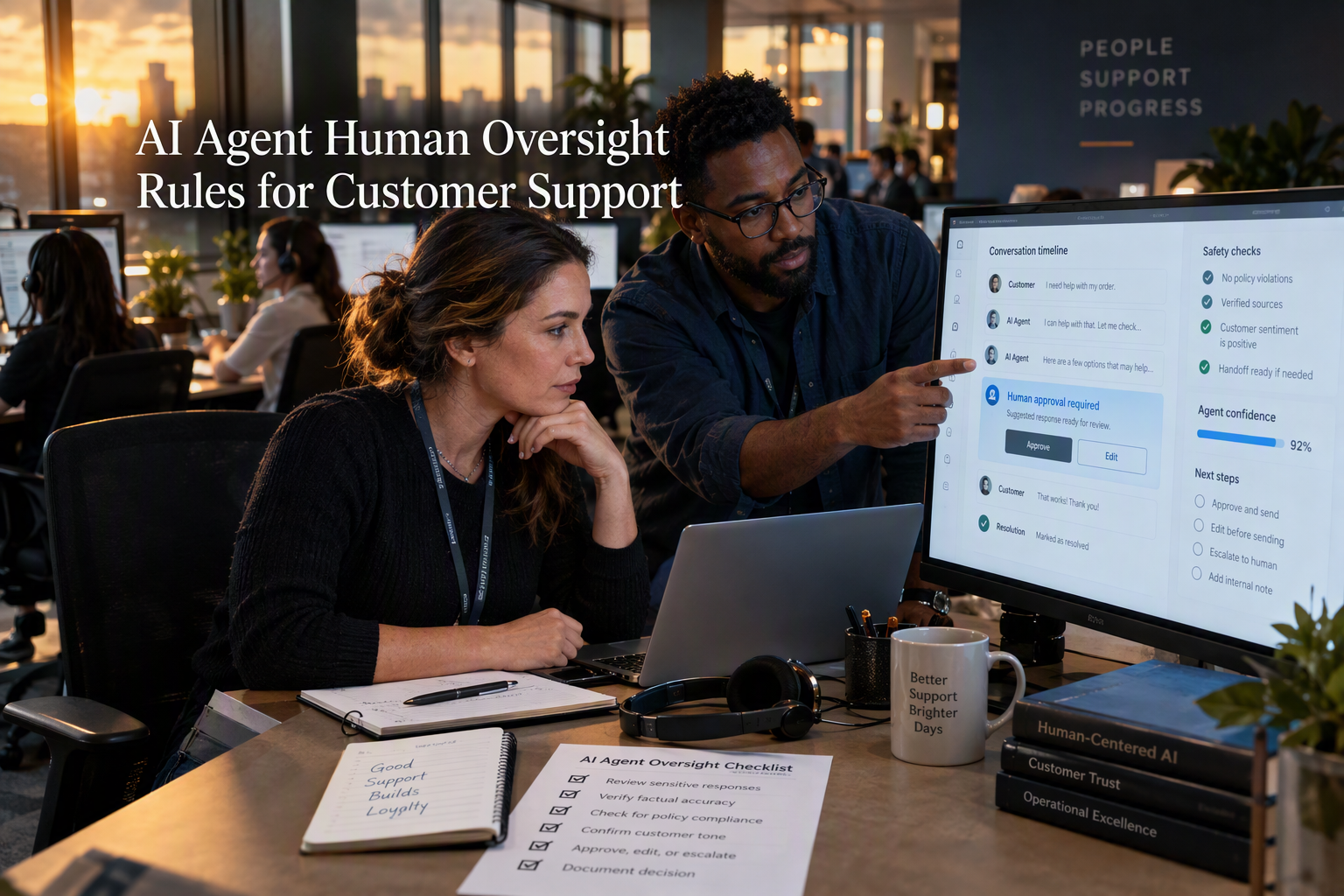
- AI Agent Human Oversight Rules for Customer Support
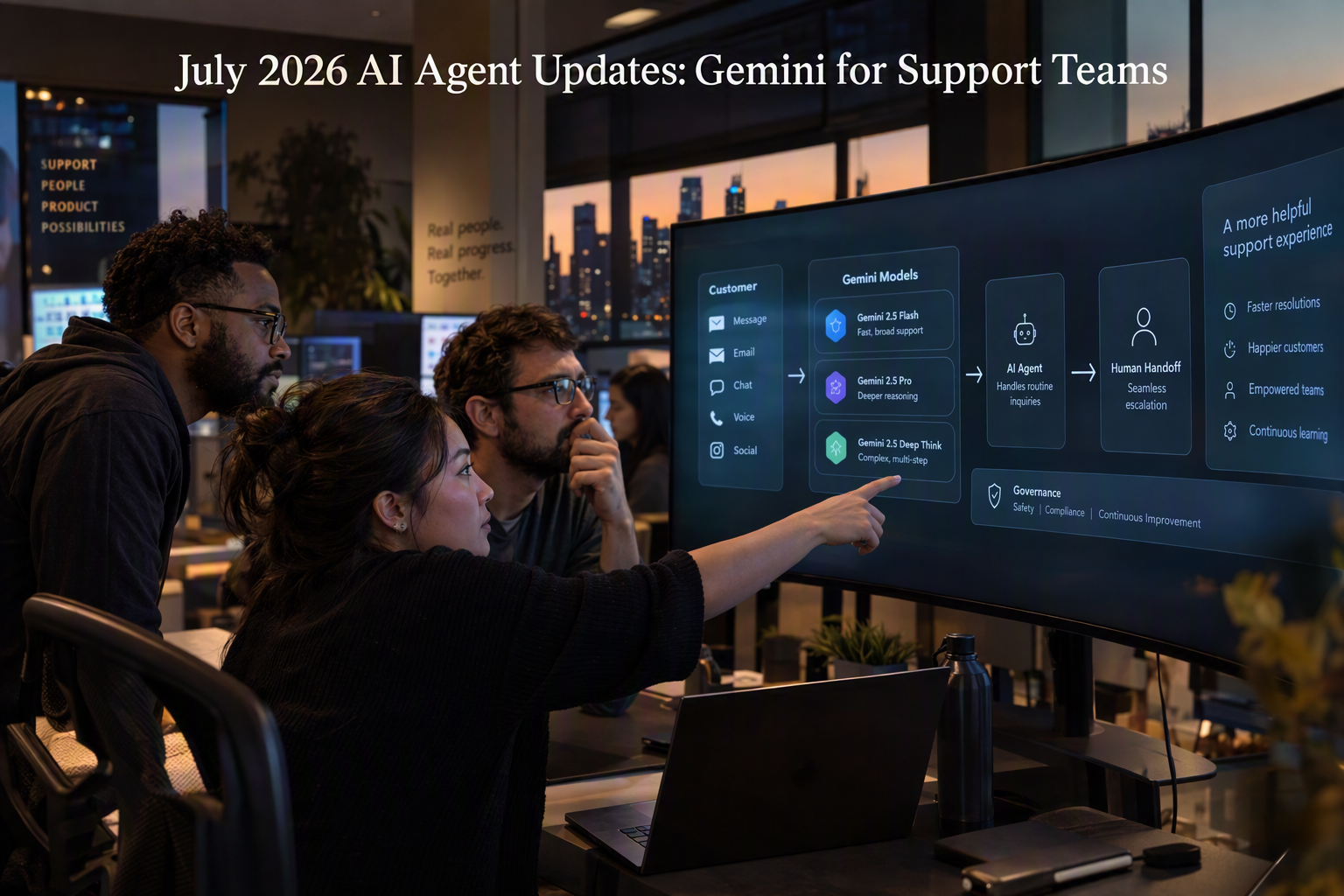
- July 2026 AI Agent Updates: Gemini for Support Teams
- Voice Agent API With LiveKit Support: Verified 2026 Comparison
Sources
Discussion
Related Posts
Ready to automate customer conversations?
Launch AI voice agents and WhatsApp bots with CallMissed — one API, 22+ Indian languages.