
No Code AI Agent Automation for Small Businesses: 2026 Phone, WhatsApp and Email Guide


Learn how a no code AI agent connects phone, WhatsApp and email, with practical setup, testing, cost, safety and handoff steps.
No Code AI Agent Automation for Small Businesses: 2026 Phone, WhatsApp and Email Guide
What if your next customer calls after closing time, messages in Hindi on WhatsApp, and follows up by email—yet receives an accurate response on every channel without an employee writing code? No-code AI agent automation for small businesses makes that workflow practical in 2026 by combining visual configuration, approved integrations, business knowledge, and human escalation rules.
The opportunity is substantial. WhatsApp surpassed 3 billion monthly users worldwide, according to Meta CEO Mark Zuckerberg during Meta’s Q1 2025 earnings call. Meanwhile, 75% of small and medium-sized businesses were evaluating or already using artificial intelligence, according to Salesforce’s 2025 Small and Medium Business Trends report. These figures point to a clear shift: customers increasingly communicate through digital channels, while smaller companies are adopting AI to handle demand without building large contact-centre or engineering teams.
What “no code” actually means
A no code AI agent is configured through forms, visual workflow builders, templates, and prebuilt connectors rather than programmed from scratch. A business owner can define what the agent should do, connect relevant systems, add approved knowledge, and specify when a person must take over. No-code does not mean “no setup,” “no testing,” or “fully autonomous.”
Depending on the workflow, a small business can use:
- No code voice AI to answer calls, qualify leads, book appointments, provide order updates, or recover missed calls.
- A no code WhatsApp chatbot to respond to enquiries, collect customer details, share approved information, and escalate conversations.
- Email agents to classify messages, draft grounded replies, route requests, and create CRM tasks.
- No code customer service automation to maintain context across phone, WhatsApp, email, and web conversations.
Platforms such as CallMissed, an AI-native customer-engagement and communication-infrastructure platform, reflect this trend by combining AI voice agents, WhatsApp chat and Business calling, email, an omnichannel inbox, and knowledge-base retrieval, with support for 22 Indian languages.
What this guide will help you implement
This guide explains how to build AI agent without coding while recognising where custom development remains the better choice. You will learn how to select low-risk, repeatable workflows; map customer journeys; connect calendars, customer relationship management systems, telephony, WhatsApp Business, and email; and ground responses in FAQs, policies, catalogues, and other controlled knowledge sources.
The guide also covers the operational work that determines whether AI automation for small business succeeds after the demo:
- A practical no-code-versus-API comparison
- Setup stages and a launch checklist
- Testing for accuracy, latency, language, and edge cases
- Guardrails for privacy, consent, payments, and sensitive requests
- Human handoff design and conversation ownership
- Maintenance, analytics, and knowledge updates
- Costs to verify, including platform fees, phone usage, WhatsApp charges, model consumption, integrations, and support
- Situations requiring custom APIs, specialised logic, or regulated-system controls
The goal is not automation for its own sake. It is a dependable system that resolves routine work, preserves customer context, and brings employees into the conversation exactly when human judgement matters.
What is a no code AI agent, and how can a small business use one in 2026?
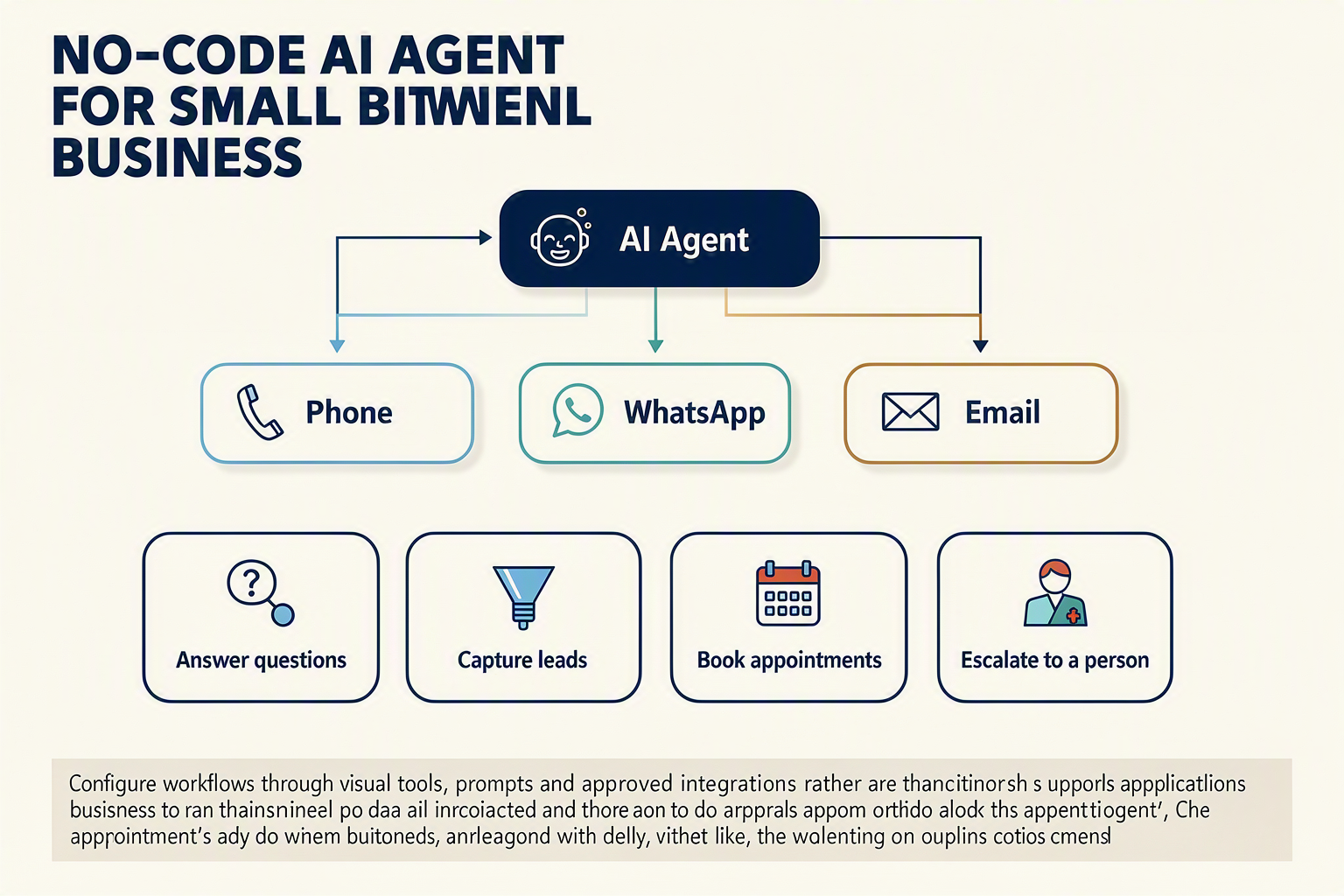
A no code AI agent is software that can understand a customer’s request, retrieve approved business information, take permitted actions, and escalate exceptions—without requiring the business to program the underlying models. In 2026, small businesses can use these agents as supervised digital team members across phone, WhatsApp, and email.
How a no-code agent differs from a basic chatbot
A traditional chatbot usually follows a scripted decision tree. An AI agent can interpret natural language, preserve conversational context, consult connected knowledge, and trigger actions in other systems.
A practical agent has five components:
- Channel: The phone number, WhatsApp Business account, email inbox, or website where the conversation begins.
- Instructions: Rules defining the agent’s role, tone, supported tasks, and prohibited actions.
- Knowledge: Approved FAQs, policies, service descriptions, product catalogues, pricing sheets, and operating hours.
- Integrations: Connections to calendars, customer relationship management systems, help desks, order databases, and payment-link tools.
- Guardrails and handoff: Conditions that transfer a conversation to an employee, such as low confidence, customer frustration, payment disputes, or safety concerns.
“No code” describes how these elements are configured—not the absence of operational work. Businesses still need to verify integrations, permissions, consent requirements, response accuracy, and escalation paths.
Where small businesses can apply AI agents
The strongest starting workflows are high-volume, repeatable, and low-risk. Suitable examples include:
- Lead capture and qualification: Ask what the prospect needs, confirm location and budget range, update the CRM, and schedule a callback.
- Appointment management: Check availability, book or reschedule a slot, and send confirmation through WhatsApp or email.
- Frequently asked questions: Answer approved questions about opening hours, delivery areas, services, return policies, or required documents.
- Request classification: Categorise incoming email, identify urgency, and route the message to sales, support, billing, or operations.
- Missed-call recovery: Follow up after an unanswered call and let the customer continue through voice or WhatsApp.
- Order and service updates: Retrieve authorised status information after verifying the customer’s identity.
A clinic might deploy no code voice AI to answer after-hours calls, collect non-clinical details, and offer available appointment slots. A retailer could use a no code WhatsApp chatbot for product questions and delivery updates, while an email agent classifies refund requests for employee review.
What an omnichannel workflow looks like
Consider a customer who calls a repair company but disconnects before booking. The agent can record the enquiry, send an approved WhatsApp follow-up, answer questions in the customer’s preferred language, reserve a technician slot, and email a confirmation. If the customer disputes a charge, the workflow stops automation and assigns the full conversation history to a person.
This continuity matters because WhatsApp exceeded 3 billion monthly users worldwide, according to Meta CEO Mark Zuckerberg during Meta’s Q1 2025 earnings call. Adoption is also moving beyond experimentation: 75% of small and medium-sized businesses were evaluating or already using AI, according to Salesforce’s 2025 Small and Medium Business Trends report.
Platforms such as CallMissed enable no code customer service automation across AI voice, WhatsApp chat and Business calls, email, and a shared inbox, including support for 22 Indian languages. This allows a business to build AI agent without coding while retaining human escalation and controlled knowledge access.
The goal of AI automation for small business is therefore not to automate every conversation. It is to resolve predictable requests consistently, complete clearly authorised actions, and give employees better context when human judgement is required.
Why has AI automation for small business become more practical in 2026?

AI automation is more practical for small businesses in 2026 because speech, messaging, knowledge retrieval, workflow orchestration, and monitoring can now be combined through managed services and visual configuration tools. This makes it possible to deploy a no code AI agent for a narrowly defined workflow without developing every component from scratch.
“No code,” however, does not mean that code is absent from the underlying platform—or that an agent can operate without supervision. Businesses still need to configure permissions, connect systems, maintain approved content, test edge cases, monitor outcomes, and provide human escalation.
The technology stack has converged
Earlier automation often depended on rigid decision trees. Unexpected wording, follow-up questions, or a language change could send a workflow down the wrong branch. Current systems can combine natural-language models with controlled data sources and predefined business actions.
The relevant capabilities include:
- Multimodal processing: A workflow can combine speech recognition, language processing, text-to-speech, email classification, and document retrieval.
- Retrieval-augmented generation: An agent can search an approved knowledge base before composing an answer, reducing—but not eliminating—the risk of unsupported responses.
- Structured tool use: The system can gather required fields and call permitted functions, such as checking availability, creating a lead, or requesting an appointment.
- Visual orchestration: Teams can configure prompts, business hours, branching rules, retries, and handoffs through forms or workflow builders.
- Managed infrastructure: Vendors can provide model hosting, communication APIs, delivery logs, usage controls, and monitoring interfaces.
This stack allows a business to configure a no-code agent for a bounded task. It does not justify giving the agent unrestricted access to customer records, payments, calendars, or other operational systems. Production deployments still require least-privilege access, testing, audit logs, and ongoing review.
Communication channels are becoming easier to connect
Phone, WhatsApp, and email can share an orchestration and customer-history layer, although each channel retains its own technical rules, consent requirements, and delivery constraints.
For example, a cross-channel workflow might:
- Use no code voice AI to answer an after-hours call and collect the caller’s stated requirements.
- Create or update a CRM record after applying the business’s consent and data-handling rules.
- Send an eligible WhatsApp follow-up using an approved template where required.
- Classify a subsequent email and route uncertain or sensitive cases to an employee.
- Preserve channel events and agent actions for review in a shared workspace.
Meta’s official Q1 2025 earnings-call transcript records CEO Mark Zuckerberg saying that WhatsApp had more than 3 billion monthly active users. That figure describes WhatsApp’s worldwide consumer reach; it does not indicate how many users communicate with businesses or how many are reachable in a particular market.
The operational opportunity comes from the WhatsApp Business Platform, which supports features such as webhooks and message templates. Businesses must still follow Meta’s current eligibility, template, consent, quality, and messaging-window rules rather than assuming that any customer can be contacted automatically.
Adoption is moving from trials to defined workflows
Salesforce’s Small & Medium Business Trends, 6th Edition reported that 75% of surveyed SMB leaders were at least experimenting with AI. The underlying double-anonymous survey covered 3,350 SMB leaders in 26 countries and was conducted from November 26, 2024, through February 19, 2025. Salesforce defined SMBs for the study as businesses with 1–200 employees. This is a survey result—not a measure of universal deployment, successful automation, or adoption among all small businesses.
The most suitable starting points for AI automation for small business generally have:
- Sufficient conversation volume to justify automation
- Repetitive answers that can be checked against an approved source
- Clear completion and failure criteria
- Limited, permissioned system access
- A defined route to a human
Appointment requests, lead intake, missed-call follow-up, routine order enquiries, FAQs, and email triage can fit these conditions. Disputes, unusual complaints, regulated advice, high-value transactions, and consequential financial decisions usually require tighter controls or direct employee involvement.
The practical advance in 2026 is therefore configurability, not zero-maintenance autonomy. No-code customer-service automation can reduce development effort, but reliable operation still depends on approved knowledge, constrained actions, documented consent, observable logs, fallback behavior, and regular human review.
How does no-code compare with APIs when you need to build AI agent without coding? (TABLE)
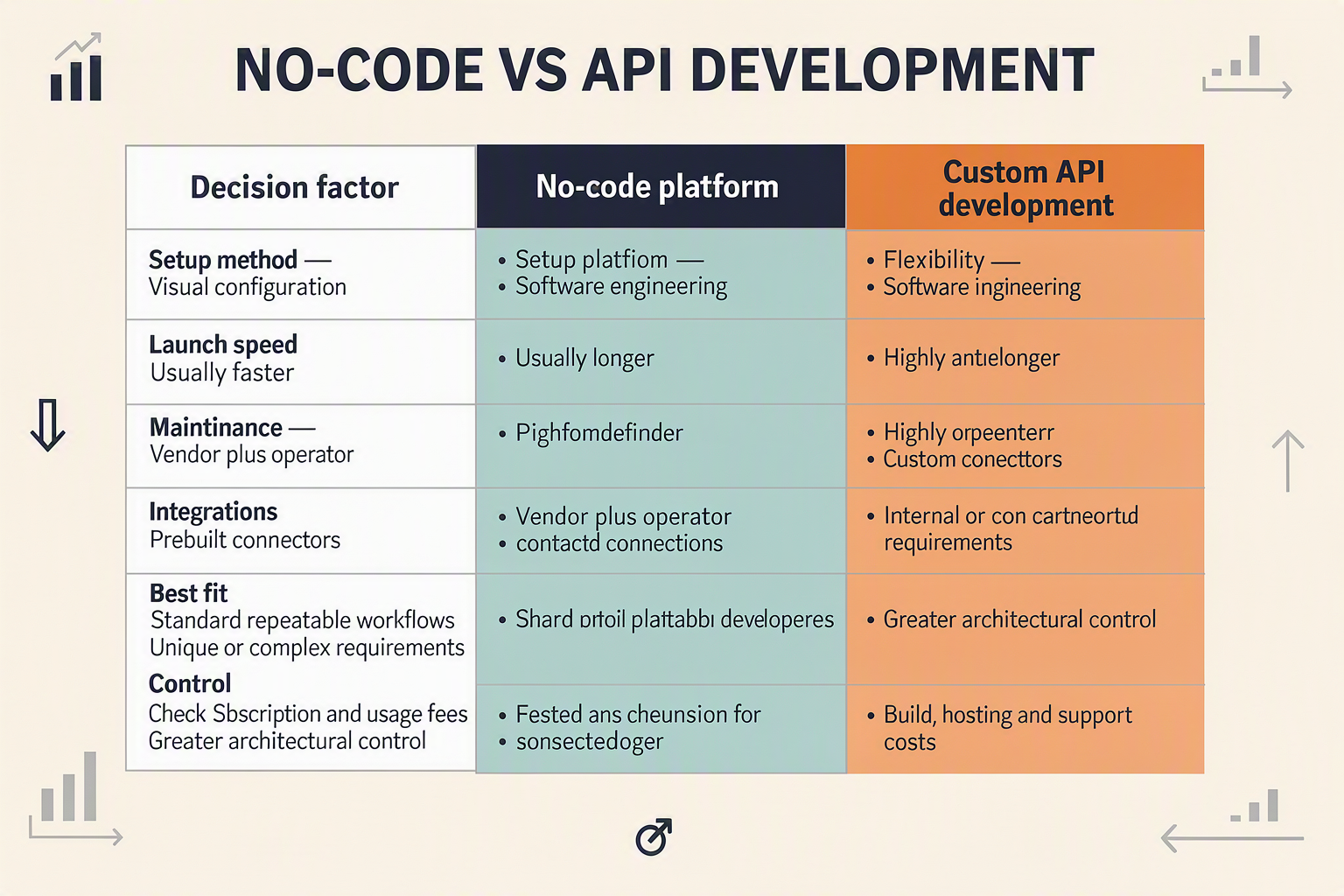
No-code is usually the practical starting point when a small business needs a standard customer workflow quickly; APIs are better when the agent requires proprietary logic, unusual integrations, or precise control over every interaction. Many businesses ultimately use a hybrid model: no-code tools manage conversations and routine workflows, while APIs handle specialised actions behind the scenes.
No-code AI agents versus API-built agents
| Decision factor | No-code approach | API/custom-code approach | Practical choice |
|---|---|---|---|
| Initial build | Configure forms, prompts, workflows, knowledge sources, and templates | Develop application logic, interfaces, authentication, and error handling | Choose no-code for faster implementation of established workflows |
| Channel setup | Use prebuilt phone, WhatsApp, email, CRM, and calendar connectors | Integrate each channel through provider APIs and webhooks | Choose APIs when an unsupported or proprietary channel is essential |
| Customisation | Adjust available fields, rules, prompts, branches, and escalation conditions | Control state management, user interfaces, models, routing, and business logic | Choose code for highly differentiated customer journeys |
| Maintenance | Platform manages much of the hosting, model connectivity, and connector upkeep | Internal or contracted developers monitor infrastructure and API changes | Choose no-code when engineering capacity is limited |
| Data and actions | Connect approved systems through native integrations or automation tools | Query internal databases and execute tightly controlled custom functions | Choose APIs for complex permissions, transactions, or legacy systems |
| Best-fit workflows | FAQs, lead qualification, bookings, order updates, message classification, and handoff | Dynamic pricing, regulated decisions, proprietary algorithms, and deeply embedded product features | Start with the lowest-risk repeatable workflow |
A no code AI agent still depends on APIs—the platform simply abstracts them behind a visual interface. For example, a workflow builder might let an owner select “create CRM lead,” while the platform handles the API request, authentication, retries, and response mapping.
When no-code is sufficient
Use no code customer service automation when the process has clear inputs, approved answers, predictable actions, and an obvious escalation route. Suitable examples include:
- A no code voice AI agent that answers opening-hours questions and books appointments through a supported calendar.
- A no code WhatsApp chatbot that collects a customer’s name, location, and service requirement before assigning the conversation.
- An email agent that categorises enquiries, drafts a knowledge-grounded response, and sends uncertain cases to an employee.
- A missed-call workflow that creates a lead and triggers an approved follow-up message.
No-code is especially appropriate when operations teams—not software engineers—will maintain prompts, policies, business hours, and routing rules.
When an API or hybrid architecture is better
Custom development becomes justified when the agent must calculate outcomes using proprietary logic, access several internal systems in real time, enforce granular permissions, or support an interaction that a visual builder cannot represent safely. APIs also provide greater control over logging, model selection, latency optimisation, versioning, and user-interface design.
A hybrid architecture avoids an unnecessary all-or-nothing decision. CallMissed, the OpenAI-compatible AI gateway and customer-engagement platform, illustrates both paths: businesses can configure voice, WhatsApp, and email automation through the business platform, while developers can use one API key for multiple LLM, Speech-to-Text, Text-to-Speech, image-generation, and web-search models.
Before deciding to build AI agent without coding, ask three questions:
- Can approved connectors complete every required action?
- Can sensitive or uncertain cases reliably reach a person?
- Can the team test, audit, and maintain the workflow without engineering support?
If all three answers are yes, no-code is likely sufficient. If one is no, add a targeted API integration rather than rebuilding the entire agent.
Which workflows suit no code voice AI, a no code WhatsApp chatbot and email automation?
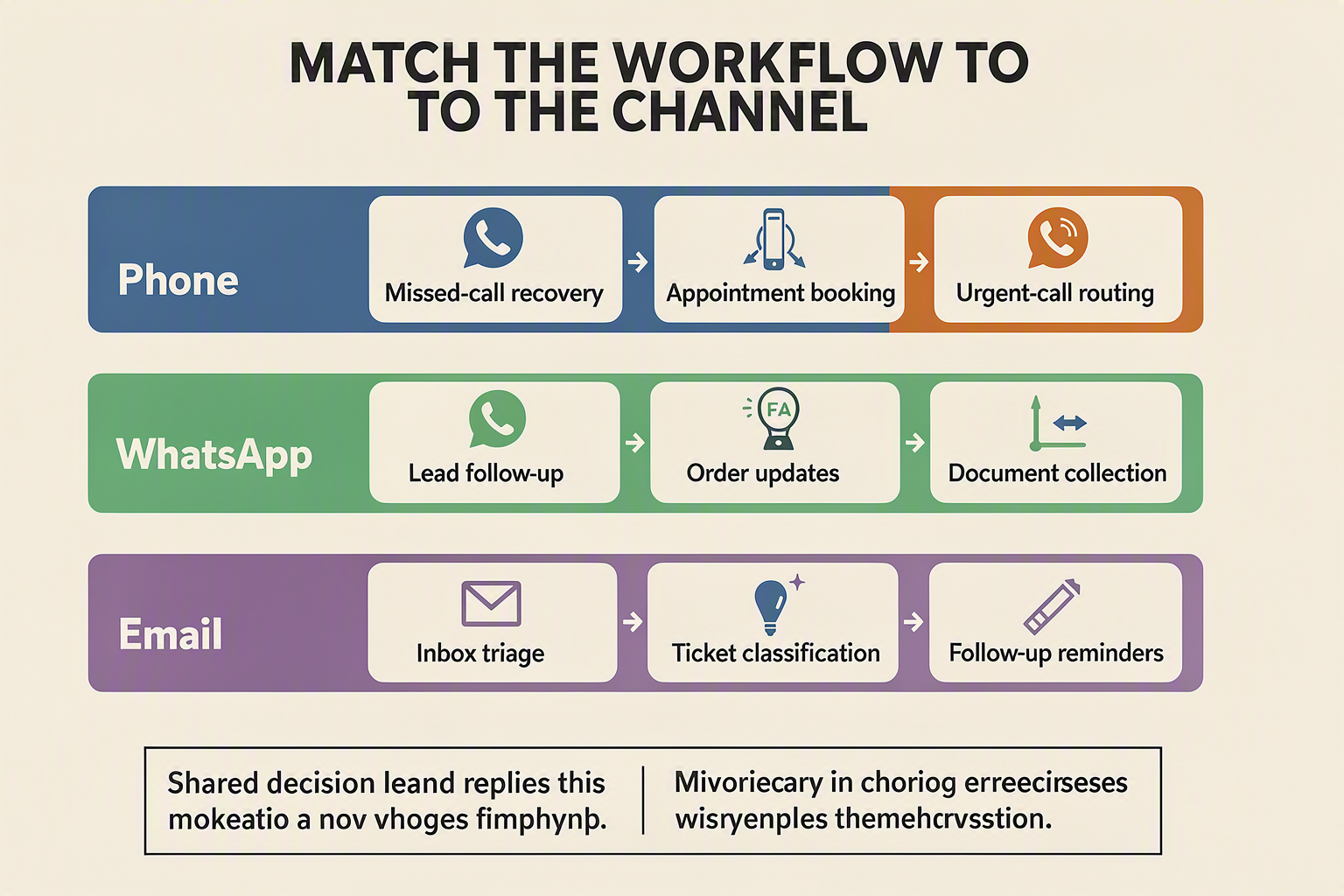
The best no-code workflows are high-volume, repeatable, rules-bounded tasks with clear data inputs and an obvious route to a human. Start with appointment handling, lead qualification, FAQs, status updates, message classification, and follow-ups—not disputes, complex advice, or irreversible decisions.
Use no code voice AI for structured conversations
No code voice AI suits calls where the agent can follow a defined sequence, retrieve approved information, and confirm important details aloud. Strong starting workflows include:
- After-hours and missed-call recovery: Answer immediately or return a missed call, identify the caller’s need, and create a follow-up task.
- Lead qualification: Collect location, budget, service requirement, preferred language, and contact details before routing the lead.
- Appointment management: Check calendar availability, book or reschedule a slot, and send confirmation.
- Routine status enquiries: Retrieve an order, service ticket, application, or delivery status after verifying the caller.
- Call routing: Detect intent and language, then transfer the caller to the correct employee or queue.
Voice automation is less suitable when requests involve medical or legal judgement, emotionally sensitive complaints, payment-card details, or policies with frequent exceptions. In those cases, the agent should collect context and transfer the call rather than attempt resolution.
Use a no code WhatsApp chatbot for asynchronous service
A no code WhatsApp chatbot works well when customers need quick, mobile-friendly interactions that may continue over several minutes or hours. WhatsApp’s scale makes this channel especially relevant: WhatsApp exceeded 3 billion monthly users worldwide, according to Meta CEO Mark Zuckerberg during Meta’s Q1 2025 earnings call.
Suitable workflows include:
- Answering questions about prices, opening hours, eligibility, availability, and returns.
- Capturing enquiries through buttons, lists, forms, images, and location sharing.
- Sending appointment reminders, order notifications, and approved follow-ups.
- Gathering documents or photographs before an employee reviews the case.
- Escalating the conversation to a shared team inbox with its history intact.
Platforms such as CallMissed extend this model beyond messaging by connecting inbound and business-initiated WhatsApp Business calls to an AI voice agent. That allows a customer to move from chat to voice without forcing the business to operate disconnected systems.
Use email automation for classification and controlled drafting
Email is appropriate for longer, less time-sensitive requests. A no code AI agent can:
- Categorise messages by intent, urgency, customer, or product.
- Extract reference numbers and update a CRM record.
- Draft replies grounded in approved policies and knowledge sources.
- Route invoices, sales enquiries, complaints, and supplier messages.
- Generate a task when confidence is low or approval is mandatory.
For early deployments, let employees approve drafts before sending them. Automatic sending should initially be limited to narrow scenarios such as acknowledgement messages or document-receipt confirmations.
Combine channels around one business outcome
The most valuable no code customer service automation often crosses channels. A caller can request a quotation, receive it through WhatsApp, reply with missing details, and obtain an email confirmation while the CRM maintains one customer record.
Before trying to build AI agent without coding, score each candidate workflow against four questions:
- Is the process repeated frequently?
- Are the required answers available in controlled sources?
- Can success be measured objectively?
- Is there a safe human-handoff point?
This approach keeps AI automation for small business focused on operationally useful, testable workflows rather than open-ended autonomy.
How do you set up channels, integrations and trusted knowledge sources?
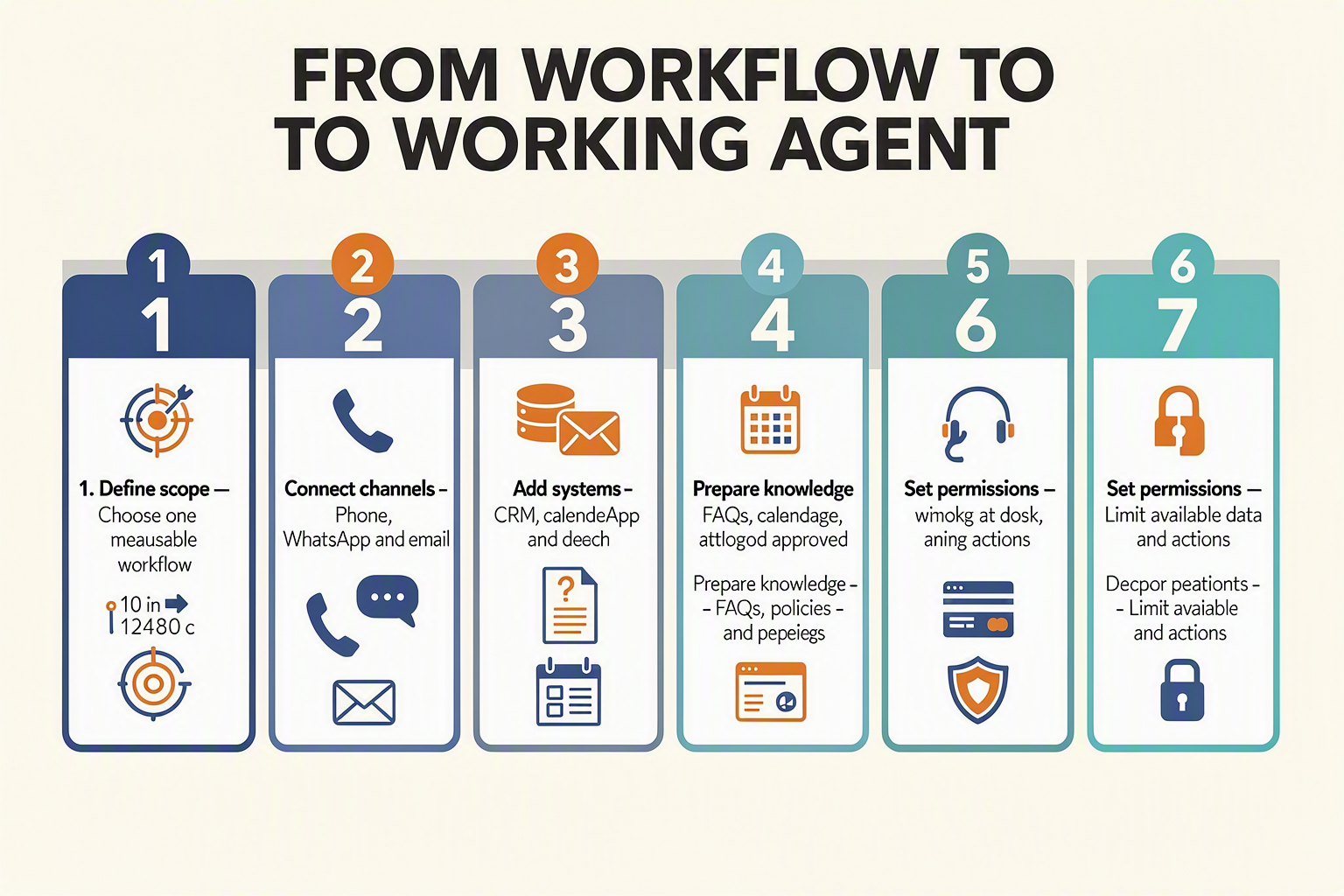
Connect each customer-facing channel to one shared workflow, integrate only the systems required to complete that workflow, and ground the agent in approved, version-controlled business content. A reliable no code AI agent should retrieve facts from trusted sources, record actions in the correct system, and escalate whenever information is missing or authority is required.
1. Configure each communication channel
Set up channels individually before combining them into an omnichannel journey:
- Phone: Connect a business number, define operating hours, configure call recording and consent notices where applicable, and specify fallback routing. Test no code voice AI for background noise, interruptions, names, numbers, and regional accents.
- WhatsApp: Connect an authorised WhatsApp Business account, obtain customer opt-in where required, configure approved message templates, and distinguish customer-initiated service conversations from business-initiated outreach.
- Email: Authenticate the sending domain, connect the relevant mailbox, and create rules for categories such as sales, support, billing, and spam. Begin with drafting or classification before allowing autonomous sending.
- Web chat: Add the widget only to relevant pages and pass useful context—such as the product page, language, or campaign source—into the conversation.
Platforms such as CallMissed can connect a WhatsApp Business call to an AI voice agent, alongside WhatsApp chat, conventional voice, email, and an omnichannel inbox. This arrangement helps a customer move between channels without forcing staff to operate separate queues.
2. Add integrations with minimum necessary access
Integrations turn conversation into action, but every connector increases operational and security risk. Use role-based permissions and give the agent only the access its workflow needs.
Common connections include:
- Calendar: Read availability and create, reschedule, or cancel appointments.
- CRM: Find a customer, create a lead, update a stage, and log the conversation.
- Order system: Retrieve order status using a verified identifier.
- Help desk: Create tickets, assign priority, and attach transcripts.
- Payments: Share an approved payment link; do not ask the model to collect or repeat card credentials.
- Email and messaging: Send confirmations only after validating the recipient and action.
Use a sandbox account first. Store credentials in the platform’s secure connector or secrets manager—not inside prompts, spreadsheets, or knowledge documents. For consequential actions, require confirmation: “Book Tuesday at 3:00 p.m. for Priya—yes or no?”
3. Build a trusted knowledge layer
A no code customer service automation system should answer from controlled business sources rather than the model’s general memory. Suitable sources include:
- Approved FAQs and operating-hours pages
- Product catalogues, service menus, and current price lists
- Delivery, cancellation, warranty, and refund policies
- Troubleshooting guides and staff-approved scripts
- Location, eligibility, and escalation information
Assign every source an owner, approval status, effective date, and review date. Remove duplicates and resolve contradictions before upload. Separate public information from employee-only or customer-specific data.
Knowledge-base retrieval, commonly called retrieval-augmented generation (RAG), should fetch relevant passages and instruct the agent to answer only from that evidence. If retrieval returns weak or conflicting information, the correct response is clarification or human handoff—not a plausible guess.
4. Validate the complete workflow
To build AI agent without coding safely, run end-to-end tests across phone, a no code WhatsApp chatbot, and email:
- Ask the same question using different wording and languages.
- Verify CRM writes, calendar changes, and confirmations.
- Test outdated, missing, and contradictory knowledge.
- Confirm authentication before revealing account information.
- Disable a connector and verify graceful escalation.
This staged approach makes AI automation for small business auditable: every answer has an approved source, every action has defined permission, and every failure has a human route.
How should no code customer service automation be tested, guarded and handed off to people?
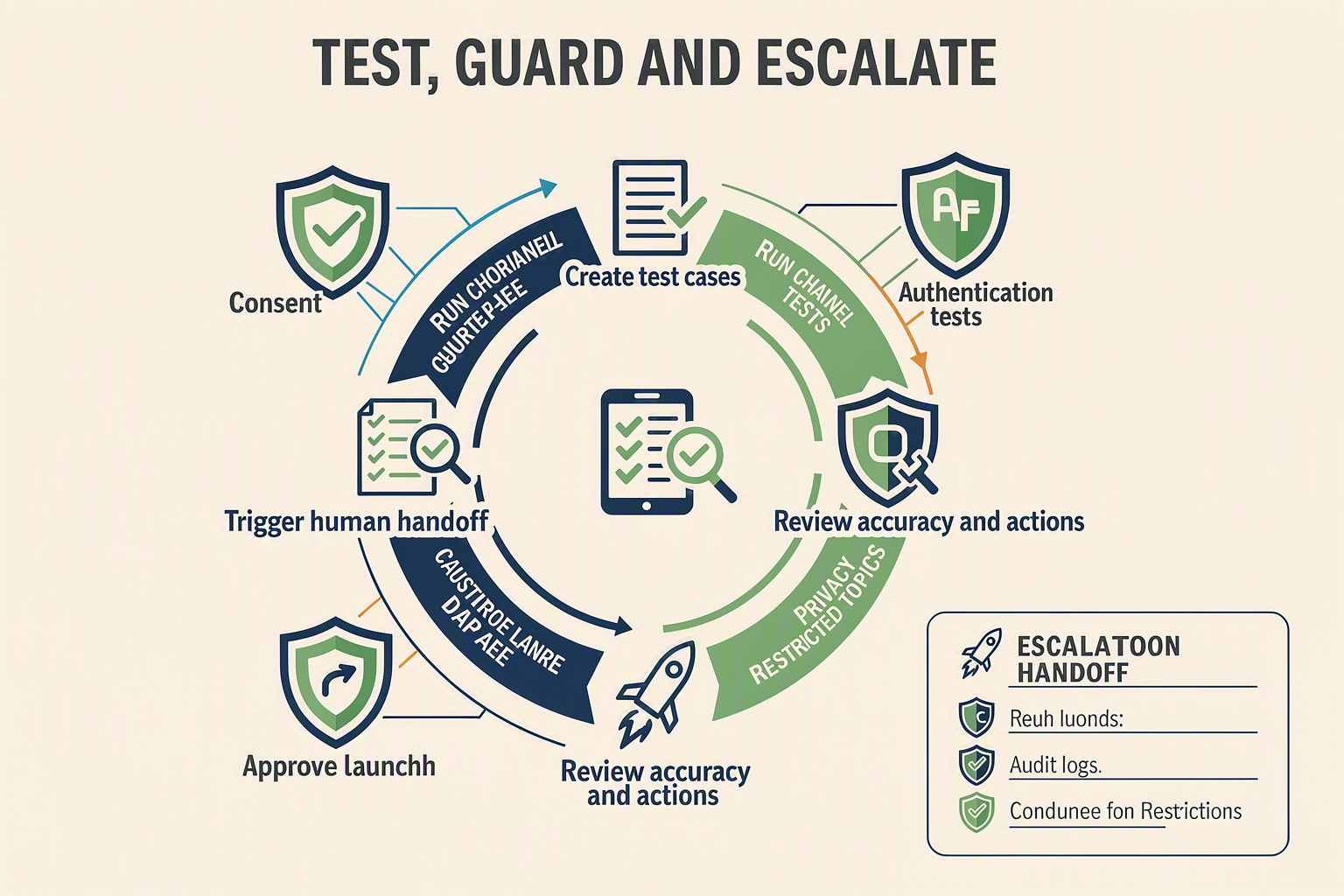
A no-code customer-service agent should be launched only after scenario testing, explicit action limits, and verified human handoffs work across every enabled channel. Treat the agent like a new employee: test its knowledge and permissions, supervise a limited pilot, and retain people for ambiguous, sensitive, or high-impact decisions.
Test conversations, actions, and channels
Create a test matrix covering common requests, edge cases, adversarial prompts, and system failures. Salesforce reported in its 2025 Small and Medium Business Trends report that 75% of SMBs were evaluating or already using AI, making repeatable quality assurance an operational requirement rather than an optional technical exercise.
Test the no code AI agent separately on phone, WhatsApp, and email because each interface creates different risks:
- Accuracy: Does every answer match the approved knowledge source, including prices, opening hours, refund terms, and service areas?
- Task completion: Can the agent correctly create a lead, retrieve an order, or book, reschedule, and cancel an appointment?
- Language handling: Test accents, code-switching, spelling variations, background noise, and regional languages rather than relying on clean scripted inputs.
- Channel behaviour: Check interruptions and silence on no code voice AI, short or fragmented WhatsApp messages, and long email threads.
- Integration failures: Disconnect the CRM, calendar, or order system deliberately and confirm that the agent does not invent a successful result.
- Prompt attacks: Ask the agent to ignore its instructions, expose private information, or make an unauthorised exception.
Record answer accuracy, task-completion rate, escalation accuracy, transfer success, latency, and containment rate during testing. Set thresholds based on business risk; a wrong salon-hours answer and an incorrect payment or medical statement should not share the same tolerance.
Apply guardrails before granting autonomy
No-code configuration makes deployment easier, but it does not remove accountability. Guardrails should define what the agent may answer, retrieve, update, promise, and never do.
At minimum:
- Use role-based access and give each integration the least permission required.
- Require customer verification before revealing order, account, appointment, or personal information.
- Block the agent from changing prices, approving refunds above a defined limit, or making legal, medical, credit, or contractual decisions.
- Send payments through an approved secure checkout rather than collecting card details in conversation.
- Disclose that the customer is interacting with AI where appropriate, and honour consent, opt-out, retention, and deletion requirements.
- Instruct the agent to say it cannot verify an answer when retrieval produces weak, conflicting, or outdated evidence.
Design human handoff as part of the workflow
Handoff should be an intentional route, not a generic “contact support” message. Trigger escalation when the customer requests a person, repeats a question, shows strong frustration, fails verification, disputes a charge, reports danger, or enters a workflow outside the agent’s authority.
The employee receiving the conversation should get a concise handoff packet containing:
- Customer identity and verified contact details
- Channel and preferred language
- Conversation summary and full transcript
- Detected intent, sentiment, and urgency
- Knowledge sources consulted
- Actions already attempted and integration errors
- Recommended next step
Before launch, test transfers during staffed and unstaffed hours, including failed calls and unavailable agents. For omnichannel systems such as CallMissed, verify that context follows the customer between WhatsApp, voice, email, and the shared inbox. Finally, begin with a limited pilot, review failures daily, and expand AI automation for small business only after employees confirm that escalations arrive complete, timely, and actionable.
How much does no-code automation cost, and what must you verify and maintain?
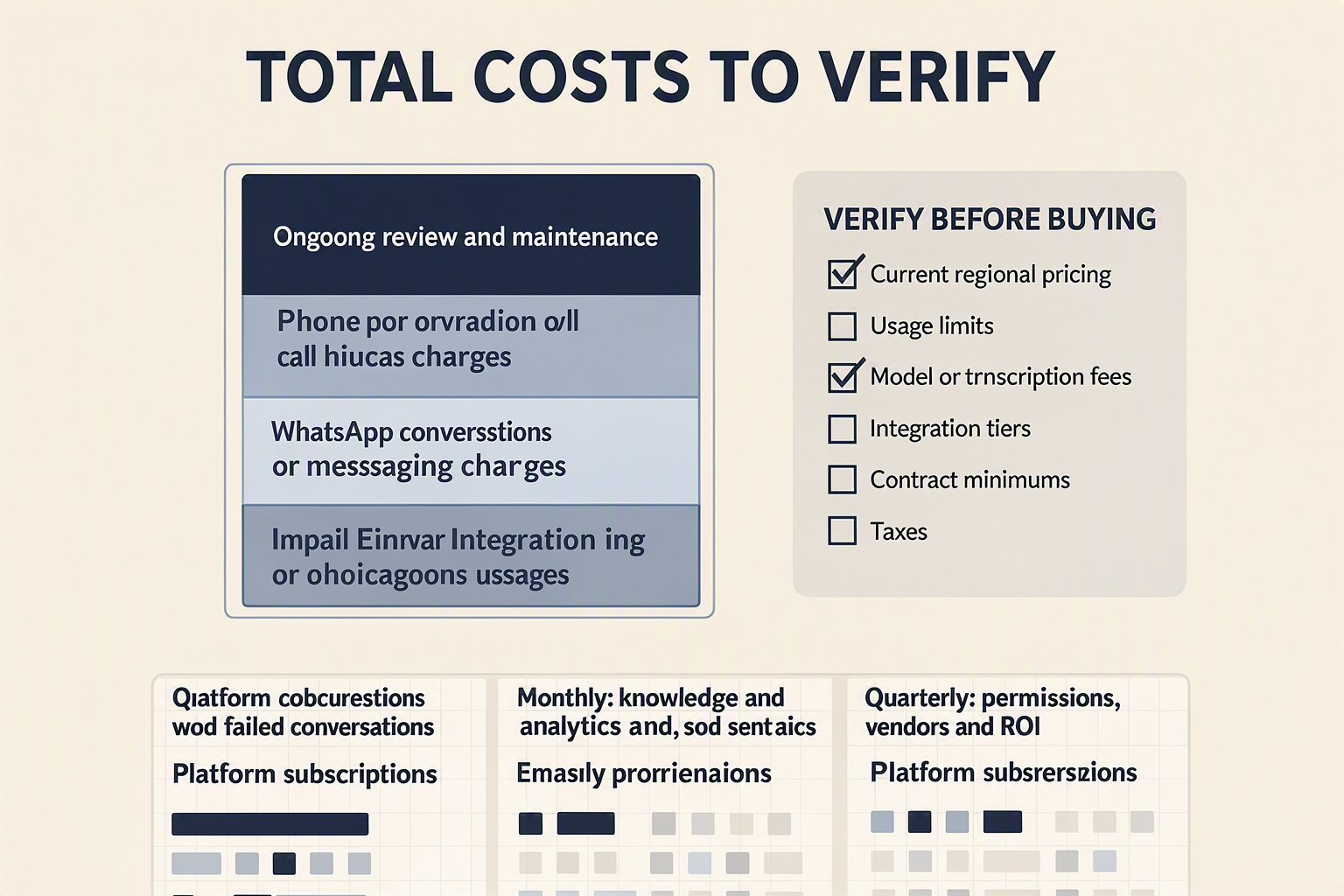
The cost of a no code AI agent is not simply the advertised subscription: budget for channel usage, AI processing, integrations, implementation, human escalation, and ongoing quality control. Before buying, verify the billing unit and model a normal month, a peak month, and an incident month using your own call minutes, messages, emails, and handoffs.
Calculate the total operating cost
Use this practical formula:
Monthly cost = platform fee + channel charges + AI usage + integrations + implementation + human handling + monitoring
Estimate each component separately:
- Platform: Workspace, agent, user-seat, inbox, knowledge-base, analytics, or premium-support fees.
- Phone: Telephone number rental, inbound and outbound minutes, forwarding, recording, transcription, text-to-speech, and carrier charges.
- WhatsApp: Meta or Business Solution Provider charges, template-related costs, calling charges where applicable, and fees for media storage or additional numbers.
- Email: Mailbox or sending-provider fees, contact limits, email volume, dedicated-domain services, and deliverability tools.
- AI usage: Language-model tokens, speech recognition, voice generation, retrieval, web search, and premium-model surcharges.
- Integrations: CRM, calendar, payment, help-desk, automation-platform, or connector subscriptions.
- Operations: Initial configuration, knowledge preparation, testing, staff training, transcript review, and human follow-up.
Transparent units make forecasting easier. For example, CallMissed’s published pricing defines one credit as ₹1 and offers free-tier and pay-as-you-go access, allowing an Indian small business to translate estimated usage into rupees without converting an abstract token balance. Even so, the business should confirm which actions consume credits and whether external channel fees are separate.
Verify these terms before purchase
Ask the vendor to answer these questions in writing:
- What starts and stops billing? For voice, determine whether ringing, transfers, hold time, voicemail, or rounded-up minutes count.
- Are failed actions charged? Check unanswered calls, undelivered WhatsApp templates, retried API requests, duplicate emails, and fallback models.
- Which charges are passed through? Separate platform fees from telecom carriers, Meta WhatsApp Business, email providers, and third-party software.
- Do prices vary by model, language, country, or number type? This matters when deploying no code voice AI across Indian languages or serving international customers.
- What are the limits? Verify concurrency, messages per second, storage, recording retention, knowledge-base size, seats, and integration runs.
- Can spending be controlled? Require budgets, usage alerts, role-based permissions, rate limits, and an emergency shutdown process.
- How are data and exits handled? Confirm retention, deletion, transcript export, number portability, access logs, and contract termination terms.
Maintain performance after launch
No code customer service automation still requires an owner. Assign responsibility for weekly operational checks and monthly improvement cycles.
- Review failed conversations, incorrect answers, escalations, latency, and unexpected usage every week.
- Revalidate prices, opening hours, refund policies, catalogues, staff rosters, and booking availability monthly.
- Test the no code WhatsApp chatbot, phone agent, and email workflow after every prompt, integration, model, or knowledge-source change.
- Track cost per resolved enquiry, booking, qualified lead, and human-assisted case—not merely cost per message.
- Archive obsolete content and inspect permissions, consent records, recordings, and retention settings quarterly.
- Keep fallback routing and human handoff available during outages or budget-limit events.
A workflow may be cheap per interaction yet expensive overall if it creates repeat contacts or unnecessary escalation. Sustainable AI automation for small business therefore balances unit cost with resolution quality, customer outcomes, and the staff time required to maintain it.
When is custom development better, and how should experts evaluate CallMissed or another platform?

Custom development is better when the workflow requires proprietary logic, specialised security controls, unusual integrations, or predictable performance that a configurable platform cannot provide. Experts should evaluate business fit, channel depth, integration architecture, governance, reliability, and total operating cost rather than choosing from a polished demonstration alone.
Choose custom development for requirements that create real differentiation
A no code AI agent is usually appropriate for standardised activities such as lead qualification, appointment booking, FAQ resolution, message classification, and human handoff. Custom software becomes more defensible when the agent must:
- Execute complex, company-specific decisions involving multiple systems and conditional rules.
- Integrate with legacy software that lacks supported APIs, webhooks, or connectors.
- Meet strict data-residency, encryption, audit, identity-management, or private-deployment requirements.
- Process regulated or high-consequence interactions where deterministic validation is essential.
- Maintain extremely low latency or handle traffic patterns that require dedicated infrastructure.
- Use proprietary models, retrieval pipelines, ranking logic, or user interfaces that create competitive advantage.
- Support unusual channel behaviour that a standard no code voice AI or no code WhatsApp chatbot cannot configure safely.
A hybrid architecture is often the practical middle ground. Teams can use a managed platform for telephony, WhatsApp, email, model access, and conversation operations while implementing proprietary business logic through APIs and webhooks.
Evaluate the workflow before evaluating the vendor
Experts should turn the proposed automation into a written test specification. A credible assessment measures complete customer journeys—not isolated model answers.
- Define outcomes: Specify whether success means a booked appointment, resolved query, qualified lead, CRM update, or accurate escalation.
- Build a representative test set: Include routine requests, ambiguous questions, unsupported claims, interruptions, silence, mixed-language conversations, duplicate messages, and integration failures.
- Set acceptance thresholds: Establish business-specific targets for task completion, grounded-answer accuracy, transfer success, latency, and cost per resolved interaction. There is no universal passing score.
- Run failure tests: Disconnect the CRM, expire an authentication token, remove a knowledge document, and make the requested staff member unavailable.
- Inspect evidence: Review transcripts, tool calls, retrieved sources, consent records, handoff events, and billing logs rather than relying only on dashboard summaries.
Apply a platform scorecard
For CallMissed or another provider, procurement and technical teams should verify:
- Channel capability: Does “WhatsApp support” mean messaging only, or also inbound and business-initiated WhatsApp Business calling?
- Language performance: Test real customer speech, accents, code-switching, names, addresses, and noisy audio. CallMissed supports speech-to-text and text-to-speech across 22 Indian languages, but each intended language and workflow still requires production-like testing.
- Integration control: Check APIs, webhooks, authentication methods, rate limits, idempotency, retry behaviour, sandbox availability, and data-export options.
- Model flexibility: Determine whether models can be changed without redesigning the workflow. CallMissed’s developer gateway uses an OpenAI-compatible endpoint and provides same-tier model fallbacks across LLM, speech, image, and search services.
- Governance: Verify retention controls, role-based access, audit trails, human approval, deletion procedures, and incident handling.
- Economics: Model telephony, WhatsApp, email, model, speech, storage, implementation, and support costs at expected and peak volumes. CallMissed states that one credit equals ₹1, with free-tier and pay-as-you-go options; teams should confirm current pricing and channel-specific charges during procurement.
The right decision is not “no code versus engineering” in the abstract. It is whether no code customer service automation satisfies documented requirements—and whether custom development adds enough control or differentiation to justify its ongoing maintenance burden.
What does a launch-ready phone, WhatsApp and email implementation look like? (TABLE)
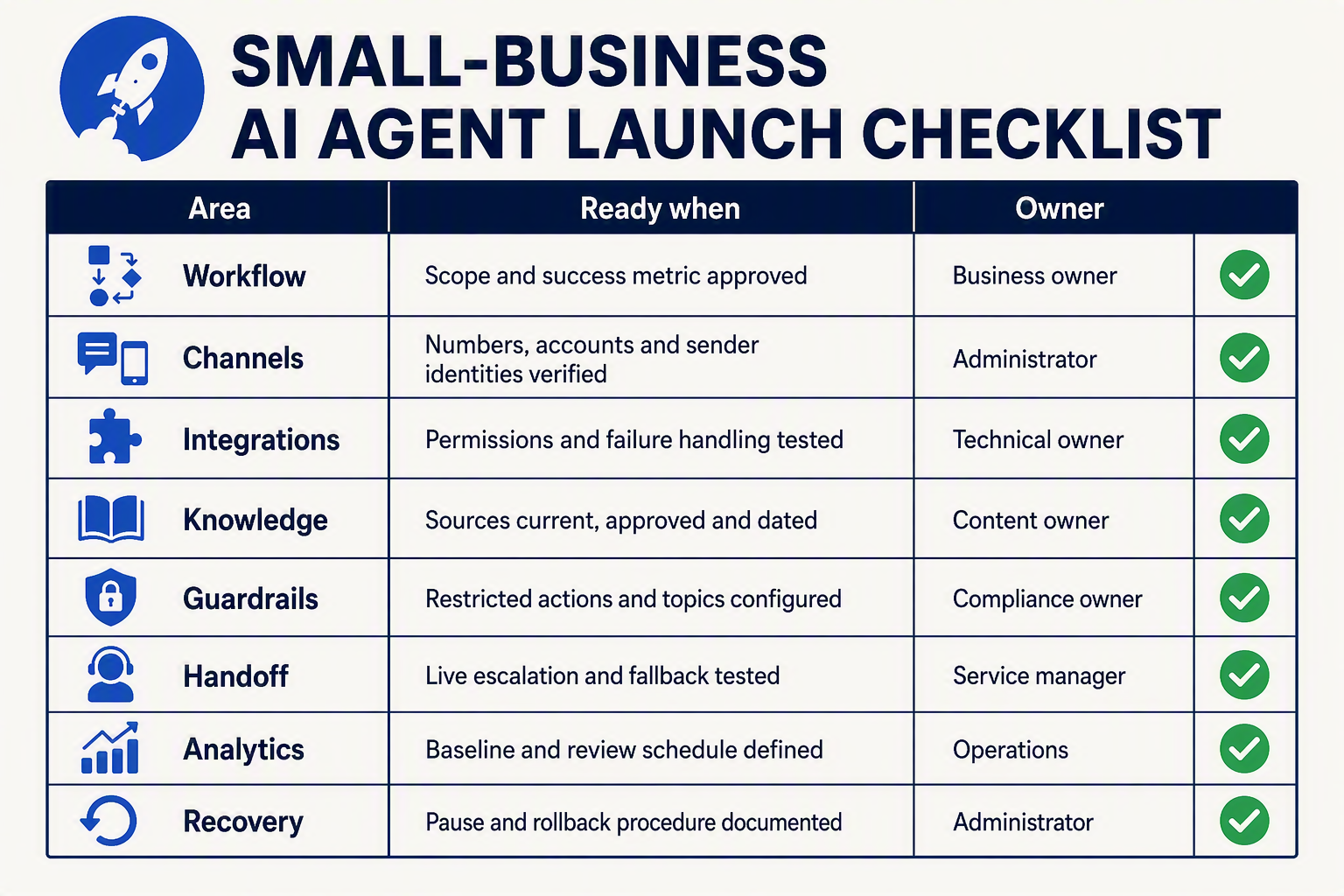
A launch-ready implementation behaves like one governed customer-service operation across three channels, not three disconnected bots. It should use approved knowledge, preserve customer context, complete permitted actions, transfer exceptions to a person, and produce records that the business can audit.
Launch-readiness matrix
| Implementation layer | Phone | Launch gate | ||
|---|---|---|---|---|
| Identity and routing | Published number, opening disclosure, business hours, language selection and overflow route | Verified WhatsApp Business account, chat and calling routes, approved templates where required | Authenticated sending domain, monitored inbox and reply address | Every channel identifies the business and reaches the correct team |
| Knowledge grounding | Concise, voice-friendly answers with pronunciation rules | Approved FAQs, policies, product details, links and media | Longer grounded responses with citations or source references where appropriate | Critical answers match the current source documents |
| Action integrations | Calendar booking, CRM lookup, ticket creation and call disposition | Lead capture, order status, appointment updates and CRM synchronisation | Classification, draft or send rules, ticketing and follow-up tasks | Test records are created once, with correct fields and timestamps |
| Safety and permissions | Consent handling, recording notice, blocked sensitive actions and emergency routing | Opt-in status, template approval, payment boundaries and opt-out processing | Unsubscribe handling, restricted attachments and approval for sensitive replies | Prohibited requests cannot bypass workflow controls |
| Human handoff | Warm transfer or callback with transcript, intent and collected details | Inbox assignment with conversation history and escalation reason | Forwarding or ticket assignment with draft, sources and priority | An employee receives enough context to continue without restarting |
| Quality and monitoring | Accuracy, latency, interruption handling, accents and failed-call tests | Language, formatting, media, duplicate-message and calling tests | Tone, threading, attachment and deliverability tests | Dashboards, alerts, ownership and rollback procedures are active |
Define measurable acceptance criteria
The launch gate should be based on business-owned thresholds, not whether a polished demonstration worked once. A small business might require:
- 100% passage of critical safety scenarios, including refund exceptions, payment requests, legal threats and requests for a person.
- A test set of at least 25–50 representative interactions per channel, expanded for every supported language and major customer intent.
- Zero unintended writes to production calendars, customer relationship management records or ticketing systems during pre-launch testing.
- A named owner for failed calls, unassigned WhatsApp conversations, bounced emails and integration outages.
- A rollback option that routes phone calls, WhatsApp messages and emails to existing human-operated queues.
Capacity planning also matters: WhatsApp exceeded 3 billion monthly users worldwide, according to Meta CEO Mark Zuckerberg during Meta’s Q1 2025 earnings call. Businesses should therefore test peak campaign traffic and retry behaviour rather than assuming normal-day message volume represents launch conditions.
Run one end-to-end customer journey
Before release, complete a realistic cross-channel test: a customer calls after hours, receives a follow-up on WhatsApp, replies in a regional language, and later emails supporting information. The implementation should recognise or safely reconcile the customer, avoid duplicate tickets, preserve consent, and show the complete history to the assigned employee.
Platforms such as CallMissed can place AI voice agents, WhatsApp chat and Business calling, email, knowledge-base retrieval, and an omnichannel inbox within the same operating environment. For an Indian deployment, its support for 22 Indian languages also makes language-specific testing a core launch task rather than a post-launch addition.
Final go-live controls
Launch gradually with:
- A restricted workflow or limited operating window.
- Daily transcript and outcome reviews during the initial period.
- Immediate escalation for uncertain, sensitive or high-value cases.
- Weekly knowledge, integration and permission checks.
A no code AI agent is launch-ready only when failures are visible, recoverable and owned—not merely when routine conversations succeed.
Frequently asked questions about no-code AI agents for phone, WhatsApp and email
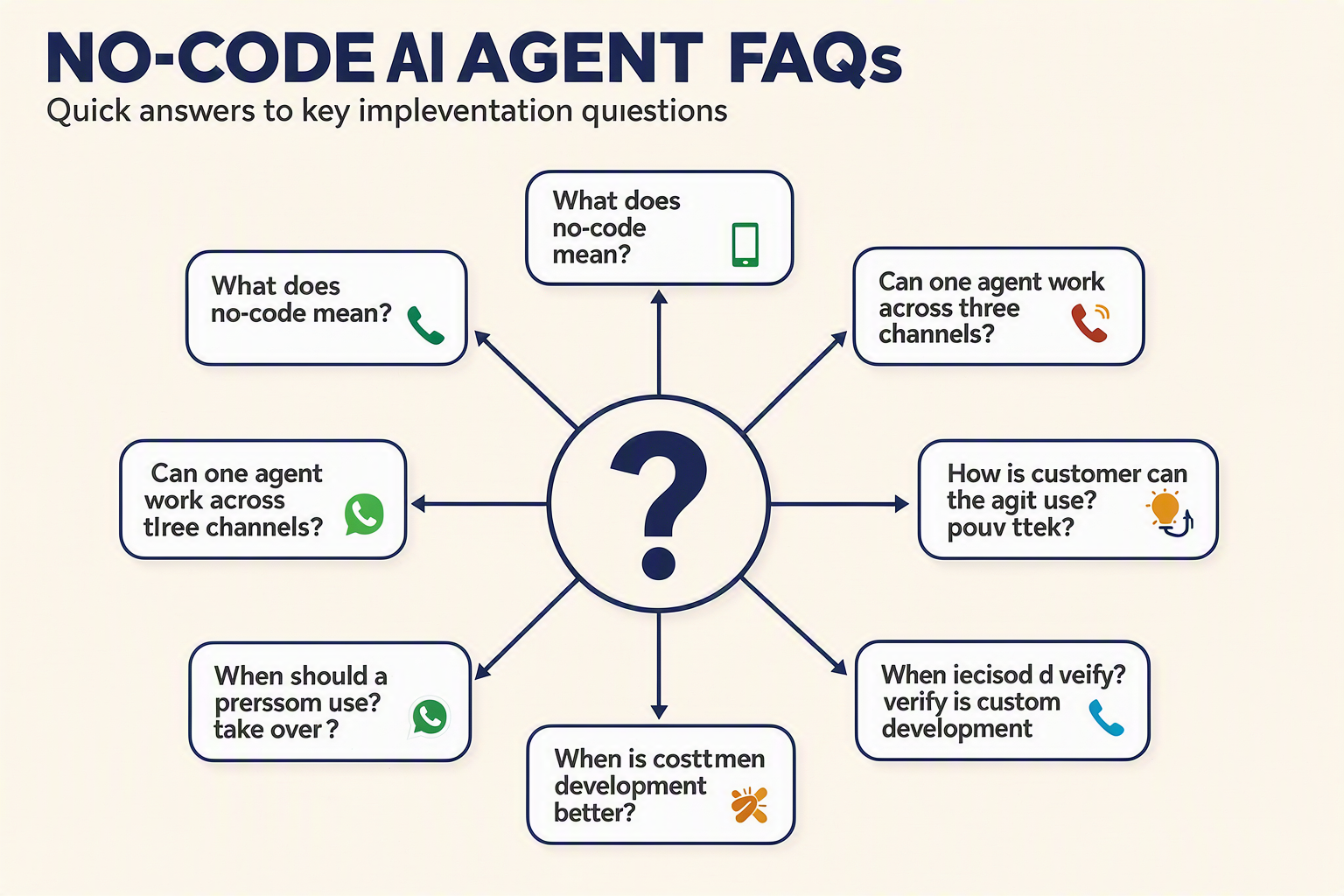
Setup and channel choices
How does no-code AI agent automation for small businesses work?
Can one no-code AI agent handle phone, WhatsApp, and email conversations?
Knowledge, testing, and safeguards
What information should I connect when I build AI agent without coding?
How should a small business test a no code WhatsApp chatbot or voice agent?
Costs, compliance, and custom development
What costs should I verify before buying AI automation for small business?
When is custom development better than no-code AI agent automation for small businesses?
Conclusion
No-code AI agent automation gives small businesses a practical way to serve customers across phone, WhatsApp, and email in 2026—without creating a large engineering or contact-centre team. The strongest implementations begin with narrow, repeatable workflows and combine reliable integrations, controlled business knowledge, clear guardrails, and timely human handoff.
The demand is already visible. WhatsApp surpassed 3 billion monthly users worldwide, according to Meta CEO Mark Zuckerberg during Meta’s Q1 2025 earnings call. Salesforce’s 2025 Small and Medium Business Trends report found that 75% of small and medium-sized businesses were evaluating or already using artificial intelligence. For small businesses, the question is therefore shifting from whether to automate to where automation can deliver value safely.
Key takeaways from this guide include:
- A no code AI agent still requires thoughtful configuration, testing, monitoring, and maintenance; “no code” does not mean “no work.”
- Start with low-risk workflows: use no code voice AI for missed calls and bookings, a no code WhatsApp chatbot for common enquiries, and email agents for classification, grounded drafts, and routing.
- Effective no code customer service automation depends on accurate FAQs, policies, catalogues, calendars, CRM records, and escalation rules—not merely access to an AI model.
- Teams that want to build AI agent without coding should verify integration support, language quality, latency, consent controls, handoff behaviour, maintenance requirements, and total costs before launch.
What should businesses watch next? AI automation for small business will increasingly be judged by consistent cross-channel context, regional-language performance, dependable human escalation, and measurable operational outcomes rather than impressive standalone demos.
Platforms such as CallMissed illustrate this direction by bringing AI voice agents, WhatsApp chat and Business calling, email, an omnichannel inbox, knowledge retrieval, and support for 22 Indian languages into one environment. Which customer journey could your business automate safely first—and what evidence would prove that it works?
Related Reading
Discussion
Ready to automate customer conversations?
Launch AI voice agents and WhatsApp bots with CallMissed — one API, 22+ Indian languages.