Indian Language TTS: Add Telugu and Kannada to Your App


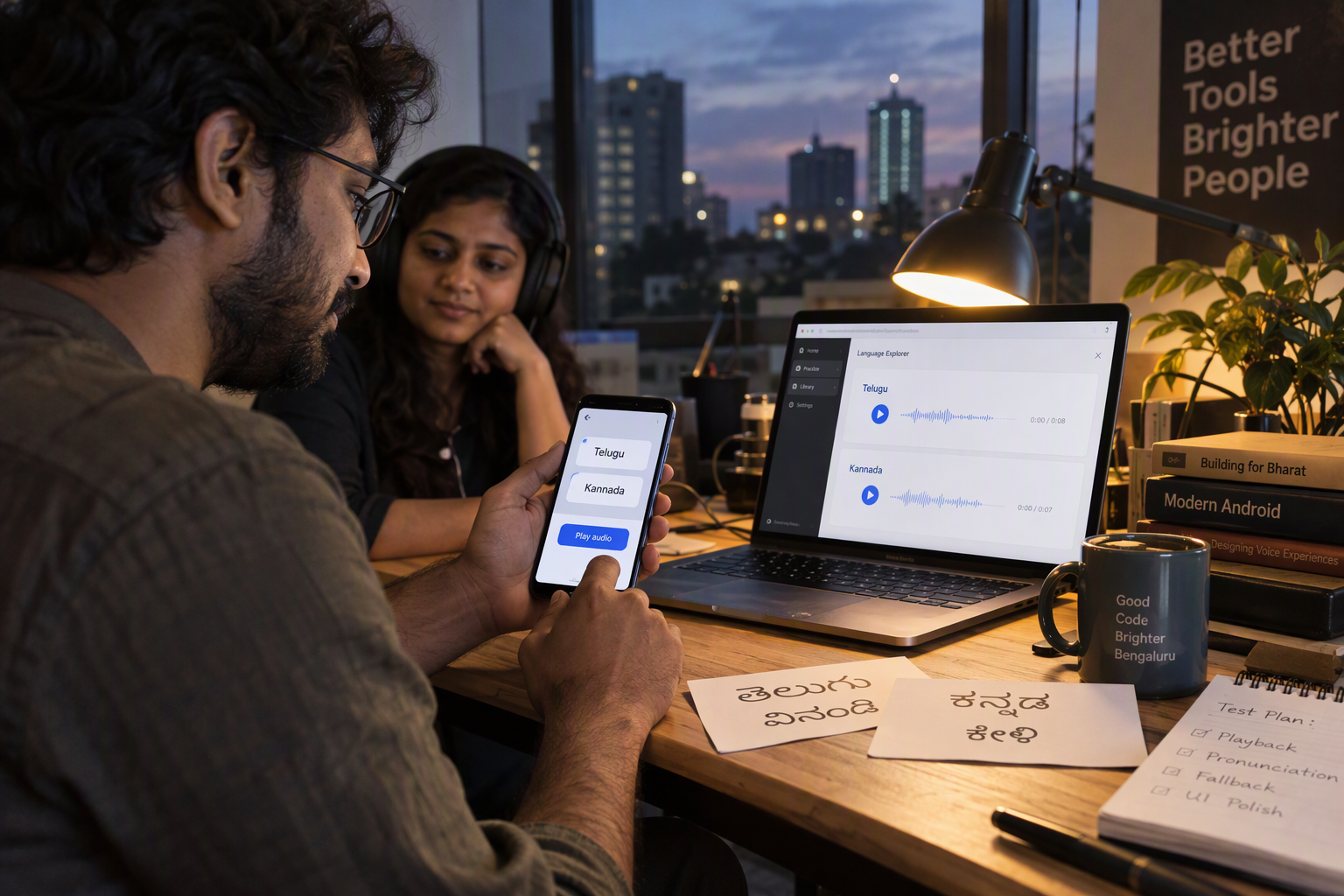
Add Indian Language TTS with runnable backend and playback code for Telugu and Kannada, secure API keys, native-script tests, and fixes.
Indian Language TTS: Add Telugu and Kannada to Your App
What if adding Telugu and Kannada speech to your app required an API integration—not training a voice model? To add Indian Language TTS, send text from your backend to a text-to-speech API with the appropriate language setting, then play the returned audio in your app.
The practical challenge is not generating your first clip. It is making Telugu and Kannada sound useful inside real workflows: reading an order update, explaining a payment failure, or guiding someone through an appointment booking. Names, amounts, English product terms, and sentence breaks all need testing before a successful API response becomes a successful user experience.
Why add Telugu and Kannada TTS now?
As of October 2026, the supplied Sarvam AI REST API documentation explicitly lists Telugu and Kannada among its supported speech languages and identifies target_language_code as the language-selection parameter. That gives developers a concrete integration path rather than a research project.
As of October 2026, Sarvam AI’s migration documentation describes 30+ ready-to-use Bulbul v3 voices, with no per-request voice cloning or training step to manage. This matters because your team can focus on choosing a suitable voice and validating pronunciation instead of building a speech model.
The broader infrastructure trend is relevant, too: as of October 2026, CallMissed offers OpenAI-compatible speech endpoints and natural text-to-speech voices in 10 Indian languages plus English, according to its verified product fact sheet.
However, language support alone does not guarantee that every voice suits your audience. A clear instructional voice may work for onboarding but feel wrong for a conversational assistant. Test the actual sentences your users will hear.
How will this guide help you integrate TTS?
This guide answers “how to add Telugu and Kannada TTS to my app” through a practical sequence:
- Choose an API and voice: check Telugu and Kannada support, listen to samples, and confirm the selected model’s request format.
- Build a backend request: keep credentials server-side and select the language explicitly.
- Prepare your text: test native-script sentences, mixed English terms, names, dates, and currency amounts.
- Play the audio: connect the response to your app’s playback controls and handle loading and failure states.
- Validate before launch: ask native speakers to review intelligibility, pronunciation, and pacing.
We will also distinguish a short notification from a longer narration. The supplied Sarvam documentation contains differing descriptions of long-form handling, so checking the exact endpoint’s current limits is an implementation step—not an optional footnote.
How do I add Telugu and Kannada TTS to my app?
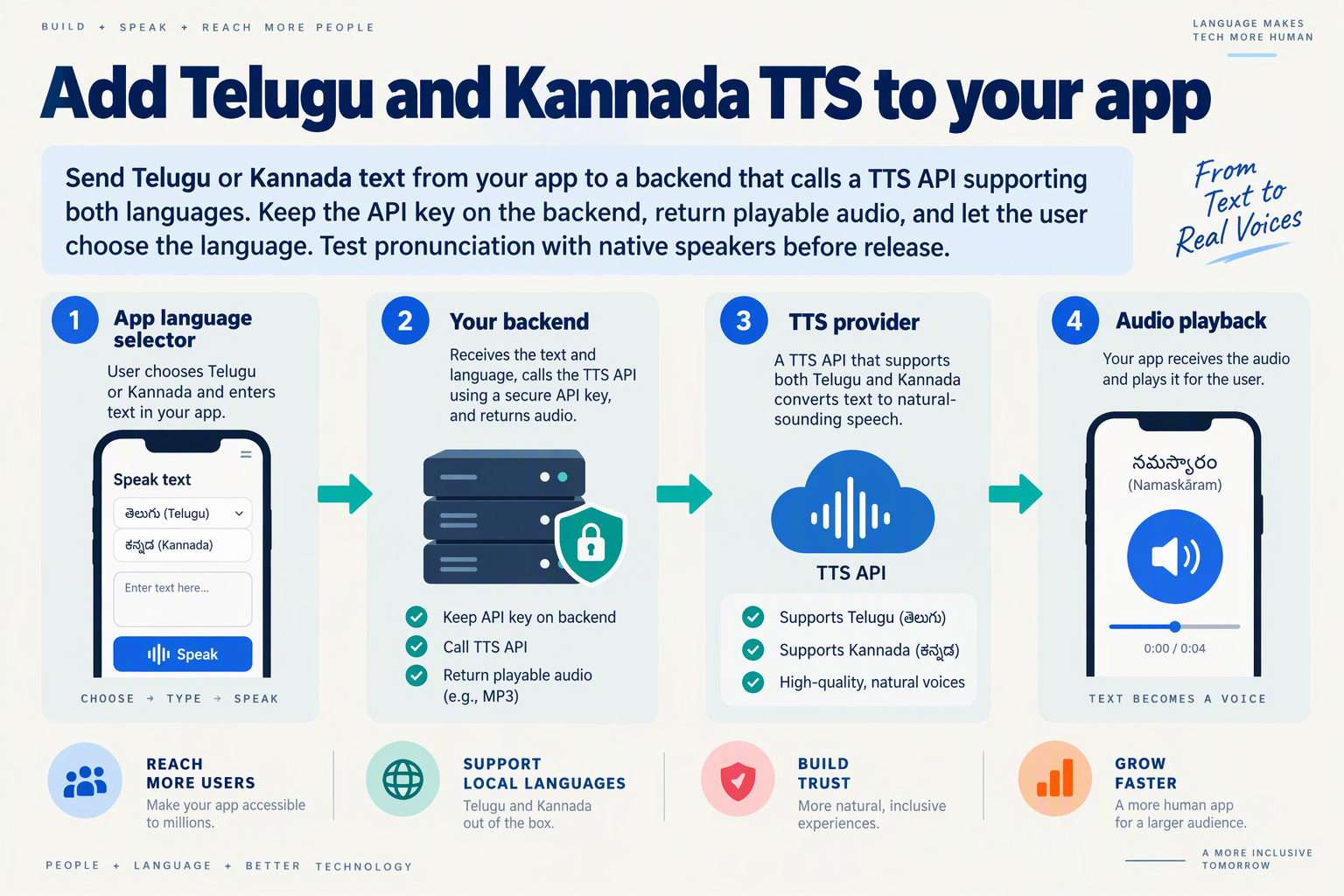
Add Telugu and Kannada TTS by sending native-script text from your backend to a speech API, selecting te-IN for Telugu or kn-IN for Kannada, and returning the generated audio to your app. Keep the API key server-side and verify the chosen endpoint’s audio response format before implementing playback.
What should the first working integration look like?
Start with one short sentence per language, not a complete voice assistant. This isolates authentication, language selection, audio generation, and playback before you introduce longer content.
- Create a backend route, such as
POST /api/speech. - Accept text and a language choice from your app.
- Validate both inputs and map the language to the provider’s language code.
- Call the TTS provider using a server-side credential.
- Return playable audio using the response handling required by that endpoint.
Your app-facing request can stay provider-independent:
{
  "text": "మీ ఆర్డర్ సిద్ధంగా ఉంది.",
  "language": "telugu"
}
This separation lets you change providers without changing every mobile or web client.
Which parameters select Telugu and Kannada speech?
As of October 2026, Sarvam AI’s Text-to-Speech REST API documentation identifies target_language_code as the language-selection parameter and explicitly lists Telugu and Kannada support.
The following Python-style request follows the client.text_to_speech.convert(...) pattern shown in Sarvam AI’s best-practices documentation. It assumes you have already configured an authenticated SDK client:
language_codes = {
    "telugu": "te-IN",
    "kannada": "kn-IN",
}

audio = client.text_to_speech.convert(
    text=request_text,
    model="bulbul:v3",
    target_language_code=language_codes[requested_language],
    speaker="shubh",
)
As of October 2026, Sarvam AI’s best-practices documentation uses bulbul:v3 and speaker="shubh" in its example. Treat that speaker as a starting point, not a pronunciation guarantee for your application.
Test these independently:
- Telugu:
మీ ఆర్డర్ సిద్ధంగా ఉంది. - Kannada:
ನಿಮ್ಮ ಆರ್ಡರ್ ಸಿದ್ಧವಾಗಿದೆ.
Both are intended as simple “Your order is ready” messages; have native speakers validate wording and delivery before launch.
How do I turn the response into app playback?
Inspect the endpoint’s documented response before writing the playback adapter. Do not assume every TTS service returns an MP3 URL: your adapter must handle whichever representation the selected endpoint actually provides.
For a web app, your backend can expose the generated audio through an authenticated route, which the browser loads into an audio element. For a mobile app, pass the returned audio resource to the platform’s audio player.
Include three visible states:
- Generating: prevent duplicate requests.
- Ready: offer play and replay controls.
- Failed: retain the text and provide a retry option.
Avoid generating new speech every time someone presses replay; reuse the existing clip where appropriate.
What should I verify before expanding beyond the prototype?
As of October 2026, Sarvam AI’s REST conversion reference lists a 2,500-character maximum for Bulbul v3, while another supplied REST documentation page describes long-form requests without chunking. Resolve that discrepancy against your selected endpoint before implementing narration.
Test names, currency amounts, English product terms, and interruptions—not just clean sample sentences.
If you prefer a gateway integration, CallMissed’s verified fact sheet lists OpenAI-compatible speech endpoints as of October 2026. Confirm the selected model’s Telugu and Kannada support and request schema rather than assuming Sarvam-specific parameters transfer unchanged.
What do I need before setting up Telugu and Kannada TTS?
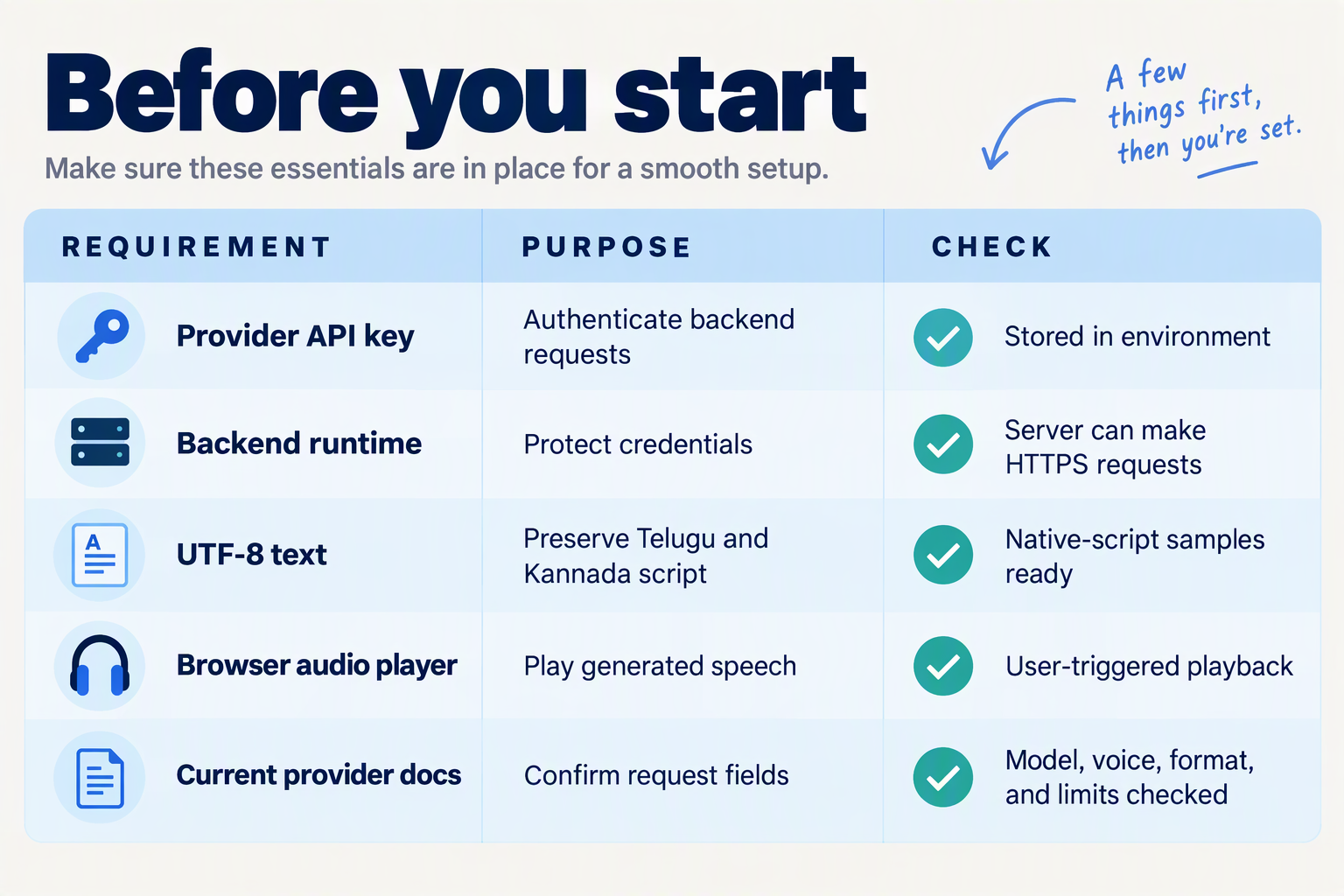
Before setting up Telugu and Kannada TTS, you need API credentials, a backend that protects those credentials, native-script test text, and an audio player in your app. You also need to verify your chosen endpoint’s language codes, voice options, input limits, and billing units before writing the integration.
What should my Telugu and Kannada TTS setup checklist include?
Use this checklist to separate development prerequisites from decisions that depend on your speech provider. Provider-specific details below reflect the supplied Sarvam AI documentation as of October 2026.
| Prerequisite | What to prepare | What to verify |
|---|---|---|
| API access | Provider account and server-side API key | Authentication format and available quota |
| Backend route | A server endpoint that accepts text and language | Credentials never reach browser or mobile-app code |
| Language selection | Telugu te-IN; Kannada kn-IN | The endpoint’s language parameter and accepted values |
| Model and voice | Model identifier and supported speaker name | Voice compatibility with each selected language |
| Test content | UTF-8 Telugu and Kannada sentences | Names, punctuation, amounts, and English terms |
| Audio and budget | Playback support and a usage estimate | Response format, request limits, and billing units |
You do not need to train a voice model for this workflow. Your preparation is primarily application engineering: credential handling, request validation, text preparation, and playback compatibility.
Which API settings should I confirm before coding?
Create a small configuration record for your selected provider rather than scattering settings throughout your app:
- Model: Record the exact model identifier; Sarvam AI’s supplied best-practices example uses
bulbul:v3, as of October 2026. - Language: Map your app’s Telugu and Kannada selections to the endpoint’s accepted language codes.
- Voice: Store a supported speaker name and test the same voice with both languages.
- Response handling: Confirm whether the endpoint returns playable audio directly or a representation that your backend must decode.
For voice selection, do not rely exclusively on a sample in another language. Sarvam AI’s supplied Voices documentation, as of October 2026, demonstrates voices using a Hindi sentence; that preview cannot establish how your Telugu or Kannada product names will sound.
What text should I prepare for the first test?
Prepare a compact native-speaker review set before connecting TTS to live application data. Include:
- A short order or appointment update in each language.
- A sentence containing an English brand or product name.
- A payment amount, date, and reference number.
- A longer instruction with several punctuation breaks.
Keep these samples in UTF-8 throughout storage and transmission. Treat pronunciation feedback separately from API success: a valid response proves the request worked, not that the spoken message is clear.
What limits and costs should I check first?
As of October 2026, Sarvam AI’s supplied REST conversion reference lists a 2,500-character maximum for bulbul:v3 and a 1,500-character maximum for bulbul:v2. Another supplied Sarvam REST page describes v3 long-form input without chunking, so verify the exact endpoint’s current contract before designing narration support.
As of October 2026, Sarvam’s AI voice generator page advertises API pricing starting at ₹30 per 10,000 characters and a free tier of 10,000 characters per month. Use those figures as a preliminary budget reference, then confirm account-specific terms. Count expected text volume and retries—not just the number of users—to estimate your app’s synthesis costs.
How do I choose Bulbul v3 and make my first Telugu or Kannada API request?
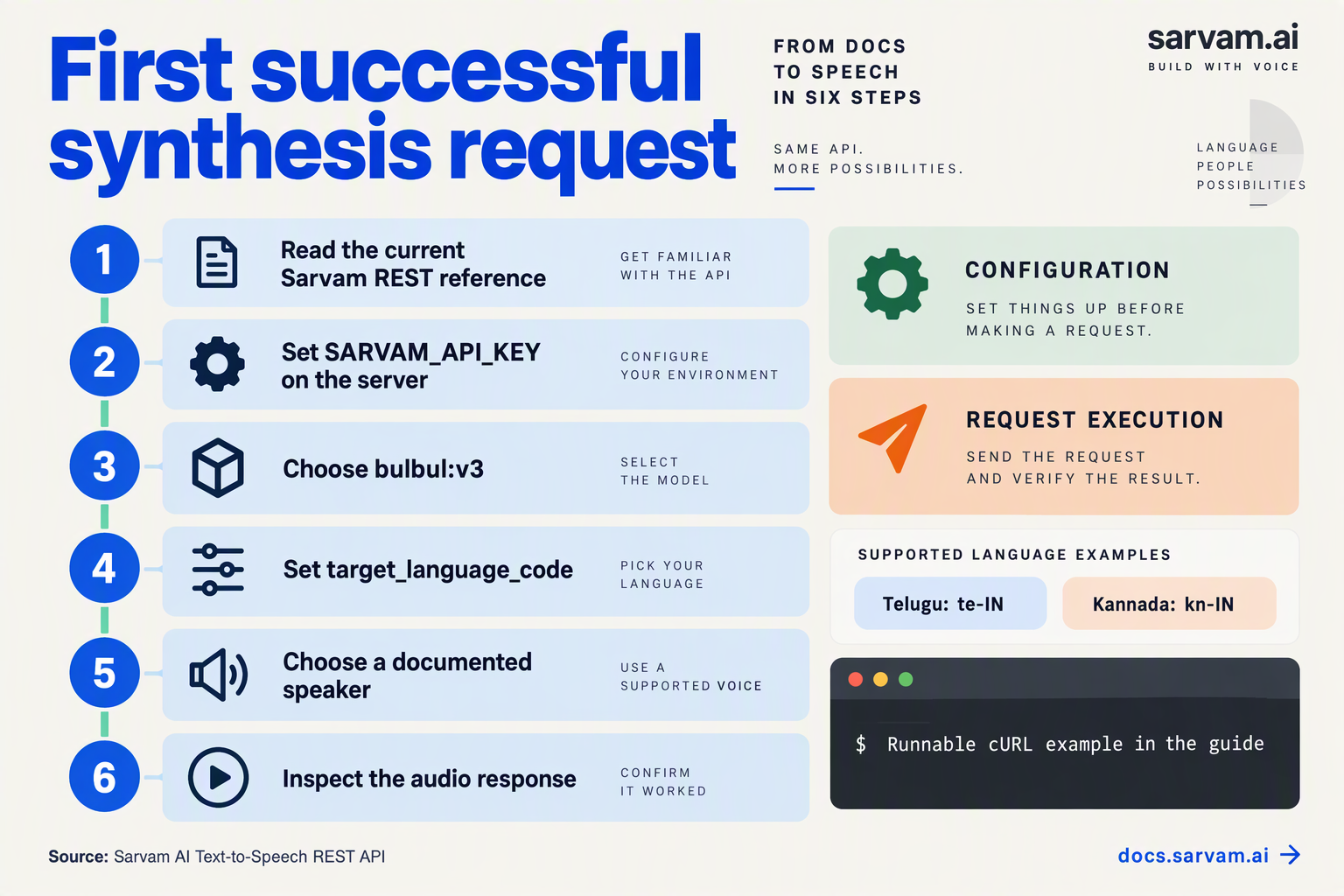
Choose model="bulbul:v3", select a supported named speaker, and send a short native-script sentence with target_language_code="te-IN" or "kn-IN". Make the request from your backend, then decode the returned audio and listen before connecting playback to your app.
How do I choose a Bulbul v3 voice?
Start with Sarvam AI’s Voices documentation, but audition your shortlisted voices using your own Telugu and Kannada text. A sample demonstrates a voice’s character; it does not establish how well that voice pronounces your customers’ names or product terminology.
As of October 2026, Sarvam AI’s migration documentation describes “30+ Bulbul v3 voices” and specifies “Plain speaker names, no voice object.” Your integration therefore uses a named speaker, rather than creating a voice object or running a cloning workflow.
Use this selection process:
- Shortlist voices: choose candidates appropriate for instructions, notifications, or conversation.
- Generate identical test sentences: keep the text unchanged so you can compare voices fairly.
- Ask native speakers to review: prioritize intelligibility, pronunciation, and suitable delivery.
- Save the chosen speaker in configuration: avoid scattering voice names throughout your application.
As of October 2026, Sarvam AI’s Best Practices for Writing Text for TTS documentation demonstrates speaker="shubh" with model="bulbul:v3". Treat that as a starting configuration—not evidence that it is the right voice for every Telugu or Kannada workflow.
What does my first Telugu API request look like?
Install Sarvam AI’s Python SDK in your backend environment:
pip install sarvamai
export SARVAM_API_KEY="your-api-key"
Then generate one short Telugu clip:
import base64
import os
from pathlib import Path
from sarvamai import SarvamAI

client = SarvamAI(
    api_subscription_key=os.environ["SARVAM_API_KEY"]
)

response = client.text_to_speech.convert(
    text="నమస్కారం! మీ ఆర్డర్ సిద్ధంగా ఉంది.",
    model="bulbul:v3",
    target_language_code="te-IN",
    speaker="shubh",
)

Path("telugu.wav").write_bytes(
    base64.b64decode(response.audios[0])
)
The sentence means, “Hello! Your order is ready.” This small test separates authentication and synthesis from frontend playback problems.
Keep the API key server-side. Do not embed it in browser JavaScript, a mobile application bundle, or a public repository.
How do I change the request to Kannada?
Reuse the same request structure, changing both the text and language setting:
response = client.text_to_speech.convert(
    text="ನಮಸ್ಕಾರ! ನಿಮ್ಮ ಆರ್ಡರ್ ಸಿದ್ಧವಾಗಿದೆ.",
    model="bulbul:v3",
    target_language_code="kn-IN",
    speaker="shubh",
)

Path("kannada.wav").write_bytes(
    base64.b64decode(response.audios[0])
)
As of October 2026, Sarvam AI’s Text-to-Speech REST API documentation explicitly lists Telugu and Kannada support and identifies target_language_code as the language-selection parameter. Set it explicitly rather than assuming the text alone will select the intended language.
What should I check before adding app playback?
Validate these four things first:
- Audio content: confirm that the generated clip reads the complete sentence.
- Pronunciation: have a Telugu or Kannada speaker review the result.
- Response handling: handle authentication errors, unsuccessful requests, and missing audio.
- Input length: keep the initial test short.
As of October 2026, Sarvam AI’s REST conversion reference specifies a 2,500-character maximum for bulbul:v3, while another REST documentation page describes single-request long-form synthesis. Until you verify the limit for your chosen endpoint, use the stricter documented limit rather than assuming unlimited input.
Once both clips work locally, expose synthesis through your backend and connect the returned audio to your app’s player.
How do I build a secure Node.js TTS endpoint with working code?
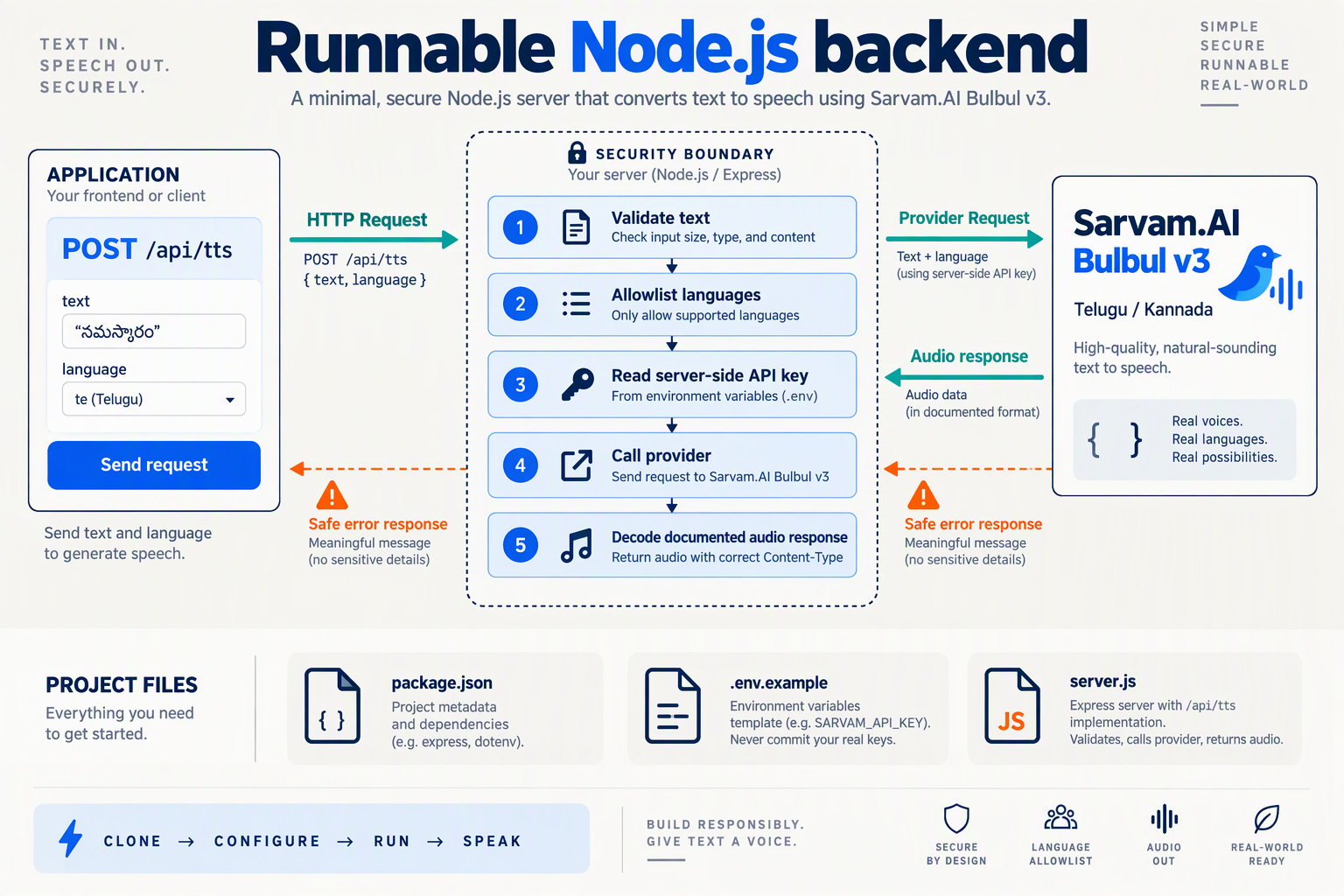
Build a server-side Node.js endpoint that authenticates users, validates Telugu or Kannada input, calls Sarvam AI with a private API key, and returns playable audio. Never send the provider key to your browser or mobile app.
What should I install and configure?
- Use Node.js 22 or later for this example.
- Install the dependencies:
npm install express express-rate-limit jose- Configure server-only environment variables:
export SARVAM_API_KEY="your-provider-key"
export AUTH_JWKS_URL="https://your-auth-service.example/.well-known/jwks.json"
export AUTH_ISSUER="https://your-auth-service.example/"
export AUTH_AUDIENCE="your-api"
The authentication values must match your existing identity provider. Clients send their short-lived user access token, not your Sarvam API key.
What does the secure TTS endpoint look like?
Save this as server.mjs. As of October 2026, Sarvam AI’s best-practices documentation demonstrates model: "bulbul:v3" with speaker: "shubh"; its REST documentation uses target_language_code for language selection.
import express from "express";
import rateLimit from "express-rate-limit";
import { createRemoteJWKSet, jwtVerify } from "jose";

for (const name of [
  "SARVAM_API_KEY", "AUTH_JWKS_URL",
  "AUTH_ISSUER", "AUTH_AUDIENCE"
]) {
  if (!process.env[name]) throw new Error(`Missing ${name}`);
}

const app = express();
const jwks = createRemoteJWKSet(
  new URL(process.env.AUTH_JWKS_URL)
);

async function authenticate(req, res, next) {
  try {
    const header = req.get("authorization") || "";
    if (!header.startsWith("Bearer ")) throw new Error();
    const { payload } = await jwtVerify(header.slice(7), jwks, {
      issuer: process.env.AUTH_ISSUER,
      audience: process.env.AUTH_AUDIENCE
    });
    if (!payload.sub) throw new Error();
    req.userId = payload.sub;
    next();
  } catch {
    res.status(401).json({ error: "Authentication required" });
  }
}

const quota = rateLimit({
  windowMs: 60_000,
  limit: 30,
  keyGenerator: req => req.userId
});

app.post("/api/tts", authenticate, quota,
  express.json({ limit: "8kb" }), async (req, res) => {
    const { text, language } = req.body || {};
    if (
      typeof text !== "string" || !text.trim() ||
      [...text].length > 500 ||
      !["te-IN", "kn-IN"].includes(language)
    ) {
      return res.status(400).json({ error: "Invalid input" });
    }

    try {
      const upstream = await fetch(
        "https://api.sarvam.ai/text-to-speech", {
          method: "POST",
          headers: {
            "Content-Type": "application/json",
            "api-subscription-key": process.env.SARVAM_API_KEY
          },
          body: JSON.stringify({
            text: text.trim(),
            target_language_code: language,
            model: "bulbul:v3",
            speaker: "shubh",
            output_audio_codec: "wav"
          }),
          signal: AbortSignal.timeout(15_000)
        }
      );
      if (!upstream.ok) throw new Error("Provider failure");
      const result = await upstream.json();
      const encoded = result.audios?.[0];
      if (typeof encoded !== "string" || !encoded.length) {
        throw new Error("Missing audio");
      }
      res.set({
        "Content-Type": "audio/wav",
        "Cache-Control": "no-store",
        "X-Content-Type-Options": "nosniff"
      }).send(Buffer.from(encoded, "base64"));
    } catch {
      res.status(502).json({ error: "Speech generation failed" });
    }
  }
);

app.use((err, req, res, next) => {
  res.status(err.type === "entity.too.large" ? 413 : 400)
    .json({ error: "Invalid request body" });
});

app.listen(3000, "127.0.0.1");
How do I test Telugu and Kannada audio?
Start the server with node server.mjs, then use a valid access token issued for your API:
curl --fail-with-body http://127.0.0.1:3000/api/tts \
  -H "Authorization: Bearer $USER_ACCESS_TOKEN" \
  -H "Content-Type: application/json" \
  -d '{"text":"ನಮಸ್ಕಾರ! ನಿಮ್ಮ ಆದೇಶ ಸಿದ್ಧವಾಗಿದೆ.","language":"kn-IN"}' \
  --output kannada.wav
For Telugu, change the text to నమస్కారం! మీ ఆర్డర్ సిద్ధంగా ఉంది. and the language to te-IN.
What should I change before production?
- Use HTTPS through your deployment’s reverse proxy.
- Enforce spending limits: the example’s 30 requests per minute, 500-character cap, and 15-second timeout are local safeguards—not Sarvam limits.
- Share rate-limit storage across multiple server instances.
- Avoid logging text, tokens, or audio unless explicitly required and governed by retention rules.
As of October 2026, Sarvam AI’s REST reference lists a 2,500-character maximum for Bulbul v3, while another supplied page describes unchunked long-form input. Keep this notification endpoint conservative and verify the exact endpoint contract before increasing its limit.
How do I add a language selector and play the audio in my app?
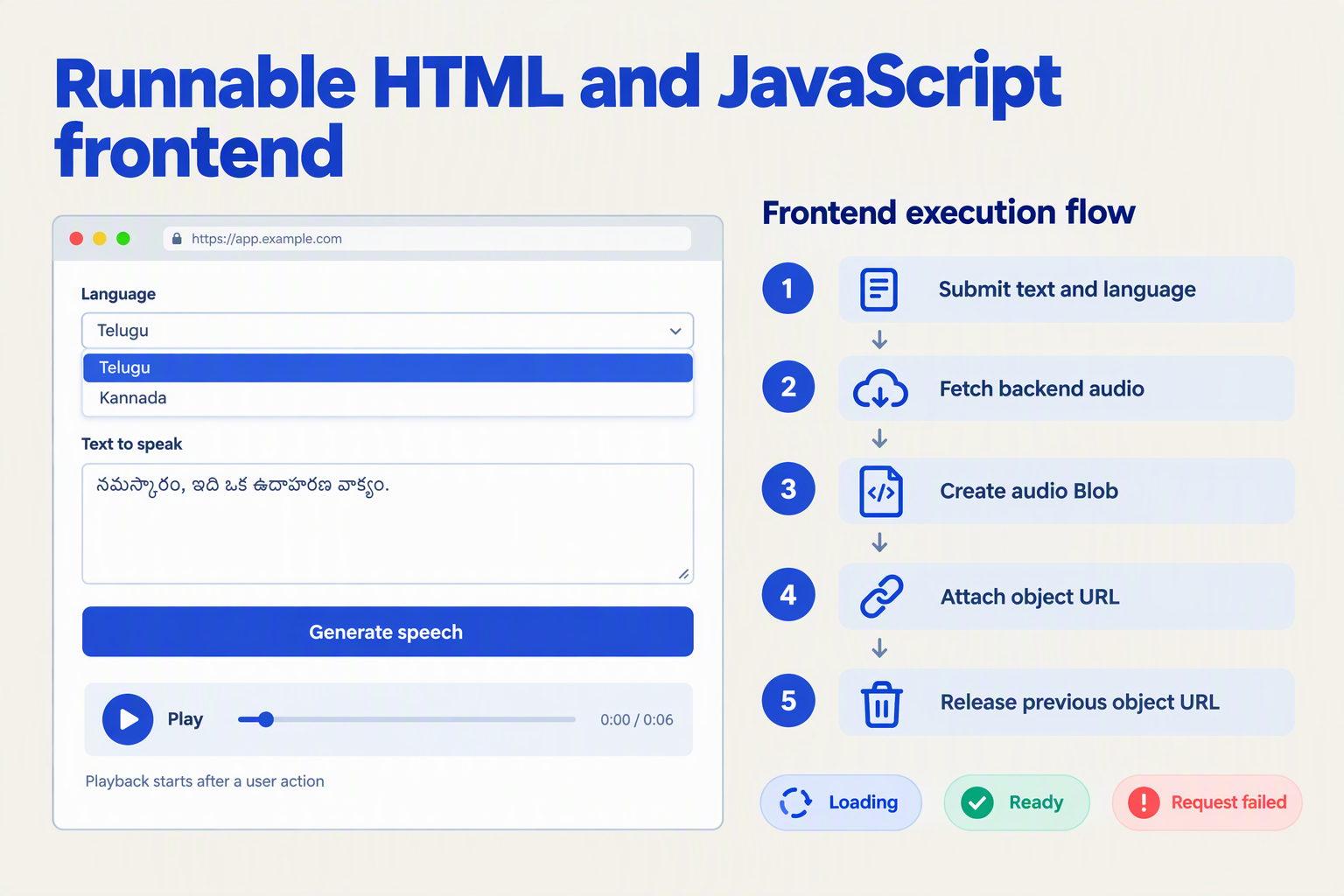
Add a language selector that maps Telugu to te-IN and Kannada to kn-IN, then send the selected language and matching text to your backend. Return playable audio to the frontend and expose standard playback controls, with clear loading and error states.
How do I connect a language selector to Telugu and Kannada TTS?
As of October 2026, Sarvam AI’s Text-to-Speech REST API documentation lists Telugu and Kannada support and uses target_language_code to select the speech language. Keep that provider-specific field on your backend; your frontend can send a simpler language value.
- Display native-language labels alongside English names.
- Store the selected language in application state.
- Supply content in that language before requesting speech.
A TTS language selector is not a translation engine. Choosing Kannada should load your Kannada message—not merely send Telugu text with a different language code. For dynamic content, translation is a separate step.
For a web app, start with semantic HTML:
<label for="tts-language">Audio language</label>
<select id="tts-language">
  <option value="te-IN">తెలుగు — Telugu</option>
  <option value="kn-IN">ಕನ್ನಡ — Kannada</option>
</select>

<button id="speak" type="button">Generate audio</button>
<p id="tts-status" role="status"></p>
<audio id="tts-player" controls></audio>
The native <select> provides keyboard interaction, while role="status" makes loading and failure messages available to assistive technology.
How do I play the generated speech in a web app?
Use your backend as the boundary between the browser and the speech provider. In this example, /api/tts is an illustrative application route, not a Sarvam AI or CallMissed endpoint; it accepts JSON and returns binary audio with the correct Content-Type.
const selector = document.querySelector("#tts-language");
const button = document.querySelector("#speak");
const player = document.querySelector("#tts-player");
const status = document.querySelector("#tts-status");

const messages = {
  "te-IN": "మీ ఆర్డర్ సిద్ధంగా ఉంది.",
  "kn-IN": "ನಿಮ್ಮ ಆರ್ಡರ್ ಸಿದ್ಧವಾಗಿದೆ."
};

let audioUrl;

button.addEventListener("click", async () => {
  button.disabled = true;
  selector.disabled = true;
  player.pause();
  status.textContent = "Generating audio…";

  try {
    const response = await fetch("/api/tts", {
      method: "POST",
      headers: { "Content-Type": "application/json" },
      body: JSON.stringify({
        language: selector.value,
        text: messages[selector.value]
      })
    });

    if (!response.ok) throw new Error("Speech request failed");

    const audio = await response.blob();
    if (audioUrl) URL.revokeObjectURL(audioUrl);
    audioUrl = URL.createObjectURL(audio);
    player.src = audioUrl;
    player.load();
    status.textContent = "Audio ready. Press Play.";
  } catch {
    status.textContent = "Could not generate audio. Please retry.";
  } finally {
    button.disabled = false;
    selector.disabled = false;
  }
});
The two sample messages mean “Your order is ready.” Have native speakers review your production strings.
Explicit playback avoids relying on browser autoplay permission: an asynchronous speech request may finish after the original click’s user activation has expired. Also revoke the final object URL when the component unmounts or the page’s player is removed.
What should my backend and playback controls validate?
Before connecting this interface to production:
- Allowlist languages: accept only supported values, rather than forwarding arbitrary input.
- Normalize the response: decode provider-returned encoded audio if necessary; do not serve JSON as an audio file.
- Match the format: return the actual audio MIME type and test playback on target devices.
- Prevent stale playback: clear previously generated audio when the language or source text changes.
- Handle playback errors: show a useful message if the browser cannot decode the file.
As of October 2026, CallMissed’s verified product fact sheet lists OpenAI-compatible speech endpoints. That offers another backend integration path, but compatibility does not make provider-specific language and voice parameters interchangeable—check the selected model’s request contract.
How do I test Telugu and Kannada pronunciation and choose Android playback?
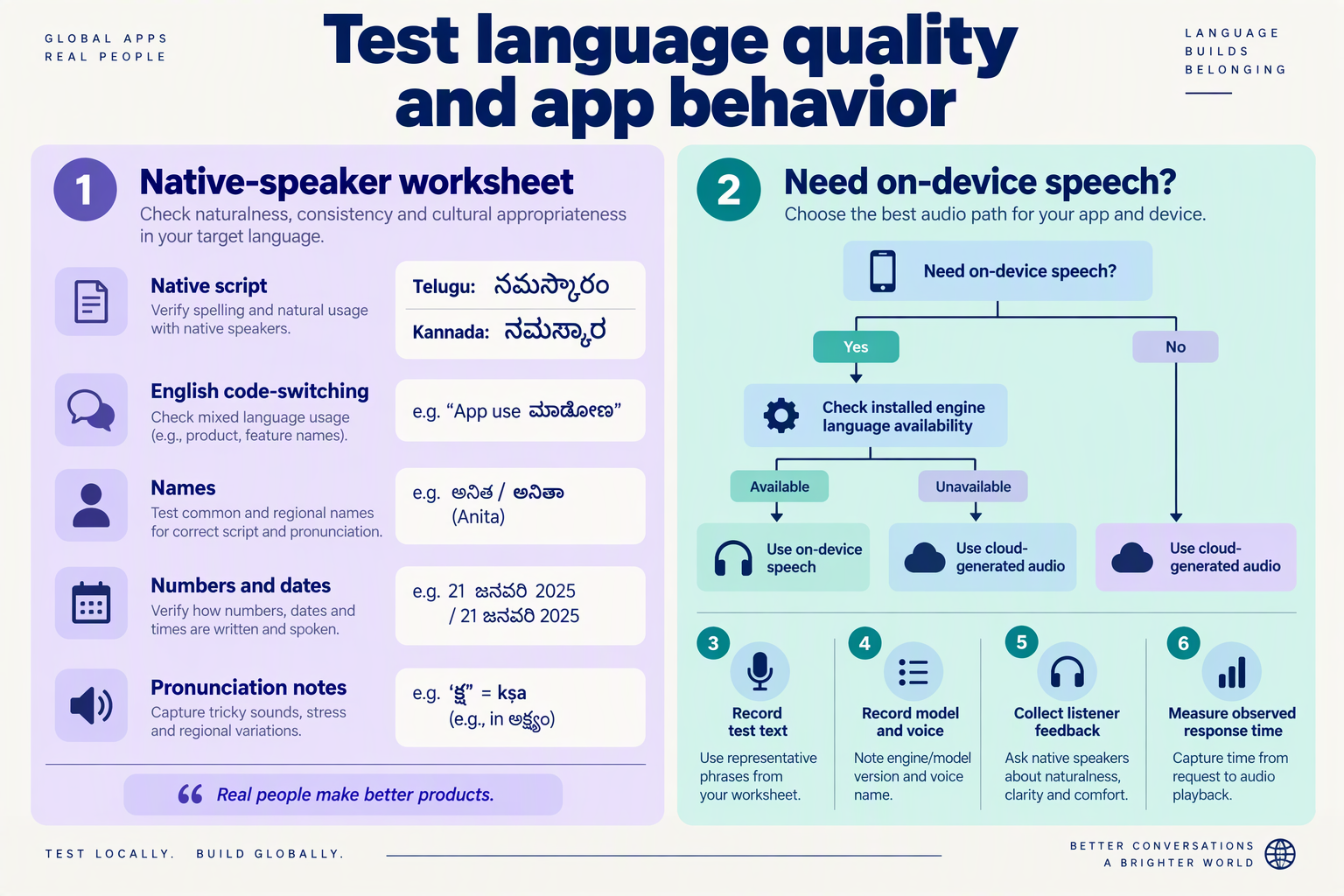
Test Telugu and Kannada pronunciation with native speakers using real app sentences, then choose Android playback according to the audio’s length and delivery method. For fetched TTS clips, AndroidX Media3 ExoPlayer is a practical default; use SoundPool for short, preloaded cues rather than longer spoken messages.
How do I build a Telugu and Kannada pronunciation test set?
Create a small, repeatable acceptance corpus before comparing voices. Include both ordinary sentences and cases where a pronunciation mistake could change the meaning:
- Native-script messages: Telugu: “మీ ఆర్డర్ సిద్ధంగా ఉంది.” Kannada: “ನಿಮ್ಮ ಆರ್ಡರ್ ಸಿದ್ಧವಾಗಿದೆ.” Both convey that an order is ready.
- Names and places: use actual delivery locations, customer names with permission, and regional place names.
- Amounts and dates: include
₹1,250, a delivery date, and a time; define the intended spoken interpretation before testing. - Code-mixed text: combine Telugu or Kannada with product names, “UPI,” and English interface terms.
- Critical instructions: include payment failures, cancellations, and appointment changes.
As of October 2026, Sarvam AI’s REST documentation explicitly supports code-mixed English and Indic text, while Sarvam AI’s best-practices guide recommends selecting target_language_code according to the language used in mixed-language input. Support is a starting point—not evidence that every brand name or abbreviation will sound correct.
Keep the input, model, speaker, language setting, and generated audio together so failures are reproducible.
How should native speakers score TTS pronunciation?
Ask Telugu and Kannada reviewers to assess their respective languages independently. Play clips without showing the text first: this helps distinguish genuine intelligibility from listeners filling in what they expect.
Use a proposed 1–5 review scale, not a claimed industry benchmark:
- Intelligibility: can the listener repeat the intended message?
- Pronunciation: are names, consonants, and word boundaries correct?
- Numbers: are amounts, dates, and identifiers interpreted correctly?
- Pacing: are pauses helpful rather than distracting?
Treat an incorrect payment amount or reversed instruction as a release blocker, even if the voice sounds natural. Fix ambiguous wording first, regenerate the clip, and retest.
As of October 2026, Sarvam AI’s Voices documentation advises, “Listen to every voice before you pick one for your product.” Its displayed sample sentence is Hindi, so use those samples to shortlist voices—not to replace Telugu and Kannada testing.
Which Android player should I use for TTS audio?
For an Android integration planned in October 2026, choose by playback requirements:
- AndroidX Media3 ExoPlayer: a strong default for fetched audio requiring playback controls, buffering, and lifecycle management.
- MediaPlayer: suitable for a simple, single-clip implementation when advanced playback behavior is unnecessary.
- SoundPool: suited to short, preloaded sounds; avoid making it the default for variable-length narration.
If your API returns encoded audio, decode it into a playable file or supported data source first. Match the actual codec and container; renaming a file to .mp3 does not convert its contents.
What should I verify on Android before release?
Test on physical devices with speaker output, headphones, and Bluetooth. Verify:
- Loading, replay, cancellation, and network-error states.
- Audio-focus handling when another app or a phone call interrupts.
- Cleanup when the user leaves the screen.
- No overlapping speech after repeated taps.
- Correct playback of every generated format.
Finally, replay the pronunciation corpus through the actual Android playback path. This separates synthesis errors from playback faults such as clipping or incorrect decoding.
Which advanced settings improve quality, cost, and reliability?
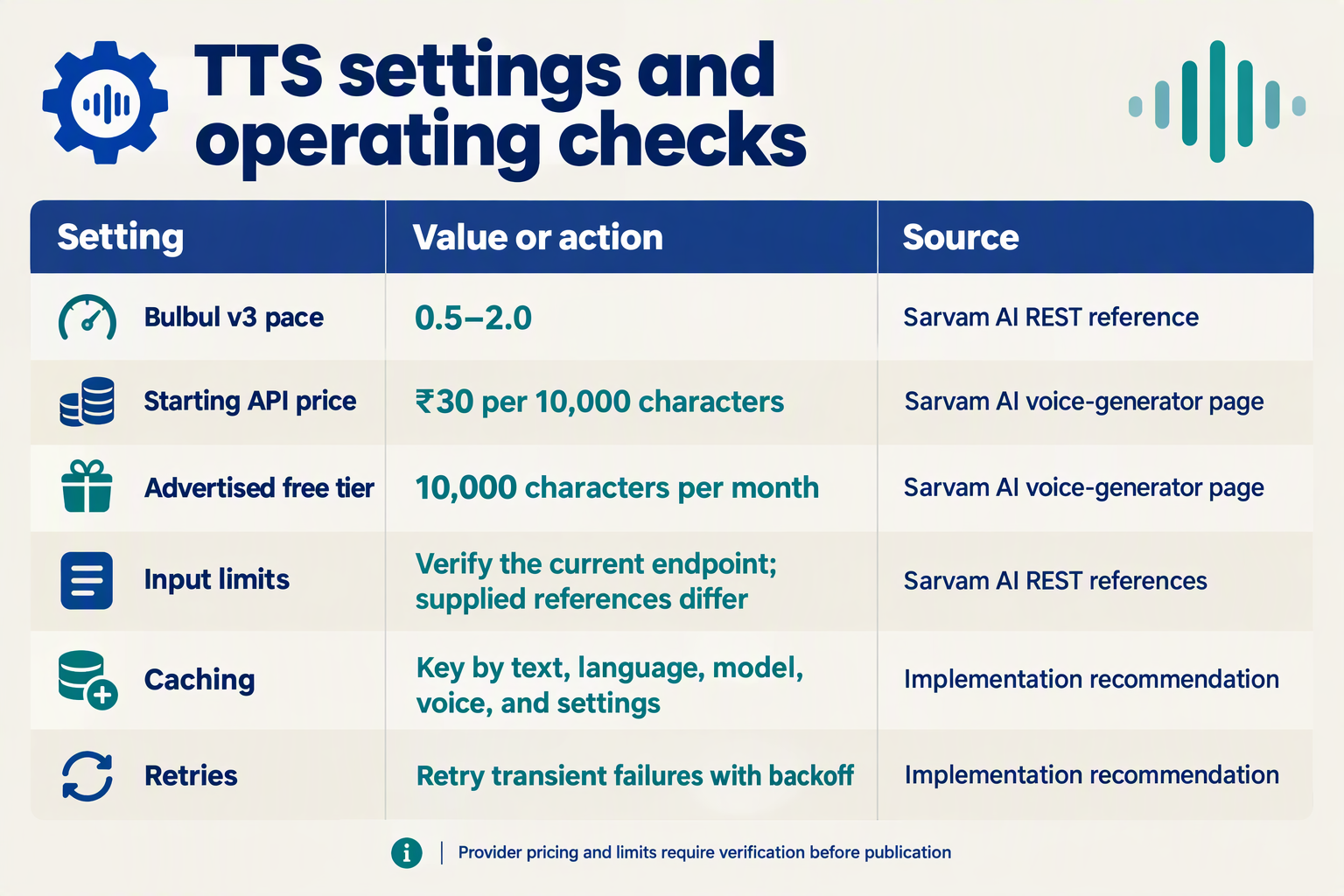
The most useful advanced settings for Telugu and Kannada TTS are voice selection, speech pace, request sizing, audio caching, and bounded retries. Tune these against real app sentences: a faster voice is not necessarily easier to understand, and repeated generation of identical audio can add avoidable cost.
Which TTS settings should I tune first?
Use this configuration checklist after your basic integration works. Provider capabilities below reflect the supplied Sarvam AI documentation as of October 2026; caching and retry policies are application-level recommendations, not additional Sarvam API parameters.
| Setting | Recommended starting point | Quality, cost, or reliability trade-off |
|---|---|---|
| Voice selection | Compare supported speaker values using the same Telugu and Kannada test sentences. | Consistency matters more than choosing the most expressive demo. |
| Speech pace | Start at the documented default; adjust only after listener testing. | Slower speech may clarify instructions but lengthens playback. |
| Request size | Validate your exact endpoint’s character limit before sending text. | Smaller segments simplify retries but can interrupt prosody. |
| Audio caching | Cache reusable, non-sensitive phrases with configuration-aware keys. | Avoids repeated synthesis; stale keys can return the wrong voice. |
| Retry policy | Use capped exponential backoff for transient failures. | Improves recovery without creating unlimited duplicate requests. |
| Timeout and fallback | Set a timeout and keep the original text available. | Preserves usability when audio generation or playback fails. |
As of October 2026, Sarvam AI’s REST documentation identifies pace as the speech-speed control. Check the accepted range for your selected model rather than assuming settings from another TTS provider are interchangeable.
How do I handle conflicting request limits?
As of October 2026, Sarvam AI’s supplied REST conversion reference lists a maximum of 2,500 characters for bulbul:v3 and 1,500 characters for bulbul:v2. However, another supplied Sarvam AI REST page describes v3 long-form synthesis as requiring no chunking.
Treat this discrepancy as a deployment check:
- Confirm the endpoint and model used by your backend.
- Test near-limit inputs in staging and inspect validation errors.
- Split at sentence boundaries if that endpoint requires segmentation.
Do not split solely by byte count: Telugu and Kannada text uses multibyte UTF-8 characters. Also confirm how the API counts “characters”; your programming language’s string-length function may use a different unit.
How can caching reduce TTS costs safely?
As of October 2026, Sarvam’s AI voice generator page advertises API pricing starting at ₹30 per 10,000 characters, with 10,000 free characters per month. At that advertised starting rate, 100,000 billable characters would cost ₹300, before taxes or other applicable charges; verify pricing for your chosen configuration.
Build cache keys from:
- Normalized text and target language.
- Model and speaker.
- Pace and any selected output settings.
Cache generic instructions, not sensitive account balances or personal messages in a shared public store. Separately, avoid automatically retrying validation errors: unchanged invalid input will not become valid.
What should I monitor before changing settings?
Log generation failures, time to playable audio, cache hits, and native-speaker pronunciation feedback. Change one setting at a time so improvements are attributable.
As of October 2026, CallMissed’s verified product fact sheet lists OpenAI-compatible speech endpoints. That offers another integration path, but verify the selected voice model’s Telugu and Kannada support and controls rather than assuming endpoint compatibility makes every provider-specific setting portable.
What common integration mistakes should I avoid?
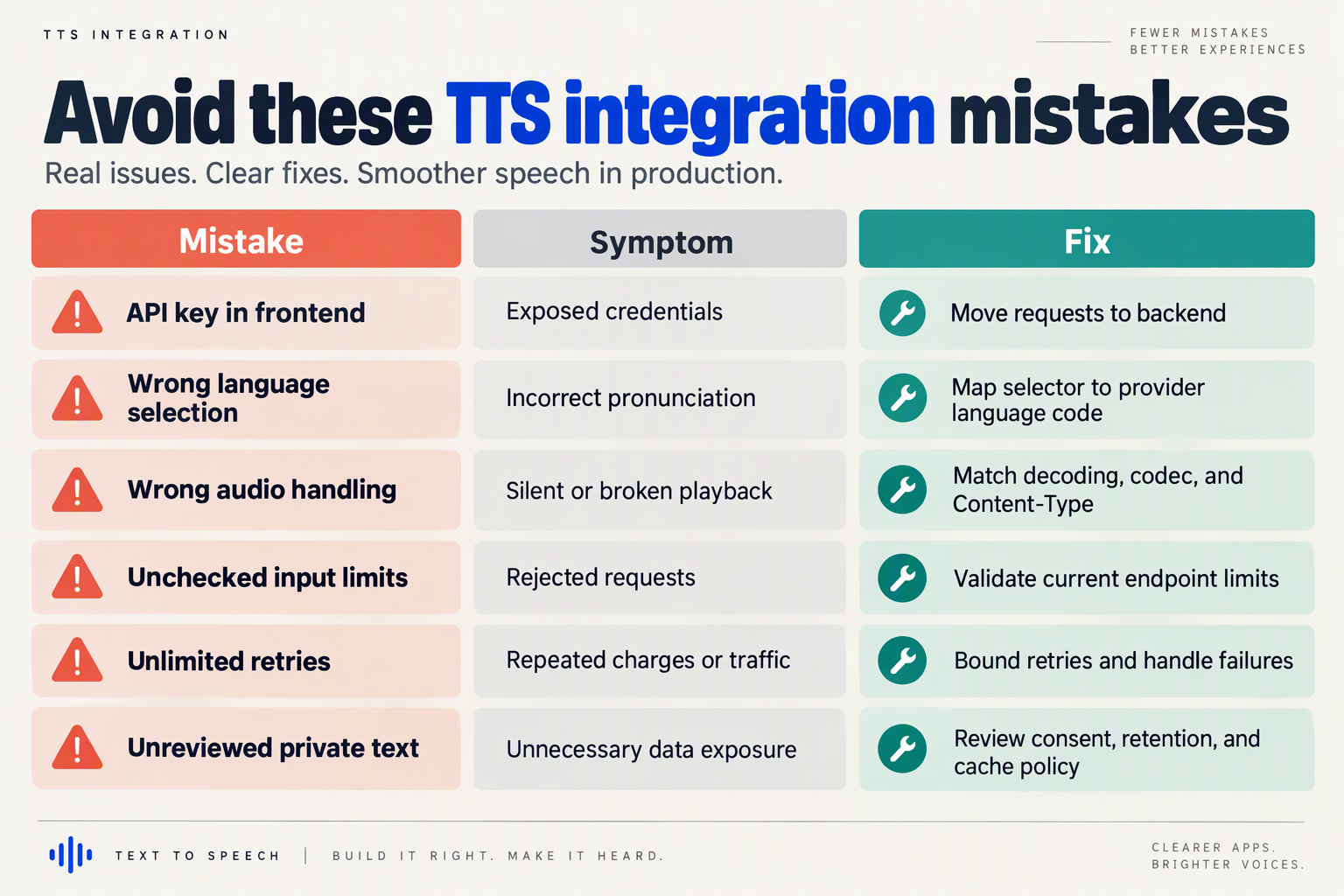
The most common Telugu and Kannada TTS integration mistakes are mixing API schemas, mishandling Unicode, exceeding endpoint limits, caching the wrong audio, and replaying stale responses. Avoid these by validating requests before synthesis and treating audio delivery as a separate, testable part of your app.
Which Telugu and Kannada TTS mistakes cause production failures?
A successful HTTP response does not prove that the right sentence reached the right listener. Use this checklist to catch failures that a basic “generate and play” demo can miss.
| Mistake | What goes wrong | Practical fix |
|---|---|---|
| Reusing another provider’s request schema | Language or speaker settings are rejected or incorrectly mapped. | Build a provider adapter; validate each endpoint’s required fields. |
| Truncating text by bytes | A Telugu or Kannada character sequence can be damaged before synthesis. | Preserve Unicode; split at sentence boundaries using the endpoint’s counting rules. |
| Assuming unlimited input | Long notifications or narration fail unexpectedly. | Enforce a configurable input limit and test boundary cases. |
| Caching by text alone | A Kannada request can receive audio generated with another language or voice. | Include language, model, speaker, pace, and output format in cache keys. |
| Playing whichever response arrives last | An older request interrupts the user’s newer selection. | Track request IDs; discard stale responses and cancel obsolete playback. |
| Retrying every failure | Invalid requests repeat, while duplicate synthesis increases usage. | Retry transient failures selectively; cap attempts and deduplicate in-flight requests. |
How should I handle conflicting API limits?
Treat the exact endpoint’s limits as a deployment constraint, not a universal model property. As of October 2026, Sarvam AI’s supplied REST conversion reference lists a 2,500-character maximum for bulbul:v3 and 1,500 characters for bulbul:v2.
However, as of October 2026, another supplied Sarvam AI REST API page describes v3 long-form synthesis as requiring no chunking. These descriptions differ, so confirm the endpoint and model combination you actually call rather than combining documentation from separate routes.
Before release:
- Record the endpoint and model in your integration configuration.
- Test inputs below, at, and above the documented limit.
- Define an overflow policy: reject with a useful message, or split into sentences and preserve playback order.
Do not silently cut off an appointment instruction or payment explanation just to make a request fit.
How do I prevent provider-switching and playback bugs?
Keep your app’s internal speech request separate from the provider’s payload. An internal object might contain text, language, and voicePreference; your backend adapter translates those fields into the selected API’s documented parameters.
As of October 2026, CallMissed’s verified product fact sheet lists OpenAI-compatible speech endpoints. That compatibility can simplify existing SDK integration, but developers should still validate the selected model’s voice identifiers, language handling, and returned audio format rather than assume Sarvam-specific fields transfer unchanged.
For playback, test an intentionally awkward sequence: request Telugu audio, immediately switch to Kannada, then navigate away before either response finishes. Only the current request should remain eligible to play.
What should I log when synthesis fails?
Capture enough information to diagnose failures without routinely storing sensitive narration:
- Request metadata: provider, model, language, input length, and correlation ID.
- Failure category: validation, authentication, throttling, synthesis, decoding, or playback.
- Delivery state: cancelled, superseded, downloaded, or played.
Separating synthesis success from playback success helps identify whether a problem belongs to text preparation, the API adapter, or the app’s audio lifecycle.
Frequently Asked Questions
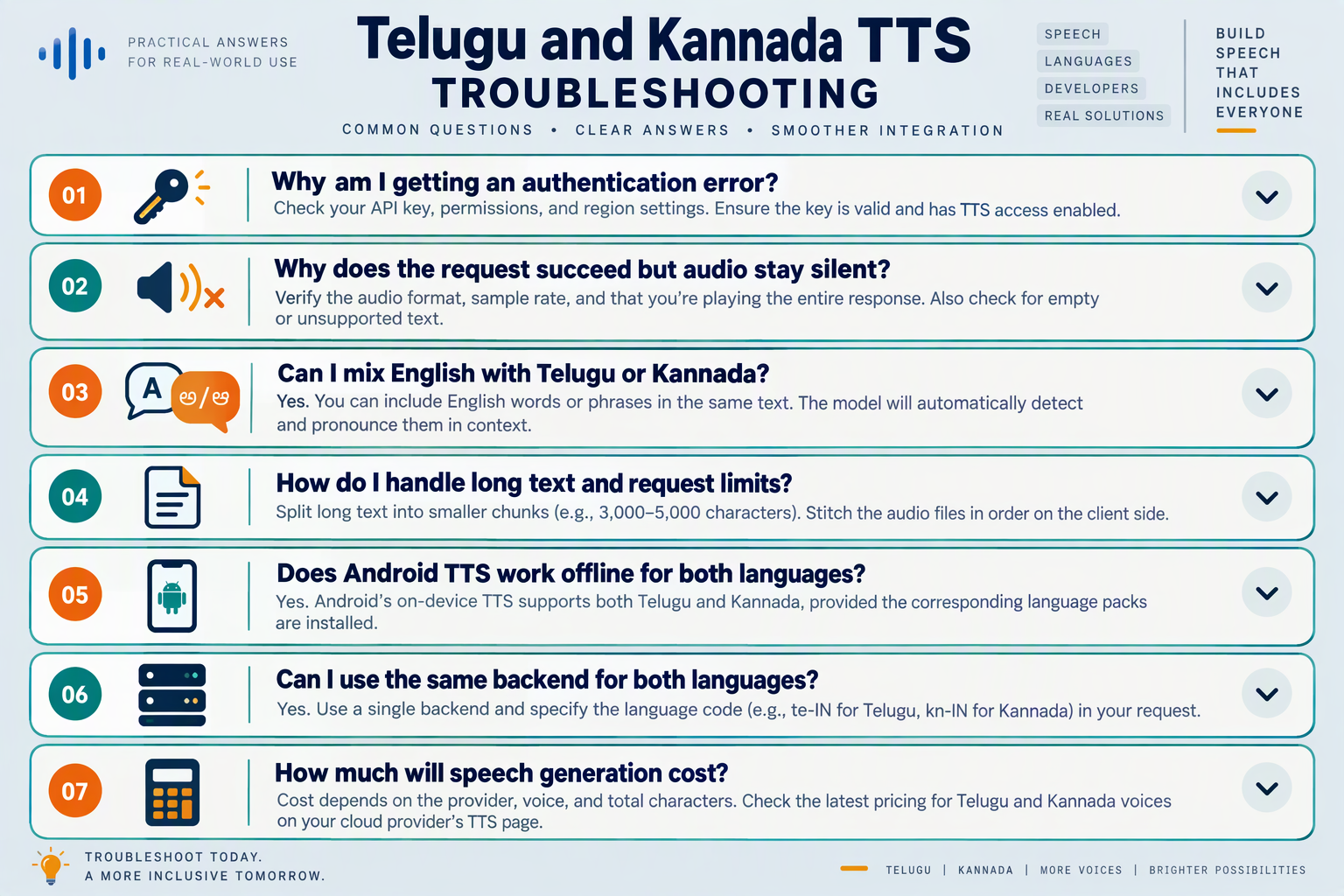
How do I add Telugu and Kannada TTS to my app without authentication or invalid-request errors?
target_language_code as its language-selection parameter; do not assume another provider accepts the same field. CallMissed’s verified October 2026 fact sheet lists OpenAI-compatible speech endpoints, so use the selected provider’s request schema rather than copying a Sarvam payload unchanged.Why does Telugu or Kannada TTS mispronounce English words and local names?
How do I add Telugu and Kannada TTS to my app when generated audio will not play?
Why does a long Telugu or Kannada TTS request fail or stop early?
bulbul:v3 and 1,500 characters for bulbul:v2, while another supplied Sarvam REST page says v3 accepts long-form text without chunking. Because those descriptions differ, verify the endpoint you actually call and, where necessary, split text at sentence boundaries while preserving playback order.How can I fix incorrect readings of prices, dates, and phone numbers in Indian-language TTS?
Why does Telugu or Kannada TTS sound rushed or unnatural even when pronunciation is correct?
pace as a speech-speed control, and its migration documentation describes 30+ ready-to-use Bulbul v3 voices. Compare the same Telugu or Kannada passage across supported voices and pace settings, asking native listeners about clarity and pauses rather than choosing solely from a sample in another language.Where can I find official documentation and an alternative integration path?
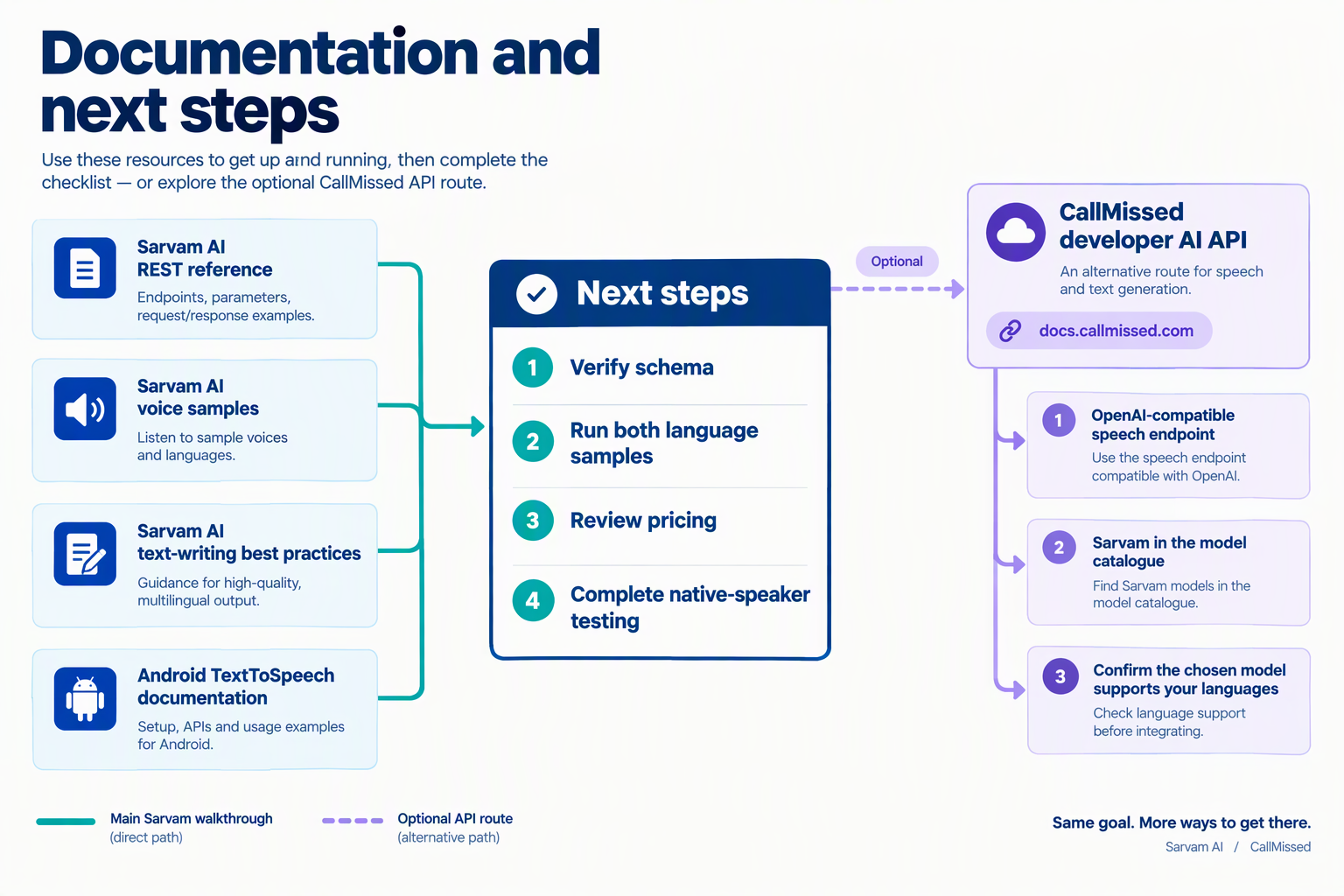
Use Sarvam AI’s official REST API reference, voice catalogue, and text-preparation guide as your primary documentation for Telugu and Kannada TTS. For an alternative integration path, CallMissed provides OpenAI-compatible speech endpoints; confirm the selected model’s language support and request schema before switching.
Which official Sarvam AI documentation should I use?
Keep these four resources in your implementation notes, with the date your team last checked them:
- Text-to-Speech REST API — Instant Voice Synthesis: Use this as the starting point for request parameters and language selection. As of October 2026, Sarvam AI’s REST documentation explicitly lists Telugu and Kannada and identifies
target_language_codeas the language-selection field. - Voices: Use Sarvam AI’s official voice catalogue to shortlist speakers. As of October 2026, the catalogue provides samples reading the same Hindi sentence, making comparisons easier—but those samples do not replace testing your actual Telugu and Kannada content.
- Best Practices for Writing Text for TTS: Consult this when preparing mixed-language sentences. As of October 2026, Sarvam AI’s guide includes a
bulbul:v3example with a namedspeakerand guidance on selecting the target language for code-mixed text. - Migrating Text-to-Speech from Cartesia to Sarvam: Read this when adapting an existing integration. As of October 2026, Sarvam AI’s migration guide describes “Plain speaker names, no voice object,” an important distinction when translating another provider’s voice configuration.
Treat these pages as complementary: the API reference defines the contract, while the guides explain how to use it effectively.
What should I do when the documentation disagrees?
Verify the exact endpoint your application calls rather than assuming every Sarvam documentation page describes identical limits.
As of October 2026, Sarvam AI’s “Instant Voice Synthesis” REST page says developers can “Send long-form text in a single request (v3).” However, Sarvam AI’s separate “REST” conversion reference lists a 2,500-character maximum for bulbul:v3 and 1,500 characters for bulbul:v2, also in the supplied October 2026 context.
Before shipping:
- Record the endpoint, model identifier, SDK version, and documentation page used.
- Test input near the documented boundary in a development environment.
- Check whether oversized requests fail, truncate, or require another workflow.
- Ask Sarvam AI to clarify conflicting guidance before designing long-form narration around it.
A successful short request does not establish the maximum supported length.
How can I use an OpenAI-compatible alternative integration path?
As of October 2026, CallMissed’s verified product fact sheet lists OpenAI-compatible audio speech endpoints, 14 text-to-speech models, and natural voices in 10 Indian languages plus English. Existing OpenAI SDK integrations can use its compatible endpoints by changing the base URL, but compatibility does not establish identical voice names, language controls, or model behaviour.
For this alternative path:
- Check the current speech documentation for a model explicitly supporting Telugu and Kannada; the aggregate language count alone is insufficient.
- Map your application’s settings to that model’s supported fields rather than copying Sarvam’s
target_language_codeunchanged. - Run the same acceptance tests for pronunciation, returned audio, playback, and error handling.
- Keep provider configuration separate from your app’s user-facing language selector.
The practical finish line is a documented, tested integration—not merely interchangeable API syntax.
Conclusion
To add Telugu and Kannada TTS to your app, send native-script text from your backend to a speech API, select the appropriate language, and play the returned audio. The integration is straightforward; production readiness depends on how well the speech handles your users’ actual words, workflows, and listening needs.
The central takeaway is that you do not need to train a voice model to begin. As of October 2026, Sarvam AI’s migration documentation describes 30+ ready-to-use Bulbul v3 voices, with “no per-request cloning or training step to manage.” That shifts the practical work toward voice selection, text preparation, playback, and validation.
What should you remember before launching Telugu and Kannada TTS?
- Choose the language and voice explicitly. For Sarvam AI, use
target_language_codewithte-INfor Telugu orkn-INfor Kannada, and confirm the selected model’s request format. Listen to candidate voices using your own order updates, payment explanations, or appointment instructions—not just a polished sample. A voice that sounds appealing in isolation may not deliver your workflow clearly.
- Keep the integration on your backend. Store API credentials server-side, send the prepared text to the speech endpoint, and connect the returned audio to your app’s playback controls. Treat loading and failure states as part of the feature: generating audio successfully is only one step toward giving users a dependable listening experience.
- Validate the sentences people will actually hear. Test native-script text alongside English product terms, personal names, dates, and currency amounts. Ask Telugu and Kannada speakers to review intelligibility, pronunciation, sentence breaks, and pacing. Prioritize whether listeners understand an instruction correctly rather than whether the voice merely sounds impressive.
- Check endpoint limits before adding longer narration. As of October 2026, the supplied Sarvam AI documentation includes both a long-form, single-request description and a separate REST reference listing a 2,500-character limit for Bulbul v3. Confirm which documentation applies to your implementation instead of assuming every endpoint handles longer text identically.
What should developers watch next?
Watch how voice choices, pronunciation quality, and long-form handling evolve, then retest the same representative sentences when changing models or voices. The useful benchmark remains your application’s listening experience, not language support alone.
CallMissed is another platform readers can explore as multilingual AI communication develops. As of October 2026, CallMissed’s verified product fact sheet lists OpenAI-compatible speech endpoints and natural text-to-speech voices in 10 Indian languages plus English.
Start with one useful Telugu workflow and one Kannada workflow, validate both with native speakers, and expand only when the speech reliably communicates what users need to know.
Related Reading
- Bulbul V4 Flash Now on CallMissed API: Sarvam's Fast TTS
- Hardware-Efficient Language Models for Support Costs
- Large Language Models: Customer Support's Future in 2026