OpenAI Realtime WebRTC API: Speech-to-Speech Setup Guide



Set up the OpenAI Realtime WebRTC API with browser and server code, secure credentials, audio playback, and fixes for common connection errors.
OpenAI Realtime WebRTC API: Speech-to-Speech Setup Guide
Your browser can carry a speech-to-speech conversation without your application stitching together separate transcription, text-generation, and speech-synthesis services. To set up the OpenAI Realtime WebRTC API, create a browser peer connection, attach microphone audio, exchange a Session Description Protocol (SDP) offer and answer through a secure backend, and play the incoming audio stream.
That is the core architecture—not a requirement to expose your OpenAI API key in frontend JavaScript. According to OpenAI’s Realtime documentation, as of October 2026, the unified WebRTC connection flow uses POST /v1/realtime/calls: your browser sends its SDP offer to your developer-controlled server, which makes the authenticated request to OpenAI and returns the SDP answer.
How do you set up realtime speech-to-speech with WebRTC?
Start with a small browser client and a backend endpoint that keeps your standard API credentials private. The browser handles microphone capture and audio playback; the backend handles authenticated session establishment. A WebRTC data channel carries conversation events alongside the audio connection, giving your application a way to send instructions and respond to session activity.
This matters now because choosing the right transport changes how much infrastructure you must build. OpenAI’s WebSocket guide recommends WebRTC for browser clients as of October 2026. For a browser-based voice assistant, that recommendation provides a practical starting point: use the browser’s media capabilities rather than treating live conversation as a sequence of uploaded audio files.
The endpoint details also matter. The supplied OpenAI documentation includes both Realtime calls and separate live-session examples; this guide follows the Realtime /v1/realtime/calls flow rather than mixing request bodies or response formats across interfaces. Copying individually plausible snippets from different API guides can leave an otherwise sound implementation unable to connect.
You will learn how to:
- Capture microphone audio and attach tracks to an
RTCPeerConnection. - Create an SDP offer and exchange it through your backend.
- Apply the SDP answer and play the model’s returned audio.
- Handle conversation events through the data channel.
- Troubleshoot connection failures, microphone permissions, authentication errors, and silent playback.
The broader developer ecosystem reflects this shift toward integrated voice infrastructure: as of October 2026, CallMissed’s verified product catalogue includes 24 realtime voice-agent models behind one API key and balance, although that does not establish compatibility with OpenAI’s specific WebRTC signaling flow.
By the end, you will understand not just which code to paste, but where authentication belongs, how audio travels, and which failures to investigate first.
How do I set up realtime speech-to-speech with WebRTC?
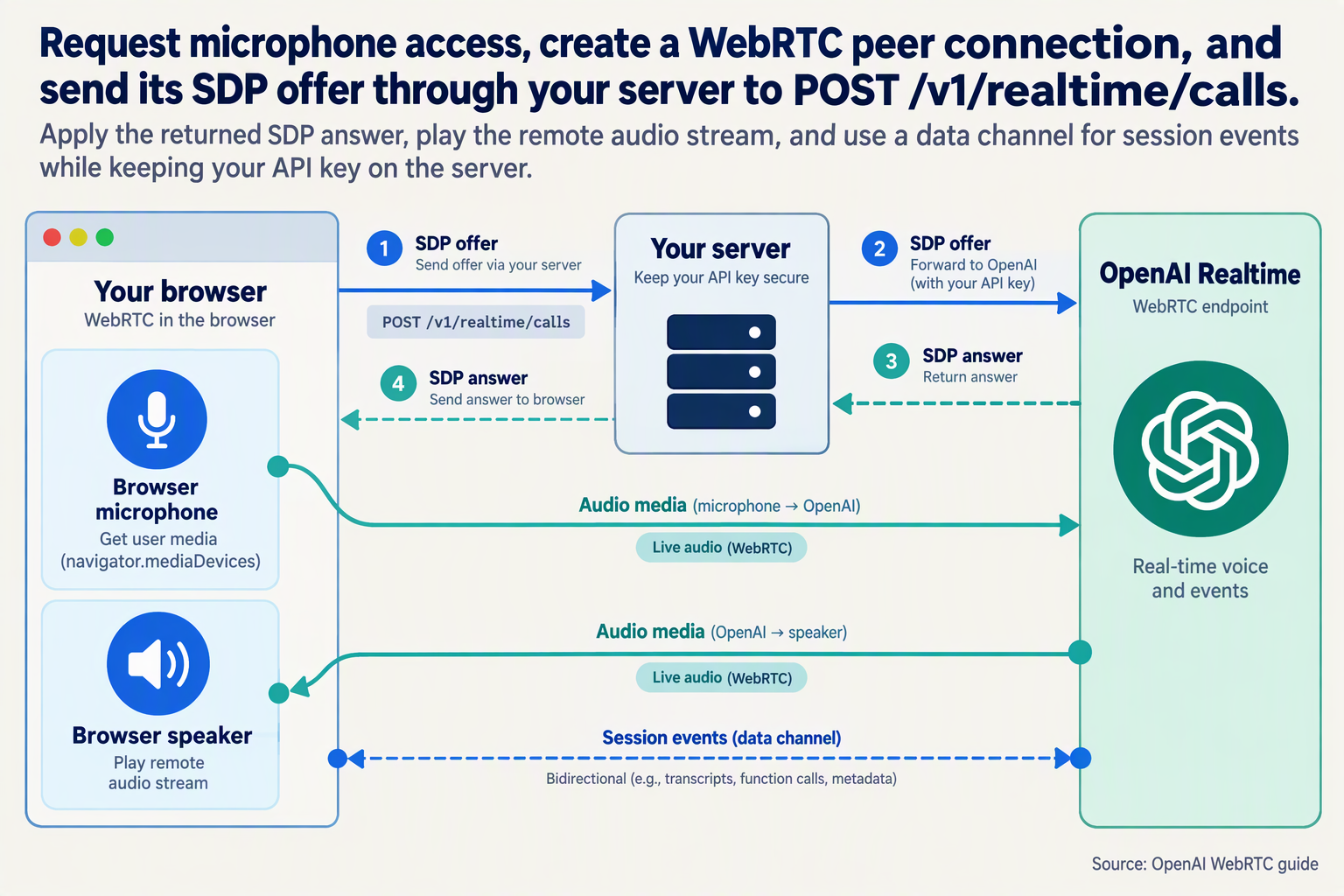
Set up realtime speech-to-speech with WebRTC by connecting a microphone-enabled browser to OpenAI through an authenticated SDP exchange handled by your backend. The minimal implementation below makes that connection concrete: one server route, one browser page, and a data channel for session events.
What do you need before running the code?
Use Node.js 18 or newer, an OpenAI API key, and a Realtime model identifier available to your project. Serve the browser page from localhost during development or HTTPS in production so microphone access works.
According to OpenAI’s WebRTC documentation, as of October 2026, the unified connection interface establishes sessions through POST /v1/realtime/calls. This example follows that interface—not the separate /v1/live/sessions examples.
- Install Express with
npm install express. - Save the backend as
server.mjs. - Set
OPENAI_API_KEYandOPENAI_REALTIME_MODELin your server environment. - Save the browser page as
public/index.html.
How does the backend exchange the SDP offer?
The backend receives plain SDP from your browser and submits multipart form data containing the offer and session configuration. Keep authentication credentials on this server; never include them in the HTML.
// server.mjs
import express from "express";

const app = express();
app.use(express.static("public"));

app.post("/session", express.text({
  type: "application/sdp",
  limit: "100kb"
}), async (req, res) => {
  try {
    const form = new FormData();
    form.set("sdp", req.body);
    form.set("session", JSON.stringify({
      type: "realtime",
      model: process.env.OPENAI_REALTIME_MODEL,
      instructions: "Answer briefly and clearly."
    }));

    const upstream = await fetch(
      "https://api.openai.com/v1/realtime/calls",
      {
        method: "POST",
        headers: {
          Authorization: `Bearer ${process.env.OPENAI_API_KEY}`
        },
        body: form
      }
    );

    const body = await upstream.text();
    if (!upstream.ok) {
      console.error(upstream.status, body);
      return res.status(502).send("Session creation failed");
    }

    res.type("application/sdp").send(body);
  } catch (error) {
    console.error(error);
    res.status(500).send("Connection failed");
  }
});

app.listen(3000);
Do not manually set the upstream Content-Type header: FormData generates the multipart boundary. Run node server.mjs, then open localhost on port 3000.
How does the browser connect microphone and speaker audio?
Create the data channel and attach microphone tracks before generating the offer. Apply the server’s response as an SDP answer—not as JSON.
<button id="start">Start conversation</button>
<audio id="speaker" autoplay></audio>
<script type="module">
const start = document.querySelector("#start");
const speaker = document.querySelector("#speaker");

start.onclick = async () => {
  start.disabled = true;
  const pc = new RTCPeerConnection();
  let mic;

  try {
    pc.ontrack = ({ streams }) => {
      speaker.srcObject = streams[0];
      speaker.play().catch(console.warn);
    };

    mic = await navigator.mediaDevices.getUserMedia({
      audio: true
    });
    mic.getTracks().forEach(track => pc.addTrack(track, mic));

    const events = pc.createDataChannel("oai-events");
    events.onmessage = event => console.log(JSON.parse(event.data));

    await pc.setLocalDescription(await pc.createOffer());

    const response = await fetch("/session", {
      method: "POST",
      headers: { "Content-Type": "application/sdp" },
      body: pc.localDescription.sdp
    });
    if (!response.ok) throw new Error(await response.text());

    await pc.setRemoteDescription({
      type: "answer",
      sdp: await response.text()
    });
  } catch (error) {
    mic?.getTracks().forEach(track => track.stop());
    pc.close();
    start.disabled = false;
    console.error(error);
  }
};
</script>
How can you tell whether setup succeeded?
Speak after the connection establishes, then check three signals:
- Microphone permission: the browser indicates active capture.
- Connection state: inspect
pc.connectionStatewhen debugging. - Session events: the console receives data-channel messages.
According to OpenAI’s Realtime conversations documentation, as of October 2026, client events travel over the WebRTC data channel. Receiving events confirms messaging, but does not prove speaker playback; test both paths separately.
Before production, add authenticated access to /session, usage controls, and a Stop button that stops microphone tracks and closes the peer connection. The example intentionally focuses on establishing the connection; conversation controls and failure recovery come next.
What do I need before starting the WebRTC demo?
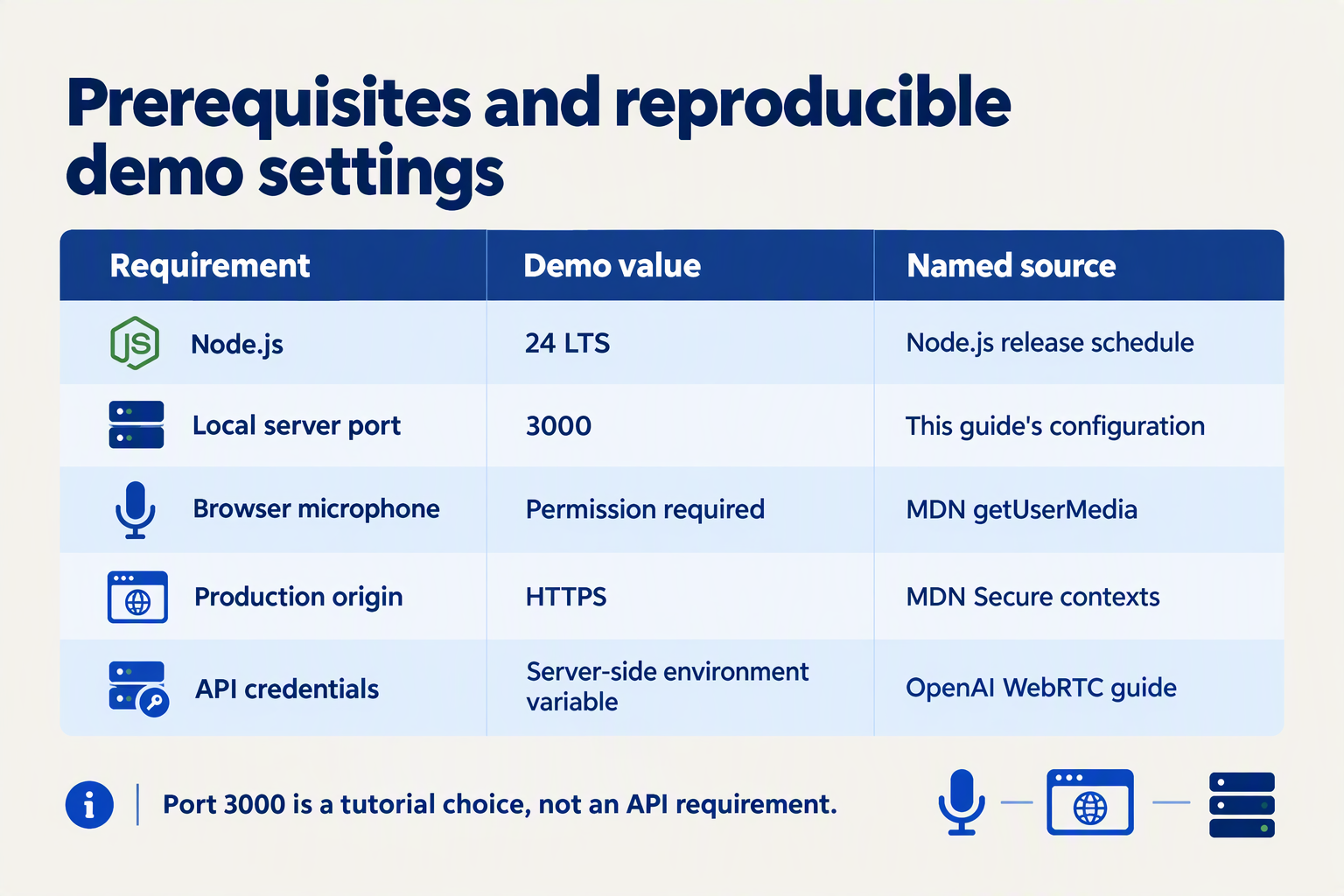
Before starting the WebRTC demo, you need a microphone-enabled browser, a secure browser context, an OpenAI API project with Realtime access, and a backend that keeps your API key private. For the implementation in this guide, also prepare an audio playback element and browser developer tools so you can distinguish permission failures from signaling or playback problems.
What are the minimum requirements for the WebRTC demo?
Use this checklist before writing the connection code. The endpoint selection below follows OpenAI’s Realtime WebRTC documentation as of October 2026; the browser checks are practical prerequisites, not additional OpenAI services.
| Requirement | What to prepare | Quick verification |
|---|---|---|
| Browser and microphone | A browser supporting RTCPeerConnection and navigator.mediaDevices.getUserMedia() | Confirm both APIs exist and the microphone works |
| Secure browser context | HTTPS for deployment; localhost for local development | Check that window.isSecureContext is true |
| OpenAI credentials | A server-side API key and a project permitted to use the chosen Realtime model | Verify project access and available API usage funding |
| Backend endpoint | A server route that forwards session-establishment requests | Confirm the browser can reach your route |
| Consistent API flow | The Realtime POST /v1/realtime/calls interface | Keep request and response handling aligned with its documentation |
| Playback and diagnostics | An <audio> element, a Start button, and developer tools | Test speaker output and inspect failed network requests |
An existing ChatGPT subscription is not a substitute for configuring OpenAI API access. Check your API project separately, and do not assume the demo is free: consult current model pricing before running extended conversations.
How can I check browser readiness before connecting?
Run this small check from your demo page:
const readiness = {
  secureContext: window.isSecureContext,
  peerConnection: typeof RTCPeerConnection !== "undefined",
  microphoneAPI: Boolean(
    navigator.mediaDevices?.getUserMedia
  ),
};

console.table(readiness);
All three checks should return true. These results establish that the browser exposes the required capabilities; they do not prove that microphone permission has been granted or that the network will allow a WebRTC connection.
Next, test microphone permission from a button click:
async function testMicrophone() {
  const stream = await navigator.mediaDevices.getUserMedia({
    audio: true,
  });

  console.log("Microphone permission granted");
  stream.getTracks().forEach(track => track.stop());
}
Stopping the tracks releases the microphone after this preliminary test. Later, the actual conversation will retain its microphone stream until the user ends the session.
What should I configure on the backend first?
Prepare these items before exchanging any SDP:
- Store the API key server-side, for example in an
OPENAI_API_KEYenvironment variable. Never put a standard API key into frontend source code or a browser-exposed build variable. - Choose a supported Realtime model using OpenAI’s current documentation and your project’s access permissions.
- Define one browser-facing connection route, such as
/session, and make its response format explicit. - Protect that route before public deployment with appropriate authentication, usage limits, and request validation.
According to OpenAI’s Realtime WebRTC documentation, as of October 2026, the unified connection interface requires a server-side application to call /v1/realtime/calls. Your own /session route is application-defined—not an OpenAI endpoint.
Finally, keep this guide’s API family consistent. The supplied OpenAI GPT-Live documentation describes a different /v1/live/sessions flow; its JSON response fields should not be copied into this Realtime demo.
How do the Realtime API, WebRTC, and WebSockets fit together?
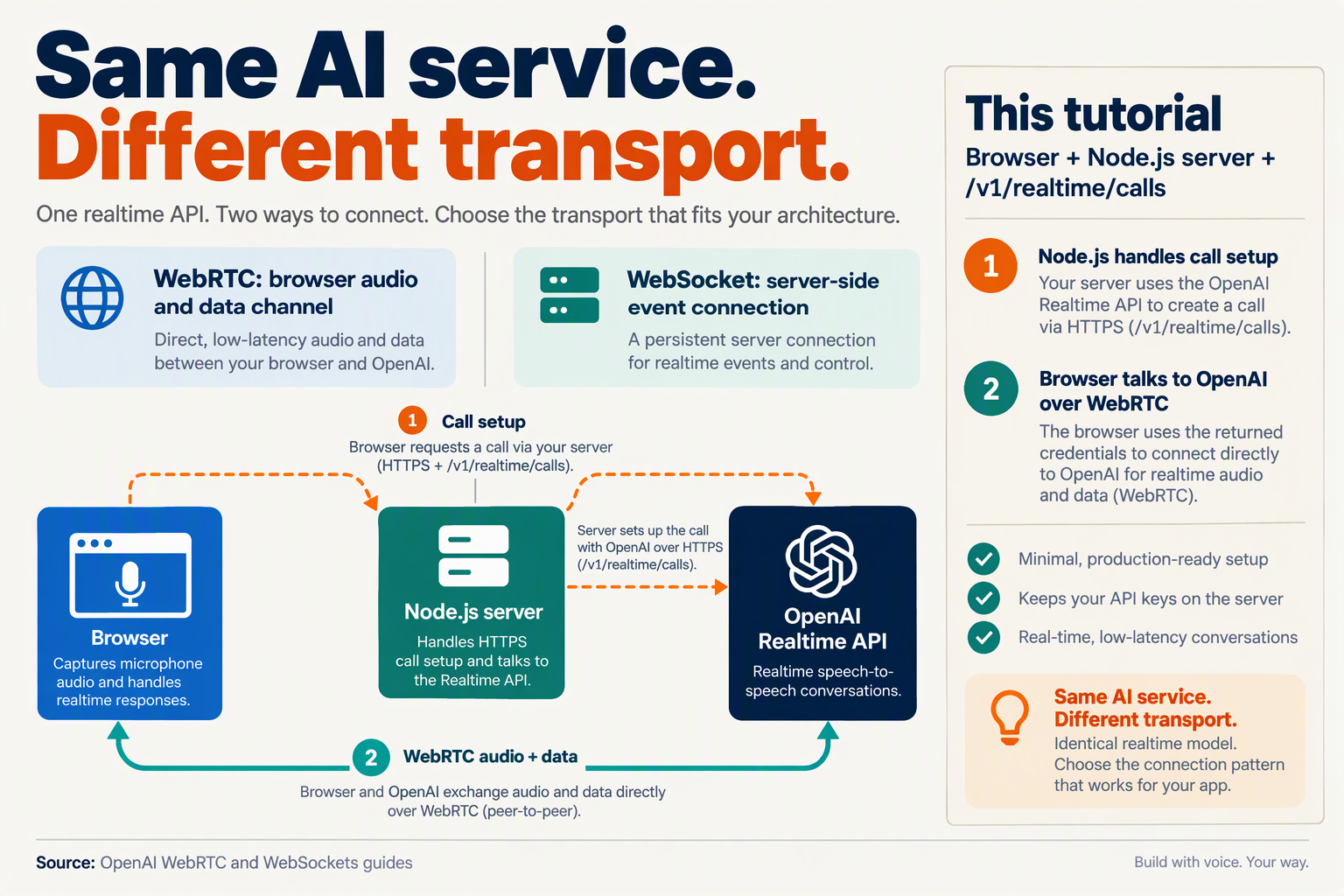
The Realtime API provides the conversational model and event protocol; WebRTC and WebSockets are alternative ways to connect your application to that service. For browser speech-to-speech, use WebRTC to transport audio and a WebRTC data channel to exchange control events—not a separate WebSocket just to send instructions.
What does the Realtime API do?
The Realtime API is the application layer: it defines sessions, conversation activity, instructions, and responses. The transport determines how audio and events travel between your application and OpenAI.
According to OpenAI’s Realtime conversations documentation, as of October 2026, applications can send client events through either WebRTC or WebSocket connections. That means an instruction update is a conversation operation, not a feature exclusive to one transport.
Keep three responsibilities separate:
- Model behavior: instructions, response generation, and conversation state.
- Connection setup: authentication and establishing the session.
- Transport: delivering microphone audio, returned audio, and events.
This separation makes debugging easier: a connected microphone does not prove that your instruction update succeeded, and a received event does not prove that browser audio playback is working.
How does WebRTC carry audio and control events?
For a browser voice assistant, WebRTC provides two distinct paths within the connection:
- Media tracks carry microphone audio to the service and returned audio to the browser.
- An
RTCDataChannelcarries structured conversation events, such as instruction updates.
The Session Description Protocol (SDP) offer and answer negotiate the connection; they are not the ongoing conversation payload. According to OpenAI’s WebRTC documentation, as of October 2026, the unified connection flow establishes Realtime sessions through POST /v1/realtime/calls.
Once your data channel is open, an instruction update can look like this:
// dc is the RTCDataChannel created during WebRTC setup.
function updateInstructions(instructions) {
  if (dc.readyState !== "open") {
    throw new Error("Realtime data channel is not open");
  }

  dc.send(JSON.stringify({
    type: "session.update",
    session: {
      type: "realtime",
      instructions
    }
  }));
}
This sends a control event, not microphone samples. Receive server events on the same channel and inspect error events rather than assuming that successful send() means the service accepted the update.
When should I use WebSockets instead of WebRTC?
Use WebSockets when your application runs primarily on a server or already manages audio capture, encoding, buffering, and playback outside a browser.
In a WebSocket implementation, audio and control events share the socket connection. Your application handles audio payloads explicitly rather than attaching browser media tracks to an RTCPeerConnection.
OpenAI’s WebSocket guide recommends WebRTC for browser clients as of October 2026. WebSockets remain useful, but they do not automatically provide the browser media pipeline that WebRTC supplies.
For example, CallMissed’s verified product catalogue, as of October 2026, includes a managed voice-agent WebSocket and a Deepgram Voice Agent-compatible endpoint. Those are relevant to WebSocket-based integrations; they do not establish support for OpenAI’s WebRTC signaling flow.
How do I choose the right architecture?
Choose based on where audio originates:
- Browser microphone and browser playback: start with WebRTC.
- Server-managed audio streams: consider WebSockets.
- Browser UI with backend business logic: keep browser media on WebRTC and application secrets on your backend.
The practical rule is simple: choose the transport first, then implement its audio path and event handling consistently. Do not combine WebSocket audio examples with WebRTC media-track code and expect them to form one working connection.
How do I create the Node.js server for POST /v1/realtime/calls?
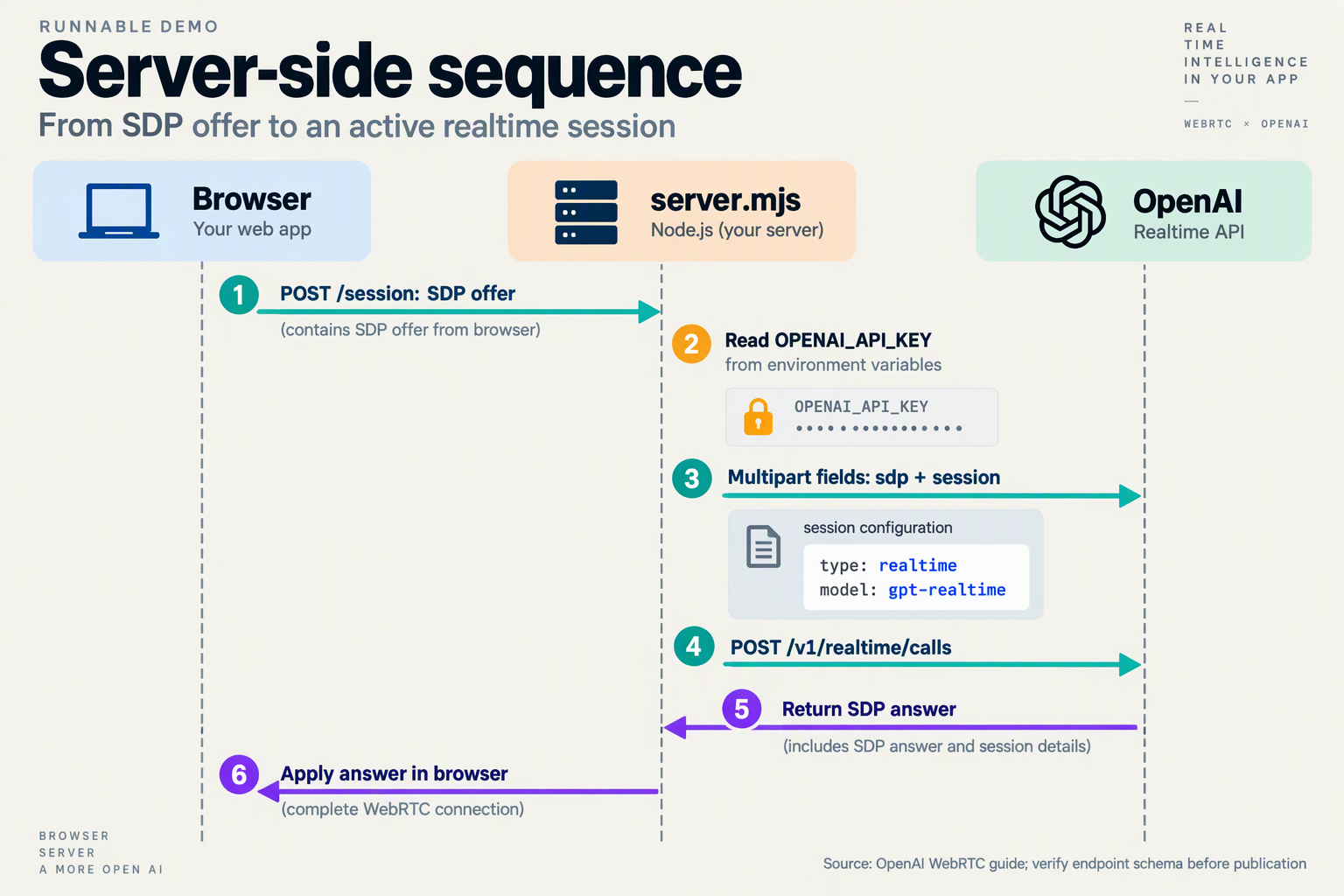
Create a Node.js signaling server that accepts the browser’s SDP offer, sends it to OpenAI’s POST /v1/realtime/calls endpoint with server-side credentials, and returns the SDP answer. According to OpenAI’s Realtime WebRTC guide, as of October 2026, this unified connection flow uses a developer-controlled backend rather than exposing a standard API key in the browser.
What do I need to install for the Node.js server?
Use Node.js 22 or newer for this example, which relies on built-in fetch, FormData, and environment-file loading. Install Express in a new project:
mkdir realtime-server
cd realtime-server
npm init -y
npm install express
Create a .env file:
OPENAI_API_KEY=your_server_side_api_key
OPENAI_REALTIME_MODEL=gpt-realtime
Keep .env out of version control. The model is configurable so you can select an available Realtime model for your OpenAI project without changing the signaling code.
How do I implement the SDP exchange in Express?
Save this as server.mjs. The browser-facing route is POST /session; the upstream OpenAI route is POST /v1/realtime/calls. They serve different purposes and do not need matching names.
import express from "express";

const app = express();
const apiKey = process.env.OPENAI_API_KEY;

if (!apiKey) throw new Error("OPENAI_API_KEY is required");

app.post(
  "/session",
  express.text({ type: "application/sdp", limit: "64kb" }),
  async (req, res) => {
    if (!req.is("application/sdp")) {
      return res.status(415).json({
        error: "Send Content-Type: application/sdp",
      });
    }

    if (typeof req.body !== "string" ||
        !req.body.trim().startsWith("v=0")) {
      return res.status(400).json({ error: "Invalid SDP offer" });
    }

    const form = new FormData();
    form.set("sdp", req.body);
    form.set("session", JSON.stringify({
      type: "realtime",
      model: process.env.OPENAI_REALTIME_MODEL || "gpt-realtime",
      instructions: "Be helpful, concise, and conversational.",
    }));

    try {
      const upstream = await fetch(
        "https://api.openai.com/v1/realtime/calls",
        {
          method: "POST",
          headers: { Authorization: `Bearer ${apiKey}` },
          body: form,
          signal: AbortSignal.timeout(15000),
        }
      );

      if (!upstream.ok) {
        console.error("Realtime setup failed:", upstream.status);
        return res.status(upstream.status).json({
          error: "Realtime session creation failed",
        });
      }

      const answer = await upstream.text();
      return res.status(201).type("application/sdp").send(answer);
    } catch (error) {
      console.error("Realtime signaling error:", error.name);
      return res.status(502).json({
        error: "Could not reach the Realtime service",
      });
    }
  }
);

app.listen(3000, "127.0.0.1", () => {
  console.log("Signaling server listening on localhost:3000");
});
Start the server:
node --env-file=.env server.mjsWhy does the request use FormData instead of JSON?
For the Realtime calls flow documented by OpenAI as of October 2026, send the SDP offer and session configuration as separate multipart fields. Do not manually set the upstream Content-Type: Node.js generates the multipart boundary required to parse the request.
The exchange has three distinct payloads:
- Browser → backend: raw SDP with
Content-Type: application/sdp. - Backend → OpenAI: multipart form containing
sdpand JSON-encodedsession. - Backend → browser: raw SDP answer, read with
response.text().
Do not use the JSON response shape from OpenAI’s separate live-session examples with this implementation.
What should I secure before deploying the endpoint?
This example binds to localhost for development; it is not a publicly deployable authentication boundary. Before exposing it:
- Require application authentication and enforce per-user session limits.
- Validate request origins and add appropriate CSRF protection for cookie-authenticated applications.
- Use HTTPS and keep credentials exclusively on the server.
- Avoid logging SDP bodies or upstream error payloads unnecessarily.
During development, proxy the frontend’s /session requests to port 3000. The backend establishes the connection; it does not relay the ongoing WebRTC audio stream.
How do I connect the browser microphone and hear the AI reply?
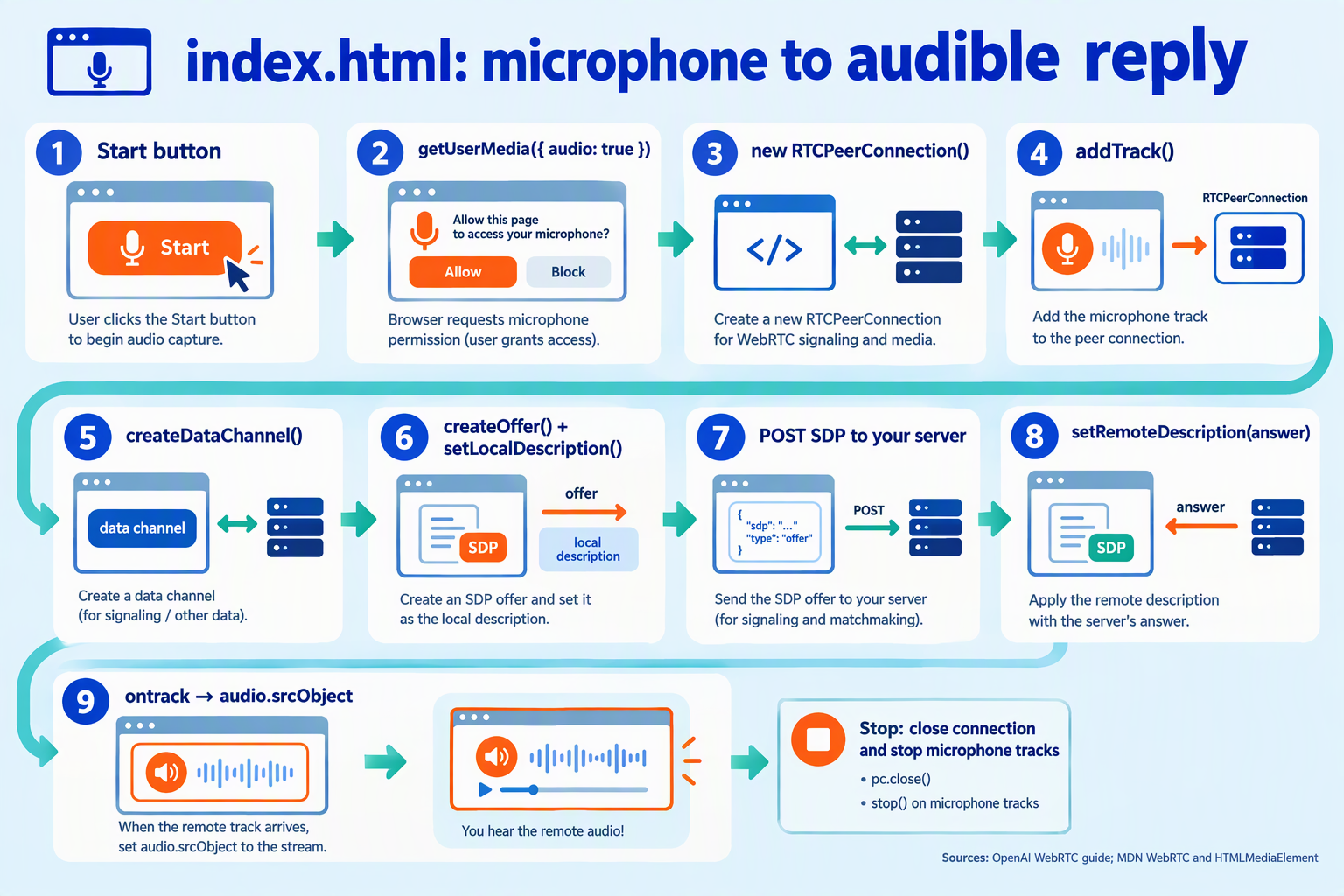
Connect the browser microphone with getUserMedia(), add its audio tracks to your RTCPeerConnection, and play the AI’s incoming audio through an HTML <audio> element. Attach the microphone and register the playback handler before creating your SDP offer, so the connection negotiates audio from the start.
How do I attach microphone audio to the WebRTC connection?
As of October 2026, OpenAI’s WebRTC guide demonstrates microphone capture with navigator.mediaDevices.getUserMedia({ audio: true }) and attaches the resulting track with RTCPeerConnection.addTrack(). These browser APIs handle the media path; you do not need to encode microphone audio as Base64 events for this WebRTC setup.
Use the following helper with the pc peer connection from your session-establishment code:
<audio id="ai-audio" autoplay playsinline></audio>
<button id="enable-audio" type="button" hidden>
  Enable AI audio
</button>

<script>
async function attachAudio(pc) {
  const player = document.querySelector("#ai-audio");
  const enableAudio = document.querySelector("#enable-audio");

  const microphone = await navigator.mediaDevices.getUserMedia({
    audio: {
      echoCancellation: true,
      noiseSuppression: true,
      autoGainControl: true
    }
  });

  async function playReply() {
    try {
      await player.play();
      enableAudio.hidden = true;
    } catch {
      enableAudio.hidden = false;
    }
  }

  enableAudio.onclick = playReply;

  function receiveAudio(event) {
    if (event.track.kind !== "audio") return;

    player.srcObject =
      event.streams[0] || new MediaStream([event.track]);
    void playReply();
  }

  pc.addEventListener("track", receiveAudio);

  for (const track of microphone.getAudioTracks()) {
    pc.addTrack(track, microphone);
  }

  return function stopAudio() {
    microphone.getTracks().forEach(track => track.stop());
    pc.removeEventListener("track", receiveAudio);
    pc.close();
    player.pause();
    player.srcObject = null;
    enableAudio.onclick = null;
    enableAudio.hidden = true;
  };
}
</script>
The three audio-processing constraints are preferences, not guarantees: browser and device support can vary. Start with these defaults, then test with the microphones and headsets your users actually use.
Where does this fit into the SDP setup?
Call the helper inside your existing Start conversation button handler:
// pc is the RTCPeerConnection used by your signaling code.
const stopAudio = await attachAudio(pc);

// Next: create the data channel and SDP offer,
// exchange SDP through your backend, and apply the answer.

// On your End conversation button:
// stopAudio();
Follow this order:
- Request microphone permission after the user clicks Start.
- Attach local tracks and register the incoming-track handler.
- Complete the existing SDP exchange through your backend.
- Play incoming audio when the remote track arrives.
This helper deliberately does not duplicate signaling. According to OpenAI’s Realtime WebRTC documentation, as of October 2026, the unified connection flow establishes the session through POST /v1/realtime/calls; microphone capture and playback remain browser responsibilities.
Why is the AI connected but silent?
A connected peer connection does not prove that the browser is playing audio. Check these separately:
- Autoplay blocked:
player.play()can reject even withautoplaypresent. The helper reveals an Enable AI audio button so a fresh user gesture can retry playback. - Microphone denied: handle a rejected
attachAudio(pc)call in your Start handler and show a permission message. - Insecure page: microphone access requires a secure context; use HTTPS, or localhost during development.
- Feedback loop: never assign the local microphone stream to the reply player. Use headphones when testing.
Finally, call stopAudio() when the conversation ends. Closing the peer connection alone should not replace explicitly stopping every microphone track.
How do I tune voice activity detection and migrate beta examples safely?
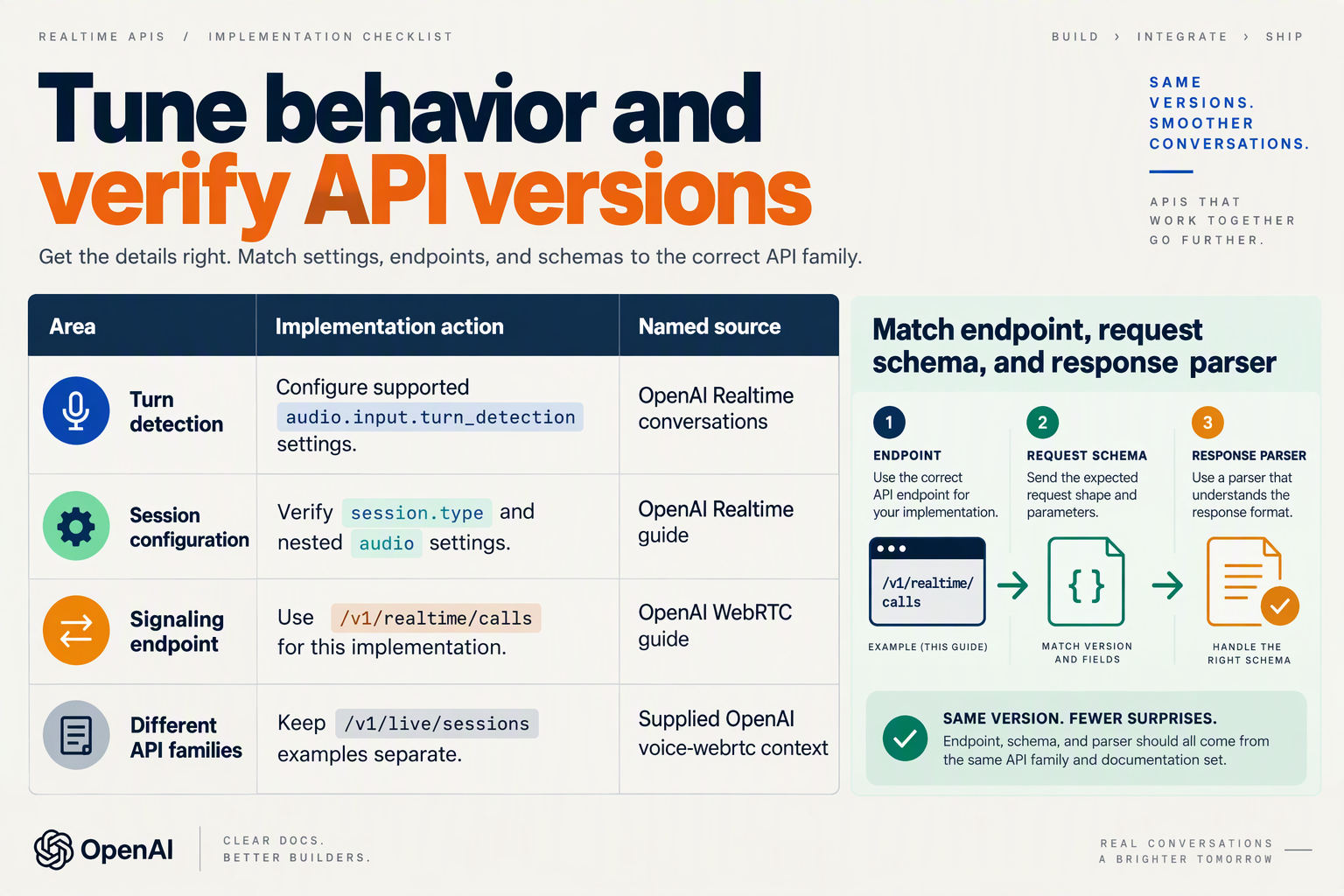
Tune voice activity detection (VAD) by testing missed speech, premature replies, and interruptions separately—not by changing every setting at once. Migrate beta examples by checking the endpoint, session schema, and event names together; a working WebRTC connection does not prove that copied session settings are valid.
Which VAD settings should I adjust first?
Server VAD detects turns using audio activity and silence; semantic VAD considers whether the speaker appears to have finished their thought. Start with server VAD for straightforward tuning, then evaluate semantic VAD if natural pauses regularly trigger unwanted replies.
The following values are illustrative test settings, not production recommendations or measured benchmarks. For an October 2026 implementation, validate accepted fields against OpenAI’s Realtime API reference before deployment.
| Setting or check | Starting experiment | What to watch | Adjustment |
|---|---|---|---|
threshold | Test 0.5 | Background noise triggers speech | Raise gradually; retest quiet speakers |
prefix_padding_ms | Test 300 ms | First syllables disappear | Increase retained pre-speech audio |
silence_duration_ms | Test 500 ms | Replies begin during thinking pauses | Increase the silence window |
| Semantic VAD | Test eagerness: "low" | Server VAD cuts off unfinished thoughts | Compare completion detection |
create_response | Set true for automatic replies | Speech ends but no reply starts | Check response-generation settings |
interrupt_response | Set true for barge-in | Assistant continues over the user | Test interruption behavior |
Do not interpret a 500 ms silence window as a promise of 500 ms response latency. Endpoint detection is only one contributor; network transport, model processing, and audio playback also affect perceived responsiveness.
How do I apply VAD settings over the data channel?
OpenAI’s Realtime conversations guide describes sending client events over WebRTC data channels, as referenced in October 2026. Once your existing channel is open, send a session.update using the current Realtime session structure:
function configureVad(dc) {
  if (dc.readyState !== "open") {
    throw new Error("Realtime data channel is not open");
  }

  dc.send(JSON.stringify({
    type: "session.update",
    session: {
      type: "realtime",
      audio: {
        input: {
          turn_detection: {
            type: "server_vad",
            threshold: 0.5,
            prefix_padding_ms: 300,
            silence_duration_ms: 500,
            create_response: true,
            interrupt_response: true
          }
        }
      }
    }
  }));
}
Inspect the returned session.updated event rather than assuming that sending JSON applied the configuration. Also log error, input_audio_buffer.speech_started, and input_audio_buffer.speech_stopped events to distinguish configuration failures from turn-detection problems.
For push-to-talk, disable automatic turn detection with turn_detection: null and explicitly manage committing input and requesting responses.
How do I migrate beta examples without mixing interfaces?
Treat migration as a small compatibility audit:
- Identify the interface. OpenAI’s Realtime WebRTC guide specifies
POST /v1/realtime/callsin the supplied October 2026 documentation. Do not combine that flow with/v1/live/sessionsexamples or their JSON response parsing. - Rebuild session configuration. Check nested
audio.inputsettings instead of blindly copying beta-era top-level fields. - Audit event handlers. Check current names such as
response.output_audio.delta; do not assume olderresponse.audio.deltahandlers remain applicable. With WebRTC, continue playing the incoming media track rather than rebuilding playback from audio delta events. - Remove obsolete assumptions. Verify model identifiers, headers, and supported parameters against the chosen interface—not the age of the tutorial.
Before releasing, test quiet speech, background noise, mid-sentence pauses, and barge-in with consented samples. Change one setting per run and record both premature replies and missed turns: faster endpointing is not an improvement if users cannot finish speaking.
Which common WebRTC setup mistakes cause failures?
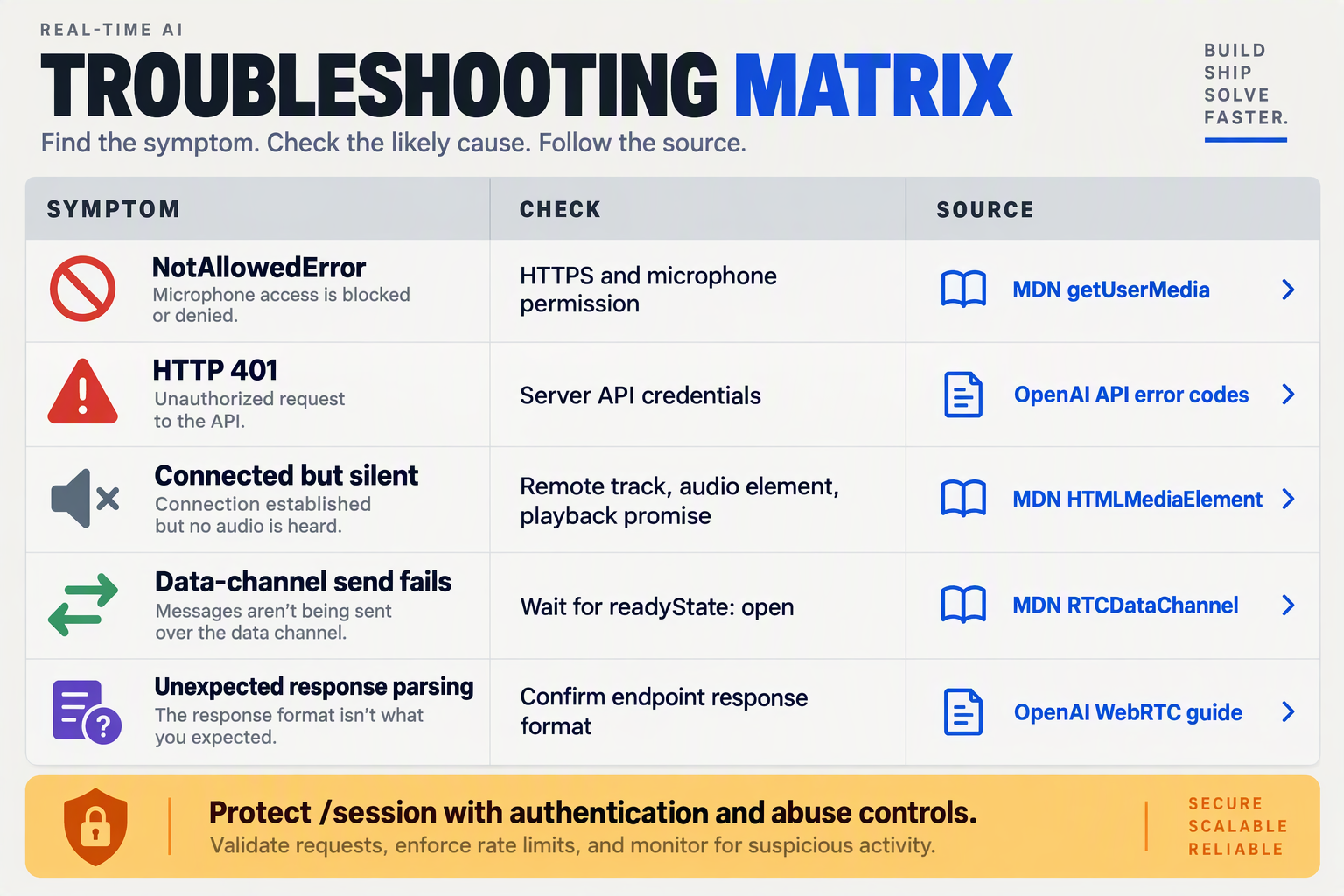
The most common WebRTC setup failures are mixing incompatible signaling examples, unavailable microphone input, blocked audio playback, premature data-channel messages, and network connectivity problems. Diagnose the failing layer first: a successful backend request does not prove that media is flowing or that the browser can play it.
As of October 2026, OpenAI’s Realtime WebRTC documentation directs session establishment through POST /v1/realtime/calls; OpenAI’s separate live-session example uses a different response structure containing transport.sdp. Treat these as separate interfaces, not interchangeable snippets.
Which WebRTC errors should I check first?
Use this troubleshooting table after your initial connection attempt. Browser checks below reflect standard WebRTC debugging practice as of October 2026; endpoint distinctions come from the supplied OpenAI documentation.
| Mistake | Observable symptom | Diagnostic check | Corrective action |
|---|---|---|---|
| Mixing Realtime calls and live-session examples | SDP parsing fails or the answer is undefined | Inspect the actual response body and content type | Match request construction and answer extraction to the selected OpenAI interface; do not assume every response contains transport.sdp |
| Broken backend authentication | Session creation returns an authorization error | Check upstream status and sanitized server logs | Verify server-side credentials; never “fix” authentication by exposing a standard API key in browser code |
| Missing or inactive microphone track | Connection establishes, but speech produces no response | Check permission errors, track readyState, and enabled | Use a secure browser context, obtain microphone permission, and confirm a live track is attached before creating the offer |
| Browser blocks playback | Remote audio arrives, but the user hears nothing | Inspect the promise returned by audio.play() | Provide an explicit playback button; check mute, volume, and output device |
| Sending events before the data channel opens | send() throws or instructions never arrive | Inspect dataChannel.readyState | Send only when the state is open; surface server error events separately |
| ICE connectivity fails | Signaling succeeds, but the peer connection stalls or fails | Inspect iceConnectionState, connectionState, and candidate-pair statistics | Compare networks and inspect firewall restrictions before changing prompts or model settings |
How do I distinguish missing audio from blocked playback?
Measure media delivery before investigating conversation behavior. An audio element can remain silent even when the connection receives packets, while a connected peer can have no usable microphone input.
Capture a small diagnostic snapshot:
console.log({
  connection: pc.connectionState,
  ice: pc.iceConnectionState,
  events: dataChannel.readyState,
});

const stats = await pc.getStats();
stats.forEach((report) => {
  if (report.type === "inbound-rtp" &&
      report.kind === "audio") {
    console.log({
      bytesReceived: report.bytesReceived,
      packetsLost: report.packetsLost,
      jitterSeconds: report.jitter,
    });
  }
});
Compare snapshots over time rather than interpreting one counter:
- Increasing received bytes: investigate playback restrictions, mute settings, and audio content next.
- No received audio: check whether the session actually generated a response, then investigate transport.
- No outbound microphone traffic: inspect capture and track attachment before changing session instructions.
These counters indicate transport activity—not whether the assistant understood the speaker or produced an appropriate answer.
What evidence should I save when a connection fails?
Record the failure as a short sequence:
- Signaling: backend status, response content type, and sanitized error details.
- Transport: peer-connection, ICE, and data-channel state transitions.
- Media: microphone track state, audio counters, and playback errors.
As of October 2026, OpenAI’s Calls API reference identifies the Location header returned during Realtime call creation as the source of the call ID used for subsequent control operations. Preserve that identifier server-side for correlation, but exclude credentials and raw conversation content from routine diagnostic logs.
How do I use Python instead of Node.js for WebRTC signaling?
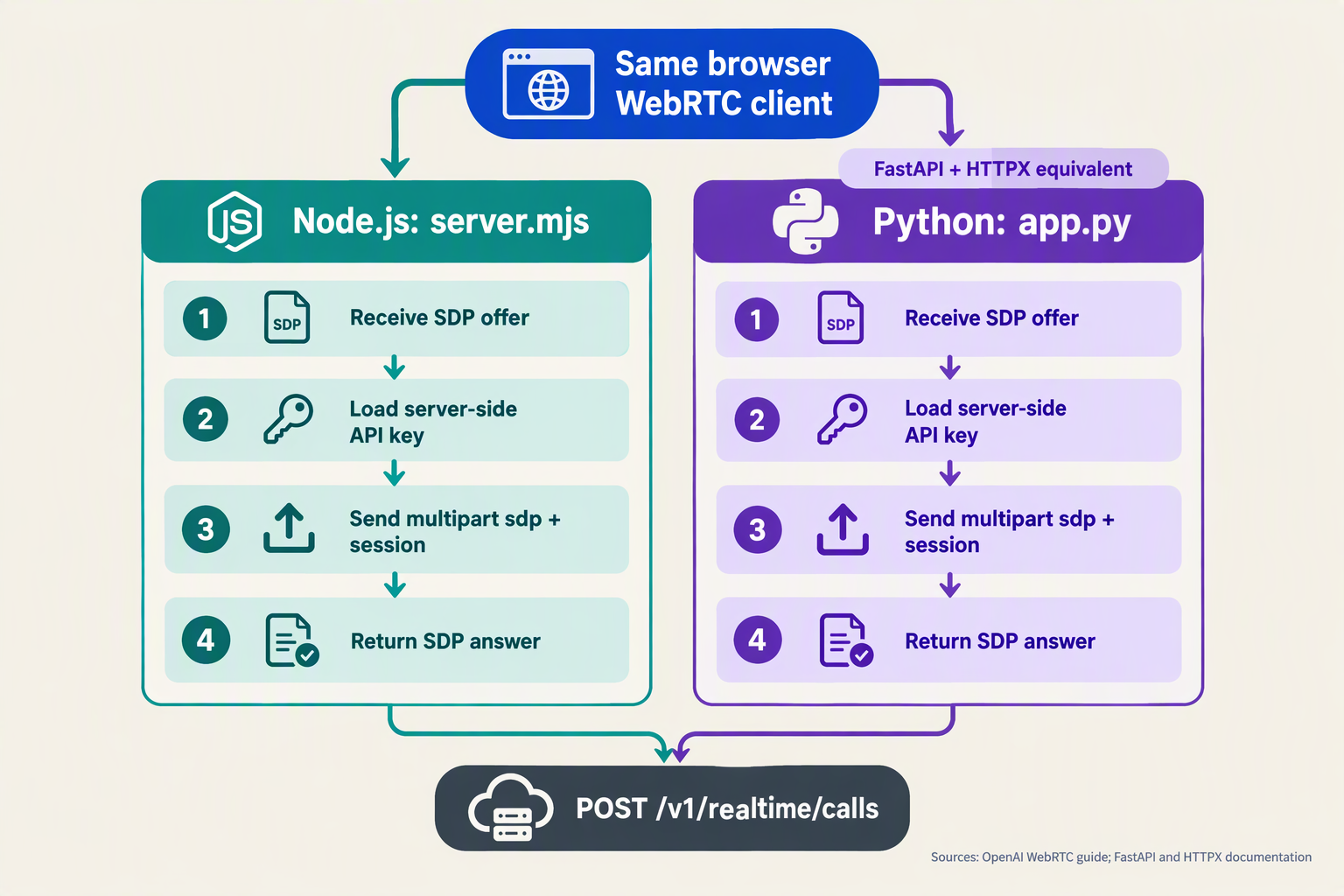
Use Python with FastAPI and HTTPX to replace the Node.js signaling endpoint; your browser’s WebRTC code stays unchanged. Python receives the browser’s SDP offer, forwards it to OpenAI with server-side credentials and session configuration, and returns the SDP answer—not the audio stream.
According to OpenAI’s WebRTC documentation, as of October 2026, the unified Realtime connection flow uses POST /v1/realtime/calls. Keep this implementation separate from the /v1/live/sessions interface mentioned in other examples.
How do I create a Python WebRTC signaling endpoint?
Install the dependencies and configure your credentials:
pip install fastapi uvicorn httpx
export OPENAI_API_KEY="your-server-side-key"
export OPENAI_REALTIME_MODEL="gpt-realtime"
The model setting should match a Realtime model available to your project. Save the following as app.py:
import json
import os

import httpx
from fastapi import FastAPI, HTTPException, Request, Response

app = FastAPI()
API_KEY = os.environ["OPENAI_API_KEY"]
MODEL = os.environ["OPENAI_REALTIME_MODEL"]


@app.post("/session")
async def create_session(request: Request):
    content_type = request.headers.get("content-type", "")
    if content_type.split(";")[0].strip() != "application/sdp":
        raise HTTPException(415, "Expected application/sdp")

    offer = await request.body()
    if not offer:
        raise HTTPException(400, "Missing SDP offer")

    session = {
        "type": "realtime",
        "model": MODEL,
        "instructions": "Answer clearly and briefly.",
    }

    try:
        async with httpx.AsyncClient(timeout=30.0) as client:
            upstream = await client.post(
                "https://api.openai.com/v1/realtime/calls",
                headers={"Authorization": f"Bearer {API_KEY}"},
                files={
                    "sdp": (None, offer, "application/sdp"),
                    "session": (
                        None,
                        json.dumps(session),
                        "application/json",
                    ),
                },
            )
    except httpx.RequestError:
        raise HTTPException(502, "Realtime signaling unavailable")

    if not upstream.is_success:
        raise HTTPException(502, "Realtime session creation failed")

    return Response(
        content=upstream.content,
        media_type="application/sdp",
    )
Start the development server:
uvicorn app:app --host 127.0.0.1 --port 8000HTTPX constructs the multipart boundary automatically. Do not manually set the upstream Content-Type header: the request contains both the sdp and session fields, rather than a standalone JSON body.
What changes in my browser JavaScript?
Only the signaling request needs to point to Python. After creating your offer and setting the peer connection’s local description, use:
const response = await fetch("/session", {
  method: "POST",
  headers: { "Content-Type": "application/sdp" },
  body: pc.localDescription.sdp,
});

if (!response.ok) {
  throw new Error(`Signaling failed: ${response.status}`);
}

await pc.setRemoteDescription({
  type: "answer",
  sdp: await response.text(),
});
This assumes the browser and /session share an origin—for example, through a reverse proxy. If your frontend runs on another origin during development, configure FastAPI’s CORS middleware for that specific origin.
The existing microphone tracks, remote audio playback, and data channel remain attached to the browser’s RTCPeerConnection.
Do I need aiortc for Python signaling?
No: this architecture does not make Python a WebRTC peer. Python handles an HTTP signaling exchange; the browser and OpenAI negotiate the media connection.
Use a Python WebRTC library such as aiortc only if your server must participate in media transport or process audio itself. Adding it merely to forward SDP introduces unnecessary complexity.
Before deploying:
- Authenticate
/sessionso anonymous visitors cannot create billable sessions. - Enforce request-size limits and rate limits at the application or proxy.
- Use HTTPS outside localhost so browser microphone access works.
- Log upstream failures privately, while keeping credentials and diagnostic payloads out of browser responses.
A successful signaling response establishes the session negotiation; it does not prove that microphone capture or audio playback is working. Debug those browser-side stages separately.
Frequently Asked Questions
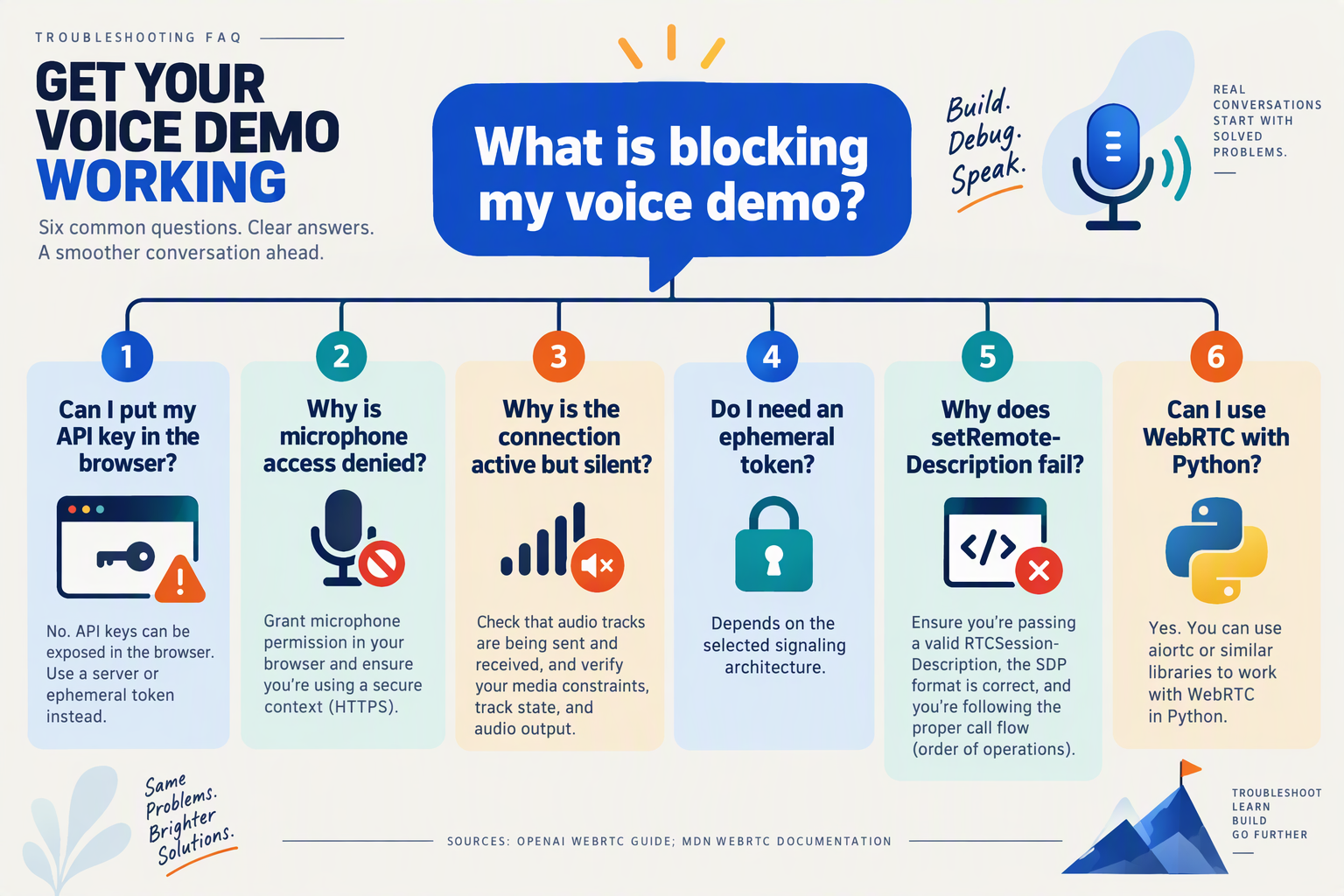
How do I set up realtime speech-to-speech with WebRTC without exposing my API key?
POST /v1/realtime/calls, then returns the SDP answer to the browser. Protect your signaling endpoint with application authentication and usage limits: hiding the provider key does not stop unauthorized users from consuming sessions through an unprotected backend.Why does my WebRTC voice assistant connect but produce no sound?
srcObject, and that audio.play() is not failing because of browser autoplay restrictions; offer a user-triggered “Start conversation” button. If those checks pass, inspect conversation events for model errors or missing responses, and use browser WebRTC diagnostics to distinguish an audio-routing problem from a media-transport failure.Should I use WebRTC or WebSockets for a browser speech-to-speech application?
How do I send instructions and receive conversation events over WebRTC?
How do I disconnect a WebRTC Realtime session and release the microphone?
POST /v1/realtime/calls/$CALL_ID/hangup for WebRTC sessions as of October 2026. OpenAI’s Calls reference says to retain the call identifier returned in the creation response’s Location header; keep authenticated hangup requests on your backend rather than exposing the standard API key.How do I set up realtime speech-to-speech with WebRTC through another AI provider?
Which resources should I use to verify the demo and choose my next step?
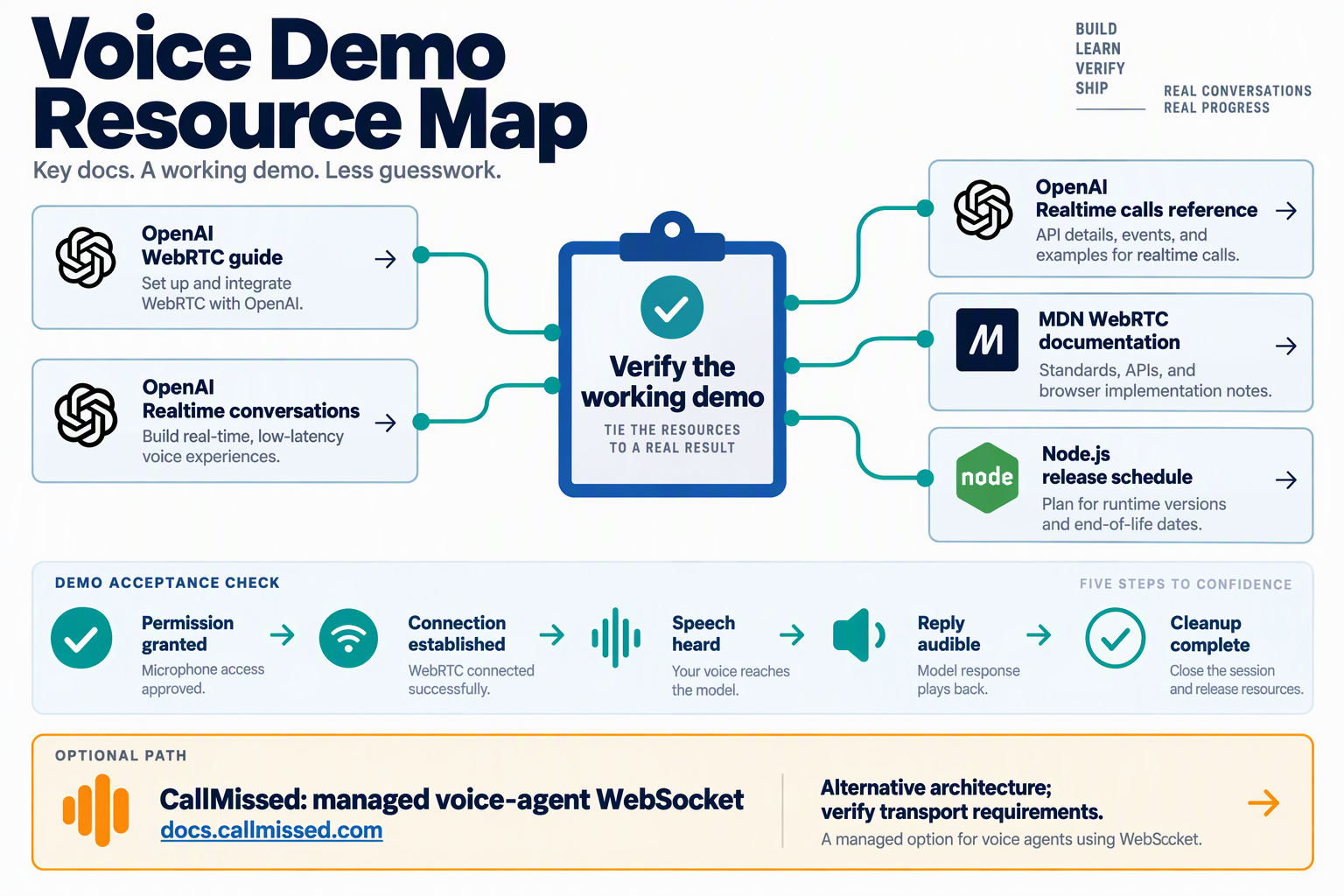
Use OpenAI’s WebRTC guide, Realtime conversations guide, and Calls API reference to verify this demo against the /v1/realtime/calls interface. Then choose your next step based on whether you need a browser prototype, production session controls, or a different voice transport—not simply more code.
Which official resources should I check first?
Keep these resources beside your implementation, and record the documentation review date in your project README. For this guide, that reference date is October 26, 2026.
- OpenAI’s “WebRTC” guide: Verify the browser-to-backend SDP exchange and authenticated session creation. According to OpenAI’s WebRTC documentation, as of October 2026, the unified Realtime interface establishes connections through
POST /v1/realtime/calls. - OpenAI’s “Realtime conversations” guide: Check the client events your application sends and the server events it handles. Use this resource when changing session instructions or conversation behavior; a connected audio stream does not prove that your event logic is correct.
- OpenAI’s “Calls” API reference: Verify call identifiers and supported call-control operations. According to OpenAI’s Calls reference, as of October 2026, WebRTC applications should reuse the call ID returned in the
Locationheader when creating a call. - OpenAI’s “WebSockets” guide: Consult this when moving conversation handling into a server-side application. OpenAI’s WebSockets guide recommends WebRTC for browser clients as of October 2026.
- OpenAI’s “Telephony and SIP” guide: Review this for telephone connectivity and session termination. According to OpenAI’s documentation, as of October 2026, the Hang up endpoint can terminate both SIP and WebRTC realtime sessions.
Do not combine interfaces accidentally. The supplied October 2026 OpenAI documentation also includes a separate /v1/live/sessions example with a JSON response containing transport.sdp; that is not the response contract this Realtime calls demo follows.
How do I know the speech-to-speech demo actually works?
Treat a successful connection as the beginning of verification, not the finish line. Save a small, repeatable acceptance checklist alongside the demo:
- Conversation: Ask a question, hear a relevant spoken answer, then ask a follow-up that depends on the first exchange.
- Events: Confirm that your application receives and handles the conversation events it expects, rather than merely logging an open data channel.
- Interruption: Speak while the assistant is answering and record the observed behavior against your intended interaction design.
- Failure recovery: Deny microphone permission, simulate a failed backend request, and reconnect after disconnecting.
- Cleanup: End the session and confirm that microphone capture stops and application state resets.
Record browser version, device, network conditions, and the test date. These observations are your demo’s evidence, not provider-wide latency or reliability benchmarks.
What should I build after the demo passes?
Choose one next milestone:
- Browser product: Add authentication, explicit recording disclosures where applicable, usage controls, and reproducible regression tests.
- Server-managed conversation: Evaluate WebSocket integration when your backend needs to manage the audio exchange.
- Telephone assistant: Follow OpenAI’s SIP documentation rather than treating browser signaling as a telephony implementation.
- Broader model evaluation: Compare supported transports, language coverage, event contracts, and total operating costs before changing providers.
As of October 2026, CallMissed’s verified developer API offers a managed voice-agent WebSocket, including a Deepgram Voice Agent-compatible endpoint. That makes it a relevant option for a WebSocket-based next step, but does not establish compatibility with this OpenAI WebRTC signaling flow.
The practical finish line is simple: a reproducible conversation, verified event handling, and clean session termination. Build outward from that evidence.
Conclusion
To set up realtime speech-to-speech with WebRTC, connect your browser’s microphone to an RTCPeerConnection, exchange an SDP offer and answer through a secure backend, and play the incoming audio stream. Use a WebRTC data channel for conversation events while keeping your standard OpenAI API credentials on the server.
The central lesson is architectural: the browser manages media, the backend authenticates session establishment, and the data channel handles application-level conversation events. Keeping those responsibilities separate makes the implementation easier to understand and failures easier to isolate.
According to OpenAI’s Realtime WebRTC documentation, as of October 2026, the unified connection flow establishes sessions through POST /v1/realtime/calls. Treat that documented flow as one complete implementation—not as a collection of interchangeable snippets from different voice interfaces.
Keep these four takeaways in your implementation checklist:
- Capture and connect browser audio correctly. Obtain microphone permission, attach the captured audio tracks to your peer connection, and configure playback for the incoming stream. A successful authentication request alone does not prove that the user can hear the assistant or that microphone audio is reaching the session.
- Keep authentication behind your backend. Send the browser’s SDP offer to your developer-controlled server, let that server make the authenticated OpenAI request, and return the SDP answer. Apply that answer to the browser’s peer connection without exposing your standard API key in frontend JavaScript.
- Separate audio transport from conversation control. WebRTC carries the live audio connection, while the data channel carries conversation events and instructions. Test both paths: audible speech confirms the media path, but your application also needs to handle session activity correctly.
- Troubleshoot by layer rather than guessing. Check microphone permissions, backend authentication, SDP exchange, connection state, and audio playback in sequence. Keep the Realtime calls flow separate from live-session examples whose request bodies and response formats differ.
What should developers watch as realtime voice APIs evolve?
Watch for changes to session-establishment endpoints, event formats, and browser guidance before updating a working integration. OpenAI’s WebSocket guide recommends WebRTC for browser clients as of October 2026; rechecking that guidance helps keep future revisions aligned with the transport you actually use.
The broader trend is toward integrated voice infrastructure. According to CallMissed’s verified product catalogue, as of October 2026, CallMissed offers 24 realtime voice-agent models through one API key and balance. Developers can explore CallMissed to understand that trend, while evaluating compatibility separately rather than assuming support for OpenAI’s specific WebRTC signaling flow.
Start with one complete, testable conversation: microphone capture, secure connection, audible response, and observable events. Can your implementation demonstrate all four—and show you exactly which layer failed when a conversation goes silent?
Related Reading
- Voice Agent API With LiveKit Support: OpenAI Realtime vs LiveKit Agents
- GPT-6 Luna API Pricing, Limits and Setup Guide 2026
- GPT-6 Luna API: Pricing, Model ID and Setup in 2026