
AI Productivity Stack: Avoid Support Tool Overload



Build a lean AI productivity stack for customer support: audit redundant tools, consolidate safely, and measure resolution quality and total cost.
AI Productivity Stack: Avoid Support Tool Overload
What if your next AI support tool makes individual tasks faster—but your customer-support operation slower? An AI productivity stack should reduce the work between a customer’s question and a useful resolution, not multiply dashboards, handoffs, and decisions. Avoiding tool overload starts with designing that journey before buying another capability.
The distinction matters in October 2026 because faster tasks do not automatically translate into better service. In its January 20, 2026 analysis, Forbes reported AI productivity gains of 14–55% at the task level, while describing the broader productivity transition as uncertain. Those figures are not a forecast for your support team; they highlight why measuring isolated speed improvements is insufficient.
Klover.ai’s 2026 analysis, “Buridan’s AI,” frames the problem as an “AI Productivity Paradox”: individual activity metrics can rise while organizational output stalls. For customer support, the practical version is easy to recognize. An assistant drafts replies faster, a separate agent summarizes conversations, and another system classifies tickets—but employees still reconcile conflicting records and repeat context across tools.
Consider a hypothetical refund request. A chatbot identifies the issue, but cannot access the order; an agent opens the commerce system, checks the policy elsewhere, and manually updates the customer record. Faster text generation has not removed the bottleneck. The workflow needs connected information, clear permissions, and a reliable escalation path—not necessarily another model.
How can you avoid AI support tool overload?
Build around completed customer outcomes, then evaluate which capabilities genuinely support them. Before adding software, ask:
- What friction disappears? Name the step eliminated, rather than the feature added.
- Where does context live? Establish which system owns customer history, policies, and order information.
- Who handles exceptions? Define when automation stops and a person takes responsibility.
- What proves improvement? Track resolution time, repeat contacts, customer satisfaction, and total operating cost—not just messages generated.
Consolidation can help, but fewer tools alone do not guarantee better support. A unified platform still needs accurate knowledge, sensible access controls, and tested handoffs; specialist software may remain worthwhile when it solves a clearly defined requirement.
As of October 2026, CallMissed combines an omnichannel inbox, a human-handoff queue, and a built-in CRM, illustrating the industry’s move toward connected customer-communication workflows.
This guide will show you how to audit overlapping tools, map one high-value support journey, choose an essential automation stack, and test whether it improves service. The goal is not maximum AI adoption. It is fewer operational obstacles between customers and answers.
How do you avoid AI tool overload? Audit overlaps, automate one workflow and measure outcomes
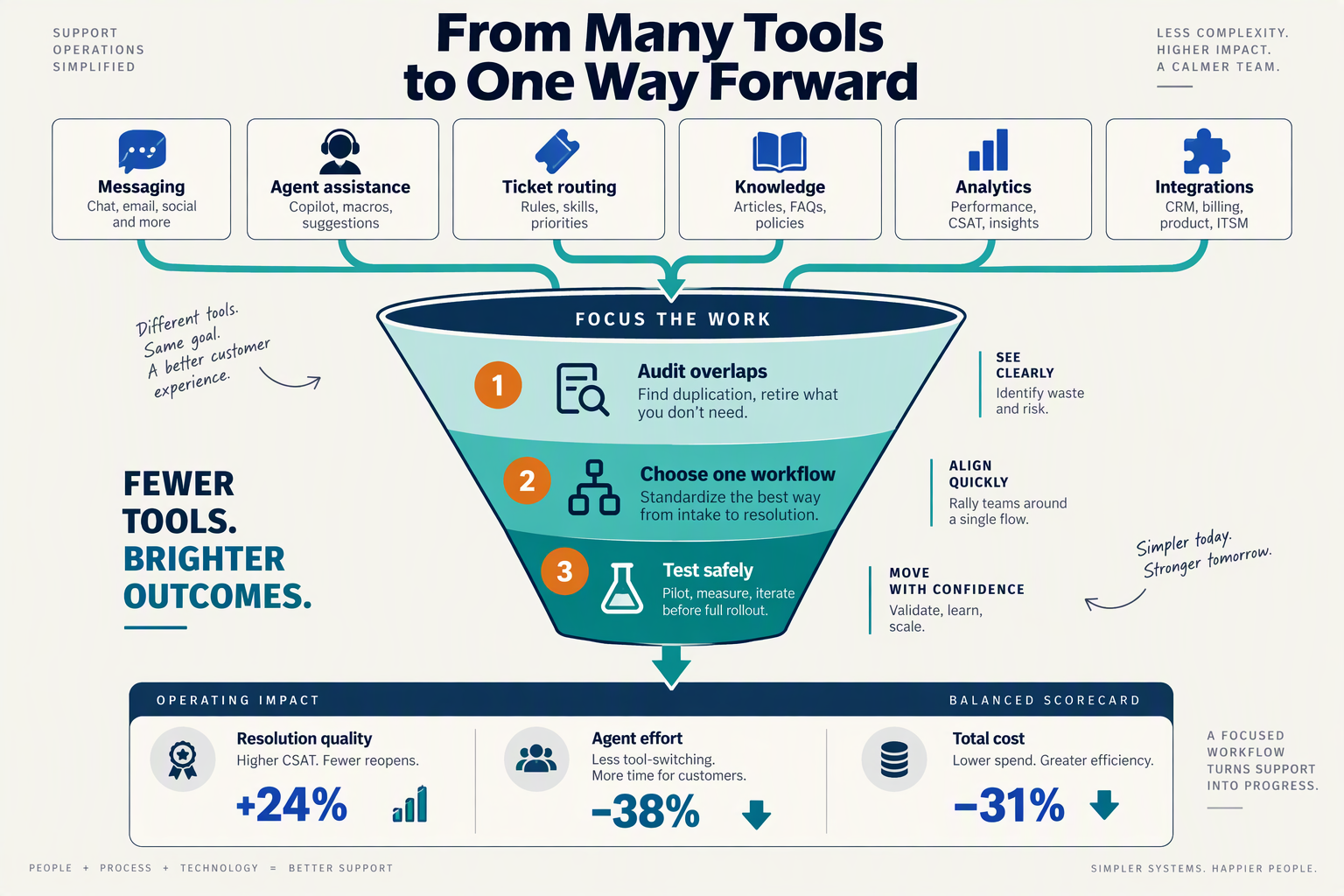
Avoid AI tool overload by auditing duplicated capabilities, automating one bounded support workflow, and comparing customer outcomes against a baseline. Give every tool a defined job—and require evidence of improvement before expanding its role.
How do you audit overlapping AI support tools?
Start with the systems employees actually use, including browser extensions, unofficial assistants, and spreadsheets—not just approved software. For each tool, record its workflow role, data access, owner, cost, and the manual work required to keep it useful.
Build the audit around five questions:
- Capability: Does it classify tickets, retrieve knowledge, draft replies, or execute actions?
- Overlap: Which other tools perform the same function?
- Authority: Can it suggest an action, or change customer and order records?
- Maintenance: Who updates its knowledge, permissions, and integrations?
- Dependency: What breaks if you remove it?
Two reply-drafting tools may be redundant; a drafting assistant and a ticket-routing system may be complementary. Compare responsibilities, not feature labels. Keep a specialist tool when it meets a documented requirement, but test whether overlapping capabilities can be retired without losing quality.
Klover.ai’s 2026 “Buridan’s AI” analysis emphasizes “deep infrastructural integration.” Applied to support automation, that means connecting the necessary systems before adding another assistant that employees must supervise.
Which customer-support workflow should you automate first?
Choose a frequent, predictable request with accessible data and reversible actions. Order-status enquiries are a useful pilot when shipment information is reliable; disputed refunds and sensitive account changes usually require tighter controls.
Write the workflow as an operational contract:
- Trigger: A customer asks where an order is.
- Required information: An approved identity check and current order or shipment data.
- Allowed action: Retrieve the status and explain the next step.
- Escalation: Route missing records, conflicting information, or delivery disputes to a person.
- Completion: Record the interaction and its outcome in the designated system.
As of October 2026, CallMissed supports Shopify integration for orders, products, and customers, alongside a human-handoff queue. Those capabilities illustrate how one platform can cover connected steps; teams must still configure permissions and test their workflow.
Freeze additional tool purchases during the pilot. Otherwise, changing several systems simultaneously makes it difficult to identify what caused an improvement—or a failure.
How do you measure whether support automation actually helps?
Measure the complete enquiry, including human cleanup, rather than the automated reply alone. Monitoosoft’s March 20, 2026 article, “AI is saving hours of work. But no one is working less,” highlights why apparent time savings should not be treated as reduced workload.
Use a baseline and a comparable pilot group. Track:
- Resolution time: Include waiting, escalation, and follow-up.
- Repeat-contact rate: Check whether customers return about the same issue.
- Human handling time: Count verification and correction work.
- Customer satisfaction: Compare results for similar request types.
- Cost per resolved enquiry: Include software, usage, integration, and oversight.
For illustration—not a benchmark—suppose baseline handling takes eight minutes, while automation requires three minutes of review plus two minutes of correction. The saving is three minutes, not five; repeat contacts could erase it.
Set decision rules before launch: expand when service quality holds and total effort falls, revise when exceptions dominate, and stop when customers experience worse outcomes. That turns an AI productivity stack into a controlled operational improvement rather than an accumulating software collection.
What does the 2026 “Buridan’s AI” discussion reveal about support productivity?
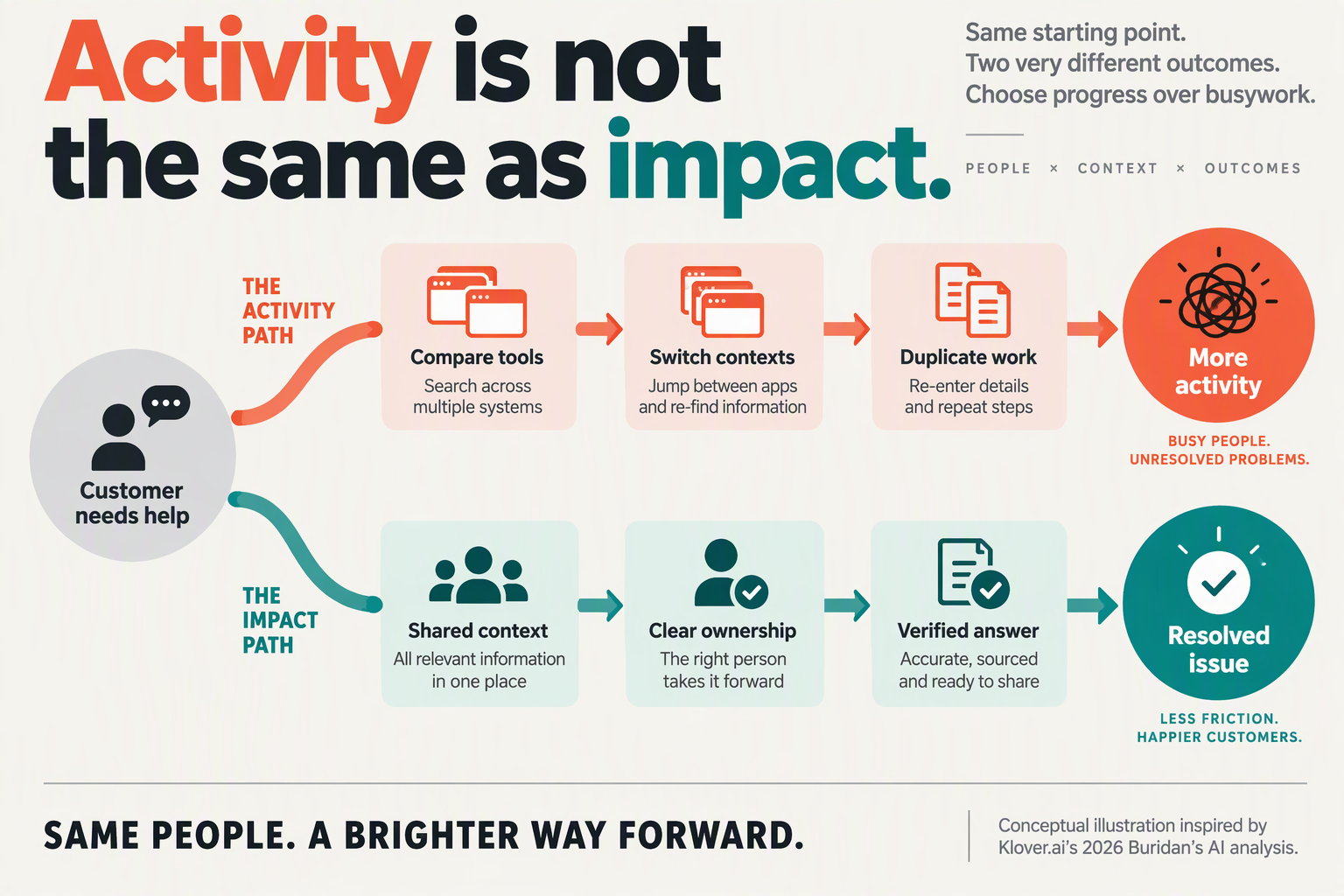
The 2026 “Buridan’s AI” discussion reveals that support productivity depends on how teams choose, connect, and govern AI—not simply how many tasks AI accelerates. For support leaders, the central risk is optimizing individual activities while leaving the constraints on completed resolutions unchanged.
Why can more AI choices make support teams less productive?
Klover.ai’s 2026 “Buridan’s AI” analysis emphasizes “deep infrastructural integration” rather than isolated productivity improvements. Applied to customer support, that means the important decision is not which assistant produces the most impressive demonstration, but which configuration reliably moves work through the operation.
Choice paralysis creates two distinct costs:
- Selection overhead: Teams repeatedly compare models, prompts, and applications instead of committing to a testable workflow.
- Execution overhead: Agents must decide which tool to use, verify its output, and determine which system should receive the result.
These costs can persist after procurement. If three assistants offer different suggested responses, employees inherit an additional judgment task: reconciling the suggestions. More available intelligence does not necessarily mean less work.
The practical response is bounded choice: establish an approved default for each support activity, with explicit conditions for using an alternative. Model flexibility can remain behind the scenes without making every frontline employee a model-selection specialist.
Why do faster support tasks fail to increase resolution capacity?
Monitoo’s March 20, 2026 article, titled “AI is saving hours of work. But no one is working less,” highlights the distinction between saving time and reducing workload. In support operations, saved time can disappear into additional review, expanded service expectations, or rising contact volumes.
Consider this illustrative calculation—not a measured benchmark:
- A support case requires eight minutes of investigation, four minutes of writing, and four minutes of documentation: 16 minutes total.
- AI halves writing time, bringing the case to 14 minutes, a 12.5% reduction.
- If checking the generated answer adds two minutes, total handling time returns to 16 minutes.
The writing tool still performed its task faster. The operational gain disappeared because verification consumed the saving.
This does not mean review should be removed. It means teams should distinguish necessary quality control from avoidable checking caused by missing evidence, inconsistent policies, or unreliable outputs. Automating the easiest step is not always the same as improving the limiting step.
What should support leaders change in their AI productivity stack?
Treat the 2026 discussion as a reason to introduce decision discipline, not to stop experimenting. Before expanding an AI productivity stack, make three operating choices explicit:
- Set a default: Specify the approved tool and information source for each activity, rather than leaving selection to individual agents.
- Budget verification: Include review time in the business case, especially for refunds, account changes, and policy-sensitive answers.
- Assign the saved capacity: Decide whether time released will reduce backlogs, improve complex-case handling, or expand coverage.
As of October 2026, CallMissed offers agent assist with suggested replies and knowledge snippets, alongside support tickets and SLA policies. Those capabilities illustrate how AI assistance can sit within support operations; teams still need to define review responsibilities and escalation rules.
The takeaway is straightforward: AI productivity is an operating-design problem as much as a technology-selection problem. A useful automation investment makes the next action clearer and the whole case easier to complete—not merely the current task faster.
What must be ready before you consolidate support automation? Prerequisites & Setup
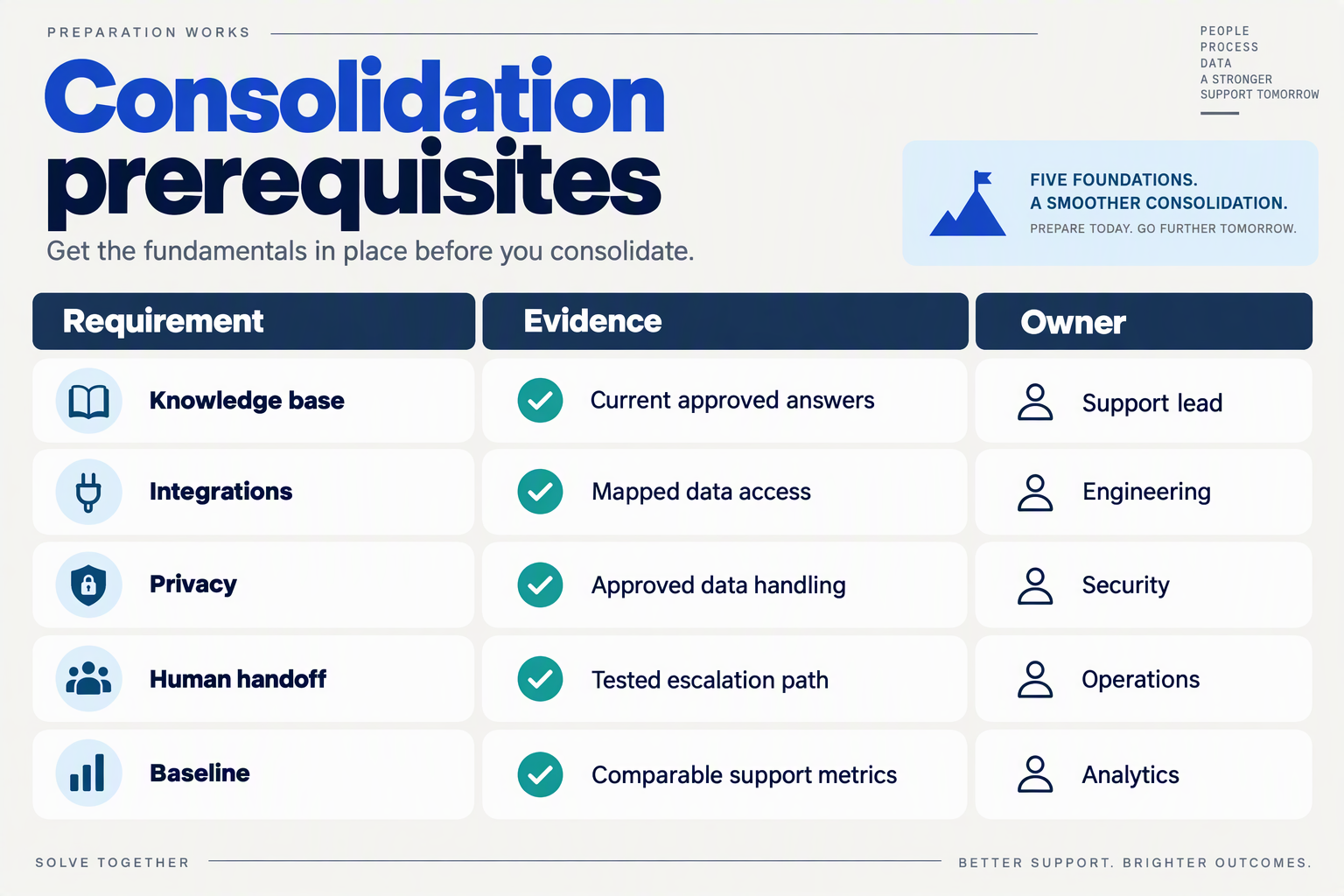
Before consolidating customer-support automation, prepare a workflow owner, authoritative data sources, approved knowledge, scoped integration access, escalation rules, and a measurable baseline. These prerequisites let you replace overlapping tools without accidentally removing a capability your team depends on.
The practical lesson from Klover.ai’s 2026 “Buridan’s AI” analysis is to prioritize “deep infrastructural integration” over isolated activity gains. For support teams, that means checking whether systems can share reliable context and complete approved actions—not merely whether their AI features look similar.
What should your support-automation readiness checklist include?
Use this checklist as a migration gate, not a shopping list. Each row should have an accountable owner and evidence that the requirement works before you retire an existing tool.
| Prerequisite | Prepare before migration | Readiness check |
|---|---|---|
| Workflow ownership | Name the support lead responsible for one pilot journey and its exceptions. | Someone can approve changes and stop the pilot. |
| Authoritative records | Identify the system of record for customers, orders, tickets, and conversation history. | A test interaction retrieves the correct customer and order. |
| Approved knowledge | Assign owners to policies; remove duplicates and label outdated content. | Answers match current policy, including exceptions. |
| Integration access | Document API credentials, required permissions, field mappings, and failure handling. | Read and write operations succeed without unnecessary access. |
| Human escalation | Define escalation triggers, queue ownership, operating hours, and required context. | A person receives the transcript and issue details without asking the customer to restart. |
| Measurement and recovery | Record current service metrics; document rollback and data-export procedures. | The team can compare outcomes and restore the previous workflow. |
Passing a feature demo is not the same as passing these checks. An integration may retrieve an order successfully yet update the wrong customer record because identifiers were mapped incorrectly.
How should you set up the first consolidated workflow?
Start with a bounded journey such as order-status enquiries, rather than a high-risk process involving discretionary refunds.
- Define the permitted outcome. Specify what automation may answer or change, what requires customer verification, and what remains a human decision.
- Map the minimum data path. Connect the customer identifier, order lookup, policy source, and ticket update. Avoid importing every available field simply because an integration supports it.
- Test failure cases before launch. Include missing orders, ambiguous customer matches, unavailable APIs, outdated policies, and requests outside the approved scope.
- Rehearse rollback. Confirm who restores the previous workflow and how conversations already in progress will be handled.
As of October 2026, CallMissed supports knowledge bases built from text, web pages, and PDFs, custom REST tools, and agent versioning with publish and rollback. Those capabilities can support this setup, but teams still need to validate source accuracy, integration permissions, and recovery procedures themselves.
What should delay consolidation?
Pause the migration when any of these conditions remains unresolved:
- Conflicting policies: two sources give different answers to the same question.
- Unclear accountability: nobody owns failed actions or unattended escalations.
- Missing comparison data: faster replies cannot be checked against resolution quality or repeat contacts.
The readiness threshold is straightforward: the pilot must answer from approved information, act within defined limits, and fail safely. Consolidation should reduce operational uncertainty—not hide it inside a single interface.
How do you get started with an audit of overlapping AI support tools?
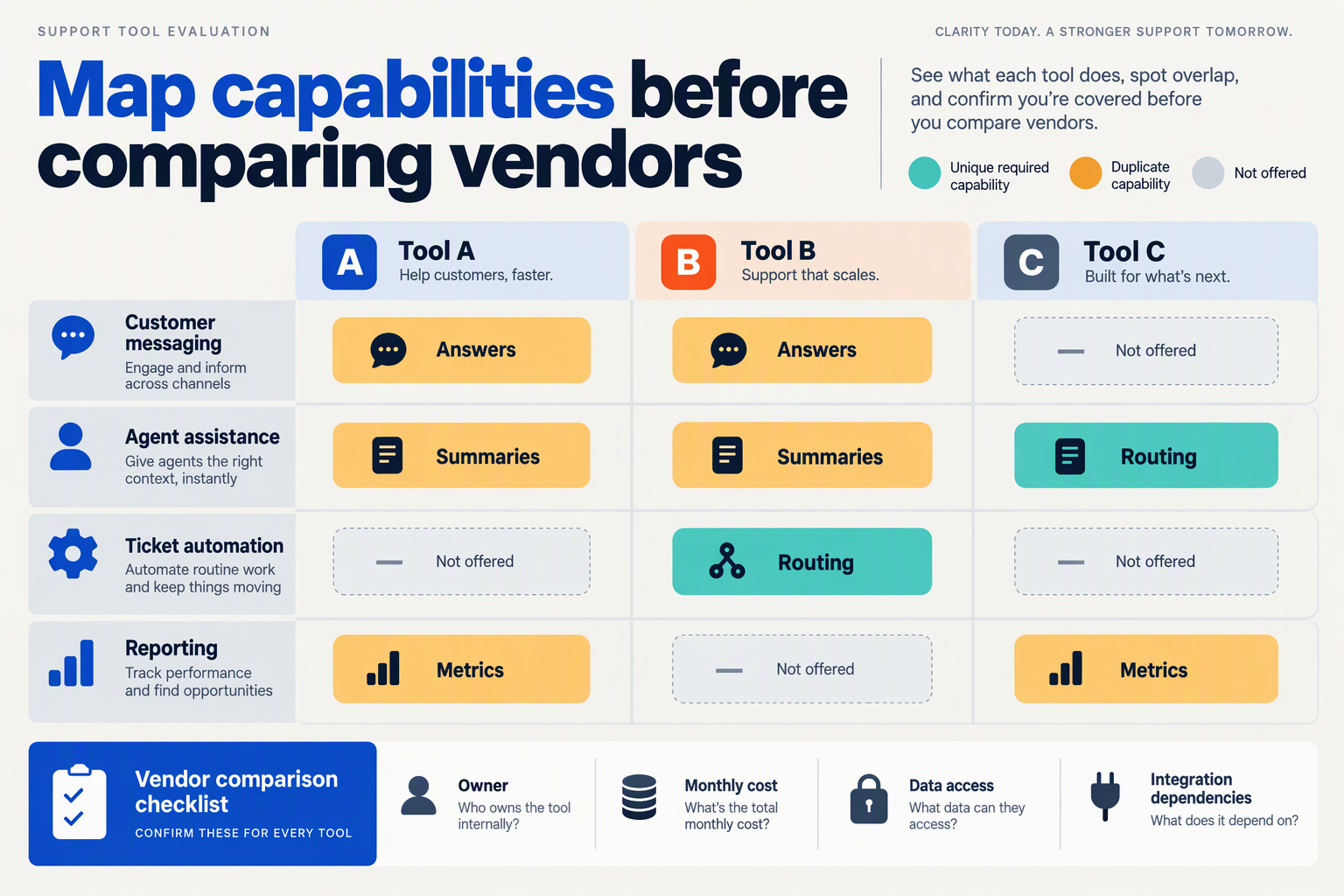
Start with a workflow-level inventory, not a list of AI vendors: identify what each tool does, who uses it, which data it touches, and whether another tool performs the same job. Then check actual usage and dependencies before labeling anything redundant.
Klover.ai’s 2026 “Buridan’s AI” analysis describes a productivity paradox in which “individual activity metrics surge artificially while actual organizational output stalls.” Your audit should test for that disconnect: does each tool remove work, or merely create another place where work happens?
What should an AI support tool inventory include?
Create one shared spreadsheet and assign an owner from support operations. Ask frontline agents, IT, finance, and security to contribute; a procurement list alone can miss browser extensions, personal AI subscriptions, and features bundled into existing software.
For an October 2026 audit, record current contract terms and usage rather than relying on purchase-time assumptions. Capture these fields for every tool:
- Function: ticket classification, reply drafting, knowledge retrieval, translation, summarization, quality assurance, or customer-facing automation.
- Users and ownership: who actively uses it, who administers it, and who approves renewal.
- Data access: customer records, conversations, order details, knowledge articles, and any write permissions.
- Connections: integrations, exports, webhooks, and manual transfers to other systems.
- Cost: subscription, usage charges, integration maintenance, and staff time spent checking outputs.
- Evidence of value: observed usage, successful task completion, corrections, and failure cases.
Include traditional helpdesk automation alongside generative AI. A rules-based ticket router and an AI classifier may overlap even though only one carries an AI label.
How do you distinguish duplication from useful specialization?
Compare tools by job, input, and destination, not marketing category. Two products both offering “AI assistance” are not necessarily substitutes if one translates incoming messages and the other checks completed conversations against a quality rubric.
Use this sequence:
- Group tools by support task. Put all summarizers together, all routing systems together, and so on.
- Inspect representative cases. Examine routine requests, escalations, and multilingual conversations.
- Trace the output. Check whether agents use it, edit it, ignore it, or copy it elsewhere.
- Record dependencies. Identify what would stop working if the tool disappeared.
For example, two summarizers may be redundant if both process the same conversation and populate the same ticket field. They may be complementary if one creates internal handover notes while another produces a customer-facing explanation requiring different safeguards.
As of October 2026, CallMissed provides AI call notes—including summaries, action items, disposition, and follow-up—pushed to the CRM. That capability belongs in the same audit group as a standalone call-summary tool; its presence does not automatically prove the standalone tool is unnecessary.
What decisions should the audit produce?
Give each tool a provisional disposition:
- Keep: demonstrated value with a clear owner.
- Consolidate: overlapping work that another approved tool can handle.
- Investigate: unclear usage, missing evidence, or unresolved dependencies.
- Retire: no demonstrated need after migration checks.
Before cancellation, verify export options, retention obligations, integration dependencies, and a rollback plan. Your first deliverable is a shortlist of testable consolidation opportunities, not an immediate purge. That turns choice paralysis into a bounded decision backed by operational evidence.
Should you retain, replace or retire each tool? Native AI versus add-ons
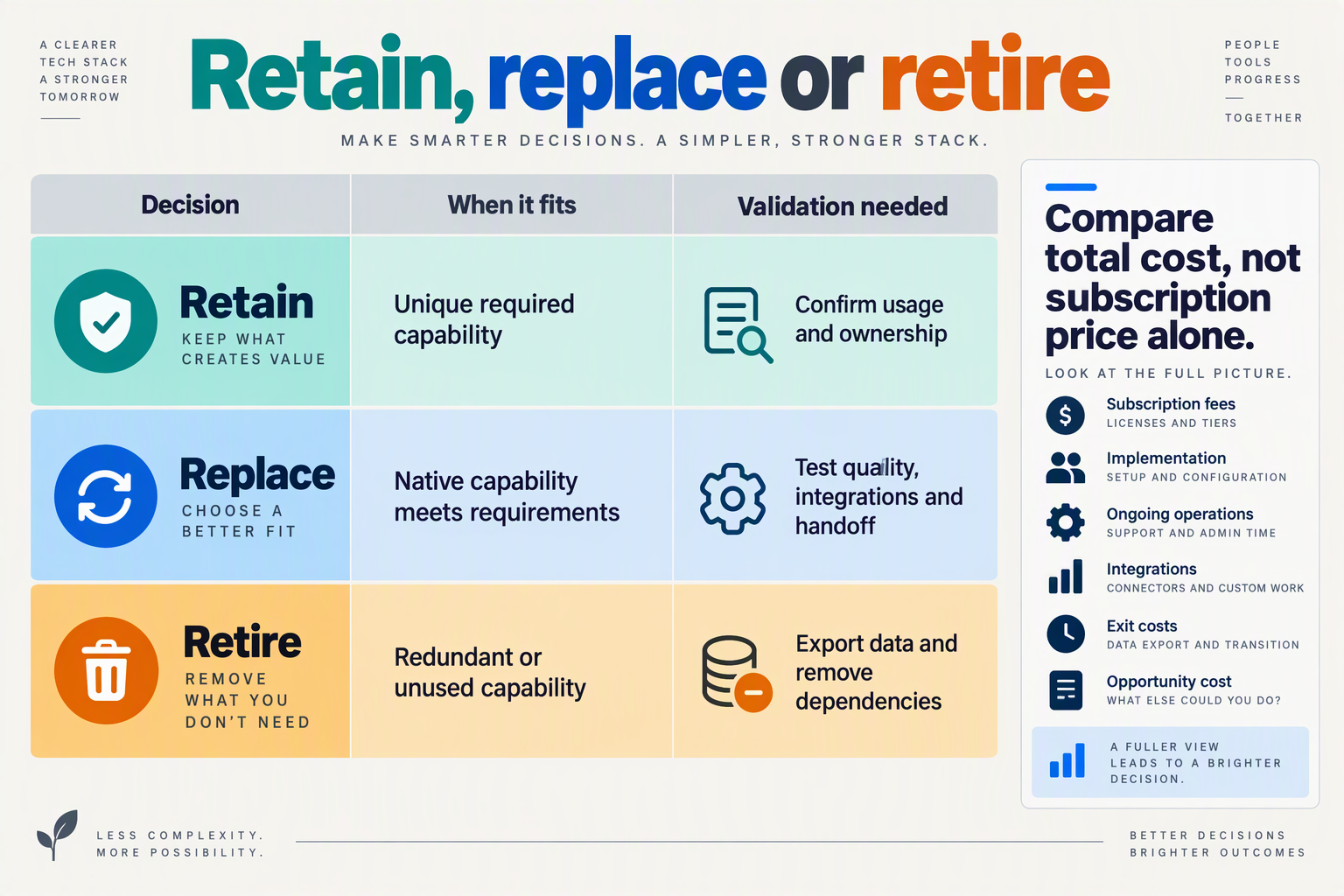
Retain a tool when it meets a distinct requirement, replace it when another system can deliver the same outcome with less operational friction, and retire it when its function is redundant or unused. Choose between native AI and add-ons through workflow testing—not feature counts or the assumption that consolidation always wins.
Klover.ai’s 2026 “Buridan’s AI” analysis emphasizes “deep infrastructural integration.” For your October 2026 stack review, translate that principle into a practical question: does this tool remove a dependency, or create another one?
When should you retain, replace or retire an AI support tool?
Use the following decision matrix to review each capability. Native AI means functionality built into your primary support platform; an add-on is a separately integrated service. These are evaluation criteria, not claims that either architecture is universally stronger.
| Capability | Test native AI for | Retain an add-on when | Replace or retire when |
|---|---|---|---|
| Reply drafting | Policy accuracy and editable suggestions | Specialized terminology materially improves answers | Equivalent drafts require fewer transfers |
| Knowledge retrieval | Source accuracy and update handling | Required repositories are unavailable natively | Duplicate indexes create conflicting answers |
| Ticket classification | Routing accuracy on real tickets | Custom categories improve assignment | Two classifiers overwrite each other |
| Conversation summaries | Completeness and record placement | Required formats or detail are missing | Summaries duplicate existing case notes |
| Voice automation | Language coverage and human escalation | A necessary language or call workflow is unsupported | Another tested system covers the requirement |
| Quality assurance | Rubric coverage and reviewer agreement | Specialist evaluation catches important failures | Duplicate scoring adds review without useful insight |
A specialist tool can deserve retention even when its feature appears elsewhere. For example, a classifier that reliably distinguishes warranty claims from installation requests may be valuable if that distinction determines which team receives the case. Its justification is better assignment, not merely having more labels.
How should you compare native AI with an add-on?
Run both options against the same representative cases, including ambiguous requests, outdated knowledge, and situations requiring a person. Do not compare a polished demonstration with your existing system’s hardest production tickets.
- Define the pass criteria first. Specify required accuracy, escalation behavior, record updates, and permissions.
- Measure the whole task. Include correction time, context switching, integration maintenance, and duplicated charges.
- Check failure recovery. Establish what happens when retrieval fails, an API times out, or an agent cannot complete an action.
- Choose the simplest passing option. Retain additional complexity only when its benefit is demonstrable.
As of October 2026, CallMissed offers agent assist with suggested replies and knowledge snippets, alongside support tickets, SLA policies, and CSAT surveys. Those verified capabilities make it a relevant consolidation candidate—but your own cases should determine whether they replace existing tools.
What must happen before you retire a tool?
Retirement requires dependency checks, not just subscription cancellation. A little-used service may still supply an essential webhook, historical record, or escalation rule.
Before switching it off:
- Identify downstream dependencies: routing rules, integrations, reporting, and scheduled jobs.
- Preserve required records: export information according to your retention policy.
- Test the replacement path: confirm access, ownership, and exception handling.
- Set rollback criteria: define which failures trigger restoration.
Record each decision with an owner, supporting evidence, and a review date. This prevents the next attractive AI feature from reopening a choice you have already resolved.
How do you pilot one support workflow step by step? A CallMissed example
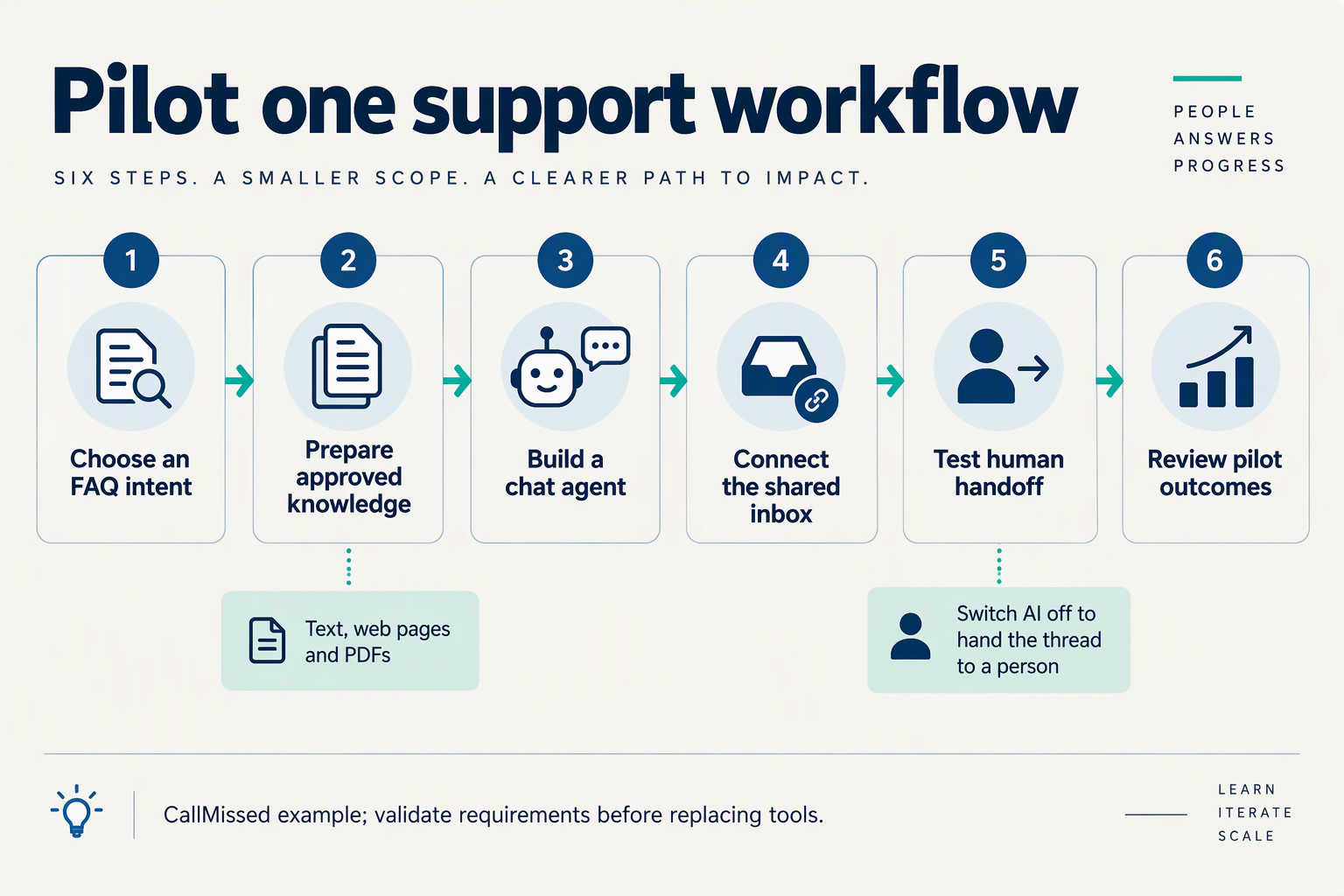
Pilot one narrow, reversible support workflow: define its boundaries, configure the minimum capabilities, test exceptions, and compare customer outcomes against a baseline. For this CallMissed example, use WhatsApp delivery-policy questions—not refunds, payment disputes, or account changes.
What should your first support automation pilot handle?
Choose a question with an approved answer and a clear escalation point: “What is your standard delivery timeframe?” The pilot should explain published delivery policies, ask for missing context such as destination region, and hand off questions requiring investigation.
Klover.ai’s 2026 “Buridan’s AI” analysis emphasizes “deep infrastructural integration.” Applied here, that means connecting the answer and escalation path before experimenting with more models or agents.
- Write a one-sentence scope. “Answer general delivery-policy questions on WhatsApp; send order-specific problems and exceptions to a human.”
- Name an owner. A support lead approves policies, reviews failures, and decides whether the pilot expands.
- Record the baseline. Sample comparable conversations and measure time to a useful answer, repeat contacts, human handling time, and customer satisfaction.
Keep the initial workflow informational. Do not let the agent promise delivery dates that the business cannot verify.
How do you configure the workflow without adding unnecessary tools?
As of October 2026, CallMissed supports WhatsApp Business connection through Meta embedded signup, AI chatbot agents with a knowledge base, and a live shared inbox. Its human-handoff queue allows a thread to pass to a person when AI is switched off—useful capabilities for this bounded pilot.
- Connect the channel and load approved knowledge. Include delivery regions, standard timeframes, cutoff times, holiday exceptions, and the escalation policy. Assign someone to maintain that information.
- Define response boundaries. Instruct the agent to answer from approved material, acknowledge missing information, and avoid inventing tracking updates.
- Set the handoff procedure. Specify triggers such as conflicting policies, an overdue parcel, a complaint, or an explicit request for a person. Tell staff who monitors the queue and how quickly they should respond.
Example: A customer asks, “Where is order 4821?” Without an authorized order lookup in this pilot, the agent should explain that a support representative must check the shipment. A plausible-sounding delivery estimate is not a successful resolution.
How should you test before letting customers use it?
- Build a small test set from real, anonymized questions. Include straightforward requests and uncomfortable edge cases:
- A delivery destination outside the supported region.
- Two knowledge entries with contradictory timeframes.
- A customer demanding a guaranteed arrival date.
- A request to ignore policy or disclose another customer’s details.
Check answer accuracy, unnecessary data collection, escalation correctness, and whether the receiving person understands the issue. Start with supervised testing, then release to a limited customer cohort with a clear stop procedure.
How do you decide whether to expand the pilot?
- Review outcomes after a predefined trial. An illustrative plan is two weeks, with daily exception reviews; that is a proposed schedule, not a published benchmark.
Compare similar question types and include review, correction, and handoff time in the operating cost. Faster replies alone do not justify expansion if customers return because the answer was incomplete.
Expand only when answers remain accurate, handoffs work, and total effort falls without harming customer satisfaction. Otherwise, repair the workflow—not the tool count.
How do you measure whether consolidation improves agent productivity and efficiency?
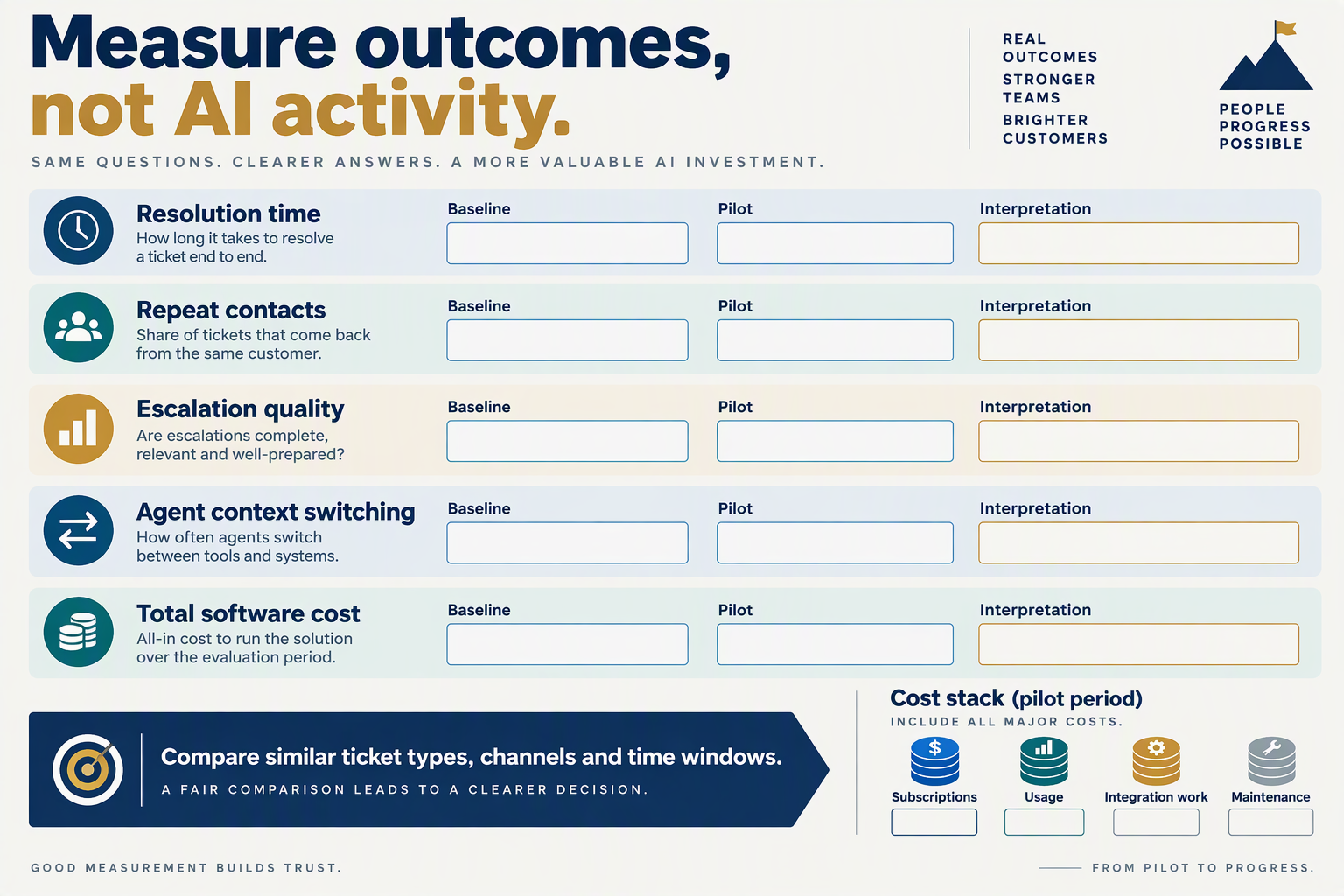
Measure consolidation by quality-adjusted resolutions per agent-hour and total cost per resolved issue, not by how many AI features agents use. A consolidated workflow improves productivity only when it reduces effort across the entire support journey without increasing errors, repeat contacts, or customer dissatisfaction.
Klover.ai’s 2026 “Buridan’s AI” analysis argues that enterprise improvement depends on “deep infrastructural integration.” For your measurement plan, that means testing whether connected workflows remove work—not merely whether individual tools generate answers faster.
Which metrics reveal genuine support productivity gains?
Use a balanced scorecard that separates throughput, effort, quality, and cost:
- Quality-adjusted resolutions per agent-hour: Count resolved issues that meet your quality rubric and do not reopen within a defined window, divided by staffed support hours.
- Human effort per issue: Include investigation, handling, after-contact work, escalation, and correction time. Excluding cleanup makes automation look artificially efficient.
- End-to-end resolution time: Measure from the customer’s first contact to confirmed resolution, including waiting between teams.
- Repeat-contact and reopen rates: Track customers returning about the same issue. Define the observation window before testing.
- Customer satisfaction and quality scores: Compare equivalent issue categories and disclose survey response rates.
- Total cost per resolved issue: Include labor, subscriptions, model usage, telephony, integration maintenance, and quality-review costs.
Also record context switches per issue and manual data re-entry events. These diagnostic measures help explain improvements, but fewer clicks are not themselves proof of better service.
How should you compare the old and consolidated workflows?
Run a controlled pilot rather than comparing an unusually quiet week with a seasonal rush.
- Establish a baseline. As a practical starting point, collect several weeks of data, extending the period if volumes are low or demand varies substantially.
- Choose comparable groups. Split eligible tickets between workflows where feasible; otherwise match issue type, channel, complexity, agent experience, and shift.
- Keep definitions fixed. Apply the same resolution criteria, quality rubric, and repeat-contact window to both groups.
- Track implementation effort separately. Report training and migration costs alongside steady-state operating costs rather than hiding either.
- Check the distribution. Compare median and 90th-percentile resolution times; averages can conceal customers stuck in lengthy escalations.
As of October 2026, CallMissed provides agent analytics, call scoring against custom QA rubrics, and A/B experiments, according to its verified product fact sheet. These capabilities can support evaluation, but teams still need consistent outcome definitions across channels.
What would a convincing improvement look like?
Consider a hypothetical October 2026 pilot, not a published benchmark. The existing workflow produces 800 quality-approved resolutions across 200 staffed hours; the consolidated workflow produces 920 across the same hours.
That raises quality-adjusted throughput from 4.0 to 4.6 resolutions per hour—a 15% improvement. If total operating cost rises from ₹80,000 to ₹84,000, cost per approved resolution still falls from ₹100 to approximately ₹91.30, an 8.7% reduction.
However, those gains are not convincing if reopen rates worsen or complex cases receive poorer support. Set acceptance thresholds before launch, review results by issue category, and expand only when efficiency improvements survive the quality checks.
The decisive question is: Did consolidation remove work while preserving successful customer outcomes? Faster drafting alone cannot answer it.
Which advanced tactics and common mistakes matter during consolidation?
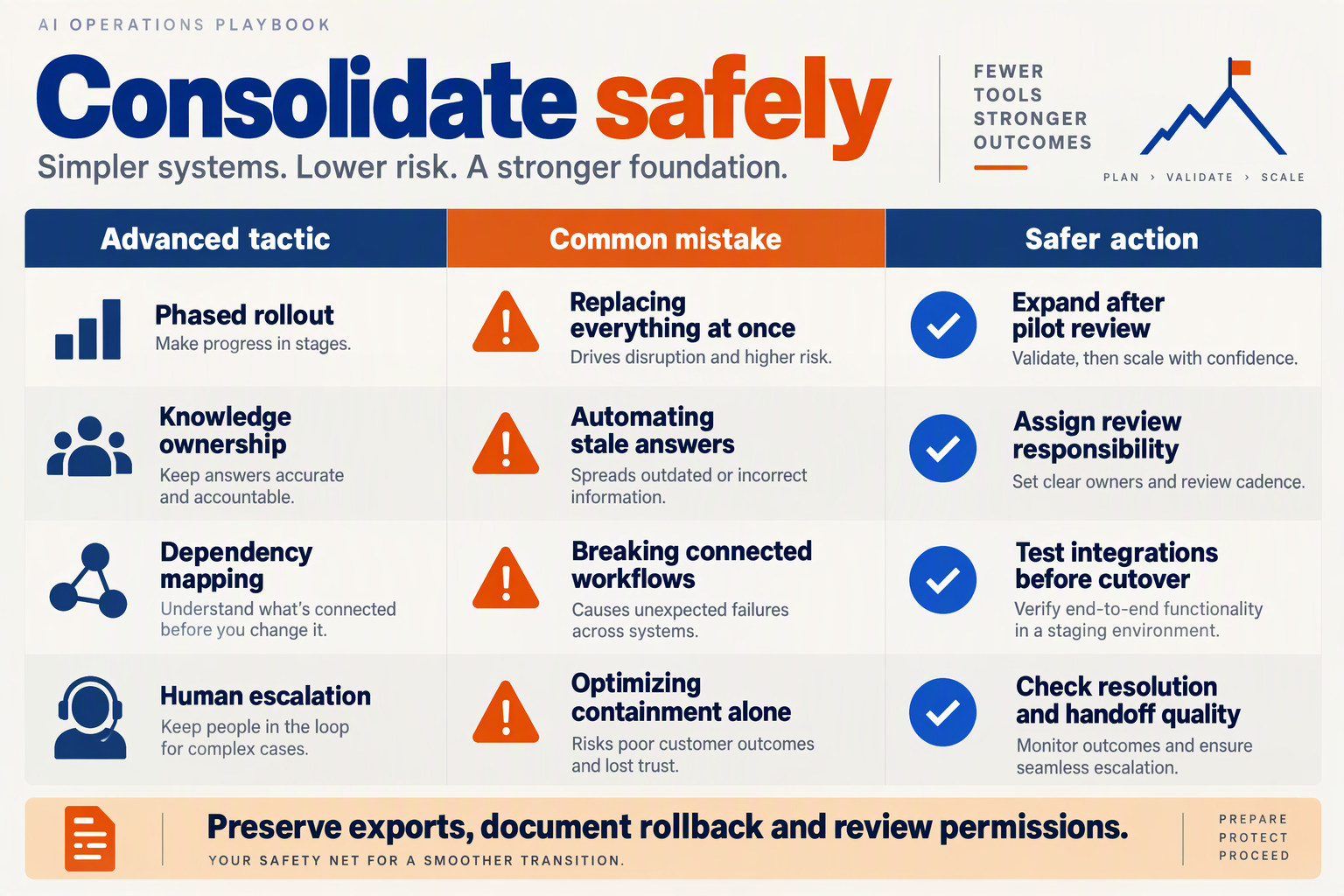
The advanced tactics that matter most are shadow testing, controlled cutovers, explicit write permissions, and verified tool retirement. The biggest consolidation mistake is reducing vendor count while leaving duplicate decisions, records, and operational dependencies intact.
Klover.ai’s 2026 “Buridan’s AI” analysis emphasizes “deep infrastructural integration” rather than isolated AI activity. Applied to customer-support automation in October 2026, that means testing how systems interact—not merely whether the replacement assistant produces better answers.
Which consolidation tactics prevent hidden failures?
Use the following controls when moving an established support workflow onto a consolidated stack. The numbers below are illustrative test parameters, not published performance benchmarks.
| Advanced tactic | Practical implementation | Common mistake | Evidence to check |
|---|---|---|---|
| Shadow testing | Replay 100 redacted historical cases without sending replies or changing records. | Testing only straightforward FAQs. | Errors on refunds, ambiguous requests, and escalations. |
| Single-writer ownership | Assign one system authority to update each operational field. | Letting multiple agents overwrite ticket status. | Conflicting updates and unexplained record changes. |
| Controlled cutover | Start with a proposed 10% of eligible, low-risk cases. | Switching every channel simultaneously. | Resolution quality versus the existing workflow. |
| Reversible releases | Version prompts, policies, and tool configurations together. | Reverting a prompt while leaving changed permissions active. | A rehearsed return to the previous configuration. |
| Dependency-aware retirement | Check webhooks, scheduled jobs, exports, and reporting before cancellation. | Treating an unused dashboard as an unused service. | No remaining production traffic or unresolved dependencies. |
| Exception budgeting | Record human review, correction, and maintenance time per workflow. | Counting generated replies as completed work. | Total staff effort per resolved case. |
Shadow testing needs a firm boundary: candidate agents should not execute live refunds, send customer messages, or modify CRM records. Use read-only credentials or simulated tools; otherwise, a supposedly harmless comparison can create real customer consequences.
How should you test model routing without creating more tool overload?
Separate model choice from workflow ownership. A routing layer can send simple classification tasks to one model and complex policy interpretation to another, but the same permissions, escalation rules, and evaluation criteria should govern both.
Keep the initial routing policy deliberately small:
- One default route for ordinary support requests.
- One exception route for cases that fail defined checks.
- One human escalation path when automation cannot safely proceed.
Fallbacks also need failure-specific rules. Retrying after a temporary service error may help; repeatedly switching models after an authorization denial will not fix the underlying permission problem.
As of October 2026, CallMissed supports voice-agent versioning with publish and rollback, eval suites, and A/B experiments. These capabilities can support controlled changes, but teams still need to define representative cases and acceptable outcomes.
When is it safe to retire an old AI support tool?
Retire a tool only after proving that its dependencies and exception workload have moved successfully—not simply after the new interface launches.
- Trace hidden consumers: identify integrations, reports, and teams that still depend on the old service.
- Rehearse recovery: document who can restore the previous workflow and how unresolved cases will be handled.
- Confirm operational savings: include migration effort, correction work, and ongoing administration in the comparison.
For example, faster refund drafting is not a consolidation win if supervisors now spend longer correcting duplicate CRM updates. The exit criterion should be a reliable workflow with less total coordination—not an impressive demo or a smaller software inventory.
Frequently Asked Questions
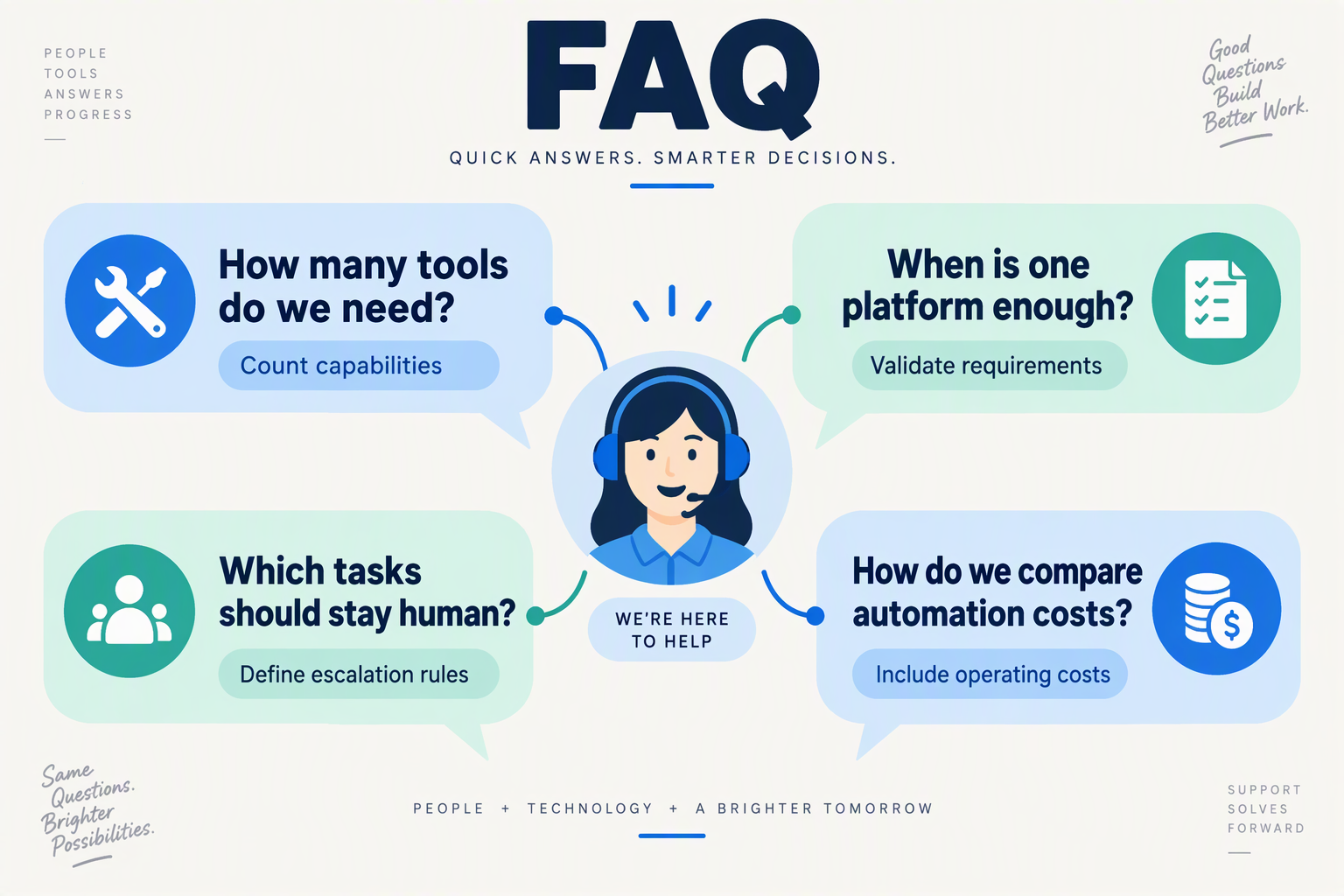
How many tools should a customer-support AI productivity stack include?
When should you consolidate your customer-support AI productivity stack?
How can you tell whether an AI productivity stack is actually improving support?
Which customer-support decisions should stay with human agents?
Does consolidating AI support tools mean using only one AI model?
How do you avoid vendor lock-in when consolidating customer-support automation?
Which resources and next steps help you validate a lean stack? Review CallMissed docs and pricing
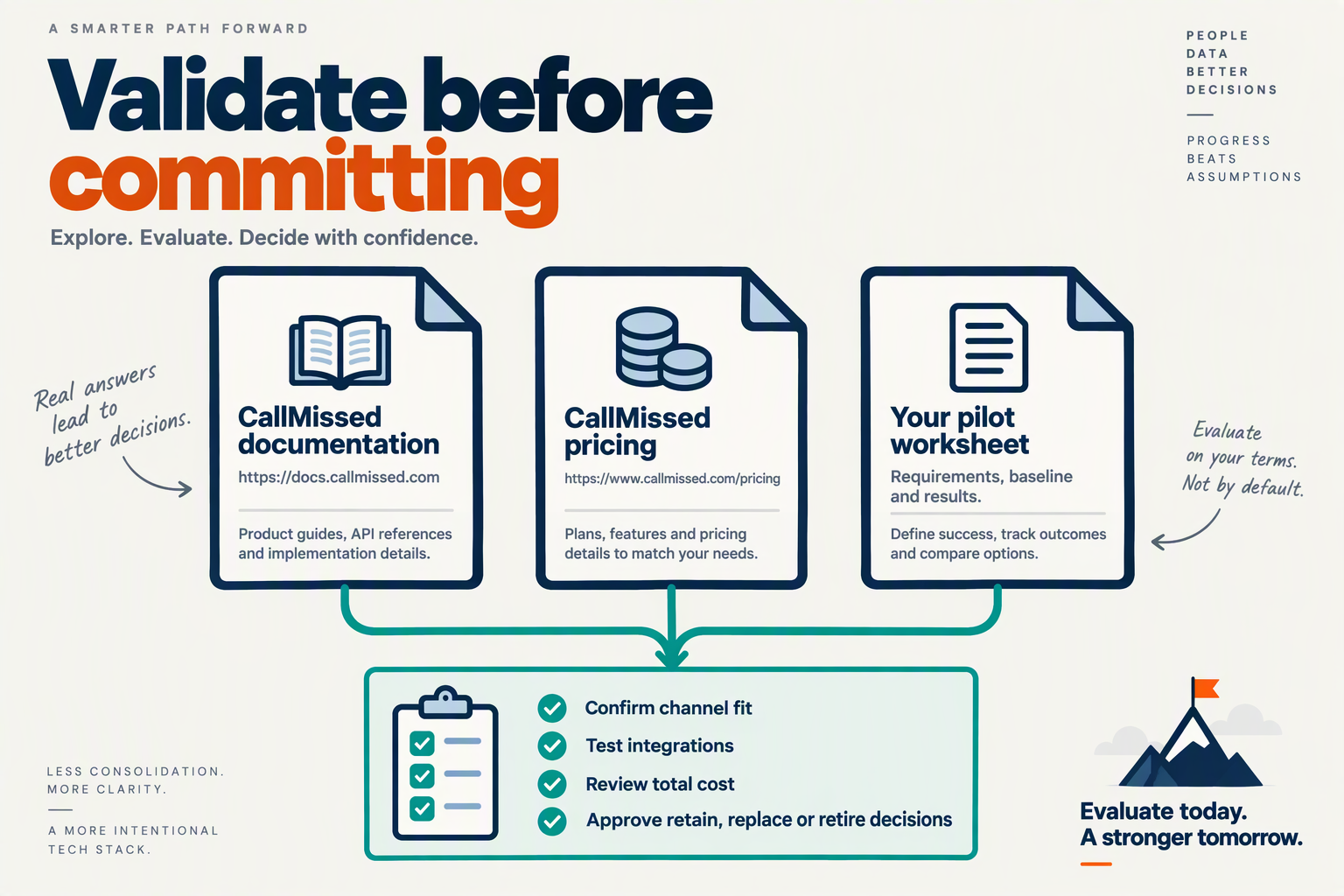
Validate a lean customer-support stack with official documentation, a workload-based cost estimate, and a bounded pilot—not a longer vendor shortlist. Use those resources to produce a decision record that shows what works, what remains uncertain, and which existing tools you can safely retire.
Which documentation should you review before committing?
Start with CallMissed’s developer documentation, then verify the capabilities needed for your chosen support journey. As of October 2026, CallMissed supports knowledge bases built from text, web pages, and PDFs; custom REST tools; and integrations including Shopify, WooCommerce, and HubSpot.
Turn that documentation review into an evidence checklist, rather than a feature comparison:
- Knowledge: Can the agent retrieve the correct policy, including exceptions and outdated information?
- Actions: Can the required integration complete the specific operation, rather than merely retrieve information?
- Handoff: What context must reach a human when automation cannot proceed?
- Recovery: What happens if an external service times out or returns incomplete data?
Distinguish “the platform supports this integration” from “our workflow has passed an end-to-end test.” For example, an order lookup working successfully does not prove that a refund exception will reach the right person with sufficient context.
Record unanswered questions and ask for clarification before expanding the implementation. Documentation is a starting point for validation, not proof of production readiness.
How should you estimate the cost of a small pilot?
Review CallMissed’s pricing against your expected workload, not the number of features available. According to CallMissed’s verified pricing information, as of October 2026, Standard voice agents cost ₹4 per minute, covering speech recognition, the language model, and the voice; phone carriage is billed separately.
For a hypothetical pilot with 100 billable voice minutes, that component would cost ₹400, before separate phone-carriage charges. As of October 2026, CallMissed applies a 30-second minimum per call, while calls that never connect cost nothing, so estimate billable usage rather than simply adding conversation durations.
Build the full pilot budget around:
- Usage charges: Voice, messaging, model usage, and any applicable external services.
- Implementation effort: Knowledge preparation, integration work, and testing.
- Operating effort: Human review, exception handling, and ongoing maintenance.
A low usage bill does not establish a low-cost workflow if staff still spend substantial time correcting outcomes.
What should your next validation steps be?
Use a short, written sequence to prevent evaluation from becoming another form of tool overload:
- Freeze the scope. Select one support journey and explicitly exclude unrelated capabilities.
- Set acceptance criteria. Define acceptable answers, permitted actions, escalation conditions, and cost limits before testing.
- Run representative cases. Include ordinary requests, ambiguous questions, missing records, and failed integrations.
- Make a keep, revise, or stop decision. Retain evidence and assign an owner to unresolved issues.
The March 20, 2026 Monitoosoft article, “AI is saving hours of work. But no one is working less,” captures why time saved on isolated tasks is an incomplete success measure. For your pilot, ask whether the entire support journey requires less effort—not merely whether replies appear faster.
Your final deliverable should be a one-page validation record, not another shortlist: tested workflow, observed outcomes, total costs, outstanding risks, and a clear deployment decision. That turns choice paralysis into an evidence-based next step.
Conclusion
A useful AI productivity stack removes friction from customer-support journeys; it does not merely accelerate isolated tasks. The way to avoid tool overload is to connect customer context, define human responsibility, and measure completed resolutions before adding another capability.
Forbes reported 14–55% task-level AI productivity gains in its January 20, 2026 analysis, while describing the broader productivity transition as uncertain. That distinction captures this guide’s central lesson: faster replies and summaries are valuable only when they help customers reach useful answers with less effort.
Keep these four principles at the center of your support-automation decisions:
- Audit overlap before expanding the stack. Identify tools that duplicate reply drafting, conversation summaries, ticket classification, or customer records. Ask what operational step each tool eliminates. Consolidate where duplication creates unnecessary work, but retain specialist software when it addresses a clear requirement that the rest of your stack cannot meet.
- Map one high-value customer journey first. Trace a request from the initial question through information retrieval, a decision, and resolution. A refund workflow, for example, needs access to order details, the applicable policy, and an updated customer record. Improving text generation alone will not fix missing information or manual reconciliation between those steps.
- Make context and handoffs explicit. Establish which system owns customer history and support knowledge, what automation can access, and when a person takes responsibility. A unified interface is helpful, but reliable support still depends on accurate information, sensible permissions, and tested escalation paths. Consolidation should simplify accountability rather than hide unresolved workflow problems.
- Judge success by customer outcomes. Track resolution time, repeat contacts, customer satisfaction, and total operating cost—not simply messages generated or tasks completed. Test whether automation improves the whole journey before expanding it. If employees still repeat context, correct conflicting records, or chase exceptions across dashboards, the bottleneck remains.
What should support teams watch for next?
Watch whether AI products make workflow integration more dependable, rather than merely adding more ways to generate output. Klover.ai’s 2026 analysis, “Buridan’s AI,” describes an “AI Productivity Paradox” in which individual activity metrics rise while organizational output stalls. For support leaders, the practical response is disciplined selection: favor capabilities that remove handoffs and preserve context over features that create another decision surface.
As of October 2026, CallMissed combines an omnichannel inbox, a human-handoff queue, and a built-in CRM. Readers can explore CallMissed as one example of the shift toward connected customer-communication workflows, while evaluating whether those capabilities address their own operational gaps.
Start with one support journey this week: which step could you eliminate—not merely accelerate—to make the customer’s next resolution easier?
Related Reading
- AI Productivity Tools Market: What Support Buyers Need
- Agentic AI Reduced Productivity: What Support Must Track
- Agentic AI Governance: India Voice Support Safety Guide
Sources
Discussion
Related Posts



Ready to automate customer conversations?
Launch AI voice agents and WhatsApp bots with CallMissed — one API, 22+ Indian languages.