Real-time speaker diarization: A Practical API Guide


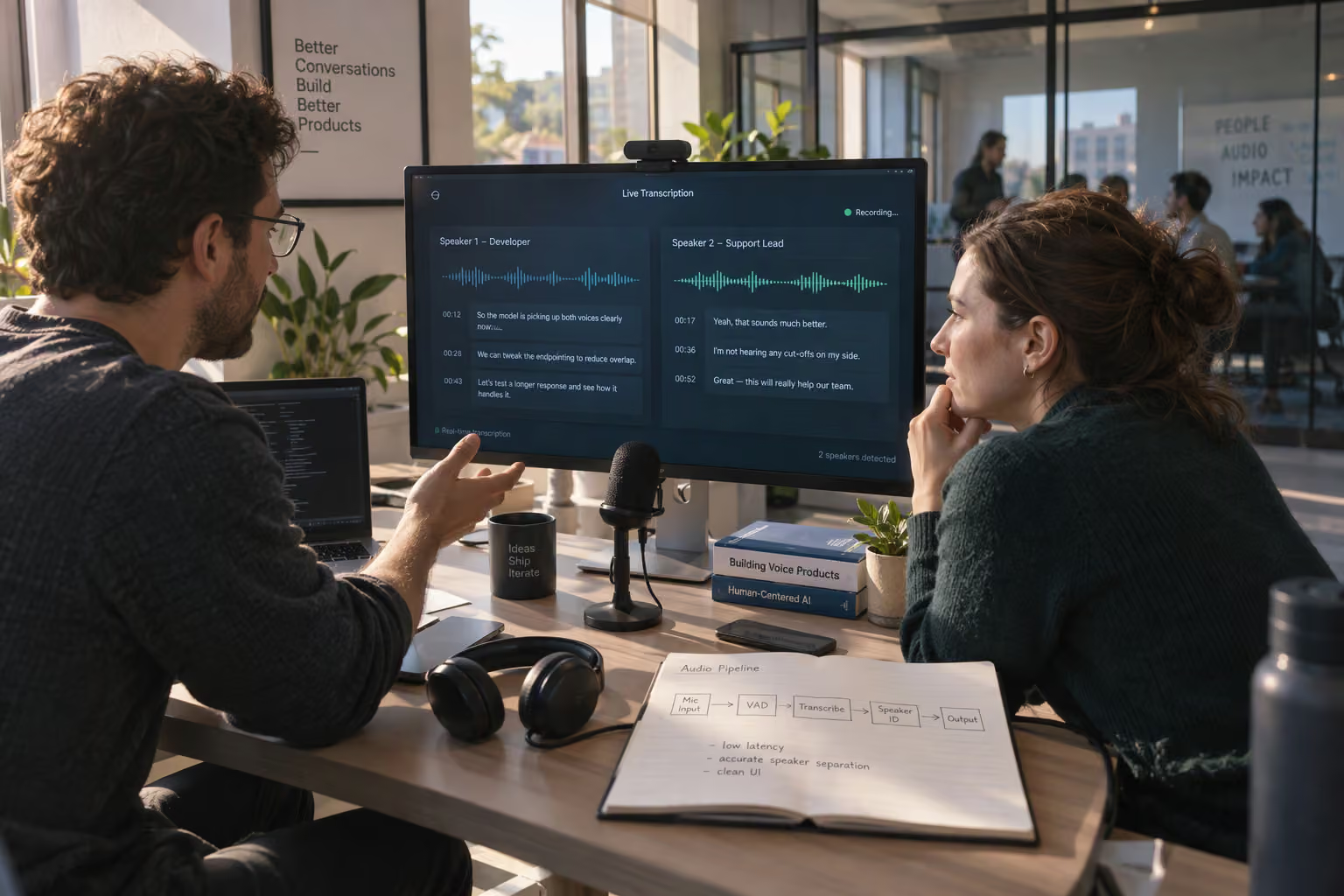
Add speaker diarization to live transcription with a microphone-to-UI workflow, streaming API setup, pricing checks, and error fixes.

Real-time speaker diarization: A Practical API Guide
A live transcript can capture every word and still miss the most important detail: who said what? To add realtime transcription with speaker diarization, stream audio to a compatible speech-to-text API, enable diarization, and turn timestamped speaker labels into readable conversation turns.
That distinction matters when a customer says, “Cancel my order,” and an agent replies, “Don’t cancel it yet.” Without speaker attribution, downstream summaries, quality reviews, and automation can confuse a request with a response. Diarization separates voices into labels; it does not, by itself, establish someone’s name or identity.
The economics make this increasingly practical. As of November 2026, Deepgram’s supplied pricing lists Nova-3 Monolingual speech-to-text at $0.0048 per minute on pay-as-you-go, with its streaming FAQ quoting approximately $0.29 per hour. Affordable transcription, however, is only one part of a reliable implementation: model compatibility, transcript revisions, and speaker attribution still need deliberate engineering.
How do you add realtime transcription with speaker diarization?
Start by checking the provider’s streaming-specific capabilities, rather than copying a prerecorded transcription example. According to Deepgram’s documentation supplied for this November 2026 guide, streaming supports diarize_model=latest or diarize_model=v1; requesting v2 for streaming returns a validation error. “Latest” also resolves differently across modes: currently v2 for batch diarization and v1 for streaming.
The response format matters just as much. Deepgram’s November 2026 documentation states that live diarization returns a speaker value, while prerecorded diarization returns both speaker and speaker_confidence. A dashboard built around confidence scores from offline examples therefore needs different handling for live sessions.
This guide walks through the practical integration decisions:
- Capture and stream audio: choose the connection method and match the API’s audio-format requirements.
- Configure transcription and diarization: select a supported streaming model and enable speaker attribution.
- Process incoming events: distinguish provisional text from finalized results and preserve word timestamps.
- Build conversation turns: group adjacent words by speaker without treating labels as verified identities.
- Test difficult audio: evaluate interruptions, overlapping voices, and short acknowledgments before production.
Deepgram’s implementation guide specifically warns that overlapping speech and brief back-channels such as “uh-huh” can reduce diarization confidence—useful reminders to test realistic conversations, not just clean demos.
As of November 2026, CallMissed offers 50 speech-to-text models through its developer AI API, reflecting broader demand for accessible speech infrastructure; verify diarization support separately for your chosen model and endpoint.
The goal is straightforward: a live transcript your application can interpret, not merely display, with explicit boundaries around speaker attribution.
How do you add realtime transcription with speaker diarization? Stream live audio to an STT API that supports streaming diarization. Enable speaker labels, then reconcile provisional and final transcript events in your UI.
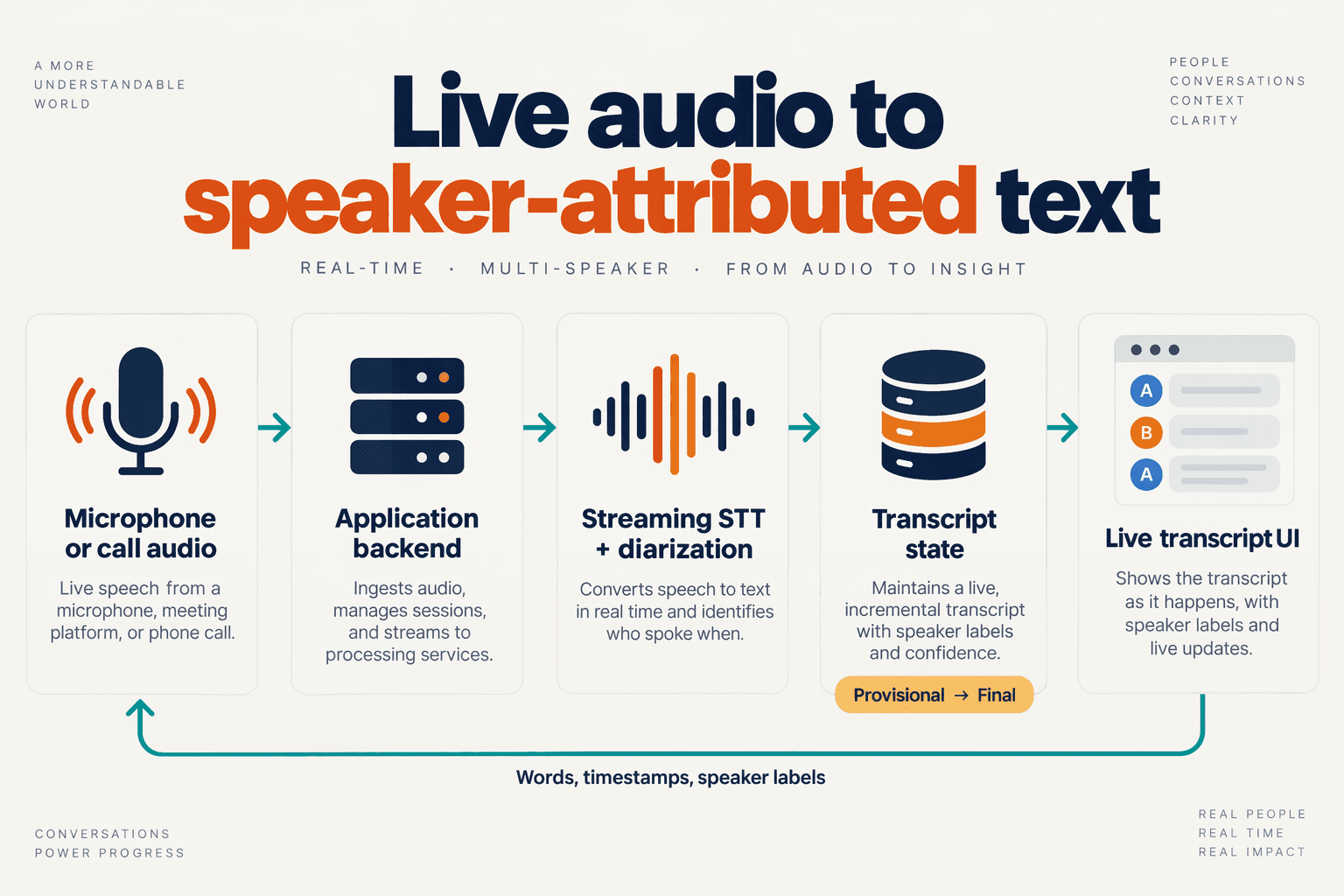
Add realtime transcription with speaker diarization by streaming live audio to a compatible speech-to-text API, enabling speaker labels, and maintaining separate provisional and finalized transcript states. The critical engineering step is reconciliation: update an existing transcript segment when results change instead of appending every incoming event as new text.
What should you check before streaming audio?
Validate the complete streaming path before building the transcript interface. A provider’s prerecorded transcription example does not establish that the same options or response fields work for live audio.
Use this implementation checklist:
- Confirm streaming diarization support for your selected model and language.
- Match the audio specification: encoding, sample rate, and channel count must agree with what you actually send.
- Keep credentials server-side: use a backend relay or provider-supported temporary credentials rather than exposing a permanent API key in browser code.
- Enable provisional results if users need text before a segment is finalized.
- Record the resolved model configuration alongside the session for debugging.
According to Deepgram’s documentation supplied for this November 2026 guide, diarize_info appears alongside model_info when returned, making the resolved diarizer visible. Deepgram specifies that diarize_info is either present with both documented fields or absent entirely—not null or an empty object. Treat absent metadata explicitly rather than assuming a particular diarizer was used.
How should you reconcile provisional and final transcript events?
Build a small provider adapter that converts incoming responses into your own internal event format. This keeps provider-specific payload details out of your UI and makes switching transcription services less disruptive.
A useful normalized event contains:
- Session and channel identifiers to separate concurrent streams.
- Segment identity or time range to locate the text being revised.
- Word text, timestamps, and speaker labels for rendering attributed turns.
- Finalization status to distinguish editable hypotheses from committed results.
Use a provider-issued segment identifier where available. Otherwise, reconcile overlapping time ranges within the same session and channel; do not use arrival order alone as identity.
For example, a provisional result might show “Please cancel,” followed by “Please cancel my subscription.” Those are two revisions of one segment, not two separate customer statements. Replace the provisional text, then commit the finalized version without duplicating earlier words.
Keep segment finalization separate from end-of-turn detection. A finalized transcription chunk does not necessarily mean the speaker has finished talking; implement those states according to the provider’s event semantics.
How do you turn speaker labels into readable conversation turns?
Group adjacent words with the same speaker label into a turn, preserving their start and end timestamps. Split a turn when the speaker changes, and consider a configurable silence threshold for readability.
Display neutral labels such as Speaker 0 and Speaker 1 until another trusted source establishes identity. For known agent and customer audio channels, preserve that channel information rather than assuming diarization labels identify their roles.
What should you test before shipping?
Test revisions, speaker changes, reconnects, and audio interruptions—not just transcription accuracy. Confirm that revised text replaces earlier hypotheses, finalized words appear once, and reconnects cannot merge unrelated sessions.
As of November 2026, Deepgram’s supplied implementation guide warns that overlapping speech and short back-channels such as “uh-huh” can reduce diarization confidence. Include those cases in acceptance tests, and measure attribution errors separately from incorrect words: readable text can still assign a statement to the wrong speaker.
Who is this setup for, and what must be ready before you start?
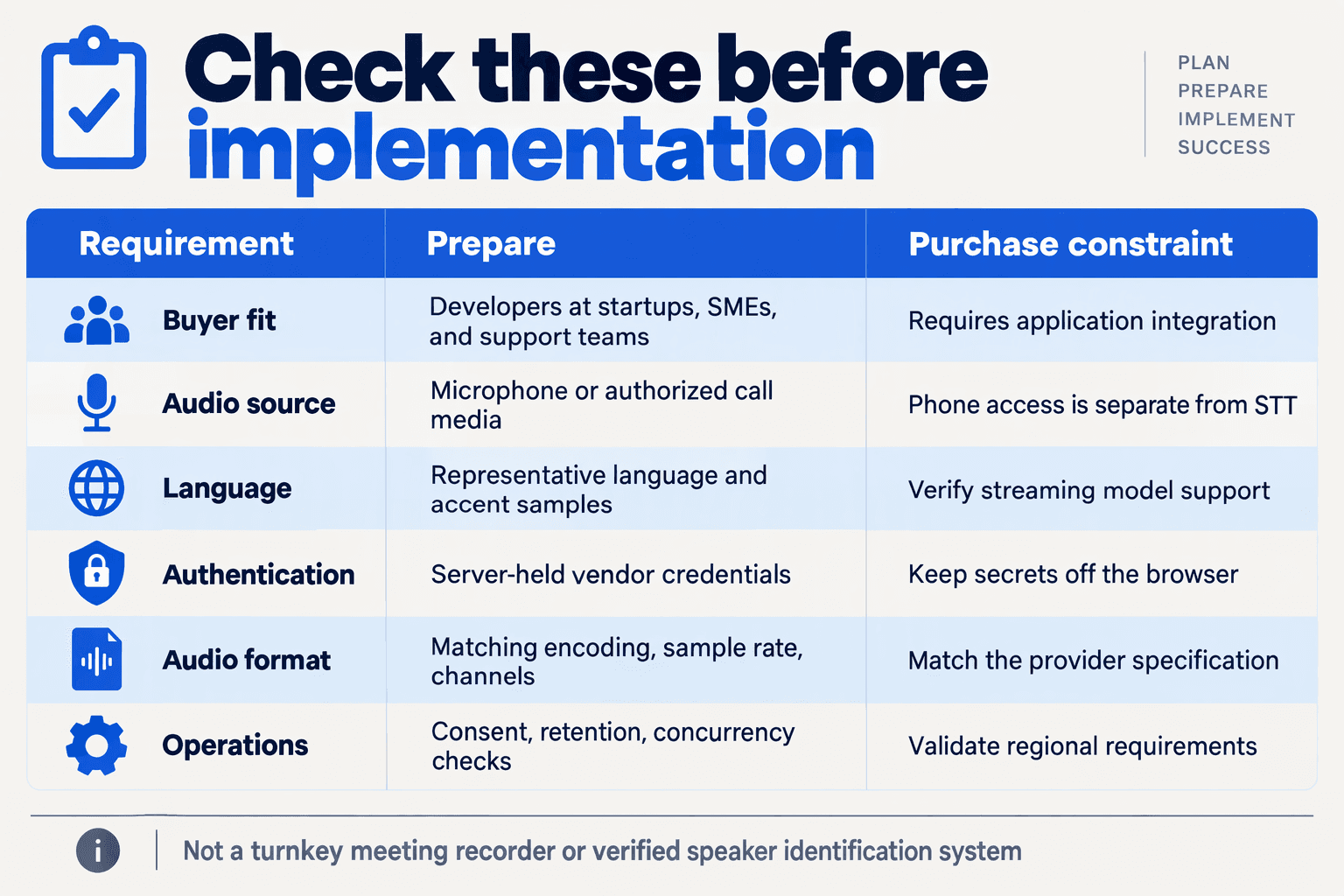
This setup is for teams building live, speaker-attributed transcripts for support calls, meetings, interviews, or voice applications—not teams that only need transcripts after recordings finish. Before starting, you need access to the audio stream, a streaming-compatible transcription endpoint, an event-processing backend, and clear rules for consent, storage, and speaker labels.
Who should use realtime transcription with speaker diarization?
Use this readiness checklist to decide whether your application actually needs live diarization. The requirements below are implementation recommendations for November 2026, not guarantees about any provider’s accuracy.
| Use case | Why attribution matters | Must be ready | First acceptance test |
|---|---|---|---|
| Customer-support calls | Separates requests from agent responses | Access to caller and agent audio; recording notice | Correctly attribute a request and its reply |
| Meeting assistants | Organizes contributions into speaker turns | Microphone capture; participant consent | Preserve turns across several speakers |
| Live interviews | Distinguishes interviewer questions from answers | Reliable audio capture; timestamp storage | Handle short questions followed by long answers |
| Voice-agent applications | Separates customer speech from synthesized replies | Access to both audio directions; playback isolation | Avoid transcribing playback as new customer speech |
| QA and compliance tools | Connects statements to conversation roles | Retention policy; review workflow | Let reviewers inspect uncertain attribution |
| Multilingual conversations | Attributes turns when participants switch languages | Model support for the actual language mix | Test language switches using representative audio |
For a two-party call, first check whether your telephony system exposes separate audio tracks. Known track ownership can provide role attribution directly; diarization is particularly useful when speakers share a mixed recording. Neither approach automatically verifies a person’s identity.
What technical prerequisites must be ready?
Prepare these four components before writing the transcript interface:
- Audio access: Confirm that your browser, mobile application, or telephony integration can deliver audio continuously. Record the encoding, sample rate, and channel count, then check them against the selected endpoint’s requirements.
- Secure streaming access: Keep long-lived provider credentials server-side. Establish how sessions authenticate, start, stop, and recover after a connection failure.
- An event-processing layer: Store session identifiers, timestamps, speaker labels, and finalization state. Design updates so provisional text can change without creating duplicate transcript lines.
- A representative test set: Include your actual microphones, accents, background noise, and conversation styles—not just studio-quality sample files.
As of November 2026, LiveKit’s Deepgram STT documentation lists interim_results as a boolean with a default of True. That makes revision handling a practical prerequisite when using that integration: a live caption should not automatically become a permanent CRM note.
What budget and governance decisions should you make first?
Separate transcription charges from audio transport, storage, and downstream summarization costs. According to Deepgram’s supplied pricing, as of November 2026, Nova-3 Multilingual costs $0.0058 per minute on pay-as-you-go; at that listed rate, 10,000 audio minutes would cost $58 for transcription, before any other charges.
Set operational boundaries before testing with real customers:
- Consent: Determine which notices or permissions your use case and jurisdiction require.
- Retention: Decide whether to retain audio, transcripts, both, or neither.
- Access: Restrict who can view, export, or correct conversation records.
As of November 2026, CallMissed’s developer AI API provides usage and request logs, according to its verified product fact sheet. Those capabilities are relevant when evaluating integration observability, but buyers should confirm streaming diarization support for their chosen endpoint separately.
Step 1: How do you capture live microphone or phone audio safely?
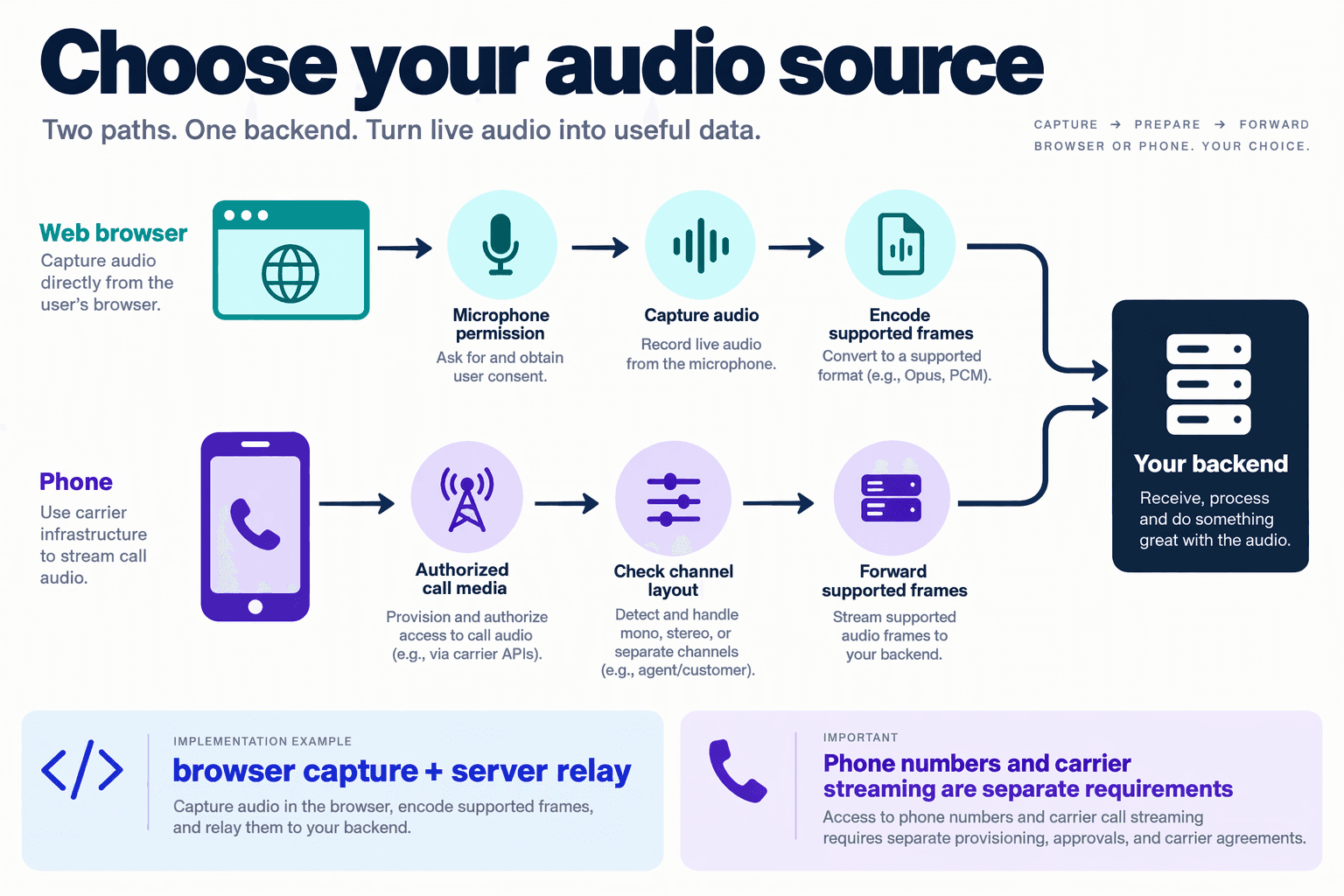
Capture live microphone audio through a permission-based browser flow, or receive phone audio through your carrier’s media-stream interface, then forward it over an encrypted connection to your transcription backend. Keep provider credentials server-side, match the actual audio format to the streaming API, and establish consent before transmitting speech.
How do you capture browser microphone audio for realtime transcription?
For a browser implementation as of November 2026, use navigator.mediaDevices.getUserMedia() from a secure context, normally HTTPS. Request microphone access only after an explicit action such as clicking Start transcription, and display a persistent indicator while capture is active.
Choose the capture pipeline based on the transcription provider’s accepted formats:
- AudioWorklet: Suitable for accessing audio samples and preparing PCM frames. Explicitly handle resampling and conversion to the required bit depth.
- MediaRecorder: Convenient for encoded audio, but inspect the supported MIME type and resulting container. Do not assume every emitted chunk is an independently decodable audio file.
- Backend relay: Forward audio through your server so long-lived API keys never appear in browser code. Direct browser connections should use short-lived credentials only where the provider explicitly supports them.
Requesting a sample rate does not guarantee that the browser produces it. Inspect the actual stream settings and resample when necessary; declaring 16 kHz while sending 48 kHz samples can produce incorrect timing or unusable recognition.
How do you capture phone audio without losing speaker separation?
For telephone transcription, use the carrier’s supported media-stream interface or a SIP media integration. Confirm the codec, sample rate, channel layout, and whether payloads contain raw audio or encoded transport messages before forwarding anything.
Preserve separate caller and agent tracks when available. Channel attribution identifies an audio track; speaker diarization identifies voices within audio. These are related but different signals, so keep channel metadata rather than prematurely mixing both sides into mono.
For example, maintain separate incoming and outgoing track identifiers alongside session timestamps. If the chosen transcription endpoint accepts only one channel, make that conversion deliberately and document the loss of separation.
As of November 2026, CallMissed supports inbound and outbound phone calls through rented numbers or bring-your-own carriers, including Twilio, Plivo, and SIP trunks, according to the CallMissed fact sheet. That is a telephony integration option—not evidence that every underlying transcription model supports streaming diarization.
What audio settings should you validate before streaming?
Validate these properties against the selected API’s current documentation:
- Encoding: PCM, μ-law, or another explicitly supported format.
- Sample rate and channels: The declared values must match the transmitted samples.
- Chunk boundaries: Preserve sample alignment and any required container structure.
- Flow control: Bound your send queue; surface congestion rather than silently dropping audio.
- Capture quality: Test speakerphone echo, background noise, and simultaneous talk.
For a November 2026 implementation example, 16 kHz, 16-bit mono PCM produces 32,000 bytes per second before transport overhead, calculated as 16,000 samples × 2 bytes. This is a sizing example, not a universal provider requirement.
Deepgram’s implementation guide, supplied for this November 2026 guide, flags overlapping speech and short acknowledgments as diarization challenges. Good capture cannot eliminate those cases, but avoiding clipping and unnecessary mixing prevents additional ambiguity.
How do you protect audio and end capture safely?
Explain the transcription purpose and obtain any consent required by applicable law and organizational policy. Microphone permission is not a substitute for recording or processing consent.
Encrypt transport, restrict access to transcripts, and define retention periods. On stop, release microphone tracks, finish the provider’s stream-closing sequence, and clear session buffers; exclude raw audio, credentials, and sensitive transcript content from routine diagnostic logs.
Step 2: How do you enable speaker diarization on a streaming API?
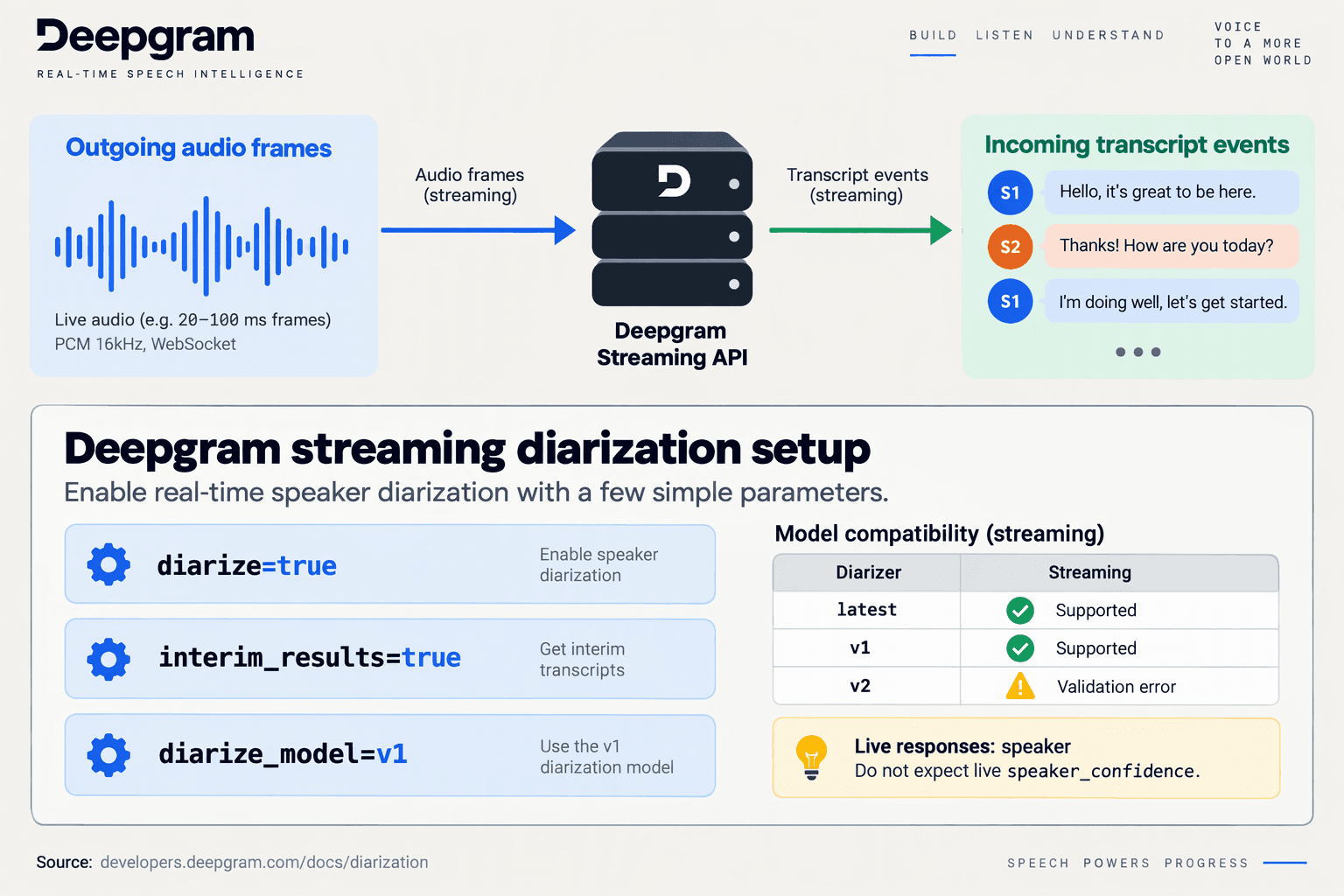
Enable speaker diarization in the streaming connection’s configuration before sending audio, then confirm that transcript events contain speaker labels. For Deepgram streaming, set diarize=true and choose a supported diarize_model; transcription model selection and diarizer selection are separate settings.
Which parameters enable speaker diarization in realtime transcription?
Keep the configuration explicit so a working transcription connection does not silently become a transcription-only connection. The following JavaScript example builds query parameters for a Deepgram Nova-3 streaming request; it is configuration code, not a complete WebSocket client:
const params = new URLSearchParams({
  model: "nova-3",
  language: "en",
  diarize: "true",
  diarize_model: "v1",
});

// Append params.toString() to your streaming connection request.
// Keep your existing authentication and audio-format settings.
The settings have different jobs:
modelselects the speech-to-text model that recognizes words.languagespecifies the transcription language for this example.diarizeenables speaker attribution.diarize_modelselects the diarizer version, independently of the transcription model.
Do not copy an entire prerecorded configuration into a live connection. Deepgram’s supplied implementation guide uses utterances=True in a prerecorded Python SDK example; that example alone does not establish how a streaming client should configure conversation segmentation.
Should you use diarize_model=latest or pin a version?
Use latest when you want the provider’s current generally available streaming diarizer, or pin v1 when repeatable configuration matters more than automatically adopting future changes.
According to Deepgram’s diarization documentation supplied for November 2026, latest resolves to v1 for streaming and v2 for batch transcription. The same documentation states that requesting diarize_model=v2 for streaming returns a validation error.
This creates a practical deployment trade-off: latest reduces manual version management, while a pinned version makes regression testing easier to interpret. Neither setting guarantees accurate attribution in every recording.
For production, record the requested setting alongside the resolved diarizer metadata. As of November 2026, Deepgram documents diarize_info alongside model_info in streaming responses, allowing applications to inspect which diarizer was actually selected.
How do you check whether diarization is actually enabled?
Run a short, controlled two-speaker test before connecting the stream to summaries, CRM updates, or other downstream actions:
- Start a fresh streaming connection with diarization explicitly enabled.
- Have two people alternate complete sentences, avoiding interruptions for this initial configuration check.
- Inspect word-level transcript data for
speakervalues rather than relying on the displayed transcript text. - Check resolved model metadata where available, and preserve configuration details in your application logs.
According to Deepgram’s documentation supplied for November 2026, live diarization returns speaker, whereas prerecorded diarization returns both speaker and speaker_confidence. Do not make a live integration fail merely because the prerecorded confidence field is absent.
What if your SDK or gateway does not expose diarization?
Check whether the client supports streaming diarization parameters, passes them through to the provider, and preserves speaker fields in responses. An available transcription model does not automatically imply an available diarization feature.
If transcription works but speaker labels are missing, first inspect the outgoing configuration and raw incoming events. That separates an unsupported capability from a parameter omitted by an SDK wrapper—or a speaker field discarded by your own response parser.
Step 3: How do you reconcile partial text, final words, and changing speaker labels?
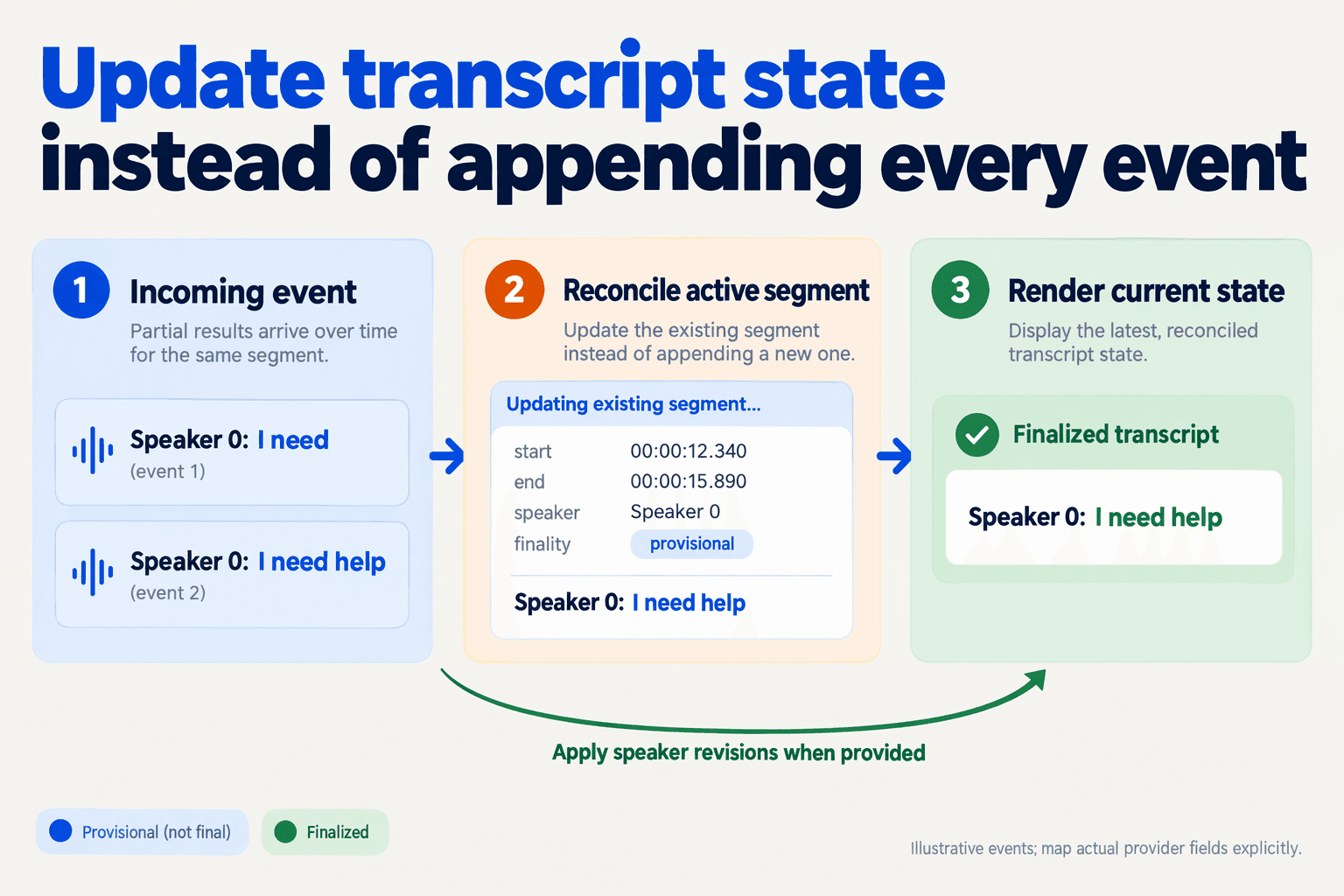
Reconcile realtime transcription with speaker diarization by keeping provisional text separate from committed words and treating speaker labels as revisable metadata. Use audio timestamps—not arrival order or the latest text string—to determine which part of the conversation an update replaces.
How should you store partial and final transcript results?
Maintain two transcript layers: a committed timeline for finalized results and a provisional buffer for the audio currently being decoded. Interim hypotheses should replace the corresponding provisional span, not append another sentence to the transcript.
For example, an illustrative stream might produce:
- Partial: “I want to cancel”
- Revised partial: “I want to cancel my”
- Final: “I want to cancel my order.”
Appending all three produces duplicated text. Reconciliation produces one sentence, with the provisional display changing until the final result arrives.
Keep these fields in your application’s normalized representation:
- Session and channel: identify the audio stream.
- Segment identifier or audio interval: locate the span being updated.
- Word text, start, and end: preserve alignment with the recording.
- Finalization state: distinguish editable hypotheses from committed recognition.
- Speaker label and revision: track attribution separately from text.
These are application-design recommendations, not a promise that every provider returns this exact schema. Map your chosen API’s events into this representation and verify its finalization semantics before implementation.
Does final text mean the speaker label cannot change?
Do not assume text finalization guarantees immutable speaker attribution. Establish whether your provider can revise labels, and keep your storage model capable of applying attribution corrections without duplicating words.
According to Deepgram’s documentation supplied for this November 2026 guide, live diarization returns a speaker value, whereas prerecorded diarization returns both speaker and speaker_confidence. Consequently, a live interface should not display a numerical speaker-confidence score that the streaming response never supplied.
Use neutral labels such as Speaker 0 and Speaker 1. Keep any verified customer or agent identity in a separate mapping; a diarization label alone is not identity evidence.
If an attribution correction arrives, update the affected timestamp range and rebuild the surrounding conversation turns. Avoid globally renaming a speaker unless the provider explicitly indicates that the correction applies across the session.
How do you reconcile updates without losing or duplicating words?
Use a deterministic update sequence:
- Locate the affected span using provider identifiers where available, otherwise channel and audio timestamps.
- Replace its provisional hypothesis rather than concatenating the incoming text.
- Commit finalized words and remove only the provisional content they supersede.
- Apply supported corrections as explicit revisions, preserving an audit trail.
- Regroup adjacent words when speaker attribution changes.
Make repeated delivery idempotent: processing the same event twice should not create two transcript entries. For overlapping intervals, follow the provider’s documented replacement rules rather than guessing from text similarity.
When should summaries and automation consume the transcript?
Show provisional text immediately for responsiveness, but feed downstream workflows committed words with explicit attribution status. An illustrative cancellation workflow should not act on an unfinished “cancel…” hypothesis.
Separate recognition finality from business readiness: a finalized phrase can still require the next conversational turn for context. For consequential actions, require confirmation rather than treating either finalized transcription or a speaker label as authorization.
How much does streaming transcription cost, and which alternatives should you evaluate?
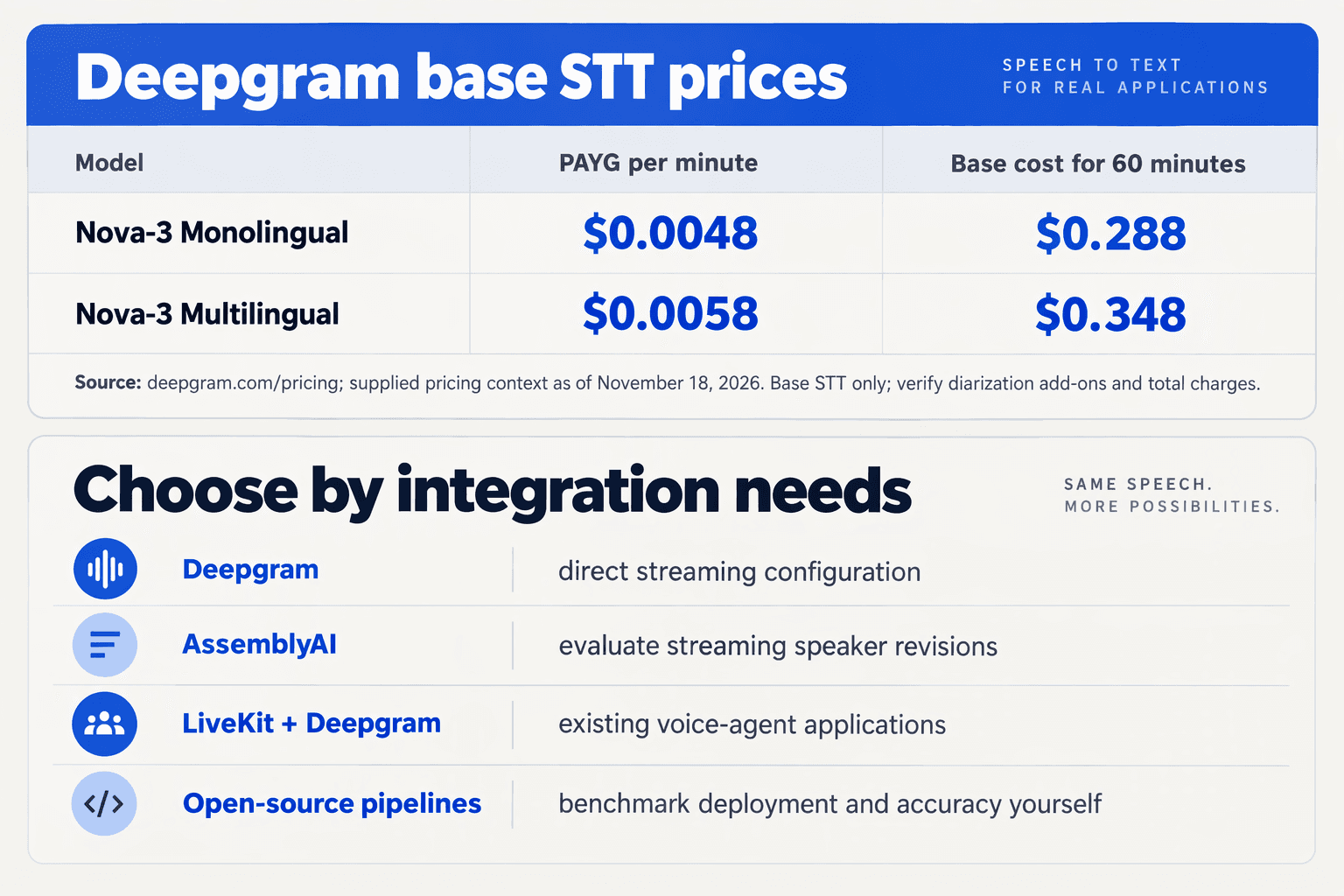
Streaming transcription can cost about $0.29–$0.47 per audio hour at the Deepgram pay-as-you-go rates supplied for this November 2026 guide. To budget for realtime transcription with speaker diarization, compare the transcription rate with your channel count, billing rules, integration costs, and verified streaming diarization support—not just the advertised price.
What do streaming transcription options cost?
Deepgram’s November 2026 pricing lists Nova-3 Monolingual at $0.0048 per minute and Nova-3 Multilingual at $0.0058 per minute on pay-as-you-go. Deepgram’s streaming pricing FAQ separately quotes the hourly figures below; these are transcription prices, not verified all-inclusive diarization quotes.
The comparison includes both model alternatives and integration routes. All prices and product details reflect the supplied sources as of November 2026.
| Option | Published transcription price | Why evaluate it? | What to verify |
|---|---|---|---|
| Deepgram Nova-3 Monolingual | $0.0048/min; approximately $0.29/hour | Baseline for single-language workloads | Streaming diarization configuration and total bill |
| Deepgram Nova-3 Multilingual | $0.0058/min; approximately $0.35/hour | Alternative for multilingual audio | Supported languages and speaker attribution quality |
| Deepgram Flux STT Monolingual | $0.39/hour, per pricing FAQ | Another streaming model to benchmark | Model-specific diarization support |
| Deepgram Flux STT Multilingual | $0.47/hour, per pricing FAQ | Multilingual streaming alternative | Language coverage and diarization compatibility |
| LiveKit Inference with Deepgram STT | No rate supplied in this context | Integration route with documented interim-result controls | Inference pricing and exposed diarization parameters |
| CallMissed developer AI API | Model-specific STT rates not supplied | Access to 50 speech-to-text models through one API key and balance | Streaming, speaker labels, and rates for the chosen model |
According to CallMissed’s verified November 2026 fact sheet, its developer API includes OpenAI-compatible audio transcription endpoints. That compatibility is useful for integration planning, but does not by itself establish streaming diarization support for every available model.
How do you calculate a realistic monthly transcription budget?
Start with billable audio minutes, rather than meeting counts or customer counts. Then calculate the base transcription charge before adding other infrastructure.
- Estimate volume: For example, 1,000 conversations averaging 10 minutes produce 10,000 audio minutes.
- Apply the published rate: Using Deepgram’s November 2026 Nova-3 Monolingual pay-as-you-go rate, 10,000 minutes cost $48 before any additional charges.
- Compare language requirements: The same volume at Deepgram’s published Nova-3 Multilingual rate costs $58, a calculated difference of $10.
- Confirm billing assumptions: Ask whether separate channels, reconnects, minimum durations, or optional features change the charge.
Neither the supplied pricing excerpt nor the diarization documentation establishes an additional diarization fee. Do not assume diarization is included—or carries a surcharge—without checking the applicable quote.
Which alternatives should you benchmark before buying?
Benchmark the cheapest compatible model against your actual conversations, then evaluate the integration route separately. A lower transcription bill can be offset by engineering work or frequent speaker-label corrections.
Use the same representative recordings across candidates and compare:
- Speaker attribution: Count incorrectly attributed turns, especially interruptions.
- Streaming behavior: Measure time to usable text and how often provisional text changes.
- Operational fit: Check concurrency limits, reconnect handling, retention terms, and support.
- Total cost: Include audio transport, application hosting, storage, and downstream summarization.
LiveKit’s supplied Deepgram STT documentation lists interim_results as defaulting to True, illustrating why integration defaults matter. Choose the option that produces usable attributed turns at an acceptable total cost—not simply the lowest price per minute.
Step 4: How do you test overlap, speaker re-entry, and multilingual audio?
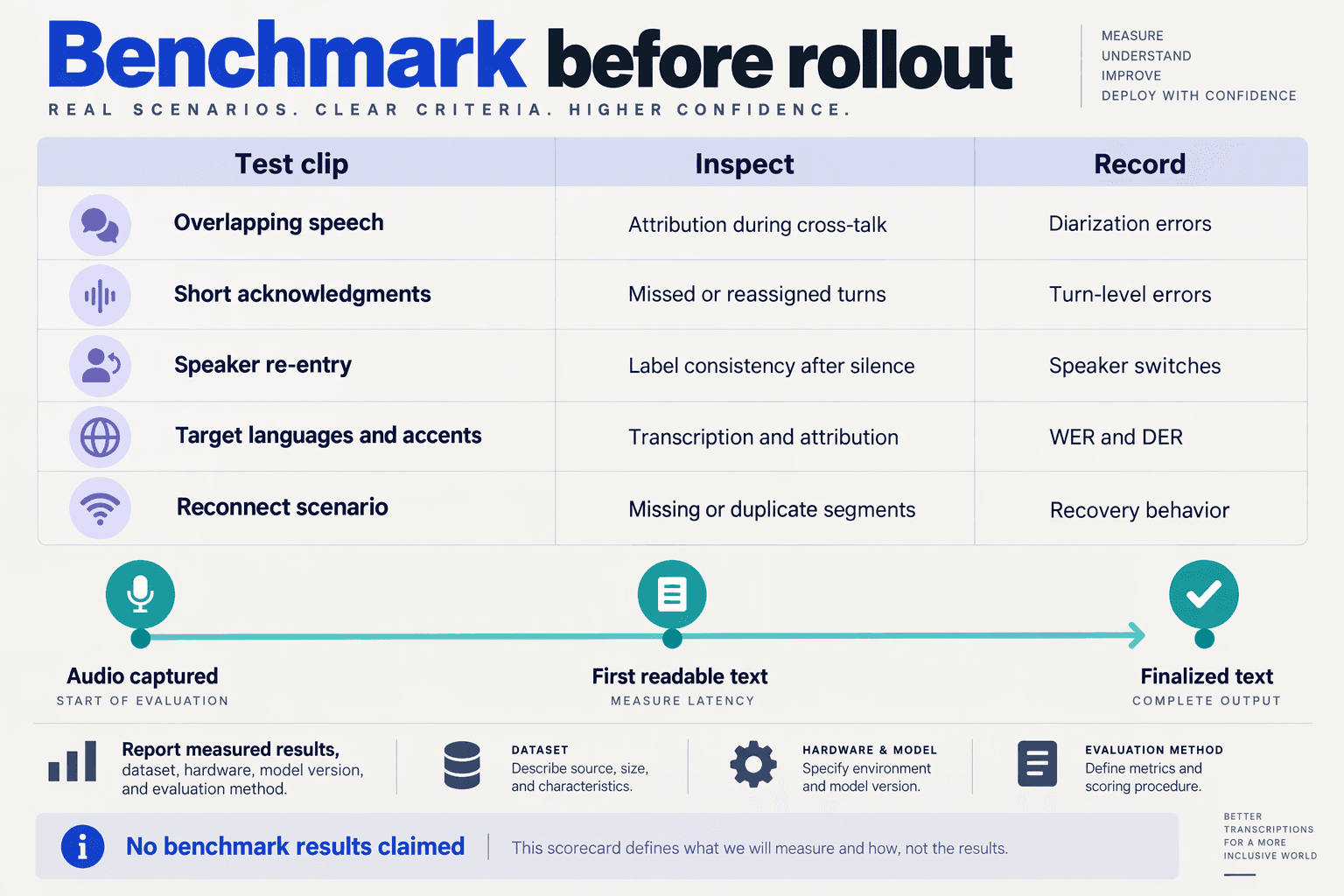
Test realtime transcription with speaker diarization using human-annotated recordings that include simultaneous speech, returning speakers, and language switches, then replay them through your production streaming path. Evaluate transcription accuracy and speaker attribution separately: correct words do not guarantee correct speaker labels.
Which audio scenarios should your test suite include?
Use the following six-case test matrix as a starting point. These are proposed test scenarios, not provider benchmarks; run each across the languages, microphones, and call conditions your application actually supports.
| Test case | Audio fixture | What to measure | Failure to flag |
|---|---|---|---|
| Clean baseline | Two speakers taking distinct turns | Word errors; speaker attribution errors | Labels change without a voice change |
| Overlapping speech | One speaker interrupts another mid-sentence | Missed speech; attribution during overlap | Both voices assigned to one speaker |
| Short acknowledgments | “Yes,” “okay,” and “uh-huh” between longer turns | Attribution of brief responses | Acknowledgment attached to the wrong turn |
| Speaker re-entry | Speaker A returns after B and C converse | Label continuity across the absence | Returning voice receives a new label |
| Multilingual turns | Speakers alternate between supported languages | Word errors and label stability by language | Language change triggers a speaker change |
| Code-mixed, degraded audio | Hinglish with noise or uneven volume | Errors by language segment and audio condition | Quiet speech disappears or gets misattributed |
Deepgram’s implementation guide, supplied for this November 2026 guide, warns that short back-channels such as “uh-huh” and overlapping speech can produce “lower diarization confidence.” Treat these as mandatory fixtures rather than occasional edge cases.
How do you score overlap and speaker re-entry?
Create reference annotations containing words, timestamps, speaker identities, and overlap intervals. Keep reference identities internal to evaluation; the API’s numeric labels need not match your annotation labels.
- Align speaker labels consistently. Map predicted labels to reference speakers across the recording, rather than remapping every turn and hiding label instability.
- Separate error categories. Track missed speech, false speech detections, and speaker confusion. If reporting diarization error rate (DER), disclose whether overlapping speech is scored and whether boundary tolerance is allowed.
- Inspect re-entry explicitly. In a proposed fixture, let speaker A return after a 30-second absence. Check whether A retains the mapped label and whether B or C accidentally inherits it.
- Score the rendered transcript too. A correct raw event can still become an incorrect conversation turn after application-level merging.
According to Deepgram’s documentation supplied for November 2026, live diarization returns speaker, while prerecorded diarization also returns speaker_confidence. Consequently, do not make a confidence threshold your only acceptance gate for streaming.
How should you validate multilingual audio before launch?
Test language recognition and speaker continuity as separate capabilities. A model can recognize both languages yet split one bilingual speaker into two labels—or preserve labels while mistranscribing a language switch.
As of November 2026, CallMissed’s verified product specifications list speech recognition in 22 Indian languages plus English, including code-mixed speech such as Hinglish. That coverage is relevant when selecting test languages, but it does not establish diarization support for every model or language combination; verify your selected streaming configuration separately.
Before release:
- Report results by scenario and language, not just one aggregate score.
- Replay audio at realtime pace through the same capture and event-processing pipeline.
- Set application-specific acceptance criteria before testing, especially for consequential speaker-attributed actions.
The goal is not a flawless demo: it is knowing which conversation conditions your implementation handles reliably and which require human review.
Which common mistakes break real-time speaker diarization?
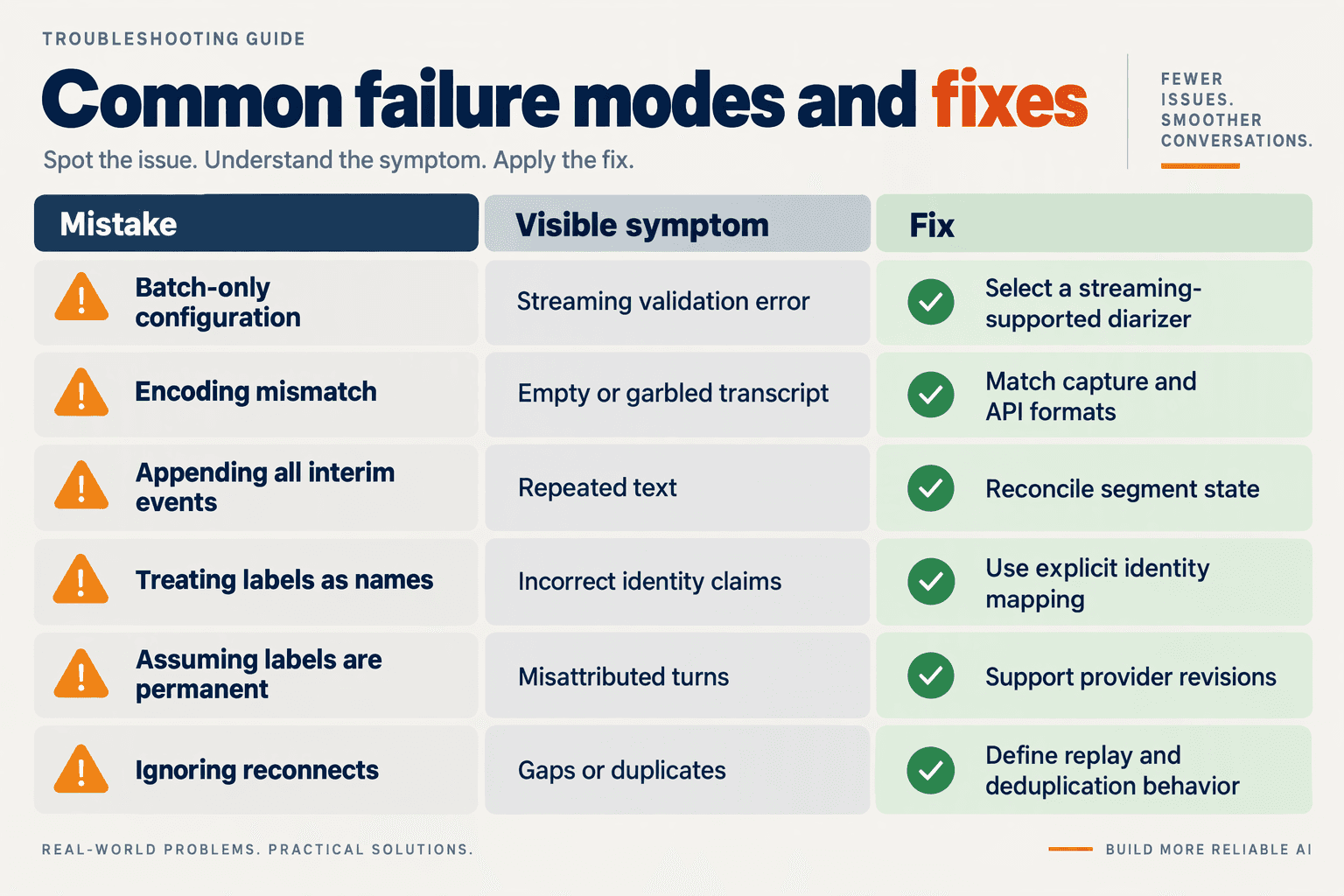
The most damaging real-time diarization mistakes happen when applications treat provisional transcripts, anonymous speaker labels, or interrupted streams as permanent truth. Reliable implementations preserve timing and session boundaries, accept revisions, and prevent uncertain speaker attribution from triggering irreversible actions.
Use this checklist when adding realtime transcription with speaker diarization. These are engineering failure modes to test—not a ranking of model accuracy.
| Mistake | What breaks | Practical fix | Verification test |
|---|---|---|---|
| Declaring the wrong audio format | Transcription becomes unreliable, undermining speaker attribution | Match encoding, sample rate, and channel settings to the actual audio sent | Replay a known recording through the production capture path |
| Appending every interim result | Revised phrases appear twice or under conflicting speakers | Update provisional text; commit only according to the API’s finalization semantics | Check that repeated partial results produce one finalized passage |
| Reusing speaker IDs across sessions | A new caller inherits an earlier caller’s label | Scope speaker identifiers to the transcription session | Start two calls and confirm their speaker records remain separate |
| Treating speaker labels as identities | “Speaker 0” becomes “customer” without evidence | Keep anonymous labels until a trusted channel or workflow establishes roles | Reverse the speaking order and inspect role assignment |
| Ignoring reconnect boundaries | Timestamps collide, turns merge, or audio disappears silently | Track stream segments, timestamp offsets, and capture gaps | Disconnect mid-sentence and inspect the reconstructed timeline |
| Forcing certainty during overlap | Brief acknowledgments or interruptions become misleading turns | Preserve uncertain passages and avoid automatic role-based actions | Test simultaneous speech and short “uh-huh” responses |
How should you handle transcript revisions without corrupting speaker turns?
Treat the live transcript as editable state, not an append-only log. Maintain provisional results separately from committed transcript segments, using the provider’s documented identifiers or timing boundaries to reconcile updates.
For example, a provisional “cancel my…” followed by “cancel my appointment” should update the displayed phrase—not create two independent customer requests. Rebuild affected speaker turns when the underlying words change, and make downstream processing idempotent so repeated events cannot create duplicate tasks.
A useful implementation sequence is:
- Receive and validate the event.
- Replace or reconcile the affected provisional segment.
- Commit finalized content using the API’s documented semantics.
- Release eligible content to summaries or automation.
What should you log when speaker attribution changes unexpectedly?
Record session ID, stream segment, timestamps, requested configuration, resolved model metadata, and finalization state. Without that context, an application bug can look like a diarization-model regression.
According to Deepgram’s documentation supplied for this November 2026 guide, diarize_info exposes the resolved diarizer alongside model_info in streaming and prerecorded responses. Deepgram also specifies that diarize_info is either present with both documented fields or absent entirely—not null or {}.
That distinction matters operationally: handle missing metadata explicitly rather than allowing a parser exception to interrupt transcription. Preserve the resolved configuration when available so evaluations compare equivalent setups.
Which difficult conversations should you test before launch?
Test attribution quality separately from word accuracy: a readable transcript can still assign a cancellation request to the wrong participant.
- Interruptions: Does the UI preserve turn order?
- Short acknowledgments: Are brief responses attached to the correct speaker?
- Reconnects: Are missing intervals visible rather than silently hidden?
Deepgram’s implementation guide, supplied for this November 2026 article, warns that short back-channels such as “uh-huh” and overlapping speech can reduce diarization confidence. Use those cases as explicit acceptance tests, and require confirmation before uncertain attribution drives consequential actions.
Which resources help you ship this, and where can CallMissed fit?
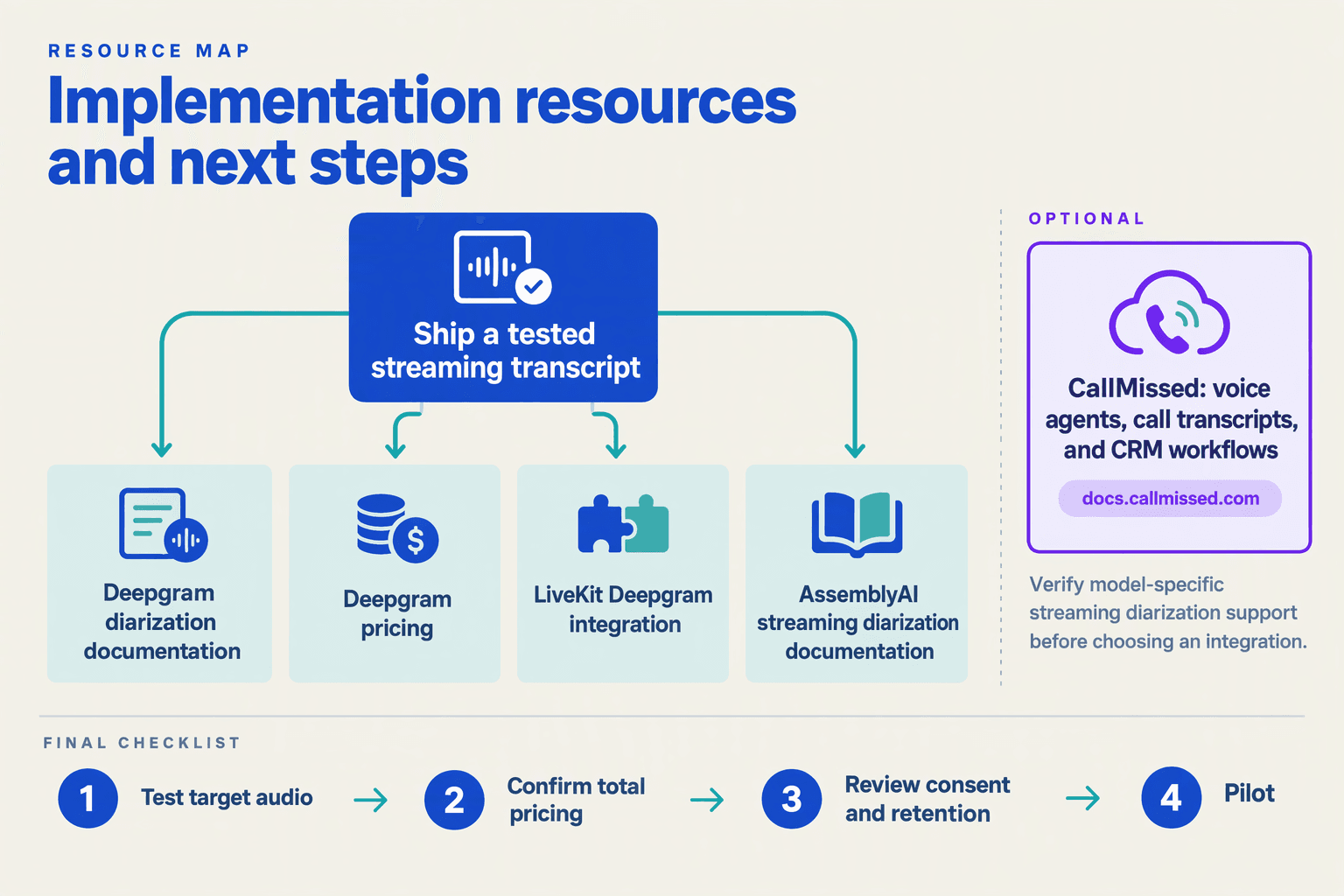
The most useful resources are provider-specific streaming documentation, SDK examples, and your integration layer’s parameter reference—each answers a different shipping question. CallMissed can fit as a developer API or customer-communication platform, but its model catalogue should not be treated as proof that a particular endpoint supports realtime speaker diarization.
Which documentation should developers use for realtime speaker diarization?
Use the following resources as a verification stack, rather than treating one tutorial as a complete production specification:
- Deepgram’s “Speaker Diarization” documentation: Use this as the reference for streaming-compatible diarizer settings and response fields. A useful production detail in the documentation supplied for November 2026 is that
diarize_infoappears alongsidemodel_info, making the resolved diarizer visible when you requestlatest. Deepgram states thatdiarize_infocontains both documented fields or is absent entirely; it is nevernullor{}. Make your parser tolerate absence, and record the metadata when available.
- Deepgram’s “Working with timestamps, utterances, and speaker diarization” guide: Use this to understand how attributed words become conversation turns. Its supplied Python example uses
PrerecordedOptionsandtranscribe_url, so treat it as a response-processing reference—not a drop-in live-streaming implementation.
- LiveKit’s “Deepgram STT” reference: Consult this if LiveKit is your integration layer. The supplied November 2026 reference lists
interim_resultsas a Boolean with a default ofTrue; check how your application handles provisional text before displaying or persisting it. The excerpt does not establish diarization support, so verify that separately in the complete integration documentation.
For documentation-assisted development, Deepgram’s supplied developer pages also advertise .md versions and page-level /llms.txt indexes. These can help an AI coding assistant work from relevant documentation rather than remembered API syntax.
What should you verify before choosing a transcription integration?
Turn the documentation into a short acceptance checklist:
- Parameter passthrough: Can the integration send the required diarization options, or does its abstraction omit them?
- Response preservation: Does it retain speaker labels, timestamps, finalization signals, and available model metadata?
- Version visibility: Can you identify the model configuration used when investigating a regression?
- Billing scope: Does the published rate cover your selected model, language mode, and configuration?
As a budgeting reference, Deepgram’s pricing supplied for November 2026 lists Nova-3 Multilingual at $0.0058 per minute on pay-as-you-go. That equals $5.80 for 1,000 minutes at the listed model rate, before any separately applicable charges. Compare costs only after confirming equivalent capabilities.
Where can CallMissed fit without assuming unsupported features?
As of November 2026, CallMissed’s verified developer API offers one API key and one balance for 158 models, including OpenAI-compatible audio transcription endpoints, usage logs, and request logs. These are relevant building blocks for teams consolidating AI integrations; compatibility alone, however, does not guarantee streaming diarization or preservation of provider-specific speaker fields.
For customer-support deployments, CallMissed’s verified November 2026 platform also includes call recordings, transcripts, AI call notes pushed to the CRM, and call scoring against your own QA rubrics. Those capabilities support the surrounding workflow, but they are not a verified promise of speaker-labelled realtime transcription. Before committing, ask for a working example of the exact endpoint, selected model, diarization parameters, and emitted speaker events.
Frequently Asked Questions
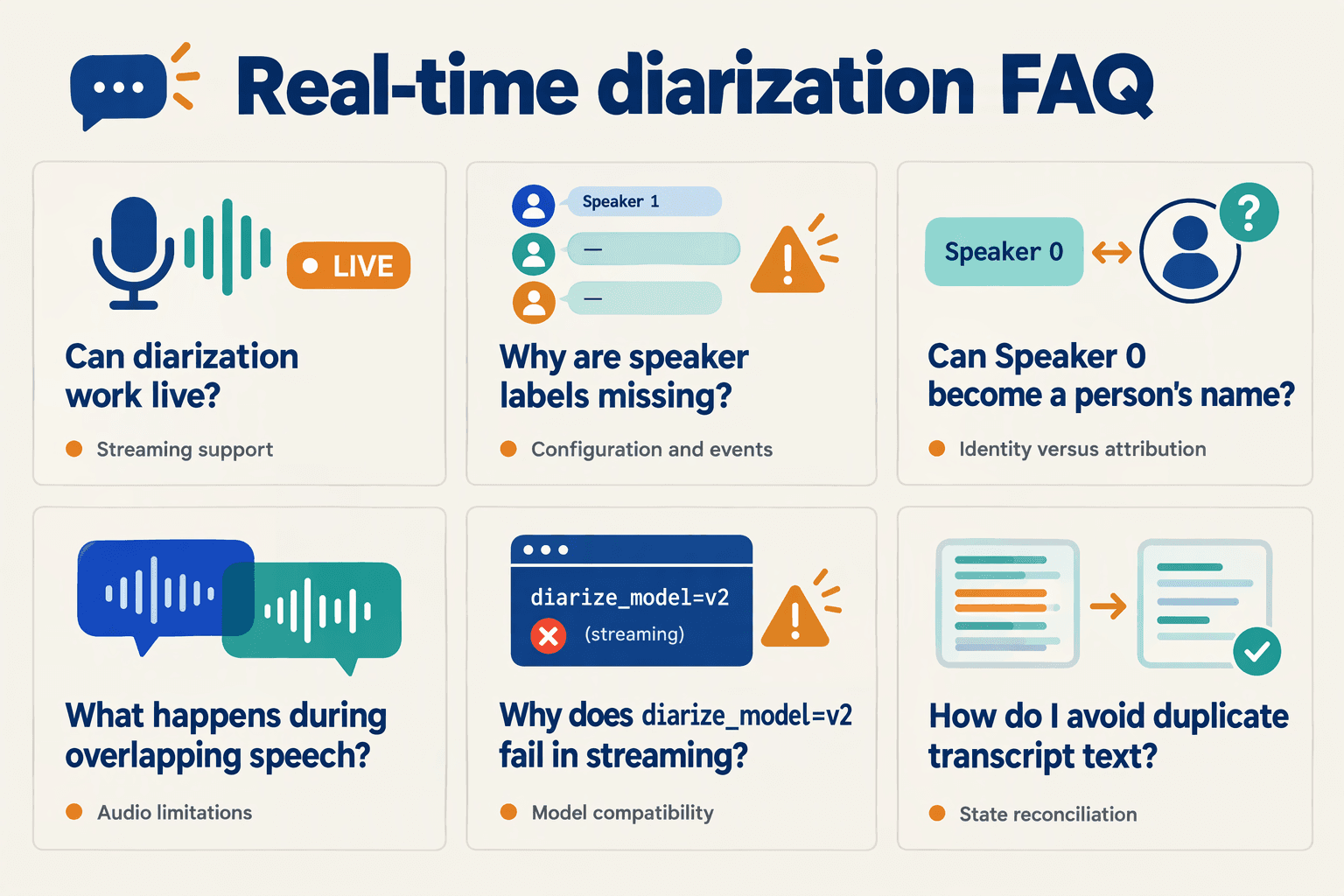
How do I add realtime transcription with speaker diarization that works during a live call?
diarize_model=latest or diarize_model=v1, whereas diarize_model=v2 returns a validation error. Check the streaming response contract before implementation: a configuration copied from a prerecorded example may request unsupported features or assume fields that live responses do not contain.Can realtime speaker diarization identify participants by name?
Can realtime transcription with speaker diarization handle overlapping speakers accurately?
How do I recover missing speaker labels in a live transcript?
Does live speaker diarization return confidence scores?
speaker value, while prerecorded diarization returns both speaker and speaker_confidence. Do not interpret an absent confidence field as zero confidence, and do not substitute transcription confidence for speaker-attribution confidence. For operational review, flag uncertainty using clearly labeled application rules—such as missing labels or rapid speaker switching—rather than presenting those rules as model-generated confidence scores.How much does realtime transcription with diarization cost, and what should buyers verify?
Conclusion
To add realtime transcription with speaker diarization, stream audio to a compatible speech-to-text API, enable its supported diarization configuration, and convert timestamped speaker labels into conversation turns. A production-ready integration must also handle transcript revisions and test attribution under realistic conditions—not simply display incoming text.
The central lesson is that transcription accuracy and speaker attribution are separate requirements. Capturing “Cancel my order” correctly is useful; distinguishing that customer request from an agent’s response is what makes the transcript dependable for summaries, quality reviews, and downstream automation. Speaker labels identify distinct voices, not verified names or identities.
What should you remember before deploying realtime diarization?
- Check streaming support before choosing a model. According to Deepgram’s documentation supplied for November 2026, streaming diarization accepts
diarize_model=latestordiarize_model=v1, whilev2returns a validation error. A working prerecorded example is therefore not proof that the same configuration will work live. Match the connection method and audio format to the API’s streaming requirements.
- Build around the live response schema. Deepgram’s November 2026 documentation states that live diarization returns
speaker, whereas prerecorded diarization returns bothspeakerandspeaker_confidence. Preserve word timestamps, distinguish provisional text from finalized results, and group adjacent words by speaker. Do not design a live interface that depends on confidence fields available only in offline responses.
- Evaluate conversations, not just clean recordings. Deepgram’s implementation guide, supplied for this November 2026 guide, warns that overlapping speech and short acknowledgments such as “uh-huh” can reduce diarization confidence. Test interruptions and brief responses before relying on attributed turns for summaries or quality reviews. Treat readable conversation turns as an engineering outcome, not an automatic consequence of enabling diarization.
- Keep price and compatibility in the same evaluation. As of November 2026, Deepgram lists Nova-3 Monolingual speech-to-text at $0.0048 per minute on pay-as-you-go, with its streaming FAQ quoting approximately $0.29 per hour. Affordable transcription makes experimentation practical, but price alone does not establish whether a model supports your required live diarization behavior.
What should developers watch next?
Watch for changes in streaming diarization model availability, response fields, and how latest resolves. As providers update their APIs, recheck documentation and repeat realistic conversation tests rather than assuming a newer model preserves your existing integration’s behavior.
As of November 2026, CallMissed’s developer AI API offers 50 speech-to-text models, making CallMissed a platform worth exploring as speech infrastructure evolves. Verify realtime diarization support separately for any model you select.
Start with one representative customer-agent conversation: can your integration reliably show who said what, even when the speakers interrupt each other?
Related Reading
- Cheapest LLM API Provider in India (2026): Real Token Pricing, INR Cost Guide & Verdict
- LLM API aggregator: Fallback and Routing Buyer's Guide
- Claude Fable 5.2 API Pricing: $8/$40 Rates and Migration