WhatsApp Appointment Reminders: Multilingual Voice Guide


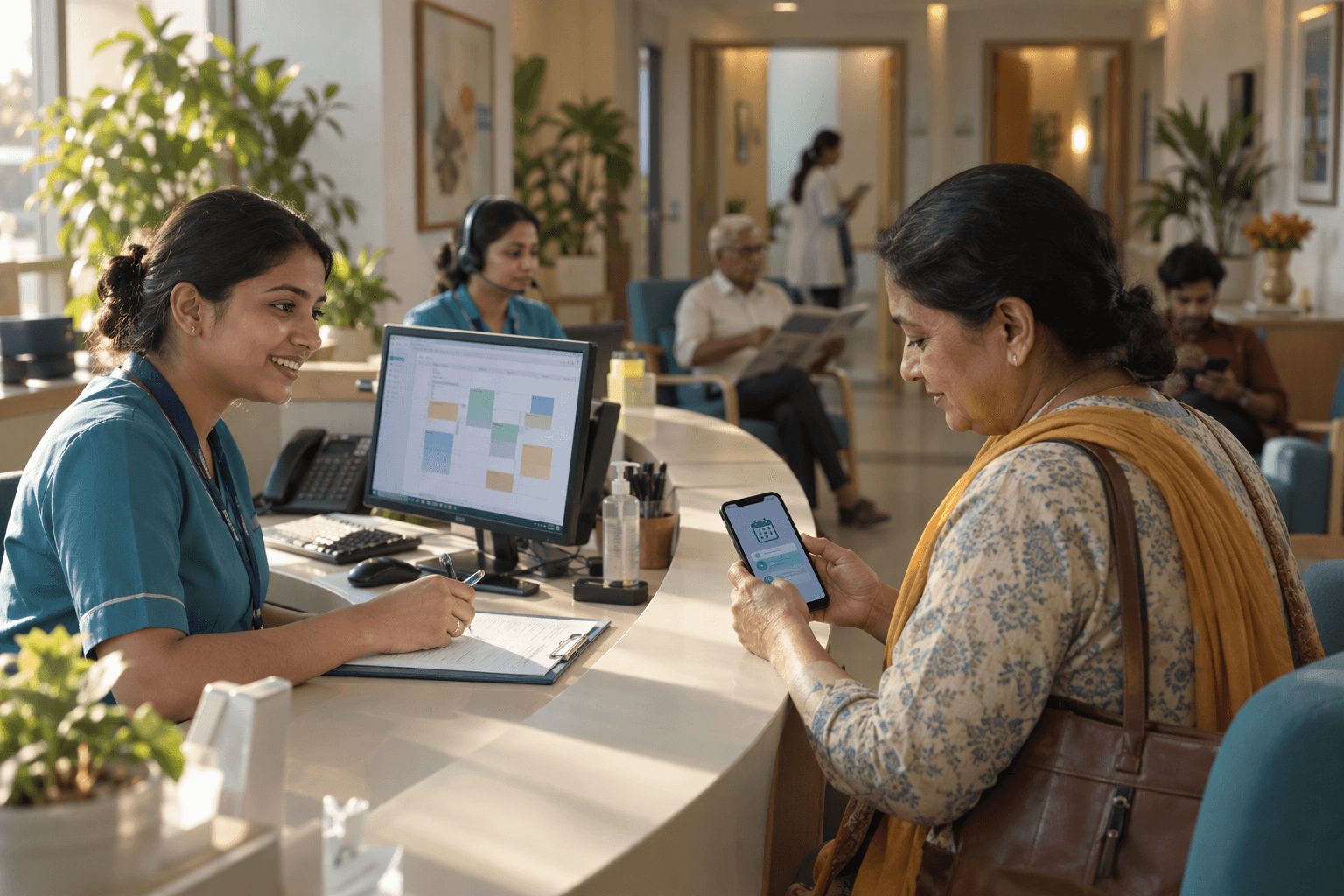
WhatsApp Appointment Reminders help clinics coordinate multilingual calls, confirmations and rescheduling. Learn consent, setup and pilot measurement.

WhatsApp Appointment Reminders: Multilingual Voice Guide
Could a simple reminder make the difference between an empty consultation slot and a patient receiving care? WhatsApp Appointment Reminders can give healthcare teams a practical way to share appointment details, while multilingual voice offers another route for patients who prefer speaking to reading.
The evidence for reminders is compelling—but it needs careful interpretation. As of November 2026, the historical Cochrane review available through PubMed reports appointment attendance of 78.6% with mobile messaging reminders, compared with 67.8% without reminders. Across seven studies involving 5,841 participants, the review found moderate-quality evidence that text reminders improved attendance, with a risk ratio of 1.14.
Those findings concern mobile text messaging, not WhatsApp specifically, and should not be presented as a guaranteed result for any clinic. Nevertheless, they establish a useful starting point: timely communication can help patients keep appointments.
The opportunity now is to make that communication easier to understand and act on. Imagine a patient receiving an English appointment message but feeling more comfortable asking questions in Tamil. A useful reminder experience should help that patient confirm the time, understand the location, or request rescheduling—not simply deliver another notification.
Multilingual voice adds a conversational option, but language coverage alone is not enough. Clinics also need clear pronunciation, accurate handling of dates and names, and an accessible route to a staff member when a request becomes complicated.
As of November 2026, CallMissed supports WhatsApp Business Calling through the official Meta Cloud API, alongside speech recognition in 22 Indian languages plus English and natural text-to-speech voices in 10 Indian languages plus English.
How should clinics combine WhatsApp reminders with multilingual voice?
This guide explains how to design a reminder journey around patient preferences rather than technology alone. You will learn how to:
- Write useful reminders: include the appointment date, time, location, and a clear next step.
- Choose the right language: distinguish written-message preferences from spoken-language needs.
- Use voice thoughtfully: separate customer-initiated WhatsApp calls from business calls requiring customer permission.
- Protect patient privacy: minimise sensitive details, consider shared phones, and establish human handoff.
- Measure meaningful outcomes: track confirmations, rescheduling requests, attendance, and communication costs.
The financial case also deserves attention. As of November 2026, the historical Cochrane review indexed by PubMed reports that two studies found text-message costs per attendance were 55% and 65% lower than telephone-reminder costs; these are not WhatsApp pricing estimates.
The goal is better appointment coordination—not more messages, unnecessary calls, or unsupported promises.
How do multilingual voice and WhatsApp appointment reminders work together?
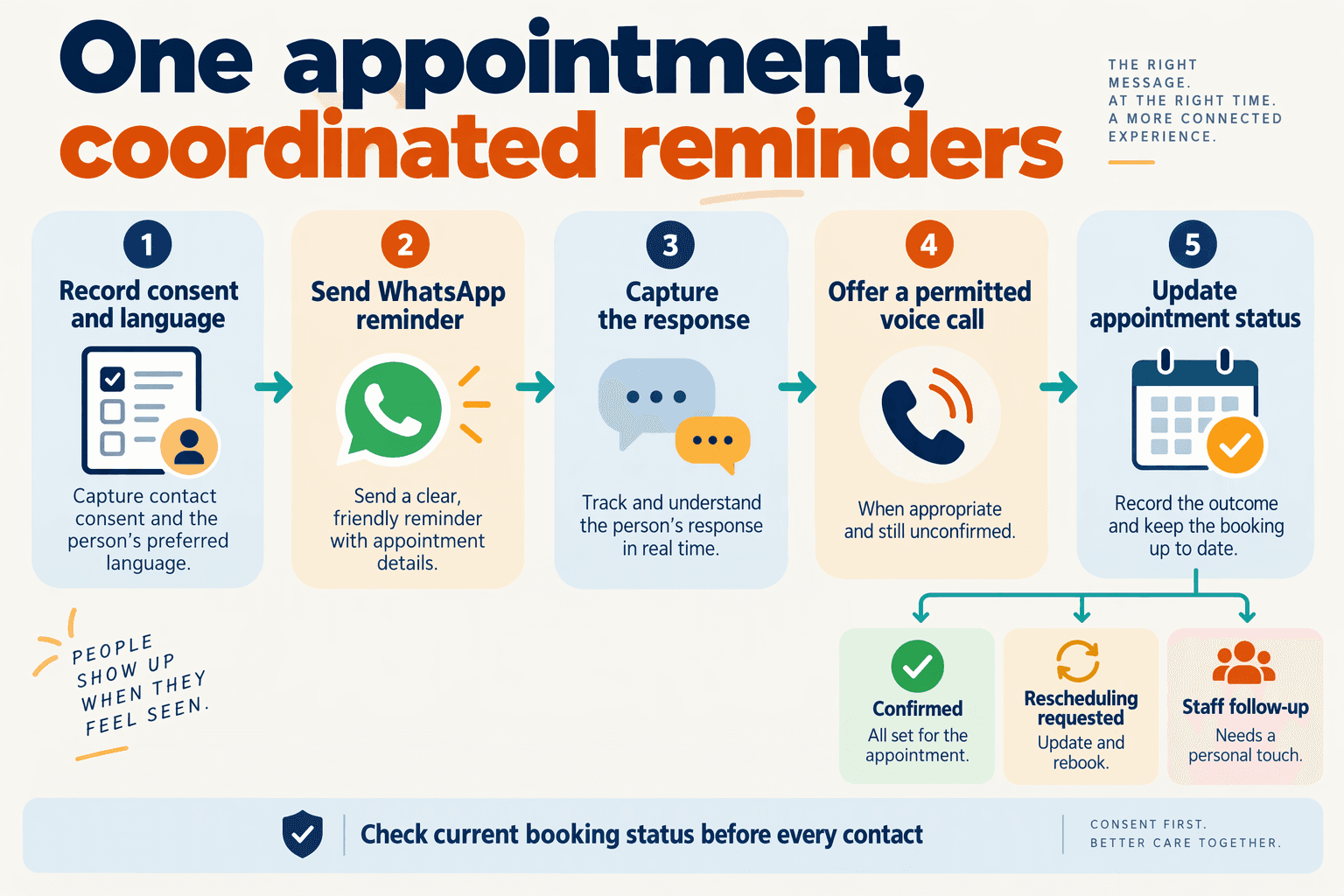
WhatsApp appointment reminders provide a written reference, while multilingual voice helps patients clarify details and explain what they need. The channels work together when both feed into one appointment workflow: send the reminder, capture the response, resolve questions, and record the outcome without making the patient repeat themselves.
What should happen after a patient receives a WhatsApp reminder?
Think of the reminder as the start of a short coordination process—not proof that the patient will attend. A delivered message, a patient’s confirmation, and an updated booking are three different events.
A practical workflow is:
- Read the booking record: retrieve the current appointment time, location, and preferred communication language.
- Send a concise reminder: provide the essential details and clear options to confirm, request a change, or ask for help.
- Interpret the response: distinguish “I’ll attend” from “Can I come later?” or “Where is the entrance?”
- Offer voice when useful: let the patient discuss a confusing detail rather than navigate repeated text exchanges.
- Update the appointment record: save the confirmation or route a change request to staff, then send a written summary.
A critical safeguard is to verify booking availability before promising a new slot. An AI agent should not turn “I would prefer Friday” into a confirmed Friday appointment unless the scheduling system or an authorised staff member has approved it.
When should multilingual voice support a WhatsApp conversation?
Voice is most useful when speaking reduces effort: a patient struggles with written instructions, switches between languages, or needs to explain several scheduling constraints. It should be an available route, not an automatic escalation for every unanswered message.
Consider this illustrative November 2026 journey:
- A clinic sends: “Your appointment is on 18 November 2026 at 10:30 a.m., Main Street Clinic. Please confirm or request a change.”
- The patient replies in Hindi that they cannot arrive before noon.
- A voice conversation clarifies whether they want a later appointment that day or another date.
- Staff or a connected scheduling workflow checks availability.
- WhatsApp provides the final, approved appointment details in writing.
The written recap matters because spoken dates and times can be misheard. During the call, the agent should also read back critical details and ask the patient to confirm them.
How do clinics keep both channels coordinated?
Use a shared appointment status, rather than separate voice and messaging records. Useful statuses include confirmed, change requested, awaiting staff action, and cancelled; message delivery status should remain separate.
As of November 2026, CallMissed, the AI customer-communication platform, offers a live shared inbox, a human-handoff queue, custom REST tools, and Google Calendar integration. These capabilities can support coordination, but clinics still need to configure booking rules, permissions, and staff responsibilities.
The evidence supports offering complementary channels—not assuming that combining them guarantees better attendance. As reviewed in November 2026, the historical Cochrane review indexed by PubMed found similar attendance effects for mobile text reminders and telephone reminders across three studies involving 2,509 participants, with a risk ratio of 0.99 (95% CI 0.95–1.02). That comparison concerns text messaging and telephone calls, not a multilingual WhatsApp-and-voice workflow.
The practical objective is therefore a completed scheduling action with less patient effort, not simply more contact attempts.
What data, consent and tools do clinics need before setup?
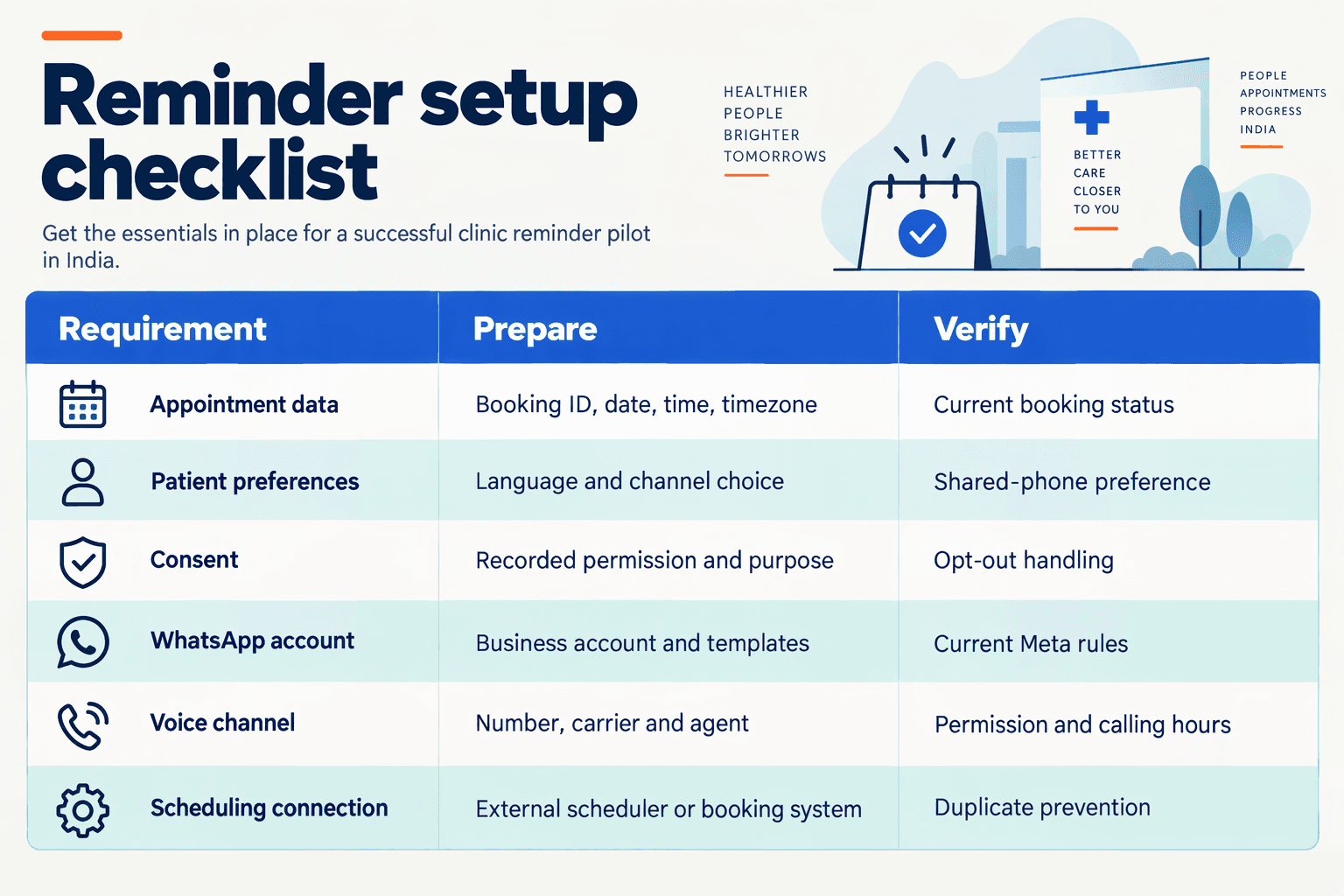
Clinics need a minimal appointment dataset, recorded communication preferences and permissions, and a reliable connection to their scheduling system before setting up WhatsApp appointment reminders or multilingual voice. Start with administrative information—not a full medical record—and define who handles cancellations, incorrect numbers, and requests the AI cannot safely resolve.
What information should clinics prepare before setup?
Use this checklist as a readiness gate. The examples are recommended implementation fields, not a requirement to upload every field to a messaging platform.
| Setup requirement | Minimum data or tool | Pre-launch check |
|---|---|---|
| Patient contact | Patient ID, verified phone number, preferred name | Confirm ownership and whether the phone is shared |
| Appointment record | Appointment ID, date, time zone, location, status | Match the current scheduling record; exclude cancelled bookings |
| Language preferences | Written language, spoken language, preferred channel | Ask the patient rather than infer from name or location |
| Permission record | Channel, purpose, permission status, timestamp, collection method | Keep messaging preferences separate from permission for business-initiated WhatsApp calls |
| Messaging and voice tools | WhatsApp Business account, reminder template, voice agent if needed | Test template variables, pronunciation, and staff escalation |
| Scheduling and staff workflow | Scheduling integration, update rules, staff queue, access controls | Verify that confirmations and rescheduling requests reach the right team |
An appointment ID is particularly useful: it lets the workflow identify the booking without placing diagnosis details in the reminder. Store dates in a consistent format internally, but present them naturally—for example, “18 November 2026 at 10:30 a.m. IST” for an Indian appointment.
How should clinics record consent and protect shared-phone users?
Treat consent as an operational record, not a checkbox that disappears after registration. Have the clinic’s privacy or legal lead review applicable local requirements; permission to receive appointment communications should not be treated as permission for marketing or unrestricted disclosure.
A practical collection script should establish:
- Channel choice: WhatsApp messages, voice calls, or another available route.
- Safe wording: whether naming the clinic could reveal sensitive information on a shared phone.
- Withdrawal route: how patients can stop reminders or change their preference.
- Calling permission: whether the patient permits business-initiated WhatsApp calls.
Privacy needs its own assessment. As reviewed in November 2026, the historical Cochrane review indexed by PubMed states that the included reminder studies “did not report on health outcomes or people's perceptions of safety related to receiving reminders by text message.” Attendance evidence therefore does not establish privacy or clinical safety.
Which tools should clinics connect and test first?
The scheduling system should remain the source of truth. A messaging tool should not confirm a changed appointment until the scheduling system—or an authorised staff member—has accepted the change.
As of November 2026, CallMissed supports WhatsApp Business account connection through Meta embedded signup, Meta-synced message templates, custom REST tools, and a human-handoff queue. These capabilities can support reminder coordination, but clinics should verify their own scheduling integration rather than assume a ready-made connection to every clinical system.
Before launch:
- Test a dummy booking: verify language, date, location, and patient-facing wording.
- Test exceptions: cancellation, duplicate records, wrong numbers, and withdrawn permission.
- Test escalation: ensure ambiguous requests reach staff without exposing unnecessary patient information.
Launch only when the reminder and the appointment record stay consistent throughout these tests.
When should clinics start with WhatsApp rather than a voice call?
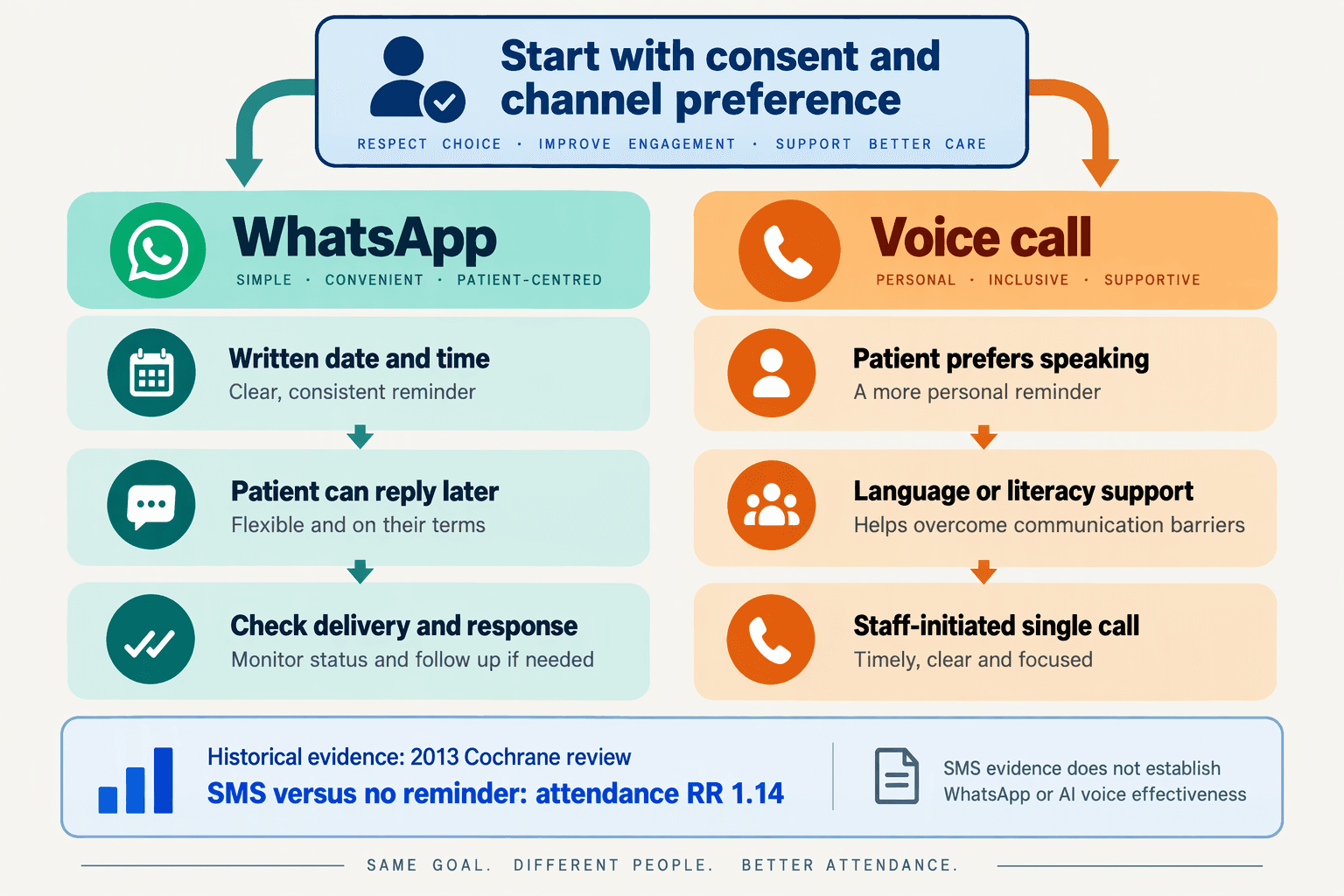
Clinics should start with WhatsApp appointment reminders when patients have agreed to receive them, regularly use WhatsApp, and can confirm or request a change without a spoken explanation. Start with a voice call when the patient prefers speaking, cannot comfortably read the message, or needs clarification before the appointment.
Which appointments are suitable for WhatsApp-first reminders?
WhatsApp-first works well for routine appointment coordination: confirming a booked slot, sharing directions, or asking whether a patient needs to reschedule. A written message gives patients something they can revisit rather than requiring them to remember details from a conversation.
Use these checks before choosing the channel:
- Patient preference: Has the patient agreed to WhatsApp reminders, and is this still their preferred contact number?
- Reading comfort: Can the patient understand a short message in their chosen written language?
- Task simplicity: Can the next step be expressed as “confirm,” “request rescheduling,” or “contact reception”?
- Privacy suitability: Is the number personal or shared, and what appointment information is appropriate to display?
- Response window: Is there enough time for the patient to reply before staff must act?
Do not assume that a patient who speaks Hindi comfortably also prefers reading Hindi. Record written-language and spoken-language preferences separately.
Does research support messaging before calling?
Messaging is a reasonable starting point, but the evidence does not establish WhatsApp as universally preferable.
As of November 2026, the historical Cochrane review indexed by PubMed reports that three studies involving 2,509 participants found mobile text reminders had a similar effect on attendance to telephone reminders, with a risk ratio of 0.99 and a 95% confidence interval of 0.95–1.02.
Those studies examined mobile text messaging, not WhatsApp specifically. The practical lesson is to test a messaging-first workflow rather than assume every routine reminder requires a call.
As of November 2026, the same Cochrane review reports that its included studies did not report health outcomes or patients’ perceptions of safety related to text reminders. Attendance evidence therefore cannot establish that a particular messaging workflow is clinically appropriate or privacy-safe.
When should clinics move from WhatsApp to voice?
Escalate according to the patient’s needs—not simply because a message was delivered.
- Offer a clear reply route. Let patients confirm, request a change, or ask for help.
- Set a clinic-specific response deadline. Choose it around reception hours and the time needed to refill a cancelled slot.
- Review unresolved reminders. A delivery or read indicator is not an appointment confirmation.
- Call when conversation adds value. Examples include reading difficulties, repeated confusion, an explicit callback request, or unresolved scheduling details.
For an illustrative appointment on 18 November 2026, a clinic might send a short reminder on 16 November and review unanswered messages the following day. This is a workflow example, not an evidence-based universal timing rule.
What should the first WhatsApp reminder enable?
The reminder should make one next action obvious, while keeping clinical questions with the appropriate care team.
As of November 2026, CallMissed supports Meta-synced WhatsApp message templates and a live shared inbox, giving clinics tools for consistent reminders and staff-managed replies. The operational priority remains clear ownership: reception should know who reviews responses, who handles rescheduling, and when a patient should receive a call instead.
How do you set up CallMissed reminders with an external scheduler and single-call follow-up?
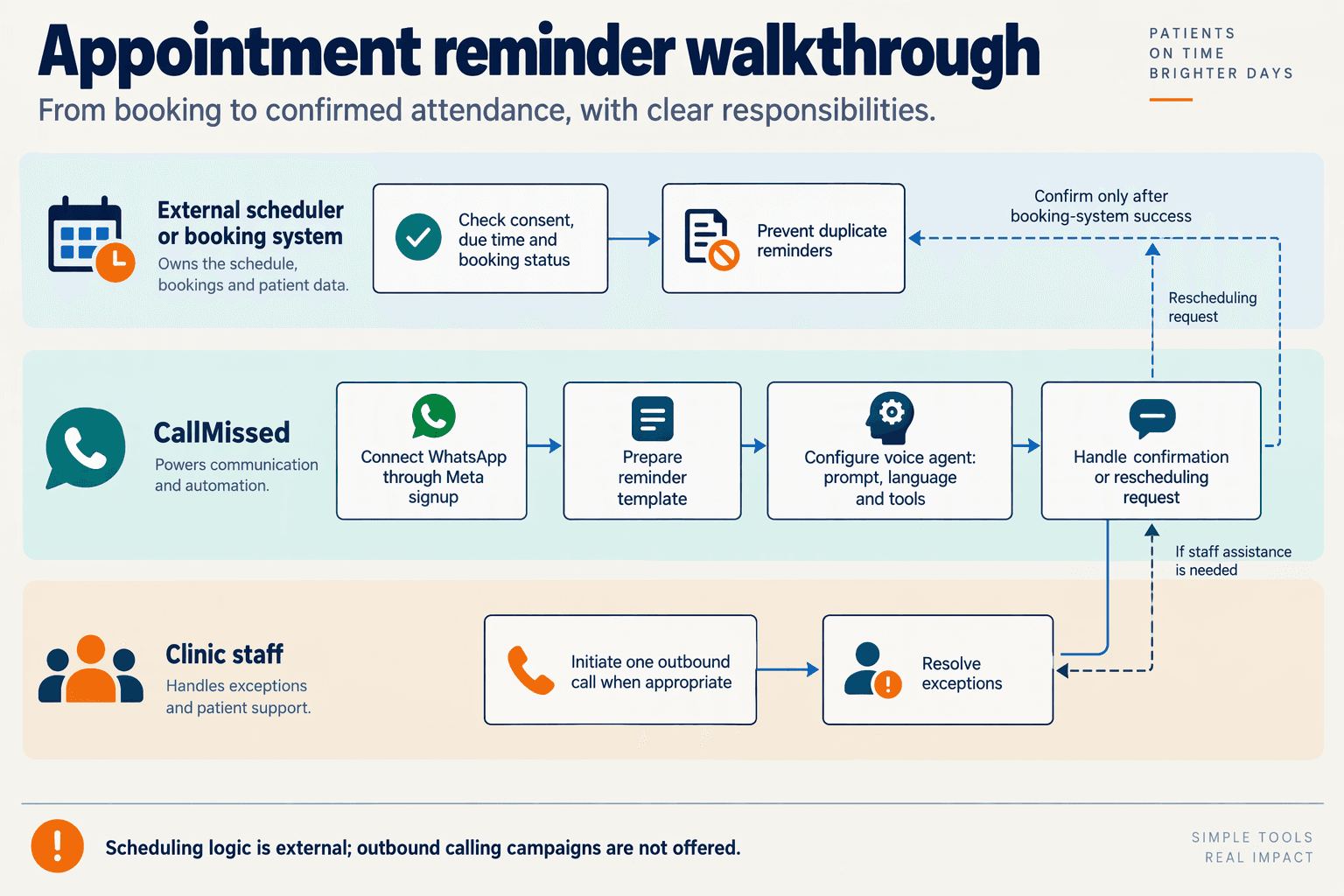
Use an external scheduler to decide when each reminder is due, then use CallMissed for the communication step and an individual follow-up call when appropriate. As of November 2026, CallMissed supports Google Calendar and Cal.com integrations, WhatsApp message templates, and a Twilio-compatible Calls API for single inbound and outbound calls—not automated outbound calling campaigns.
How do you connect the appointment scheduler to the reminder workflow?
Keep your clinic’s appointment system as the source of truth. Calendar connectivity does not, by itself, define reminder timing, patient consent, or follow-up rules; configure those decisions in your external scheduler or clinic-owned middleware.
- Define the appointment record. Store an appointment ID, start time, timezone, current status, contact number, preferred language, and channel permissions. Keep diagnosis and clinical notes out of the reminder payload.
- Create reminder jobs. For example, schedule a WhatsApp appointment reminder 24 hours before the visit. This is a proposed clinic policy, not a platform default.
- Recheck before sending. Read the current appointment record when the job runs. Cancel the job if the visit has been cancelled, moved, or already confirmed.
- Prevent duplicate sends. In your middleware, use a unique key such as
appointment_id + reminder_stage + appointment_version. Record successful dispatches so a scheduler retry does not send the same reminder twice.
Treat timezone handling as a safety requirement: “10:00 tomorrow” should never depend on the server’s local clock.
How do you configure WhatsApp messages and the voice agent?
As of November 2026, CallMissed connects WhatsApp Business accounts through Meta embedded signup, synchronises message templates with Meta, and provides a no-code agent builder with prompts, languages, knowledge bases, and custom REST tools.
Prepare a template in each supported patient language and verify its approval status before use. A suitable reminder might say: “Your appointment at [clinic] is on [date] at [time]. Please reply to confirm or request a change.”
Configure the voice agent to:
- Confirm appointment details from the current scheduler record rather than guessing.
- Capture rescheduling requests, without promising a new slot unless the scheduling system confirms it.
- Use narrowly scoped tools, such as retrieving one appointment or recording a confirmation.
- Escalate uncertainty to clinic staff, especially identity mismatches or medical questions.
Test names, dates, pronunciation, and code-mixed replies with clinic staff before enabling patient calls.
When should the scheduler trigger a single follow-up call?
Define a narrow eligibility rule: the appointment remains active, confirmation is still missing, contact permissions allow the selected channel, and the patient’s preferred calling hours are open. Immediately before dispatch, recheck those conditions.
For example, your external scheduler could evaluate one appointment six hours before the visit and submit one individual outbound phone-call request through the Calls API. Track the attempt in your own workflow; do not assume built-in campaign scheduling or automatic retries. If choosing a business-initiated WhatsApp call instead, obtain the customer’s permission.
What should you verify before going live?
Test cancellations, rescheduling, duplicate jobs, wrong numbers, and unanswered calls. Record reminder dispatch, confirmation, follow-up attempt, and staff-review status separately.
The historical Cochrane review available through PubMed, reviewed here as of November 2026, reported that its included studies did not assess patients’ perceptions of reminder safety. That evidence gap makes privacy checks and patient feedback essential—not optional launch extras.
How do you write and test reminders in Hindi, English and other Indian languages?
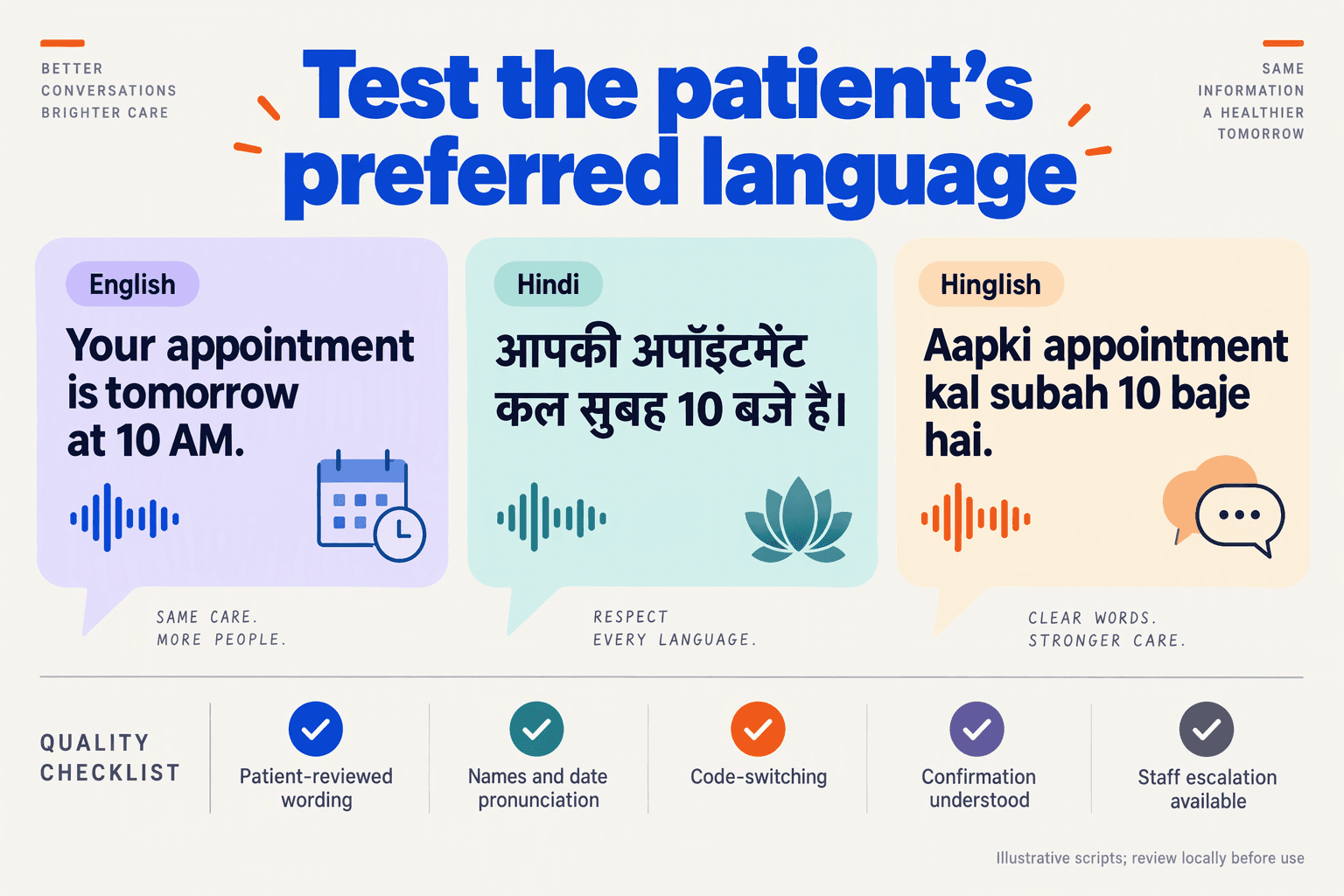
Write one clear appointment reminder, adapt it into each patient’s preferred language, and test both the wording and the complete conversation before launch. Translation accuracy is only the starting point: patients must also understand the date, recognise the clinic, and know how to confirm or request a change.
How do you write clear Hindi and English appointment reminders?
Start with a single approved source message containing verified appointment fields. Keep administrative reminders separate from clinical advice, and avoid adding diagnoses or preparation instructions unless the clinic has specifically approved them.
The following illustrative messages use the same appointment details:
- English: “Hello from Asha Clinic. Your appointment is on 20 November 2026 at 3 pm. Reply YES to confirm, or CHANGE to request another time.”
- Hindi: “आशा क्लिनिक की ओर से नमस्ते। आपका अपॉइंटमेंट 20 नवंबर 2026 को दोपहर 3 बजे है। पुष्टि करने के लिए हाँ लिखें। समय बदलने का अनुरोध करने के लिए बदलें लिखें।”
Do not instruct Hindi-speaking patients to reply “हाँ” unless the workflow actually recognises that response. Configure and test the reply options offered in every language, including common spelling variations.
For WhatsApp appointment reminders, make the next action explicit. For voice, replace “reply” with “say,” pause after the appointment details, and ask one question at a time.
How should you adapt reminders for other Indian languages?
Use native-language reviewers rather than treating machine translation as final copy. Ask reviewers to check meaning, politeness, local terminology, and whether patients would naturally use the wording.
Maintain a small localisation glossary covering:
- Dates and times: use an unambiguous month name and specify morning, afternoon, or evening.
- Clinic and clinician names: preserve identity while checking spoken pronunciation.
- Patient actions: distinguish confirming, cancelling, and requesting rescheduling.
- Preparation instructions: preserve exact meaning; do not simplify clinical instructions without approval.
For Tamil, Bengali, Marathi, or another language, start with the approved source message—not a translation of the Hindi version. This reduces opportunities for meaning to drift between translations.
Ask separately about written and spoken preferences. A patient may prefer English messages but Hindi calls, or use Hinglish during a conversation. Test Roman-script responses such as “haan” if patients commonly use them; do not assume native-script coverage guarantees transliteration support.
How do you test multilingual reminders before sending them?
Use a repeatable acceptance test rather than judging whether the voice merely sounds fluent:
- Validate appointment fields. Check missing names, changed times, duplicate records, and location substitutions.
- Listen to rendered audio. Review dates, numbers, clinic names, pauses, and pronunciation with native speakers.
- Test realistic responses. Include “yes,” “not that day,” interruptions, background noise, and code-switching.
- Check action accuracy. A rescheduling request must not become a cancellation or an unsupported promise of a new slot.
- Review privacy and escalation. Test wrong recipients, shared phones, and requests that need clinic staff.
As of November 2026, the historical Cochrane review indexed by PubMed reports that the included studies did not assess health outcomes or patients’ perceptions of reminder safety. That evidence gap makes local safety testing important; attendance results alone cannot validate a multilingual workflow.
As of November 2026, CallMissed supports agent versioning with publish and rollback, eval suites, and call scoring against a team’s own QA rubrics. Clinics can use those capabilities to compare approved reminder versions, while native-language reviewers remain responsible for validating meaning and clinical wording.
How can clinics improve timing, measure no-shows and control pilot costs?
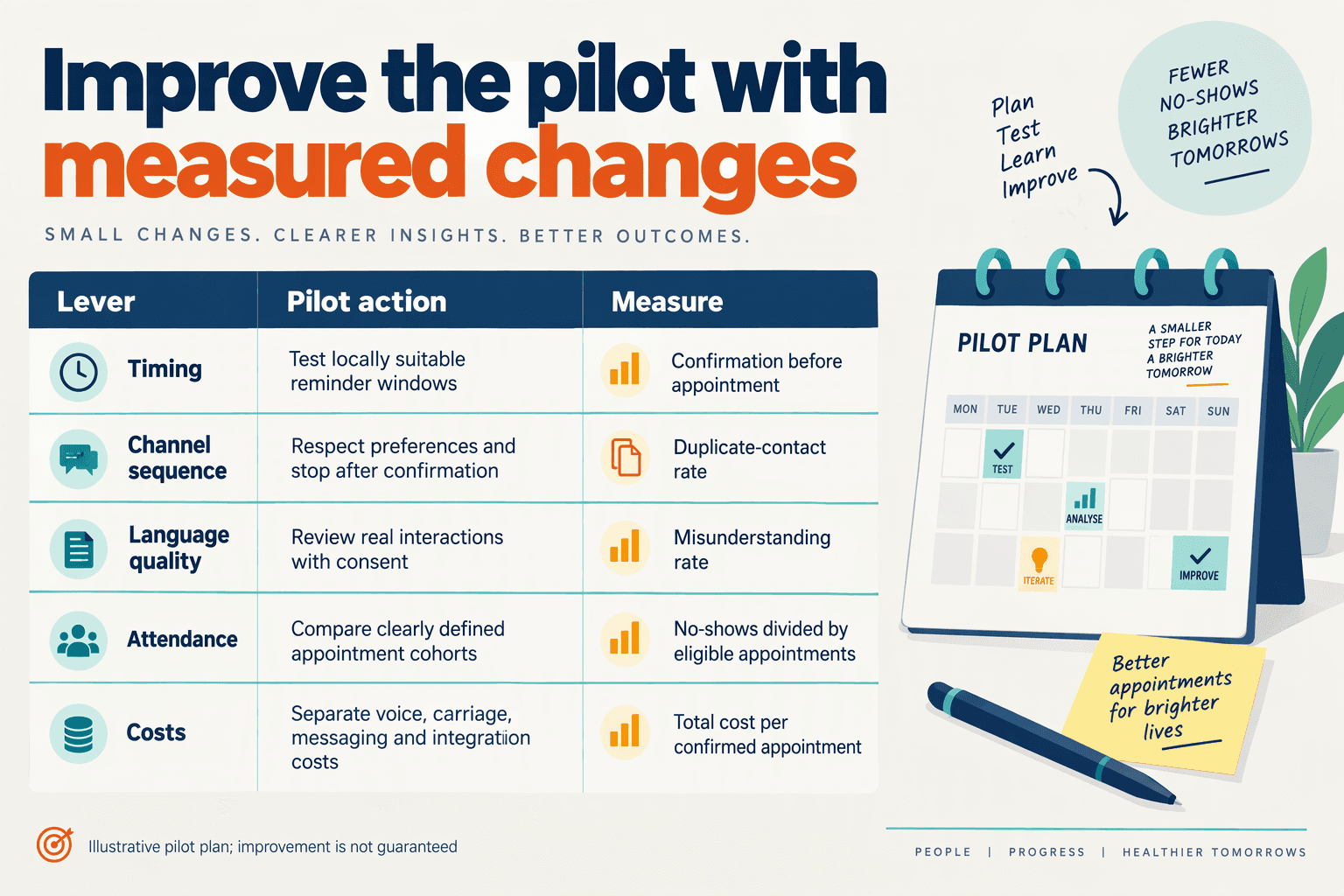
Clinics should test reminder timing against their own attendance data, separate no-shows from cancellations, and set a spending cap before launching a pilot. WhatsApp appointment reminders should be judged by attended appointments and usable rescheduling—not delivery receipts alone.
When should clinics send appointment reminders?
Start with a small timing experiment rather than assuming one schedule works for every specialty. A reminder 48 hours before the appointment, followed by a 24-hour follow-up for patients who have not responded, is a proposed pilot schedule—not an evidence-established optimum.
Give patients enough time to change travel or work arrangements, and stop follow-ups after confirmation, cancellation, or rescheduling. Use patient-preferred contact hours; avoid adding voice calls simply because a WhatsApp message remains unread.
| Pilot measure | Suggested starting rule | What to record | Decision it supports |
|---|---|---|---|
| First reminder | Test 48 hours before | Responses and attendance | Whether earlier notice helps |
| Follow-up | At 24 hours, if unresolved | Extra confirmations; opt-outs | Whether another contact adds value |
| Voice escalation | Offer for unresolved bookings | Connected minutes; outcomes | Whether voice warrants its cost |
| No-show rate | Use a fixed appointment cutoff | No-shows ÷ eligible bookings | Whether attendance improves |
| Cancellation recovery | Track separately from no-shows | Cancelled slots subsequently filled | Whether capacity is recovered |
| Pilot spending | Set weekly and total caps | Messaging, voice, staff costs | Whether expansion is affordable |
These are illustrative pilot rules for November 2026, not published clinical benchmarks. Keep appointment eligibility and cancellation cutoffs identical across comparison groups.
How should clinics measure no-shows accurately?
Define a no-show as an eligible appointment where the patient neither attended nor cancelled before the clinic’s agreed cutoff. Record attended, cancelled, rescheduled, and no-show outcomes separately, and disclose which outcomes enter the denominator.
Use this measurement sequence:
- Establish a baseline: select a comparable period and document holidays, specialty mix, and booking lead times.
- Compare like with like: where feasible, assign eligible appointments to different reminder schedules while preserving usual care.
- Reconcile outcomes: check the appointment register after visits; confirmation does not prove attendance.
In an illustrative November 2026 pilot, 40 no-shows among 200 eligible appointments equal 20%, while 30 among another 200 equal 15%. That is a 5-percentage-point decrease, or a 25% relative reduction—but without a sound comparison design, it is not proof that reminders caused the change.
As of November 2026, the historical Cochrane review indexed by PubMed reports similar attendance effects for mobile text reminders and telephone reminders across three studies involving 2,509 participants, with a risk ratio of 0.99 (95% CI 0.95–1.02). That finding supports testing channel economics; it does not establish WhatsApp-specific performance.
How can clinics keep pilot costs predictable?
Budget the whole workflow, not just message delivery:
- Communication: messaging charges, connected voice minutes, and separate phone carriage.
- Operations: staff time handling replies and rescheduling.
- Value: additional attended appointments and cancelled slots successfully refilled.
As of November 2026, CallMissed’s Standard voice-agent plan costs ₹4 per minute, covering speech recognition, the language model, and voice, with a 30-second minimum per call; phone carriage is separate, and unconnected calls cost nothing.
An illustrative 100 connected calls lasting 90 seconds each therefore cost ₹600 for the voice-agent component, excluding other charges. Divide total incremental pilot spending by estimated additional attendances, and report the underlying counts before deciding whether to expand.
Which privacy, rescheduling and fallback mistakes should clinics avoid?
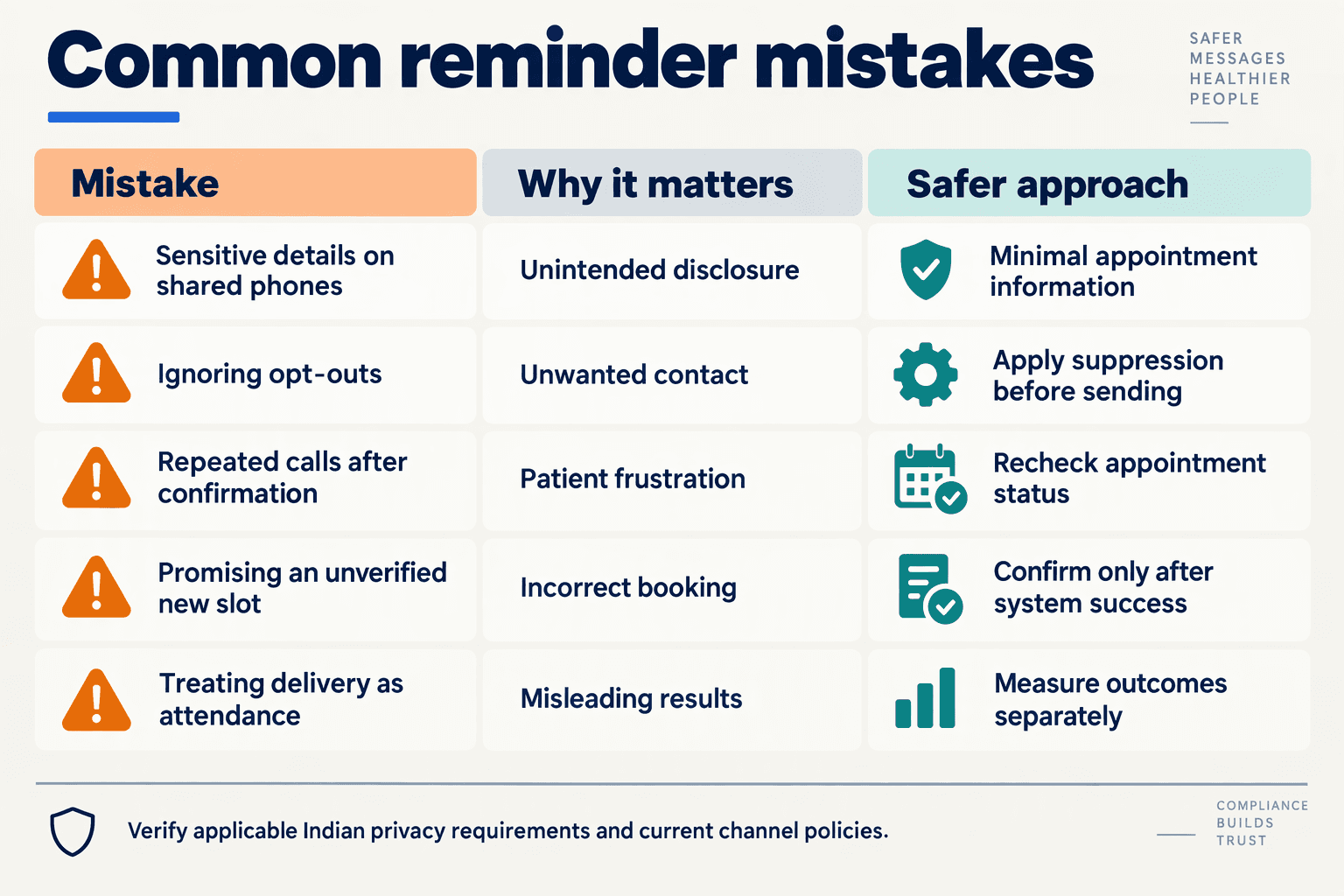
Clinics should avoid exposing sensitive information, treating a rescheduling request as a confirmed booking, and letting failed reminders disappear without follow-up. For WhatsApp Appointment Reminders and multilingual voice, privacy checks, explicit booking states, and staff-owned fallback procedures should be designed before launch.
Which reminder mistakes create the biggest operational risks?
Use the following checklist when reviewing your clinic’s workflow. These are recommended safeguards as of November 2026, not a substitute for jurisdiction-specific legal advice.
| Mistake | What can go wrong | Safer workflow | Verification step |
|---|---|---|---|
| Including diagnoses or test results | A shared phone or lock-screen preview exposes sensitive information. | Keep reminders neutral; provide only necessary appointment details. | Preview messages on a locked phone. |
| Assuming the recipient is the patient | A relative, former number owner, or caregiver receives private details. | Verify identity before discussing sensitive information; record authorised contacts. | Test a “wrong person” response. |
| Calling every non-responder | Repeated contact ignores preferences or lacks required permission. | Record channel preferences, calling permission, and stop requests. | Check permission before initiating a WhatsApp business call. |
| Saying “rescheduled” before saving the booking | The patient believes a slot exists when the calendar has not changed. | Confirm availability, commit the change, then send confirmation. | Simulate a failed calendar update. |
| Guessing unclear dates or languages | “Next Friday” or a misheard time creates the wrong booking. | Read back the full date, time, location, and selected language. | Test ambiguous speech and corrections. |
| Treating delivery failure as case closure | An unreachable patient receives no useful follow-up. | Route failures to a named staff queue with a follow-up deadline. | Check that unresolved cases remain visible. |
How should clinics prevent false rescheduling confirmations?
Rescheduling is a transaction, not just a conversation. Separate “request received,” “slot offered,” and “booking confirmed” so neither the patient nor reception mistakes an intermediate step for completion.
For example, if a patient asks for Friday afternoon, the assistant should not promise a slot until the scheduling system accepts the change. Use this sequence:
- Clarify: read back the exact requested date and preferred time.
- Check: retrieve available slots from the clinic’s scheduling source.
- Commit: save the accepted change and check for success.
- Confirm: state the new appointment details only after the update succeeds.
If the update fails, say: “Your appointment has not changed yet. Reception will help complete your request.” Preserve the existing booking unless the patient explicitly requests cancellation and the clinic’s workflow completes it.
What should happen when automation cannot safely finish?
Use bounded retries and human ownership, rather than repeatedly messaging or calling until someone responds. Suggested escalation triggers include:
- The recipient reports a wrong number or withdraws permission.
- Speech remains unclear after a clarification attempt.
- The patient requests clinical advice rather than appointment administration.
- A booking update fails or two systems show conflicting details.
As of November 2026, CallMissed provides a human-handoff queue in its omnichannel inbox; switching the AI off hands the thread to a person. Clinics still need to assign responsibility and response deadlines—handoff capability alone does not guarantee resolution.
Finally, do not confuse attendance evidence with privacy evidence. As reviewed in November 2026, the historical Cochrane review indexed by PubMed reports that its included studies did not report health outcomes or patients’ perceptions of safety related to text reminders. Improved attendance therefore cannot establish that a particular WhatsApp or voice workflow is safe: clinics must separately evaluate disclosure risks, incorrect bookings, complaints, and unresolved handoffs.
Frequently Asked Questions
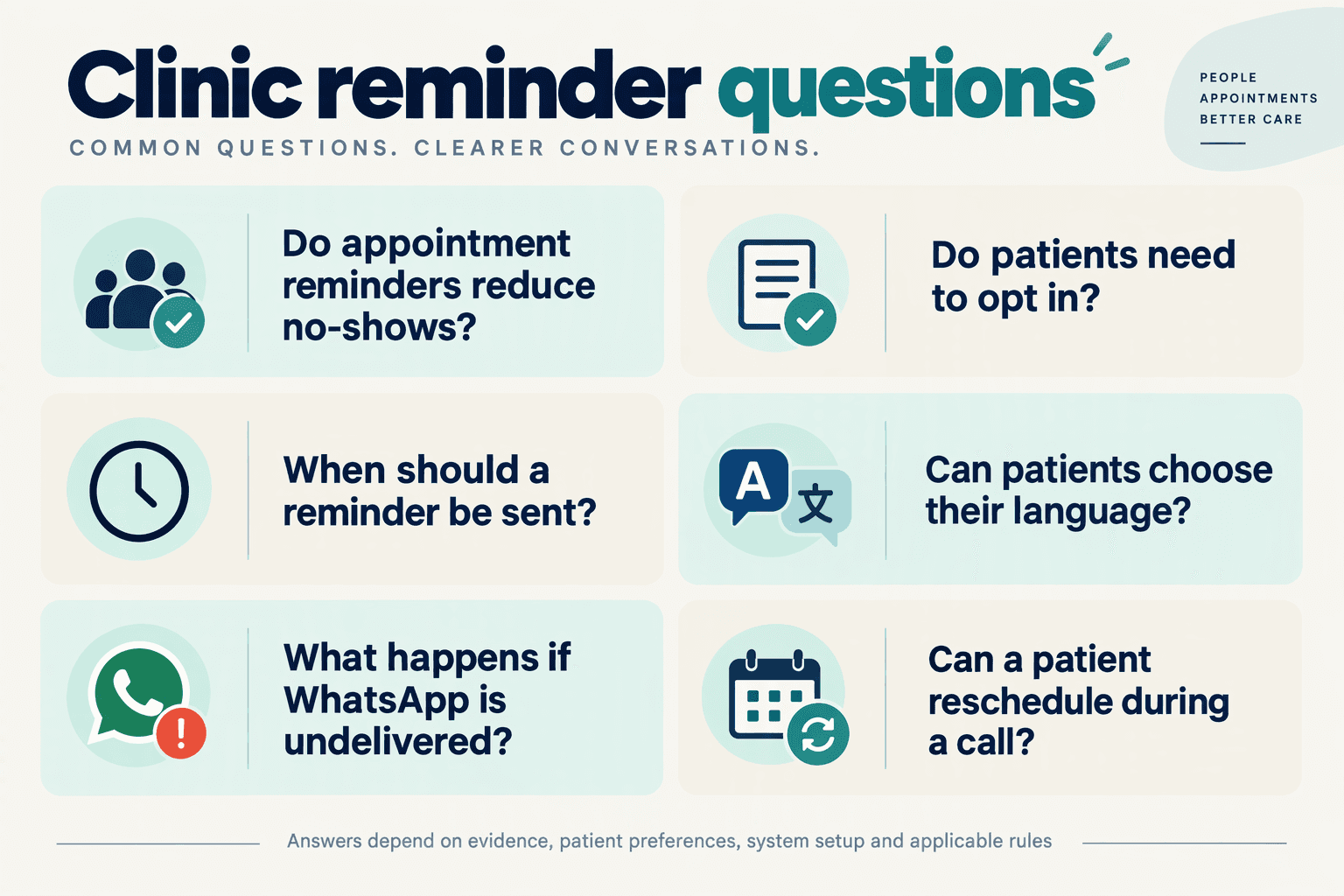
Do clinics need patient consent for WhatsApp Appointment Reminders?
When should clinics send WhatsApp Appointment Reminders before an appointment?
How should multilingual appointment reminders handle language preferences?
Can patients reschedule through WhatsApp Appointment Reminders?
What patient information is safe to include in an appointment reminder?
What should happen if a patient does not reply or asks a medical question?
Which evidence, policy resources and launch checks should you review next?
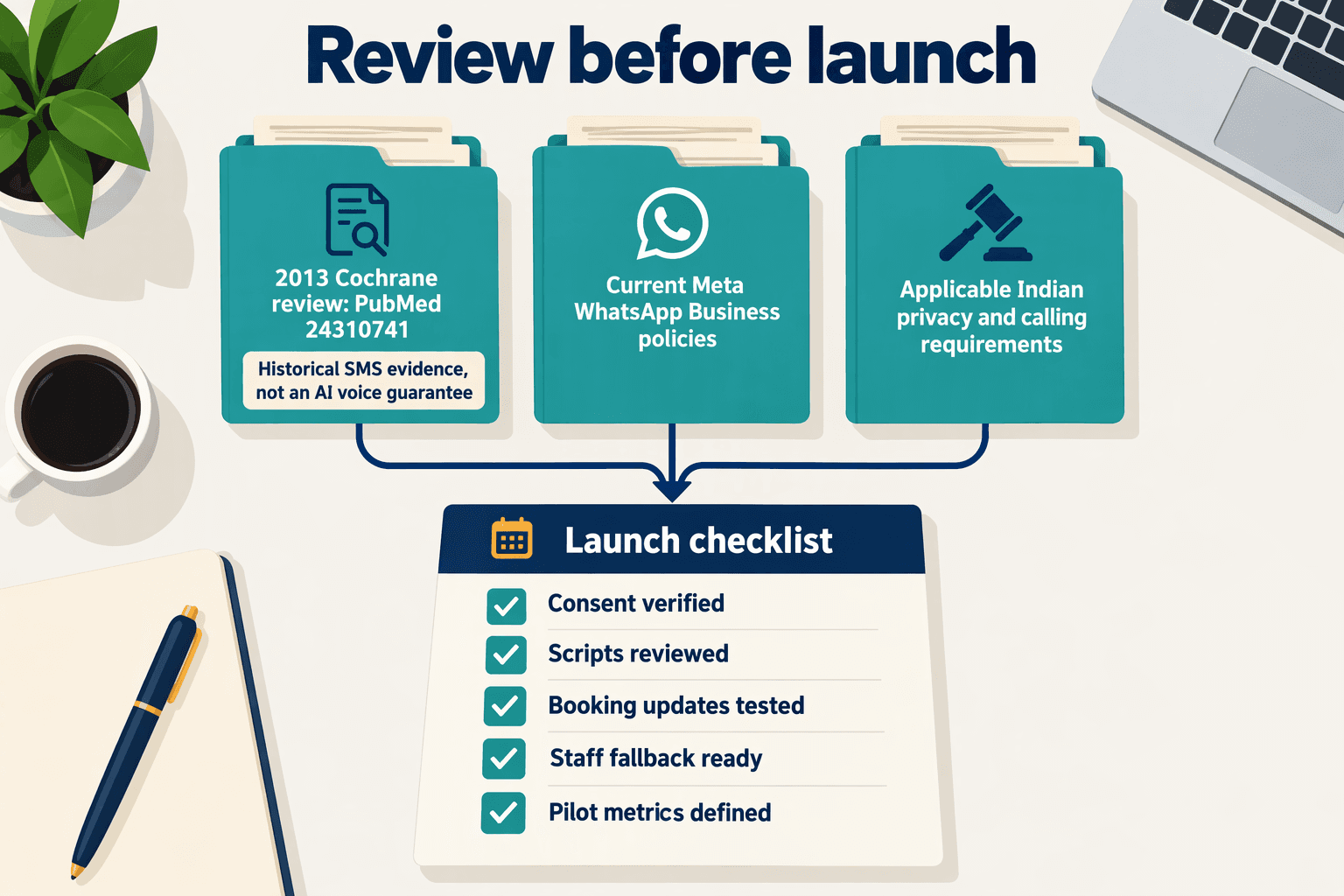
Review three things before launch: the evidence behind reminders, the policies governing patient communication, and a documented go/no-go checklist. For healthcare appointment reminders with multilingual voice and WhatsApp, the final decision should rest on verified permissions, tested workflows, and measurable patient-service outcomes—not message delivery alone.
Which reminder evidence should healthcare teams read?
Start with the Cochrane review, “Mobile phone messaging reminders for attendance at healthcare appointments,” indexed by PubMed. Read its limitations alongside its findings, and distinguish historical SMS evidence from evidence about your proposed WhatsApp workflow.
As of November 2026, the historical Cochrane review available through PubMed reports that text-message and telephone reminders had similar effects on attendance across three studies involving 2,509 participants, with a risk ratio of 0.99 and a 95% confidence interval of 0.95–1.02.
That finding supports offering communication choices; it does not establish that voice is unnecessary or that WhatsApp will perform identically.
Importantly, the Cochrane review states that included studies “did not report on health outcomes or people's perceptions of safety related to receiving reminders by text message.” Your evaluation should therefore include privacy complaints, wrong-recipient incidents, and patient feedback—not just attendance.
Which policy resources should you verify before deployment?
For a November 2026 launch, consult the current official documents rather than relying on an old implementation guide:
- Meta: review the WhatsApp Business Messaging Policy, template guidance, and WhatsApp Business Calling documentation. Confirm the applicable requirements for healthcare content, messaging permission, and business-initiated calls.
- Indian government sources: ask your privacy or legal lead to check Ministry of Electronics and Information Technology materials on the Digital Personal Data Protection framework, including commencement notifications and applicable rules.
- Relevant local authorities: for patients outside India, identify applicable health-data, privacy, and telecommunications requirements with qualified advisers.
- Your own organisation: approve retention schedules, staff access, recording practices, incident response, and escalation responsibilities.
Platform availability is not a compliance determination. Record who reviewed each resource, its version or access date, and which decisions followed from it.
What launch checks should a clinic complete?
Use a numbered acceptance checklist with an owner and a pass/fail result for every item:
- Verify recipient and permission records. Test changed numbers, shared phones, withdrawn permission, and separate preferences for messages and calls.
- Validate appointment accuracy. Check dates, time zones, locations, cancellations, and duplicate bookings against the scheduling source.
- Test multilingual conversations. Have fluent reviewers assess date pronunciation, code-switching, confirmation, and rescheduling requests.
- Prove human escalation works. Simulate an urgent clinical question, an uncertain identity, and a failed booking update; confirm staff receive enough context to act.
- Check disclosure and retention. Review message previews, transcripts, recordings, access permissions, and deletion procedures.
- Assign a stop owner. Document who can pause the pilot and how unresolved patient requests will be handled.
As of November 2026, CallMissed supports call scoring against a team’s own QA rubrics, eval suites, and A/B experiments. Those capabilities can support structured testing, but clinic-specific acceptance criteria still need clinical and operational ownership.
What should determine whether the pilot expands?
Expand only after reviewing attendance, successful rescheduling, wrong-recipient incidents, handoff completion, and cost per resolved appointment interaction. Define each metric’s denominator before launch.
A delivered reminder is a technical event; a safely confirmed or rescheduled appointment is the service outcome. Keep that distinction at the centre of the launch review.
Conclusion
WhatsApp Appointment Reminders work best when patients can understand the message, choose how to respond, and reach a person when needed. Multilingual voice should support that journey—not replace clear appointment details, patient permission, or thoughtful privacy safeguards.
The evidence supports reminders, but not promises of guaranteed results. As of November 2026, the historical Cochrane review indexed by PubMed reports appointment attendance of 78.6% with mobile messaging reminders versus 67.8% without reminders. These findings concern mobile text messaging, not WhatsApp specifically; clinics should measure their own outcomes rather than assume the same improvement.
Four practical takeaways should guide implementation:
- Make every reminder actionable. Include the appointment date, time, location, and an obvious next step: confirm, ask a question, or request rescheduling. A delivered notification is only the beginning; the useful outcome is a patient who knows what to do next and can complete that action without unnecessary friction.
- Match language to patient preference. Written-message preferences and spoken-language needs may differ. A patient who receives an English message may prefer discussing appointment details in Tamil. Test pronunciation, names, and dates carefully, because broad language coverage does not automatically mean every reminder will be understood correctly.
- Keep permission and privacy central. Distinguish patient-initiated WhatsApp calls from business-initiated calls requiring customer permission. Minimise sensitive information, account for shared phones, and make human handoff accessible. When a request becomes complicated, patients should have a clear route to staff rather than being pushed through further automated exchanges.
- Measure coordination, not message volume. Track confirmations, rescheduling requests, attendance, and communication costs together. More messages or calls are not inherently better. Use these outcomes to identify whether reminders are helping patients act, where confusion remains, and whether voice adds practical value for the people your clinic serves.
What should clinics watch for next?
Watch whether multilingual voice makes the transition from reminder to conversation easier—especially when patients need clarification or a different appointment time. The meaningful advance will be clearer, more accessible coordination, not simply more automation.
For teams exploring this direction, CallMissed is a platform worth considering: as of November 2026, CallMissed supports WhatsApp Business Calling through the official Meta Cloud API, speech recognition in 22 Indian languages plus English, and natural text-to-speech voices in 10 Indian languages plus English. Those capabilities provide options to evaluate against patient preferences, language accuracy, and handoff needs.
Start with a focused reminder journey, review the results, and improve what patients find difficult. Can your next reminder help a patient take the next step—not merely receive another notification?
Related Reading
- WhatsApp appointment reminders for clinics: India Guide
- WhatsApp COD Confirmation for Shopify: Voice Workflow & ROI
- WhatsApp voice AI integration: Developer Setup Guide