WhatsApp appointment reminders for clinics: India Guide



WhatsApp appointment reminders for clinics help patients confirm or reschedule. Learn multilingual scripts, consent checks and safe retry rules.
WhatsApp appointment reminders for clinics: India Guide
Could a simple reminder help turn an empty appointment slot into a completed consultation? WhatsApp appointment reminders for clinics offer Indian healthcare teams a practical way to confirm bookings, invite cancellations, and explain how to reschedule—while multilingual voice can support patients who prefer speaking to reading.
The evidence behind reminders is stronger than the buzz around any messaging platform. Cochrane’s December 2013 systematic review reported appointment attendance of 67.8% without reminders versus 78.6% with mobile text-message reminders. That is a 10.8-percentage-point difference. These are historical SMS findings, not a WhatsApp-specific benchmark or a guaranteed result for your clinic, but they establish why timely reminders deserve serious operational attention.
As of October 2026, the question for clinics is not simply whether to send a message. It is how to create a reminder workflow that patients understand, staff can manage, and the clinic can evaluate without exposing unnecessary health information.
Consider a hypothetical patient who books a follow-up consultation but cannot read the English reminder comfortably. A short message in their preferred language, with the appointment time and a clear confirmation request, may be more useful than a lengthy notification. If the patient needs help, a voice conversation can clarify directions or route a rescheduling request to reception. The aim is a clear next step, not more notifications.
Privacy matters just as much as convenience. WhatsApp’s Business Messaging Policy, referenced for this October 2026 guide, restricts health-related messaging where applicable regulations prohibit its distribution through systems without heightened protections. Clinics should therefore distinguish administrative reminders from clinical conversations, establish permission practices, and avoid putting diagnoses or sensitive details into routine reminder text.
As of October 2026, CallMissed supports WhatsApp Business messaging through Meta’s official Cloud API, WhatsApp Business Calling with AI voice agents, and speech recognition in 22 Indian languages plus English, including code-mixed speech such as Hinglish.
This guide will show you how to:
- Design useful reminders: include the clinic name, appointment date, time, location, and a straightforward response request.
- Plan multilingual support: choose patient-preferred languages and decide when voice or human assistance is appropriate.
- Handle replies: separate confirmations, cancellations, and rescheduling requests so reception teams know what needs attention.
- Measure outcomes responsibly: track attendance, cancellations, and staff workload rather than treating message delivery as proof of success.
You will also learn how to pilot the workflow before expanding it. Start with one appointment category, compare outcomes against your clinic’s baseline, and improve the patient experience.
How do clinics combine WhatsApp reminders and multilingual calls?
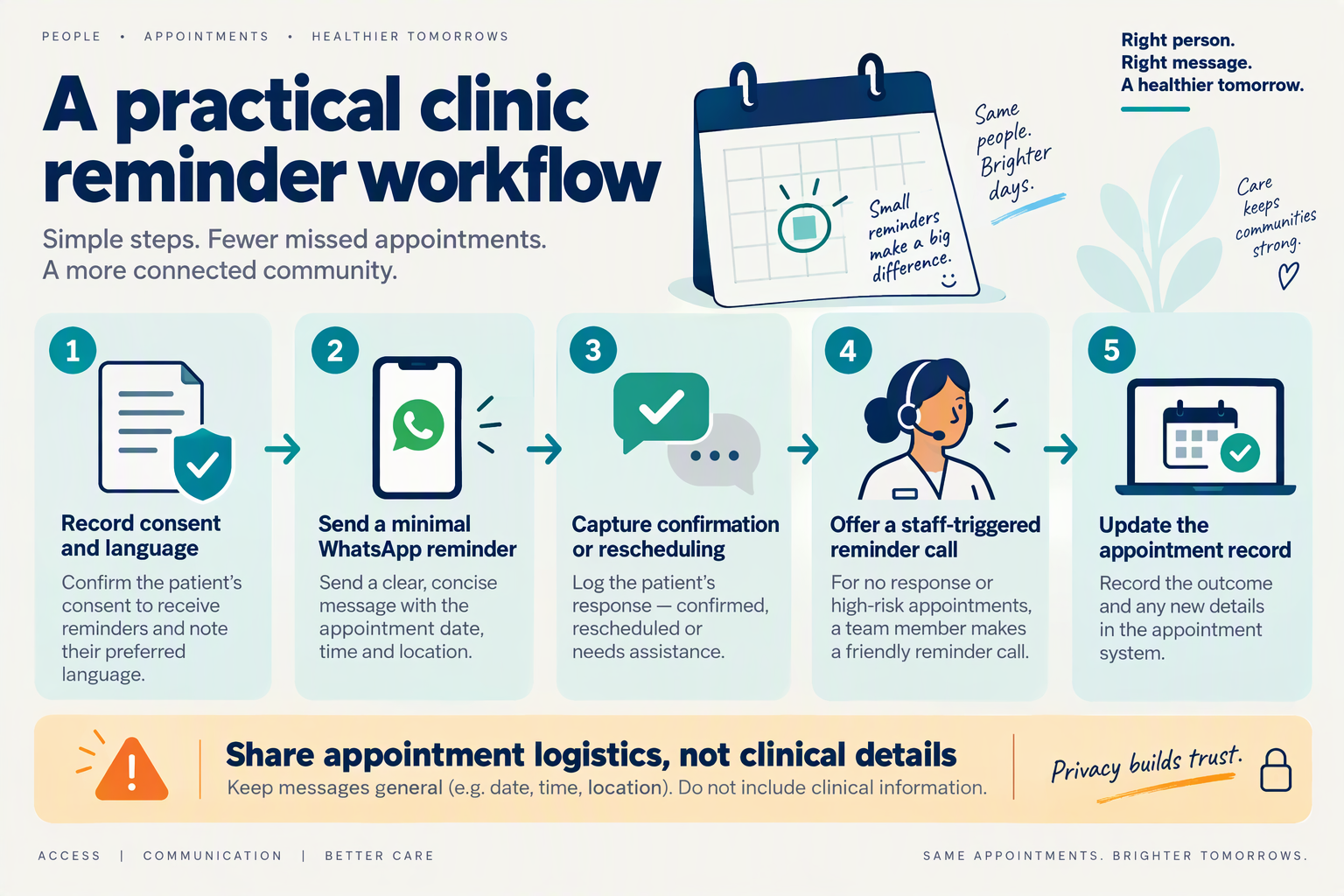
Clinics combine WhatsApp appointment reminders and multilingual calls by using messages for straightforward responses and voice for patients who need help understanding or acting on them. Both channels should feed one appointment record, so a confirmed booking stops generating follow-ups and a rescheduling request reaches reception.
What should clinics set up before sending reminders?
Start with the booking record—not the messaging tool. For this October 2026 guide, a practical minimum is:
- Appointment details: booking reference, date, time, and location.
- Language preference: ask the patient rather than inferring it from their name.
- Contact permissions: record messaging preferences and any permission required for business-initiated calls.
- Response status: awaiting reply, confirmed, cancellation requested, or rescheduling requested.
- Assigned owner: identify who handles unresolved requests.
Keep communication status separate from appointment status. A delivered reminder is not a confirmed appointment, and a cancellation request should not silently release a slot before the clinic’s booking process accepts it.
When should WhatsApp switch to a multilingual call?
Use voice as a targeted assistance channel, not an automatic consequence of every unread message. A patient may be busy, have limited connectivity, or share a phone; repeated contact can create friction rather than clarity.
An illustrative workflow—not a clinically validated timing recommendation—could be:
- Send a reminder 48 hours before the visit. Ask the patient to confirm, request cancellation, or ask for rescheduling help.
- Process the reply. Update the booking record or create a reception task; do not merely mark the conversation “answered.”
- Review unresolved appointments 24 hours before the visit. Prioritise patients who requested voice support or whose booking needs clarification.
- Make an individual call where permitted. Offer the patient’s preferred language and explain the available administrative choices.
- Close the loop. Record the outcome and suppress unnecessary follow-ups.
For example, a hypothetical patient replies in Hinglish that they cannot attend at 10 a.m. The workflow should identify a rescheduling request, not a confirmation, and send it to reception unless a connected booking system can reliably offer and reserve an alternative.
How can AI support regional-language conversations?
Language support needs testing beyond a language label. Check whether the system understands local place names, spoken dates, code-switching, and corrections such as “Tuesday, not Thursday.”
As of October 2026, CallMissed supports speech recognition in 22 Indian languages plus English, including Hinglish, and natural text-to-speech in 10 Indian languages plus English. CallMissed also supports customer-initiated WhatsApp Business calls answered by an AI voice agent and business-initiated WhatsApp calls to customers who have given permission. Clinics should verify support for each required spoken language and retain a human route for unclear requests.
What information should stay out of reminder conversations?
Keep routine reminders administrative and disclose only what is necessary. A neutral booking reference may be safer than naming a sensitive procedure, particularly where phones are shared.
WhatsApp’s Business Messaging Policy, referenced as of October 2026, prohibits sharing or requesting full payment-card numbers, financial-account numbers, personal-ID numbers, and other sensitive identifiers. Do not use a reminder conversation to collect those details.
The practical goal is one understood next step: confirm the appointment, request a change, or speak with reception—not resolve clinical questions through the reminder workflow.
What consent, scheduling data and WhatsApp setup do you need?
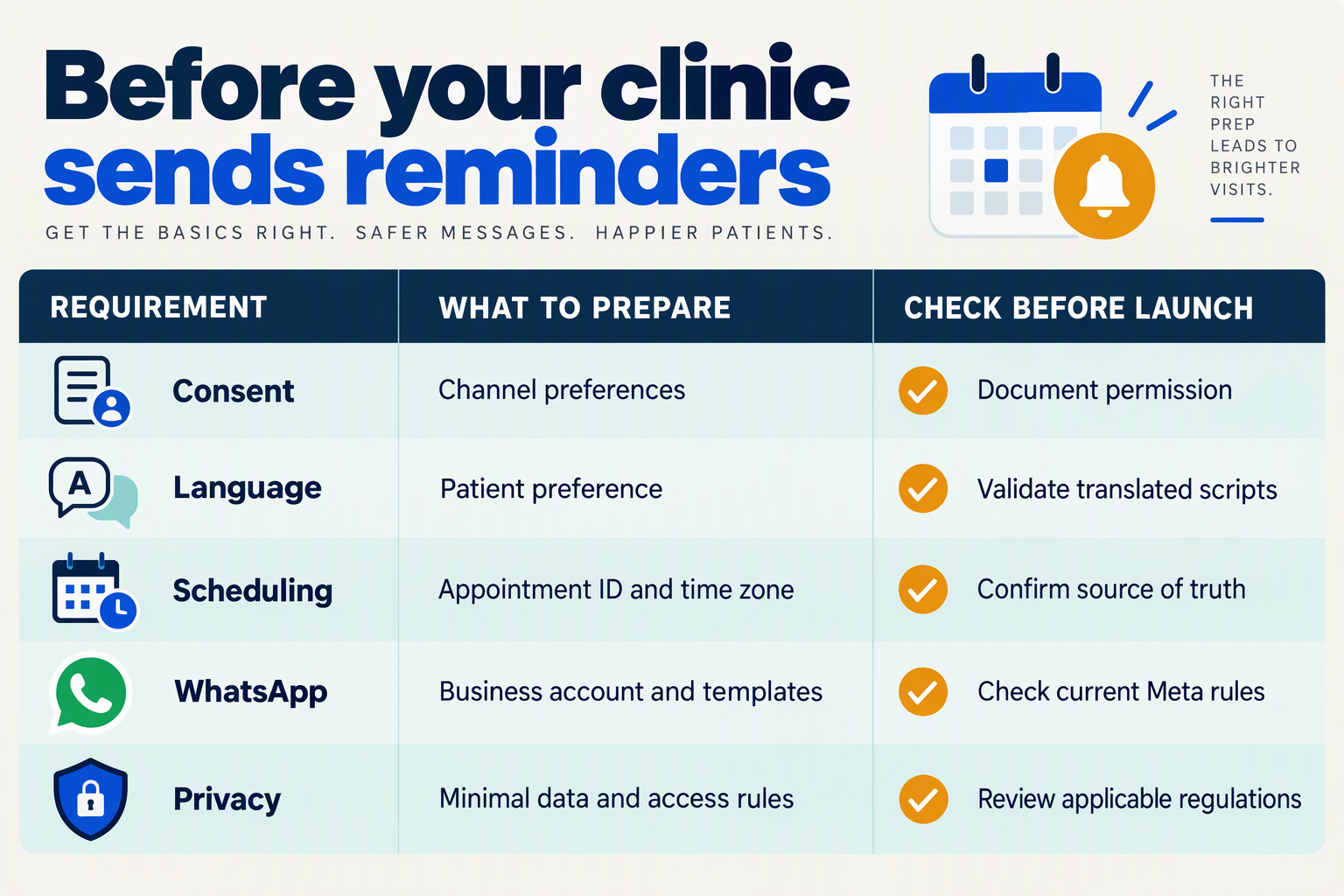
You need documented patient permission, accurate appointment records, and a configured WhatsApp Business account before sending healthcare appointment reminders. Keep reminder consent separate from clinical information, record language and channel preferences, and make the scheduling system—not the conversation—the source of truth.
What information should clinics collect before sending reminders?
Use this implementation checklist for an October 2026 rollout. These are recommended operational controls; your privacy lead should confirm the legal requirements that apply to your clinic and patients.
| Requirement | Minimum information or setup | Check before launch |
|---|---|---|
| Reminder permission | Permission status, collection date, method, and agreed channels | Can staff explain how permission was obtained? |
| Contact and recipient | Phone number with country code; patient or authorised caregiver | Is the number correct, and who may receive reminders? |
| Language preference | Preferred written and spoken language; voice preference | Has the patient chosen rather than staff assumed? |
| Scheduling record | Appointment ID, date, time zone, location, status, and update timestamp | Will cancellations and changes suppress outdated reminders? |
| WhatsApp setup | Business account, official API connection, and approved templates where required | Have current Meta requirements and template status been checked? |
| Replies and escalation | Confirmation, cancellation, rescheduling, opt-out, and staff-routing rules | Does each response have a named owner and next step? |
A booking is not a substitute for a reminder-permission record. As a practical safeguard, collect channel-specific preferences during registration or booking, explain what patients will receive, and provide an easy way to stop reminders.
For shared phones, ask whether the clinic name and appointment details can safely appear in notifications. Record caregiver authorisation separately rather than assuming that whoever answers the phone may discuss the appointment.
Which scheduling fields prevent incorrect reminders?
The essential control is checking the latest appointment status immediately before sending. A reminder prepared yesterday can become incorrect after a cancellation, clinician change, or rescheduling today.
For example, if an appointment moves from 10:00 to 11:30, keep the same appointment identifier, update the time, and invalidate the pending reminder containing 10:00. Do not treat a patient’s “please reschedule” reply as a completed booking change until the scheduling system confirms the replacement slot.
Build these checks into your workflow:
- Validate: Confirm the recipient, permission, language, and active appointment.
- Reconcile: Read the latest date, time, location, and cancellation status.
- Route: Send unresolved requests to reception and record the outcome.
Avoid copying diagnoses, test results, or detailed treatment notes into reminder fields.
What WhatsApp setup and privacy checks are necessary?
As referenced for this October 2026 guide, WhatsApp’s Business Messaging Policy says: “Don’t share or ask people to share full length individual payment card numbers, financial account numbers, personal ID card numbers, or other sensitive identifiers.” Design templates and reply handling so patients are not prompted to disclose these details.
As of October 2026, CallMissed supports Meta embedded signup, AI-drafted message templates synced with Meta, and a live shared inbox. These capabilities can support account onboarding and reply management; they do not replace the clinic’s scheduling controls or privacy review.
Before launch, test approved reminder wording, language rendering, opt-outs, and reception handoffs using test records. Separately verify permission requirements for business-initiated WhatsApp calls: permission to receive reminder messages should not automatically be treated as permission to receive calls.
How do you get started with CallMissed voice agents and WhatsApp?
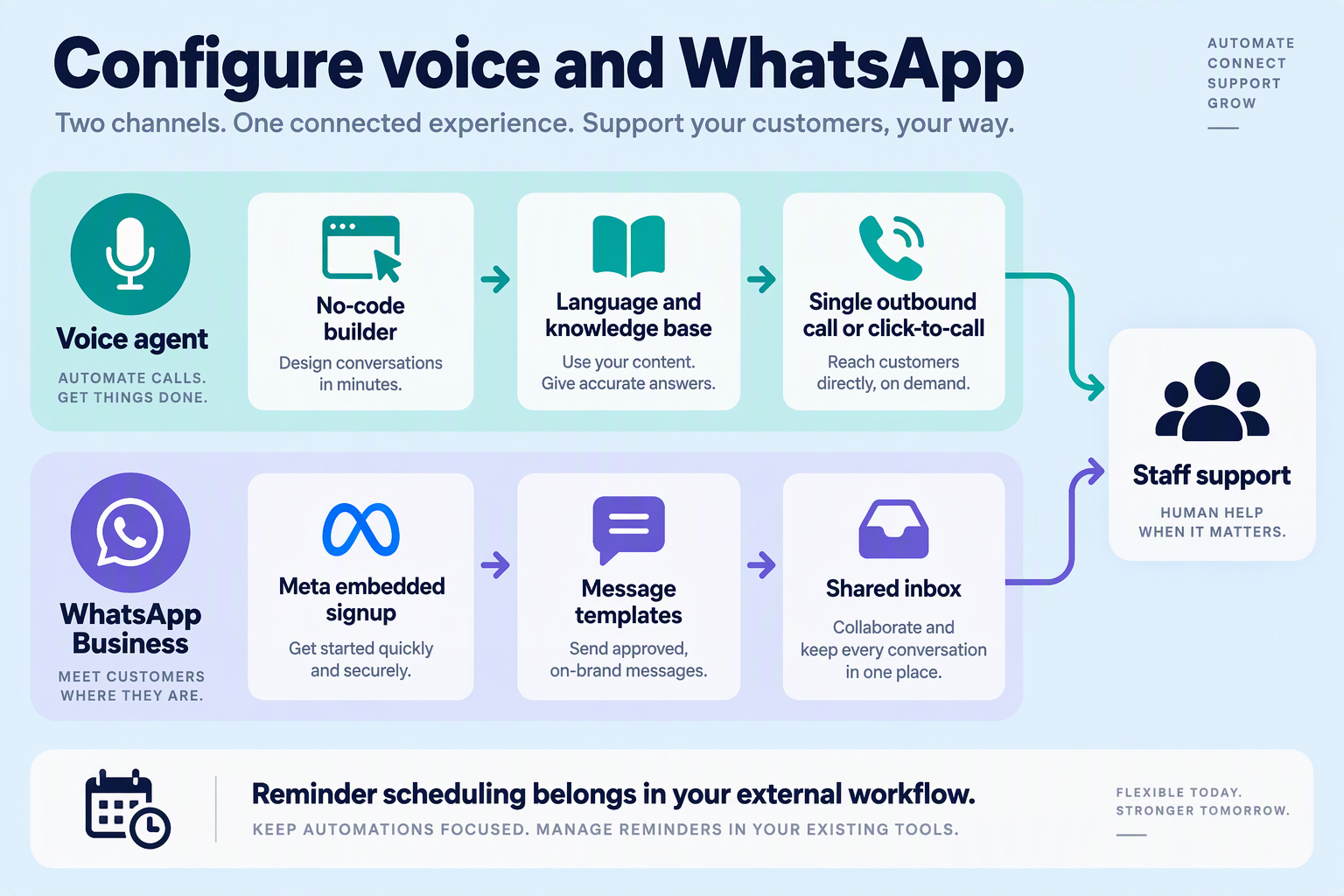
Start by configuring a narrowly scoped appointment-support agent, connecting your WhatsApp Business account, and testing confirmations and reception handoffs before contacting patients. As of October 2026, CallMissed provides a no-code voice-and-chat agent builder and WhatsApp connection through Meta embedded signup, allowing clinics to begin with configuration rather than a custom application.
What should you prepare before building the agent?
Create a small, approved information pack that reception staff can verify. Keep administrative information separate from clinical records.
- Define the pilot: choose one clinic location and one appointment category.
- Prepare essential fields: patient contact number, preferred language, appointment date and time, location, and messaging permission.
- Assign responsibilities: identify who checks cancellations, handles rescheduling, and corrects booking discrepancies.
- Approve the script: specify what the agent may answer and when it must stop.
Use test records initially. Do not upload an entire patient database simply because an integration makes that convenient.
How do you configure the appointment-support voice agent?
Using the builder capabilities available as of October 2026, select the agent’s prompt, voice, language, knowledge base, tools, and variables. Give the agent an administrative role rather than a clinical one.
A useful starting instruction is:
“You help patients confirm appointments and understand clinic logistics. Do not provide medical advice. If a patient requests clinical guidance or reports conflicting booking information, direct them to clinic staff.”
Add approved opening hours, directions, accessibility information, and cancellation procedures to the knowledge base. Treat appointment availability differently: only let the agent confirm a changed booking when an authorized scheduling workflow has actually completed.
For the pilot, reception can handle changes manually. As of October 2026, supported integration options include Google Calendar, Cal.com, and custom REST tools, but clinics should verify their own scheduling system’s permissions and behavior before connecting it.
How do you connect WhatsApp and prepare reminder messages?
Connect the business account through embedded signup, then prepare message templates for Meta’s review process. As of October 2026, the platform supports templates synced with Meta, a template library, and a live shared inbox.
Keep the initial template simple:
- Clinic name and appointment date/time.
- Location or a request to contact reception for directions.
- A clear confirmation or cancellation request.
- Instructions for reaching a person.
WhatsApp’s Business Messaging Policy, referenced in October 2026, prohibits requesting or sharing full payment-card numbers, financial-account numbers, personal-ID numbers, or other sensitive identifiers. Do not add identity-document collection to a reminder flow.
How should voice calls and human handoffs work?
Offer voice as an assistance channel, not an assumed permission to telephone every patient. As of October 2026, WhatsApp Business Calling supports customer-initiated calls answered by an AI voice agent and business-initiated calls to customers who have given permission.
For reception-led follow-up, use supported single outbound calls or click-to-call; do not assume automated outbound calling campaigns are available. Test the human-handoff queue: switching AI off should leave staff responsible for the conversation.
What should you budget and test before launch?
According to CallMissed’s verified pricing, as of October 2026, Standard voice-agent usage costs ₹4 per minute, with a 30-second minimum per connected call; phone carriage is billed separately. A hypothetical 100 connected, one-minute Standard calls would therefore cost ₹400 in voice-agent usage, excluding carriage and other applicable charges.
Before launch, test wrong numbers, unclear speech, cancellations, unsupported languages, and requests for medical advice. Publish only after reception can reliably take over and resolve exceptions.
How do you send, confirm and reschedule a reminder step by step?
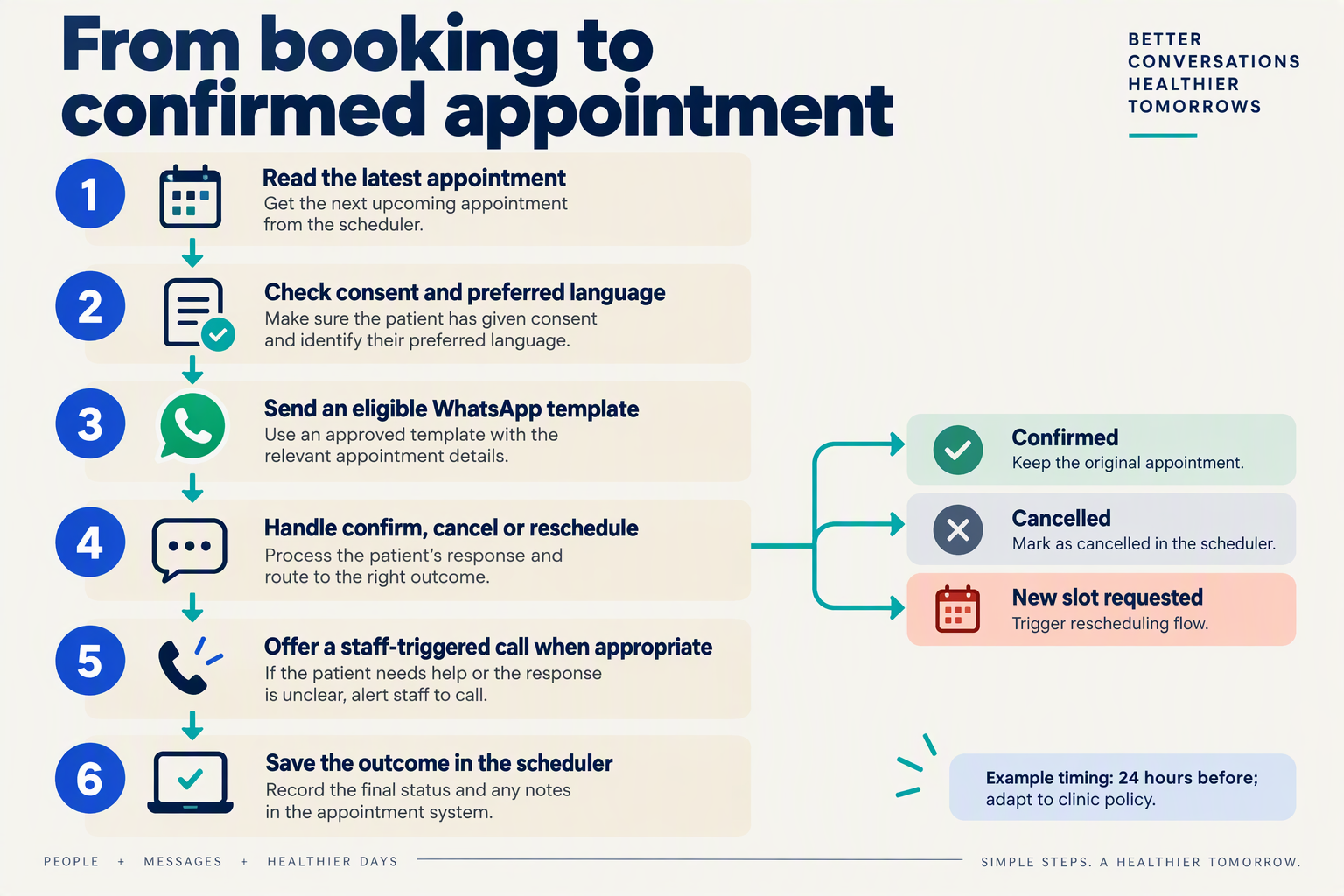
Send the reminder from a verified appointment record, classify the patient’s reply, and update the booking only after confirmation. For rescheduling, offer available alternatives and secure the new slot before telling the patient their appointment has changed.
How do you prepare an appointment reminder?
- Check the booking and communication preferences. Verify the appointment ID, date, time, clinic location, phone number, preferred language, and permission to use the chosen channel. Check whether the number belongs to the patient or an authorised caregiver.
- Define the response options. Use three clear outcomes: confirm, cancel, or reschedule. Keep an additional “needs staff help” status for ambiguous replies, accessibility needs, and questions outside the reminder workflow.
For an October 2026 pilot, start with one reminder approximately 48 hours before the appointment. Treat that timing as a testable clinic choice, not a proven optimum: Cochrane’s December 2013 review supports mobile-message reminders, but does not establish the best WhatsApp schedule for your clinic.
What should the WhatsApp reminder say?
- Send a short, language-matched message. Where a WhatsApp template is required, use the appropriate approved template rather than assuming any free-form message can initiate the conversation.
A hypothetical reminder could read:
“Hello from Greenfield Clinic. Your appointment is on 20 October 2026 at 10:30 am, Main Road branch. Please reply CONFIRM, CANCEL, or RESCHEDULE. For reception assistance, reply HELP.”
Translate the meaning—not just the words—and have a fluent speaker check dates, time expressions, and instructions. Avoid mentioning a specialty or procedure when that could unnecessarily reveal sensitive information.
As of October 2026, CallMissed supports WhatsApp message templates synced with Meta, a live shared inbox, and WhatsApp Flows for multi-screen in-chat forms. Those capabilities can support the interaction; appointment validation and booking updates still need a deliberately configured workflow.
How do you record a patient’s confirmation?
- Match the reply to the correct booking. Before updating anything, check whether the patient has multiple appointments. A bare “yes” should not confirm the wrong visit.
Use explicit status changes:
- Confirmed: acknowledge the existing date, time, and location.
- Cancellation requested: apply the clinic’s cancellation process and acknowledge the outcome.
- Rescheduling requested: keep the booking unchanged until an alternative is agreed.
- Unclear reply: ask one clarifying question or route to reception.
Message delivery is not confirmation. Record the patient’s response separately from delivery status, with a timestamp and appointment reference.
How do you reschedule without creating booking errors?
- Check live availability and offer limited choices. For example: “Would 21 October at 11 am or 22 October at 3 pm suit you?” Recheck availability when the patient chooses, then commit the change in the scheduling system.
Only after a successful update should you send: “Your appointment is now 21 October 2026 at 11 am.” If the update fails, explain that reception will help; do not imply the replacement slot is secured.
When should multilingual voice or reception take over?
- Offer assistance rather than repeatedly messaging. Use voice when the patient prefers speaking, and obtain the required permission before a business-initiated WhatsApp call.
During the call, confirm the appointment details aloud and repeat the final outcome. Route clinical questions, disputed bookings, and uncertain language interpretation to staff; the reminder workflow should manage appointments, not make medical decisions.
What should reminder scripts say in English, Hindi, Telugu, Tamil and Kannada?
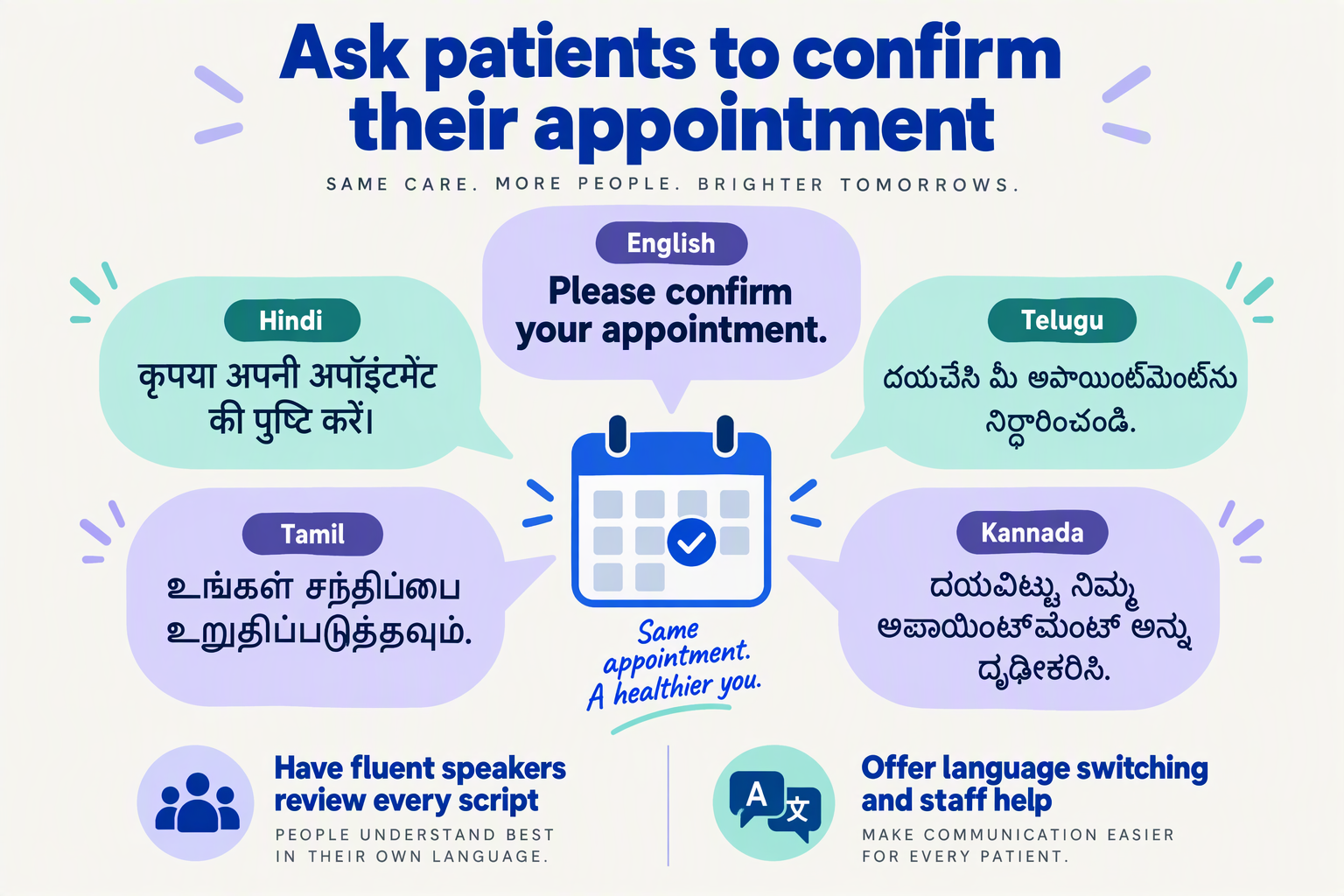
Reminder scripts should identify the clinic, state the appointment date, time and location, and offer clear choices to confirm, cancel or request rescheduling. Use the patient’s preferred language, with equivalent instructions across English, Hindi, Telugu, Tamil and Kannada—not literal translations that sound unnatural.
What should a multilingual WhatsApp appointment reminder say?
The following October 2026 sample scripts use a hypothetical appointment on 20 October 2026 at 10:00 a.m. Replace [Clinic] and [Location] before sending, and have a fluent local reviewer check wording, tone and place-name spelling.
Keep the response mapping consistent: 1 = confirm, 2 = cancel, 3 = request another time.
- English:
“Hello from [Clinic]. Your appointment is on 20 October 2026 at 10:00 a.m. at [Location]. Please reply: 1 to confirm, 2 to cancel, or 3 to request a different time.”
- Hindi:
“नमस्ते, यह [Clinic] की ओर से अपॉइंटमेंट का रिमाइंडर है। आपका अपॉइंटमेंट 20 अक्टूबर 2026 को सुबह 10 बजे [Location] पर है। कृपया जवाब दें: पुष्टि के लिए 1, रद्द करने के लिए 2, या समय बदलने का अनुरोध करने के लिए 3।”
- Telugu:
“నమస్కారం, [Clinic] నుంచి మీ అపాయింట్మెంట్ గురించి గుర్తు చేస్తున్నాము. మీ అపాయింట్మెంట్ 20 అక్టోబర్ 2026న ఉదయం 10 గంటలకు [Location]లో ఉంది. దయచేసి నిర్ధారించడానికి 1, రద్దు చేయడానికి 2, లేదా సమయం మార్చమని కోరడానికి 3 అని పంపండి.”
- Tamil:
“வணக்கம், [Clinic] சார்பாக உங்கள் சந்திப்பை நினைவூட்டுகிறோம். உங்கள் சந்திப்பு 20 அக்டோபர் 2026 அன்று காலை 10 மணிக்கு [Location] இல் உள்ளது. உறுதிப்படுத்த 1, ரத்து செய்ய 2, அல்லது நேரத்தை மாற்றக் கோர 3 என்று பதிலளிக்கவும்.”
- Kannada:
“ನಮಸ್ಕಾರ, [Clinic] ಕಡೆಯಿಂದ ನಿಮ್ಮ ಅಪಾಯಿಂಟ್ಮೆಂಟ್ ಕುರಿತು ನೆನಪಿಸುತ್ತಿದ್ದೇವೆ. ನಿಮ್ಮ ಅಪಾಯಿಂಟ್ಮೆಂಟ್ 20 ಅಕ್ಟೋಬರ್ 2026 ರಂದು ಬೆಳಿಗ್ಗೆ 10 ಗಂಟೆಗೆ [Location]ನಲ್ಲಿ ಇದೆ. ದಯವಿಟ್ಟು ಖಚಿತಪಡಿಸಲು 1, ರದ್ದುಪಡಿಸಲು 2, ಅಥವಾ ಸಮಯ ಬದಲಿಸಲು ವಿನಂತಿಸಲು 3 ಎಂದು ಉತ್ತರಿಸಿ.”
Numbers reduce typing effort, but patients should also be able to respond naturally. Treat “ಬರಲು ಆಗುವುದಿಲ್ಲ,” “வர முடியாது,” or “I can’t come” as replies requiring interpretation—not invalid inputs.
How should a voice reminder differ from a WhatsApp message?
A voice script should use short turns and spoken choices, rather than reading the entire message in one breath. Start by checking whether the recipient can discuss an appointment before disclosing its details, especially when families share phones.
Use this sequence:
- Identify the caller: “Hello, this is the appointment assistant from [Clinic]. Is now a suitable time to discuss an appointment?”
- State the booking: Once appropriate, speak the date, time and location slowly.
- Ask one question: “Would you like to confirm, cancel, or request another time?”
- Read back the outcome: “You would like another time. Reception will need to confirm a new appointment.”
Say “twenty October, ten in the morning,” not “twenty slash ten” or “ten hundred.” Test how the selected voice pronounces local neighbourhoods and clinic names.
As of October 2026, CallMissed supports speech recognition in 22 Indian languages plus English, including Hinglish, and natural text-to-speech voices in 10 Indian languages plus English. Recognition coverage and voice coverage are different; check the selected voice before deploying each language script.
What should reminder scripts leave out?
Avoid diagnoses, test results, unnecessary identifiers and promises of an unconfirmed replacement slot. WhatsApp’s Business Messaging Policy, referenced for this October 2026 guide, says businesses must not request or share full personal ID card numbers or other sensitive identifiers.
If identification is necessary, use the clinic’s approved verification process rather than asking patients to send identity documents. Keep routine reminders administrative, and route clinical questions to an appropriate staff member.
How do you integrate a scheduler and prevent duplicate or outdated reminders?
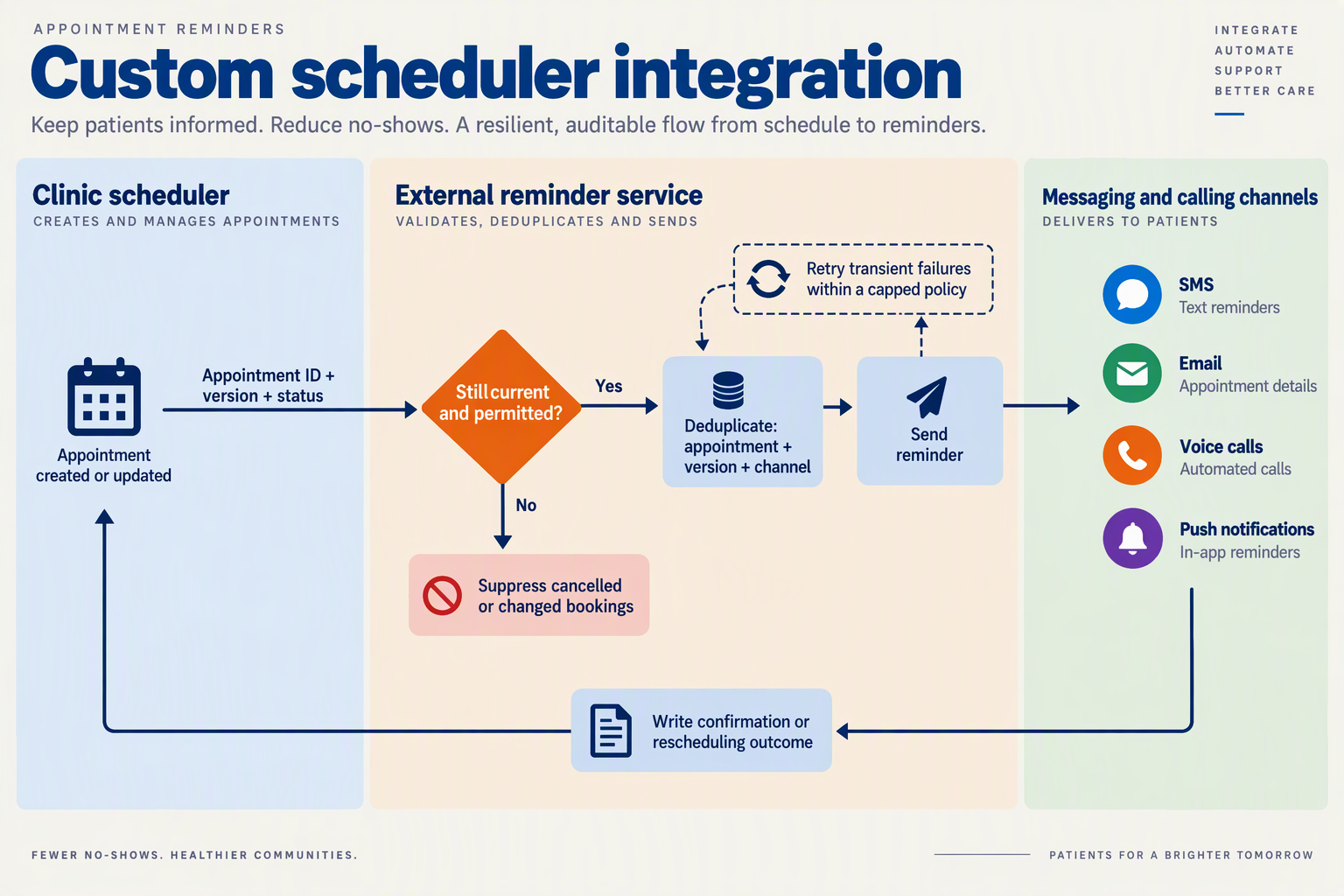
Integrate the scheduler as the single source of truth, then recheck each appointment immediately before sending a reminder. Prevent duplicates with a persistent send ledger and an idempotency key; prevent outdated messages by invalidating queued reminders whenever a booking changes.
How should a clinic connect its scheduler to reminders?
Use scheduler events—booking created, rescheduled, cancelled, or completed—to update a separate reminder service. If the scheduler cannot emit events, poll for changes and periodically reconcile records; polling introduces a delay that your clinic should explicitly account for.
As of October 2026, CallMissed supports Cal.com and Google Calendar integrations, custom REST tools, and outbound webhooks with per-agent event subscriptions, according to the CallMissed fact sheet. These are integration building blocks; appointment versioning, duplicate suppression, and reminder scheduling should be implemented and tested in your clinic’s integration layer rather than assumed to be automatic.
Store only the operational fields needed:
- Appointment ID and version: a stable identifier plus a revision number.
- Current status: booked, confirmed, cancelled, completed, or awaiting rescheduling.
- Start time and time zone: store a UTC timestamp and the clinic’s named time zone.
- Contact preferences: verified destination, preferred language, and channel permissions.
- Reminder state: scheduled time, channel, delivery state, and provider message identifier.
Keep diagnoses and clinical notes outside the reminder payload. WhatsApp’s Business Messaging Policy, referenced as of October 2026, says: “Don’t share or ask people to share” sensitive identifiers such as full payment-card or personal-ID numbers.
How do you stop duplicate WhatsApp and voice reminders?
Create a unique key for each intended reminder, such as:
appointment_id:version:reminder_stage:channel
Enforce that key with a database uniqueness constraint—not just an application-level check. Two workers can otherwise both decide that a reminder has not been sent.
Use this sequence:
- Claim the job atomically so only one worker processes it.
- Fetch the latest booking and verify its version, status, time, and permissions.
- Record the send attempt against the unique key.
- Submit the message or individual call request and save the provider identifier.
- Reconcile uncertain outcomes before retrying.
A network timeout does not prove that delivery failed: the provider may have accepted the request before the connection dropped. Use provider idempotency where available; otherwise investigate ambiguous attempts rather than blindly sending again.
Also coordinate channels. A successful WhatsApp confirmation should normally suppress a planned voice follow-up unless your clinic has a documented reason to retain it.
What happens when a patient reschedules or cancels?
Consider a hypothetical booking moved from 20 October 2026 at 10:00 IST to 21 October 2026 at 15:00 IST. Increment its version, invalidate the old reminder jobs, and generate replacements from the new appointment time.
Before sending, the worker must reject any job carrying the previous version. This protects against delayed events and jobs already sitting in a queue.
Treat patient replies carefully:
- Cancellation: update the scheduler, then suppress remaining reminders.
- Rescheduling request: route it to reception or a booking workflow; do not claim a new slot is confirmed until the scheduler accepts it.
- Late reply: associate it with the relevant appointment, not simply the patient’s latest booking.
Finally, test duplicate events, concurrent workers, cancellations during dispatch, and provider timeouts. Once a message has been submitted, it may not be retractable; logs and a clear correction workflow remain essential.
How can you improve language handling, retry rules and reminder measurement?
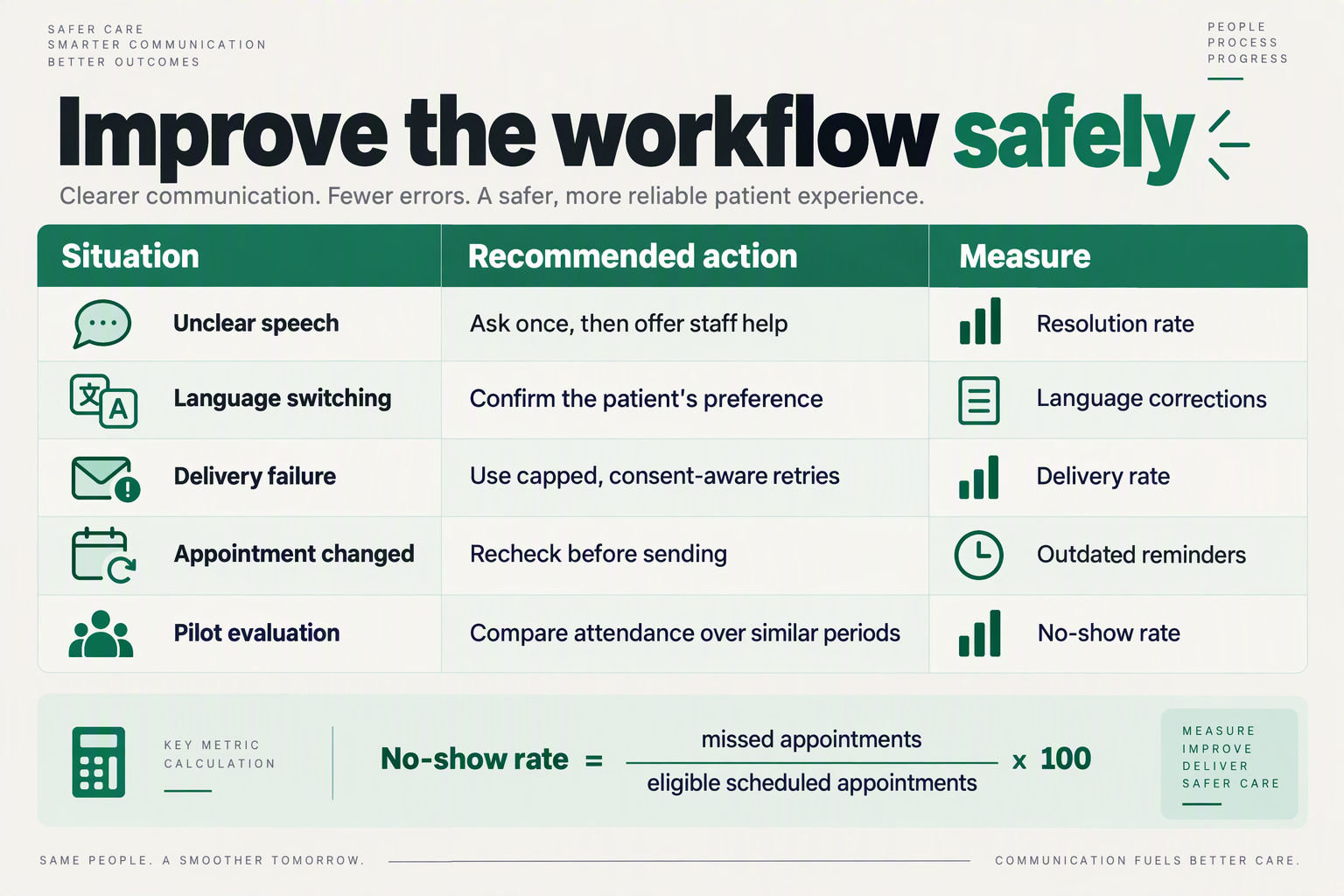
Improve language handling, retry rules and reminder measurement by recording patient preferences, defining when contact must stop, and linking reminder outcomes to appointment records. For an October 2026 pilot, change one workflow variable at a time so you can distinguish better communication from simply sending more reminders.
How should clinics handle language choices and reminder retries?
Use the following as a proposed clinic operating checklist, not a universal schedule or a claim that every platform automates these rules.
| Area | Recommended rule | Exception or stop condition | Measure |
|---|---|---|---|
| Language preference | Ask patients to choose their written and spoken languages separately. | Offer reception support if the preferred language is unavailable. | Preference coverage |
| Translation quality | Have a fluent reviewer check dates, directions and confirmation wording. | Revise ambiguous wording before sending. | Misunderstanding rate |
| Code-mixed speech | Test common language mixtures, names and appointment-time expressions. | Ask for clarification rather than guessing. | Correction rate |
| First retry | Retry only unresolved appointments within a clinic-defined contact window. | Stop after confirmation, cancellation or opt-out. | Additional resolved bookings |
| Channel fallback | Offer permission-based voice contact when messaging remains unresolved. | Avoid repeated calls after refusal or a wrong-number response. | Fallback resolution rate |
| Outcome tracking | Reconcile replies with the appointment register. | Count unresolved replies separately from confirmed bookings. | Attendance and no-show rates |
Written-language preference is not necessarily spoken-language preference. A patient might prefer a Hindi conversation but an English message that a family member can read. Do not infer either preference from a surname, postcode or previous staff interaction.
As of October 2026, CallMissed provides natural text-to-speech voices in 10 Indian languages plus English, alongside call transcripts and call scoring against a clinic’s own QA rubrics. These capabilities can support language-quality review, but language availability alone does not establish that patients understood the reminder.
When should a reminder workflow stop retrying?
Make stop conditions appointment-specific. A cancellation should close the reminder task for that booking; a rescheduling request should enter a staff queue rather than trigger another reminder for the original slot.
For an October 2026 pilot, document three decisions:
- Eligibility: Which unresolved bookings qualify for another contact attempt?
- Limits: What contact window and maximum attempt count has the clinic approved?
- Ownership: Who handles unclear replies, wrong numbers and rescheduling requests?
Distinguish a failed delivery from a delivered message with no reply. Neither proves refusal, and neither justifies unlimited retries. Measure whether each additional attempt resolves bookings—not merely whether it generates another delivery event.
Which metrics show whether reminders actually help?
Cochrane’s December 2013 review evaluated appointment attendance, making it a more relevant outcome than message engagement alone; its findings concern mobile text reminders, not a WhatsApp-specific performance guarantee.
Track these measures with consistent definitions:
- No-show rate: unattended, uncancelled appointments divided by eligible scheduled appointments.
- Timely cancellation rate: cancellations received before the clinic’s defined refill cutoff.
- Staff workload: minutes spent resolving replies and arranging new slots.
In a hypothetical October 2026 pilot, 120 no-shows among 1,000 eligible appointments equals 12%; 90 among another 1,000 equals 9%. That is a 3-percentage-point decrease, or a 25% relative reduction, not proof that reminders caused the change.
Compare similar appointment types and weekdays, and report outcomes by preferred language where sample sizes permit. Small groups should prompt further review, not sweeping conclusions about language effectiveness.
Which privacy, messaging and calling mistakes should clinics avoid?
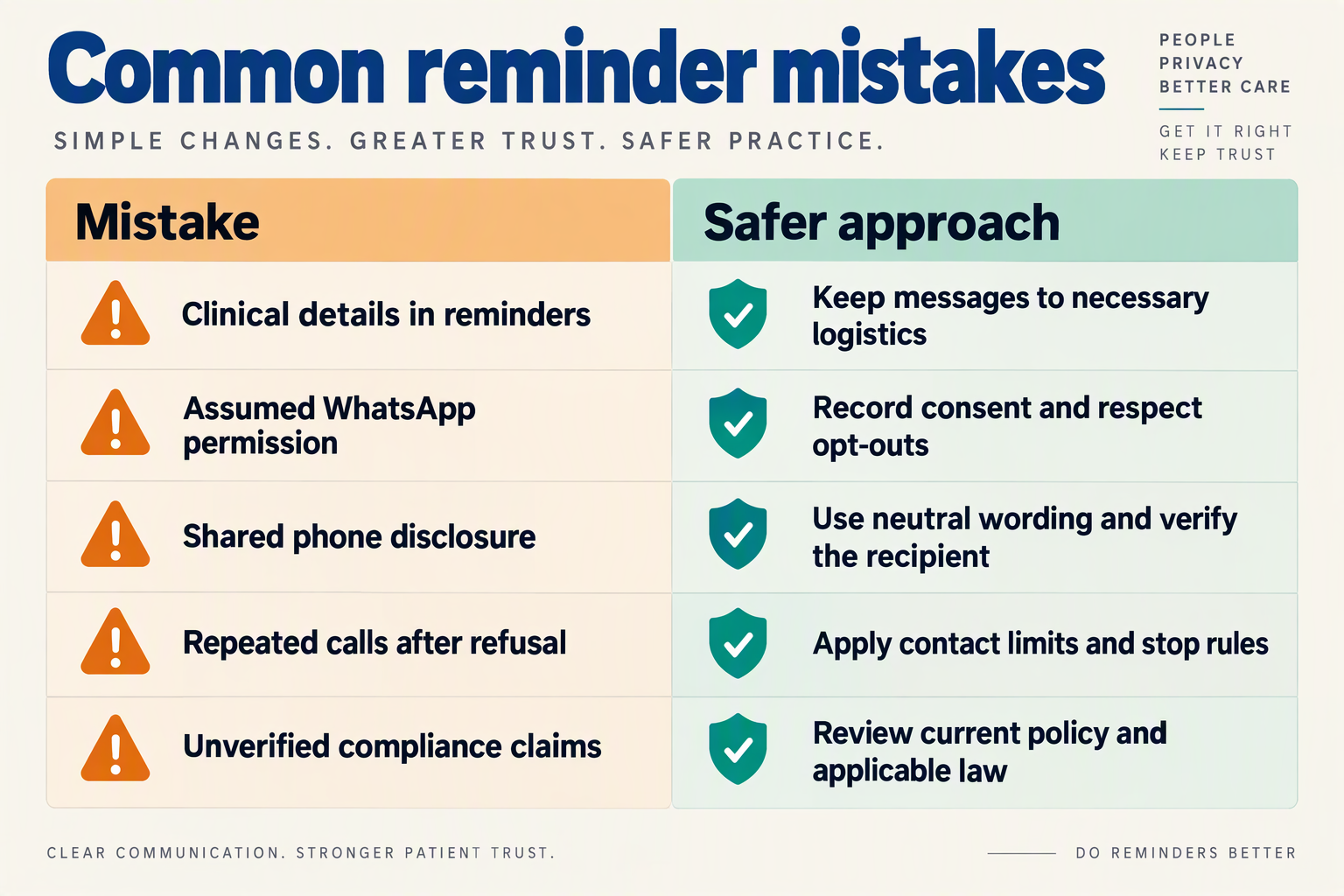
Clinics should avoid treating appointment reminders as permission to disclose medical details, send promotions, or initiate calls without the appropriate consent. For WhatsApp appointment reminders for clinics, the safest approach is to minimise disclosure, document channel preferences, and give staff clear rules for stopping or escalating conversations.
Which reminder mistakes create privacy and consent risks?
The following checklist is for an October 2026 implementation review, not a substitute for checking applicable healthcare, privacy, and telecommunications requirements.
| Mistake | What can go wrong | Safer clinic practice |
|---|---|---|
| Assuming a saved number belongs exclusively to the patient | A shared family phone or reassigned number exposes appointment information. | Verify the contact number and ask whether neutral reminders are safe on that device. |
| Treating booking consent as permission for every channel | Patients receive unexpected WhatsApp messages, calls, or promotional offers. | Record permission and preferences separately for reminders, calls, and marketing; honour withdrawal requests. |
| Including sensitive details in previews | Lock-screen notifications reveal a specialty, procedure, or reason for attending. | Use the minimum necessary wording; consider a neutral clinic identifier agreed with the patient. |
| Requesting sensitive identifiers in chat | Reception collects information that should use a more controlled process. | Do not request full payment-card, financial-account, or personal-ID numbers through WhatsApp. |
| Recording every voice interaction indefinitely | Recordings and transcripts accumulate sensitive information unnecessarily. | Establish recording notices, access restrictions, retention periods, and deletion procedures before enabling recording. |
| Calling without checking permission or recipient identity | A voice agent discloses appointment details to the wrong person. | Check calling permission first; use a neutral opening and verify the recipient before discussing the appointment. |
WhatsApp’s Business Messaging Policy, referenced for this October 2026 guide, says: “Don’t share or ask people to share full length individual payment card numbers, financial account numbers, personal ID card numbers, or other sensitive identifiers.” That restriction should appear in receptionist guidance and AI-agent instructions—not merely in a policy document nobody reads.
How should clinics handle shared phones and clinical replies?
A reminder can reveal sensitive information even without a diagnosis. For example, naming a specialist service may disclose more than the patient intended when a relative sees the notification.
For a hypothetical shared-phone booking, ask: “Can we send a neutral appointment reminder to this number, and what clinic name should appear?” Do not assume that translating the message makes the disclosure safer.
Use a simple escalation sequence:
- Pause automation if someone reports a wrong number, asks to stop, or disputes permission.
- Route clinical questions to an appropriate person, rather than letting a reminder agent interpret symptoms.
- Move sensitive exchanges to an approved clinical channel, with the patient’s agreement.
As of October 2026, CallMissed provides a human-handoff queue in which switching the AI off hands the thread to a person. That supports operational escalation; it does not, by itself, establish healthcare compliance.
What should clinics check before enabling WhatsApp calls?
As of October 2026, CallMissed’s WhatsApp Business Calling supports business-initiated calls to customers who have given permission. Messaging permission should not be assumed to cover calling permission; clinics should verify the applicable requirements and retain evidence of the patient’s choice.
Before launch, test:
- Wrong-recipient handling: no appointment details before verification.
- Language-specific privacy wording: understandable notices and stop instructions.
- Access and retention: who can view conversations, recordings, and transcripts—and when they are deleted.
Treat these as launch checks, not corrections to make after a privacy incident.
Frequently Asked Questions
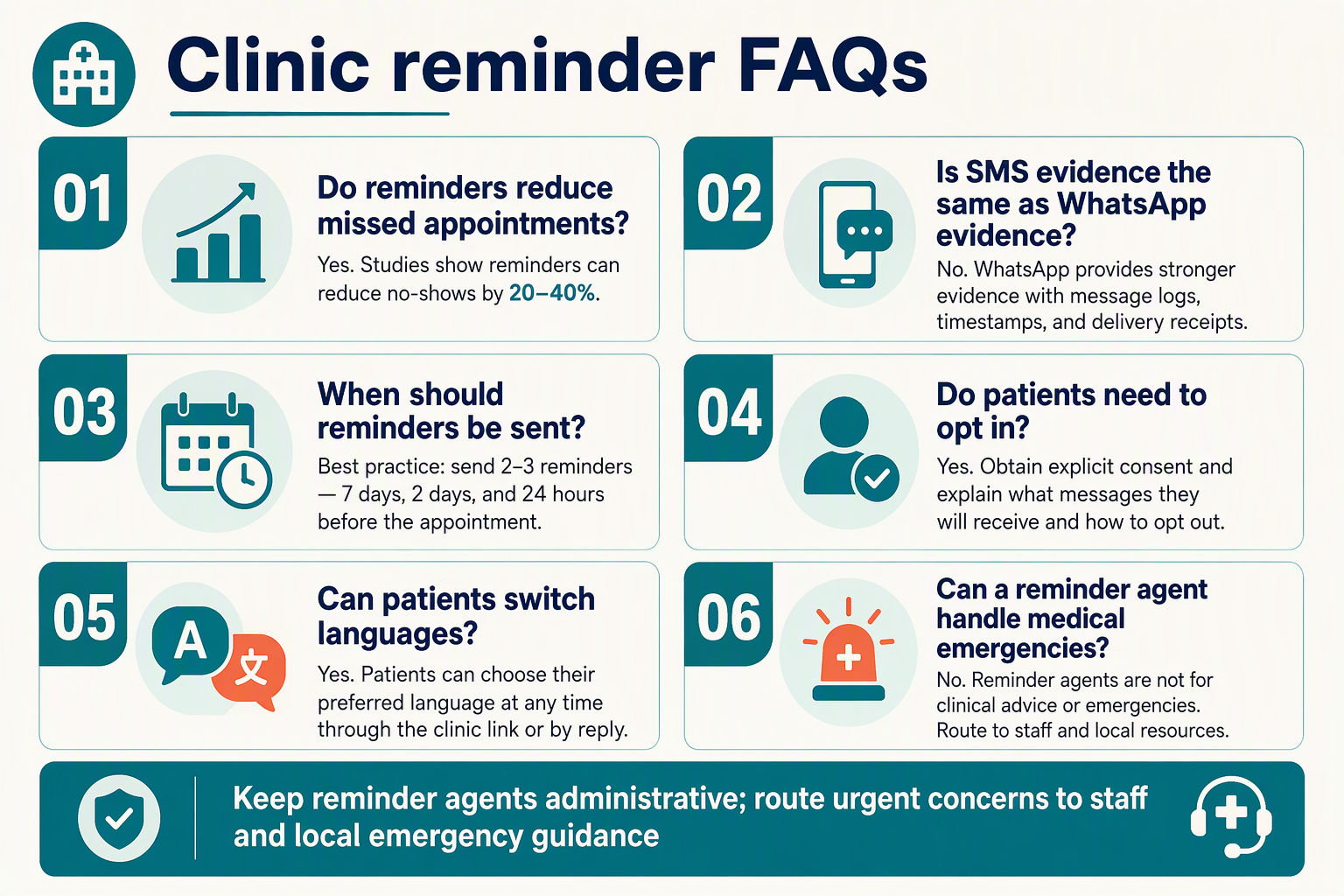
When should clinics send WhatsApp appointment reminders for clinics?
Do WhatsApp appointment reminders for clinics require patient consent?
Can multilingual voice reminders understand Hinglish and reply in regional languages?
How much do AI voice calls and WhatsApp reminder calls cost?
Can patients cancel or reschedule appointments through WhatsApp replies?
How should clinics measure whether WhatsApp appointment reminders reduce no-shows?
Which resources should you check before launching a clinic reminder pilot?

Before launching a clinic reminder pilot, check primary research, WhatsApp’s official messaging policy, your clinic’s privacy procedures, and your platform’s implementation documentation. As of October 2026, these resources should inform a written launch checklist—not just a collection of reading links.
Which research should guide your pilot targets?
Start with Cochrane’s “Mobile phone messaging reminders for attendance at healthcare appointments,” published in December 2013 by Gurol-Urganci and colleagues. Use this systematic review to understand the evidence behind reminders, while keeping its historical SMS findings separate from expectations for multilingual voice or WhatsApp.
Also consult Dove Medical Press’s “Appointment reminder systems are effective but not optimal” for a broader review of reminder-system research. Read beyond headline results: patient populations, reminder methods, and operational conditions determine how relevant findings are to your clinic.
Turn the reading into practical questions:
- Does the research setting resemble your appointment category?
- Is the intervention SMS, voice, or another channel?
- Does the outcome measure attendance, cancellation, or merely message engagement?
Your clinic’s baseline should determine the pilot target. External evidence supports testing reminders; it does not establish the improvement your workflow will achieve.
Which WhatsApp rules should reception and compliance teams review?
Review Meta’s WhatsApp Business Messaging Policy immediately before launch, rather than relying on an older implementation guide.
The WhatsApp Business Messaging Policy, referenced for this October 2026 guide, states: “Don’t share or ask people to share full length individual payment card numbers, financial account numbers, personal ID card numbers, or other sensitive identifiers.” Its health-information restriction also depends on applicable regulations; do not interpret it as blanket approval for clinical messaging.
Ask your privacy or legal reviewer to document:
- Which administrative details may appear in a reminder.
- How patient permission and withdrawal requests will be recorded.
- What staff should do when a patient replies with medical information.
- Which conversations must move to an approved clinical channel.
A template’s acceptance should not replace this review.
Which technical documentation should you check?
Use your provider’s current documentation alongside Meta’s official documentation to verify account setup, message-template handling, reply routing, calling permissions, and failure handling. Check actual configuration screens and test results—not just feature descriptions.
As of October 2026, CallMissed supports Meta embedded signup, message templates synced with Meta, a live shared inbox, and WhatsApp Business Calling with AI voice agents. Clinics evaluating CallMissed should use its documentation to check how those capabilities fit their reception workflow; business-initiated WhatsApp calls require customer permission.
Create a small test matrix covering preferred languages, unanswered calls, cancellation replies, and requests that need a person. Record what happens when a reminder cannot be delivered or a reply is misunderstood.
What should be in the final launch pack?
Bring the resources together in four signed-off documents:
- Evidence brief: relevant research, limitations, and the clinic baseline.
- Policy checklist: approved reminder content, permission procedures, and privacy escalation contacts.
- Test record: sample conversations, language checks, failure cases, and unresolved issues.
- Pilot scorecard: attendance definitions, staff-workload measures, review dates, and stop criteria.
Launch only when reception staff know who owns each exception. The most useful resource is ultimately a shared operating procedure that turns research, policy, and product documentation into consistent patient-facing decisions.
Conclusion
WhatsApp appointment reminders for clinics work best as a patient-friendly workflow, not simply a message delivery system. For Indian healthcare teams, the next step is to combine clear administrative reminders, patient-preferred languages, manageable reply handling, and a small pilot that measures actual appointment outcomes.
The evidence supports testing reminders, but not promising a particular result. Cochrane’s December 2013 systematic review reported attendance of 67.8% without reminders versus 78.6% with mobile text-message reminders—a 10.8-percentage-point difference. Those historical SMS findings provide a rationale for action; they are neither a WhatsApp-specific benchmark nor a forecast for your clinic.
Keep four practical takeaways at the centre of implementation:
- Make every reminder actionable. Include the clinic name, appointment date, time, and location, followed by a straightforward request to confirm, cancel, or ask about rescheduling. A patient should understand the next step without having to interpret a long notification. The purpose is to make the appointment easier to manage, not to send more messages.
- Match communication to patient preferences. Use the patient’s preferred language rather than assuming English is suitable for everyone. Where reading is difficult or a patient needs clarification, multilingual voice or reception support can help. Treat voice as a useful option within the workflow, rather than a replacement for human assistance.
- Protect privacy while organising replies. Keep routine reminders administrative, establish permission practices, and avoid unnecessary diagnoses or sensitive details. WhatsApp’s Business Messaging Policy, referenced for this October 2026 guide, makes applicable regulatory restrictions relevant to health-related messaging. Separately identify confirmations, cancellations, and rescheduling requests so reception staff can see what needs attention.
- Pilot before expanding. Begin with one appointment category and compare attendance, cancellations, and staff workload against your clinic’s baseline. Message delivery alone does not demonstrate a successful consultation or a better patient experience. Use the findings to improve wording, language choices, and reply handling before extending the workflow.
What should clinics watch for next?
Looking ahead from October 2026, watch whether multilingual messaging and voice make appointment management genuinely easier for patients—and whether reception teams can handle the resulting conversations without added confusion. Clear handoffs and understandable responses matter more than adding another communication channel.
For teams exploring this direction, CallMissed, an AI customer-communication platform, supports WhatsApp Business messaging through Meta’s official Cloud API and WhatsApp Business Calling with AI voice agents, as of October 2026. Explore those capabilities against your clinic’s language and reception needs, then start small.
Which appointment category could your clinic pilot first—and what would count as a meaningful improvement for both patients and staff?
Related Reading
- WhatsApp Business API providers: India SMB Guide 2026
- COD confirmation voice bot script: WhatsApp and ROI
- WhatsApp customer support automation: India playbook