How to Use Meta Muse Code: A Launch-Readiness and Official Documentation Verification Guide


Learn how to use Meta Muse Code safely by verifying official access, setup, repository permissions, security, testing, support, and rollout status.
How to Use Meta Muse Code: A Launch-Readiness and Official Documentation Verification Guide
What if the most important step in adopting a new AI coding tool is proving that the product exists? As of August 5, 2026, the available first-party evidence does not verify “Meta Muse Code” as a publicly documented Meta product. Searches across six primary Meta properties—ai.meta.com, meta.com, about.fb.com/news, developers.facebook.com, engineering.fb.com, and Meta’s GitHub organizations—returned no official product page, announcement, documentation, repository, or support route for that name.
That finding changes how to use Meta Muse Code from a conventional setup tutorial into a verification exercise. There are currently no verified first-party steps for Muse Code setup, editor installation, repository connection, pricing, waitlist access, testing features, regional availability, or security controls. A general Meta AI page, a Meta Llama code model, or a similarly named third-party tool would not establish the existence of a specific Meta AI coding platform called Muse Code.
Why launch verification matters now
Coding assistants can touch source code, branches, pull requests, CI/CD pipelines, and organization data, so an unverified installation is not a harmless experiment. Until Meta publishes OAuth scopes, authentication instructions, data-use terms, retention rules, revocation procedures, and an incident-reporting channel, readers should not authorize an unknown application or grant organization-wide or write access. The absence of documentation is not proof that a product will never launch; it is proof that responsible setup instructions cannot yet be written. This distinction matters because copied screenshots, reposted claims, and search snippets can appear credible without confirming publisher identity, release status, or current terms.
What this guide will verify
This guide gives you a launch-readiness workflow to use when official material appears. You will learn to:
- Locate an official Meta announcement and documentation hub, then verify the publisher, domain, eligibility rules, supported countries, account tiers, interfaces, and editors.
- Inspect installation and authentication guidance, source-control integrations, requested GitHub or GitLab permission scopes, data handling, revocation, and repository boundaries.
- Evaluate a non-sensitive task in a disposable repository, inspect the diff, run normal tests and security checks, and require human approval before merging.
- Distinguish login, installation, integration, and service-status failures only after Meta publishes official support and status pages.
The guide maps nine evidence categories—access, setup, interfaces, repositories, tasks, review and testing, security, limitations and troubleshooting, and availability—to the first-party records required. Until those records exist, treat “Meta Muse Code” setup claims as unverified, record the date checked, and rely on Meta’s primary sources rather than reposts.
How can you use Meta Muse Code today? Public access, official documentation, and Muse Code setup were not verifiable as of August 5, 2026

You cannot follow a verified Muse Code setup today because Meta has not published first-party access, installation, or usage instructions for a product named “Meta Muse Code.” As of August 5, 2026, the responsible answer to how to use Meta Muse Code is to pause setup and verify an official launch before creating an account, installing software, or connecting source code.
What the first-party search established
A review conducted on August 5, 2026, found no official “Meta Muse Code” product result across six primary Meta properties: Meta AI, Meta’s corporate website, Meta Newsroom, Meta for Developers, Meta Engineering, and Meta’s GitHub organizations.
That search did not identify any of the records normally required for a usable developer product:
- An official announcement or product page
- A documentation hub or quick-start guide
- A verified download, command-line package, or editor extension
- Account eligibility, pricing, waitlist, or regional-access information
- Authentication instructions or API credentials
- GitHub, GitLab, or other repository-connection documentation
- Privacy, security, retention, support, or service-status pages
This result means public access is unverified, not that Meta could never release such a product. It also does not determine whether a similarly named project exists internally, under another name, or outside Meta. Only a first-party Meta publication can resolve those possibilities.
Apply an evidence gate before setup
Do not treat a search result, social-media post, screenshot, tutorial, download page, or third-party repository as sufficient launch evidence. Before attempting any future installation, require the following chain of confirmation:
- Find the announcement on a Meta-controlled property. Confirm that the page explicitly names “Muse Code,” identifies Meta as the publisher, and links to documentation.
- Follow documentation links from that announcement. Avoid relying on lookalike domains, shortened links, reposted instructions, or search-result snippets.
- Confirm access conditions. Look for supported countries, account types, age or organization requirements, rollout phases, pricing, and waitlist terms.
- Verify the distribution channel. An editor extension should link to a verified publisher; a command-line tool should have an official package name, installation command, checksum or signing guidance, and removal procedure.
- Read authorization details before signing in. Official instructions should explain OAuth scopes, token storage, repository boundaries, data use, retention, revocation, and administrative controls.
- Locate support and status resources. A documented product should provide a way to distinguish account, installation, integration, and service-availability failures.
Avoid false product matches
A Meta-owned page is not automatically evidence for the requested product. Meta AI, Meta Llama, a Llama-based code model, and an unrelated tool containing the words “Muse” or “Code” do not verify a specific Meta AI coding platform called Meta Muse Code.
Use the exact product name as the matching criterion, then confirm that the announcement, documentation, software publisher, legal terms, and support route refer to the same offering. Until that evidence chain exists, do not enter credentials, install an executable, purchase access, or authorize repository permissions based on claims of Meta affiliation.
What is Meta Muse Code, and how do you distinguish a documented Meta AI coding platform from rumors or similarly named products?
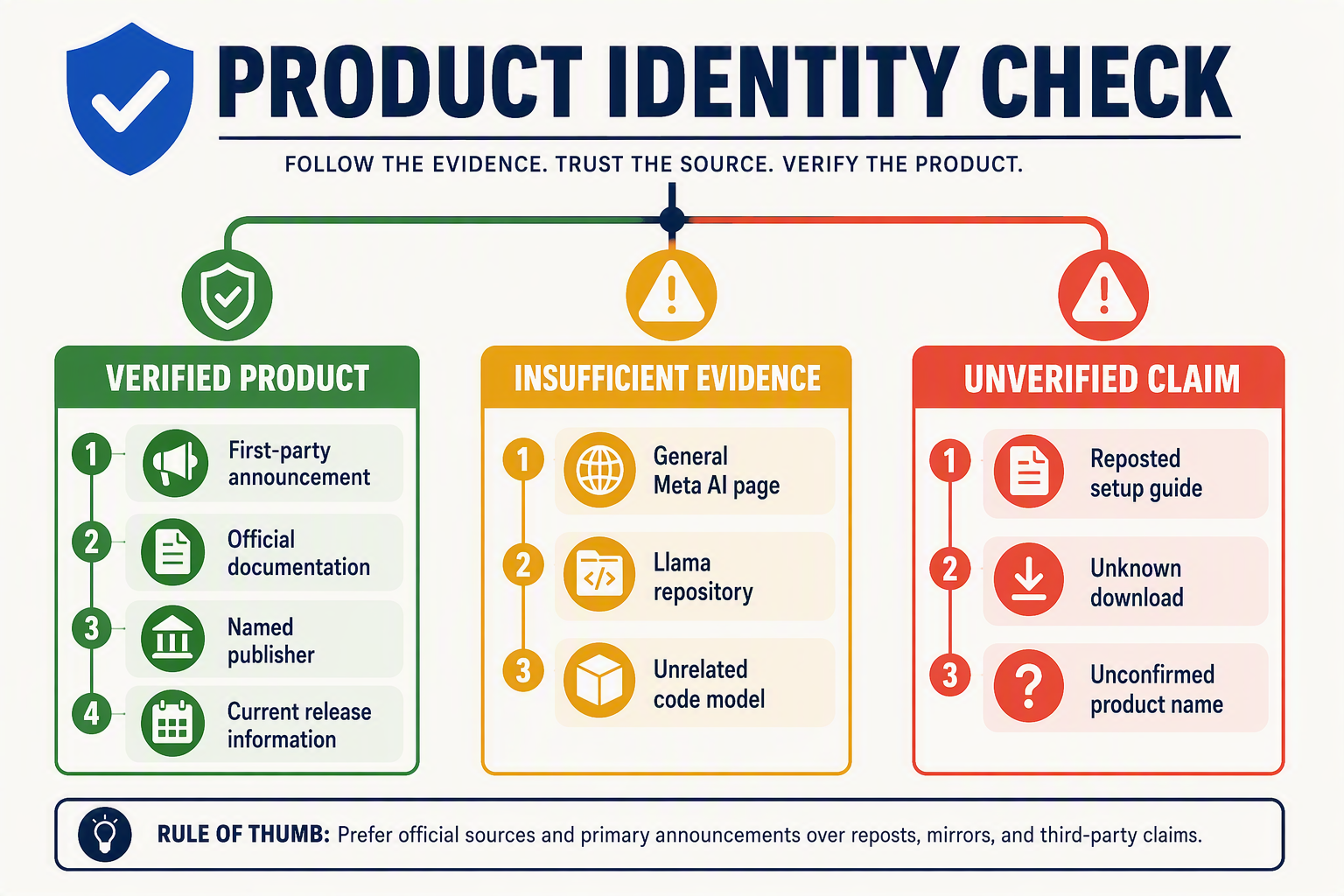
Meta Muse Code is not currently verifiable as a publicly documented Meta AI coding platform. As of August 5, 2026, the exact name lacks the first-party evidence needed to distinguish an official product from a rumor, an internal codename, a mistaken label, or an unrelated similarly named service.
Apply an exact-entity test
Product verification requires more than finding the words “Meta,” “Muse,” or “Code” separately. The evidence must connect the exact product identity—Meta Muse Code—to Meta Platforms and describe what users can access.
Use this three-part test:
- Exact name: Does an official page explicitly call the product “Muse Code” or state that Muse Code is a Meta product?
- Product function: Does Meta describe it as a coding platform, coding agent, developer tool, model, or service?
- Operational path: Does Meta provide documentation, authentication, access, support, or release information?
A result that satisfies only one or two conditions is insufficient. For example, a Meta Llama repository containing code-related models may be genuine Meta material without verifying a separate product named Muse Code.
Rank evidence by authority
Treat evidence as a hierarchy rather than a simple search-result count.
Strong verification evidence includes:
- A product page on ai.meta.com or meta.com
- A launch announcement from Meta Newsroom at about.fb.com/news
- Technical documentation on developers.facebook.com
- An implementation article on Meta Engineering
- A Meta-controlled GitHub repository linked from official documentation
- Consistent privacy, terms, release notes, support, and status references
Weak or non-conclusive evidence includes:
- Screenshots without a visible, verifiable Meta domain
- Social posts quoting unnamed employees or private demonstrations
- Search snippets with no accessible source page
- Third-party tutorials offering Muse Code setup
- Download pages, browser extensions, or OAuth applications using a similar name
- General Meta AI or Meta Llama pages that never mention “Muse Code”
The August 5, 2026 research audit checked six primary Meta properties—ai.meta.com, meta.com, about.fb.com/news, developers.facebook.com, engineering.fb.com, and Meta’s GitHub organizations—and found zero official results documenting “Muse Code” as a public product. This finding establishes an evidence gap, not proof that Meta could never announce such a platform.
Watch for identity and naming traps
Similarly named products can be legitimate while remaining unrelated. Verify the publisher, not just the branding, because app-store names, GitHub repository titles, package names, and OAuth consent-screen labels can be chosen by third parties.
Before trusting a claimed launch, check that:
- The announcement and documentation cross-link to each other.
- The domain is controlled by Meta, with no misspellings or deceptive subdomains.
- The publisher identity is consistent across installation, login, billing, and support.
- Release notes specify a date, version, rollout status, and supported audience.
- Any GitHub or GitLab application is referenced by official integration documentation.
- Privacy and security terms identify the responsible Meta entity and applicable service.
Use a defensible status label
Until the evidence chain is complete, describe the product as “not publicly verified as of August 5, 2026,” rather than “fake,” “cancelled,” or “coming soon.” Consequently, searches for how to use Meta Muse Code do not yet have a documented answer, and any claimed access requirements, pricing, editor support, repository permissions, or regional availability should remain explicitly unconfirmed.
What did the official-source verification searches find as of August 5, 2026? Key Developments
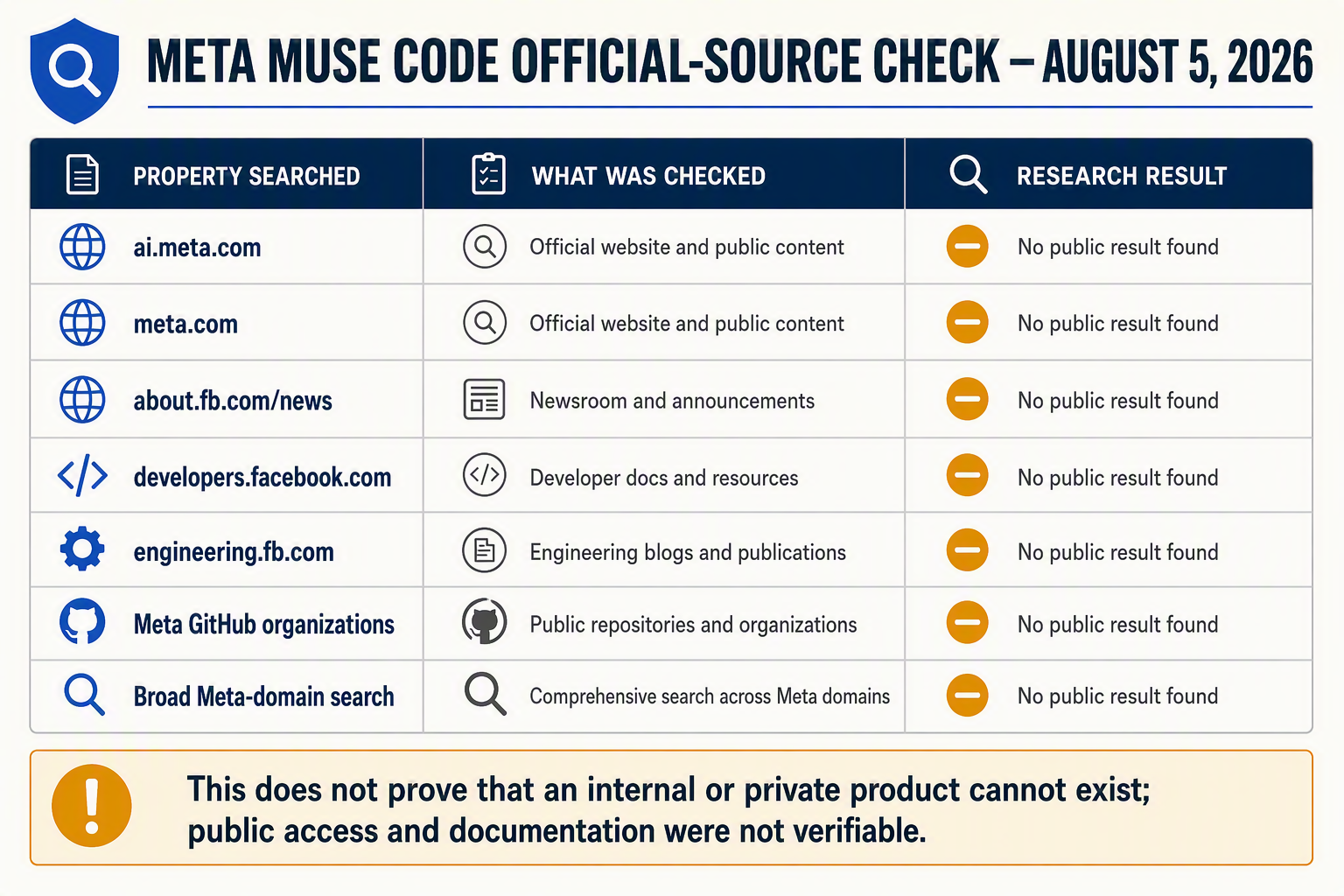
As of August 5, 2026, official-source verification found zero publicly documented Meta products named “Meta Muse Code” across the six Meta properties searched. The result means no first-party evidence currently supports instructions for access, setup, repository integration, testing, pricing, security, or availability.
Official-source search result
The verification covered six primary Meta properties: Meta AI, Meta’s corporate website, Meta Newsroom, Meta for Developers, Meta Engineering, and Meta’s GitHub organizations. Searches did not identify an official announcement, product page, documentation hub, repository, release note, support page, or status entry for the exact product name.
This finding has two important boundaries:
- It does not prove that Meta will never release a product under this name or that no internal or private project exists.
- It does prove that a public guide explaining how to use Meta Muse Code cannot yet be grounded in verifiable first-party instructions.
A Meta AI landing page, Meta Llama coding model, research paper, trademark reference, search snippet, or similarly named third-party application is insufficient evidence of a distinct Meta AI coding platform called Muse Code.
Evidence required before setup can begin
| Verification category | Finding on August 5, 2026 | First-party evidence required | Safe action now |
|---|---|---|---|
| Access requirements and availability | No verified public access route, waitlist, price, account tier, country list, or rollout schedule was found. | Meta product page or announcement stating eligibility, supported regions, account requirements, pricing, and release stage. | Do not pay a third party or submit credentials based on reposted access claims. |
| Muse Code setup and interfaces | No official installation procedure, command, extension, web interface, API, or supported-editor list was found. | Meta documentation identifying authentic downloads, package names, extensions, system requirements, authentication steps, and supported editors. | Do not install packages or browser extensions merely using the Muse Code name. |
| Repository connection | No verified GitHub, GitLab, OAuth, or source-control connector was documented. | Integration documentation specifying app identity, requested scopes, repository boundaries, data handling, revocation, and administrator controls. | Do not grant organization-wide, private-repository, or write access to an unknown application. |
| Coding tasks | No official prompt syntax, agent behavior, execution environment, or task limits were found. | Product documentation covering supported operations, sandboxing, file access, command execution, quotas, and model limitations. | If a verified launch occurs, begin with a small change in a disposable, non-production repository. |
| Code review and testing | No verified diff-review, test-running, pull-request, approval, or rollback workflow was found. | Documentation showing how generated changes are reviewed, tested, logged, approved, reverted, and merged. | Preserve human review; inspect the diff and run the project’s normal tests and security checks before merging. |
| Security, troubleshooting, and support | No product-specific privacy terms, retention policy, incident channel, support route, or service-status page was found. | Meta security and privacy documentation covering code use, retention, training, deletion, encryption, audit logs, incidents, known limitations, support, and status reporting. | Treat login, installation, integration, and outage advice as unverified until official support documentation exists. |
What would count as a genuine development?
A launch-readiness status should change only when Meta publishes traceable first-party records. The strongest confirmation would combine:
- An announcement on a Meta-controlled domain.
- A dedicated documentation hub linked from that announcement.
- Consistent product naming across documentation, authentication screens, repositories, privacy terms, and support pages.
- Dated release notes identifying public preview, limited beta, or general availability.
Until those records appear, the accurate status is “not publicly verifiable,” not “available,” “cancelled,” or “confirmed.”
How should you verify an official launch before attempting Muse Code setup, installation, authentication, or editor integration?
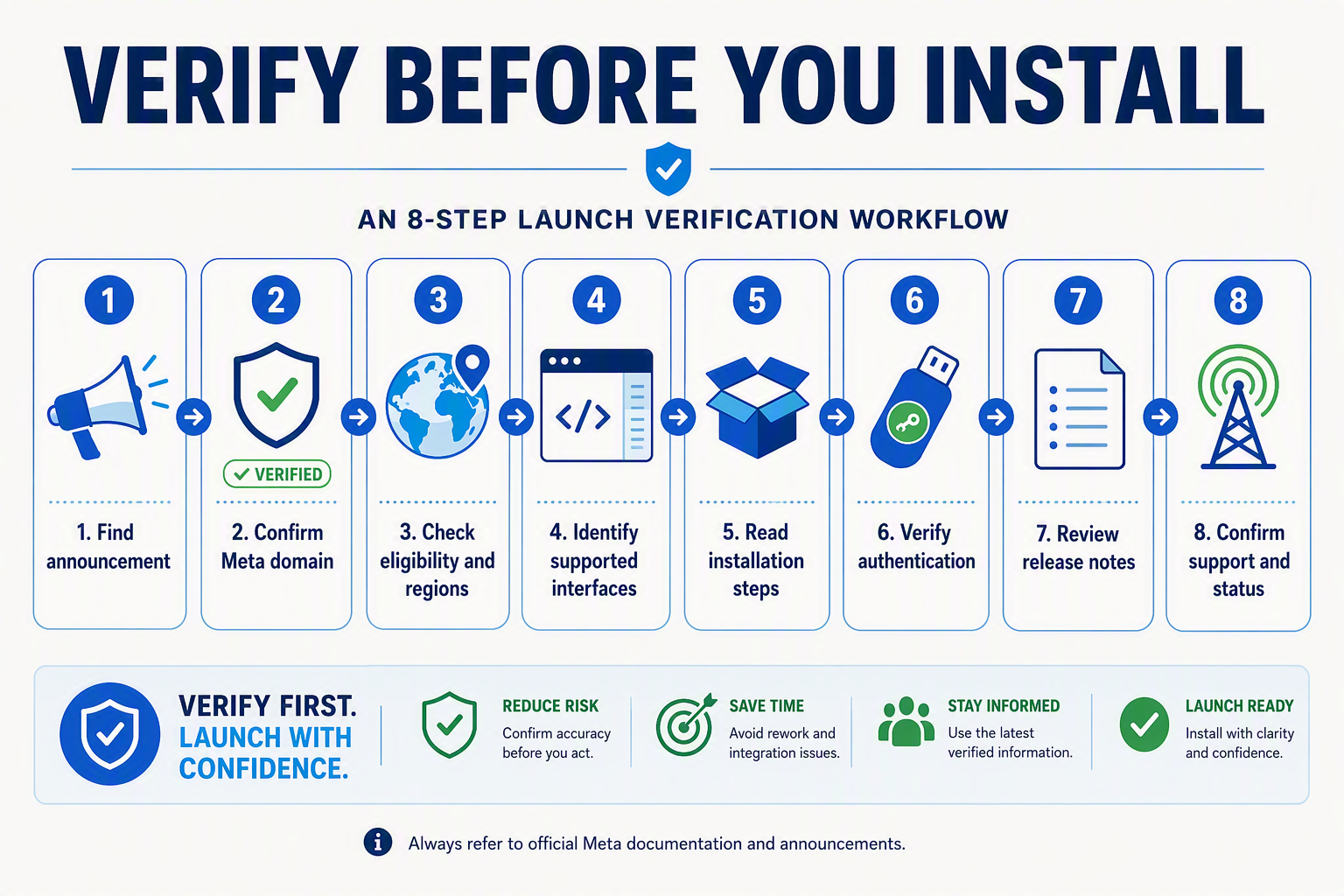
Verify a launch through a continuous chain of first-party evidence: an official Meta announcement, product documentation, authenticated distribution channel, access terms, and support or status resources must all describe the same product. Until that chain exists, do not attempt Muse Code setup, install an extension, enter credentials, or connect a repository.
As of August 5, 2026, searches across six primary Meta properties—Meta AI, Meta corporate pages, Meta Newsroom, Meta for Developers, Meta Engineering, and Meta’s GitHub organizations—did not verify a publicly documented product named “Meta Muse Code.”
Apply a two-source launch test
Do not treat one screenshot, marketplace listing, social post, or search snippet as launch confirmation. Require at least two mutually consistent first-party records:
- A product-level record: Look for a Meta announcement or product page that explicitly uses the name “Muse Code,” identifies its purpose, and states whether access is public, preview-only, waitlisted, enterprise-restricted, or invitation-based.
- An operational record: Find documentation covering setup, authentication, supported interfaces, permissions, security, and support.
Both records should agree on the product name, publisher, release stage, and access method. A Meta AI landing page, Meta Llama code model, research paper, or unrelated “Muse” repository does not independently verify a Meta AI coding platform called Muse Code.
Validate the publisher and distribution path
Follow links from the official announcement rather than searching directly for downloads. For every installation artifact, confirm:
- The documentation originates from a recognized Meta-controlled property.
- The extension, command-line package, desktop application, or GitHub App lists the same verified publisher named in Meta’s documentation.
- Package names, extension identifiers, checksums, signing details, and supported versions match the official installation guide.
- The documentation links to current privacy terms, release notes, and an official support route.
- Redirects do not lead to lookalike domains, unofficial mirrors, or community-maintained packages presented as official software.
An editor marketplace page alone is insufficient evidence because names and branding can be imitated. The marketplace listing should be reachable from Meta’s first-party documentation and identify the documented publisher.
Confirm access before authentication
Before entering a Meta, GitHub, GitLab, or enterprise identity, verify that first-party documentation answers four questions:
- Who is eligible? Confirm account types, subscription tiers, age or organization requirements, and preview restrictions.
- Where is access available? Check supported countries, languages, and regional exclusions.
- How does login work? Identify the official sign-in domain, authentication flow, multifactor requirements, and session-revocation procedure.
- What permissions are requested? Compare every OAuth scope with Meta’s documented minimum permissions.
Stop if an application requests repository write access, organization administration, secrets, or broad account data without a matching explanation in official documentation.
Record an auditable verification result
Create a dated launch record before anyone on the team proceeds:
- Date and time checked
- Official announcement and documentation locations
- Publisher and package identifiers
- Release stage and eligible regions
- Authentication method and requested scopes
- Privacy, retention, security, support, and status references
- Documentation version or release-note date
For the current research date, the correct result for how to use Meta Muse Code is “launch not publicly verified; setup blocked.” Re-run the verification only when Meta publishes identifiable first-party material, rather than substituting reposted instructions or similarly named tools.
How should you connect a repository and run a safe first coding task if official integration documentation becomes available?
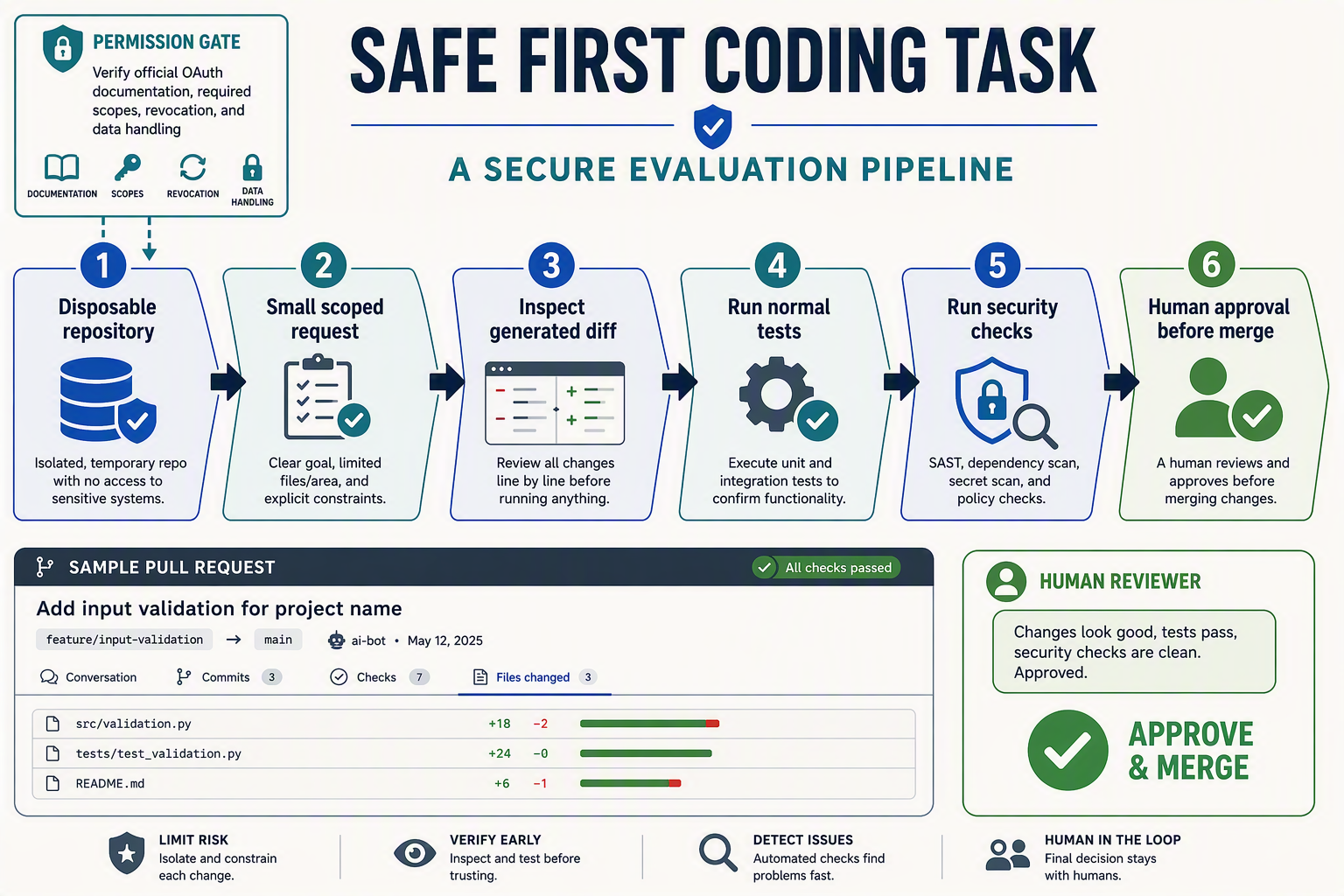
Connect a repository only after official Meta documentation identifies the integration, publisher, permission scopes, data handling, and revocation procedure. For the first task, use a disposable repository, request one small change, inspect every diff, run existing checks, and require human approval before merging.
As of August 5, 2026, searches across six primary Meta properties—Meta AI, Meta.com, Meta Newsroom, Meta for Developers, Meta Engineering, and Meta’s GitHub organizations—had not produced verified repository-integration instructions for “Meta Muse Code.” The workflow below is therefore a general safe evaluation template, not product-specific setup guidance.
Verify the repository connector before authorization
If official documentation for a Meta AI coding platform appears, match the installation screen against the documented connector. Confirm whether Meta specifies a GitHub App, GitLab integration, OAuth application, IDE extension, or local command-line tool; these mechanisms expose different resources and require different controls.
Before selecting Authorize or Install, verify:
- The application publisher and destination domain match Meta’s official documentation.
- The requested permissions match the documented minimum scopes.
- Repository access can be limited to selected repositories, rather than every personal or organization repository.
- Meta explains whether source code, prompts, generated code, logs, or repository metadata leave the source-control platform.
- The documentation states retention periods, model-training policies, subprocessors, supported regions, and deletion procedures.
- Organization administrators can revoke access and remove stored data.
- An official security contact and incident-reporting route are available.
Do not infer that a permission is safe merely because an installation page displays Meta branding. If the official guide documents read-only access but the authorization dialog requests organization administration, secret management, or unrestricted write privileges, stop the process and report the discrepancy through the documented support channel.
Create an isolated evaluation environment
Use a new private test repository containing synthetic code and no customer, production, or proprietary data. Do not copy environment files, API keys, signing certificates, access tokens, database exports, internal URLs, or customer conversations into the repository.
Configure normal engineering safeguards before connecting the tool:
- Create a dedicated branch such as
muse-evaluation. - Protect the default branch from direct writes.
- Require pull-request review and passing status checks.
- Restrict the integration to the test repository.
- Record the installer, timestamp, approved scopes, and authorization owner.
- Establish a rollback point with a clean commit or repository snapshot.
Run one bounded first task
Choose a change that is easy to understand and independently test. A suitable prompt might be: “Add unit tests for the input validator’s existing empty-string behavior; do not modify production logic or dependencies.”
The task should have explicit boundaries:
- Name the permitted files or directory.
- Prohibit dependency upgrades and configuration changes.
- Define the expected test command and success criteria.
- Require the tool to explain its proposed changes.
- Request a pull request or patch instead of a direct merge.
Review the complete diff for unrelated edits, hidden files, generated artifacts, insecure code, dependency changes, and accidental secret exposure. Then run the repository’s standard unit tests, linters, type checks, dependency audit, secret scan, and static security analysis in a controlled environment.
Close the evaluation safely
A human reviewer should approve or reject the result; successful tests alone do not establish correctness. After evaluation, revoke the connector, verify that webhooks or deploy keys were removed, rotate any credential that may have been exposed, and follow Meta’s documented deletion process. If official Muse Code setup documentation does not provide these controls, do not connect a real repository.
What repository permissions, data-use terms, retention rules, and incident controls should security and engineering reviewers require?
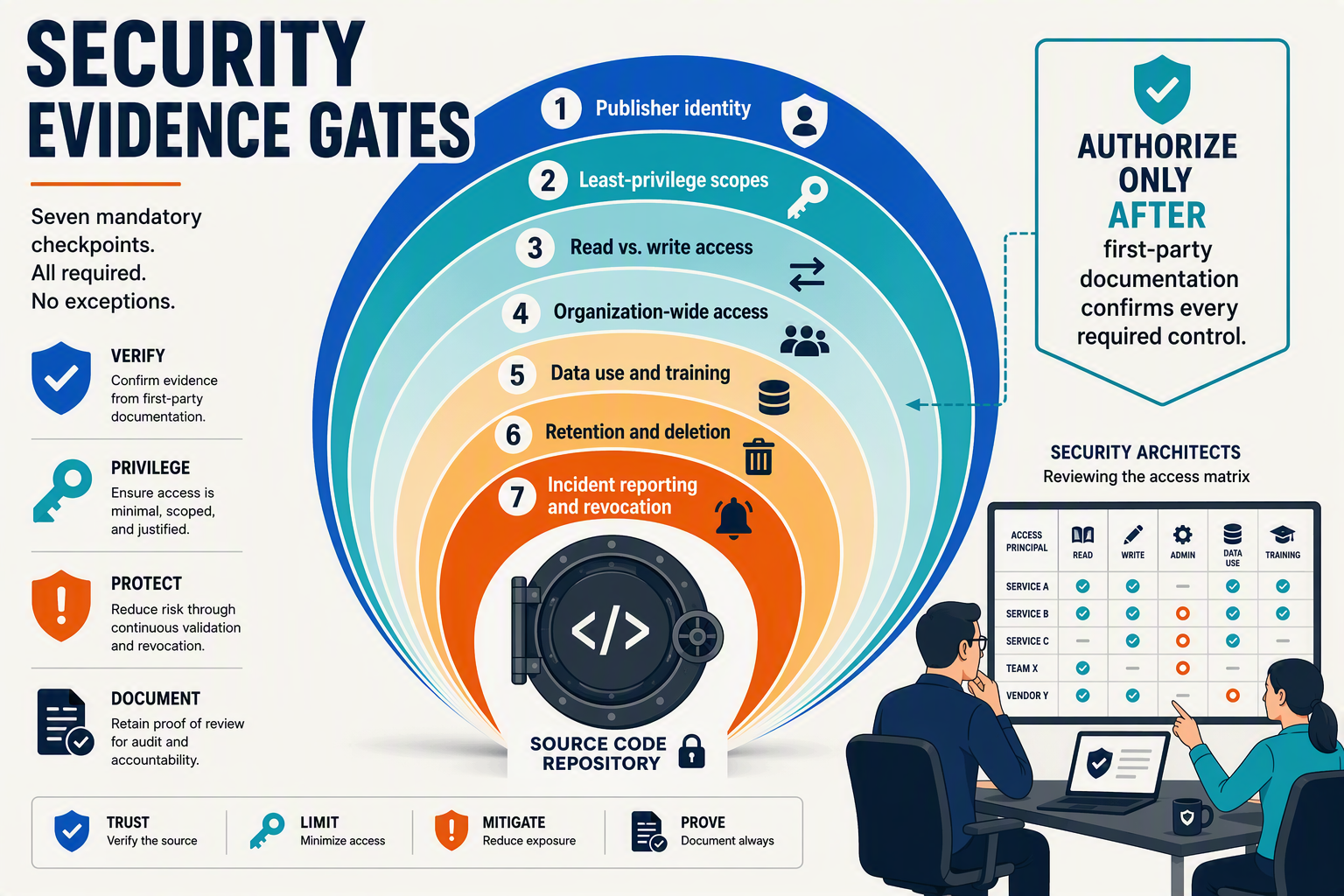
Security and engineering reviewers should require least-privilege repository access, explicit data-use and retention terms, auditable revocation, and a documented incident-response route before approving any coding assistant. As of August 5, 2026, searches across six primary Meta properties—ai.meta.com, meta.com, About Meta, Meta for Developers, Meta Engineering, and Meta’s GitHub organizations—found no official documentation for “Meta Muse Code,” so these controls cannot currently be verified for that product name.
Require granular repository permissions
Do not authorize an application based on screenshots, reposted setup instructions, or an unofficial OAuth link. Approval should wait for first-party Meta documentation identifying the application, verified publisher, source-control integration, requested scopes, and business justification for each permission.
Reviewers should require:
- Repository-level selection instead of automatic organization-wide access.
- Read-only access by default, with write access enabled only for a documented workflow.
- Separate controls for source code, issues, pull requests, actions, deployments, webhooks, and administration.
- No access to repository secrets, environment variables, signing keys, or production credentials unless an exceptional requirement is documented.
- A defined revocation process covering OAuth grants, GitHub Apps, GitLab applications, API tokens, webhooks, and cached credentials.
- Human approval for branches, pull requests, merges, deployments, and CI/CD configuration changes.
Official documentation should identify the verified publisher, application ID, and installation flow. An unknown application should never receive organization-wide or write access merely because its display name resembles a Meta product.
Verify how code and prompts are used
A security review needs product-specific, binding terms explaining what happens to each submitted data category. At minimum, reviewers should obtain written answers to these questions:
- Are prompts, source files, diffs, logs, test output, and repository metadata stored?
- Are customer inputs used to train or improve models, and can that use be disabled?
- Can humans, subprocessors, or affiliated entities review submitted content?
- In which countries or cloud regions is data processed and stored?
- Is encryption specified for data in transit and at rest?
- Can customers exclude sensitive repositories, branches, or file paths from indexing?
Terms for a general Meta AI service or a Meta Llama model cannot establish data-use protections for a distinct product called Meta Muse Code. Reviewers must verify the terms attached to the exact product, endpoint, account tier, and repository integration rather than infer protections from Meta branding or a related model name.
Demand enforceable retention and deletion rules
Official terms should state separate retention periods for prompts, generated code, telemetry, audit logs, repository indexes, backups, and support records. Reviewers should confirm whether deletion is immediate or delayed, how long backups persist, what happens after account closure, and whether legal holds override ordinary deletion.
Require an administrator-accessible deletion workflow and evidence that revoking access stops future synchronization. “Retained as necessary” is insufficient for sensitive source code unless the provider defines the criteria and maximum retention period.
Make incident readiness an approval gate
Before any Muse Code setup, require:
- A verified security contact and incident-reporting channel.
- Published vulnerability-disclosure and escalation procedures.
- Customer-notification commitments for breaches or exposed credentials.
- Audit logs for access, permission changes, generated commits, and administrative actions.
- Documented token rotation, session termination, containment, and recovery procedures.
- An official support page and service-status page.
Until first-party documentation supplies this evidence, organizations should classify the proposed Meta AI coding platform as unverified, avoid connecting repositories, and refrain from granting credentials or production access.
What first-party evidence is required for access, Muse Code setup, editors, repositories, coding, testing, security, troubleshooting, and availability? What This Means for You
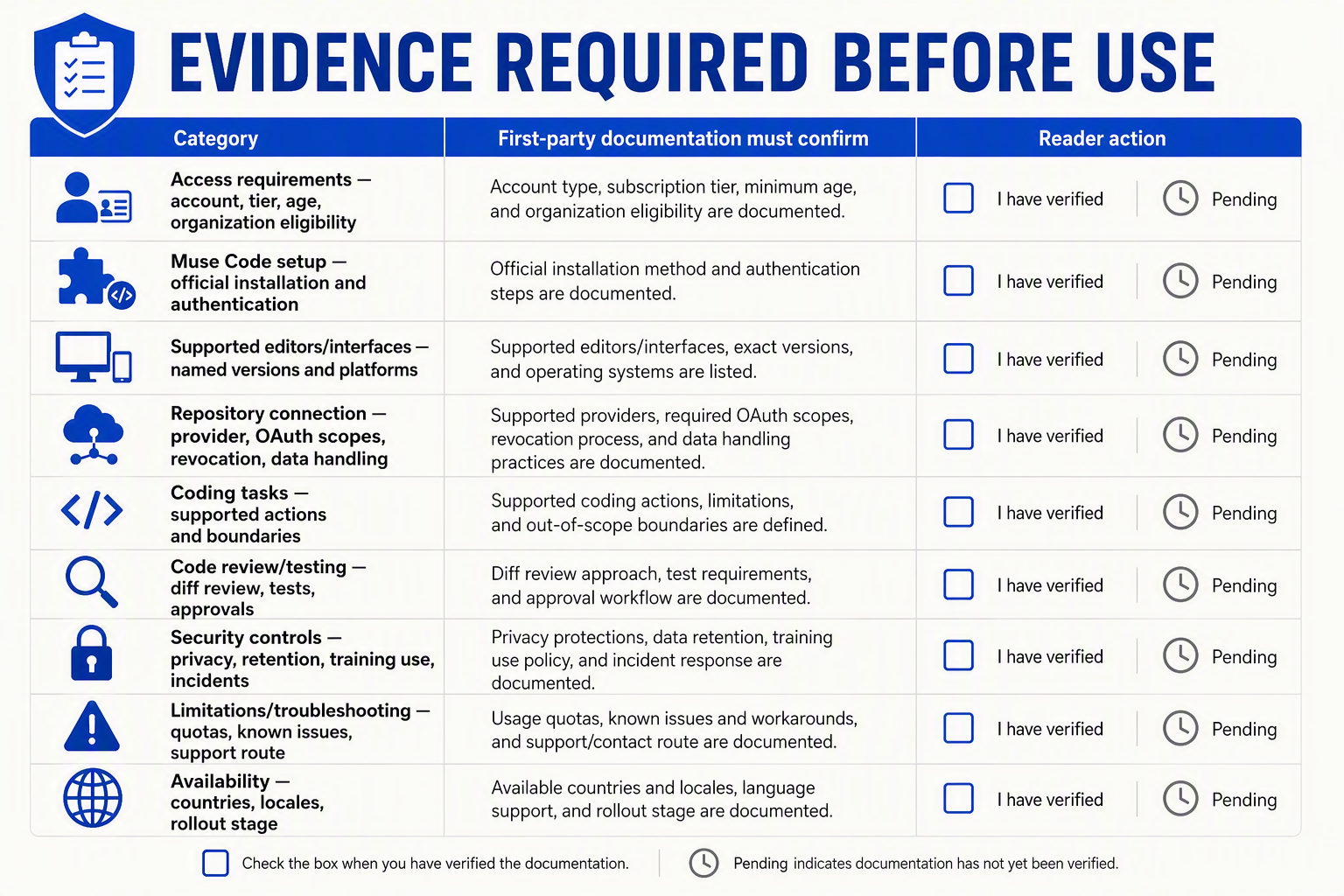
First-party Meta documentation must verify every stage—from eligibility and installation to repository permissions, security, support, and regional availability—before any guide can authoritatively explain how to use Meta Muse Code. As of August 5, 2026, no publicly verifiable Meta documentation supports those operational claims.
Evidence required before setup
On August 5, 2026, searches across six Meta-controlled sources—Meta AI, Meta.com, Meta Newsroom, Meta for Developers, Meta Engineering, and Meta’s GitHub organizations—found zero official pages or repositories for a product named “Meta Muse Code.” This finding does not prove that the product will never exist; it means that its public launch, specifications, and usage procedures are currently unconfirmed.
| Category | Required first-party evidence | What the evidence must confirm | Current finding |
|---|---|---|---|
| Access requirements | Meta product page, eligibility guide, or account documentation | Supported accounts, organization or age requirements, pricing, plans, waitlist rules, and prerequisites | Not verified |
| Muse Code setup | Official installation and authentication guide | Package identity, publisher, dependencies, sign-in flow, configuration, updates, and removal | Not verified |
| Editors and interfaces | Compatibility matrix and release notes | Supported IDEs, extensions, web interfaces, operating systems, versions, and feature differences | Not verified |
| Repository connection | Meta integration guide and official GitHub or GitLab app listing | OAuth publisher, requested scopes, repository boundaries, write access, revocation, approvals, and data handling | Not verified |
| Coding tasks | Product documentation and acceptable-use policy | Supported languages, task types, context limits, code execution, generated-code behavior, and prohibited uses | Not verified |
| Review and testing | Official workflow documentation | Diff review, test execution, pull requests, branch protection, logs, rollback, and human approval | Not verified |
| Security controls | Meta security, privacy, and data-use documentation | Encryption, retention, model-training use, deletion, subprocessors, tenant isolation, audit logs, and incident reporting | Not verified |
| Troubleshooting and limits | Official support center, status page, and limits reference | Error codes, quotas, known issues, outage status, recovery procedures, and escalation channels | Not verified |
| Availability | Meta launch announcement, regional matrix, and release notes | Supported countries, languages, account tiers, rollout dates, preview status, and restrictions | Not verified |
What this means for you
Do not treat a social-media post, screenshot, search snippet, copied installer, or similarly named extension as evidence of a Meta AI coding platform. A general Meta AI page or Meta Llama code-model repository also does not establish the existence of a separate product called Meta Muse Code.
Until Meta publishes the required evidence:
- Do not install unverified software or provide Meta, GitHub, GitLab, or workplace credentials.
- Do not authorize repository access, particularly organization-wide, private-repository, administration, or write permissions.
- Do not upload sensitive material, including proprietary code, credentials, customer records, production logs, or regulated data.
- Do not invent troubleshooting procedures when no official support center or service-status page is available.
If official documentation appears, apply a general safe-evaluation workflow rather than immediately connecting production systems:
- Use a disposable, non-production repository containing no secrets.
- Request one small, precisely scoped code change.
- Inspect the complete diff and any generated commands.
- Run the project’s existing unit, integration, dependency, and security checks.
- Require human approval before merging or deploying.
Maintain a reader update record containing the date checked, official announcement, product documentation, supported locales and tiers, release notes, privacy and security terms, service status, and official support contact. Only a Meta-controlled announcement combined with product-specific documentation can make access, setup, integration, security, and availability claims authoritative.
How should you troubleshoot claims of login, installation, integration, or service problems and keep the guide current?
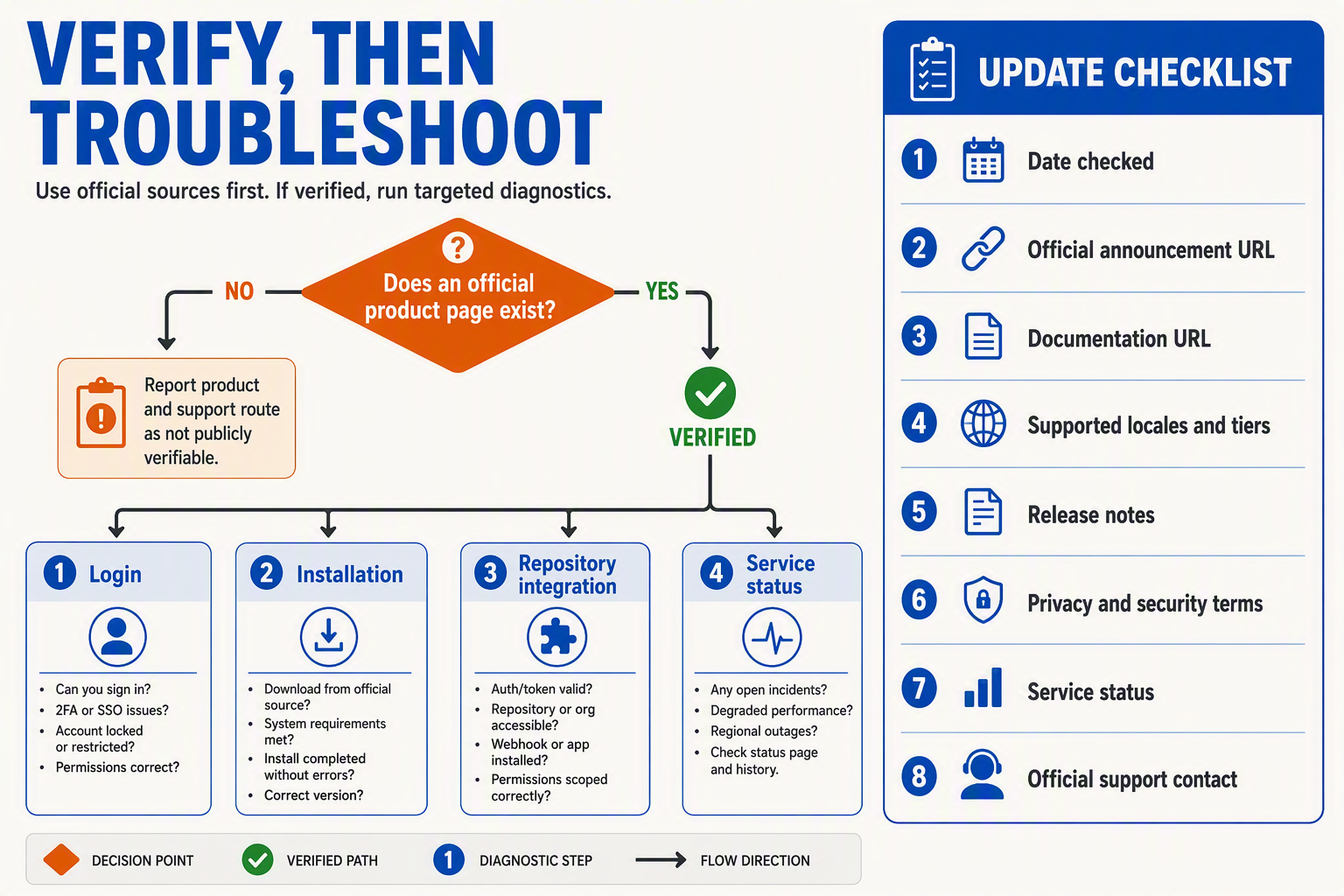
Troubleshoot any claimed Meta Muse Code problem by first verifying that the product, support route, and relevant documentation are official. As of August 5, 2026, searches across six primary Meta properties found no public product page, documentation, repository, support channel, or status page for “Meta Muse Code,” so a reported login or installation failure cannot yet be classified as a verified product incident.
Classify the claim before attempting a fix
Do not apply generic fixes copied from forums, videos, or similarly named tools. Record the exact symptom, then place it in one of four categories:
- Login or access: Look for an official Meta authentication page, eligibility requirements, supported account types, geographic restrictions, or waitlist terms. An unfamiliar sign-in domain or undocumented OAuth consent screen should be treated as unverified—not as evidence that an account is misconfigured.
- Installation: Require first-party instructions naming the supported operating systems, package source, editor extension publisher, version requirements, checksums or signatures, and uninstall process. Do not execute unofficial scripts or sideload an extension merely because it uses Meta branding.
- Integration: For GitHub, GitLab, editors, CI/CD systems, or cloud services, compare every requested permission with official scope documentation. Stop if an app requests organization-wide access, repository write access, secrets, or workflow permissions that Meta has not publicly documented.
- Service availability: Check an official status page and release notes before diagnosing an outage. Without those records, distinguish between “the service is down” and the more accurate conclusion: the claimed service and its operational status are not publicly verifiable.
The six Meta properties checked as of August 5, 2026, were Meta AI, Meta.com, Meta Newsroom, Meta for Developers, Meta Engineering, and Meta’s GitHub organizations. A general Meta AI page, Meta Llama code model, or third-party “Muse” product does not resolve a Meta Muse Code support claim.
Use an evidence-based troubleshooting record
For every reported issue, preserve enough information to reproduce and reassess it without exposing credentials:
- Date, time, country, account tier, operating system, editor, and extension version
- Exact error message and the step that produced it
- Official documentation or release-note title used
- Installer, package, extension, or OAuth publisher identity
- Requested repository permissions and whether access was revoked
- Official incident identifier or support case number, if available
- Sanitized logs with tokens, source code, customer data, and secrets removed
Only follow recovery steps published for the exact interface and version. Common actions such as clearing sessions, reinstalling packages, rotating tokens, or reconnecting repositories may have security consequences and should not be presented as Muse Code setup instructions until Meta documents them.
Keep the guide current without converting rumours into facts
Use a dated change-control process rather than silently editing instructions:
- Recheck primary sources before each material update.
- Add a feature only when an official announcement and operational documentation agree.
- Record availability by country, account tier, interface, and release stage.
- Link each troubleshooting step to its first-party support or status evidence.
- Mark renamed, withdrawn, preview-only, or deprecated features clearly.
- Retain a “last verified” date and summarize what changed.
If official documentation later appears, archive the evidence snapshot and retest the workflow in a disposable environment. Until then, the correct troubleshooting result for searches about how to use Meta Muse Code is not a speculative workaround; it is a transparent statement that the claimed Meta AI coding platform and its support procedures remain unverified.
Frequently Asked Questions: Is Meta Muse Code publicly available, are there official setup instructions, can it access repositories, and is it related to Meta AI or Llama?
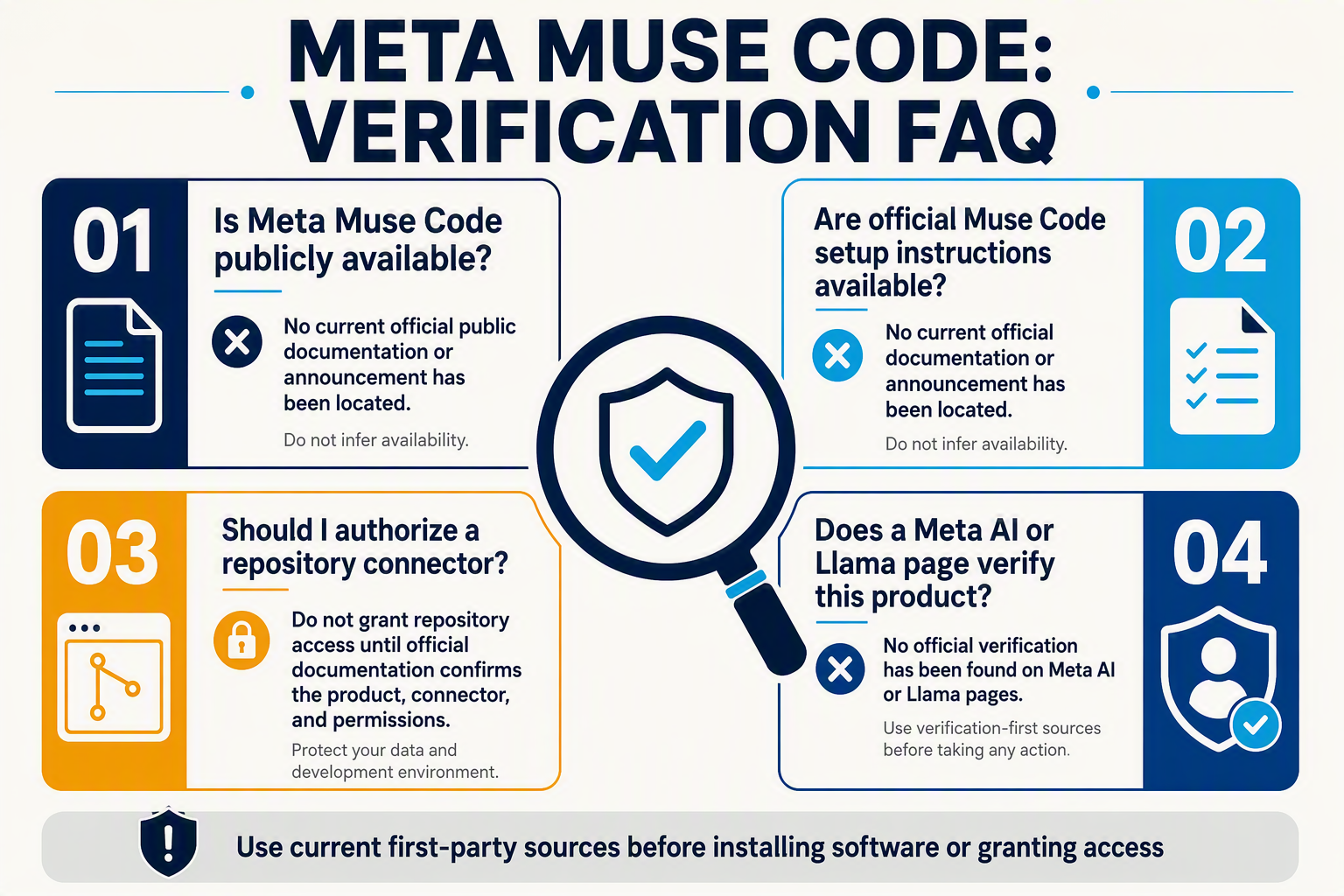
Is Meta Muse Code publicly available as of August 5, 2026?
Are there official Meta Muse Code setup or installation instructions?
Can Meta Muse Code access GitHub, GitLab, or private repositories?
Is Muse Code related to Meta AI or Meta Llama coding models?
How can I verify whether a claimed Meta coding assistant is legitimate?
What should I do if someone offers early access or claims the platform is already working?
Conclusion
As of August 5, 2026, there are no verified first-party instructions explaining how to use Meta Muse Code. Searches across six primary Meta properties—Meta AI, Meta.com, Meta Newsroom, Meta for Developers, Meta Engineering, and Meta’s GitHub organizations—found no official product page, announcement, documentation, repository, or support channel bearing that name.
Key takeaways
- Treat Meta Muse Code as unverified for now. A similarly named third-party service, a general Meta AI page, or a Meta Llama coding model does not confirm the existence of a specific Meta AI coding platform called Muse Code.
- Do not invent or follow unsupported setup instructions. No first-party source currently establishes Muse Code setup requirements, pricing, waitlist access, supported editors, repository connectors, regional availability, testing features, or security controls.
- Require documentation before granting access. Do not authorize an unknown application or provide repository write access until official Meta documentation identifies OAuth scopes, GitHub or GitLab permissions, repository boundaries, data-use terms, retention policies, revocation procedures, and incident-reporting channels.
- Use a controlled evaluation process after verification. If Meta launches and documents the product, begin with a disposable, non-production repository. Request a small change, inspect the generated diff, run the project’s established tests and security checks, and retain human approval before merging.
What to watch for next
A credible launch should create a traceable chain of first-party evidence: an official Meta announcement, a documentation hub, eligibility and country details, installation and authentication guidance, release notes, privacy and security terms, a service-status page, and an official support contact. Record the date each source was checked because access rules, supported interfaces, and rollout regions may change over time.
Until that evidence appears, the most responsible answer to “how to use Meta Muse Code” is not a speculative tutorial—it is a repeatable verification workflow. For a documented example of how AI communication infrastructure is evolving, readers can explore CallMissed, an India-focused platform supporting AI voice agents, WhatsApp automation, and multilingual engagement across 22 Indian languages.
Will the next Muse Code claim you encounter link to current Meta documentation—or merely repeat an unverified setup story?