GPT Image 2.5 API: Flare vs Sunburst Developer Guide


Use the GPT Image 2.5 API to choose Flare or Sunburst, build generation and editing workflows, manage safety, retries, and costs.
GPT Image 2.5 API: Flare vs Sunburst Developer Guide
What if choosing the wrong image model costs more developer time than writing the API integration itself? The GPT Image 2.5 API, launched on September 8, 2026, addresses that decision with two purpose-built models: GPT‑Image‑2.5 Flare for fast, everyday image generation and editing, and GPT‑Image‑2.5 Sunburst for creative work requiring greater precision and control.
OpenAI confirmed on September 8, 2026, that two GPT‑Image‑2.5 models—Flare and Sunburst—are available through the API. OpenAI describes Flare as delivering the new release’s improvements in “quality, editing, and speed,” while Sunburst adds “an extra level of precision” for detailed creative workflows. That split matters because production image systems rarely have one universal requirement: an ecommerce thumbnail pipeline prioritizes throughput and consistency, while a brand campaign may demand exact edits, careful composition, and repeated refinement.
Two models, two production priorities
The practical choice is less about finding a universal winner and more about matching the model to the workload:
- Choose GPT‑Image‑2.5 Flare for rapid concept exploration, social media assets, product mock-ups, content variations, and routine edits.
- Choose GPT‑Image‑2.5 Sunburst when small visual details matter, reference images must be followed closely, or a creative team needs maximum editing precision.
- Benchmark both models against your own prompts, reference assets, latency targets, and human-review criteria before standardizing a production route.
The launch also reflects a broader shift toward multimodal API infrastructure. Platforms such as CallMissed, an OpenAI-compatible multi-model gateway, help developers access image generation alongside large language models, speech, and web search through a consolidated integration.
What this developer guide covers
This guide moves beyond a basic request example. You will learn how to:
- Generate and edit images with the Image API.
- Invoke image generation as a tool through the Responses API.
- Build reference-image workflows for style, layout, and subject guidance.
- Design iterative pipelines in which users review, revise, and approve outputs.
- Write prompts that separate subject, composition, visual style, constraints, and edit instructions.
- Decide between Flare and Sunburst using task complexity, precision needs, speed, and production economics.
- Plan for validation, failure handling, asset storage, safety checks, and reproducibility.
By the end, you will have a practical framework for selecting the right GPT‑Image‑2.5 model and turning isolated image requests into a reliable production workflow.
Which GPT Image 2.5 model should you choose? Use Flare for fast everyday work and Sunburst for maximum precision
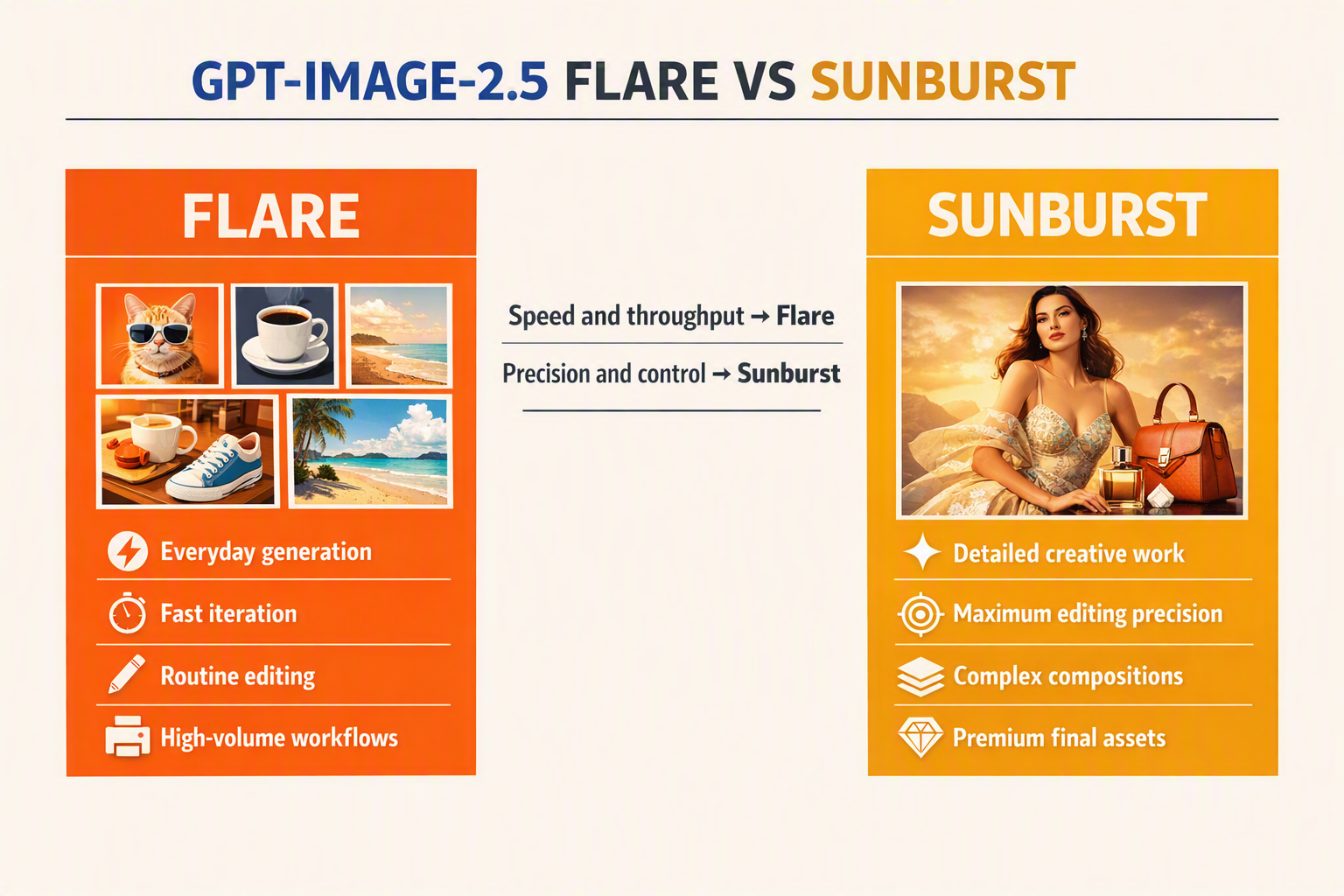
Use GPT‑Image‑2.5 Flare as the default for high-volume generation and routine editing; route work to GPT‑Image‑2.5 Sunburst when exact composition, reference fidelity, typography, or localized edits justify extra precision. OpenAI announced both API models on September 8, 2026, describing Flare as optimized around “quality, editing, and speed” and Sunburst as offering “an extra level of precision.”
Start with Flare, then escalate selectively
For most production systems, Flare should be the first-pass model. Its intended operating profile fits requests where responsiveness and iteration matter more than perfect adherence on the first attempt:
- Ecommerce thumbnails and category graphics
- Social posts, banners, and blog illustrations
- Rapid mood-board or concept exploration
- Background removal, replacement, and expansion
- Product mock-ups and common aspect-ratio variations
- Personalization pipelines that generate many creative alternatives
Use Sunburst when an image will receive close human scrutiny or when an unsuccessful edit creates substantial rework. Suitable workloads include:
- Precise modifications to one region while preserving everything else
- Brand campaigns with tightly controlled composition and visual identity
- Reference-guided work requiring close subject, style, or layout adherence
- Detailed packaging, interface, architectural, or editorial concepts
- Multi-step creative sessions in which each revision must retain prior decisions
- Images containing small objects, spatial relationships, or important text
OpenAI’s September 8, 2026 announcement does not provide a numerical latency, quality, or price comparison between Flare and Sunburst. Treat “fast” and “precise” as workload guidance—not guaranteed service-level metrics—and measure both models under your own production conditions.
Route by risk, not prompt length
A long prompt does not automatically require Sunburst. The better routing signal is the cost of visual deviation: how damaging is it if the model moves an object, alters a face, misses a reference detail, or changes an unmasked region?
A practical routing policy can score four factors:
- Edit locality: Does only one precisely bounded area need to change?
- Reference dependence: Must the result closely preserve supplied people, products, layouts, or styles?
- Constraint density: Are several independent visual requirements mandatory?
- Review cost: Would a failed output consume expensive designer or customer time?
Send low-risk requests to Flare. Escalate to Sunburst when multiple factors are high, or after Flare fails a defined validation check. This creates a tiered generation pipeline rather than forcing every request through the precision-oriented model.
Benchmark with representative production tasks
Before fixing a default route, evaluate at least 50–100 prompts from your actual workload rather than relying on attractive demonstration images. Run the same prompt, reference assets, dimensions, and edit masks against both models, then score:
- Instruction adherence
- Reference and identity preservation
- Unedited-region stability
- Text rendering accuracy
- Human acceptance rate
- Median and 95th-percentile latency
- Successful output cost, including retries
Test both direct generation through the Image API and agentic workflows using the Responses API image-generation tool, because orchestration and repeated tool calls can change total latency and cost. A strong default architecture uses Flare for drafts and variations, applies automated or human validation, and invokes Sunburst only for precision-critical requests or final approved renders.
What changed with the September 8, 2026 ChatGPT Images 2.5 launch?

The September 8, 2026 ChatGPT Images 2.5 launch changed the API from a largely single-model image workflow into a two-model architecture: GPT‑Image‑2.5 Flare targets faster everyday generation and editing, while GPT‑Image‑2.5 Sunburst adds precision for detailed creative work. The release improves model selection and routing rather than replacing the core text-and-image workflow developers already use.
The API now exposes two purpose-built models
OpenAI announced on September 8, 2026, that GPT‑Image‑2.5 Flare and GPT‑Image‑2.5 Sunburst are both available through the API. This creates an explicit quality-of-service decision at request time.
OpenAI describes the changes as follows:
- GPT‑Image‑2.5 Flare brings improvements in “quality, editing, and speed.”
- GPT‑Image‑2.5 Sunburst provides “an extra level of precision” for detailed creative workflows.
- Both models support the broader image-generation pattern of accepting instructions and visual inputs, then returning an image.
The previous GPT Image 2 documentation characterized that model as a state-of-the-art system for “fast, high-quality image generation and editing,” with text and image inputs and image output. Images 2.5 preserves those core capabilities while making the trade-off between everyday performance and higher precision explicit.
What changes in application architecture
The biggest developer-facing change is that model selection should become a routing decision rather than a hard-coded constant. A production service can now evaluate the task before submitting it:
- Classify the request: Determine whether it is generation, editing, variation, or reference-guided work.
- Estimate precision requirements: Identify strict typography, layout, identity, product-detail, or masking constraints.
- Choose an initial model: Send routine work to Flare and precision-sensitive work to Sunburst.
- Evaluate the result: Apply automated checks and, where necessary, human review.
- Escalate selectively: Retry with Sunburst when a Flare output fails defined acceptance criteria.
This approach avoids sending every request through the highest-precision path. It also prevents a fast default from silently handling work whose commercial value depends on exact visual details.
What did not automatically change
The launch announcement does not eliminate standard production responsibilities. Developers still need to manage:
- Prompt versioning so outputs can be traced to specific instructions.
- Reference-image storage and permissions, particularly for customer assets.
- Output validation for dimensions, file format, transparency, brand rules, and prohibited content.
- Retries and idempotency to prevent duplicate generations after network failures.
- Human approval for high-impact advertising, regulated material, or customer-facing edits.
Do not infer undocumented guarantees from terms such as “speed” or “precision.” OpenAI’s launch statement does not provide a universal latency percentage, accuracy score, or cost comparison between Flare and Sunburst in the supplied announcement. Benchmark both models using your own workload.
Immediate migration checklist
Before adopting Images 2.5 in production:
- Confirm the exact API model identifiers in OpenAI’s current developer documentation.
- Replace hard-coded model names with configuration or routing rules.
- Build a fixed evaluation set containing prompts, source images, and expected constraints.
- Record latency, retry rate, reviewer acceptance, and cost per approved asset.
- Keep the previous image route available until Images 2.5 passes your quality and reliability thresholds.
The practical launch change is therefore not merely “two newer models.” It is a clearer foundation for task-aware image infrastructure, where speed and precision can be selected, measured, and escalated independently.
Which GPT Image 2.5 developments are officially confirmed, and which details still require documentation checks?
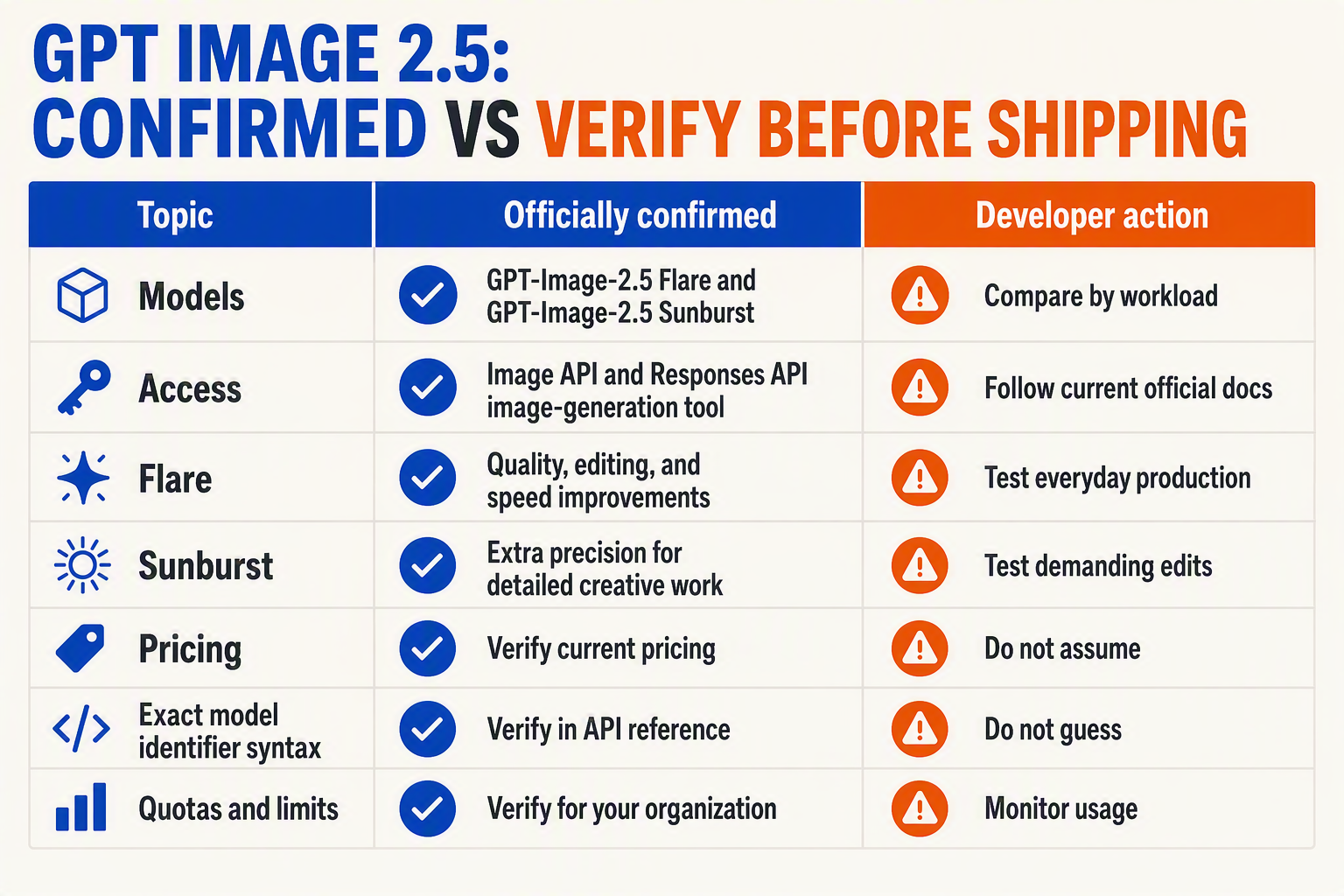
OpenAI has officially confirmed GPT‑Image‑2.5 Flare, GPT‑Image‑2.5 Sunburst, and their API availability, but developers should not infer exact model IDs, pricing, limits, or endpoint compatibility from the launch announcement alone. Treat the September 8, 2026 announcement as the source for product positioning and the live OpenAI API documentation as the source of truth for implementation details.
Confirmed facts versus documentation-dependent details
| Item | Status on Sept. 8, 2026 | What is known | Developer action |
|---|---|---|---|
| Flare model | Officially confirmed | OpenAI says GPT‑Image‑2.5 Flare brings improvements in “quality, editing, and speed.” | Evaluate for everyday generation, routine edits, and higher-throughput workloads. |
| Sunburst model | Officially confirmed | OpenAI says GPT‑Image‑2.5 Sunburst provides “an extra level of precision” for detailed creative work. | Test on reference-sensitive edits, complex compositions, and approval-heavy assets. |
| API availability | Officially confirmed | OpenAI announced that both models are available through the API. | Confirm account access and regional or organizational eligibility before deployment. |
| API model identifiers | Documentation check required | Product names do not necessarily reveal the exact strings accepted by the model parameter. | Copy identifiers from the model catalog or a successful API response; do not guess slugs. |
| Image and Responses API support | Documentation check required | The launch confirms API access, but each endpoint may expose different inputs, tools, or response structures. | Verify current Image API and Responses API image-generation-tool examples separately. |
| Pricing, limits, and formats | Documentation check required | The announcement excerpt does not specify per-image pricing, resolutions, rate limits, file formats, or maximum reference-image counts. | Read the pricing, model, rate-limit, and image-generation documentation before setting budgets or validation rules. |
OpenAI’s September 8, 2026 launch announcement explicitly states that two new image models are available in the API. The same announcement provides qualitative positioning—not reproducible latency figures, benchmark percentages, or guaranteed output times—so “speed” and “precision” should become hypotheses tested against your workload rather than hard-coded service-level assumptions.
Why the distinction matters in production
Launch posts explain what changed; API documentation defines what your software can safely send and receive. For comparison, OpenAI’s existing GPT Image 2 model page labels that model as accepting text and image input and producing image output, with “Highest” performance and “Medium” speed. Those GPT Image 2 labels should not automatically be applied to Flare or Sunburst without model-specific documentation.
Before merging a GPT Image 2.5 integration, verify:
- Exact model ID: Check capitalization, punctuation, aliases, dated snapshots, and deprecation notices.
- Endpoint contract: Confirm whether generation, editing, and reference images use identical fields in the Image API and Responses API.
- Output handling: Validate response encoding, MIME type, dimensions, transparency support, and download or retention behavior.
- Operational constraints: Record rate limits, request-size limits, timeout guidance, supported regions, and moderation behavior.
- Economics: Measure billed units and effective cost per approved asset, including retries and human review.
Build for documentation changes
Keep model IDs, endpoint selection, dimensions, quality settings, and retry policies in configuration rather than application logic. Add contract tests that submit a small approved prompt, validate the returned schema, and alert on changed parameters or unsupported values.
For multi-provider architectures, an OpenAI-compatible gateway such as CallMissed can centralize model routing and billing, but the same discipline applies: pin supported identifiers, log the resolved model, and verify current gateway documentation before enabling a newly announced image model.
How do you implement generation, editing, reference-image, and iterative workflows through OpenAI’s two API paths?
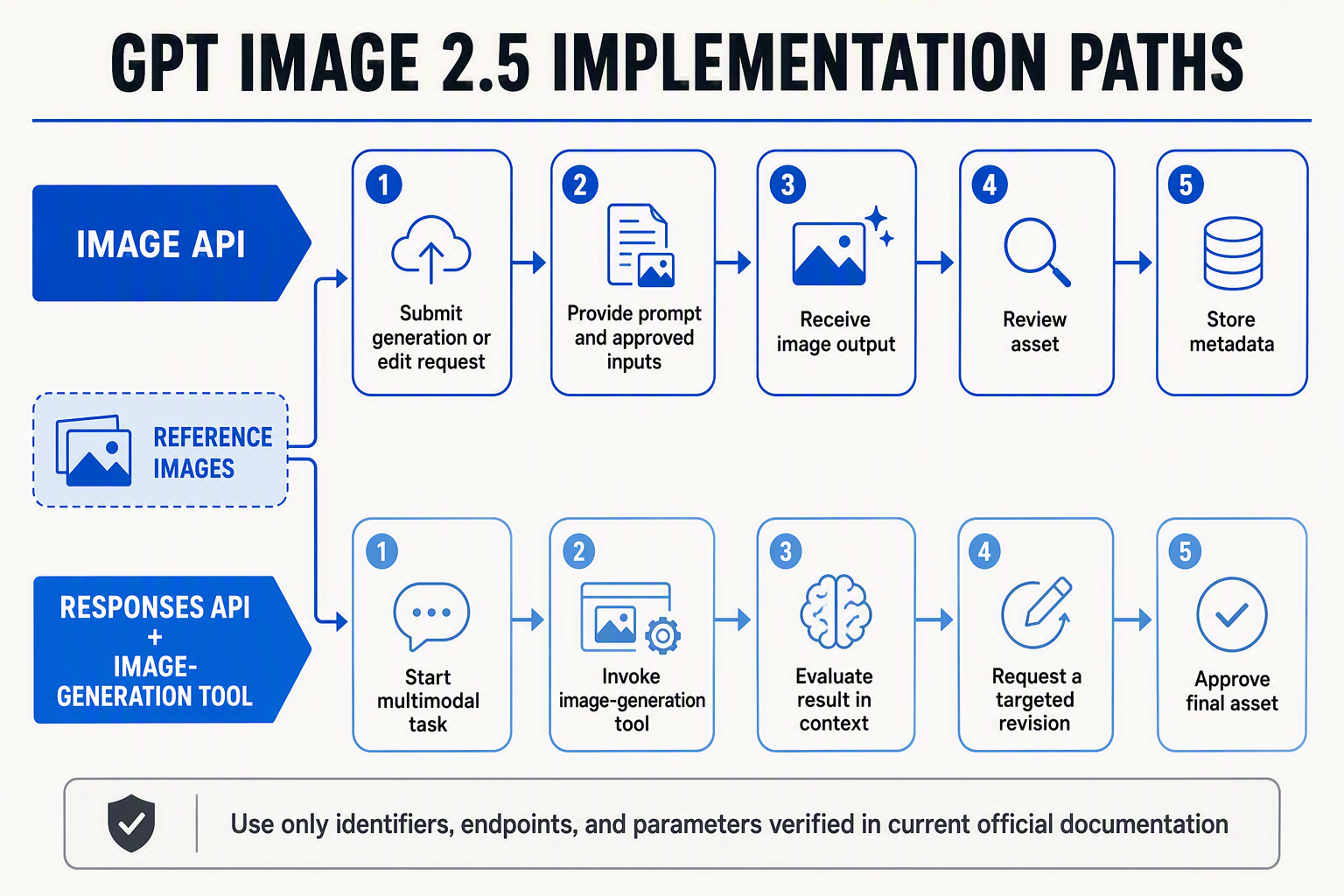
Use the Image API for direct generation and editing, and use the Responses API image-generation tool when an LLM must interpret context, inspect reference images, or manage iterative revisions. OpenAI confirmed on September 8, 2026, that both GPT‑Image‑2.5 Flare and GPT‑Image‑2.5 Sunburst are available through the API.
Path 1: Generate or edit with the Image API
The Image API is the simplest path for deterministic application flows such as “prompt in, asset out.” The following JavaScript pattern uses the OpenAI SDK; confirm the exact model identifiers and supported parameters in your account because display names and API slugs can differ.
import OpenAI from "openai";
import fs from "node:fs";

const openai = new OpenAI({ apiKey: process.env.OPENAI_API_KEY });
const FLARE = process.env.FLARE_MODEL_ID; // GPT-Image-2.5 Flare

const result = await openai.images.generate({
  model: FLARE,
  prompt: `
    Subject: insulated stainless-steel bottle
    Composition: centered, three-quarter view
    Style: clean ecommerce photography
    Background: warm off-white
    Constraints: no text, logos, hands, or extra objects
  `
});

const base64 = result.data[0].b64_json;
fs.writeFileSync("bottle.png", Buffer.from(base64, "base64"));
For an edit, provide the source image and state both what must change and what must remain invariant:
const edited = await openai.images.edit({
  model: process.env.SUNBURST_MODEL_ID,
  image: fs.createReadStream("bottle.png"),
  prompt: `
    Change only the bottle color from silver to matte forest green.
    Preserve its shape, camera angle, shadows, background, and framing.
    Do not add text or alter the cap.
  `
});
OpenAI describes Flare as improving “quality, editing, and speed,” while Sunburst provides “an extra level of precision” for detailed creative work, according to OpenAI’s September 8, 2026 launch announcement.
Path 2: Use image generation inside the Responses API
Choose the Responses API when image work belongs inside a multimodal agent. The model can consider conversation history and supplied images before calling the image-generation tool.
const response = await openai.responses.create({
  model: process.env.REASONING_MODEL_ID,
  input: [{
    role: "user",
    content: [
      { type: "input_text", text:
        "Create a campaign image using this layout as reference. Keep the visual hierarchy, replace the product with a reusable bottle, and remove all text."
      },
      { type: "input_image", image_url: referenceDataUrl }
    ]
  }],
  tools: [{
    type: "image_generation",
    model: process.env.SUNBURST_MODEL_ID
  }]
});

const call = response.output.find(
  item => item.type === "image_generation_call"
);

fs.writeFileSync(
  "campaign.png",
  Buffer.from(call.result, "base64")
);
Treat a reference image as guidance, not an implicit specification. Explicitly identify whether it controls:
- Subject identity: retain the same product or character.
- Composition: follow framing, spacing, or camera angle.
- Style: borrow palette, lighting, or rendering treatment.
- Editable region: modify only a mask or named element.
- Protected details: preserve logos, proportions, or background geometry.
Build iteration as a versioned workflow
A production loop should preserve every instruction and output:
- Store the original prompt, references, model ID, and request settings.
- Save the generated asset under an immutable version ID.
- Collect structured feedback such as “change,” “preserve,” and “avoid.”
- Submit the prior output as the next reference image.
- Stop after approval or a configured revision limit.
This structure prevents later prompts from accidentally discarding earlier constraints and makes human review, rollback, and model comparison practical.
How should you write prompts that preserve references and produce controllable edits?
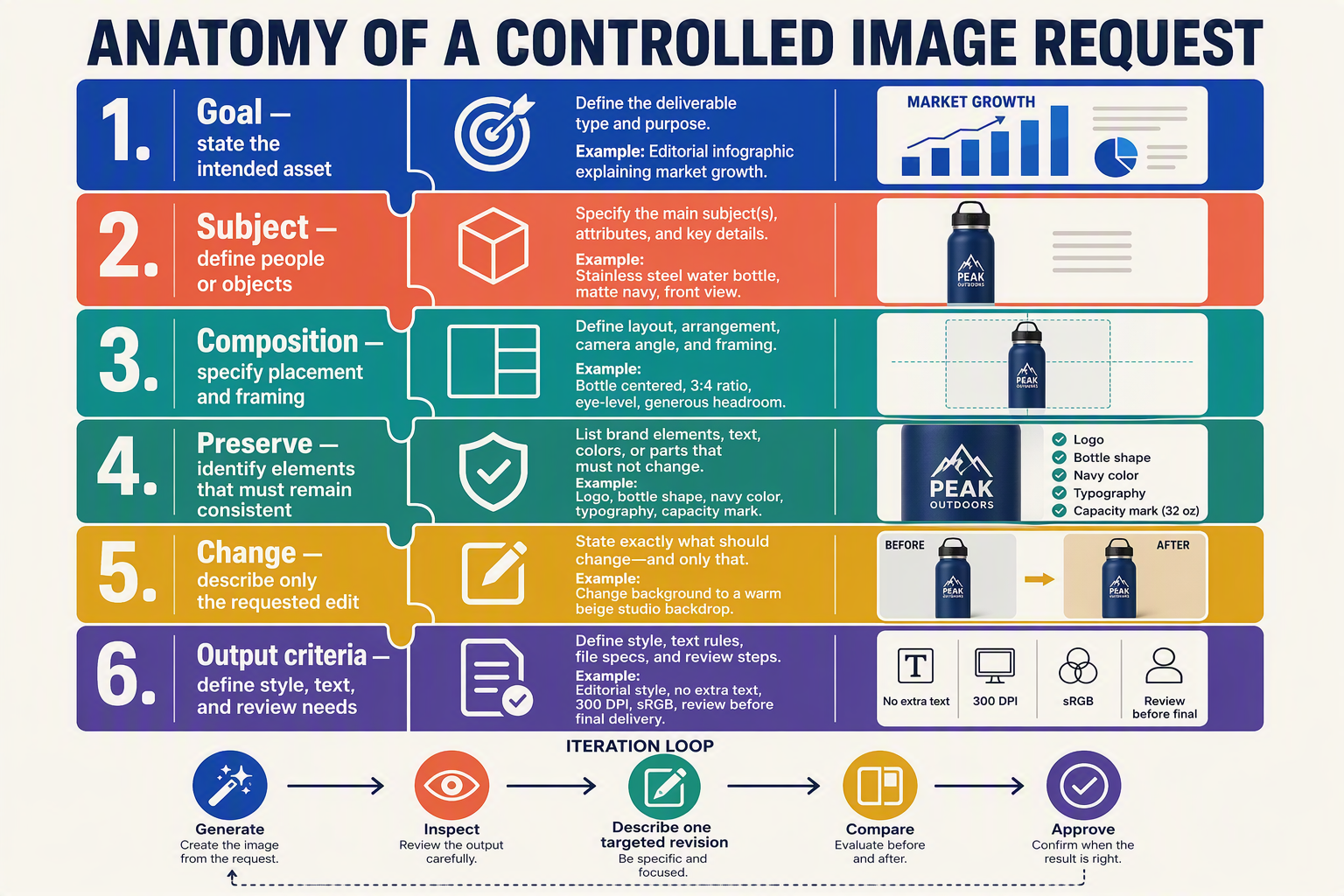
For controllable edits, write prompts as a structured specification: identify what must remain unchanged, describe one clearly bounded modification, and define composition, style, and output constraints separately. Reference preservation improves when developers state invariants explicitly rather than asking the model to “make it similar.”
Separate the prompt into five control layers
A reliable prompt should distinguish between:
- Reference role: Explain what each supplied image controls—subject identity, product geometry, pose, layout, palette, or style.
- Preserved elements: List features that must not change.
- Requested edit: Describe the exact replacement, addition, removal, or transformation.
- Scene specification: Define framing, camera angle, lighting, background, and spatial relationships.
- Output constraints: State aspect ratio, intended use, text requirements, and prohibited changes.
OpenAI announced on September 8, 2026, that GPT‑Image‑2.5 Flare improves “quality, editing, and speed,” while GPT‑Image‑2.5 Sunburst provides “an extra level of precision” for detailed creative workflows. Use Flare for prompt iteration and ordinary edits; use Sunburst when preserving small reference details is central to acceptance.
Label every reference image by function
Do not assume that the model knows why an image was attached. Assign each input a stable label and explain its authority:
- Reference A — subject: Preserve facial structure, hairstyle, apparent age, and clothing silhouette.
- Reference B — product: Preserve packaging shape, cap design, proportions, and visible label placement.
- Reference C — composition: Follow the camera angle and object arrangement, but not the colors.
- Reference D — style: Match the lighting softness and editorial finish without copying its subject.
This separation prevents conflicting signals. If identity comes from Reference A but color treatment comes from Reference D, say so directly. Also define precedence: “If references conflict, preserve product geometry from B and composition from C.”
Express edits as invariants plus a delta
A controllable edit is easier to evaluate when framed as keep X, change Y. For example:
Preserve the bottle’s exact shape, cap, label proportions, logo spelling, camera angle, crop, and shadow direction from Reference A. Change only the background to a pale sandstone studio wall. Add a subtle surface reflection beneath the bottle. Do not add props, alter the packaging, or redesign the typography.
Effective invariants commonly include:
- Subject identity and anatomy
- Product dimensions and brand marks
- Camera position, crop, and perspective
- Typography, spelling, and placement
- Lighting direction and shadow geometry
- Elements that must not be added or removed
Avoid vague instructions such as “clean it up,” “make it premium,” or “keep everything the same.” Translate them into observable properties: neutral color temperature, larger negative space, softer shadows, no new objects, unchanged packaging.
Use one major edit per iteration
For production workflows, make the first request establish the scene, then apply bounded revisions:
- Generate or import the baseline.
- Lock approved attributes in the next prompt.
- Request one major change.
- Compare the result against the previous asset and references.
- Repeat from the last approved version, not an already degraded branch.
A useful revision prompt is: “Keep all approved elements unchanged. Move the headline 8% downward, preserve its wording and font treatment, and make no other compositional changes.” Models may not deliver pixel-perfect measurements, but numeric targets make intent more testable.
Write acceptance criteria into the prompt
End with a compact checklist: one subject, unchanged logo, exact headline text, no extra objects, 4:5 portrait composition, safe margins for mobile cropping. Then validate those conditions programmatically where possible using OCR, perceptual comparison, object detection, and human review. For high-stakes reference fidelity, route the final refinement to GPT‑Image‑2.5 Sunburst; for rapid variants and routine corrections, GPT‑Image‑2.5 Flare is the practical starting point.
How do Flare and Sunburst compare on latency, quality, retries, and measurable cost?
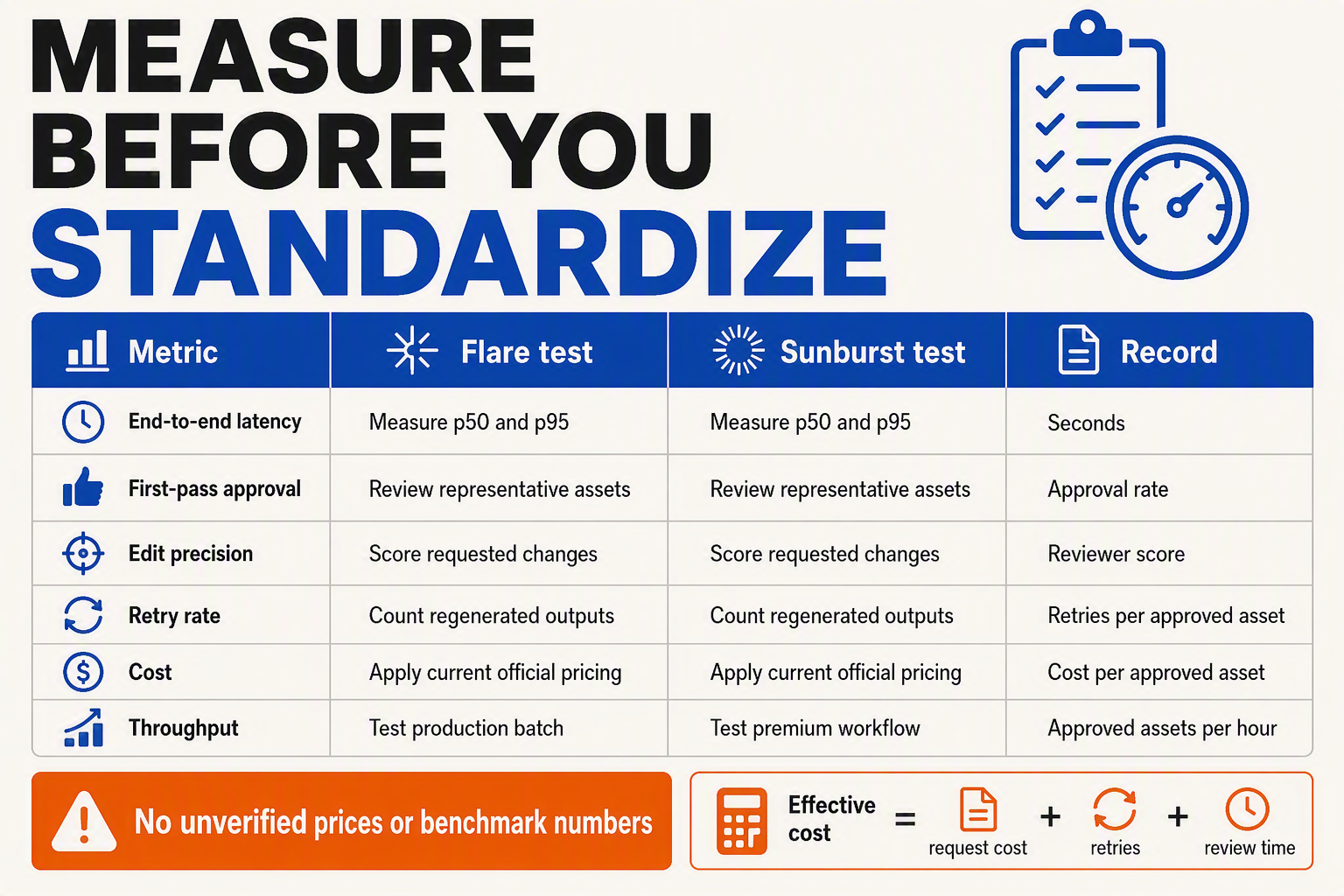
Flare should usually win on latency and throughput, while Sunburst should target higher first-pass acceptance on precision-sensitive work. OpenAI had not published model-specific latency percentiles, retry rates, or complete comparative cost benchmarks in its September 8, 2026 launch announcement, so developers should measure cost per accepted image, not compare nominal request prices alone.
Production comparison
OpenAI stated on September 8, 2026, that GPT‑Image‑2.5 Flare improves “quality, editing, and speed,” while GPT‑Image‑2.5 Sunburst provides “an extra level of precision” for detailed creative workflows. Those descriptions establish intended positioning, but they do not replace workload-specific testing.
| Measure | GPT‑Image‑2.5 Flare | GPT‑Image‑2.5 Sunburst | What developers should record |
|---|---|---|---|
| Latency | Optimized for faster everyday generation and editing | Expect a precision-first trade-off; verify experimentally | p50, p95, and p99 end-to-end latency |
| Output quality | Strong fit for routine assets and rapid variations | Better candidate for detailed, constraint-heavy work | Blind reviewer score and acceptance rate |
| Edit precision | Suitable for common additions, removals, and restyling | Intended to provide an “extra level of precision” | Percentage of requested edits completed correctly |
| Retry exposure | Lower latency can make retries less disruptive | Greater precision may reduce semantic retries | Retries per accepted asset |
| Measurable cost | Often favorable when throughput is the priority | Can be economical if fewer revisions offset higher request cost | Total billed amount divided by accepted outputs |
| Recommended routing | Default route for drafts, thumbnails, and bulk variants | Escalation route for final artwork and exact edits | Task class, escalation rate, and final model used |
Treat the Sunburst latency description as a benchmark hypothesis, not an official numeric claim. The launch material supplies a qualitative precision distinction but no published p95 latency ratio between Flare and Sunburst.
Calculate retry-adjusted cost
A model’s displayed per-request cost can be misleading when outputs regularly require regeneration. Calculate:
Effective cost per accepted image = total billed generation and editing cost ÷ number of approved images
For example, suppose a controlled test produces these hypothetical results:
- Flare generates 1,000 assets, of which 700 are approved.
- Sunburst generates 800 assets, of which 680 are approved.
- Flare’s acceptance rate is 70%; Sunburst’s is 85%.
- Flare requires about 1.43 requests per accepted image, while Sunburst requires about 1.18.
These figures are illustrative—not OpenAI benchmarks—but they show why acceptance rate can outweigh list price. Include input images, generated variants, edit passes, and any billable tool calls when calculating total cost.
Run a defensible benchmark
Use at least three workload buckets: routine generation, localized editing, and reference-heavy composition. For each prompt, run multiple trials under identical size, quality, and output settings, then record:
- API latency from request submission to complete response.
- First-pass acceptance, based on a written review rubric.
- Semantic retries, where the model misses the requested content or edit.
- Technical retries, including timeouts, rate limits, and malformed responses.
- Human review minutes and final billed usage.
Do not automatically retry every failure. Apply exponential backoff only to transient errors, cap attempts, and use an idempotency strategy where supported to avoid duplicate work. A practical router starts with Flare, escalates failed precision checks to Sunburst, and reports both direct API spend and the broader cost of review, retries, and delayed delivery.
How should production systems handle moderation, organization verification, failures, and asset review?
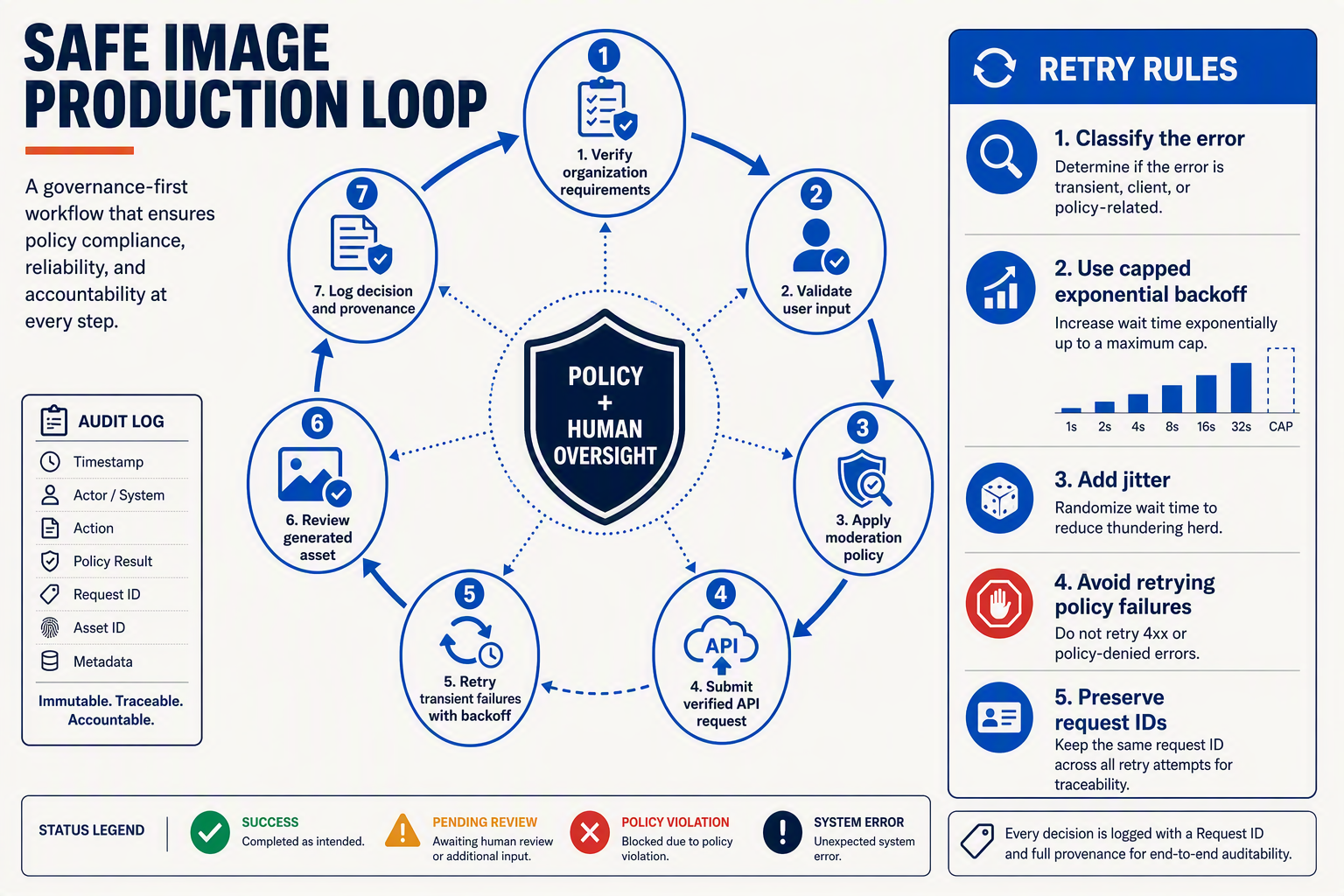
Production systems should treat image generation as a gated workflow, not a single API call: verify account access before deployment, moderate inputs, classify failures, quarantine outputs, and publish only after automated and—where risk warrants—human review.
Make organization verification a deployment prerequisite
Confirm that the OpenAI organization and project can access GPT‑Image‑2.5 Flare and GPT‑Image‑2.5 Sunburst before accepting customer traffic. OpenAI announced both API models on September 8, 2026, but access controls, verification requirements, and usage limits may vary by organization or account status.
Add a startup check or pre-deployment smoke test that:
- Authenticates using the production project credential.
- Sends a small, policy-compliant request to the selected model.
- Confirms that the response contains the expected image output.
- Records the model identifier, request ID, latency, and account or project—not the secret key.
- Blocks deployment if the API returns an authorization, verification, or model-access error.
Keep development, staging, and production credentials separate. Store keys in a secrets manager, apply least-privilege access, and never expose an API key in browser or mobile code.
Moderate both requests and generated assets
Moderation should cover prompts, uploaded reference images, edit masks, and outputs. A successful generation response indicates technical completion; it should not automatically mean that an asset is suitable for publication.
Use a layered pipeline:
- Before generation: reject prohibited requests, scan uploads, validate file types and dimensions, and remove unnecessary personal data.
- After generation: run policy and brand-safety checks for sexual content, violence, hate symbols, impersonation, regulated products, and unauthorized logos or public figures.
- Before publication: require human review for advertising, political content, children’s content, healthcare, financial promotions, or externally supplied reference images.
- After publication: preserve a reporting and takedown path so disputed assets can be traced and disabled.
Do not silently weaken moderation to improve completion rates. If an API exposes configurable moderation controls, pin the chosen setting in configuration and test it rather than relying on an undocumented default.
Classify failures before retrying
Retries are appropriate only for transient failures. Use exponential backoff with jitter for rate limits, timeouts, and server errors, while honoring any server-provided retry guidance.
Handle failure classes differently:
- 400-series validation errors: fix the request; do not retry unchanged.
- Authentication or verification errors: stop the job and alert an operator.
- Policy refusals: return a clear user-facing explanation and allow a revised prompt.
- 429 rate limits: queue or throttle the workload before retrying.
- 500-series errors and timeouts: retry a limited number of times, then move the job to a dead-letter queue.
- Malformed or missing image data: retain diagnostic metadata and regenerate only after validation.
Because retrying generation can create a different image, assign every job an application-level idempotency key and record each attempt separately.
Quarantine and review every asset
Store new images in a private quarantine bucket before exposing them through a CDN. Track the model, prompt version, reference-asset hashes, generation parameters, request ID, moderation result, reviewer, and approval timestamp.
OpenAI describes Flare as improving “quality, editing, and speed” and Sunburst as providing “an extra level of precision.” Those capabilities do not remove the need for review: automated checks should route ambiguous assets to humans, while approved files should be immutable, versioned, and auditable.
What does GPT Image 2.5 mean for existing products, and what should teams test before migrating?
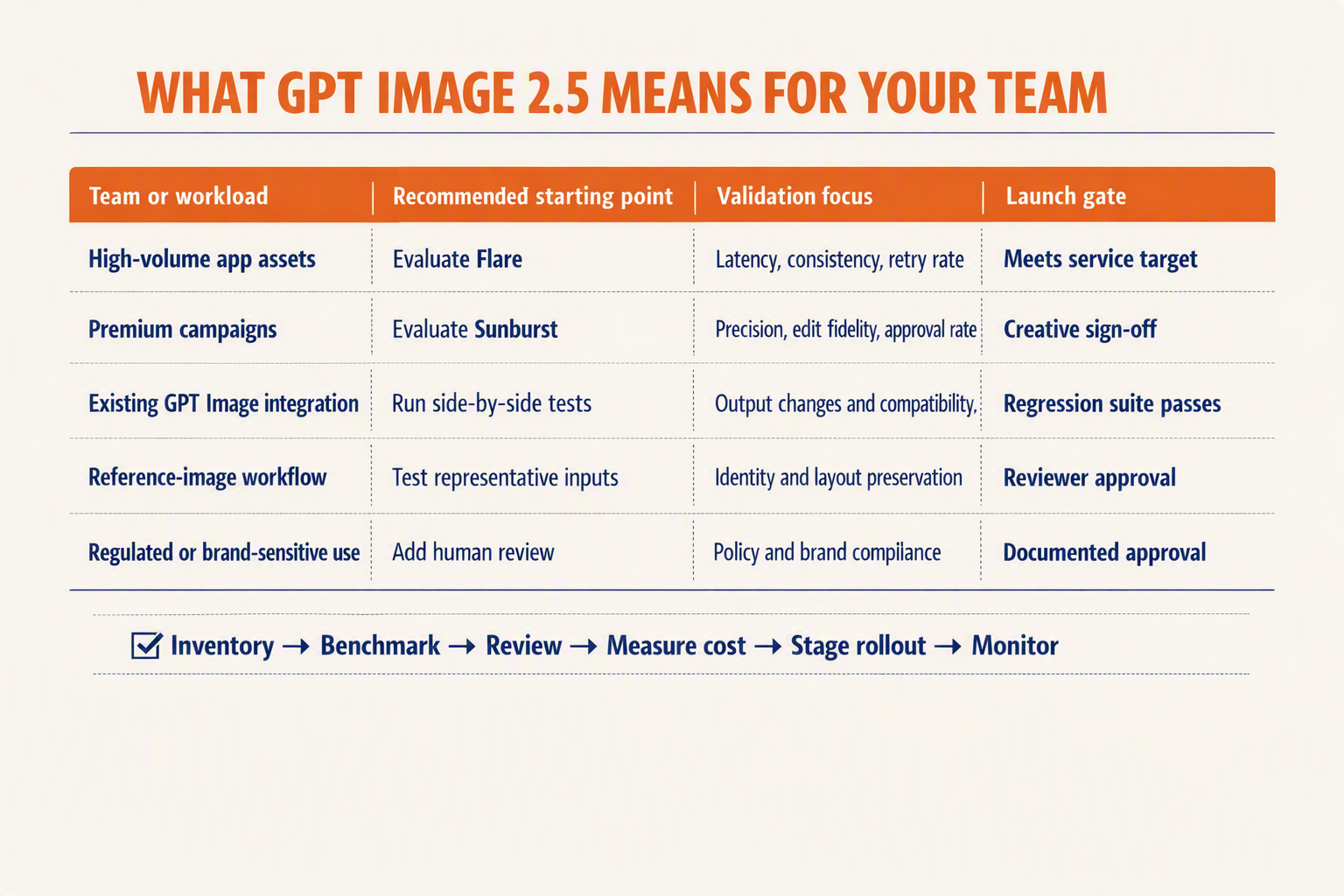
Existing products should treat GPT‑Image‑2.5 as a model migration, not a drop-in quality upgrade. OpenAI announced GPT‑Image‑2.5 Flare and GPT‑Image‑2.5 Sunburst in the API on September 8, 2026, but teams still need workload-specific tests for visual quality, edit fidelity, latency, cost, safety, and integration compatibility before changing production traffic.
Migration impact and test matrix
OpenAI says GPT‑Image‑2.5 Flare improves quality, editing, and speed, while GPT‑Image‑2.5 Sunburst provides an extra level of precision for detailed creative workflows. Those descriptions indicate intended use, not guaranteed performance for a particular product, prompt library, or reference-image set.
| Area | What may change | Migration test | Release gate |
|---|---|---|---|
| Model routing | One existing image route may need separate Flare and Sunburst paths | Replay representative jobs through both models | Route each workload using measured results |
| Generation quality | Composition, text rendering, style, or subject details may differ | Blind-review old and new outputs with a fixed rubric | Meet or exceed the current approval rate |
| Edit fidelity | Masks, preserved regions, identity, and reference adherence may shift | Compare edited regions and unintended changes outside them | No critical protected-region regressions |
| Latency and throughput | Flare and Sunburst may have different response-time profiles | Measure p50, p95, and p99 latency under realistic concurrency | Stay within product SLOs and queue limits |
| Cost | Per-request economics depend on model choice, retries, and rejected outputs | Calculate cost per approved asset, not only per API call | Remain within workload-level budgets |
| API behavior | Image API and Responses API tool flows can affect parsing and orchestration | Test payloads, errors, retries, timeouts, and output handling | Pass contract and failure-injection tests |
Build an evaluation set from real traffic
A useful migration benchmark should represent production rather than a hand-picked demo. Sample common requests, high-value edge cases, failed prompts, edits with masks, multilingual text, and workflows that use one or more reference images.
Use a frozen evaluation set and score both models against the current production baseline:
- Prompt adherence: Are every subject, constraint, and exclusion satisfied?
- Edit precision: Did the model change only what the user requested?
- Reference fidelity: Are identity, product geometry, colors, and style preserved?
- Operational performance: What are p50, p95, and p99 latency, timeout, and retry rates?
- Business outcome: What percentage of outputs pass human review without regeneration?
OpenAI’s September 8, 2026 announcement confirms availability of both models, but the supplied launch material does not publish universal latency, pricing, or acceptance-rate benchmarks. Teams should therefore avoid inserting assumed numbers into capacity plans.
Roll out with routing and rollback controls
Start with shadow evaluation, then send a small percentage of eligible traffic to GPT‑Image‑2.5. Log the model identifier, API surface, sanitized prompt version, reference-asset hashes, parameters, latency, retries, safety outcome, and reviewer decision.
A practical production policy is:
- Route routine generation and low-risk edits to GPT‑Image‑2.5 Flare.
- Escalate precision-sensitive edits or failed Flare attempts to GPT‑Image‑2.5 Sunburst.
- Cap retries to prevent silent cost multiplication.
- Preserve the previous model route behind a feature flag.
- Expand traffic only after quality, safety, cost, and reliability gates pass.
For products using a multi-model abstraction, CallMissed’s OpenAI-compatible gateway illustrates how one endpoint can support image generation alongside LLM, speech, and search services. Even with a compatible interface, teams should retain model-specific evaluations because API compatibility does not guarantee identical visual behavior.
What do official OpenAI sources say, and how should developers verify identifiers, pricing, parameters, and quotas?
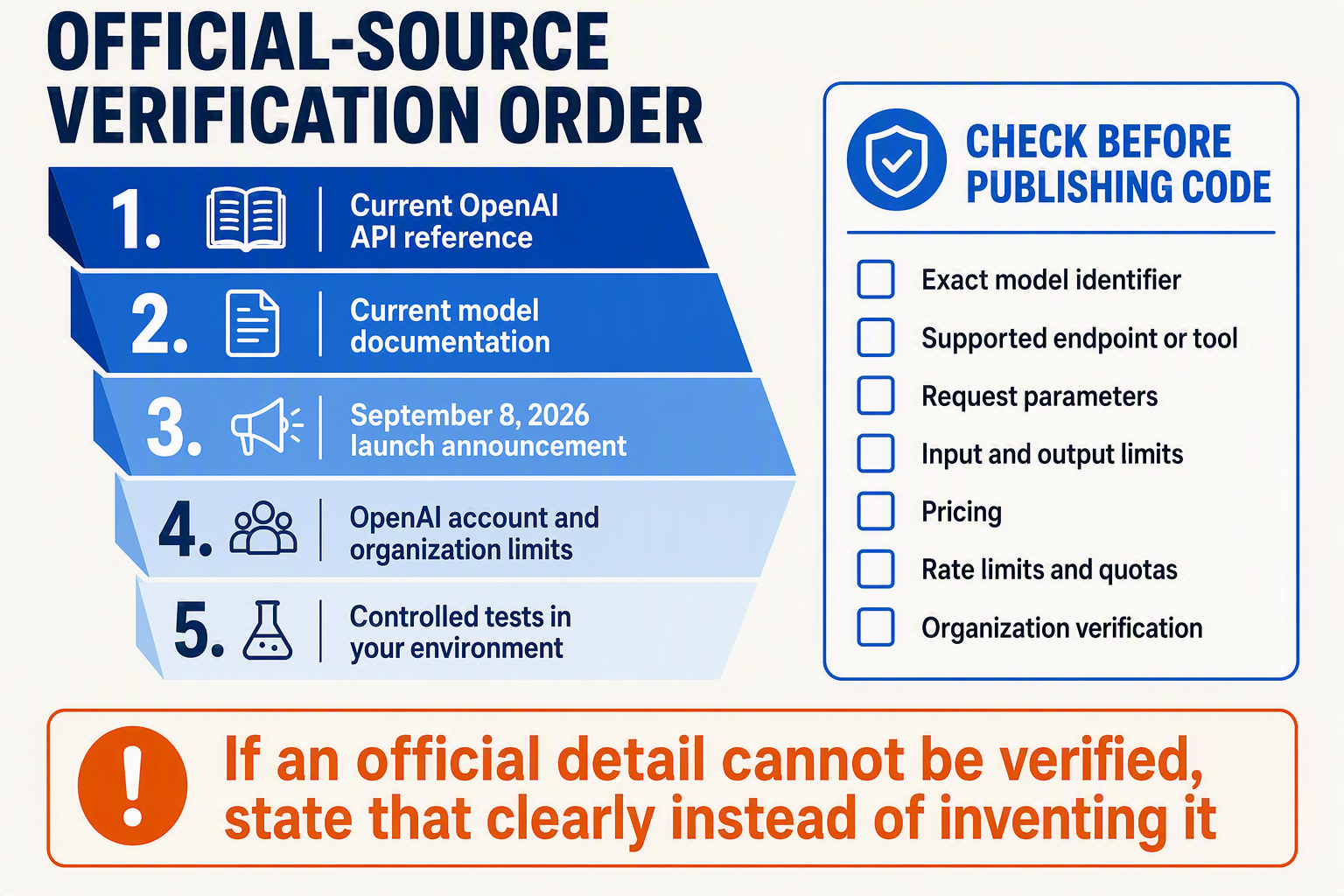
OpenAI officially confirms API availability and intended positioning, but developers should verify operational details—exact model IDs, accepted parameters, prices, and account-specific limits—against the live OpenAI developer documentation before deployment. Do not assume a launch-post name is identical to the string accepted by an endpoint.
What OpenAI has officially confirmed
OpenAI announced on September 8, 2026, that two GPT‑Image‑2.5 models—GPT‑Image‑2.5 Flare and GPT‑Image‑2.5 Sunburst—are available through the API. The OpenAI launch announcement describes Flare as bringing improvements in “quality, editing, and speed” and Sunburst as offering “an extra level of precision” for detailed creative work.
Those statements establish three facts:
- There are two officially announced API models in the GPT‑Image‑2.5 family.
- Flare targets faster, general-purpose generation and editing.
- Sunburst targets workflows where precision warrants additional processing.
However, the announcement alone should not be treated as the definitive specification for request fields, billing units, supported dimensions, or rate limits. OpenAI’s developer model catalog separately describes GPT Image 2 as a model for “fast, high-quality image generation and editing,” but that page does not by itself establish the identifiers or complete schemas for the newer Flare and Sunburst variants.
Use an official-source hierarchy
Check these OpenAI sources in order before shipping:
- Model documentation: Confirm the exact API identifier, supported inputs and outputs, endpoint compatibility, and any model-specific restrictions.
- Image API and Responses API references: Validate every request property against the endpoint actually being used. A field accepted by the Image API is not automatically valid inside the Responses API image-generation tool.
- OpenAI pricing page: Record the billing unit, currency, quality or resolution multipliers, and whether reference-image inputs incur separate charges.
- OpenAI Limits page and rate-limit documentation: Verify limits for the relevant organization, project, usage tier, endpoint, and model.
- SDK release notes and generated types: Confirm that the installed SDK version recognizes the new models and parameters; newly launched API functionality can precede SDK support.
Verify identifiers with a live request
Store verified identifiers in configuration rather than embedding an inferred slug:
export IMAGE_MODEL_FLARE="<identifier-from-OpenAI-model-docs>"
export IMAGE_MODEL_SUNBURST="<identifier-from-OpenAI-model-docs>"
Then query the OpenAI Models API where supported and run the smallest valid generation request in a non-production project. A successful lookup does not prove that every parameter combination is supported, so test generation, editing, and reference-image requests separately.
Create a launch-day verification record
For each model, capture:
- Exact model ID and documentation retrieval date.
- Supported Image API and Responses API paths.
- Valid sizes, quality settings, output formats, image-input limits, and edit controls.
- Price per documented unit, including applicable input and output charges.
- Requests-per-minute, tokens-or-images-per-minute, concurrency, and daily limits shown for your project.
- Actual response metadata, latency, cost, and rate-limit headers from a test request.
Treat documentation as versioned operational data. Recheck it before production releases and whenever OpenAI changes a model alias, SDK, price, parameter schema, or quota. This prevents a guide written on September 8, 2026 from silently becoming the source of stale configuration later.
Frequently asked questions about the GPT-Image-2.5 Flare API and GPT-Image-2.5 Sunburst API
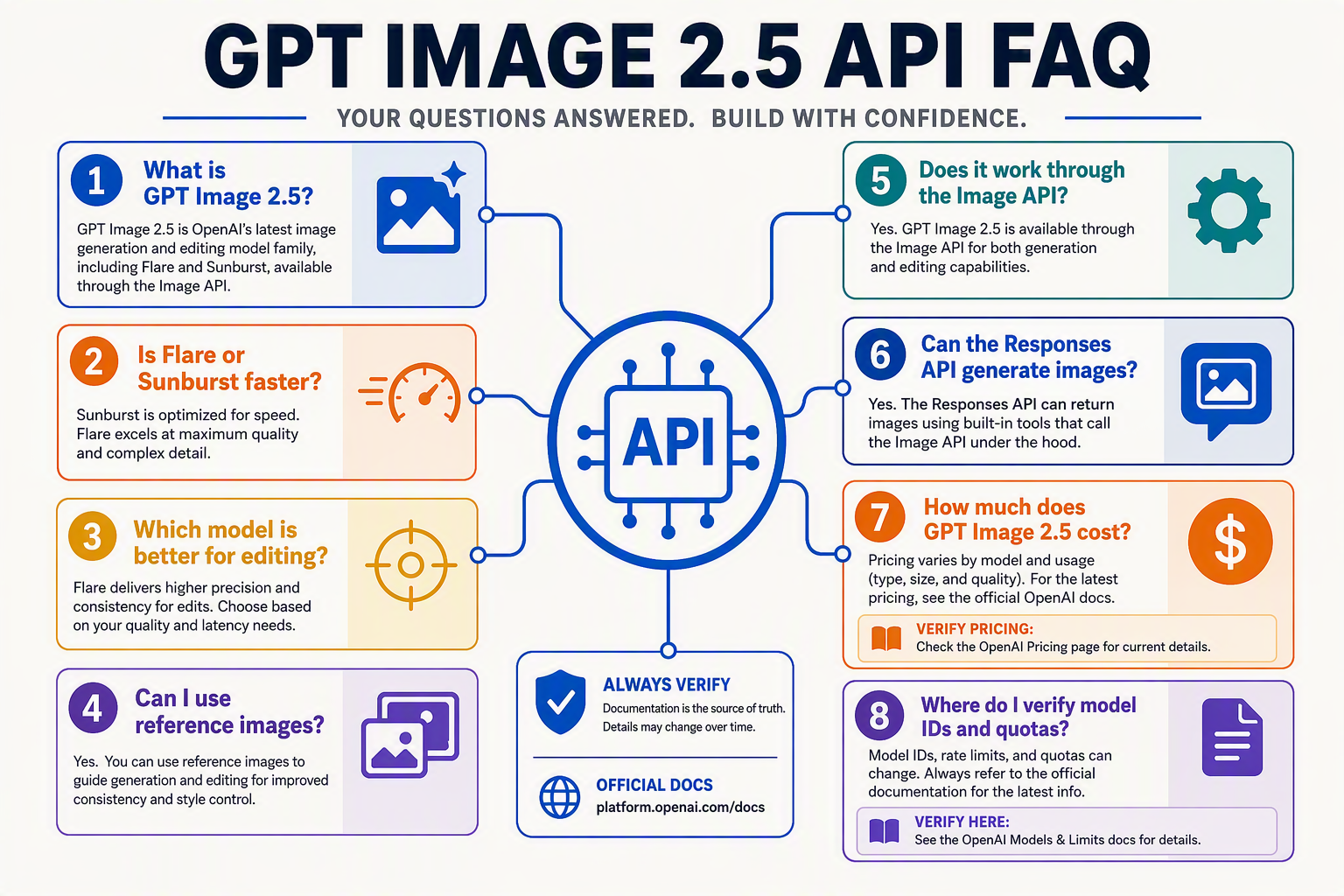
Are GPT‑Image‑2.5 Flare and GPT‑Image‑2.5 Sunburst officially available through the API?
Should the GPT Image 2.5 API use the Images API or Responses API?
Does the GPT Image 2.5 API support generation and editing?
How should I choose between Flare and Sunburst?
Is GPT‑Image‑2.5 Sketch the same as Flare or Sunburst?
Does my organization need verification?
How should applications handle GPT Image 2.5 API errors?
How do I evaluate latency and pricing?
Conclusion
The practical takeaway
The GPT Image 2.5 API makes model selection a routing decision rather than a search for one universal winner: use GPT‑Image‑2.5 Flare for speed and everyday production, then escalate precision-sensitive work to GPT‑Image‑2.5 Sunburst.
OpenAI confirmed on September 8, 2026, that two GPT‑Image‑2.5 models—Flare and Sunburst—are available through the API. OpenAI characterizes Flare around improvements in “quality, editing, and speed,” while Sunburst provides “an extra level of precision” for detailed creative workflows.
Key takeaways for developers are straightforward:
- Route by workload. Make Flare the starting point for high-volume assets, rapid concepts, routine edits, product mock-ups, and content variations. Use Sunburst when composition, reference adherence, fine details, or repeated creative refinement justify greater precision.
- Choose the right interface. Use the Image API for direct generation and editing pipelines; use the Responses API image-generation tool when image creation belongs inside a broader, tool-using application flow.
- Treat prompting as structured input. Separate the subject, composition, visual style, constraints, reference-image instructions, and requested edits. This makes prompts easier to evaluate, reproduce, and revise.
- Engineer the workflow around the model. Production readiness requires validation, failure handling, asset storage, safety checks, human review, and iterative approval—not merely a successful API response. Benchmark both models with your own prompts, assets, latency targets, and quality rubric before fixing a default route.
What developers should watch next
The next phase will be defined by how reliably teams can balance quality, latency, control, and production economics across generation and editing workloads. Watch for API revisions, model updates, and measurable changes in reference-image fidelity, edit consistency, response speed, and cost per approved asset.
Multi-model infrastructure will also make experimentation easier. Developers can explore CallMissed, an OpenAI-compatible AI gateway, to access image generation alongside large language models, speech, and web search through a consolidated integration.
The decisive question is no longer simply, “Which model produces the better image?” It is: Which model, API path, prompt structure, and review loop produces an acceptable asset most reliably for your application?
Related Reading
- GPT Image 2.5 Flare vs Sunburst: Key Differences
- Claude Fable 5.1 vs GPT-6 Astra Pricing: Real API Costs in 2026
- Claude Fable 5.1 vs GPT-6 Astra: 2026 API Migration and Routing Guide