
AI Receptionist for Small Business: Stop Losing Leads From Missed Calls


Learn how an AI receptionist helps a small business recover missed calls with lead capture, routing, CRM webhooks, consent, and measurable follow-up.
AI Receptionist for Small Business: Stop Losing Leads From Missed Calls
What happens to a potential customer when a small business misses a call—and nobody calls back? An AI receptionist can answer or return calls, disclose that the caller is interacting with AI, capture the lead’s details, qualify urgency, book available appointments, and alert a human when judgment is needed. In other words, AI receptionist help a small business turn missed calls into structured, trackable follow-up instead of losing leads from missed calls.
This matters because a missed call is often a high-intent event: the caller has already chosen to contact the business. Yet many small businesses cannot answer every call while serving customers, working on-site, or operating outside business hours. Without an immediate response, the opportunity may disappear before a team member sees the call log. Because no independently verified industry benchmark is supplied for this guide, the implementation below avoids inflated conversion claims and focuses on measurable operational outcomes.
This is a build guide, not a general product overview. You will learn how to create a reliable missed-call recovery workflow:
- Detect an unanswered call through your telephony provider’s webhook.
- Trigger an AI receptionist to answer a return call or handle the next inbound attempt.
- Disclose AI involvement and capture the caller’s name, callback number, reason for calling, urgency, preferred time, and consent.
- Apply deterministic qualification rules rather than allowing a language model to make every business decision.
- Check live calendar availability before booking an appointment.
- Send a structured lead to a CRM, database, or internal webhook.
- Escalate high-value, urgent, or low-confidence conversations to a human.
- Confirm the next step by SMS, WhatsApp, email, or voice.
The guide also covers signed webhook validation, idempotency, authentication, rate limiting, retries, timeouts, redacted logs, and a dead-letter path for failed deliveries. A FastAPI example will show the API boundary without pretending that telephony providers share identical event fields; production code must follow the selected provider’s current documentation.
Platforms such as CallMissed reflect this broader shift by combining AI voice agents, WhatsApp communication, CRM workflows, and multilingual engagement in one business platform. You will finish with an illustrative configuration table, a small test matrix, and formulas for comparing missed-call recovery before and after deployment.
How can an AI receptionist help a small business stop losing leads from missed calls?
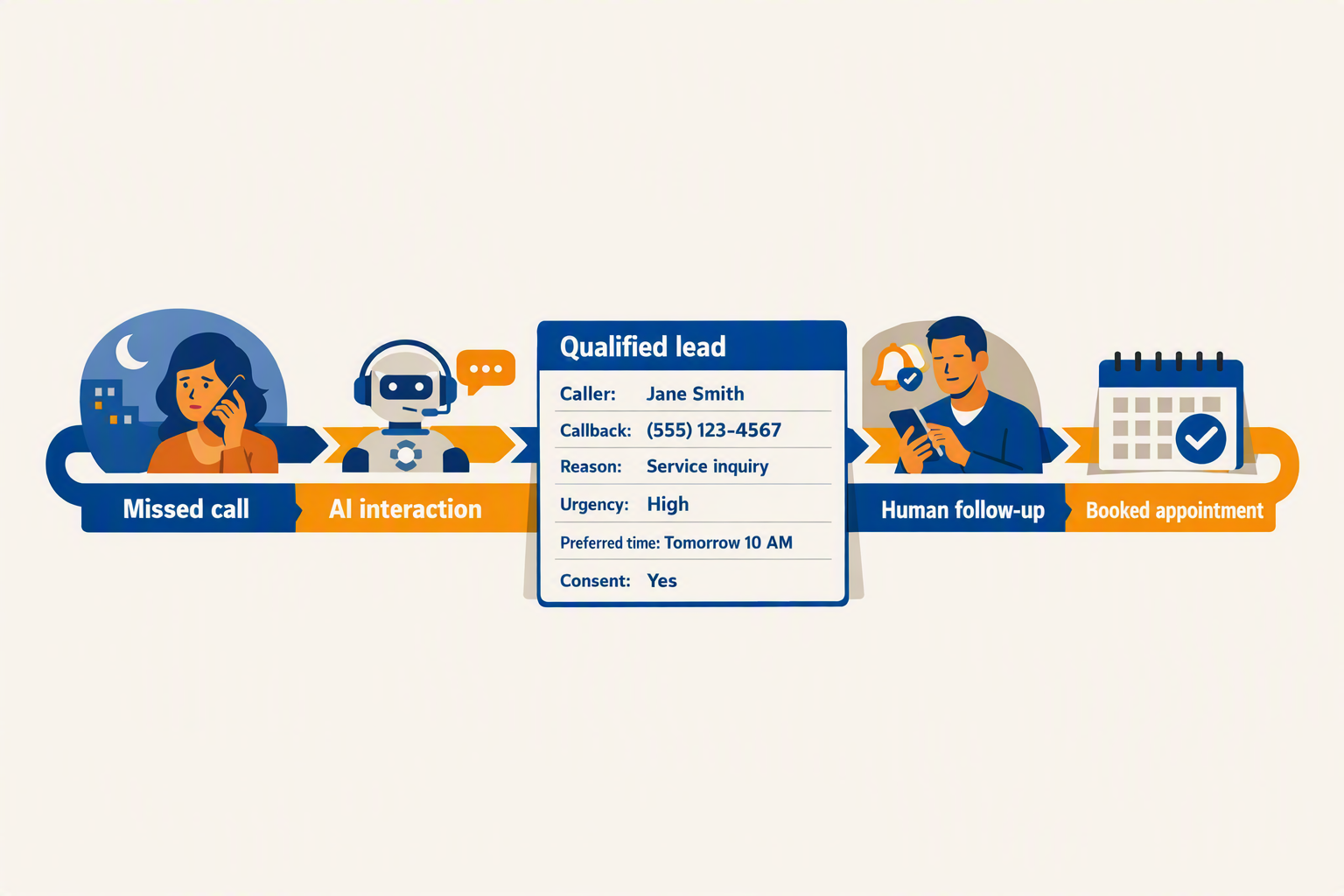
An AI receptionist can help a small business stop losing leads from missed calls by detecting unanswered calls, returning them quickly, collecting structured details, and escalating urgent or high-value opportunities to a person. In response to “How can an AI receptionist help a small business stop losing leads from missed calls?”, the reliable answer is a recovery workflow—not an uncontrolled language-model conversation: validate the event, persist the lead durably, route it, and measure what happens next.
What should happen when a small business misses a call?
Use this step-by-step flow:
- Detect: The telephony provider sends an unanswered-call webhook.
- Respond: The AI receptionist returns the call or answers the next inbound attempt.
- Disclose: Tell the caller they are interacting with AI where required.
- Capture: Collect the caller’s name, callback number, reason, urgency, preferred time, and consent.
- Qualify: Apply deterministic rules for urgency, value, and completeness.
- Route: Check live calendar availability before booking; otherwise create a CRM lead or notify a human.
- Confirm: Send the next step by SMS, WhatsApp, email, or voice.
Human handoff should occur for emergencies, high-value requests, low-confidence conversations, missing consent, or requests outside the agent’s knowledge base.
How do I connect an AI receptionist to my lead system?
Keep telephony, AI, and CRM as separate API boundaries. Provider event names, signature algorithms, and retry behavior vary, so production code must follow the selected provider’s current documentation.
The key reliability rule is validate first, then atomically persist the event and outbox job. Do not add an event ID to an in-memory or database idempotency set before lead validation and durable persistence; otherwise a temporary CRM failure can cause a retry to be discarded incorrectly.
import os, hmac, hashlib, time
from fastapi import FastAPI, Request, HTTPException

app = FastAPI()

def valid_signature(body: bytes, signature: str, timestamp: str) -> bool:
    # Illustrative scheme: use the provider's documented algorithm in production.
    if not timestamp or abs(time.time() - int(timestamp)) > 300:
        return False
    secret = os.environ["WEBHOOK_SECRET"].encode()
    message = timestamp.encode() + b"." + body
    expected = hmac.new(secret, message, hashlib.sha256).hexdigest()
    return hmac.compare_digest(expected, signature or "")

@app.post("/webhooks/missed-call")
async def missed_call(request: Request):
    body = await request.body()
    if not valid_signature(
        body,
        request.headers.get("X-Signature"),
        request.headers.get("X-Timestamp")
    ):
        raise HTTPException(401, "Invalid signature")

    event = await request.json()
    event_id, lead = event.get("event_id"), event.get("lead", {})
    required = ["name", "callback_number", "reason", "urgency", "consent"]

    if not event_id or any(not lead.get(key) for key in required):
        return {"status": "manual_review", "reason": "invalid_or_incomplete"}

    qualified = (
        lead["urgency"] in {"high", "urgent"} or
        lead["reason"] in {"emergency", "quote_request"}
    )
    payload = {**lead, "qualified": qualified, "source": "missed_call_ai"}

    # One database transaction: insert event only if new, insert outbox job,
    # then commit both. A unique constraint must exist on event_id.
    inserted = await db.transaction(
        """INSERT INTO inbound_events(event_id, payload)
           VALUES (:event_id, :payload)
           ON CONFLICT (event_id) DO NOTHING""",
        {"event_id": event_id, "payload": payload},
        outbox_sql="""INSERT INTO outbox(event_id, destination, payload, status)
                      VALUES (:event_id, 'crm', :payload, 'pending')"""
    )
    return {"status": "accepted" if inserted else "duplicate", "qualified": qualified}
An outbox worker should forward pending jobs to the CRM with timeouts, exponential backoff, provider-supported retries, and a dead-letter queue after the configured limit. Add authentication, rate limiting, redacted logs, encrypted storage, consent records, and a human-review path; never log full phone numbers or conversation contents by default.
Which settings should I test first?
These are illustrative implementation configuration values, not industry benchmarks:
| Control | Example value | Purpose |
|---|---|---|
| AI answer timeout | 20 seconds | Bound return-call attempts |
| CRM request timeout | 5 seconds | Prevent blocked workers |
| Maximum webhook retries | 3 | Limit repeated delivery attempts |
| Handoff confidence threshold | 0.70 | Escalate uncertain conversations |
| Follow-up target | 10 minutes | Test response speed |
Measure missed-call rate, completed lead records, qualified leads, booked appointments, handoffs, contact rate, and attributed revenue before and after rollout. For an illustrative 10-call test set, compare the number of calls recovered and the number producing valid CRM records; label every such result as internal test data, not an industry statistic.
What do I need before I connect an AI receptionist to my small business?
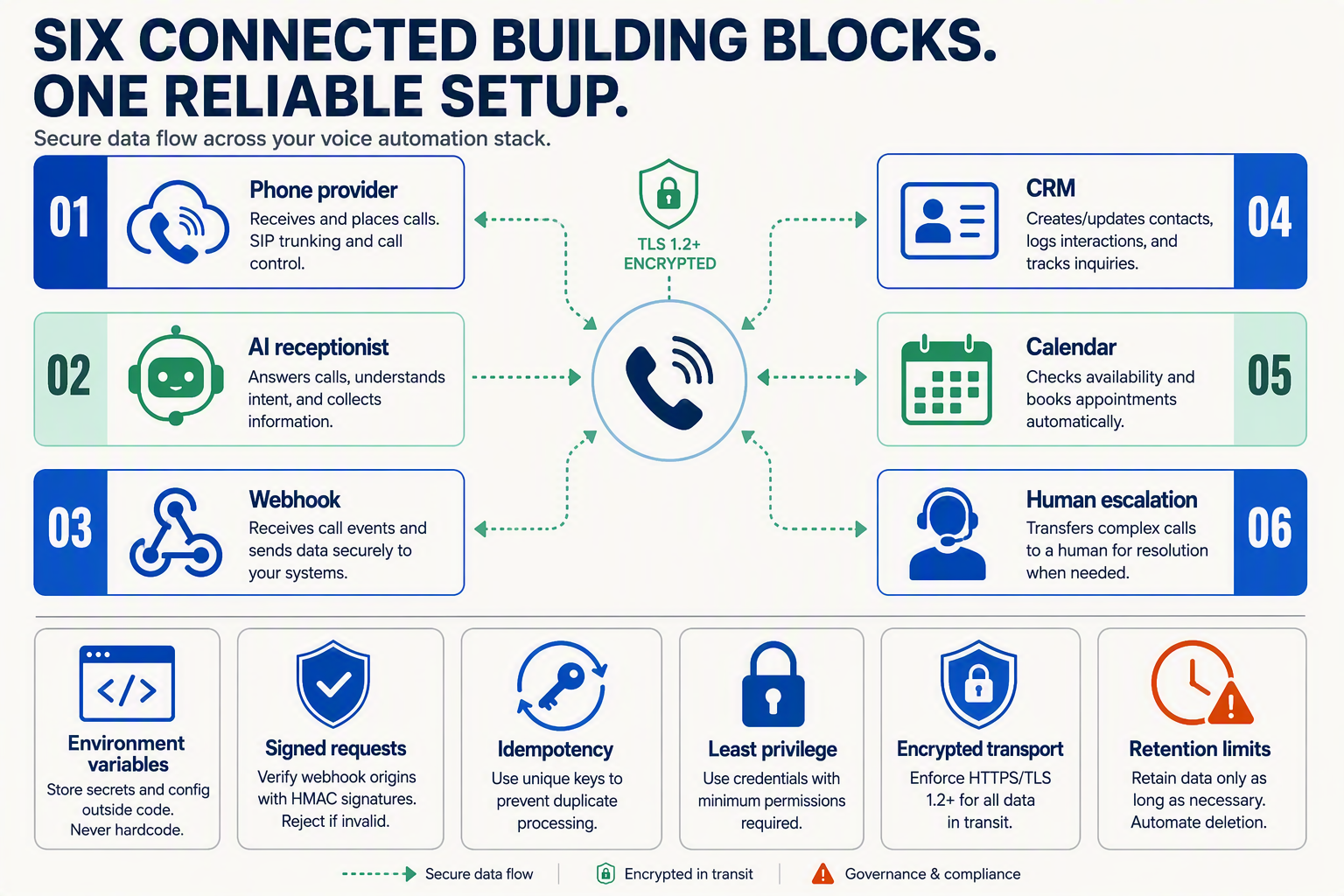
An AI receptionist can help a small business stop losing leads from missed calls by detecting unanswered calls, collecting caller details, and routing qualified or urgent opportunities to a human. Before deployment, prepare the telephony connection, business rules, lead destination, consent process, and escalation path so every call becomes a traceable next action.
What systems and information do I need before connecting an AI receptionist?
Gather these prerequisites before writing the integration:
- Telephony access: A business number, call-forwarding feature, or provider webhook that reports unanswered calls. Confirm the provider’s current event names, payload fields, signature method, and retry behavior.
- AI voice endpoint: A system that can receive or return calls, disclose that the caller is interacting with AI where required, collect structured answers, and transfer or notify a human.
- Business knowledge: Opening hours, services, service areas, pricing guidance, frequently asked questions, emergency rules, and topics the AI must not answer.
- Lead destination: A CRM, database, spreadsheet-backed API, or internal webhook that accepts a consistent lead schema.
- Calendar access: A live scheduling API that returns current availability. Do not let the AI promise a slot from a static list.
- Escalation contact: A phone number, email address, messaging inbox, or on-call queue for urgent, high-value, or low-confidence conversations.
- Security controls: Signed webhook validation, environment-based secrets, idempotency storage, rate limiting, redacted logs, bounded retries, and a dead-letter or manual-review path.
What illustrative configuration should I define before going live?
The following values are illustrative implementation targets, not industry benchmarks or externally verified standards. Adjust them after testing the selected telephony, AI, CRM, and calendar providers.
| Control | Example value | Implementation purpose | Owner |
|---|---|---|---|
| AI answer or callback timeout | 20 seconds | Prevent indefinite waiting for a response | Developer |
| CRM request timeout | 5 seconds | Keep a slow CRM from blocking the workflow | Developer |
| Maximum webhook retries | 3 attempts | Retry temporary failures before manual review | Developer |
| Human-handoff confidence threshold | 0.70 | Escalate uncertain intent or extracted details | Business + developer |
| Lead follow-up target | 10 minutes | Set an operational response target | Business owner |
| Initial test set | 10 calls | Test missed calls, urgency, opt-outs, and failures | QA owner |
What should the lead record contain?
Use a fixed schema so missed calls can be measured consistently. A minimum record should include:
caller_namecallback_numberreason_for_callurgencypreferred_contact_timeconsent_statuscall_idand event timestampqualification_resulthuman_handoff_requiredrecording_or_transcript_reference, where lawful and supported by appropriate consent
Validate phone numbers, restrict fields such as urgency to approved values, and reject records without a call_id or callback number. Do not log passwords, payment details, or unnecessary sensitive information. Store only the recording or transcript reference needed for the workflow, and define retention and deletion rules.
What should I verify before production?
Run calls covering normal enquiries, urgent requests, unclear answers, opt-outs, duplicate webhooks, CRM downtime, calendar conflicts, and failed human transfers. Confirm that every accepted event is idempotent, every failed delivery reaches manual review, and every caller receives an accurate confirmation or follow-up expectation. Production code must use the selected telephony and AI providers’ current documentation rather than assuming undocumented payloads or API behavior.
What should happen when a small business misses a call, and how do I get the first workflow working?
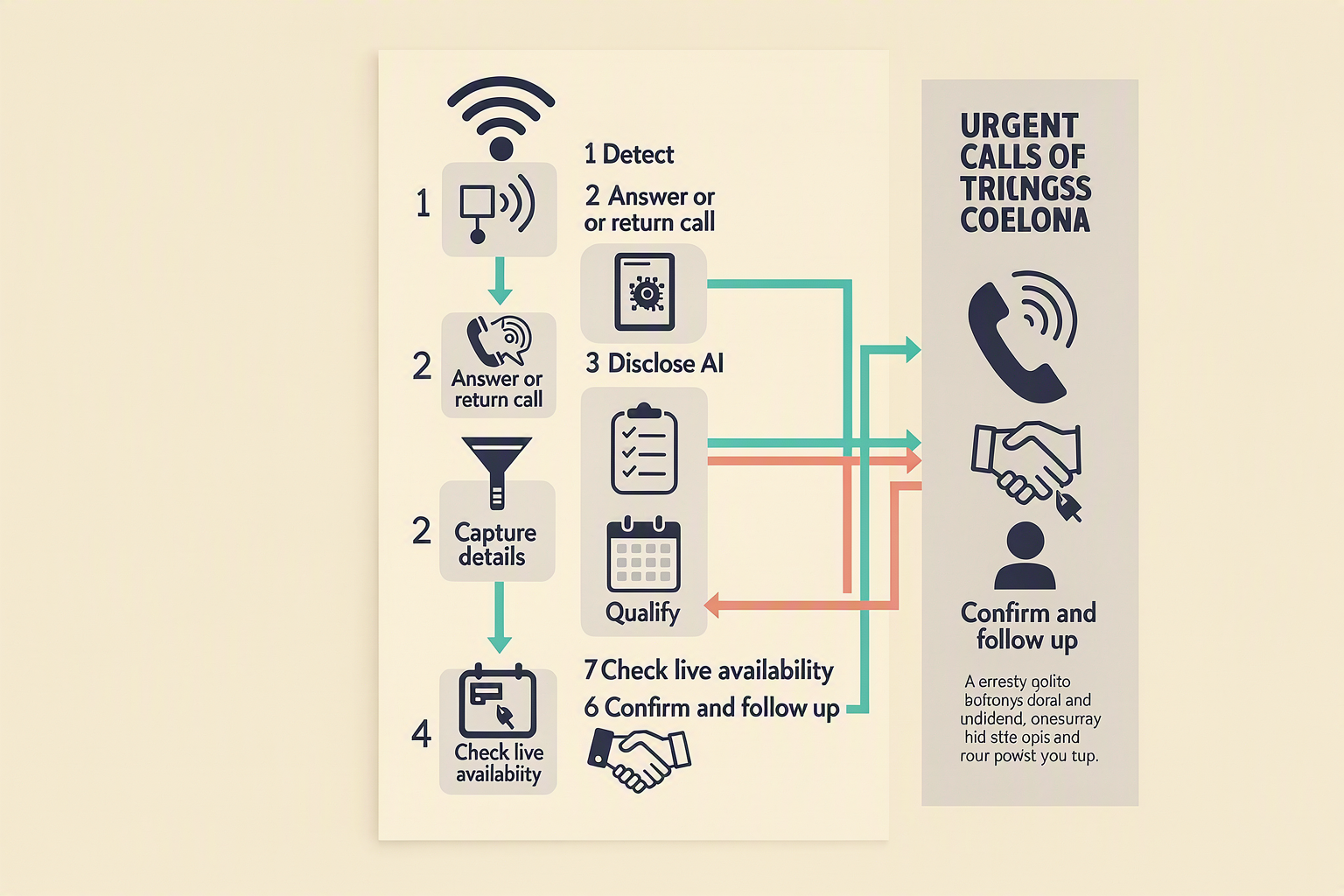
An AI receptionist can help a small business stop losing leads from missed calls by triggering a callback or message, collecting structured details, and routing urgent or uncertain cases to a human. The safest first version combines an AI receptionist with signed webhooks, deterministic qualification rules, durable idempotency, consent handling, and measurable follow-up. This is how an AI receptionist helps a small business recover opportunities without relying on an LLM alone.
What should happen when a small business misses a call?
Use this sequence for the initial workflow:
- Detect the unanswered call through the selected telephony provider’s webhook.
- Verify the request using the provider’s documented signature method and reject stale or malformed events.
- Create one durable event record keyed by the provider’s call or event ID.
- Return the call or send a message through the AI receptionist, with clear AI disclosure where required.
- Collect structured fields: caller name, callback number, reason, urgency, preferred time, and consent.
- Apply deterministic rules: escalate urgent or high-value requests, missing consent, and low-confidence responses.
- Check live calendar availability before booking; never infer availability from a cached response.
- Deliver the lead to a CRM or internal webhook, then send confirmation by SMS, WhatsApp, email, or voice.
How do I build the first webhook safely?
Do not place call_id in an in-memory seen set before saving the lead. If downstream persistence fails, a retry could be treated as a duplicate and the lead would be lost. Instead, use a database transaction with a unique idempotency key and an outbox record:
CREATE TABLE inbound_events (
  event_id TEXT PRIMARY KEY,
  received_at TIMESTAMP DEFAULT CURRENT_TIMESTAMP
);

CREATE TABLE leads (
  event_id TEXT PRIMARY KEY,
  payload JSON NOT NULL,
  status TEXT NOT NULL
);

CREATE TABLE outbox (
  id INTEGER PRIMARY KEY AUTOINCREMENT,
  event_id TEXT NOT NULL,
  payload JSON NOT NULL,
  delivered_at TIMESTAMP NULL
);
A FastAPI-style handler can then follow this provider-neutral pattern:
@app.post("/webhooks/missed-call")
async def missed_call(request: Request):
    body = await request.body()
    signature = request.headers.get("X-Signature")

    if not valid_signature(body, signature):  # Use provider documentation
        raise HTTPException(401, "invalid signature")

    event = json.loads(body)
    event_id = event.get("event_id") or event.get("call_id")
    phone = event.get("phone")

    if not event_id or not phone:
        raise HTTPException(400, "missing required fields")

    lead = {
        "event_id": event_id,
        "phone": phone,
        "name": event.get("name"),
        "reason": event.get("reason"),
        "urgency": event.get("urgency", "unknown"),
        "preferred_time": event.get("preferred_time"),
        "consent": bool(event.get("consent")),
        "status": (
            "human_review"
            if event.get("urgency") == "urgent"
            or float(event.get("confidence", 0)) < 0.70
            else "new"
        ),
    }

    with db.transaction():  # One atomic commit
        if db.exists("inbound_events", event_id):
            return {"status": "accepted", "reason": "duplicate"}

        db.insert("inbound_events", {"event_id": event_id})
        db.insert("leads", lead)
        db.insert("outbox", {"event_id": event_id, "payload": lead})

    return {"status": "accepted", "lead_status": lead["status"]}
An outbox worker retries CRM delivery independently and moves permanently failing records to a dead-letter or manual-review queue. Production systems should also use environment-stored secrets, rate limiting, payload validation, timeout handling, redacted logs, and the selected provider’s current field and signature documentation.
What configuration should I start with?
These are illustrative implementation targets, not industry benchmarks or external research:
| Control | Example value | Purpose |
|---|---|---|
| AI answer timeout | 20 seconds | Start recovery promptly |
| CRM request timeout | 5 seconds | Keep webhook processing bounded |
| Maximum retries | 3 | Retry transient failures |
| Human-handoff threshold | 0.70 confidence | Route uncertain cases |
| Follow-up target | 10 minutes | Define an operational SLA |
Track missed-call rate, completed lead records, qualified leads, booked appointments, human handoffs, contact rate, and revenue attributed to recovered calls. For example, compare a baseline of 100 missed calls with the next 100: recovery rate = completed lead records ÷ missed calls, while qualification rate = qualified leads ÷ completed lead records. Use clearly labeled internal data rather than presenting these configuration values as industry statistics.
How do I connect an AI receptionist to my lead system with a secure webhook and working code?
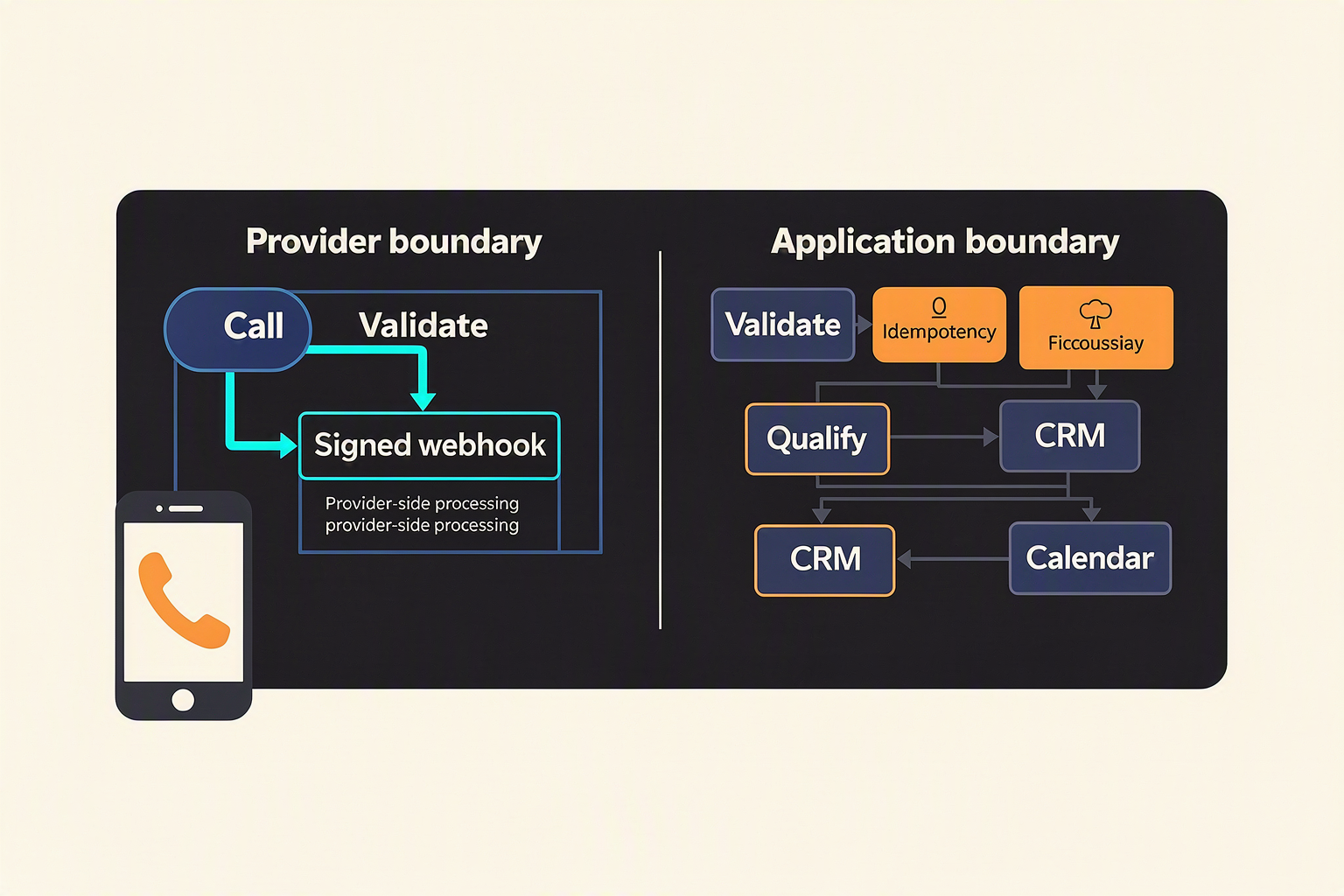
An AI receptionist can help a small business stop losing leads from missed calls by receiving a signed missed-call event, collecting structured caller information, and immediately forwarding a qualified lead to the CRM or a human teammate. The secure pattern is: validate the webhook, deduplicate the event, apply deterministic rules, then return a clear delivery status.
What should the secure webhook receive?
Your telephony provider’s event schema will differ, so map its documented fields into an internal payload rather than assuming field names. A normalized event should contain:
event_idfor idempotencycall_id,caller_number, andbusiness_numbercall_statussuch asno_answerorcompletedtranscriptor structured answers collected by the AI receptionistoccurred_atand provider signature headers
The AI receptionist should disclose that the caller is interacting with AI where required, then capture the caller’s name, callback number, reason for calling, urgency, preferred time, and consent. Appointment booking must query live calendar availability; the model should never invent an open slot.
How do I connect the AI receptionist to my lead system?
The following FastAPI example validates an HMAC signature, rejects duplicate events, applies qualification rules, and forwards a lead. Replace the provider-specific event mapping and CRM endpoint with the selected telephony, AI, or CRM provider’s current documentation.
import os, hmac, hashlib, time
from fastapi import FastAPI, Request, HTTPException
import httpx

app = FastAPI()
SECRET = os.environ["WEBHOOK_SECRET"].encode()
CRM_URL = os.environ["CRM_URL"]
seen_events = set()  # Use Redis or a database in production

def valid_signature(raw: bytes, supplied: str) -> bool:
    expected = hmac.new(SECRET, raw, hashlib.sha256).hexdigest()
    return hmac.compare_digest(expected, supplied or "")

@app.post("/webhooks/missed-call")
async def missed_call(request: Request):
    raw = await request.body()
    if not valid_signature(raw, request.headers.get("X-Signature")):
        raise HTTPException(401, "invalid signature")

    event = await request.json()
    event_id = event.get("event_id")
    if not event_id or event_id in seen_events:
        return {"status": "ignored", "reason": "duplicate_or_missing_id"}
    seen_events.add(event_id)

    answers = event.get("answers", {})
    urgency = answers.get("urgency", "normal")
    confidence = float(event.get("confidence", 0))
    lead = {
        "event_id": event_id,
        "name": answers.get("name"),
        "phone": answers.get("callback_number"),
        "reason": answers.get("reason"),
        "preferred_time": answers.get("preferred_time"),
        "consent": answers.get("consent") is True,
        "priority": "human" if urgency == "urgent" or confidence < 0.70 else "standard"
    }

    if not lead["phone"] or not lead["consent"]:
        return {"status": "review_required", "reason": "missing_phone_or_consent"}

    try:
        async with httpx.AsyncClient(timeout=5.0) as client:
            response = await client.post(CRM_URL, json=lead)
            response.raise_for_status()
    except Exception:
        # Queue the redacted event in a dead-letter system for manual replay.
        return {"status": "queued_for_retry"}

    return {"status": "accepted", "priority": lead["priority"]}
Which reliability settings should I start with?
These are illustrative implementation targets, not industry benchmarks or external research:
| Control | Example value | Purpose |
|---|---|---|
| AI answer timeout | 20 seconds | Avoid indefinite caller waits |
| CRM request timeout | 5 seconds | Keep webhook responses bounded |
| Maximum webhook retries | 3 | Retry temporary failures |
| Human-handoff confidence threshold | 0.70 | Escalate uncertain conversations |
| Follow-up target | 10 minutes | Define an operational response goal |
Use API-key or OAuth authentication for CRM requests, rate-limit the webhook, encrypt secrets, redact phone numbers and transcripts in logs, and store event IDs in durable storage. Retry only 408, 429, and 5xx responses with exponential backoff; send permanent failures to a dead-letter queue.
Platforms such as CallMissed can provide the AI voice layer, multilingual engagement across 22 Indian languages, and downstream communication workflows, while your webhook remains the controlled integration boundary.
Which advanced controls improve AI receptionist lead recovery, handoff, and observability?
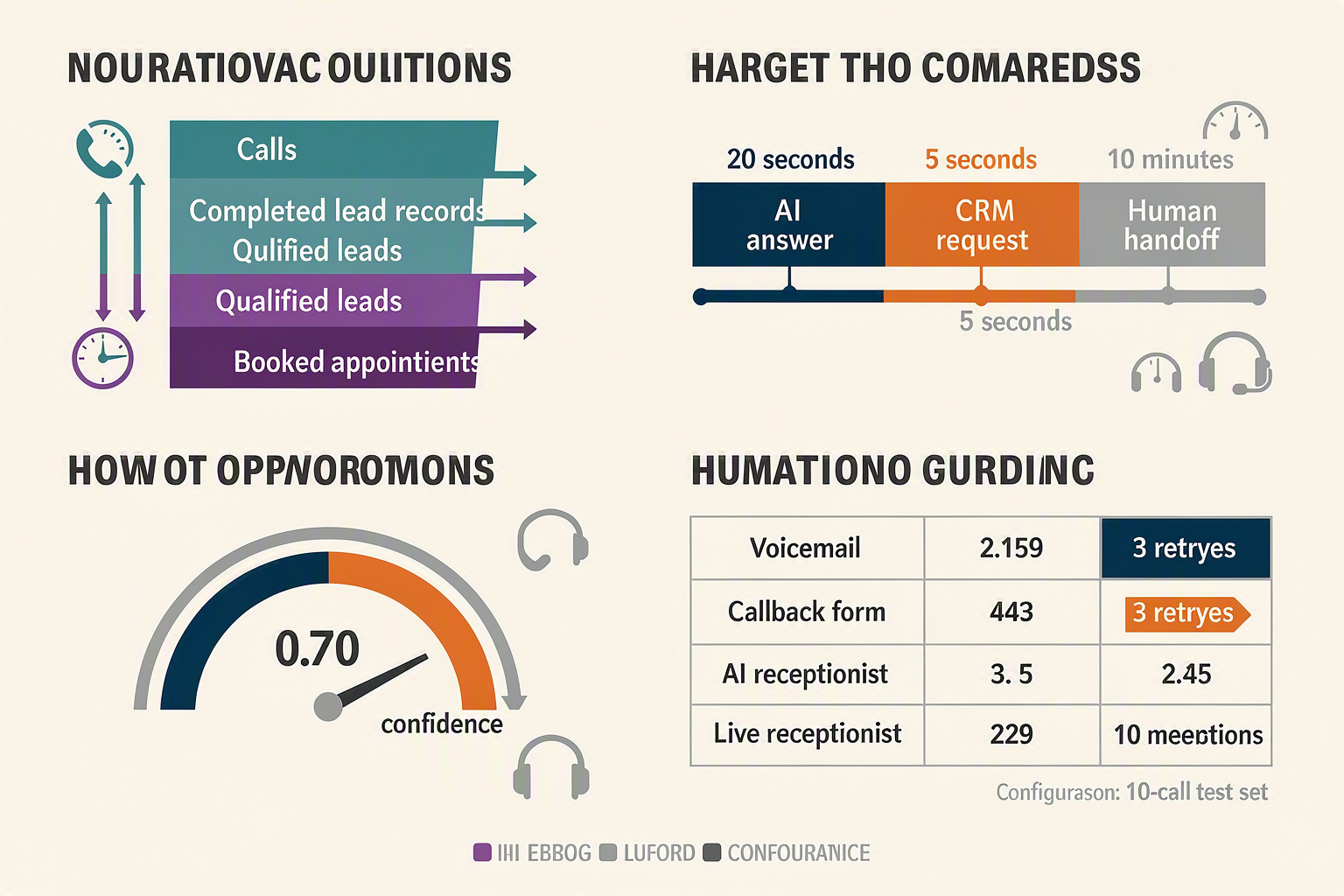
Advanced controls make an AI receptionist more reliable by separating conversation, business rules, and operational recovery. Use deterministic thresholds for lead qualification and handoff, then add idempotency, retries, redacted logs, and outcome tracking so a small business can identify where missed-call recovery fails.
Which controls should be configured first?
The following values are illustrative implementation targets, not industry benchmarks or externally validated statistics. Adjust them after reviewing the selected telephony, AI, CRM, and calendar providers’ current documentation.
| Control | Illustrative value | Implementation purpose | Failure action |
|---|---|---|---|
| AI answer or return-call timeout | 20 seconds | Give the AI receptionist enough time to establish contact without creating a long wait | Mark unreachable; schedule an approved follow-up |
| CRM or lead-webhook timeout | 5 seconds | Prevent a slow downstream system from blocking the call workflow | Retry asynchronously; place event in a dead-letter queue after limits |
| Maximum webhook retries | 3 attempts | Recover from temporary network or provider failures | Create a manual-review task after the third failure |
| Human-handoff confidence threshold | 0.70 | Escalate when intent, urgency, identity, or requested service is uncertain | Transfer or notify a human instead of guessing |
| Lead follow-up target | 10 minutes | Define an operational response goal for qualified leads | Escalate overdue leads to an owner or manager |
| Initial test set | 10 calls | Exercise normal, urgent, ambiguous, and failed-path scenarios before rollout | Block launch if critical paths fail |
How do I prevent duplicate leads and lost webhook events?
Use a stable idempotency key, such as the telephony provider’s call ID combined with the event type. Store that key before forwarding the lead; if the same webhook arrives again, return a successful response without creating another CRM record.
Validate every request before processing it:
- Verify the provider’s HMAC signature using
WEBHOOK_SIGNING_SECRET. - Reject stale timestamps outside an agreed replay window.
- Validate required fields such as call ID, callback number, consent status, and event type.
- Authenticate outbound CRM requests with
CRM_API_TOKEN. - Apply per-IP or per-provider rate limits.
- Set explicit connection and read timeouts rather than waiting indefinitely.
Provider payloads differ, so map documented fields into an internal schema such as call_id, phone, reason, urgency, preferred_time, consent, and confidence. Production integrations must follow the selected telephony and AI provider’s current API documentation rather than assuming field names.
What should observability capture?
Log the workflow as structured events, not as raw conversations. Record:
call_received,ai_attempted,details_captured,qualified,handoff_requested,lead_written, andconfirmation_sent- Latency for AI response, calendar lookup, CRM delivery, and human transfer
- Provider response codes, retry count, and dead-letter status
- Correlation ID, call ID, outcome, and qualification reason
Redact phone numbers, names, transcripts, payment details, and other sensitive data in application logs. Keep restricted audit records separately according to the business’s retention and consent policies. A dashboard should compare missed calls with completed lead records, qualified leads, booked appointments, human handoffs, and failed deliveries.
Platforms such as CallMissed extend this observability model across AI voice agents, WhatsApp conversations, and CRM workflows; the same event discipline remains important whether the system is assembled through APIs or managed through a business platform.
What common mistakes cause an AI receptionist to lose leads or create unsafe handoffs?
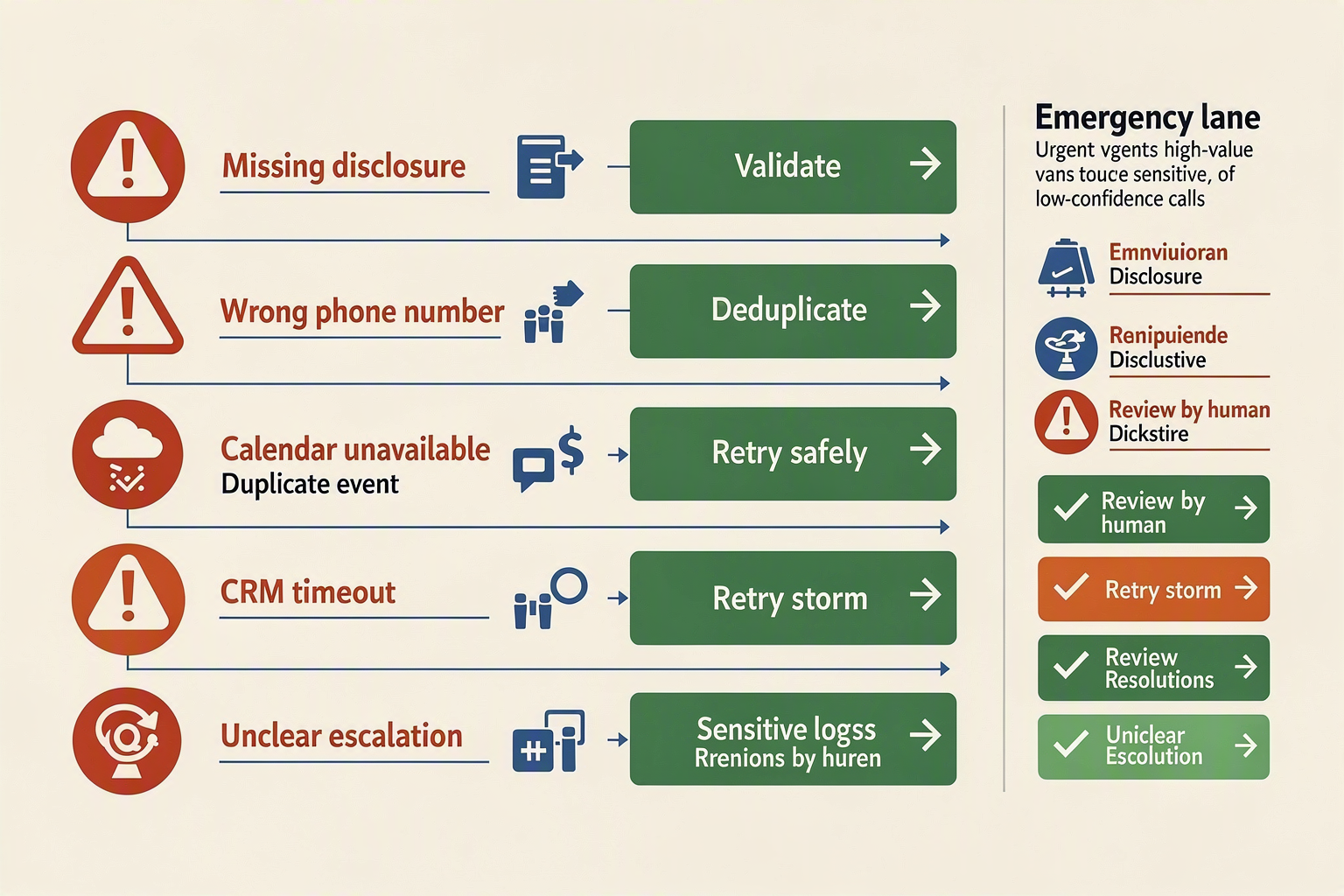
An AI receptionist loses leads when it treats every caller as routine, hides its AI identity, or hands off conversations without preserving context. Prevent this by combining deterministic qualification rules, validated structured data, live availability checks, and a human fallback that includes the full call summary.
Which implementation mistakes create unsafe handoffs?
The following is an illustrative implementation configuration, not industry research or a performance benchmark. Adjust each value after testing the selected telephony, AI, CRM, and calendar providers.
| Common mistake | Lead or safety failure | Safer implementation | Illustrative target |
|---|---|---|---|
| Letting the model decide urgency alone | Emergency, high-value, or vulnerable callers may be misclassified | Use deterministic rules for keywords, business hours, caller type, and service category; escalate when confidence is low | Handoff below 0.70 confidence |
| Booking without checking live availability | Double bookings, incorrect time zones, or appointments for unavailable staff | Query the calendar immediately before confirming; treat the calendar response as authoritative | Calendar API timeout: 5 seconds |
| Sending an incomplete handoff | The employee receives a phone number but not the reason, urgency, consent, or promised next step | Send a structured summary containing transcript highlights, extracted fields, confidence, and requested action | Required fields: 6+ |
| Retrying webhooks without idempotency | Duplicate CRM records, repeated SMS messages, or multiple human alerts | Store the provider event ID and reject or safely replay already-processed events | Maximum retries: 3 |
| Failing to disclose AI involvement | The caller may misunderstand who is speaking or how information is processed | Open with a clear AI disclosure, identify the business, explain the purpose, and provide a human option where required | Disclosure: first turn |
| Treating every failed delivery as success | A lead disappears when the CRM, calendar, or notification service is unavailable | Use bounded retries, redact logs, and place exhausted events in a dead-letter queue for manual review | CRM timeout: 5 seconds |
How should a developer test these handoffs?
Test failure paths deliberately rather than only testing a friendly caller. A minimum example test matrix can include 10 calls:
- Place 2 unanswered calls and verify that each receives one recovery action.
- Submit 2 urgent or high-value scenarios and confirm immediate human escalation.
- Submit 2 low-confidence conversations and verify that the AI does not invent an answer.
- Submit 2 calendar conflicts and confirm that no appointment is falsely confirmed.
- Submit 1 duplicate webhook and verify that only one lead is created.
- Submit 1 CRM outage and verify retry behavior plus dead-letter placement.
Each test should assert the event ID, caller consent, callback number, qualification fields, handoff reason, notification status, and final disposition. Do not log full phone numbers, payment details, or unnecessary transcript content; use redaction and access-controlled storage.
What should a safe human handoff contain?
A handoff should be actionable without forcing an employee to replay the entire call. Include:
- Caller name and verified callback number
- Reason for calling, requested service, urgency, and preferred time
- AI disclosure and consent status
- Appointment status, including time zone and calendar response
- Confidence score and the rule that triggered escalation
- Concise conversation summary and next action
- Original provider event ID for tracing
Platforms such as CallMissed show how voice agents, WhatsApp communication, and CRM workflows can be combined, but production teams must still configure provider-specific consent, webhook, retention, and escalation controls according to current documentation.
What should I do if the caller refuses AI, gives the wrong number, or the calendar and CRM fail?
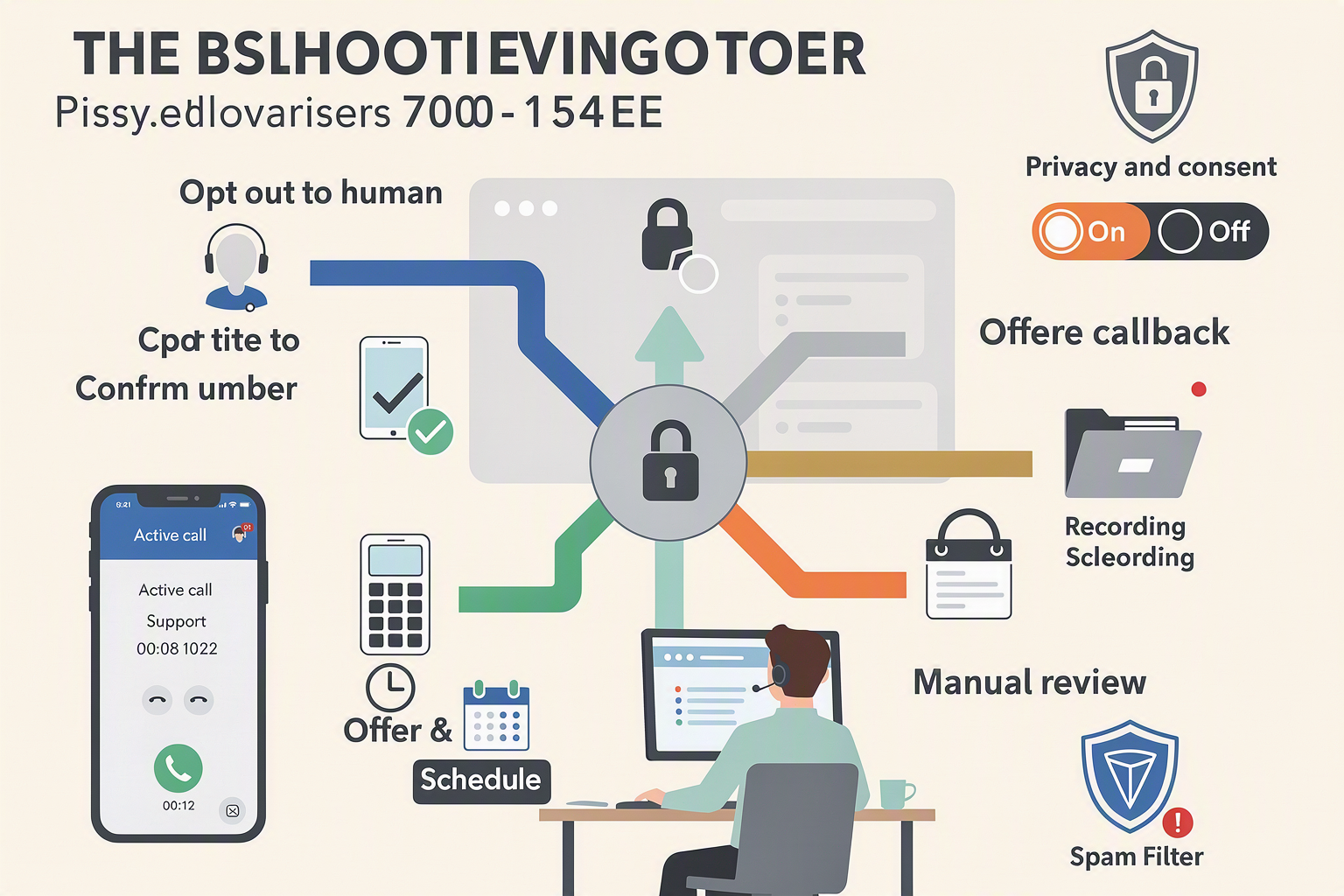
How can an AI receptionist help a small business when a caller refuses to speak with AI?
Can an AI receptionist help a small business when the caller gives the wrong phone number?
What should an AI receptionist do if the calendar booking system stops working?
How do I prevent a CRM failure from losing leads captured by an AI receptionist?
call_id. Retry transient failures with backoff, redact phone numbers and sensitive notes in logs, and move records that still fail after three attempts to a dead-letter queue or manual-review inbox; platforms such as CallMissed can fit into this architecture as the voice, messaging, and workflow layer, but provider-specific fields must follow current documentation.What should I do when the caller’s answer is unclear or the AI receptionist has low confidence?
How should I test an AI receptionist missed-call recovery workflow before launch?
How do I measure whether the AI receptionist stopped losing leads from missed calls, and what should I build next?
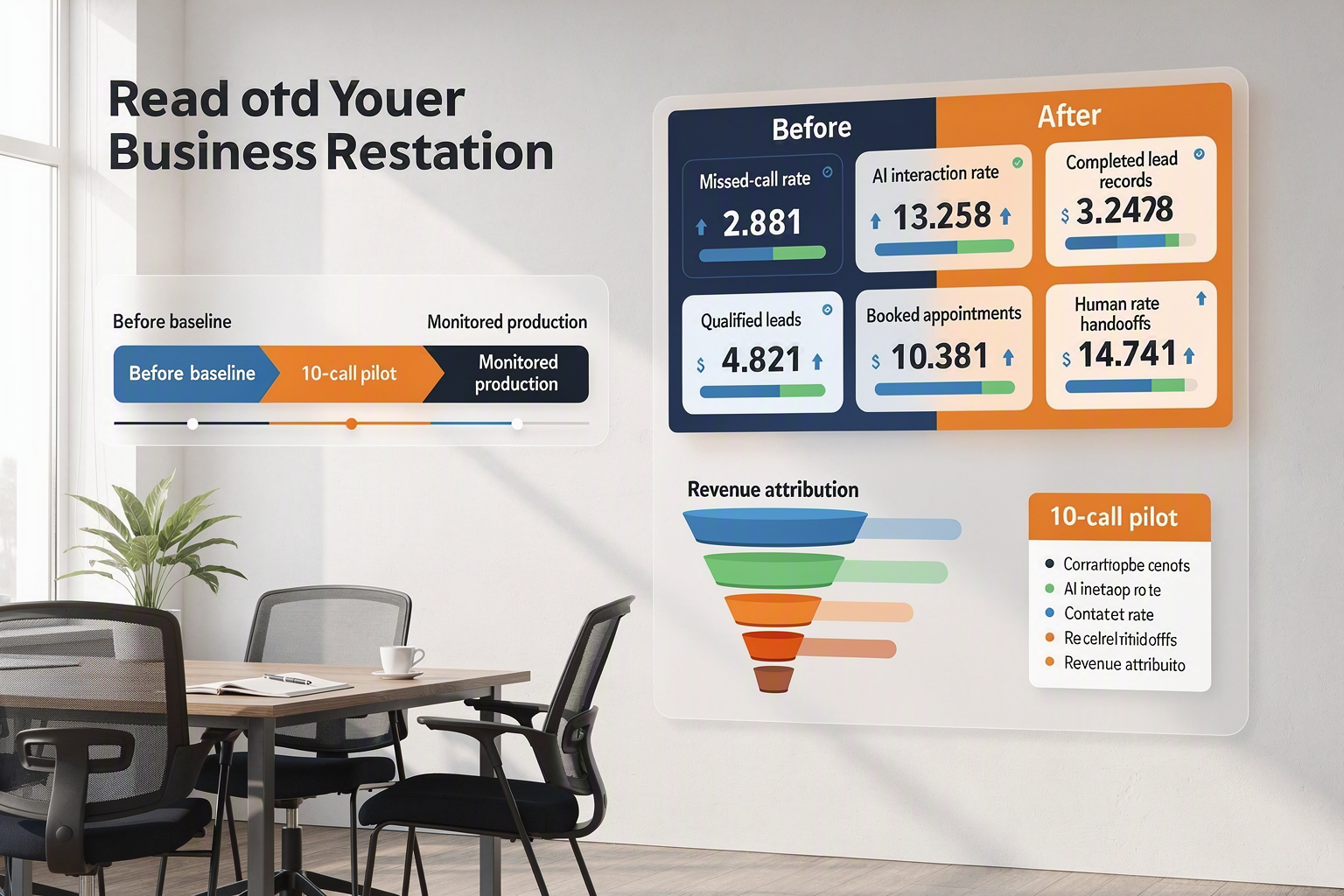
An AI receptionist helps a small business stop losing leads from missed calls only when recovery is measurable: compare a pre-launch baseline with post-launch outcomes, not just call volume. Track whether missed calls receive an AI interaction, become complete lead records, produce qualified opportunities, and result in booked appointments or revenue.
Which metrics should I measure before and after launch?
Record at least 2–4 weeks of baseline data, then compare the same measures after a controlled rollout:
- Missed-call rate = unanswered inbound calls ÷ total inbound calls × 100
- AI recovery rate = missed calls receiving an AI interaction ÷ missed calls × 100
- Lead-record completion rate = records containing name, callback number, reason, urgency, preferred time, and consent ÷ AI interactions × 100
- Qualification rate = qualified leads ÷ completed lead records × 100
- Booking rate = appointments booked ÷ qualified leads × 100
- Human-handoff rate = conversations escalated to staff ÷ AI interactions × 100
- Contact rate = leads reached by a human or AI within the defined window ÷ recovered leads × 100
- Revenue attribution = closed-won revenue linked to recovered lead IDs
Use one stable lead_id across the call platform, CRM, calendar, and payment system. This prevents duplicate counting when the same caller receives a retry, WhatsApp message, or human callback.
What example targets should I configure and test?
The following are illustrative implementation configuration values, not industry benchmarks or external research:
| Measure | Example value | How to use it |
|---|---|---|
| AI answer or return-call timeout | 20 seconds | Mark the attempt failed after this limit |
| CRM request timeout | 5 seconds | Retry transient failures without blocking the caller |
| Maximum webhook retries | 3 | Send exhausted events to a dead-letter queue |
| Human-handoff confidence threshold | 0.70 | Escalate below this score |
| Lead follow-up target | 10 minutes | Measure actual time to staff contact |
| Initial test set | 10 calls | Include normal, urgent, silent, duplicate, and failed-CRM cases |
For an illustrative example, suppose 100 calls produce 30 missed calls before deployment. After launch, 24 of those receive an AI interaction, 18 become complete lead records, 10 qualify, and 6 book appointments. The recovery rate is 24 ÷ 30 = 80%, the completion rate is 18 ÷ 24 = 75%, and the booking rate is 6 ÷ 10 = 60%. Label such figures as internal examples, not predicted results.
What should I build next after measuring recovery?
Prioritise the largest measured drop-off:
- If recovery is low, improve telephony event handling, retry logic, answer timing, and consent-safe follow-up.
- If records are incomplete, tighten the conversation schema and validate required fields before submission.
- If qualification is weak, move eligibility rules into deterministic code and reserve the model for extraction.
- If bookings fail, connect to live calendar availability rather than offering static time slots.
- If handoffs are slow, add staff alerts, ownership rules, and escalation timers.
Platforms such as CallMissed can support this iteration by connecting AI voice agents, WhatsApp conversations, CRM workflows, and multilingual engagement—including 22 Indian languages—within a broader customer-communication workflow.
What are common measurement and troubleshooting questions?
Should I measure calls or unique leads?
lead_id shows whether repeated attempts belong to one opportunity.What if the CRM is unavailable?
How do I avoid claiming false conversion improvements?
When should a human receive the conversation?
What should I review every week?
Conclusion
An AI receptionist can help a small business stop losing leads from missed calls by returning calls promptly, collecting structured information, booking only against live availability, and escalating cases that require human judgment. The result is a measurable workflow for turning missed calls into trackable follow-up—not a promise of automatic conversion gains.
The implementation in this guide centers on four principles:
- Detect and respond: Use a signed telephony webhook to identify unanswered calls and trigger an AI callback or the next inbound interaction.
- Capture and qualify: Disclose AI involvement, collect the caller’s name, number, reason, urgency, preferred time, and consent, then apply deterministic rules.
- Route reliably: Send validated leads to a CRM or webhook, notify humans for urgent, high-value, or low-confidence cases, and use retries, idempotency, redacted logs, and dead-letter review for failures.
- Measure outcomes: Compare a before-and-after baseline for missed-call rate, completed lead records, qualified leads, appointments, handoffs, contact rate, and attributed revenue.
The numeric settings shown are illustrative implementation targets, not industry benchmarks. What to watch next is whether voice AI becomes more dependable across languages, business hours, and handoff scenarios without weakening consent or operational controls.
To explore how AI communication is evolving, check out CallMissed, which combines AI voice agents, WhatsApp workflows, CRM tools, and multilingual engagement. What percentage of your missed calls could become structured follow-up this month?
Related Reading
Discussion
Related Posts

Ready to automate customer conversations?
Launch AI voice agents and WhatsApp bots with CallMissed — one API, 22+ Indian languages.