
AI Receptionist for Small Business: Build a Missed-Call Lead Recovery Workflow



Learn how to build an AI receptionist for small business that answers calls, captures leads, books appointments, and escalates to staff.
AI Receptionist for Small Business: Build a Missed-Call Lead Recovery Workflow
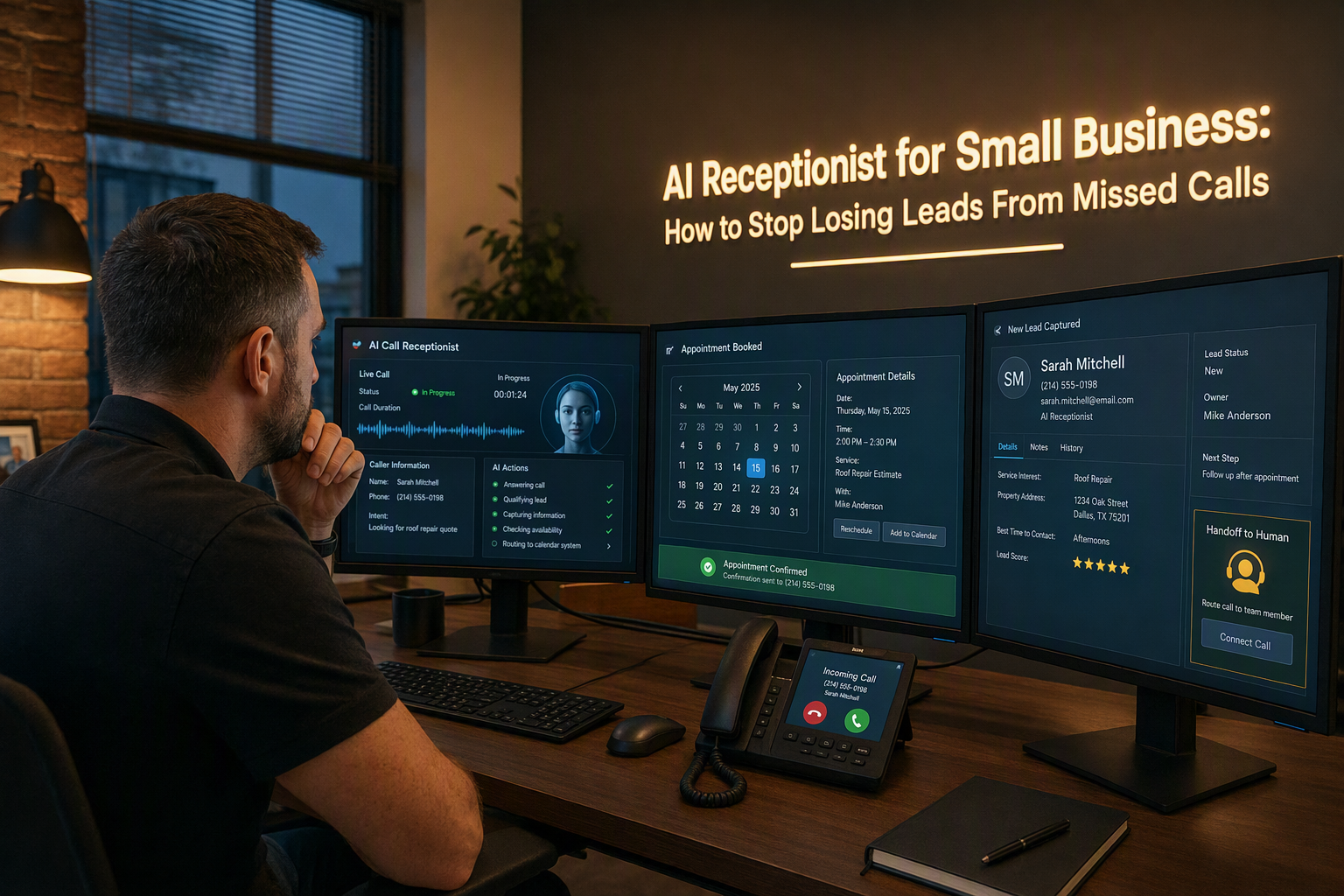
What if 20–35% of a small business’s incoming calls never reach a person? An AI receptionist for small business can prevent those missed calls from becoming lost leads by answering immediately, identifying caller intent, capturing essential details, booking appointments or creating callback tasks, and escalating urgent or complex conversations to a human.
The problem is larger than an occasional unanswered ring. Ainora’s 2026 missed-call research reports that small businesses miss 20–35% of incoming calls during business hours, while businesses with a single receptionist miss as many as 32% of calls during peak periods. These callers may be ready to request a quote, schedule a service, ask about availability, or compare providers—but every unanswered call creates friction at precisely the moment a prospect is trying to take action.
After-hours demand makes the gap even wider. NextPhone’s analysis of 1,446,980 calls across 2,074 businesses found that 28.5% of calls arrived outside normal business hours, and 51.2% were identified as real leads. The implication is practical: missed-call recovery should not mean sending every caller to a generic voicemail inbox. It should create a structured process for responding, qualifying, routing, and measuring outcomes.
This guide takes an implementation-first approach. You will learn how to build a provider-neutral workflow that:
- Answers calls when staff are busy, unavailable, or handling a peak-time queue
- Identifies whether the caller is a new lead, existing customer, emergency, vendor, or low-priority inquiry
- Captures required fields such as name, phone number, service type, location, preferred time, and urgency
- Books an appointment when the request fits defined rules
- Creates a callback task when a human must follow up
- Notifies the right staff member and records the outcome in a CRM or database
- Escalates sensitive, complex, or urgent conversations instead of guessing
The technical walkthrough will use Twilio Voice webhooks and TwiML for provider-specific call handling, alongside a Python Flask example. The guide will also separate reliable workflow logic from generated AI answers: an AI receptionist can summarize, classify, and draft responses, but business-critical actions should be validated against approved data, permissions, availability, and escalation rules.
Platforms such as CallMissed reflect this broader shift by combining AI voice agents with WhatsApp, CRM, and omnichannel follow-up capabilities, including support for voice and chat across 22 Indian languages. The goal is not to replace your team; it is to ensure that every legitimate opportunity receives a fast, traceable next step—even when nobody can pick up the phone.
How does an AI receptionist stop missed calls from becoming lost leads? An implementation-first answer
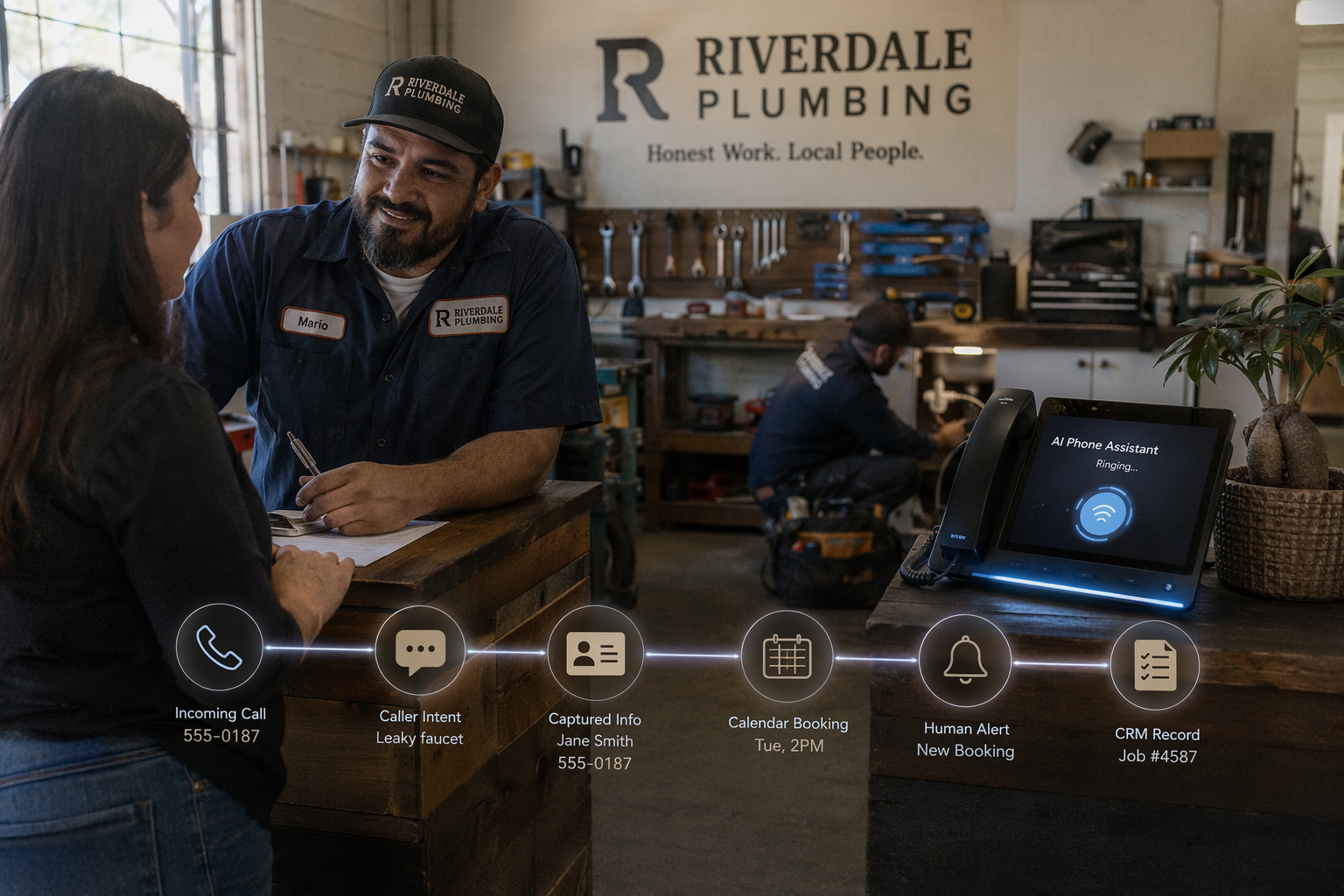
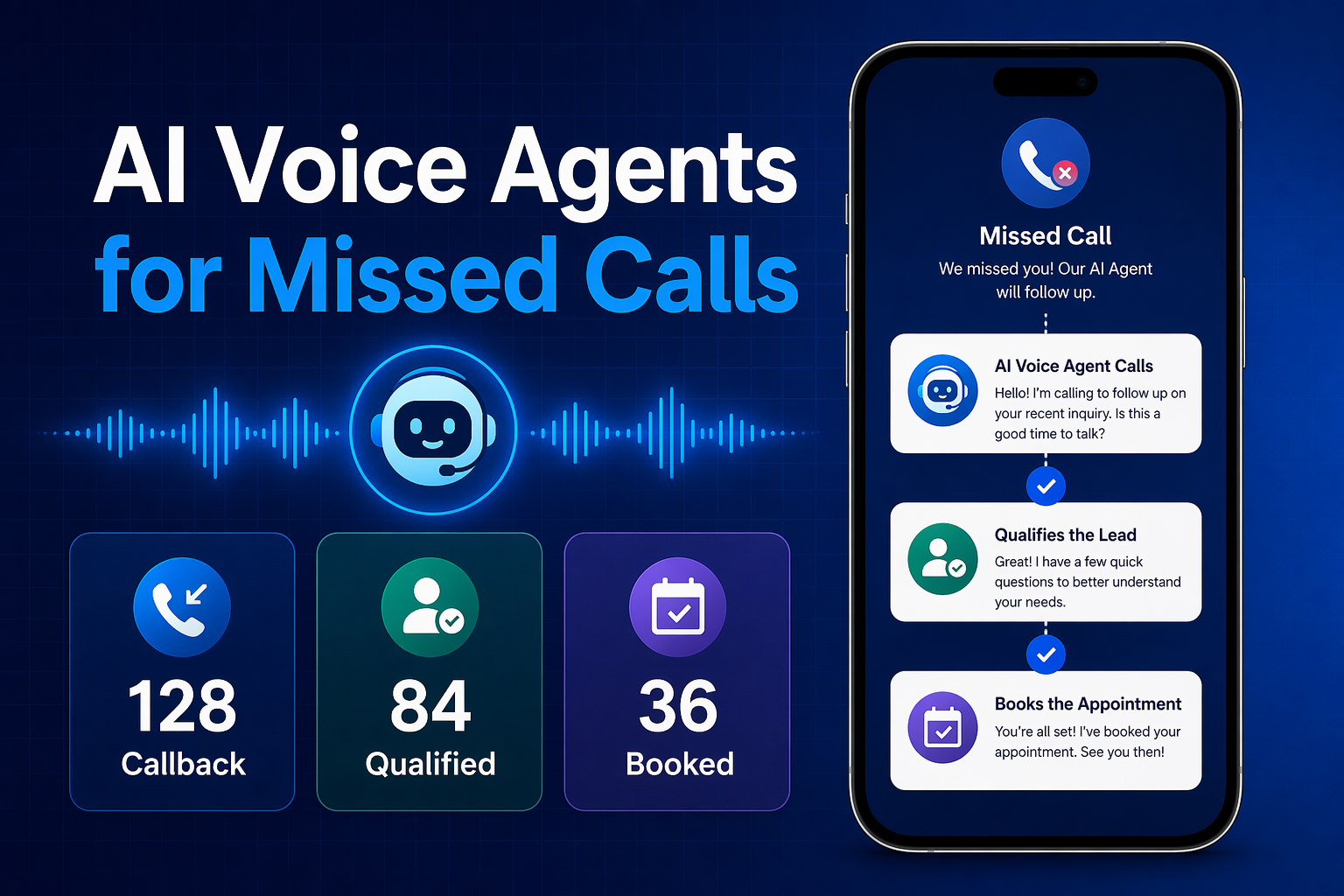
An AI receptionist stops missed calls from becoming lost leads by answering immediately, collecting the caller’s intent and contact details, then taking a defined next action: booking an appointment, creating a callback task, or escalating to a human. The reliable design is a measurable recovery workflow, not an autonomous replacement for staff.
How does an AI receptionist turn a call into a recoverable lead?
Implement the call as a state machine with explicit inputs, actions, and outcomes:
- Answer and identify intent: Ask whether the caller wants a quote, appointment, support, emergency help, or something else.
- Capture required fields: Collect name, callback number, service type, location, preferred time, and urgency.
- Validate the request: Check approved service areas, business hours, pricing rules, and calendar availability.
- Take one next action: Book a permitted appointment, create a callback task, transfer the call, or send a confirmation.
- Log and notify: Store the transcript summary, disposition, and recording identifier in a CRM or database.
This matters because NextPhone’s analysis of 1,446,980 calls across 2,074 businesses found that 28.5% arrived outside normal business hours and 51.2% were real leads. A voicemail captures presence; a structured workflow captures commercial intent.
| Workflow outcome | Required data | Automated action | Human involvement |
|---|---|---|---|
| Appointment request | Service, location, preferred time | Check approved slots and book | Review exceptions |
| Quote request | Name, phone, service details | Create qualified lead | Sales callback |
| Existing customer | Account or order reference | Route to support queue | Escalate if unresolved |
| Emergency or sensitive issue | Location, urgency, callback number | Immediate transfer or alert | Required |
| Spam or low-priority call | Intent and caller number | Log and close politely | Not normally required |
What should the Twilio Voice implementation do?
The following provider-specific Twilio example answers the call and gathers initial input with TwiML. Production code should add authentication, rate limits, consent notices, persistent storage, and a verified callback-number flow.
from flask import Flask, request, Response
from twilio.twiml.voice_response import VoiceResponse, Gather

app = Flask(__name__)

@app.post("/voice")
def voice():
    r = VoiceResponse()
    gather = Gather(
        input="speech",
        action="/intent",
        method="POST",
        speech_timeout="auto",
        timeout=5
    )
    gather.say(
        "Thanks for calling. Tell me what you need, such as a quote, "
        "an appointment, or urgent help."
    )
    r.append(gather)
    r.say("I could not hear you. Please call again.")
    return Response(str(r), mimetype="application/xml")

@app.post("/intent")
def intent():
    speech = request.form.get("SpeechResult", "")
    caller = request.form.get("From", "")
    # Send speech and caller to a classifier, CRM, and escalation rules.
    print({"caller": caller, "intent_text": speech})
    r = VoiceResponse()
    r.say("Thank you. A team member will follow up shortly.")
    return Response(str(r), mimetype="application/xml")
Keep generated answers separate from business-critical actions. An LLM may classify or summarize a call, but deterministic code should verify appointment availability, permissions, emergency rules, and CRM writes before confirming anything.
How should teams measure whether leads are being recovered?
Track answered-call rate, required-field completion, booking rate, callback-task creation, human escalation rate, and disposition accuracy. Compare these metrics by business hours and after-hours periods; do not judge success only by call duration.
Platforms such as CallMissed extend this workflow across AI voice agents, WhatsApp, CRM, and 22 Indian languages, helping businesses continue follow-up after the call ends.
What commonly breaks in an AI receptionist?
What if the caller gives incomplete information?
Should every caller be transferred to a human?
How do I prevent duplicate leads?
What happens when the calendar or CRM is unavailable?
How can I test the workflow safely?
What do you need before building an AI receptionist for small business? (TABLE)
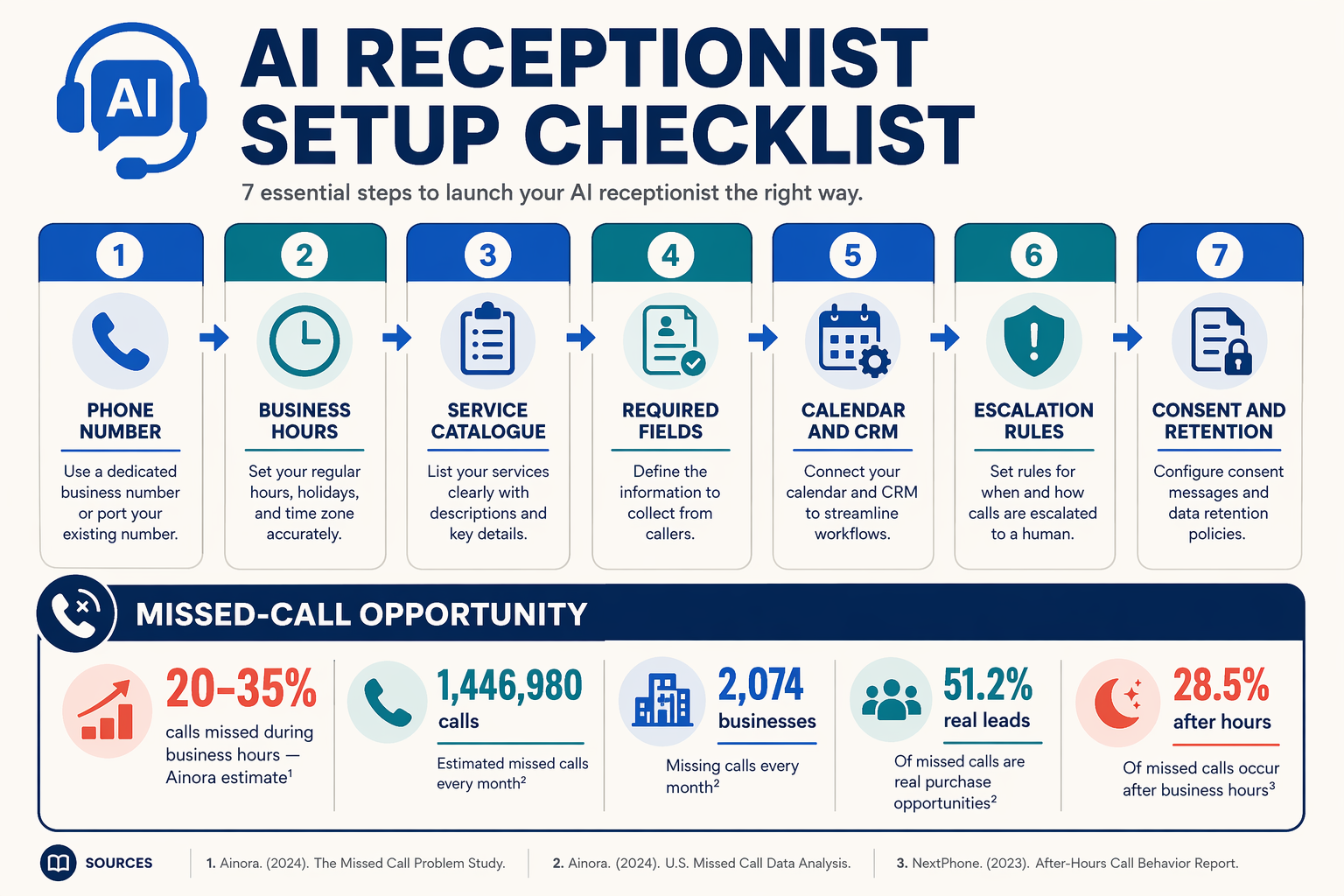
An AI receptionist stops missed calls from becoming lost leads by answering when staff are busy or unavailable, collecting the caller’s intent and contact details, booking an appointment or creating a callback task, and escalating urgent or complex requests to a person. Build it as a measurable workflow—answer, identify, capture, act, notify, and log—rather than as an unrestricted chatbot.
What call-volume benchmarks should shape the design?
Use these figures as planning benchmarks, not universal performance targets. They help determine whether your first release needs after-hours handling, peak-period overflow, and structured lead capture.
| Planning signal | Reported value | Source | Implementation implication |
|---|---|---|---|
| Small-business calls missed during business hours | 20–35% | Ainora, Missed Call Statistics, 2026 | Route unanswered calls to the AI receptionist before voicemail |
| Calls missed by single-receptionist businesses during peak periods | Up to 32% | Ainora, 2026 | Test concurrent-call and peak-period capacity |
| Calls analyzed and businesses included | 1,446,980 calls across 2,074 businesses | NextPhone, AI Receptionist Statistics, 2026 | Use a sufficiently large call sample when establishing your baseline |
| Calls arriving after normal business hours | 28.5% | NextPhone, 2026 | Include after-hours answering, lead capture, and callback creation in version one |
| Calls identified as real leads | 51.2% | NextPhone, 2026 | Track lead qualification separately from total answered calls |
What inputs does an AI receptionist need before development?
Define the minimum operating specification before writing prompts or integrating telephony:
| Prerequisite | Minimum specification | Verification step |
|---|---|---|
| Business phone access | Voice-enabled number, forwarding rule, voicemail fallback, and webhook endpoint | Test inbound, forwarded, declined, and after-hours calls |
| Lead fields | Name, callback number, intent, service, location, urgency, preferred time, and required consent | Add validation and a fallback question for every field |
| Knowledge base | Approved services, prices or ranges, hours, service areas, FAQs, policies, and emergency instructions | Assign an owner and review date to each category |
| Action integrations | Calendar or booking API, CRM/database, staff notifications, and email or SMS | Test booking, CRM writing, notification, and callback-task creation |
| Escalation rules | Transfer numbers, urgent keywords, confidence threshold, business-hours logic, and retry limit | Test emergency, angry-customer, low-confidence, and transfer-failure paths |
| Measurement plan | Answer rate, qualified leads, bookings, callback completion, transfers, and abandoned calls | Define event names and record a pre-launch baseline |
What business rules should be written down first?
Create explicit paths for the most common call intents:
- New lead: capture required fields, answer approved questions, and offer booking.
- Existing customer: identify the account or request, then route to the correct team.
- Urgent issue: follow the documented emergency procedure and escalate immediately.
- Unavailable service or location: explain the constraint and create a callback only when appropriate.
- Unclear request: ask one clarifying question, then transfer or create a callback task.
Keep generated answers separate from business-critical actions. The model may summarize intent or extract fields, but pricing, availability, permissions, appointment creation, and escalation should be validated by deterministic application logic.
For Indian businesses, platforms such as CallMissed combine AI voice, WhatsApp workflows, CRM capabilities, and support for 22 Indian languages. Whether you build provider-neutral infrastructure or use a managed platform, document the inputs, rules, human handoff, and measurable outcomes before connecting a live number.
How do I connect a business phone number to an AI receptionist?
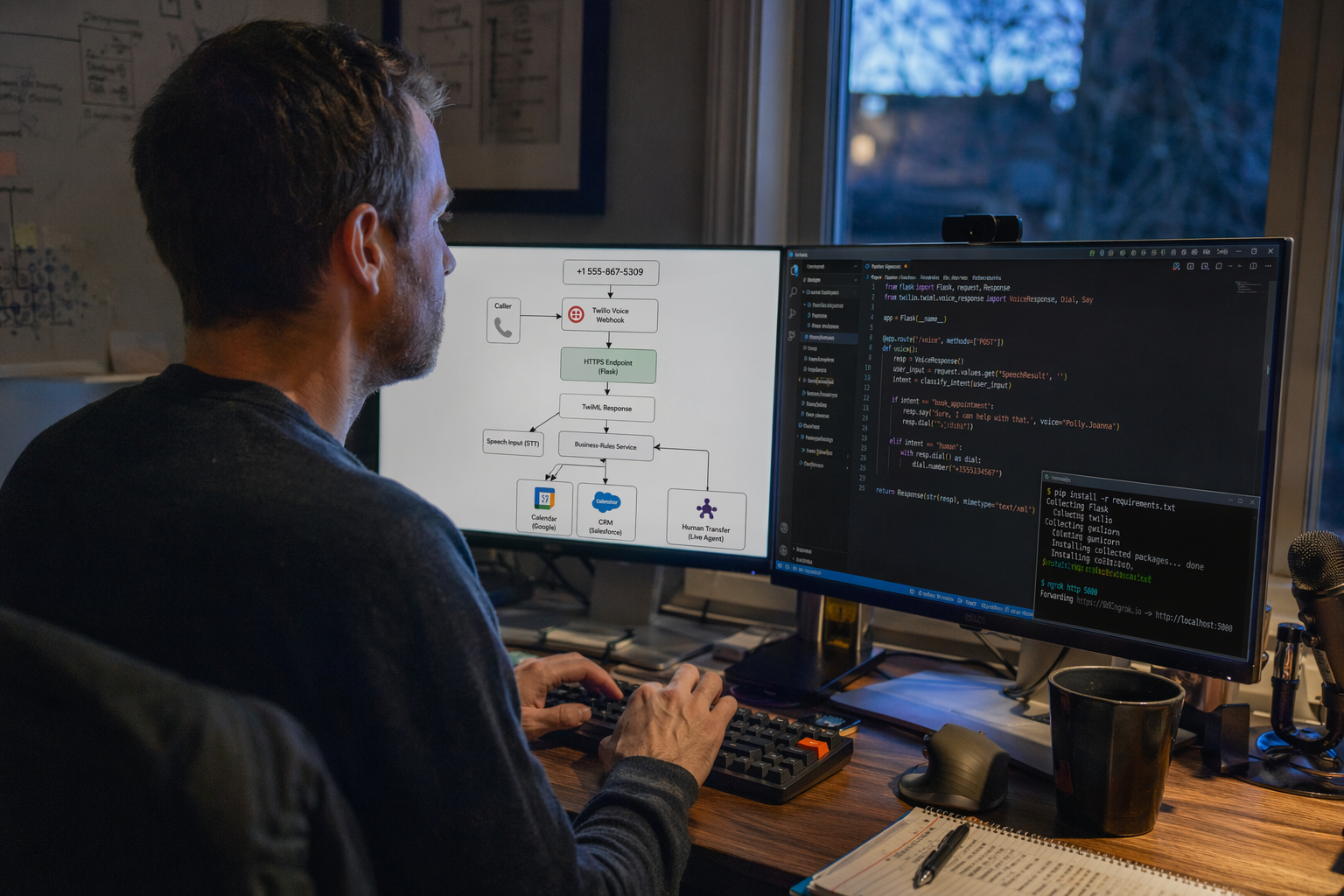
Connect a business phone number to an AI receptionist by routing calls from a telephony provider to a public webhook, then returning call instructions that connect the caller to speech recognition, conversation logic, business tools, and human escalation. The number should remain the customer-facing entry point; the AI receptionist becomes the first response layer when employees are busy, unavailable, or handling another customer.
What phone-number architecture should I use?
Start with a provider-neutral call path, then implement the provider-specific pieces:
- Business number: Buy, port, or verify an existing number with a voice provider such as Twilio.
- Inbound trigger: Configure the number’s “voice webhook” to call your HTTPS application.
- Call controller: Return TwiML or equivalent instructions to greet the caller, gather speech or keypad input, and continue the conversation.
- AI orchestration: Send the transcript and call state to your speech-to-text, LLM, and text-to-speech services.
- Business actions: Validate appointment availability, create a callback task, notify staff, and log the outcome.
- Escalation: Transfer urgent, sensitive, or low-confidence calls to a human number.
NextPhone’s analysis of 1,446,980 calls across 2,074 businesses found that 28.5% arrived outside normal business hours, so configure the same workflow for after-hours calls rather than relying only on daytime forwarding.
| Connection choice | Best use | Main implementation task | Lead-recovery risk |
|---|---|---|---|
| Direct AI answering | High call volume or after-hours coverage | Point the number to the AI webhook | Incorrect routing without escalation rules |
| Conditional forwarding | Existing staff answer first | Forward unanswered or busy calls | Short ring time can still create missed calls |
| SIP or carrier integration | Larger or multi-location teams | Connect telephony infrastructure to your agent | More network and monitoring complexity |
| Ported business number | Preserve an established number | Complete provider porting and verification | Temporary disruption during migration |
How do I configure a Twilio number?
The following example is Twilio-specific. In the Twilio Console, purchase or verify a voice-capable number, open Phone Numbers → Active numbers, and set A CALL COMES IN to your HTTPS endpoint, such as:
https://example.com/voice/incomingA minimal Python Flask handler can return TwiML that gathers the caller’s first response:
import os
from flask import Flask, request, Response
from twilio.twiml.voice_response import VoiceResponse, Gather

app = Flask(__name__)

@app.post("/voice/incoming")
def incoming_call():
    response = VoiceResponse()
    gather = Gather(
        input="speech",
        action="/voice/intent",
        method="POST",
        speech_timeout="auto",
        language="en-IN"
    )
    gather.say(
        "Thanks for calling Acme Services. "
        "How can we help you today?",
        voice="Polly.Aditi",
        language="en-IN"
    )
    response.append(gather)
    response.say("We could not hear you. Please call again or leave a message.")
    return Response(str(response), mimetype="text/xml")
Your /voice/intent endpoint should classify the request—such as new enquiry, existing customer, appointment, emergency, or vendor—and collect only the fields required for the next action. Do not let a generated answer claim that a booking exists: check the calendar or CRM, confirm the result, and create a callback task when a human must respond.
Platforms such as CallMissed provide an alternative to assembling every layer yourself, combining AI voice agents with omnichannel follow-up; its voice and chat capabilities support 22 Indian languages, useful when callers prefer regional-language conversations.
What should I test before publishing the number?
- Call during business hours, after hours, and while all staff lines are busy.
- Confirm caller ID, recording consent, language selection, and human transfer behavior.
- Test silence, background noise, wrong numbers, urgent language, and unsupported requests.
- Verify that every completed call creates a transcript, intent, lead record, and measurable outcome.
- Protect the webhook with HTTPS, signature validation, rate limits, and secret environment variables.
What should the call workflow do step by step, and how can the code book or escalate a lead?
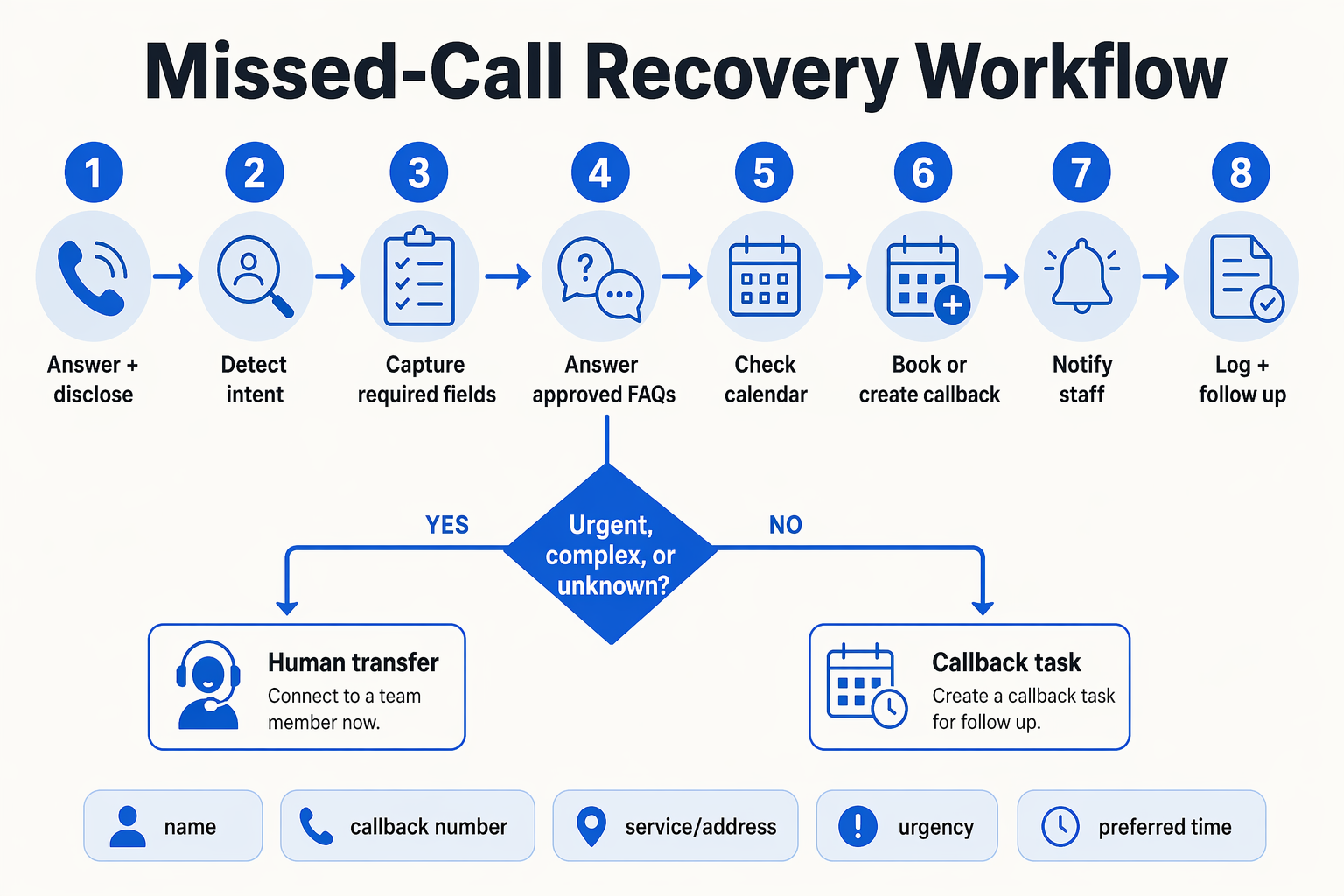
An AI receptionist stops missed calls becoming lost leads by answering when staff are busy or unavailable, capturing the caller’s details, and turning each conversation into a booking, callback task, transfer, or documented resolution. The system should qualify routine enquiries automatically while escalating urgent, ambiguous, or low-confidence calls to a human.
What should the call workflow do step by step?
Use a deterministic workflow around the AI model:
- Answer and disclose: Identify the business, disclose that an AI assistant is responding, and offer human transfer.
- Identify intent: Classify the call as
NEW_LEAD,BOOKING,URGENT,EXISTING, orGENERAL. - Capture fields: Collect name, callback number, service, location, preferred time, and urgency. Confirm critical values aloud.
- Validate rules: Check coverage, hours, availability, permissions, and customer records.
- Choose an outcome: Book an approved slot, create a callback task, answer from a verified knowledge base, or transfer.
- Notify and log: Store the transcript summary, captured fields, status, and next action in the CRM.
NextPhone’s 2026 analysis of 1,446,980 calls across 2,074 businesses found that 51.2% were real leads and 28.5% arrived after hours. This supports routing after-hours calls into the same qualification and follow-up pipeline instead of voicemail.
How should the AI code or escalate a lead?
Treat classification as a validated codebook, not an unconstrained AI decision.
| Code | Meaning | Default action | Escalate when |
|---|---|---|---|
NEW_LEAD | New enquiry or quote request | Create callback task | Required field is missing |
BOOKING | Appointment request | Validate availability | No approved slot exists |
URGENT | Safety, outage, or emergency | Transfer immediately | Always notify on-call staff |
EXISTING | Existing customer support | Retrieve verified record | Billing, complaint, or identity issue |
This provider-specific Twilio Voice/TwiML example is runnable and uses deterministic classification plus an in-memory callback-task stub:
import os
from flask import Flask, request, Response
from twilio.twiml.voice_response import VoiceResponse, Gather

app = Flask(__name__)
TASKS = []
CODES = {"NEW_LEAD", "BOOKING", "URGENT", "EXISTING", "GENERAL"}
TRANSFER_TO = os.getenv("TRANSFER_TO", "+15551234567")

def classify(text):
    t = text.lower()
    if any(x in t for x in ("emergency", "danger", "gas leak", "urgent")):
        return {"intent": "URGENT", "urgency": "high", "confidence": 0.98}
    if any(x in t for x in ("book", "appointment", "schedule")):
        return {"intent": "BOOKING", "urgency": "normal", "confidence": 0.90}
    if any(x in t for x in ("price", "quote", "new", "interested")):
        return {"intent": "NEW_LEAD", "urgency": "normal", "confidence": 0.88}
    if any(x in t for x in ("account", "existing", "invoice")):
        return {"intent": "EXISTING", "urgency": "normal", "confidence": 0.86}
    return {"intent": "GENERAL", "urgency": "normal", "confidence": 0.55}

def validate(result):
    if result["intent"] not in CODES or not 0 <= result["confidence"] <= 1:
        raise ValueError("Invalid classifier output")
    result["next_action"] = "transfer" if (
        result["urgency"] == "high" or result["confidence"] < 0.80
    ) else "callback"
    return result

@app.post("/voice")
def voice():
    r = VoiceResponse()
    g = Gather(input="speech", action="/classify", method="POST",
               speech_timeout="auto")
    g.say("You are speaking with an AI assistant. Briefly tell me how we can help.")
    r.append(g)
    r.say("I could not hear you. Please call again.")
    return Response(str(r), mimetype="text/xml")

@app.post("/classify")
def classify_call():
    result = validate(classify(request.form.get("SpeechResult", "")))
    r = VoiceResponse()
    if result["next_action"] == "transfer":
        r.say("I will connect you with a team member now.")
        r.dial(TRANSFER_TO)
    else:
        TASKS.append({"from": request.form.get("From"), "result": result})
        r.say("Thanks. Our team will follow up shortly.")
    return Response(str(r), mimetype="text/xml")

if __name__ == "__main__":
    app.run(port=5000, debug=True)
In production, replace TASKS and the classifier with authenticated CRM, calendar, and model APIs. Add Twilio signature validation, durable storage, retry handling, transcript retention rules, and explicit recording/consent controls. CallMissed follows this broader pattern across AI voice, WhatsApp, CRM follow-up, and 22 Indian languages.
What should be tested before launch?
What if speech recognition is uncertain?
What if a caller gives an incomplete number?
Should the AI promise an appointment?
When should calls transfer immediately?
What proves the workflow is working?
How can I qualify callers, book appointments, transfer safely, and measure recovery? (TABLE)
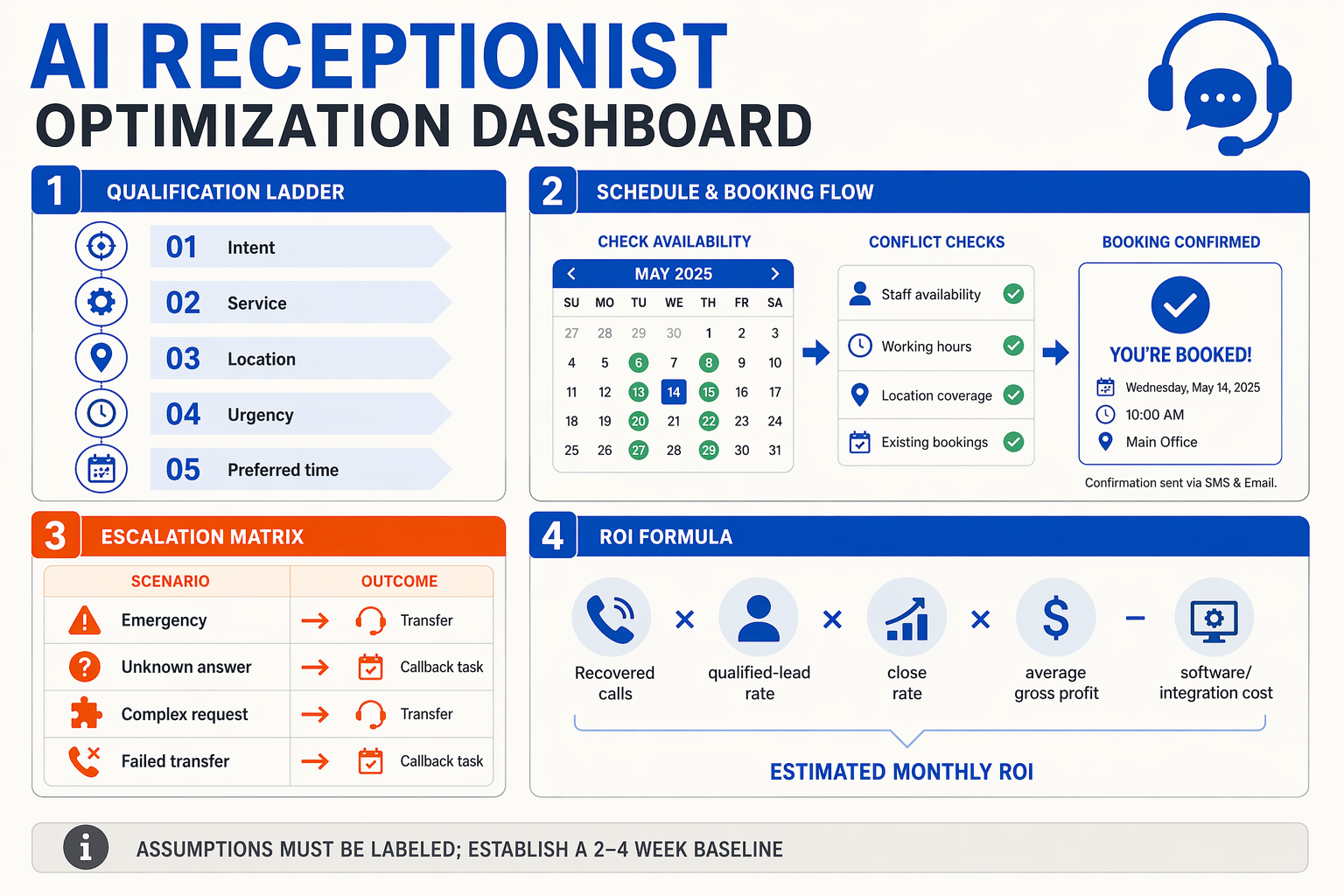
An AI receptionist helps recover missed-call leads by qualifying every caller, completing safe next actions, and recording measurable outcomes. The workflow should book appointments only when availability and business rules are verified; otherwise, it should create a callback task or transfer the call to an appropriate human.
What should the call workflow do from greeting to outcome?
Use a structured decision flow rather than allowing the model to improvise:
- Identify intent: Ask whether the caller wants a quote, appointment, existing-order support, emergency help, or something else.
- Capture required fields: Record the caller’s name, callback number, service type, location, preferred time, and urgency. Confirm the phone number verbally before ending.
- Qualify against rules: Check service area, opening hours, minimum job requirements, customer status, and whether the request is supported.
- Complete one approved action: Book an available slot, create a callback task with an owner and deadline, or transfer to a human queue.
- Confirm and log: Repeat the next step, send an SMS or WhatsApp confirmation where appropriate, and store the transcript, disposition, and lead source.
NextPhone’s analysis of 1,446,980 calls across 2,074 businesses found that 51.2% were real leads and 28.5% arrived outside normal business hours. That makes “answered” an incomplete success metric: the system must produce a traceable business outcome.
How should qualification, booking, and transfer rules work?
| Stage | AI action | Validation or safety rule | Recorded outcome |
|---|---|---|---|
| New inquiry | Ask intent, service, location, and urgency | Reject unsupported areas or services using approved rules | Qualified, disqualified, or needs review |
| Appointment request | Query the live calendar and offer eligible slots | Never invent availability; require explicit caller confirmation | Appointment ID and confirmation time |
| Callback request | Summarize need and create a task | Assign an owner, priority, and deadline | Callback task status |
| Urgent or sensitive call | Collect minimum context and transfer | Escalate emergencies, complaints, payments, or uncertainty | Transfer destination and disposition |
| Existing customer | Verify permitted details before discussing account information | Use approved verification, not caller-provided assumptions | Customer record and resolution path |
| No answer or failed transfer | Preserve the conversation summary | Retry only within consent and contact-time rules | Recovery attempt and final status |
For provider-neutral systems, keep the workflow state in your application database. Twilio Voice webhooks and TwiML can handle provider-specific call control, while Flask or another backend should decide whether an appointment, callback, or transfer is permitted. Generated AI output may classify intent and summarize a call, but deterministic code should validate calendar slots, permissions, emergency routing, and required fields.
How do I measure recovered leads?
Track a funnel rather than vanity metrics:
- Answered-call rate: answered calls ÷ inbound calls
- Qualified-lead rate: qualified calls ÷ answered calls
- Action-completion rate: bookings plus assigned callbacks ÷ qualified leads
- Human-escalation rate: transferred calls ÷ answered calls
- Recovery rate: leads that receive a confirmed next step ÷ estimated missed or after-hours leads
- Revenue attribution: closed opportunities linked to call ID or campaign
Review recordings and dispositions weekly, especially calls marked “uncertain.” Platforms such as CallMissed extend this model across AI voice agents, WhatsApp, CRM workflows, and 22 Indian languages, helping businesses maintain one follow-up record across channels rather than treating a call as an isolated event.
Which option is best for stopping missed calls: AI receptionist, voicemail, answering service, or in-house receptionist? (TABLE)
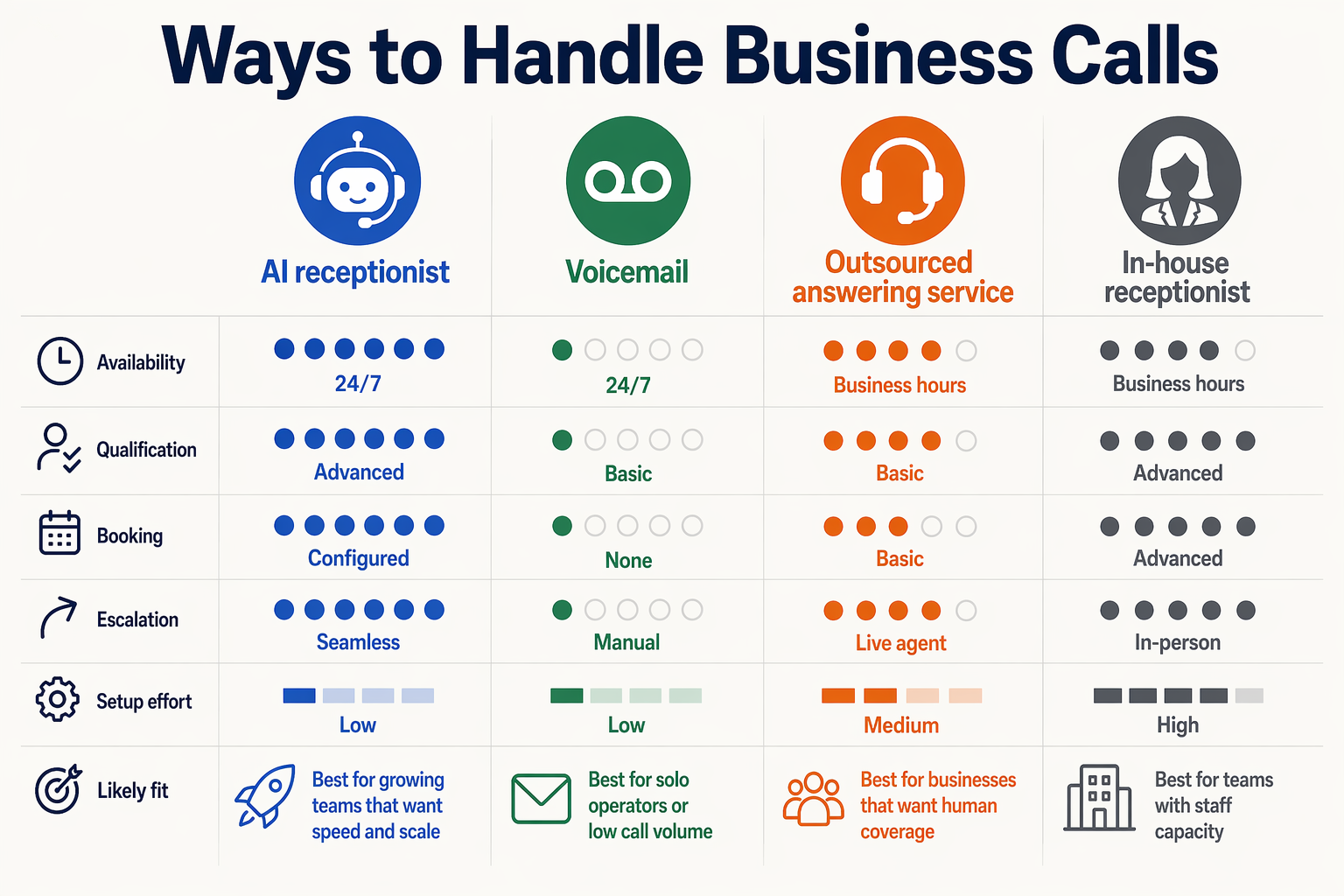
The best option for stopping missed calls is usually a hybrid: an AI receptionist handles every call immediately, while a human receptionist or staff member takes over when judgment, empathy, or complex decision-making is required. Voicemail and answering services can reduce some missed opportunities, but they do not consistently capture, qualify, book, and track leads in real time.
How do the main options compare? (TABLE)
| Option | Availability and response | Lead-capture capability | Best fit | Main limitation |
|---|---|---|---|---|
| AI receptionist | 24/7, including peak periods and after-hours | Collects details, identifies intent, books appointments, creates callback tasks, and escalates | Businesses with unpredictable call volume or frequent missed calls | Requires careful setup, testing, and human escalation rules |
| Voicemail | Available whenever the caller reaches the mailbox | Caller may leave a name and message | Very low-volume businesses with reliable callback processes | Many callers hang up or provide incomplete information; follow-up is delayed |
| Answering service | Usually covers agreed hours; a person answers calls | Can record messages, transfer calls, and follow scripts | Businesses wanting human interaction without hiring full-time staff | Quality, availability, and appointment workflows depend on the service and plan |
| In-house receptionist | Strong during staffed hours; limited during breaks, queues, and absences | Can ask questions, judge urgency, and manage exceptions | Businesses with steady call volume and complex customer interactions | Capacity is finite, and one receptionist can become a bottleneck |
| AI plus human team | AI answers overflow and after-hours calls; staff handle escalations | Structured capture plus human follow-up | Most small businesses seeking coverage without removing human support | Needs clear ownership for callbacks, alerts, and unresolved conversations |
Why is voicemail usually the weakest missed-call recovery option?
Voicemail records an attempted contact, but it does not guarantee a usable lead. A caller may omit their service requirement, preferred time, location, or urgency—and the business still has to discover those details later.
The scale of the problem makes that delay material. Ainora’s 2026 missed-call research reports that small businesses miss 20–35% of incoming calls during business hours, with single-receptionist businesses missing as many as 32% during peak periods. A voicemail-only process therefore leaves the business exposed precisely when demand is highest.
NextPhone’s 2026 analysis of 1,446,980 calls across 2,074 businesses found that 28.5% of calls arrived outside normal business hours, while 51.2% were identified as real leads. An AI receptionist can answer those calls, capture structured information, and create a defined next step instead of placing the entire burden on a later callback.
When should a small business choose an AI receptionist?
Choose an AI receptionist when at least one of these conditions applies:
- Calls arrive while employees are driving, serving customers, or working on-site.
- The business receives meaningful after-hours or weekend demand.
- Staff need consistent intake fields before calling prospects back.
- Appointments can be booked using defined availability and eligibility rules.
- Managers want metrics such as answered calls, qualified leads, bookings, escalations, and completed callbacks.
The safest implementation is not “let the AI handle everything.” Configure the AI to answer, identify intent, collect required fields, and perform approved actions; route emergencies, complaints, sensitive requests, and uncertain answers to a human.
Platforms such as CallMissed extend this model across AI voice agents, WhatsApp, and CRM-style follow-up, with voice and chat support across 22 Indian languages. For a small business, the practical decision is therefore less about replacing the receptionist and more about ensuring that every legitimate call receives a traceable next action.
What can go wrong with an AI receptionist missed-calls workflow? (TABLE)
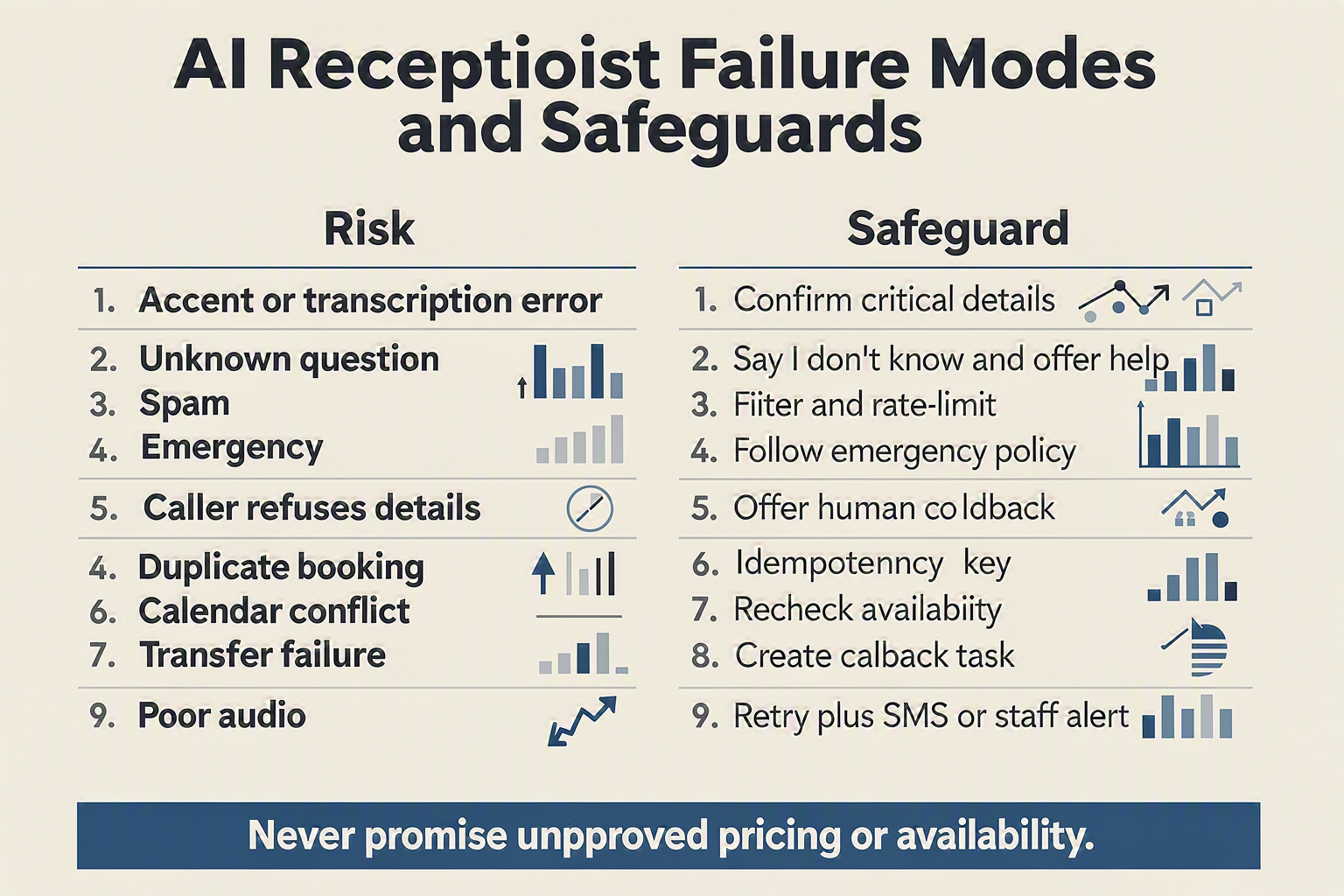
An AI receptionist workflow fails when it treats every call as a simple conversation instead of a business process. The safeguards are validated data capture, explicit escalation rules, human ownership, consent controls, and outcome monitoring—so a call ends with a reliable next action rather than an attractive but unusable transcript.
NextPhone’s analysis of 1,446,980 calls across 2,074 businesses found that 28.5% arrived outside normal business hours and 51.2% were identified as real leads. That makes after-hours handling valuable, but only if the workflow can distinguish a genuine opportunity from spam, an existing customer, or an urgent issue.
| Failure mode | What it looks like | Lead or customer impact | Practical control |
|---|---|---|---|
| The call is answered but intent is misclassified | A quote request is labeled as support, or an emergency is treated as a routine inquiry | The caller reaches the wrong queue or receives an unsuitable response | Use a small, explicit intent taxonomy such as new_lead, existing_customer, vendor, emergency, and other; require a confidence threshold and route uncertain cases to a person |
| Required details are missing or inaccurate | The system captures a name but omits phone number, service type, location, or preferred time | Staff cannot call back, price the request, or determine service coverage | Define mandatory fields before completion; read critical values back to the caller and validate phone numbers, dates, addresses, and business-area eligibility |
| The agent invents availability, pricing, or policy | Generated speech promises an appointment slot, discount, turnaround time, or service the business does not offer | The business creates operational errors and damages customer trust | Keep generated answers grounded in an approved knowledge base; check live calendars, pricing rules, and permissions before confirming any business-critical action |
| Escalation has no accountable owner | The AI says “someone will call you” but creates no task, deadline, or notification | A qualified lead disappears after the call, recreating the original missed-call problem | Create a callback task with caller details, transcript summary, priority, owner, due time, and status; alert a fallback owner if the task remains untouched |
| Urgent or sensitive calls are handled too slowly | The system continues questioning a caller reporting danger, medical risk, fraud, or an irate complaint | Delayed intervention can create safety, legal, or reputational exposure | Detect emergency and sensitive-intent phrases early; provide the approved emergency instruction, transfer when possible, and notify a human immediately |
| The workflow is not measured end to end | Call volume is reported, but bookings, callbacks, transfers, and outcomes are unknown | The business cannot prove whether automation recovers revenue or where leads leak | Track answered, qualified, booked, callback_created, human_contacted, won, and lost; review failure reasons weekly |
For context, Ainora’s 2026 research reports that small businesses miss 20–35% of incoming calls during business hours, with single-receptionist businesses missing up to 32% during peak periods. A reliable workflow should therefore be tested under simultaneous-call load, not only with a successful one-to-one demo.
Before launch, run test calls for:
- Incorrect names, noisy audio, accents, interruptions, and disconnected calls
- Out-of-hours requests and callers who refuse to provide information
- No calendar availability, duplicate bookings, and invalid service locations
- Emergency language, human-transfer failure, and notification failure
- Duplicate callers across phone, WhatsApp, CRM, or web forms
Platforms such as CallMissed extend this recovery model across AI voice agents, WhatsApp, CRM, and omnichannel follow-up, including voice and chat support across 22 Indian languages. The important design principle remains provider-neutral: automation may collect and organize information, but validated systems and accountable people must control consequential actions.
How do I troubleshoot an AI receptionist that is not answering, recording, booking, or transferring calls?
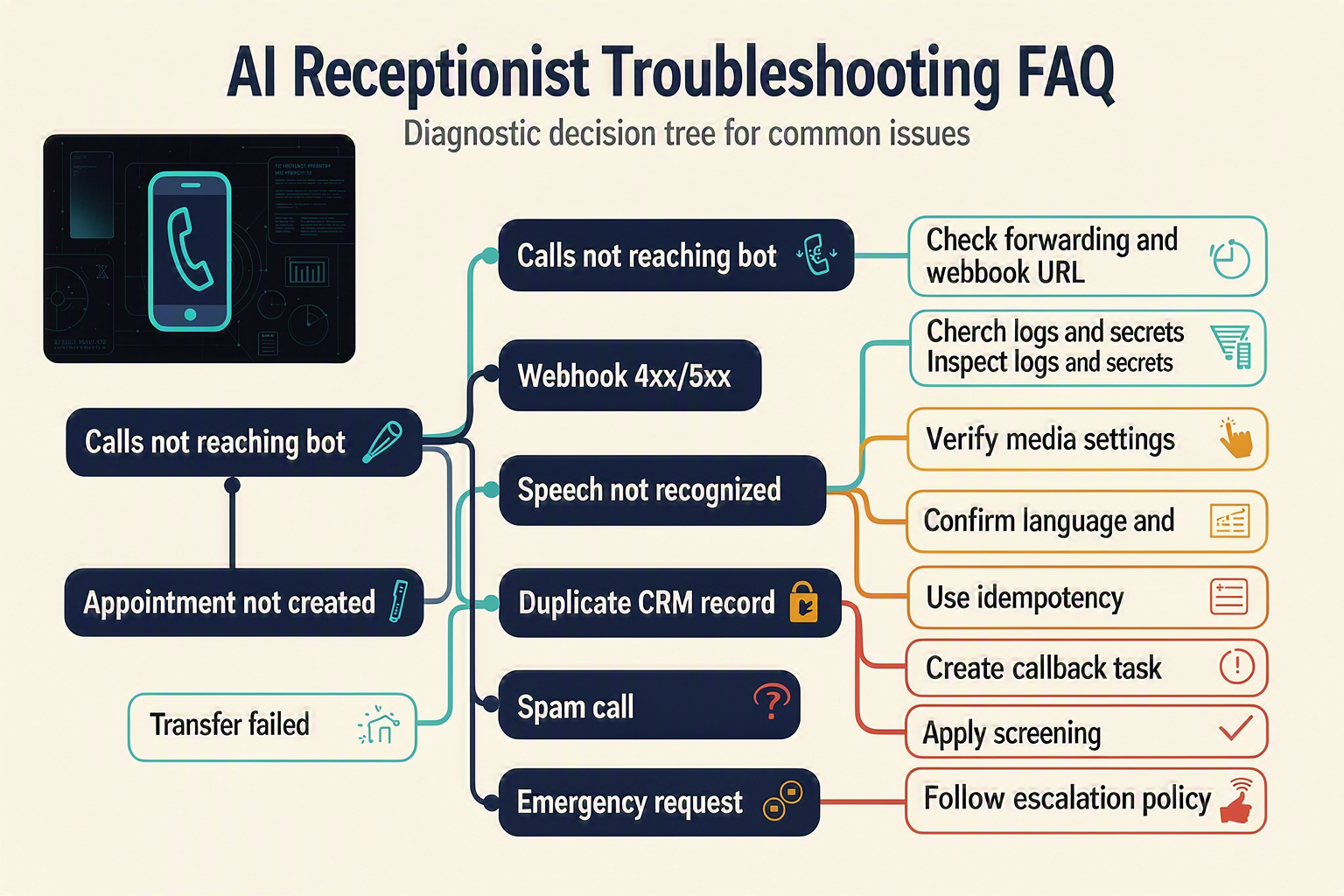
Why is my AI receptionist for small business not answering incoming calls?
POST versus GET requests; a failed webhook can send callers to voicemail or end the call. Because NextPhone’s 2026 analysis found that 28.5% of 1,446,980 business calls arrived outside normal business hours, also test after-hours routing, holidays, concurrency limits, and fallback numbers.Why does my AI receptionist answer but fail to record the caller’s details?
How do I fix an AI receptionist that is not recording calls or transcripts?
Why is my AI receptionist not booking appointments correctly?
Why can’t my AI receptionist transfer calls to a human agent?
How should I monitor an AI receptionist for small business after deployment?
How do I measure whether the AI receptionist is recovering revenue, and what should I do next?
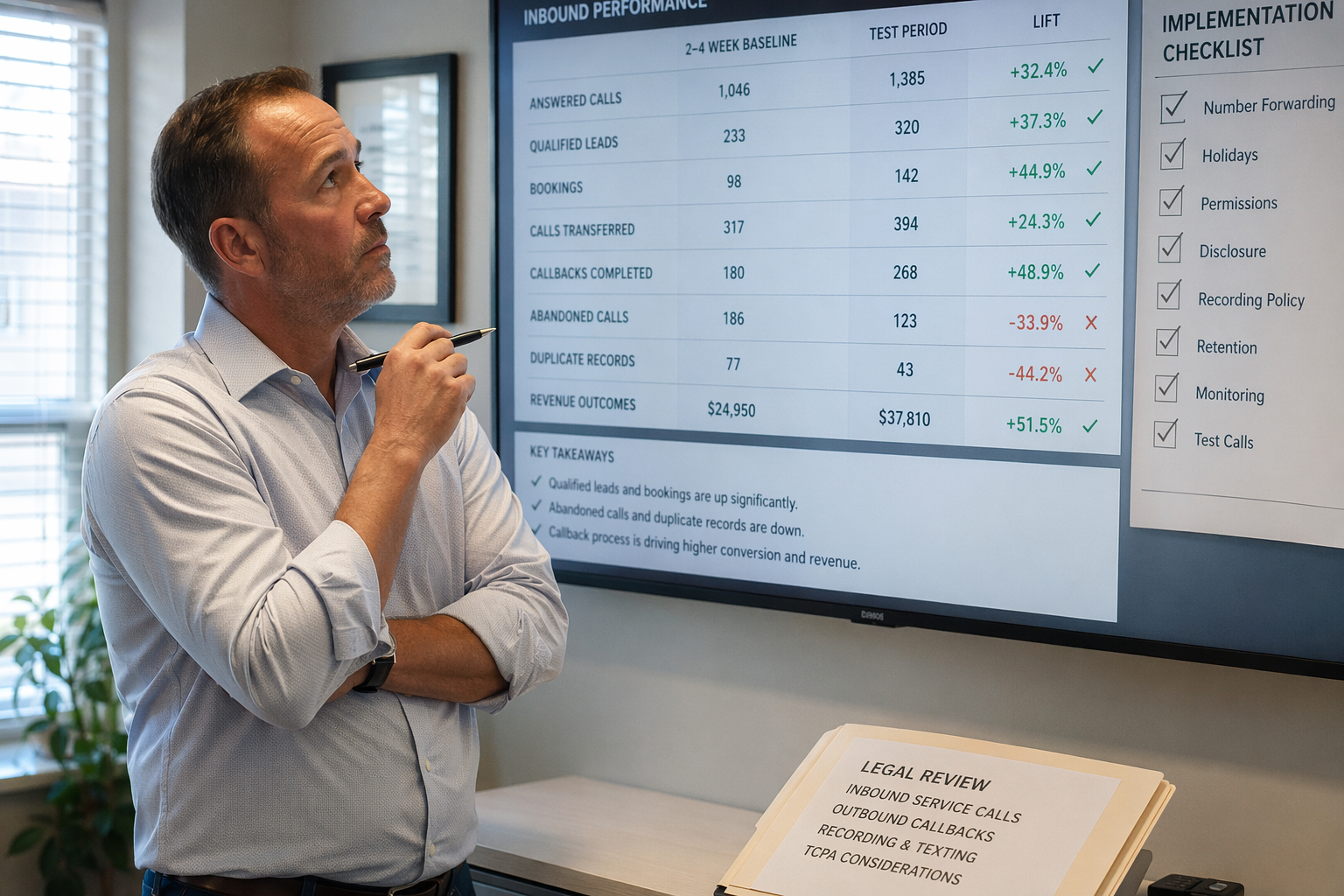
An AI receptionist helps recover revenue when you measure the complete journey from answered call to qualified lead, booked appointment, and completed sale—not just call volume. Compare AI-handled calls with a baseline, assign every outcome a value, and improve the workflow where callers abandon, fail qualification, or wait too long for human follow-up.
What should I measure after launching the AI receptionist?
Track outcomes in your CRM or database using a unique call_id, caller number, timestamp, campaign source, intent, and final disposition. The most useful metrics are:
| Metric | Calculation | Why it matters | Example target |
|---|---|---|---|
| Answer rate | Answered calls ÷ inbound calls | Shows whether demand reaches a conversation | Compare with pre-launch baseline |
| Qualified-lead rate | Qualified calls ÷ answered calls | Measures whether the agent captures genuine opportunities | Segment by service and source |
| Booking rate | Appointments ÷ qualified leads | Measures conversion into a concrete next step | Track by agent version |
| Human follow-up SLA | Median time from callback task to first human attempt | Reveals operational leakage after automation | Set a business-specific limit |
| Recovered revenue | Completed sales attributed to AI calls × average gross profit | Connects call handling to financial results | Use confirmed CRM outcomes |
The baseline matters because Ainora’s 2026 research reports that small businesses miss 20–35% of incoming calls during business hours. NextPhone’s 2026 analysis of 1,446,980 calls across 2,074 businesses found that 51.2% were real leads and 28.5% arrived after hours. Use those figures as context, not as a substitute for your own before-and-after data.
How do I attribute revenue to a recovered call?
Create a simple attribution chain:
- Store the inbound call record and source, such as Google Business Profile, website, or referral.
- Attach the
call_idto the lead, appointment, invoice, and final CRM status. - Mark outcomes as booked, human callback completed, won, lost, or unqualified.
- Calculate recovered revenue using confirmed sales, not optimistic AI predictions.
A practical formula is:
Recovered revenue = AI-attributed won deals × average gross profit per deal
Run a 30-day baseline before launch when possible, then compare equivalent periods by weekday, hour, service type, and traffic source. Also review a sample of transcripts or call summaries weekly for incorrect intent classification, missed escalation, and inaccurate booking data.
What should I do next if the numbers are weak?
Fix the narrowest measurable bottleneck first:
- Low answer rate: check telephony routing, concurrency, timeout, and after-hours schedules.
- Low qualification: tighten required fields and add explicit confirmation prompts.
- Low booking rate: validate calendar availability and service-area rules.
- Slow follow-up: assign callback tasks to a named queue with an owner and deadline.
- High escalation rate: expand the approved knowledge base without allowing unsupported answers.
Platforms such as CallMissed combine AI voice agents with CRM and omnichannel follow-up; its support for voice and chat across 22 Indian languages can help teams compare regional performance rather than treating every caller identically.
What troubleshooting questions should I ask before scaling?
Why are calls answered but not producing leads?
Why are appointments being booked incorrectly?
Why is recovered revenue overstated?
When should I add more automation?
What is the next implementation step?
Conclusion
An AI receptionist helps a small business stop losing leads by turning every unanswered call into a structured next step: answer immediately, identify intent, capture required details, book an appointment or create a callback task, notify the right person, and escalate urgent or complex conversations.
The case for this workflow is measurable. Ainora’s 2026 research reports that small businesses miss 20–35% of incoming calls during business hours, while NextPhone’s analysis of 1,446,980 calls across 2,074 businesses found that 28.5% arrived after hours and 51.2% were real leads. A voicemail alone cannot reliably qualify or recover that demand.
Key takeaways:
- Treat the AI receptionist as a missed-call recovery workflow, not a replacement for staff.
- Separate provider-specific handling—such as Twilio Voice webhooks and TwiML—from provider-neutral qualification, booking, notification, and CRM logic.
- Use AI for classification, summaries, and draft responses, but validate business-critical actions against approved data, permissions, availability, and escalation rules.
- Measure outcomes: answered calls, qualified leads, booked appointments, completed callbacks, escalations, and conversion.
As voice agents improve, watch for tighter multilingual, WhatsApp, CRM, and omnichannel coordination. To explore how AI communication is evolving, check out CallMissed, an AI infrastructure platform powering voice agents and multilingual chatbots for businesses. The important question is no longer whether calls will be missed—it is whether your workflow knows what to do next.
Related Reading
Discussion
Related Posts
Ready to automate customer conversations?
Launch AI voice agents and WhatsApp bots with CallMissed — one API, 22+ Indian languages.