
AI Receptionist Use Cases for Small Business: 8 Practical Applications


Learn the most useful AI receptionist use cases for small businesses, including call answering, booking, lead qualification, routing, setup, and ROI measurement.
AI Receptionist Use Cases for Small Business: 8 Practical Applications
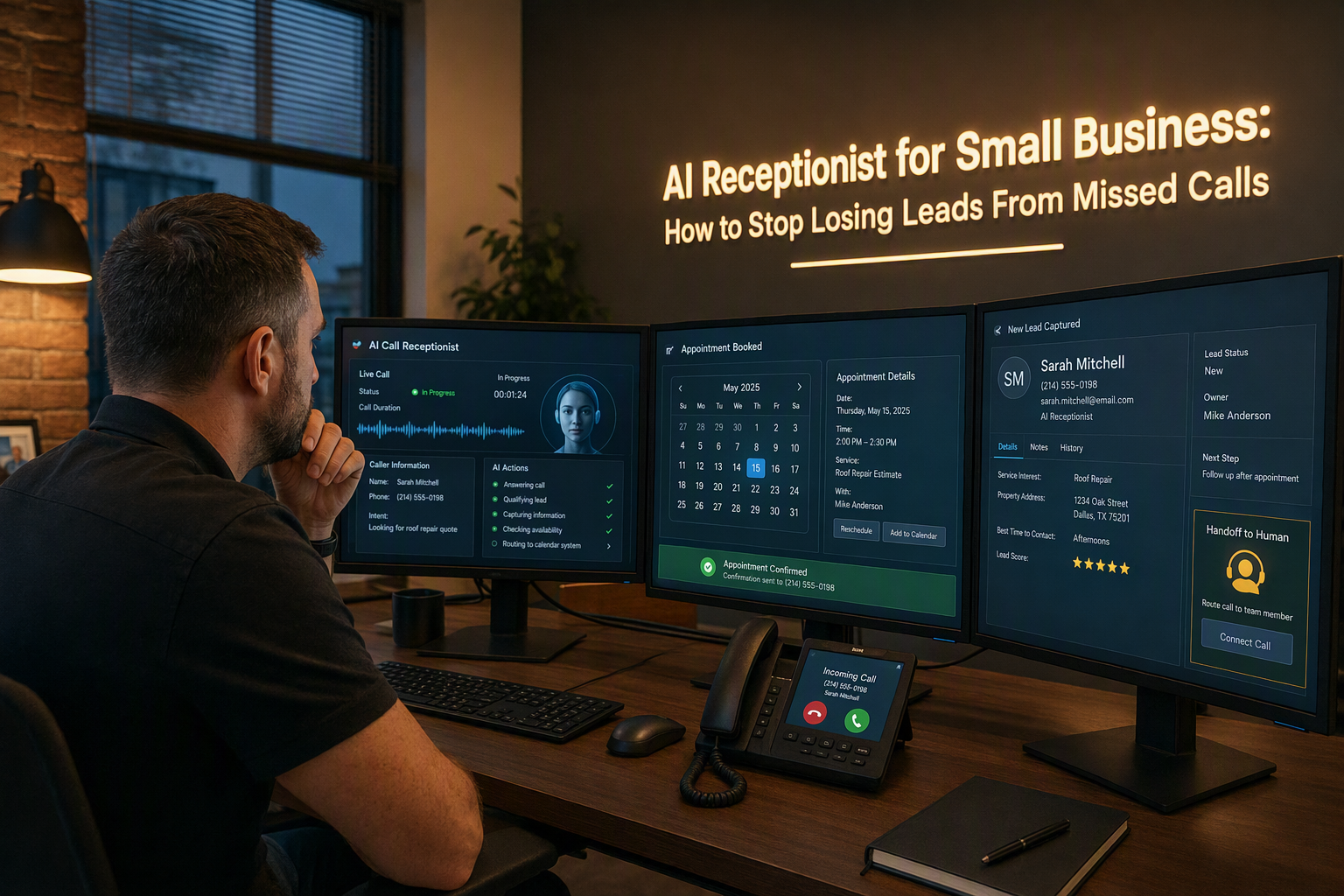
What are the most useful AI receptionist use cases for small businesses? The highest-value applications are answering business calls 24/7, booking appointments, capturing and qualifying leads, handling frequently asked questions, routing callers, sending follow-ups, managing call spikes, and supporting multilingual customers. An AI receptionist for small business is most useful when it removes repetitive phone work while ensuring urgent or complex conversations still reach a human.
The need is practical, not theoretical. A 2026 report from AInora says the average small service business answers 71% of incoming calls during business hours, while AI-assisted answering can raise the reported answer rate to 99.7%. NextPhone’s 2026 small-business guide reports that some AI receptionists answer calls in under five seconds and operate 24/7. Together, these figures explain why an AI receptionist that answers business calls can protect revenue outside office hours, during lunch breaks, and when a small team is already serving customers.
This guide focuses on applications that can be implemented and measured—not generic claims about artificial intelligence. You will learn how to:
- Set up 24/7 call answering for new and existing customers
- Use an AI receptionist to book appointments, reschedule visits, and send confirmations
- Capture caller details and qualify leads before a salesperson follows up
- Automate answers to pricing, availability, location, hours, and policy questions
- Route urgent calls to the right employee, department, or on-call number
- Recover missed opportunities with callbacks, SMS or WhatsApp follow-ups, and reminders
- Handle seasonal call spikes without immediately hiring additional reception staff
- Support regional and international customers with multilingual voice interactions
The practical sections will show how to map a call flow, define escalation rules, connect scheduling or CRM tools, test the assistant, and monitor outcomes such as answered-call rate, booked appointments, qualified leads, transfers, and unresolved questions. A data table will help compare the use cases by business value, setup complexity, and the metrics worth tracking. The implementation examples will also clarify where automation should stop: an AI receptionist should not invent prices, promise unavailable services, or handle sensitive situations without an appropriate human handoff.
Platforms such as CallMissed reflect this broader shift by combining AI voice agents with WhatsApp Business calling, chat, and multilingual support across 22 Indian languages. Whether you run a clinic, salon, home-services company, real-estate agency, legal practice, or local retailer, the goal is the same: make every customer interaction easier to answer, qualify, schedule, or route—without making customers navigate an opaque automated maze.
What are the most useful AI receptionist use cases for small businesses?
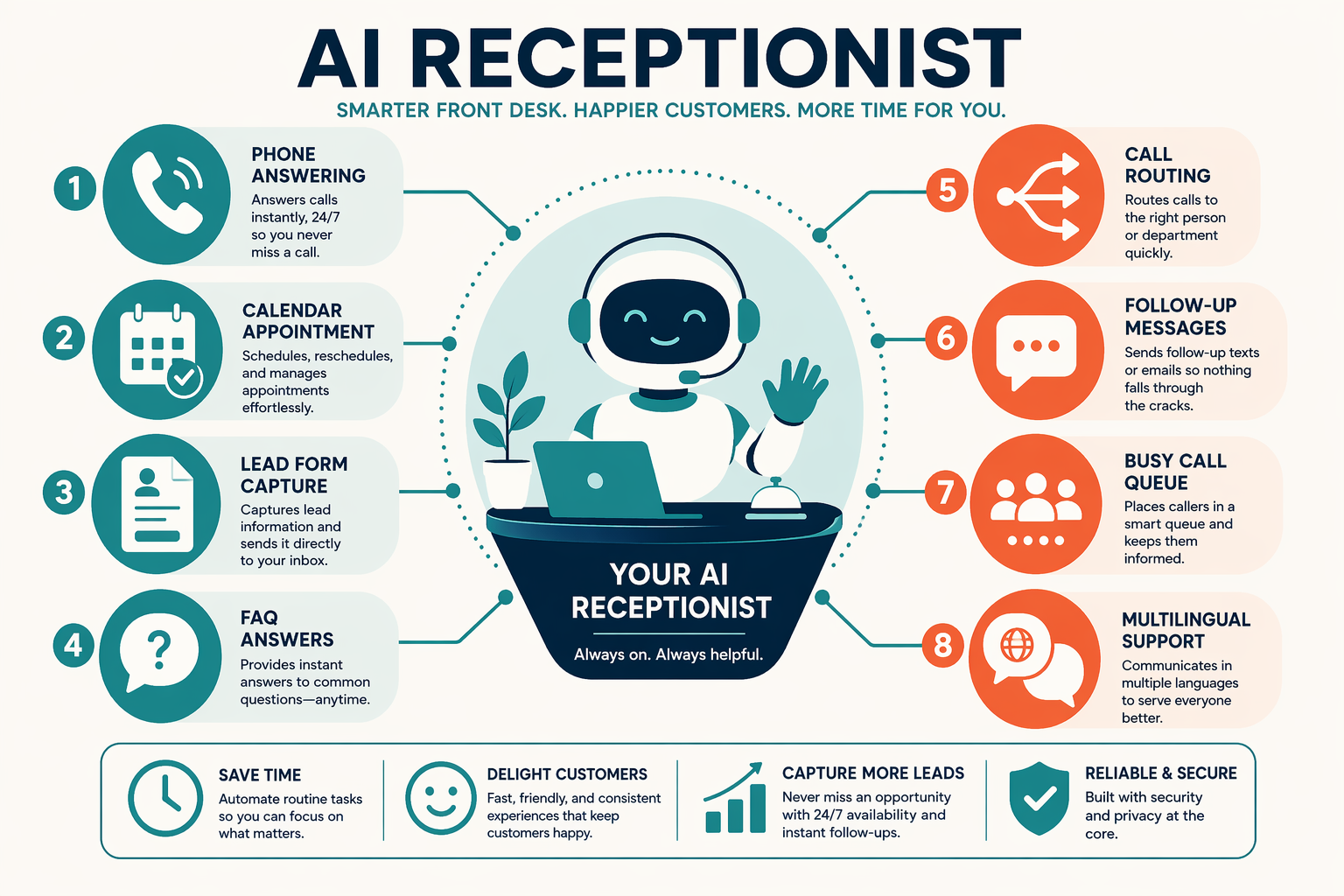
The most useful AI receptionist use cases for small businesses are the ones tied to measurable outcomes: answering every inbound call, booking appointments, capturing qualified leads, resolving routine questions, and escalating urgent or complex requests. An AI receptionist for small business should function as a reliable first layer—not as a replacement for human judgment.
Which AI receptionist use cases create the most value?
Prioritise use cases in this order:
- Answer and identify every caller: Collect the caller’s name, reason for calling, preferred callback channel, and urgency.
- Book or change appointments: Connect the AI receptionist to a live calendar, enforce working hours, and send confirmations.
- Capture and qualify leads: Ask structured questions such as service required, location, budget range, and preferred timeframe.
- Answer approved FAQs: Use a controlled knowledge base for hours, location, pricing ranges, service availability, and policies.
- Route or escalate calls: Transfer emergencies, high-value prospects, complaints, and requests outside the assistant’s confidence threshold.
AInora’s 2026 AI receptionist statistics report says the average small service business answers 71% of incoming calls during business hours, compared with a reported 99.7% answer rate with AI assistance. NextPhone’s 2026 small-business guide reports that some AI receptionists answer calls in under five seconds and operate 24/7. These figures are useful benchmarks, but each business should measure its own baseline before estimating return on investment.
How should a small business map its first call flow?
Start with one high-volume scenario rather than automating every conversation.
| Use case | Minimum integration | Primary metric | Setup effort |
|---|---|---|---|
| Call answering | Phone number and business hours | Answered-call rate | Low |
| Appointment booking | Calendar or booking API | Completed bookings | Medium |
| Lead qualification | CRM or spreadsheet webhook | Qualified leads | Medium |
| FAQ handling | Reviewed knowledge base | Resolved-call rate | Low |
| Escalation | Employee or on-call number | Successful transfers | Medium |
A simple booking webhook might look like this:
app.post("/book-appointment", async (req, res) => {
  const { name, phone, service, startTime } = req.body;

  const booking = await calendar.createEvent({
    title: `${service} - ${name}`,
    start: startTime,
    customerPhone: phone
  });

  res.json({
    confirmed: true,
    appointmentId: booking.id,
    message: "Your appointment is confirmed."
  });
});
The assistant should confirm the date, time zone, service, and customer phone number before calling the scheduling API. If the calendar returns no availability, it should offer alternatives instead of inventing a slot.
Indian platforms such as CallMissed extend this model beyond conventional phone answering by combining AI voice agents with WhatsApp Business calling, chat, and support for 22 Indian languages. That is particularly relevant for clinics, salons, home-service providers, and retailers serving multilingual customers.
What should an AI receptionist never automate?
Define explicit handoff rules before launch:
- Transfer medical, legal, financial, safety, or emergency requests.
- Escalate angry customers and unresolved repeat callers.
- Never invent prices, availability, refunds, or policy exceptions.
- Tell callers when they are speaking with an AI assistant where disclosure is required.
- Log unanswered questions for weekly knowledge-base updates.
Troubleshooting FAQ
Why is my AI receptionist failing to book appointments?
What if callers ask questions outside the knowledge base?
How can I reduce incorrect call transfers?
Should every call go to an AI receptionist first?
Which metrics should a small business monitor?
What do you need before setting up an AI receptionist for a small business? (TABLE)
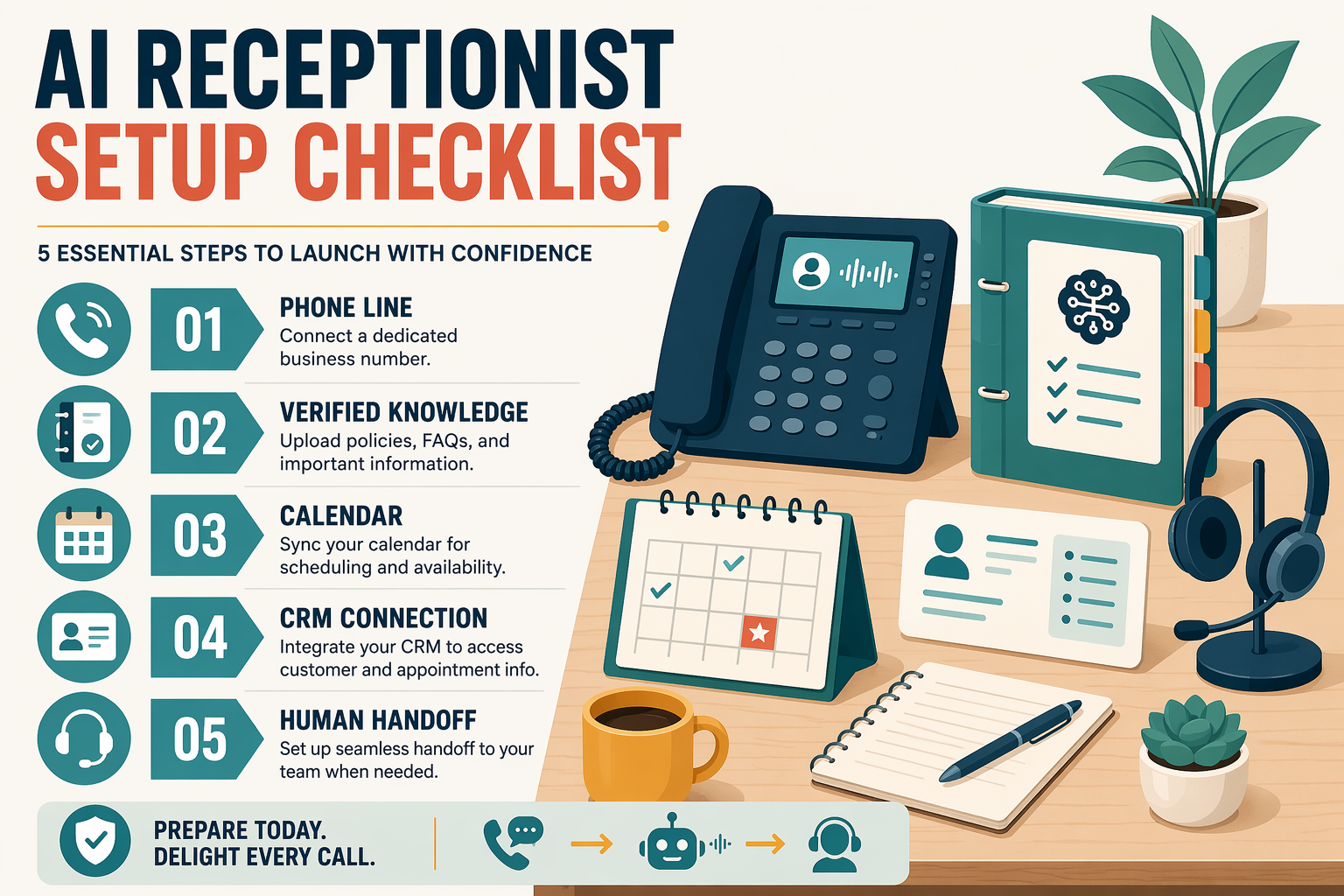
An AI receptionist for a small business needs five foundations: a reachable business number, accurate business information, clear call-handling rules, connected tools, and a human escalation path. Preparing these inputs before launch prevents the AI receptionist from giving incorrect answers, booking unavailable slots, or trapping urgent callers in automation.
What should you prepare before setup?
| Prerequisite | What to prepare | Why it matters | Acceptance check |
|---|---|---|---|
| Business phone access | Existing number, call-forwarding rules, operating hours, and after-hours behavior | The AI receptionist must know when to answer calls and where to transfer them | Test an inbound call during business hours, after hours, and during a simulated busy period |
| Verified knowledge base | Services, prices, locations, hours, policies, FAQs, and current promotions | Accurate source material reduces hallucinated answers and inconsistent customer experiences | Every high-frequency question has an approved answer and review date |
| Appointment or booking system | Calendar access, service durations, staff availability, buffer times, cancellation rules, and time zone | An AI receptionist can book appointments only when availability and booking constraints are explicit | Complete a test booking, rescheduling request, cancellation, and confirmation |
| Lead and customer fields | Name, phone number, service requested, urgency, location, preferred time, and consent requirements | Structured caller data makes follow-up and lead qualification measurable | A test call creates a complete CRM record or shared lead notification |
| Escalation plan | Transfer numbers, departments, on-call contacts, emergency criteria, and fallback voicemail | Automation should stop when a caller needs judgment, sensitive support, or a specialist | Confirm successful transfer, unanswered-transfer fallback, and human callback workflow |
How detailed should the business information be?
Write answers in plain, approved language, rather than uploading vague marketing copy. For example, specify whether a clinic accepts walk-ins, whether a plumber charges an emergency fee, or whether a salon requires a deposit for weekend bookings. Include an owner for each knowledge-base section and a process for updating information when prices, staff, or policies change.
A useful minimum content pack includes:
- Business name, address, service area, and contact details
- Opening hours, holiday closures, and after-hours instructions
- Service descriptions, pricing ranges, eligibility rules, and availability
- Frequently asked questions and prohibited promises
- Transfer conditions for urgent, angry, vulnerable, or complex callers
- Supported languages and the preferred language for follow-up messages
This preparation has measurable importance. AInora’s 2026 report says the average small service business answers 71% of incoming calls during business hours, compared with a reported 99.7% answer rate with AI assistance. NextPhone’s 2026 small-business guide reports that some AI receptionists answer calls in under five seconds and operate 24/7. These figures are benchmarks from named industry sources, not guaranteed results; your baseline should be measured before deployment.
What technical checks should happen before launch?
Run at least 10–20 representative test calls covering normal questions, unclear speech, interruptions, unavailable appointment slots, wrong numbers, and requests for a human. Review transcripts for incorrect claims, test every transfer destination, and confirm that recordings or transcripts follow applicable privacy and consent requirements.
For Indian businesses serving regional audiences, verify language quality with native speakers rather than relying only on translation labels. Platforms such as CallMissed support AI voice interactions and WhatsApp Business calling across 22 Indian languages, which can help teams design multilingual receptionist flows around real customer needs.
Which AI receptionist use case should a small business deploy first?
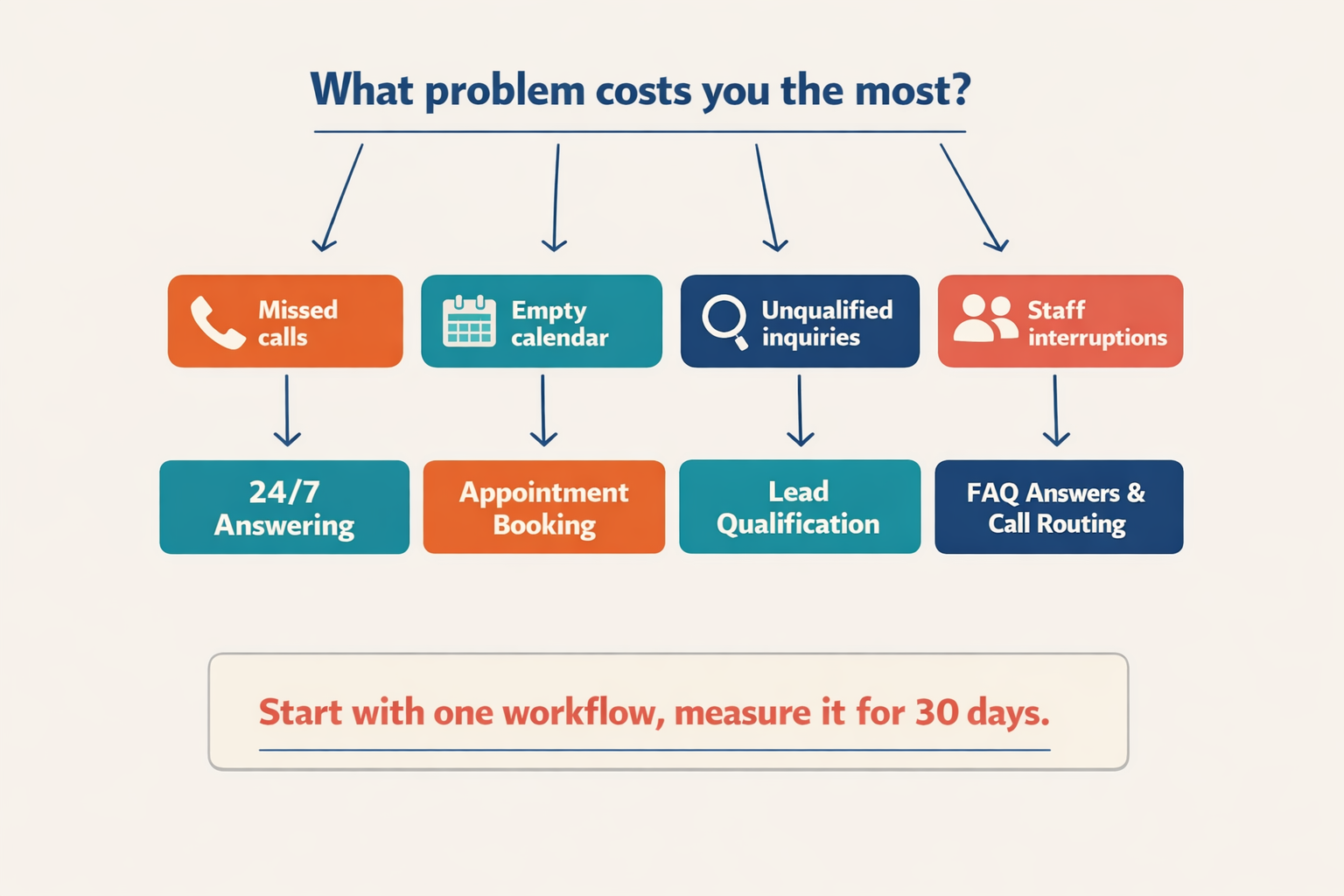
Start with the AI receptionist use case closest to a measurable revenue or service problem. For most small businesses, that means deploying 24/7 call answering with lead capture first; appointment booking should come next if the business has predictable availability and a connected calendar.
How should a small business choose its first AI receptionist use case?
Use this three-step selection process:
- Measure the current failure point. Review missed calls, unanswered after-hours calls, delayed callbacks, and repetitive questions for one week.
- Choose one outcome. Examples include more completed bookings, faster lead response, or fewer interruptions for staff.
- Add a human handoff. Define which situations require an employee, such as complaints, emergencies, price negotiation, or sensitive customer information.
The business case is strongest when calls are frequent, repetitive, and time-sensitive. AInora’s 2026 report says the average small service business answers 71% of incoming calls during business hours, compared with a reported 99.7% answer rate with AI assistance. NextPhone’s 2026 small-business guide reports that some AI receptionists answer calls in under five seconds and operate 24/7.
| First-use decision | Best starting use case | Evidence to collect | Success metric |
|---|---|---|---|
| Many calls go unanswered | 24/7 call answering | Missed and after-hours calls | Answered-call rate |
| Staff spend time on repetitive questions | FAQ automation | Top caller questions | Self-service resolution rate |
| Customers regularly request time slots | Appointment booking | Booking requests and calendar gaps | Completed bookings |
| Sales calls are being lost | Lead capture and qualification | Caller name, need, budget, urgency | Qualified leads |
| Calls reach the wrong employee | Intelligent routing | Transfer failures and call topics | Successful transfers |
What should the first call flow look like?
Begin with a narrow flow rather than asking the AI receptionist to handle every possible conversation:
{
  "greeting": "Thanks for calling Acme Dental. How can I help?",
  "intents": ["book_appointment", "clinic_hours", "existing_patient", "urgent_request"],
  "required_lead_fields": ["name", "phone", "service_needed"],
  "escalate_when": [
    "caller reports a medical emergency",
    "caller requests a human",
    "answer is not in the approved knowledge base"
  ],
  "fallback": "I want to make sure you receive accurate help. May I transfer you to our team?"
}
For a clinic, salon, repair company, or local professional service, this first version can answer approved FAQs, collect contact details, and transfer urgent or uncertain calls. Add AI receptionist appointment booking only after the assistant reliably identifies the service, duration, location, and customer details required by the scheduling system.
When should multilingual voice be the first priority?
Make multilingual answering the first deployment when regional-language callers routinely abandon calls or staff must translate conversations. Platforms such as CallMissed support AI voice interactions and WhatsApp Business calling across 22 Indian languages, giving Indian small businesses a practical path to serve multilingual customers before expanding into more complex workflows. Track language, intent, transfer, and resolution rates separately so improvements are visible by audience—not hidden inside one overall average.
How do you set up an AI receptionist step by step?
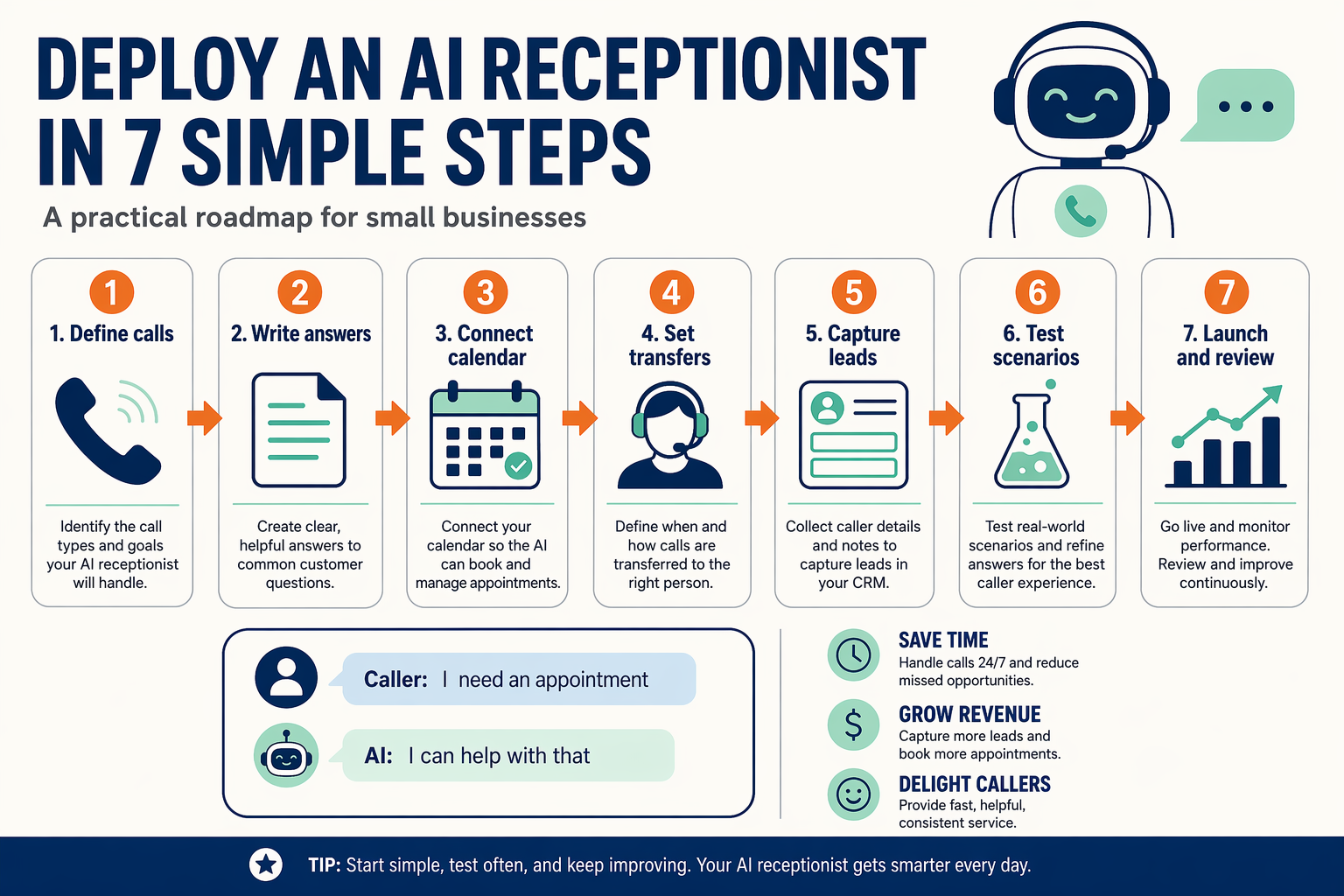
An AI receptionist for small business can be set up in seven steps: define its responsibilities, prepare verified business information, design the call flow, connect calendars and CRM tools, configure human handoffs, test realistic conversations, and monitor outcomes. Start with one high-value workflow—such as answering business calls and booking appointments—before expanding into lead qualification, follow-ups, or multilingual support.
What should you define before deploying an AI receptionist?
- Choose the first use case. Select one measurable goal, such as reducing missed calls, booking consultations, or capturing after-hours leads.
- List permitted actions. For example, the receptionist may answer FAQs, collect a caller’s name and phone number, check availability, and create appointments.
- Set prohibited actions. It should not invent prices, approve refunds, provide medical or legal advice, or promise delivery dates that are not confirmed.
- Write escalation rules. Route urgent complaints, high-value leads, payment issues, and requests for a human to an employee or on-call number.
The business case is measurable: AInora’s 2026 report says small service businesses answer 71% of incoming calls during business hours, compared with a reported 99.7% answer rate with AI assistance. NextPhone’s 2026 guide reports that some AI receptionists answer calls in under five seconds and operate 24/7.
How do you build the call flow step by step?
Use a short, predictable sequence:
- Greeting: Identify the business and disclose that the caller is speaking with an AI assistant.
- Intent detection: Ask whether the caller wants an appointment, information, support, or a human.
- Verification: Confirm relevant details such as service type, location, preferred date, or existing-customer status.
- Action: Book a slot, answer from the approved knowledge base, create a lead, or send a follow-up.
- Confirmation: Repeat the appointment time or captured details and explain the next step.
- Fallback: Transfer the call or collect a callback request when confidence is low.
A simple routing function can enforce these boundaries:
function routeCall({ intent, urgent = false, requestsHuman = false }) {
  if (urgent || requestsHuman) return { action: "transfer", target: "on_call_staff" };

  const actions = {
    appointment: "open_calendar",
    faq: "search_approved_knowledge_base",
    lead: "capture_contact_and_requirements",
    callback: "schedule_callback"
  };

  return { action: actions[intent] || "collect_callback", target: null };
}
Which tools and data should you connect?
Connect only the systems required for the selected workflow:
- Calendar: availability, booking, rescheduling, and cancellation
- CRM or spreadsheet: caller name, phone number, intent, source, and follow-up status
- Knowledge base: verified hours, location, services, pricing ranges, and policies
- Messaging: confirmation and reminder delivery through SMS, WhatsApp, or email
For developers, an OpenAI-compatible gateway such as CallMissed can centralize model access behind one API integration. CallMissed also supports AI voice agents, WhatsApp Business calling, and speech-to-text and text-to-speech across 22 Indian languages, which is relevant when a small business serves regional-language customers.
How do you test and monitor the receptionist?
Run at least these test calls before publishing the number:
- A straightforward booking request
- An unavailable time slot and rescheduling request
- An angry or urgent caller
- An unsupported question
- A caller requesting a human
- A regional-language conversation
Track answer rate, completed bookings, qualified leads, transfer rate, abandoned calls, and unresolved questions. Review transcripts regularly, update incorrect knowledge-base entries, and adjust escalation rules when the assistant repeatedly fails on the same intent.
What should you troubleshoot first?
Why is the AI receptionist giving incorrect answers?
Why are appointments being booked incorrectly?
How can an AI receptionist answer calls, book appointments, and qualify leads?
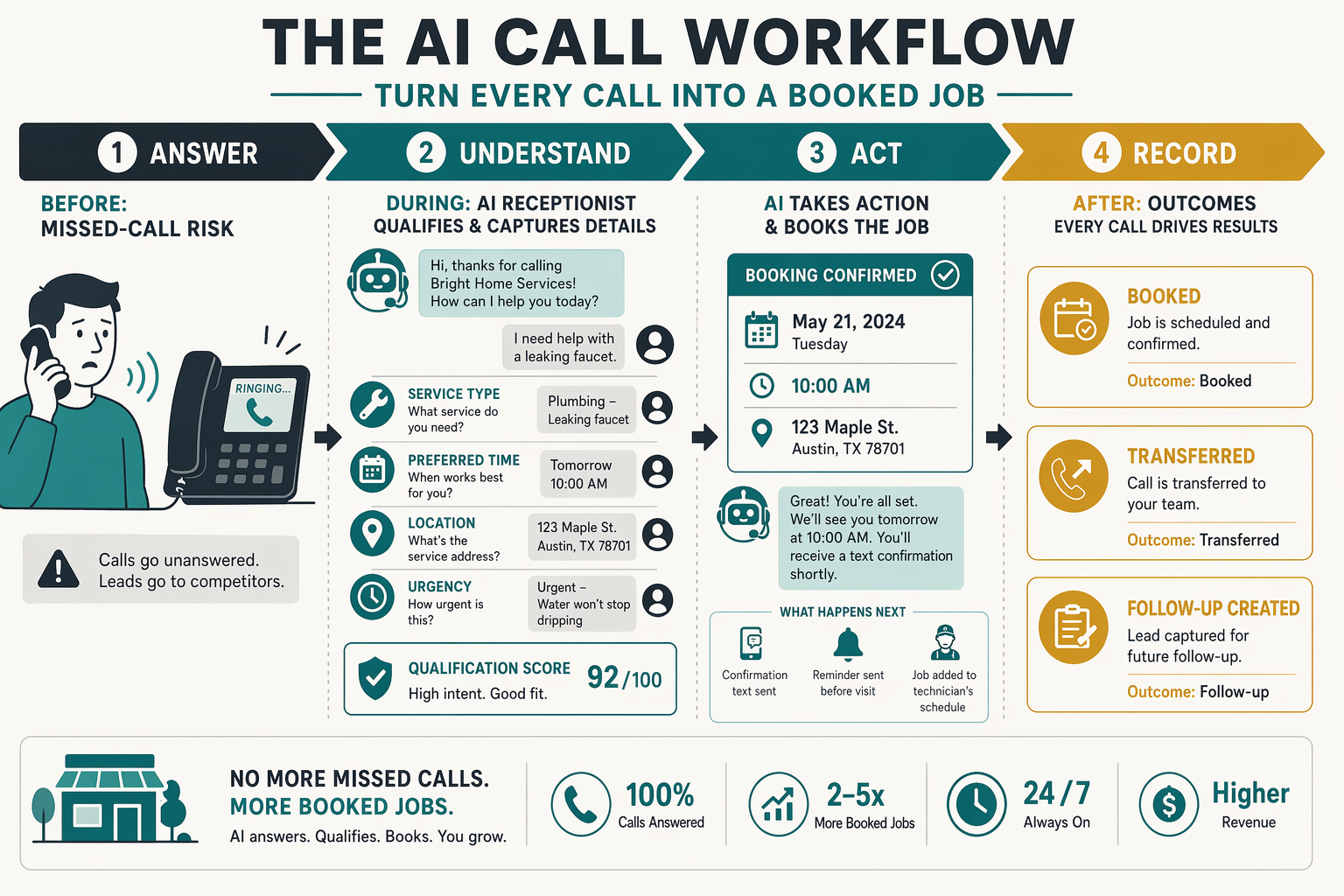
An AI receptionist answers business calls by combining speech recognition, business rules, a knowledge base, and integrations such as calendars or CRMs. For a small business, the most useful flow is: identify the caller’s intent, provide verified information, book or modify an appointment, capture lead details, and transfer sensitive or urgent cases to a person.
How should an AI receptionist handle a new call?
Use a structured call flow rather than allowing unrestricted conversation:
- Greet and disclose that the caller is speaking with an AI assistant.
- Identify intent: appointment, pricing, existing booking, service request, or urgent issue.
- Collect only necessary details: name, phone number, requested service, preferred time, and location.
- Check approved sources for business hours, availability, pricing, and policies.
- Complete the action—such as booking a slot—or create a follow-up task.
- Escalate when the caller requests a human, reports an emergency, or asks a question outside the knowledge base.
NextPhone’s 2026 small-business guide reports that some AI receptionists answer calls in under five seconds and operate 24/7. AInora reported in 2026 that AI-assisted answering can increase the reported answer rate from 71% to 99.7% for the average small service business, making after-hours and overflow handling measurable use cases.
How does an AI receptionist book appointments?
Connect the receptionist to a calendar containing real availability. The assistant should confirm the service, duration, staff member, date, time zone, and customer contact details before creating the booking.
A minimal booking decision function can look like this:
def handle_booking(request, slots):
    wanted = request["preferred_slot"]
    matches = [slot for slot in slots if slot["start"] == wanted]

    if not matches:
        return {
            "status": "needs_choice",
            "message": "That time is unavailable. Please offer the next two available slots."
        }

    slot = matches[0]
    return {
        "status": "confirm",
        "slot_id": slot["id"],
        "message": f"Please confirm {slot['start']} for {request['service']}."
    }
After confirmation, create the calendar event, send an SMS or WhatsApp confirmation, and store the booking reference in the CRM. Never let the model invent availability; the calendar response must be authoritative.
How can it qualify leads before human follow-up?
Ask consistent, business-specific questions and assign a clear outcome:
| Call outcome | Information captured | Next action | Metric |
|---|---|---|---|
| Appointment request | Service, date, contact | Book or propose slots | Booking rate |
| High-intent lead | Need, budget, location, timeframe | Create CRM task | Qualified-lead rate |
| General enquiry | Question and contact | Answer or follow up | Resolution rate |
| Urgent request | Issue, identity, callback number | Immediate transfer | Transfer success |
Platforms such as CallMissed extend this workflow across AI voice agents, WhatsApp Business calling, chat, and 22 Indian languages, which is useful when a small business serves multilingual regional audiences.
What should happen when automation fails?
Define fallback rules before launch:
- Transfer to a human when confidence is low or the caller repeats a question.
- Read back names, numbers, dates, and addresses for confirmation.
- Send unresolved enquiries to a shared inbox with the transcript and caller details.
- Log failed bookings, abandoned calls, and incorrect answers for weekly review.
What problems commonly affect AI receptionist calls?
Can an AI receptionist book appointments without a calendar integration?
How does an AI receptionist qualify a lead?
When should a call be transferred to a person?
What if the caller speaks a regional language?
Which metrics show whether the receptionist works?
How should you measure AI receptionist performance and ROI?
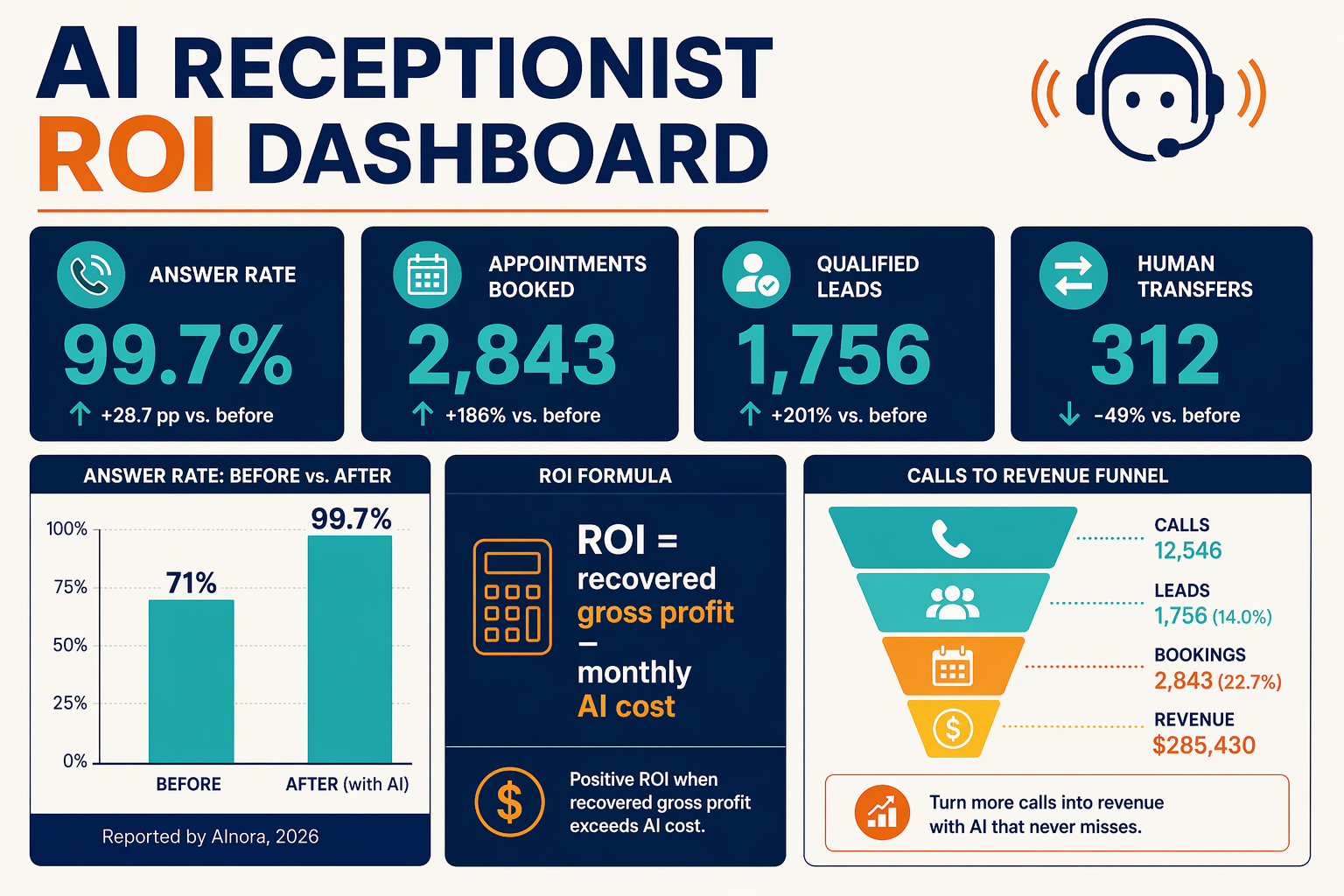
Measure an AI receptionist by business outcomes, not call volume alone: answered-call rate, qualified leads, booked appointments, successful transfers, customer satisfaction, and profit generated. Calculate ROI by comparing attributable gross profit and saved staff time with the platform, telephony, integration, and human-escalation costs.
Which AI receptionist metrics should a small business track?
Start with a baseline from the 30 days before launch, then review the same metrics weekly after implementation. The AInora 2026 report says small service businesses answer 71% of incoming calls during business hours, compared with a reported 99.7% answer rate with AI assistance; use your own baseline to validate whether performance improves.
| Metric | Formula | Why it matters | Example target |
|---|---|---|---|
| Answered-call rate | Answered calls ÷ total incoming calls × 100 | Measures availability and missed-call reduction | Improve from baseline |
| Qualified-lead rate | Qualified leads ÷ relevant calls × 100 | Shows whether conversations have commercial value | Track by campaign |
| Booking conversion | Completed bookings ÷ eligible callers × 100 | Connects calls to appointments or visits | Compare AI and human flows |
| Transfer success rate | Completed transfers ÷ transfer attempts × 100 | Tests escalation reliability | Monitor urgent calls |
| Cost per qualified lead | Total AI costs ÷ qualified leads | Compares efficiency with other channels | Trend downward |
| Resolution rate | Calls resolved without transfer ÷ total calls × 100 | Indicates automation quality | Review alongside satisfaction |
Do not treat a high resolution rate as automatically positive. An assistant that avoids transfers by frustrating callers is performing poorly; pair operational metrics with customer satisfaction, callback completion, complaint rate, and sampled call reviews.
How do you calculate AI receptionist ROI?
Use a conservative monthly model:
- Revenue recovered: additional booked appointments × average gross profit per appointment.
- Lead value created: additional qualified leads × historical close rate × average gross profit per customer.
- Labour savings: verified staff hours no longer spent on repetitive calls × fully loaded hourly cost.
- Total benefit: add the three values, excluding speculative future revenue.
- Net ROI:
(total benefit − monthly AI cost) ÷ monthly AI cost × 100.
Include subscription or usage charges, phone minutes, message fees, CRM or calendar integrations, implementation, and human follow-up time. For example, 20 additional bookings producing ₹1,000 gross profit each create ₹20,000 in attributable gross profit—not ₹20,000 in revenue. Use unique tracking numbers, campaign questions, CRM source fields, and booking timestamps to connect calls to outcomes.
Platforms such as CallMissed can support this measurement model by combining AI voice agents with WhatsApp follow-ups and an omnichannel inbox; teams can compare phone, WhatsApp, and human-assisted outcomes in one customer journey. Its transparent credit pricing, where 1 credit equals ₹1, also makes usage-cost reconciliation straightforward.
What should you troubleshoot when ROI looks weak?
Why are calls answered but bookings not increasing?
Why is the transfer rate unexpectedly high?
How long should I wait before judging ROI?
What if customers dislike the AI receptionist?
Which metric should I prioritize first?
What advanced AI receptionist tactics improve results? (TABLE)
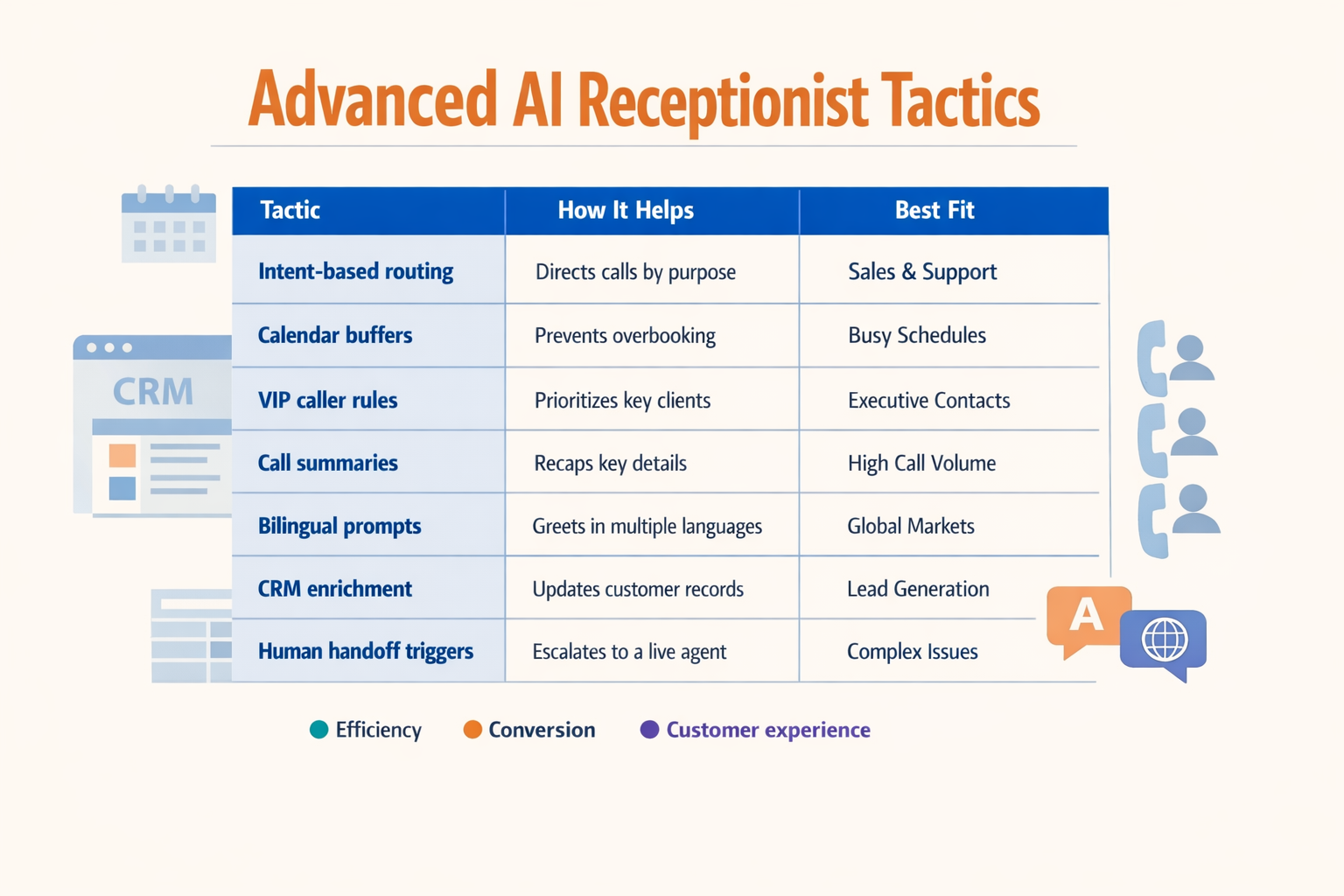
Advanced AI receptionist tactics improve results by giving the agent business context, structured workflows, reliable escalation rules, and measurable goals—not simply a more natural voice. The highest-impact approach is to combine caller intent detection, verified knowledge, automated follow-up, and human handoff while tracking outcomes such as qualified leads, completed bookings, and unresolved questions.
Which advanced tactics should an AI receptionist use?
| Advanced tactic | How to implement it | Safety or quality rule | Metric to track |
|---|---|---|---|
| Intent-based routing | Classify each caller as a new lead, existing customer, booking request, support issue, or urgent case before selecting the next step. | Route high-risk or emotionally sensitive calls to a human immediately. | Transfer accuracy and abandoned calls |
| Structured lead capture | Collect name, phone number, service needed, location, budget range, and preferred callback time in fixed fields. | Confirm critical details verbally before saving them to a CRM. | Qualified leads per 100 answered calls |
| Knowledge-base grounding | Connect the agent to approved FAQs, service lists, hours, policies, and current availability using retrieval-augmented generation (RAG). | If the answer is not found, say so and offer a callback instead of guessing. | Unresolved-question rate |
| Conversation-aware booking | Check appointment type, staff availability, location, duration, and preparation requirements before confirming a slot. | Send a confirmation and provide an easy rescheduling path. | Booking completion and no-show rate |
| Proactive follow-up | Trigger SMS, email, or WhatsApp messages after missed calls, incomplete bookings, quotations, or requested callbacks. | Use consent-aware messaging and cap reminder frequency. | Follow-up response rate |
| Adaptive escalation | Transfer based on urgency, caller sentiment, language, customer value, or repeated failure to resolve an issue. | Pass a short call summary and captured details to the human recipient. | Successful-transfer rate and repeat calls |
How should the workflow be designed?
Use a short decision sequence rather than allowing the AI receptionist to improvise:
- Identify the caller’s intent and whether the person is new or returning.
- Collect only the fields required for that intent; excessive questions increase friction.
- Verify facts against approved systems, such as a calendar, CRM, inventory database, or knowledge base.
- Confirm the action aloud, including appointment time, address, price range, or callback number.
- Escalate when confidence is low, the caller asks for a human, or the request involves an exception.
- Log the outcome as booked, qualified, transferred, resolved, abandoned, or unresolved.
A compact routing policy can be represented as:
{
  "low_confidence": "offer_human_transfer",
  "urgent_request": "transfer_on_call",
  "booking_confirmed": "send_whatsapp_confirmation",
  "unresolved_after_two_attempts": "create_callback_task"
}
The business should also test edge cases before launch: noisy audio, incomplete names, conflicting calendar slots, language switching, cancellations, and callers who interrupt the agent. NextPhone’s 2026 small-business guide reports that some AI receptionists answer calls in under five seconds and operate 24/7, but fast answering alone does not guarantee useful outcomes. The workflow must still protect accuracy and make human assistance easy.
For multilingual teams, platforms such as CallMissed combine AI voice agents with WhatsApp Business calling and support voice interactions across 22 Indian languages. That makes language-aware routing and follow-up practical for businesses serving regional customers, provided each language flow is tested with real names, addresses, and local terminology. AInora’s 2026 AI receptionist statistics report states that average small service businesses answer 71% of incoming calls during business hours, compared with a reported 99.7% answer rate with AI assistance; advanced tactics help convert those answered calls into reliable business outcomes rather than merely increasing pickup volume.
What common AI receptionist mistakes should small businesses avoid? (TABLE)
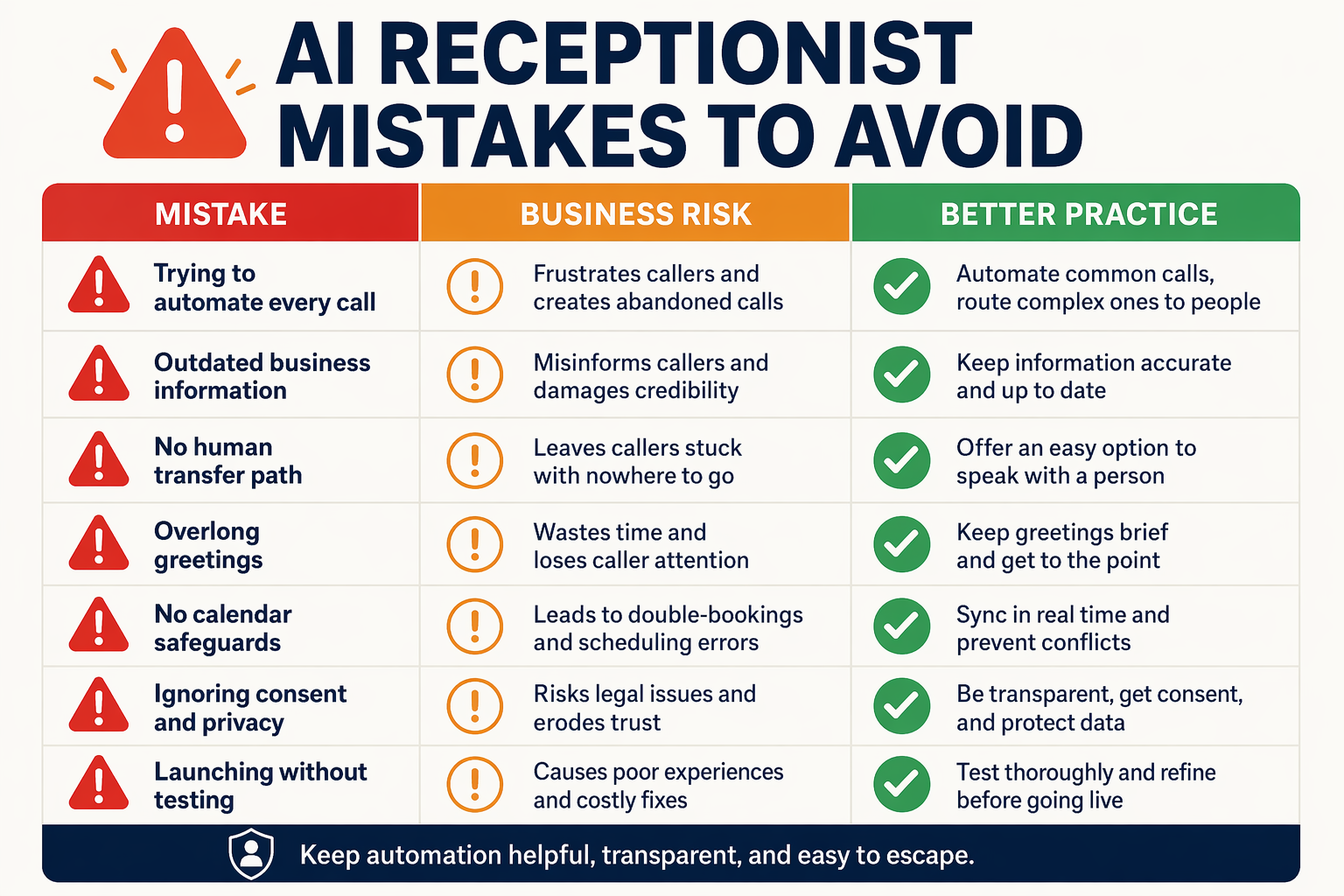
An AI receptionist for small business works best when it is treated as a controlled customer-service system—not an unsupervised replacement for staff. The most common mistakes are deploying inaccurate information, creating weak escalation rules, hiding automation from callers, and measuring call volume instead of outcomes such as resolved questions, booked appointments, and qualified leads.
Which AI receptionist mistakes should small businesses avoid?
| Common mistake | Why it creates problems | Safer implementation | Metric or test |
|---|---|---|---|
| Using an outdated knowledge base | The assistant may quote incorrect prices, hours, locations, cancellation policies, or service availability. | Assign an owner to review business information weekly and immediately after policy changes. | Test 20 common questions; target 100% factual answers. |
| Automating every conversation | Complaints, emergencies, vulnerable customers, and unusual requests can become frustrating or unsafe when handled only by AI. | Define explicit human-handoff triggers for urgency, anger, uncertainty, sensitive data, and repeated misunderstanding. | Measure transfer success and unresolved-call rate. |
| Promising appointments without checking live availability | Double bookings and incorrect confirmations damage customer trust and create staff workload. | Connect the AI receptionist to a current calendar or require staff confirmation before finalizing a booking. | Run booking, rescheduling, cancellation, and time-zone tests. |
| Failing to identify the AI | Customers may feel misled if they discover they were not speaking with a person. | Open with a clear disclosure, explain the assistant’s role, and offer “speak to a person” early in the call. | Review transcripts for disclosure and handoff-option compliance. |
| Collecting too much personal information | Recording unnecessary sensitive details increases privacy and security risk. | Ask only for information required for the next action, restrict access, and define retention and deletion rules. | Audit stored fields, recordings, permissions, and retention settings. |
| Tracking answered calls instead of business outcomes | A high answer rate does not prove that the AI generated revenue or resolved customer needs. | Track bookings, qualified leads, completed transfers, follow-up delivery, and unanswered intents by source. | Compare weekly conversion and escalation reports. |
The scale of the opportunity makes these controls important. AInora’s 2026 report says that the average small service business answers 71% of incoming calls during business hours, compared with a reported 99.7% answer rate with AI assistance. However, answering more calls is not useful if the assistant gives wrong information or blocks access to a human.
How can a small business prevent these failures?
Use a short pre-launch checklist:
- Write approved answers for hours, services, pricing ranges, locations, policies, and availability. Mark unknown information as “requires staff confirmation.”
- Create escalation rules for emergencies, legal or medical questions, payment disputes, angry callers, and requests outside the assistant’s authority.
- Test realistic scenarios, including accents, interruptions, background noise, silence, ambiguous names, and callers who change their request.
- Review transcripts and recordings during the first week, then sample calls regularly for accuracy, tone, and correct routing.
- Keep a fallback channel such as voicemail, SMS, WhatsApp, or a callback queue when no employee is available.
Platforms such as CallMissed can support this controlled model by combining AI voice agents with WhatsApp Business calling, chat, and multilingual interactions across 22 Indian languages. The technology should expand access—not force every customer through the same automated path.
What questions do small businesses ask about AI receptionists?
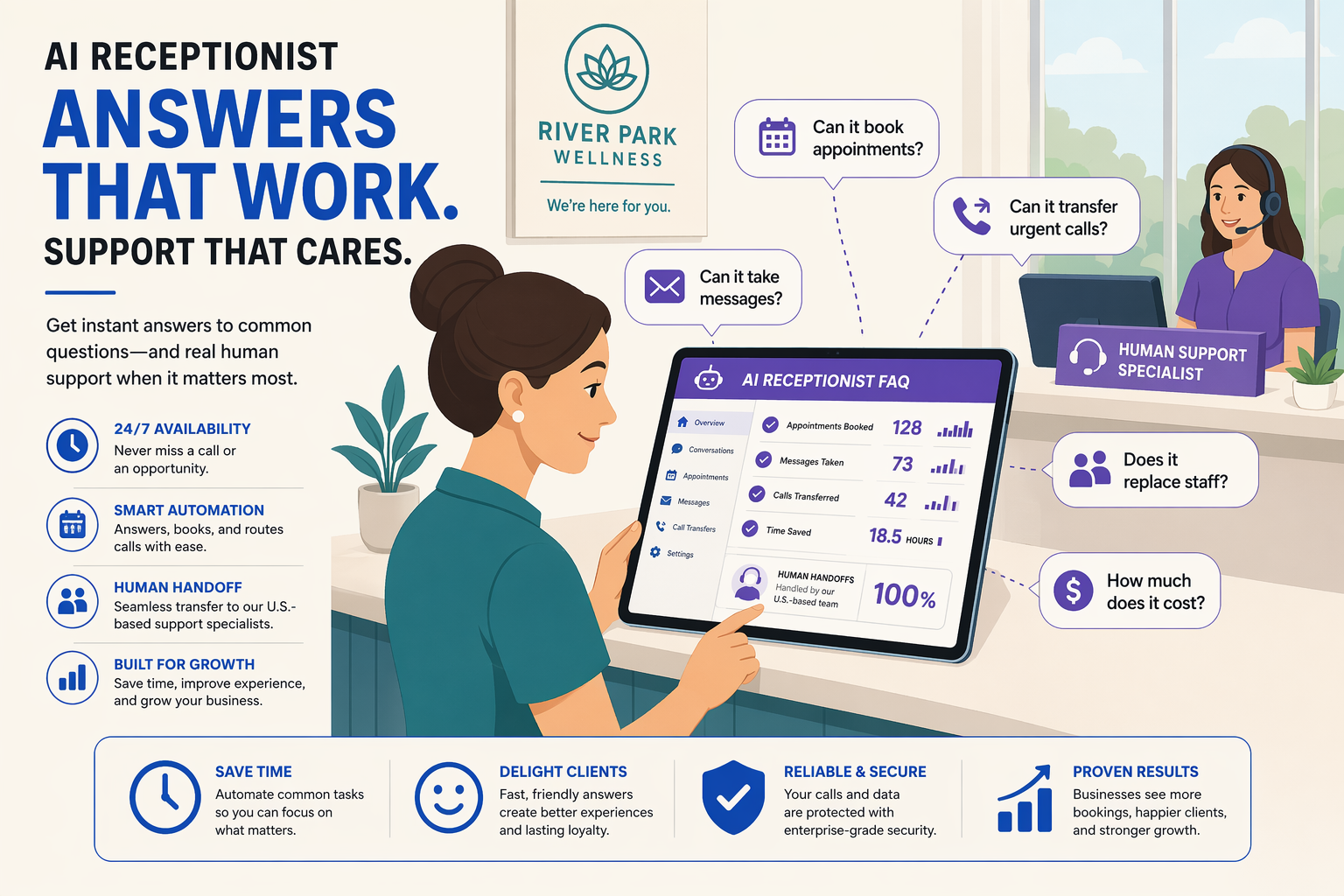
An AI receptionist for small business is most useful when it answers routine calls, collects accurate customer information, completes tasks such as booking, and transfers exceptions to a human. The right implementation should improve measurable outcomes—answered-call rate, appointments, qualified leads, and resolution rate—without forcing customers through an inflexible automated maze.
What are the most useful AI receptionist use cases for small businesses?
Can an AI receptionist answer business calls after hours and during busy periods?
Can an AI receptionist book appointments and reschedule customers?
How does an AI receptionist capture and qualify small-business leads?
What should an AI receptionist do when a caller needs a human?
Which languages can an AI receptionist support, and are these systems suitable for Indian businesses?
Where can you find reliable AI receptionist resources and next steps?
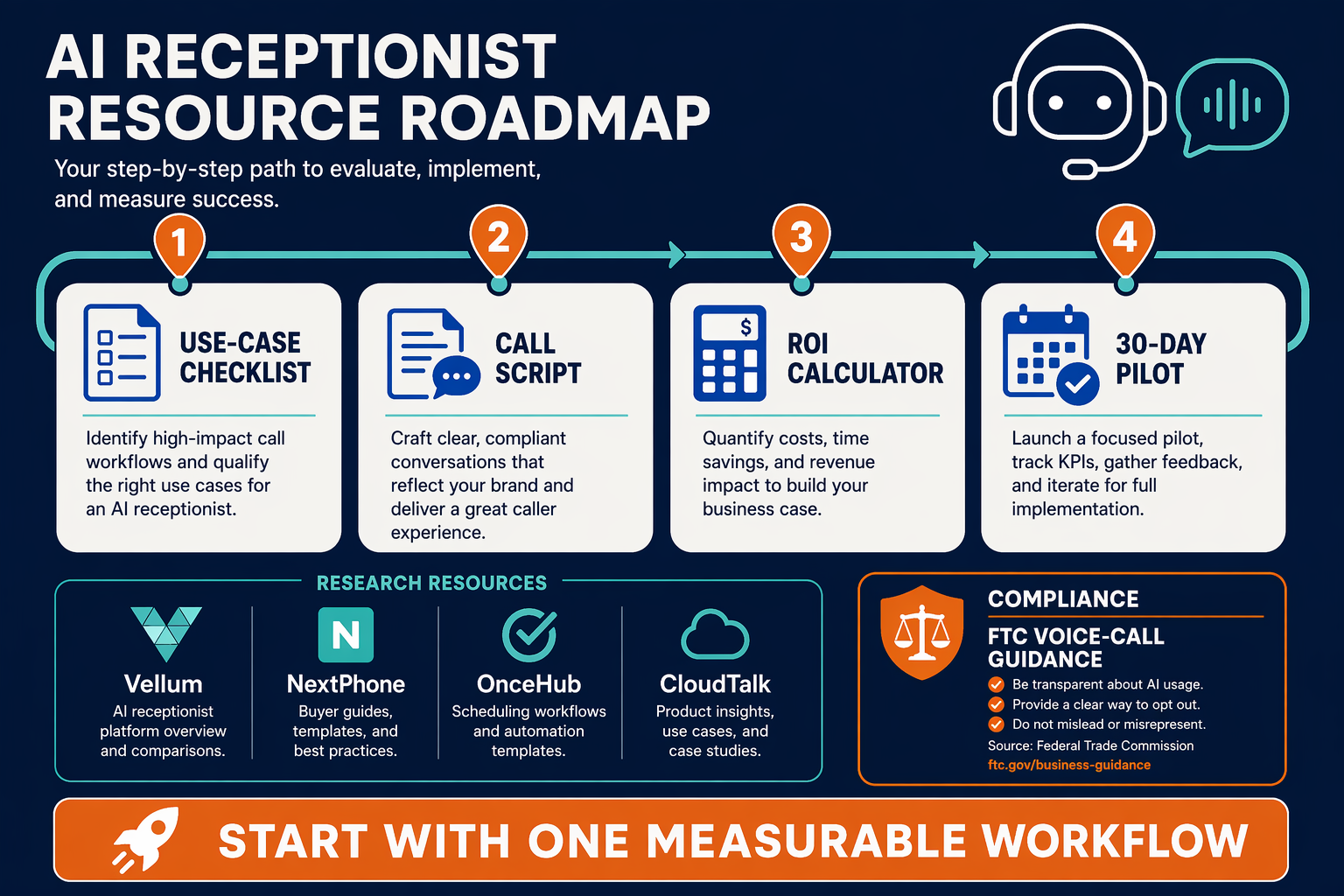
Reliable AI receptionist resources include vendor API documentation, telephony and WhatsApp Business documentation, calendar or CRM integration guides, and privacy requirements for call recording and customer consent. The safest next step is to begin with one measurable workflow—such as answering business calls and booking appointments—then expand only after testing escalation, accuracy, and handoff performance.
Which resources should you use before implementation?
Use sources that explain both capabilities and operational limits:
- AI receptionist benchmarks: AInora’s 2026 report states that the average small service business answers 71% of incoming calls during business hours, compared with a reported 99.7% answer rate with AI assistance. Treat this as a benchmark, not a guaranteed result.
- Implementation guidance: NextPhone’s 2026 small-business guide reports that some AI receptionists answer calls in under five seconds and operate 24/7.
- Product documentation: Review your provider’s instructions for phone numbers, call forwarding, appointment calendars, CRM fields, transcripts, webhooks, human transfer, and failure handling.
- Compliance guidance: Confirm rules for call recording, customer notification, personal data retention, opt-outs, and WhatsApp Business messaging in every market where the business operates.
- Integration references: Check the official documentation for Google Calendar, Microsoft Outlook, your CRM, telephony carrier, and messaging platform rather than relying on unverified tutorials.
Platforms such as CallMissed combine AI voice agents with WhatsApp Business calling, chat, and support for 22 Indian languages. That combination can be relevant when a small business needs both an AI receptionist that answers business calls and a follow-up channel for confirmations or missed-call recovery.
How should you choose the first AI receptionist workflow?
Follow this sequence:
- Select one high-volume task: Start with FAQs, lead capture, appointment booking, or call routing—not every process at once.
- Write the source of truth: Document approved hours, prices, locations, availability, cancellation rules, and escalation contacts.
- Define measurable outcomes: Track answered-call rate, completed bookings, qualified leads, transfers, unresolved questions, and opt-outs.
- Create stop conditions: Require human handoff for emergencies, complaints, sensitive data, uncertain answers, or requests outside the knowledge base.
- Test realistic scenarios: Include accents, background noise, interruptions, wrong numbers, unavailable slots, and callers who change their intent.
- Review transcripts weekly: Correct recurring misunderstandings and update the knowledge base without allowing the assistant to invent answers.
A simple routing guard can prevent unsupported automation:
def route_call(intent, confidence, urgent=False):
    human_intents = {"complaint", "emergency", "sensitive_request"}

    if urgent or intent in human_intents or confidence < 0.80:
        return "human_handoff"
    if intent == "appointment_booking":
        return "calendar_flow"
    if intent == "lead_enquiry":
        return "lead_capture"
    return "approved_faq"
What should you troubleshoot first?
The AI gives incorrect answers.?
Appointment bookings fail.?
Callers cannot reach staff.?
Follow-up messages are not sent.?
How do I know whether the system is useful?
Conclusion
The most useful AI receptionist use cases for small businesses are 24/7 call answering, appointment booking, lead capture, FAQ handling, intelligent call routing, follow-ups, call-spike management, and multilingual customer support. The right AI receptionist for small business reduces repetitive phone work while escalating urgent, sensitive, or complex conversations to a human.
This guide’s key takeaways are:
- An AI receptionist that answers business calls can protect opportunities outside office hours, during lunch breaks, and when staff are busy. A 2026 AInora report says AI-assisted answering can raise the reported answer rate from 71% to 99.7%.
- An AI receptionist that books appointments can schedule, reschedule, confirm, and remind customers while keeping calendars current.
- Structured call flows can capture and qualify leads, answer approved questions, route urgent requests, and trigger SMS or WhatsApp follow-ups.
- Clear escalation rules, connected CRM or scheduling tools, testing, and metrics—including answered calls, bookings, transfers, and unresolved questions—keep automation useful rather than frustrating.
Next, watch for tighter voice-to-CRM workflows, more natural multilingual conversations, and communication systems that combine phone, WhatsApp, chat, and email. Platforms such as CallMissed reflect this direction with AI voice agents, WhatsApp Business calling, and support for 22 Indian languages.
Which repetitive customer interaction could your business automate first—without removing the human help customers still need?
Related Reading
Discussion
Related Posts
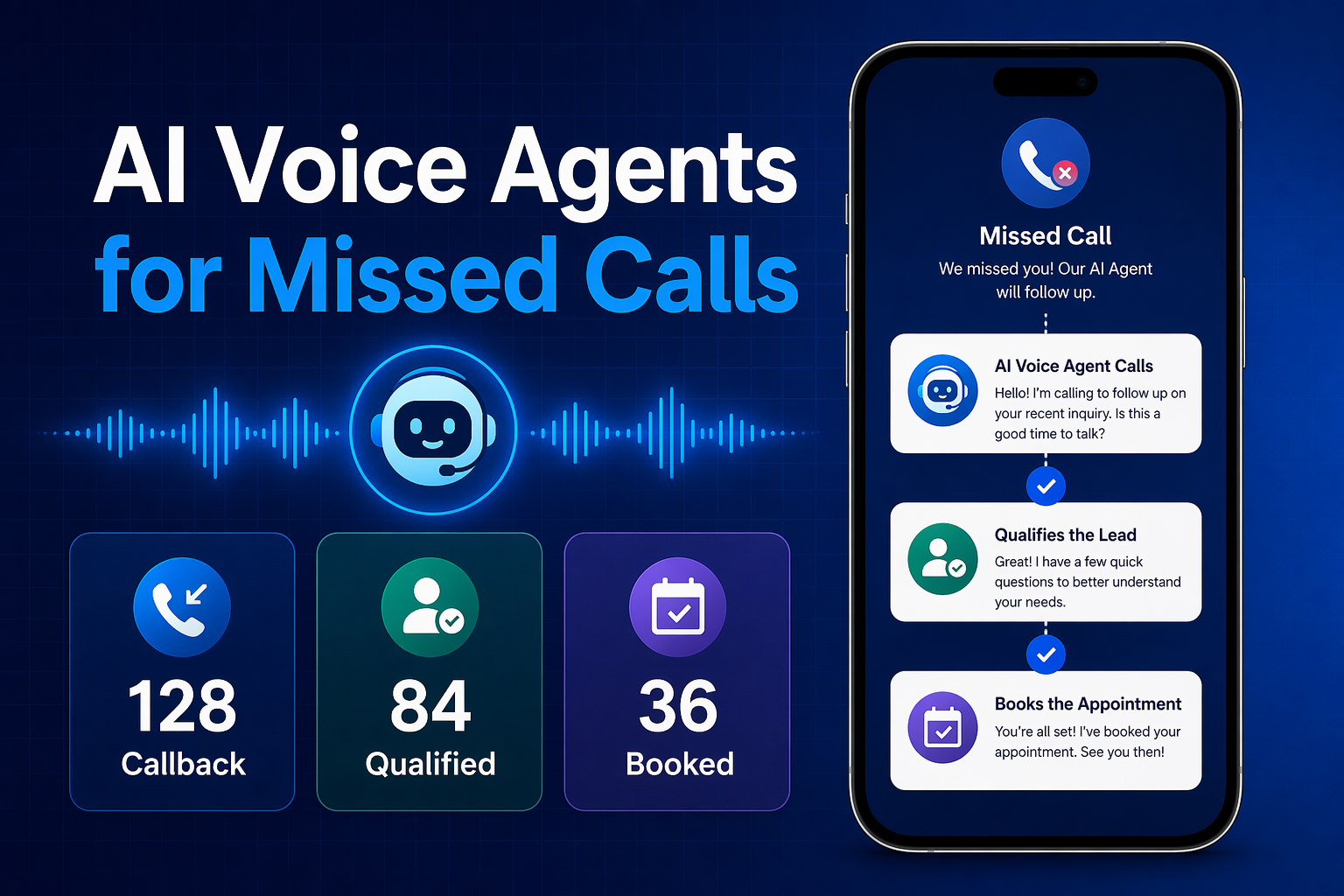

Ready to automate customer conversations?
Launch AI voice agents and WhatsApp bots with CallMissed — one API, 22+ Indian languages.