
AI Receptionist Use Cases for Small Businesses: A Practical Guide


Learn the most useful AI receptionist use cases for small businesses, with setup steps, workflows, metrics, safeguards, and practical examples.
AI Receptionist Use Cases for Small Businesses: A Practical Guide
What if a missed call—not a poor product or expensive ad—is the reason a small business loses its next customer? The most useful AI receptionist use cases for small businesses are answering business calls 24/7, qualifying and capturing leads, booking appointments, taking messages, transferring urgent calls, and handling routine questions automatically. These workflows turn an AI receptionist for small business from a simple answering service into a practical front-desk system that works after hours and during busy periods.
The need is measurable. AInora’s 2026 AI receptionist statistics roundup reports 35–60% lower front-desk operating costs for businesses using AI receptionists, although results vary by call volume, configuration, and staffing model. AInora also reports a 27% increase in booked appointments, making scheduling one of the clearest high-value use cases for service businesses such as clinics, salons, home-repair companies, consultants, and real-estate agencies.
This guide focuses on what an AI receptionist can do in daily operations—not just what vendors claim it can do. You will learn how to:
- Configure an AI receptionist that answers business calls 24/7 with a consistent greeting and brand voice.
- Collect a caller’s name, phone number, reason for calling, budget, location, or preferred service so the team receives a useful lead rather than a vague voicemail.
- Let an AI receptionist book appointments by checking availability, confirming time zones, and sending follow-up details.
- Design call-routing rules so the AI receptionist takes messages and transfers calls to the correct person or department.
- Automate answers to common questions about pricing, opening hours, service areas, availability, and policies using an approved knowledge base.
- Create escalation rules for emergencies, high-value prospects, angry customers, or requests the AI cannot answer confidently.
- Measure outcomes such as answered-call rate, qualified leads, completed bookings, transfers, abandoned calls, and human handoffs.
The implementation sections use a step-by-step approach, including sample call flows, structured data fields, API-oriented examples, and working code snippets that developers can adapt to their phone or CRM stack. A comparison table will also help you match each use case to the businesses and metrics it affects, while the troubleshooting FAQ addresses interruptions, incorrect answers, failed transfers, privacy, and appointment conflicts.
For Indian businesses serving multilingual customers, platforms such as CallMissed show how AI communication systems can combine voice agents with WhatsApp, CRM workflows, and speech technologies across 22 Indian languages. The goal is not to replace every human conversation; it is to ensure routine calls are handled quickly while people focus on customers who genuinely need them.
What are the most useful AI receptionist use cases for small businesses?
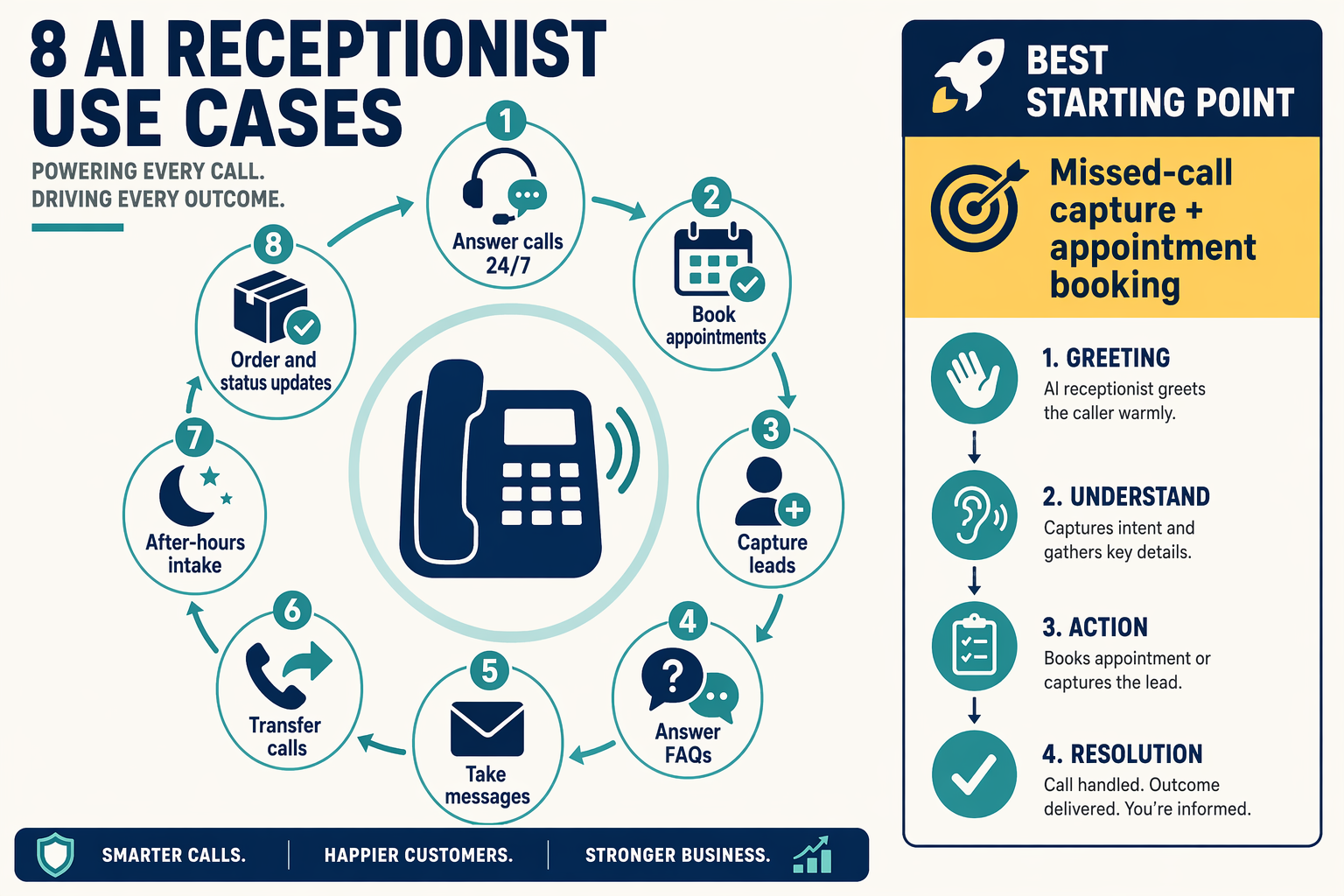
The most useful AI receptionist use cases for small businesses are answering business calls 24/7, capturing and qualifying leads, booking appointments, answering routine questions, and taking messages or transferring urgent calls. Start with one high-volume workflow, define the information the AI must collect, and provide a clear human-escalation path before expanding automation.
Which AI receptionist use cases should a small business implement first?
Prioritise use cases by call frequency, revenue impact, and the cost of a missed response:
| Use case | AI receptionist action | Best-fit businesses | Primary KPI |
|---|---|---|---|
| 24/7 call answering | Greets callers, identifies intent, and responds after hours | Phone-based businesses | Answered-call rate |
| Lead capture | Records contact details, requirements, budget, and location | Real estate, home services, agencies | Qualified leads |
| Appointment booking | Checks availability, confirms details, and sends follow-up information | Clinics, salons, consultants | Completed bookings |
| Message-taking and transfer | Summarises requests and routes priority calls | Professional services, repair firms | Successful handoffs |
| FAQ automation | Answers approved questions about hours, pricing, and service areas | Retail, education, healthcare | Self-service resolution |
AInora’s 2026 AI Receptionist Statistics roundup reports 35–60% lower front-desk operating costs for businesses using AI receptionists. The same AInora report states that businesses using AI receptionists saw a 27% increase in booked appointments; both figures vary by call volume, configuration, and staffing model.
How should an AI receptionist answer business calls 24/7?
Use a short greeting, intent detection, structured data capture, and a fallback route. The AI should identify whether the caller wants to book, ask a question, leave a message, or speak with a person. If the knowledge base does not contain a reliable answer, the AI should say so and offer a callback or transfer instead of guessing.
A basic intent-routing structure looks like this:
function routeCall(call) {
  const urgent = call.urgency === "high";

  if (urgent) {
    return { action: "transfer", destination: "on_call_team" };
  }

  const routes = {
    booking: "appointment_flow",
    pricing: "knowledge_base",
    service_area: "knowledge_base",
    complaint: "human_callback",
    message: "message_capture"
  };

  return {
    action: routes[call.intent] || "human_callback",
    caller: {
      name: call.name,
      phone: call.phone,
      reason: call.reason
    }
  };
}
Test the flow with normal, ambiguous, and urgent calls. Log the detected intent, response, transfer result, and missing information so the team can improve prompts and knowledge-base content.
How can an AI receptionist capture leads and book appointments?
Collect structured fields rather than relying only on a transcript:
- Caller name and callback number
- Reason for calling and requested service
- Preferred date, time, and time zone
- Budget, location, or property details where relevant
- Urgency, consent for follow-up, and preferred channel
This information makes each call actionable for a salesperson, service team, or CRM. For multilingual customer bases, CallMissed supports speech-to-text and text-to-speech across 22 Indian languages, according to CallMissed product information. CallMissed also combines AI voice agents with WhatsApp and CRM workflows, allowing captured context to support follow-up beyond the phone call.
What do I need before setting up an AI receptionist for a small business? (TABLE)
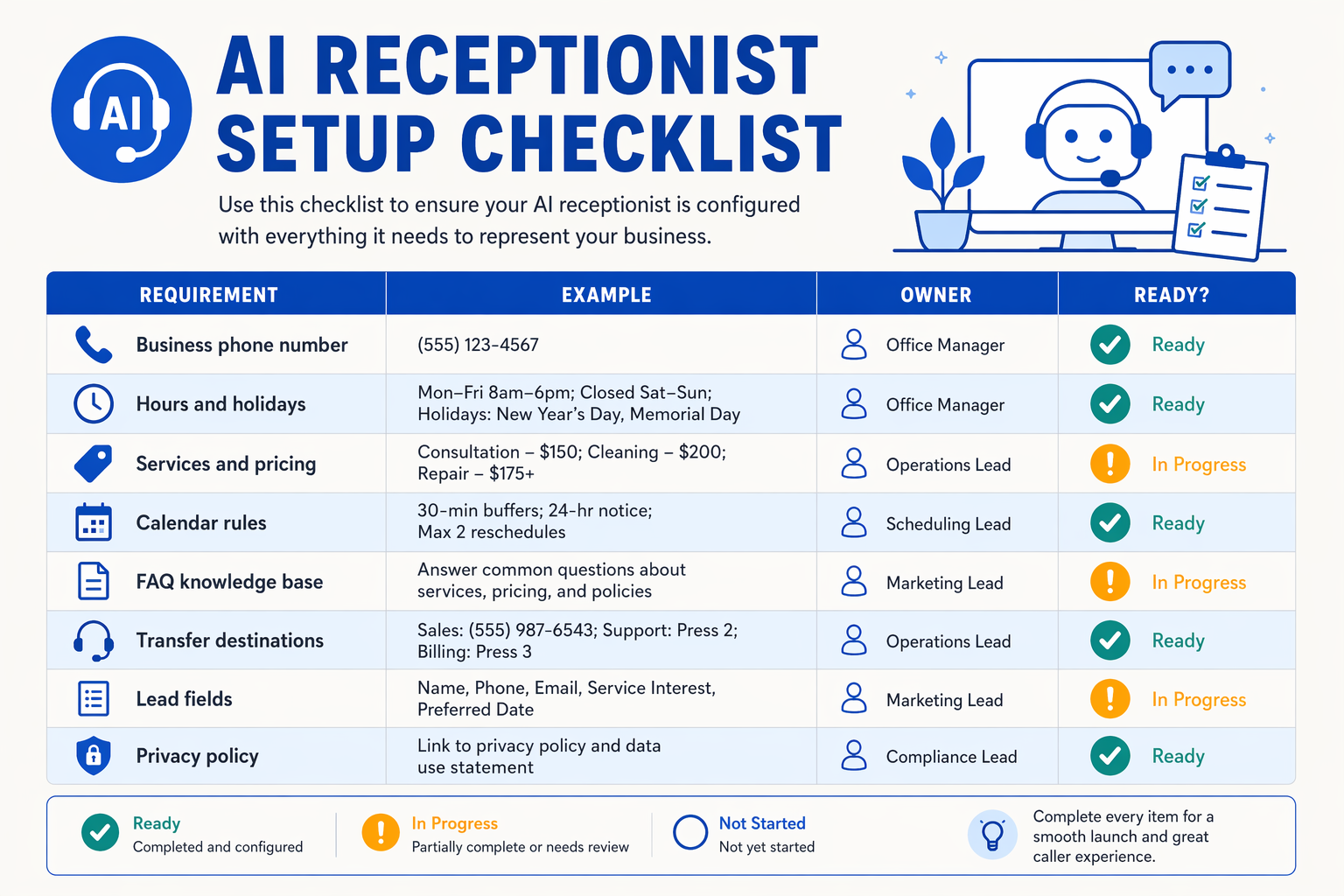
Before setting up an AI receptionist for a small business, prepare the phone connection, approved business information, call-handling rules, booking system, and escalation contacts. The minimum viable setup is a reliable business number plus a knowledge base and clear instructions for when the AI should answer, transfer, take a message, or involve a person.
What should I prepare before configuring an AI receptionist?
Use this checklist to turn a general-purpose voice agent into a controlled front-desk workflow. The table separates published findings from implementation targets that your business can adjust.
| Setup requirement | What to prepare | Evidence or target | Why it matters |
|---|---|---|---|
| Business phone access | Existing number, call-forwarding settings, or a new virtual number | Implementation target: after-hours coverage = 24/7; unanswered-call forwarding after 3 rings | Lets customers reach the AI receptionist and gives staff a defined fallback route. NextPhone describes AI receptionists as tools that answer calls 24/7, route inquiries, book appointments, and capture lead information. |
| Approved business knowledge | Hours, services, prices, locations, policies, service areas, and FAQs | Implementation target: review frequently changing answers every 30 days | Reduces guesses and outdated responses. Example: “Emergency plumbing is available within 15 km.” |
| Lead-capture fields | Required caller details and the CRM destination | Implementation target: capture at least 5 fields—name, phone number, service needed, location, and preferred time | Ensures every useful inquiry becomes a structured record rather than an unsearchable voicemail. |
| Calendar or booking system | Working hours, appointment duration, buffers, holidays, and time zone | Published finding: AInora reports 27% more booked appointments among businesses using AI receptionists in its 2026 statistics roundup | An AI receptionist books appointments only when availability rules are accurate and connected to a live calendar. |
| Routing and escalation rules | Transfer numbers, departments, priority conditions, and fallback behavior | Implementation target: define at least 3 routes—general inquiry, sales/booking, and urgent human escalation | Determines when the AI answers independently and when a person must take over. |
| Privacy and consent process | Call-recording notice, retention policy, access controls, and applicable legal review | Implementation target: document 1 owner for data access and knowledge-base approval | Helps the business handle personal information, recordings, and transcripts responsibly. |
AInora’s 2026 AI receptionist statistics roundup reports 35–60% lower front-desk operating costs for adopting businesses. AInora also reports a 27% increase in booked appointments in 2026; these are third-party reported findings, not guaranteed outcomes, and results vary with call volume, configuration, and staffing model.
How do I define the AI receptionist’s first version?
Start with one narrow workflow instead of automating every conversation:
- List the top 10 call reasons using recent call logs, staff notes, or voicemail transcripts.
- Write approved answers in plain language, including prices only when they are current.
- Mark restricted topics such as complaints, refunds, emergencies, complex quotations, or sensitive account changes.
- Specify required lead fields so the AI captures consistent data.
- Test realistic scenarios, including an after-hours inquiry, an unavailable appointment, an angry customer, and a caller outside the service area.
- Review transcripts and outcomes before expanding the call scope.
Which technical integrations are essential?
Connect the voice agent to:
- A telephony provider for inbound calls, transfers, caller identification, and voicemail fallback.
- A calendar API for availability checks and confirmed bookings.
- A CRM, spreadsheet, or help desk for lead and message storage.
- A knowledge base with an owner and review date.
- Analytics or call logs tracking answered calls, transfers, bookings, abandoned calls, and human handoffs.
For Indian businesses serving multilingual customers, platforms such as CallMissed combine AI voice agents with WhatsApp workflows and speech capabilities across 22 Indian languages, supporting a broader omnichannel receptionist setup.
How should a small business choose its first AI receptionist workflow?
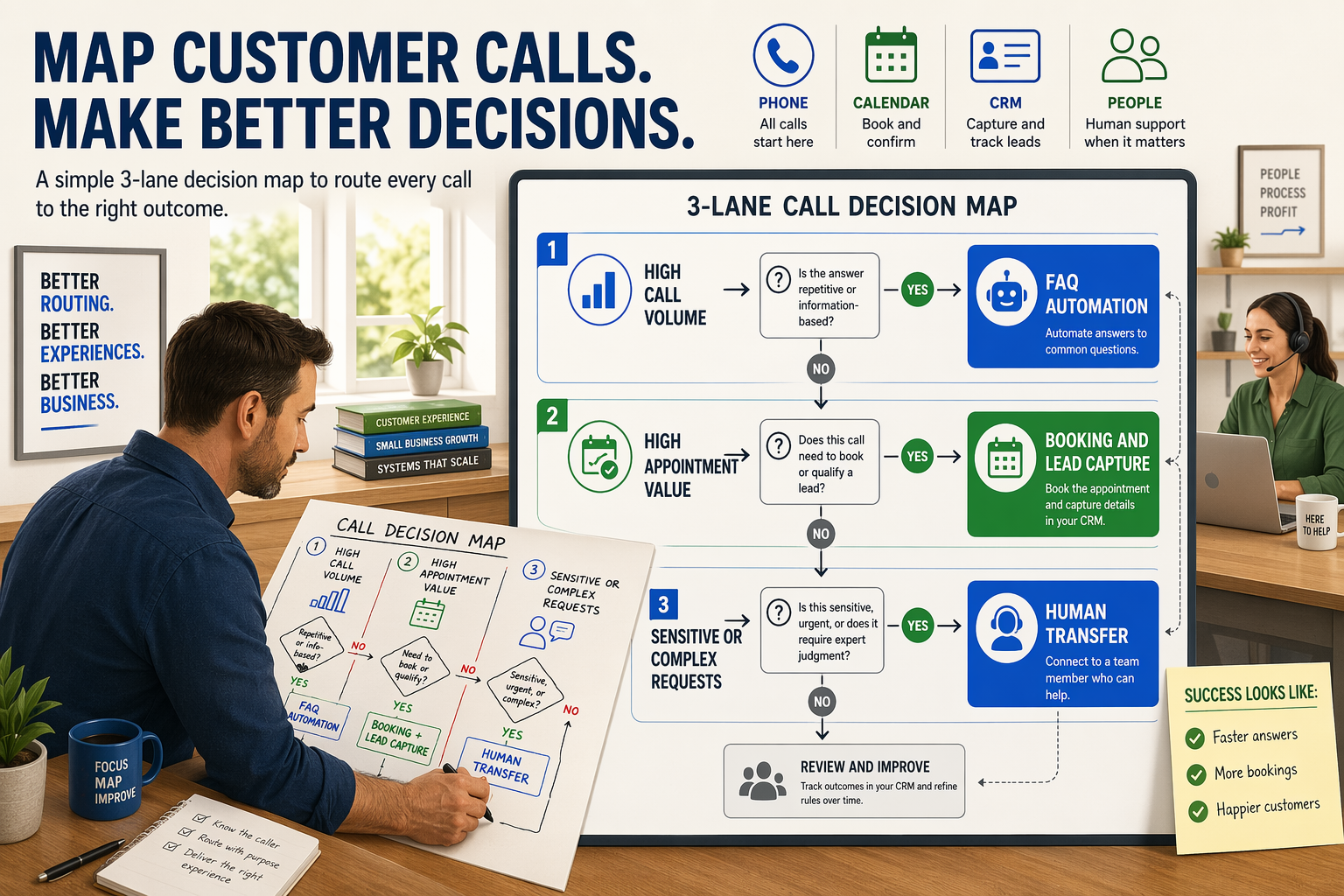
Start with the AI receptionist workflow that has the clearest business cost and the simplest safe handoff. For most small businesses, that means either capturing missed-call leads or booking appointments—not launching a fully autonomous receptionist across every department at once.
Which AI receptionist workflow should a small business launch first?
Choose the first workflow using three signals: call volume, revenue impact, and operational readiness. A workflow is a strong pilot when calls are frequent, the desired outcome is easy to define, and your team already has a reliable system for follow-up.
| First workflow | Best fit | Required setup | Primary success metric |
|---|---|---|---|
| Missed-call lead capture | Local services, agencies, real estate | Lead fields and CRM or email destination | Qualified leads captured |
| Appointment booking | Clinics, salons, consultants, repair firms | Calendar availability and booking rules | Completed bookings |
| FAQ and message-taking | Retailers, trades, professional services | Approved answers and message inbox | Containment rate |
| Call transfer and escalation | Businesses with sales or support teams | Staff numbers and transfer rules | Successful human handoffs |
AInora’s 2026 AI receptionist statistics roundup reports 35–60% lower front-desk operating costs, although outcomes vary by call volume, configuration, and staffing model. AInora also reports a 27% increase in booked appointments, making appointment scheduling a measurable pilot for appointment-based businesses rather than a feature to enable without tracking.
Use this decision sequence:
- Export two to four weeks of call records. Count missed calls, after-hours calls, repetitive questions, booking requests, and calls that required a specialist.
- Estimate the value of one successful outcome. For example, compare the average gross profit from a booked consultation with the cost of a missed opportunity.
- Select one narrow call intent. “Book a new-patient appointment” is safer and easier to measure than “handle all clinic calls.”
- Define the human fallback. The AI should take a message, send a callback request, or transfer the caller when confidence is low.
- Run a controlled pilot. Start with after-hours calls or one business number before changing the entire phone system.
How can a business score its first workflow?
A simple scoring model helps prevent teams from choosing a technically impressive but low-value use case:
function workflowScore({ frequency, value, readiness, risk }) {
  return (frequency * 0.35) +
         (value * 0.35) +
         (readiness * 0.20) -
         (risk * 0.10);
}

// Rate each input from 1 to 5.
const bookingPilot = workflowScore({
  frequency: 5,
  value: 5,
  readiness: 4,
  risk: 2
});

console.log(bookingPilot);
Rate frequency, value, and readiness from 1 to 5; rate operational or compliance risk from 1 to 5. Select the highest-scoring workflow, then review the result with the staff members who will receive transfers and follow up with leads.
For multilingual Indian operations, CallMissed demonstrates another selection criterion: language coverage. CallMissed supports voice agents and speech technologies across 22 Indian languages, while its communication platform can connect voice workflows with WhatsApp and CRM processes. That matters when a pilot must serve customers in regional languages, not only English or Hindi.
What should the pilot measure?
Track a baseline and a post-launch result for:
- Answer rate and abandoned calls
- Qualified leads captured
- Booking attempts and completed bookings
- Transfer success and human handoffs
- Incorrect answers, escalations, and callback completion
Do not judge the pilot only by call duration. The first workflow succeeds when it produces more completed business outcomes with an acceptable rate of safe human escalation.
How do I build an AI receptionist workflow from greeting to resolution?
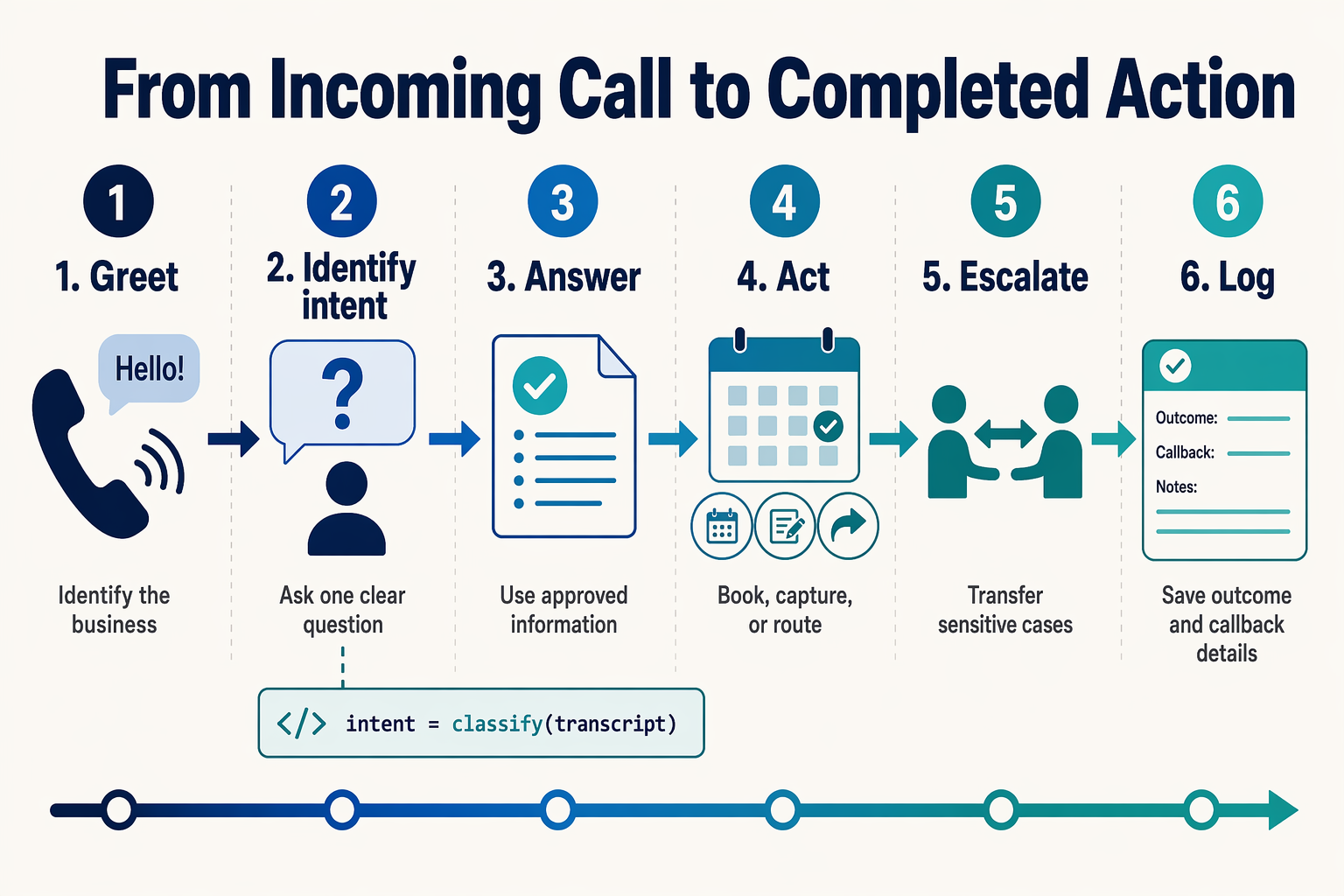
An effective AI receptionist workflow moves through five stages: greet, understand, collect, resolve, and escalate. For a small business, the best design is not a long scripted conversation; it is a controlled call flow that answers routine questions, captures structured lead data, books appointments when possible, and transfers exceptions to a person.
What should happen when the AI receptionist answers a call?
Start with a short greeting that identifies the business and offers clear options. Avoid asking several questions at once.
- Greet: “Thank you for calling Mehta Dental Clinic. How may I help you today?”
- Classify intent: Identify whether the caller wants an appointment, price information, directions, order status, support, or a human.
- Collect only relevant fields: Ask for the caller’s name and callback number, then gather details needed for that intent.
- Resolve or route: Answer from the approved knowledge base, book a slot, take a message, or transfer the call.
- Confirm: Repeat the outcome, time, phone number, and next step before ending the call.
A practical workflow can use these structured fields:
| Workflow stage | Data or action | Example |
|---|---|---|
| Greeting | Business identity and language | “Mehta Dental Clinic; English, Hindi, or Marathi” |
| Qualification | Caller name, need, location, urgency | “New patient, tooth pain, Pune” |
| Scheduling | Service, calendar, time zone | “Cleaning, 16 July at 11:00 IST” |
| Resolution | Answer, booking, message, or transfer | Appointment confirmation sent |
| Escalation | Reason and priority | Emergency symptoms transferred immediately |
CallMissed supports voice and chat workflows across 22 Indian languages, which can help businesses serve callers who prefer regional-language interactions rather than treating multilingual support as a later add-on.
How do I connect intent detection to business actions?
Keep the conversation layer separate from business logic. The AI should return a structured action, while your application validates that action before changing a calendar, CRM record, or call route.
// Node.js example: validate an AI receptionist action
app.post("/receptionist/action", async (req, res) => {
  const { intent, caller, service, slot, message } = req.body;

  if (!caller?.name || !caller?.phone) {
    return res.status(400).json({ action: "collect_missing_contact" });
  }

  if (intent === "book_appointment") {
    const available = await calendar.isAvailable(slot, service);
    if (!available) return res.json({ action: "offer_alternatives" });

    const booking = await calendar.create({
      name: caller.name,
      phone: caller.phone,
      service,
      slot
    });
    return res.json({ action: "confirm_booking", bookingId: booking.id });
  }

  if (intent === "human_transfer" || caller.urgent === true) {
    return res.json({ action: "transfer", queue: "priority_support" });
  }

  return res.json({
    action: "take_message",
    message: message || "Caller requested a callback."
  });
});
The AI receptionist should never invent availability, prices, policies, or medical guidance. Retrieve answers from approved business content, and require confirmation before sending messages or creating bookings.
Which outcomes should I measure first?
Track the workflow by stage rather than relying only on call duration:
- Answered-call rate and abandoned calls.
- Intent-classification accuracy and fallback frequency.
- Qualified leads captured with complete contact details.
- Appointments requested versus completed.
- Successful transfers, messages, and human escalations.
- Resolution rate without human intervention.
AInora’s 2026 AI receptionist statistics roundup reports 35–60% lower front-desk operating costs and a 27% increase in booked appointments for businesses using AI receptionists; actual results depend on call volume, configuration, and staffing model. These figures make appointment completion and operating cost useful baseline metrics, but they should not replace your own before-and-after measurement.
What advanced AI receptionist tips improve accuracy, conversions, and handoffs? (TABLE)
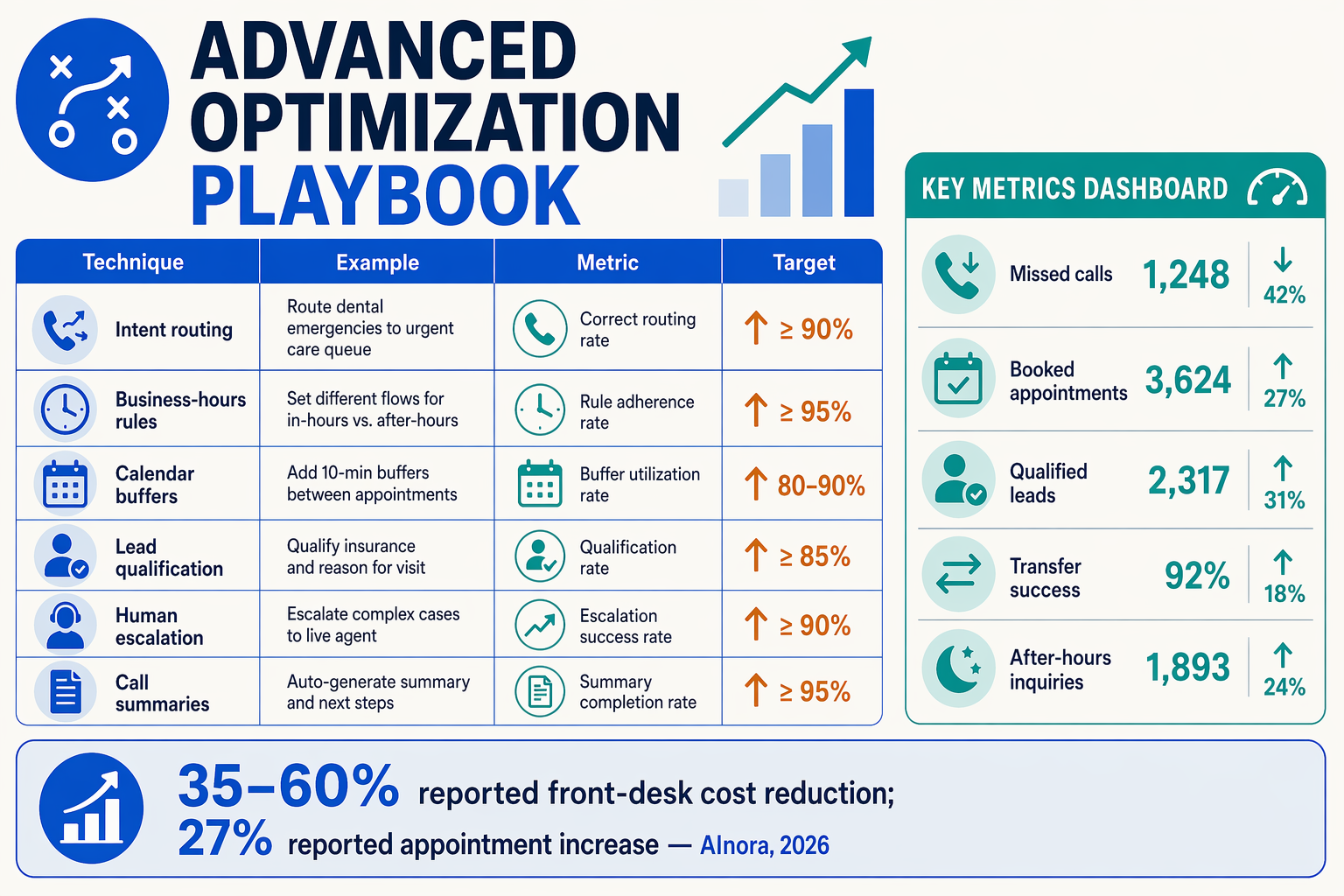
An AI receptionist improves accuracy, conversions, and human handoffs when it uses approved business data, structured call objectives, explicit escalation rules, and measurable outcomes. The most effective setup does not try to automate every conversation; it automates predictable requests and transfers uncertainty, urgency, or high-value opportunities to a person.
Which advanced AI receptionist settings have the greatest impact?
Use the following configuration as a practical starting point for an AI receptionist for small business. The thresholds are implementation recommendations, not universal benchmarks; test them against your call recordings, staffing capacity, and customer expectations.
| Advanced tip | Recommended configuration | Primary benefit | Handoff trigger | KPI to monitor |
|---|---|---|---|---|
| Ground answers in a knowledge base | Upload approved prices, opening hours, service areas, policies, and FAQs; add an owner and review date to each document | Improves answer accuracy and consistency | The requested information is missing, conflicting, or outdated | Unanswered-question rate |
| Collect structured lead data | Capture name, callback number, intent, location, budget, preferred service, and urgency as separate fields | Produces sales-ready leads instead of vague messages | Caller refuses essential details or describes a complex requirement | Qualified-lead rate |
| Use confidence-aware responses | Set a conservative rule: answer directly when the knowledge base matches; otherwise acknowledge uncertainty and offer a callback | Reduces confident-sounding errors and protects trust | The AI cannot verify an answer after one clarification | Escalation and correction rate |
| Design conversion-focused booking flows | Offer only real availability, confirm date, time zone, service duration, location, and contact details before booking | Reduces appointment friction and scheduling errors | No suitable slot, conflicting calendar data, or rescheduling dispute | Completed-booking rate |
| Prioritize urgent and high-value calls | Tag emergencies, existing complaints, enterprise inquiries, repeat customers, and high-budget leads | Helps staff respond to revenue or reputation-sensitive calls first | Emergency language, angry customer, VIP tag, or high-value intent | Time to human response |
| Summarize every handoff | Send the employee a short transcript summary, caller details, intent, sentiment, and promised next step | Prevents callers from repeating their story | Live transfer fails or the requested team member is unavailable | Successful-transfer rate |
AInora’s 2026 AI receptionist statistics roundup reports 35–60% lower front-desk operating costs for businesses using AI receptionists, with results varying by call volume, configuration, and staffing model. AInora also reports a 27% increase in booked appointments in 2026, which makes accurate scheduling and fast follow-up important conversion controls rather than optional features.
How should a small business test and improve the AI receptionist?
- Create a test set of real scenarios. Include a new lead, price question, appointment request, cancellation, wrong-number call, angry customer, emergency, and after-hours inquiry.
- Score each call on four dimensions: factual accuracy, information captured, booking or resolution success, and handoff quality.
- Review failed calls weekly. Update the knowledge base when the business changes prices, hours, staff, inventory, or policies. Do not “fix” repeated errors only through prompt wording if the underlying source is inaccurate.
- Add channel continuity. After a call, send a confirmation or summary through SMS, email, or WhatsApp where consent and local rules permit. Platforms such as CallMissed combine AI voice agents with WhatsApp workflows and speech technologies across 22 Indian languages, useful for multilingual customer operations.
- Test fallback capacity. If every human agent is busy, the AI should take a complete message, state the expected response window honestly, and create a trackable task rather than repeatedly attempting a failed transfer.
What common AI receptionist mistakes should small businesses avoid? (TABLE)
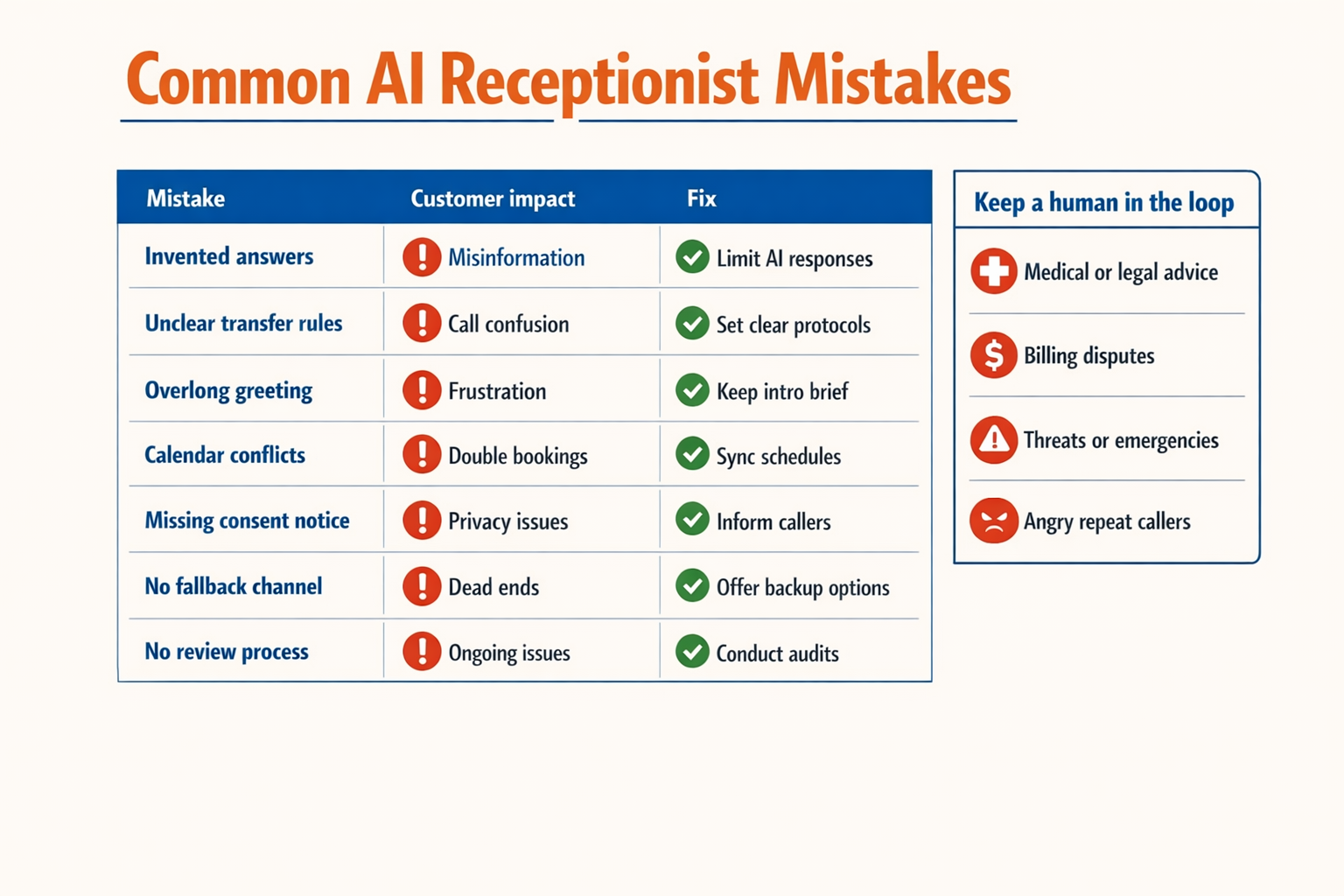
An AI receptionist for a small business fails most often when it is deployed without clear boundaries, current business information, or a reliable human handoff. Avoid these mistakes by limiting the receptionist to approved tasks, validating every workflow with realistic calls, and monitoring outcomes such as booking accuracy, transfer success, and unanswered-call rate.
AI receptionist mistakes to avoid
| Common mistake | Why it causes problems | Prevention | Practical validation |
|---|---|---|---|
| Letting the AI answer every question without limits | An outdated or invented answer can damage customer trust, especially for prices, policies, opening hours, or service availability. | Use a controlled knowledge base with approved answers, effective dates, and a rule to say, “I’m not certain—let me connect you with someone.” | Test at least 20 common questions, including questions with missing information. Review incorrect or low-confidence answers weekly. |
| Failing to define human escalation rules | Angry customers, emergencies, high-value leads, and unusual requests may remain trapped in automation. | Create explicit escalation triggers for urgent language, repeated misunderstandings, cancellation disputes, medical or safety concerns, and requests for a manager. | Place test calls using each trigger and confirm the AI transfers, takes a message, or sends an alert correctly. |
| Collecting too little lead information | A message such as “Please call me back” gives staff no useful context and slows follow-up. | Capture only the fields needed for the business, such as name, callback number, location, service type, budget range, preferred time, and reason for calling. | Check that every qualified lead creates a complete CRM record and that required fields cannot be skipped silently. |
| Booking appointments without calendar safeguards | Double bookings, incorrect time zones, unavailable staff, and missing buffers create operational failures. | Connect the AI to the live scheduling system, confirm the date and time verbally, apply service duration and buffer rules, and send written confirmation. | Test rescheduling, cancellation, after-hours requests, holidays, time-zone changes, and two callers requesting the same slot. |
| Using one call flow for every caller | A new prospect, existing customer, supplier, and urgent caller need different questions and routing paths. | Build intent-based branches: sales, support, appointments, billing, delivery, supplier calls, and emergencies. Keep each path short. | Review call recordings or transcripts by intent and measure transfer accuracy, abandoned calls, and completed bookings separately. |
| Ignoring privacy and consent | Recording calls or storing personal details without appropriate notice can create legal, reputational, and security risks. | Announce recording where required, collect only necessary data, restrict staff access, define retention periods, and document vendor data practices. | Run a privacy review before launch and verify that transcripts, phone numbers, and appointment data are deleted or retained according to policy. |
How should a small business test an AI receptionist before launch?
Use a numbered test plan rather than switching the system on for all callers immediately:
- Create a test set covering routine questions, interruptions, accents, background noise, silence, wrong numbers, and callers who change their minds.
- Run the highest-risk workflows first, including emergency escalation, failed transfers, appointment conflicts, and requests outside the knowledge base.
- Start with a limited rollout, such as after-hours calls or one business location, while a staff member reviews transcripts and outcomes.
- Measure the handoff, not just the number of calls answered: track qualified leads, completed bookings, successful transfers, abandoned calls, and human corrections.
- Update prompts and knowledge articles when the same failure appears repeatedly.
AInora’s 2026 AI receptionist statistics roundup reports 35–60% lower front-desk operating costs and a 27% increase in booked appointments for businesses using AI receptionists; these figures are reported averages, not guaranteed results. Reliable safeguards help a small business pursue those efficiencies without sacrificing accuracy.
For multilingual operations, CallMissed supports AI voice agents and speech technologies across 22 Indian languages, making language-specific testing as important as English-language testing. A receptionist should be evaluated in the languages, accents, and local business contexts that customers actually use.
What questions do small businesses ask about AI receptionists?
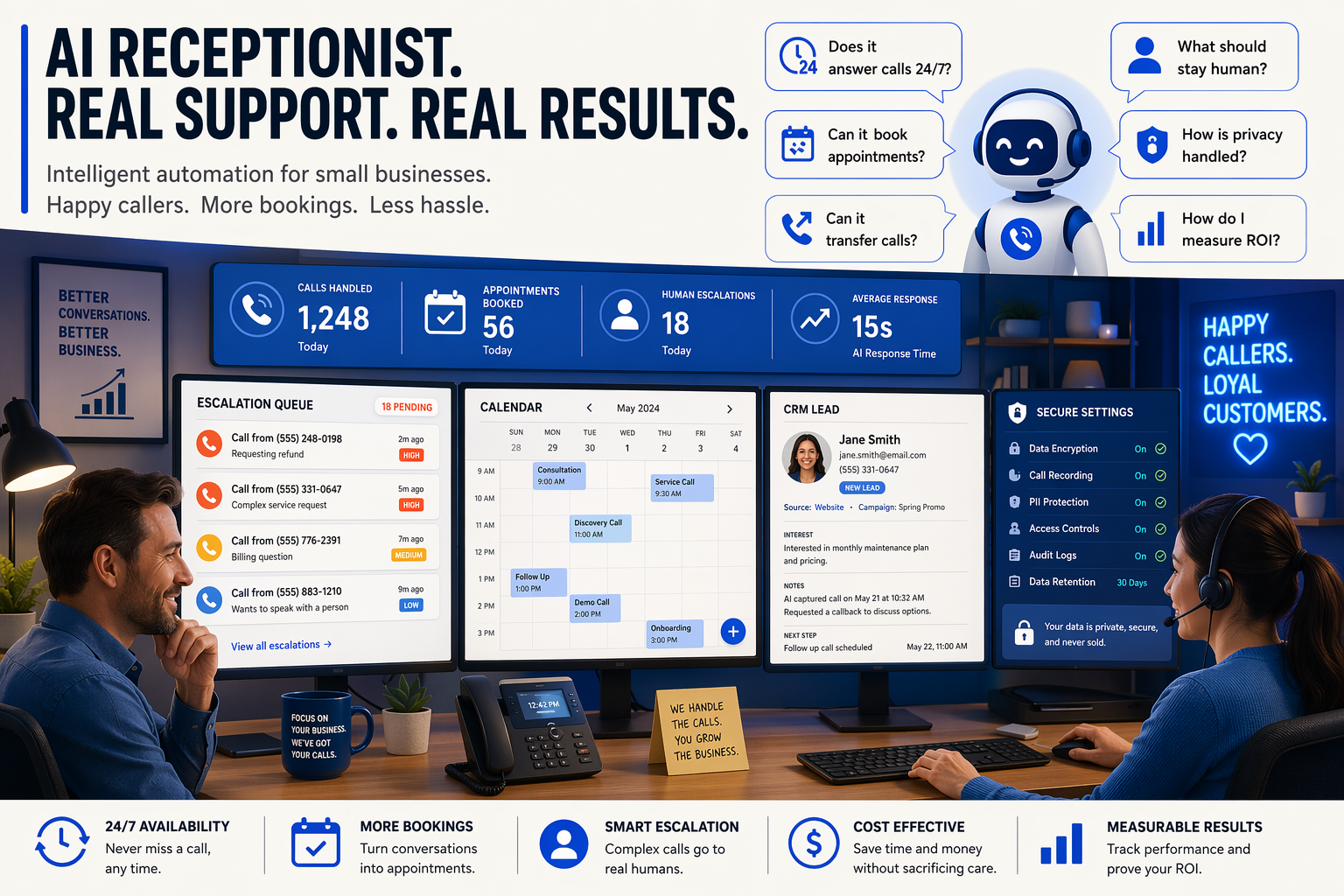
The most useful AI receptionist use cases for small businesses are 24/7 call answering, lead capture, appointment booking, routine question handling, message-taking, call transfers, and escalation to a human. The right setup automates repetitive front-desk work while preserving human involvement for complex, urgent, or high-value conversations.
What is an AI receptionist for small business, and how does it work?
Can an AI receptionist answer business calls 24/7?
How does an AI receptionist capture leads from phone calls?
Can an AI receptionist book appointments without creating scheduling conflicts?
How does an AI receptionist take messages and transfer calls?
Is an AI receptionist suitable for multilingual small businesses and sensitive calls?
How do I measure results and improve an AI receptionist after launch?
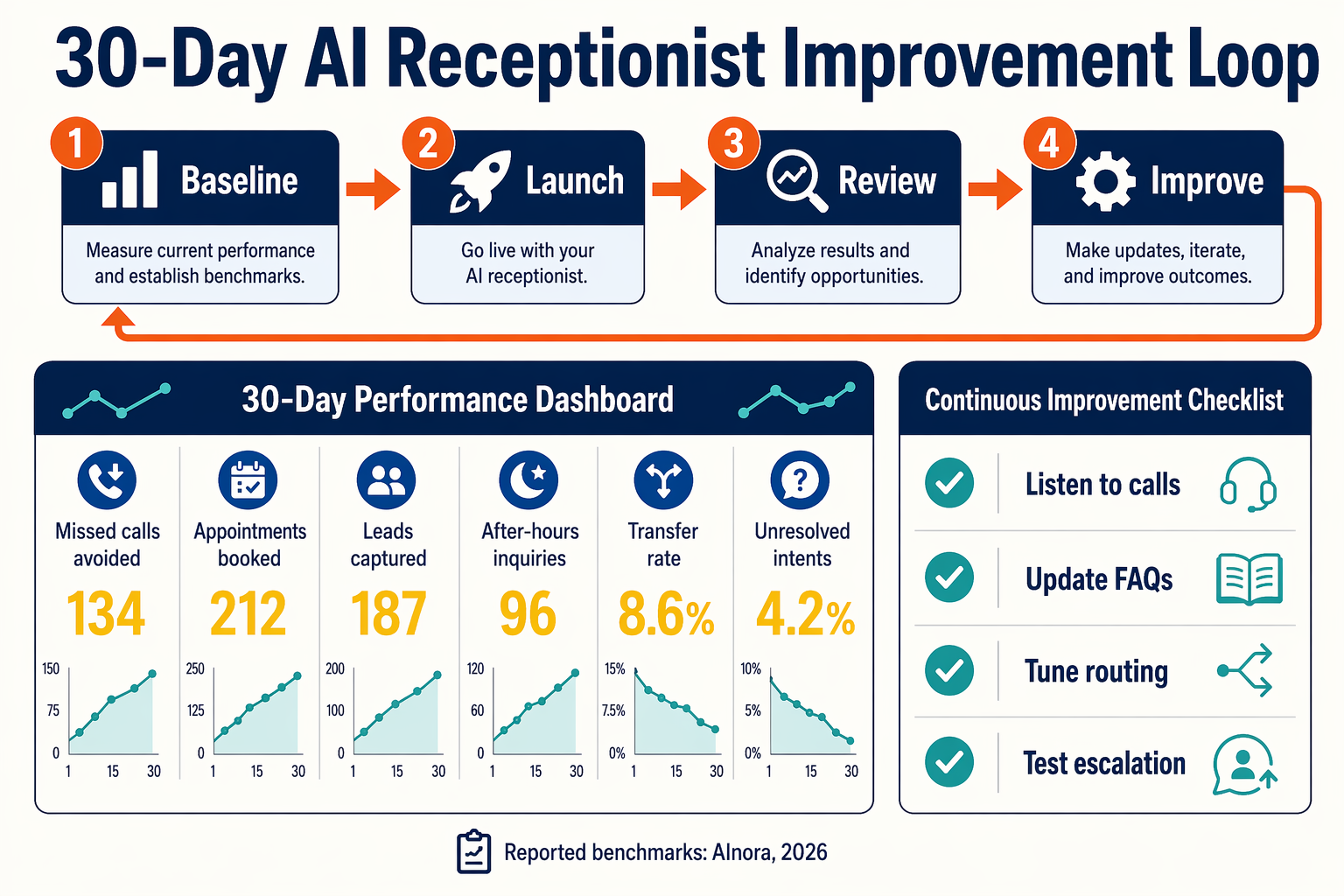
Measure an AI receptionist by business outcomes, not call volume alone: answered-call rate, qualified leads, completed bookings, transfer success, customer satisfaction, and cost per handled interaction. Improve performance by establishing a baseline, reviewing failed or escalated calls weekly, and changing one workflow or prompt at a time.
Which AI receptionist metrics should I track after launch?
Start with a 7–14-day baseline before making major changes. Track the following metrics by phone number, campaign, business hour, language, and call intent:
| Metric | Calculation | What it reveals | Improvement signal |
|---|---|---|---|
| Answered-call rate | Answered calls ÷ inbound calls × 100 | Coverage and availability | Increase after-hours coverage |
| Qualified-lead rate | Qualified leads ÷ answered calls × 100 | Lead-capture quality | Improve qualification questions |
| Booking completion rate | Completed bookings ÷ booking attempts × 100 | Scheduling reliability | Reduce calendar or confirmation failures |
| Transfer success rate | Successful transfers ÷ transfer attempts × 100 | Routing performance | Refine numbers, hours, and escalation rules |
| Human handoff rate | Calls transferred or escalated ÷ answered calls × 100 | Automation boundaries | Lower only when quality remains stable |
AInora’s 2026 AI receptionist statistics roundup reports 35–60% lower front-desk operating costs for businesses using AI receptionists, with results varying by call volume, configuration, and staffing model. AInora also reports a 27% increase in booked appointments in 2026, so appointment completion and show-up rates deserve separate tracking rather than being treated as one metric.
How do I create a useful AI receptionist performance dashboard?
Connect call events to a spreadsheet, CRM, or analytics database. Store one row per call with:
- Timestamp, duration, caller phone number, and call direction
- Detected intent: booking, sales, support, message, or emergency
- Lead status and captured fields
- Booking status, transfer result, and escalation reason
- Language, transcript reference, and customer rating where consent permits
A simple event aggregation can calculate daily outcomes:
from collections import Counter

def daily_metrics(calls):
    total = len(calls)
    answered = sum(c["status"] == "answered" for c in calls)
    qualified = sum(c.get("lead_status") == "qualified" for c in calls)
    bookings = sum(c.get("booking_status") == "confirmed" for c in calls)
    transfers = sum(c.get("transfer_status") == "successful" for c in calls)

    return {
        "answered_rate": round(answered / total * 100, 1) if total else 0,
        "qualified_leads": qualified,
        "confirmed_bookings": bookings,
        "transfer_success_rate": round(
            transfers / sum(c.get("transfer_attempted", False) for c in calls) * 100, 1
        ) if any(c.get("transfer_attempted", False) for c in calls) else 0
    }
Platforms such as CallMissed can connect voice agents with CRM and WhatsApp workflows, while support for 22 Indian languages helps teams compare outcomes across multilingual customer segments.
How do I improve an AI receptionist safely?
Review 10–20 low-rated calls and escalations each week. Classify each failure as wrong knowledge, missing information, unclear intent, bad transfer, or calendar error, then fix the relevant source rather than rewriting the entire prompt.
Use this improvement loop:
- Add approved answers and business rules to the knowledge base.
- Make required lead fields explicit.
- Add a confidence threshold and human fallback.
- Test urgent, multilingual, noisy, and off-hours calls.
- Compare the new version against the baseline for seven days.
Do not optimize for fewer human handoffs alone. A lower handoff rate is useful only if qualified leads, bookings, and customer satisfaction remain stable.
Conclusion
The most useful AI receptionist use cases for small businesses are 24/7 call answering, lead capture, appointment booking, routine-question handling, message-taking, call transfers, and human escalation. Together, these workflows create a practical front-desk system that reduces missed opportunities without removing people from conversations that require judgment or empathy.
Key takeaways:
- An AI receptionist answers business calls 24/7, including after hours and during busy periods, using a consistent greeting and approved knowledge base.
- It captures structured lead details—such as name, phone number, location, budget, and service need—then routes urgent or high-value calls to the right person.
- An AI receptionist books appointments, confirms availability and time zones, and sends follow-up details; AInora’s 2026 AI receptionist statistics roundup reports a 27% increase in booked appointments among adopting businesses.
- Cost and performance should be measured through answered-call rate, qualified leads, completed bookings, transfers, abandoned calls, and human handoffs. AInora reports 35–60% lower front-desk operating costs in 2026, although results vary by implementation.
Looking ahead, watch for more reliable escalation, deeper CRM and scheduling integration, and multilingual voice experiences. For Indian businesses, CallMissed supports voice agents, WhatsApp workflows, and speech technologies across 22 Indian languages, illustrating how AI reception can extend beyond a phone line.
To explore how AI communication is evolving, check out CallMissed. Which repetitive caller journey could your team automate first while preserving the human conversations that matter most?
Related Reading
Discussion
Related Posts

OpenAI Unveils GPT-5.6 (Sol, Terra, Luna): Flagship Power Under Government Lock and Key
The 24/7 Digital ISA: How Realtors Use AI Voice Agents, Missed Call Bots, and WhatsApp to Lock In Deals
Vapi vs CallMissed 2026: Voice AI API, Pricing and Features
Ready to automate customer conversations?
Launch AI voice agents and WhatsApp bots with CallMissed — one API, 22+ Indian languages.