
Omnichannel CRM vs Siloed Tools: Service Team Guide



Compare omnichannel CRM vs siloed tools with handoff tests, cost questions and a checklist for choosing accountable customer support workflows.
Omnichannel CRM vs Siloed Tools: Service Team Guide
What happens when a customer explains a problem on WhatsApp, calls for an update, and has to start from scratch? That repeat explanation is the service-team cost behind omnichannel CRM vs siloed tools. A shared inbox can give agents a clearer view of the conversation; separate apps may be simpler to adopt but require more work to keep records and handoffs aligned.
The choice matters especially when customers move between messaging, social DMs, and calls—or speak different languages. As of September 2026, CallMissed combines an omnichannel inbox with a built-in CRM and supports speech recognition in 22 Indian languages plus English. This guide compares the two approaches on customer context, response workflows, reporting, integration effort, and cost, so you can decide whether consolidation solves a real service problem for your team.
Which is better for a service team: an omnichannel CRM or siloed tools?
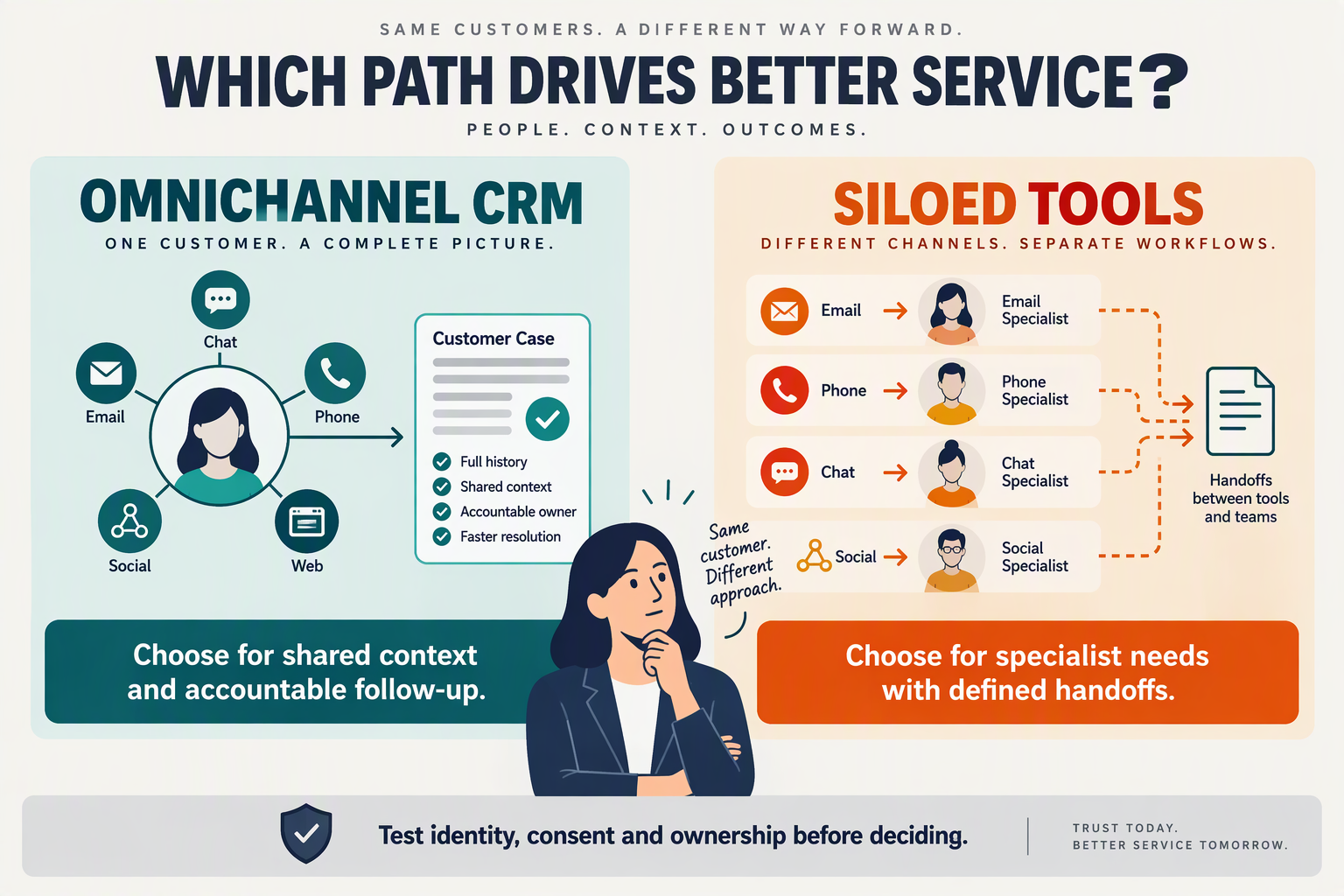
An omnichannel CRM is usually the better fit when customers switch channels and agents need one place to track ownership and follow-up. Siloed tools can be the simpler choice when channels have separate teams and few cases cross between them.
- Omnichannel CRM: Test whether an agent can find a customer’s prior WhatsApp message, call outcome and open ticket without asking them to repeat the issue. As of September 2026, CallMissed combines a shared inbox, support tickets and a CRM with a per-record timeline; verify which interactions appear in each view during a trial.
- Siloed tools: Keep separate apps if, for example, the phone team rarely handles messaging cases. If cases do cross over, time the handoff: measure how long it takes to identify the owner, locate the latest conversation and confirm the promised next step across the tools you already use.
- Omnichannel CRM: Check whether escalation has a named human owner, not just an AI-to-human switch. As of September 2026, CallMissed provides a human-handoff queue, agent-assist suggestions, SLA policies and CSAT surveys. In a test case, turn off the AI and confirm that the thread reaches the right person with usable context.
- Siloed tools: Compare the reporting work, not just the dashboards. Ask a supervisor to produce first-response time, unresolved-ticket count and CSAT results for the same period; record which figures require exports or manual matching before the team can trust them.
How should a service team make the final choice?
- Omnichannel CRM: Favor consolidation when a sample of recent cases shows repeated channel switches, duplicated contact records or unclear follow-up ownership. Set a baseline before migrating, then check whether those specific problems decline; a single inbox is valuable only if agents actually use the shared record.
- Siloed tools: Favor a phased approach if one specialist system supports a workflow the team cannot readily replace. Map the contact ID, ticket owner and status fields first; otherwise, adding an inbox may create another place to update rather than removing work.
- Omnichannel CRM: Price the whole workflow. As of September 2026, CallMissed’s Starter plan costs ₹999 per month and includes 550 credits, with no seat fees; its Standard voice-agent plan is ₹4 per minute, with phone carriage billed separately. Estimate usage before comparing that total with existing subscriptions and call costs.
- Both approaches: Run the same three-case evaluation: a message-to-call follow-up, an AI-to-human escalation and a reopened ticket. Score each on context found, owner identified, steps taken and time to resolution. Choose the setup that improves those measures without forcing agents to maintain duplicate records.
How do inbox and CRM capabilities compare?
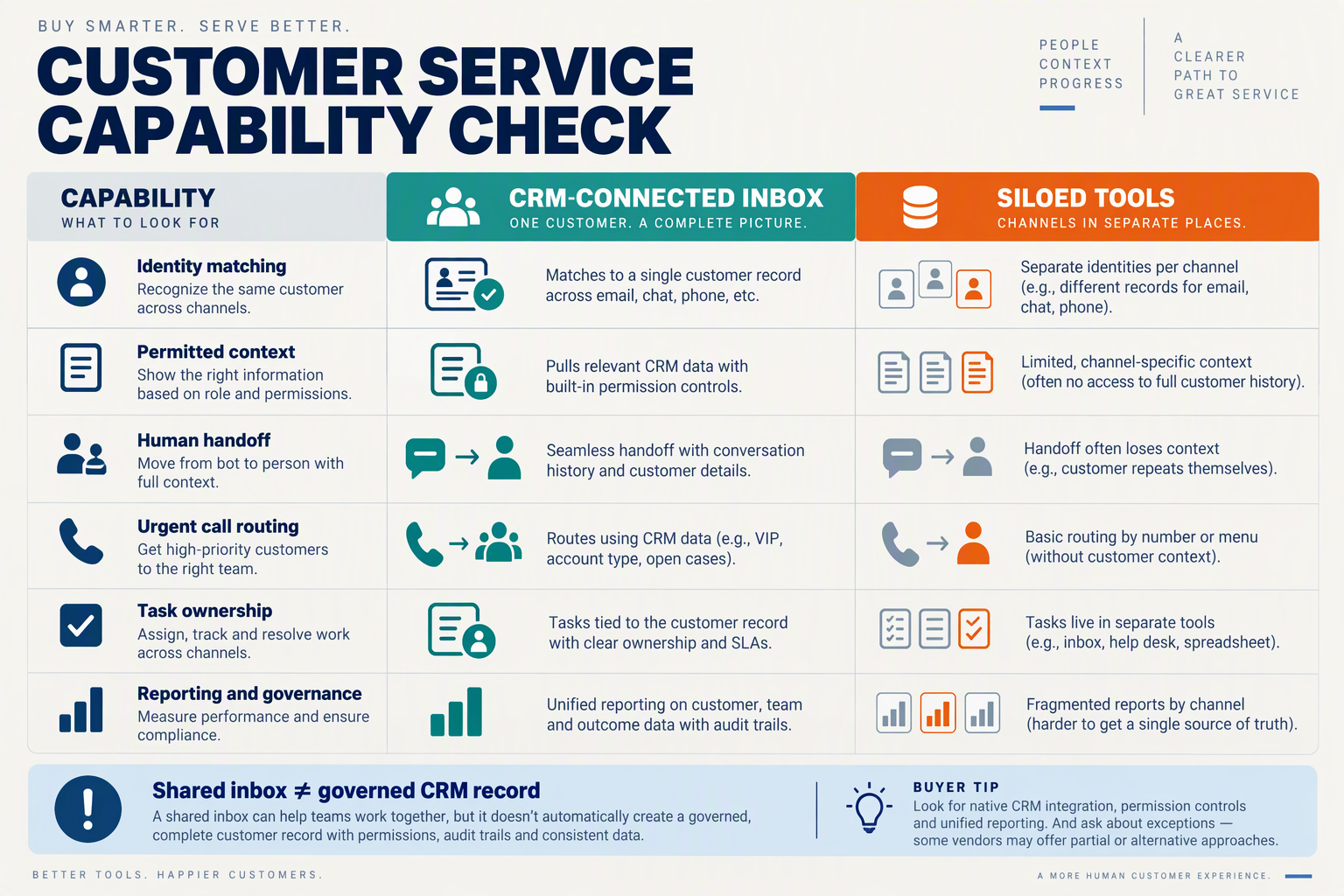
An omnichannel inbox with a built-in CRM reduces the number of places agents must check to understand a customer; siloed tools can work equally well when teams maintain reliable links between conversations and records. The useful comparison is not the number of features, but whether an agent can act on the right record without copying information between apps.
- Omnichannel inbox: Check whether messages, customer details and follow-up work are accessible in the same workflow—not merely displayed in adjacent tabs.
- Siloed tools: Check whether each channel writes to a shared customer ID; matching by name or phone number alone can leave duplicate or ambiguous records.
| Capability to test | Integrated inbox and CRM example | Siloed-tool approach | Trial task |
|---|---|---|---|
| Contact records | As of September 2026, CallMissed’s CRM includes contacts, companies, custom fields and a per-record timeline. | Records may live in a separate CRM from channel conversations. | Find a customer using an alternate identifier and inspect the record. |
| Conversation access | CallMissed’s shared inbox includes Facebook Page and Instagram DMs alongside its other connected channels. | Agents may need to search each channel’s app. | Locate the latest social DM without leaving the service workflow. |
| Sales and service follow-up | CallMissed includes support tickets, tasks, notes and deals on pipeline boards. | Tickets, tasks and deals may have different owners or IDs. | Turn a service request into a tracked task without losing its origin. |
| Data maintenance | CallMissed supports CSV import with AI column mapping, duplicate merge and bulk actions. | Cleanup depends on the CRM and each connected app’s import rules. | Import a sample file containing duplicate contacts and mismatched columns. |
| Segmentation | CallMissed offers saved views and rule-based lead scoring. | Teams may segment separately in messaging and CRM tools. | Build a view for customers needing a specific follow-up. |
| System connections | CallMissed lists Shopify, WooCommerce and HubSpot integrations, plus outbound webhooks with per-agent event subscriptions. | Connections may require middleware or separate vendor integrations. | Trace one event from its source to the customer record. |
Which inbox and CRM checks reveal the real difference?
- Omnichannel inbox: Ask an agent to complete the table’s tasks during a live trial. Count searches, screen changes and manual entries rather than assuming “unified” means every field is visible.
- Siloed tools: Document which system owns the contact ID, ticket ID and consent fields before connecting apps; otherwise, an update in one system may not resolve the matching record.
- Omnichannel inbox: Test an exception, such as two contacts sharing a phone number. A usable timeline should help the agent distinguish people, not encourage a mistaken merge.
- Siloed tools: If specialist apps remain necessary, test a failed sync as well as a successful one. The team needs to know where an agent will see missing or stale information.
- Both approaches: Score each trial task for accuracy and time to completion. Those observations make a stronger procurement case than a feature checklist alone.
What should teams compare in pricing and value?
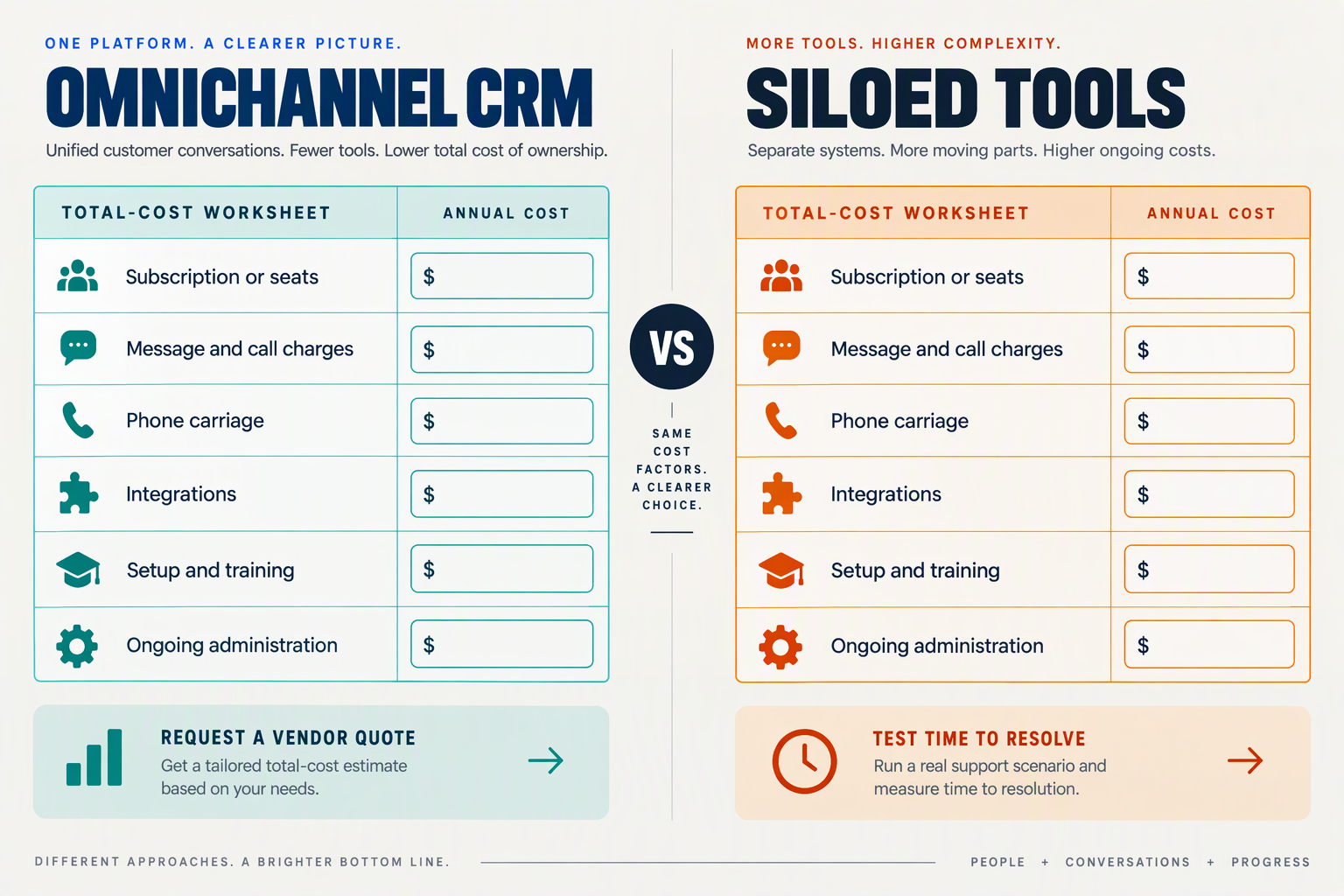
Compare total cost per resolved case, not subscription prices alone: include usage, phone carriage, integration work, and the time agents spend reconstructing customer history. A cheaper set of separate tools can cost more to operate if cross-channel cases require repeated manual work.
- Subscriptions: Add every inbox, calling, ticketing, and CRM fee; check whether vendors charge per seat, channel, or contact.
- Usage: Model your actual call lengths and message volumes, including minimum charges and any separate carrier fees.
- Integration: Count the hours needed to match contact records and keep ticket ownership and status synchronized.
- Agent time: Time a sample of channel-switching cases from first contact to resolution; include record searches and repeated questions.
- Reporting: Price the work required to reconcile response-time, ticket, and CSAT figures across systems.
| Cost or value test | Omnichannel inbox | Siloed tools |
|---|---|---|
| Monthly baseline | Check plan fees and included credits | Sum every subscription |
| Voice usage | Check per-minute rate, minimum, and carriage | Check each calling provider’s terms |
| Seats | Check whether seats cost extra | Multiply seat fees across apps |
| Integration | Test built-in records and required connections | Budget for syncing and maintenance |
| Case handling | Measure time to find the full history | Measure searches and manual handoffs |
What would a sample call workload cost?
CallMissed’s September 2026 pricing provides a concrete example: its Standard AI voice-agent rate is ₹4 per minute, covering speech recognition, the language model, and voice, with a 30-second minimum per connected call; phone carriage is separate. One hundred connected two-minute calls would therefore cost ₹800 in voice-agent usage before carriage. CallMissed also lists a ₹999-per-month Starter plan with 550 additional credits and no seat fees. Use the same workload and resolution measure when requesting quotes from siloed-tool providers.
What are the pros and cons of each approach?
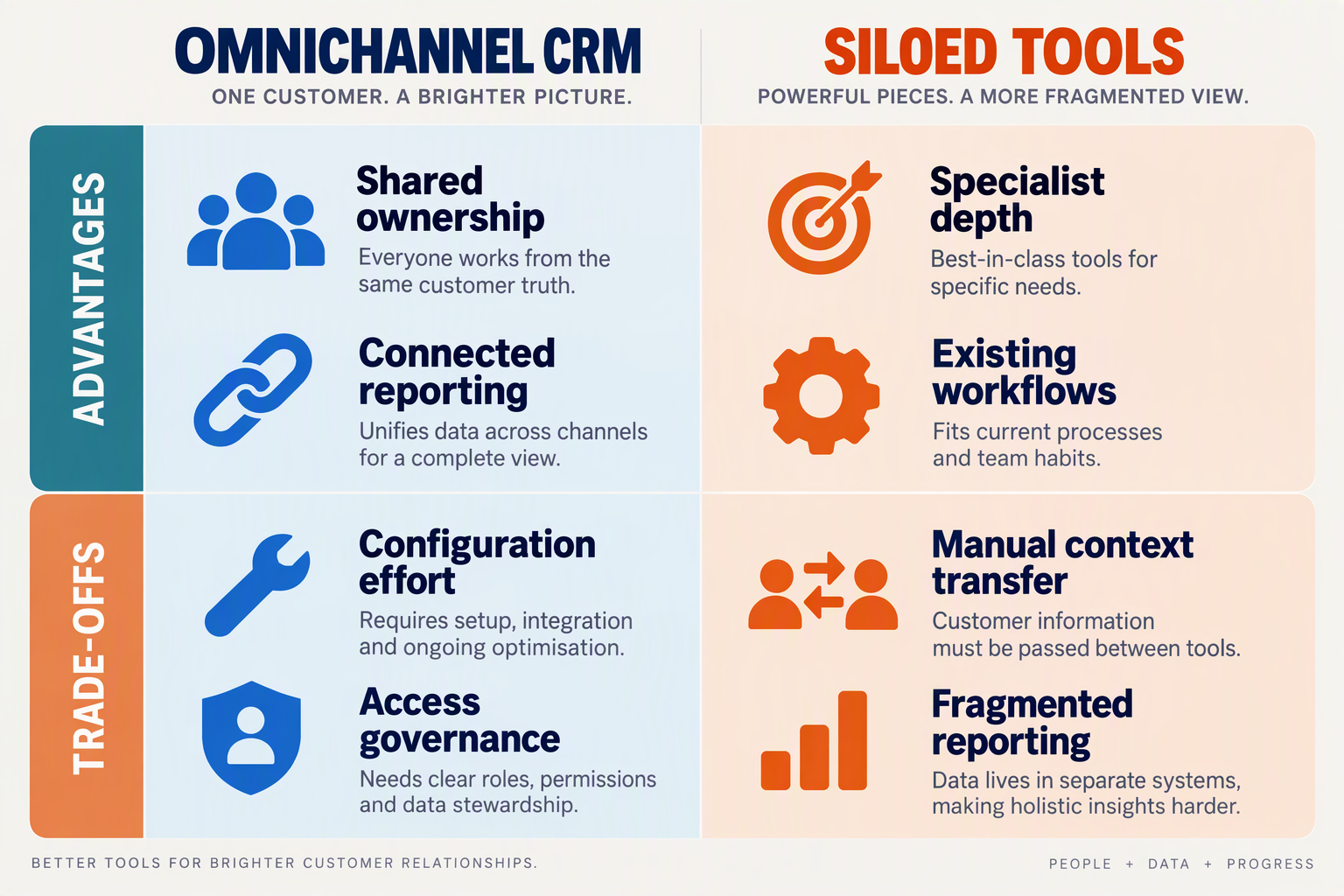
An omnichannel inbox reduces the work of coordinating service across channels; siloed tools preserve flexibility when teams have distinct workflows. Neither approach removes the need to define ownership, access and a reliable customer identifier.
- Omnichannel inbox: Fewer screens can simplify an agent’s shift, but consolidation requires training and agreement on how to label, assign and close cases.
- Siloed tools: Specialists can keep familiar applications, but supervisors must decide which system holds the authoritative case status when records disagree.
- Omnichannel inbox: Review permissions by role and channel; a shared workspace should not mean every agent can access every conversation.
- Siloed tools: Review permissions across each application too, including what happens when an employee changes teams or leaves.
- Omnichannel inbox: Price the complete workflow—subscriptions, usage, phone carriage and migration—not merely the advertised per-user or per-minute rate.
- Siloed tools: Price the coordination work as well: integration maintenance, duplicate-record cleanup and the time spent reconciling reports.
| Evaluation area | Omnichannel inbox: advantage | Omnichannel inbox: trade-off | Siloed tools: advantage and trade-off |
|---|---|---|---|
| Agent workflow | Agents work from a common service workspace. | Teams must standardize assignments and case labels. | Specialists keep tailored interfaces, but cross-channel cases require deliberate coordination. |
| Change management | One rollout can establish common operating rules. | Migrating contacts and retraining teams takes planning. | Teams can change one application at a time, but inconsistent processes may persist. |
| Integrations | Native connections can reduce custom wiring. | Check that critical specialist functions remain available. | Teams choose each specialist tool, but must maintain the connections between them. |
| Access control | Roles can be reviewed around a shared workflow. | Channel-specific access still needs testing. | Access can be isolated by application, but permissions must be audited in multiple places. |
| Reporting | Common definitions can make combined service reporting easier. | Poor data hygiene can still undermine the figures. | Channel reports retain specialist detail, but combined figures may need reconciliation. |
| Commercial model | A platform may combine several service functions. | Usage and carrier charges can remain separate. | Teams pay only for selected tools, but overlapping subscriptions can accumulate. |
What should teams verify before deciding?
As of September 2026, CallMissed lists a shared inbox, support tickets, SLA policies and a built-in CRM; its listed integrations include Shopify, WooCommerce and HubSpot. Its Starter plan is ₹999 per month with 550 credits, while phone carriage is billed separately. Those are useful inputs to a cost comparison, not a substitute for testing your actual case volume, specialist workflows and migration effort.
How should teams test WhatsApp voice email customer support handoffs?
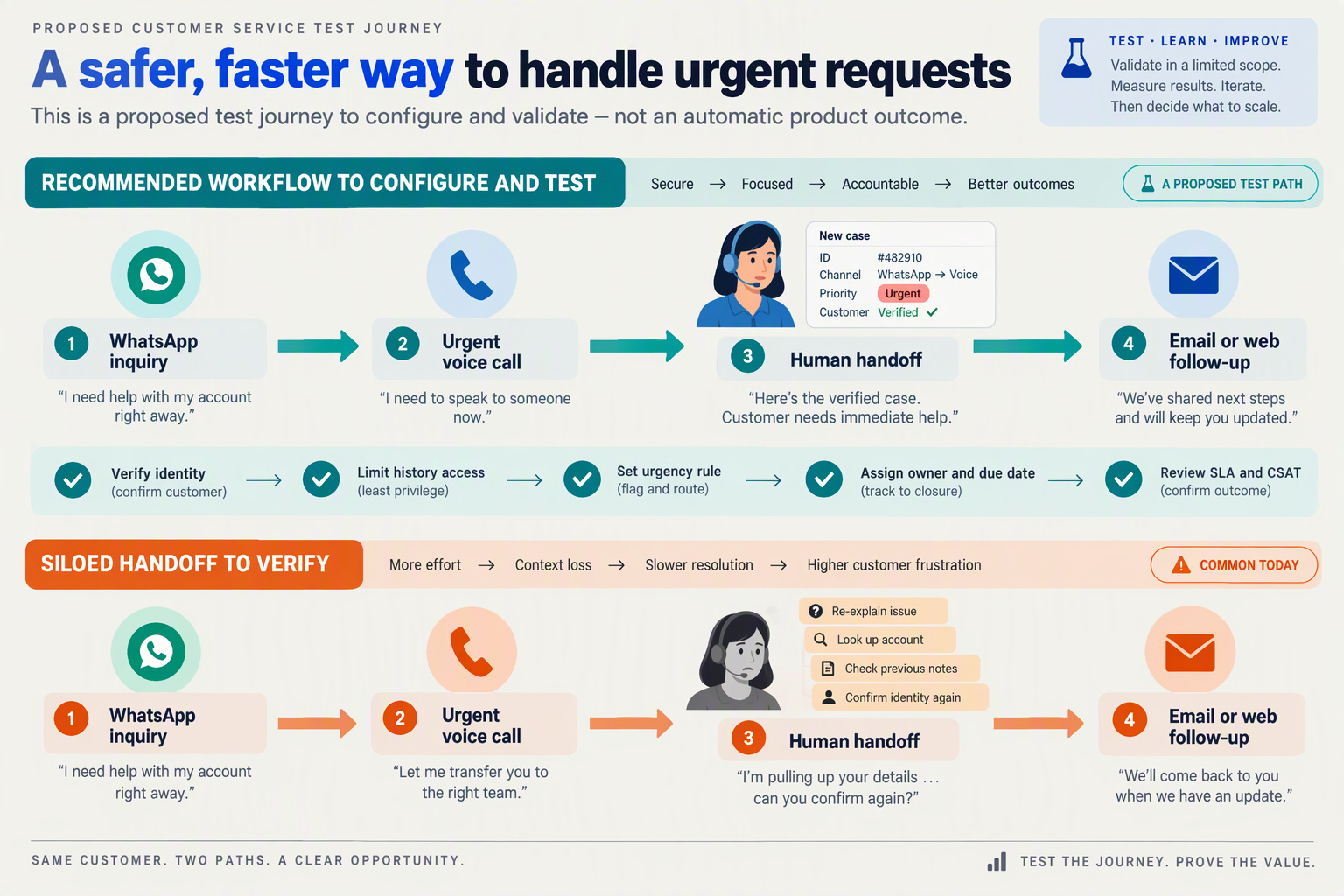
Test the WhatsApp → voice → email handoff as one customer case, not three channel demos. The winning setup is the one that preserves the issue, the person responsible and the promised next step when the customer changes channels.
What should agents do during a cross-channel trial?
- Omnichannel inbox: Send a WhatsApp message about a delayed order, then call from the same number and ask for an update. Check whether the agent can identify the earlier message and its owner before asking questions; record every detail the customer must repeat.
- Siloed tools: Run the identical case across your existing WhatsApp and phone apps. Time the steps needed to find the message, confirm the caller’s identity and pass the case to the phone agent. A successful handoff requires the right context, not merely a forwarded notification.
- Voice-to-human handoff: Have a voice agent take the call, then escalate an unresolved question. Inspect the transcript, summary, action items and disposition available to the receiving employee, and ask that employee to state the next step without listening to the full recording.
- Email follow-up: Ask an agent to email the promised update and verify where that message, its recipient and its owner are recorded. As of September 2026, CallMissed lists Gmail integration alongside a shared inbox and CRM; test the precise email workflow rather than assuming every email automatically appears in a shared conversation.
How should teams score the handoff?
- Context accuracy: Use five test cases: a changed phone number, two contacts at one company, a reopened issue, a missed call and a WhatsApp message from someone other than the buyer. Count incorrect record matches separately from cases that simply need human verification.
- Ownership and timing: For each channel change, record the time from the customer’s request to a named agent accepting responsibility. Check whether the ticket owner, due time and promised action agree across the inbox, CRM and any specialist app.
- Integration reliability: Deliberately resend one event and delay another before measuring results. CallMissed’s 2026 CRM integration guide recommends recording a source event ID and using an idempotency key to reject duplicates; apply that test to any webhook-based bridge you evaluate.
- Decision rule: Compare repeat explanations, incorrect matches, unowned cases and minutes spent reconciling records over the same trial period. Choose consolidation if it reduces those failures without losing required specialist workflows; keep siloed tools where the measured handoffs remain clear and dependable.
What should you ask vendors to demonstrate before switching?
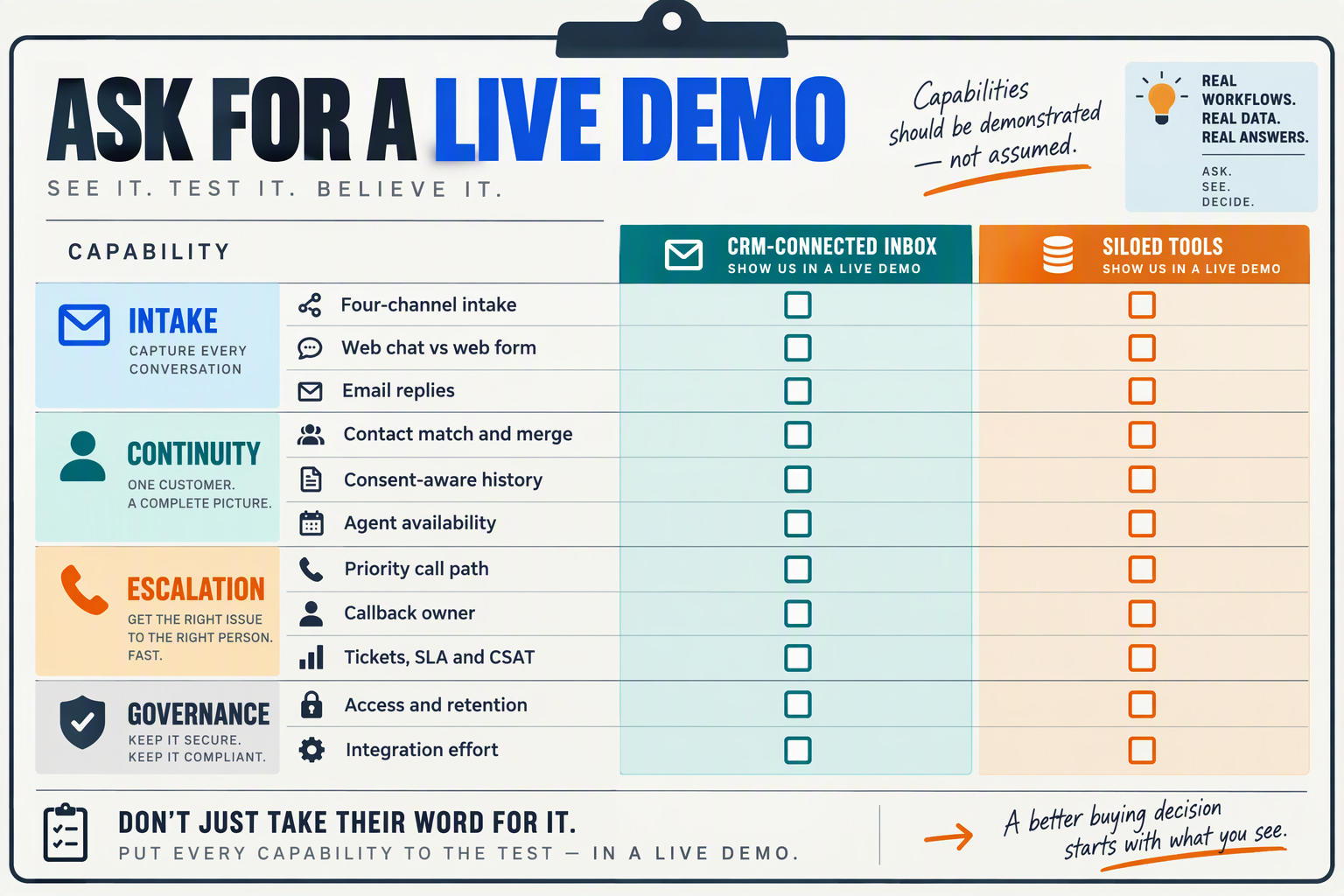
Ask each vendor to run the same customer journey in a live demo, using realistic records and your team’s escalation rules. The goal is to see where context, ownership or cost becomes hard to verify—not to count features on a slide.
What should vendors show in a live service-team demo?
- Channel continuity: Start a case on WhatsApp, continue it in an Instagram DM, then have the customer call. Ask the vendor to show exactly what the receiving agent can see, which details require a search, and whether the same contact is identified across all three interactions.
- Identity and data cleanup: Import a small CSV containing duplicate contacts and inconsistent phone formats. Ask the vendor to demonstrate field mapping, duplicate review and a corrected customer record; for siloed tools, have the team perform the equivalent reconciliation across apps and count the steps.
- Permission-aware calling: Demonstrate an inbound WhatsApp Business call and an outbound call to a customer who has given permission. CallMissed says its WhatsApp Business Calling supports both workflows as of September 2026; ask every vendor to show where permission is recorded and how an agent checks it before calling.
- Failure and recovery: Disconnect an integration during a test order-status query, then restore it. Ask what the customer sees, what the agent sees, whether the interaction is preserved, and how a supervisor finds cases requiring follow-up. A polished successful-path demo alone will not answer those questions.
What evidence should vendors provide before you sign?
- Integration boundaries: Pick one system your team relies on—such as Shopify, WooCommerce or HubSpot—and request a live lookup and update. As of September 2026, CallMissed lists integrations with all three; verify the specific fields, permissions and update direction your workflow needs rather than assuming “integrated” means full synchronization.
- Language performance: Supply five anonymized recordings that reflect your actual callers, including code-mixed speech if relevant. CallMissed states that its speech recognition supports 22 Indian languages plus English, including Hinglish, as of September 2026; check transcription accuracy and agent handling separately, since language availability is not an accuracy benchmark.
- Complete price calculation: Request a written estimate for your monthly conversation volume, including seats, messaging, AI usage, phone carriage and minimum call charges. CallMissed lists no seat fees and voice-agent plans of ₹4, ₹5 or ₹6 per minute as of September 2026, with a 30-second minimum per connected call and phone carriage billed separately.
- Pilot exit criteria: Agree on a two-week test with the same case sample for each option. Require exports showing ownership changes, unresolved cases, response times and total spend; ask how records can be retrieved if you leave. Choose against your baseline, not the smoothest demonstration.
Which approach should your team choose?
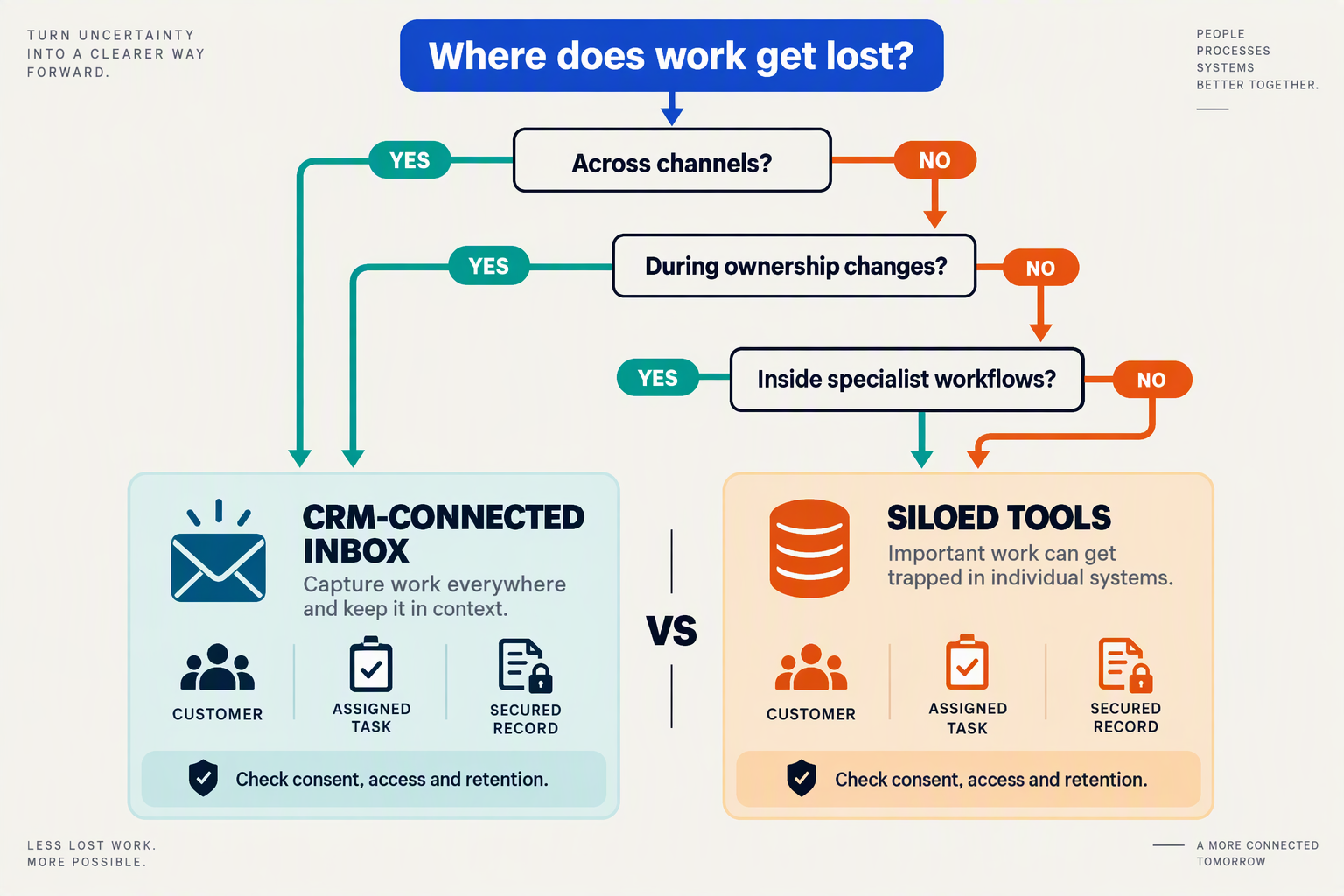
Choose an omnichannel inbox if cross-channel cases are frequent enough to justify changing how agents work; keep siloed tools if specialist workflows matter more and handoffs are rare. Make the decision against a defined pilot, not a feature checklist.
- Omnichannel inbox: Pilot one service queue for 30 days rather than migrating every team at once. Give agents three realistic tasks—resolve a messaging query, escalate a call and reopen an older case—and record completion time, missing information and corrections. Consolidation earns its place if those measures improve without creating new steps.
- Siloed tools: Keep a specialist app when its workflow is essential and a replacement fails a live test. Identify who maintains the connection to the other systems, which record governs contact details and how agents recover when a sync fails. A familiar interface is useful; an unowned integration is a service risk.
- Omnichannel inbox: Compare the whole operating cost, including migration, training, messaging charges and phone carriage—not just the subscription. As of September 2026, CallMissed lists Starter at ₹999 per month with 550 credits and no seat fees; its voice-agent rates and phone carriage need separate consideration. Price a representative month of actual traffic.
- Siloed tools: Calculate what separation costs in staff time before treating a lower software quote as a saving. Have a supervisor log the minutes spent reconciling five disputed cases across systems, then multiply by the team’s normal case volume. This is a planning estimate, not a published industry benchmark; check it against a pilot.
- Omnichannel inbox: Choose it only if the shared workflow respects channel-specific rules. For example, WhatsApp Business Calling requires customer permission before a business calls a customer; an agent’s ability to see the thread does not remove that requirement. Test permissions, escalation and record access as carefully as response speed.
- Siloed tools: Prefer a staged connection when legal, regional or specialist teams must retain different access rules. Document which fields may cross systems, how long records remain available and who can correct a mistaken match. Run a deletion or correction request through the proposed workflow before approving a broader rollout.
- Omnichannel inbox: Set a go/no-go threshold before the pilot: for example, require agents to complete all three test tasks without copying customer details between apps, while supervisors can identify the next owner. This is a team-defined acceptance test, not a universal performance target. Ask frontline agents whether the new workflow is easier to use.
- Siloed tools: Choose separation deliberately, not by default. Name an owner for every cross-tool handoff, schedule a review after 60 days and revisit the decision if case volume or channel mix changes. The right answer is the setup that handles your real exceptions reliably—not necessarily the one with the most channels.
Frequently Asked Questions
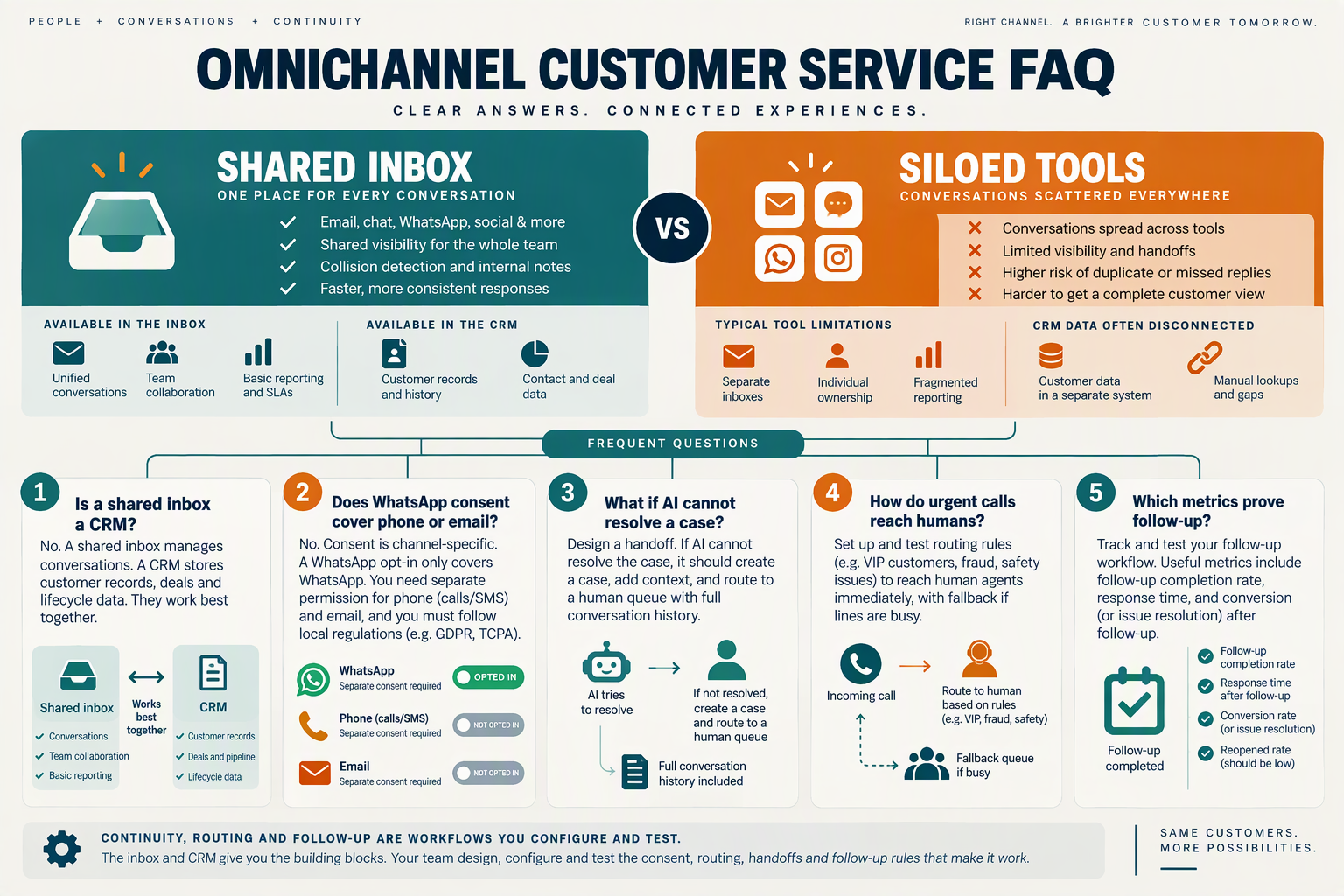
The practical question is whether customers cross channels often enough to justify a shared record. These six checks help a service team compare an omnichannel inbox with its current tools.
- Q: What is the difference between omnichannel customer service and separate support tools?
A: Omnichannel customer service gives agents a shared place to handle conversations and related customer records; separate tools require a process for transferring that context. Neither approach guarantees a good handoff. Review recent cases and count how often agents had to search another app or ask a customer to repeat information.
- Q: Which channels should an omnichannel customer service inbox cover?
A: Start with the channels customers actually use, rather than the longest channel list on a product page. As of September 2026, CallMissed offers a shared inbox that includes WhatsApp, Facebook Page and Instagram DMs, alongside phone-call capabilities. In a trial, check whether agents can identify the customer and the next action when a conversation moves between channels.
- Q: How should an omnichannel customer service team handle AI-to-human escalation?
A: The handoff should put the conversation in a human queue with enough context to act, rather than simply stop the AI response. As of September 2026, CallMissed provides a human-handoff queue that receives a thread when the AI is switched off, plus agent-assist suggestions and knowledge snippets. Test who takes ownership when the assigned agent is unavailable.
- Q: Which metrics show whether a shared inbox is worth adopting?
A: Compare first-response time, unresolved-ticket count, SLA breaches and CSAT before and after a limited rollout. CallMissed supports support tickets, SLA policies and CSAT surveys as of September 2026, but the useful result is your team’s measured change—not the presence of a dashboard. Use the same case types and reporting period for both approaches.
- Q: Can a service team keep specialist tools alongside a shared inbox?
A: Yes; consolidation does not have to mean replacing every existing system. As of September 2026, CallMissed lists integrations with HubSpot, Shopify, WooCommerce, Google Calendar and Gmail, as well as outbound webhooks. Before adopting a mixed setup, decide which system owns the contact ID, ticket status and follow-up task, then test what happens when records change.
- Q: How do you compare omnichannel inbox costs with siloed-tool costs?
A: Add subscription charges, usage-based charges and the staff time spent matching records or transferring cases. As of September 2026, CallMissed lists monthly plans of ₹999 for Starter, ₹4,999 for Pro and ₹20,000 for Enterprise, with no seat fees; voice-agent minutes and phone carriage need separate consideration. Compare a realistic month of usage, not plan prices alone.
Conclusion
Choose an omnichannel CRM when customers regularly switch channels and agents lose context; keep siloed tools when cases rarely cross teams.
- Check whether agents can see prior messages, call outcomes and open tickets without asking customers to repeat themselves.
- Test whether escalations reach a named person with a clear next step.
- Compare the work required to produce trustworthy response-time and CSAT reports.
- Keep specialist tools where needed, but map contact IDs and ownership before connecting workflows.
Watch whether shared records actually reduce repeat explanations. As of September 2026, CallMissed offers a shared inbox, support tickets and a built-in CRM to explore. What would a trial reveal about your team’s handoffs?
Related Reading
Discussion
Related Posts


Ready to automate customer conversations?
Launch AI voice agents and WhatsApp bots with CallMissed — one API, 22+ Indian languages.