
How to Call an OpenAI-Compatible API with Python and JS


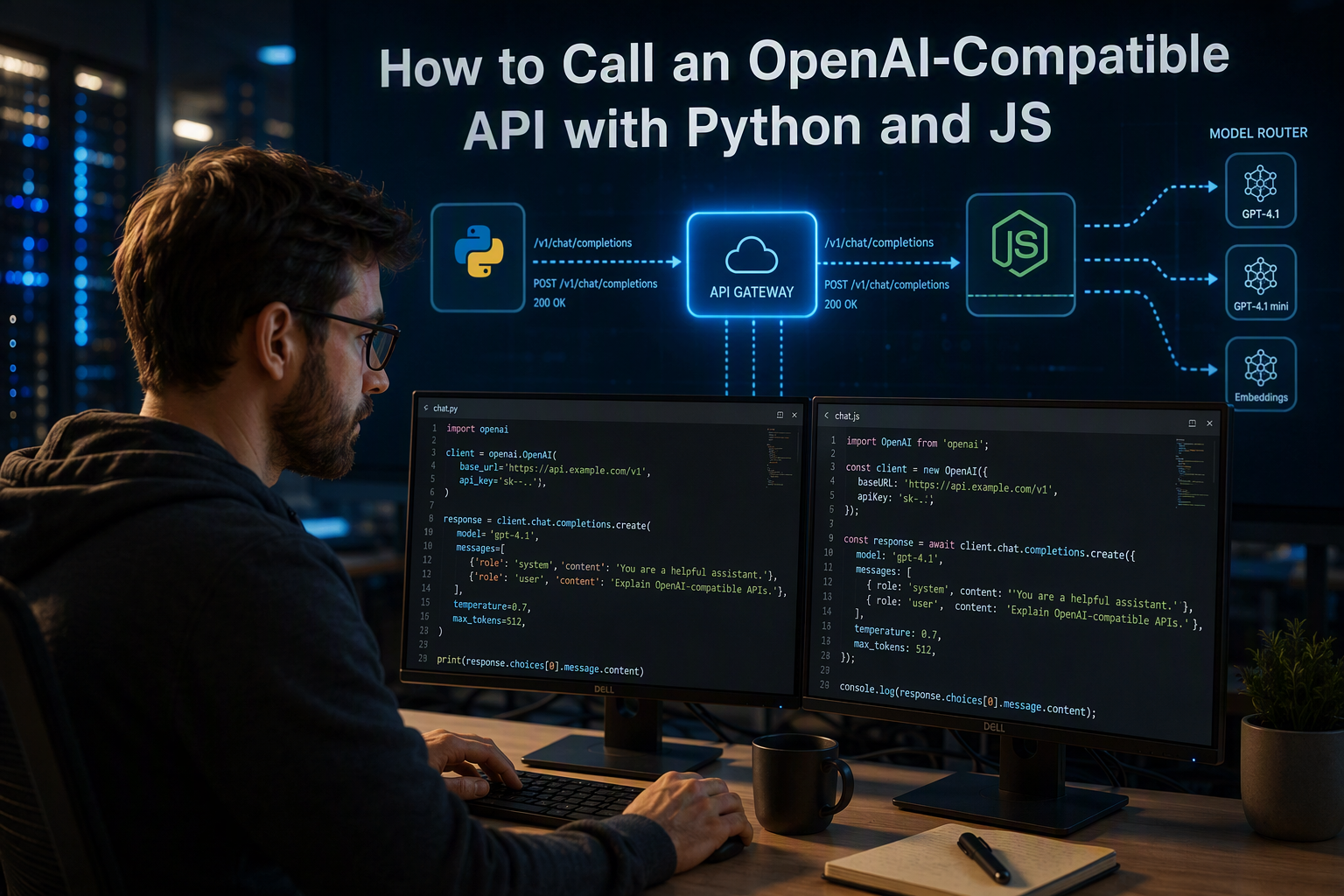
Learn how to call an OpenAI-compatible API with Python and JavaScript SDKs, configure base URLs, test requests, stream responses, and fix errors.
How to Call an OpenAI-Compatible API with Python and JS
What if changing an AI provider required only two configuration values—not a rewrite of your application? To call an OpenAI-compatible API with Python and JS, install the familiar OpenAI SDK, set its custom base_url, authenticate with the provider’s API key, and select a model that provider exposes.
That small change is possible because an OpenAI-compatible provider implements enough of the same conventions—HTTP paths, authentication, request fields, and response formats—for existing OpenAI clients to communicate with it. Compatibility is not automatically feature-complete, however: one provider may support chat completions and streaming while another handles vision, tool calling, structured outputs, or audio differently. Treat the shared interface as a practical baseline, then verify the provider’s documentation before depending on advanced features.
This guide takes a hands-on approach to using an OpenAI SDK compatible API without replacing your application architecture. You will learn how to:
- Install and configure the official OpenAI Python library with a custom endpoint.
- Send a chat-completion request using
from openai import OpenAI. - Read the returned assistant message safely.
- Configure the official OpenAI JavaScript or TypeScript SDK with the same pattern.
- Use environment variables to keep API keys out of source control.
- Diagnose common failures involving incorrect base URLs, unsupported models, authentication, response formats, and feature mismatches.
- Understand when to use
chat.completions.create()and when a provider may expose newer Responses API functionality.
OpenAI’s official Python library documentation specifies support for Python 3.10 and newer, while OpenAI’s SDK documentation provides dedicated libraries for both Python and JavaScript/TypeScript. That means many developers can preserve their existing client code and change configuration rather than learning an entirely new SDK.
The approach also scales beyond a single model vendor. As of September 2026, CallMissed’s developer AI API provides one OpenAI-compatible API key and balance for 138 models, including 42 general-purpose language models, 25 realtime voice-agent models, 45 speech-to-text models, 9 text-to-speech models, 15 image models, and 2 embedding models, according to CallMissed’s verified product documentation. The broader lesson is straightforward: a stable client interface can make model experimentation, fallback strategies, and provider migration substantially easier.
By the end, you will have working Python and JavaScript examples, a clear compatibility checklist, and a troubleshooting process you can apply to nearly any OpenAI-compatible endpoint.
How do you call an OpenAI-compatible API with an existing SDK?

Install the official OpenAI SDK, point its base_url at the provider’s OpenAI-compatible endpoint, authenticate with that provider’s API key, and select a model the provider supports. In most cases, the application logic remains unchanged: only the client configuration and model name need to change.
What does “OpenAI-compatible API” mean?
An OpenAI-compatible API implements familiar HTTP routes, authentication headers, request fields, and response structures closely enough for an existing OpenAI SDK to communicate with it. Compatibility is a practical interface—not a guarantee that every OpenAI feature is supported identically.
Before production use, verify these provider-specific details:
- The correct base URL and whether it requires a
/v1suffix. - Supported model IDs and modalities.
- Chat Completions versus Responses API support.
- Streaming, tool calling, structured outputs, vision, audio, and embeddings.
- Rate limits, error formats, and billing behavior.
OpenAI’s official Python library documentation lists Python 3.10 or newer as supported, according to OpenAI’s Python API reference accessed in September 2026. CallMissed’s developer AI API is one concrete example: as of September 2026, CallMissed documents 138 available models across language, voice, speech-to-text, text-to-speech, image, and embedding categories.
How do you call an OpenAI-compatible API with Python?
- Install the SDK:
pip install openai- Set the provider key and endpoint as environment variables:
export AI_API_KEY="your-provider-key"
export AI_BASE_URL="https://api.example.com/v1"
export AI_MODEL="provider-model-id"- Create the client and send a request:
import os
from openai import OpenAI

client = OpenAI(
    api_key=os.environ["AI_API_KEY"],
    base_url=os.environ["AI_BASE_URL"],
)

response = client.chat.completions.create(
    model=os.environ["AI_MODEL"],
    messages=[
        {"role": "user", "content": "Explain API compatibility in one sentence."}
    ],
)

print(response.choices[0].message.content)
The important migration points are api_key, base_url, and model. The request method and response access pattern remain familiar.
How do you call the same API with JavaScript or TypeScript?
OpenAI’s official JavaScript and TypeScript library documentation provides the equivalent client configuration, according to OpenAI’s SDK documentation published on its developer site.
npm install openaiimport OpenAI from "openai";
const client = new OpenAI({
apiKey: process.env.AI_API_KEY,
baseURL: process.env.AI_BASE_URL,
});
const response = await client.chat.completions.create({
model: process.env.AI_MODEL,
messages: [
{ role: "user", content: "Explain API compatibility in one sentence." }
],
});
console.log(response.choices[0].message.content);For CallMissed, the documented developer API uses an OpenAI-compatible endpoint and supports OpenAI-compatible Chat Completions, Responses, embeddings, image, audio transcription, translation, and speech endpoints. Use the exact base URL and model identifier shown in the current CallMissed documentation rather than assuming every model supports every operation.
| Configuration | Python | JavaScript/TypeScript | Purpose |
|---|---|---|---|
| API key | api_key | apiKey | Authenticates the request |
| Base URL | base_url | baseURL | Selects the compatible provider |
| Model | model= | model: | Chooses an exposed model |
| Request method | chat.completions.create() | chat.completions.create() | Sends the generation request |
What should you check when the request fails?
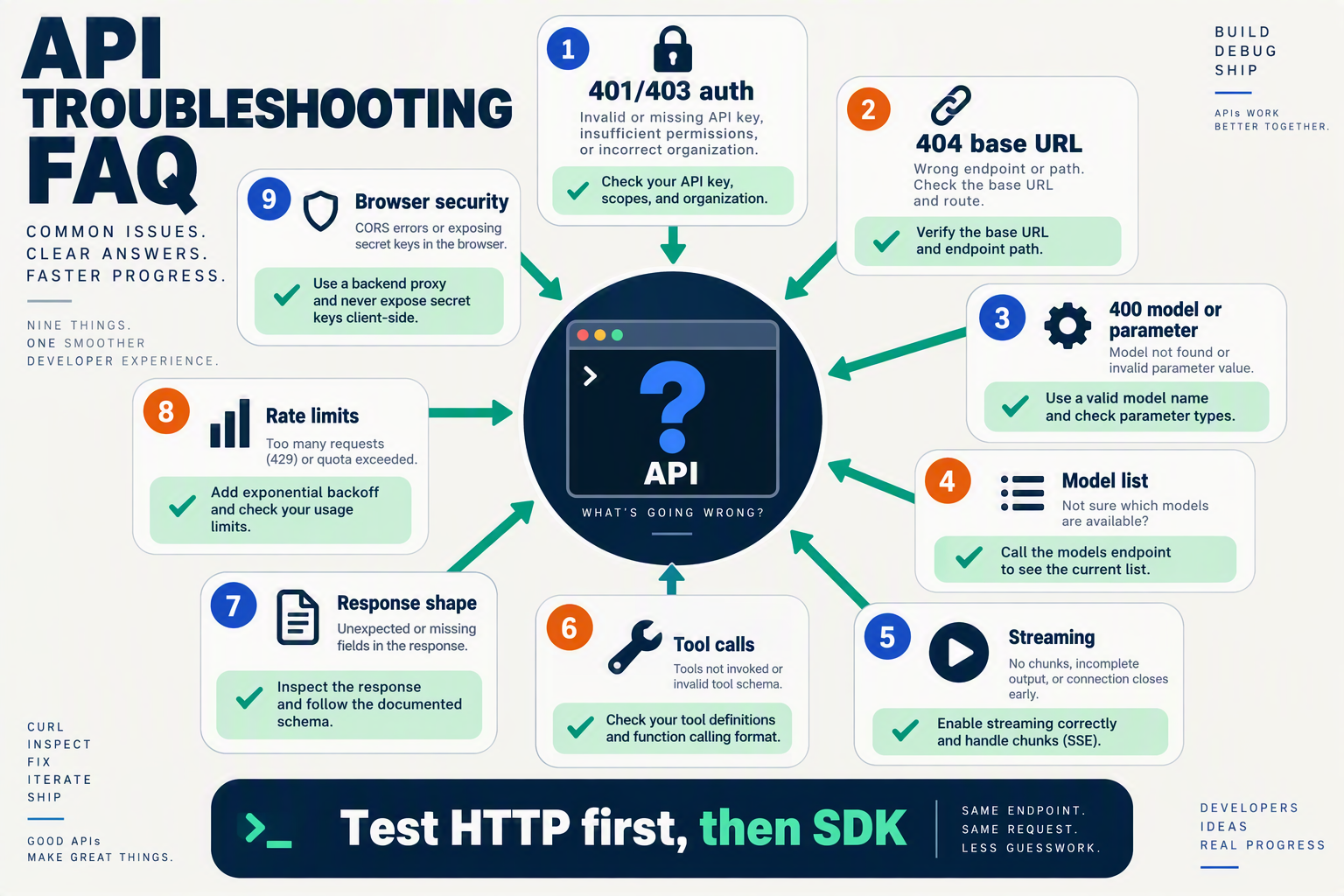
- 401 or 403: confirm the provider key, environment variable, and account permissions.
- 404: inspect the base URL; a duplicated or missing
/v1is common. - Model-not-found: copy the provider’s exact model ID.
- 400 feature error: check whether that model supports tools, vision, JSON output, or audio.
- Empty content: inspect
response.choices, finish reasons, and streamed versus non-streamed output.
What do you need before configuring an OpenAI-compatible SDK?
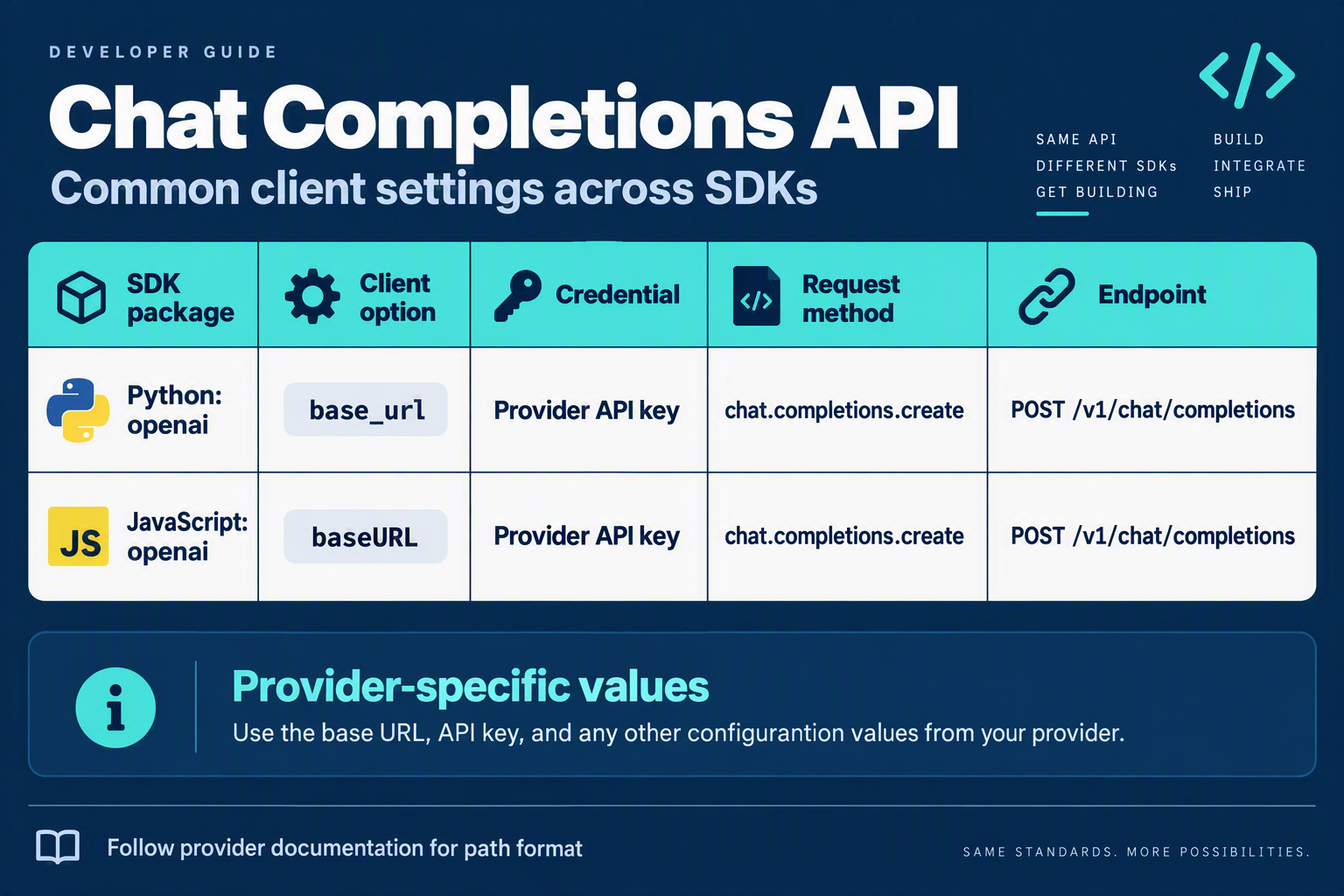
Install the existing OpenAI SDK, obtain an API key, set the provider’s documented custom base_url, and choose a model that the provider exposes. Before writing application code, verify the endpoint format, SDK runtime, authentication method, and feature support so a configuration problem is not mistaken for an API incompatibility.
What should you verify before changing base_url?
An OpenAI-compatible API implements familiar HTTP paths, authentication conventions, request fields, and response shapes well enough for an existing OpenAI client to communicate with it. Compatibility is a practical baseline—not a guarantee that every provider supports every OpenAI feature, model parameter, streaming event, or response format.
Use this checklist before configuring Python, JavaScript, or TypeScript:
| Requirement | What to prepare | Why it matters | Example or check |
|---|---|---|---|
| SDK and runtime | Install the official OpenAI SDK; use Python 3.10+ or a supported Node.js version | The client library depends on language-runtime support | OpenAI’s Python library documentation specifies Python 3.10 and newer |
| API key | Create a provider key and store it in an environment variable | Prevents credentials from being committed to Git or exposed in frontend code | Use OPENAI_API_KEY or a provider-specific variable |
| Base URL | Copy the provider’s exact OpenAI-compatible base URL from its documentation | A missing /v1, duplicated path, or wrong host can produce 404 errors | Do not guess the URL; confirm whether the SDK appends /v1 |
| Model identifier | Find the provider’s exact model ID | Friendly display names may not be valid request values | Test with a documented model before adding fallback logic |
| Feature requirements | Check support for chat completions, Responses API, streaming, tools, vision, audio, or structured outputs | “Compatible” does not mean feature-complete | Confirm each capability against the provider’s API reference |
What information does CallMissed provide for this setup?
CallMissed’s developer AI API is a concrete example of a multi-model OpenAI-compatible service. As of September 2026, CallMissed documents 138 models behind one API key and balance: 42 general-purpose LLMs, 25 realtime voice-agent models, 45 speech-to-text models, 9 text-to-speech models, 15 image models, and 2 embedding models, according to CallMissed’s verified product documentation.
Before configuring an SDK for CallMissed, prepare:
- A CallMissed API key from the developer API service.
- The documented CallMissed API base URL and authentication instructions.
- A model ID from the CallMissed catalogue.
- The specific endpoint family your application needs.
CallMissed documents OpenAI-compatible endpoints for chat completions, the Responses API, embeddings, images, audio transcription, translation, and speech. It also documents Anthropic-compatible /v1/messages endpoints, but that is a separate compatibility path and should not be mixed with OpenAI SDK configuration.
Which compatibility details should you test first?
Start with one small, non-production request using a basic text model. Confirm that the response contains the expected assistant message before testing streaming, function calling, vision, or structured outputs. OpenAI’s API Reference identifies endpoint paths, request schemas, response formats, and streaming behavior as separate implementation details; therefore, matching only the client constructor does not prove complete compatibility.
Keep a short provider checklist in your repository:
- Authentication: Does the provider expect
Authorization: Bearer <key>? - Path construction: Does
base_urlinclude/v1, or does the SDK add it? - Model availability: Is the selected model active on your account?
- Response shape: Does the provider return
choices[0].message.contentfor chat completions? - Limits and billing: What rate limits, token limits, and usage rules apply?
This preparation makes the Python and JavaScript examples that follow reproducible while keeping provider-specific assumptions visible.
How should you smoke-test the endpoint before debugging SDK code?

Before debugging Python or JavaScript, send one minimal curl request to the provider’s OpenAI-compatible endpoint. If the request returns a valid assistant message, your API key, base URL, model name, and core request schema are working; SDK errors can then be isolated to client configuration or response handling.
What should a minimal smoke test contain?
Use the provider’s documented base URL, append the compatible chat-completions path, and send the smallest supported request. OpenAI’s API Reference documents the standard request and response conventions, but providers may expose different base URLs or model names.
export API_KEY="replace-with-provider-key"
export BASE_URL="https://provider.example.com/v1"
export MODEL="provider-model-name"

curl "$BASE_URL/chat/completions" \
  -H "Authorization: Bearer $API_KEY" \
  -H "Content-Type: application/json" \
  -d '{
    "model": "'"$MODEL"'",
    "messages": [
      {"role": "user", "content": "Reply with the word OK"}
    ],
    "temperature": 0
  }'
A successful response should contain an assistant message inside a structure similar to:
{
  "choices": [
    {
      "message": {
        "role": "assistant",
        "content": "OK"
      }
    }
  ]
}
Do not assume that every provider supports every optional field. For the first test, omit streaming, tools, images, structured outputs, and provider-specific parameters. Add those capabilities only after the basic request succeeds.
How do you interpret the smoke-test result?
The HTTP status code usually identifies the first configuration layer that failed. The table below is a practical triage guide; exact error text varies by provider.
| Result | Likely cause | First check | SDK implication |
|---|---|---|---|
| 200 OK | Request accepted | Confirm choices[0].message.content | SDK configuration is the next test |
| 400 Bad Request | Invalid JSON, field, or model request | Compare model and messages with provider docs | Remove optional parameters |
| 401 Unauthorized | Missing or invalid credential | Check the Bearer token and environment variable | Do not change response-parsing code yet |
| 404 Not Found | Wrong base URL or path | Check whether /v1 is already included | Correct base_url before installing packages |
| 429 Too Many Requests | Rate or quota limit | Check balance and per-key limits | Add backoff only after credentials work |
OpenAI’s official Python library documentation supports Python 3.10 and newer, while the official OpenAI TypeScript documentation covers JavaScript and TypeScript clients. Those SDKs can reuse the same endpoint once the curl test confirms the HTTP contract.
What does a successful CallMissed smoke test prove?
For CallMissed, use the developer API base URL and model identifier shown in the current CallMissed documentation rather than copying an OpenAI production URL. CallMissed provides OpenAI-compatible chat completions, Responses API, embeddings, image generation, audio transcription, translation, and speech, but compatibility remains feature-specific: a model must support the capability you request.
CallMissed’s API documentation also lists default per-key limits of 60 requests per minute for Free, 500 for Starter, 3,000 for Pro, and 10,000 for Enterprise. A successful single request does not prove that your production traffic fits those limits; it only confirms that the endpoint, authentication, model, and baseline payload are aligned.
How do you configure Python and JavaScript SDKs step by step?
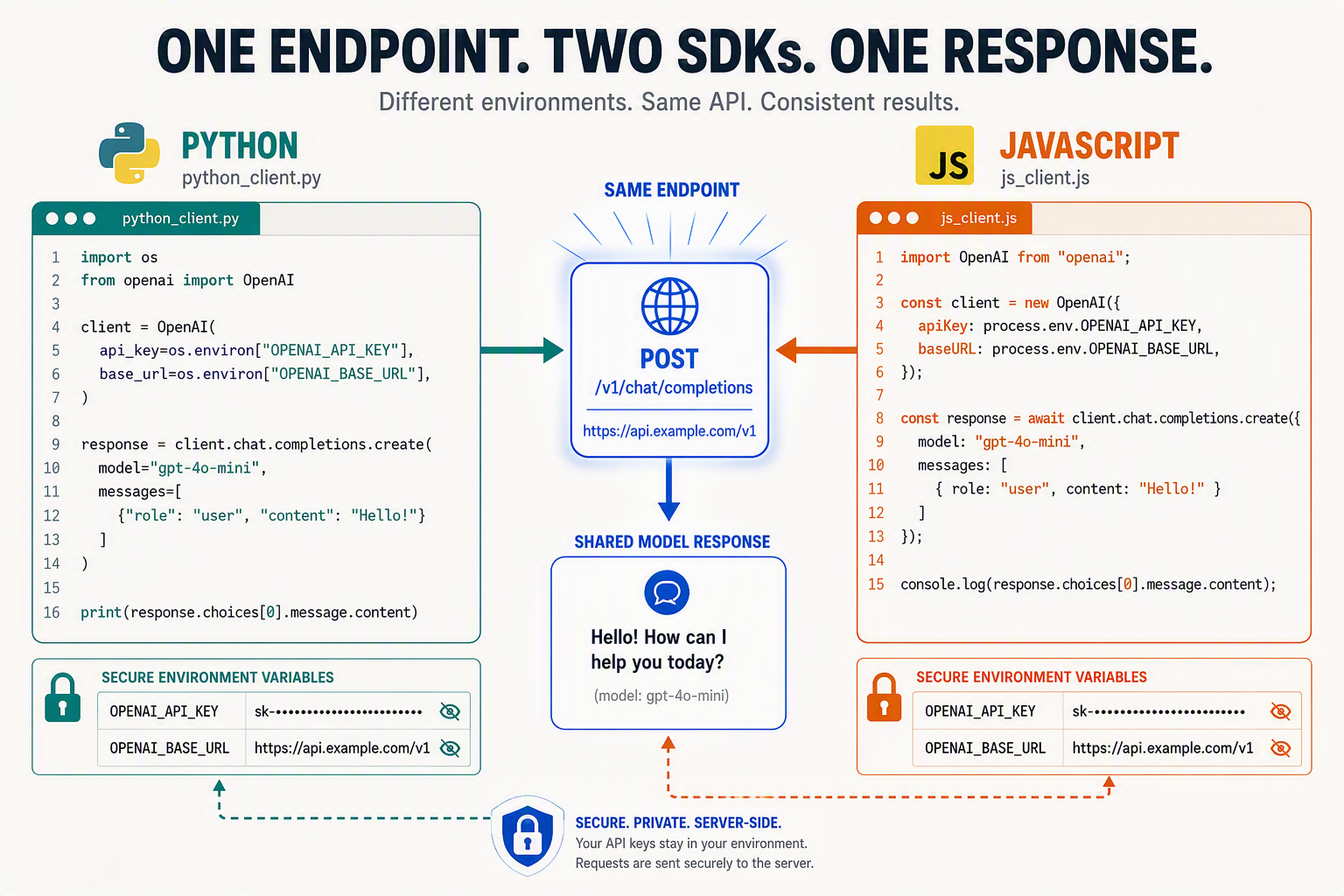
Install the existing OpenAI SDK, set its custom base_url to the provider’s OpenAI-compatible endpoint, authenticate with that provider’s API key, and select a model the provider exposes. This lets most applications preserve their request logic while changing configuration rather than rewriting the integration.
What does “OpenAI-compatible” mean in practice?
An OpenAI-compatible API follows familiar conventions for HTTP paths, authentication, request fields, and response shapes closely enough for an existing OpenAI client to work. Compatibility is not automatically feature-complete: chat completions may work even when a provider implements vision, audio, tool calling, structured outputs, or the Responses API differently.
OpenAI’s Python library documentation states that the official library supports Python 3.10 and newer, while OpenAI’s SDK documentation lists official Python and JavaScript/TypeScript libraries. Confirm the provider’s supported models and endpoint path before deploying.
How do you configure the Python SDK?
- Install the official library:
pip install openai- Store credentials in environment variables rather than source code:
export AI_API_KEY="your-provider-api-key"
export AI_BASE_URL="https://provider.example.com/v1"
export AI_MODEL="provider-model-id"- Create the client and send a request:
import os
from openai import OpenAI

client = OpenAI(
    api_key=os.environ["AI_API_KEY"],
    base_url=os.environ["AI_BASE_URL"],
)

response = client.chat.completions.create(
    model=os.environ["AI_MODEL"],
    messages=[
        {"role": "user", "content": "Explain APIs in one sentence."}
    ],
)

print(response.choices[0].message.content)
The important configuration change is base_url. The model value must come from the provider’s model catalogue; an OpenAI model name is not automatically available elsewhere. CallMissed’s developer AI API, for example, documents one OpenAI-compatible API for 138 models as of September 2026, according to CallMissed product documentation.
| CallMissed model category | Number of models | Capability |
|---|---|---|
| General-purpose LLMs | 42 | Text generation and reasoning |
| Realtime voice-agent models | 25 | Realtime voice applications |
| Speech-to-text models | 45 | Audio transcription |
| Text-to-speech models | 9 | Speech generation |
| Image models | 15 | Image generation or processing |
How do you configure JavaScript or TypeScript?
Install the official package:
npm install openaiSet AI_API_KEY, AI_BASE_URL, and AI_MODEL in your shell or .env file, then use:
import OpenAI from "openai";

const client = new OpenAI({
  apiKey: process.env.AI_API_KEY,
  baseURL: process.env.AI_BASE_URL,
});

const response = await client.chat.completions.create({
  model: process.env.AI_MODEL,
  messages: [
    { role: "user", content: "Explain APIs in one sentence." }
  ],
});

console.log(response.choices[0].message.content);
OpenAI’s TypeScript/JavaScript library documentation identifies this package as the official client for JavaScript and TypeScript applications.
What should you check before switching providers?
- Base URL: Verify whether the provider expects
/v1or another path. - Model ID: Copy the exact provider-specific identifier.
- Response shape: Confirm that
choices[0].message.contentis supported. - Advanced features: Test streaming, tools, vision, audio, and structured outputs separately.
Can I use an OpenAI SDK with another AI provider?
Should the API key be hard-coded?
.env files from source control.Which compatibility features should you test after the first request?
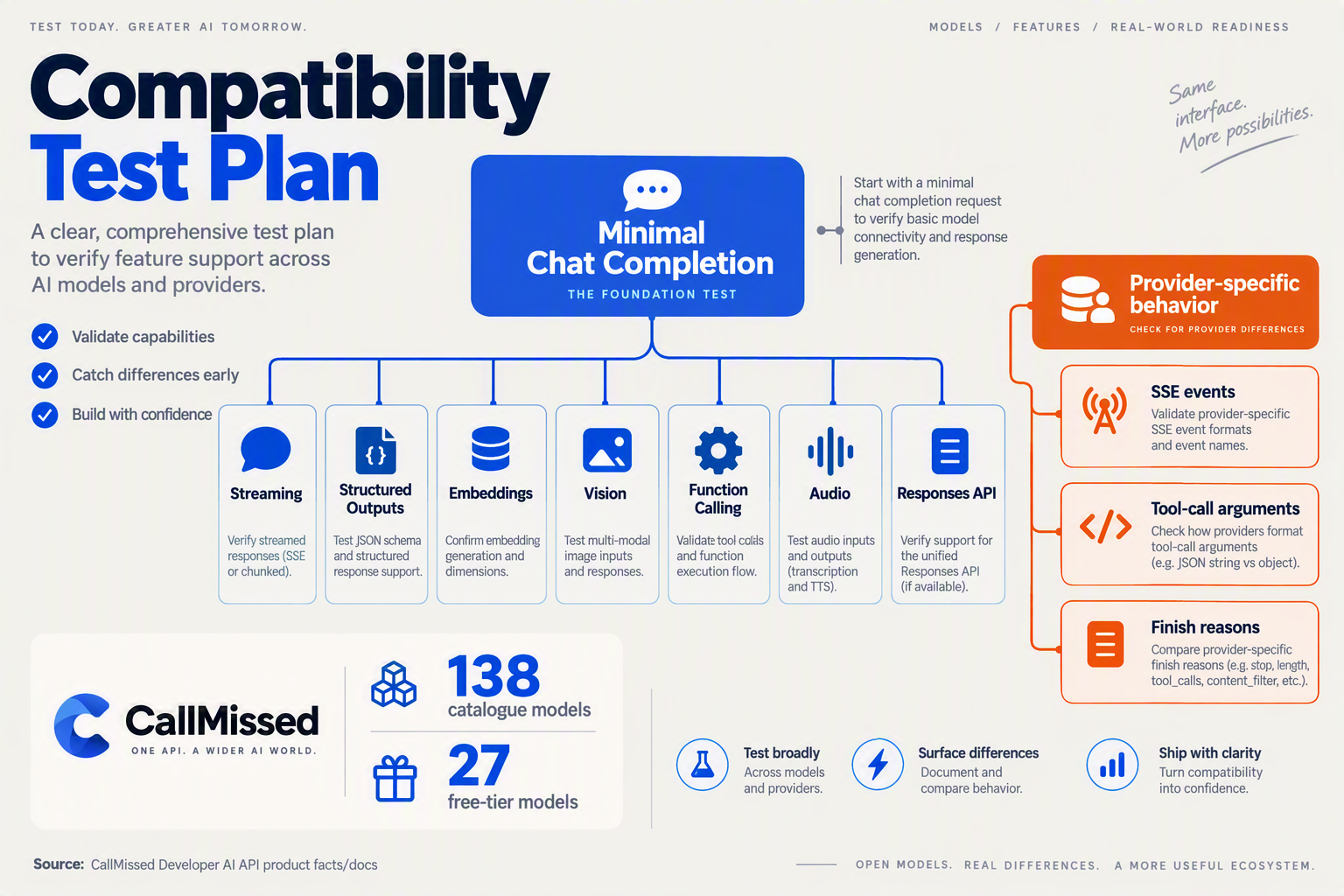
After the first successful chat response, test the features your application will actually rely on: streaming, structured outputs, tool calling, vision, embeddings, and audio. An OpenAI-compatible API can match the basic request and response shape without supporting every SDK method or parameter.
What should you test first?
Run these checks against a non-production model and record both the HTTP status and parsed response. The OpenAI API Reference documents endpoint schemas, streaming events, and shared request behavior; use it as the baseline, then compare the provider’s own documentation.
| Feature | Minimal test | Pass signal | If it fails |
|---|---|---|---|
| Streaming | Set stream=True in Python or JavaScript | Multiple incremental delta events arrive and concatenate into the answer | Confirm the provider supports streaming and uses the SDK’s expected event format |
| Structured outputs | Request a small JSON object with a schema | The response parses as valid JSON and follows the requested fields | Check whether JSON mode or strict schemas are supported separately |
| Function calling | Send one tool definition, such as get_weather | The model returns a tool call with the expected name and arguments | Verify tool schema syntax and whether the model supports tool calling |
| Vision input | Send a text prompt plus an image URL or image content block | The model refers accurately to the image | Select a provider-listed vision model and confirm image MIME or URL rules |
| Embeddings | Call client.embeddings.create() with one sentence | A numeric vector is returned with a documented dimension | Confirm that embeddings use a supported model and endpoint |
| Audio | Call transcription or speech generation with a short file or sentence | Text or audio output is returned in the requested format | Check supported audio models, file limits, and format parameters |
How do you verify streaming and structured output?
Start with streaming because production interfaces often depend on token-by-token delivery. In Python, the shape commonly resembles:
stream = client.chat.completions.create(
    model="provider-model",
    messages=[{"role": "user", "content": "Give three short tips."}],
    stream=True,
)

for chunk in stream:
    text = chunk.choices[0].delta.content
    if text:
        print(text, end="")
A compatible provider may stream successfully but omit usage totals, finish reasons, or some metadata. Treat those fields as optional until your test confirms they are consistently present.
Next, test structured output with a deliberately small schema— for example, {"priority": "high", "reason": "..."}. Validate the result in your application rather than trusting that a 200 response guarantees schema compliance. This catches providers that accept a parameter but ignore it.
Which advanced features does CallMissed support?
As of September 2026, CallMissed’s developer AI API supports streaming, function calling, structured outputs, vision input, reasoning-effort control, caller-chosen fallback models, and response caching, according to CallMissed’s verified product documentation. CallMissed also exposes OpenAI-compatible endpoints for chat completions, the Responses API, embeddings, image generation, audio transcription, translation, and speech.
CallMissed provides one API key and balance across 138 models as of September 2026: 42 general-purpose LLMs, 25 realtime voice-agent models, 45 speech-to-text models, 9 text-to-speech models, 15 image models, and 2 embedding models, according to CallMissed’s product documentation. Test each capability against the specific model you select; API-level compatibility does not mean every model supports every modality.
What should you avoid when migrating an OpenAI SDK?
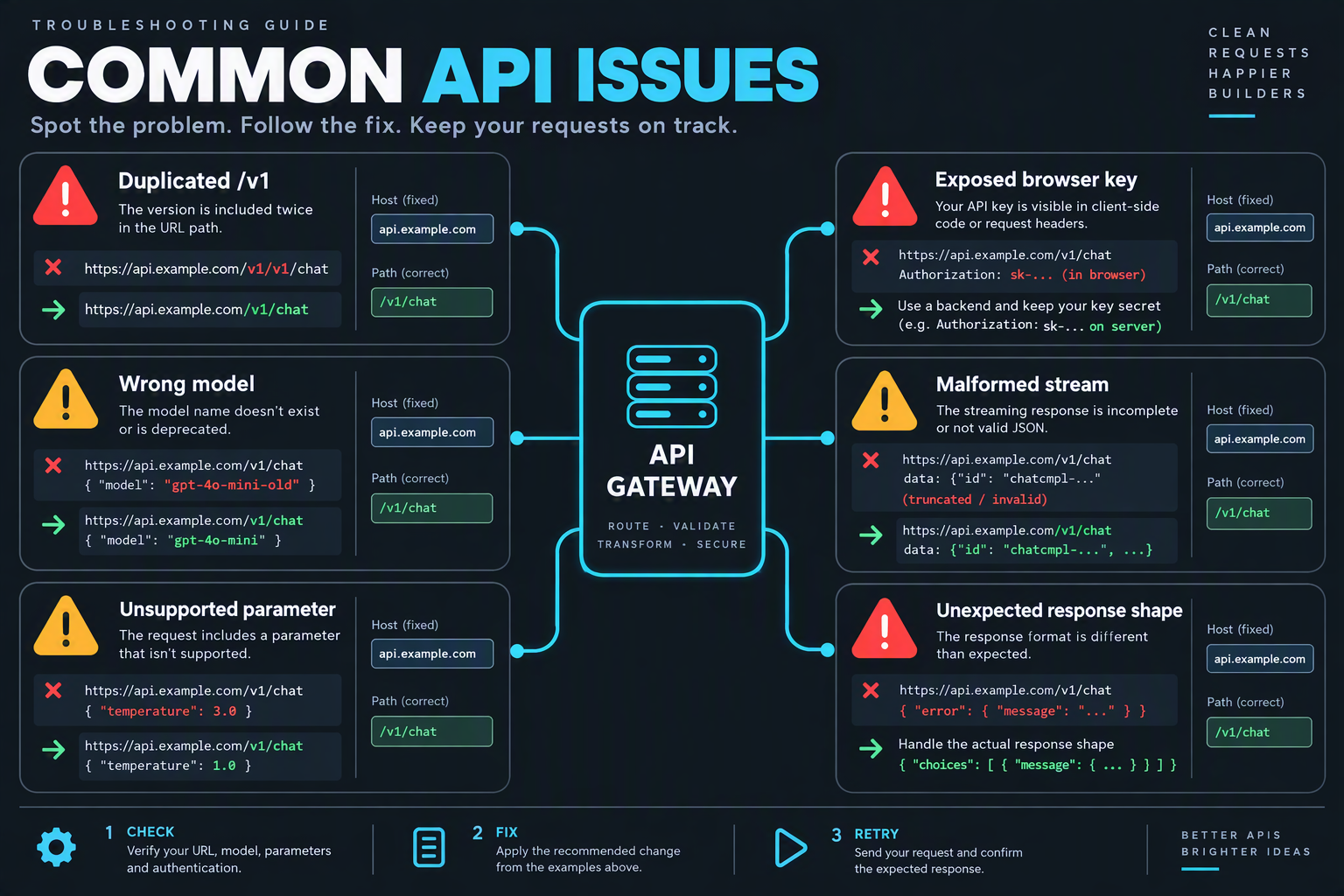
An OpenAI SDK migration is safest when you treat compatibility as a verified contract, not a guarantee that every OpenAI feature behaves identically. Keep the existing client where possible, change only the endpoint and credentials, then test models, response formats, streaming, tools, and error handling before releasing the change.
What should you avoid when migrating an OpenAI SDK?
Use this checklist to prevent the most common migration failures:
| Migration mistake | Why it causes problems | Safer approach | Validation step |
|---|---|---|---|
Copying the provider’s full URL into base_url | A duplicated path such as /v1/v1/chat/completions can produce 404 errors | Use the base URL format documented by the provider | Log the final request path in a development environment |
| Assuming every model name is portable | Model IDs, capabilities, context limits, and pricing differ by provider | Choose a model from the provider’s published catalogue | Send a minimal request before migrating production traffic |
| Treating compatibility as feature parity | Chat completions may work while tools, vision, audio, or structured outputs differ | Verify each advanced feature independently | Run one test for every feature your application uses |
| Hard-coding API keys in Python or JavaScript | Keys can leak through Git history, logs, screenshots, or browser bundles | Load credentials from server-side environment variables | Scan commits and deployment logs for secrets |
| Rewriting response parsing unnecessarily | New parsing code can introduce bugs even when the response shape is compatible | Preserve existing message.content handling initially | Compare old and new responses in a test fixture |
| Ignoring rate limits and fallback behavior | A working integration can still fail under concurrency or provider throttling | Configure retries, timeouts, and an explicit fallback model | Test 429 responses and temporary upstream failures |
OpenAI’s API Reference explains that endpoint paths, request schemas, response formats, and streaming events are part of the API contract; an OpenAI-compatible provider may implement only a useful subset of that contract. The OpenAI Python library documentation also specifies Python 3.10 or newer, so verify your runtime before attributing an installation or syntax problem to the provider.
How do you verify compatibility before switching production traffic?
Follow a small, repeatable migration test:
- Check the base URL. Confirm whether the SDK expects a host such as
https://example.com/v1or a provider-specific path. Do not append/chat/completionsyourself when the SDK adds it. - List or confirm supported models. A model identifier accepted by OpenAI is not automatically valid elsewhere. CallMissed’s developer AI API, for example, documents 138 models as of September 2026, spanning general-purpose LLMs, realtime voice-agent, speech-to-text, text-to-speech, image, and embedding models.
- Run a minimal text request. Test authentication, model selection, and basic response parsing before enabling tools or streaming.
- Exercise application-specific features. Validate
stream, function calling, structured outputs, vision inputs, embeddings, and audio separately. - Compare operational behavior. Check timeout handling, rate-limit responses, token usage fields, and error formats under realistic load.
What should you do if only advanced features fail?
Do not immediately abandon the migration. Keep the compatible SDK for supported operations and isolate unsupported features behind a provider-specific adapter. OpenAI’s official documentation provides separate Python and JavaScript/TypeScript SDK references, but SDK method availability does not prove that a third-party endpoint implements every method.
For example, CallMissed’s OpenAI-compatible API supports chat completions, the Responses API, embeddings, image generation, audio transcription, translation, speech, streaming, function calling, structured outputs, and vision input according to its September 2026 product documentation. Even so, production code should verify the exact model-feature combination and maintain a clear fallback path rather than assuming universal support.
What does OpenAI-compatible mean, and where does compatibility stop?

Install the existing OpenAI SDK, set its custom base_url to the provider’s OpenAI-compatible endpoint, authenticate with that provider’s API key, and select a model the provider exposes. This usually preserves application code, but compatibility means “compatible with a defined subset,” not that every OpenAI endpoint, parameter, event, or model capability behaves identically.
What does OpenAI-compatible mean?
An OpenAI-compatible API reproduces enough familiar conventions for an existing client to work: HTTP paths, bearer-key authentication, request fields such as model and messages, and response shapes such as choices[0].message.content. OpenAI’s API Reference documents these endpoint and schema conventions, while OpenAI’s Python library documentation targets Python 3.10 and newer.
The compatibility boundary normally appears in four places:
- Endpoints:
/v1/chat/completionsmay work while/v1/responses, embeddings, images, or audio endpoints do not. - Parameters:
temperature, tool definitions, structured-output settings, or reasoning controls may be ignored or rejected. - Streaming: one service may emit OpenAI-style chunks; another may use different event names or omit usage data.
- Models: a model identifier is provider-specific unless the provider explicitly publishes that name and capability.
Treat the shared interface as a transport and schema contract—not a guarantee of identical model behavior.
Which features should you verify before migrating?
Use this checklist before changing production configuration:
| Capability | What to verify | Why compatibility can stop |
|---|---|---|
| Chat completions | Path, messages, response shape | Some providers expose only selected roles or fields |
| Responses API | Endpoint and event format | Newer APIs may not be implemented |
| Tool calling | tools, tool_choice, returned calls | JSON schemas and parallel calls may differ |
| Structured outputs | JSON mode or strict schemas | A provider may accept the field but not enforce it |
| Vision and audio | Content-part format and model support | Multimodal input is model-specific |
| Streaming | Chunk and termination events | Client parsers may expect different deltas |
For example, CallMissed’s developer AI API documents OpenAI-compatible chat completions, Responses API, embeddings, images, audio transcription, translation, and speech as of September 2026. It also documents streaming, function calling, structured outputs, vision input, and reasoning-effort control. Those are CallMissed-specific documented capabilities; another compatible provider may support only a subset.
How can you detect a compatibility mismatch safely?
Start with the smallest request, then add features one at a time:
- Send a plain text chat request.
- Confirm the returned assistant content and finish reason.
- Test streaming separately.
- Add tools, structured output, vision, or audio only after checking documentation.
- Pin a known model identifier and log request IDs, status codes, and response bodies.
CallMissed groups 138 models across 42 general-purpose LLMs, 25 realtime voice-agent models, 45 speech-to-text models, 9 text-to-speech models, 15 image models, and 2 embedding models, according to CallMissed’s September 2026 product documentation. Model category does not itself prove that every model supports every SDK feature.
Compatibility FAQ
Does an OpenAI-compatible API require changing my SDK?
Why does a basic request work but tool calling fail?
tools, the required schema, and the model you selected.Can I assume the Responses API works everywhere?
chat.completions.create().Are model names portable between providers?
What is the safest migration strategy?
Frequently Asked Questions
Why does my OpenAI-compatible API request return a 401 Unauthorized error?
api_key is loaded from the expected environment variable, that there are no extra spaces or quotation marks, and that the custom base_url belongs to the same provider that issued the key. OpenAI’s API documentation treats authentication as a shared request requirement, but each compatible provider manages its own credentials.How do I fix a 404 error when using an OpenAI-compatible API with Python or JavaScript?
/v1 path; many 404 errors come from duplicating or omitting that path. The SDK appends endpoint routes such as /chat/completions, so setting the base URL to a full endpoint like /chat/completions can produce an invalid URL. OpenAI’s Python and TypeScript SDK references document client-level base-URL configuration, while compatibility providers may specify different URL conventions.Why does an OpenAI-compatible API say that my model does not exist?
Why does my OpenAI SDK request return a 400 Bad Request error?
model and messages payload, then add options such as tools, response_format, vision input, or reasoning controls one at a time. OpenAI’s API Reference lists request schemas and response behavior, but an OpenAI-compatible provider may implement only a subset of those fields.What causes 429 rate-limit errors with an OpenAI-compatible API?
Why does my OpenAI-compatible API response break code that expects `message.content`?
How do you finish the migration and choose your next integration step?

Finish the migration by locking the endpoint and model in configuration, running a small regression suite, and monitoring real requests before changing production traffic. After the basic text-generation path works, choose the next integration—structured outputs, tool calling, audio, embeddings, or fallback models—based on your application’s actual requirements rather than assuming every OpenAI-compatible API supports every feature.
What should you verify before switching production traffic?
Use this final checklist:
- Configuration: Confirm the base URL includes the provider’s required API prefix and that the API key is loaded from an environment variable or secret manager.
- Model availability: Test the exact model identifier used in production; compatible SDKs do not guarantee identical model names.
- Response handling: Verify empty content, refusals, tool calls, usage fields, streaming events, and provider-specific metadata.
- Failure behavior: Test authentication errors, rate limits, timeouts, malformed requests, and unavailable models.
- Observability: Log request IDs, latency, status codes, model names, and token usage without storing sensitive prompts or credentials.
- Rollout: Use a staging environment or a small traffic percentage, then compare quality, cost, and failure rates with the original provider.
OpenAI’s API Reference documents endpoint schemas, streaming events, and shared request behavior; use it as the baseline, then compare each advanced feature with the destination provider’s documentation.
Which integration should you add next?
Choose the next capability according to the application’s workflow:
| Application need | Next integration | Validation test | Typical risk |
|---|---|---|---|
| Predictable JSON responses | Structured outputs | Validate every response against a JSON schema | Partial schema support |
| External actions | Function calling | Execute a safe mock tool first | Different argument formats |
| Live conversations | Streaming or realtime voice | Measure interruption and disconnect handling | Event-shape differences |
| Search and retrieval | Embeddings or web search | Compare retrieval relevance on a fixed dataset | Model and dimension mismatch |
| Reliability | Fallback models | Force a primary-model failure in staging | Inconsistent output quality |
As of September 2026, CallMissed’s developer AI API documents 138 models across general-purpose LLMs, realtime voice-agent models, speech-to-text, text-to-speech, image, and embedding categories. CallMissed’s documentation also lists OpenAI-compatible Chat Completions, Responses API, embeddings, images, audio transcription, translation, and speech endpoints, plus streaming, function calling, structured outputs, vision input, and caller-chosen fallback models. Treat those as documented CallMissed capabilities—not assumptions that apply to every compatible provider.
How do you make the migration maintainable?
Keep provider-specific decisions outside business logic. Store the base URL, model name, timeout, and feature flags in configuration, while your application calls a small internal wrapper such as generate_reply() or transcribe_audio(). Add contract tests that run the same prompts and tool schemas against the old and new endpoints, then record quality and operational differences.
Can an OpenAI-compatible API be used without changing the SDK?
What is the safest next step after a successful test call?
Should the model name remain unchanged after migration?
When should you use a provider’s native API instead?
Conclusion
The practical answer is simple: keep your existing OpenAI SDK, change the provider’s base_url and API key, then select a model that endpoint supports. Python and JavaScript applications can therefore move between compatible providers without rewriting their core request logic—but compatibility should always be verified for advanced features such as streaming, tool calling, structured outputs, vision, and audio.
This guide’s key takeaways are:
- Use
from openai import OpenAIin Python or the official OpenAI JavaScript/TypeScript SDK, configured with the provider’s endpoint. - Call
chat.completions.create()when the provider supports the familiar chat interface, and confirm whether its Responses API is available for newer workflows. - Store credentials in environment variables and troubleshoot systematically: check the base URL path, API key, model name, response shape, and feature support.
- Treat OpenAI compatibility as a shared foundation—not a guarantee that every model or capability behaves identically.
The next phase will be less about rewriting integrations and more about choosing models dynamically, testing fallback behavior, and validating compatibility as APIs evolve. CallMissed illustrates this direction: according to CallMissed’s September 2026 product documentation, its developer AI API offers one OpenAI-compatible key and balance across 138 models, including language, voice, speech, image, and embedding models.
To explore how AI infrastructure is evolving, visit CallMissed. As model ecosystems expand, which provider—or model-switching strategy—will give your application the flexibility it needs next?
Related Reading
- Best OpenAI-Compatible API Gateway in 2026: 7 Compared
- Best OpenAI-Compatible API Gateway: A Decision Matrix for Teams
- Voice Agent API With LiveKit Support: OpenAI Realtime vs LiveKit Agents
Sources
Discussion
Related Posts



Ready to automate customer conversations?
Launch AI voice agents and WhatsApp bots with CallMissed — one API, 22+ Indian languages.