
AI Email Agent Guide 2026: Customer Service and Sales Automation


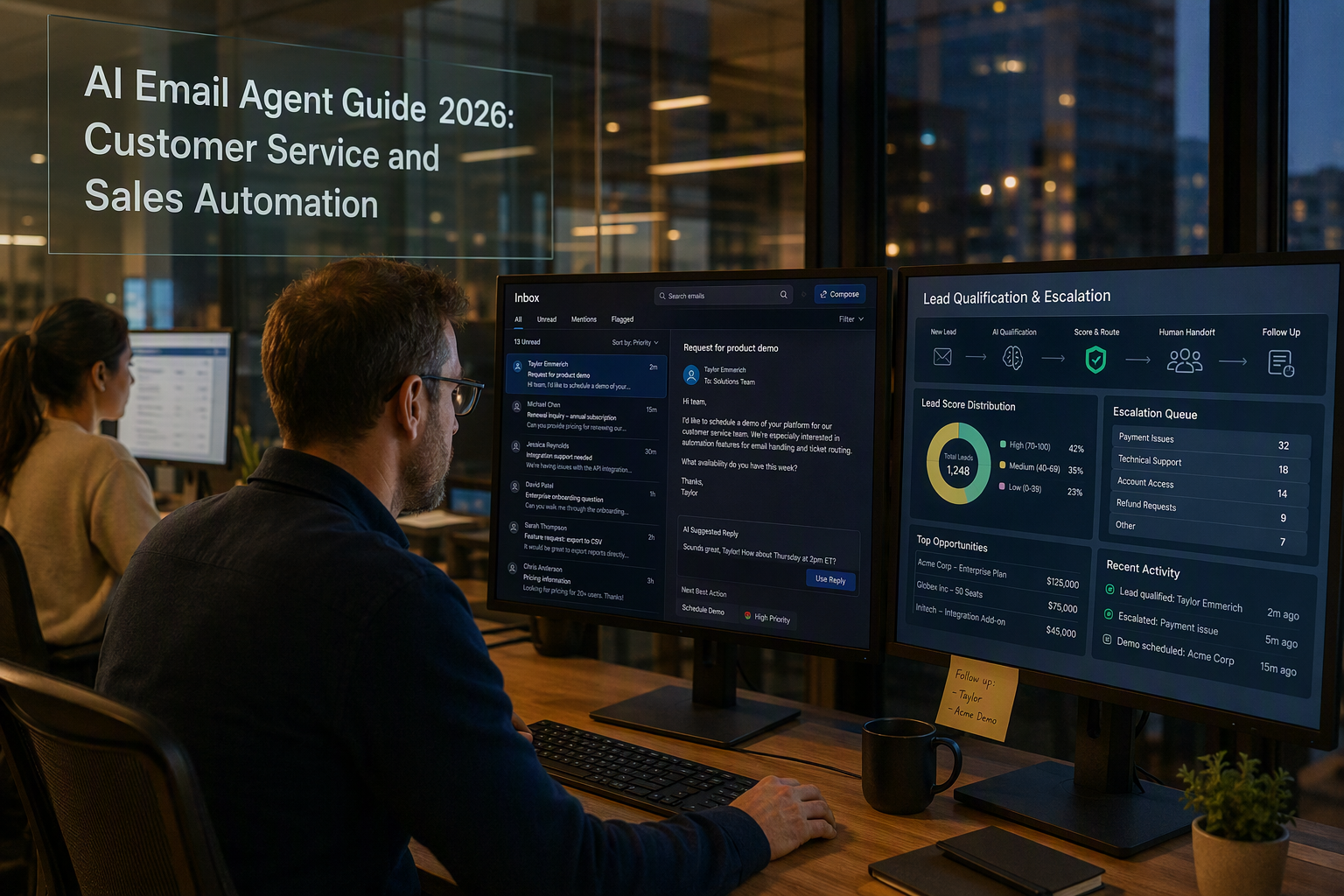
Learn how an AI email agent handles triage, replies, lead qualification, security, setup, escalation, and ROI for service and sales.
AI Email Agent Guide 2026: Customer Service and Sales Automation
What if your support inbox could classify every message, draft an accurate reply, qualify sales leads, and escalate urgent cases before an employee opened their email? An AI email agent makes that workflow possible by combining language models, business rules, customer data, and human approval controls—not by operating as an unchecked autoresponder.
The scale makes this capability particularly relevant in 2026. The Radicati Group’s Email Statistics Report 2024–2028 projects that people and businesses will exchange approximately 392.5 billion emails per day in 2026. Meanwhile, Gartner predicted in August 2023 that 80% of customer-service organizations would apply generative AI in some form by 2025, illustrating how quickly AI-assisted operations have moved from experimentation toward routine deployment.
Beyond basic automated replies
Traditional email rules can route messages based on a sender, subject line, or keyword. Modern email automation AI interprets intent, sentiment, urgency, language, account history, and commercial potential. A well-designed system can therefore:
- Use email triage automation to separate refunds, complaints, order questions, demos, and spam.
- Produce an automated email response grounded in approved policies and knowledge-base content.
- Turn inbound enquiries into structured leads using budget, need, authority, and timing signals.
- Give support and sales teams shared customer context across previous conversations.
- Escalate sensitive, high-value, ambiguous, or low-confidence messages to the right employee.
This distinction matters because generative AI for email support introduces risks alongside speed. Inaccurate answers can create contractual, reputational, or privacy problems, while unrestricted access to inboxes and customer records expands the security surface. IBM’s Cost of a Data Breach Report 2024 placed the global average breach cost at US$4.88 million, reinforcing why permissions, encryption, retention policies, audit logs, prompt-injection defenses, and human handoffs belong in the initial design.
What this guide covers
This guide explains how to implement AI customer service email and sales automation without treating every message identically. You will learn how to map inbox workflows, connect a trusted knowledge base, design lead-qualification criteria, set confidence thresholds, configure escalation, test reply quality, and measure resolution time, acceptance rate, conversion, containment, and customer satisfaction.
CallMissed fits this trend by combining email tooling, knowledge-base RAG, and an omnichannel inbox/CRM with AI engagement across voice, WhatsApp, and web, allowing email conversations to retain broader customer context.
The objective is practical: automate repetitive work while preserving accountability, security, and human judgment wherever the consequences require them.
What is an AI email agent, and how does it automate customer service and sales email?

An AI email agent is software that reads inbound email, determines the sender’s intent, retrieves relevant business and customer information, and then recommends or executes the next approved action. Unlike a simple autoresponder, it can coordinate customer-service and sales workflows while preserving confidence thresholds, permissions, and human review.
How an AI email agent processes a message
A production workflow usually combines a large language model, deterministic rules, CRM data, and retrieval-augmented generation (RAG). The process follows five stages:
- Ingest and normalize: The agent receives the email, subject, attachments, thread history, sender identity, and mailbox metadata. It can also detect the message’s language and remove signatures or quoted text before analysis.
- Classify and prioritize: Email triage automation identifies intent—such as a refund request, technical issue, pricing enquiry, demo request, or spam—and estimates urgency, sentiment, and risk.
- Retrieve context: The system searches approved knowledge-base articles, order records, account details, previous conversations, and CRM fields instead of relying solely on a language model’s general knowledge.
- Generate or assign an action: The agent may prepare an automated email response, update a ticket, create a sales opportunity, request missing details, or route the message to a specialist.
- Validate and record: Policy checks, confidence scores, and approval rules determine whether the reply can be sent automatically. The system then logs its sources, actions, and any human edits for auditing and improvement.
This structured approach is important at scale. The Radicati Group’s Email Statistics Report 2024–2028 projects that global email traffic will reach approximately 392.5 billion messages per day in 2026.
Customer-service and sales use cases
For support teams, AI customer service email can categorize cases, identify service-level agreement deadlines, retrieve account-specific answers, and draft replies consistent with approved policies. A delivery-status request may be answered automatically when reliable order data is available, while a threatened legal complaint should be escalated without an autonomous response.
For sales teams, email automation AI can extract structured qualification signals, including:
- Product or service requested
- Company, location, and industry
- Budget or expected purchase size
- Decision-making authority
- Required implementation date
- Buying intent and recommended follow-up
The agent can then create or enrich a CRM record, assign an owner, and draft a relevant reply. Missing information should trigger a focused question rather than an invented assumption.
Shared context without unchecked autonomy
Generative AI for email support becomes more useful when service and sales teams can access the same governed customer record. Previous purchases, support cases, consent status, and conversations across approved channels can prevent customers from repeatedly explaining their situation.
Shared context does not mean unrestricted access. Each workflow should apply role-based permissions, data minimization, retention controls, source citations, and human escalation rules. Low-confidence answers, payment disputes, account cancellation requests, regulated data, angry customers, and unusually valuable opportunities should reach an employee.
This human-governed model matters because Gartner predicted in August 2023 that 80% of customer-service organizations would use generative AI in some form by 2025. In 2026, the practical differentiator is therefore not merely generating email text; it is connecting accurate context, controlled action, and accountable escalation.
Why are email automation AI and generative AI for email support becoming important in 2026?
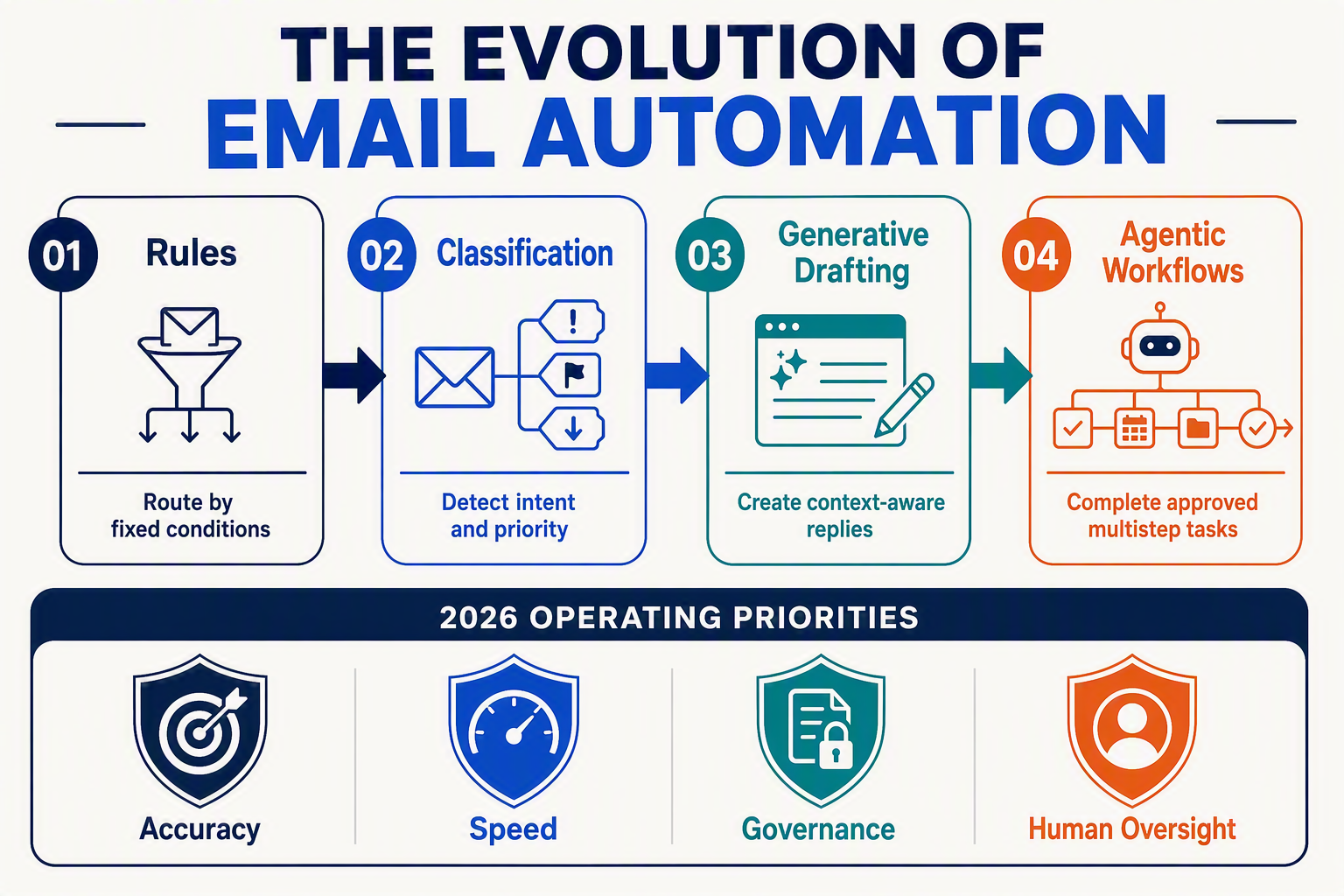
Email automation AI is becoming important in 2026 because email remains a high-volume business channel while generative models can now interpret messages, retrieve customer context, and initiate controlled workflows—not merely send template replies. The result is faster service, more consistent sales follow-up, and better use of employee time, provided organizations retain strong approval and escalation controls.
Email volume is outgrowing manual workflows
Manual inbox management does not scale linearly. Adding customers creates more order questions, billing requests, complaints, renewals, demo enquiries, and follow-ups—often distributed across personal mailboxes and shared addresses.
The Radicati Group’s Email Statistics Report 2024–2028 projects approximately 392.5 billion business and consumer emails per day in 2026. At that scale, even modest delays in classification can create backlogs and inconsistent response times.
An AI email agent changes the operating model by processing each incoming message as structured work. It can identify the customer, classify intent, extract entities such as an order number, assess urgency, and recommend the next action. Effective email triage automation therefore helps teams prioritize:
- Account cancellations, fraud concerns, and service outages requiring immediate review.
- Routine delivery, invoice, appointment, or product-information requests.
- Sales enquiries containing budget, use case, company size, or purchasing timelines.
- Low-confidence, abusive, suspicious, or legally sensitive messages needing escalation.
Generative AI adds context beyond rule-based automation
Traditional automation depends on predefined triggers: if a subject contains “refund,” assign it to the returns queue. Generative AI for email support can evaluate the meaning of the complete conversation, including indirect requests and follow-up questions that do not repeat the original topic.
This enables an automated email response to be grounded in approved documentation, CRM records, and earlier interactions. Instead of merely inserting a customer’s name into a template, the system can draft a response that reflects the relevant product, order status, policy, language, and conversation history.
The practical progression is:
- Understand: Detect intent, sentiment, urgency, language, and key entities.
- Retrieve: Find approved knowledge and authorized customer records.
- Draft: Generate a relevant response with the correct tone and next steps.
- Act or escalate: Send within defined boundaries or request human approval.
- Record: Save classifications, actions, sources, and outcomes for auditing.
Customer service and sales now share the same inbox signals
An AI customer service email system can also recognize when a support conversation contains a commercial opportunity. A customer asking about higher usage limits may need technical help, but the message could also indicate expansion intent. Conversely, a promising sales lead reporting an implementation concern should not receive a generic promotional sequence.
This shared context matters because customers do not organize their needs around internal departmental boundaries. Connecting email history with CRM and engagement records allows support, sales, and account-management teams to see the same relationship rather than maintain fragmented versions of it.
Gartner predicted in August 2023 that 80% of customer-service organizations would apply generative AI in some form by 2025. By 2026, the differentiator is consequently shifting from whether a company uses AI to how reliably it integrates AI with knowledge, permissions, workflow ownership, and human judgment.
The strongest business case is not “automate every email.” It is to automate predictable work, accelerate complex work, and route consequential decisions to accountable employees.
Which key AI email capabilities and operating models should teams compare?
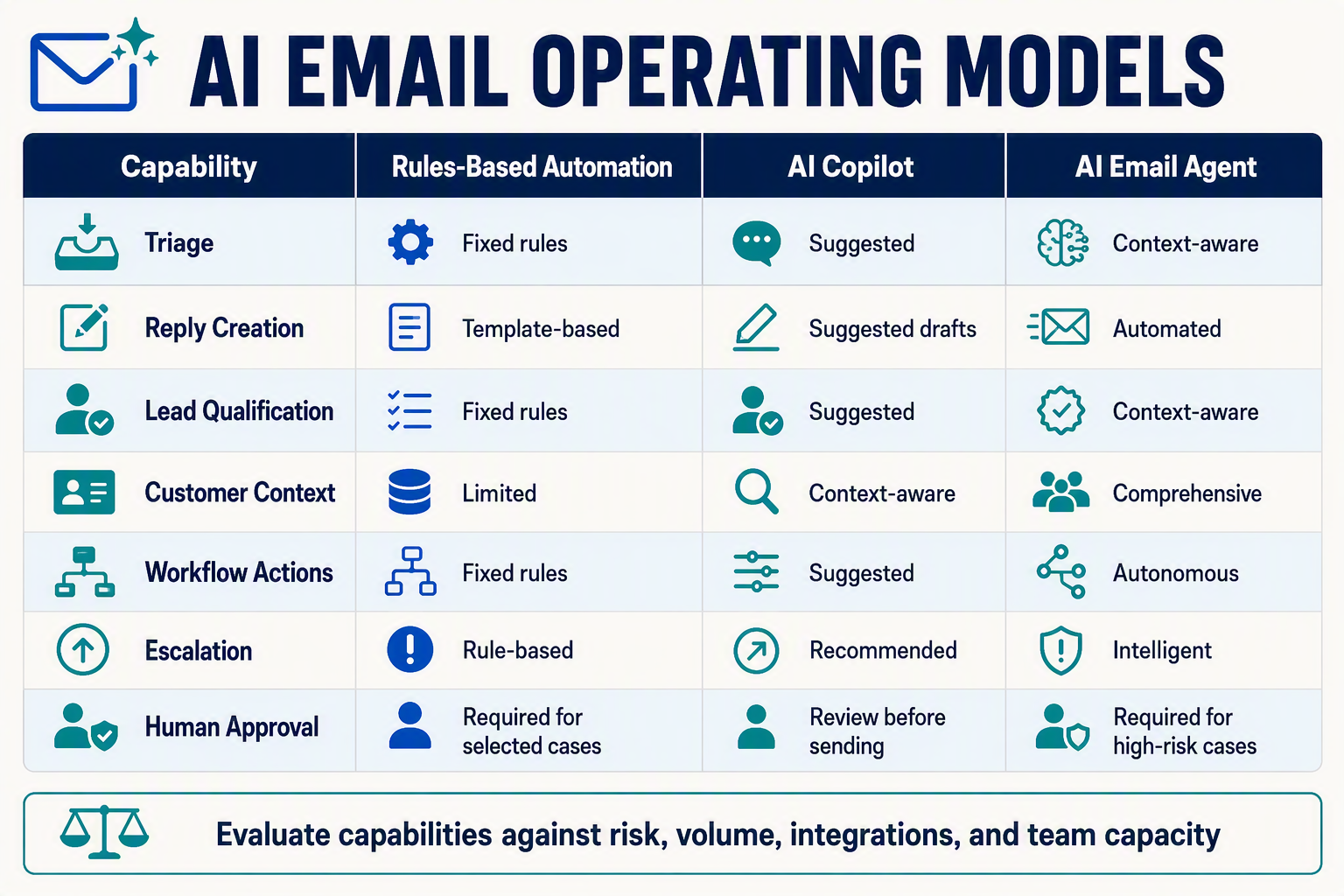
Teams should compare an AI email agent across six areas—triage, grounded drafting, lead qualification, customer context, escalation, and governance—and assign autonomy workflow by workflow. Autonomous sending, mailbox access, CRM updates, and cross-channel context are not inherent capabilities: they depend on available integrations, granted permissions, plan features, and administrator configuration.
A graduated rollout is generally the lowest-risk approach: begin with employee assistance, validate performance on representative emails, automate narrow and reversible tasks, and retain human approval for consequential or sensitive messages.
Capability comparison matrix
| Capability | What to compare | Assistive operation | Controlled automation | Success measure |
|---|---|---|---|---|
| Email triage automation | Intent, language, urgency, spam detection, multi-label performance, and behavior on ambiguous messages | Suggests categories, priority, and destination queue | Routes messages that meet tested rules; sends uncertain or excluded cases to review | Routing accuracy, reassignment rate, missed-priority rate, time to first action |
| Reply drafting | Knowledge grounding, source links, tone controls, personalization, policy checks, and resistance to malicious email content | Creates a draft for employee review and approval | Sends an automated email response only for permitted intents when applicable rules and thresholds are satisfied | Draft acceptance rate, edit distance, unsupported-claim rate, reopening rate |
| Lead qualification | Extraction of need, company, timing, authority, budget signals, consent, and buying intent | Summarizes the opportunity and recommends follow-up | With an authorized CRM integration, updates approved fields, assigns owners, or triggers defined workflows | Field accuracy, qualified-lead rate, incorrect-update rate, meeting conversion |
| Shared customer context | Authorized access to CRM records, order history, previous emails, consent status, and other channel activity | Displays relevant history beside the draft when connected systems permit access | Uses approved context to personalize responses or recommend next actions within configured permissions | Retrieval accuracy, use of outdated context, duplicate-contact rate |
| Escalation and handoff | Escalation rules, uncertainty thresholds, VIP handling, complaint severity, regulated topics, and service-level timers | Recommends an owner and explains why escalation may be needed | Pauses automation, transfers the thread, and preserves available summaries and source records | Correct-escalation rate, missed-risk rate, unnecessary-escalation rate, handoff time |
| Security and governance | Role-based access, authentication, encryption, retention controls, auditability, data location, redaction, vendor subprocessors, and defenses against untrusted content | Limits suggestions to data and tools the user is authorized to access | Blocks prohibited actions or requires approval according to configured policies | Unauthorized actions, policy violations, audit coverage, incident response time |
Security features should be verified in the vendor’s current documentation and contract rather than inferred from the use of “AI.” Buyers should also confirm whether controls apply to message content, attachments, retrieved knowledge, model-provider logs, and connected systems.
Compare three operating models
An email automation AI deployment should not apply one autonomy level to every mailbox. Published adoption forecasts may indicate market interest, but they do not establish that autonomous email handling is appropriate or effective for a particular organization.
- Copilot model: The system classifies, summarizes, or drafts, but an employee approves every external message. This is a sensible starting point for new deployments and remains appropriate for complex sales discussions, complaints, refunds, legal issues, and regulated communications.
- Approval-by-exception model: Generative AI for email support sends responses for narrow, tested intents while routing novel, ambiguous, high-value, or sensitive cases to employees. Buyers should verify how exceptions are identified; a model-generated confidence score alone is not proof that a reply is accurate or safe.
- Bounded-autonomy model: The agent may send replies, schedule follow-ups, update specified records, or close simple cases within explicit limits. These actions require suitable mailbox and system integrations, narrowly scoped credentials, monitoring, reversible workflows where possible, and a tested way to pause automation.
Make the decision workflow-specific
Evaluate AI customer service email and sales workflows separately instead of relying on a single headline automation rate. A routine status enquiry, an enterprise pricing negotiation, and a legal complaint carry different error costs and should not share identical permissions.
Before selecting an operating model, document:
- The permitted intents, recipients, and actions for each inbox.
- Which messages always require human review.
- The rules or thresholds that trigger escalation.
- Which mailboxes, customer records, and knowledge sources the system may access.
- Which CRM fields or external systems it may modify through configured integrations.
- Whether factual claims must be supported by an approved source.
- How attachments, personal data, retention, and deletion requests are handled.
- Who reviews exceptions, audit records, incidents, and performance drift.
- How administrators can revoke access or stop automated sending.
When evaluating CallMissed or another provider, confirm current email, knowledge-base, inbox, CRM, and cross-channel capabilities directly against the selected plan and technical documentation. Shared context from voice, WhatsApp, web, or other channels is available only where the relevant integrations are supported, connected, and authorized; it should not be treated as automatically accessible or suitable for autonomous use.
How do email triage automation and automated email response workflows work step by step?
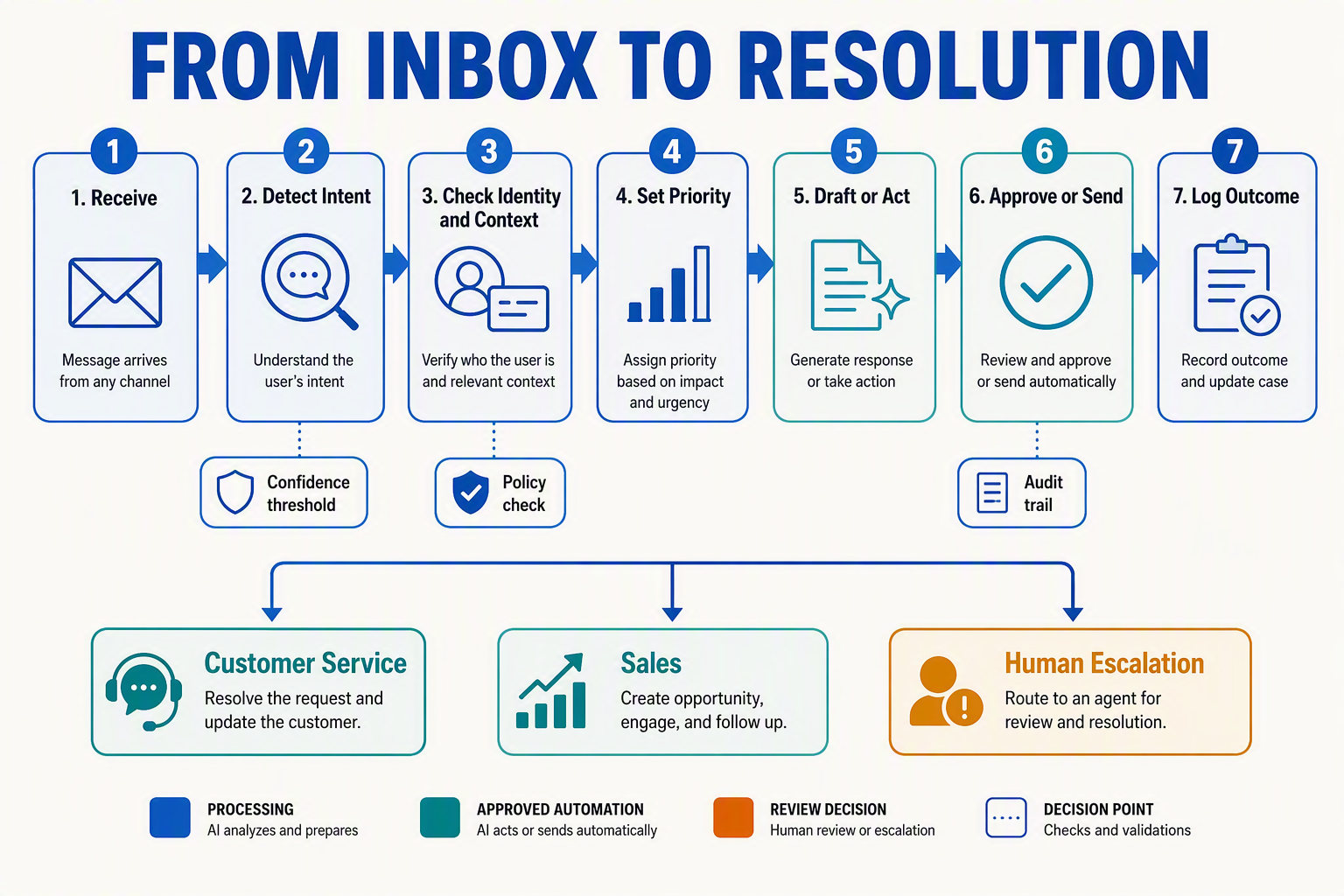
An AI email agent processes each inbound message through a controlled pipeline: ingest, normalize, classify, enrich, decide, draft, validate, send or escalate, and learn from the outcome. The workflow should separate language-model interpretation from deterministic business rules so that email automation AI remains fast without bypassing human accountability.
1. Ingest and normalize the message
The system first receives email through an API, webhook, or mailbox connection and converts it into a consistent record. It should:
- Preserve the sender, recipients, subject, timestamps, thread ID, and attachments.
- Remove quoted history and signatures from the text being classified while retaining the complete thread for reference.
- Detect language and extract entities such as order numbers, product names, dates, phone numbers, and company names.
- Scan links and attachments before exposing their contents to downstream systems.
Capacity planning matters at this stage. The Radicati Group’s Email Statistics Report 2024–2028 projects approximately 392.5 billion business and consumer emails per day in 2026, so production systems need queueing, retry logic, deduplication, and rate-limit handling.
2. Classify intent, urgency, and risk
Next, email triage automation assigns structured labels rather than immediately generating prose. A classification record might contain:
- Intent: refund, delivery query, technical issue, complaint, demo request, partnership, or spam.
- Priority: routine, time-sensitive, urgent, or critical.
- Sentiment: positive, neutral, frustrated, or threatening.
- Risk: legal, financial, privacy, safety, or reputational.
- Confidence: a score used to choose automation or human review.
Business rules then map those labels to queues and service-level targets. For example, a high-confidence order-status enquiry can proceed automatically, while a chargeback threat or deletion request should reach an authorized employee.
3. Enrich the email with customer context
The agent retrieves only the information needed for the task:
- CRM identity, account tier, owner, and lead stage
- Previous email, chat, voice, or WhatsApp conversations
- Orders, subscriptions, tickets, and unresolved complaints
- Approved knowledge-base passages, policies, and product documentation
This grounding step allows generative AI for email support to answer from current business information instead of relying on model memory. Identity conflicts, missing records, or outdated documentation should reduce confidence and trigger clarification or review.
4. Choose the next action and draft the reply
A decision engine determines whether to respond, request information, route, create a task, or escalate. For sales enquiries, it can extract qualification signals such as company size, use case, location, budget, authority, and purchase timeline before assigning an owner.
The automated email response is then produced from a controlled template plus retrieved evidence. A useful draft includes:
- A direct acknowledgement of the request
- A factual answer supported by approved sources
- Any required next step or clarifying question
- The appropriate tone, language, signature, and disclosure
5. Validate, send, escalate, and record
Before sending, the AI customer service email workflow checks factual support, prohibited claims, personal data, recipient addresses, attachments, and policy compliance. Low-confidence, high-risk, high-value, or emotionally sensitive messages enter a human-review queue with the draft and evidence attached.
After delivery, the system records the classification, retrieved sources, model output, approval history, response time, and customer outcome. Corrections should feed evaluation datasets and rule updates—not unrestricted self-training—so automation improves through governed review rather than silent behavioral drift.
How can one agent qualify leads, use shared customer context, and escalate cases safely?
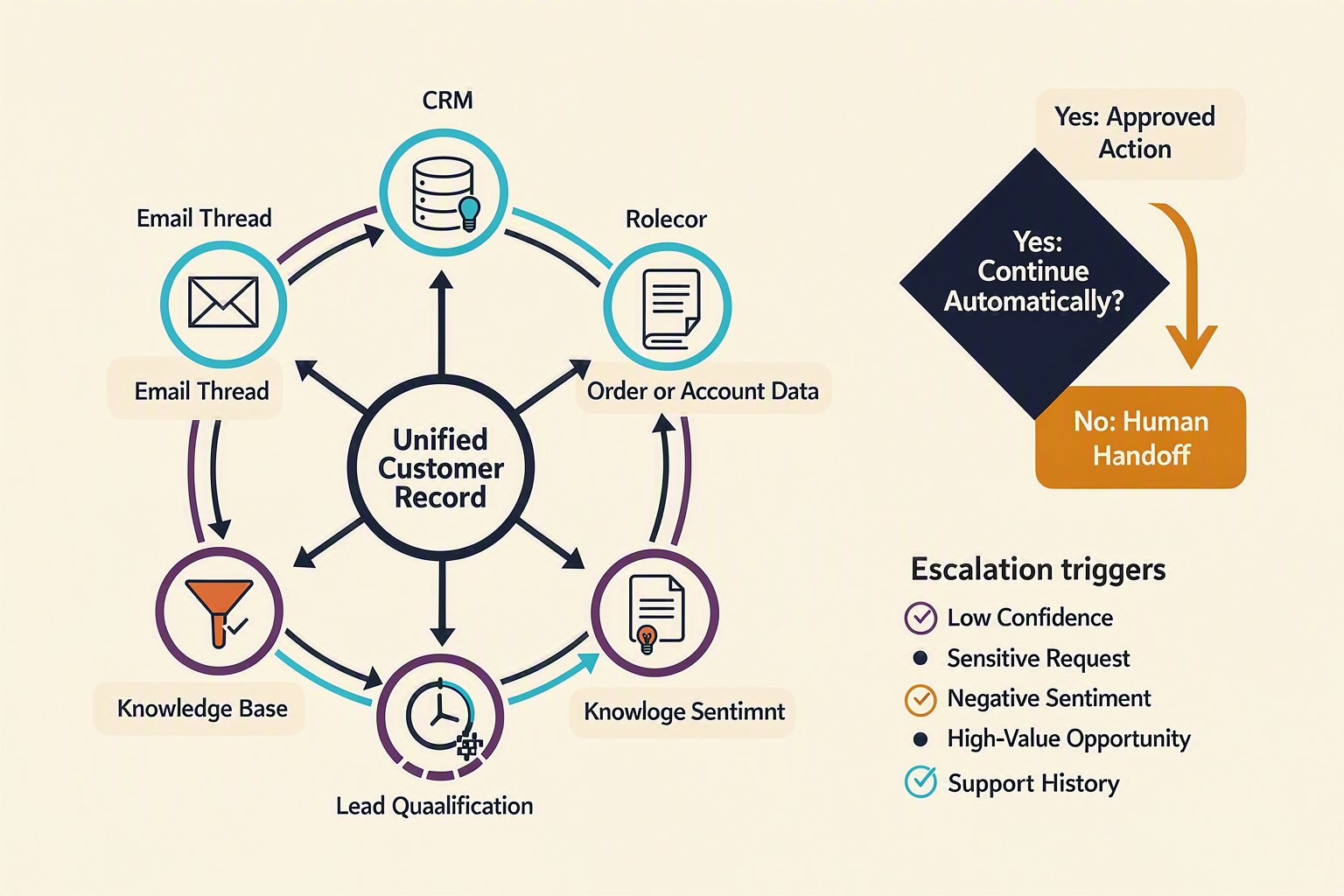
One AI email agent can support both sales and service when it uses a shared customer record, applies workflow-specific rules, and hands off decisions that exceed defined confidence or risk thresholds. The agent should behave as a controlled orchestrator—not as an autonomous system with unrestricted authority.
Qualify leads with structured evidence
Instead of labeling every product enquiry “qualified,” email automation AI should extract observable buying signals and map them to fields in the CRM. A practical workflow is:
- Detect intent: Distinguish demo requests, pricing questions, partnership enquiries, support cases, and spam.
- Extract qualification data: Identify the customer’s need, organization, role, location, expected volume, budget indicators, and timeline.
- Score the opportunity: Apply a documented framework such as BANT—budget, authority, need, and timing—or a business-specific scoring model.
- Resolve missing information: Draft a concise follow-up asking only for fields required at the current stage.
- Route the lead: Assign high-fit opportunities to sales, place incomplete leads into nurturing, and divert existing-customer issues to support.
The agent must distinguish explicit facts from model inference. “We need 50 seats by October” is evidence; “this appears to be a large enterprise deal” is an inference that should carry a confidence score and remain reviewable.
Build replies from shared customer context
Shared context prevents customers from repeating information and stops sales and support from producing contradictory answers. Before generating an automated email response, the system can retrieve:
- Contact, company, consent, language, and account-owner records.
- Previous email threads and unresolved tickets.
- Purchases, subscriptions, returns, invoices, and service status.
- Sales-stage data, promised follow-ups, and approved discounts.
- Relevant policies and knowledge-base passages with timestamps or version identifiers.
- Recent interactions across authorized channels.
This context should be retrieved selectively rather than inserting an entire customer history into every prompt. Role-based access controls can prevent a sales workflow from seeing sensitive support notes, while retrieval filters can limit data by tenant, region, purpose, and retention status.
Platforms such as CallMissed combine email tooling, knowledge-base RAG, and an omnichannel inbox/CRM, allowing authorized email workflows to reference relevant context from voice, WhatsApp, email, and web interactions.
Escalate based on confidence, risk, and customer impact
Safe AI customer service email automation uses explicit handoff triggers rather than relying on sentiment alone. Escalate when:
- Classification or answer confidence falls below the approved threshold.
- Retrieved sources conflict, are outdated, or do not support the proposed answer.
- A customer mentions legal action, fraud, safety, data deletion, discrimination, or regulatory complaints.
- The request involves refunds, discounts, contract changes, or account access above delegated limits.
- A high-value lead requests negotiation or procurement documentation.
- The customer asks for a person, repeats the issue, or rejects the agent’s answer.
The handoff package should contain the original email, intent, extracted fields, retrieved evidence, draft response, confidence score, and escalation reason. This makes email triage automation actionable and gives employees enough information to decide quickly.
Security is central to generative AI for email support because shared context increases the potential impact of excessive access. IBM’s Cost of a Data Breach Report 2024 reported that the global average breach cost reached US$4.88 million. Consequently, every automated action should be logged, permission-scoped, reversible where possible, and subject to human approval for high-consequence cases.
How do you implement an AI customer service email workflow securely? A setup checklist
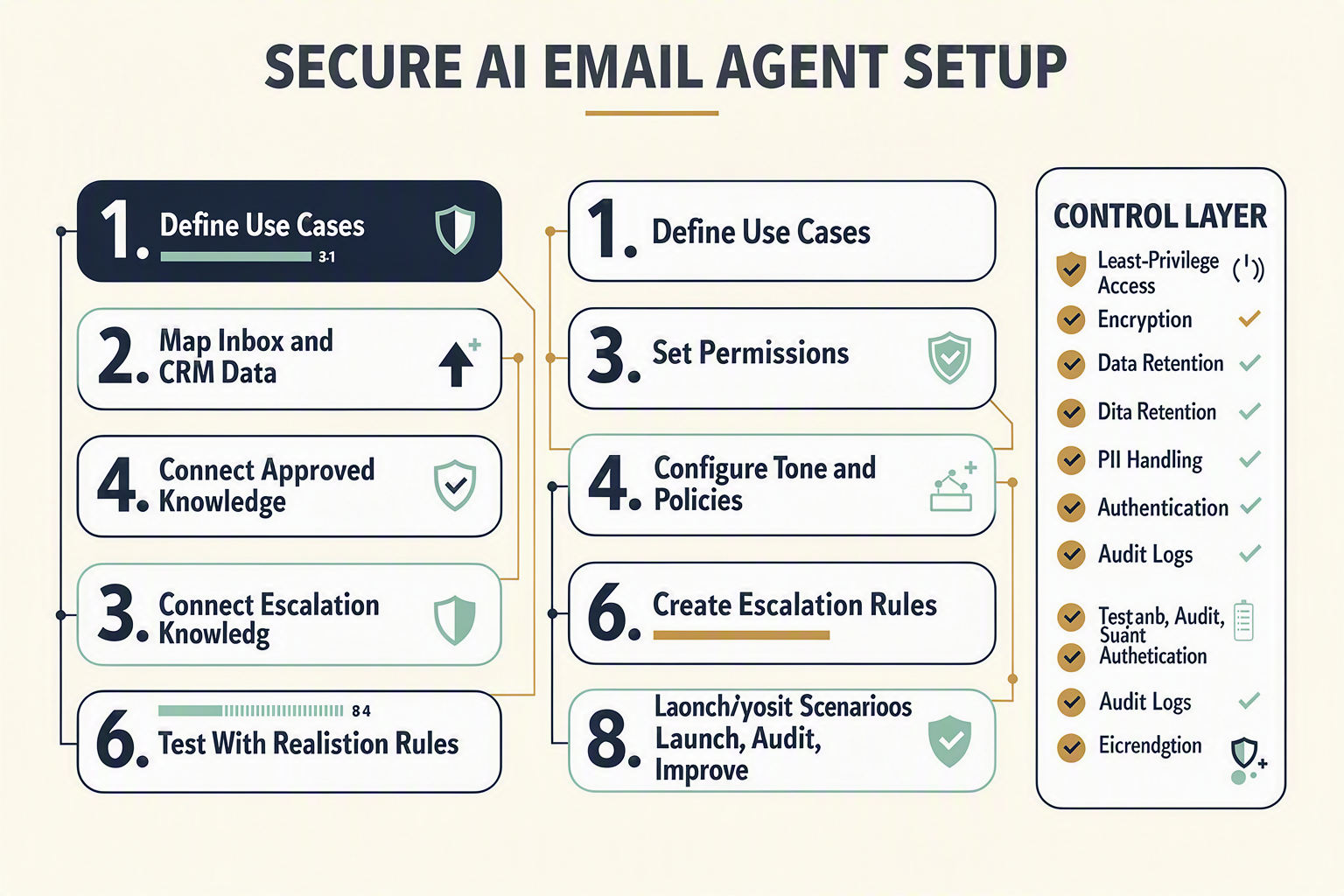
Implement an AI customer service email workflow securely by limiting what the agent can access and do, grounding replies in approved information, and requiring human review for consequential messages. Start with draft-only automation, test against realistic attacks and edge cases, then expand autonomy only when measured accuracy supports it.
1. Define the workflow and risk boundaries
Document each inbox, message type, data source, action, and owner before connecting an AI email agent. Separate low-risk tasks from decisions with financial, legal, or reputational consequences.
- Classify routine intents such as order status, demo requests, and account questions.
- Mark refunds, cancellations, complaints, payment changes, and contractual statements as sensitive.
- Specify whether the agent may classify, draft, send, update CRM fields, or trigger downstream actions.
- Prohibit autonomous commitments involving prices, refunds, service-level agreements, or legal liability.
- Create separate policies for customer service, sales qualification, and internal email.
2. Minimise access to inbox and customer data
Apply least-privilege access to email, CRM, knowledge-base, and campaign systems.
- Use dedicated service identities rather than employees’ credentials.
- Grant access only to required mailboxes, folders, fields, and API operations.
- Require multi-factor authentication for administrators and role-based access for operators.
- Encrypt messages and customer records in transit and at rest.
- Define retention and deletion periods for prompts, outputs, attachments, and logs.
- Mask unnecessary payment, identity, health, or authentication data before model processing.
This control layer matters financially as well as operationally. IBM’s Cost of a Data Breach Report 2024 calculated the global average breach cost at US$4.88 million.
3. Ground replies and distrust inbound content
Connect generative AI for email support only to reviewed policies, product documentation, pricing, and account data. Retrieval-augmented generation should return source passages with document versions so reviewers can verify why a reply was drafted.
Treat every sender message and attachment as untrusted input. Attackers can embed instructions such as “ignore company policy” or request confidential records. Defences should include:
- Separating system instructions from customer-supplied text.
- Blocking retrieved content outside the sender’s authorised account.
- Scanning links and attachments before processing.
- Validating recipients, claims, prices, and actions after generation.
- Preventing the model from exposing prompts, credentials, or another customer’s context.
Platforms such as CallMissed combine email tooling, knowledge-base RAG, and an omnichannel inbox/CRM, which can help teams maintain authorised context across email, voice, WhatsApp, and web without treating the model itself as the source of truth.
4. Configure confidence thresholds and escalation
Set independent thresholds for email triage automation, reply drafting, lead qualification, and sending. A classification may be reliable enough to route automatically while the resulting automated email response still requires approval.
Escalate when the agent detects:
- Low confidence, conflicting records, or missing knowledge.
- Anger, threats, vulnerability, fraud, or security incidents.
- High-value opportunities or unclear sales intent.
- Refunds, regulated data, legal language, or executive contacts.
- Repeated contact after an unsuccessful answer.
5. Test, monitor, and release gradually
Evaluate the email automation AI against historical messages that have been anonymised and access-controlled. Test hallucinations, multilingual requests, prompt injection, malicious attachments, incorrect recipients, CRM mismatches, and attempted data leakage.
Launch in shadow mode, progress to employee-approved drafts, and permit narrow auto-send cases only after review. Keep tamper-resistant audit logs covering retrieved sources, model versions, approvals, actions, and overrides; maintain a kill switch and documented incident-response owner. Security is a continuing release criterion—not a one-time setup task.
How should you measure the impact, quality, and business implications of email automation?
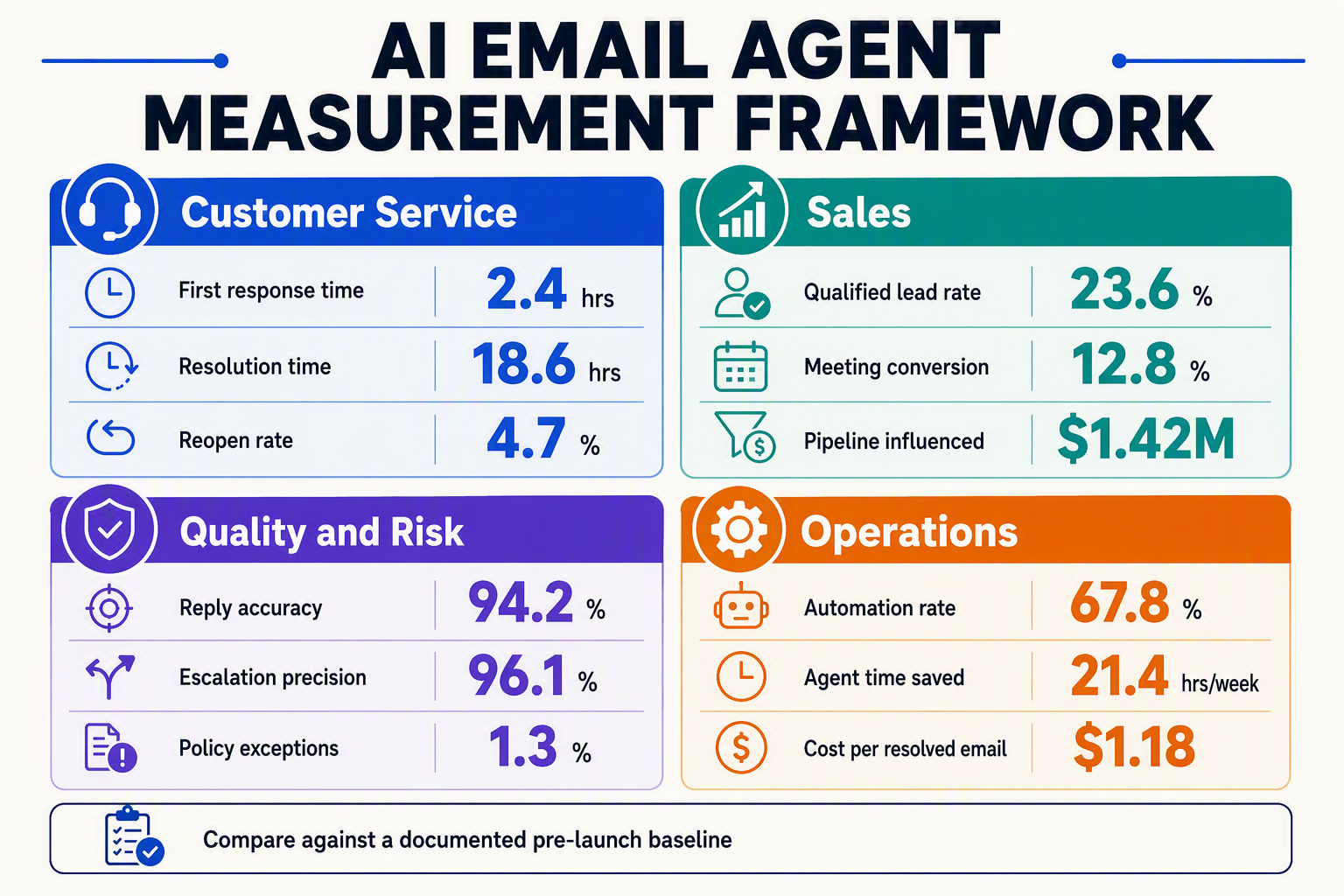
Measure an AI email agent against a pre-deployment baseline using four dimensions: operational efficiency, reply quality, customer or lead outcomes, and risk-adjusted financial impact. Faster responses matter only when email automation AI also preserves accuracy, customer satisfaction, conversion, and appropriate human oversight.
Establish the baseline and evaluation groups
Record at least four weeks of human-only performance before launch, segmented by inbox, intent, language, customer tier, and message complexity. Then compare human-only, AI-assisted, and approved autonomous workflows; a blended inbox-wide average can conceal failures in sensitive categories such as refunds or cancellations.
Track these operational metrics:
- First-response time: Time between email receipt and the first meaningful response.
- Time to resolution: Time until the issue is solved, not merely acknowledged.
- Triage accuracy: Correctly classified and routed messages divided by reviewed messages.
- Draft acceptance rate: AI drafts sent with no material employee edits.
- Average handling time: Human review and editing time per conversation.
- Automation or containment rate: Conversations completed without human intervention.
- Escalation precision: Escalated messages that genuinely required an employee.
- Reopen rate: Resolved conversations reopened because the answer was incomplete or wrong.
For email triage automation, calculate precision and recall separately for each high-risk intent. A system that detects 98% of routine order-status emails but misses urgent fraud reports should not receive one aggregated “accuracy” score.
Score reply quality, not just output volume
Evaluate a statistically useful random sample of messages every week, alongside all complaints, low-confidence replies, escalations, and policy-sensitive cases. Reviewers should score each automated email response against a consistent rubric:
- Factual correctness: Are claims supported by approved customer records or knowledge-base sources?
- Completeness: Does the reply answer every material question?
- Policy compliance: Are refund, pricing, legal, and eligibility rules applied correctly?
- Groundedness: Can important statements be traced to retrieved evidence?
- Tone and clarity: Is the message concise, respectful, and appropriate for the customer’s language?
- Action accuracy: Were CRM updates, tags, assignments, or follow-ups executed correctly?
Measure hallucination rate as unsupported factual claims divided by reviewed AI replies. Also track override reasons—incorrect facts, poor tone, missing context, unsafe action, or unnecessary escalation—because an acceptance percentage alone does not explain what to improve.
Connect service and sales metrics to business outcomes
For AI customer service email, monitor customer satisfaction, resolution rate, repeat-contact rate, SLA attainment, refunds caused by misinformation, and churn signals. For sales, measure qualified-lead rate, meeting-booking rate, sales-accepted leads, pipeline value, conversion rate, and revenue per inbound enquiry.
Calculate financial impact with transparent assumptions:
Net monthly benefit = labour savings + incremental gross profit − platform costs − implementation costs − expected error and compliance costs.
Avoid counting every automated message as saved labour. Use measured handling-time reductions and loaded employee costs, then subtract ongoing QA, escalation, knowledge maintenance, and security expenses.
Risk belongs in the business case. IBM’s Cost of a Data Breach Report 2024 estimated the global average breach cost at US$4.88 million, so access violations, sensitive-data exposure, prompt-injection incidents, and unauthorised sends should appear on the executive scorecard—even when their frequency is low.
Use one accountable dashboard
A practical dashboard should show weekly trends by intent, language, team, automation level, and model version. Platforms such as CallMissed can connect email activity with omnichannel customer context, but teams should still distinguish email-specific outcomes from voice, WhatsApp, and web performance.
Review generative AI for email support weekly during rollout and monthly after stabilisation. Expand autonomy only when quality thresholds remain satisfied; otherwise, lower confidence thresholds, update retrieval content, or return affected intents to draft-only mode.
What do customer service, sales, security, and operations experts recommend?

Experts recommend deploying an AI email agent as a controlled decision system: automate low-risk, repeatable work; ground replies in approved data; and require human review when confidence is low or consequences are high. Customer service, sales, security, and operations leaders should jointly define these controls rather than allowing one team to configure the system alone.
Customer-service leaders: prioritise accuracy and recoverability
Support experts generally recommend beginning with email triage automation and reply drafting before enabling autonomous sending. Triage offers immediate operational value while keeping employees accountable for customer-facing statements.
Customer-service teams should:
- Create separate intents for billing, refunds, cancellations, technical issues, complaints, and general enquiries.
- Ground each automated email response in approved knowledge-base articles, policies, and current account data.
- Display source passages beside drafts so agents can verify claims quickly.
- Route messages to humans when the request is ambiguous, emotionally sensitive, legally consequential, or outside the knowledge base.
- Give customers a clear route to a person rather than trapping them in an automated exchange.
This measured approach reflects mainstream adoption patterns. Gartner predicted in August 2023 that 80% of customer-service organizations would apply generative AI in some form by 2025, but “using AI” does not require fully autonomous replies.
Sales leaders: qualify leads without hiding uncertainty
Sales experts recommend translating qualification frameworks into observable fields instead of asking a model whether a lead is simply “good.” Email automation AI should extract evidence such as company, geography, use case, budget range, authority, urgency, and requested implementation date.
A practical sales policy is to:
- Record the evidence behind every qualification score.
- Separate explicit statements from model inferences.
- send high-value, strategic, or uncertain opportunities to an account executive.
- Require approval for discounts, contractual commitments, and delivery promises.
- Synchronise email activity with CRM records to prevent duplicate or contradictory outreach.
The agent should also respect consent, suppression lists, and regional marketing rules. Lead scoring should assist prioritisation—not make opaque decisions that employees cannot review.
Security experts: assume every email is untrusted input
Security teams recommend treating inbound content, attachments, links, and retrieved documents as potentially hostile. This is especially important for generative AI for email support, because a malicious message may contain prompt-injection instructions designed to override policies or expose data.
Recommended controls include:
- Least-privilege access to mailboxes, CRM fields, and knowledge sources.
- Tenant and customer-data isolation during retrieval.
- Encryption in transit and at rest, plus managed secret rotation.
- Attachment scanning, URL inspection, output filtering, and data-loss prevention.
- Immutable audit logs covering prompts, retrieved sources, drafts, approvals, sends, and configuration changes.
- Retention and deletion rules aligned with contractual and regulatory obligations.
The financial stakes are material: IBM’s Cost of a Data Breach Report 2024 calculated the global average breach cost at US$4.88 million. Teams can structure governance around the NIST AI Risk Management Framework and test language-model threats using the OWASP Top 10 for Large Language Model Applications.
Operations leaders: measure outcomes, not email volume
Operations experts recommend a phased rollout: shadow mode, employee-approved drafts, narrowly scoped autonomous replies, and then controlled expansion. Track classification accuracy, draft acceptance, correction rate, escalation precision, first-response time, reopen rate, conversion, complaints, and security incidents.
For AI customer service email connected to other channels, maintain one customer timeline. Platforms such as CallMissed combine email tooling, knowledge-base RAG, and an omnichannel inbox/CRM, helping authorised teams preserve context across email, WhatsApp, voice, and web while applying channel-specific controls.
What does this mean for your team, and where might CallMissed fit?
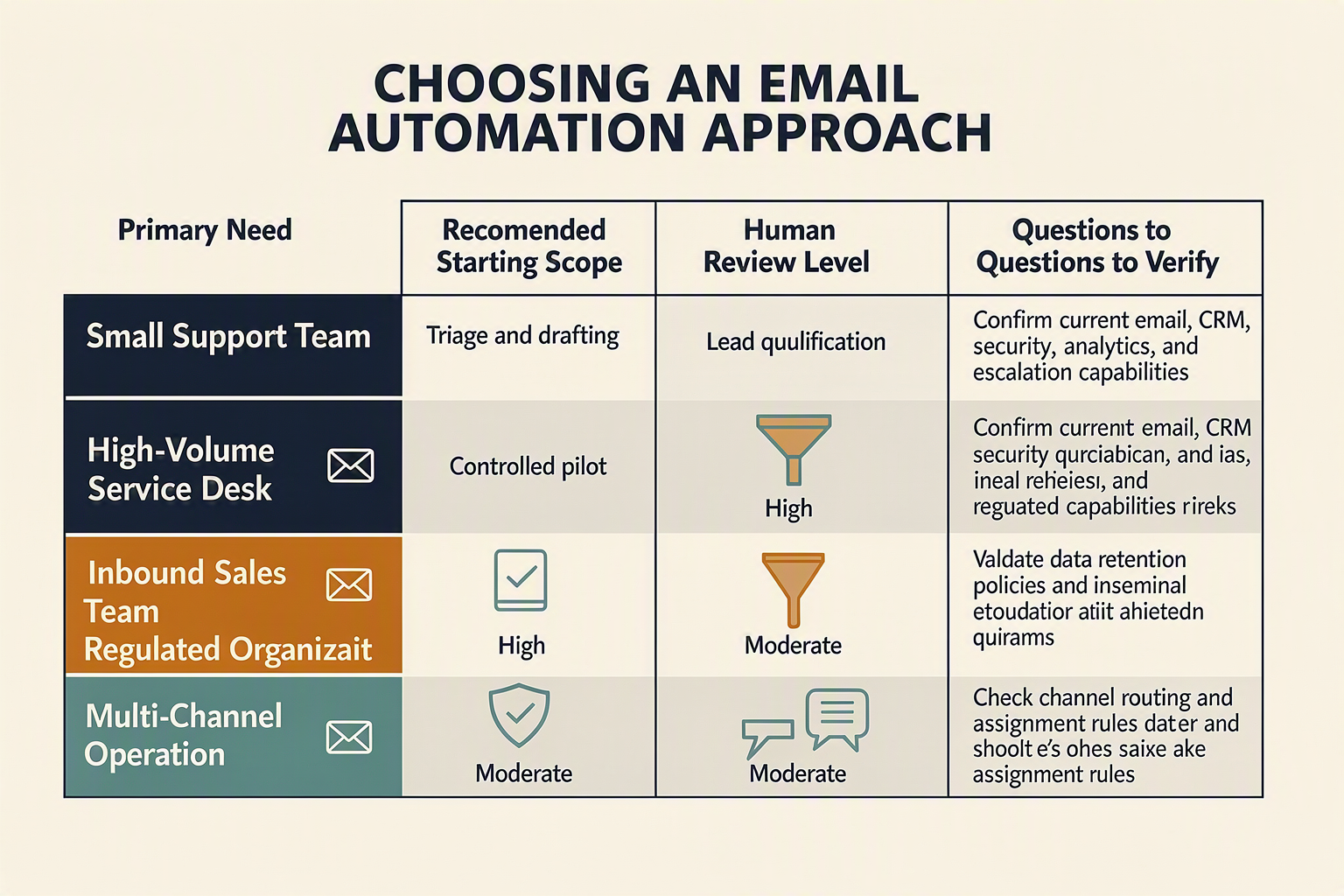
Your team should treat an AI email agent as a governed workflow shared by support, sales, operations, IT, and security—not as a replacement for inbox ownership. CallMissed may fit when the goal is to connect email tooling and knowledge-base RAG with customer context from an omnichannel inbox/CRM, WhatsApp, voice, and web.
Translate capabilities into team responsibilities
Successful email automation AI requires clear ownership for routing logic, approved knowledge, escalation thresholds, data access, and performance reviews. The following operating model shows what changes and where CallMissed can contribute.
| Team need | Operating change | Recommended control | Where CallMissed may fit |
|---|---|---|---|
| Faster inbox sorting | Support operations define intents, priorities, languages, and queue owners | Audit misroutes and require fallback queues | Email tooling and an omnichannel inbox/CRM can centralize customer conversations |
| Accurate reply drafting | Subject-matter experts maintain approved policies and answer sources | Ground drafts with knowledge-base RAG and apply confidence thresholds | CallMissed supports knowledge-base RAG for context-grounded engagement |
| Sales lead qualification | Sales leaders define fields such as need, budget, authority, location, and timeline | Route incomplete or high-value leads to representatives | Shared CRM context can preserve qualification details across conversations |
| Human escalation | Support and sales agree on urgency, sentiment, value, and risk triggers | Never auto-send sensitive legal, payment, cancellation, or complaint replies without review | Teams can design handoffs within a broader customer-engagement workflow |
| Cross-channel continuity | Agents review relevant email, WhatsApp, voice, and web history | Limit access by role and expose only task-relevant data | CallMissed brings these channels into an omnichannel operating environment |
| Regional customer engagement | Teams identify preferred languages and channels by audience | Test terminology, names, addresses, and code-switching with native speakers | CallMissed supports speech technologies across 22 Indian languages and WhatsApp Business calling |
Decide whether the fit is operational, technical, or both
CallMissed is particularly relevant when email is one part of a longer customer journey. For example, an AI customer service email workflow might classify a delivery complaint, draft a grounded answer, and route the case to an employee who can review earlier WhatsApp messages or voice interactions.
The platform also offers an OpenAI-compatible developer gateway covering large language models, Speech-to-Text, Text-to-Speech, image generation, and web search. A single API key and automatic same-tier fallbacks can simplify model access for teams building custom classification, summarization, or drafting components. Pricing uses transparent credits where one credit equals ₹1, with free-tier and pay-as-you-go options.
This does not eliminate implementation work. Before enabling an automated email response, your team should confirm:
- Which inboxes and message types are in scope.
- Whether email triage automation can act automatically or only recommend routing.
- Which replies require employee approval.
- What customer data each model and employee role may access.
- How quality, latency, escalation, conversion, and opt-out compliance will be reviewed.
Make governance the deciding factor
Security should influence the buying decision as much as model quality. IBM reported in its 2024 Cost of a Data Breach Report that the global average breach cost reached US$4.88 million. Accordingly, any use of generative AI for email support should undergo checks for authentication, encryption, retention, auditability, prompt injection, data minimization, and incident response.
The practical fit is strongest when your team needs email-first automation with broader context, values India-focused language and WhatsApp capabilities, and is prepared to retain human accountability for consequential messages.
Frequently asked questions about AI email agents for customer service and sales
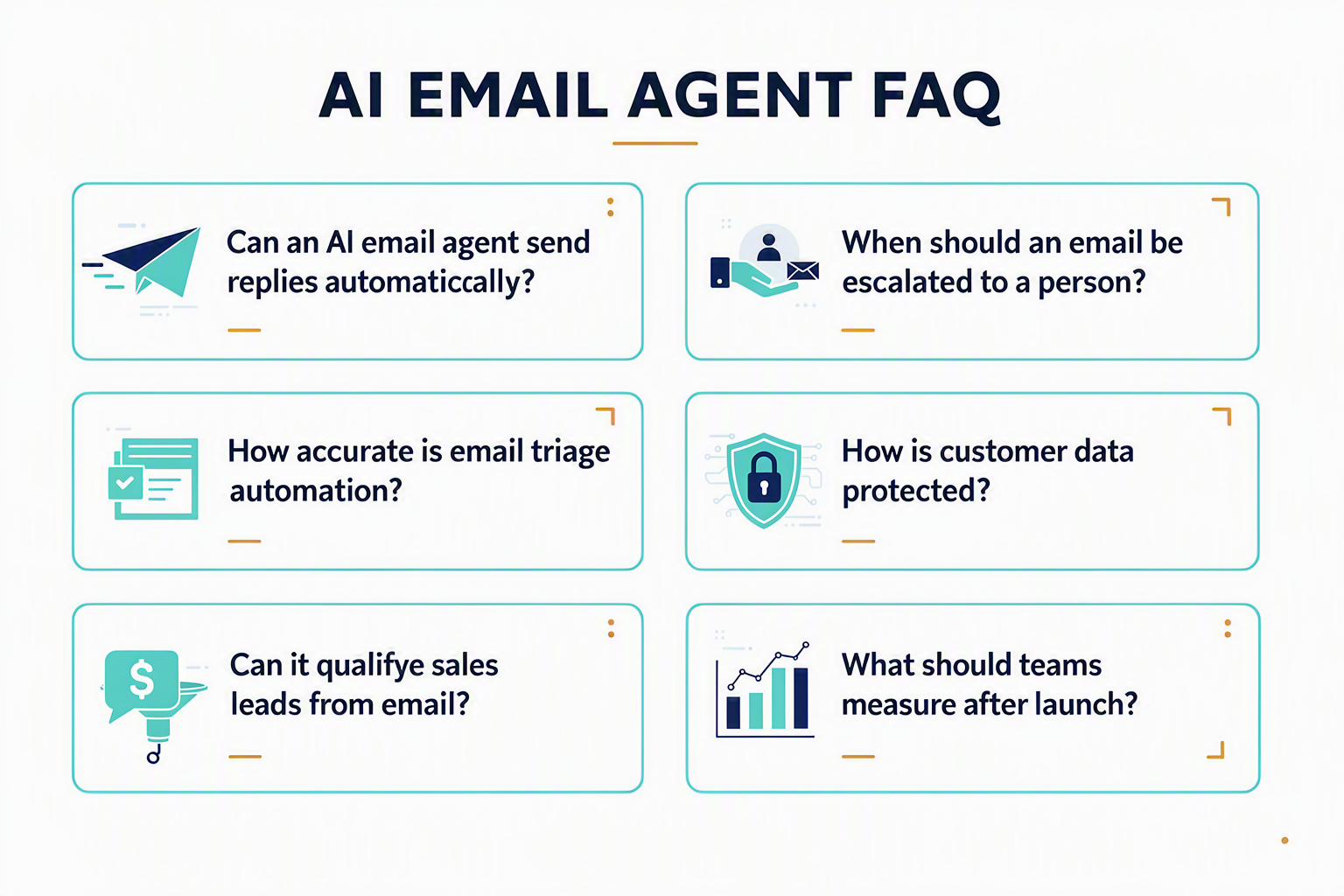
What does an AI email agent do for customer service teams?
How does email automation AI create accurate customer-service replies?
Can an AI email agent automatically send replies without human approval?
How can an AI email agent qualify inbound sales leads?
Is generative AI for email support secure enough for customer data?
How should businesses implement and measure AI customer service email automation in 2026?
Conclusion
An AI email agent can make customer service and sales faster in 2026, but successful deployment depends on controlled automation rather than unchecked replies. The goal is to combine language models, business rules, trusted customer data, and human judgment so every email receives an appropriate level of attention.
Key takeaways
- Start with structured triage. Effective email triage automation classifies messages by intent, urgency, sentiment, language, and commercial value before routing them to support, sales, or a specialist queue.
- Ground every reply in approved information. An automated email response should draw from a maintained knowledge base, customer history, and current policies. Confidence thresholds and employee approval remain essential for ambiguous, sensitive, high-value, or consequential cases.
- Connect service and sales context. Email automation AI can extract lead-qualification signals such as need, budget, authority, and timing while giving customer-facing teams access to relevant conversation history. Shared context reduces repetitive questions and creates more consistent follow-up.
- Treat security and measurement as design requirements. Permissions, encryption, retention controls, audit logs, prompt-injection defenses, and escalation paths should be implemented from the beginning. IBM’s Cost of a Data Breach Report 2024 calculated the global average breach cost at US$4.88 million, demonstrating the financial importance of responsible access to inboxes and customer records. Teams should also track resolution time, draft acceptance, containment, conversion, escalation accuracy, and customer satisfaction.
What to watch next
The next phase of generative AI for email support will focus on better grounding, richer shared context, and more precise decisions about when automation should stop. That evolution will become increasingly important as email volume grows: The Radicati Group’s Email Statistics Report 2024–2028 projects approximately 392.5 billion business and consumer emails per day in 2026.
For organizations implementing AI customer service email, the practical advantage will come from learning continuously without weakening governance. Platforms such as CallMissed can be explored as this trend develops, combining email tooling, knowledge-base RAG, and an omnichannel inbox/CRM with AI engagement across voice, WhatsApp, and web.
Which repetitive inbox workflow could your team automate first while keeping the right human accountable for the outcome?
Related Reading
Discussion
Related Posts

Ready to automate customer conversations?
Launch AI voice agents and WhatsApp bots with CallMissed — one API, 22+ Indian languages.