
How to Add a WhatsApp AI Chatbot to Your Business



Learn how to add a WhatsApp AI chatbot to your business with Meta setup, webhooks, working API code, human handoff, costs, and testing.
How to Add a WhatsApp AI Chatbot to Your Business
What if your customers could ask questions, check order status, and request support on WhatsApp without waiting for a human agent? To learn how to add a WhatsApp AI chatbot to my business, connect an official WhatsApp Business account through Meta’s WhatsApp Cloud API, receive messages through webhooks, send them to an AI model, and return the generated reply to the customer.
This matters because WhatsApp is more than a messaging channel: it can become an AI customer-support layer connected to your catalogue, CRM, order system, and human support team. Meta for Developers’ official setup path covers four core stages—create a Meta app with WhatsApp, start using the API, send and receive messages, and configure a test webhook—while Meta’s Embedded Signup flow helps businesses connect the assets required for onboarding.
This practical guide explains how to connect your AI chatbot to WhatsApp without confusing a personal WhatsApp number with the official WhatsApp Business Platform. You will learn how to:
- Choose between Meta’s direct Cloud API setup and a managed WhatsApp AI chatbot for business
- Create a Meta app, connect a WhatsApp Business account, and configure a webhook
- Write a secure server that receives inbound messages and sends AI-generated replies
- Use message templates, human handoff, knowledge bases, and commerce workflows
- Test authentication, webhook verification, duplicate events, rate limits, and failed deliveries
- Measure whether the chatbot is resolving customer questions rather than simply sending more messages
| Setup path | Best for | Core requirement | Typical control |
|---|---|---|---|
| Meta Cloud API directly | Developer-led teams | Meta app, phone number, webhook server | Maximum implementation control |
| Managed WhatsApp platform | Businesses wanting faster deployment | Meta Embedded Signup | Configuration through a dashboard |
| Human-plus-AI inbox | Support teams | Shared inbox and handoff workflow | AI handles routine queries; people handle exceptions |
| Commerce chatbot | Retail and ecommerce businesses | Catalogue and order integration | Product discovery, carts, and order updates |
Platforms such as CallMissed support the official Meta Cloud API, AI chatbot agents, message templates, broadcasts, shared inboxes, analytics, catalogues, carts, order status, and WhatsApp Business Calling. As of September 2026, CallMissed also supports speech recognition in 22 Indian languages plus English, which is relevant when WhatsApp support needs to serve multilingual customers.
The sections that follow turn the setup into a working implementation, with request examples and troubleshooting guidance you can adapt to your own stack.
How do I add a WhatsApp AI chatbot to my business?
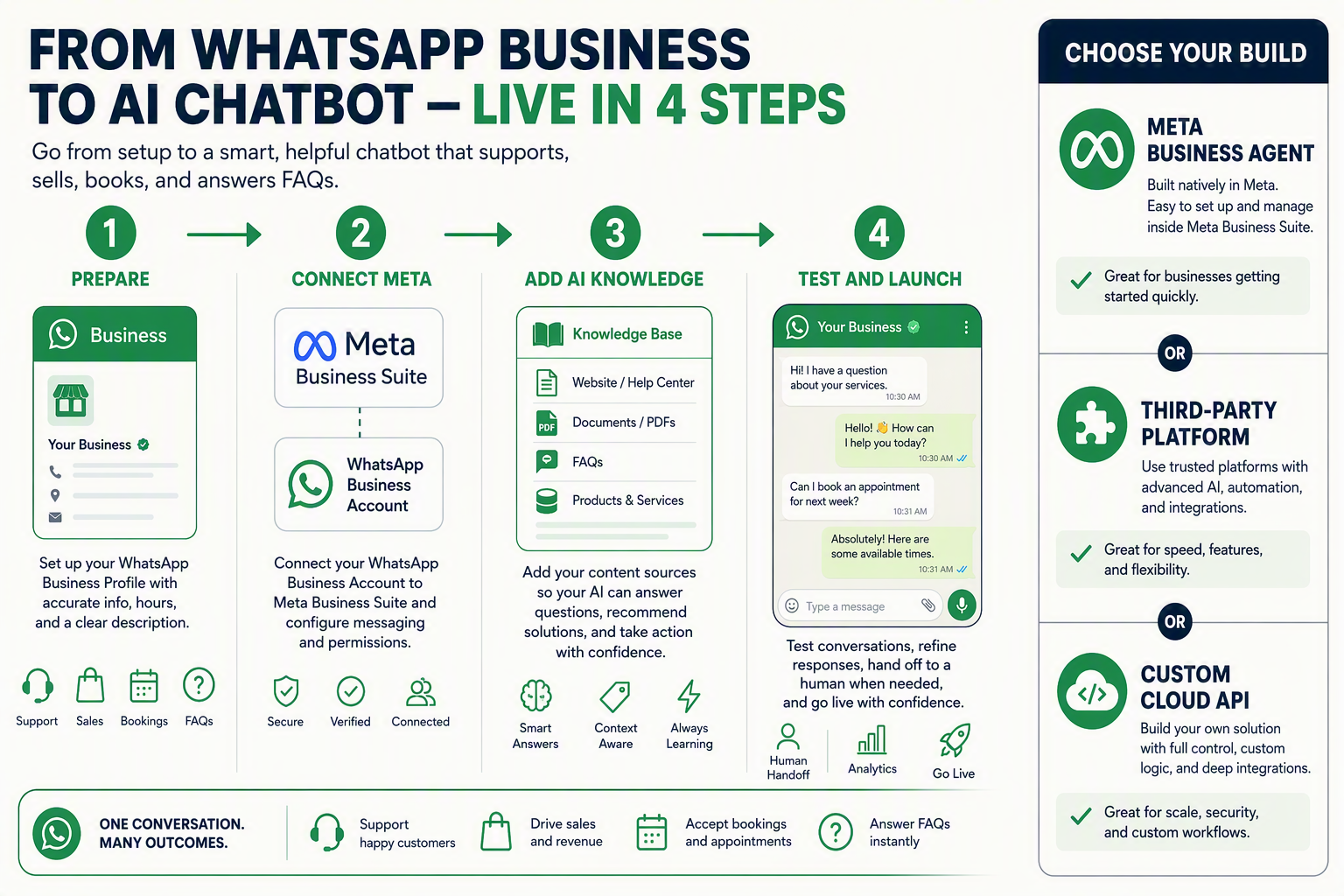
Connect an official WhatsApp Business account to Meta’s WhatsApp Cloud API, configure a webhook, pass incoming messages to an AI model, and send the model’s reply through the WhatsApp messages endpoint. For a faster deployment, use a managed WhatsApp AI chatbot for business that handles Meta onboarding, prompts, knowledge bases, templates, inboxes, and human handoff.
What do I need before connecting an AI chatbot to WhatsApp?
Prepare these components:
- A Meta Business account and WhatsApp Business account.
- A Meta app with the WhatsApp product enabled.
- A verified webhook endpoint using HTTPS.
- A permanent access token stored as a secret.
- An AI model and a knowledge source for approved answers.
- A human escalation path for sensitive or unresolved requests.
Meta for Developers’ WhatsApp Cloud API Get Started documentation lists the official sequence: create a WhatsApp app, start using the API, send and receive messages, configure a test webhook, and create the production setup. Meta’s Embedded Signup flow is designed to help businesses connect the assets needed for WhatsApp Business Platform onboarding.
How do I connect my AI chatbot to WhatsApp?
Use this message flow:
Customer message → Meta webhook → your server → AI model → WhatsApp Cloud API reply
A minimal webhook in Node.js can verify Meta’s callback and receive messages:
import express from "express";

const app = express();
app.use(express.json());

const VERIFY_TOKEN = process.env.WHATSAPP_VERIFY_TOKEN;

app.get("/webhook", (req, res) => {
  const valid =
    req.query["hub.mode"] === "subscribe" &&
    req.query["hub.verify_token"] === VERIFY_TOKEN;

  res.status(valid ? 200 : 403).send(valid ? req.query["hub.challenge"] : "Forbidden");
});

app.post("/webhook", async (req, res) => {
  res.sendStatus(200); // acknowledge quickly

  const message = req.body.entry?.[0]?.changes?.[0]?.value?.messages?.[0];
  if (!message?.text?.body) return;

  const customerText = message.text.body;
  const customerNumber = message.from;

  // Send customerText to your AI model, then call Meta's
  // /PHONE_NUMBER_ID/messages endpoint with the generated reply.
});

app.listen(3000);
Return HTTP 200 immediately, then process the AI request asynchronously. Store processed message IDs so a repeated webhook event does not create duplicate replies. Restrict the model to your business knowledge base, redact sensitive data, and route payment disputes or complaints to a person.
Which WhatsApp chatbot option fits my business?
| Option | Best use | Numeric reference |
|---|---|---|
| Meta Cloud API directly | Developer-controlled implementation | 1 webhook server |
| Managed WhatsApp platform | Faster no-code or low-code deployment | 1 connected business account |
| Multilingual support | Indian-language customer service | 22 speech-recognition languages |
| Starter AI deployment | Testing a production workflow | ₹999/month plus 550 credits |
CallMissed supports the official Meta Cloud API, AI-generated chatbot prompts, knowledge bases, templates, shared inboxes, catalogues, carts, order status, analytics, and human handoff. As of September 2026, CallMissed also supports speech recognition in 22 Indian languages plus English; the CallMissed product fact sheet lists ₹999/month and 550 included credits for its Starter plan.
FAQ: What should I check first?
Can I use my personal WhatsApp number?
Does the chatbot need a human handoff?
Can the chatbot send order updates?
How do I prevent duplicate replies?
How do I test the integration?
What prerequisites and setup details do I need?
What prerequisites and setup details do I need?
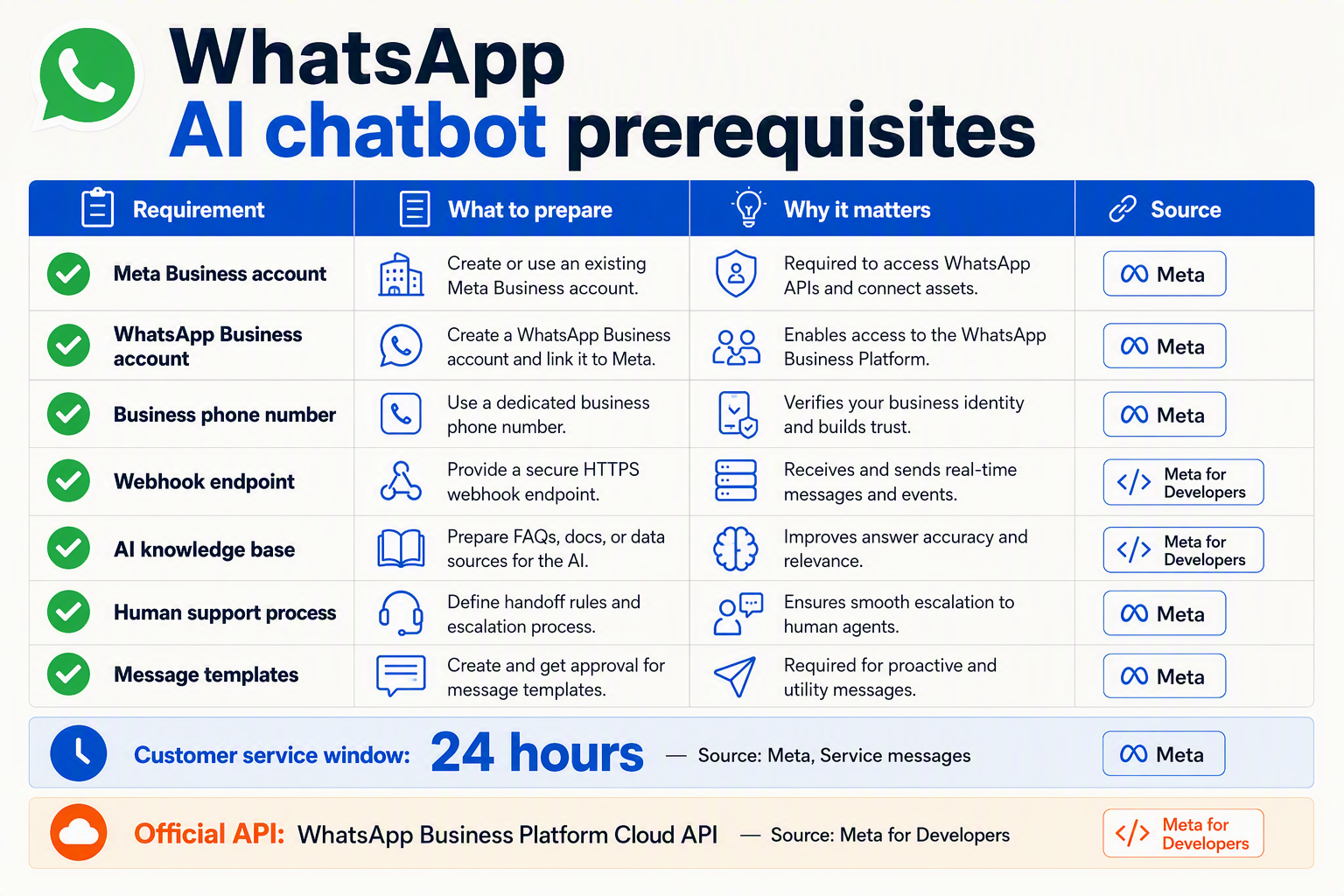
To add a WhatsApp AI chatbot to your business, prepare a Meta Business portfolio, WhatsApp Business account, business phone number, Meta developer app, access token, and HTTPS webhook endpoint. You also need an AI model, a knowledge source for accurate answers, and a human-handoff process before inviting real customers.
| Prerequisite | What you need | Why it matters | Setup check |
|---|---|---|---|
| Meta business assets | Meta Business portfolio and WhatsApp Business account | Connects your business identity and messaging assets to the WhatsApp Business Platform | Confirm the correct business has admin access |
| WhatsApp number | A business phone number that can receive verification | Identifies the WhatsApp sender and receives customer conversations | Do not assume a personal WhatsApp number is API-ready |
| Meta developer app | A Meta app with the WhatsApp product enabled | Provides the API credentials and configuration area | Use Meta for Developers’ official WhatsApp setup |
| Authentication | Temporary test token for development; secured production credentials later | Authorises API requests to send messages and read account data | Store secrets in environment variables, never in frontend code |
| Webhook server | Public HTTPS URL, verification token, and event handler | Receives inbound messages and delivery-status events from Meta | Return Meta’s verification challenge and acknowledge events quickly |
| AI response layer | Model endpoint, system prompt, business knowledge, and fallback behaviour | Generates useful answers instead of generic replies | Define when the bot answers, asks for clarification, or escalates |
#### What Meta account access is required?
The Meta for Developers WhatsApp Cloud API Get Started documentation lists the official onboarding path, including creating a Meta app with WhatsApp, starting API use, sending and receiving messages, and configuring a test webhook. Your developer account should have permission to manage the relevant business assets; otherwise, the phone number, account, or token may not appear during setup.
For a managed WhatsApp AI chatbot for business, Meta Embedded Signup can reduce manual configuration. Meta’s Embedded Signup documentation describes the flow as a way for businesses to generate the assets required for onboarding to the WhatsApp Business Platform. Confirm that the provider uses the official Meta Cloud API, not an unofficial WhatsApp session or browser automation.
#### What should I prepare before connecting the AI?
Create a short implementation brief before writing code:
- List the first five customer tasks, such as FAQs, order-status requests, product discovery, or appointment questions.
- Gather approved answers from your website, PDFs, catalogue, help desk, or CRM.
- Define sensitive topics that always require a person, including refunds, complaints, payment disputes, or account changes.
- Decide how the chatbot identifies a customer and what data it may access.
- Write a fallback message for unavailable systems, uncertain answers, and failed deliveries.
Platforms such as CallMissed, which supports the official Meta Cloud API, provide AI chatbot agents, knowledge bases, message templates, shared inboxes, catalogues, carts, and order-status workflows. As of September 2026, CallMissed also supports WhatsApp Business Calling, including AI voice agents answering customer-initiated WhatsApp calls.
#### Do I need multilingual preparation?
If your customers use regional languages or code-mixed speech, include representative examples in testing. CallMissed supports speech recognition in 22 Indian languages plus English, including Hinglish, according to its September 2026 product specifications; that figure applies to speech recognition, not text-to-speech. For text chat, test spelling variations, transliteration, emojis, and mixed-language questions before launch.
Which WhatsApp AI chatbot setup route is best for my business?
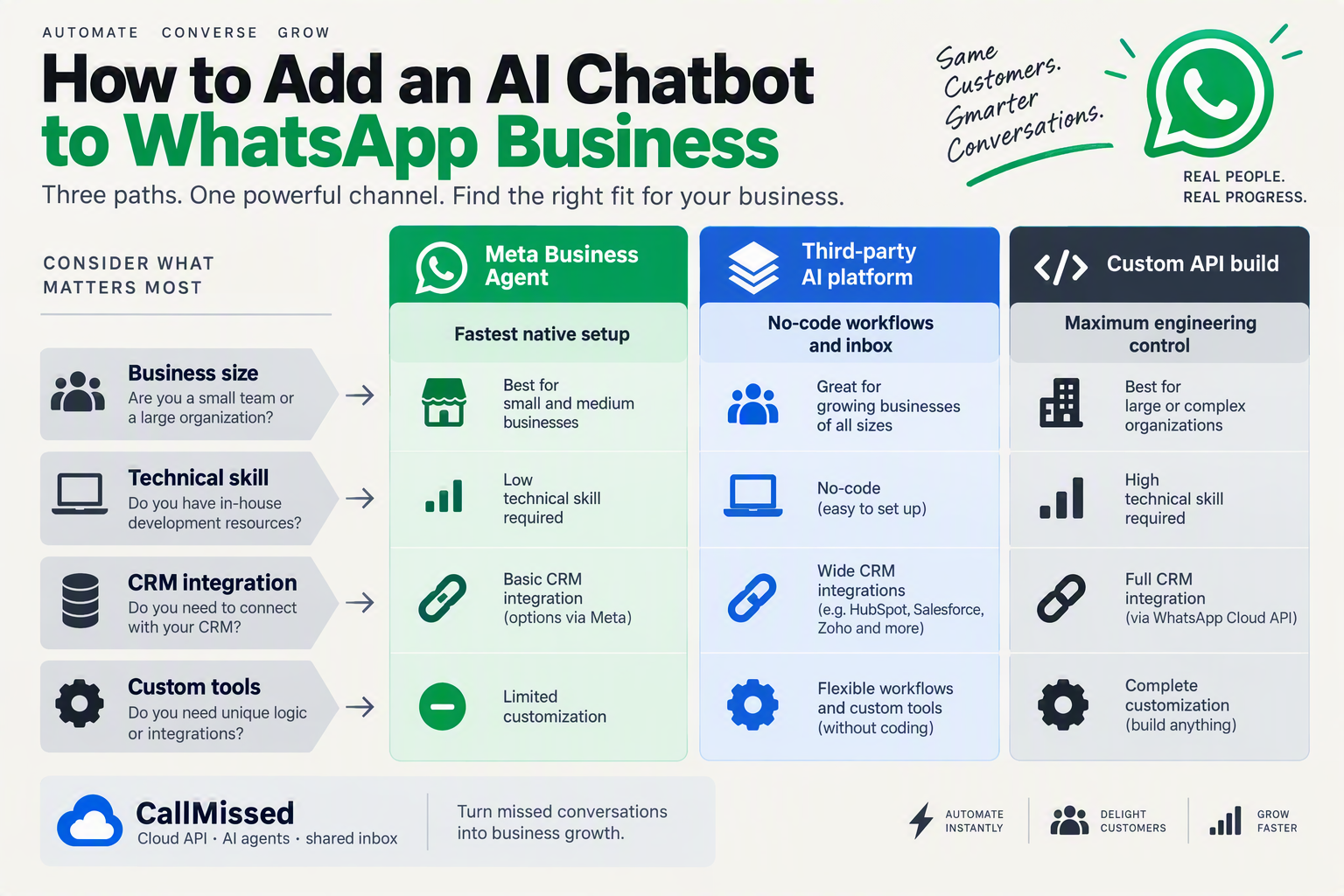
Choose Meta Cloud API directly if your team needs complete control over prompts, webhooks, data flows, and infrastructure. Choose a managed WhatsApp AI chatbot for business if you want to connect an official WhatsApp Business account, configure an agent, and launch AI customer support on WhatsApp with less engineering work. For most small and mid-sized businesses, the managed route is the practical starting point; developer-led teams may prefer a hybrid approach.
Which WhatsApp AI chatbot setup route should I choose?
Use this decision table before creating a Meta app or migrating your number:
| Route | Best fit | Engineering effort | Control level | Typical first use |
|---|---|---|---|---|
| Meta Cloud API directly | Developer-led product teams | High | Maximum | Custom support bot |
| Managed WhatsApp platform | Small and mid-sized businesses | Low | Configuration-level | FAQs and lead capture |
| Human-plus-AI inbox | Existing support departments | Medium | Shared AI and human control | Triage and escalation |
| Commerce chatbot | Retail and ecommerce brands | Medium | Catalogue and order workflows | Product and order support |
Meta’s official WhatsApp Cloud API documentation defines four initial stages—create a Meta app, start using the API, send and receive messages, and configure a test webhook—so the direct route is flexible but requires backend ownership. Meta’s Embedded Signup documentation describes the onboarding flow that businesses use to connect the assets required for the WhatsApp Business Platform.
When is the direct Meta Cloud API route best?
Select direct integration when you need to:
- Store conversation state in your own database.
- Apply custom authentication, logging, retention, and compliance policies.
- Connect the bot to private systems such as inventory, billing, or claims.
- Control model selection, fallback logic, tool calls, and webhook processing.
- Build a reusable WhatsApp integration for multiple products or clients.
This route normally requires a Meta app, WhatsApp Business assets, access tokens, a publicly reachable HTTPS webhook, signature validation, message-processing logic, and retry handling. It is powerful, but the business—not a platform vendor—must maintain the integration.
When is a managed WhatsApp AI chatbot better?
Choose a managed platform when speed, shared operations, and built-in workflows matter more than infrastructure control. Look for these capabilities:
- Official Meta Cloud API onboarding rather than unofficial WhatsApp automation
- AI-generated prompts and a searchable knowledge base
- A shared inbox with explicit human handoff
- Message templates synchronized with Meta
- Catalogue, cart, and order-status workflows
- Conversation analytics and delivery monitoring
For example, CallMissed connects through the official Meta Cloud API and combines AI chatbot agents, templates, a live shared inbox, analytics, catalogues, carts, and order status. As of September 2026, CallMissed also supports speech recognition in 22 Indian languages plus English, according to its verified product documentation—useful for businesses serving multilingual customers.
What if I need both automation and human support?
Start with a human-plus-AI inbox. Let the agent answer low-risk questions such as hours, delivery policies, product availability, or return instructions. Route payment disputes, complaints, ambiguous requests, and high-value leads to a person.
Before launch, define:
- The exact questions the AI may answer
- The confidence threshold for escalation
- Which customer data the agent may access
- A visible “talk to a person” path
- Ownership and response-time targets after handoff
Quick FAQ: choosing a WhatsApp AI chatbot route
Can I use a personal WhatsApp number for an AI chatbot?
Do I need developers to add an AI chatbot to WhatsApp?
Is Meta’s native Business Agent the same as a custom chatbot?
Should ecommerce businesses choose a commerce chatbot?
What is the safest rollout strategy?
How do I connect Meta, configure the chatbot, and send a test message?
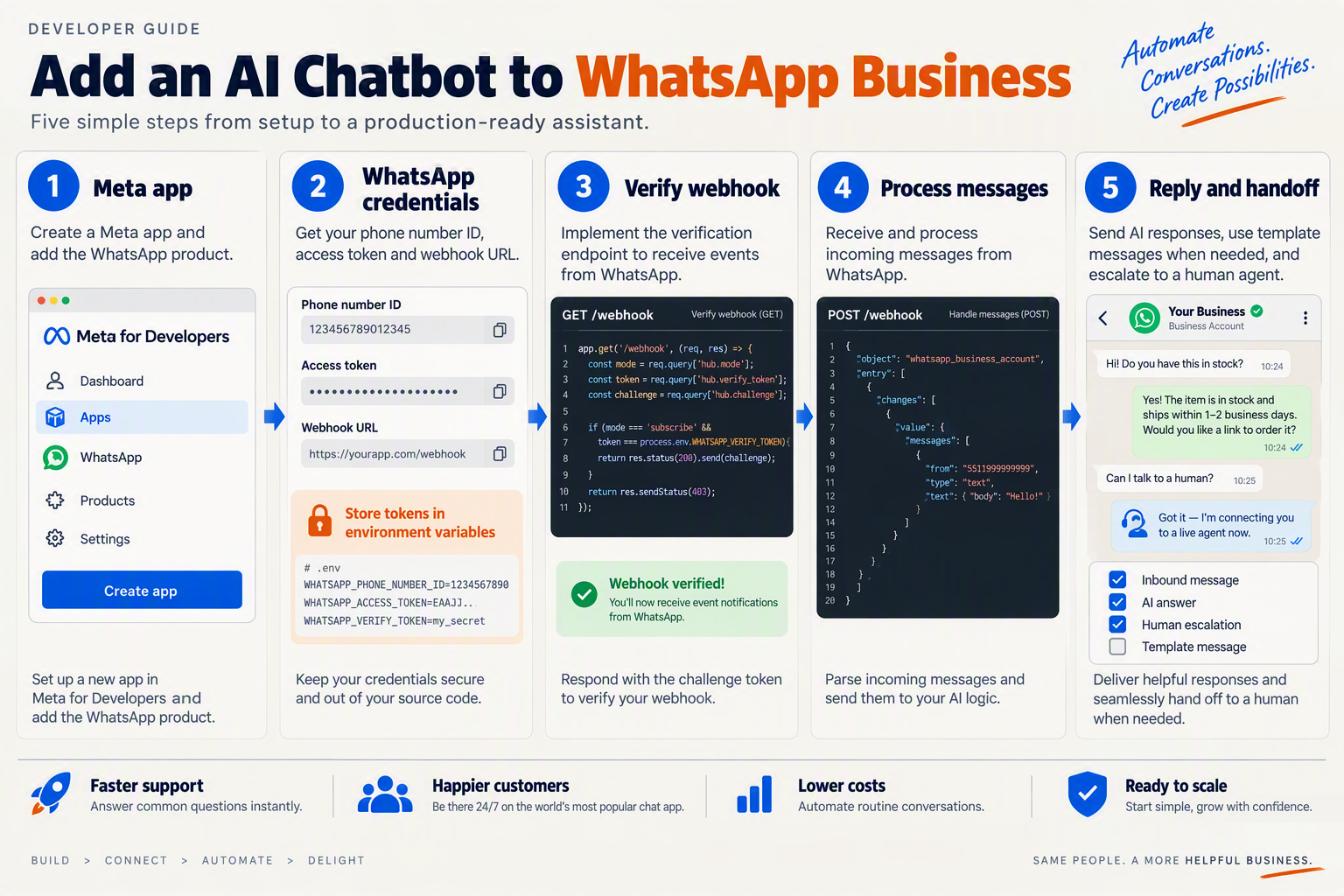
Connect Meta’s official WhatsApp Cloud API, complete Meta Embedded Signup, then attach your chatbot’s webhook to the resulting WhatsApp Business account. After verification, send an inbound message to your webhook, pass the text to your AI model, and return the reply through Meta’s /messages endpoint.
How do I connect my WhatsApp Business account through Meta?
Meta for Developers defines the Cloud API onboarding path as: create a Meta app with WhatsApp, start using the API, send and receive messages, and configure a test webhook. For a managed WhatsApp AI chatbot for business, use Meta’s Embedded Signup flow to connect the customer’s WhatsApp Business assets without asking them to manually exchange every identifier.
- In Meta for Developers, create an app and add the WhatsApp product.
- Open the WhatsApp API setup screen and record the phone number ID, WhatsApp Business account ID, and temporary access token.
- For production, create a long-lived system-user token with only the permissions your server needs.
- Publish a publicly reachable HTTPS webhook, then subscribe the WhatsApp Business account to message events.
- Send a test message from a separate WhatsApp number to the connected business number.
Do not use a personal WhatsApp number or an unofficial automation library. The official WhatsApp Business Platform is the supported foundation for AI customer support on WhatsApp.
How do I configure the chatbot webhook?
Your webhook must handle Meta’s verification request and POST message events. Store tokens in environment variables, validate the request, acknowledge events quickly, and process the AI response asynchronously where possible.
import express from "express";

const app = express();
app.use(express.json());

app.get("/webhook", (req, res) => {
  const ok =
    req.query["hub.mode"] === "subscribe" &&
    req.query["hub.verify_token"] === process.env.WA_VERIFY_TOKEN;

  return ok
    ? res.status(200).send(req.query["hub.challenge"])
    : res.sendStatus(403);
});

app.post("/webhook", (req, res) => {
  res.sendStatus(200); // acknowledge Meta immediately

  const change = req.body.entry?.[0]?.changes?.[0]?.value;
  const message = change?.messages?.[0];

  if (message?.type === "text") {
    handleIncomingText({
      from: message.from,
      text: message.text.body,
      messageId: message.id
    });
  }
});

app.listen(process.env.PORT || 3000);
Configure the callback URL and verify token in the Meta app dashboard. Save each message.id before processing so retries do not create duplicate AI replies.
How do I send a test message through the API?
After receiving the customer’s text, call Meta’s messages endpoint with the phone number ID. Replace GRAPH_API_VERSION with the version selected in your Meta app.
curl -X POST \
  "https://graph.facebook.com/GRAPH_API_VERSION/PHONE_NUMBER_ID/messages" \
  -H "Authorization: Bearer $WA_ACCESS_TOKEN" \
  -H "Content-Type: application/json" \
  -d '{
    "messaging_product": "whatsapp",
    "to": "CUSTOMER_NUMBER",
    "type": "text",
    "text": {
      "body": "Thanks for contacting us. How can we help?"
    }
}'| Response | Meaning | Immediate action |
|---|---|---|
| 200 | Message accepted | Store the message ID |
| 400 | Invalid payload or identifier | Check JSON, phone number ID, and recipient |
| 401 | Token rejected | Replace or renew the access token |
| 403 | Permission or webhook verification failure | Review Meta app permissions and token scope |
For a faster managed setup, platforms such as CallMissed connect WhatsApp Business through Meta Embedded Signup and provide AI-generated prompts, knowledge bases, message templates, a shared inbox, and human handoff. That lets a business configure AI customer support on WhatsApp before building every webhook and CRM integration itself.
What should I test before going live?
- Send text messages from two different customer numbers.
- Confirm the webhook returns HTTP 200 and ignores duplicate event IDs.
- Test an unknown question and verify the bot does not invent an answer.
- Switch AI off and confirm the conversation reaches a human queue.
- Test failed tokens, unavailable AI responses, long messages, and non-text events.
- Check that production credentials—not the temporary Meta test token—are active.
How can I improve an AI customer-support chatbot on WhatsApp?
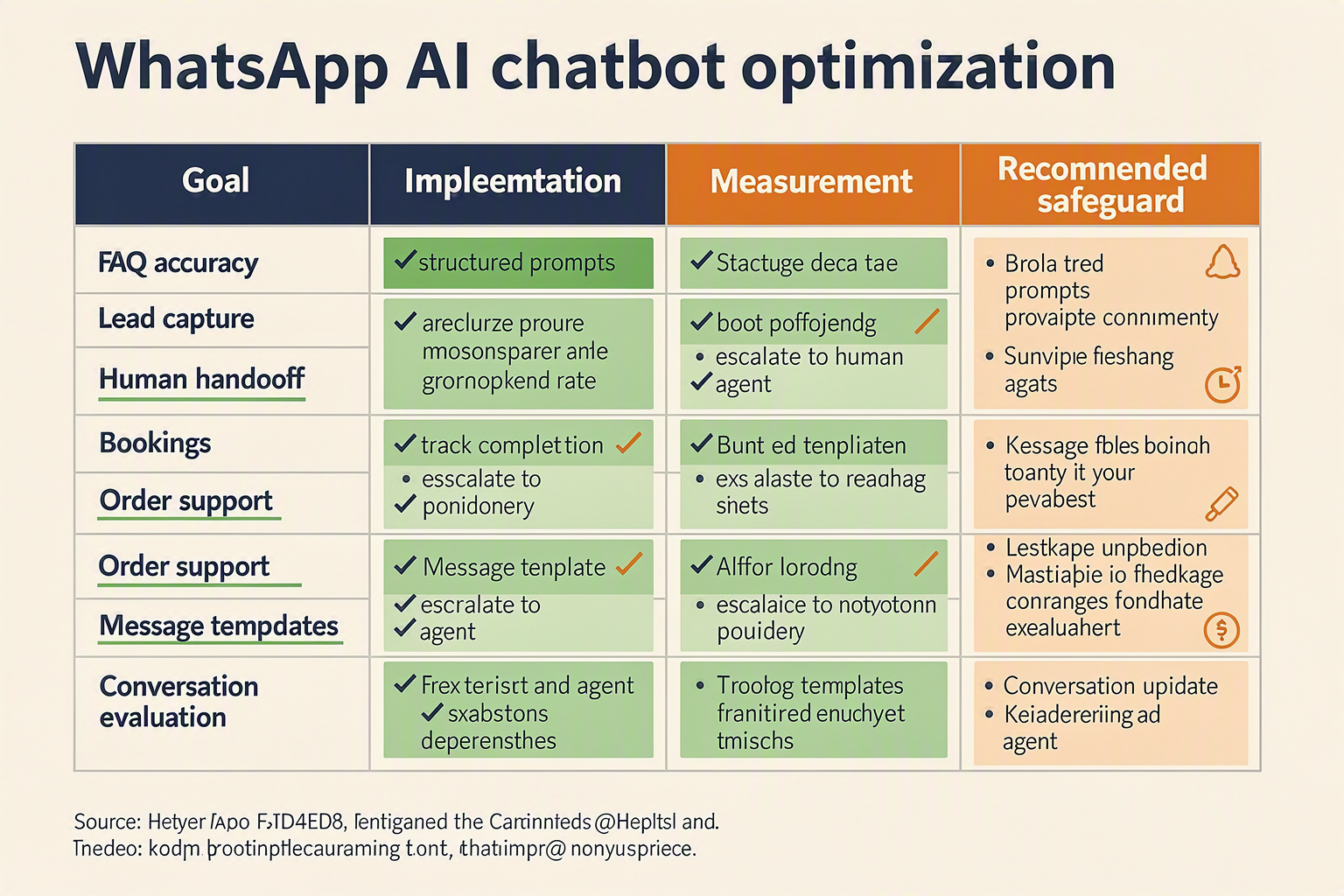
An AI customer-support chatbot on WhatsApp improves when it has reliable business knowledge, clear escalation rules, structured integrations, and measurable success criteria. Start with a narrow set of high-volume customer tasks—such as order status, returns, product questions, and appointment requests—then expand only after reviewing real conversations.
Which knowledge should my WhatsApp AI chatbot use?
Create a maintained knowledge base containing approved answers, product information, policies, and troubleshooting instructions. Use short, specific entries rather than one large document so the chatbot can retrieve the relevant passage quickly.
| Improvement area | What to implement | Practical test | Success signal |
|---|---|---|---|
| Knowledge accuracy | Add current FAQs, product pages, PDFs, and return policies | Ask 20 common customer questions | Answers cite or reflect the correct policy |
| Order support | Connect Shopify, WooCommerce, or an internal order API | Test order lookup with valid and invalid IDs | Correct status without exposing another customer’s data |
| Human handoff | Define triggers for complaints, refunds, payment issues, and uncertainty | Ask an intentionally ambiguous question | Conversation reaches a human with context intact |
| Message design | Use concise replies, numbered options, and one question at a time | Test on small mobile screens | Customers understand the next action immediately |
| Multilingual support | Add approved translations and code-mixed examples | Test English, Hindi, and Hinglish queries | Meaning and product terms remain accurate |
| Measurement | Track resolution, escalation, response, and failure rates | Review a fixed weekly sample | Improvements are based on conversation evidence |
Meta for Developers identifies sending and receiving messages, configuring webhooks, and using the WhatsApp Business Platform as core implementation steps; improving the chatbot requires adding the business logic around those messages rather than changing the WhatsApp channel itself.
How do I reduce incorrect AI answers on WhatsApp?
Use retrieval-augmented generation (RAG) and instruct the model to say when information is unavailable. A safe system instruction can include:
Answer only from the supplied business knowledge and approved tool results. If the answer is uncertain, explain that a support specialist can help. Never invent prices, delivery dates, refund decisions, or order details.
Keep sensitive actions behind tools with validation. For example, the chatbot may collect an order number, but the server should authenticate the customer and query the order system before returning a status.
When should the chatbot transfer a customer to a person?
Set explicit handoff conditions instead of waiting for the model to infer them. Transfer conversations when a customer requests a human, the chatbot fails twice, a dispute involves money, or the issue requires account-level judgment. Preserve the transcript, detected intent, order number, and attempted actions for the human agent.
Platforms such as CallMissed provide AI chatbot agents, a shared inbox, analytics, and a human-handoff queue; switching the AI off hands the thread to a person. CallMissed also supports WhatsApp catalogues, carts, order status, and WhatsApp Flows for multi-screen forms, which can reduce free-text errors during support and commerce journeys.
How should I measure AI customer support on WhatsApp?
Review a consistent sample of conversations every week and track:
- Resolution rate: conversations completed without human intervention
- Escalation rate: conversations transferred to an agent
- Fallback rate: questions receiving an “I don’t know” response
- First-response time: time from inbound message to first reply
- Reopen rate: customers returning because the original issue was unresolved
Do not optimize for message volume alone. A chatbot that sends more replies but increases escalations or incorrect order information is performing worse, even if response time appears low.
What common WhatsApp AI chatbot mistakes should I avoid?
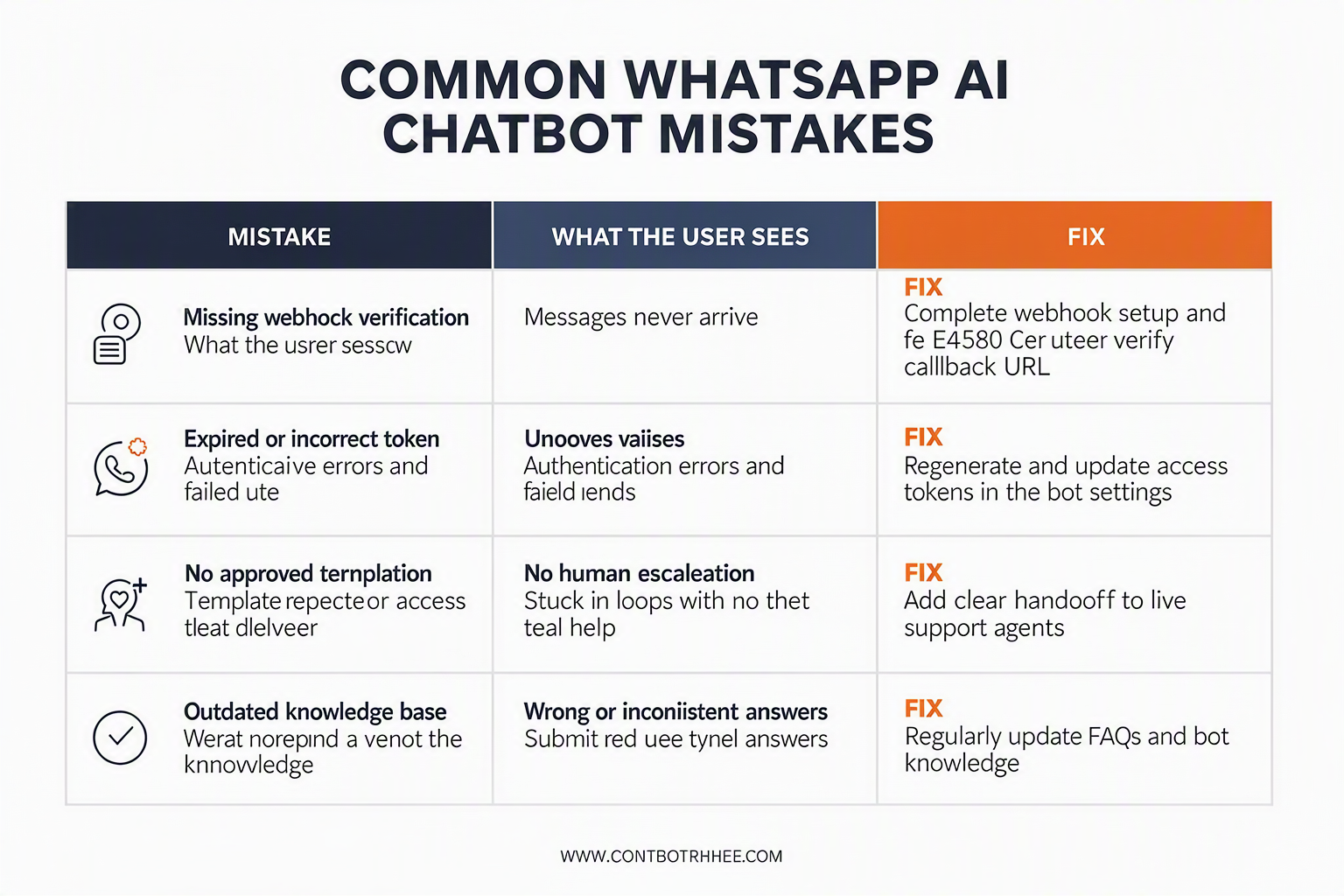
The most damaging WhatsApp AI chatbot mistakes are using an unofficial integration, giving the AI unchecked access to business information, and designing no path to a human. Avoid these errors by validating Meta setup, securing webhooks and tokens, grounding answers in approved content, testing duplicate or failed events, and measuring resolution quality—not message volume.
Which WhatsApp AI chatbot mistakes should I avoid?
| Mistake | Why it causes problems | Safer implementation | Verification check |
|---|---|---|---|
| Using a personal WhatsApp number or unofficial API | Personal WhatsApp accounts are not the same as the official WhatsApp Business Platform, so the integration may lack supported API access and business controls. | Connect an official WhatsApp Business account through Meta’s Cloud API or Meta Embedded Signup. | Send a test message through Meta’s documented “Send and receive messages” flow and confirm the webhook receives the event. |
| Treating webhook events as unique | WhatsApp events can be retried or delivered more than once; processing every event can create duplicate replies or duplicate tickets. | Store each provider event ID or message ID briefly and ignore IDs already processed. Return a successful HTTP response only after validating the request format. | Replay the same payload twice and confirm the customer receives one reply, not two. |
| Exposing access tokens in frontend code | A browser, mobile app, or public repository can reveal credentials that allow unauthorized API requests. | Keep Meta credentials and AI-provider keys on a server; use environment variables, secret storage, and separate development and production credentials. | Search the repository and browser network logs for tokens before deployment. |
| Letting the model invent prices, policies, or order data | A fluent answer is not proof that the information is correct. Unsupported answers can create refunds, compliance issues, and lost trust. | Ground responses in an approved knowledge base and connect verified tools for orders, products, and customer records. Tell the model when to ask for clarification or hand off. | Test expired offers, unavailable products, unknown orders, and ambiguous questions. |
| Designing no human-handoff path | AI customer support on WhatsApp needs an escalation route for complaints, sensitive cases, and questions outside the bot’s scope. | Add a clear “talk to an agent” action, preserve the conversation context, and route the thread to a shared inbox or support queue. | Confirm that switching the AI off transfers the thread to a person without losing prior messages. |
| Sending every message as a free-form reply | Business-initiated notifications may require approved WhatsApp message templates, and inconsistent copy can make operational messages difficult to manage. | Create a template library for approved notifications; use AI to draft templates, then review and sync them with Meta before use. | Test order updates, reminders, and re-engagement messages separately from inbound support replies. |
How can I test a WhatsApp AI chatbot before launch?
Use a small test matrix rather than checking only whether the bot answers “Hello.” Meta for Developers lists four initial Cloud API stages—create a Meta app with WhatsApp, start using the API, send and receive messages, and configure a test webhook—so each stage should have an explicit pass/fail test.
Test these cases:
- Authentication: invalid, expired, and missing credentials.
- Message handling: text, unsupported content, empty input, and repeated events.
- Knowledge accuracy: product availability, pricing, policies, and multilingual or code-mixed questions.
- Operations: human handoff, failed delivery, webhook timeout, and service recovery.
- Privacy: logs should exclude unnecessary personal data and secrets.
Managed platforms can reduce integration mistakes when the team does not want to maintain the full API layer. For example, CallMissed connects a WhatsApp Business account through Meta Embedded Signup and provides AI chatbot agents, a shared inbox, templates, analytics, catalogues, carts, and order-status workflows as of September 2026.
Frequently Asked Questions
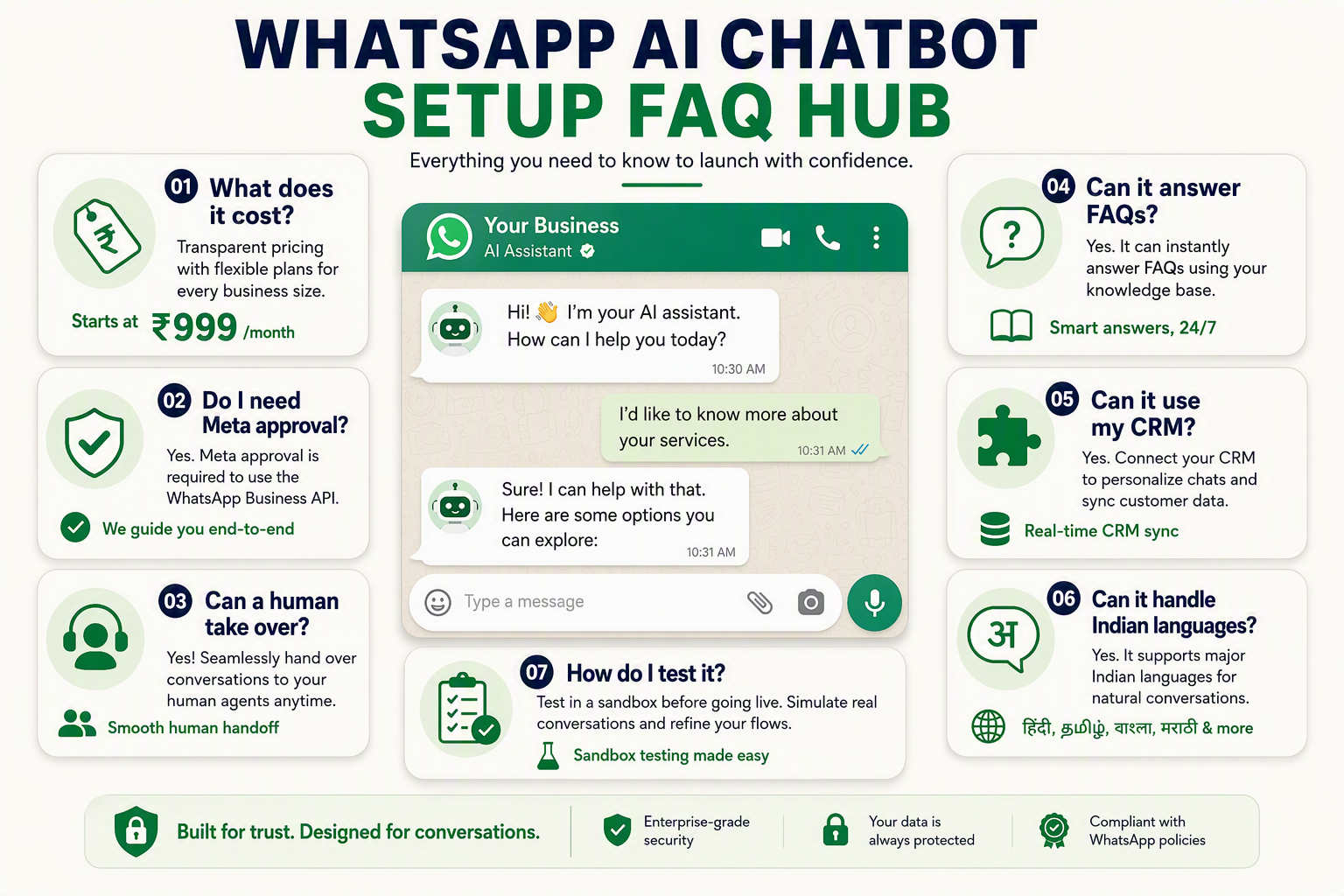
How do I add a WhatsApp AI chatbot to my business without coding?
How do I connect my AI chatbot to WhatsApp using Meta’s Cloud API?
What is the difference between Meta Business Agent on WhatsApp and a custom WhatsApp AI chatbot for business?
Can a WhatsApp AI chatbot answer questions from my website, PDFs, and product catalogue?
How do I add a WhatsApp AI chatbot to my business while keeping human support?
How much does it cost to run an AI customer-support chatbot on WhatsApp?
Where can I find official documentation and what should I do next?
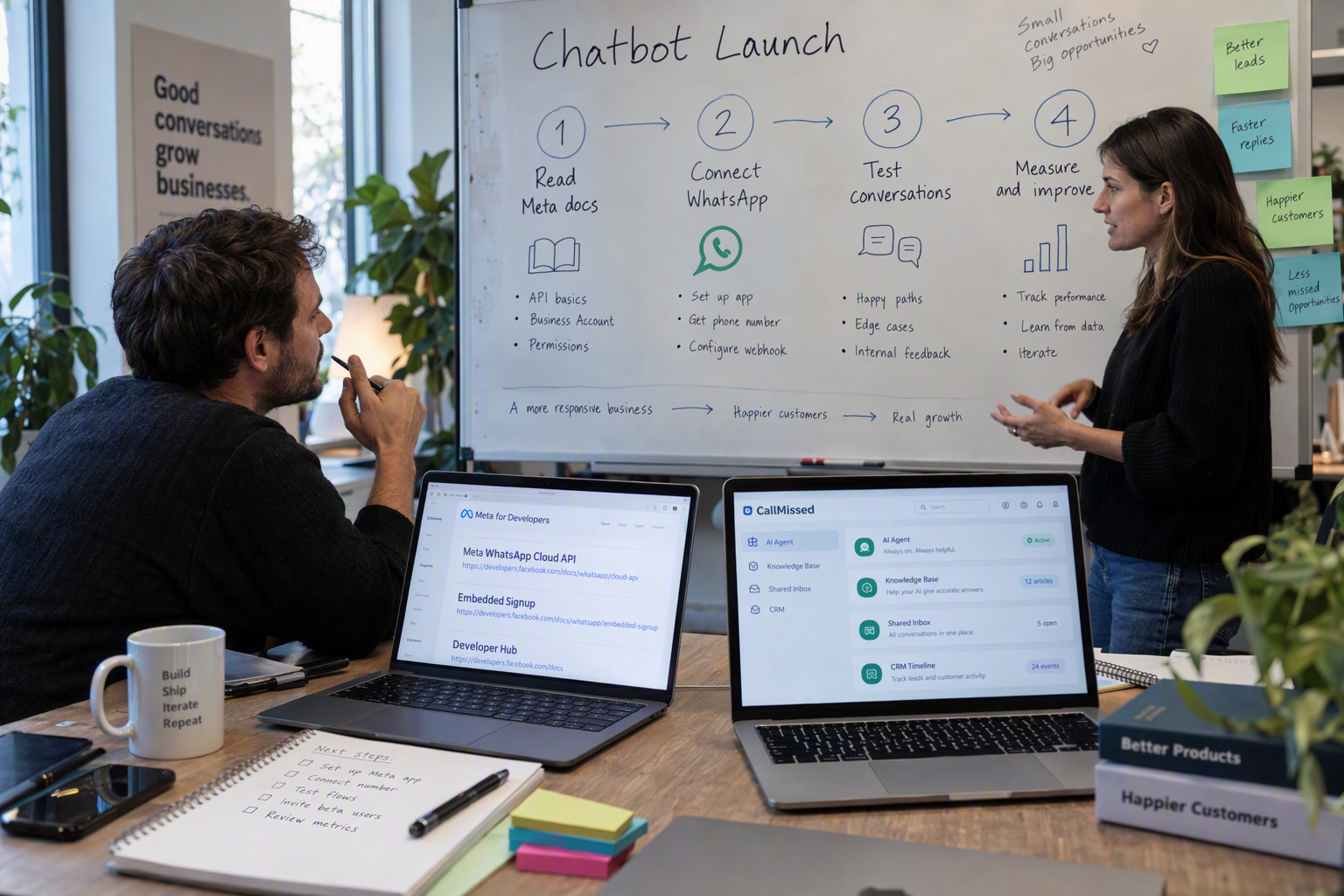
To add a WhatsApp AI chatbot to your business, use the official WhatsApp Business Platform through Meta’s Cloud API, configure a webhook, connect an AI model, and send approved responses back through WhatsApp. For a faster implementation, use a managed platform that supports Meta’s official Cloud API, Embedded Signup, knowledge bases, automation, and human handoff.
Which official documentation should I use first?
Start with Meta for Developers’ “WhatsApp Cloud API Get Started” documentation. Meta’s documented setup path has four stages:
| Meta setup stage | What you complete | Primary outcome |
|---|---|---|
| 1. Create a Meta app with WhatsApp | Create or select a Meta developer app | WhatsApp API project |
| 2. Start using the API | Generate credentials and identify business assets | Authenticated API access |
| 3. Send and receive messages | Call the messages endpoint and process events | Working message exchange |
| 4. Set up the test webhook app | Verify your callback and receive test events | Confirmed inbound delivery |
Meta’s official Developer Hub provides broader WhatsApp Business Platform documentation for testing, development, and integration. If you are building a platform for multiple businesses, read Meta’s Embedded Signup documentation: Meta says this flow helps business customers generate the assets required to onboard to the WhatsApp Business Platform.
Keep these implementation references open while building:
- Meta Cloud API Get Started: authentication, phone numbers, messages, and testing
- Meta Webhooks documentation: verification, subscriptions, and event payloads
- Meta Embedded Signup: onboarding customers and connecting their business assets
- WhatsApp message-template documentation: notifications and business-initiated conversations
- Your AI provider’s API documentation: structured replies, tool calls, safety controls, and token limits
What should I do after the chatbot works?
Run a controlled pilot before sending traffic to every customer. Verify that the chatbot can answer common questions from an approved knowledge base, identify when it lacks information, and transfer difficult conversations to a person.
Use this launch checklist:
- Test inbound text, outbound replies, media, templates, and failed deliveries.
- Store webhook event IDs and ignore duplicates so one customer message does not trigger two AI responses.
- Add authentication, signature validation, encrypted secrets, logging, and retry handling.
- Define escalation rules for refunds, complaints, sensitive data, and unknown questions.
- Measure resolution rate, human-handoff rate, response time, failed messages, and customer satisfaction.
- Review conversations weekly and update the knowledge base rather than silently expanding the model’s permissions.
Platforms such as CallMissed provide an official Meta Cloud API connection, AI chatbot agents, templates, a shared inbox, analytics, catalogues, carts, order status, and WhatsApp Business Calling. As of September 2026, CallMissed also supports speech recognition in 22 Indian languages plus English, according to its verified product specifications.
WhatsApp AI chatbot troubleshooting FAQ
Why is Meta webhook verification failing?
Why does WhatsApp deliver the same event twice?
Why can’t my chatbot send any message it wants?
Should I build directly on Meta or use a managed platform?
What is the safest next step for AI customer support on WhatsApp?
Conclusion
Adding a WhatsApp AI chatbot to your business requires four building blocks: an official WhatsApp Business account, Meta’s WhatsApp Cloud API, a verified webhook, and an AI service that generates replies. The most reliable implementations also connect the bot to business knowledge, order data, and a human support queue.
Key takeaways:
- Choose the right setup path: use Meta’s direct Cloud API for maximum developer control, or a managed WhatsApp AI chatbot platform for faster configuration and operations.
- Build for safe automation: validate webhook signatures, handle duplicate events, protect access tokens, test failed deliveries, and provide a clear human handoff.
- Make the bot useful, not merely conversational: connect approved knowledge sources, message templates, catalogues, carts, order status, CRM records, and support workflows.
- Measure resolution quality: track answered questions, escalations, failed deliveries, response relevance, and customer satisfaction—not just message volume.
Meta for Developers’ official WhatsApp Cloud API guide documents the setup sequence: create a WhatsApp app, start using the API, exchange messages, and configure a test webhook. As of September 2026, CallMissed supports Meta’s official Cloud API, AI chatbot agents, shared inboxes, commerce workflows, analytics, and speech recognition in 22 Indian languages plus English.
Next, watch how WhatsApp evolves from text support toward richer commerce, multilingual automation, and AI-assisted calling. To explore that direction, visit CallMissed. What customer question should your business automate first?
Related Reading
- WhatsApp Automation for Business in 2026: A Practical Missed Call Text Back Guide
- WhatsApp AI Agent for Business 2026: CallMissed Buyer and Implementation Guide
- CallMissed WhatsApp Business Calling: Setup, Consent & AI Guide
Sources
Discussion
Related Posts

Ready to automate customer conversations?
Launch AI voice agents and WhatsApp bots with CallMissed — one API, 22+ Indian languages.