Facebook Graph API Posting & Messenger Automation: 2026 CallMissed Guide


Learn Facebook Graph API Posting and Messenger automation with CallMissed, including permissions, webhooks, AI handoff, CRM sync and compliance.
Facebook Graph API Posting & Messenger Automation: 2026 CallMissed Guide
A Facebook automation can keep publishing successfully while its performance dashboard tells the wrong story: Meta reported that some Page metrics from April 1–4, 2026 may be inaccurate even after resolving the underlying reporting issue. That is why Facebook Graph API Posting & Messenger Automation now requires more than connecting an endpoint—it demands resilient authentication, permission management, webhook handling and monitoring that accounts for API changes.
Why Facebook automation matters in 2026
Businesses increasingly need Facebook Pages and Messenger to operate as connected customer-engagement channels rather than isolated social accounts. A publishing workflow may create Page posts automatically, while Messenger automation receives enquiries, identifies intent, retrieves customer context and transfers complex conversations to a human agent.
Meta’s 2026 platform changes make implementation discipline especially important:
- Meta for Developers states that Page access tokens are required to manage Facebook Pages through Graph API calls. A Page administrator must grant the app every necessary Page permission.
- Meta’s Pages API getting-started documentation identifies permissions including
pages_manage_metadata,pages_manage_posts,pages_manage_read_engagementandpages_show_listfor common Page-management workflows. - Meta will deprecate multiple Page Insights metrics for all API versions on June 15, 2026. Requests for retired metrics will return an
invalid metricerror, according to Meta’s Page Insights documentation. - Meta’s Graph API v25.0 documentation says publishing Page videos requires an appropriate Page access token, relevant permissions and a user who can perform the
CREATE_CONTENTtask. - Meta also states that Page Public Metadata Access requires business verification and may require additional contracts, making app-review readiness a core architectural concern.
These are not minor configuration details. Missing permissions can stop posts from publishing, expired tokens can break unattended workflows, and deprecated metrics can silently undermine reporting pipelines unless errors and API versions are monitored.
What this CallMissed guide covers
This developer and business guide explains how to design Facebook posting and messaging automation around CallMissed’s admin-confirmed Meta API capabilities. You will learn how to:
- Prepare a Meta app, Facebook Page and permission set.
- Generate and securely store Page access tokens.
- Publish Facebook Page content through the Graph API.
- Connect Messenger events to automated conversation workflows.
- Validate webhooks, prevent duplicate processing and retry failed requests.
- Route conversations between AI automation and human agents.
- Prepare for Meta App Review, business verification and production access.
- Track publishing and messaging operations without relying on deprecated metrics.
CallMissed fits this broader shift by bringing Facebook posting and messaging into an AI-native customer-engagement environment alongside voice, WhatsApp, email and web channels.
The goal is not merely to send a test post or automatic reply. It is to build a permission-aware, observable and maintainable Facebook automation system that can survive token changes, webhook retries, API-version upgrades and evolving Meta policies throughout 2026.
What can CallMissed automate on Facebook? It can publish Page content, handle Messenger conversations, qualify leads, escalate to people and preserve CRM context through official Meta APIs
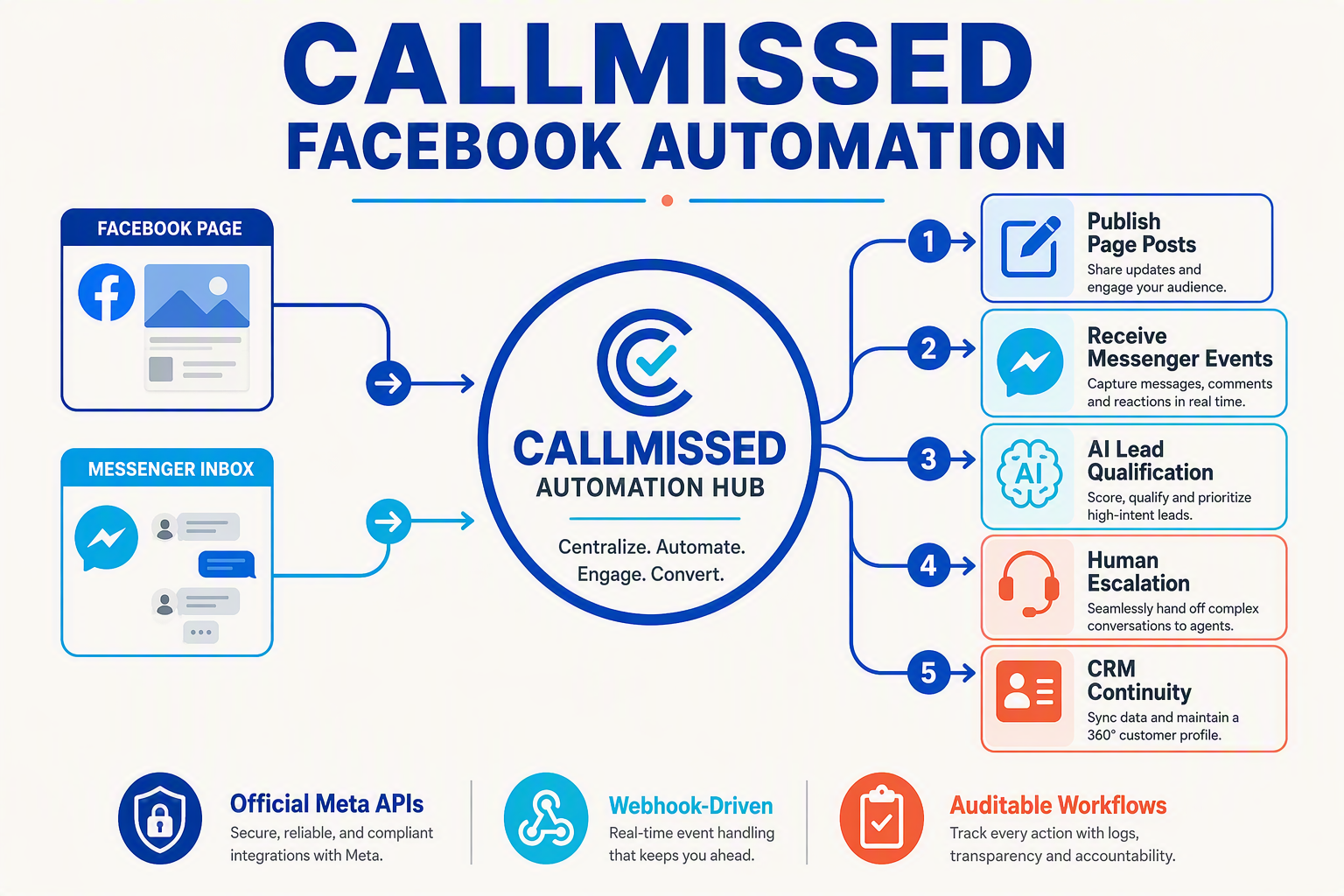
CallMissed can automate the Facebook customer journey from Page publishing and Messenger response to lead qualification, human escalation and CRM continuity. The automation runs through official Meta APIs, allowing businesses to coordinate content and conversations without relying on browser scripts or unofficial account access.
Publish and manage Facebook Page content
CallMissed’s admin-confirmed Facebook posting capability can connect an approved workflow to a business Page and publish authorised content through the Facebook Graph API. Practical automations include:
- Scheduling campaign announcements, product updates and educational posts.
- Publishing content generated from an approved calendar or business system.
- Triggering posts when a product launches, an event opens or another operational condition is met.
- Recording the Page ID, post ID, timestamp, API response and publishing status for auditing.
- Sending failed operations into a retry or human-review queue rather than silently dropping them.
Video publishing has stricter access requirements. Meta’s Graph API v25.0 Page Videos documentation states that publishing Page videos requires a suitable Page access token, relevant permissions and a token-requesting user who can perform the CREATE_CONTENT task.
Every publishing action should therefore pass through three checks:
- Is the Page access token valid?
- Does the app have the permission required for this content type?
- Can the connected person or system user perform the necessary Page task?
Automate Messenger conversations
CallMissed can connect Facebook Messenger events to AI-assisted customer-engagement workflows. When a person contacts a Page, the automation can classify the enquiry, collect relevant information and select the next action.
Typical workflows can:
- Answer frequently asked questions using an approved knowledge base.
- Detect intents such as sales, support, appointment booking or order enquiries.
- Collect structured fields such as name, location, preferred service and callback time.
- Qualify leads using business-defined criteria rather than an unrestricted AI decision.
- Retrieve an existing customer record and append the new Messenger interaction.
- Escalate sensitive, ambiguous or high-value conversations to a human agent.
Messenger automation must still operate within Meta’s applicable messaging policies, permissions and response rules. Businesses should treat API authorisation and policy eligibility as runtime controls, not one-time setup tasks.
Preserve context when automation hands off to people
A useful escalation transfers more than the latest message. Through CallMissed’s omnichannel inbox and CRM context, a human agent can receive the conversation transcript, detected intent, captured lead fields, automation outcome and escalation reason.
For example, an AI workflow might identify that a customer wants an enterprise quotation, gather company size and location, and then route the conversation to sales. The agent can continue from that point instead of asking the customer to repeat everything.
A resilient handoff record should include:
- Facebook Page and conversation identifiers.
- Customer-provided contact details and consent status.
- Recent messages and relevant knowledge-base answers.
- Lead score or qualification result with its underlying criteria.
- Assigned team, owner, priority and follow-up deadline.
Build on official Meta access controls
These capabilities depend on correctly scoped Meta access. Meta for Developers states that a Page administrator must grant every necessary Page permission before a Page access token can manage that Page. Meta also says Page Public Metadata Access requires business verification and may require additional contracts.
Official API access makes permission boundaries, errors and revocations observable. That allows CallMissed workflows to pause safely, preserve CRM state and alert an administrator when Meta access changes instead of continuing with incomplete automation.
How do Facebook Pages, the Facebook Graph API, the Facebook posting API and the Facebook Messenger API fit together?
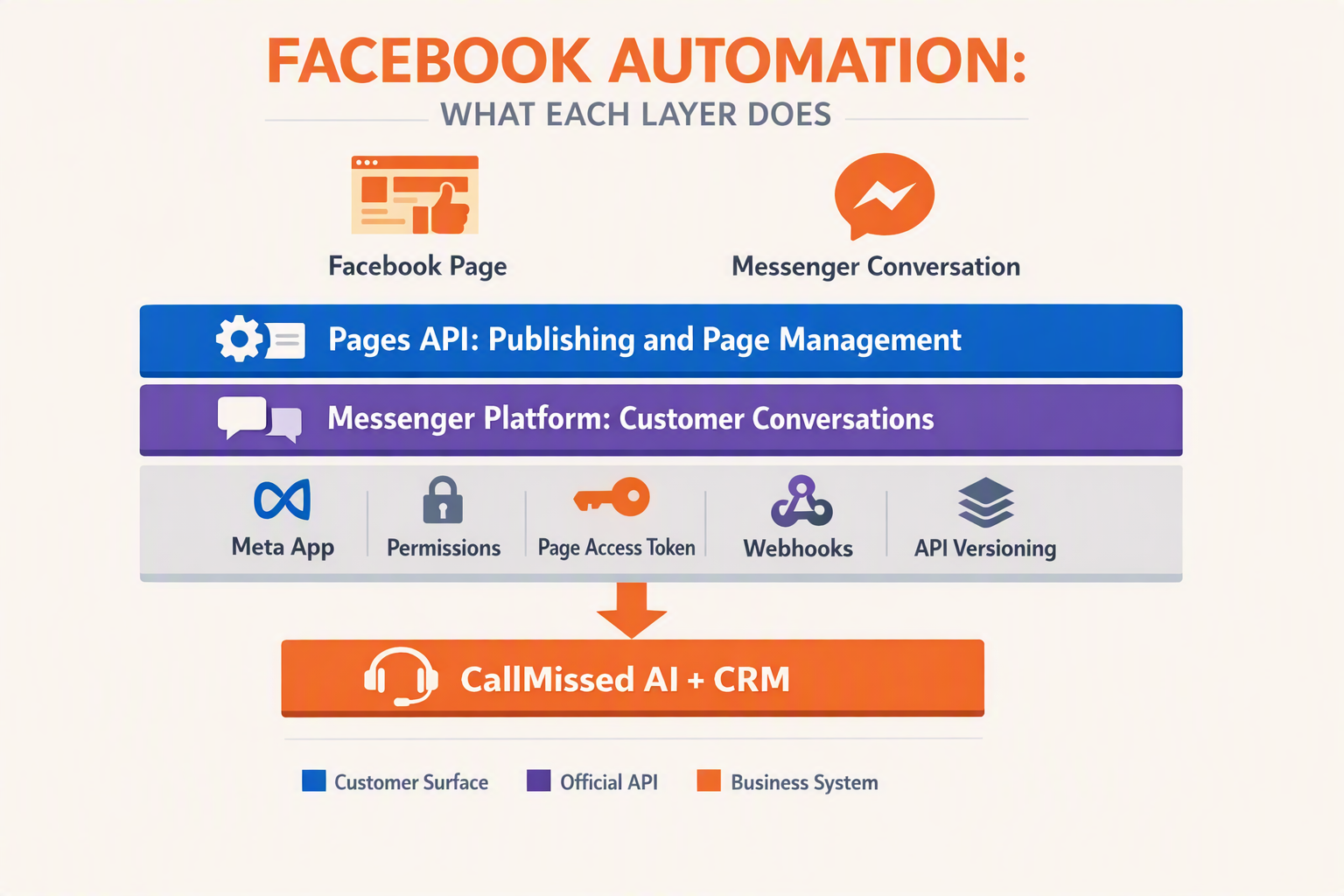
Facebook Pages are business identities; the Facebook Graph API is Meta’s shared object, permissions and data layer; the Facebook posting API refers to Pages API publishing endpoints; and the Facebook Messenger API manages Page-linked conversations. Posting and messaging can use the same Meta app and Page identity, but they require distinct permissions, events and execution pipelines.
How the four components relate
| Component | Primary role | Typical data or action | Key integration requirement |
|---|---|---|---|
| Facebook Page | Represents the business | Posts, media, messages and engagement | Page-level authorization and assigned tasks |
| Facebook Graph API | Provides the common API framework | Versioned objects, fields, edges and operations | Valid access token and supported API version |
| Facebook posting API | Publishes and manages Page content | Feed posts, videos, media and post IDs | Publishing permissions and CREATE_CONTENT authority |
| Facebook Messenger API | Automates Page conversations | Webhook events, replies and conversation state | Messaging permissions, webhook setup and policy compliance |
The Facebook posting API is a practical name for publishing capabilities within the Facebook Pages API and Graph API—not a separate authentication platform. The Messenger API similarly relies on Meta’s app, token and Page structures, while applying messaging-specific rules.
How Page publishing works
A normal publishing flow is:
Business system → Meta app → Graph API publishing endpoint → Facebook Page
The application authenticates with a Page access token and submits content to an appropriate edge, such as a feed or video endpoint. Meta’s Access Token Guide states that a Page administrator must grant the app the required Page permissions before a Page access token can be generated.
Authentication alone is insufficient. Meta’s Graph API v25.0 Page Videos documentation says video publishing requires a Page access token requested by a person who can perform the CREATE_CONTENT task, alongside applicable permissions such as pages_manage_posts, pages_read_engagement and pages_show_list.
Common failure causes include:
- A token issued for the wrong Facebook Page
- A missing or expired Page permission
- An authorizing person without the required Page task
- An unsupported Graph API version, field or edge
- Invalid media, parameters or publishing state
API-version maintenance also matters for analytics. Meta’s Page Insights documentation states that identified Page Insights metrics were deprecated across all API versions by June 15, 2026, and calls requesting those retired metrics return invalid metric. Integrations should remove retired metrics rather than repeatedly retrying those requests.
How Messenger automation differs
A Messenger workflow starts with an event rather than a publishing request:
Messenger user → Facebook Page → Meta webhook → automation → Messenger response
The webhook notifies the application of an incoming event. The automation validates the payload, maps the Page and sender, applies routing or AI logic, and sends a permitted reply through the relevant messaging operation.
Posting and messaging should remain technically separate:
- Publishing pipeline: drafts, schedules, media uploads, post IDs and publication status
- Messaging pipeline: webhook events, conversation context, AI-generated replies and human handoff
- Shared governance: encrypted tokens, Page mappings, permission reviews, Graph API version tracking and error logs
- Insights pipeline: supported metrics, reporting windows and explicit handling of
invalid metricresponses
CallMissed can operate at the automation layer, connecting admin-authorized Facebook posting and messaging with wider customer-engagement workflows. The core architecture principle is: share Page identity and governance, but separate public-content publishing from private-conversation execution.
How do Facebook posting and Messenger messaging differ in 2026? Key capabilities, permissions, events and operational responsibilities
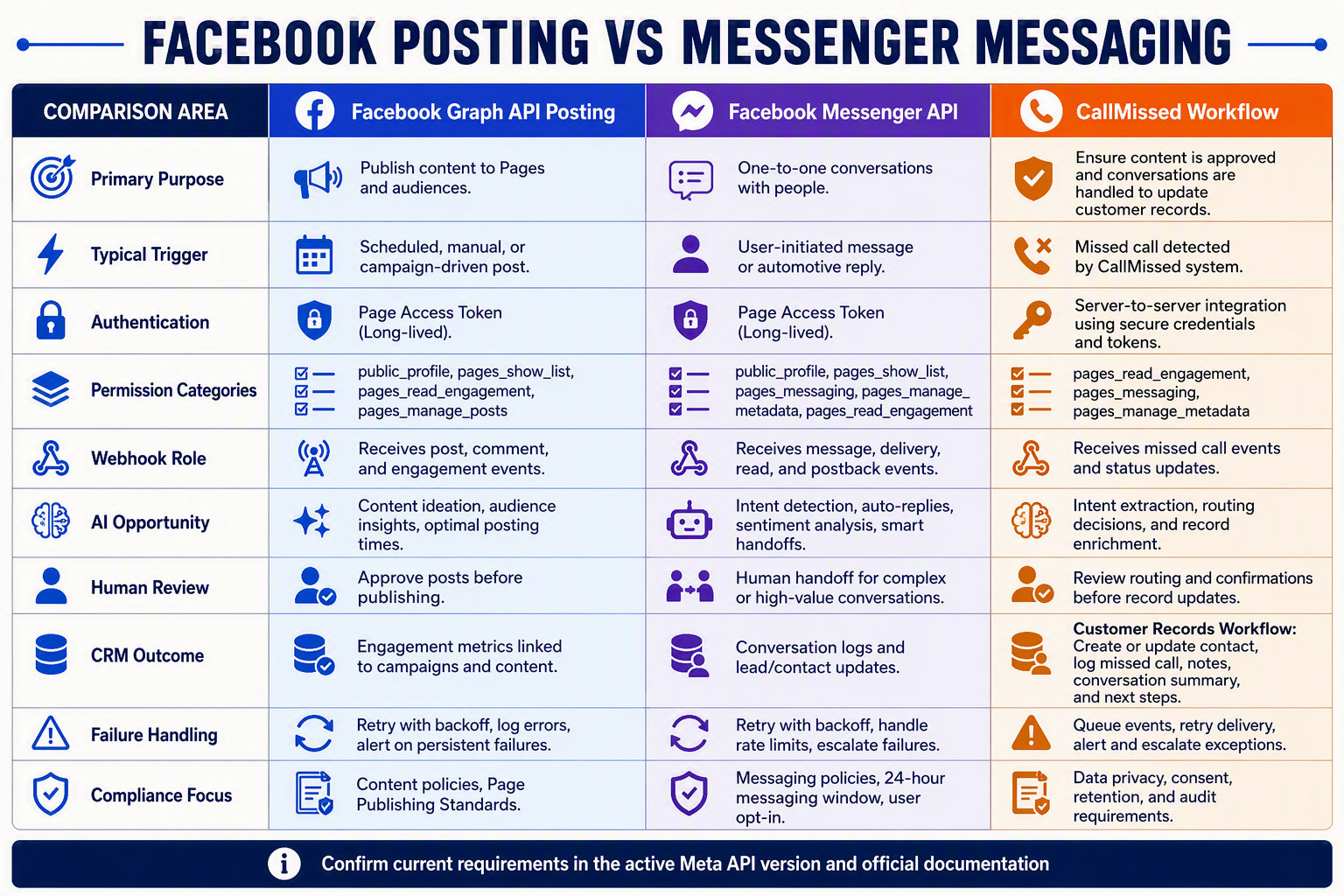
Facebook posting is a content-publishing workflow, while Messenger messaging is an event-driven conversation workflow. In 2026, both rely on official Meta APIs, but they require different permissions, event handling, data models and operational controls.
Capability and control-plane comparison
| Area | Facebook Page posting | Messenger messaging | Operational responsibility |
|---|---|---|---|
| Core capability | Publish and manage supported Page content such as text, links, images and videos | Receive customer messages and send automated or human-assisted replies | Separate publishing services from conversational automation |
| Authentication | Uses a Page access token authorised for the relevant Page | Uses a Page access token connected to the Page’s messaging configuration | Encrypt tokens, restrict access and support reauthorisation |
| Common permissions | May include pages_manage_posts, pages_show_list, pages_manage_metadata and relevant read permissions | May include pages_messaging and Page permissions needed for discovery, metadata or related functions | Request least-privilege access and verify current Meta requirements |
| Trigger model | Scheduler, campaign, CMS change or operator action | Webhook events such as messages, postbacks and messaging updates | Validate webhooks and process events asynchronously |
| Stored state | Page ID, post ID, media ID, API version and publication status | Page-scoped user ID, conversation state, event ID and handoff status | Protect identifiers and avoid assuming they work across Pages |
| Failure handling | Retry transient errors without duplicating posts or media | Deduplicate webhook deliveries and prevent duplicate replies | Use queues, backoff, dead-letter handling and audit logs |
Meta’s Access Token Guide states that Page access tokens are used for Graph API calls that manage Facebook Pages, and that a Page administrator must grant the app the required Page permissions. Meta’s Page Graph API reference also notes that business_management may be required when requests use a business system user, depending on the fields and business configuration.
Permission review, business verification and access-level requirements are not universal across every integration. They depend on the exact permissions, app mode, data accessed, users served and Meta product configuration; teams should confirm the current requirements in Meta for Developers documentation rather than assuming every production deployment follows one review path.
Posting and messaging need different architectures
Facebook posting is primarily request-response: an approved action submits content through the Pages API, stores the returned object identifier and records success or failure. Media types may introduce extra requirements. For example, Meta’s Graph API v25.0 Page Videos reference specifies a suitable Page access token and a person who can perform the CREATE_CONTENT task for the Page.
Messenger automation is asynchronous and webhook-driven. A practical official-API implementation should:
- Complete Meta’s documented webhook verification process.
- Verify the authenticity of incoming requests.
- Acknowledge deliveries quickly.
- Place events on a durable queue.
- Deduplicate events before running automation.
- Preserve conversation context and human-handoff state.
- Log outbound replies and policy decisions.
CallMissed can connect these Messenger events to automation and human handoff while treating Facebook Page publishing as a separately governed workflow.
Permissions do not replace governance
API access establishes technical authority, not business approval. Organisations should apply:
- Role-based access and least privilege
- Content approval rules for scheduled or generated posts
- Token encryption, rotation and revocation procedures
- Conversation-retention and deletion controls
- Idempotency keys, audit trails and incident alerts
Analytics require similar lifecycle management. Meta’s Page Insights documentation states that, as of June 15, 2026, the specified Page Insights metrics are deprecated for all API versions, and calls to those retired metrics return an invalid metric error. Because June 15, 2026 has passed, integrations must remove those metrics rather than schedule a future migration.
Meta for Developers also reported that some Page metrics from April 1–4, 2026 may remain inaccurate after a temporary reporting issue. Teams should therefore annotate that historical period, monitor API-version changes and treat publishing success, messaging delivery and analytics availability as separate health signals.
How should developers configure Meta apps, Page access, permissions, tokens, webhooks and production readiness for CallMissed?
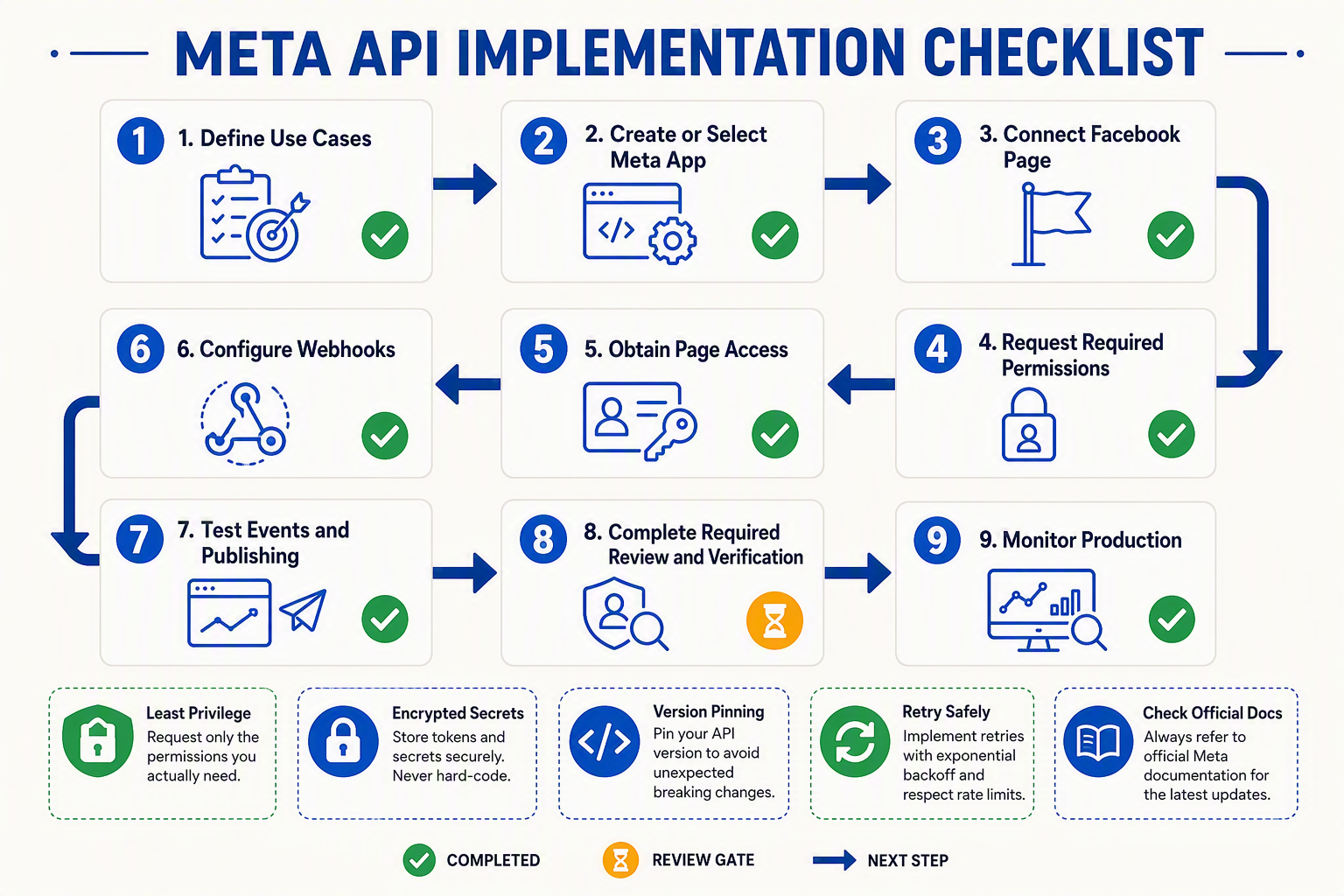
Developers should configure a Meta Business app, authorize the correct Facebook Page, request only workflow-specific permissions, secure the Page access token, verify signed webhooks and complete App Review before connecting production automations to CallMissed. Tokens, permissions, webhook delivery and Graph API versions must be managed as ongoing operational dependencies.
1. Establish the Meta app and Page access
Create or select an app in Meta for Developers, add the Facebook Login, Pages API and Messenger capabilities required by the implementation, and associate the app with the appropriate verified business portfolio.
Confirm that the authorizing Facebook user has the necessary Page access or task permissions. Meta’s Graph API v25.0 Page Videos documentation requires a Page token requested by a person who can perform the CREATE_CONTENT task for relevant publishing operations.
During development, verify that:
- The authorized account can retrieve the intended Page through
/me/accounts. - The returned Page ID matches the Page being connected to CallMissed.
- The Page token succeeds on a harmless read operation.
- Required developers, testers and test Pages are assigned while the app remains in development mode.
2. Apply least-privilege permissions
Request permissions only when a documented CallMissed workflow requires them:
pages_show_listto identify Pages accessible to the authorized user.pages_manage_postsfor supported Page publishing and post-management actions.pages_manage_metadatafor relevant Page settings and webhook subscriptions.- The currently documented Page engagement permission for required content or engagement reads.
pages_messagingfor approved Messenger sending, receiving and automation.business_managementwhen a business system user or associated business asset requires it.
Meta’s Pages API getting-started documentation lists permissions including pages_manage_metadata, pages_manage_posts, pages_manage_read_engagement and pages_show_list for common Page workflows. Verify exact names and review requirements against the app’s selected Graph API version rather than copying scopes from an older integration.
Metric availability also requires active maintenance. Meta’s Page Insights documentation states that the identified Page Insights metrics were retired by June 15, 2026, and requests for those retired metrics return an invalid metric error. Remove retired metrics from dashboards, tests and automation logic instead of treating these failures as temporary outages.
3. Protect and monitor Page tokens
Meta’s Access Token Guide states that Page access tokens manage Facebook Pages and can be generated only after a Page administrator grants the app the required Page permissions. Store tokens in a secrets manager—not browser code, repositories, screenshots or ordinary application logs.
Track the Page ID, app ID, scopes, Graph API version, authorization owner, validation status and planned rotation date. Connect credentials through CallMissed’s secured administration flow, and alert on expired access, revoked permissions, changed Page roles and OAuth failures.
4. Secure webhook delivery
Register a public HTTPS callback, complete Meta’s verification challenge and validate X-Hub-Signature-256 against the unmodified request body using the app secret. Acknowledge valid events quickly, process asynchronously, deduplicate repeated deliveries and retry transient failures with exponential backoff.
Logs should retain correlation IDs, event types and timestamps without exposing tokens or message content unnecessarily. Route valid Messenger events into the appropriate CallMissed automation or human inbox workflow.
5. Use an approval-to-recovery production pipeline
Production readiness should follow a repeatable sequence:
- Approve: Complete business verification and App Review with demonstrations justifying every permission.
- Publish: Enable only reviewed workflows and release changes gradually.
- Verify: Confirm posting, Messenger delivery, webhook signatures and Page identity using controlled tests.
- Recover: Maintain token reauthorization, webhook replay, rollback and human-escalation procedures.
This pipeline prevents a successful App Review from being mistaken for permanent production reliability.
How does a reliable Facebook Page post move from CallMissed through approval, publishing, verification and failure recovery?
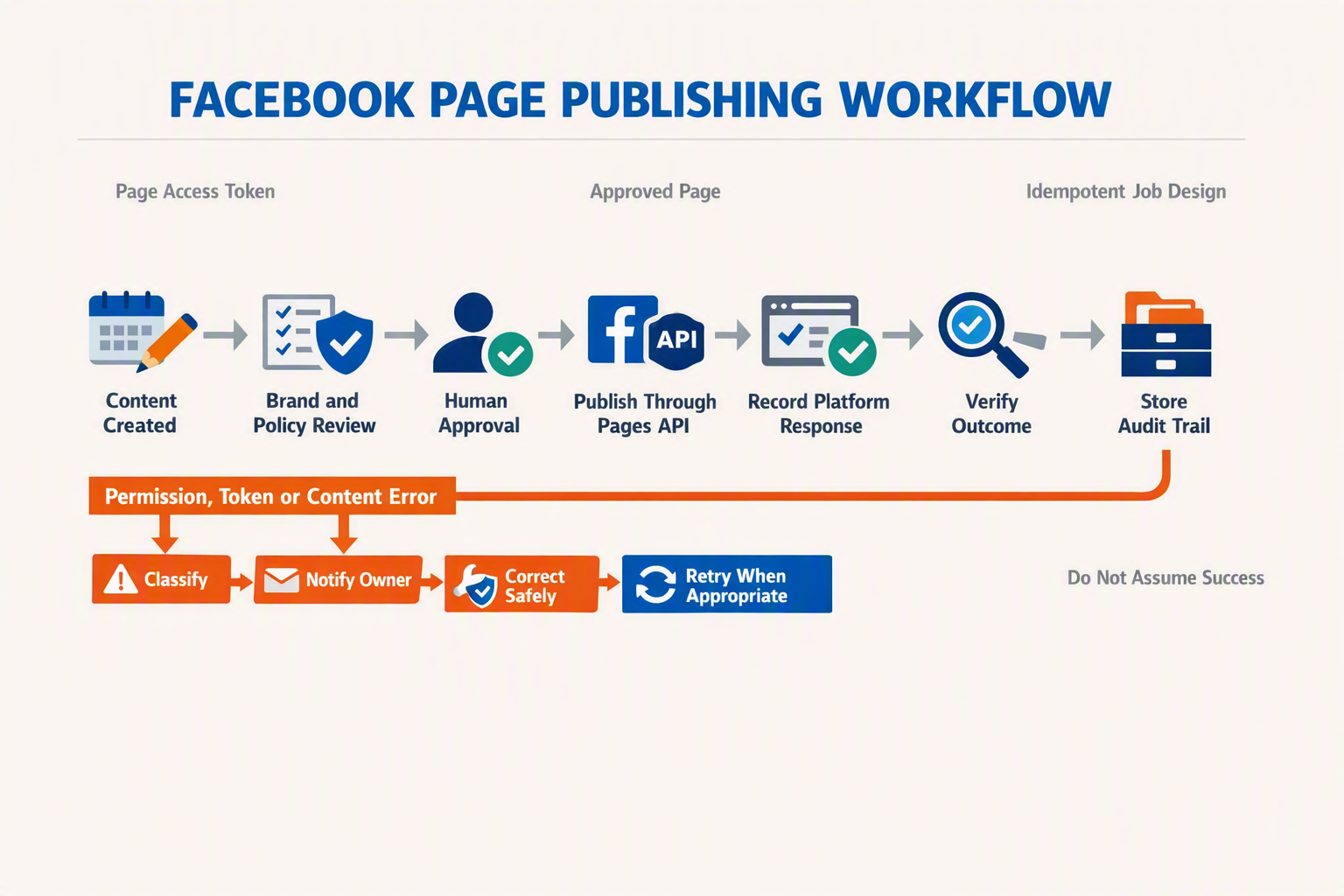
A reliable Facebook Page post should pass through a stateful pipeline: draft, policy approval, permission validation, publishing, Graph API verification and controlled recovery. CallMissed should treat the returned Facebook post ID—not a dashboard impression count—as the primary proof that Meta accepted the publication.
1. Create and approve a publication-ready draft
Store each draft as a structured record rather than immediately sending it to Meta. Recommended fields include:
- Page ID, content type, message, media references and target publish time.
- Creator, approver and timestamps for an auditable approval trail.
- A unique internal operation ID for duplicate prevention.
- Campaign tags that connect the post with subsequent Messenger enquiries.
- Status values such as
DRAFT,APPROVED,PUBLISHING,PUBLISHED,VERIFYINGandFAILED.
Business approval should cover factual accuracy, brand policy, links, image rights and regulated claims. Meta App Review is a separate platform-level approval: it determines whether an app may use requested permissions in production, while the business workflow determines whether an individual post may go live.
2. Run pre-publish checks
After approval, CallMissed should perform a preflight check before submitting the post:
- Confirm that the destination Facebook Page ID matches the approved record.
- Retrieve the correct Page access token from encrypted storage.
- Verify that the connected user or system identity still has the necessary Page role or task.
- Confirm the app has the permissions required for that content type.
- Validate message length, media availability and scheduling parameters.
- Freeze the approved content or send material edits back for reapproval.
Meta for Developers states that a Page administrator must grant an app the necessary Page permissions before a Page access token can manage that Page. For common publishing workflows, Meta’s Pages API documentation identifies permissions such as pages_manage_posts and pages_show_list. If a business system user makes the request, Meta’s Page Graph API reference says business_management may also be required.
Video publishing needs an additional authorization check. Meta’s Graph API v25.0 Page Videos documentation requires a suitable Page access token and a person who can perform the CREATE_CONTENT task on the Page.
3. Publish once and preserve Meta’s response
CallMissed can submit an approved post to the relevant Meta Graph API edge, recording the API version, request time, non-secret request metadata, HTTP status and Meta trace information. Access tokens must never appear in application logs.
On success, persist the returned post ID or video ID before updating the workflow to PUBLISHED. If the client times out after submission, do not immediately send the same post again: Meta may have created it even though CallMissed did not receive the response.
4. Verify publication independently
Verification should read the created object through the Graph API and compare its Page, content and publication state with the approved record. For asynchronously processed media, keep the workflow in VERIFYING until processing completes or a defined timeout expires.
Do not use Insights as proof of publication. Meta reported that some Page metrics from April 1–4, 2026 may remain inaccurate despite resolution of the reporting issue. Meta also says several Page Insights metrics will return invalid metric after their deprecation on June 15, 2026.
5. Recover without creating duplicate posts
Classify failures before retrying:
- Rate limit or server error: retry with exponential backoff and jitter.
- Ambiguous timeout: search or read back before resubmitting.
- Expired token: pause, refresh or reconnect, then resume safely.
- Permission or task failure: require administrator action; do not retry automatically.
- Invalid media or content: return the draft for correction and reapproval.
- Permanent policy rejection: retain the error and audit trail, then close the operation.
This state-machine approach makes Facebook posting through CallMissed observable, reviewable and recoverable without confusing API acceptance, public availability and performance reporting.
How can a Messenger AI agent qualify leads, answer customers and transfer conversations to human support without losing context?
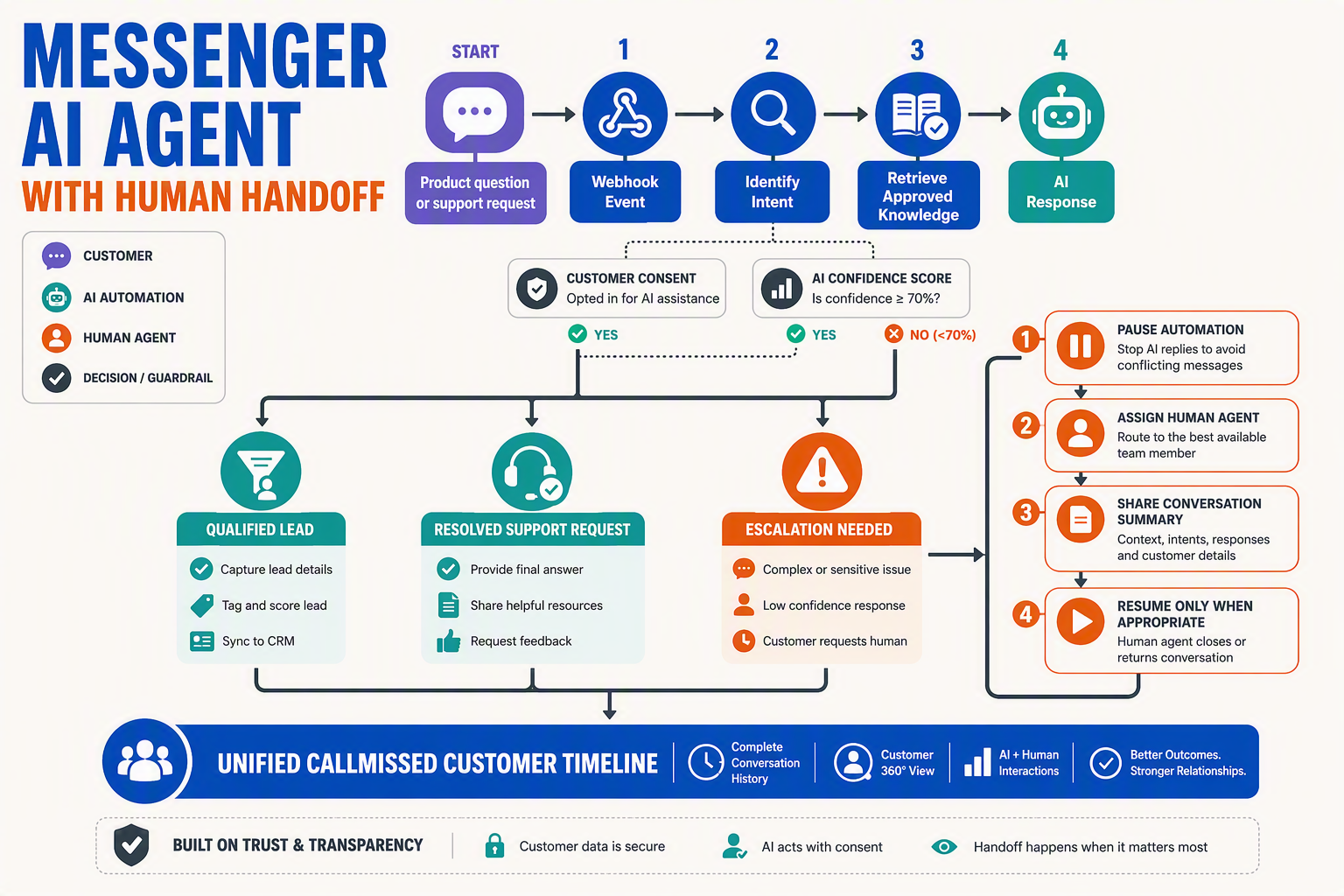
A Messenger AI agent should classify intent, collect only the information needed to qualify the enquiry, answer from approved business knowledge and transfer the complete conversation state when human judgment is required. The customer should never have to repeat their question, contact details or troubleshooting steps after escalation.
Build one stateful conversation pipeline
Treat every Messenger webhook as an event in a durable conversation rather than an isolated message. A practical workflow is:
- Receive and validate the webhook before acknowledging it quickly.
- Deduplicate the event using Meta’s message or event identifier.
- Load conversation state using the Facebook Page ID and sender-scoped identifier.
- Detect intent such as sales, pricing, support, order status or complaint.
- Retrieve approved information from product documentation, policies or CRM records.
- Generate and send the response through the connected Facebook Page.
- Record the interaction for subsequent AI turns and human review.
Store structured facts separately from the transcript. Useful fields include lead stage, product interest, language, consent status, urgency, sentiment, last action and assigned agent. This prevents the model from repeatedly extracting the same information and makes routing deterministic.
Meta for Developers states that Page access tokens are used in Graph API calls to manage Facebook Pages and must be generated after a Page administrator grants the required permissions. Keep that token in a secrets manager rather than conversation records or client-side code.
Qualify leads without turning Messenger into a form
The AI agent should ask one short, context-sensitive question at a time. For example, a B2B enquiry might require:
- Use case: What problem is the prospect solving?
- Company profile: Industry, team size or service geography.
- Requirement: Relevant product, volume or integration.
- Timeline: Immediate, this quarter or exploratory.
- Next step: Demo, quotation, callback or documentation.
Use a transparent scoring model rather than asking the language model to declare a lead “good” without explanation. A workflow might add points for a defined requirement and near-term timeline, then route high-intent leads to sales. Missing data should remain unknown, not be inferred.
CallMissed can place Messenger interactions alongside voice, WhatsApp, email and web conversations in an omnichannel workflow, allowing qualification data captured on Facebook to remain available if the customer later changes channel.
Answer safely from verified business knowledge
Use retrieval-augmented generation, not unrestricted model memory, for prices, policies and technical claims. Retrieve the most relevant approved passages, attach document IDs and timestamps internally, and instruct the agent to acknowledge uncertainty when evidence is absent.
Apply deterministic controls around:
- Refunds, legal claims and regulated advice.
- Account changes requiring identity verification.
- Payment information and sensitive personal data.
- Outdated or conflicting knowledge-base records.
Transfer to a human with full context
Escalation should be triggered by explicit customer requests as well as operational signals such as repeated failed answers, negative sentiment, authentication requirements or high-value sales intent. The handoff package should contain:
- The complete transcript and a concise AI-generated summary.
- Customer identity and CRM record, where lawfully available.
- Detected intent, qualification fields and sentiment.
- Knowledge articles already consulted.
- Unresolved question and recommended next action.
Set the conversation to human-owned before notifying the agent so the bot does not continue replying concurrently. When support returns control, record a clear resolution note and restart automation from the updated state—not from the beginning.
How should CallMissed maintain CRM continuity, conversation ownership, audit trails and missed-message recovery across Facebook automations?
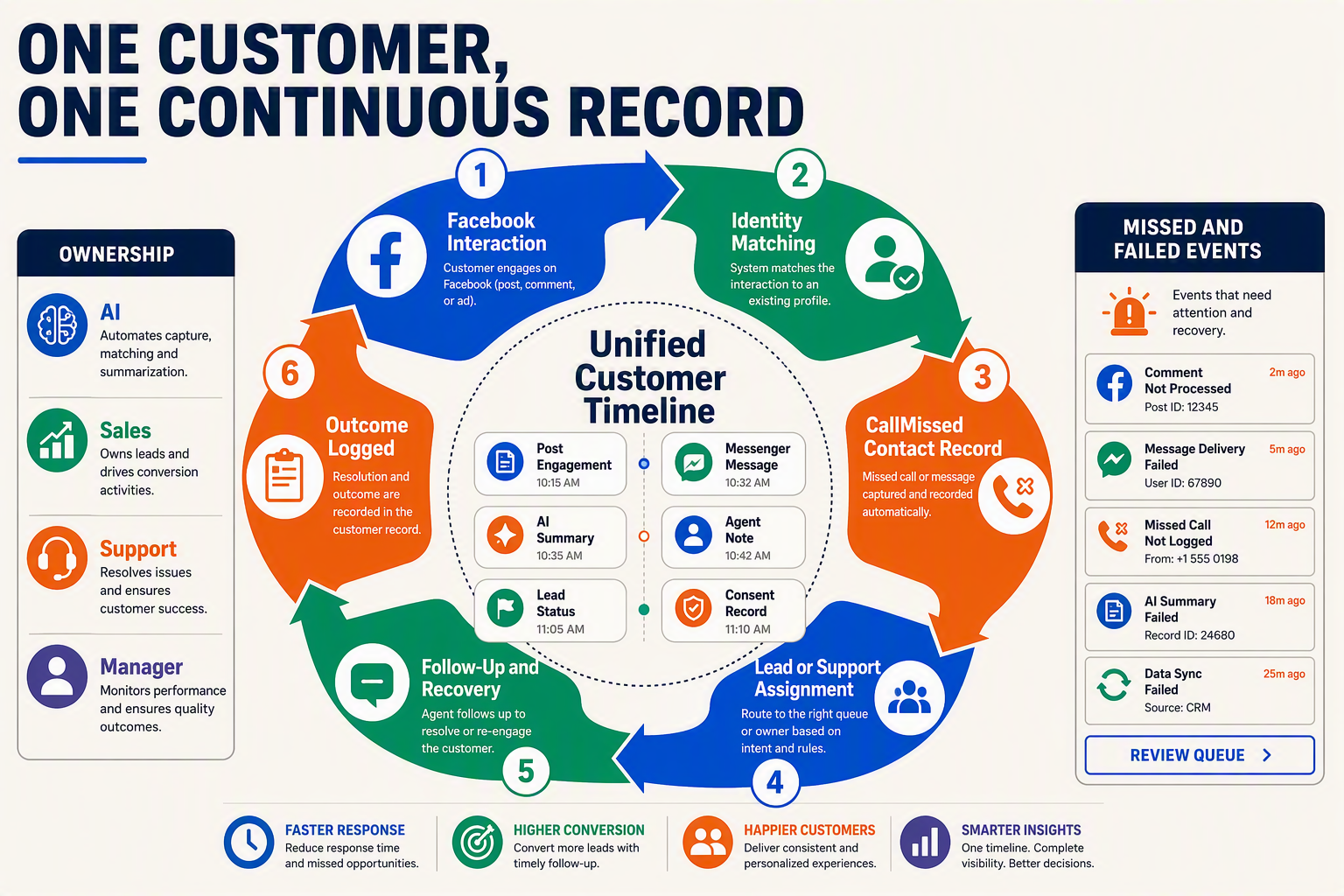
CRM continuity should be built around a canonical customer record, durable conversation ledger and explicit ownership state, not around transient Facebook webhook deliveries. CallMissed should acknowledge events quickly, process them idempotently and preserve enough evidence to recover messages without creating duplicate replies.
Maintain one customer timeline across channels
CallMissed’s omnichannel inbox/CRM should represent Facebook Messenger as another identity attached to a customer—not as an isolated contact list. Each inbound event should store:
- Facebook Page ID and Page-scoped user ID
- Meta message or event ID
- Conversation and reply references
- Message text, attachments and post/comment context
- Meta timestamp and CallMissed receipt timestamp
- Automation, campaign or routing source
- Consent, retention and deletion status
Because Facebook identifiers can be Page-scoped, CallMissed should not merge records based only on a matching name. Cross-channel identity resolution should require stronger evidence, such as a verified phone number, verified email address or deliberate linking by an authorised agent.
The timeline should distinguish operational events from analytics. Meta for Developers reported that some Page metrics from April 1–4, 2026 may remain inaccurate despite resolution of the reporting incident. A CRM should therefore use its own accepted, processed, assigned and replied timestamps for service-level reporting rather than treating Page Insights as the transaction ledger.
Make conversation ownership explicit
A conversation needs one accountable owner at any moment, even when an AI workflow is responding. A practical ownership state machine is:
- Unassigned: The message has arrived but routing has not completed.
- Automation-owned: A defined bot or AI agent may respond.
- Human-queued: Automation has detected an escalation condition.
- Human-owned: A named agent holds an expiring ownership lease.
- Resolved: The outcome and resolution reason have been recorded.
- Reopened: A new customer event has returned the thread to active routing.
Use compare-and-set updates or version numbers when ownership changes. This prevents an AI agent and human agent from replying simultaneously. Agent disconnects, expired leases and inactivity thresholds should automatically return conversations to a queue.
Preserve a complete audit trail
Every consequential action should generate an append-only audit event containing who or what acted, what changed, when it happened and which Meta object was affected. Record:
- Webhook receipt, signature-validation result and deduplication decision
- Routing-rule and AI-model version
- Knowledge sources used to formulate an answer
- Human assignment, transfer, override and approval
- Outbound payload hash, Graph API response and Meta message ID
- Permission, token and API-version failures
- Redaction, export and deletion operations
Sensitive tokens must never appear in logs. Meta’s Access Token Guide states that a Page access token is required to manage a Facebook Page, so token identifier, scope status and rotation time should be audited without recording the credential itself.
Recover missed messages without duplicate replies
CallMissed should combine idempotency, retries, dead-letter queues and reconciliation:
- Deduplicate on Page ID plus Meta event or message ID.
- Acknowledge valid webhooks before running slow AI or CRM work.
- Retry transient failures with exponential backoff and jitter.
- Move repeatedly failing events to a dead-letter queue with an alert.
- Reconcile recent conversations against Meta APIs where permissions and retention rules permit.
- Flag unrecoverable gaps for human review instead of inventing message content.
Monitoring must also separate delivery failures from reporting failures. Meta says deprecated Page Insights metrics will return an invalid metric error from June 15, 2026; that error should update reporting queries, not reopen customer conversations or trigger message replays.
What security, privacy and compliance controls do experienced teams prioritize for Facebook and Messenger automation?
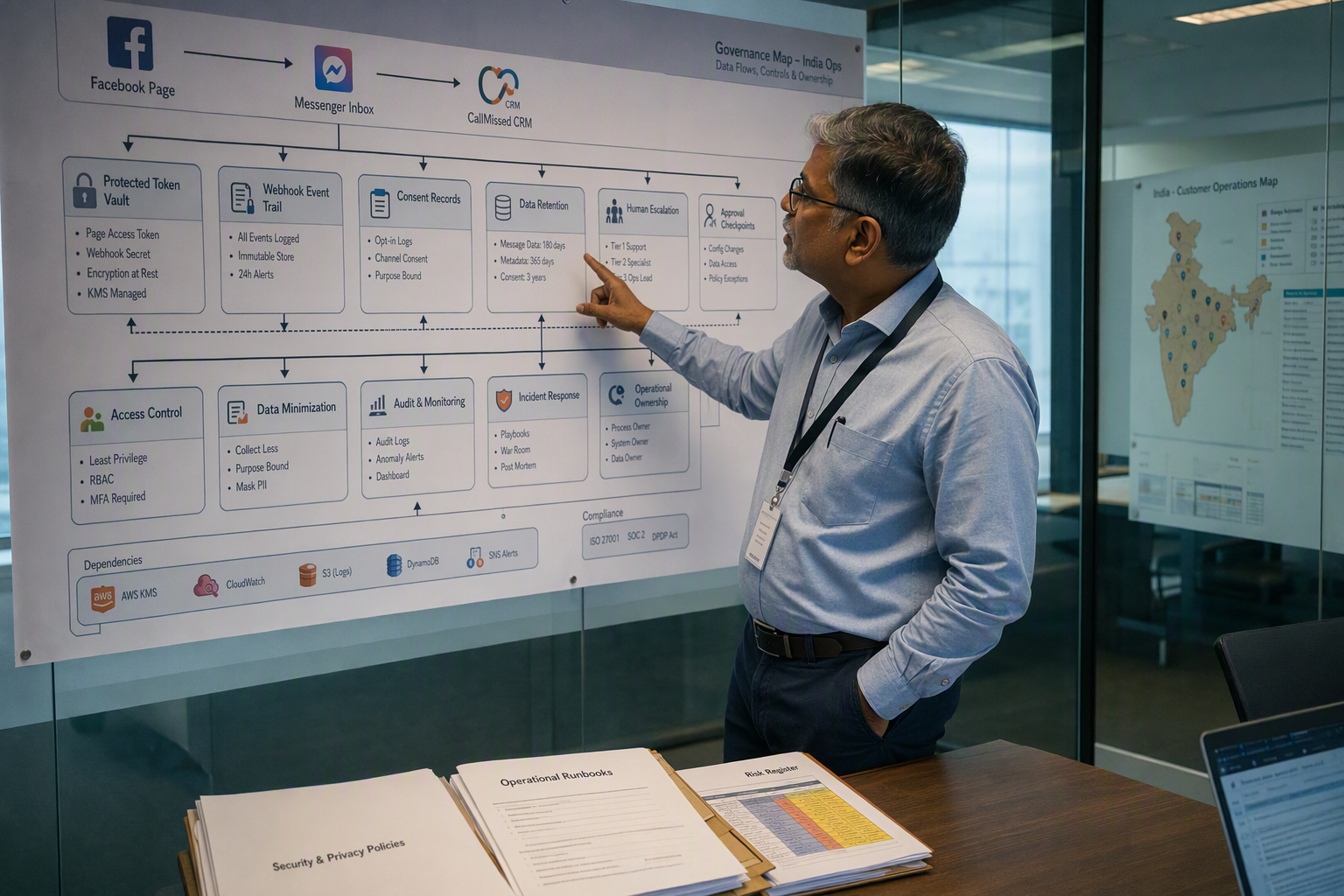
Experienced teams treat Facebook and Messenger automation as a privileged production system: they minimize permissions, isolate tokens, authenticate webhooks, restrict customer-data use and preserve auditable human control. Security must cover the full path from Meta and CallMissed to internal CRMs, AI models and support agents—not merely the initial API connection.
Apply least privilege to identities and permissions
Grant each app, administrator and system user only the access required for its defined workflow. Meta for Developers states that a Page administrator must grant the necessary Page permissions before a Page access token can manage that Page.
A defensible permission process should:
- Map every Graph API endpoint to its required permission and business purpose.
- Separate development, staging and production Meta apps where operationally feasible.
- Restrict production app roles and Business Manager access to approved personnel.
- Review permissions after feature changes and remove unused scopes.
- Revoke access promptly when an employee, agency or integration is offboarded.
Meta’s Pages API documentation identifies four common Page-management permissions—pages_manage_metadata, pages_manage_posts, pages_manage_read_engagement and pages_show_list—but teams should request only those their workflow actually uses. If a business system user makes a request, Meta’s Page Graph API reference says business_management may also be required; it should not be granted automatically to every integration.
Protect tokens, webhooks and outbound actions
Page access tokens are credentials, not configuration values. Store them in a managed secrets vault, encrypt them in transit and at rest, redact them from logs, and prevent exposure in browser code, screenshots, support tickets or source-control repositories.
For webhook-driven Messenger automation, experienced teams also:
- Validate Meta’s webhook verification flow and request-signing mechanism before processing an event.
- Reject malformed, unsigned or stale requests.
- Use event identifiers or idempotency keys to stop duplicate deliveries from triggering repeated replies.
- Place incoming events on a queue so verification is separated from slower AI or CRM processing.
- Rate-limit publishing and messaging actions by Page, tenant and user.
- Require approval for sensitive actions such as public posts, campaign launches or bulk replies.
CallMissed’s Facebook posting and messaging automation should therefore be connected through tenant-isolated credentials, narrow workflow permissions and explicit approval rules, rather than sharing one unrestricted token across customers or environments.
Minimize and govern Messenger customer data
Messenger conversations can contain names, order details, phone numbers and free-form sensitive information. Collect only data needed for the stated customer-service purpose, define retention periods, and document every downstream destination—including CRMs, analytics systems, knowledge bases and AI providers.
Controls should include:
- Purpose limitation: do not reuse support messages for unrelated marketing or model training without an appropriate basis and notice.
- Access control: limit transcript visibility by role, team and customer account.
- Deletion handling: propagate valid deletion requests to searchable indexes, exports and connected systems.
- Logging discipline: mask personal data while retaining operational metadata such as event ID, timestamp and outcome.
- Human escalation: prevent automation from making unsupported commitments in financial, medical or legally sensitive conversations.
Maintain evidence for Meta review and incident response
Meta for Developers states that Page Public Metadata Access is available only with business verification and may require additional contracts. Experienced teams maintain accurate privacy policies, data-flow diagrams, reviewer instructions, test credentials and screen recordings showing why each permission is necessary.
Finally, keep immutable audit records for token changes, permission grants, automated posts, Messenger replies, human overrides and failed requests. Define incident owners, token-revocation procedures and customer-notification paths before launch. These records turn compliance from a one-time App Review exercise into an operational control that can be tested continuously.
What does Facebook automation with CallMissed mean for developers, agencies, ecommerce brands and customer-support teams?
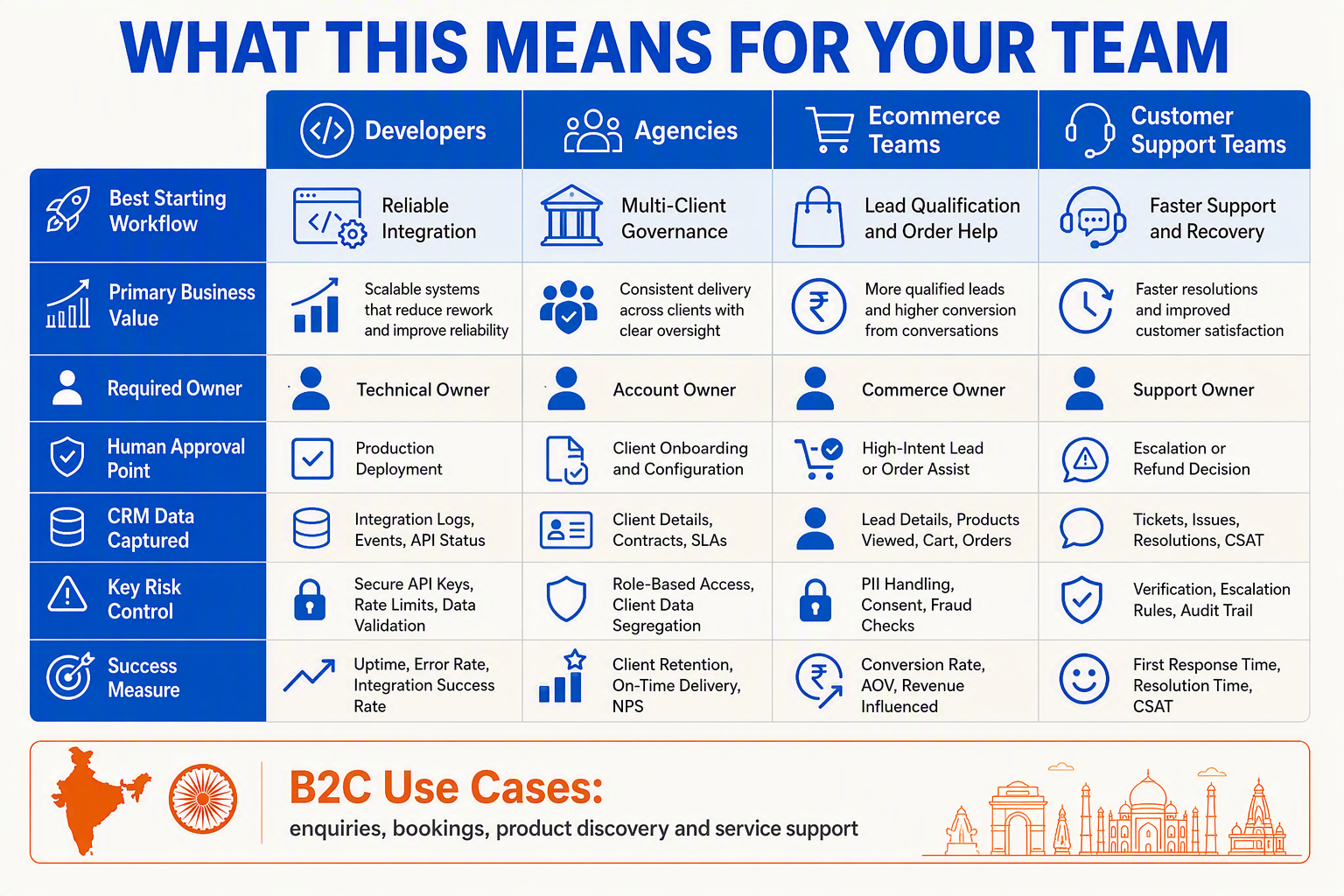
Facebook automation with CallMissed turns Facebook Page publishing and Messenger conversations into programmable business workflows. Developers gain reusable API-driven components, while agencies, ecommerce brands and support teams can connect content, customer messages, AI responses and human follow-up without operating each channel manually.
Practical impact by team
| Team | High-value automation | Implementation priority | Success measure |
|---|---|---|---|
| Developers | Trigger Page posts, process Messenger webhooks and connect messages to business systems | Versioned Graph API calls, secure Page tokens, idempotency and structured error handling | Delivery success rate, webhook latency and retry volume |
| Agencies | Manage publishing and enquiries across multiple client Pages | Strict tenant isolation, per-Page permissions and client-level audit logs | Time saved per account and failed-action rate |
| Ecommerce brands | Publish product content and route Messenger enquiries about availability, orders or returns | Connect conversation intent to catalog, CRM or order-management data | Qualified conversations, response time and assisted conversions |
| Customer-support teams | Classify incoming messages, retrieve knowledge and escalate exceptions | Clear AI-to-human handoff rules, conversation history and ownership status | First-response time, resolution time and escalation rate |
| Marketing teams | Schedule Page content and convert Messenger responses into follow-up workflows | Campaign tags, consent-aware data handling and reporting validation | Engagement, attributed conversations and lead progression |
| Platform operations | Monitor tokens, permissions, webhooks, API versions and deprecated fields | Central alerts, dead-letter queues and credential-rotation procedures | Mean time to detect and recover from failures |
What changes operationally
For developers, CallMissed’s Facebook posting and messaging capabilities can serve as an orchestration layer around Meta’s APIs. The application should still treat Meta as an external dependency: store Meta object IDs, preserve raw event identifiers for deduplication and separate “request accepted” from “business action completed.”
For agencies, the central design issue is tenancy rather than content generation. Every client Page should have an isolated connection record, credential lifecycle and authorization scope. A failed token for one Page must not interrupt publishing or messaging for another.
For ecommerce and support teams, Messenger automation is most useful when it can choose among three actions:
- Answer automatically from approved product, policy or support knowledge.
- Invoke a business workflow, such as collecting an order reference or creating a CRM task.
- Escalate to a person when identity, payment, complaints or unusual exceptions require judgement.
CallMissed’s broader omnichannel inbox and knowledge-base retrieval capabilities make that handoff relevant beyond Messenger: a team can preserve context while moving work between AI automation and human agents.
Governance remains a shared responsibility
Automation does not remove Meta’s access controls. Meta for Developers states that a Facebook Page administrator must grant the app the required permissions before a Page access token can manage the Page. Teams should therefore assign explicit ownership for credentials, App Review evidence and permission changes.
Reporting also needs independent validation. Meta deprecated multiple Page Insights metrics across all API versions on June 15, 2026, with retired metric requests returning an invalid metric error, according to Meta’s Page Insights documentation. Consequently, operational dashboards should distinguish API delivery health from marketing performance.
A production rollout should include:
- Developers: webhook replay tests, idempotency keys and API-version monitoring.
- Business owners: approved automation boundaries and escalation policies.
- Security teams: least-privilege access, token rotation and audit trails.
- Analysts: metric definitions that remain valid after Meta schema changes.
The result is not merely faster Facebook activity; it is a controlled customer-engagement system with measurable ownership across publishing, messaging and support.
Frequently Asked Questions: Can the Facebook API publish Page posts, what permissions are required, how do Messenger webhooks work, when is app review or business verification needed, and how does human handoff work?
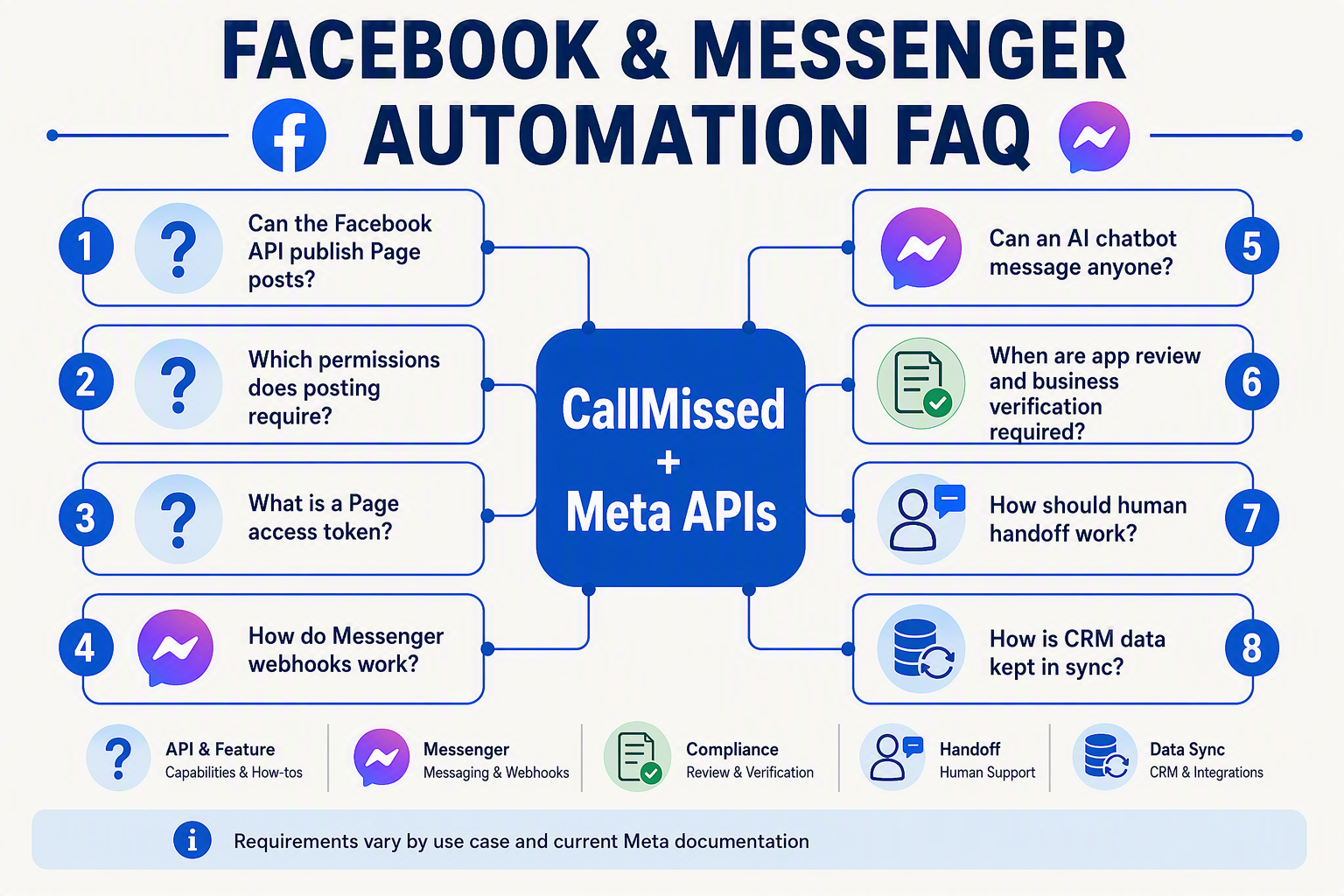
Can Facebook Graph API Posting publish directly to a Facebook Page?
CREATE_CONTENT task where required. Store the returned post ID and confirm publication before reporting success. Do not assume the same access supports publishing to personal profiles or Groups.Which permissions are required for Facebook Graph API Posting and Messenger automation?
pages_manage_posts for publishing, pages_show_list for discovering managed Pages, pages_read_engagement for reading Page content or engagement, and pages_manage_metadata for Page webhook subscriptions. Messenger reply automation generally requires pages_messaging. Request only the permissions the workflow actually needs.How does automated Messenger replying work?
How should Messenger webhooks be configured?
When are App Review and business verification required?
How should Page access tokens be managed in production?
How does human handoff work between a Messenger bot and a support agent?
What should teams monitor after Facebook Graph API Posting goes live?
Conclusion
Reliable Facebook Graph API posting and Messenger automation in 2026 depends on disciplined authentication, permissions, webhook processing and observability—not simply connecting an API endpoint. Businesses should design Facebook Pages and Messenger as connected publishing and customer-engagement channels, with clear paths from automation to human support.
Key takeaways include:
- Use the correct Page access token and permissions. Meta for Developers requires Page administrators to grant capabilities such as
pages_manage_posts,pages_manage_metadata,pages_manage_read_engagementandpages_show_list. - Build resilient event handling. Validate Messenger webhooks, prevent duplicate processing, retry transient failures and preserve conversation context when routing enquiries between AI agents and people.
- Monitor operations separately from performance metrics. Meta says some Page metrics from April 1–4, 2026 may remain inaccurate, even though the underlying reporting issue was resolved.
- Prepare for governance and API change. App Review, business verification and task-based access—including
CREATE_CONTENTfor Page video publishing—should be addressed before production deployment.
Next, watch Meta’s API-version updates and the June 15, 2026 retirement of multiple Page Insights metrics, which will produce invalid metric errors.
Businesses can explore CallMissed to connect Facebook posting and messaging with broader AI-driven engagement workflows. Is your automation architecture ready for Meta’s next permission, metric or webhook change?
Related Reading
- Missed Call Automation in 2026: CallMissed Lead Recovery Workflow Guide
- WhatsApp Business API Chatbot for Support: CallMissed API Guide (2026)
- CallMissed API Guide: Missed Call Automation With Voice AI and WhatsApp