Instagram Automation API Guide for 2026: CallMissed Posting and Messaging


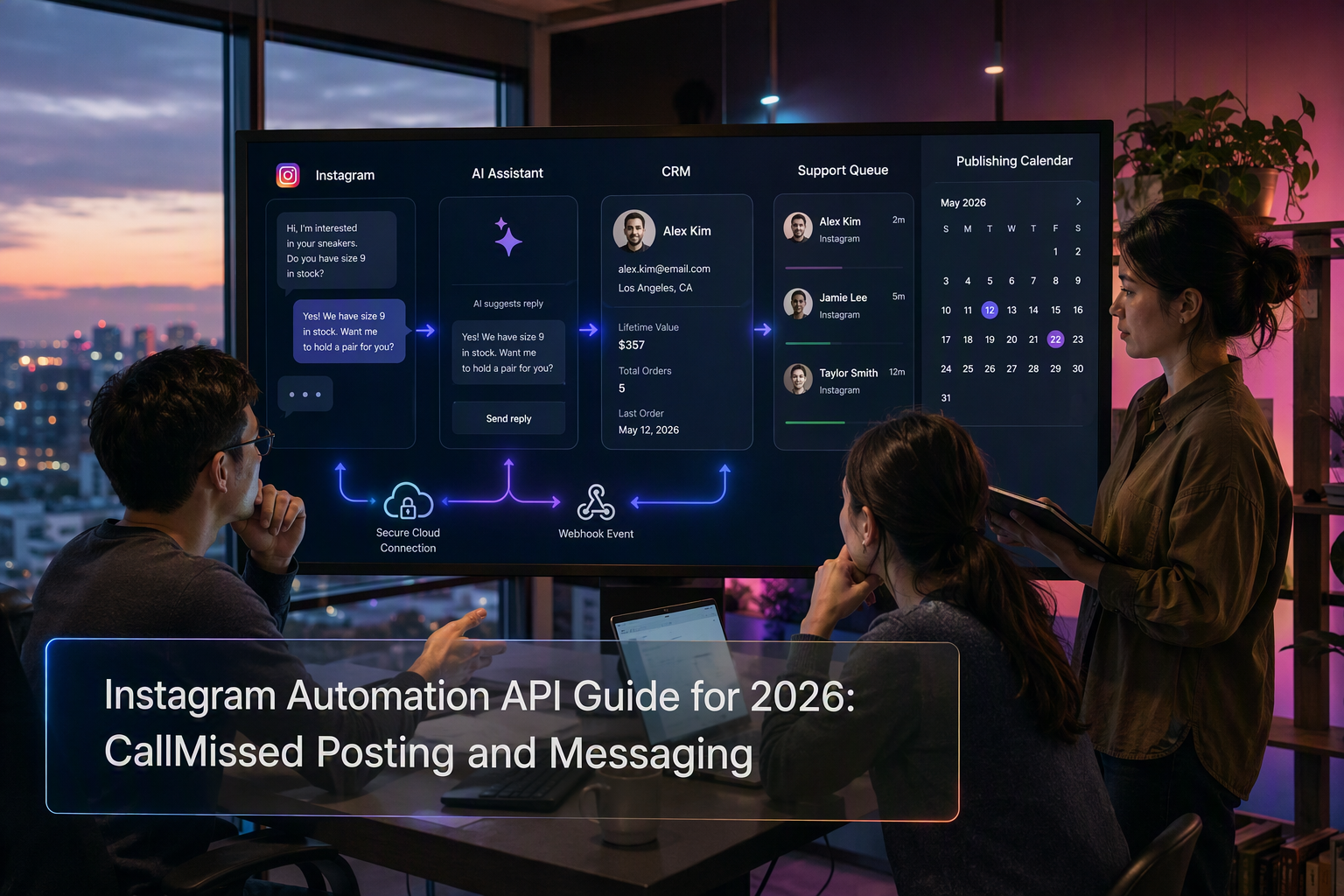
Learn how CallMissed uses official Meta APIs for Instagram posting, DM automation, AI agents, webhooks, permissions and human handoff.
Instagram Automation API Guide for 2026: CallMissed Posting and Messaging
Did you know Meta’s Human Agent feature can let an authorized human respond for up to seven days after an Instagram user’s message? In 2026, an Instagram automation API is no longer just a scheduling tool: Meta’s official platform supports structured publishing and messaging workflows that can connect content, direct messages, AI assistance, lead qualification, customer support, and human teams—without relying on fragile browser bots.
That distinction matters now because Instagram conversations increasingly sit at the intersection of marketing and service. A prospect may discover a product in a post, ask a question by direct message, share media, and expect a useful response without changing channels. Meta for Developers confirms that Instagram Messaging API support allows Instagram professional accounts to send and receive messages and manage Instagram and Facebook Page conversations through one platform. Meta also uses webhooks to notify connected applications about relevant events, enabling event-driven workflows rather than constant polling.
CallMissed has newly added Meta API capabilities for Instagram posting and messaging, giving businesses and developers another official channel for building automated engagement workflows. This guide stays strictly within those admin-confirmed capabilities; it does not assume undocumented endpoint paths, prices, usage limits, review outcomes, or account approval status.
You will learn how to approach:
- AI DM agents that interpret inbound questions and prepare or deliver policy-compliant responses.
- Lead qualification workflows that collect intent, requirements, and contact information before routing a conversation.
- Customer support and human handoff, including where automation should stop and an authorized team member should take over.
- Content posting workflows for preparing, approving, and publishing Instagram content through supported Meta APIs.
- Webhooks and permissions, including the roles they play in authentication, events, testing, and production architecture.
- Policy-safe implementation, with a clear separation between official Meta API automation and risky unofficial browser automation.
Permissions are central to the setup. Meta for Developers identifies instagram_business_basic and instagram_business_manage_messages as required permissions for the relevant Instagram app functionality. Meta’s documentation also notes that testers must hold appropriate roles on both the Meta app and the Instagram professional account, underscoring why a technically correct integration can still fail when account access is misconfigured.
Whether you are a developer, agency, creator, ecommerce operator, or service business, the goal is not to automate every interaction. It is to build a reliable system that posts consistently, responds quickly, preserves context, escalates sensitive conversations, and remains inside Meta’s supported platform rules.
What can CallMissed automate on Instagram through official Meta APIs?

CallMissed can automate two admin-confirmed Instagram functions through official Meta APIs: content posting and messaging. These capabilities support approved publishing workflows and event-driven Instagram DM operations without relying on unofficial browser bots, password sharing, or simulated clicks.
Instagram content posting workflows
CallMissed’s newly added Meta API integration can support Instagram posting automation. Businesses can connect publishing to a controlled workflow rather than manually moving content between calendars, approval tools, and Instagram.
A practical posting workflow can:
- Prepare content in a business system or campaign process.
- Apply internal brand, legal, or campaign checks.
- Route the content to an authorized reviewer.
- Publish through the supported Meta API after approval.
- Record the outcome for operational visibility.
This model is relevant to agencies managing client calendars, ecommerce teams coordinating product campaigns, and creators maintaining consistent publishing schedules. However, “posting support” should not be interpreted as confirmation of every Instagram media format or publishing feature. The precise formats available depend on Meta’s current API support, permissions, account configuration, and implementation.
Instagram Messaging API automation
The Instagram Messaging API allows Instagram professional accounts to send and receive messages through an application. Meta for Developers states that Messenger API support for Instagram can manage Instagram and Facebook Page conversations through one platform.
With CallMissed, businesses can build messaging workflows such as:
- AI DM assistance: Interpret an inbound question and generate a context-aware response based on approved business information.
- Lead qualification: Ask structured questions about intent, budget, location, requirements, or preferred contact time before routing the lead.
- Customer support: Answer common questions, collect order or case details, and send unresolved issues to a team.
- Conversation routing: Categorize messages by topic, urgency, language, or department.
- Human handoff: Transfer sensitive, ambiguous, high-value, or policy-restricted conversations to an authorized employee.
Meta’s Human Agent feature permits an authorized human to respond using the human_agent tag for up to seven days after the Instagram user’s message, according to Meta for Developers. That window is intended for genuine human support, not unrestricted automated follow-ups.
Webhook-driven responses
Official Instagram automation should be event-driven. Meta’s Instagram Platform provides webhooks that notify connected applications when relevant activity occurs, allowing a system to process events without repeatedly polling Instagram.
For example, an inbound DM can trigger a workflow that:
- Receives the webhook event.
- identifies the conversation and available context.
- Classifies the request.
- Generates an approved automated response or creates a human task.
- Logs the action for monitoring and follow-up.
When a customer shares media or a post in a message, Meta notes that the webhook notification includes only the URL for the shared media or post. Developers should design downstream processing around the event data Meta actually supplies.
Boundaries of the confirmed integration
CallMissed’s confirmed scope is Instagram posting and messaging through newly added Meta APIs. It does not imply undocumented endpoints, guaranteed app approval, universal account eligibility, or access to every consumer Instagram feature.
Production access also depends on correct authorization. Meta identifies instagram_business_basic and instagram_business_manage_messages as required permissions for relevant Instagram functionality. Meta further requires testers to hold suitable roles on both the Meta app and the Instagram professional account.
This official API approach is materially different from browser automation that stores credentials, imitates user actions, or scrapes Instagram interfaces. Official integration provides defined permissions, webhooks, and policy controls—the safer foundation for durable business automation.
How did official Instagram automation replace risky browser-based workarounds?
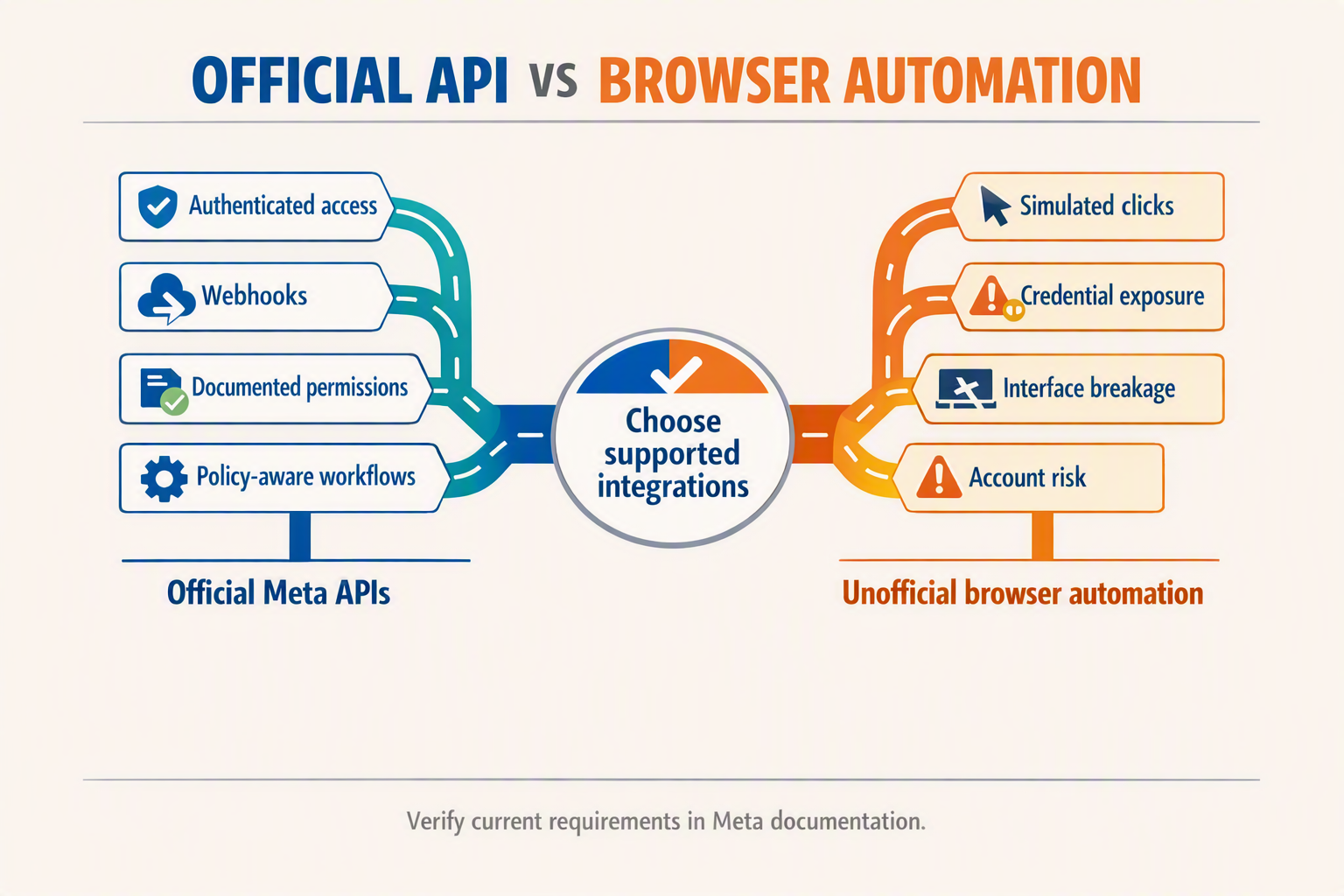
Official Instagram automation replaced browser-based workarounds by giving approved applications structured access to publishing, messaging, permissions, and webhook events. Instead of imitating clicks or maintaining a logged-in browser session, businesses can build against Meta’s documented Instagram Platform and operate within explicit account and app controls.
From screen imitation to supported integration
Unofficial browser automation typically behaves like a person using Instagram.com: it stores session cookies, locates page elements, clicks buttons, enters text, and scrapes the resulting interface. That approach creates avoidable operational risks:
- Interface fragility: A changed button label, page layout, or login flow can break the automation.
- Credential exposure: Browser bots may require passwords, cookies, or persistent sessions rather than scoped access tokens.
- Weak event handling: Scraping or repeatedly refreshing an inbox is less efficient than receiving a webhook when an event occurs.
- Unclear policy posture: Simulated user actions may fall outside supported API behavior, especially when used for unsolicited engagement or high-volume activity.
- Poor auditability: It can be difficult to determine which person, script, or browser session performed an action.
The Instagram automation API model is different. Applications authenticate through Meta, request defined permissions, process documented data structures, and respond to events delivered through supported mechanisms. Meta for Developers describes the Instagram Platform as a set of tools that helps businesses interact with Instagram users.
What official automation changes architecturally
A policy-conscious Instagram integration usually separates automation into four layers:
- Authentication and authorization: The business connects an eligible Instagram professional account and grants the application relevant permissions.
- Event ingestion: Meta webhooks notify the application about supported activity instead of the application continuously polling or scraping Instagram.
- Workflow logic: Business rules or an AI agent classify a message, retrieve approved information, qualify a lead, or decide that human review is required.
- Supported action: The application sends a message or executes a posting workflow through the available Meta API capability.
Meta for Developers states that Messenger API support for Instagram—also called the Instagram Messaging API—allows Instagram professional accounts to send and receive Instagram messages and manage Instagram and Facebook Page conversations through one platform. This creates a supported foundation for shared inboxes, customer-support routing, and AI-assisted direct-message workflows.
Webhooks also provide structured but deliberately bounded information. For example, Meta for Developers notes that when a customer sends a message containing a shared post or media item, only the URL of that shared media or post is included in the webhook notification. Developers should therefore design for the data Meta actually supplies rather than attempting to recover additional information through browser scraping.
A practical policy-safe boundary
Official access does not mean every desired action is permitted. A robust implementation should:
- Automate only actions exposed through documented Meta capabilities.
- Request only permissions necessary for the intended workflow.
- Keep access tokens and webhook secrets out of browser code and logs.
- Validate webhook authenticity and make handlers idempotent.
- Preserve an audit trail for automated posts, replies, approvals, and handoffs.
- Avoid using browser bots to fill gaps where an official capability is unavailable.
CallMissed’s newly added Meta API capabilities for Instagram posting and messaging follow this official-integration model. They enable businesses to design supported content and conversation workflows without treating Instagram’s consumer interface as an unofficial automation surface.
Which Meta API developments and CallMissed capabilities matter most?
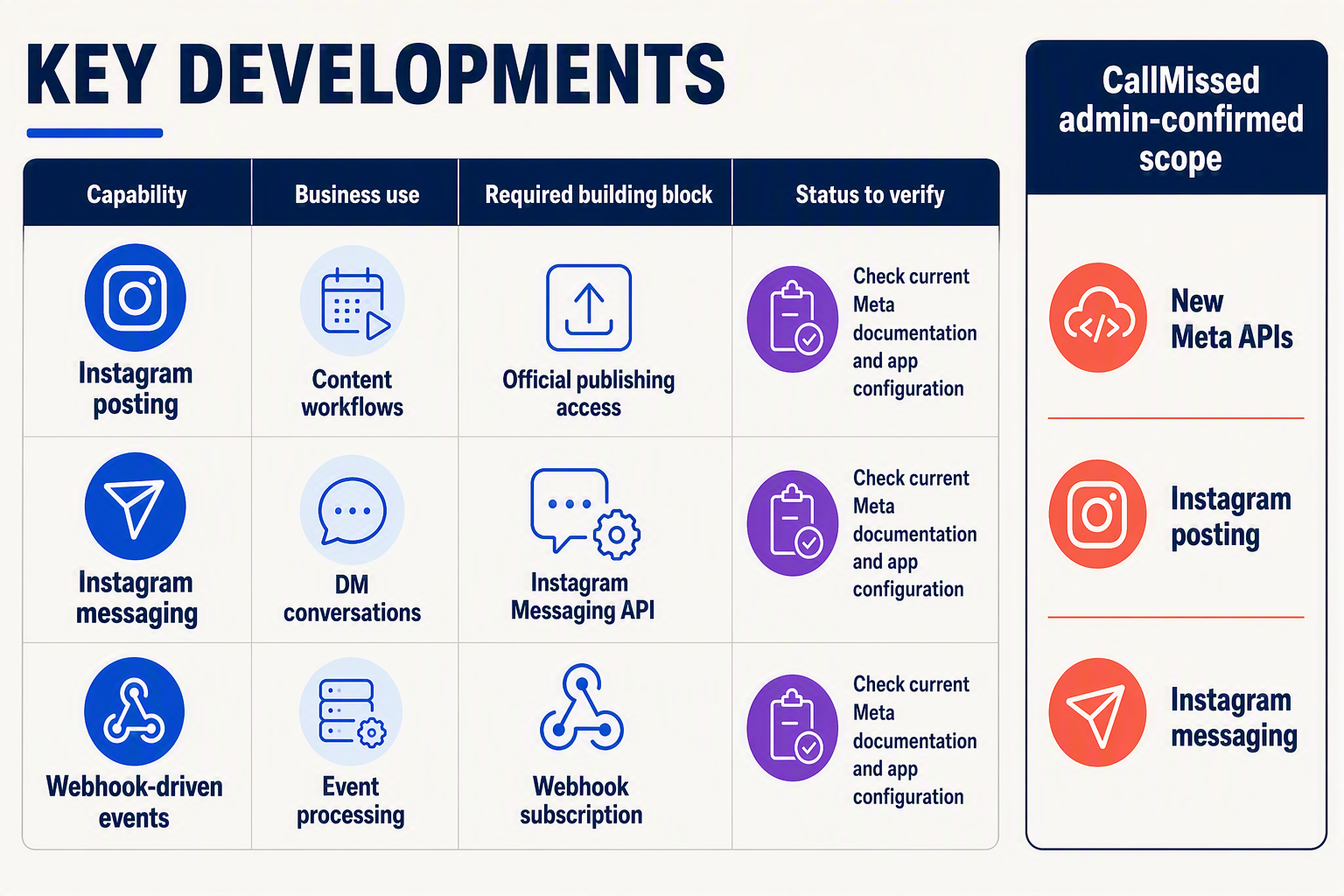
The most consequential developments are official Instagram publishing and messaging support, webhook-driven events, granular permissions, and controlled human handoff. CallMissed’s newly added Meta API capabilities cover the two core automation surfaces—Instagram posting and messaging—while Meta remains responsible for account eligibility, permissions, tokens, policies, and platform behavior.
Capability and implementation map
| Capability | What the official Meta layer provides | Confirmed CallMissed scope | Practical application |
|---|---|---|---|
| Instagram content posting | Supported API-based publishing for eligible Instagram accounts and content workflows | Instagram posting through newly added Meta API capabilities | Prepare, approve, and publish campaign or brand content without browser automation |
| Instagram Messaging API | Sending and receiving messages for Instagram professional accounts | Instagram messaging through newly added Meta API capabilities | AI DM assistance, lead capture, support responses, and conversation routing |
| Webhook events | Notifications when relevant Instagram events occur, reducing the need for continuous polling | Messaging workflows can use Meta-originated events as automation triggers | Start a qualification flow when a message arrives or alert a team when intervention is required |
| Shared-media handling | Webhook notifications include the URL of a shared post or media item rather than the complete media object | Applications can process the supplied event data within documented constraints | Detect shared-product or shared-post enquiries, then fetch or route context as permitted |
| Permissions and roles | Meta requires permissions and appropriate account/app roles | CallMissed connectivity still depends on successful Meta authorization | Separate development, testing, authorization, and production-readiness checks |
| Human Agent workflow | An authorized human can respond using the human_agent tag within Meta’s defined window | Human handoff can complement, rather than be replaced by, message automation | Escalate complaints, exceptions, regulated questions, or high-value leads |
What developers should design around
The Instagram Messaging API is the central development because it converts direct messages into structured application events. Meta for Developers says Messenger API support for Instagram allows Instagram professional accounts to manage Instagram and Facebook Page conversations through one platform.
A robust implementation should therefore separate four layers:
- Meta authorization: Verify login type, account eligibility, permissions, tester roles, and access-token handling.
- Event intake: Validate and process webhook notifications before triggering business logic.
- Decision logic: Classify intent, retrieve approved information, qualify the lead, or determine whether escalation is necessary.
- Response or handoff: Send a supported reply or transfer the conversation to an authorized person.
Meta for Developers specifies that instagram_business_basic and instagram_business_manage_messages are required for the relevant Instagram app functionality. Meta also states that app testers must hold a role on the app, grant the required permissions, and have a role on the Instagram professional account; this makes role configuration a distinct deployment check, not an incidental detail.
Why human handoff remains a core capability
As of September 6, 2026, Meta for Developers documents a seven-day Human Agent response window following an Instagram user’s message. This feature is intended for genuine human support, so it should not be treated as an unlimited extension for automated promotional messaging.
Appropriate escalation triggers include:
- Low-confidence AI responses
- Refunds, disputes, or complaints
- Requests involving sensitive personal information
- Complex product or service exceptions
- Explicit requests to speak with a person
CallMissed’s confirmed Instagram posting and messaging capabilities should consequently be viewed as building blocks for policy-aware workflows, not permission to automate every action. Official Meta APIs provide authenticated, event-driven integration; unofficial browser bots imitate user activity and introduce avoidable reliability, security, and policy risk.
How does an Instagram DM AI agent connect messaging, lead qualification, CRM history and human handoff?
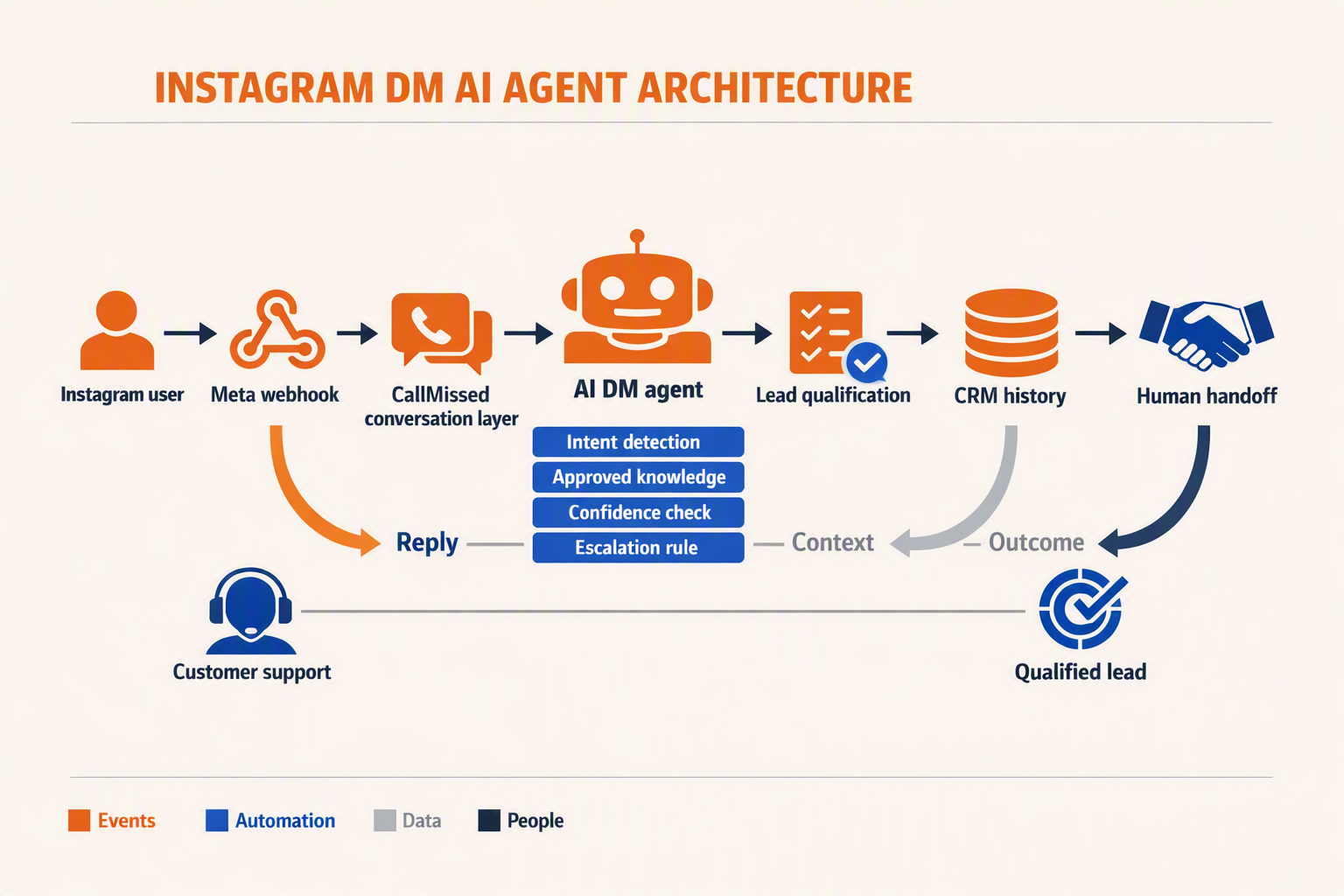
An Instagram DM AI agent connects messaging, lead qualification, optional customer history, and human handoff through an event-driven workflow: Instagram DM → webhook → AI decision → external record update → automated response or human review. CallMissed’s admin-confirmed official Meta API support for Instagram messaging can provide the Instagram channel connection; businesses may separately integrate their preferred CRM, inbox, database, or customer-record system.
Build on official Meta APIs and webhooks
A policy-safe agent should use the Instagram Messaging API and Meta webhooks, rather than browser automation that imitates clicks or stores Instagram credentials. Meta for Developers says that Messenger API support for Instagram allows Instagram professional accounts to send and receive messages through connected applications.
A typical architecture follows these steps:
- Receive the event: A customer sends a direct message, shares media, or replies within an existing conversation.
- Validate and normalize: The application validates the webhook and maps the event into a consistent internal schema.
- Retrieve optional history: If the business has connected a CRM, help desk, inbox, or database, the workflow can look up earlier conversations, lead stage, assigned owner, purchases, and unresolved cases.
- Classify intent: The AI identifies sales, support, booking, order-related, feedback, or another approved category.
- Select an action: The agent answers from approved information, asks a qualification question, or escalates the thread.
- Store the outcome: A connected system can record the transcript, classification, extracted fields, response, and handoff status.
Meta for Developers specifies that the instagram_business_basic and instagram_business_manage_messages permissions are required for this Instagram messaging functionality. Permission requirements and account eligibility should therefore be checked during implementation rather than after the workflow is built.
Meta for Developers also states that when a customer shares media or a post, the webhook notification includes only the URL for the shared item. Developers should process the event data supplied by Meta instead of assuming every attachment arrives as a directly stored file.
Qualify leads progressively
Lead qualification should resemble a useful conversation, not an interrogation. Depending on the business and customer consent, an AI agent can collect:
- Intent: purchase, consultation, demo, availability check, or support.
- Need: product category, service requirement, or problem description.
- Timing: immediate, this week, this month, or exploratory.
- Location and language: useful for regional routing and service availability.
- Contact preference: requested only when necessary and clearly explained.
For example, “Need AC repair in Pune tomorrow” can become service: AC repair, location: Pune, and urgency: next day. Those fields may then be sent to a business-selected CRM, spreadsheet, ticketing tool, or internal database.
Make human handoff explicit
Automation should pause when the customer requests a person, the model lacks reliable information, or the conversation concerns refunds, complaints, sensitive data, safety, or unusual commercial terms. A robust handoff workflow should:
- Mark the conversation as human-owned in the business’s chosen orchestration or inbox system.
- Suppress AI replies while a person is handling the thread.
- Present the latest message, qualification fields, and a concise conversation summary.
- Retrieve prior customer history only if an external system is connected and access is authorized.
- Resume automation only after an authorized operator releases the conversation.
Meta for Developers states that the Human Agent feature permits an authorized human to respond using the human_agent tag for up to seven days after the user’s message. This seven-day boundary supports genuine human service; it is not permission for unrestricted automated follow-ups.
The resulting design keeps responsibilities clear: CallMissed connects official Instagram messaging, the AI handles approved qualification tasks, optional business systems retain customer records, and accountable people take over judgment-heavy conversations.
How should developers configure accounts, permissions, webhooks and compliance checks?
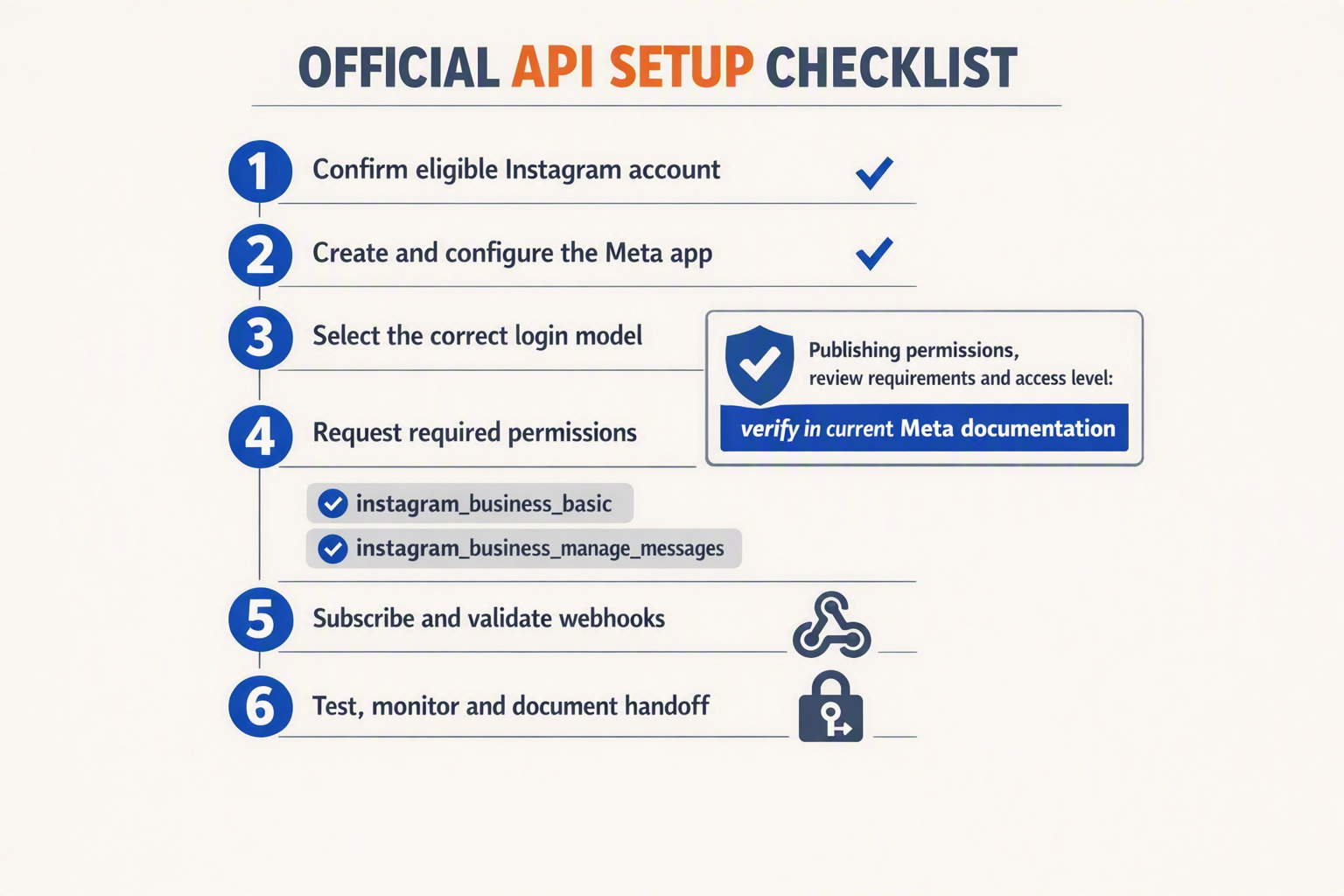
Configure the integration in four gates: eligible accounts, least-privilege permissions, verified webhooks, and a pre-production compliance review. Developers should treat successful authentication as only one checkpoint; account roles, event delivery, data handling, and Meta policy constraints must also work before automation goes live.
1. Confirm the account and app relationship
Start with an Instagram professional account connected through Meta’s supported setup flow. Meta for Developers states that the Instagram Messaging API allows professional accounts to send and receive Instagram messages and manage Instagram and Facebook Page conversations through one platform.
Use separate environments or credentials for development and production where the available Meta configuration permits. During testing, verify all three relationships:
- The developer or tester has the appropriate Meta app role.
- The tester has a role on the Instagram professional account that owns the account being tested.
- The Instagram account has granted every permission required by the selected functionality.
Meta for Developers explicitly says that app testers must hold roles on both the app and the relevant Instagram professional account. This explains many cases where token generation succeeds but messaging tests still fail.
2. Request only the permissions the workflow needs
For the documented Instagram app functionality, Meta identifies instagram_business_basic and instagram_business_manage_messages as required permissions and says they are added by default during the relevant app-creation flow.
Apply least privilege rather than requesting broad access pre-emptively:
- Use
instagram_business_basicfor the relevant basic Instagram business-account access. - Add
instagram_business_manage_messageswhen the application must manage direct-message conversations. - Check the current Meta dashboard and documentation for the exact permissions associated with posting; do not assume messaging authorization also grants publishing access.
- Record why each permission is needed and where its data is processed.
- Re-test authorization after changing account roles, permissions, or app configuration.
CallMissed’s newly added Meta API support covers Instagram posting and messaging, but developers should still validate each Meta-side permission and account dependency for their intended workflow rather than assuming approval or access.
3. Make webhooks reliable and safe
Meta uses webhooks to notify applications about relevant Instagram events, allowing event-driven processing instead of continuous polling. A production webhook layer should:
- Accept only expected event types and validate incoming requests using Meta’s current security guidance.
- Acknowledge events quickly, then place longer AI or CRM work onto a queue.
- Store event identifiers or equivalent state to prevent duplicate processing.
- Retry failed internal jobs without sending duplicate customer replies.
- Log delivery time, routing outcome, response status, and human escalation.
- Treat shared-content notifications carefully: Meta notes that when a customer sends a share, the webhook notification includes only the URL of the shared media or post.
4. Run compliance checks before launch
Create a written release checklist covering consent, purpose limitation, retention, access controls, deletion procedures, and escalation. Never collect passwords, simulate browser activity, scrape sessions, or bypass Meta’s official interfaces.
Test policy boundaries with realistic scenarios: opt-outs, abusive messages, sensitive support requests, unavailable agents, duplicate webhooks, expired authorization, and media the system cannot interpret. If a conversation requires manual resolution, Meta’s Human Agent feature permits an authorized human response using the human_agent tag for up to seven days after the user’s message, according to Meta for Developers. That window is a policy feature—not permission for unrestricted automated follow-up.
How do Instagram posting workflows differ from Instagram Messaging API workflows?
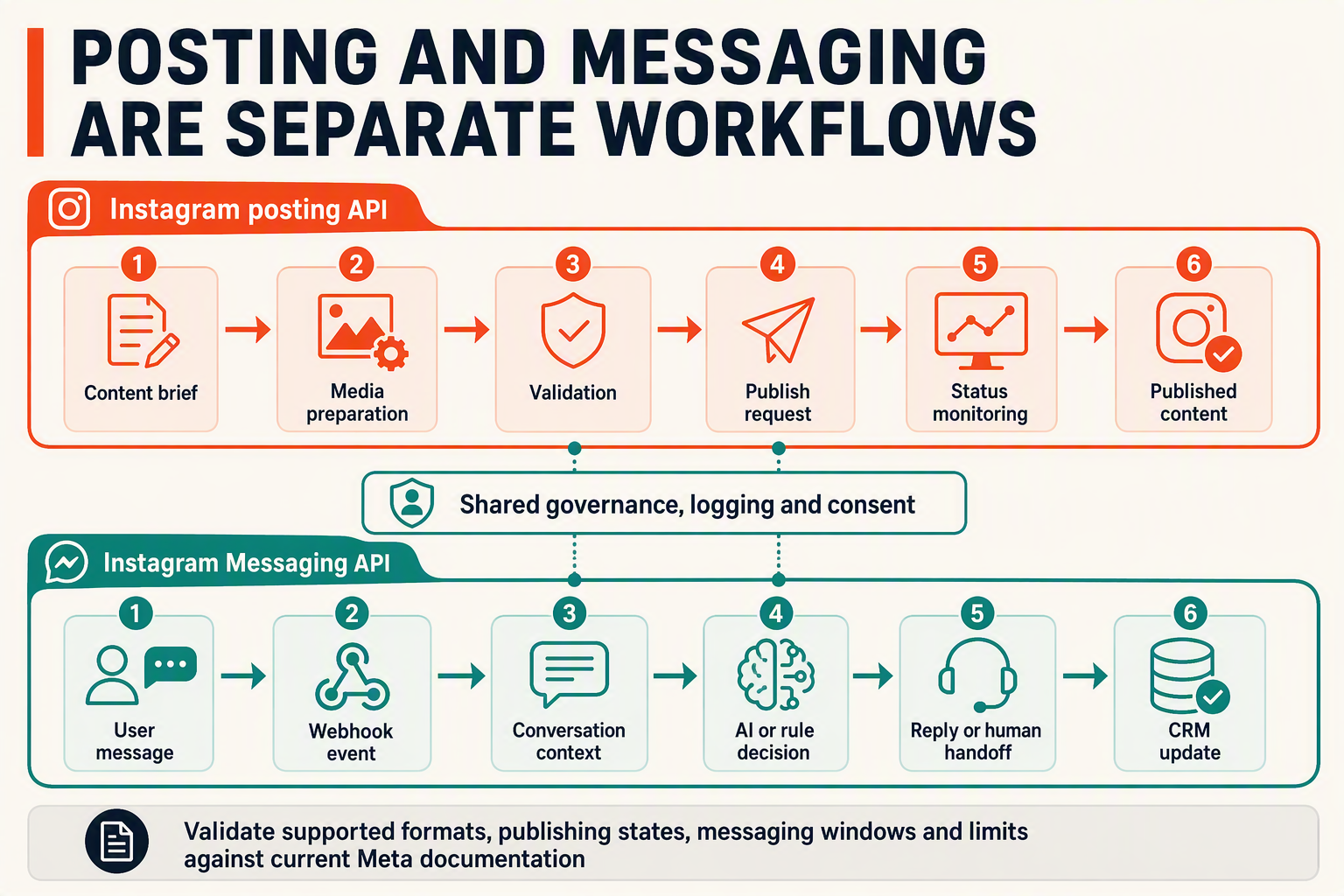
Instagram posting workflows are content pipelines, while Instagram Messaging API workflows are event-driven conversations. Posting moves approved media and copy toward publication; messaging listens for user activity, maintains conversational context, responds appropriately, and escalates when automation should stop.
Posting follows a planned content lifecycle
An Instagram posting API workflow usually begins inside a content calendar, campaign system, or approval queue. Its inputs are business-controlled assets rather than unpredictable customer messages.
A practical posting workflow is:
- Prepare content: Collect the media, caption, campaign metadata, and intended publishing time.
- Validate inputs: Check required fields, asset availability, account selection, and current Meta documentation before submission.
- Request approval: Route drafts to a creator, brand manager, legal reviewer, or client.
- Publish through an official Meta API: Send the approved content using the account’s authorized connection.
- Record the result: Store the returned status and identifiers needed for audit, reporting, retries, or support.
- Handle failures safely: Retry only where appropriate; otherwise place the item in an exception queue for human review.
Posting is therefore mainly state-oriented. A content item moves through states such as draft, approved, scheduled, submitted, published, or failed. Developers should not assume that every Instagram media format, scheduling behavior, limit, or approval state is universally available; implementation must follow the current Meta documentation and the capabilities granted to the connected account.
Messaging reacts to webhooks and conversation state
An Instagram Messaging API workflow begins when an Instagram user acts. Meta for Developers states that Messenger API support for Instagram enables Instagram professional accounts to send and receive messages and manage Instagram and Facebook Page conversations through one platform.
The typical flow is:
- Meta sends a webhook notification for a subscribed event.
- The application verifies, acknowledges, and deduplicates the event.
- The workflow loads the conversation’s relevant context and routing rules.
- An AI DM agent or deterministic workflow classifies intent.
- The system answers, asks a qualification question, or assigns a human.
- The application records the outcome for continuity and auditing.
Messaging is consequently event-oriented and user-dependent. It must account for duplicate delivery, delayed processing, multiple messages arriving close together, unsupported content, and human intervention. Meta for Developers also notes that when a customer shares media or a post, the webhook notification includes only the URL for the shared media or post—an important detail for downstream content handling.
The operational differences matter
- Trigger: Posting starts from an internal plan; messaging starts from an external user event.
- Timing: Posting can use controlled queues; messaging generally needs low-latency processing.
- Context: A post is a discrete content object; a DM belongs to an evolving conversation.
- AI role: AI can help draft captions for review, while an AI DM agent may classify intent, answer questions, or qualify leads.
- Human handoff: Posting usually requires approval before publication; messaging may escalate after automation has already gathered context.
- Risk control: Posting needs duplicate-publication protection, while messaging needs webhook deduplication and safeguards against repeated replies.
CallMissed’s newly added official Meta API capabilities for Instagram posting and messaging can support both patterns, but they should remain separate workflows with shared authentication, governance, logging, and human oversight—not one generic “Instagram automation” job.
What are the operational and policy implications of automating Instagram conversations?
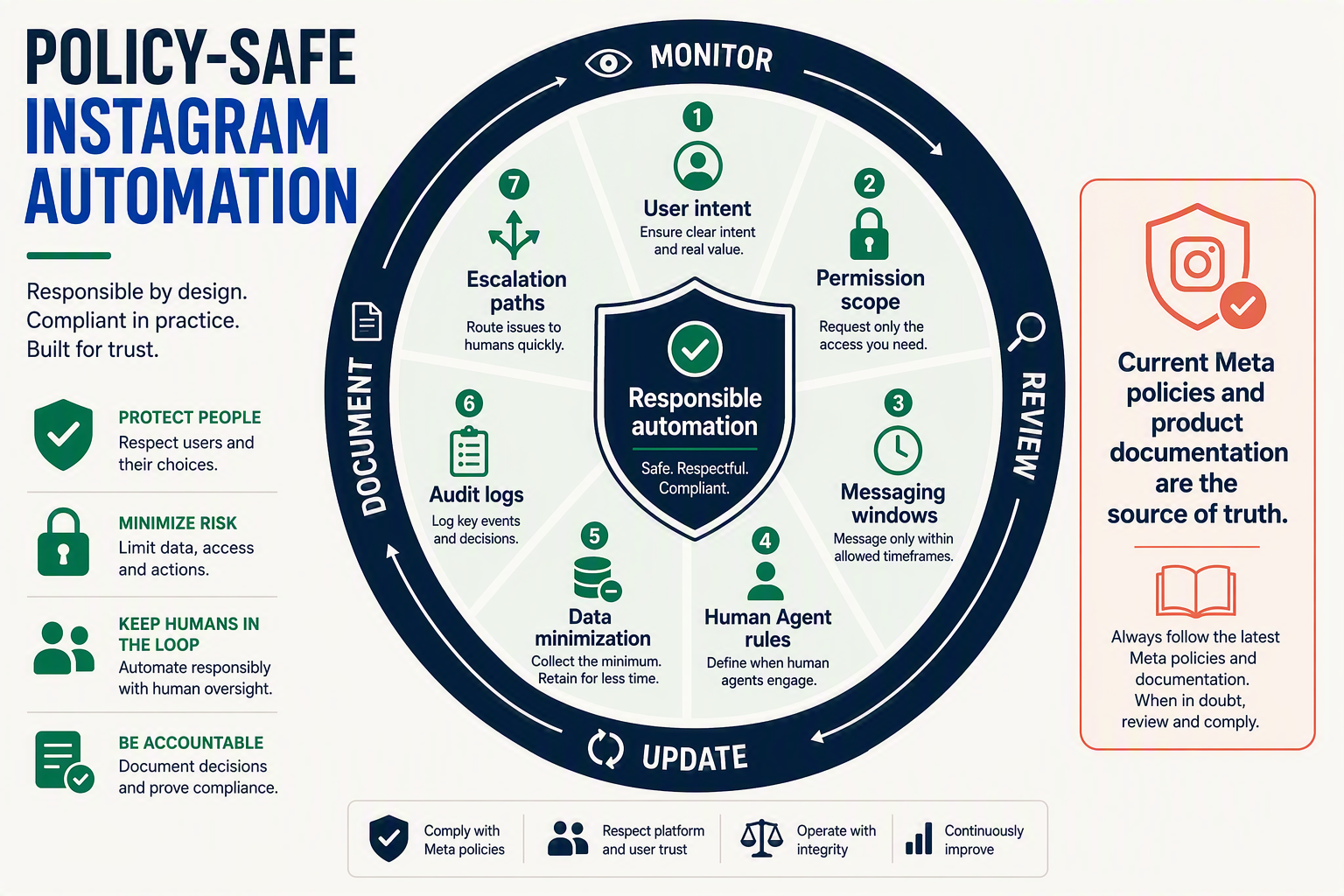
Automating Instagram conversations changes more than response speed: it creates ongoing obligations around permissions, escalation, data handling, content approval, and platform compliance. Businesses should treat the Instagram Messaging API as production communication infrastructure—not as an unrestricted bulk-messaging channel.
Official API automation versus browser automation
Policy-safe automation uses Meta’s documented APIs, authorized access tokens, permissions, and webhooks. Unofficial browser bots typically imitate human actions by storing passwords, scraping pages, or automating clicks; these approaches are fragile because interface changes, security challenges, and account controls can interrupt them.
Meta for Developers states that the Instagram Messaging API enables Instagram professional accounts to send and receive Instagram messages and manage Instagram and Facebook Page conversations through one platform. That supported scope does not imply permission to perform undocumented actions or contact users without an eligible conversation context.
An operational policy should therefore prohibit:
- Sharing Instagram passwords with automation tools.
- Scraping profiles or conversations through browser sessions.
- Attempting to bypass permissions, platform reviews, or messaging rules.
- Treating API access as consent for unrelated marketing.
- Claiming that automated replies are human-authored when disclosure is appropriate.
CallMissed’s newly added Meta API capabilities for Instagram posting and messaging are designed around official integrations, allowing teams to build workflows without depending on brittle browser automation.
Human handoff is a controlled workflow
Automation should resolve predictable requests while transferring ambiguity, risk, and emotional situations to an authorized person. Meta for Developers documents that the Human Agent feature permits an authorized human to respond with the human_agent tag for up to seven days after the Instagram user’s message.
That seven-day feature should not be interpreted as a general automation window. Meta describes its allowed purpose as facilitating a human-agent response, so teams should preserve the distinction between automated processing and genuine human intervention.
Define escalation triggers for:
- Refunds, disputes, complaints, and legal threats.
- Requests involving sensitive personal or financial information.
- Low-confidence AI answers or missing knowledge-base evidence.
- Repeated failed replies, negative sentiment, or explicit requests for a person.
- Promises involving prices, availability, delivery dates, or contractual terms.
The handoff record should include the user’s request, relevant conversation history, automation already performed, and the reason for escalation.
Operational controls for reliable conversations
Instagram automation needs measurable controls rather than a “set and forget” deployment:
- Assign ownership: Name teams responsible for access tokens, message operations, posting approvals, and incident response.
- Use least privilege: Meta for Developers identifies
instagram_business_basicandinstagram_business_manage_messagesas permissions required for relevant Instagram functionality. - Monitor webhooks: Detect failed deliveries, duplicate events, processing delays, and malformed payloads. Use idempotency controls so retries do not generate duplicate responses.
- Protect customer data: Restrict transcript access, define retention periods, redact unnecessary sensitive information, and log administrative actions.
- Review AI quality: Sample conversations for factual accuracy, tone, escalation performance, and unsupported claims.
- Add a kill switch: Operators must be able to pause messaging or posting independently when content, policy, or integration problems arise.
Posting and messaging require separate governance
Posting workflows need draft, review, approval, publication, and audit stages; messaging workflows need triage, response, escalation, and closure stages. Keeping these controls separate reduces the chance that a campaign approval grants excessive access to private conversations—or that a support agent can publish public content unintentionally.
Meta for Developers also requires testers to hold appropriate roles on both the Meta app and the owning Instagram professional account. Consequently, access reviews and role changes should be part of routine operations, not merely initial setup.
What do Meta documentation and experienced implementation teams emphasize about reliable automation?

Reliable Instagram automation depends less on sending the first successful API request and more on permissions, webhook resilience, conversation state, human escalation, and policy-safe operations. Meta for Developers and experienced implementation teams consistently point toward event-driven systems that expect missing context, duplicate events, expired credentials, and cases automation should not resolve alone.
Treat permissions and roles as deployment dependencies
Meta for Developers identifies instagram_business_basic and instagram_business_manage_messages as required permissions for relevant Instagram app functionality. Permissions alone are insufficient during testing: Meta states that app testers must have a role on the Meta app, grant all required permissions, and hold a role on the Instagram professional account that owns the account.
A production checklist should therefore verify:
- The correct Instagram professional account is connected.
- The Meta app has the necessary permissions for each enabled workflow.
- Test users have roles on both the app and Instagram account.
- Access-token failures are detected and routed to an administrator.
- Posting and messaging are tested independently before being combined.
This prevents an authorization problem from being misdiagnosed as an API, webhook, or AI-model failure.
Design webhooks for imperfect delivery
Meta’s Instagram Platform uses webhooks to notify applications about relevant events. Reliable implementations should acknowledge events quickly, process longer tasks asynchronously, and make handlers idempotent, meaning repeated delivery does not create duplicate replies or actions.
Recommended safeguards include:
- Store an event identifier or deterministic deduplication key.
- Validate incoming webhook requests according to Meta’s documented process.
- Queue AI inference, CRM updates, and media retrieval outside the receiver.
- Apply retries with backoff for transient downstream failures.
- Record event timestamps, processing outcomes, and escalation decisions.
- Alert operators when retries are exhausted.
Do not assume every webhook contains the complete conversational payload. Meta for Developers notes that when a customer sends a message containing a shared post or media item, only the URL for that shared media or post is included in the webhook notification. Applications should handle that event type explicitly rather than treating it as ordinary text.
Make conversation control deterministic
An AI DM agent should generate language, but application logic should control whether, when, and how a response is sent. Maintain a conversation state such as automated, awaiting_customer, human_required, or closed, and prevent the AI from replying after a human has taken ownership.
Escalate when the conversation involves:
- Refunds, disputes, threats, or sensitive personal information.
- Low-confidence intent classification or ambiguous requests.
- Repeated failure to answer from approved knowledge.
- A direct request for a person.
- Actions requiring authorization outside the messaging workflow.
Meta for Developers documents that the Human Agent feature can allow an authorized human to respond using the human_agent tag within seven days of the user’s message, subject to Meta’s permitted use. That window is a controlled support mechanism, not permission for unrestricted automated outreach.
Operate posting and messaging as governed workflows
For content posting, separate draft creation, media validation, approval, publication, and result logging. For messaging, retain consent and routing context, enforce policy rules before generation, and log which system or person sent each response.
CallMissed’s admin-confirmed Meta capabilities cover Instagram posting and messaging, enabling these official API workflows without resorting to browser automation. Unofficial scripts that imitate clicks, scrape sessions, or store account passwords introduce avoidable fragility; reliable teams build against Meta’s supported APIs, documented permissions, and webhook model instead.
Which CallMissed Instagram automation setup fits developers, agencies, creators, ecommerce and service businesses?
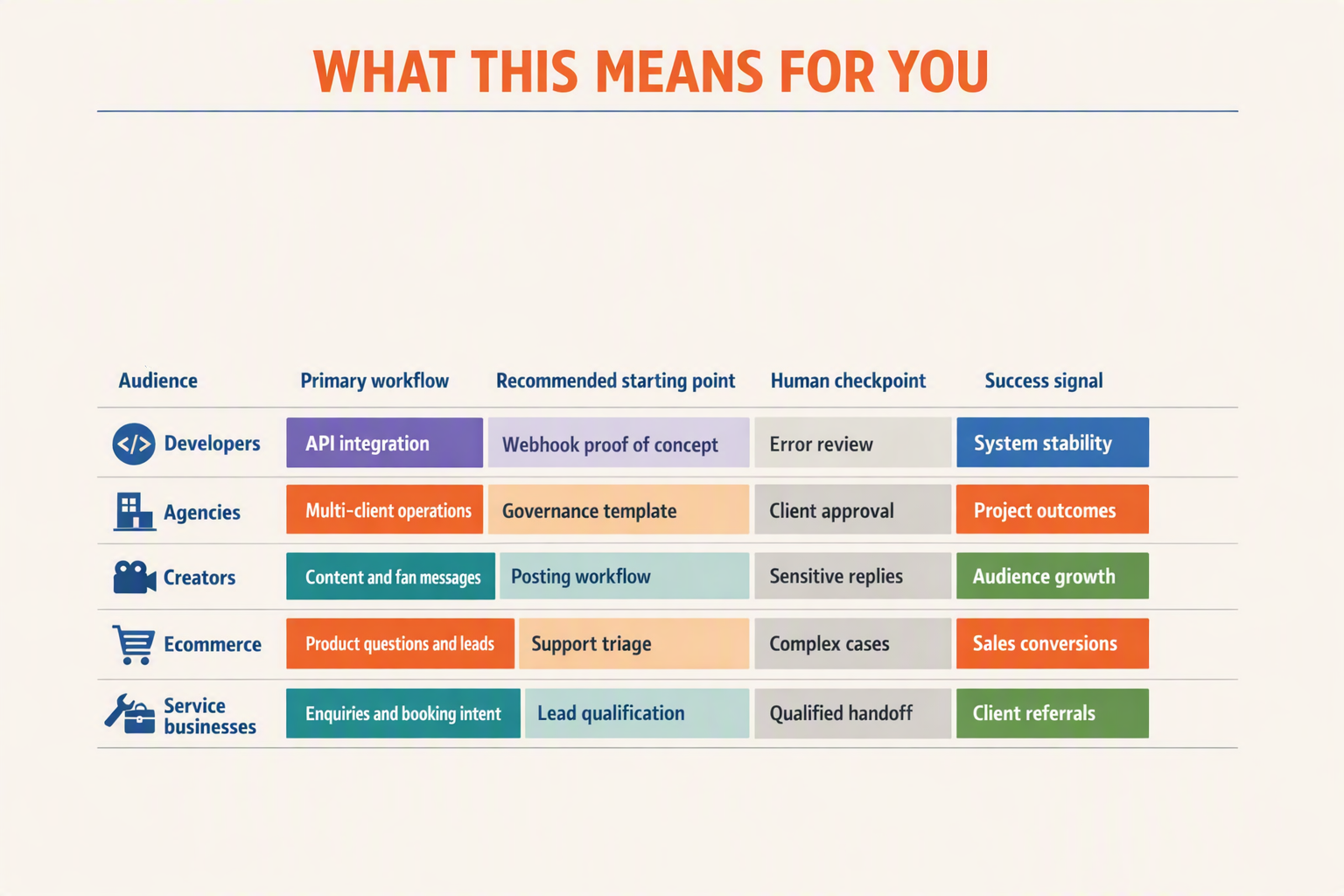
The right CallMissed setup depends on who owns the workflow, how many accounts are involved, and when a human must intervene. Developers typically need webhook-driven integrations, while agencies need repeatable account governance; creators, ecommerce teams, and service businesses benefit from narrower posting and messaging flows tied to clear escalation rules.
Setup decision matrix
| User type | Recommended automation setup | Primary Instagram workflows | Human-control point | Key implementation priority |
|---|---|---|---|---|
| Developers | Custom, webhook-driven integration using CallMissed’s newly added Meta APIs | Receive message events, process DMs, trigger AI assistance, send supported responses, publish approved content | Escalate low-confidence, sensitive, or policy-restricted conversations | Permissions, event handling, idempotency, logging, token security |
| Agencies | Reusable multi-client operating model with separate account access and approval queues | Client content posting, DM triage, lead capture, support routing | Client-specific approval and assigned-agent handoff | Keep credentials, roles, data, and audit trails isolated by client |
| Creators | Lightweight posting workflow plus inbox assistance | Prepare and publish content, classify inbound DMs, answer recurring questions | Creator approves important posts, partnerships, pricing, and personal replies | Preserve authentic voice rather than automating every response |
| Ecommerce businesses | DM-based product discovery and support workflow | Qualify purchase intent, answer catalog or order-policy questions, route support cases | Staff handle refunds, disputes, payment issues, and complex order exceptions | Connect each conversation to current product and policy data |
| Service businesses | Lead qualification and appointment-intent routing | Collect service type, location, budget, preferred time, and contact details | Sales or service staff confirm availability, scope, and commitments | Ask only necessary questions and avoid making unverified promises |
How to choose without overengineering
Use four questions to determine the smallest viable architecture:
- Is the objective publishing, messaging, or both?
A posting-focused workflow needs preparation, approval, publishing, and failure monitoring. A messaging workflow additionally needs webhook processing, conversation state, response logic, and escalation.
- Will AI answer directly or assist a person?
An AI DM agent can classify intent, retrieve approved information, and draft a response. Human approval is safer for regulated advice, complaints, refunds, negotiations, or any answer unsupported by the connected knowledge source.
- How quickly must a conversation reach a person?
Meta for Developers states that the Human Agent feature permits an authorized human response using the human_agent tag for up to seven days after the user’s message. That window supports delayed human service, but it should not become a target response time.
- Who controls account access?
Meta for Developers identifies instagram_business_basic and instagram_business_manage_messages as required permissions for relevant Instagram functionality. Meta also requires testers to hold suitable roles on both the Meta app and the Instagram professional account, so agencies should formalize onboarding and offboarding.
Minimum production safeguards
Whichever setup fits, include:
- Webhook verification and deduplication so retried events do not trigger duplicate responses.
- Per-account authorization boundaries for agencies or multi-brand organizations.
- Conversation logs and escalation reasons for operational review.
- Content approval states such as draft, approved, published, and failed.
- Fallback behavior when AI confidence is low or account access expires.
CallMissed’s confirmed Instagram capabilities cover posting and messaging through newly added Meta APIs. Build around those official capabilities rather than browser automation that simulates clicks, depends on changing page layouts, or handles credentials outside Meta’s supported authorization model.
Frequently asked questions about the Instagram automation API, posting API and Messaging API
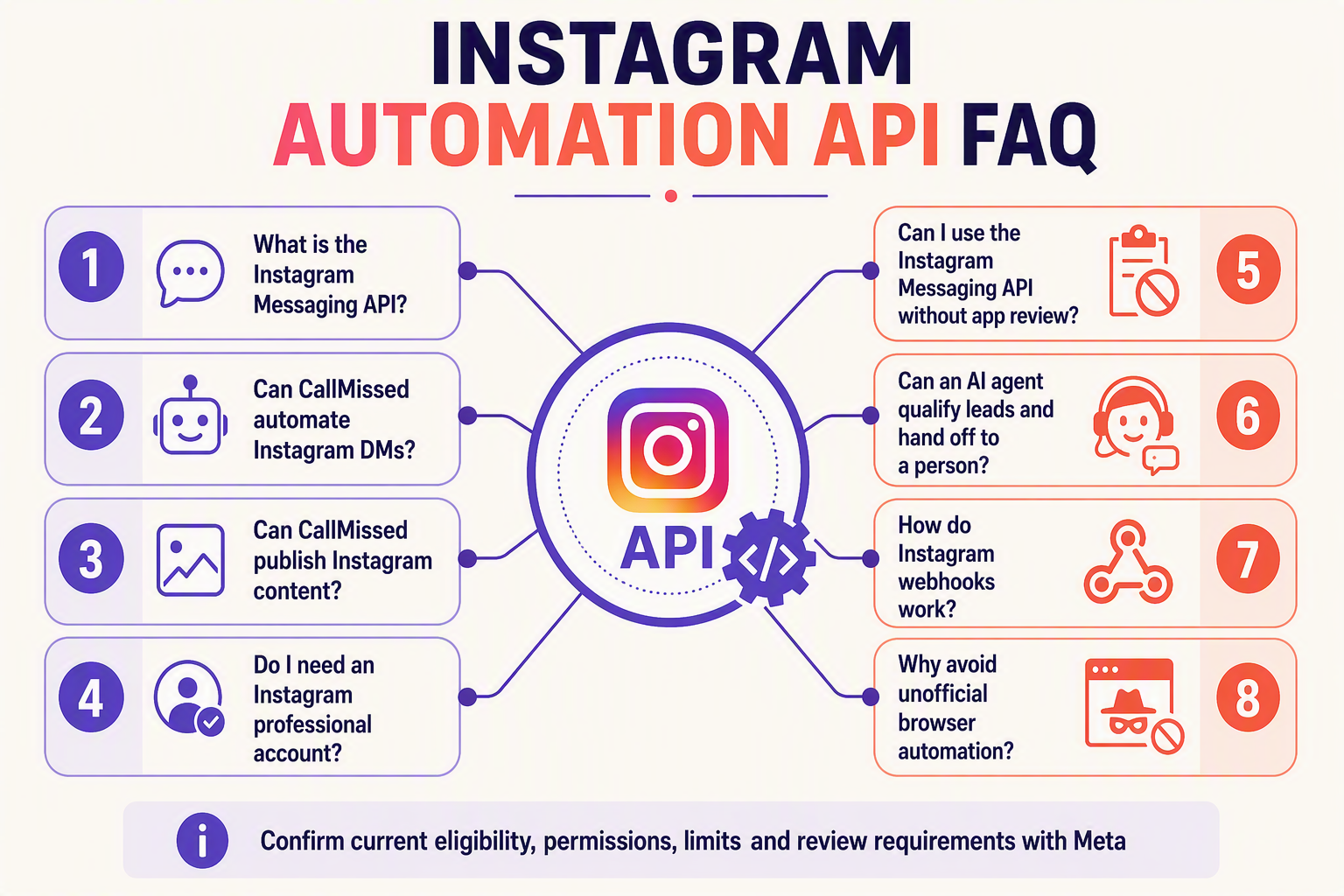
What do I need to use an Instagram automation API with a business account?
Which permissions are required for Instagram posting and messaging?
instagram_business_basic, instagram_business_content_publish, and instagram_business_manage_messages. Developers should verify the current Meta documentation and App Dashboard rather than assume that one permission covers posting, DMs, comments, insights, or webhooks.What can businesses automate with the Instagram posting API?
Can the Instagram Messaging API automate direct messages?
Can an Instagram automation API power an AI agent?
How do Instagram webhooks work for automated DMs?
How long can a business reply after an Instagram user sends a message?
How should an automated Instagram conversation hand off to a person?
Is an official Instagram automation API safer than browser bots?
How does CallMissed use the Instagram posting and Messaging APIs?
Conclusion
Instagram automation in 2026 should combine official Meta APIs, event-driven architecture, and deliberate human oversight. CallMissed’s newly added Meta API capabilities for Instagram posting and messaging give developers and businesses a policy-aligned foundation for connecting content workflows, direct messages, AI assistance, lead qualification, support, and human teams.
The central lesson is that effective automation does not mean removing people from every conversation. It means using software for predictable, high-volume tasks while preserving context and creating clear escalation paths for sensitive, ambiguous, or high-value interactions.
- Use official APIs rather than browser bots. Meta’s supported Instagram Platform provides a more dependable basis for publishing and messaging than unofficial automation that imitates user actions and may break when interfaces or enforcement systems change.
- Design messaging around webhooks and permissions. Meta for Developers specifies
instagram_business_basicandinstagram_business_manage_messagesfor relevant Instagram functionality. Webhooks can notify connected applications about message events, allowing AI DM agents and support workflows to respond without continuous polling.
- Treat AI as part of a routed workflow. AI agents can interpret common questions, collect lead requirements, and prepare policy-compliant responses, but businesses should define confidence thresholds and handoff rules. Meta for Developers states that the Human Agent feature can allow an authorized person to respond using the
human_agenttag for up to seven days after the user’s message.
- Build governance into content publishing. Instagram posting automation should include content preparation, validation, approval, publishing, status tracking, and exception handling—not simply scheduled submission.
What should teams watch next? Meta may continue evolving permissions, messaging policies, supported content formats, webhook behavior, and review requirements. Developers should therefore keep capabilities configurable, monitor Meta for Developers documentation, and avoid hard-coding assumptions about endpoints, limits, prices, or approval outcomes.
To stay ahead of this shift, explore CallMissed as a platform for official Instagram posting and messaging workflows—and ask one practical question: which Instagram interaction should your business automate first, and which should always remain human?
Related Reading
- Facebook Graph API Posting & Messenger Automation: 2026 CallMissed Guide
- Missed Call Automation in 2026: CallMissed Lead Recovery Workflow Guide
- WhatsApp Business API Chatbot for Support: CallMissed API Guide (2026)