
AI Productivity Tools for Business in 2026: Audit Guide


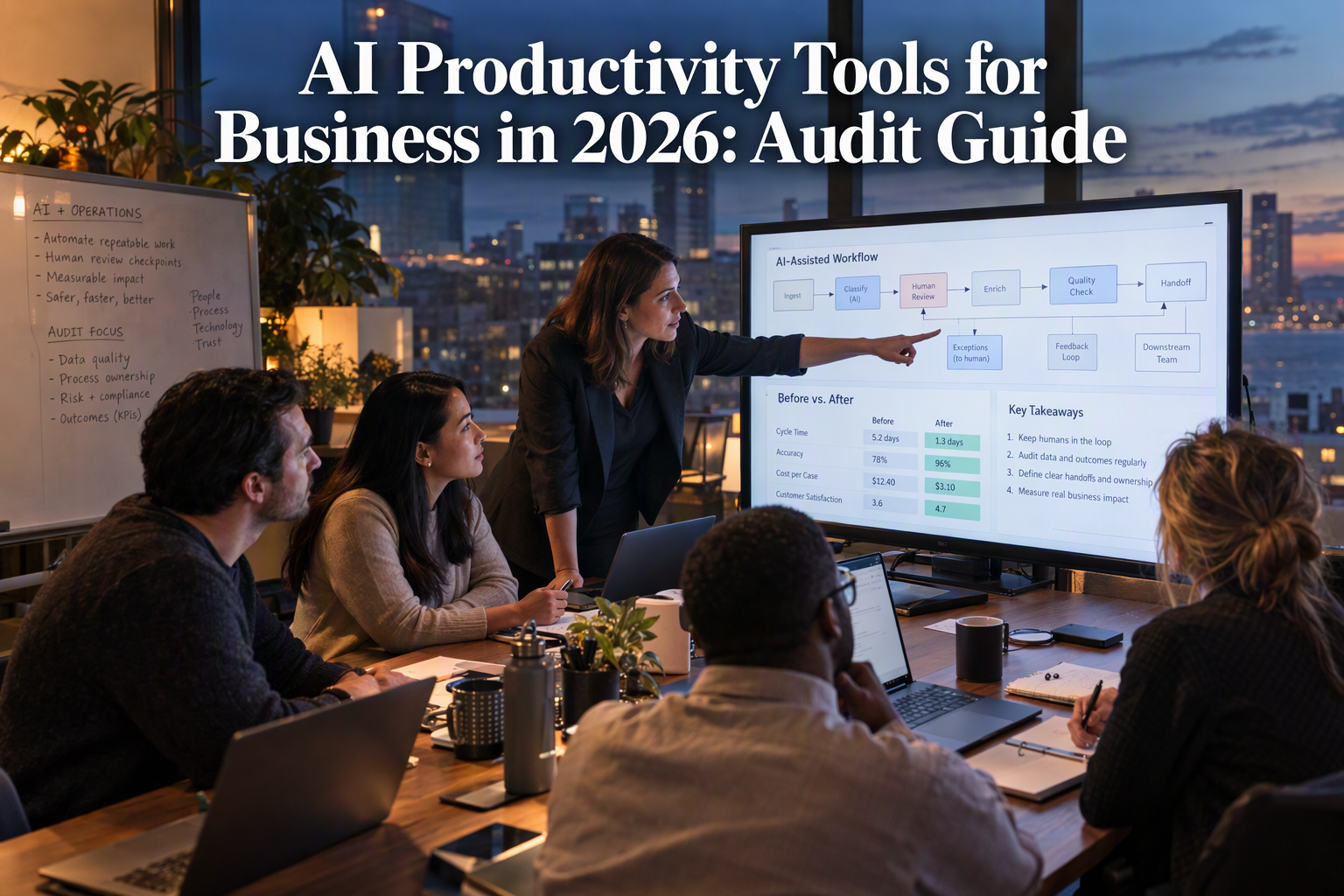
Use a practical audit to test AI productivity tools for business in 2026, measure net workflow gains, and catch review, rework, and cost traps.
AI Productivity Tools for Business in 2026: Audit Guide
What if the AI tools intended to save your team time are quietly adding work instead? AI Productivity Tools for Business in 2026 are spreading fast, but adoption alone is no guarantee of better results: according to McKinsey’s Technology Trends Outlook 2026, as reported on September 20, productivity declined in nearly 30% of companies after teams began using agentic AI tools.
That figure makes a practical audit more useful than another shopping list. An AI assistant may draft a response in seconds, while its human reviewer spends longer checking it, correcting errors, or moving information between disconnected systems. An autonomous agent may complete a task—but also create new approval steps, duplicate records, or confusing handoffs. The real question is not how many tools a business has adopted; it is whether they improve a measurable workflow without adding hidden costs or risk.
This guide shows you how to assess AI productivity tools through the work they actually support. You’ll learn how to map repetitive processes, establish a before-and-after baseline, and evaluate time saved alongside accuracy, rework, employee effort, customer experience, and operating cost. It also explains how to distinguish a useful AI agent from an impressive demo: look for a clearly bounded task, reliable access to the right context and systems, sensible human oversight, and a way to measure outcomes.
The audit is designed for practical decisions, not a wholesale technology reset. You can use it to identify where automation is appropriate, where a human should remain in control, and whether to improve, replace, or stop using a tool. For example, a support team might compare response time and resolution quality before and after introducing an AI-assisted workflow—not simply count how many replies the AI drafted.
Communication platforms are part of this shift: CallMissed, an AI customer-communication platform, offers voice and chat agents alongside an omnichannel inbox and built-in CRM. The broader lesson is to judge every capability by its effect on a real process.
By the end, you’ll have a repeatable way to evaluate AI productivity tools in 2026: start with a business problem, test against a baseline, check the trade-offs, and scale only when the evidence supports it.
Do AI Productivity Tools for Business in 2026 Improve Results? Audit the Whole Workflow, Not Just Task Speed

AI productivity tools improve business results only when they improve the end-to-end workflow—not just the speed of one task. A faster draft or automated action is not a productivity gain if it creates more checking, rework, handoffs, or customer friction elsewhere.
Why can AI make a task faster but a workflow slower?
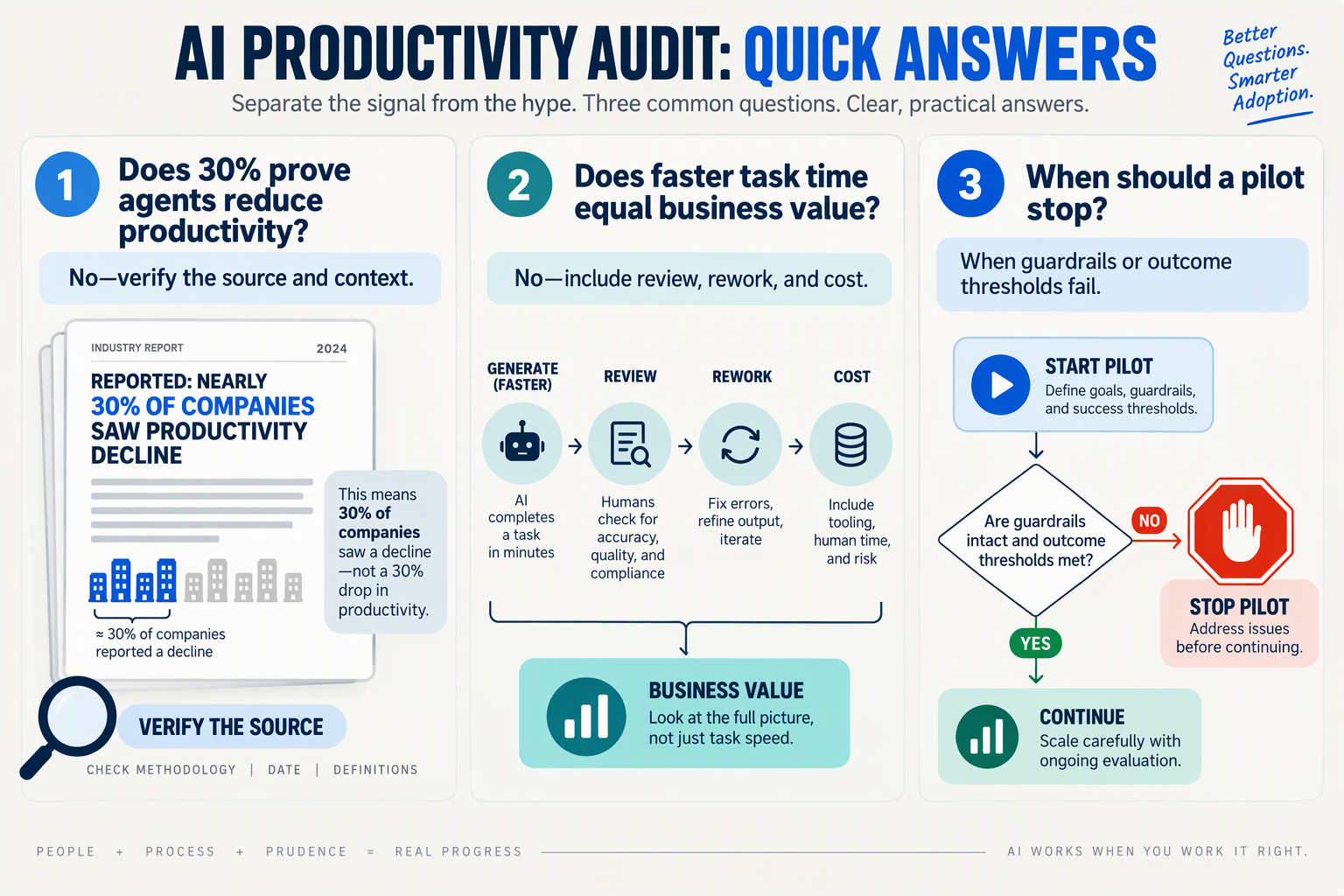
McKinsey’s Technology Trends Outlook 2026, as reported on September 20, 2026, found that productivity declined in nearly 30% of companies after they began using agentic AI tools. The result is a reminder to evaluate operational outcomes, not adoption or activity alone.
Consider an AI tool that drafts customer-service replies. The draft may arrive quickly, but the workflow can still lose time if staff must verify every claim, copy details into another system, or reopen cases the response failed to resolve. A useful audit follows the work from trigger to outcome and counts human effort at each step.
What should a business measure in an AI productivity audit?
Choose a recurring workflow with a clear business purpose, such as answering support questions, qualifying inbound leads, or summarising service calls. Compare a representative period before and after introducing AI, using the same definitions and similar case types.
Track a balanced set of measures:
- Time: elapsed time to completion and employee minutes spent per case.
- Quality: accuracy, completeness, resolution rate, or errors against a defined standard.
- Rework: corrections, reopened cases, duplicate records, and extra approval steps.
- Experience: customer satisfaction, wait time, or employee-reported effort.
- Cost and risk: software and usage costs, plus the impact of mistakes or missed handoffs.
Do not treat these measures as interchangeable. For instance, lower average handling time may look positive while resolution quality falls. A meaningful result states both what improved and what changed in the trade-offs.
How do you audit the whole workflow step by step?
- Map the current process. Record the trigger, each task and handoff, the systems involved, and the person accountable for completion.
- Set a baseline. Measure current time, quality, rework, and cost before changing the process. Note exceptions so unusual cases do not distort the comparison.
- Mark the AI’s actual boundary. Specify what the tool may do independently, what requires approval, and when a person takes over.
- Run a controlled pilot. Use a defined group or workflow and compare comparable cases. Log failures and human corrections, not just successful AI actions.
- Decide from the full result. Keep the tool when it improves outcomes without unacceptable quality, risk, or workload trade-offs; otherwise, adjust the workflow, narrow the task, or stop.
For example, a communications team can assess whether AI call notes reduce follow-up effort while preserving accurate records. As of September 2026, CallMissed offers voice agents with call recordings, transcripts, AI call notes, and call scoring against a business’s own QA rubrics—capabilities that can support measurement across more than the conversation itself.
When should an AI productivity tool be scaled?
Scale only after the pilot shows a repeatable improvement across the workflow and the responsible team can explain the result. Keep a human review or escalation path where errors carry material consequences, and continue checking quality after rollout. The practical test is simple: did the business complete useful work better, with fewer total resources or a stronger customer outcome—not merely faster at one step?
What Should You Prepare Before an AI Productivity Audit?: Owner, Workflow, Baseline Period, Systems, Measures, Risks
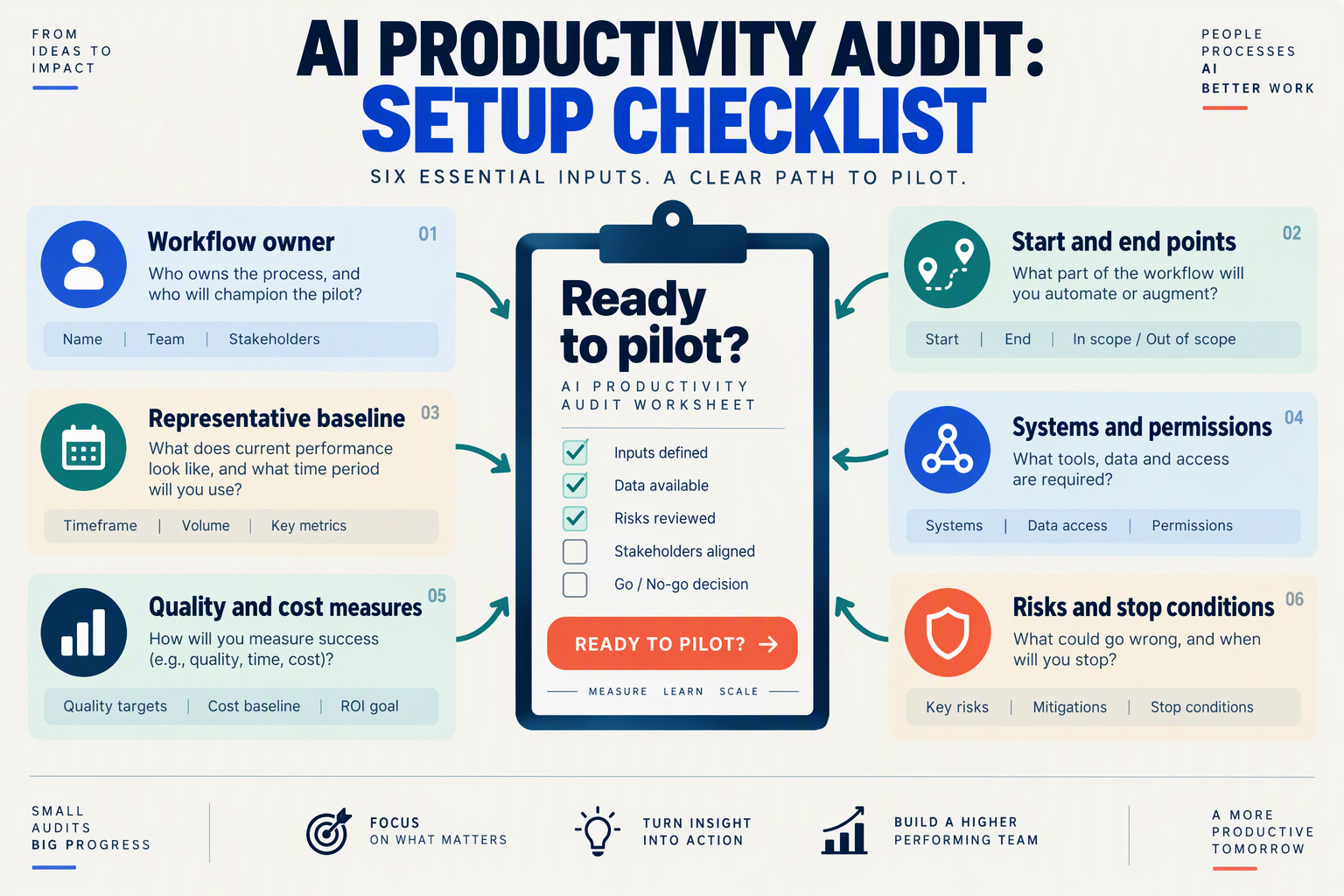
What should you prepare before an AI productivity audit?
Prepare a named owner, a clearly bounded workflow, a representative pre-AI baseline, a systems inventory, measurable outcomes, and a risk plan for each process you want to assess. McKinsey’s Technology Trends Outlook 2026, as reported by The Times of India on September 20, 2026, found productivity declined in nearly 30% of companies after teams began using agentic AI tools—one reason to document the starting point before changing the workflow.
Use the table as a working inventory. The periods below are practical starting recommendations, not universal benchmarks; extend them if the workflow is infrequent or demand varies substantially.
| Owner & workflow | Baseline period | Systems | Measures | Risks |
|---|---|---|---|---|
| Support lead — classify incoming requests and draft replies | Suggested: 2–4 weeks before AI; match the comparison period after launch | Help desk, knowledge base, messaging channels, AI tool | Time to first response; resolution time; accuracy; escalations; rework | Incorrect answers, missed handoffs, exposure of customer data |
| Sales operations lead — summarize calls and update CRM records | Suggested: 2–4 weeks, including varied call types | Phone or meeting system, CRM, recording and transcription tools | Minutes per record; completeness; correction rate; follow-up completion | Misattributed details, consent or retention issues, duplicate records |
| Finance lead — extract invoice details for review | Suggested: 2–4 weeks or a representative invoice batch | Email, document storage, accounting system, AI tool | Processing time; field-level accuracy; exception rate; cost per invoice | Incorrect payment details, sensitive-data access, missed exceptions |
| HR operations lead — answer routine policy questions | Suggested: 2–4 weeks, including common and edge-case questions | HR information system, approved policy sources, chat channel | Time to answer; answer accuracy; repeat questions; human referrals | Outdated policy, inappropriate advice, confidential employee information |
| IT service owner — triage and route internal tickets | Suggested: 2–4 weeks, covering normal and peak demand if possible | Ticketing system, identity tools, knowledge base, AI tool | Time to route; correct category; reopen rate; resolution time | Misrouting urgent incidents, excessive permissions, automation without escalation |
How do you make the baseline useful?
Record the work as it happens, not just the time an employee spends interacting with AI. For a support reply, for example, include drafting, review, edits, copying information between systems, and any later correction. Otherwise, the audit may count fast generation while missing the extra effort required to make the response usable.
For each workflow, capture:
- Volume and mix: number of cases and their complexity, so a quiet week is not mistaken for an AI improvement.
- Human effort: active handling time, review time, rework, and handoffs.
- Outcome quality: accuracy, completion, customer or employee experience, and escalations.
- Operating cost: relevant tool charges and the cost of any additional review or support.
Keep definitions consistent before and after deployment. If “resolution time” means elapsed time in the baseline but staff effort in the follow-up, the comparison will mislead.
Who should own the audit?
Assign one accountable process owner and involve the people who perform or review the work. Before the trial, agree on the measurement window, the data source for each measure, and who can stop or escalate the AI workflow. That preparation gives the audit a credible starting point and makes the eventual decision—expand, revise, or discontinue—traceable to evidence.
How Do You Choose a Workflow and Establish a Reliable Baseline? (Getting Started)

Choose a workflow that is frequent, measurable, and bounded—and record how it performs before introducing AI. A reliable baseline captures the whole process, including review, rework, handoffs, and customer outcomes, so a faster AI-generated task is not mistaken for a genuine productivity gain.
Which workflow should you audit first?
Start with a recurring process that has a clear beginning and end, identifiable owners, and enough volume to compare results. Avoid starting with a vague goal such as “use more AI” or a process so unusual that a short test cannot provide useful evidence.
Score candidate workflows against four practical criteria:
- Frequency: Does the task happen often enough to measure?
- Consistency: Are the steps and inputs reasonably predictable?
- Measurability: Can you track time, quality, cost, and completion?
- Risk: Can you test safely, with a person reviewing consequential decisions?
For example, a support team could examine how an incoming customer question moves from receipt to resolution. The workflow might include finding relevant information, drafting a reply, checking it, sending it, and updating the customer record. That full path is a better audit unit than “time to draft a reply,” because the draft may create extra review or recordkeeping work.
Communication workflows can be good candidates when the scope is specific. CallMissed, an AI customer-communication platform, offers voice and chat agents alongside an omnichannel inbox and built-in CRM; a business could assess one defined customer interaction workflow rather than assume that adding these capabilities will improve every process.
How do you establish a baseline before using AI?
Measure the current process under ordinary operating conditions before changing tools or instructions. McKinsey’s Technology Trends Outlook 2026, reported on September 20, 2026, found that productivity declined in nearly 30% of companies after teams began using agentic AI tools. That finding reinforces why the comparison should cover outcomes and effort across the workflow, not just speed at one step.
For a representative sample, record:
- Volume and completion: How many cases arrive, and how many are completed or resolved?
- End-to-end time: Measure elapsed time and hands-on employee time separately.
- Quality: Track errors, corrections, escalations, repeat contacts, or another relevant quality measure.
- Extra effort: Count review, rework, duplicate entry, and handoffs between people or systems.
- Customer impact and cost: Where available, record response or resolution time, customer feedback, and operating cost per completed case.
Use consistent definitions and a defined observation period. If some cases are unusually complex, tag them rather than letting a shift in case mix distort the comparison. Keep the source data, assumptions, and measurement method documented so the team can repeat the audit.
What makes the before-and-after comparison trustworthy?
Compare similar work under similar conditions. If possible, test the AI-assisted process on a limited group while another comparable group continues with the existing process. If that is not practical, compare a clearly defined period before and after launch, and note changes such as staffing, demand, or policy.
Set success criteria before the trial—for example, lower end-to-end handling time without higher error or rework rates. An illustrative target might be “reduce median handling time while keeping escalation and correction rates within agreed limits”; the thresholds should reflect your business, not a generic benchmark. This baseline turns an AI productivity audit into a decision: expand the workflow, revise it, or stop.
How Do You Run a Step-by-Step Agentic AI Productivity Audit? Map, Baseline, Set Guardrails, Pilot, Score, Then Expand
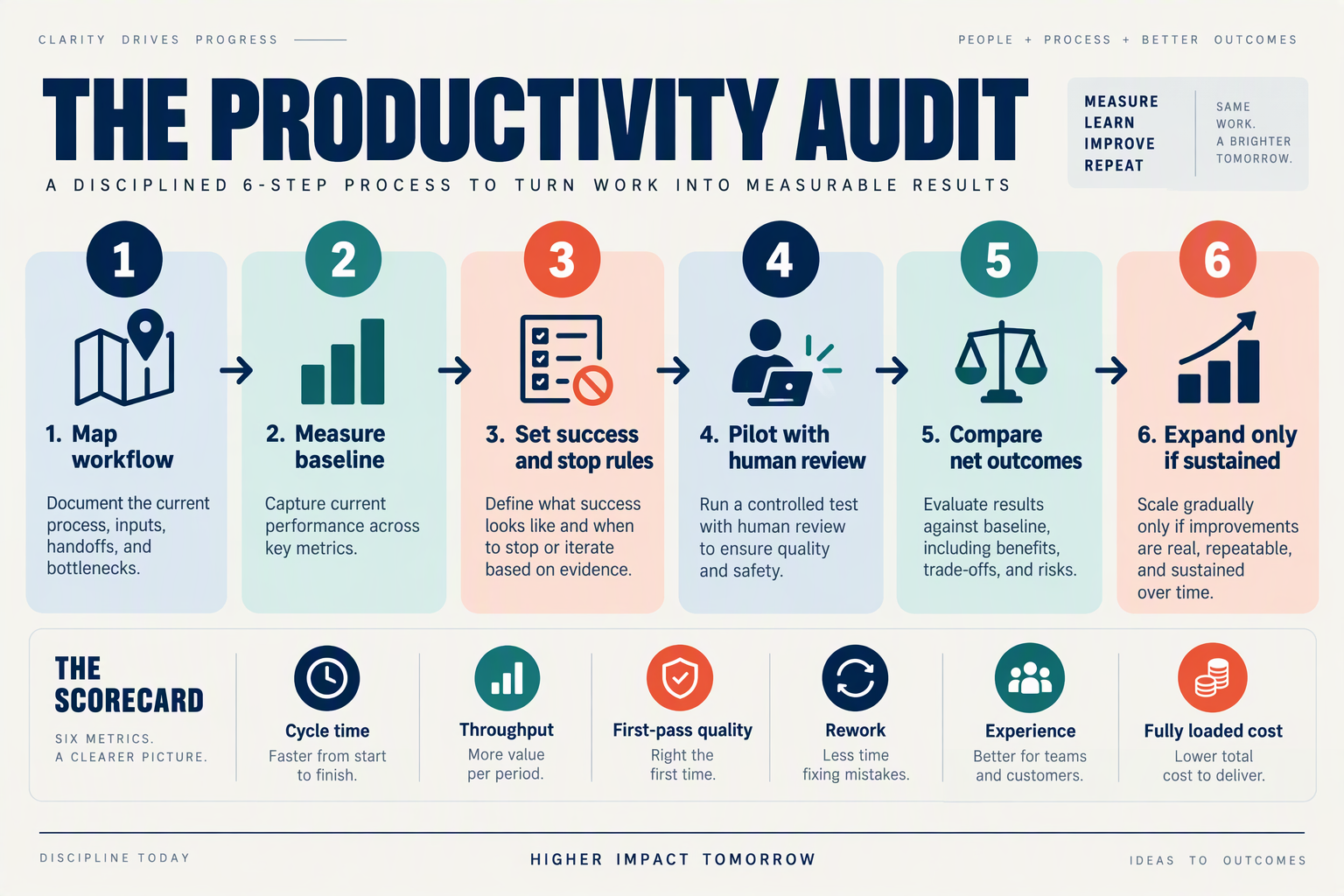
An agentic AI productivity audit is a controlled test of whether an AI-supported workflow improves end-to-end results without adding unacceptable risk or work. Map the process, capture a baseline, set guardrails, run a bounded pilot, score the trade-offs, and expand only when evidence supports it.
How do you map the workflow before choosing an AI tool?
Start with one recurring process—not a department-wide ambition to “use more AI.” Trace the work from trigger to completed outcome, naming the people, systems, decisions, and handoffs involved.
For a customer-support workflow, for example, map how a request arrives, how an agent finds the answer, whether another team must approve it, and how the resolution is recorded. Mark where delays, duplicate entry, or repeat contacts occur. Then identify the specific step an AI tool might perform and what must remain with a person.
A useful map answers three questions:
- What outcome matters? For example, a correctly resolved request—not merely a drafted reply.
- Who owns each step? Include the person responsible when the AI cannot proceed.
- What information and systems are involved? Note permissions, records, and handoffs the workflow depends on.
What should you measure before the pilot?
Record a baseline for the existing process before changing it. Use a consistent sample and timeframe, and measure more than task speed: include completion time, error or correction rate, rework, human review effort, customer outcome, and operating cost where available.
For example, an illustrative support baseline might track median time to resolution, the share of replies needing correction, and minutes spent reviewing each case. Keep the definitions fixed during the pilot; otherwise, an apparent improvement may reflect a changed measurement rather than a better workflow.
McKinsey’s Technology Trends Outlook 2026, as reported on September 20, 2026, found that productivity declined in nearly 30% of companies after teams began using agentic AI tools. That finding is a reason to measure the whole process, not assume adoption itself is progress.
Which guardrails should you set before an AI agent acts?
Define the agent’s boundaries in writing before testing. Specify which tasks it may complete, which actions require approval, what information it may access, and when it must stop and hand work to a person.
For a customer-facing pilot, guardrails could include human approval before issuing a refund or changing an account, escalation when the agent lacks reliable information, and a review process for sampled interactions. Assign an owner to monitor exceptions and a clear way to pause the pilot if errors or customer harm emerge.
How do you run a safe, useful pilot?
Test the agent on one bounded workflow with a named team and a defined review period. Compare pilot results with the baseline using the same measures, and record failures as well as successful completions. Keep a human in the loop where a wrong action could affect money, access, safety, or customer trust.
Avoid expanding scope mid-test. If the agent performs well on routine cases but struggles with exceptions, document that boundary; it may still be useful when exceptions route to a person.
How do you score results and decide whether to expand?
Score the pilot against a small set of agreed outcomes: time saved, quality, rework, human effort, customer impact, and cost. Treat faster completion as a benefit only if quality and customer outcomes hold steady or improve.
- Expand when results are repeatable and guardrails work.
- Improve and retest when benefits are promising but review effort or errors remain high.
- Stop when the workflow becomes slower, riskier, or more costly overall.
Scale gradually: add one workflow or team at a time, retain the same measures, and recheck results after each expansion.
Which Agentic AI Productivity Tools Should You Evaluate?: Fit, Reliability, Integrations, Controls, Observability, Security, Usability, Total Cost
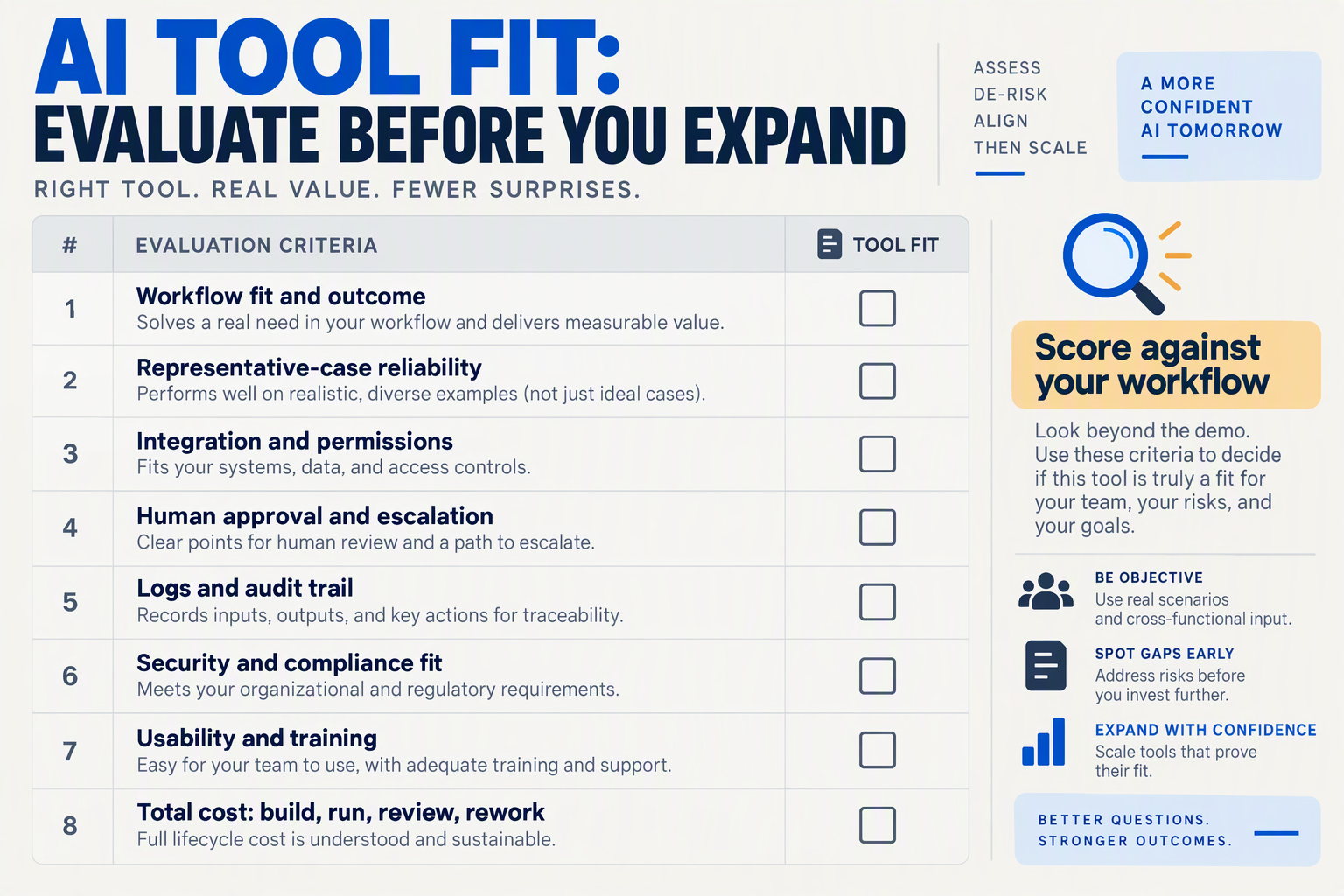
Choose tools by whether they improve a defined workflow under realistic conditions—not by the number of features in a demo. Score each candidate against the same task, baseline, and evidence requirements so that “faster” does not obscure extra review, rework, or operating cost.
What should you test before selecting an agentic AI tool?
Run a small, bounded pilot using representative work, including exceptions and handoffs. For each dimension below, record what you tested, what evidence you collected, and whether the tool passes your team’s requirements.
| Dimension | What to test | Evidence to collect | Audit question |
|---|---|---|---|
| Fit | Can the tool complete a specific, repeatable task with the context available in your workflow? | Completion rate, exceptions, human time saved, and quality against your existing process | Does it solve a real bottleneck, or add a new step? |
| Reliability | Repeat the same task with routine inputs, edge cases, and interruptions. | Errors, incomplete actions, recovery behavior, and consistency across runs | Can the team predict when it needs to intervene? |
| Integrations | Test the systems and data the agent must read from or update. | Correctness of retrieved context, successful updates, and manual copy-paste still required | Does it work inside the actual workflow? |
| Controls | Check permissions, approval points, escalation paths, and the ability to stop or correct an action. | Test logs showing what required approval and how handoffs worked | Can people retain control over consequential actions? |
| Observability | Check whether staff can understand what the agent did and investigate failures. | Available transcripts, action histories, explanations, alerts, or evaluation results | Can a supervisor diagnose a bad outcome? |
| Security | Review access, data handling, retention, and administrative controls against company policy. | Vendor documentation and results from your organization’s security review | Is the tool acceptable for the data and users involved? |
| Usability | Ask intended users to complete the workflow, including a correction or escalation. | Task completion, user feedback, training needs, and review time | Is the workflow easier for the people who will use it? |
| Total cost | Include usage, setup, human review, integration work, and ongoing maintenance. | A cost per completed task, not just a subscription or token price | Does the measured benefit exceed the full cost? |
How do you compare tools on cost and language coverage?
Compare cost per successful outcome across the same workload. A low unit price can still be expensive if the tool requires extensive checking or fails often; include the time people spend reviewing, fixing, and escalating its work.
For communication workflows, check pricing units and language support carefully. As of September 2026, CallMissed lists AI voice-agent rates of ₹4, ₹5, or ₹6 per minute, depending on the plan; calls have a 30-second minimum, phone carriage is billed separately, and a call that never connects costs nothing. Those details make a useful checklist for any metered tool: identify what is included, what is billed separately, and how failed or short tasks are charged.
Language specifications also need precision. CallMissed supports speech recognition in 22 Indian languages plus English, including code-mixed speech such as Hinglish; its natural text-to-speech voices cover 10 Indian languages plus English. If a workflow serves regional-language customers, test recognition and generated speech separately with realistic accents and code-mixed examples.
How should you turn the evaluation into a decision?
Use a short decision record for each candidate:
- Pass: meets the workflow’s quality, control, security, and cost thresholds.
- Pilot further: shows value, but a specific risk or integration needs more testing.
- Stop: adds review or rework, lacks required controls, or fails to justify its full cost.
Keep thresholds consistent across candidates, and record exceptions rather than averaging them away. That makes the audit useful after launch too: teams can revisit the same measures when workflows, prices, or tool capabilities change.
What Common AI Productivity Mistakes Should Businesses Avoid?: Review Bottlenecks, Poor Fit, Duplicate Work, Rework, Weak Adoption
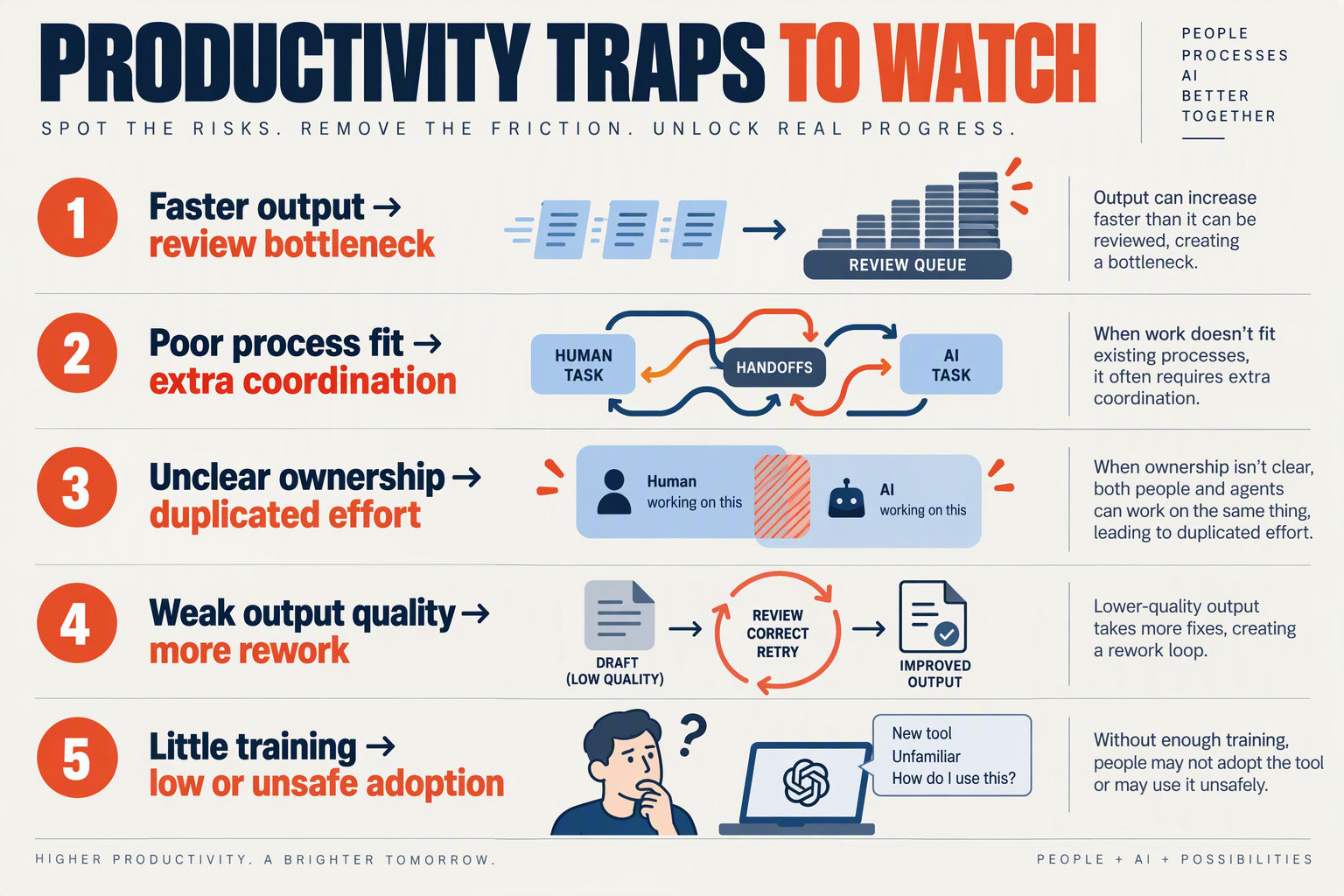
AI productivity mistakes usually appear at the handoffs: a tool may produce output quickly while increasing review time, creating duplicate records, or leaving employees unsure when to trust it. McKinsey’s Technology Trends Outlook 2026, cited in reporting on September 20, 2026, found that productivity declined in nearly 30% of companies after they began using agentic AI tools.
Which AI productivity mistakes should a business audit first?
| Mistake | Warning sign | What to check | Practical correction |
|---|---|---|---|
| Review bottlenecks | AI output waits in a queue for approval, or reviewers spend more time checking than they would doing the task. | Track approval wait time and review minutes per output; sample errors by type and severity. | Narrow the agent’s permissions or task scope. Route only exceptions or higher-risk cases to a person, and make review criteria explicit. |
| Poor fit | The workflow depends on judgment, missing context, or unusual cases the tool handles inconsistently. | List the task’s inputs, decision points, exceptions, and consequences of an error. | Start with a bounded, repeatable step—such as categorising routine enquiries—rather than handing over an entire customer interaction. Keep a human decision-maker for consequential exceptions. |
| Duplicate work | Staff copy AI-generated details into another system, or customers are asked for information they have already provided. | Trace one case from intake to closure and note every re-entry, channel switch, and system update. | Reduce unnecessary handoffs and define which system owns each record. Test whether information reaches the right destination before expanding automation. |
| Rework | Faster first drafts are offset by corrections, reopened cases, or follow-up messages clarifying errors. | Review a sample of completed tasks for correction time, repeat contacts, and unresolved outcomes—not just generation speed. | Feed recurring failure patterns into prompts, knowledge sources, or workflow rules; pause automation when quality falls below the team’s agreed standard. |
| Weak adoption | Employees bypass the tool, use inconsistent workarounds, or cannot explain when to escalate to a person. | Ask users where the process feels slower or unclear; compare usage with completed-work quality and handoff rates. | Train around real cases, publish escalation rules, and invite frontline staff to flag friction. Treat low usage as diagnostic evidence, not automatically as resistance. |
How can teams distinguish a useful check from unnecessary review?
Review is valuable when it catches material errors or protects customers; it is wasteful when every low-risk output receives the same manual scrutiny. Set review rules by task risk, then examine both the time spent and the consequences of missed errors. For example, a routine internal summary may need spot checks, while an action that changes a customer’s account may warrant approval.
A communication workflow also needs clear ownership across channels. As of September 2026, CallMissed offers an omnichannel inbox and built-in CRM; these capabilities illustrate why an audit should check whether information moves through the workflow rather than requiring staff to reconstruct a conversation across disconnected records.
What should a business do when an AI workflow underperforms?
Use a short decision sequence:
- Locate the friction: identify whether the delay comes from review, poor task fit, duplicate entry, rework, or low adoption.
- Change one thing: narrow the task, adjust the approval rule, or clarify ownership before adding another tool.
- Recheck the whole process: include human effort, quality, customer impact, and operating cost in the comparison.
- Decide deliberately: improve the workflow, keep human control over the task, or stop using the tool if it continues to add more work than it removes.
The goal is not maximum automation. It is dependable output with fewer avoidable steps for employees and customers.
Frequently Asked Questions
Do AI Productivity Tools for Business in 2026 really reduce productivity at 30% of companies?
How do you measure net productivity gains from AI agents?
Which metrics should a business track when testing AI Productivity Tools for Business in 2026?
How can I tell whether an AI productivity pilot caused an improvement?
When should a business stop an AI agent pilot?
How long should an AI productivity pilot run before deciding whether to scale?
What Resources and Next Steps Help You Apply the Audit? Worksheet, Scorecard, Source Checks, and Workflow Examples

Use a one-page worksheet, a consistent scorecard, and a source-check routine to turn the audit into a decision: improve, expand, pause, or stop. Apply them to one workflow at a time, and compare results with a baseline rather than relying on tool adoption or task speed alone.
What should an AI productivity audit worksheet include?
Copy this template for each workflow. Keep the answers specific enough that another team member could repeat the test.
- Workflow and owner: What process is being assessed, and who is accountable?
- Start and finish: What event begins the work, and what counts as completion?
- Baseline: Before AI, record typical handling time, volume, error or rework rate, handoffs, and customer or employee impact. Note the measurement period and data source.
- AI’s role: What does the tool draft, decide, retrieve, or execute? Which actions require human approval?
- Test conditions: Record the tool and version, users, sample size, dates, and exceptions.
- After-test results: Measure the same outcomes as the baseline, including review time, correction effort, and new work created.
- Decision and next review: State what changes, who will make them, and when the workflow will be checked again.
For instance, a support team might compare total time from incoming message to resolved case—not just time to generate a reply. If AI speeds up drafting but increases corrections or transfers, the worksheet makes that trade-off visible.
How can teams score an AI workflow consistently?
Score each category from 1 (worse than baseline) to 5 (clearly better), using the same test period and evidence for every option:
| Measure | What to compare |
|---|---|
| Time | End-to-end completion time, including review |
| Quality | Accuracy, resolution, or task acceptance |
| Rework | Corrections, repeat contacts, or reopened tasks |
| Effort | Human review and exception-handling time |
| Risk | Privacy, access, approval, and failure controls |
| Cost | Tool, integration, and operating costs |
Do not let a high average hide a serious failure. Set minimum acceptable standards for quality and risk before testing; a workflow that misses either should not scale just because it saves time. Treat the score as a decision aid, not a universal benchmark.
How should you check AI productivity claims and sources?
Check who published the claim, when it was published, what evidence it relies on, and what “productivity” measures. Look for the original report or dataset, the population studied, the comparison period, and whether results apply to your task and organization.
The Times of India reported on September 20, 2026, that McKinsey’s Technology Trends Outlook 2026 found productivity declined in nearly 30% of companies after agentic AI adoption. That statistic is a reason to audit carefully—not proof that any specific tool will reduce productivity. When several articles repeat the same finding, check whether they offer independent evidence or refer back to one report.
What workflow examples make a useful first test?
Choose a frequent, bounded process with a clear owner and measurable outcome. Examples include summarizing support conversations, drafting answers from approved knowledge, or routing a request to the right person. Keep human review in place for consequential decisions and track exceptions as part of the workload.
For communication workflows, CallMissed offers AI voice and chat agents, an omnichannel inbox, and a built-in CRM; as of September 2026, its platform can also push AI call notes—including summaries and action items—to a CRM. A team could test whether that reduces total note-taking and follow-up time while checking accuracy and missed actions. Start small, review the evidence, then expand only when the complete workflow—not just one AI task—shows a worthwhile improvement.
Conclusion
AI productivity tools for business in 2026 should earn their place by improving the whole workflow—not merely completing individual tasks faster. McKinsey’s Technology Trends Outlook 2026, as reported on September 20, found productivity declined in nearly 30% of companies after teams began using agentic AI, making measurement essential.
Use this audit to turn adoption into evidence-based decisions:
- Map the workflow and identify where delays, repeat work, handoffs, or customer friction occur.
- Set a baseline before introducing or changing a tool, then compare end-to-end results.
- Measure trade-offs: time saved matters alongside accuracy, rework, employee effort, customer experience, and operating cost.
- Keep oversight proportional to the task, and improve, replace, or stop using tools according to the evidence.
Looking ahead, watch whether AI agents can work reliably with the right context and systems while reducing the need for correction and extra approvals. Communication platforms are part of that shift: CallMissed offers voice and chat agents alongside an omnichannel inbox and built-in CRM, capabilities businesses can assess against real processes.
The goal is not to automate everything; it is to make useful improvements repeatable. Which workflow will you measure first—and what result would convince you that AI is genuinely making it better?
Related Reading
- Manus AI Automation in 2026: Hands-On Guide to Business Workflows
- Best AI Answering Service for Small Business in 2026: 7 Compared
- AI Receptionist: Missed-Call Automation Guide for Small Business in 2026
Sources
Discussion
Related Posts



Ready to automate customer conversations?
Launch AI voice agents and WhatsApp bots with CallMissed — one API, 22+ Indian languages.