Manus AI Automation in 2026: Hands-On Guide to Business Workflows


Learn Manus AI automation for research, enrichment, reports, browser tasks, approvals, risk controls, costs, and a safe 2026 pilot.
Manus AI Automation in 2026: Hands-On Guide to Business Workflows
What if an AI agent could research a market, enrich a lead list, update a spreadsheet, draft a report, and repeat the workflow next Monday—without requiring a custom integration for every step? Manus AI automation in 2026 makes that possibility increasingly practical, but reliable business use depends on far more than writing a clever prompt.
Why Manus matters now
Traditional chatbots generate answers; agentic systems attempt to complete multi-step work. Manus describes its platform as an autonomous AI agent that can plan, execute, and deliver finished outputs, while Manus Browser Operator extends that model into websites and business applications. Manus says Browser Operator runs inside a local browser environment and can take page-level actions “as if you were doing it yourself,” turning the browser from a passive viewer into an active agent.
The number of supported automation surfaces is also expanding. Manus’s 2026 enterprise guide names Gmail, Slack, calendar connectors, a browser operator for applications without APIs, and an API for triggering tasks programmatically. Together, these capabilities create a practical bridge between AI reasoning and everyday operational systems.
However, demonstrated functionality should not be confused with guaranteed autonomy. Browser interfaces change, research sources conflict, authentication expires, and generated documents can contain plausible but incorrect details. First-party Manus demonstrations establish that these capabilities exist; they do not prove that every workflow will run accurately, securely, or economically under production conditions.
What this hands-on guide covers
This guide will show you how to turn a business outcome into a controlled Manus workflow, including:
- Conducting research with traceable sources rather than surface-level summaries
- Enriching lead lists while protecting personal and commercially sensitive data
- Producing reports, presentations, spreadsheets, and document revisions
- Scheduling recurring tasks with clear completion criteria
- Operating browser-based tools that lack conventional APIs
- Adding human approval gates before emails, uploads, purchases, or record changes
- Recovering from failed steps, stale sessions, missing fields, and partial outputs
- Setting credit budgets, retry limits, and safe pilot boundaries
You will also learn where Manus should complement specialist infrastructure rather than replace it—for example, platforms such as CallMissed can handle production-grade AI voice, WhatsApp Business calling, and multilingual customer engagement while an agent coordinates surrounding operational work.
The objective is not “full autonomy” on day one. It is a measurable workflow that saves time, preserves accountability, and fails safely.
How can you use Manus AI automation for business workflows in 2026? A practical answer, best-fit tasks, limits, and quick-start process
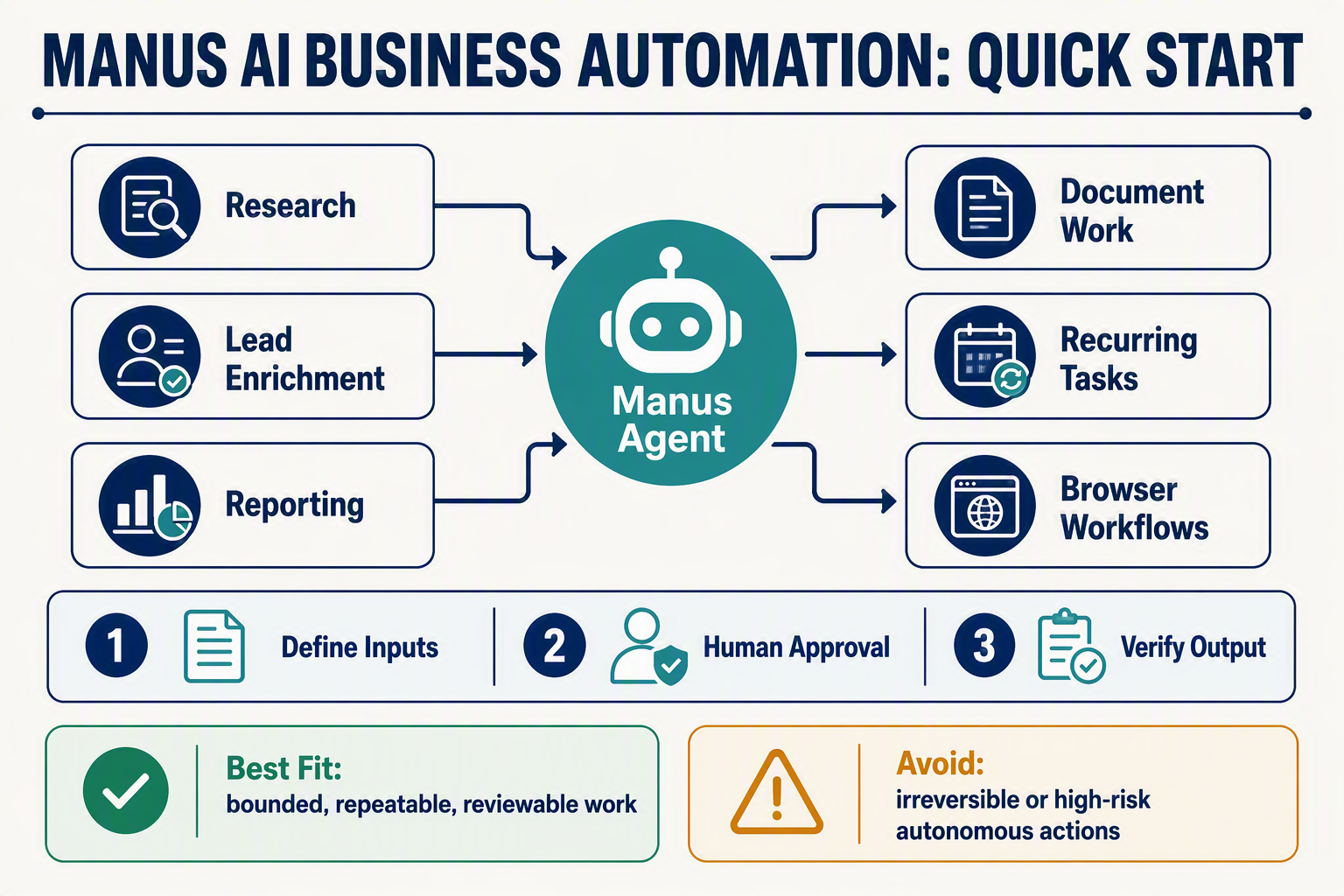
Manus AI automation is best used for bounded, multi-step knowledge workflows that combine research, reasoning, files, and browser actions. In 2026, the safest quick start is to automate one repeatable, low-risk process, define an approval checkpoint, and measure accuracy, time saved, failures, and credit consumption before expanding.
Best-fit business tasks
Manus is a practical fit when a workflow has a clear input, a verifiable output, and rules that can be written down. Strong starting points include:
- Research: Compare competitors, collect market evidence, extract information from approved sources, and produce a cited briefing.
- Lead-list enrichment: Add company size, industry, headquarters, public contact channels, or qualification notes to an existing spreadsheet.
- Reporting: Combine spreadsheet data, summarize changes, identify anomalies, and draft weekly operational reports.
- Document work: Review contracts against a checklist, reformat proposals, classify files, or turn source material into presentations.
- Recurring tasks: Repeat a Monday-morning scan, monthly account review, or scheduled management summary.
- Browser workflows: Retrieve data or enter approved information in applications that do not offer suitable APIs.
Manus’s 2026 enterprise guide lists Gmail, Slack, calendar connectors, Browser Operator, and an API for programmatic task triggering. These are first-party descriptions of available automation surfaces—not independent evidence of accuracy, uptime, or suitability for regulated operations.
Where Manus adds value—and where it does not
The strongest use case is orchestration across several steps, such as finding approved sources, updating a worksheet, generating a chart, and drafting an executive summary. Manus says its Browser Operator works directly in a local browser environment and can act on pages “as if you were doing it yourself,” making authenticated web applications accessible when conventional API automation is unavailable.
Avoid unattended use when mistakes could create irreversible consequences. Require human approval before:
- Sending external emails or messages
- Changing CRM, payroll, financial, or customer records
- Uploading confidential files
- Accepting legal terms or submitting regulatory forms
- Making purchases, refunds, transfers, or account changes
Manus can coordinate work around specialist systems, but it should not automatically replace them. For example, CallMissed can provide production-facing AI voice agents, WhatsApp Business calling, and engagement across 22 Indian languages, while Manus prepares research, updates supporting documents, or assembles reviewed campaign inputs.
A five-step quick-start process
- Choose one bounded outcome. Start with “produce a cited Friday competitor brief,” not “manage market intelligence.”
- Define inputs and permitted systems. List approved websites, folders, spreadsheets, accounts, and data classifications.
- Specify the output contract. Set required fields, file format, citation rules, freshness date, and acceptance criteria.
- Add control points. Cap retries and credits; require approval before writes, messages, uploads, or transactions.
- Run a supervised pilot. Compare the result with a human-created baseline and record completion time, correction time, missing fields, unsupported claims, and failed steps.
A useful starter instruction is: “Research these 20 companies using only the approved sources; update the specified columns; cite every factual field; mark unavailable data as ‘not found’; do not contact anyone; stop and request approval before writing to the CRM.”
Practical limits to plan for
Expect failures from changed page layouts, expired sessions, CAPTCHAs, inaccessible sources, ambiguous names, conflicting evidence, and malformed files. Configure the workflow to preserve partial results, log sources and actions, avoid guessing, and escalate uncertainty. The right 2026 benchmark is not whether Manus completes an impressive demo once; it is whether a controlled workflow produces reviewable outputs consistently, within an agreed error and cost budget.
What is the Manus AI autonomous agent, and how is it different from chatbots, scripts, RPA, and specialized business software?
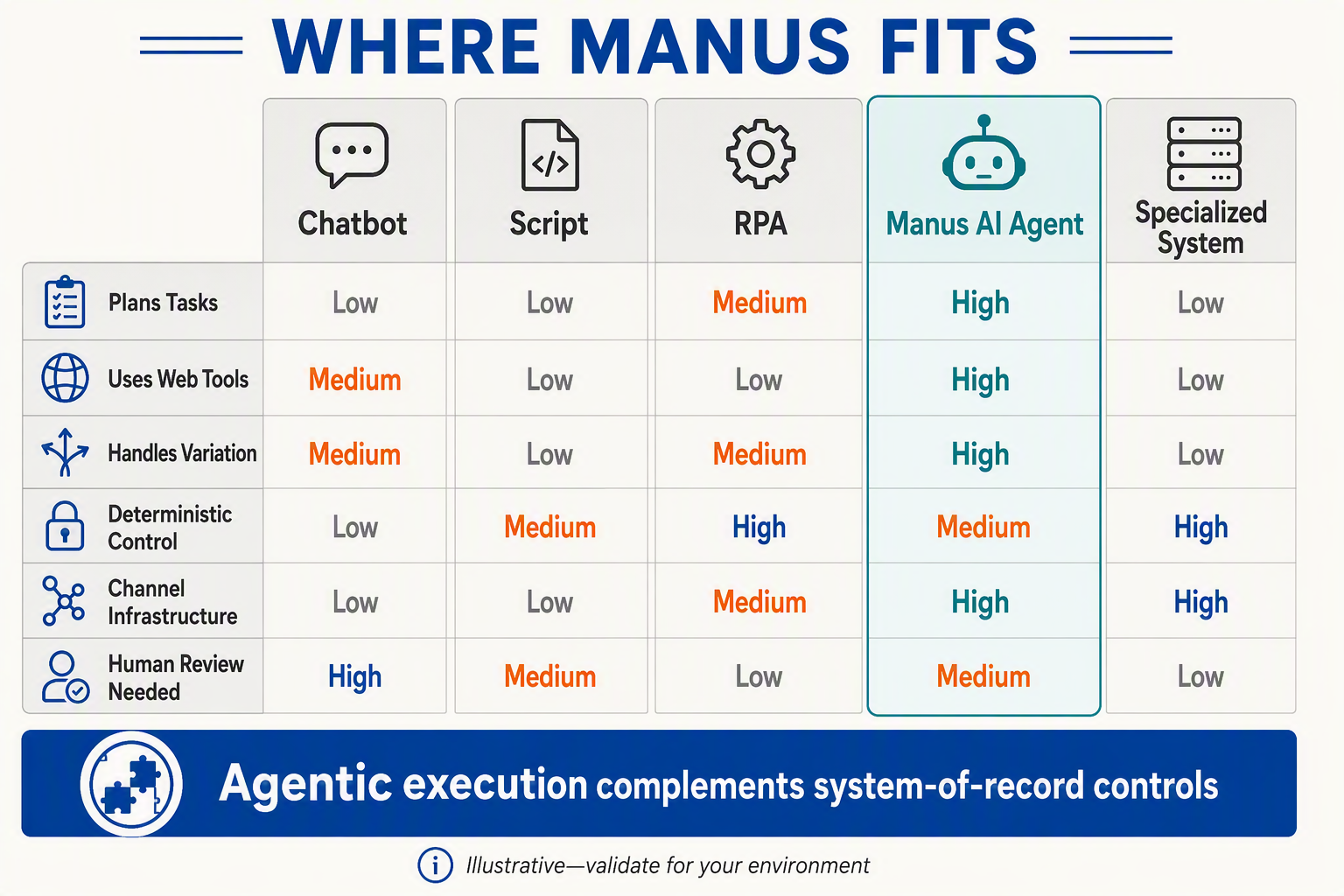
Manus AI is a general-purpose autonomous agent that converts a stated goal into a sequence of actions, executes those actions across supported tools, and returns an output such as a spreadsheet, report, or updated record. Unlike a chatbot, script, robotic process automation (RPA) bot, or specialist application, Manus can dynamically plan the route—but that flexibility also makes its behavior less deterministic.
The core difference: goals rather than fixed instructions
A conventional chatbot primarily responds with generated text. Manus describes its autonomous agent as taking a goal and independently planning, executing, and delivering a finished result, according to the company’s 2026 customer-service agent guide.
For example, “Identify 50 suitable distributors, verify their websites, enrich the spreadsheet, and summarize regional gaps” requires several stages:
- Interpret the qualification criteria.
- Find and compare relevant sources.
- extract structured fields.
- resolve missing or conflicting information.
- produce a spreadsheet and written summary.
A chatbot may explain how to perform those steps; an autonomous agent attempts to perform them. Manus can also choose intermediate actions based on what it encounters instead of requiring every branch to be predefined.
Manus versus scripts, RPA, and business applications
| Approach | How work is defined | Primary strength | Important limitation |
|---|---|---|---|
| Chatbot | Prompt and conversational context | Drafting, explanation, and question answering | Usually stops at an answer rather than completing work |
| Script or API integration | Explicit code and rules | Fast, repeatable, testable execution | Requires engineering and breaks when interfaces change |
| Traditional RPA | Recorded steps, selectors, and workflow rules | Predictable repetitive processing | Often brittle when layouts or process paths vary |
| Manus autonomous agent | Goal, context, constraints, and available tools | Adapts plans across research, documents, and websites | Outputs and actions can vary between runs |
| Specialized business software | Purpose-built domain workflows | Strong controls, records, permissions, and compliance features | Usually limited to its defined business function |
The distinction is not that agents eliminate these technologies. A practical workflow may use Manus for reasoning and orchestration, an API for reliable data transfer, RPA for a stable legacy interface, and specialist software as the system of record.
Why Browser Operator changes the automation surface
Manus Browser Operator is a browser extension that lets the agent operate directly in a local browser environment. Manus states that the extension can act on pages “as if you were doing it yourself,” making it relevant to portals and web applications without suitable APIs.
Manus’s 2026 enterprise comparison also names Gmail, Slack, calendar connectors, a browser operator for applications without APIs, and an API for programmatic task triggers. Those are documented product surfaces, not proof that every website, authentication flow, or business process will work reliably.
Browser operation differs from conventional RPA because the agent can interpret page content and adjust its next step. However, visual changes, expired sessions, CAPTCHAs, ambiguous buttons, and unexpected dialogs can still stop or misdirect execution.
Use each category for what it does well
Choose Manus when a workflow involves judgment, variable inputs, research, or several tools. Prefer scripts and APIs for deterministic high-volume transfers, RPA for stable rule-based interfaces, and specialized systems for regulated records or customer-facing production operations.
Most importantly, treat “autonomous” as an operating model—not a guarantee of correctness. Require human review before irreversible actions such as sending external messages, changing customer records, approving payments, or publishing documents.
Which Manus capabilities and 2026 developments are demonstrated, vendor-reported, or still claims that buyers should verify?
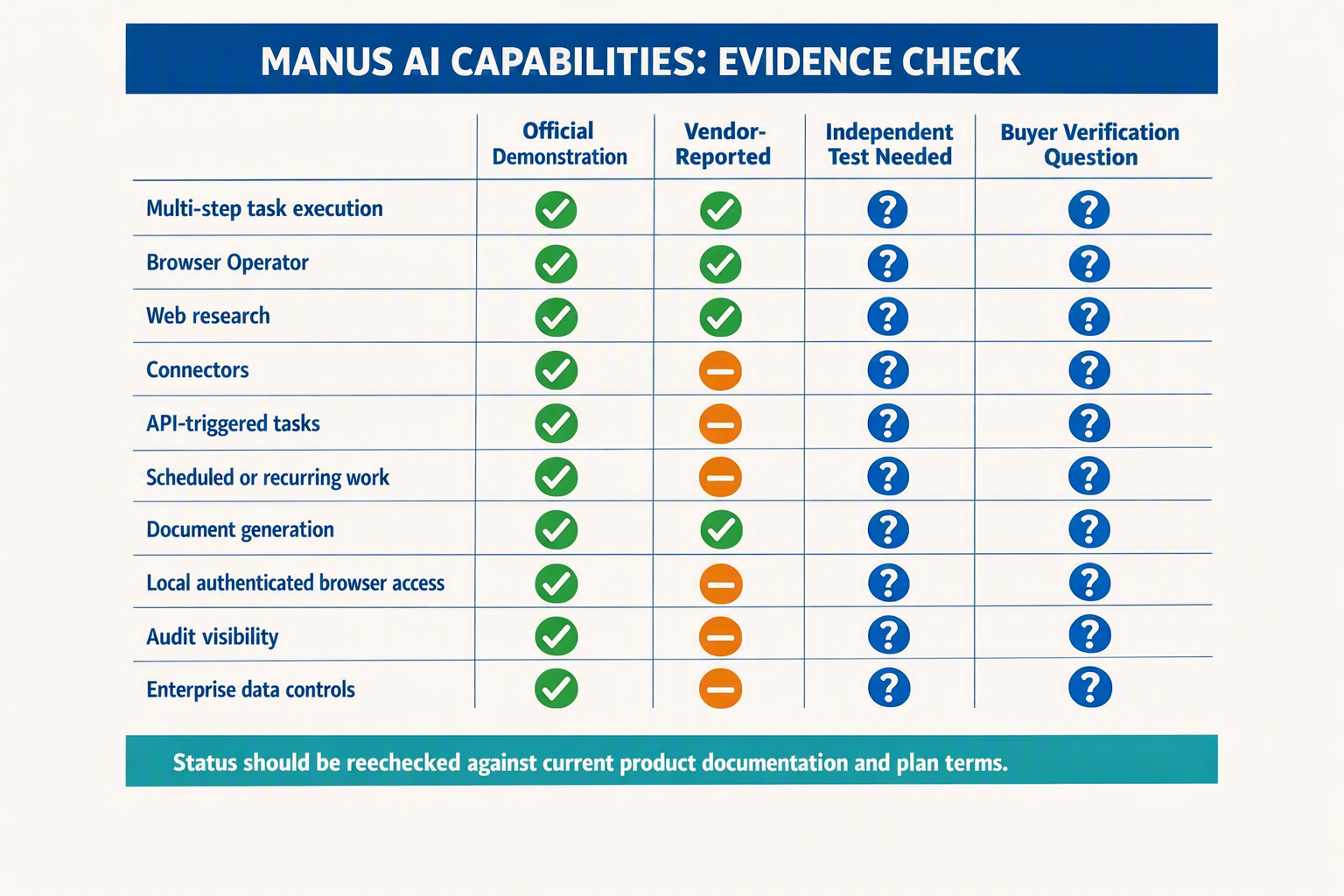
The safest reading is that Manus has demonstrated several useful automation surfaces, but its strongest autonomy, security, reliability, and cost-efficiency statements remain vendor claims until buyers reproduce them in their own environment. As of September 8, 2026, the supplied evidence is primarily first-party material from Manus rather than independent production benchmarks.
Evidence matrix for buyers
| Capability or development | Evidence in the supplied sources | Classification | What buyers should verify |
|---|---|---|---|
| Multi-step task execution | Manus describes its agent as accepting a goal, then planning, executing, and delivering a finished result. | Vendor-reported capability | Test completion rate, factual accuracy, retries, and whether “finished” outputs meet your acceptance criteria. |
| Manus Browser Operator | Manus announced a browser extension that operates directly in a local browser environment and takes actions within pages. | Demonstrated product surface | Validate supported browsers, operating systems, session persistence, extension permissions, and behavior after UI changes. |
| Authenticated browser workflows | Manus says Browser Operator can move beyond search APIs and public pages by working through browser-based environments. | Demonstrated concept; workflow-specific | Test login expiry, multifactor authentication, CAPTCHAs, role-based access, downloads, pop-ups, and anti-bot controls. |
| Gmail, Slack, and calendar connectors | Manus’s 2026 enterprise guide lists connectors for Gmail, Slack, and calendars. | Vendor-reported availability | Confirm exact scopes, read/write permissions, audit logs, tenant controls, regional availability, and connector limits. |
| Programmatic task triggering | The same Manus 2026 enterprise guide says an API can trigger tasks programmatically. | Vendor-reported availability | Verify API documentation, authentication, idempotency, rate limits, webhooks, timeout behavior, and service commitments. |
| Free and paid access | Manus’s 2026 enterprise guide reports a free tier with daily-refresh credits and paid plans. | Vendor-reported commercial detail | Recheck current pricing, credit consumption per task, concurrency, overage handling, refund rules, and data-retention differences by plan. |
What “demonstrated” does—and does not—mean
A public launch post, product demonstration, or accessible interface shows that a feature exists in some form. It does not establish a statistically reliable success rate across different websites, datasets, account configurations, or jurisdictions. Manus’s Browser Operator announcement says the extension lets Manus act inside pages “as if you were doing it yourself,” but that wording should not be interpreted as proof of human-equivalent judgment.
Likewise, Manus’s customer-service comparison characterizes Manus as an autonomous agent that can independently plan and execute work around support operations. That is a useful description of intended behavior, not an independent benchmark. The supplied sources provide no verified percentage for task success, hallucination frequency, browser-action accuracy, uptime, or average credits consumed per completed workflow.
A practical verification protocol
Before adopting any capability, run a controlled evaluation:
- Select 20–50 representative tasks, including normal cases, missing-data cases, expired sessions, and changed page layouts.
- Define pass criteria before testing: correct fields, traceable sources, approved destinations, maximum runtime, and credit ceiling.
- Record task completion rate, human correction time, retries, cost per accepted output, and unsafe-action attempts.
- Require approval before external messages, purchases, uploads, deletions, or CRM writes.
- Review data-processing terms, access scopes, retention, deletion, auditability, and incident handling with security and legal teams.
Treat connectors, local-browser execution, and API triggering as testable capabilities. Treat “autonomous,” “secure,” “enterprise-ready,” and “finished result” as claims requiring workload-specific evidence. This distinction keeps the pilot grounded in measurable outcomes rather than polished demonstrations.
How do you build reproducible Manus workflows for research, lead-list enrichment, reporting, document work, and recurring tasks?
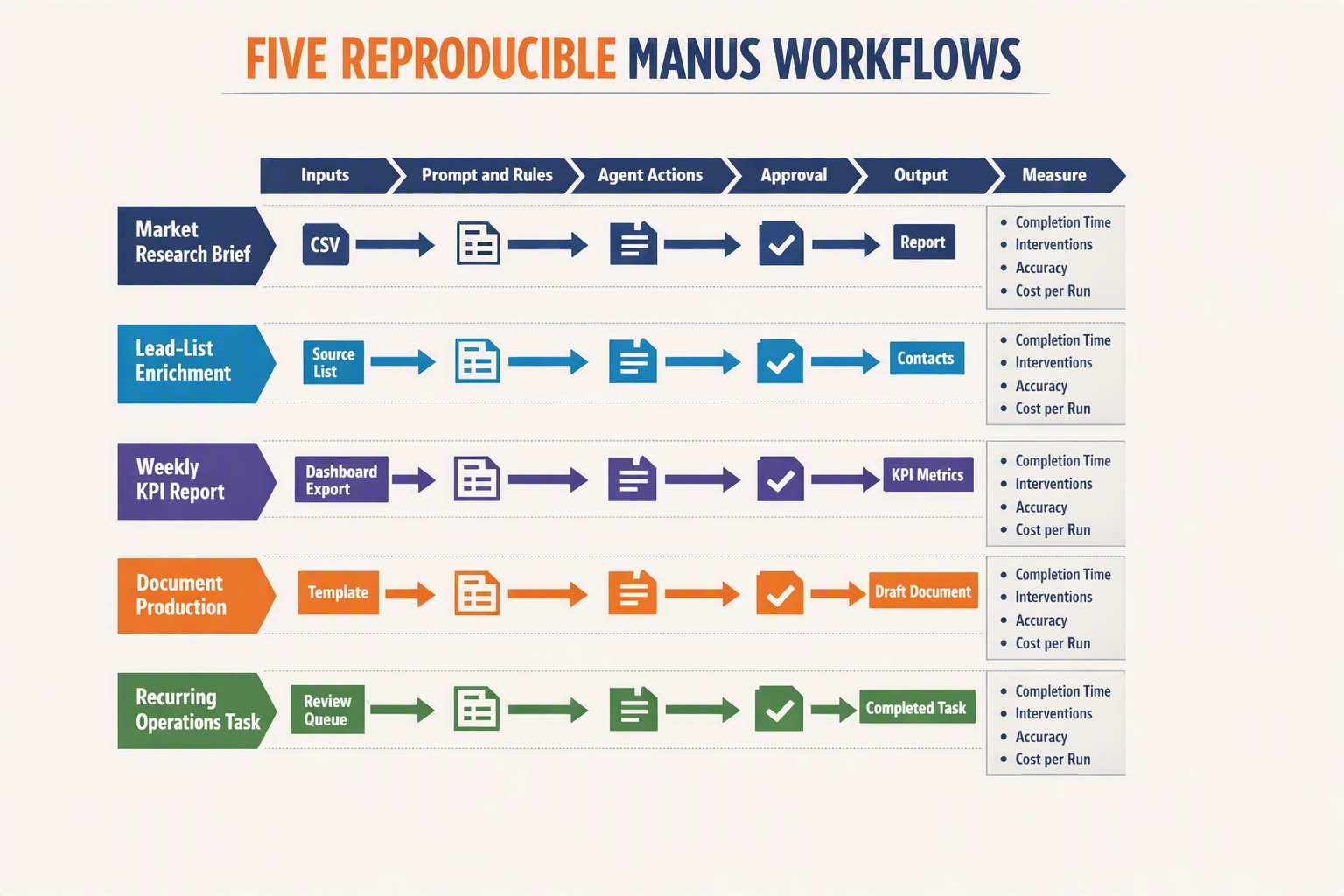
Reproducible Manus workflows require a fixed input schema, explicit step sequence, evidence rules, validation checks, and defined outputs. Treat each automation as a versioned operating procedure—not an open-ended instruction—and test it against the same sample inputs before scheduling it.
Start with a workflow contract
Write the contract before opening Manus:
- Trigger: manual upload, calendar schedule, email arrival, or API call
- Inputs: required files, date range, regions, fields, and approved sources
- Actions: research, extraction, enrichment, calculations, drafting, and export
- Output: filename, format, column schema, destination, and deadline
- Acceptance criteria: completeness, source traceability, duplication threshold, and freshness
- Stop conditions: login failure, conflicting data, missing mandatory fields, or budget limit
Manus’s 2026 enterprise guide names Gmail, Slack, calendar connectors, Browser Operator, and an API for programmatic task triggering. These are available automation surfaces, but they do not guarantee that every run will produce an identical result.
Build research and enrichment as evidence pipelines
For market research, specify the questions, source hierarchy, cutoff date, geography, and citation format. Manus itself warns that ordinary AI research can stop at search APIs and public pages, producing a “polite summary” of surface-level results; its Browser Operator is intended to access deeper browser-based sources.
Use a prompt sequence such as:
- “Create a research plan and list the evidence needed for each question.”
- “Search approved primary sources first; record title, publisher, publication date, and access date.”
- “Separate verified facts, estimates, and unresolved conflicts.”
- “Return a source ledger and flag any claim supported by only one source.”
For lead-list enrichment, define a stable table:
company_name,domain,industry,countryemployee_band,public_contact_pagesource,source_date,confidencestatus,review_note
Instruct Manus never to guess missing values; use NOT_FOUND instead. Deduplicate by normalized domain, preserve the original row, and route personal contact details or ambiguous company matches to human review.
Make reports and documents deterministic
Do not ask Manus simply to “prepare a report.” Provide a template with fixed headings, calculation rules, audience, tone, length, and permitted sources.
A reliable reporting workflow should:
- Import only approved data files.
- Validate totals, date ranges, currencies, and duplicate records.
- Generate tables before writing narrative conclusions.
- Tie every material claim to a table cell or named source.
- Export both the editable source and final PDF.
- Produce an exception log for missing or inconsistent data.
For document work, require tracked revisions, a change summary, and an unchanged copy of the source. Contracts, policies, financial disclosures, and regulated communications should never be finalized without qualified human approval.
Schedule recurring work without creating silent failures
Turn a successful manual run into a recurring task only after several controlled tests. Parameterize variables such as reporting_period, region, input_folder, and output_folder; never bury dates inside prose.
Before scheduling, define:
- Idempotency: rerunning does not duplicate rows, messages, or files.
- Freshness: reject inputs older than the agreed threshold.
- Completion signal: send a Slack or email summary with output links.
- Failure path: stop after a limited number of retries and preserve partial work.
- Approval gate: require confirmation before sending, publishing, purchasing, or updating systems of record.
Save the final prompt, template, schema, test dataset, connector permissions, and expected output as a versioned workflow package. That package—not the conversational history—is what makes Manus automation auditable, repeatable, and transferable between operators.
How should Browser Operator workflows handle logged-in websites, form entry, downloads, cross-checking, and human approval?
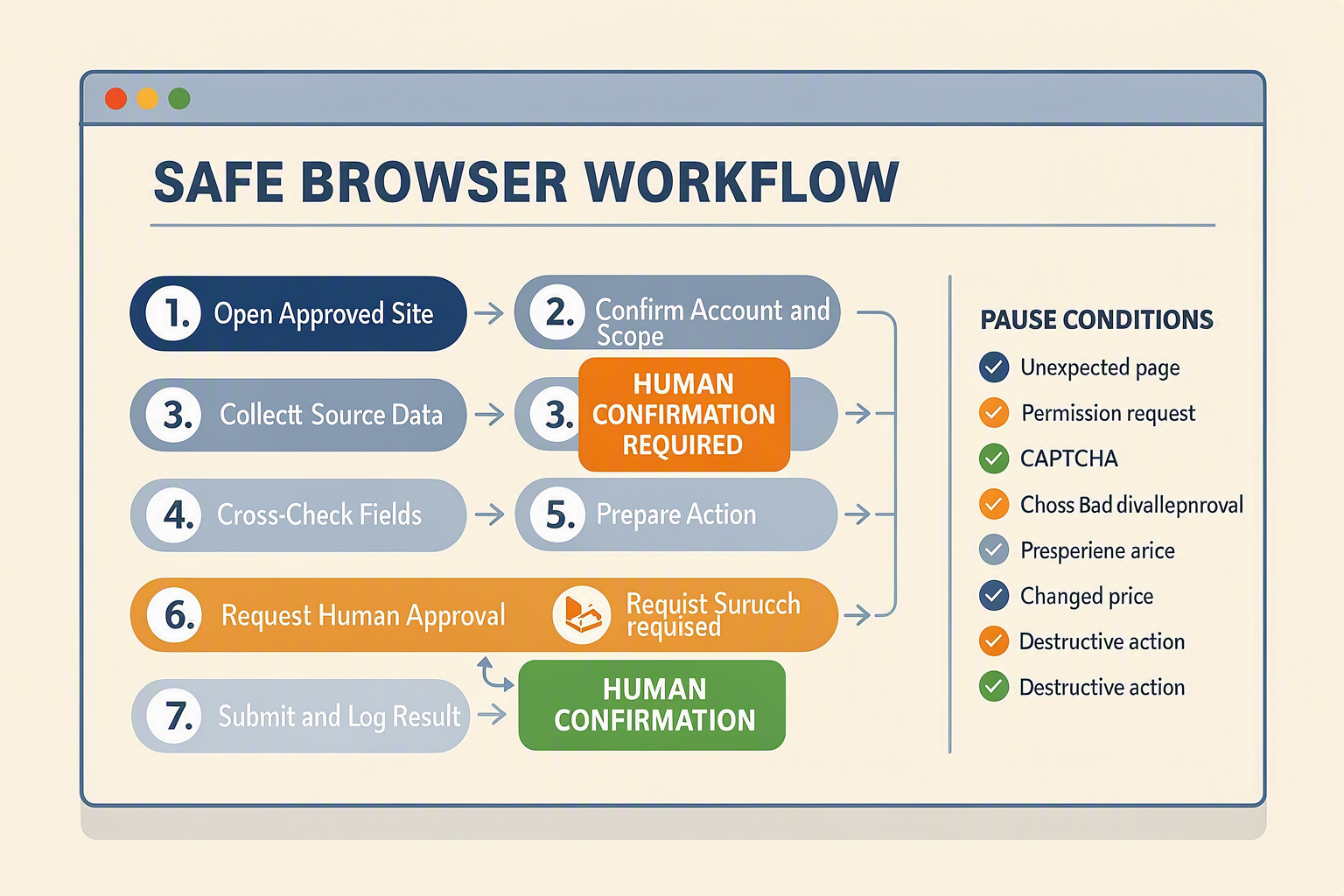
Manus Browser Operator should treat logged-in access as delegated, supervised work—not blanket permission to act. Use a dedicated browser profile, constrain every run to named websites and records, validate downloaded data, and require human approval before any action that creates an external or irreversible consequence.
1. Isolate logged-in sessions
Manus says in its 2026 Browser Operator announcement that the extension operates inside the user’s local browser environment and can act on pages “as if you were doing it yourself.” This enables work inside authenticated CRM, supplier, analytics, and research portals, but also means the agent may inherit the user’s active permissions.
Before starting:
- Create a separate browser profile for automation.
- Sign in with a least-privilege service account where the website permits it.
- Enable multifactor authentication; complete authentication challenges manually.
- Restrict the task to an allowlist of domains and explicitly prohibit password, security, billing, and user-management pages.
- Never place passwords, recovery codes, API keys, or payment-card details in the prompt.
- Set a session timeout and sign out after workflows involving sensitive records.
Do not instruct the operator to bypass CAPTCHAs, access controls, paywalls, or a site’s terms.
2. Separate form preparation from submission
Use a two-phase workflow: populate and inspect first; submit second. A practical instruction is:
Open the specified lead record, enter values only from the approved CSV, preserve blank fields when evidence is missing, and stop at the final confirmation screen. Return a field-by-field preview and do not click Save or Submit.
Add validation rules for dates, currencies, country codes, mandatory fields, and duplicate records. For bulk work, test one record, review five to ten samples, and only then expand the batch. Emails, purchases, refunds, job applications, contract acceptance, CRM deletion, and customer-facing messages should always require explicit approval.
3. Quarantine and verify downloads
Downloads are inputs, not trusted evidence. Configure the workflow to:
- Save files to a dedicated run folder.
- Record the source page, download time, filename, and reporting period.
- Reject unexpected file types, password-protected archives, or executable content.
- Scan files using the organisation’s endpoint-security tooling.
- Compare row counts, totals, column names, and reporting dates against the source interface.
- Preserve the original file and write transformed data to a separate output.
For financial or operational reports, reconcile at least one control total—such as invoice value, lead count, or closed-ticket count—before using the download downstream.
4. Cross-check browser findings
Manus describes Browser Operator as a way to move beyond surface-level search into websites and applications that lack convenient public access. That is a demonstrated interaction capability, not proof that every extracted value is correct.
Require the operator to capture:
- The exact page title and organisation name
- The relevant date or “last updated” label
- A quotation or copied source field
- A second authoritative source for material claims
- Any conflicts, missing values, or confidence limitations
If two sources disagree, the agent should report the discrepancy rather than choose silently.
5. Make approval evidence-rich
Every approval request should show the intended action, target account, changed fields, source evidence, and rollback plan. Use three outcomes: approve, reject, or return for correction.
Keep an execution log with timestamps, screenshots or page references, downloaded-file hashes, approvals, errors, and final status. This converts human review from a vague checkpoint into an auditable control—and ensures Browser Operator fails safely when sessions expire, layouts change, or evidence remains incomplete.
What can go wrong with autonomous workflows, and how do you control sensitive data, permissions, failures, auditability, and credit costs?
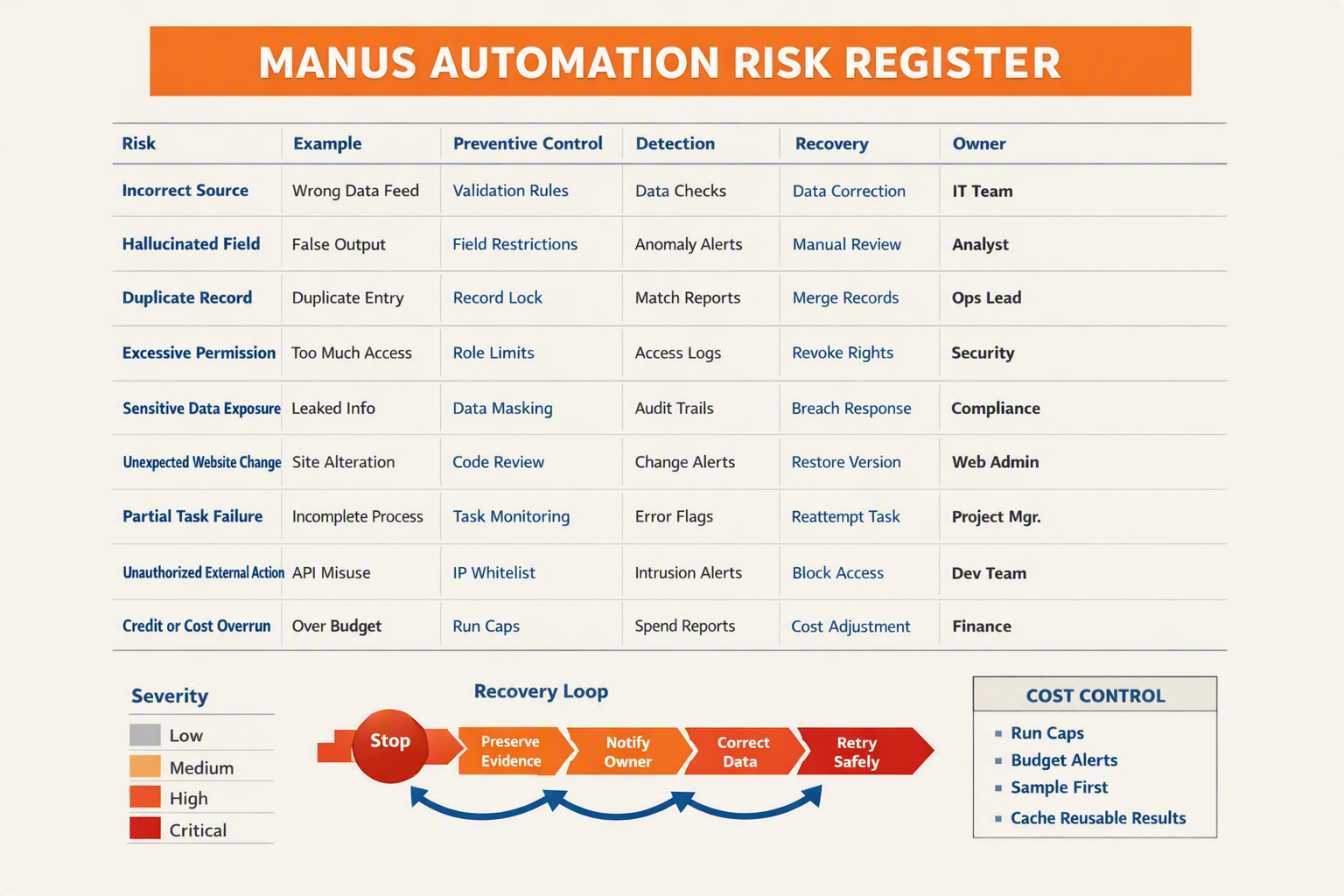
Autonomous workflows can expose confidential data, overreach permissions, silently produce incorrect outputs, and consume credits through loops or retries. Control these risks with least-privilege access, approval gates, validation rules, immutable logs, retry limits, and hard spending caps—not prompt instructions alone.
Risk-and-control matrix
| Failure mode | Practical example | Preventive control | Recovery and evidence |
|---|---|---|---|
| Sensitive-data exposure | Manus copies customer PII, contracts, or credentials into an unnecessary task context | Minimise inputs; redact fields; separate public, internal, confidential, and regulated datasets | Revoke sessions, preserve logs, identify affected records, and follow the organisation’s incident-response process |
| Excessive permissions | Browser Operator receives access to an entire CRM when it only needs read access to one lead view | Use a dedicated agent account, role-based access control, scoped folders, and read-only permissions by default | Disable the account or connector; review access and activity logs |
| Unapproved external action | The agent sends an email, edits a CRM record, uploads a file, or confirms a purchase | Require human approval before send, publish, delete, payment, permission change, or bulk update | Stop the run, reverse the transaction where possible, and record the approver and final payload |
| Hallucination or bad extraction | A report invents a figure, merges two companies, or places an unverified email in a lead list | Require source URLs, field-level confidence, schema validation, duplicate detection, and spot checks | Quarantine failed rows; rerun only the affected stage rather than the complete workflow |
| Browser or session failure | A redesigned page, expired login, CAPTCHA, or changed selector blocks Browser Operator | Add preflight checks, stable completion criteria, short task stages, and API-based steps where available | Capture screenshots and error messages; refresh authentication; resume from a checkpoint |
| Runaway credit use | An ambiguous goal causes repeated research, recursive browsing, or full-workflow retries | Set per-run budgets, maximum steps, bounded search depth, retry limits, and alerts at defined thresholds | Automatically terminate the run; inspect the expensive step; restart with narrower scope |
Treat browser access like delegated employee access
Manus Browser Operator runs inside the local browser environment and can act on a page “as if you were doing it yourself,” according to Manus. That convenience also means the agent may inherit the authenticated user’s practical reach. Do not run sensitive workflows from a browser profile containing unrestricted finance, HR, administrator, or personal accounts.
Create a separate browser profile and service identity with:
- Access only to the required sites, folders, and records
- Multi-factor authentication and short session durations
- No stored payment details unless purchasing is explicitly approved
- A denylist for payroll, banking, identity documents, secrets, and production administration
- Manual confirmation for consequential actions
Make every run auditable and recoverable
A production run should create a durable record containing the task ID, prompt version, initiator, timestamps, connected systems, source references, files read, actions attempted, outputs, approvals, errors, retries, and credits consumed. Manus says its 2026 enterprise offering includes Gmail, Slack, calendar connectors, Browser Operator, and an API for programmatic task triggers; each surface should therefore have its own access and action log.
Use checkpointed execution:
- Read and collect
- Transform and validate
- Present a preview
- Obtain approval
- Write, send, or publish
- Verify the destination state
If verification fails, stop rather than assuming success.
Put economics inside the workflow
Credit usage should be an operational metric, not a surprise on the invoice. Track credits per successful output, not merely per run, because failed and duplicated runs create no business value. Set a maximum cost per lead, report, or document; trigger an alert at 50–75% of the run budget; and prohibit automatic retries after the cap.
Start with non-sensitive, reversible work. Expand permissions only after sample audits show acceptable accuracy, complete logs, predictable credit consumption, and reliable rollback.
Can Manus replace customer communication platforms for voice, WhatsApp, Instagram, Facebook, and human handoff?
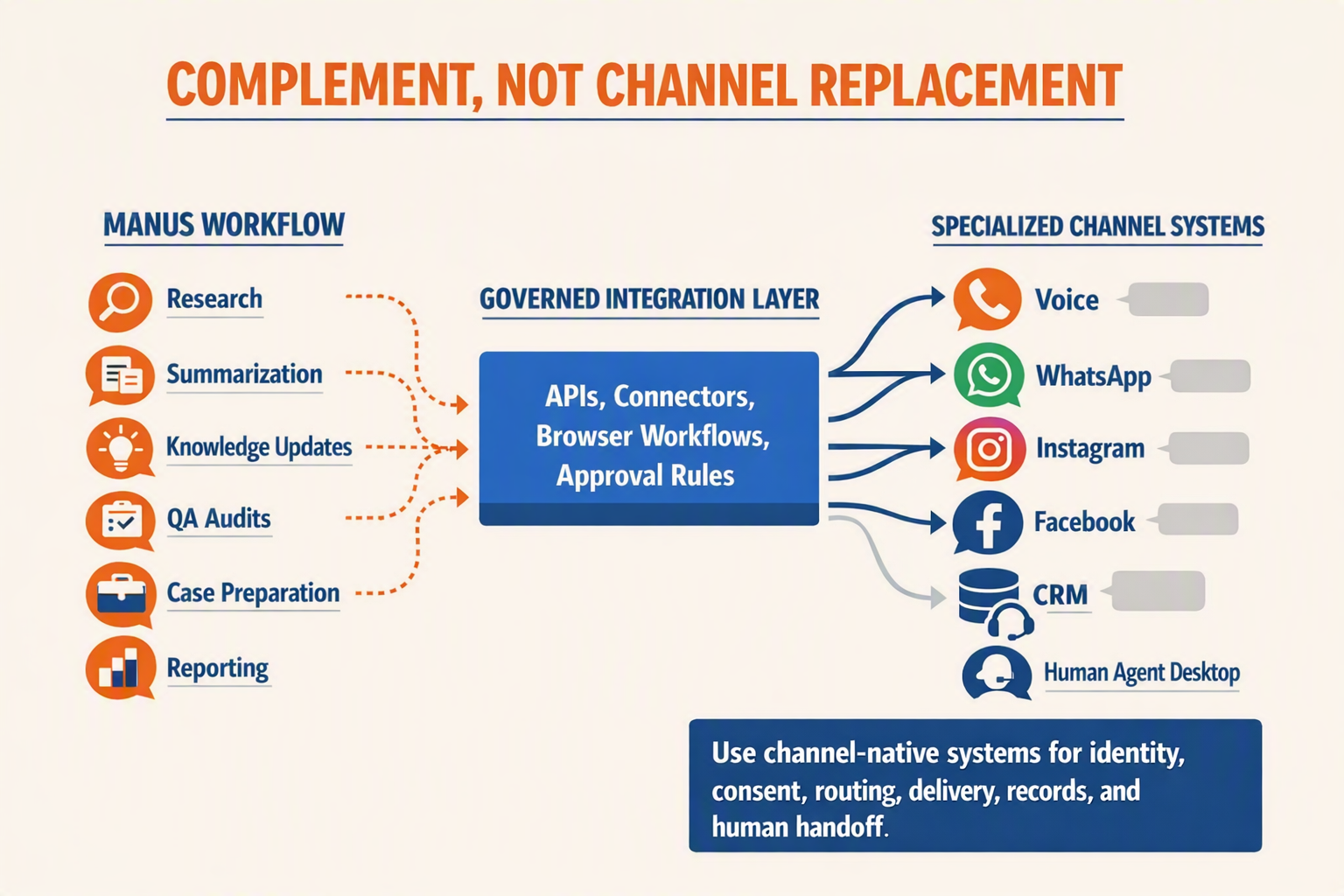
No—not as a complete replacement. Manus AI is better suited to automating the operational work around customer service, while specialist communication infrastructure remains necessary for reliable voice, WhatsApp, Instagram, Facebook Messenger, routing, consent, and human handoff.
Where Manus fits—and where it does not
Manus describes itself as an autonomous agent that can plan, execute, and deliver completed work. In its 2026 customer-service comparison, Manus explicitly says the product is “not a ticket-answering bot” and instead automates surrounding tasks such as knowledge-base maintenance, ticket analysis, and QA audits.
Use Manus for workflows such as:
- Summarising conversations exported from a shared inbox
- Classifying tickets by issue, urgency, language, or sentiment
- Identifying recurring complaints and drafting weekly reports
- Researching an account before an agent responds
- Updating approved knowledge-base articles
- Preparing follow-up drafts for human review
- Auditing samples of conversations against QA criteria
Do not treat Manus itself as the communications layer responsible for phone numbers, call media, WhatsApp Business templates or calls, Instagram and Facebook messaging permissions, queue management, delivery receipts, opt-outs, or agent presence.
Use a layered architecture
A safer implementation separates customer-facing execution from back-office reasoning:
- Channel platform: Receives and sends calls or messages across voice, WhatsApp, Instagram, Facebook Messenger, email, and web.
- Inbox and routing layer: Resolves customer identity, applies consent rules, assigns queues, records delivery state, and transfers conversations.
- Manus workflow: Analyses transcripts, researches context, drafts responses, prepares reports, or updates approved internal systems.
- Human approval: Reviews sensitive recommendations and takes over live conversations when policy requires it.
For Indian businesses, CallMissed can provide the specialist engagement layer: AI voice agents, WhatsApp chatbots, inbound and business-initiated WhatsApp Business calling, an omnichannel inbox/CRM, and support for speech across 22 Indian languages. Manus can then coordinate adjacent tasks—for example, analysing support outcomes, creating an escalation brief, or compiling a weekly issue report.
Build human handoff as a state machine
Do not rely on a prompt such as “transfer when needed.” Define machine-readable escalation states and test each one:
- AI_ACTIVE: The system may answer from approved knowledge.
- REVIEW_REQUIRED: A draft exists, but nothing is sent.
- HUMAN_QUEUED: The conversation has an owner, priority, and deadline.
- HUMAN_ACTIVE: Automation stops sending customer-facing messages.
- RESOLVED: The outcome and disposition are recorded.
- AUTOMATION_RESUMED: AI restarts only after explicit approval.
Trigger handoff for payment disputes, legal threats, cancellations, safety issues, repeated misunderstanding, low-confidence retrieval, authentication failure, or a direct request for a person. Pass the human agent the transcript, customer identity, channel, detected language, attempted actions, confidence indicators, and a concise summary.
Treat browser control as an exception path
Manus says Browser Operator runs in the local browser environment and can act on pages “as if you were doing it yourself.” That makes it useful for preparing records in legacy support portals without APIs, but browser automation should not become the primary transport for live messaging.
Require approval before Browser Operator:
- Sends a message or starts a call
- Changes consent, contact, or account data
- Closes a ticket or issues compensation
- Uploads customer documents
- Publishes knowledge-base content
The practical model is specialist channels for dependable communication, Manus for cross-system operational automation, and humans for judgment and accountability.
What do automation and security experts recommend, and how should you independently benchmark Manus AI claims?
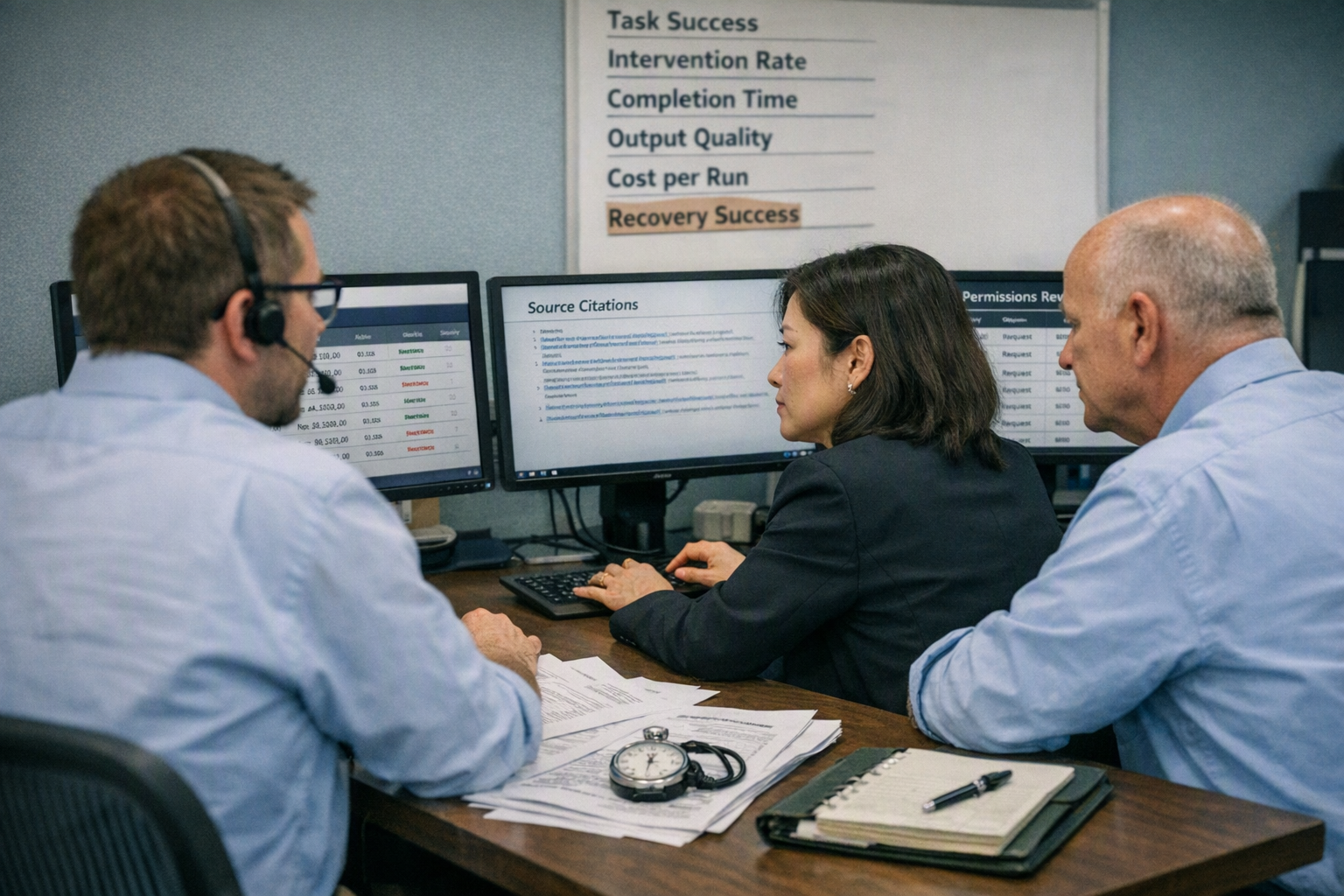
Automation and security experts recommend treating Manus AI as a privileged junior operator, not an unsupervised employee: grant minimum access, constrain its actions, log every step, and require approval for irreversible changes. Independently benchmark Manus with your own data and applications because a successful demonstration does not establish production accuracy, security, reliability, or cost.
Apply established automation and security guidance
Use least privilege, short-lived sessions, and task-specific accounts. The OWASP Top 10 for Large Language Model Applications identifies risks including prompt injection, sensitive-information disclosure, excessive agency, and insecure output handling—all directly relevant when an agent reads webpages and operates authenticated software.
Manus states that Manus Browser Operator works inside the local browser environment and can act on pages “as if you were doing it yourself.” That demonstrates browser interaction, but it also means the agent may encounter malicious webpage instructions, confidential tabs, saved sessions, or unintended controls.
Before deployment:
- Create a dedicated browser profile without personal history, saved cards, or unrelated logins.
- Give the agent read-only access first; add write permissions only after testing.
- Block autonomous payments, deletions, external messages, permission changes, and bulk CRM edits.
- Require human approval immediately before every consequential action.
- Store prompts, sources, screenshots, outputs, approvals, and error messages in an audit log.
- Never place passwords, API keys, health records, or unrestricted customer exports directly in prompts.
- Define a kill switch, session timeout, retry ceiling, and incident owner.
Follow the NIST AI Risk Management Framework cycle of govern, map, measure, and manage. In practice, that means assigning an accountable workflow owner, documenting affected data and users, measuring failures, and revising controls after incidents.
Build an independent benchmark
Do not benchmark with one polished task. Assemble at least 20 representative cases per workflow, including ordinary, difficult, and intentionally adversarial examples. Run the same frozen test set after prompt, model, connector, website, or policy changes.
- Define completion precisely. For lead enrichment, success might require the correct company, source URL, retrieval date, and no unsupported contact details.
- Create a verified answer set. Have a domain expert establish expected outputs and permitted actions before testing Manus.
- Run repeated trials. Browser behavior can vary with page layout, authentication state, pop-ups, rate limits, and network conditions.
- Score end-to-end results. A well-written report still fails if its spreadsheet inputs are wrong.
- Compare against baselines. Measure Manus against the current manual process and, where relevant, a deterministic script or API workflow.
Track these metrics:
- Task success rate: fully correct runs divided by total runs.
- Field-level accuracy: verified fields divided by completed fields.
- Unsupported-claim rate: claims lacking valid evidence divided by claims checked.
- Human intervention rate: runs requiring correction or rescue.
- P50 and P95 completion time: typical and slow-case latency.
- Cost per accepted output: total credits and review cost divided by approved deliverables.
- Safety violation rate: prohibited actions attempted per run.
Set evidence-based release gates
Separate three evidence levels in your evaluation: vendor-described, internally demonstrated, and production-validated. Manus’s 2026 enterprise material names Gmail, Slack, calendar connectors, a browser operator, and programmatic API triggers; those are documented capabilities, not proof that they satisfy your accuracy or compliance threshold.
Promote a workflow only when it meets predefined targets across multiple runs, passes adversarial tests, and produces usable audit evidence. If a high-impact failure occurs—such as emailing the wrong recipient or overwriting a record—pause deployment, investigate the full action trace, and rerun the benchmark before restoring access.
What does Manus AI mean for your team, and how do you run a safe 30-day pilot with clear go/no-go criteria?
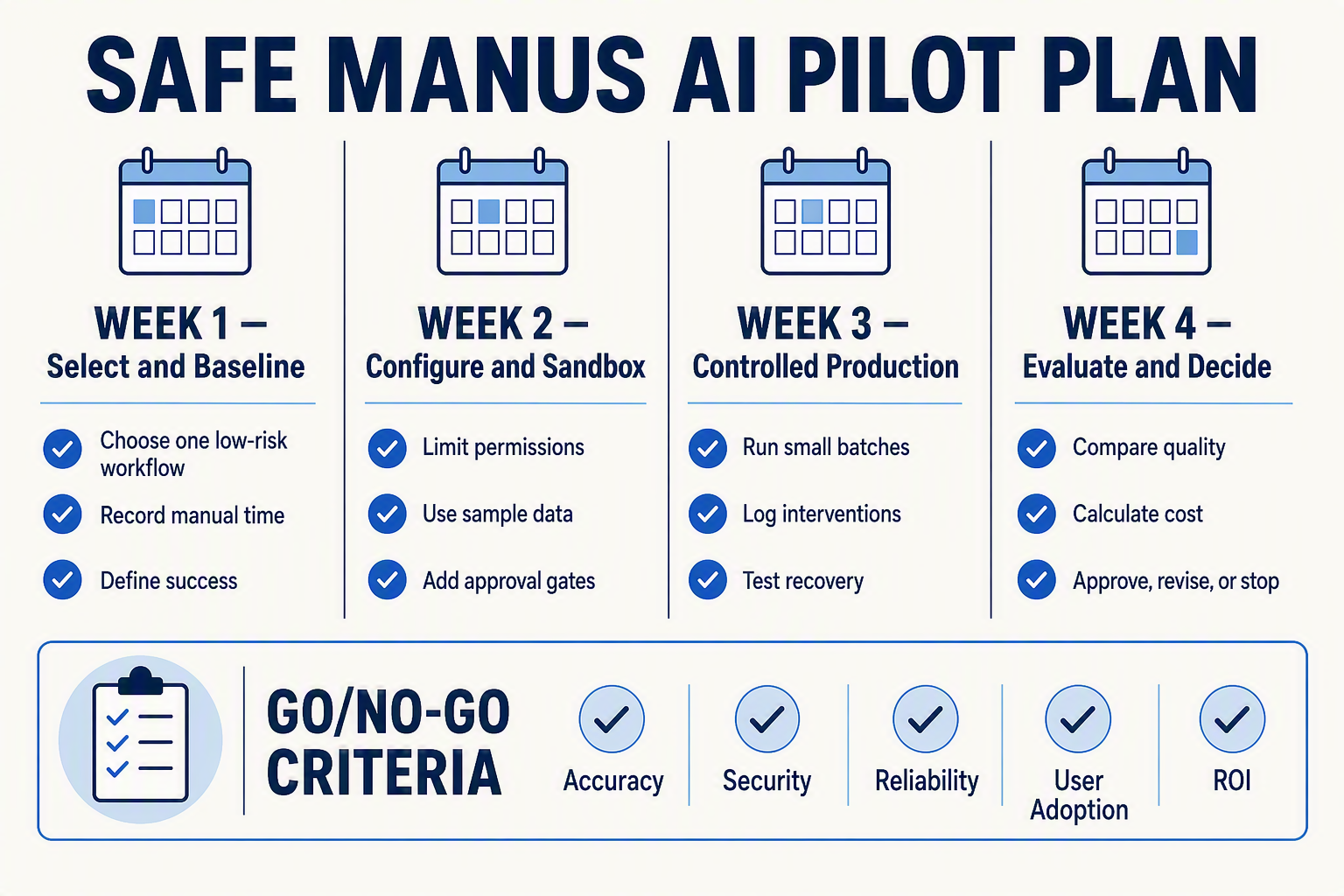
Manus AI should mean delegating bounded, repeatable digital work—not removing human accountability. Run a 30-day pilot on one low-risk workflow, measure quality, time, cost and failure recovery, then proceed only if predefined thresholds are met.
What changes for the team
Assign Manus the role of an operator under supervision. Employees remain responsible for defining completion criteria, reviewing exceptions and approving consequential actions.
A practical operating model has four owners:
- Business owner: Defines the outcome, baseline and acceptable error rate.
- Workflow designer: Writes instructions, test cases and fallback paths.
- Reviewer: Validates sources, records and documents before release.
- Security or IT owner: Controls access, data classes, retention and incident response.
Manus’s 2026 enterprise guide names Gmail, Slack, calendar connectors, Browser Operator and an API for programmatic task triggering. Manus also says Browser Operator works in the local browser and can act on a page “as if you were doing it yourself”; these are first-party capability statements, not independent proof of accuracy in your environment.
A controlled 30-day pilot
Choose one workflow with measurable volume, such as enriching 50 approved company records per week or preparing a recurring market report. Avoid payroll, payments, employee decisions, regulated advice and irreversible customer communications during the pilot.
| Period | Objective | Actions | Evidence to capture | Gate |
|---|---|---|---|---|
| Days 1–3 | Establish controls | Select one workflow; classify permitted data; document prohibited actions | Current time, cost, defect rate and process map | Proceed only with named owner and rollback path |
| Days 4–7 | Build a test version | Create instructions, approved sources, output schema and retry limits | Prompt version, permissions and 10 representative test cases | At least 9 of 10 outputs structurally complete |
| Days 8–14 | Run supervised tasks | Execute 20–30 cases in a sandbox or duplicate workspace | Accuracy, unsupported claims, browser failures and credits used | No unauthorized external action or sensitive-data exposure |
| Days 15–21 | Test resilience | Introduce missing fields, changed pages, expired sessions and conflicting sources | Recovery time, escalation rate and duplicate-action count | Every failure must stop safely or reach a reviewer |
| Days 22–27 | Conduct shadow production | Run Manus beside the existing process without replacing it | Minutes saved, reviewer corrections and cost per accepted result | Meet quality and savings thresholds for five consecutive runs |
| Days 28–30 | Decide and document | Review logs, incidents, economics and team feedback | Signed scorecard, revised SOP and access review | Go, extend with remediation, or stop |
Set go/no-go criteria before testing
Use thresholds appropriate to the workflow rather than adopting generic vendor claims. A defensible pilot scorecard could require:
- Accuracy: At least 95% of required fields correct after source verification.
- Reliability: At least 90% task completion without manual reconstruction.
- Safety: Zero unauthorized emails, purchases, uploads or production-record changes.
- Efficiency: At least 30% less employee handling time, including review.
- Economics: Cost per accepted output below the existing fully loaded process cost.
- Recoverability: Every failed run produces a visible error, usable partial output or escalation.
Approve production only when the evidence meets all critical safety criteria and the workflow remains economical after human-review time is included. Extend the pilot when failures are correctable through narrower permissions or better instructions; stop it when errors are silent, access cannot be constrained, or savings depend on skipping review.
Frequently asked questions about Manus AI automation, pricing, safety, recurring tasks, Browser Operator, business fit, alternatives, and replacement decisions
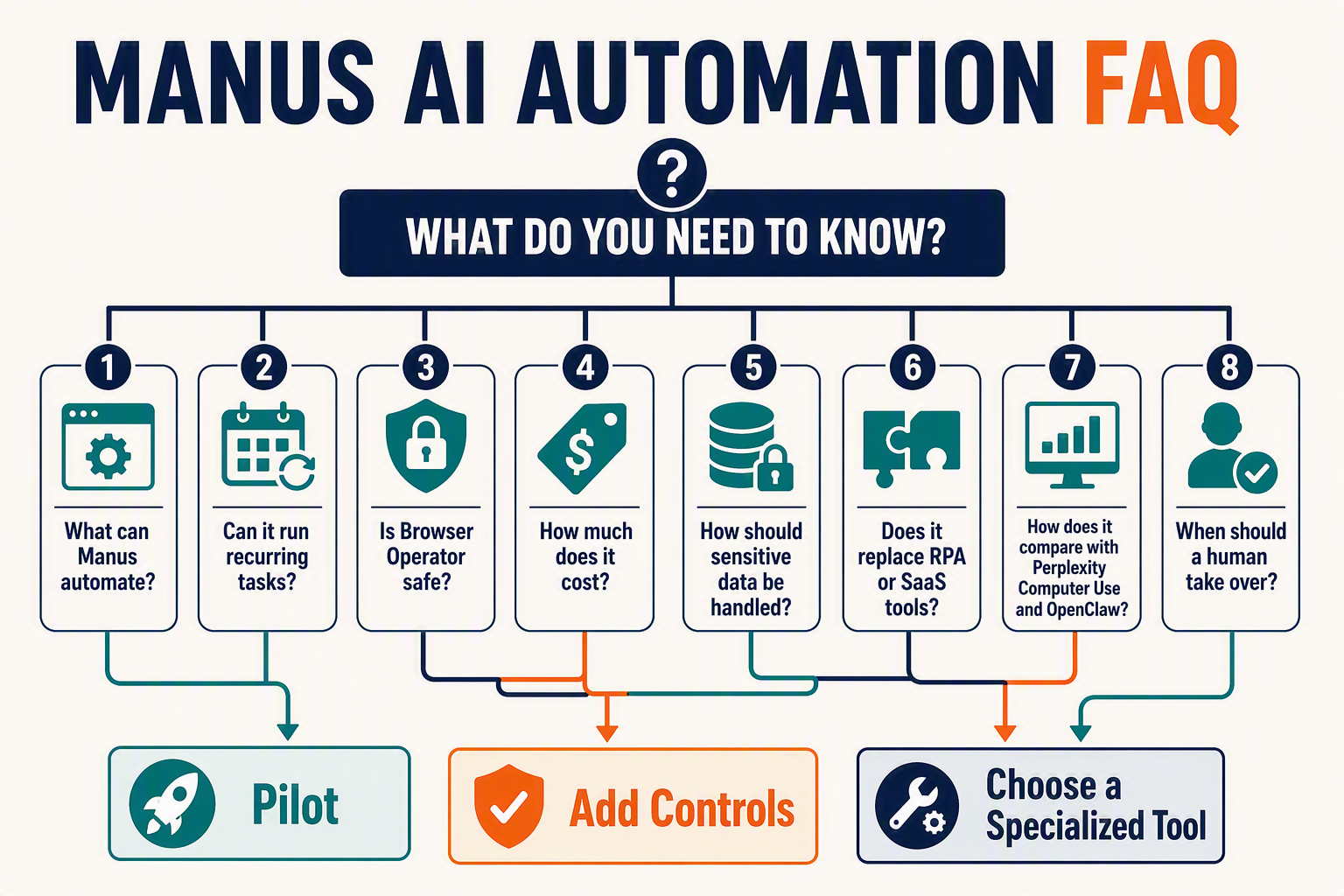
What is Manus AI automation, and which business workflows fit it best?
How much does Manus AI cost in 2026, and how can businesses control credits?
Is Manus AI automation safe for sensitive business data?
Can Manus AI run recurring tasks automatically?
What is Manus Browser Operator, and when should a business use it?
What are the best Manus AI alternatives, and when should a company replace Manus?
Conclusion
Manus AI automation in 2026 is most valuable when it operates as a controlled workflow layer—not an unsupervised replacement for business judgment. The practical goal is to delegate repetitive research, browser, spreadsheet, reporting, and document tasks while retaining clear limits, auditability, and human ownership.
- Start with bounded, measurable workflows. Choose a recurring task with known inputs, explicit completion criteria, and an output that can be checked quickly. Research briefs, lead-list enrichment, weekly reports, document revisions, and structured data entry are safer starting points than open-ended processes with irreversible consequences.
- Treat browser automation as powerful but inherently fragile. Manus says Browser Operator works inside a local browser environment and can perform page-level actions “as if you were doing it yourself.” Manus’s 2026 enterprise guide also names Gmail, Slack, calendar connectors, browser operation for applications without APIs, and an API for programmatic task triggering. These are demonstrated capabilities, not guarantees that every website, session, or workflow will remain reliable.
- Build controls into the workflow from the beginning. Require traceable research sources, minimise access to personal and commercially sensitive data, and place human approval gates before sending emails, uploading files, making purchases, or changing system-of-record data. Define what Manus should do when authentication expires, a field is missing, a source conflicts, or only part of a task succeeds.
- Measure economics alongside accuracy. Set credit budgets, retry limits, timeouts, and escalation rules before scheduling recurring work. A useful pilot should record completion rate, correction time, cost per successful run, failure categories, and hours saved—not merely whether the agent produced an impressive first result.
Manus can coordinate operational work, but specialist communication infrastructure may remain the better execution layer for customer-facing channels. To explore how this model is evolving, visit CallMissed, an AI-native platform supporting voice agents, WhatsApp Business calling, multilingual chatbots, and speech across 22 Indian languages.
Looking ahead, watch for stronger permission controls, clearer execution logs, more dependable recovery from partial failures, and better cost visibility. The decisive question is not whether Manus can automate a task once, but: Can your team make that automation repeatable, reviewable, economical, and safe next Monday?
Related Reading
- AI Receptionist: Missed-Call Automation Guide for Small Business in 2026
- WhatsApp Automation for Business in 2026: A Practical Missed Call Text Back Guide
- AI Receptionist CRM Implementation Guide for 2026: Call Lead Capture, WhatsApp Workflows, and CRM Automation