
Detect npm Encrypted Loader Malware in Dependencies


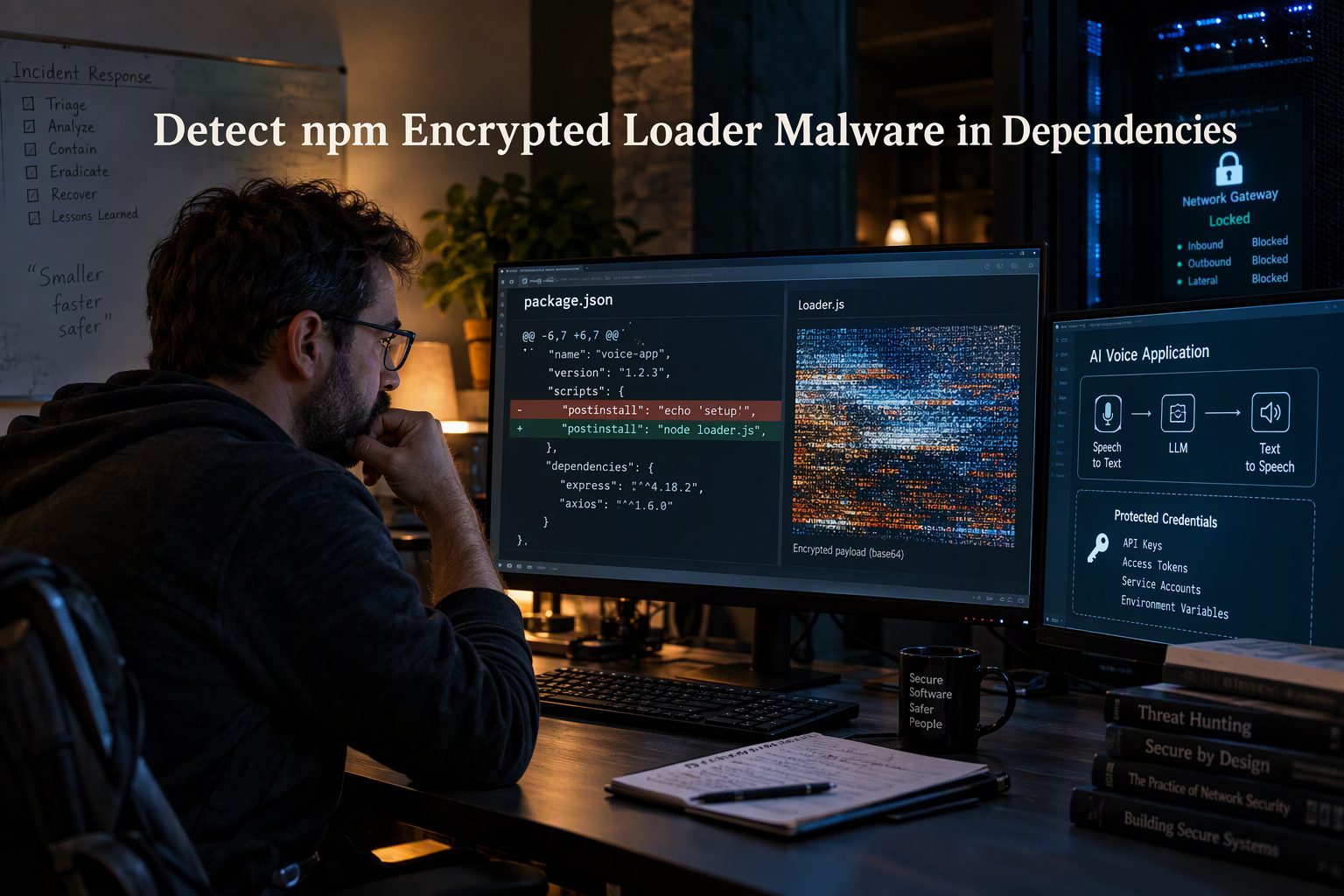
Learn to detect npm encrypted loader malware with staged triage, safer sandbox tests, npm controls, and AI and telephony credential defenses.
Detect npm Encrypted Loader Malware in Dependencies
What if the npm package powering your AI or telephony app is also the mechanism hiding its next-stage malware? To detect npm encrypted loader malware in dependencies, teams need to look beyond package names and routine vulnerability scores: an encrypted or obfuscated loader may conceal what it will execute until install time or runtime.
This is a current supply-chain concern, not a theoretical edge case. In July 2026, The Hacker News reported that four compromised packages in the @asyncapi namespace delivered a multi-stage botnet loader, citing research from OX Security and SafeDep. The incident is a reminder that familiar namespaces and normal-looking dependency updates are not proof that code is safe. For AI and telephony applications, a compromised dependency can put more than a developer workstation at risk: it may expose application credentials, cloud secrets, customer data, or systems that handle calls and messages.
That makes dependency review especially important in software that connects models, APIs, and communication channels. For platforms in this space—including CallMissed, which offers AI voice agents and a developer AI API—dependency integrity is one part of building trustworthy customer-facing systems. The practical goal is not to assume every unfamiliar package is malicious, but to catch suspicious behavior before it reaches production and to limit the damage if something slips through.
This guide explains how to inspect npm dependencies for signs of encrypted loaders, including unexpected install scripts, encoded strings, concealed execution paths, and suspicious outbound network activity. You’ll learn how to compare package versions and lockfile changes, use automated scanning alongside manual review, and strengthen CI/CD controls so risky code has fewer opportunities to run. We’ll also cover what to do when a package raises concern: preserve evidence, isolate affected environments, rotate potentially exposed secrets, and verify the dependency before restoring service. The result is a repeatable review process for teams building AI and telephony apps—one that treats every dependency as code to evaluate, not simply a name to trust.
How can you detect and prevent an encrypted npm loader?

Encrypted npm loaders are best detected by combining package-diff review, lifecycle-script inspection, controlled execution, and network monitoring; no single scanner reliably catches every concealment technique. Treat a suspicious dependency as untrusted until you can explain what it runs, when it runs, and what it tries to contact.
Which npm package changes should you inspect first?
Start with the exact package version and the change that introduced it. Compare the new release with the last known-good version, then inspect both package.json and the lockfile for unexpected changes.
Look closely at:
- Lifecycle scripts such as
preinstall,install,postinstall, andprepare. These can run code during installation or packaging. - New or altered dependencies, especially unexpected additions that provide little apparent value to the package.
- Obfuscated code, including long encoded strings, unusual character substitutions, dynamic imports,
eval, or code that decodes data before executing it. - Hidden execution paths, such as code that activates only on a particular platform, environment variable, date, or runtime condition.
Obfuscation alone does not prove malware: legitimate packages may bundle or transform code. The concern rises when concealment is paired with unexplained install-time execution, secret access, or outbound connections.
How can you examine an encrypted loader safely?
Download or unpack the package in an isolated environment—not on a developer laptop or a production runner—and inspect its files before running its scripts. For example, npm pack package-name@version lets reviewers examine the published archive. Avoid running an unfamiliar package’s lifecycle scripts just to see what happens.
If analysis requires execution, use a disposable container or virtual machine with no production credentials, limited filesystem access, and controlled network egress. Record processes, files created, environment variables accessed, and DNS or HTTP requests. A loader that decrypts a second stage only at runtime may look harmless in a quick source review, so compare static findings with observed behavior.
The July 2026 AsyncAPI incident reported by The Hacker News involved four compromised packages. Use incidents like this as a reminder to investigate the precise package and version in your dependency tree, rather than treating a familiar namespace as a safety signal.
What controls prevent a suspicious dependency from reaching production?
Build checks into the dependency update and release process:
- Review lockfile diffs in pull requests and require an explanation for new packages, versions, and install scripts.
- Run automated scans for known malicious packages and suspicious code, then send uncertain results for human review. Treat scanner output as evidence to investigate, not a verdict.
- Test with scripts disabled where practical.
npm ci --ignore-scriptscan help determine whether installation requires lifecycle behavior; review exceptions individually because some legitimate packages need scripts. - Restrict CI secrets and network access. Give build jobs only the credentials they need, and limit outbound connections where possible.
- Keep a response path ready. If a package is suspect, stop deployments, preserve logs and package files, isolate affected environments, and rotate credentials that may have been exposed.
AI and telephony applications often connect model providers, communication services, and customer systems. Teams building with platforms such as CallMissed—which offers AI voice agents and a developer AI API—should apply the same dependency controls to the code that handles integration credentials and application data. The goal is layered defense: make risky behavior visible, constrain what a package can reach, and catch surprises before deployment.
What do you need before auditing an npm dependency?
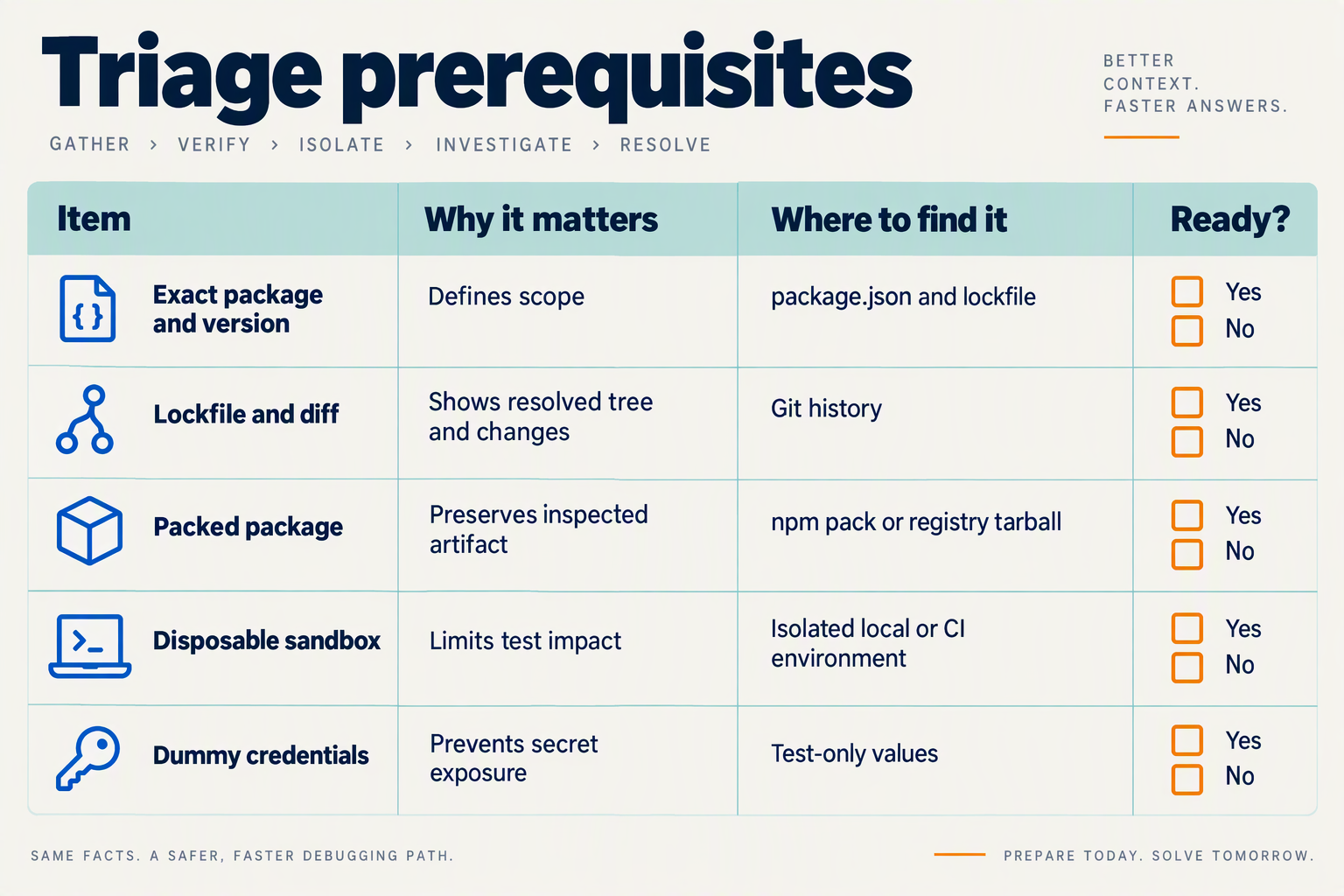
What do you need before auditing an npm dependency?
Before auditing a dependency, gather the exact package version, the lockfile change that introduced it, a known-good comparison point, and a safe environment for inspection. This lets you trace what changed and evaluate package behavior without exposing production credentials or systems.
| Audit input | What to collect | Why it matters | Quick check |
|---|---|---|---|
| Package identity | Exact name, version, registry, and dependency path | Helps distinguish a specific release from similarly named packages or other versions | Check package.json and the lockfile |
| Change baseline | Previous known-good version and relevant diff | Shows whether scripts, files, or dependencies changed unexpectedly | Compare manifests and package contents |
| Install metadata | Lifecycle scripts and dependency declarations | Install-time execution can be hidden in familiar-looking packages | Inspect the package manifest before installation |
| Package artifact | Tarball and integrity information for the exact version | Lets reviewers examine the published files that the project would install | Retrieve and inspect the versioned package artifact |
| Isolated environment | Disposable container or VM with no production secrets | Limits potential damage if suspicious code executes | Disable access to credentials and restrict outbound network traffic |
| Application exposure map | Secrets, APIs, data, and systems the app can reach | Helps prioritize risk for AI and telephony workloads | List model keys, cloud credentials, and communication integrations |
Start with the lockfile, not just the package name. The lockfile records the resolved version and dependency relationships, so review the precise entry changed by the update. Note whether the package arrived directly or through another dependency, and preserve a copy of the current lockfile before making changes. A clean comparison against the previous release can reveal unexpected install scripts, new dependencies, or altered package files.
Prepare a safe inspection workspace. Use a disposable environment that resembles the project’s Node.js and npm setup, but does not contain production credentials, customer data, or privileged cloud access. Restrict outbound network access where practical; if network behavior is part of the investigation, capture and review it deliberately rather than allowing unrestricted connections. Treat static inspection and execution as separate steps: reading files is lower risk than running package code.
In July 2026, The Hacker News reported that four compromised packages in the @asyncapi namespace delivered a multi-stage botnet loader, citing research from OX Security and SafeDep. That incident illustrates why a trusted namespace or ordinary-looking version update should not replace a version-specific review.
Before investigating, record:
- The package name, exact version, source registry, and the date it entered the project.
- The expected purpose of the dependency and which application components use it.
- The known-good version, relevant lockfile diff, and package integrity details.
- The credentials and services the application can access, including AI-provider keys and telephony or messaging integrations.
For an initial inspection, review the package manifest and source files without running install scripts. If installation is necessary for analysis, consider a controlled install with scripts disabled, then examine any script separately in the isolated environment. Disabling scripts reduces one execution path; it does not prove that the package is safe, since suspicious behavior may occur when the application later imports or runs the code.
How do you establish a trusted baseline before scanning?
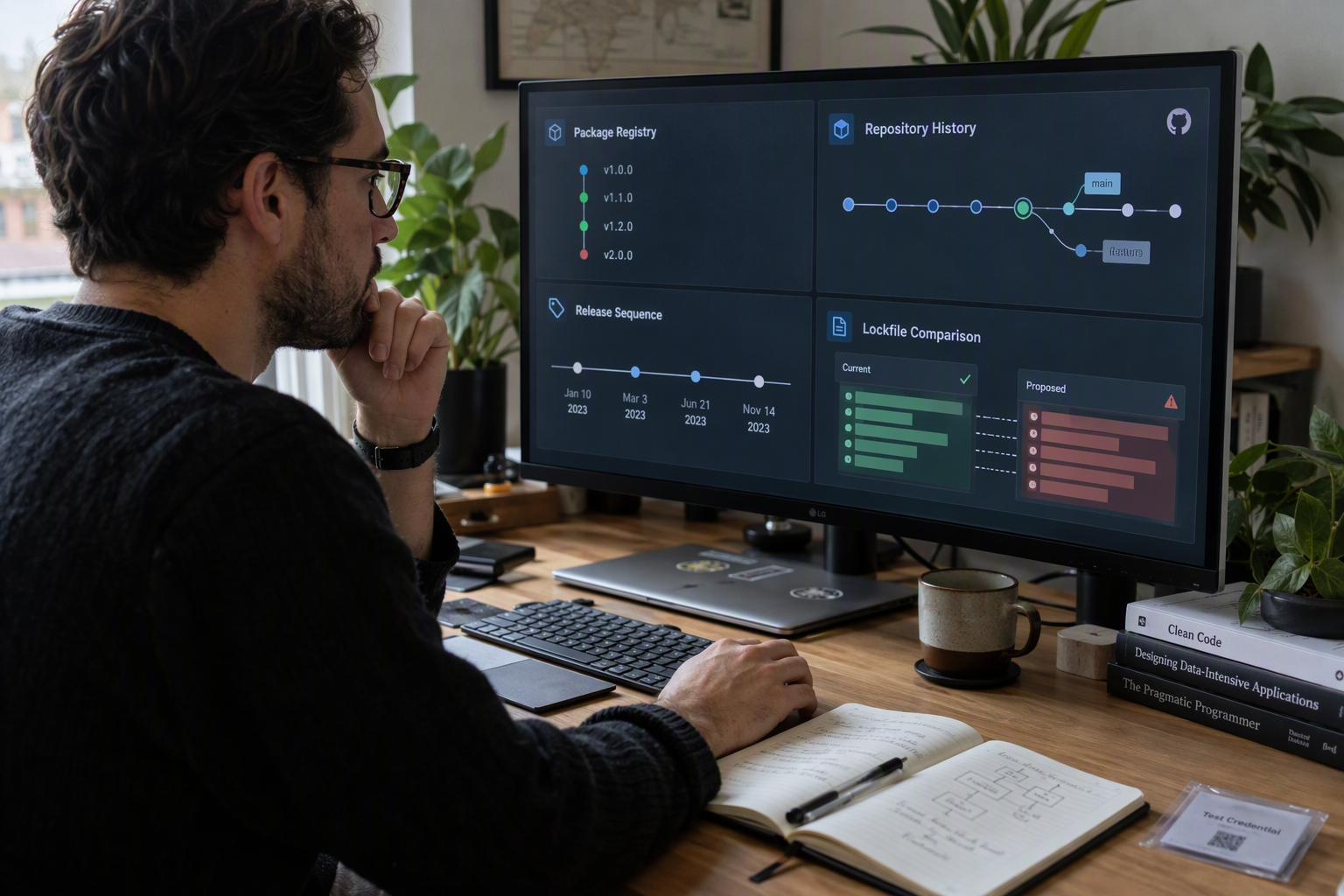
A trusted baseline is a documented, reproducible record of the dependencies, scripts, package artifacts, and network behavior your application needs before a proposed change is introduced. Build it from a known-good release, then compare new dependency changes against that record; a baseline should flag surprises, not automatically declare familiar code safe.
What should you record in a known-good dependency baseline?
Start with the exact source revision and build environment that produced a verified application release. Save the lockfile, Node.js and npm versions, install command, and hashes of the lockfile and key build artifacts. Use npm ci in CI to install from the lockfile rather than allowing dependency versions to drift.
Record dependencies as a package-and-version inventory, including transitive packages. For each, note its source, integrity value from the lockfile, whether it is direct or transitive, and whether it has lifecycle scripts such as preinstall or postinstall. Keep this inventory with the release record so reviewers can distinguish an expected package update from an unexplained change.
A useful baseline also captures normal behavior:
- Which packages legitimately need install-time scripts, and why.
- Which processes a clean build starts and which files it changes.
- Which external hosts the build or application is expected to contact.
- Which environment variables and secrets are available at build time.
For an AI or telephony application, document expected connections to model providers, telephony services, and messaging APIs. This gives reviewers a concrete comparison point if a changed dependency unexpectedly makes outbound requests or attempts to read credentials.
How do you make the baseline hard to tamper with?
Store baseline records in version control or a protected artifact store, and require review for changes to lockfiles, package manifests, and CI configuration. Restrict who can approve changes to trusted build workflows. Keep production credentials out of dependency installation and scanning jobs; a baseline is less useful if suspicious code can access real secrets during the check.
For an initial review, install in an isolated environment without production credentials. Consider using npm ci --ignore-scripts to inspect the dependency tree before allowing lifecycle scripts to run. Some legitimate packages require scripts, so document approved exceptions and test them separately rather than treating every script as malicious—or allowing every script by default.
How should teams update the baseline?
Update it only after reviewing and accepting a dependency change. A practical review sequence is:
- Compare the proposed lockfile and manifest with the last approved revision.
- Explain new packages, version changes, integrity changes, and lifecycle-script edits.
- Test the change in a disposable environment and compare file and network activity with the recorded baseline.
- Approve the new baseline only when the changes have a clear purpose and evidence supports them.
Datamation reported a campaign involving 338 malicious npm packages and more than 50,000 downloads; those figures describe that report, not a live count of npm threats. The practical lesson is to baseline actual package artifacts and behavior, not popularity or familiarity alone. A known-good baseline makes scanning more useful because it helps teams focus on what changed—and investigate before that change reaches a customer-facing system.
How do you triage a suspicious npm package step by step?
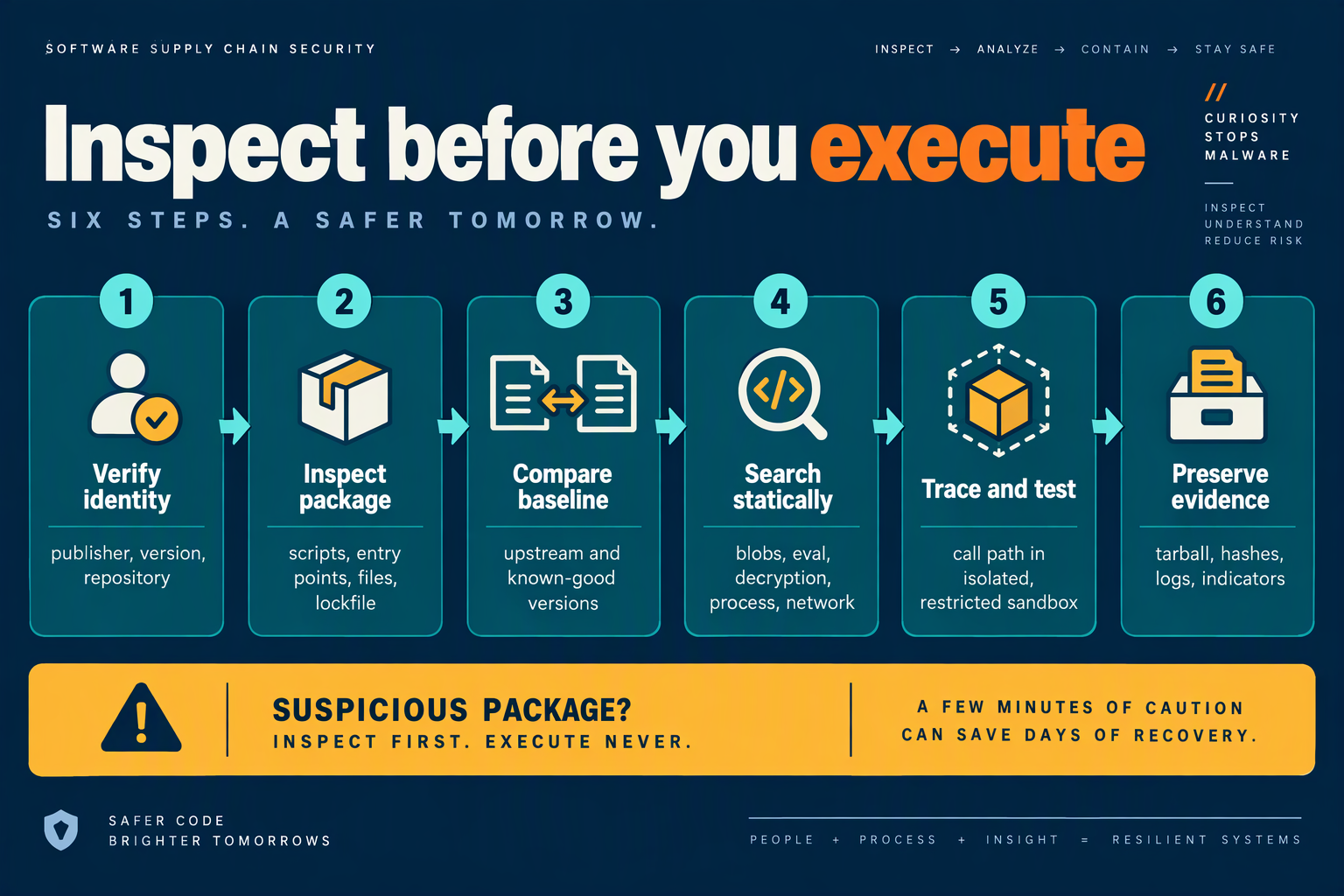
Triage a suspicious npm package in a disposable environment, starting with the exact version and preserving evidence before you run or remove anything. Then inspect its metadata and files, test its behavior with scripts disabled first, and make any deeper execution observable and isolated.
What should you capture before investigating?
Record the package name, exact version, source registry, discovery time, and the dependency path that brought it into the project. Save the relevant package.json, lockfile, CI logs, and package archive; note the package’s integrity hash and compare it with the value in the lockfile. These details help distinguish a compromised release from a later update or a local environment issue.
Check the change that introduced the package: who approved it, whether the version was pinned or ranged, and whether the lockfile changed unexpectedly. Don’t delete the package or rewrite the lockfile before saving this evidence.
The Hacker News reported in July 2026 that four compromised packages in the @asyncapi namespace distributed a multi-stage botnet loader, citing research from OX Security and SafeDep. That incident illustrates why a trusted namespace or familiar dependency path should not replace version-specific review.
How do you inspect the package without running it?
First retrieve registry metadata and package contents without installing the dependency into a developer workspace:
npm view <package>@<version> dist.integrity dist.tarball scripts --json
npm pack <package>@<version>
Extract the archive in a disposable directory and inspect package.json, entry points, bundled files, and recent release changes. Search for lifecycle hooks such as preinstall, install, postinstall, and prepare, then trace any code that decodes strings, constructs commands dynamically, launches child processes, or makes network requests. Encoded text alone is not proof of malware; the key question is what the decoded value does and when it runs.
Compare the suspicious version against the last known-good release. Look for newly added files, unusual minified bundles, changes to install scripts, or code that retrieves and executes a second-stage payload. A vulnerability scan can add context, but a clean result does not explain away suspicious behavior.
How do you test suspicious behavior safely?
If static inspection is inconclusive, use a disposable VM or tightly isolated container—not a laptop with developer credentials. Start with scripts disabled:
npm ci --ignore-scriptsThis lets you examine the dependency tree without automatically running npm lifecycle scripts. If you need to observe install-time behavior, repeat in a separate, resettable environment with no production secrets, restricted network access, and process, filesystem, and DNS/HTTP logging. Record what the package attempts to execute or contact; don’t allow an unknown payload unrestricted internet access.
For runtime testing, trigger only the relevant code path and watch for unexpected child processes, writes outside the project, environment-variable access, or outbound connections. A loader may remain dormant until a particular function runs, so “install completed without errors” is not a safety finding.
When should you block the package?
Block or quarantine the version when you cannot explain its execution path, when it fetches or decrypts an unexplained payload, or when it reaches unexpected hosts. Preserve logs and hashes, alert your security owner, and check whether the same version ran in CI or production. If it did, treat accessible tokens and credentials as potentially exposed: rotate them, review relevant logs, and replace the dependency only after verifying a known-good version or alternative.
Which controls reduce npm supply-chain risk in AI and telephony apps?
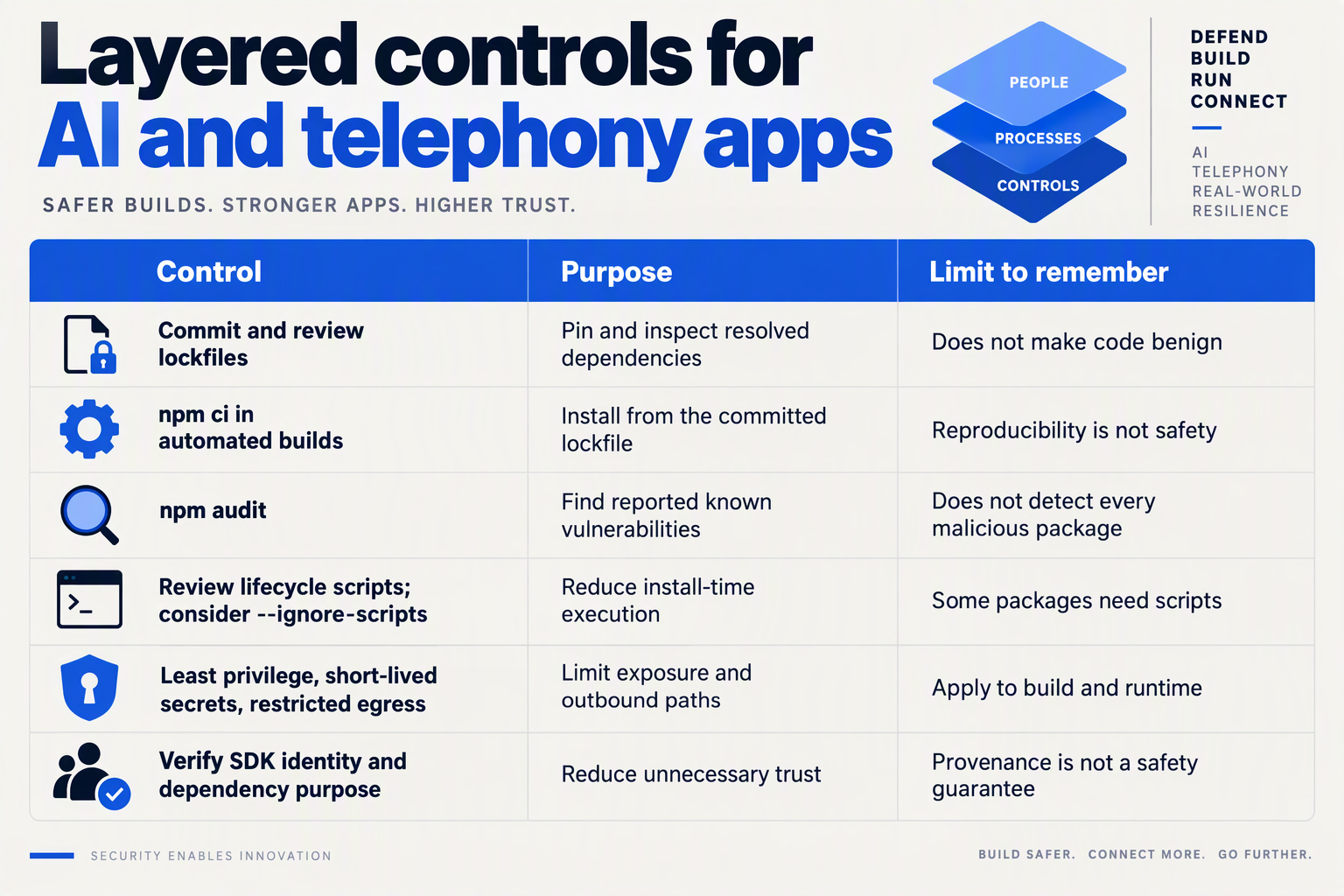
Use layered controls: make dependency changes reviewable, restrict what install-time code can access, and preserve enough build evidence to investigate an alert. The Hacker News reported in July 2026 that four compromised @asyncapi packages delivered a multi-stage botnet loader, citing OX Security and SafeDep; a vulnerability scan alone is not a substitute for execution controls.
Which pipeline controls reduce npm supply-chain risk?
| Control | Enforce in the pipeline | Risk reduced | Evidence to retain |
|---|---|---|---|
| Pin and verify dependencies | Commit the lockfile, use npm ci in CI, and require review of dependency and lockfile changes. Prefer exact versions for sensitive packages. | Unexpected version drift and unreviewed dependency substitution. | Lockfile, package diff, reviewer approval and build logs. |
| Gate package provenance | Check package publisher, repository and release history before approval. Where available, validate provenance or signature information against the expected source. | Typosquatting, account compromise and releases that do not match the expected project. | Registry metadata, provenance results and approval record. |
| Control lifecycle scripts | Disable install scripts by default where feasible, for example with npm ci --ignore-scripts. Allow only documented scripts that are needed, and run them in an isolated build. | Hidden commands executing automatically during installation. | Script allowlist, exceptions, and sandbox output. |
| Isolate build execution | Build in short-lived containers or workers without production credentials, with limited filesystem access and restricted outbound network routes. | Loader access to developer machines, secrets or unrestricted command-and-control traffic. | Container image, network policy and process logs. |
| Limit credentials and permissions | Do not expose deployment secrets to untrusted pull requests or dependency-install steps. Use short-lived credentials and least-privilege CI identities. | Theft of cloud, repository, signing or deployment credentials if malicious code runs. | Secret-access policy, token scope and CI job permissions. |
| Monitor and contain | Alert on unexpected child processes, new outbound destinations, modified build artifacts or anomalous package changes. Define a quarantine and credential-rotation procedure. | Quiet persistence and continued access after a suspicious build. | Alerts, artifact hashes, incident timeline and response actions. |
These controls work best as gates, not just recommendations in a checklist. For example, a pull request that adds a package can require a named owner, a documented reason, and approval for any install-script exception before CI proceeds. If a legitimate package needs a native build step, isolate that step rather than granting it the same access as deployment jobs.
Static analysis and software-composition scanners remain useful for known vulnerabilities and suspicious patterns, but encrypted or staged payloads may not be recognizable from a package name or advisory match. Treat scan results as one signal alongside provenance checks, restricted execution and runtime monitoring.
How should teams roll these controls out?
Start with the highest-impact boundaries: no production secrets in dependency-install jobs, a committed lockfile, and isolated CI workers. Then add package approval and script exceptions, with a clear owner and review date for each exception. This keeps routine builds practical while ensuring unusual package behavior has a review path.
For AI and telephony apps, apply the same controls to packages used in webhook handlers, model connectors and call-processing services. Those components may handle sensitive credentials or customer interactions, so a suspicious dependency should trigger containment and investigation—not an automatic assumption that the application is safe because its tests passed.
What mistakes create false confidence during malware detection?
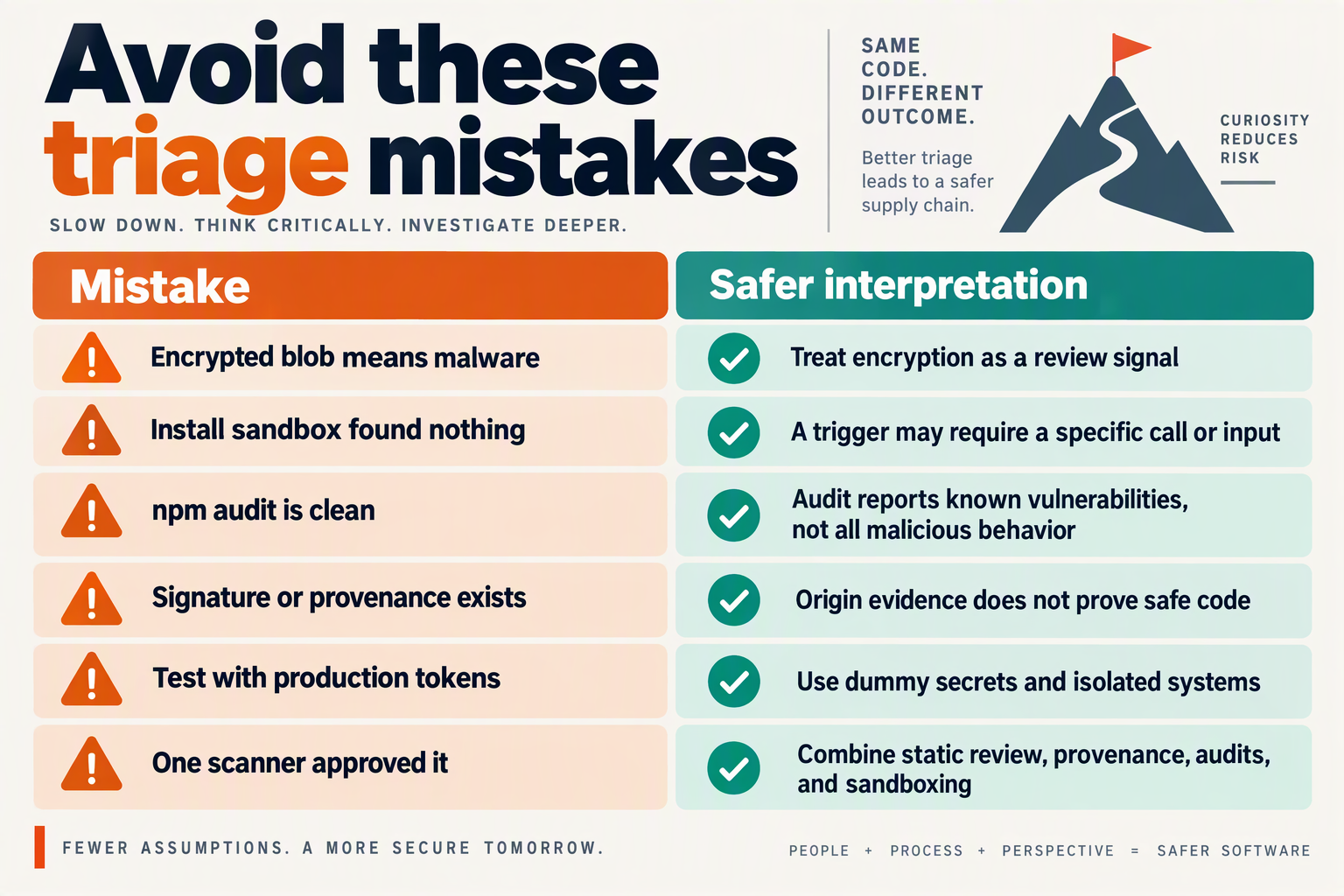
What mistakes create false confidence during malware detection?
False confidence comes from treating a single signal—such as a familiar package name, a clean scanner result, or a successful build—as proof that an npm dependency is safe. Reduce that risk by combining independent checks and judging each package against the behavior your application actually needs.
| False-confidence assumption | Why it fails | Better control | Risk for AI and telephony apps |
|---|---|---|---|
| “The package is under a familiar or trusted namespace.” | An established namespace can be compromised, and malicious code may arrive through a legitimate-looking release. In July 2026, The Hacker News, citing OX Security and SafeDep, reported that four compromised @asyncapi packages delivered a multi-stage botnet loader. | Verify the exact package version and publisher context; require review for new or changed dependencies, including packages from known organizations. | A dependency may run in an environment with access to model credentials, telephony integrations, or customer data. |
| “Our vulnerability scanner passed it, so it is safe.” | Vulnerability databases and malware detection are different checks. A package can contain harmful behavior without matching a known vulnerability or detection signature. | Use scanners as one input, not a verdict. Pair automated results with review of the dependency’s purpose, provenance, and changes. | A clean vulnerability report can leave a team unprepared for code designed to steal secrets or contact an external server. |
| “There are no install scripts, so there is no execution risk.” | Malicious behavior may be reached through application code or a transitive dependency after installation. Checking one package’s metadata does not explain every execution path. | Review the full dependency tree and test the application in an isolated environment with restricted credentials and network access. | A loader may activate only when an AI or communications feature is used, rather than during installation. |
| “The app built and passed its tests.” | Tests establish that expected scenarios work; they do not prove that a dependency behaves safely in untested conditions. A concealed payload may remain dormant until a particular runtime event. | Add security-focused tests and observe process, file, and network behavior during representative runtime scenarios. Repeat checks when dependencies change. | A normal development test may miss behavior triggered only during a live call, message, or model request. |
| “We pinned the direct dependency, so its contents cannot change.” | A pinned version does not establish that the chosen release is trustworthy, and it may not pin or vet every transitive package in the tree. | Commit and review the lockfile, enforce reproducible installs, and investigate unexpected dependency-tree changes before merging. | A transitive change can introduce code into the same service that handles customer conversations or API keys. |
The incident reported by The Hacker News in July 2026 is a useful reminder: namespace familiarity did not prevent four @asyncapi packages from being used to deliver a multi-stage loader. The practical lesson is not to distrust every package; it is to avoid treating reputation, scanner output, or passing tests as substitutes for evidence about what code runs.
For teams building AI and telephony systems, make the review proportional to access. A dependency used by a low-privilege utility presents a different exposure from one loaded into a service that can reach model providers, call infrastructure, or production secrets. Use layered checks, restrict CI credentials, and investigate suspicious behavior before promoting a build. When a package cannot be explained, quarantine it and verify it in an isolated environment rather than relying on a reassuring single signal.
What should you do if triage finds a suspicious dependency?

Treat a suspicious npm dependency as a potential security incident until you can establish what ran, where it ran, and what it could access. First preserve evidence and contain affected systems; then assess exposure, remove or replace the package, and restore service only after verification.
What evidence should you preserve first?
Before deleting node_modules, rebuilding, or changing lockfiles, capture the package name and version, the lockfile and manifest, install logs, relevant CI output, and timestamps. Record where the package appeared—developer workstation, build runner, staging, or production—and retain available process, DNS, proxy, and endpoint logs. If you can do so safely, calculate file hashes and store copies of suspicious files in a restricted location for analysis.
Avoid running the package to “see what happens.” Review its contents in an isolated environment that has no production credentials and restricted network access. Record the exact commands and findings so another responder can reproduce the analysis.
How should you contain a potentially compromised dependency?
Use a measured sequence that stops further execution without destroying useful evidence:
- Pause affected builds and deployments. Block the suspect version from entering new artifacts, and alert the application and security owners.
- Isolate exposed environments. Restrict network access or remove systems from service when there are signs of active execution or unauthorized connections. For customer-facing AI and telephony services, follow incident procedures for maintaining safe service continuity.
- Review the dependency path. Identify direct and transitive consumers through the lockfile and dependency tree. Check whether the package was installed only or also loaded at runtime.
- Revoke and rotate potentially exposed secrets. Prioritize credentials available to the affected process: cloud and CI tokens, model-provider keys, database credentials, webhook secrets, and telephony-provider credentials. Revoke first where possible, then issue replacements and update protected stores.
- Search for indicators of execution. Compare outbound connections, unexpected child processes, modified files, and secret-access events against normal activity. Preserve suspicious findings for investigation rather than treating a clean scan as proof of safety.
The stakes are concrete: The Hacker News reported in July 2026 that four compromised @asyncapi npm packages delivered a multi-stage botnet loader, citing research from OX Security and SafeDep. That incident illustrates why a familiar namespace or a successful build should not be treated as evidence that a package is safe.
When is it safe to restore service?
Restore from a known-good source only after you have removed or pinned away from the suspect version, reviewed the replacement’s contents, and rebuilt in a clean environment. Confirm that lifecycle scripts and runtime behavior are understood; verify that rotated secrets are active and old credentials no longer work. Then run tests and monitor logs, network activity, and authentication events closely after deployment.
If investigation confirms malicious behavior—or cannot rule out credential access—handle the event under your organization’s incident-response and notification policies. Document the timeline, affected versions and systems, evidence collected, containment steps, and remaining uncertainty. This record helps teams make a defensible recovery decision and improve dependency controls without relying on guesswork.
Frequently Asked Questions
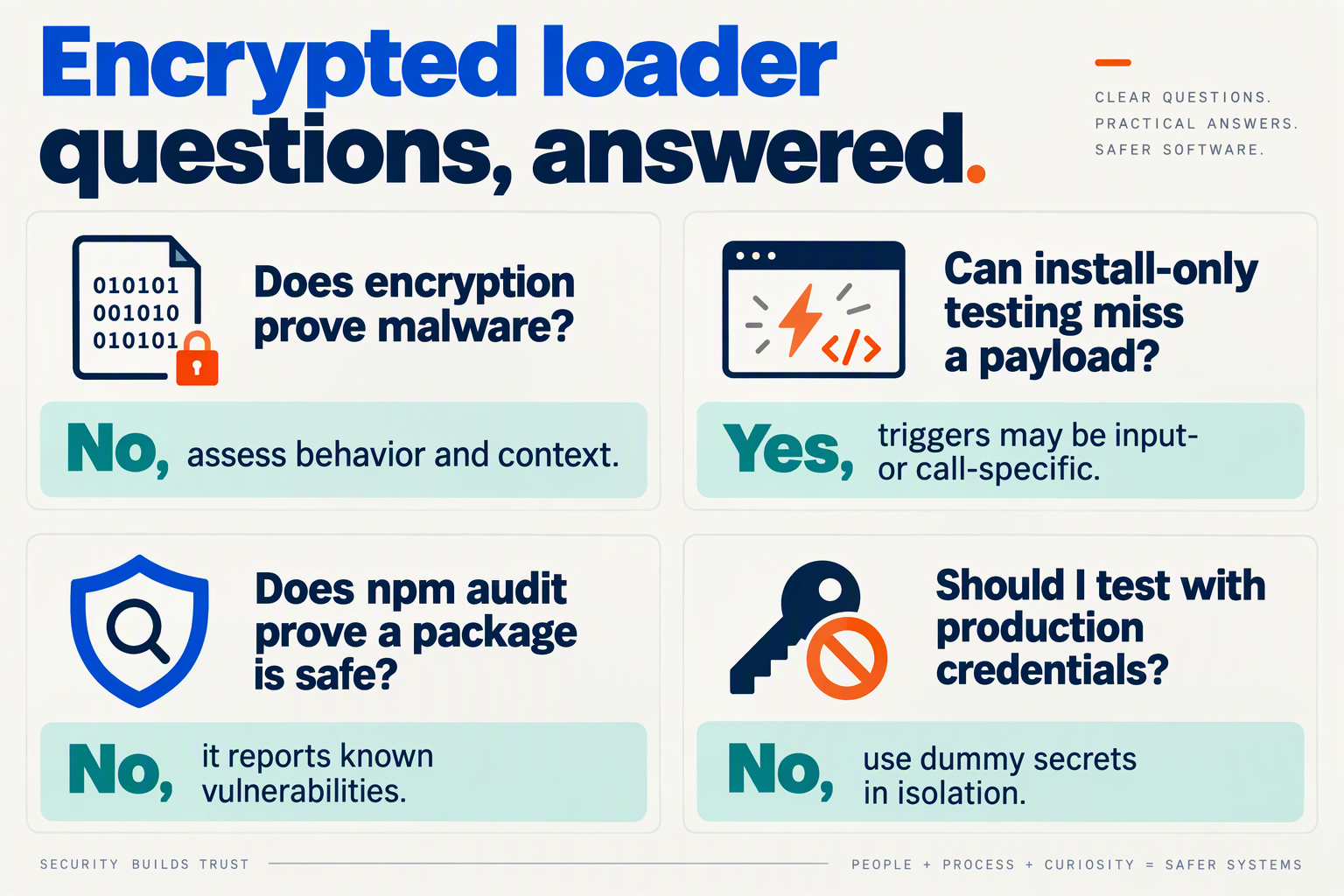
Frequently asked questions about npm encrypted loaders
What is an encrypted loader in an npm dependency?
How can I detect npm encrypted loader malware in a dependency?
package.json, and lockfile for unexpected changes. Search for lifecycle scripts, large encoded strings, runtime code generation such as eval or Function, and unfamiliar outbound connections; investigate each finding in context rather than treating any single indicator as proof.What npm package signs can indicate an encrypted loader?
@asyncapi packages delivered a multi-stage botnet loader, citing OX Security and SafeDep; the report illustrates why a familiar namespace is not a substitute for reviewing package contents.How do I safely test a suspicious npm package?
What should I do if an npm dependency may contain an encrypted loader?
How can AI and telephony teams prevent npm encrypted loader attacks?
Where can you learn more and what should you check next?
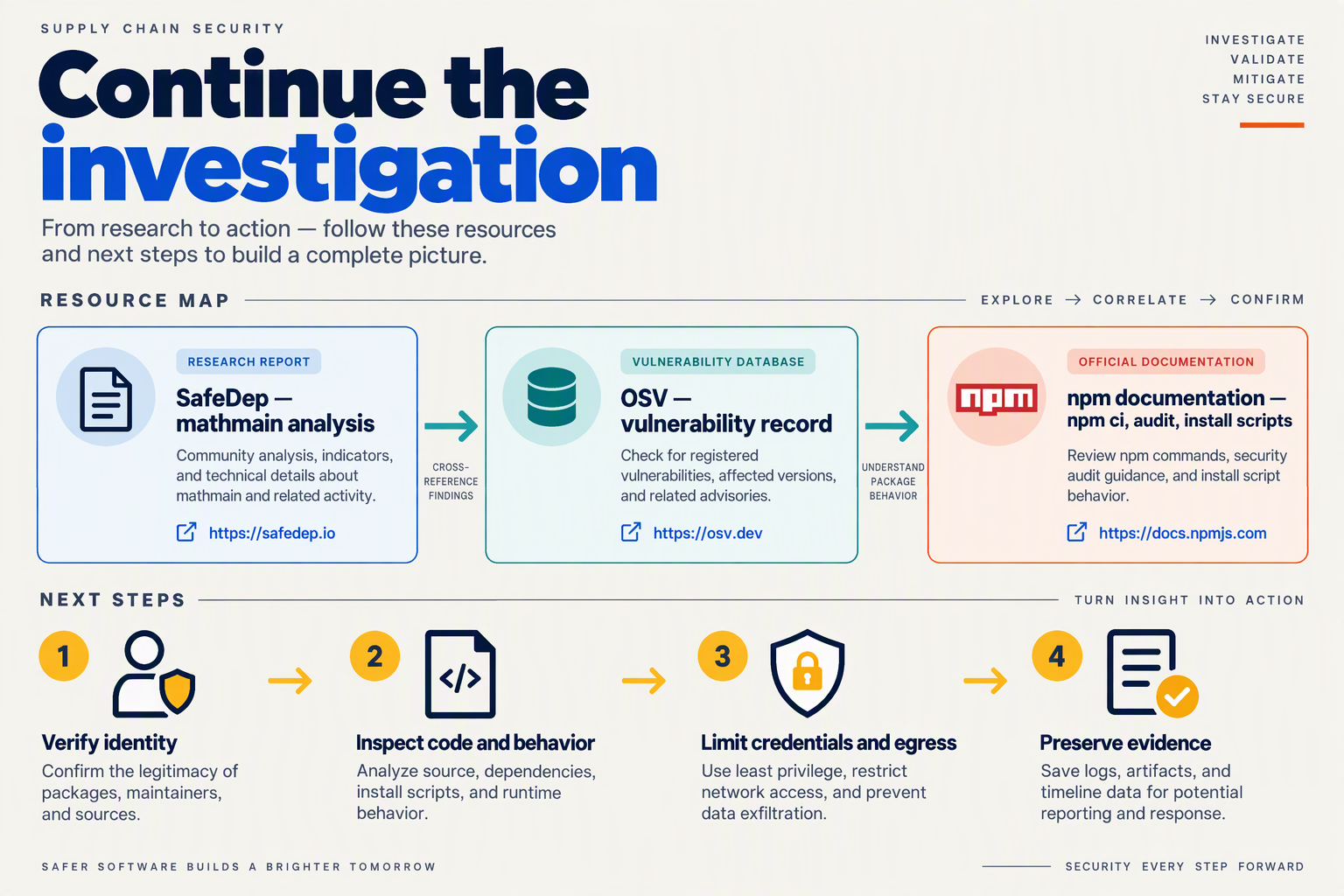
Use the final review step to turn package-risk findings into a repeatable release decision: document what raised concern, who approved the dependency, and what evidence supports that decision. For further reading, start with the incident reporting and research named below, then apply the checklist to your next dependency update.
Where can you learn more about recent npm loader incidents?
The Hacker News reported in July 2026 that four compromised packages in the @asyncapi namespace distributed a multi-stage botnet loader, citing research from OX Security and SafeDep. Read the reporting alongside the researchers’ analysis to understand how the incident unfolded and which indicators defenders identified; do not assume that a package is safe simply because its namespace is familiar.
Use incident reports as learning material, not as a blocklist by themselves. Package names can change, and a useful write-up should help your team ask broader questions: What changed between versions? At what point did the code execute? What behavior would be unusual for this package’s stated purpose? Record the answers in your dependency-review notes so future reviewers can apply the same reasoning.
What should your team check before the next release?
Treat approval as a documented decision rather than a green light from one scanner. Before merging a dependency update, confirm that the change has a clear owner, an understood purpose, and a rollback path. For higher-risk packages—especially those that can access secrets, build pipelines, model endpoints, or communications infrastructure—require a second review.
Use this short release checklist:
- Confirm provenance: Check the package’s source, publisher, release history, and whether the selected version matches the version your team intended to adopt.
- Record the review: Save the package version, relevant code or metadata changes, scan results, reviewer, and approval rationale with the change request.
- Limit exposure: Keep build and runtime credentials scoped to what the application needs; avoid making broadly privileged secrets available to untrusted install or build steps.
- Define a response owner: Know who can pause a release, investigate affected environments, and coordinate credential rotation if suspicious behavior is found.
- Revisit exceptions: Give temporary approvals an expiration or review date rather than allowing them to become permanent policy.
For AI and telephony teams, apply the same discipline to dependencies that sit near model access, customer records, voice processing, and messaging workflows. A communications platform such as CallMissed, which offers AI voice agents and a developer AI API, illustrates how many software components can meet in a customer-facing system; dependency review remains a responsibility of the team building and operating its own application.
How can you make dependency review sustainable?
Assign ownership for dependency policy and make review part of the normal release process, not an emergency-only task. Track exceptions and near misses, then update your checks when they reveal a gap. Reassess the process whenever an application adds a new integration or changes how it handles credentials and customer data.
The practical goal is not to eliminate every third-party package. It is to make each addition explainable, limit what it can reach, and ensure that your team can respond quickly when the evidence changes.
Conclusion
Encrypted npm loaders are best contained when dependency review becomes a repeatable release control—not a one-time scan. For AI and telephony apps, the aim is to understand what a package executes, when it executes, and what systems it contacts before trusting it with production access.
The key practices are:
- Review changes, not just names: compare package versions and lockfile updates, and scrutinize unexpected lifecycle scripts.
- Look for concealment: investigate encoded strings, obfuscated execution paths, and code that behaves differently at install time or runtime.
- Combine tools with controlled checks: use automated scanning alongside manual review, isolated execution, and outbound-network monitoring.
- Prepare for a suspected compromise: preserve evidence, isolate affected environments, rotate potentially exposed secrets, and verify packages before restoring service.
The risk will keep evolving as attackers adapt loaders to evade static checks, making package behavior and network activity increasingly important signals. In July 2026, The Hacker News reported that four compromised @asyncapi packages delivered a multi-stage botnet loader—a reminder that familiar namespaces are not guarantees of integrity.
As AI communication systems grow, dependency discipline will remain part of protecting the credentials, customer data, and services behind them. To explore how this infrastructure is evolving, visit CallMissed, an AI customer-communication platform offering voice agents and a developer AI API. What will your team verify before its next dependency update reaches production?
Sources
Discussion
Related Posts



Ready to automate customer conversations?
Launch AI voice agents and WhatsApp bots with CallMissed — one API, 22+ Indian languages.