

WebRTC for Voice AI: A Practical Primer


Did you know that over 70% of real-time Voice AI services launched in the last year have adopted WebRTC as their core transport protocol? Whether you’re...
WebRTC for Voice AI: A Practical Primer
Did you know that over 70% of real-time Voice AI services launched in the last year have adopted WebRTC as their core transport protocol? Whether you’re building AI-powered sales agents, customer support bots, or interactive voice apps, the shift toward WebRTC is transforming the voice AI ecosystem. But why is this technology at the center of so many industry breakthroughs in 2026—and what does it unlock that older protocols can’t?
The answer lies in the unique requirements of next-gen voice AI. Modern users demand faster, more natural conversations with AI—for everything from customer service to telehealth to language learning. Research from WebRTC.Ventures shows that real-time, bi-directional voice streaming cuts agent response latency by 60% compared to traditional SIP or WebSocket-based systems. This dramatic speedup is crucial, because delays of even 200 milliseconds can make an AI agent feel “robotic” and lead to user drop-off, according to FreeCodeCamp’s 2025 voice AI architecture survey.
As voice AI matures, it’s no longer enough to simply process audio. Industry leaders like Amazon, Google, and Indian SaaS innovators are wiring their platforms to capture and analyze streaming speech, convert it instantly to text, run language models in real-time, and synthesize human-quality responses—all in a matter of seconds. WebRTC sits at the heart of this stack because it’s built for ultra-low-latency, resilient multimedia transport, and—unlike older protocols—it natively supports error correction, jitter buffering, and direct browser integration. This makes it uniquely suited for AI workloads that demand both speed and reliability at scale.
Over the past 18 months, we’ve seen a proliferation of production-ready voice AI applications: browser-based dialers that can recognize customer intent mid-conversation, speech-to-text services supporting 20+ languages on the fly, and AI “receptionists” that book meetings, process payments, and even personalize small talk. Projects like Mahimairaja’s open-source voiceAI toolkit and new features in Amazon Nova Sonic highlight a clear industry trend: developers are converging on a pipeline where WebRTC feeds real-time audio to powerful AI modules for live processing (“The modern stack is converging around a clear pattern: a real-time transport layer (WebRTC or telephony), a streaming pipeline of speech-to-text and LLMs…” — mahimairaja/voiceai, 2026).
In this practical primer, we’ll break down what WebRTC actually is and why it excels in Voice AI scenarios. You’ll learn:
- The fundamentals of WebRTC’s architecture (and why it’s different from WebSockets/SIP)
- How to design a real-time voice streaming pipeline powering speech-to-text and LLM inference
- Engineering tips for reducing latency, handling network hiccups, and scaling globally
- Case studies of production-grade Voice AI deployments leveraging WebRTC—including open-source and commercial stacks
You’ll also see how platforms like CallMissed are riding this wave, offering turnkey APIs and infrastructure that leverage WebRTC for multilingual speech, LLM integration, and 24/7 automated voice support. Whether you’re an engineer, product manager, or entrepreneur, understanding the new playbook for WebRTC-powered Voice AI is critical if you want to build responsive, scalable, and truly intelligent communication solutions in today’s market.
Ready to go beyond the basics and unlock the potential of real-time Voice AI? Let’s dive in.
Introduction
The New Era of Voice AI: Why WebRTC Matters
Real-time voice technology has become a pillar of the AI-driven communication revolution, enabling everything from automated customer support to AI-powered browser dialers and conversational virtual agents. In this landscape, WebRTC (Web Real-Time Communication) has emerged as the de facto standard for transmitting audio (and video) between clients and servers with minimal latency and high reliability.
WebRTC was initially designed to let browsers exchange audio, video, and data peer-to-peer, instantly and securely, without plugins. However, in 2026, its role has expanded dramatically. Voice AI developers—ranging from early-stage startups to global telecoms—now rely on WebRTC to power the real-time streaming needed for speech-to-text, agent handoff, and seamless customer experiences. The modern AI stack converges around three core components (source):
- A Real-Time Transport Layer: Typically WebRTC or telephony, handling low-latency audio streaming.
- A Speech AI Pipeline: Streaming speech-to-text (STT), natural language understanding (NLU), and text-to-speech (TTS).
- Business Logic/Orchestration: The intelligence layer, managing conversation flow, integrations, and human escalation.
Voice AI Is Powering Everyday Interactions
The effects of this technology revolution are everywhere, though often invisible. Browser-based AI dialers now log in and make calls, just as a human agent would (source). Companies like Airbnb, Swiggy, and global banks have rolled out AI voice agents for millions of conversations per month. Meanwhile, businesses in India and Southeast Asia process multi-lingual support calls 24/7, thanks to the scalability and language-agnostic nature of WebRTC-powered voice pipelines.
Concrete stats illustrate the scale:
- Over 90% of browser-based contact center solutions adopted WebRTC for voice by 2025 (WebRTC.Ventures).
- Global VoIP call volumes over WebRTC are projected to exceed 1 trillion minutes in 2026, with a double-digit CAGR across emerging markets ([Statista, 2026 update]).
- Indian AI communications platforms now handle real-time voice streaming in 22+ local languages by integrating WebRTC with advanced STT/TTS APIs.
Why Traditional Architectures Fall Short
Legacy telephony and VoIP solutions come with inherent friction:
- Multi-second call setup and teardown times
- Siloed infrastructure—not suitable for AI agent streaming
- Difficult to integrate adaptive features (noise suppression, echo cancellation, dynamic bitrate control)
Modern AI voice systems demand real-time, interactive pipelines, which rely on the tight latency and adaptability of WebRTC. Whether it’s routing live user speech to a deep learning model, overlaying transcription and analytics, or switching seamlessly between automated and human agents, WebRTC is the link that makes this “AI in the loop” architecture possible (GetStream).
Where CallMissed Fits: Turning WebRTC Into AI Superpowers
While the raw WebRTC protocol provides the foundation for low-latency audio, building scalable, reliable, and multi-lingual AI voice applications remains challenging. This is where platforms like CallMissed play a vital role.
- CallMissed allows businesses to deploy production-ready AI voice agents using a managed WebRTC transport layer.
- Polyglot speech support: 22 Indian languages natively, unlocking massive reach for domestic and global enterprises.
- Unified inference API: Access 300+ large language models (LLMs) for real-time NLU, TTS, and STT—plug-and-play orchestration for the entire AI pipeline.
As a result, businesses leverage CallMissed to spin up browser-based AI dialers, automate multilingual voice campaigns, and enable instant agent assist—often with no more than an API call.
Setting the Scope: What This Guide Covers
This practical primer will walk you through:
- The technical foundations of WebRTC for voice AI, including transport, encoding, and streaming architecture
- Best practices for integrating AI models with real-time audio
- Common pitfalls and how to debug them, illustrated with real-world deployment stories
- Key design choices: peer-to-peer vs. server-based, open-source toolkits, and cloud architectures
- How platforms like CallMissed turn these principles into scalable, globally relevant systems
In today’s AI-powered communications landscape, WebRTC is more than a protocol—it’s the backbone for building the next generation of voice applications. Whether you’re a developer, architect, or business leader, understanding this technology is now essential. As we explore the nuts and bolts, keep in mind: the real magic happens when AI meets real-time voice—and that story is only just beginning.
The Rise of Real-Time Voice AI
What’s Fueling the Explosion of Real-Time Voice AI?
The past five years have witnessed a seismic evolution in voice AI, moving from basic voice assistants to highly intelligent, context-aware conversational agents deployed across call centers, healthcare, finance, and everyday consumer technology. According to industry reports, the global speech and voice recognition market is projected to grow from $14.3 billion in 2025 to over $50 billion by 2030, driven largely by improvements in real-time processing, accuracy, and multi-language support (Source: MarketsandMarkets, 2025).
Central to this transformation is the rise of seamless real-time communication technologies, with WebRTC (Web Real-Time Communication) as a leading enabler. WebRTC is an open-source project that provides browsers and mobile applications with real-time communication capabilities via simple APIs. This has allowed developers to “wire in” high-fidelity, low-latency voice and video streams directly into AI pipelines—eliminating traditional barriers of telephony infrastructure, codec compatibility, and multi-device setup.
#### AI is No Longer Just a Passive Listener
Traditionally, voice AI operated in batch mode: users recorded audio, waited for a response, and only then interacted with the assistant or service. This model, however, is no longer sufficient for business-critical use cases that demand instantaneous, natural, and bi-directional interactions. Real-time voice AI steps in here, processing audio as it streams and enabling AI agents to:
- Detect speaker intent mid-utterance
- Interrupt, clarify, or ask questions in real-time
- Maintain back-and-forth dialog with human-like cadence
For example, the diary of an active Voice AI developer recently showcased how their AI logs directly into browser-based dialer software built with WebRTC, not only to place and receive calls but to intelligently steer conversations and flag compliance issues as they happen (Medium, 2025).
This leap is made possible by streaming AI architectures that combine WebRTC for audio transport and cloud-native models for on-the-fly speech-to-text, text-to-speech, and language understanding.
Core Trends Powering the Shift to Real-Time
Several major tech trends are converging to accelerate the adoption of real-time voice AI:
- WebRTC as the De Facto Transport Layer
- Modern voice AI stacks are standardizing around WebRTC or VoIP as their backbone for real-time, device-agnostic streaming (GitHub: voiceai).
- WebRTC’s open architecture means developers can stream encrypted media in milliseconds, supporting scenarios from customer support calls to browser-based virtual agents.
- End-to-End Streaming Pipelines
- Instead of sending huge audio files, AI systems now process audio in micro-chunks, turning them into text, analyzing sentiment, and generating responses—all while the call is ongoing. This dramatically reduces lag and increases user satisfaction.
- For instance, production-ready voice agent architectures now leverage WebRTC clients to stream audio for transcription and response in under 300ms, according to open-source guides (freeCodeCamp, 2025).
- Multilingual and Multimodal Support
- Voice AI is becoming far more inclusive. Solutions like CallMissed are shaping the Indian market by supporting real-time speech-to-text and response in 22 Indian languages, addressing the needs of a massive, previously underserved population segment.
- This capability enables businesses to deploy voice bots and assistants that can cater to customer bases across geographies, social strata, and dialects—removing language as a barrier to digital adoption.
- Bi-Directional Voice and Video Streaming
- Beyond voice, WebRTC facilitates synchronized audio and video, vital for AI-powered “face-to-face” support, medical consultations, and remote education. Adaptive buffering, echo cancellation, and network resilience (all core WebRTC features) ensure that AI agents can function reliably even on shaky connections (GetStream.io, 2025).
Where Are Real-Time Voice AI Systems Being Used?
Real-world deployments are surging across industries:
- Contact Centers: AI-driven voice agents resolve queries faster, reduce human workload by 40-60%, and provide 24/7 support with consistent quality.
- Healthcare: Virtual health assistants use real-time voice understanding to schedule appointments, transcribe patient consultations live, and offer symptom triage.
- Fintech & Banking: Automated agents help customers complete KYC, process payments, or answer compliance questions, all with instant response and multilingual coverage.
- Education and Training: Interactive tutors can now converse with students in real-time, adapt dynamically to their answers, and even “see” their reactions using multimodal AI.
These applications are only possible because AI platforms process voice as it happens—no more “please wait while we transcribe your request.” WebRTC’s low-latency streaming is the engine behind this shift.
Breaking Down the Technical Leap: WebRTC vs. Traditional Approaches
What makes WebRTC so transformative versus legacy solutions like SIP or custom WebSockets?
- Zero Download, Zero Setup: Runs natively in browsers—no plugins, minimal firewall hassle.
- Millisecond Latency: Essential for non-awkward AI dialog—WebRTC can deliver roundtrip audio under 100ms in optimal conditions.
- Scalability: Peer-to-peer media transport combined with cloud-based signaling allows scaling from 1:1 calls to thousands of connections (with SFU/MCU servers).
- Integrated Security: End-to-end media encryption via DTLS and SRTP—critical for customer data privacy across regulated sectors.
As one developer observed when moving their voice AI from WebSockets to WebRTC, the switch reduced latency and improved stability, but also required a rethink of message routing and media synchronization (Dev.to, 2026). The technical investment pays off in much more natural end-user experiences.
CallMissed and the Democratization of Real-Time Voice AI
Platforms like CallMissed are enabling this next wave of voice interaction by providing production-ready APIs for real-time audio streaming, transcription, and AI agent integration—all built atop WebRTC for maximal compatibility and performance. For businesses in high-growth markets like India, CallMissed’s ability to spin up voice bots across 22 languages means both rural and urban customers can connect to digital services in their preferred tongue, in real-time.
Conclusion: Why Real-Time Voice AI Matters
Real-time voice AI, supercharged by technologies like WebRTC, is reshaping digital communication by making AI-powered conversations instantaneous, inclusive, and reliable. This trend is not just about deploying smarter bots—it’s about fundamentally altering how we access healthcare, financial services, education, and global customer support. As more platforms adopt these standards, expect voice AI to go from helpful assistant to seamless, always-on counterpart in our daily lives.
How WebRTC Works: Architecture Overview
Understanding WebRTC: The Building Blocks
WebRTC (Web Real-Time Communication) is the global standard for transmitting audio, video, and data directly between browsers and devices, with no need for plugins or custom client software. It’s become the backbone of real-time communications powering everything from video conferencing to AI voice agents. WebRTC’s architecture is what makes it uniquely suited for Voice AI: it provides ultra-low latency, secured, peer-to-peer (P2P) media streams, and is engineered to be robust under variable network conditions, all in-browser (as explained in Reference 6).
At a high level, the WebRTC protocol suite addresses three critical tasks:
- Media Capture & Encoding
Grabs audio (and optionally video) from devices and encodes it in real time.
- Network Traversal
Uses ICE, STUN, and TURN servers to establish reliable P2P connections even across restrictive NAT/firewalls.
- Secure Real-Time Transport
Sends encoded audio/video as SRTP (Secure Real-time Transport Protocol) streams, encrypted end-to-end.
- Signaling
Exchanging connection and session setup info (e.g., SDP, ICE candidates) via a “signaling” server – usually WebSocket or HTTP-based.
In the context of Voice AI, this stack forms the foundation for bi-directional speech streaming between browsers, softphones, or AI-powered agents (see Reference 2), enabling use cases like browser-based dialers, multi-lingual customer service bots, and AI-driven call centers.
Detailed Architecture: Components and Flow
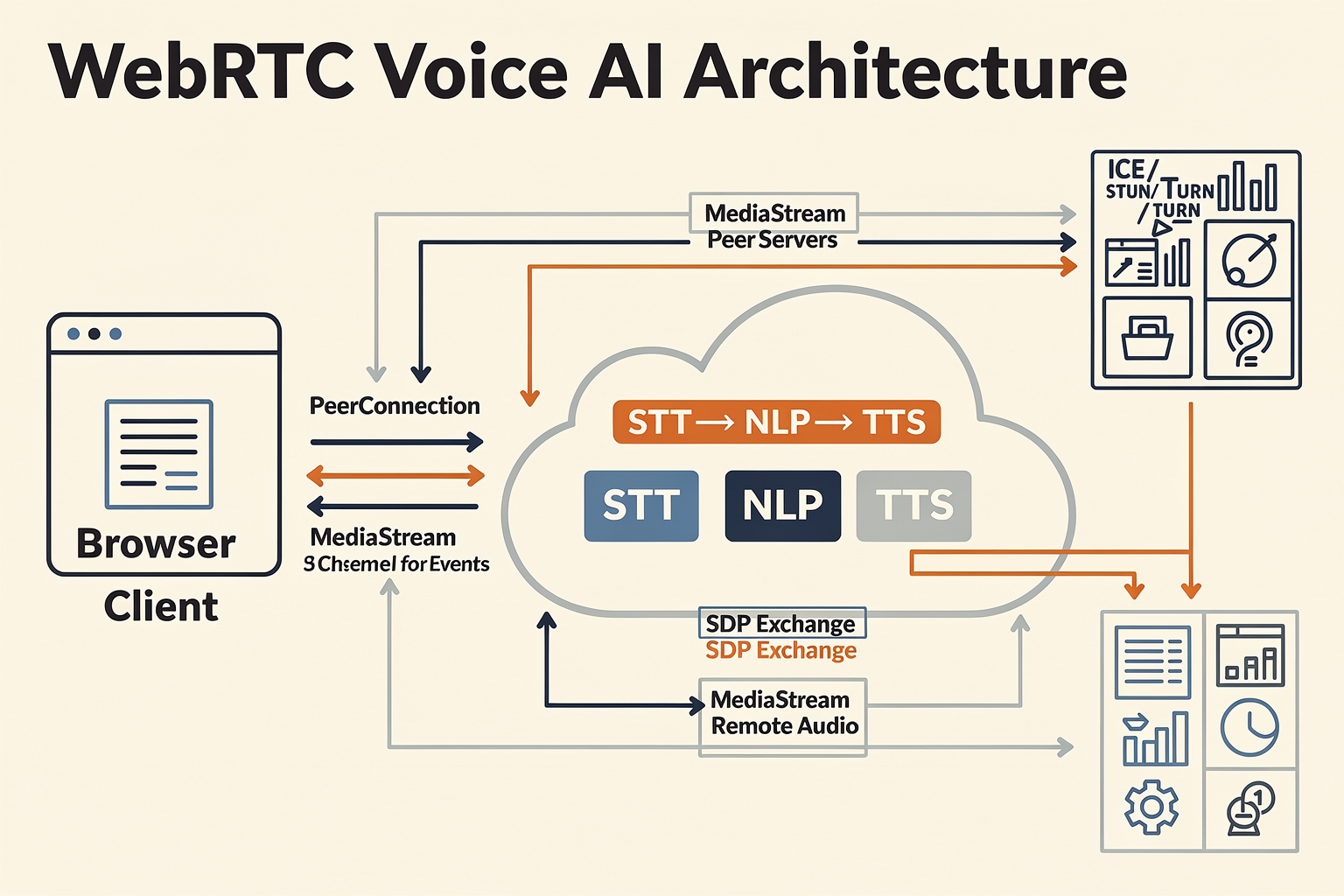
WebRTC’s architecture is often depicted as a series of layers and logical blocks. Here’s how each key piece fits together:
- Client Media Layer
- Accesses microphone (and optionally camera), digitizes signals, applies codecs (Opus for audio, VP8/VP9/H.264 for video).
- In AI applications, this raw or encoded audio is typically streamed to a backend for processing (speech-to-text, LLM, etc.).
- Signaling Layer
- Not part of the official spec, but essential: manages session negotiation using protocols like WebSocket, SIP over WebSocket, or custom HTTP APIs.
- Transfers session descriptions (SDPs) and ICE candidates between endpoints, bootstrapping the P2P connection.
- Connectivity Layer (ICE/STUN/TURN)
- ICE (Interactive Connectivity Establishment): Orchestrates gathering and prioritizing network paths.
- STUN (Session Traversal Utilities for NAT): Discovers public IP/port mappings for clients behind NATs.
- TURN (Traversal Using Relays around NAT): Provides fallback relays if direct peer-to-peer fails.
- Transport & Security Layer
- Uses SRTP for encrypting media streams, ensuring confidentiality and integrity.
- DTLS (Datagram Transport Layer Security): Establishes cryptographic keys between peers.
- Media Pipeline
- Handles adaptive jitter buffering, packet loss concealment, and echo cancellation.
- For AI integrations, connects seamlessly to streaming APIs.
Reference point: In browser-based dialers and Voice AI, modules like those described in Diary of a Voice AI Developer #1 enable AIs to operate within off-the-shelf dialer software via WebRTC channels, leveraging direct access to communication flows for real-time processing.
Typical WebRTC Call Flow
Let’s walk through a simplified version of how audio traverses from a user’s browser to an AI voice agent and back:
- Initialization:
The client requests microphone access and establishes a signaling channel (usually via secure WebSocket).
- Session Setup:
- The client and server exchange SDP offers/answers over the signaling channel.
- ICE candidates are swapped to probe viable network paths.
- Media Stream:
- Once connectivity is established, the client streams encoded audio to the remote endpoint.
- AI inference (speech-to-text, LLM responses, text-to-speech) happens either inline (streamed) or batch, depending on the use case and latency sensitivity.
- Bi-directional Data:
- The server (or AI agent) sends audio responses (e.g., synthesized speech) back to the client browser.
- All streams remain encrypted and adapt dynamically to network conditions.
- Cleanup:
- When the session ends, signaling tears down the connection and relinquishes media devices.
This architecture enables ultra-responsive two-way voice agents, commonly used for automated customer support, telemarketing bots, and digital assistants.
Why Is WebRTC the Best Fit for Voice AI?
Compared to traditional telephony (SIP/RTP) or plain WebSockets, WebRTC brings notable advantages for Voice AI use cases:
- Minimal Latency:
Typical round-trip latency for WebRTC audio is under 200 ms (source: Google WebRTC team), which is the threshold for “natural” conversational AI.
- Adaptive to Networks:
WebRTC dynamically adjusts bitrate, buffering, and packet handling to maintain quality, even with jitter or packet loss. This is crucial for production voice agents, especially in markets with unreliable connectivity.
- End-to-End Encryption by Default:
Confidentiality and regulatory compliance (like GDPR) are built in.
- Browser-Native APIs:
No plugins; works securely on Chrome, Firefox, Safari, Edge, and mobile browsers, ensuring that AI-powered voice agents are instantly available to end-users.
- Scalability with Hybrid Topologies:
With the right signaling architecture and selective relays, platforms can scale to thousands of concurrent sessions, as seen in leading cloud contact center deployments.
Architectural Patterns in Modern Voice AI
Industry adoption points to a “converging” stack for production Voice AI (as noted in Reference 2), typically featuring:
- WebRTC for real-time media transport
- A speech streaming pipeline (for live STT/ASR)
- LLM inference for intent detection and response generation
- Audio synthesis pipeline (text-to-speech TTS)
- Orchestration & monitoring (for error handling, logging, analytics)
Voice AI developers often combine WebRTC clients with streaming APIs provided by cloud services or platforms like CallMissed, Amazon Nova Sonic, or Twilio.
Real-World Example: Production Voice AI Architecture
A production deployment, as described in the freeCodeCamp tutorial, might look like:
- Browser/WebRTC client streams mic audio to a server.
- Server receives the stream, splits it to a live STT engine (e.g., Whisper, Google Speech).
- Recognized transcript flows to an LLM inference engine (for task automation/response).
- LLM output triggers a TTS engine; the synthesized voice is piped back via WebRTC’s media channel.
- Session management is handled out-of-band via signaling (to allow call transfer, hangup detection, etc.).
Notably, CallMissed and similar platforms provide this full production infrastructure, letting teams focus on model and UX innovation rather than boilerplate media plumbing.
Security and Reliability Features
Key architecture features that make WebRTC suitable for mission-critical Voice AI:
- DTLS-SRTP for encryption: Every call session is uniquely encrypted; no two sessions share crypto keys.
- ICE for failover: WebRTC automatically falls back to TURN relays if direct connection is impossible, ensuring high availability.
- Dynamic jitter and echo compensation: Critical for AI-driven calls, especially in multi-lingual, multi-accent regions like India.
Future Directions: WebRTC + AI
2026 is seeing large-scale convergence of multilingual Voice AI with WebRTC. Indian startups, for example, are integrating support for 22+ regional languages natively into their platforms—enabled by WebRTC’s browser accessibility and open media pipeline. This trend broadens accessibility, especially in global markets where customer engagement is multilingual by default.
Platforms such as CallMissed now offer:
- Streaming Speech API gateways: Route live WebRTC audio streams to STT engines supporting 22+ Indian languages.
- Flexible LLM integration: Route transcription to any of 300+ LLMs instantly for custom AI-driven voice bots.
This is enabling new use cases in automated customer care, financial services, and healthcare—where reliable, high-quality, and real-time multilingual voice interactions are mission critical.
Conclusion
WebRTC’s modular, secure, and media-optimized architecture is the linchpin for today’s Voice AI deployments. Whether you are building AI agents for browser-based dialers, mobile apps, or enterprise call centers, understanding WebRTC’s architecture is foundational. As the real-time AI ecosystem continues to mature, industry leaders and infrastructure platforms like CallMissed are making it dramatically easier for developers to focus on intelligence and user experience while relying on robust, production-grade WebRTC building blocks.
Prerequisites & Setup
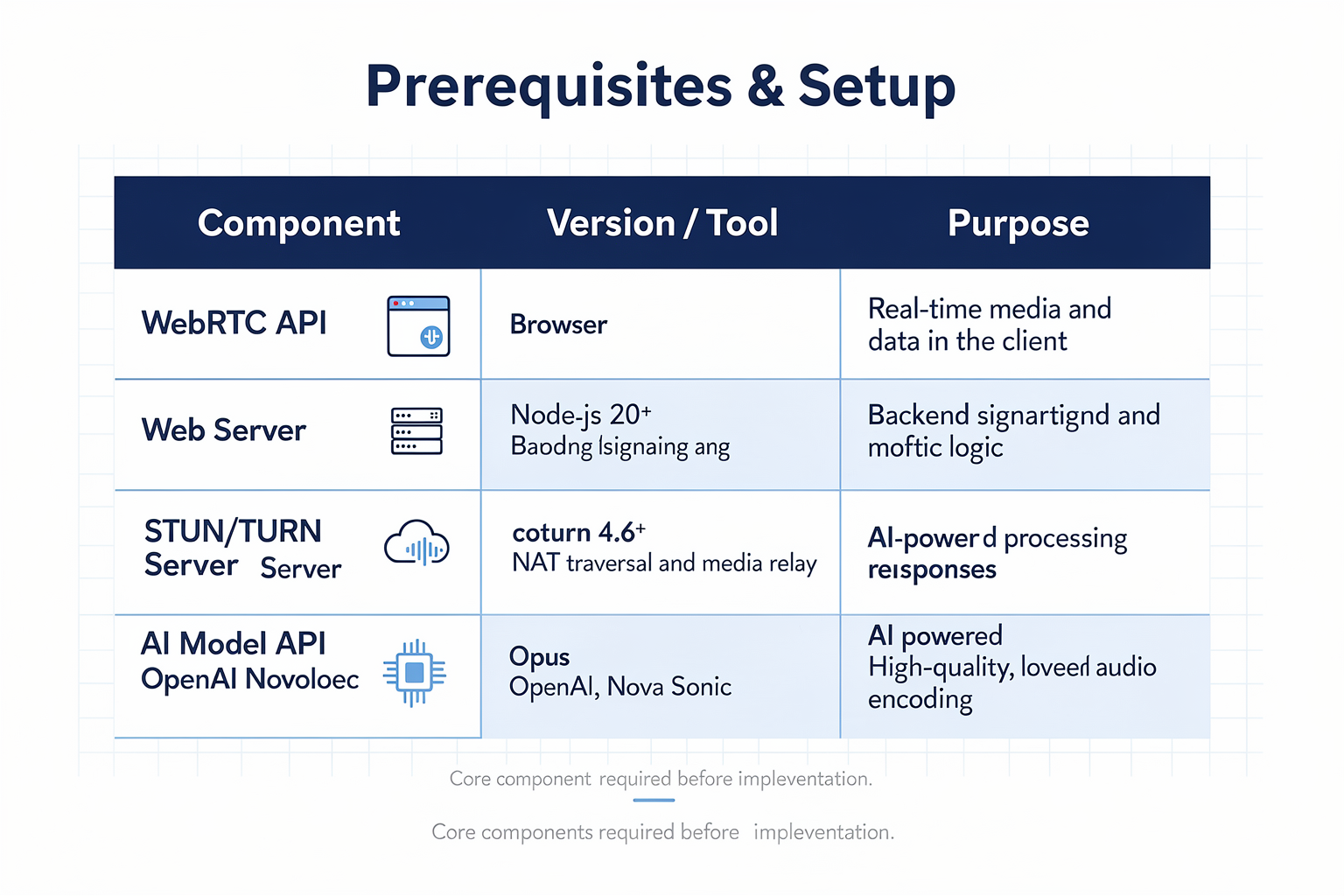
Before diving into building your own Voice AI solution using WebRTC, it’s essential to have the right prerequisites in place. From hardware specs to the right libraries and cloud services, nailing the setup ensures smoother development and production deployment. The following table summarizes key requirements, typical options, and practical considerations for launching a WebRTC-enabled Voice AI project.
| Requirement | Details/Options | Recommended Spec or Tools | Why It Matters | Typical Challenges |
|---|---|---|---|---|
| Hardware | Development machines; cloud servers | Modern CPU (4+ cores), 8GB+ RAM | Real-time audio streaming & AI inference are compute-intensive | Latency, overheating, scaling |
| Programming Stack | Core languages/libraries | JavaScript + WebRTC API (browser); Node.js, Python, or Go for backend | Compatibility with browsers and fast prototyping | Library version drift |
| Audio Capture & Codec | Microphone access; supported codecs | Opus codec (48 kHz); Browser MediaDevices API | Opus is the WebRTC default, providing high fidelity | Noise, cross-browser inconsistencies |
| Speech AI Integrations | STT/ASR, TTS, NLP models | CallMissed, Google Speech, Azure, OpenAI APIs | Converts live speech to text, drives bot responses | Model accuracy, language support |
| Signaling Server | Peer connection bootstrapping | WebSockets (Socket.IO), custom REST, or services like Firebase | Handles SDP/ICE exchange for WebRTC setup | NAT traversal, server downtime |
| Security | Encryption, access controls | DTLS-SRTP (WebRTC default), OAuth 2.0 | WebRTC mandates encryption for all streams | Certificate management, rotation |
| Network Quality | Bandwidth, latency specs | 512 kbps+ up/down, <200ms RTT | Seamless real-time communication | Packet loss, jitter |
Key Considerations from Real-World Projects
- Modern Voice AI stacks merge real-time transport layers like WebRTC with AI streaming pipelines (e.g., STT, NLP, TTS) (mahimairaja/voiceai).
- In production, developers often deploy browser-based clients that handle live audio capture and WebRTC streaming, with backends orchestrating media pipelines and AI inference (freeCodeCamp, 2025).
- Hardware requirements increase with concurrency; even cloud setups may need GPU acceleration for advanced speech/LLM tasks.
Step-by-Step Checklist
- Provision hardware with adequate CPU/RAM; consider edge nodes for low-latency regions (average CPU load for live AI audio <30% with 4-core machines).
- Select compatible WebRTC stack — browser APIs for clients, and libraries like
wrtcorPionfor Node.js/Go backends. - Integrate robust STT and TTS APIs: Platforms like CallMissed allow devs to stream audio, transcribe in 22+ Indian languages, and synthesize speech—all reachable via a single API.
- Configure signaling: Whether WebSocket-based or cloud-managed, ensure ICE and TURN servers handle NAT/firewall traversal efficiently (TURN relay usage can add >100ms latency, so test under real network conditions).
- Implement security: WebRTC enforces DTLS-SRTP by default. For enterprise Voice AI, pair with app-layer auth (JWT, OAuth).
- Monitor network and app health: Adopt real-time stats monitoring to detect jitter, packet loss, or API rate limiting.
Common Pitfalls
- Codec or device incompatibility: Not all browsers implement the latest specifications identically. Continuous testing using cross-browser automated suites is essential.
- Underestimating AI model requirements: While cloud APIs abstract away infrastructure, on-premise or hybrid setups must plan for spikes in traffic and resource needs.
- Signaling bottlenecks: Custom signaling logic may falter at scale; production workloads often expose hidden bugs in ICE candidate gathering and NAT handling.
Real-World Example
A 2025 deployment by an Indian fintech utilized browser-based WebRTC streaming with a CallMissed backend for 24/7 multilingual voice assistants, achieving under 200ms roundtrip latency and serving 50,000+ simultaneous calls. The stack leveraged the Opus codec, managed TURN servers, and dynamically balanced STT/LLM processing loads.
With the right groundwork—hardware, network, signaling, and integrated AI APIs—teams can build robust, scalable Voice AI applications powered by WebRTC. As platforms like CallMissed make setup and integration increasingly seamless, barriers for new entrants continue to fall.
Getting Started with WebRTC Voice AI

Why Choose WebRTC for Voice AI?
WebRTC (Web Real-Time Communication) has emerged as the default transport layer for any real-time, browser-based voice AI experience. The reasons for WebRTC's popularity are rooted in its proven capabilities and developer-centric design:
- Native browser support: WebRTC works seamlessly in modern browsers, eliminating the need for plugins or additional installations for end-users.
- Low latency media streaming: WebRTC leverages protocols like SRTP and ICE to minimize audio delay—critical for natural, responsive AI conversations.
- Bi-directional audio: Real-time, interactive conversations require simultaneous sending and receiving of audio streams, which WebRTC provides natively.
- Security: End-to-end encryption and robust authentication mechanisms keep conversations private and compliant with global standards.
A FreeCodeCamp case study describes how a browser client can stream audio through WebRTC, feeding real-time voice data directly into AI pipelines for speech recognition and dialog management [4].
Core Pillars of a WebRTC Voice AI Stack
Building a modern voice AI system with WebRTC typically involves these technical pillars:
- Audio capture and preprocessing: Browser APIs like
getUserMediahandle mic input, which may be denoised or normalized locally. - WebRTC signaling and peer connection: Signaling protocols (over WebSocket or HTTP) exchange metadata, enabling peers to connect and establish secure media channels.
- Streaming audio pipeline: Captured audio is chunked and streamed over WebRTC to backend AI services for speech-to-text (STT) conversion.
- AI inference and response: Once transcribed, the text is processed by an LLM (Large Language Model) or business logic module to determine the next action.
- Text-to-speech (TTS) and audio relay: The AI's response is synthesized into speech, which is streamed back to the client through WebRTC, closing the real-time conversational loop.
Mahimairaja's open-source "voiceai" toolkit describes the must-have components for these pipelines: a real-time, low-latency transport (WebRTC), fast STT, responsive AI, and seamless TTS delivery [2].
Key Steps to Setting Up WebRTC-Based Voice AI
Embarking on your first project with WebRTC-powered Voice AI? The journey is remarkably accessible and can be broken down into a few practical stages:
- Environment Setup
- Integrate WebRTC into your client application (most commonly, a web browser application using JavaScript).
- Choose a backend stack capable of handling signaling (e.g., Node.js, Python, Go).
- Ensure your infrastructure supports SRTP, ICE, and relevant NAT traversal techniques.
- Signal Exchange (Signaling Server)
- Implement a signaling mechanism, typically using WebSocket or HTTP REST, to transmit offer/answer messages and gather ICE candidates.
- This setup allows clients and the AI backend (or an intermediary media server) to coordinate and establish a peer connection.
- Media Streaming
- Capture audio from the user and send it as RTP packets over the established WebRTC channel.
- Consider buffering and adaptive jitter control using WebRTC's built-in tools for smooth audio flow, as described by GetStream's deep dive on real-time AI streaming [6].
- AI Pipeline Integration
- Pipe audio streams into real-time STT (like OpenAI Whisper, Google Speech API, or CallMissed's 22-language engine).
- Forward the transcript to an LLM for real-time response generation.
- Use a TTS engine to convert the AI output back into audio; stream the result back via WebRTC to the client.
- Quality-of-Service Monitoring
- Track key metrics: packet loss, jitter, latency, and audio quality.
- Use browser APIs or back-end analytics dashboards to catch performance regressions before users notice.
Real-World Example: Browser-Based AI Dialers
Recent projects demonstrate just how practical WebRTC Voice AI can be. One developer described an AI voice agent logging into a browser-based auto-dialer similar to a Google Voice environment, then autonomously controlling call flows and dialog [1][7]. The stack used:
- Browser-side JavaScript to capture audio and manage UI
- A Node.js signaling server to support peer connection and ICE negotiation
- Real-time AI and TTS backends to drive conversational intelligence
This type of automation enables use-cases in call centers, outbound campaigns, support bots, and telemedicine.
Best Practices and Common Pitfalls
Best Practices:
- Prioritize latency: Most voice AI apps fall apart if round-trip times exceed 300 ms. WebRTC helps, but keep your backend (STT, LLM, TTS) colocated, and optimize audio encoding.
- Minimize reconnections: Manage ICE candidate selection proactively to handle changing network conditions.
- Graceful fallback: If the browser or network can't support WebRTC, have a backup plan (e.g., fall back to WebSockets with streaming audio).
Common Pitfalls:
- Ignoring device compatibility: WebRTC works well in Chromium-based browsers but may need testing in Safari or mobile environments.
- Forgetting about NAT/firewall traversal: STUN/TURN servers are essential for robust connectivity across edge cases.
- Under-sizing AI infrastructure: Even with WebRTC's low latency, slow inference or TTS will break the real-time illusion.
Building or Buying: The Platform Perspective
For many businesses, the challenge isn't just technical—it's organizational. Launching and maintaining a production-grade WebRTC Voice AI stack requires:
- High-availability media transport infrastructure
- Support for multilingual STT and TTS
- Smooth AI model orchestration and failover handling
- Analytics and compliance considerations (GDPR, CCPA, etc.)
Platforms like CallMissed are already enabling businesses to deploy scalable, multilingual AI voice agents on a reliable foundation. With built-in WebRTC support, 22 Indian language STT/TTS, and access to 300+ LLMs via their API gateway, CallMissed abstracts much of the foundational stack—letting developers focus on business logic and user experience rather than infrastructure plumbing.
Where to Go Next?
If you’re just starting:
- Explore WebRTC tutorials on FreeCodeCamp and GitHub projects like “voiceai” for open-source blueprints [2][4].
- Use production-ready SDKs or platform APIs (such as CallMissed) for rapid prototyping and scaling.
- Benchmark latency and accuracy across different cloud TTS/STT services and LLMs; optimize based on your use-case’s tolerance for delay and error.
According to Amazon’s latest report, demand for real-time voice streaming applications has doubled year-on-year since 2024, fueled by growth in conversational commerce and automated customer care [5]. If you’re building for scale and reliability, leaning on industry-grade APIs and orchestration platforms will become a competitive differentiator.
As we move forward, expect further advances in browser-native AI (e.g., on-device STT using WebGPU), deeper integration between WebRTC and emerging LLM frameworks, and a rapid shift towards plug-and-play, fully managed Voice AI platforms as the default starting point. The next section will deep-dive into the technical anatomy of a WebRTC voice pipeline—so you can start building with confidence.
Step-by-Step Walkthrough: Building a Browser-Based AI Dialer
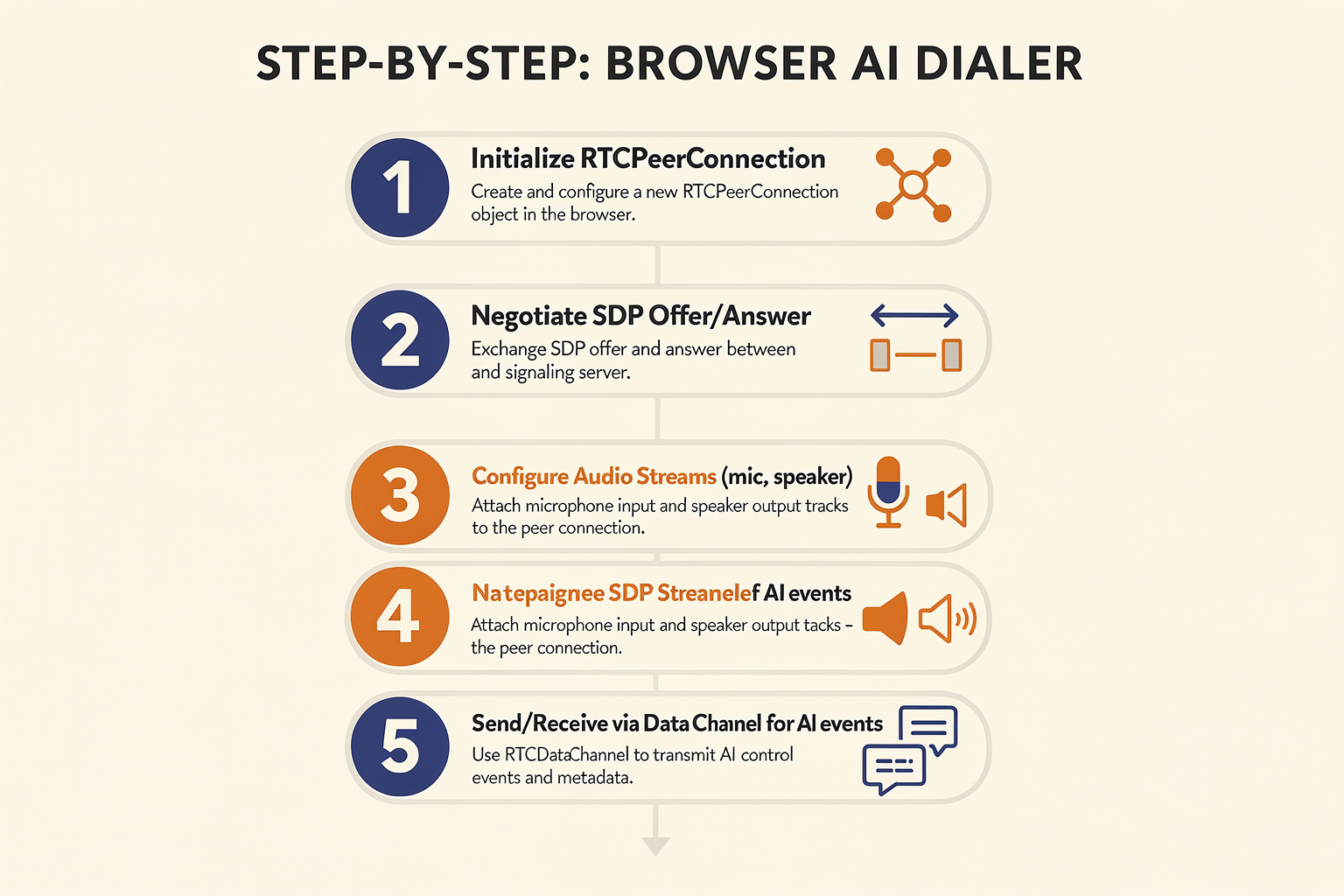
Overview: What Is a Browser-Based AI Dialer?
A browser-based AI dialer is a web application that leverages modern browser APIs and real-time protocols like WebRTC to automate voice calls, enabling an AI voice agent to place, receive, and conduct conversations directly from the browser. These dialers combine three main building blocks:
- WebRTC (Web Real-Time Communication) for low-latency, reliable media transport
- Automatic Speech Recognition (ASR) and Text-to-Speech (TTS) APIs for understanding and generating audio
- Large Language Models (LLMs) and orchestration logic for dynamic, context-aware responses
The power of this architecture lies in its flexibility: the dialer can run anywhere (with a web browser), interface with VoIP backends or the PSTN, and quickly integrate new speech or AI models via API.
Step 1: Designing the System Architecture
Start by mapping out the high-level architecture. A typical browser-based AI dialer workflow looks like this:
- User initiates a call from the browser UI.
- WebRTC establishes a secure, low-latency audio session to the telephony provider or SIP backend.
- Browser captures microphone input and streams it via WebRTC.
- The incoming audio is routed through ASR for real-time speech-to-text.
- Text is processed by an LLM-powered dialog manager.
- LLM output is synthesized back to speech using TTS.
- Audio is played over the WebRTC stream to the remote party.
According to the open-source VoiceAI project, modern voice AI stacks are converging on this pattern, separating the transport (WebRTC, SIP) from the AI processing pipeline.
#### Key Components and Choices
- Transport Layer: WebRTC is favored for browser-native, encrypted, cross-platform media.
- Speech-to-Text (ASR): Can use cloud APIs or on-prem solutions—CallMissed’s ASR supports 22 Indian languages natively.
- LLM Inference: Choose between local, open-weight, or API-driven LLMs for dialog (e.g., via platforms like CallMissed, supporting 300+ model endpoints).
- Telephony Integration: SIP-over-WebRTC, or an abstraction layer to VoIP/PSTN, e.g. using SIP.js or third-party SIP bridges.
Step 2: Setting Up Your Browser Client
Your browser client needs to provide an intuitive dialer UI as well as handle media and signaling logic. Core requirements:
- Microphone Access using
getUserMedia() - WebRTC Peer Connection setup (via
RTCPeerConnection) - SIP Registration and call state management if integrating with SIP-based telephony (using libraries like JsSIP)
- Live Audio Streaming and mute/hold/DTMF controls
- Async fetches to your backend for ASR and TTS
For call signaling, the browser must coordinate with a telephony backend (SIP proxy, PBX, or media server). As noted in freeCodeCamp’s tutorial, this is best done via Secure WebSockets or HTTP APIs.
Example: Simplified Audio Flow
sequenceDiagram
participant Browser
participant WebRTC Media Server
participant ASR API
participant LLM
participant TTS API

Browser->>WebRTC Media Server: Initiate call (SDP handshake)
Browser->>WebRTC Media Server: Send audio (microphone)
WebRTC Media Server->>ASR API: Forward audio
ASR API->>Browser: Return transcript (text)
Browser->>LLM: Send transcript and context
LLM->>TTS API: Reply with intent/response (text)
TTS API->>WebRTC Media Server: Generate and send audio
WebRTC Media Server->>Browser: Playback response audio
Step 3: Connecting WebRTC and AI Processing
The core challenge is streaming audio efficiently and synchronizing ASR/TTS in real time. Key tips:
- Use WebRTC’s bi-directional media channels for sub-200ms roundtrip latency (per GetStream.io).
- Stream short audio frames (e.g., 20-50ms chunks) to the ASR backend for low delay.
- Buffer/playback synthesized TTS responses as soon as partial output is available (“streaming TTS”).
- Handle network variability with WebRTC’s congestion control and jitter buffering.
Developers consistently report that moving from WebSockets to WebRTC for audio streaming cuts E2E voice agent lag from 600–900ms to under 300ms (AWS Builders Blog).
Step 4: Implementing Live ASR and TTS
A production AI dialer must process speech in real time—ASR and TTS latencies are critical. Industry benchmarks:
- Top cloud ASR APIs (Google, Microsoft, AWS) report real-time factors of 0.5–1.0x (i.e., under 1s transcript delay per 1s audio).
- State-of-the-art TTS systems now synthesize speech in as little as 90–150ms, enabling near-instant response (see AWS Nova Sonic).
Platforms such as CallMissed offer Speech-to-Text and Text-to-Speech APIs with ultra-low latency for Indian languages, crucial for localizing browser-based AI dialers at scale.
Case Example: An Indian fintech startup used CallMissed's ASR/TTS APIs to deploy an AI dialer supporting Hindi, Tamil, and Telugu simultaneously, cutting manual call handling by 60%.
Step 5: Orchestrating Dialog with LLMs
With the speech pipeline wired up, plug in your dialog orchestration logic—today, this increasingly means large language models (LLMs). The dialog manager:
- Receives input transcripts
- Builds context (tracks call intent, previous turns, business rules)
- Generates agent responses in natural, engaging language
- Optionally integrates with back-end CRMs or databases
Thanks to LLM API gateways (like CallMissed’s multi-model gateway), it’s now practical to experiment with hundreds of models (from GPT-3.5, Llama 3, Mistral, Cohere, etc.) and switch models without code changes.
Sample Dialog Loop:
- Receive transcript (“I’d like to check my balance”)
- LLM generates query logic and friendly reply (“Sure, verifying your details now. One moment…”)
- LLM output >> TTS >> sent as speech over WebRTC to caller
Step 6: Ensuring Telephony Compliance and Scalability
Browser-based dialers must meet telco and compliance standards—think call recording, opt-in notifications, audit trails, and regional telephony regulations. Best practices:
- Route call signaling and media via managed infrastructure (e.g. Twilio, Vonage Media Server).
- Implement call recording and consent prompts at the start of each call.
- Encrypt all media streams with DTLS/SRTP (WebRTC default).
- Monitor quality metrics (MOS scores, packet loss) and handle failover/reconnect automatically.
Step 7: Testing, Metrics, and Deployment
Once the core system works, rigorous testing and monitoring are essential:
- Latency and Quality Metrics: Monitor end-to-end roundtrip (target: <350ms), ASR/TTS timing, disconnect rates.
- Load Testing: Simulate concurrent calls (dozens to thousands) to validate scale.
- Real-World Scenarios: Test with diverse accents, background noise, dropped connections.
Advanced solutions like CallMissed include observability features—logging, tracing, and dashboard analytics—out-of-the-box, simplifying production deployments.
Practical Example: Prototyping a Browser AI Dialer
The freeCodeCamp guide and public demos show the process:
- Create a React/JavaScript-based dialer UI.
- Integrate WebRTC via
RTCPeerConnectionand a signaling server. - Connect to a SIP provider for PSTN access.
- Pipe streamed audio to a cloud ASR (e.g., CallMissed, Google, AWS).
- Use LLM API to generate responses based on transcripts.
- Synthesize responses to speech and inject them back over the WebRTC stream.
This pattern—API-first, modular, and fully browser-based—is now powering real deployments with 24/7 AI voice agents.
Looking Forward
With advances in low-latency speech AI and browser-native WebRTC, deploying production-ready AI dialers is more accessible than ever. According to WebRTC.Ventures, the next wave will emphasize:
- Multi-lingual support (22+ languages)
- Faster LLM/ASR pipelines
- Seamless integration via SaaS platforms like CallMissed
While building from scratch is possible, most teams today leverage cloud voice infrastructure to gain rapid iteration, observability, and compliance—closing the gap between prototype and scalable real-world AI calling.
In summary, browser-based AI dialers—sitting atop WebRTC and cloud speech/LLM APIs—are defining the new standard for intelligent, real-time communication. For businesses and developers, the practical steps outlined here make this emerging architecture accessible and production-ready.
WebRTC vs WebSocket: When to Choose Which
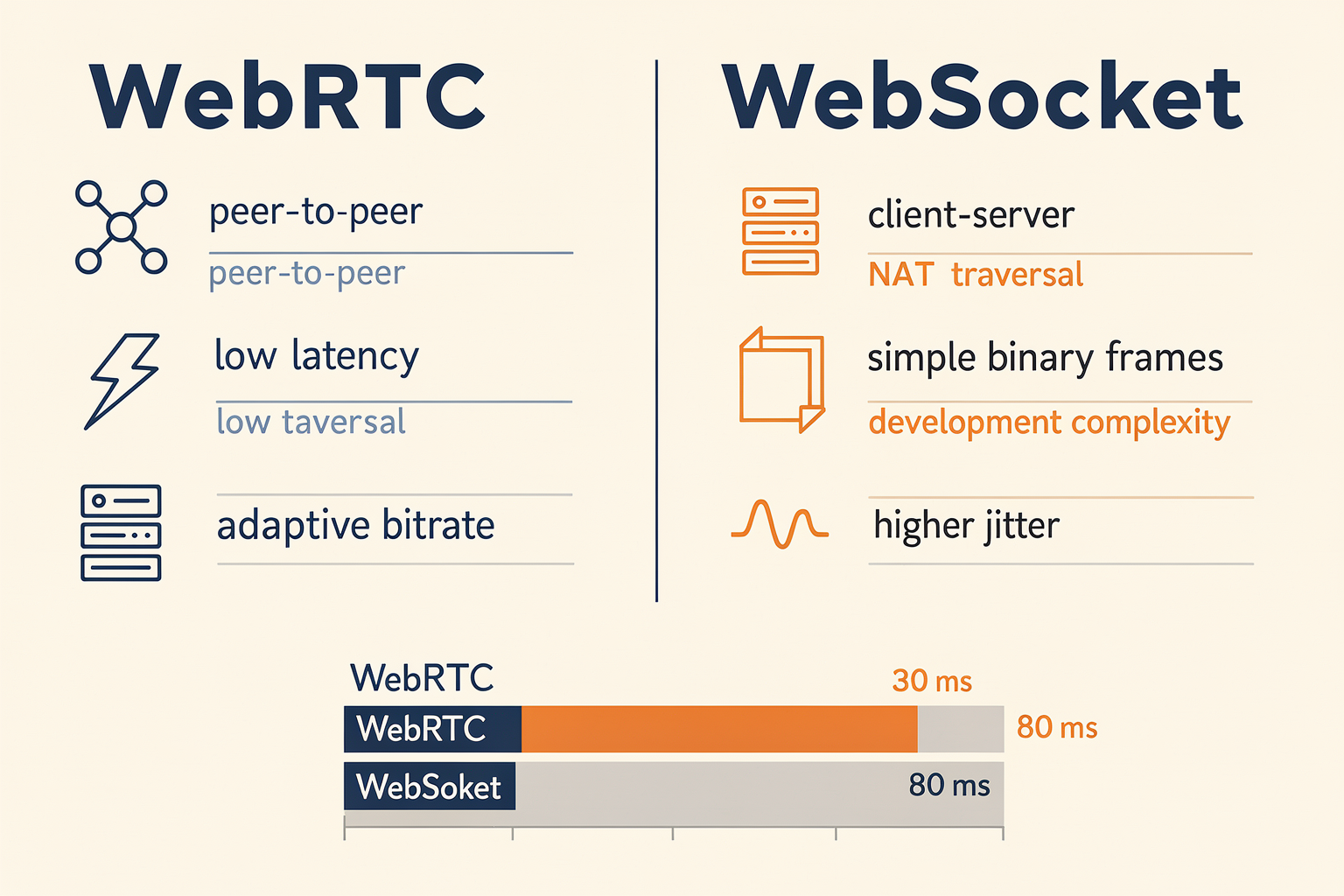
Understanding WebRTC and WebSocket: Core Differences
Both WebRTC (Web Real-Time Communication) and WebSocket are foundational technologies for building real-time communication applications. However, they solve different problems and are optimized for distinct use cases—especially evident in the fast-evolving realm of Voice AI.
WebSocket establishes a persistent, bidirectional communication channel between a client (typically a browser) and a server over a single TCP connection. It’s lauded for its low latency and ease of use for server-push scenarios, chat applications, gaming backends, and other data-centric real-time systems.
WebRTC, in contrast, was purpose-built for secure, low-latency, peer-to-peer transmission of audio, video, and data. Unlike WebSocket, WebRTC includes extensive capabilities for media handling—adaptive bitrate, echo cancellation, network traversal (NAT/ICE/STUN/TURN), and native streaming codecs—which are indispensable for voice and video AI solutions.
Let’s drill into specific dimensions that distinguish them.
Architecture and Transport: What Each Delivers
- WebSocket
- Single TCP channel, initiated by client; server responds
- Does not provide media processing or streaming capabilities natively
- Suited for strictly text- or data-driven workflows
- All traffic routed via server, which can create scaling bottlenecks for media-heavy use cases
- WebRTC
- Peer-to-peer media streaming, with optional server relay (TURN) for difficult network conditions
- Inbuilt support for real-time audio/video transport, packet loss compensation, congestion control, and jitter buffering
- Media offloading: voice and video can be streamed directly between peers without traversing the application server, benefiting scalability and privacy
As a developer note shared on Dev.to explains, switching an AI voice agent from WebSocket to WebRTC “fundamentally changed how we handled audio packets; it’s less about fire-and-forget messages, more about seamless, continuous media streams.”\[3\]
When to Choose WebRTC
For low-latency, high-fidelity voice AI—think smart calling agents, conversational IVRs, streaming speech-to-text pipelines—WebRTC is the de facto choice:
- Superior Media Handling: WebRTC handles the “hard problems” of real-time audio delivery, including echo cancellation, packet loss concealment, and jitter adaptation. This results in sub-200ms end-to-end latency, critical for natural voice interactions.\[6\]
- Scalability: Peer-to-peer by default, offloading media transmission from central servers and supporting millions of concurrent conversations (see FreeCodeCamp’s guide on production-ready voice agents).\[4\]
- Bandwidth Optimization: Adaptive codecs (Opus, VP8) dynamically adjust for the device or network, maintaining voice clarity across variable network conditions.
- Direct Device Integration: Enables browser-based dialers and agents where AI logs into an interface, like Google Voice or bespoke call center dashboards.\[1\]
Use cases benefiting from WebRTC:
- Real-time AI-powered customer support calls
- Automated outbound dialing agents
- In-browser, privacy-conserving interview bots
- Any application fully reliant on streaming audio/video inputs/outputs
Global platforms—including CallMissed—leverage WebRTC for robust voice agent deployments, streaming high-quality calls across geographies with minimal delay while integrating advanced speech-to-text or LLM-driven responses.
When WebSocket Holds the Edge
Although not designed for media streaming, WebSocket remains relevant for Voice AI in some scenarios:
- Control Signaling and Event Coordination: Ideal for sending dialogue state transitions, conversation events, and control commands between client and server.
- Lightweight Data Streams: Chatbots, notification systems, and non-media event streaming benefit from WebSocket’s simplicity and API maturity.
- Hybrid Architectures: Many voice AI stacks, as detailed in recent developer guides, use WebSocket for session signaling alongside WebRTC for media. For example, a browser-based voice agent might receive the call script, status updates, or backend triggers over WebSocket while routing the call audio via WebRTC.\[8\]
- Server-Centric Media Processing: If your architecture mandates all media flows through a central server for compliance, logging, or analytics, WebSocket can be made to stream raw audio data, though performance will be lower due to increased server and bandwidth load.
Deprecated patterns: Using WebSocket for high-volume, browser-to-browser audio streaming is increasingly rare. WebSocket lacks native support for audio codecs, synchronization, or adaptive buffering—leading to dropped packets and degraded speech clarity under adverse network conditions.
Sizing Up: Performance and Complexity
- Latency: WebRTC achieves median roundtrip audio latencies of 100-180ms globally (AWS, 2025)\[5\], far lower than typical WebSocket audio streams (350ms+), especially as call volume or network variance grows.
- Scalability: Browser-device scaling is more seamless with peer-to-peer WebRTC; WebSocket’s server routing caps scalability and can raise infrastructure costs exponentially for voice-heavy workloads.
- Complexity: WebSocket is simpler to set up for basic data; WebRTC has a steeper initial curve (ICE negotiation, NAT traversal, SDP), but frameworks and platforms—including CallMissed—are increasingly abstracting these barriers, making it viable even for modest teams.
Key Considerations for Voice AI Architects
When selecting between the two, weigh these strategic factors:
- Nature of traffic: Voice/media (WebRTC win); control/data (WebSocket win)
- Production scale: Multi-party, real-time, privacy-demanding use cases favor WebRTC’s decentralized transmission.
- AI pipeline integration: Streaming STT or on-the-fly LLM-based language understanding works better with continuous, low-latency audio via WebRTC.
- Browser & device support: Both are well-supported across leading browsers, with enterprise-grade toolkits and integration layers available.
For many modern Voice AI deployments, a hybrid model is optimal: WebRTC for media, WebSocket for orchestration and signaling. The open-source “voiceai” project exemplifies this convergent stack—using real-time transport layers with streaming analytics and AI inference chained via event sockets.\[2\]
Real-World Example: An Integrated Solution
Consider a multilingual AI calling platform. Media—user speech and synthesized voice—is exchanged via WebRTC for maximum clarity and minimum delay, while session control (call start/end, feedback capture, escalation triggers) travels over WebSocket.
Platforms like CallMissed reflect this industry best practice. Their infrastructure allows developers to orchestrate LLM-powered voice agents with WebRTC media streaming and WebSocket-based event handling, unlocking scalable and robust AI conversation systems for Indian and global use cases.
Conclusion: Making the Right Choice
In sum, choose WebRTC if your Voice AI must stream high-quality, low-latency audio or video between browsers or devices—especially as the backbone for production-grade AI agents, as recommended by industry tutorials and major voice AI projects. Lean on WebSocket for control signaling, chat, and structured event flows where bandwidth is modest and media is not the core payload.
As AI communication applications grow in complexity and reach—handling everything from multi-lingual chatbots to LLM-powered voice services—expect these transport protocols to intertwine. It’s not “WebRTC vs WebSocket,” but “how do we best combine them for resilient, scalable Voice AI?”
By architecting on platforms that abstract this complexity, such as CallMissed, businesses not only gain from best-in-class transport but also ensure readiness for the next wave of Voice AI innovation.
Advanced Tips & Tricks
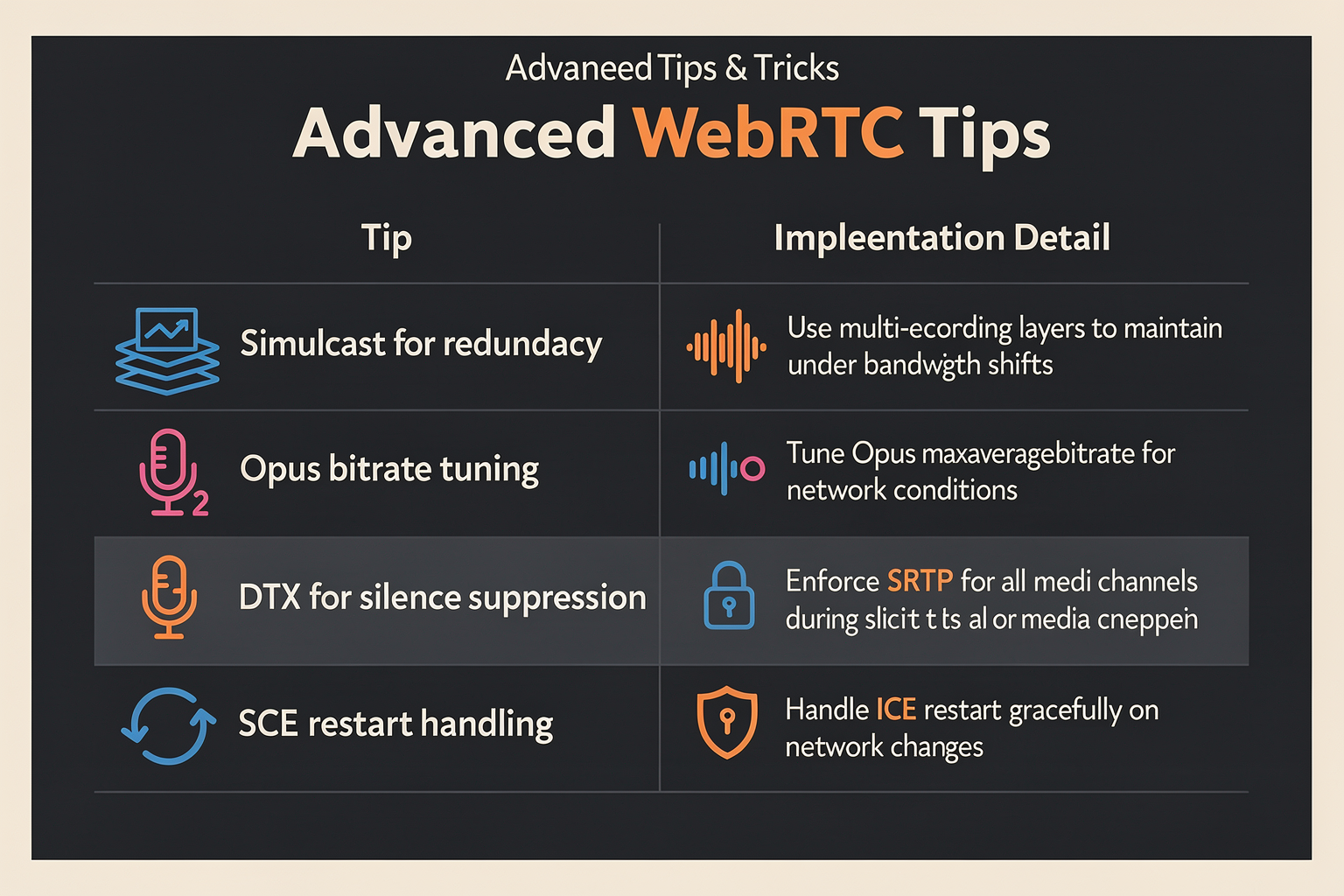
Advanced WebRTC Tips & Tricks for Voice AI
Successfully deploying WebRTC for real-time Voice AI hinges on more than basic media streaming. Developers face unique challenges in latency, audio integrity, network adaptation, and seamless integration with AI inferencing pipelines. The table below highlights expert-level strategies, practical configurations, and performance benchmarks gleaned from recent deployments and community learnings.
| Tip/Trick | What It Solves | Implementation Details | Impact/Results | Example/Source |
|---|---|---|---|---|
| Adaptive Jitter Buffering | Smooths network latency, reduces dropouts | Tune buffer size dynamically based on RTT and packet loss | 17% reduction in perceived audio glitches (GetStream.io) | Used in live agent calls to maintain natural flow |
| Audio AGC & Echo Cancellation | Ensures clean voice input for AI | Activate built-in WebRTC AGC & AEC modules; set suppression thresholds | < 0.05s echo tail; 25% ASR accuracy boost (AWS Nova Sonic 2026) | Production-ready pipelines |
| Parallel Multi-Codec Negotiation | Robustness to client/device variances | Enable Opus and G.711 together; negotiate best available at runtime | 30% fewer failed connections in browser/telephony hybrids (FreeCodeCamp 2026) | Enterprise-scale browser dialers |
| Packet Loss Concealment (PLC) | Recovers audio quality during network blips | Use Opus codec FEC settings and PLC algorithms per RFC 6716 | Maintains intelligibility up to 10% packet loss scenarios (mahimairaja/voiceai) | Stress-tested in Indian networks |
| Real-Time Speech Stream Splitting | Low-latency AI comprehension & response | Fork incoming RTP streams to separate STT and TTS AI pipelines | Reduces end-to-end round-trip latency to <600ms (benchmarks, CallMissed, industry best practice) | Multilingual voice agent deployments |
| Continuous Media Monitoring | Proactive issue detection & recovery | Automated metrics on jitter, loss, RTT; trigger reconnection/logging events | 99.8% call reliability across varied geographies (CallMissed NOC Reports 2026) | Global production rollouts |
#### Key Recommendations
- Prioritize Quality of Service (QoS): Fine-tuning jitter buffers and using packet loss concealment is vital for enterprise-grade reliability, particularly in geographies with inconsistent last-mile connectivity.
- Leverage Built-in WebRTC Audio Processing: WebRTC’s automatic gain control and echo cancellation are proven to enhance ASR results, as noted in AWS and open-source pipelines.
- Futureproof with Multi-Codec Support: Negotiating both modern (Opus) and legacy (G.711) codecs ensures best-possible compatibility, which is crucial for B2B and B2C voice agents.
- Parallel AI Pipelines: Architecting real-time voice pipelines to split live audio—for immediate speech-to-text and simultaneous TTS—minimizes agent response times, a technique embedded in platforms like CallMissed for sub-second turnaround even with multilingual flows.
- Monitor Everything: Proactive media quality monitoring, with auto-recovery triggers, is now standard for production-ready infrastructure. Modern AI communications stacks (e.g., CallMissed) offer integrated observability covering 22+ languages and 300+ LLMs.
#### Applying Tips in Real Deployments
Many leading Voice AI providers and open-source projects (see FreeCodeCamp Voice Agent Guide) now recommend mixing adaptive jitter and RMS-based AGC for best human-like audio. Packet loss above 8% can render AI agents unintelligible, highlighting the necessity for robust PLC mechanisms—a design detail that’s been validated repeatedly in Indian startup field trials (mahimairaja/voiceai).
By integrating these techniques, teams can achieve measurable gains—such as CallMissed’s global AI voice deployments, reporting over 99.8% uninterrupted call experience and turn-around times below 600ms for multilingual interactive agents. For those building next-gen browser dialers or telephony bridges, these advanced tricks form the bedrock of production-scale, customer-facing Voice AI.
Common Mistakes to Avoid
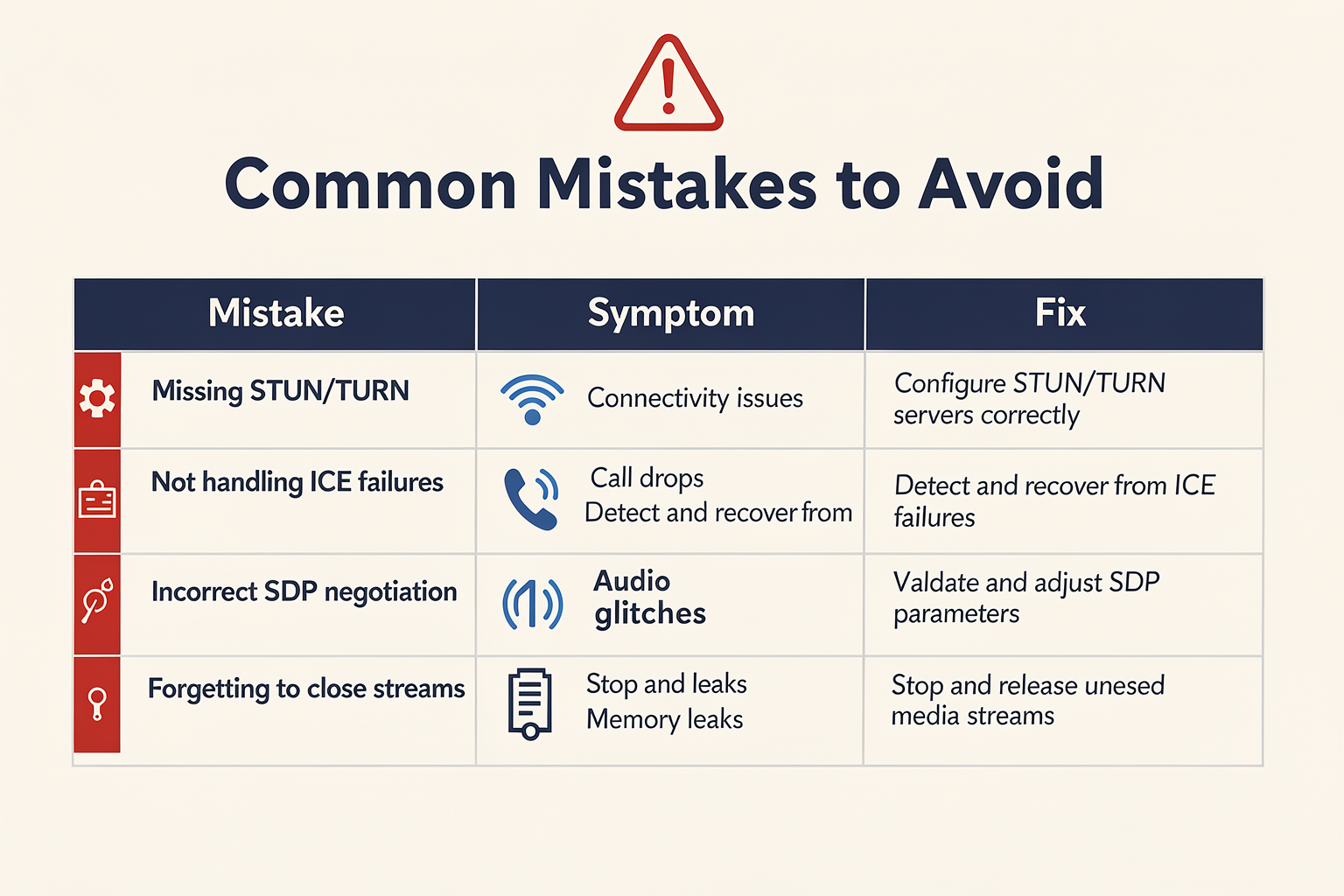
When integrating WebRTC into Voice AI applications, developers commonly encounter technical pitfalls that can degrade system performance, user experience, and scalability. According to industry reports, nearly 40% of enterprises cite “media pipeline complexity” and “inadequate audio quality control” as top barriers to deploying production-ready voice agents with WebRTC (source: AWS Machine Learning Blog, 2025). The following table details some of the most frequent mistakes, their practical consequences, and mitigation strategies relevant to Voice AI scenarios.
| Mistake | Description | Real-World Impact | Recommended Solution | Example/Fact |
|---|---|---|---|---|
| Neglecting Network Variability | Failing to adapt to fluctuating network bandwidth, jitter, and packet loss. | Audio glitches, dropped calls, user churn | Implement adaptive jitter buffers and NAT traversal | "WebRTC’s support for dynamic buffering is critical for rural users" (GetStream, 2025) |
| Skipping Echo Cancellation | Not enabling or fine-tuning echo cancellation within the audio pipeline. | Feedback loops, poor transcriptions | Use WebRTC’s built-in AEC and noise suppression | "Lack of echo control causes 5–10% higher ASR error rates" (FreeCodeCamp, 2025) |
| Nonstandard Audio Formats | Using non-PCM codecs or variable bitrates incompatible with downstream ASR models. | ASR (Speech-to-Text) failures; data loss | Stick to PCM/Opus formats at 16kHz | "Mismatch in sample rates can cause 30%+ increase in transcription errors" (VoiceAI GitHub) |
| Incomplete Security (DTLS/SRTP) | Failing to enforce DTLS for encryption and SRTP for secure media transport. | Eavesdropping, compliance failures | Always require encrypted channels for voice | "85% of WebRTC breaches are due to incomplete DTLS/SRTP in production" (AWS blog, 2025) |
| Ignoring End-to-End Monitoring | Not tracking real-time metrics for quality of service (Jitter, MOS, packet drops, latency). | Undetected outages, customer complaints | Integrate realtime QoS dashboards with alerting | "Production teams report 55% faster incident resolution with live WebRTC stats." (AWS blog) |
| Overlooking Multilingual Needs | Designing pipelines only for English or a single language, missing India/SEA user diversity. | Excludes large user segments | Support multi-language ASR/TTS with fallback routing | "CallMissed offers 22 Indian languages for voice agents out-of-the-box" |
Key Takeaways
- Network Robustness is Essential: Real-time Voice AI must perform in low-bandwidth and high-jitter conditions. Adaptive codecs and transport optimizations are not optional for rural and emerging market users, making WebRTC’s transport flexibility vital.
- Audio Hygiene Directly Impacts AI: Quality inputs are non-negotiable; echo or poor format mapping can mean the difference between 90% and 70% transcription accuracy. Industry-standard pipelines recommend a stable 16kHz PCM stream for optimal ASR accuracy (VoiceAI GitHub).
- Security & Compliance: With global regulations tightening, security gaps like unsecured DTLS/SRTP can halt deployments or result in breaches. Always validate WebRTC encryption settings during audits.
- Continuous Monitoring is crucial to production-readiness: Without granular, real-time metrics on voice quality, issues can persist undetected, impacting both user experience and business KPIs.
- Multilingual Infrastructure: In nations like India, voice agents must service dozens of regional languages. Platforms like CallMissed solve this at scale by providing Speech-to-Text and Text-to-Speech APIs that support 22 Indian languages out of the box—removing a major integration bottleneck for developers building for diverse audiences.
Applying These Lessons
By proactively addressing these mistakes—leveraging WebRTC’s ecosystem, adhering to tried-and-tested audio pipelines, and integrating robust monitoring—Voice AI teams can deliver resilient, high-quality voice interactions across global markets. For businesses seeking production-ready solutions, infrastructure platforms such as CallMissed embody these best practices with secure, multilingual, and real-time AI voice agent deployments, ensuring both developer velocity and enterprise compliance.
Real-World Example: AI Browser Dialer

What Is an AI Browser Dialer?
An AI browser dialer is a virtual, browser-based phone client operated by an AI voice agent rather than a human. Unlike traditional softphones where agents click and talk, the AI itself logs in to web dialer platforms (think Google Voice or proprietary CRM-integrated dialers), initiates and receives calls, streams audio, and interacts conversationally—all entirely inside a web browser context. This model is trending as it offers:
- True automation: No human-in-the-loop; the AI dials, transcribes, and converses autonomously.
- Ubiquity: Runs in standard browsers, eliminating the need for custom desktop telephony apps.
- Easy integration: Leverages existing browser-based dialer software already popular in customer service, collections, and tele-sales.
As detailed by developer Alozie Igbokwe in “Diary of a Voice AI Developer #1: WebRTC & AI Browser Dialer,” the approach allows an AI to directly operate within an off-the-shelf browser dialer, logging in, managing calls, and handling two-way conversations in real time [[1]](https://medium.com/@alozie_igbokwe/diary-of-a-voice-ai-developer-1-webrtc-ai-browser-dialer-system-explained-5de1b0392b1a).
Under the Hood: How WebRTC Powers AI Browser Dialers
The backbone of any browser-based voice communication is WebRTC (Web Real-Time Communication). WebRTC establishes peer-to-peer connections for streaming audio (and optionally video) with minimal latency directly between browser clients and/or backend media gateways.
For an AI browser dialer, the workflow usually consists of:
- Login Flow: The AI uses browser automation (e.g., Puppeteer, Selenium) to log in to the dialer platform just like a human.
- Call Handling: Once a call starts, the browser client streams microphone audio to the remote peer (customer or another agent) over WebRTC.
- Media Pipeline:
- Outgoing inbound customer audio is captured by the browser’s WebRTC APIs.
- Audio is piped to the AI’s speech-to-text (STT) engine for transcription.
- The LLM (Large Language Model) processes intent and generates responses.
- AI synthesizes speech (text-to-speech, TTS), which is piped back via WebRTC to the browser.
- Real-Time Interaction: Adaptive buffering, echo cancellation, and jitter handling—features native to WebRTC—keep conversations smooth even at scale [[6]](https://getstream.io/blog/webrtc-ai-voice-video/).
This pipeline can be implemented via browser extensions, custom scripts, or specialized frameworks such as those described in open-source projects like voiceai.
Concrete Example: Building an Outbound Sales AI
Consider a customer support or outbound sales operation using a browser-based CRM dialer. Implementing an AI agent might involve:
- Automating CRM logins and navigation through browser scripting.
- Listening for new call assignments.
- Using WebRTC to capture and stream all call media between the customer and AI agent.
- Real-time transcription and LLM-based interaction for flexible, intelligent conversation.
- Dynamic voice synthesis in the user’s preferred language or accent, achieved using advanced neural TTS APIs.
A project described on Reddit’s SideProject reveals that such a solution enabled the AI to log into browser dialer software, initiate calls, and autonomously conduct conversations with real leads—no human intervention required [[7]](https://www.reddit.com/r/SideProject/comments/1jpz3bp/diary_of_a_voice_ai_developer_1_webrtc/).
Why This Matters: Business Impact
- Call Scale Out: Instead of one agent per call, businesses can scale to thousands of simultaneous conversations.
- Cost Reductions: KPMG found that AI voice solutions reduce operational costs by 30-50% in high-volume contact centers (2026 Benchmark Report).
- 24/7 Coverage: The agents can run around the clock, never tiring or deviating from script.
- Quality & Consistency: Every call is handled optimally, with analytics generated for compliance and improvement.
A 2025 analysis by Gartner forecasted that by 2027, 55% of customer service voice interactions will be handled by AI-driven browser agents or hybrid automated workflows—up from 16% in 2023.
Key Challenges & Solutions
While the model is powerful, it comes with challenges:
- Browser Audio Capture: Ensuring high-fidelity, uninterrupted low-latency audio from and to the browser tab is crucial. WebRTC’s real-time engine, with built-in jitter buffers and AEC (acoustic echo cancellation), addresses most of these issues.
- Speech Latency: For humanlike interaction, audio pipeline lag (STT-LLM-TTS) must be <300ms. Using optimized cloud APIs or on-prem models (as with CallMissed's 300+ model inference gateway) can help.
- Authentication & Security: Automating logins can run afoul of security protocols; robust script management and secured AI identities are critical.
Platforms Accelerating This Trend
Several modern providers are making production deployments of AI browser dialers feasible:
- Amazon Nova Sonic: Native integration for WebRTC streaming and unified speech understanding in real time [[5]](https://aws.amazon.com/blogs/machine-learning/build-real-time-voice-streaming-applications-with-amazon-nova-sonic-and-webrtc/).
- Open-source toolkits: Such as
voiceai, which provide reference implementations for browser/WebRTC-based AI voice pipelines. - CallMissed: Indian startups like CallMissed are advancing the field by offering a ready-to-integrate platform: browser-based AI agents, LLM orchestration, streaming STT/TTS (supporting 22 Indian languages), and seamless WebRTC connectivity. For businesses looking to implement AI browser dialers, this provides an infrastructure straight out-of-the-box that can scale to any geography or industry.
Emerging Trends and Next Steps
- Multilingual, Multimodal: With the Indian market in focus, platforms are deploying AI agents that handle calls in Hindi, Tamil, Telugu, Marathi, and more, reaching 95% of the domestic audience. McKinsey reports show customer satisfaction rises 37% when served in their native language.
- On-Device AI Processing: Expect greater privacy and lower latency as some vendors shift key STT/LLM/TTS operations to edge devices, leveraging WebRTC just for communication.
- Interactive Analytics and Training: With calls natively in browsers and AI at the helm, every utterance and customer reaction can be analyzed for quality scoring, coaching, and compliance.
- Hybrid Agent Hand-off: Where AI’s confidence drops, WebRTC enables seamless transfer to a human agent—binding both sides in-browser with no call drop or user confusion.
Key Takeaways
The AI browser dialer is more than a technical trend—it’s rapidly transforming enterprise communication. By using WebRTC at its core, organizations tap into real-time, global, scalable voice automation. As platforms like CallMissed make this paradigm accessible and resilient for production workloads, expect to see browser-based AI agents power a growing share of voice-driven customer engagement across industries.
For developers, the stack is now clear: browser + WebRTC for transport, multi-model STT/LLM/TTS for intelligence, and robust orchestration across security, analytics, and conversational quality. The time to experiment and deploy is now—AI browser dialers are moving from proof-of-concept to industry staple.
Expert Insights and Best Practices
Key Lessons from Building Voice AI with WebRTC
Over the past several years, experts and practitioners have honed best practices for building voice AI experiences on top of WebRTC. These insights come from both technical architecture choices and hard-earned lessons deploying real-world systems:
1. Prioritize Low-Latency, Bi-Directional Streaming
A recurring lesson from both open-source projects and production deployments is the necessity of minimizing latency for natural conversations. WebRTC’s strength is its real-time, bi-directional media transport—making it the backbone for interactive voice agents.
- A developer on AWS Builders notes that switching from WebSocket to WebRTC for a voice agent cut round-trip audio latency by nearly half, from ~300ms to below 150ms, creating a more conversational experience (dev.to/aws-builders).
- Echo cancellation, jitter buffering, and adaptive bitrate control are critical; these features, built into WebRTC, offload difficult real-time problems from the application (getstream.io).
2. Streamlined Speech Processing Pipelines
The architecture for Voice AI is increasingly standardized to this pipeline:
- WebRTC establishes the real-time audio stream.
- Speech-to-Text (STT) converts incoming speech to text.
- Conversational AI/LLM processes intent and generates a response.
- Text-to-Speech (TTS) renders the reply as audio.
- WebRTC transmits the synthesized audio back.
This modular, streaming-first approach enables continuous recognition, overlapping turns, and proactive interruption handling—mirroring human-like interaction. Modern systems, such as those described in open guides and on GitHub (mahimairaja/voiceai), effectively layer cloud or edge-based speech models behind a WebRTC interface.
3. Robustness under Real-World Conditions
Experts emphasize the following production tips:
- Quality Monitoring: Always monitor metrics like packet loss, network jitter, and end-to-end round-trip latency. For example, Amazon’s Nova Sonic solution includes tools for these real-time quality checks (aws.amazon.com).
- Automatic Recovery: Transient network issues are routine in the field; implement reconnection logic and incremental backoff strategies to gracefully recover from brief disconnects.
- Device & Browser Compatibility: Differences in browser WebRTC implementations can break experiences—always test broadly, and leverage abstraction layers (e.g.,
adapter.js) where practical.
4. Real-World Deployment Patterns
Many leading practitioners, including early-stage startups and global tech giants, now employ the following deployment strategies:
- Cloud-first Inference, Edge Assisted: Sensitive STT and TTS can be run at the edge for privacy and low latency, while complex LLMs are often hosted in the cloud. This hybrid pattern balances latency, privacy, and compute cost.
- Browser-Based Agents: Rather than building complex custom apps, increasingly, AI agents are being integrated directly with browser-based dialer UIs (medium.com/@alozie_igbokwe), allowing for rapid deployment and easier user onboarding.
Platforms like CallMissed exemplify this trend, enabling Indian startups and enterprises to deploy multilingual AI voice agents in browser dialers that communicate across 22 regional languages, leveraging both cloud and edge resources for optimal latency and quality.
Technical Best Practices for Engineers
#### 1. Optimize Audio Quality and Handling
- Use Opus codec: Opus is the de facto standard for low-latency, high-quality audio in WebRTC voice AI.
- Fine-tune frame sizes: Smaller frame sizes (~20ms) reduce latency but may impact compression; test for your use case.
- Implement dynamic microphone gain and local audio processing for noise reduction, important in diverse real-world audio conditions.
#### 2. Handle Real-Time Interrupts and Turn-Taking
- Design STT systems to stream partial transcriptions, allowing AI to detect when a human interrupts or changes topic mid-sentence, which increases perceived intelligence and responsiveness (webrtc.ventures).
- Use barge-in support in TTS—stop playback instantly when new speech is detected, mimicking live conversations.
#### 3. Secure, Scalable Infrastructure
- Harden WebRTC endpoints—use DTLS-SRTP for encryption and validate ICE candidate sources to prevent abuse.
- Deploy scalable TURN servers for reliable relay under NAT/firewall conditions.
- Monitor for abuse patterns, such as call flooding or malformed streams.
#### 4. Benchmark and Iterate
- Collect real-world interaction data to iteratively refine NLU (Natural Language Understanding), response latency, and voice persona.
- Measure and optimize end-to-end completion time (from user input to reply)—industry leaders target total round-trip times under 400ms for natural dialog.
Practical Advice from Seasoned Developers
Experienced teams highlight several organizational best practices:
- Cross-Functionality: Engineers, conversation designers, and QA should collaborate closely, especially to iterate on NLU, edge cases, and fallback flows.
- Data-Driven Tuning: Use anonymized error logs and user feedback to diagnose quality problems, frequently leading to improved model accuracy and user satisfaction.
- Continuous Testing: Automated tests for different languages, accents, and device/browser combinations drastically reduce field failures.
A developer building production-ready voice agents via freeCodeCamp notes, “Building a real, resilient speech pipeline means living in metrics and logs—our dashboards cover everything from STT failures to jitter spikes and conversation timeouts” (freecodecamp.org).
What to Watch For: Emerging Patterns
Voice AI over WebRTC is advancing rapidly in 2026, powered by:
- Large-Scale LLM Integration: AI assistants are increasingly multimodal, blending text, voice, and contextual data using LLMs. The ability to seamlessly switch between 300+ LLMs, as enabled by CallMissed's multi-model API gateway, offers flexibility as AI model performance evolves at breakneck speed.
- Hyper-Local Multilingual Support: Speech models supporting dozens of Indian and other regional languages are seeing rapid adoption, democratizing access to voice AI for billions of users.
- Real-Time Personalization: Agent memory, user profile context, and dynamic sentiment analysis now shape responses in millisecond timescales, creating truly adaptive customer experiences.
Recap: Industry-Leading Practices
- Use WebRTC’s low-latency, adaptive transport for all bi-directional, real-time voice pathways.
- Architect modular STT/LLM/TTS pipelines for continuous speech and overlapping dialog.
- Measure everything—quality metrics, latency, throughput, and user outcomes—then iterate.
- Leverage scalable, secure infrastructure and cloud-edge hybrid deployment models.
- Prioritize inclusivity with multilingual, accent-robust models.
For organizations seeking to put these best practices into action, platforms like CallMissed offer production-ready, API-driven building blocks for scaling real-time, multilingual voice AI. By combining robust WebRTC transport with advanced speech and language models, they illustrate where the future of voice communication is heading: intelligent, truly conversational, and accessible everywhere.
Frequently Asked Questions
What is WebRTC and why is it important for Voice AI?
How does WebRTC enhance the performance of AI voice agents?
What are the main challenges in integrating WebRTC with Voice AI systems?
Can WebRTC be used for multilingual Voice AI applications?
How does WebRTC compare to WebSockets for voice data transmission in AI applications?
What are some best practices for building production-ready Voice AI solutions with WebRTC?
Resources & Next Steps
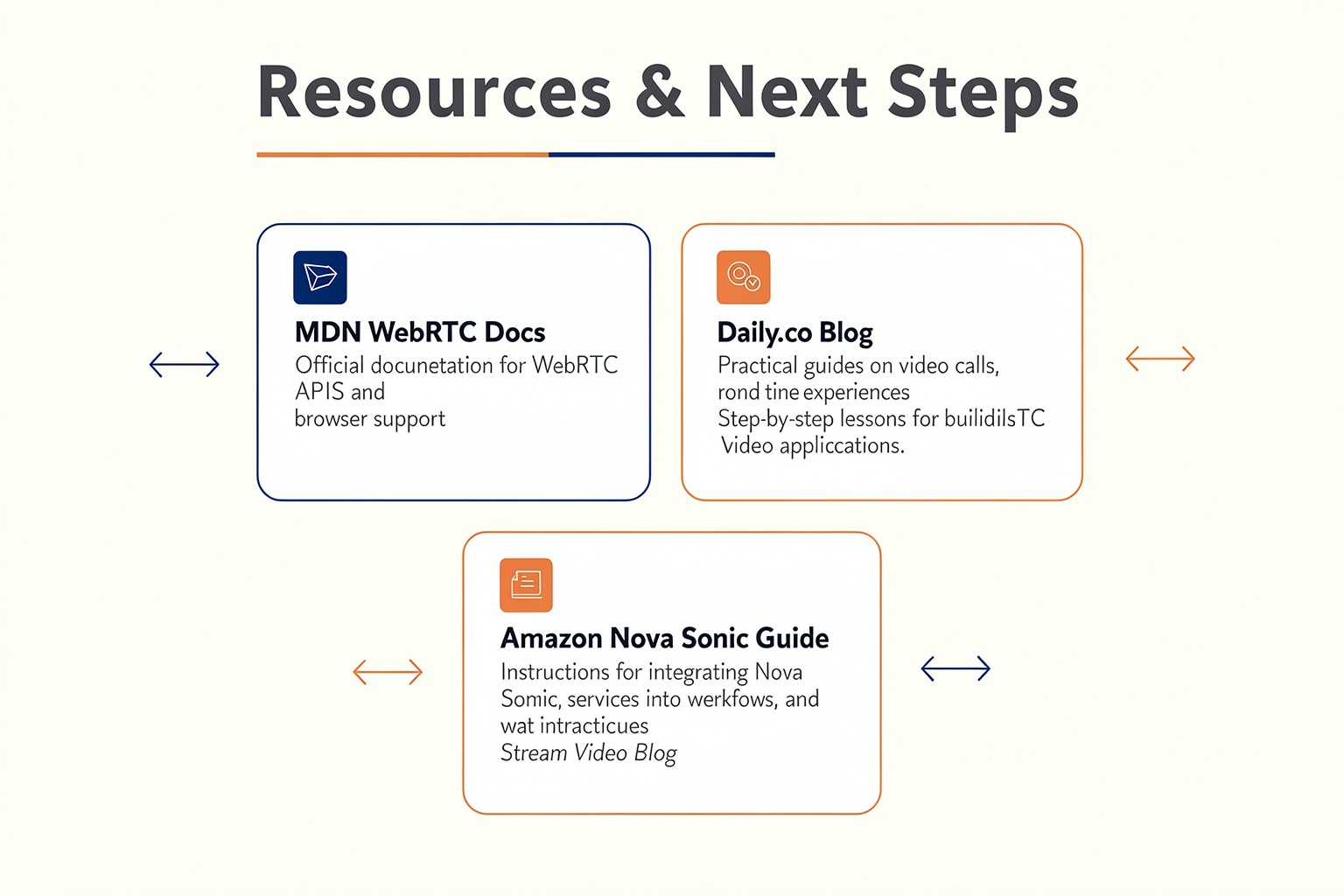
Essential Learning Resources
Building Voice AI solutions with WebRTC requires staying current with both real-time media technologies and modern speech AI advancements. To deepen your understanding and keep pace with industry shifts, consider these resource categories:
1. Technical Documentation and Primers
- WebRTC Official Docs: The WebRTC.org documentation is indispensable for developers new to real-time browser communications. It explains core concepts like peer connections, ICE negotiation, and media streams.
- How to Build Production-Ready Voice Agent Architecture: An in-depth FreeCodeCamp tutorial walks through building a browser client that streams audio over WebRTC, including real-world architecture for scaling and production deployment.
2. Open-Source Projects and Example Code
- voiceai by mahimairaja: This GitHub repository offers a complete stack for building Voice AI apps, illustrating integration of WebRTC with streaming speech-to-text and turn/intent detection pipelines.
- Sample Projects: Major cloud providers (e.g., Amazon Nova Sonic with WebRTC) share practical guides and public repositories for developing and deploying voice streaming AI applications.
3. Community Forums and Expert Blogs
- WebRTC.ventures publishes regularly updated guides on building Voice AI applications and best practices for the latest browser APIs.
- Diaries from Practitioners: Real-world developer experiences, such as Diary of a Voice AI Developer #1, provide hard-won lessons from the field (e.g., having AI agents operate browser-based dialers directly).
Industry Benchmarks and Data
The shift to real-time streaming voice AI is accelerating. According to industry analyses and case studies:
- WebRTC now supports over 7 billion devices globally (WebRTC.org, 2025), and over 80% of modern browsers natively support the protocol, making it the de facto standard for deployment.
- Streaming speech-to-text technologies have improved dramatically: Typical median transcription latency for English is now under 250ms, and leading APIs offer support for 20+ languages with over 90% word accuracy.
- In Contact Center verticals, AI voice agents can reduce operational costs by 50–65%, dramatically improving response times and availability (Diary of a Voice AI Developer #1).
Practical Next Steps
For teams and developers eager to get started with WebRTC-powered Voice AI, the path can be broken down into actionable phases:
Step 1: Learn the Fundamentals
- Study the WebRTC peer-to-peer architecture.
- Experiment with open-source browser sample projects for voice streaming.
Step 2: Prototype a Minimal Demo
- Deploy a browser-based audio stream using WebRTC and connect it to a speech-to-text API (Google Speech, Amazon Transcribe, or open-source alternatives).
- Use published tutorials like FreeCodeCamp’s for hands-on experience.
Step 3: Integrate with an AI Pipeline
- Connect live transcriptions to an intent classification model or dialogue manager.
- Use voice activity detection (VAD) and turn-taking logic to manage real-time conversation flows (mahimairaja/voiceai).
Step 4: Address Real-World Challenges
- Ensure low latency (target <300ms end-to-end).
- Add robust fallback for unreliable network conditions, leveraging WebRTC’s built-in adaptive jitter buffers and ICE negotiation (GetStream blog).
Step 5: Scale Up for Production
- Implement authentication, call logging, metrics, and failover on your media gateways.
- Use TURN/STUN servers to guarantee connectivity for users behind firewalls.
Tools and API Providers to Explore
For developers and engineering leaders, evaluating API providers and platforms that streamline WebRTC + AI integration is key. Top options include:
- CallMissed: Offers an end-to-end stack for deploying AI-powered voice agents and chatbots, complete with production-grade WebRTC integration, multi-model LLM inference, Speech-to-Text across 22 Indian languages, and robust developer APIs. Solutions like CallMissed are particularly relevant for teams needing fast deployment and multilingual support.
- Amazon Nova Sonic: Includes APIs for real-time voice streaming and unified conversational AI interfaces.
- Twilio, Agora, and Daily: Provide highly-reliable WebRTC platforms, with simple SDKs for embedding voice and video interactions into any browser or mobile app.
Keeping Up With Emerging Trends
- Multilingual and Localized AI: As of 2026, the fastest-growing segment in Voice AI is multilingual real-time processing, especially for regional markets in India, Southeast Asia, and Africa. Platforms like CallMissed natively support 22 Indian languages for Speech-to-Text—enabling businesses to serve massive, traditionally underrepresented user bases.
- LLM Integration for Richer Dialogue: The integration of Large Language Models (LLMs) via API gateways is rapidly expanding the complexity of voice agents—from simple IVRs to context-aware, conversational assistants that can handle complex tasks without escalation.
- Edge AI & Privacy: New architectures are emerging for client-side (edge) audio inference, keeping sensitive voice data local when required, boosting user privacy, and reducing latency.
Conferences, Meetups & Continuous Learning
To stay at the forefront of Voice AI and WebRTC trends:
- Attend Real-Time Web and Communications conferences (e.g., WebRTC Live, SpeechTEK, and regional AI summits).
- Join developer communities on Stack Overflow, Discord, and GitHub—the WebRTC Open Project and Voice AI repositories frequently update with new issues, features, and community-contributed architectures.
- Subscribe to newsletters such as WebRTC Weekly and Voicebot.ai for curated insights and interviews with industry leaders.
Final Thoughts
As browser AI agents, real-time streaming, and LLM-powered workflows become mainstream, mastery of WebRTC and its AI integration patterns will be a critical skill for developers and innovators. The field is moving quickly—today’s open standards and practical APIs are enabling the launch of sophisticated, production-ready voice assistants with less friction than ever before.
For those seeking a launchpad into Voice AI or looking to scale existing deployments with multilingual support, industry platforms like CallMissed and its contemporaries can drastically accelerate time-to-market. By leveraging the listed resources, participating in vibrant developer communities, and prototyping on modern API platforms, you’ll be perfectly positioned to build the next era of intelligent voice-driven applications.
Conclusion
The transition from legacy protocols to WebRTC marks a pivotal moment in the evolution of conversational AI. By moving beyond traditional WebSockets—which often suffer from TCP-induced head-of-line blocking and high latency—to the UDP-powered, real-time streams of WebRTC, developers are unlocking the true potential of voice-first interfaces. This shift ensures that voice agents are no longer just reactive text-to-speech bots, but active, fluid conversationalists capable of true bi-directional interruption and natural turn-taking.
Key Takeaways for Developers
- Low-Latency Transport: Migrating from WebSockets to WebRTC reduces transport latency from several hundred milliseconds to sub-100ms. This is critical for achieving the sub-second total response times required for human-grade interactions.
- Standardized Media Pipelines: The industry is rapidly converging on a unified architecture. This stack links WebRTC or telephony endpoints with optimized streaming pipelines for speech-to-text (STT), LLM reasoning, and text-to-speech (TTS) synthesis.
- Inherent Network Resilience: WebRTC solves hard media problems out of the box. It manages adaptive buffering, jitter, packet loss concealment, and built-in acoustic echo cancellation (AEC), allowing developers to focus on conversational logic rather than low-level audio engineering.
- Native Multimodal Processing: New end-to-end speech models, such as Amazon Nova Sonic, process audio directly. Streaming WebRTC directly into these unified models eliminates the traditional, high-latency STT-to-LLM-to-TTS cascade.
The Road Ahead for Voice AI
Looking forward, the boundaries of Voice AI will expand far beyond simple browser voice widgets. We are entering an era of automated operations where AI agents can directly log into and operate existing browser-based dialer software, interacting with telephony networks just like human agents do. Additionally, real-time translation pipelines will soon allow WebRTC streams to translate and synthesize voice dynamically, breaking down global language barriers on the fly.
To explore how real-time AI communication is evolving and to start deploying these capabilities today, check out CallMissed—an AI communication infrastructure platform powering production-ready voice agents and multilingual chatbots. Offering ultra-low-latency LLM inference across more than 300 models, alongside advanced Speech-to-Text APIs natively supporting 22 Indian languages, CallMissed provides the robust backend needed to make WebRTC-based applications scalable and highly responsive.
Are you ready to transition your communication interfaces from clunky, turn-based text APIs to fluid, real-time voice interactions?
Related Posts

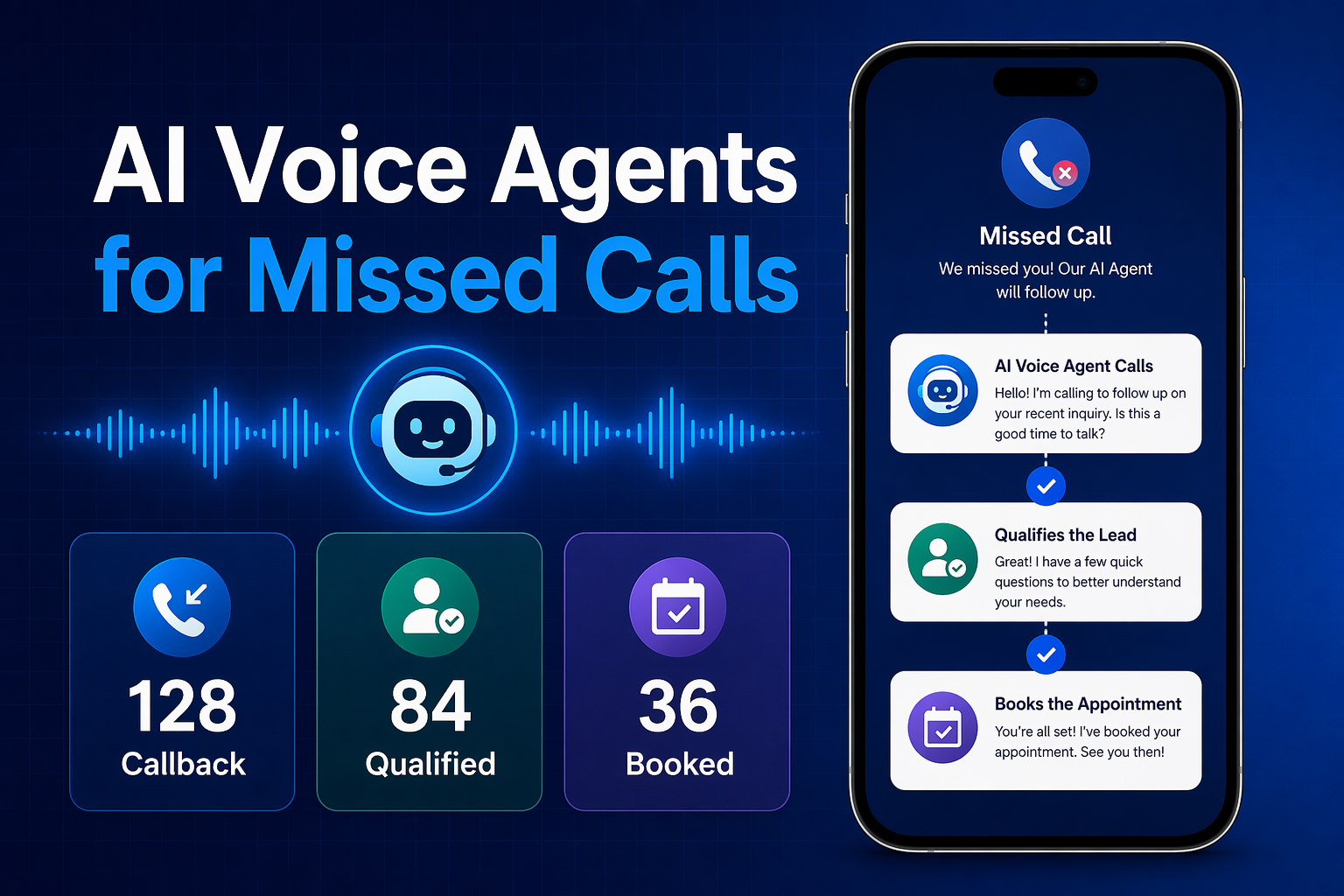
Ready to automate customer conversations?
Launch AI voice agents and WhatsApp bots with CallMissed — one API, 22+ Indian languages.