

WhatsApp Integration in CallMissed Is Easy: Automate Support, Leads, Orders, and Bookings


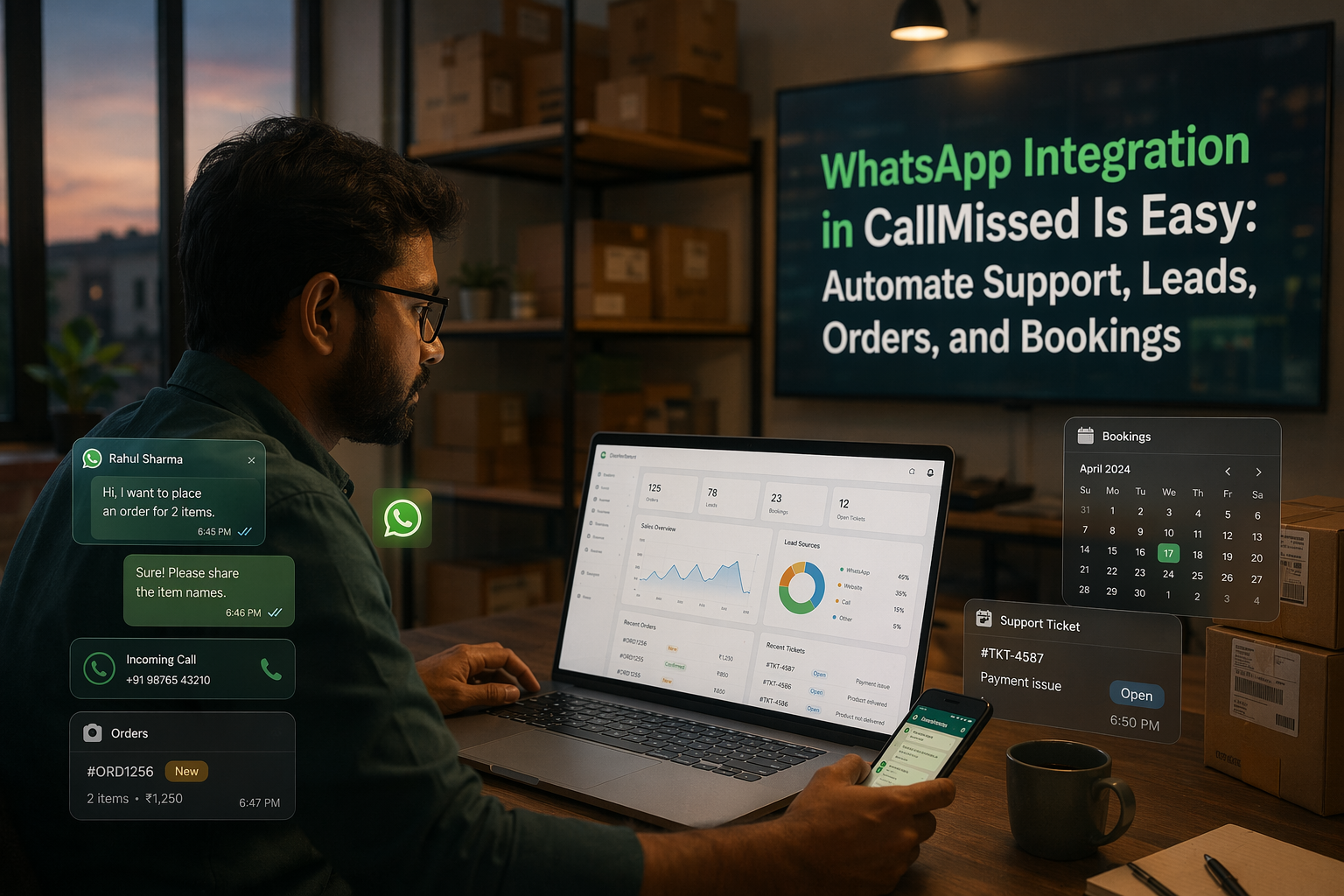
Learn how CallMissed can simplify WhatsApp automation for support, leads, orders, bookings, and faster missed-call follow-up.
WhatsApp Integration in CallMissed Is Easy: Automate Support, Leads, Orders, and Bookings
What if every missed call, unanswered chat, abandoned order, and booking request could turn into a WhatsApp conversation automatically—without your team stitching together five different tools? That is the promise behind WhatsApp Integration in CallMissed Is Easy: moving WhatsApp from a passive inbox to an always-on customer engagement channel that can respond, qualify, route, and follow up in real time.
This matters now because WhatsApp is no longer just a messaging app—it is where customers expect businesses to be. Meta reported WhatsApp crossing 3 billion monthly users in 2025, and business messaging has become a default channel for support, sales, delivery updates, and appointment coordination. At the same time, speed matters: if a lead calls and nobody answers, the opportunity can disappear within minutes. That is why platforms such as GoHighLevel now document “missed call WhatsApp back” workflows that automatically message callers when a call is unanswered, while MyOperator promotes after-call WhatsApp automation for instant follow-ups via the WhatsApp Business API.
The bigger shift is simple: customers do not care whether they started on a phone call, WhatsApp message, website form, or email. They expect continuity. CallMissed’s public homepage positions the platform as an AI-powered CRM unifying WhatsApp, Voice, Email, and Web, with AI agents that support customers, qualify leads, and engage conversations 24/7—a model that reduces the need for disconnected bots, CRMs, and manual follow-up sheets.
In this practical guide, you will learn how WhatsApp automation can support four high-impact business workflows: customer support, lead capture and qualification, order updates, and booking management. We will look at how WhatsApp chatbots and AI agents detect customer intent, use business context, trigger the next best action, update CRM records, and escalate to humans when needed. You will also see why missed-call-to-WhatsApp automation is one of the fastest wins for service teams, clinics, real estate firms, education businesses, restaurants, and local service providers.
By the end, you will understand how an easy WhatsApp integration in CallMissed can help turn everyday conversations into structured, automated workflows—without making customers feel like they are talking to a machine.
Introduction: Why Missed Calls Should Become WhatsApp Conversations
From “missed opportunity” to instant customer touchpoint
A missed call is rarely just a missed call. For a clinic, it may be a patient trying to book an appointment. For a real estate team, it may be a buyer asking about a site visit. For an ecommerce brand, it may be a customer checking delivery status before cancelling an order. The problem is that most businesses still treat missed calls, WhatsApp messages, web leads, and CRM updates as separate workstreams.
That gap is exactly why WhatsApp integration in CallMissed is easy: the goal is not to add “one more inbox,” but to connect WhatsApp directly into an AI-powered communication flow. CallMissed’s public homepage describes the platform as an AI-powered CRM unifying WhatsApp, Voice, Email, and Web, with AI agents that can support customers, qualify leads, and engage conversations 24/7. In practical terms, that means a customer action—like an unanswered call—can trigger a WhatsApp conversation, capture intent, update context, and route the next step without manual follow-up.
Why WhatsApp is the natural follow-up channel
Customers already live on WhatsApp. Meta reported that WhatsApp crossed 3 billion monthly users in 2025, making it one of the most important customer communication channels globally. For many businesses, especially in India and other mobile-first markets, WhatsApp is faster than email, more persistent than a phone call, and more conversational than a web form.
That is why missed-call-to-WhatsApp automation has become a visible trend. GoHighLevel documents a “Missed Call WhatsApp Back” workflow that automatically messages callers on WhatsApp when their call is not answered. MyOperator also promotes after-call WhatsApp automation using the WhatsApp Business API for instant follow-ups after customer calls. These examples show a clear market demand: businesses want to re-engage customers immediately, before interest cools.
The reason is simple:
- Speed improves conversion when a lead gets a response within seconds.
- WhatsApp feels personal compared with generic SMS or email follow-ups.
- Conversation history stays visible, making future support easier.
- Automation reduces manual workload for sales and support teams.
The new customer expectation: continuity
Modern customers do not think in channels. They may call first, reply on WhatsApp, share documents later, and expect the business to remember the full context. If your team has to check call logs, spreadsheets, WhatsApp Web, and CRM notes separately, the experience breaks.
A WhatsApp AI agent solves this by turning unstructured conversations into structured workflows. For example, after a missed call, the system can:
- Send an automatic WhatsApp message.
- Ask what the customer needs.
- Detect whether the intent is support, sales, order status, or booking.
- Collect missing details.
- Update the CRM.
- Escalate to a human when the issue is complex.
This is where platforms like CallMissed fit into the broader industry shift. Instead of stitching together disconnected bots, dialers, CRMs, and notification tools, businesses can use WhatsApp as part of a unified AI communication layer.
What this guide will help you automate
In the sections ahead, we will break down four practical workflows where WhatsApp automation creates immediate business value:
- Support: instant replies, issue triage, and human handoff.
- Leads: capture, qualification, routing, and sales follow-up.
- Orders: confirmations, delivery updates, and customer queries.
- Bookings: appointment requests, reminders, rescheduling, and cancellations.
The bigger promise is not just automation—it is responsiveness. When every missed call can become a WhatsApp conversation, businesses stop losing customers to silence.
Background & Context: CallMissed as an Omnichannel AI CRM
Why “omnichannel” matters before WhatsApp automation
Most WhatsApp automation projects fail for a simple reason: the chatbot is added on top of a messy operating system. A customer calls one number, messages another team on WhatsApp, fills a website form, and then receives an email from a different tool. The result is fragmented context, duplicate follow-ups, and support agents asking customers to repeat information they already shared.
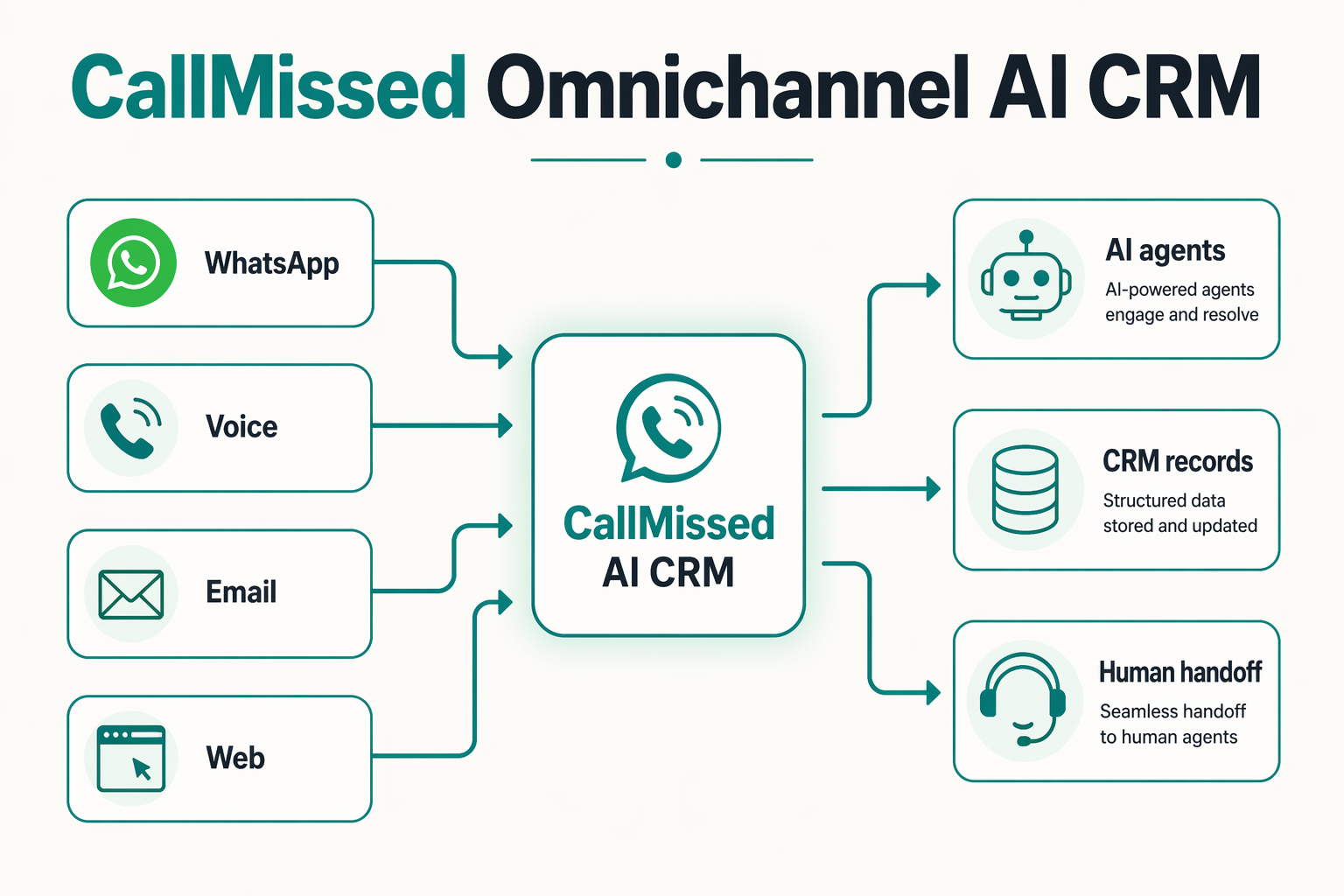
That is where the omnichannel AI CRM model becomes important. CallMissed’s public homepage describes the platform as an AI-powered CRM that unifies WhatsApp, Voice, Email, and Web, with AI agents built to handle support, lead qualification, and customer engagement 24/7. In practical terms, WhatsApp is not treated as a standalone chat inbox. It becomes one channel inside a shared customer conversation layer.
This is the background behind the claim that WhatsApp integration in CallMissed is easy: the business is not wiring WhatsApp into five disconnected systems. Instead, WhatsApp can sit alongside voice calls, missed-call triggers, web enquiries, and CRM records.
From channel integration to customer memory
An omnichannel CRM is valuable because it gives automation “memory.” A WhatsApp bot that only sees the latest message can answer basic FAQs. But an AI CRM-connected WhatsApp agent can understand the customer’s history, source, intent, and next step.
For example, if a customer first arrives through a missed call and then continues on WhatsApp, the workflow can preserve context such as:
- Phone number and contact identity
- Call status, such as answered, missed, or abandoned
- Lead source, such as an ad campaign, website form, or referral
- Previous conversations across WhatsApp, voice, email, or web
- Customer intent, such as support, booking, order tracking, or sales enquiry
- Escalation status, including whether a human agent needs to step in
This is the difference between a basic auto-reply and an AI-assisted customer engagement workflow. The former says, “Thanks for contacting us.” The latter says, “Hi Priya, sorry we missed your call. Are you looking to book a consultation for this week?”
The market is already moving toward instant re-engagement
The demand for missed-call-to-WhatsApp automation is visible across the market. GoHighLevel documents a “Missed Call WhatsApp Back” workflow that automatically messages callers on WhatsApp when their call is not answered, helping teams re-engage faster. MyOperator similarly promotes after-call WhatsApp automation through the WhatsApp Business API for immediate follow-ups after customer calls.
These examples show an important shift: businesses increasingly see phone calls and WhatsApp messages as part of the same customer journey. A missed call should not wait for a callback list. It should trigger an immediate conversation.
In an omnichannel setup like CallMissed, that journey can follow a simple sequence:
- Customer calls the business.
- If the call is missed, the CRM captures the event.
- WhatsApp automation sends a contextual follow-up.
- The AI agent asks the right qualifying question.
- The CRM updates the lead, ticket, order, or booking record.
- A human agent is alerted only when needed.
What CallMissed adds to the WhatsApp layer
Publicly available CallMissed details position it around unified AI communication rather than just messaging. That distinction matters. WhatsApp automation becomes more useful when it can connect to voice, email, web, and CRM logic in one place.
A WhatsApp AI agent in this environment can support workflows such as:
- Support: answer FAQs, collect issue details, and escalate complex cases
- Leads: qualify prospects by budget, location, requirement, or urgency
- Orders: send delivery updates, payment reminders, and status responses
- Bookings: confirm appointment slots, reschedule requests, and reminders
- Follow-ups: re-engage customers after missed calls, abandoned forms, or incomplete purchases
This matches the broader industry pattern described by providers such as SleekFlow, where WhatsApp AI agents detect intent, use business context, decide the next action, reply automatically, or escalate to humans. It also aligns with customer support expectations highlighted by Kommo: customers want instant replies and 24/7 availability, not “we will get back to you during business hours.”
So, before looking at specific support, lead, order, and booking flows, the key context is this: CallMissed makes WhatsApp easier to operationalize because it treats WhatsApp as part of an AI CRM system, not as another isolated inbox.
Key Developments (TABLE)
What has changed in WhatsApp automation
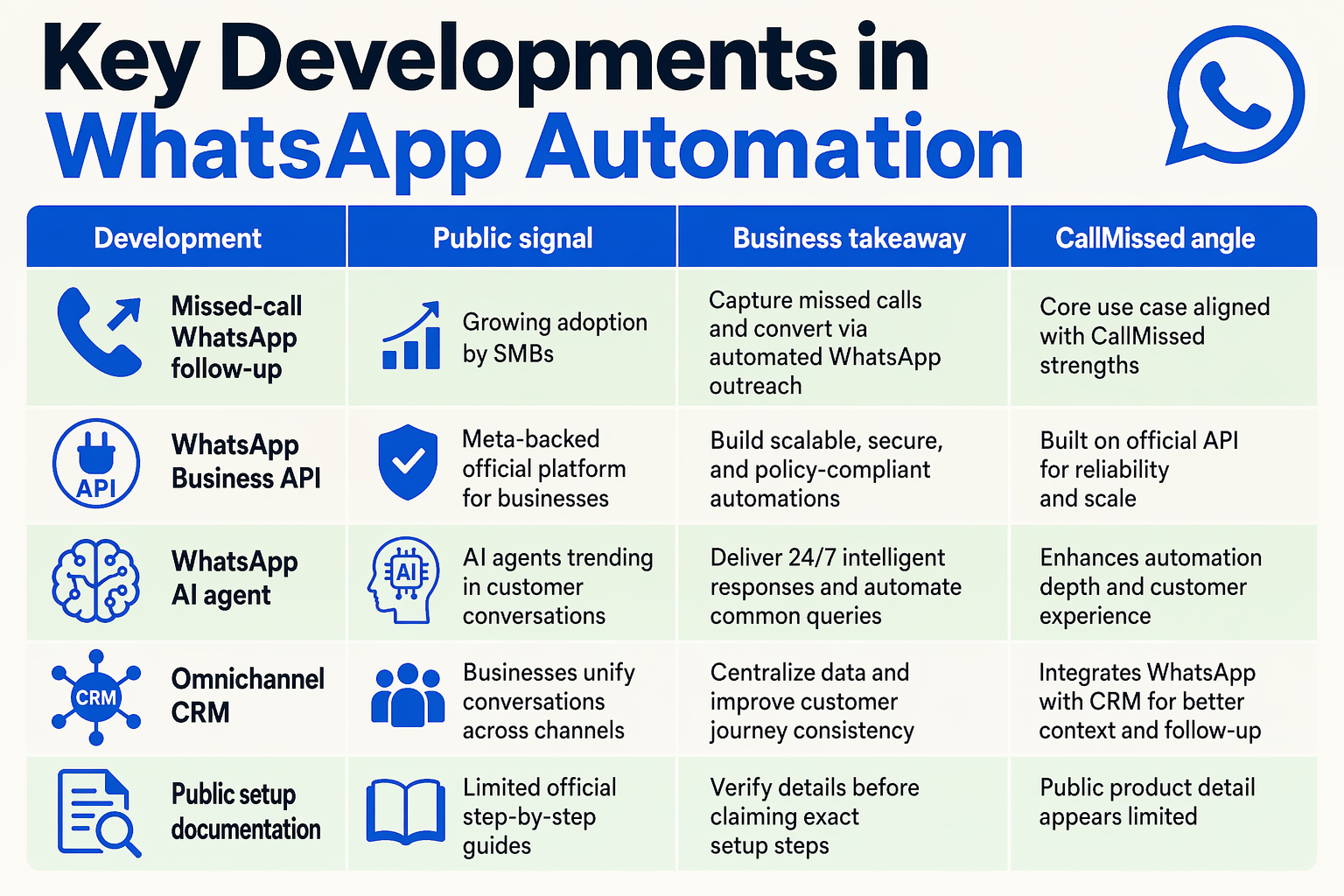
The reason WhatsApp integration in CallMissed feels easier now is not just better tooling—it is a broader market shift. WhatsApp has become a primary business channel, automation patterns are now well understood, and AI agents can handle more than scripted replies. Instead of asking teams to manually copy customer details from calls into WhatsApp and then into a CRM, modern platforms are converging around one workflow: detect the customer event, understand intent, respond instantly, and update the business system.
| Key development | What it means for businesses | Source / signal | Practical impact |
|---|---|---|---|
| WhatsApp at massive scale | WhatsApp is now a default customer communication channel, not an optional add-on | Meta reported WhatsApp crossing 3 billion monthly users in 2025 | Businesses can reach customers where they already respond quickly |
| Missed-call-to-WhatsApp automation | Unanswered calls can trigger instant WhatsApp follow-ups | GoHighLevel documents “Missed Call WhatsApp Back” workflows that message callers when a call is not answered | Reduces lost leads and gives customers a fast next step |
| After-call messaging | WhatsApp can be used immediately after customer calls, not only for inbound chats | MyOperator promotes After Call WhatsApp Automation via the WhatsApp Business API | Useful for confirmations, payment links, feedback, and support summaries |
| AI-powered omnichannel CRM | WhatsApp, Voice, Email, and Web can be managed from one customer engagement layer | CallMissed’s public homepage describes an AI-powered CRM unifying WhatsApp, Voice, Email, and Web | Teams avoid stitching together separate inboxes, bots, and spreadsheets |
| AI agents for intent handling | WhatsApp bots can detect intent, use context, respond, route, or escalate | SleekFlow describes WhatsApp AI agents as systems that interpret customer needs and take next steps | Enables support, lead qualification, orders, and booking flows beyond static FAQs |
| 24/7 automated support | Customers can get replies outside business hours | Kommo highlights always-on WhatsApp customer conversations and instant replies | Improves response speed for clinics, real estate, ecommerce, and local services |
Why these developments matter for CallMissed users
The practical takeaway is that WhatsApp automation has moved from “nice chatbot” to operational infrastructure. A missed call can become a qualified lead. A delivery question can become an automated order-status reply. A booking request can become a confirmed appointment. A complaint can be routed to the right human with context already attached.
For a business using CallMissed, the important development is the shift toward one connected customer timeline. The platform’s public positioning as an AI-powered CRM for WhatsApp, Voice, Email, and Web means the WhatsApp integration is not treated as a separate inbox. It becomes part of a wider engagement system where AI agents can support customers, qualify leads, and continue conversations 24/7.
That matters because most customer journeys are messy:
- A buyer calls first, then replies on WhatsApp.
- A patient asks for availability, then wants a reminder.
- A restaurant customer checks an order, then asks for refund support.
- A student lead sends a WhatsApp message after missing a counselor’s call.
The key development is that these no longer need to be handled manually in disconnected tools. With an integrated setup, WhatsApp becomes the action layer for follow-ups, confirmations, support updates, and handoffs—while the CRM keeps the customer record structured.
In-Depth Analysis: Why WhatsApp Business Automation in CallMissed Feels Low-Friction
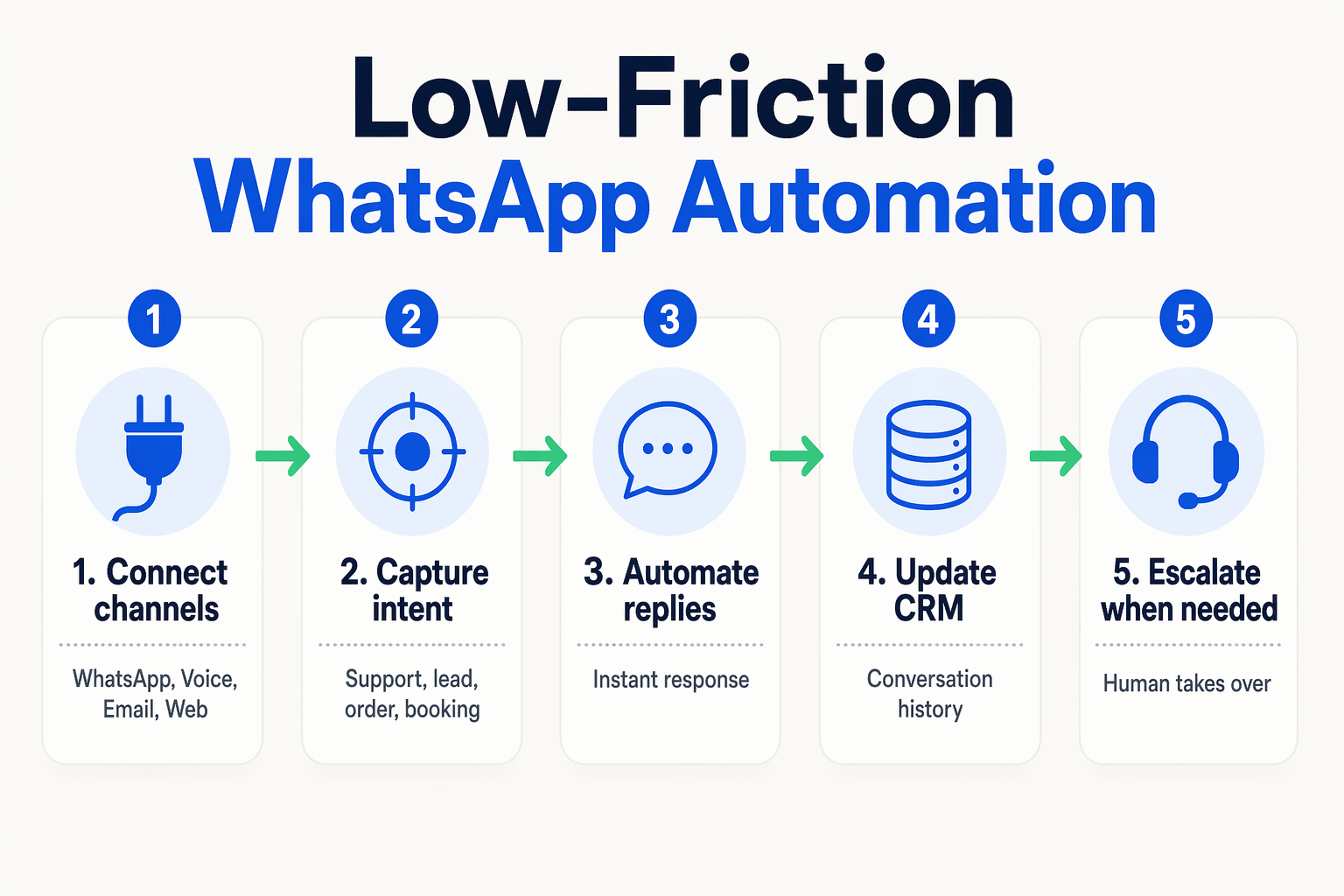
Low-friction does not mean “no workflow”—it means fewer moving parts
The reason WhatsApp Business automation in CallMissed feels low-friction is not simply that connecting WhatsApp is easy. It is that WhatsApp sits inside a broader communication layer instead of acting like a standalone inbox. CallMissed’s public homepage describes the platform as an AI-powered CRM that unifies WhatsApp, Voice, Email, and Web, with AI agents for support, lead qualification, and customer engagement 24/7. That matters because most automation failures happen between systems—not inside the chat window.
In a disconnected setup, a business may need:
- A telephony tool for calls
- A WhatsApp Business API provider
- A chatbot builder
- A CRM
- A separate automation tool for routing and follow-ups
Each extra tool adds mapping, webhook maintenance, duplicate customer records, and brittle handoffs. CallMissed’s advantage is that WhatsApp automation can be treated as part of the same customer journey as calls, web forms, email conversations, and CRM activity.
The trigger-to-action path is shorter
A practical WhatsApp automation usually follows a simple chain:
- Trigger: missed call, new message, lead form, booking request, order update, or support query
- Intent detection: the AI agent identifies whether the customer wants help, pricing, delivery status, appointment slots, or a callback
- Context lookup: the system checks available customer, order, lead, or booking data
- Action: reply, qualify, route, notify, update CRM, or escalate
- Follow-up: send reminders, confirmations, or next-step messages on WhatsApp
This is where the market is clearly moving. GoHighLevel documents a “Missed Call WhatsApp Back” workflow that automatically messages callers on WhatsApp when their call is not answered. MyOperator similarly promotes After Call WhatsApp Automation, where a predefined WhatsApp message is sent via the WhatsApp Business API immediately after a customer call is answered. These examples show that businesses increasingly want call events to become WhatsApp conversations automatically.
CallMissed fits that same pattern, but with a broader AI-CRM framing: the missed call is not just a trigger for a canned message—it can become part of an ongoing customer record and workflow.
AI agents reduce configuration complexity
Traditional bots often require businesses to build rigid decision trees: “Press 1 for sales, press 2 for support,” translated into WhatsApp buttons and keyword rules. That works for simple flows, but it becomes messy when customers type naturally: “I called earlier about my booking for tomorrow” or “Can someone confirm if my order has shipped?”
A WhatsApp AI agent makes the experience smoother because it can:
- Identify support, lead, order, or booking intent
- Ask missing qualification questions
- Use business context before responding
- Decide whether to automate or escalate
- Keep the conversation available outside office hours
The operator brief notes that WhatsApp AI agent patterns described by providers such as SleekFlow involve detecting customer intent, using business context, deciding next steps, replying automatically, or escalating to a human. Kommo also highlights the support benefit of always-on conversations outside business hours. That is the real low-friction layer: fewer manual rules, more context-aware handling.
The customer experience stays familiar
Low-friction is not only an internal operations benefit. It also works because customers already know WhatsApp. Meta reported WhatsApp crossing 3 billion monthly users in 2025, which means businesses do not have to persuade customers to install another app, remember another login, or check another portal.
For the customer, the experience can be as simple as:
- “Sorry we missed your call—how can we help?”
- “Would you like to book an appointment?”
- “Please confirm your delivery address.”
- “A support agent has been notified and will join shortly.”
For the business, those replies can quietly update lead status, assign owners, trigger reminders, and keep records in the CRM. Public CallMissed details do not expose every implementation step, but the platform’s positioning—WhatsApp, Voice, Email, and Web unified into one AI-powered CRM—explains why the integration story is compelling: less tool-switching for teams, faster re-engagement for customers, and a cleaner path from conversation to outcome.
Impact & Implications: WhatsApp Customer Support, Lead Generation, Order Automation, Booking Bots, and Sales Automation
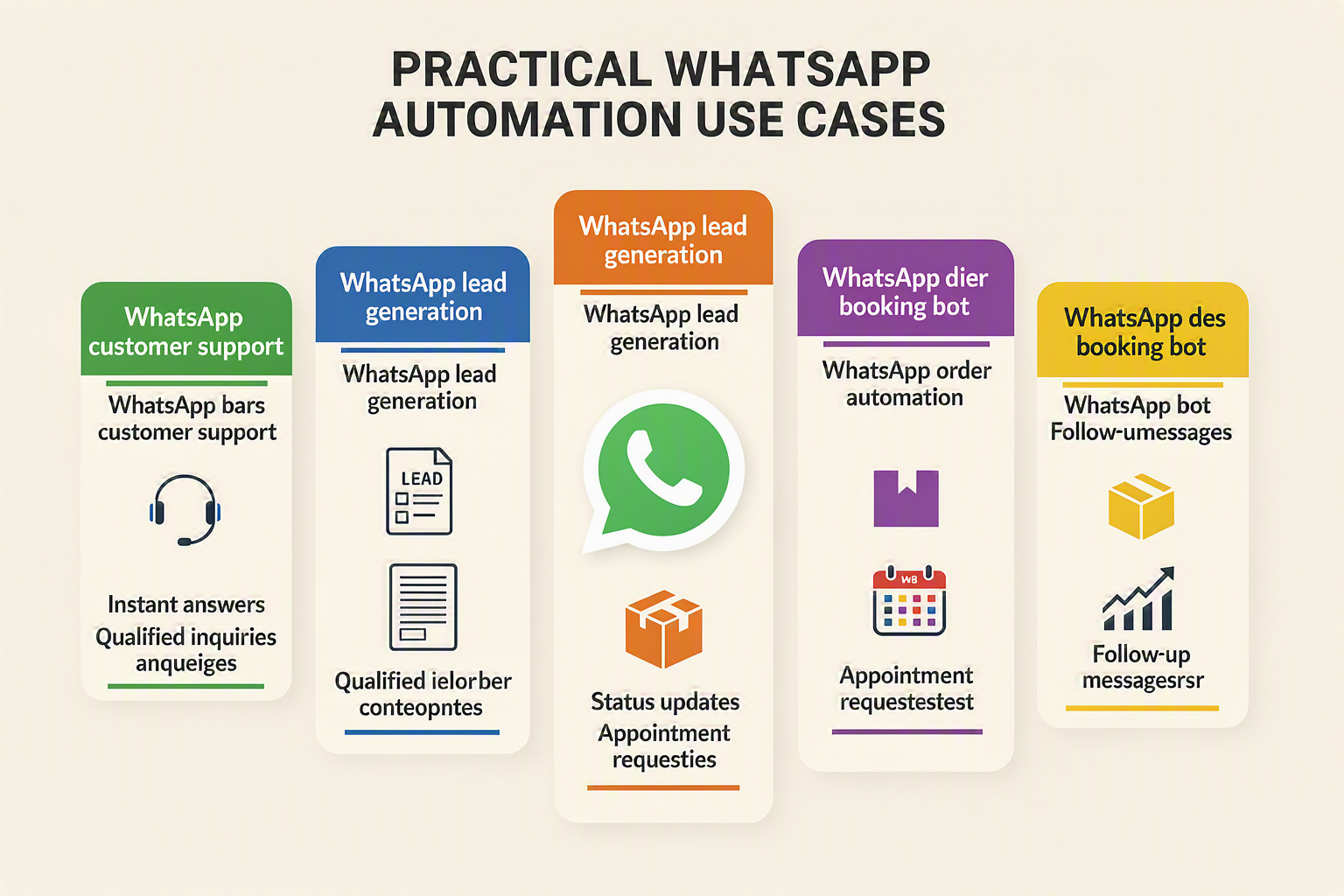
The operational impact: WhatsApp becomes the workflow, not just the inbox
The biggest implication of WhatsApp automation is that customer conversations stop being “messages to reply to” and become structured business events. A missed call can create a lead. A product question can trigger a recommendation. A booking request can check availability. An order query can pull status. A complaint can escalate to the right human agent with context already attached.
That is why WhatsApp integration matters beyond convenience. With WhatsApp crossing 3 billion monthly users in 2025, the channel is now large enough to function as a primary customer interface for support, sales, bookings, and post-purchase engagement. The shift is especially important for businesses where speed determines conversion: clinics, real estate firms, restaurants, ecommerce brands, local services, education companies, and financial service providers.
Platforms such as CallMissed are aligned with this shift by positioning WhatsApp inside an AI-powered CRM that unifies WhatsApp, Voice, Email, and Web, instead of forcing teams to manage separate tools for calling, chat, follow-up, and CRM updates.
1. WhatsApp customer support becomes always-on
For support teams, WhatsApp automation reduces dependency on business hours and manual first responses. Kommo highlights the value of always-on conversations outside business hours, while the broader market is moving toward instant replies and AI-assisted resolution.
A WhatsApp support bot can:
- Answer FAQs instantly, such as pricing, refund policy, delivery timelines, or appointment rules
- Collect required information before escalation
- Route urgent issues to a human team
- Share ticket updates, links, documents, or next steps
- Maintain continuity when a customer switches from call to WhatsApp
The impact is not just faster replies. It is lower support load, cleaner ticket intake, and fewer repeated questions for agents.
2. Lead generation becomes faster and more measurable
Missed-call-to-WhatsApp automation is one of the strongest examples of lead recovery. GoHighLevel documents a “Missed Call WhatsApp Back” workflow that automatically messages callers on WhatsApp when a call is not answered. MyOperator similarly promotes after-call WhatsApp automation through the WhatsApp Business API for instant follow-ups.
This reflects a clear market need: businesses want to re-engage prospects before intent fades.
A practical lead workflow may look like this:
- Customer calls but the team misses it
- WhatsApp message is sent instantly
- Bot asks what the customer needs
- AI qualifies intent, budget, location, or urgency
- CRM record is updated
- Sales rep receives only qualified, high-priority leads
For sales teams, this means fewer cold callbacks and more conversations that already have context.
3. Orders and bookings become self-service flows
WhatsApp is also becoming a lightweight interface for transactions and coordination. Instead of asking customers to call repeatedly, businesses can automate order and booking journeys inside chat.
For order automation, WhatsApp bots can:
- Confirm order placement
- Share payment or invoice links
- Send delivery updates
- Handle cancellation or return requests
- Notify customers about delays or stock changes
For booking bots, the same pattern applies:
- Ask for preferred date, time, location, or service
- Check available slots
- Confirm appointments
- Send reminders
- Reschedule or cancel without human intervention
This is particularly useful for appointment-heavy businesses such as salons, diagnostics labs, coaching centers, repair services, and property site visits.
4. Sales automation becomes conversational
The deeper implication is that sales automation becomes less robotic. Instead of blasting generic messages, a WhatsApp AI agent can detect intent, use business context, decide the next best action, and escalate when required—a pattern also described by SleekFlow for WhatsApp AI agents.
That enables workflows such as:
- Product recommendations based on customer answers
- Follow-ups after abandoned inquiries
- Renewal or reorder reminders
- Quote sharing after qualification
- Human handoff for high-value deals
In CallMissed, this fits naturally with the platform’s public promise of AI agents that support customers, qualify leads, and engage conversations 24/7 across WhatsApp, Voice, Email, and Web. The result is not just automation for its own sake—it is a more responsive customer journey where every interaction can move toward resolution, booking, purchase, or retention.
Expert Opinions: From WhatsApp Chatbot to WhatsApp AI Agent
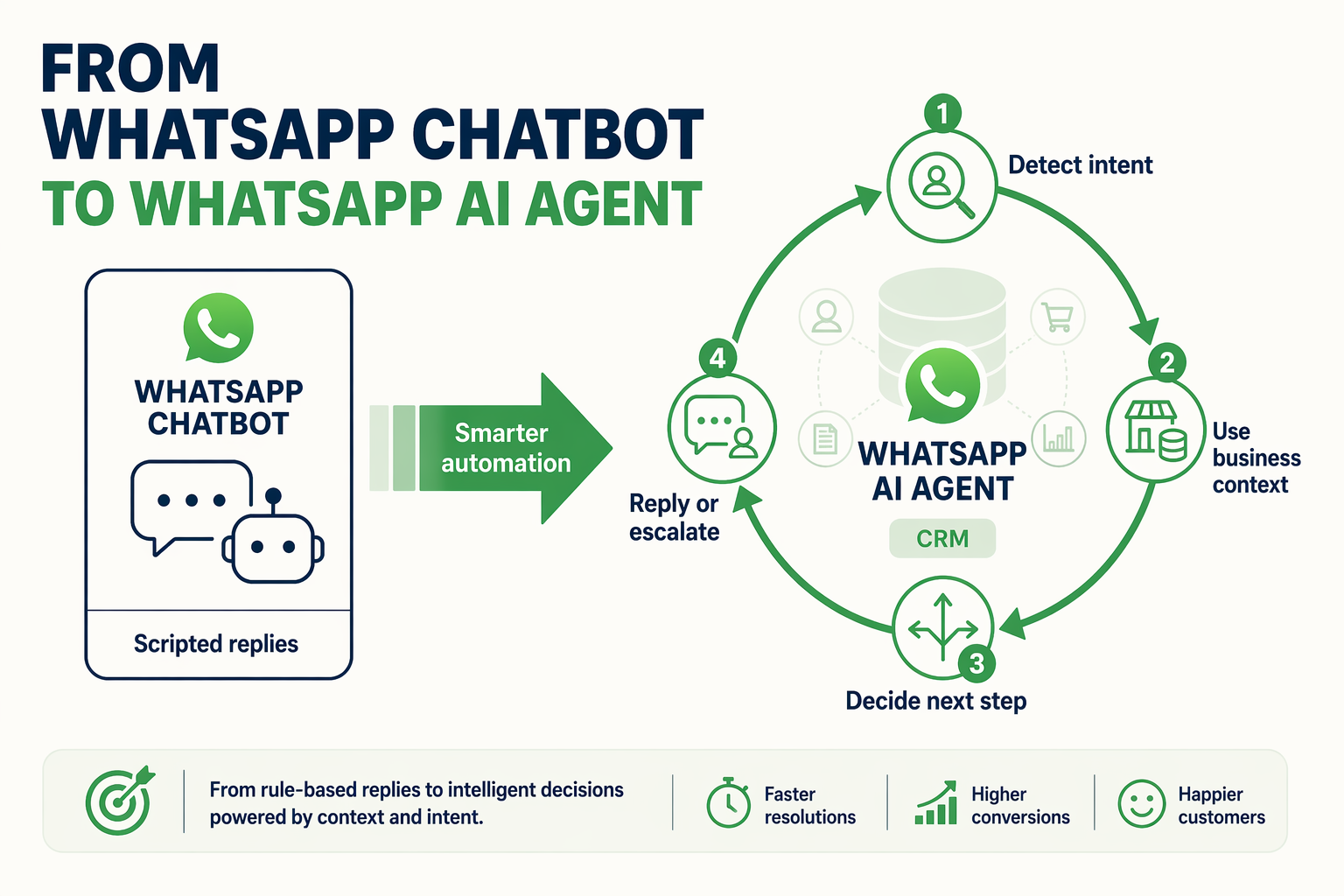
Why experts are moving beyond rule-based chatbots
The first generation of WhatsApp automation was mostly menu-driven: “Press 1 for support, press 2 for sales.” That still works for simple FAQs, but it breaks down when customers ask messy, real-world questions like: “Can I reschedule tomorrow’s appointment and also confirm the payment link?” or “My order is delayed—should I cancel or wait?”
Industry guidance is shifting toward WhatsApp AI agents because they can interpret intent, use context, and decide what action should happen next. SleekFlow describes this pattern as an AI agent that can detect customer intent, use business context, reply automatically, and escalate when needed. That is a meaningful jump from a chatbot that only follows fixed scripts.
The timing also matters. WhatsApp crossed 3 billion monthly users in 2025, according to Meta, and business messaging is now a mainstream customer channel. As volume grows, companies need automation that can handle not just replies, but full workflows.
Chatbot vs AI agent: the practical difference
A WhatsApp chatbot is useful when the path is predictable. A WhatsApp AI agent is more useful when the conversation needs judgment.
For example:
- Chatbot flow:
Customer: “I want to book an appointment.”
Bot: “Choose a date from the list.”
- AI agent flow:
Customer: “I missed your call. Can I come after 6 tomorrow? Also, do you accept UPI?”
Agent: Understands booking intent, checks availability, answers payment question, confirms the slot, and updates the CRM.
That second experience is where businesses start seeing real operational value. The agent is not just “chatting”; it is coordinating across systems.
Key differences include:
- Intent recognition: Understands whether the user needs support, sales, booking, cancellation, order tracking, or escalation.
- Context awareness: Uses previous calls, CRM notes, lead stage, booking history, or order status.
- Action-taking: Sends reminders, updates records, routes leads, creates tickets, or triggers follow-ups.
- Human handoff: Escalates when confidence is low, policy requires approval, or the customer becomes frustrated.
What experts recommend for real businesses
The most practical expert advice is: do not automate everything at once. Start with high-frequency, low-risk conversations, then expand.
A sensible rollout looks like this:
- Start with instant replies
Kommo highlights the value of always-on WhatsApp support outside business hours. Even a simple automated response can reassure customers that their request has been received.
- Automate missed-call recovery
GoHighLevel documents “Missed Call WhatsApp Back,” which automatically messages callers on WhatsApp when a call is not answered. MyOperator similarly promotes after-call WhatsApp automation through the WhatsApp Business API. This shows clear market demand for instant re-engagement.
- Add qualification questions
For leads, the AI agent can ask budget, location, urgency, service type, or preferred time—then route the lead to the right team.
- Connect workflows to CRM actions
The real benefit appears when WhatsApp conversations update customer records, trigger tasks, and create follow-up sequences automatically.
This is where platforms like CallMissed fit the broader trend: its public homepage positions it as an AI-powered CRM unifying WhatsApp, Voice, Email, and Web, with AI agents for support, lead qualification, and customer engagement 24/7. Instead of stitching together a bot tool, CRM, call tracker, and automation platform, businesses can think in terms of one connected customer engagement layer.
The expert takeaway: AI agents should feel helpful, not robotic
The best WhatsApp AI agents are not the ones that sound the most “human.” They are the ones that resolve customer intent quickly while knowing when to step aside.
A strong WhatsApp AI agent should:
- Answer common questions instantly
- Ask only necessary follow-up questions
- Personalize responses using business context
- Avoid making promises it cannot verify
- Escalate sensitive, complex, or angry conversations
- Keep CRM and team workflows updated in the background
In other words, the future is not chatbot versus human. It is AI agent plus human team, where automation handles speed and scale, while people handle judgment and relationship-building. For businesses adopting WhatsApp through CallMissed, that is the practical upgrade: WhatsApp becomes more than an inbox—it becomes an intelligent front door for support, leads, orders, and bookings.
WhatsApp Business API, Meta WhatsApp API, and the WhatsApp Voice Agent Layer
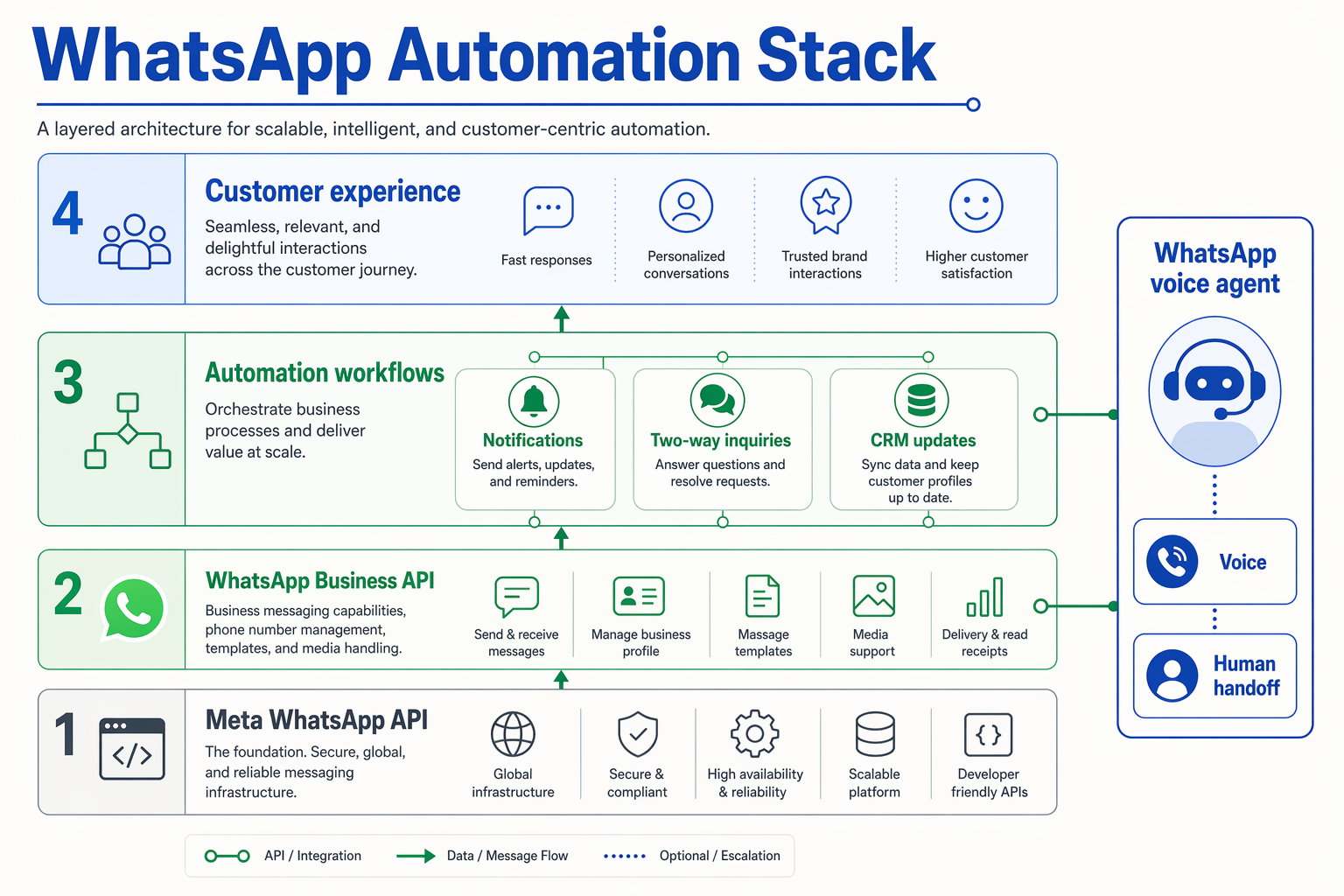
The API layer: what businesses are really connecting
When people say “WhatsApp Business API” or “Meta WhatsApp API,” they usually mean the official infrastructure businesses use to send and receive WhatsApp messages at scale. Unlike the regular WhatsApp Business app, the API is designed for automation: routing conversations, triggering templates, syncing CRM records, and connecting bots or AI agents.
In a practical CallMissed setup, this API layer becomes the bridge between WhatsApp and the rest of the customer journey. Instead of WhatsApp sitting as a standalone inbox, it connects to:
- Voice calls — including missed-call follow-ups
- CRM records — lead status, customer history, booking notes
- AI agents — for support, qualification, and routing
- Notifications — order updates, reminders, confirmations
- Human handoff — when automation should stop and a team member should step in
That is why the distinction matters. The API is not just for sending messages; it is the foundation for turning WhatsApp into an operational workflow.
WhatsApp Business API vs Meta WhatsApp API
The terminology can be confusing, but the business outcome is simple.
WhatsApp Business API is the common industry term for using WhatsApp programmatically. Meta WhatsApp API refers to the official Meta-managed infrastructure behind that access, including WhatsApp Cloud API and business messaging controls.
For most businesses, the practical questions are:
- Can we send automated replies when customers message us?
- Can we trigger WhatsApp messages after a missed or completed call?
- Can we connect WhatsApp conversations to our CRM?
- Can an AI agent answer, qualify, and escalate?
- Can we manage support, leads, orders, and bookings in one place?
This is where platforms like CallMissed reduce friction. Its public homepage describes CallMissed as an AI-powered CRM unifying WhatsApp, Voice, Email, and Web, with AI agents for support, lead qualification, and customer engagement 24/7. In other words, businesses do not need to think only in terms of “API access”; they can think in terms of customer workflows.
The missing layer: voice-to-WhatsApp automation
The most powerful use case is not just WhatsApp chat automation—it is connecting voice events to WhatsApp conversations.
This pattern is already visible across the market. GoHighLevel documents a “Missed Call WhatsApp Back” workflow that automatically messages callers on WhatsApp when their call is not answered. MyOperator also promotes After Call WhatsApp Automation, where a predefined WhatsApp message is sent through the WhatsApp Business API immediately after a customer call is answered.
The reason this matters is simple: voice calls often signal high intent. A customer who calls is usually ready to book, buy, complain, confirm, or ask something urgent. If nobody answers, WhatsApp becomes the fastest recovery channel.
A voice-to-WhatsApp layer can automate sequences such as:
- Missed call → WhatsApp apology + menu
- Answered call → WhatsApp summary + payment link
- Support call → ticket confirmation
- Booking inquiry → available time slots
- Sales call → brochure, quote, or follow-up reminder
Where the WhatsApp voice agent fits
A WhatsApp voice agent layer goes one step further. It does not merely send a static message after a call; it understands the customer’s context and continues the conversation intelligently.
For example:
- A customer calls a clinic after hours.
- The call is missed.
- CallMissed triggers a WhatsApp message automatically.
- The AI agent asks whether the customer wants an appointment, report update, or emergency contact.
- The conversation is logged in the CRM.
- If needed, the agent escalates to a human.
This aligns with the broader WhatsApp AI agent model described by providers such as SleekFlow: an AI agent detects customer intent, uses business context, decides the next action, replies automatically, or escalates to a human.
The result is a cleaner architecture: Meta’s WhatsApp API handles the messaging rail, while CallMissed adds the AI, voice, CRM, and workflow intelligence on top. That is the layer that turns WhatsApp from a messaging endpoint into an always-on engagement system.
What This Means For You (TABLE)
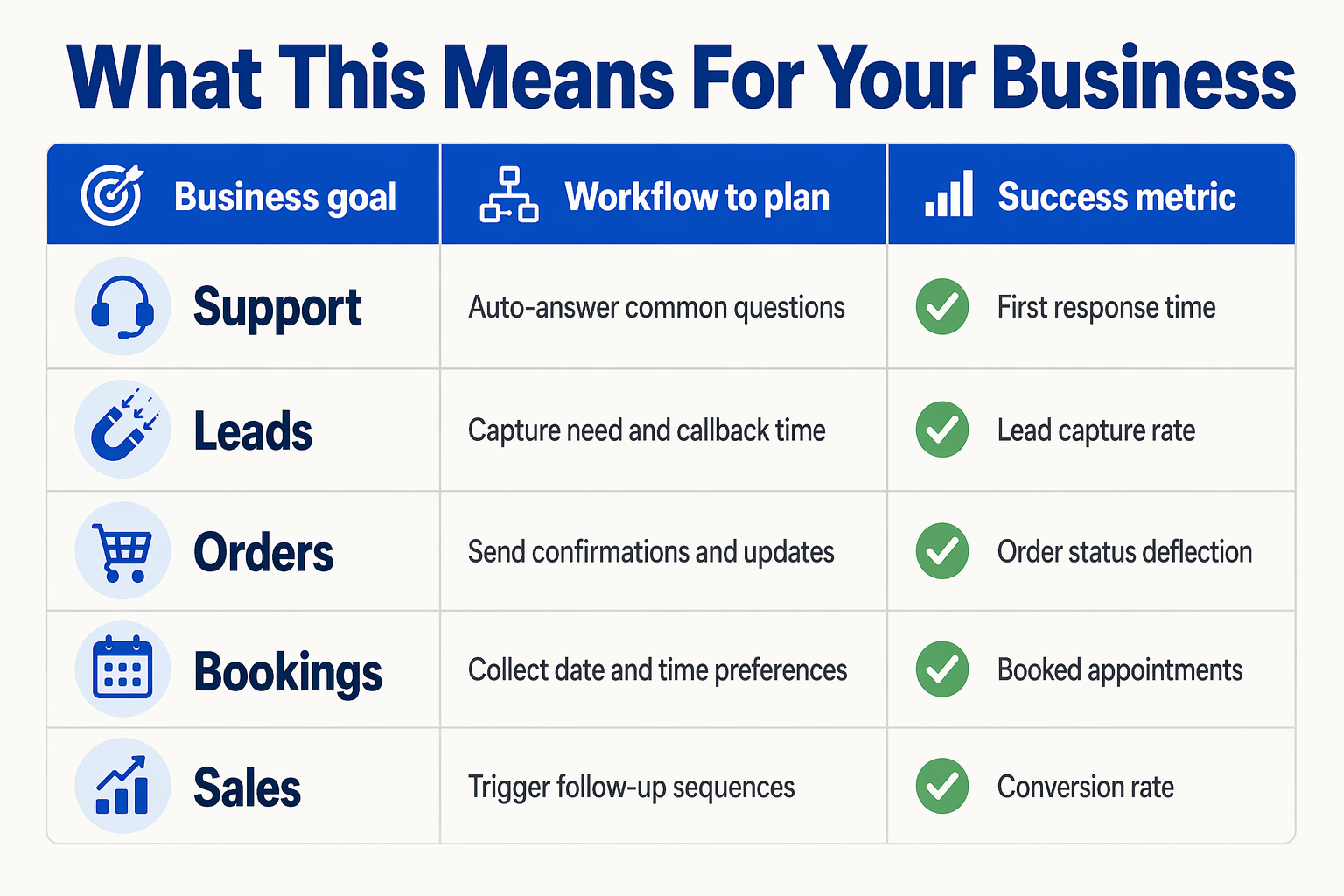
Turning WhatsApp automation into business outcomes
The practical takeaway is not “add another chatbot.” It is to make WhatsApp part of your customer operating system—connected to calls, CRM records, booking slots, order status, and human handoffs. That is where the easy integration story matters: CallMissed’s public homepage describes the platform as an AI-powered CRM unifying WhatsApp, Voice, Email, and Web, with AI agents for support, lead qualification, and customer engagement 24/7.
For a business owner or operations team, this means fewer disconnected workflows and faster customer response. WhatsApp already has the reach—Meta reported 3 billion monthly WhatsApp users in 2025—but the real value comes when conversations trigger actions automatically.
| If you struggle with... | WhatsApp automation can... | Best CallMissed workflow | Business impact |
|---|---|---|---|
| Missed sales or support calls | Send an instant WhatsApp reply when a call is unanswered | Missed-call-to-WhatsApp follow-up | Faster re-engagement before the customer moves to a competitor |
| Repetitive support questions | Answer FAQs, collect issue details, and escalate complex cases | AI support agent + human handoff | 24/7 first response with less manual workload |
| Unqualified leads | Ask budget, location, requirement, and urgency questions | Lead qualification chatbot | Cleaner CRM data and better sales prioritization |
| Order status requests | Share dispatch, delivery, cancellation, or payment updates | Order notification workflow | Fewer inbound “Where is my order?” messages |
| Appointment coordination | Confirm preferred date, time, branch, service, and reminders | Booking automation | Lower no-shows and less back-and-forth |
| Scattered customer history | Sync WhatsApp, voice, email, and web interactions into one view | Omnichannel AI CRM | Better context for agents and more consistent service |
Why this matters operationally
The market is already moving in this direction. GoHighLevel documents a “Missed Call WhatsApp Back” workflow that automatically messages callers on WhatsApp when a call is not answered. MyOperator promotes after-call WhatsApp automation through the WhatsApp Business API for immediate follow-ups after calls. These examples show that businesses are no longer treating missed calls as dead ends—they are turning them into structured conversations.
With CallMissed, the advantage is that these workflows can sit inside a broader AI communication layer rather than being patched together across multiple tools. That matters when your team wants to:
- Keep support available beyond office hours
- Capture leads from both calls and WhatsApp
- Route urgent issues to humans
- Maintain one customer history across channels
- Automate follow-ups without losing personalization
The simplest way to decide where to start
If you are implementing WhatsApp automation for the first time, start where the revenue or service leakage is most visible:
- High missed-call volume? Start with instant WhatsApp callbacks.
- Too many repeated questions? Deploy a support FAQ agent.
- Low lead conversion? Add qualification before sales handoff.
- Manual booking chaos? Automate appointment collection and reminders.
- Order anxiety? Trigger proactive delivery and payment updates.
The bigger point: WhatsApp integration is not just about messaging customers faster. It is about making every conversation actionable. When WhatsApp, voice, CRM, and AI agents work together, your business can respond instantly, qualify accurately, and escalate intelligently—without making the customer repeat themselves.
Frequently Asked Questions
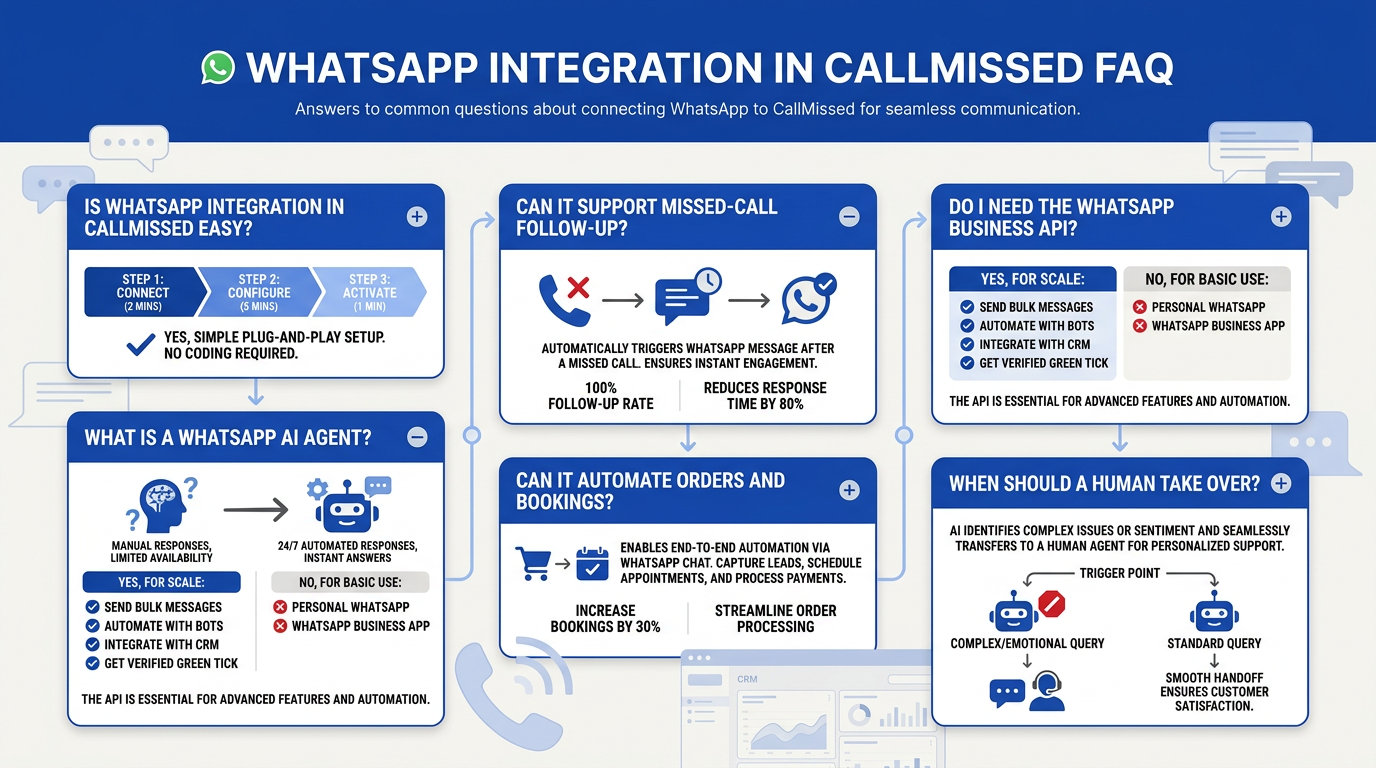
Why is WhatsApp integration in CallMissed easy for small businesses?
Can CallMissed automatically send a WhatsApp message after a missed call?
What can a WhatsApp chatbot automate in customer support?
Is WhatsApp integration in CallMissed useful for lead generation and qualification?
Do I need the WhatsApp Business API to automate orders, bookings, and follow-ups?
How does WhatsApp Integration in CallMissed Is Easy compare with using separate automation tools?
Conclusion
WhatsApp automation is no longer a “nice to have” add-on—it is becoming the operating layer for faster customer response. With WhatsApp reaching 3 billion monthly users in 2025, businesses that still depend on manual callbacks, scattered inboxes, and delayed follow-ups risk losing leads, orders, and bookings to faster competitors.
Key takeaways:
- Missed calls can become instant WhatsApp conversations, helping teams re-engage customers before interest fades.
- Support, lead qualification, order updates, and booking flows can be automated without forcing customers into unfamiliar channels.
- AI agents and chatbots can detect intent, reply 24/7, update CRM records, and escalate to humans when the conversation needs personal attention.
- CallMissed simplifies WhatsApp integration by bringing WhatsApp, Voice, Email, and Web into one AI-powered CRM instead of requiring disconnected tools.
Looking ahead, the businesses to watch will be those that treat WhatsApp not as a chat inbox, but as a real-time workflow engine for customer engagement. As AI agents become more context-aware, the line between conversation, CRM action, and business outcome will keep shrinking.
To explore how this shift can work in practice, check out CallMissed — a platform helping businesses automate WhatsApp, voice, and customer conversations. What would change if every missed interaction became an automated opportunity?
Related Posts

Ready to automate customer conversations?
Launch AI voice agents and WhatsApp bots with CallMissed — one API, 22+ Indian languages.