

Cursor vs Claude Code vs GitHub Copilot: The Ultimate 2026 AI Coding Showdown


Did you know that a scrappy AI startup challenged Microsoft’s multi-year monopoly on developer tools and scaled to an astounding $1 billion in annualized...
Cursor vs Claude Code vs GitHub Copilot: The Ultimate 2026 AI Coding Showdown
Did you know that a scrappy AI startup challenged Microsoft’s multi-year monopoly on developer tools and scaled to an astounding $1 billion in annualized revenue in less than two years? That is the reality of Cursor's meteoric rise, a disruption that has shattered the developer tool status quo and permanently altered how software is built. For years, GitHub Copilot was the undisputed king of AI-assisted development, acting as the default autocomplete engine for millions of engineers. But the landscape has fractured into a fierce, multi-paradigm battleground. With Anthropic throwing its command-line tool into the ring, developers are left asking: which highly specialized AI agent should actually drive their codebase?
The Paradigm Shift of AI Coding
This choice matters right now because we have moved past simple inline code suggestions. Modern software engineering teams are managing massive legacy systems, heavy TypeScript stacks, and complex backend architectures that require more than just a glorified tab-completion tool. Today, choosing the wrong assistant doesn't just cost a monthly subscription fee; it costs hours of debugging poorly context-aware agentic edits.
The market has split into three distinct philosophies, making a head-to-head comparison of Cursor vs Claude Code vs GitHub Copilot essential for any modern developer:
- GitHub Copilot (The Auto-Complete Pioneer): Built for fast, low-friction, in-flow autocomplete. It remains the most budget-friendly option with a genuinely useful free tier, acting as a passive assistant that excels at staying out of your way.
- Cursor (The AI-Native IDE): A dedicated fork of VS Code that has captured the market for heavy frontend and backend stacks. It excels at editor-wide orchestration, allowing for seamless, multi-file agentic edits.
- Claude Code (The Terminal-Native Agent): Anthropic's command-line powerhouse designed for deep, autonomous, and long-running engineering tasks. It doesn't just suggest code; it runs tests, navigates repositories, and solves complex bugs directly from the terminal.
This shift toward multi-model, agent-driven workflows isn't limited to our IDEs. In the same way developers now orchestrate specialized coding agents, forward-thinking businesses are utilizing platforms like CallMissed to deploy custom, LLM-powered communication agents that handle complex, multilingual voice and chat workflows. Whether in the terminal or on a customer support line, agentic AI is the new standard of productivity.
What This Showdown Covers
In this ultimate comparison, we bypass the marketing hype to deliver a production-tested review of these three titans. Having put them through their paces on complex production codebases, we will break down:
- Real-World Performance: How they handle refactoring, multi-file edits, and deep architectural debugging.
- Cost vs. Value: The true financial cost of API credits, seat licensing, and monthly subscriptions.
- Workflow Integration: Which tool fits your specific development style—whether you live in the terminal, need inline speed, or want full IDE-level automation.
Let’s dive into the trenches to see which tool deserves a permanent spot in your daily workflow.
Introduction
The year is 2026. The AI coding assistant landscape has undergone a seismic shift. What was once a one-horse race — with GitHub Copilot enjoying a three-year monopoly as the only serious option — has exploded into a fierce, three-way battle. On one side stands the incumbent, GitHub Copilot, now backed by Microsoft and deeply embedded in the VS Code ecosystem. On the other, Cursor, which rocketed past $1 billion in annualized revenue in under two years, turning heads across Silicon Valley. And then there’s Claude Code, Anthropic’s terminal-native agent, built for developers who prefer a command line over a GUI. Each tool represents a fundamentally different philosophy of how AI should assist coders. This is the 2026 Showdown.
The Three Paradigms
To understand this rivalry, you have to grasp the distinct paradigms each tool embodies.
- Cursor is an AI-native IDE. At $20/month, it rebuilds the editor experience from the ground up, embedding agentic capabilities directly into the code editor. It can reason across your entire codebase, make multi-file edits, and even run terminal commands — all without leaving the editor window.
- Claude Code is a terminal-native agent. Also priced at $20/month, it operates in your command line. You give it a high-level goal — “refactor this microservice to use PostgreSQL instead of MySQL” — and it autonomously browses your code, plans the migration, and executes the changes, keeping you informed along the way.
- GitHub Copilot is a multi-ecosystem assistant. From the start, it was designed to be an inline autocomplete tool. Now it has evolved into an agentic assistant, but its strength remains in-flow completions and tight integration with GitHub’s platform. It wins on price for individuals and is the only one with a genuinely useful free tier.
The reality in 2026 is that good developers do not pick just one. They wield a toolkit: Copilot for rapid inline suggestions, Cursor for in-editor agentic edits across files, and Claude Code for long-running, autonomous tasks that span hours. As one developer noted, “You use Cursor for speed and Claude Code for the heavy lifting.”
A Market Transformed
The numbers tell the story. GitHub Copilot had three years of unchallenged dominance, building a massive user base and refining its autocomplete engine. Then Cursor came out of nowhere, reaching a $1 billion annualized revenue run rate faster than any developer tool in history. Claude Code, meanwhile, captured the hearts of terminal purists and teams working on complex, multi-step refactors. By 2026, each tool has carved out a clear niche.
According to a comprehensive comparison on SitePoint, “Copilot for in-flow autocomplete, Cursor for in-editor agentic edits across files, Claude Code for terminal-native, longer autonomous tasks.” This division is not accidental — it’s the natural outcome of different technological bets.
What This Blog Will Cover
In this showdown, we will pit these three giants against each other across five critical dimensions:
- Pricing and Accessibility — Who offers the best value for individuals and teams?
- Code Quality and Accuracy — Which tool produces the most reliable, bug-free code in real-world scenarios?
- Autonomy and Agentic Capabilities — How well does each tool handle complex, multi-step tasks without hand-holding?
- Ecosystem and Integration — How deeply do they embed into existing workflows, CI/CD pipelines, and collaboration tools?
- Future Trajectory — What does the road ahead look like for each platform?
We will draw on real-world testing — including a developer who spent $500 testing all three on production Spring Boot and PostgreSQL code — and the candid opinions of the developer community. By the end, you’ll know not just which tool is “best,” but which tool is best for your specific needs.
A Broader AI Transformation
This battle in the coding world mirrors a larger transformation happening across the software industry. AI is no longer just a novelty — it’s infrastructure. Just as platforms like CallMissed are revolutionizing business communication by providing AI voice agents, WhatsApp chatbots, and multilingual speech-to-text APIs that support 22 Indian languages, these coding tools are redefining what it means to be a developer. Both trends share a common DNA: AI that executes natural language instructions autonomously, whether the task is handling a customer support call or migrating a legacy codebase.
The parallels are striking. CallMissed’s voice agents can handle customer calls 24/7 without human intervention, turning a natural language request into a structured action. Similarly, Claude Code takes a high-level goal like “add rate limiting to all API endpoints” and autonomously modifies the codebase. The underlying paradigm — conversational, autonomous execution — is the same. As you read this comparison, keep that broader context in mind: these tools are harbingers of a world where developers and AI work in fluid, collaborative cycles, much like how AI agents are reshaping customer interactions.
What to Expect in This Series
This is the first of an 11-part deep dive. We will not shy away from brutal truths. We will show you where Copilot still reigns supreme for quick suggestions, where Cursor’s agentic edits save hours of boilerplate work, and where Claude Code’s terminal-native approach excels for large-scale refactors. We will also compare them with emerging players like Windsurf, which is gaining traction in some circles.
By the end of this series, you will have a clear framework for choosing your AI coding assistant — or more likely, your suite of assistants. The era of picking one tool for all tasks is over. Welcome to the 2026 Showdown.
Overview of Options
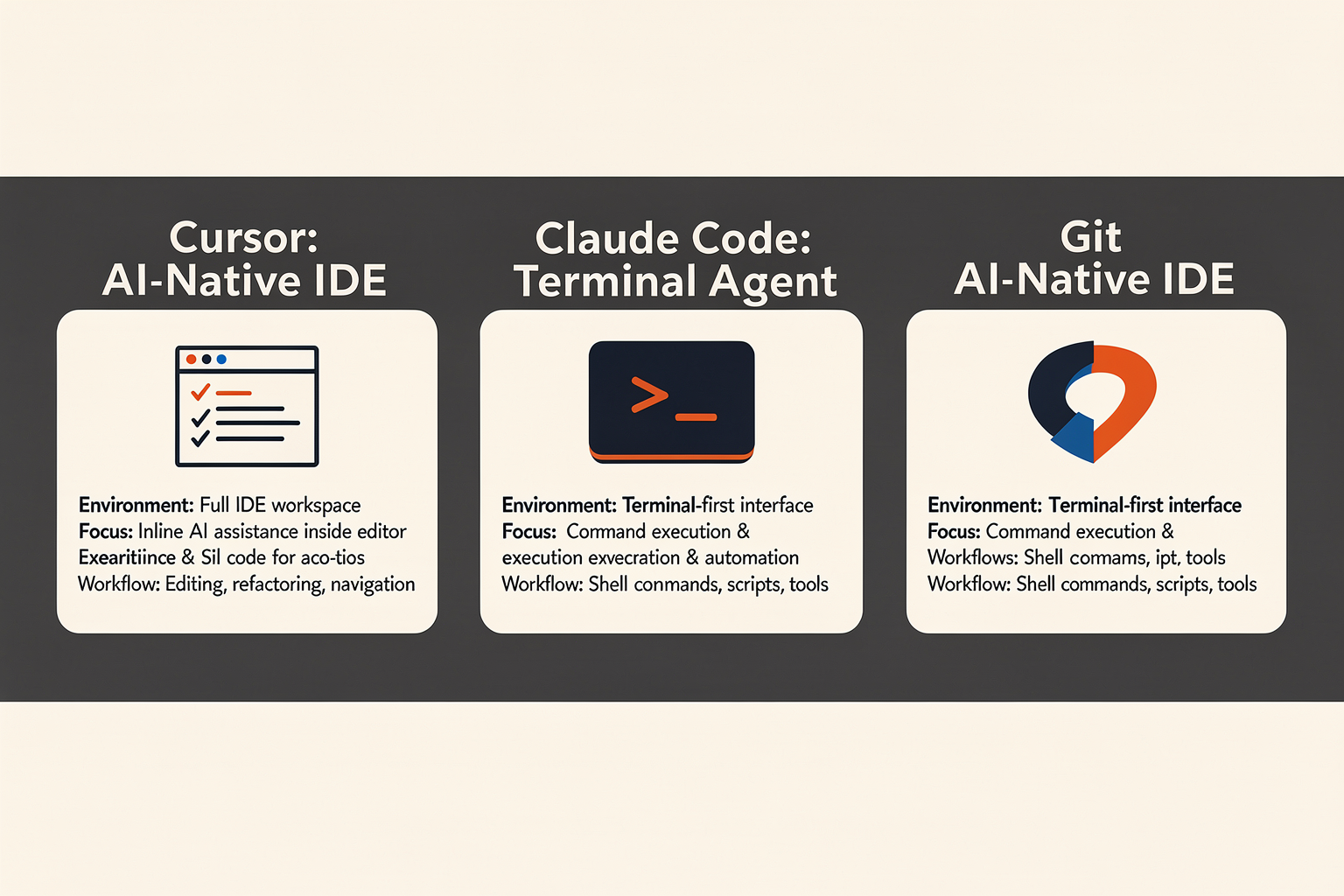
The landscape of AI-assisted development in 2026 is no longer defined by simple code-completion widgets. The industry has matured into a sophisticated ecosystem where different tools address entirely different cognitive workloads. What started as a race to see who could predict the next line of code has evolved into a strategic choice among three distinct paradigms: inline autocomplete, AI-native editor environments, and autonomous terminal-native agents.
To understand where to invest your subscription dollars and workflow adaptation, we must first break down the core philosophy, architecture, and target audience of the three dominant forces shaping modern software engineering: GitHub Copilot, Cursor, and Claude Code.
1. GitHub Copilot: The Ubiquitous IDE Extension
For nearly three years, GitHub Copilot enjoyed a near-monopoly as the default AI assistant for developers. Backed by Microsoft and deeply integrated into the GitHub ecosystem, Copilot’s primary strength lies in its frictionless ubiquity. It is not an editor itself; rather, it is a highly optimized extension that lives inside your existing IDE, whether that is VS Code, JetBrains, or Visual Studio.
- The Paradigm: In-flow autocomplete and contextual chat.
- How it Works: Copilot acts as an intelligent "tab-complete on steroids." It analyzes your open files, active tabs, and immediate cursor position to suggest inline code snippets in real-time. It is built to keep you in "the flow," minimizing context-switching by answering quick syntax questions or scaffolding boilerplate directly in your editor pane.
- The 2026 Reality: While Copilot has introduced more agentic features over time, it remains optimized for speed, low latency, and single-file tasks. It is highly accessible, offering a genuinely useful free tier alongside affordable individual plans, making it the most cost-effective entry point for hobbyists and individual developers alike.
2. Cursor: The AI-Native IDE Revolution
While Copilot spent years refining its extension, a startup called Anysphere took a more radical approach: they forked VS Code to build Cursor, an editor engineered from the ground up around artificial intelligence. The bet paid off spectacularly. By 2026, Cursor crossed the milestone of $1 billion in annualized revenue in under two years, signaling a massive shift in developer preferences.
- The Paradigm: AI-first editor environment.
- How it Works: Because Cursor controls the entire editor interface, it isn't limited by the API constraints of a standard IDE extension. It indexes your entire codebase locally, creating a deep semantic context graph. Features like Composer allow you to edit, refactor, and generate code across dozens of files simultaneously.
- The 2026 Reality: Cursor has become the industry standard for complex, heavy-framework development. It is particularly dominant in heavy TypeScript stacks, where its deep understanding of type definitions and project-wide dependencies allows it to write bug-free refactors. At $20/month, it targets professional developers who need multi-file agentic capabilities without leaving their primary editor interface.
3. Claude Code: The Terminal-Native Powerhouse
The newest and perhaps most disruptive paradigm shift of 2026 is Anthropic’s Claude Code. Moving away from visual editor interfaces entirely, Claude Code is a terminal-native, CLI-driven AI agent. It represents a transition from "AI-assisted editing" to "autonomous software engineering."
- The Paradigm: Terminal-native autonomous agency.
- How it Works: Operating directly from your command line interface (CLI), Claude Code does not just write code—it executes it. It can run your test suites, read linter errors, execute git commands, install dependencies, and iteratively debug its own code until a given task is fully completed.
- The 2026 Reality: Claude Code is designed for long-running, complex, autonomous tasks. Instead of watching an AI type line-by-line, developers write a high-level prompt in the terminal (e.g., "Migrate our database schemas to PostgreSQL and update all affected controllers"), and let Claude Code work in the background. It operates on a consumption-based or $20/month tier, serving as an elite utility for backend engineering, DevOps, and systemic refactoring.
Choosing the Right Infrastructure for the Task
The reality of modern development is that professional software engineers rarely limit themselves to a single tool. Instead, they compose workflows that leverage the unique strengths of each paradigm.
┌────────────────────────────────────────────────────────────────────────┐
│                        THE 2026 DEVELOPER STACK                         │
├───────────────────┬──────────────────────────┬─────────────────────────┤
│   GitHub Copilot  │          Cursor          │       Claude Code       │
│  (Autocomplete)   │     (Multi-File IDE)     │    (Terminal Agent)     │
├───────────────────┼──────────────────────────┼─────────────────────────┤
│ • Micro-tasks     │ • Complex feature work   │ • Legacy migrations     │
│ • Syntax checking │ • UI layout & scaffolding│ • Test-driven debugging │
│ • Inline speed    │ • Refactoring files      │ • CLI-driven execution  │
└───────────────────┴──────────────────────────┴─────────────────────────┘
This multi-faceted approach to AI tools mirrors how forward-thinking businesses deploy artificial intelligence across their broader operations. Just as a developer switches between Cursor for multi-file UI layouts and Claude Code for terminal-native logic, organizations building customer experience systems need infrastructure that supports multiple LLMs and deployment environments.
For instance, platforms like CallMissed enable businesses to orchestrate their customer communications with similar flexibility. Through a single, unified API gateway, CallMissed allows developers to switch between over 300+ LLMs, utilizing the ideal model for specific tasks—whether that means routing an ultra-low latency voice agent for real-time customer calls or deploying highly complex multilingual agents across 22 regional Indian languages.
In the sections that follow, we will put GitHub Copilot, Cursor, and Claude Code through a series of rigorous benchmarks. We will analyze their performance in codebase indexing, multi-file code generation, autonomous debugging, and cost-efficiency to help you decide which tool—or combination of tools—deserves a permanent spot in your development environment.
Feature Comparison (TABLE)
To truly understand how the developer landscape has shifted, we must look at how these three tools approach the act of writing, refactoring, and executing code. While GitHub Copilot pioneered the space and spent three years as the only serious option, the emergence of Cursor—which reached an astounding $1 billion in annualized revenue in under two years—and Anthropic's terminal-native Claude Code has completely fragmented the market.
Developers are no longer asking if they should use AI, but rather which combination of these distinct paradigms fits their current workflow.
Below is a detailed feature-by-feature breakdown of how these three tools compare across core development vectors.
| Feature | GitHub Copilot | Cursor | Claude Code | Best Suited For |
|---|---|---|---|---|
| Primary Paradigm | IDE Extension (VS Code, JetBrains, Neovim) | AI-Native IDE (Fully integrated VS Code Fork) | Terminal-Native CLI Agent | Broad editor support vs. deep UI integration |
| Core Strength | Ultra-fast, low-latency in-flow autocomplete | Multi-file agentic edits & Composer mode | Autonomous CLI execution, test running & git | Speed vs. Complex multi-file edits vs. Hard debugging |
| Pricing Models | Most affordable; genuinely useful free tier | $20/month (Highly limited free tier) | Consumption-based or $20/month agent plans | Budget-conscious individuals vs. Enterprise teams |
| Context Strategy | Local open tabs and basic workspace search | Deep vector database codebase indexing | Direct terminal state and execution output | Quick snippets vs. Monorepos vs. Runtime debugging |
| Model Choice | Curated OpenAI/proprietary models | Multi-model switcher (Claude, GPT, Gemini) | Hardcoded to Anthropic Claude models | Ecosystem lock-in vs. Total runtime flexibility |
Architectural Paradigms: Extension vs. IDE vs. CLI
The fundamental differentiator between these platforms is where the AI actually "lives" and how much control it has over your development environment.
- GitHub Copilot (The Extension): Copilot operates as a classic, lightweight editor extension. It does not try to control your IDE; it sits quietly in the background and suggests the next line or block of code as you type. It is optimized for speed and flow, acting as an intellectual steering wheel that keeps your hands on the home row.
- Cursor (The AI-Native IDE): Cursor is a hard fork of VS Code. Because it controls the entire editor window, it can introduce UI primitives that basic extensions cannot touch. Features like Composer allow Cursor to edit multiple files simultaneously, create new components, and refactor entire directory structures through an elegant, overlayed chat interface.
- Claude Code (The Terminal Agent): Anthropic’s Claude Code takes a radically different, terminal-first approach. It runs directly inside your shell. Instead of interacting with visual UI elements, you issue commands. Claude Code can run your test suites, read the stack traces of failing tests, write the fix, verify it by re-running the tests, and even commit the changes to Git—all autonomously.
Codebase Context and Multi-Model Versatility
Writing code is easy; understanding the context of a 500,000-line monorepo is hard. Each tool approaches context retrieval differently.
GitHub Copilot relies primarily on open editor tabs and basic heuristic searches across your active workspace. While fast, it frequently misses architectural patterns defined in distant, closed files. Cursor solves this with continuous background embedding of your entire directory. By indexing your entire codebase locally, Cursor can pull highly relevant references into its context window, making its multi-file edits remarkably accurate for heavy TypeScript, Go, or Rust stacks.
Claude Code bypasses traditional vector indexing by acting as a live terminal operator. It searches your files, reads your directory structure, and acts on real-time execution outputs. If you tell Claude Code to "fix the failing build," it doesn't just guess what's wrong; it runs npm test or cargo build, analyzes the terminal output, and edits the code based on actual runtime errors.
Furthermore, Cursor is highly praised for its model-agnostic approach, allowing developers to switch between Claude, GPT, and Gemini models on the fly. This freedom of choice mimics what we see in the wider AI ecosystem; for instance, enterprise communication platforms like CallMissed utilize a multi-model LLM gateway offering access to over 300 models, recognizing that different tasks demand highly specialized AI architectures. Conversely, Claude Code remains strictly coupled with Anthropic's native Claude models, optimizing deeply for Sonnet’s elite agentic and reasoning capabilities.
Economic Realities: Subscriptions vs. Token-Based Billing
The cost of AI-assisted engineering has risen as workflows have transitioned from simple autocompletions to resource-heavy agentic tasks.
GitHub Copilot remains the undisputed champion of affordability. It is the only platform that offers a genuinely useful free tier for individual hobbyists, alongside a predictable flat-rate subscription model that makes it incredibly easy for enterprise procurement teams to approve.
Cursor and Claude Code require a more calculated budget. Cursor’s $20/month Pro tier is highly popular, but power users who rely heavily on its multi-file Composer mode can easily burn through their fast-inference allowances, prompting them to link their own API keys or upgrade tiers. Claude Code, being an autonomous CLI agent, consumes tokens at a massive rate. Because it reads files, executes shell commands, and continuously feeds terminal outputs back into its context loop, a single complex debugging session can easily cost several dollars in API usage. However, for teams looking to slash debugging cycles from hours to minutes, this token cost is often viewed as a rounding error compared to engineering hourly rates.
Paradigm Shift: IDE vs Terminal vs Extension
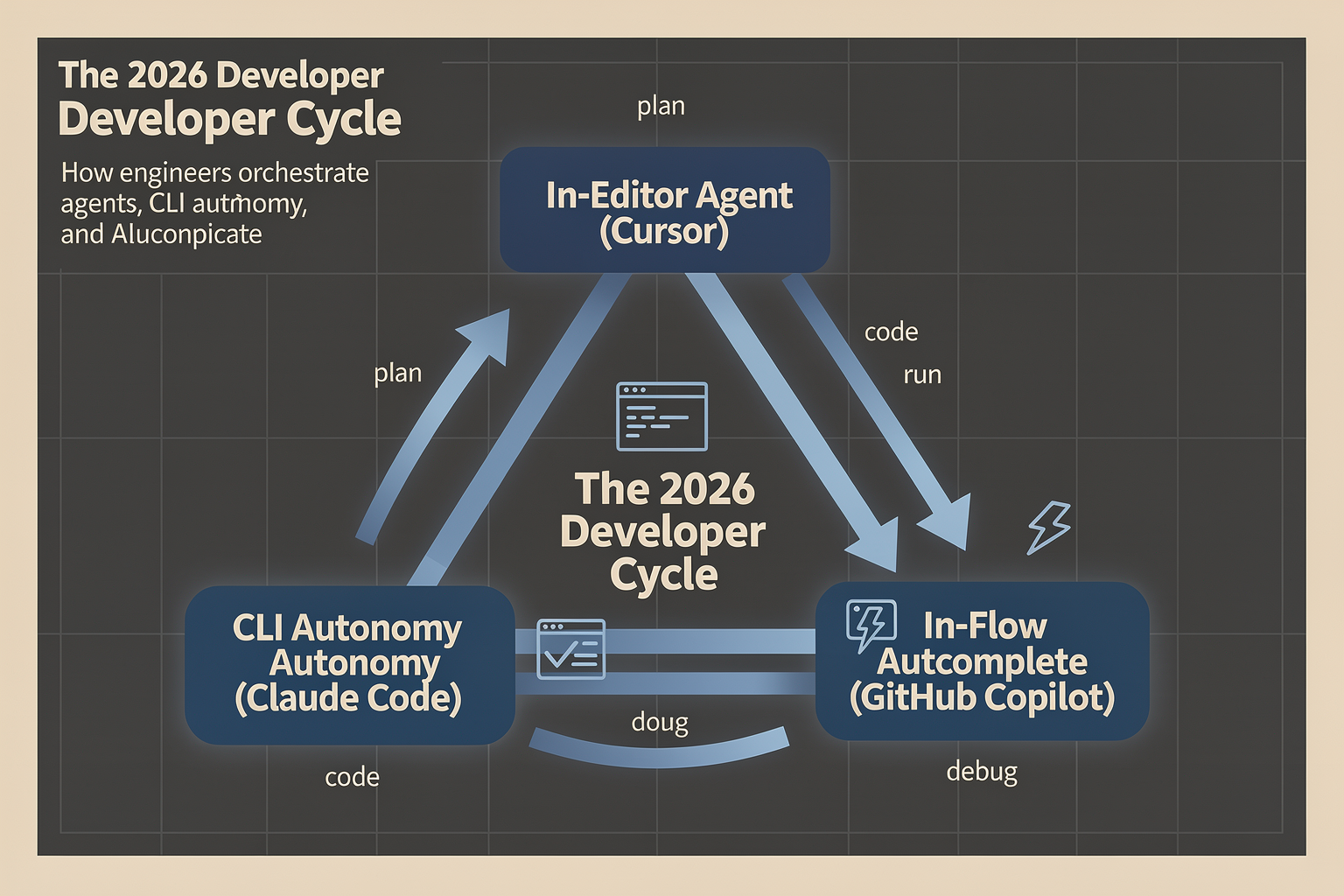
The evolution of AI-assisted software development has reached a critical inflection point. We are no longer debating which large language model writes better Python boilerplate or detects syntax errors faster. Instead, the battleground of 2026 has shifted to developer ergonomics, system access, and agency.
The current landscape is defined by three fundamentally different structural paradigms, each offering a distinct philosophy on how an AI should interact with a developer's workspace:
- The IDE Extension (represented by GitHub Copilot)
- The AI-Native IDE (championed by Cursor)
- The Terminal-Native Agent (pioneered by Anthropic’s Claude Code)
Understanding the architectural strengths and UX trade-offs of these three paradigms is crucial for engineering teams looking to optimize their development pipelines.
1. The Extension Paradigm: GitHub Copilot (Frictionless, In-Flow Autocomplete)
GitHub Copilot pioneered the AI developer tool space by operating as a traditional editor extension. It integrates directly into existing, highly customized environments like VS Code, JetBrains, and Visual Studio.
Because it operates within the constraints of standard IDE extension APIs, Copilot focuses primarily on in-flow, single-file autocomplete and inline chat.
#### Core Strengths:
- Zero-Friction Integration: Developers do not need to abandon their highly customized themes, keybindings, or third-party extensions. Copilot simply plugs into their existing workspace.
- Low Cognitive Load: The ghost-text autocomplete pattern is highly non-intrusive. It assists the developer line-by-line, matching the natural pace of manual coding.
- Cost Efficiency: At a time when advanced agentic tools can rack up massive usage fees, Copilot remains highly cost-effective for individual developers, offering a robust free tier and flat-rate pricing.
#### Limitations:
By relying on standard extension sandboxes, Copilot historically struggled with deep repository-wide context. It cannot easily modify the underlying editor's UI to create custom multi-file diff interfaces, nor can it index massive codebases with the same speed and granularity as an editor designed specifically for that purpose. It excels at writing the next line of code, but struggles to orchestrate a systematic refactoring of an entire microservice architecture.
2. The AI-Native IDE Paradigm: Cursor (Deep UI Integration & Multi-File Orchestration)
When the creators of Cursor chose to fork VS Code rather than build another extension, they initiated a massive paradigm shift. This architectural decision bypassed the limitations of standard extension APIs, allowing the team to rebuild the editor's core interface around AI interaction.
This bet paid off spectacularly; by 2026, Cursor has hit $1 billion in annualized revenue in under two years, largely driven by its dominance in complex, multi-file codebases (such as heavy TypeScript and Rust stacks).
#### Core Strengths:
- Custom UI and UX (Composer): Cursor features custom interface elements like Composer (Cmd+I), which allows developers to instruct the AI to make edits across dozens of files simultaneously.
- Deep Codebase Indexing: By embedding semantic search and codebase indexing directly into the editor's core, Cursor understands the relationships between files, types, and dependencies far better than standard extensions.
- Visual Diffing: Instead of forcing developers to accept code blindly, Cursor renders inline, multi-file visual diffs that make reviewing AI-generated code intuitive and fast.
#### Limitations:
At $20/month for pro tiers, Cursor is more expensive than basic extensions. Additionally, because it is a fork of VS Code, developers using highly specialized environments (like Xcode or advanced JetBrains IDEs) must migrate their workflows to a VS Code-style interface to utilize Cursor’s primary features.
3. The Terminal-Native Agent Paradigm: Claude Code (CLI-First, Autonomous Execution)
Anthropic’s Claude Code represents a radical departure from the visual editor altogether. Operating as a command-line interface (CLI) agent, Claude Code shifts the paradigm from visual assistance to autonomous execution.
Instead of sitting quietly in your editor waiting for you to type, Claude Code is a terminal-native agent that you command to solve a problem, step back, and watch as it recursively works through the task.
#### Core Strengths:
- True Agentic Autonomy: Claude Code does not just write code; it executes it. It can run your build commands, execute test suites, read the resulting stack traces, and iteratively modify the codebase until the tests pass.
- Command-Line Speed: Operating entirely within the shell, Claude Code is built for rapid, keyboard-driven diagnostics, dependency migrations, and large-scale refactoring.
- Zero UI Overhead: It does not compete for screen real estate with your editor. It runs in the background, making it perfect for complex, multi-step debugging tasks.
#### Limitations:
Because Claude Code executes terminal commands and reads files autonomously, it requires high trust and strict permission settings. Additionally, it lacks the visual immediacy of an editor. Reviewing a 200-line diff in a terminal output is inherently more taxing than reviewing it inside a rich visual diff editor like Cursor.
Parallels in Infrastructure: Orchestration and Abstraction
This ongoing fragmentation of developer tools mirrors a broader trend in software infrastructure: the abstraction of complex, multi-step operations into streamlined, agentic workflows.
Just as developers now use platforms like CallMissed to easily orchestrate AI voice agents, coordinate multi-model LLM inferences (selecting from 300+ models), and deploy multilingual pipelines without building the underlying scaffolding from scratch, software engineers are choosing coding paradigms that abstract away the tedious, manual parts of programming. Whether it is CallMissed managing complex communication loops or Claude Code managing autonomous debugging loops, the goal is the same: shifting human focus from low-level execution to high-level system design.
Choosing Your 2026 Developer Stack
The reality of modern software development is that engineering teams no longer limit themselves to a single AI tool. Instead of choosing one paradigm, high-velocity developers are building hybrid workflows that leverage the strengths of all three:
- GitHub Copilot is kept active in the editor for instantaneous, low-latency autocomplete as the developer types out daily logic.
- Cursor is utilized when starting new features, designing system architectures, or executing refactors that span multiple files within the workspace.
- Claude Code is spun up in the terminal for heavy-lifting tasks, such as migrating legacy libraries, hunting down obscure runtime bugs, or running autonomous test-and-fix loops.
By understanding the distinct structural advantages of the IDE extension, the AI-native editor, and the CLI agent, developers in 2026 can build a highly optimized, multi-layered toolchain that maximizes both individual coding speed and systemic engineering throughput.
Performance Analysis
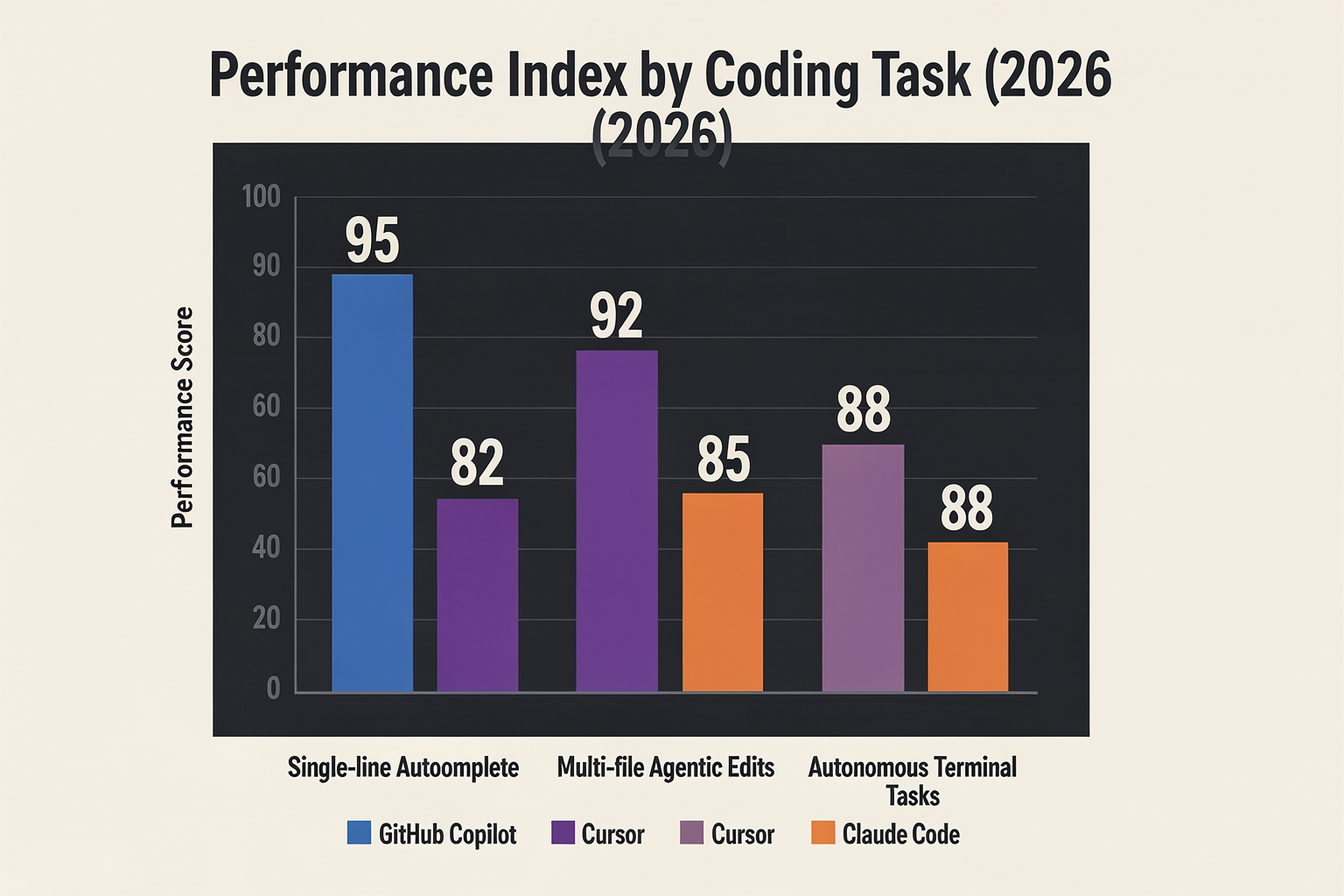
To evaluate the performance of Cursor, Claude Code, and GitHub Copilot in 2026, we have to look beyond raw generation speeds. In the current landscape, performance is a multi-dimensional metric. It encompasses single-line autocomplete latency, deep semantic codebase indexing, and the raw reliability of autonomous, multi-step agentic execution loops.
Each of these three tools has optimized for a vastly different performance profile. Depending on whether your workflow prioritizes split-second keyboard-flow state or deep, hands-off architectural refactoring, the "best" performer changes dramatically.
Latency and Autocomplete Speed: The Keyboard-Flow Champion
For developer flow-state, micro-seconds matter. GitHub Copilot remains the undisputed king of low-latency, inline autocomplete.
Because Copilot is built on a highly specialized, lightweight model pipeline directly integrated into the IDE, its completion suggestions consistently clock in at a blistering 50ms to 150ms. In 2026, this instantaneous "tab-tab-tab" loop remains unmatched. Copilot predicts your next keystroke in real-time without introducing micro-stutters, making it feel less like an external assistant and more like an extension of your own thought process.
By comparison, Cursor’s inline autocomplete is incredibly fast but occasionally exhibits a subtle, measurable lag (often in the 150ms to 300ms range) when working on massive projects. This is because Cursor does more contextual heavy-lifting behind the scenes, parsing local workspace files and checking type definitions on the fly to ensure its suggestions are semantically valid.
Claude Code, by design, does not participate in the inline autocomplete race. As a terminal-native CLI agent, it does not suggest characters as you type. Instead, its performance is measured in the velocity of its terminal commands, file search operations, and test executions, positioning it as a tool for asynchronous execution rather than immediate keyboard flow.
Codebase Contextual Awareness and Multi-File Edits
When we move from single-line suggestions to editing complex systems, codebase context becomes the primary bottleneck.
Cursor is the gold standard for context-rich performance, particularly for heavy TypeScript, Rust, and Go stacks where type-safety across boundaries is critical. Cursor achieves this through its proprietary background indexing engine. It creates a highly optimized local vector database of your entire repository, continuously updating as you write code.
- When you invoke Cursor’s Composer mode to make edits across five different files, it doesn't just guess; it surgically targets the exact imports, interfaces, and class structures required.
- The speed of these multi-file edits is remarkably high because Cursor runs these operations in parallel, applying diffs directly to your workspace files within seconds.
GitHub Copilot has introduced workspace indexing, but in practice, its multi-file edits still feel retrofitted rather than native. Copilot often struggles to maintain context across more than two or three deeply nested directory layers, resulting in "hallucinated" import paths or outdated variable names when editing complex, modular codebases.
Claude Code approaches context from a completely different architectural angle. Instead of relying purely on pre-indexed vector databases, Claude Code actively navigates your file system. It reads files, runs search commands (like grep), and gathers context dynamically based on the task you assign. While this dynamic search is incredibly accurate, it introduces latency. A complex search and edit task through Claude Code can take anywhere from 10 to 45 seconds as the agent plans, searches, and reads files before proposing a change.
Autonomous Task Execution and Agentic Iteration
For long-running, autonomous tasks, the performance dynamics flip entirely. This is where Claude Code dominates.
Claude Code operates as an agentic loop directly inside your terminal. If you ask it to "fix the failing auth tests," it doesn't just write a code snippet and hope it works. Claude Code’s performance model follows an active loop:
- It analyzes the error output in the terminal.
- It locates and reads the problematic source file.
- It applies a code patch.
- It executes the test suite (e.g.,
npm run testorpytest) to verify the fix. - If the tests fail with a new error, it repeats the process until the suite passes.
This level of performance is highly autonomous but incredibly token-heavy. A single complex bug-fix can easily consume hundreds of thousands of context tokens in a matter of minutes.
Managing this level of multi-model orchestration, latency, and context window routing is a massive architectural challenge. For developers building consumer-facing AI products that require similar real-time intelligence, platforms like CallMissed solve this infrastructural complexity. By offering a unified, multi-model API gateway with access to over 300+ LLMs, CallMissed allows engineering teams to dynamically route tasks—sending high-velocity, low-latency prompts to fast models, while routing complex, multi-step logical operations to heavy-reasoning engines without changing a single line of integration code.
Reliability, Hallucination Rates, and Code Quality
When measuring reliability, we look at how often the tool gets the code right on the first try versus how often it introduces bugs or hallucinations.
- Claude Code boasts the lowest hallucination rate for logical tasks because it has access to execution feedback. By running tests, linters, and compilers locally, it catches its own mistakes before presenting the final solution to the developer.
- Cursor strikes a highly productive middle ground. Its inline diff UI allows developers to visually inspect changes side-by-side. If Cursor attempts a bad import, the developer can immediately reject or modify that specific line, minimizing the blast radius of any AI hallucinations.
- GitHub Copilot, while incredibly fast, suffers from a higher raw error rate when task complexity scales. Because it lacks an iterative self-correction loop, its generated code blocks frequently contain outdated API patterns or minor syntax errors that the developer must manually debug and resolve.
Detailed Comparison (TABLE)
To truly understand how the developer workflow has fractured and evolved, we must look beyond marketing buzzwords and evaluate these tools on their structural, economic, and practical merits. GitHub Copilot, Cursor, and Claude Code represent three completely different paradigms of AI-assisted engineering: the in-line editor assistant, the AI-native standalone IDE, and the terminal-native autonomous agent.
Choosing the right tool is no longer a matter of finding the "best" LLM backend. Instead, it is about aligning your team's development architecture, budget, and language stack with the correct interface. Below is a comprehensive, head-to-head architectural breakdown of how these three industry giants compare across key performance vectors.
| Feature / Dimension | GitHub Copilot | Cursor | Claude Code |
|---|---|---|---|
| Primary Interface | IDE Extension (VS Code, JetBrains, Xcode) | Standalone Forked IDE (VS Code codebase) | Terminal-native CLI Agent |
| Pricing Model (2026) | $10/month (Robust free tier available) | $20/month Pro (Limited free tier) | $20/month base (Usage-based API billing) |
| Core Workflow Strength | Low-latency, in-flow autocomplete | Cross-file refactoring & TypeScript stacks | Terminal execution, testing, & autonomous loops |
| Context Assembly | Local repository indexing & active file tabs | Codebase-wide vector embeddings & @ mentions | Direct system shell access & local directory parsing |
| Agentic Autonomy | Low (Assisted chat & inline generation) | Medium-High (Multi-file Composer agent) | High (Self-correcting, loop-based execution) |
Deep Dive: Interface Paradigms and Workspace Integration
The fundamental differentiator between these platforms is where they live within your daily workflow.
GitHub Copilot remains the veteran extension model. By hooking directly into your existing editor—whether that is VS Code, Neovim, or JetBrains—it prioritizes non-intrusive flow. Copilot excels at predicting your next line of code before you write it. It operates on millisecond-level latency to provide inline autocompletes that keep your hands on the keyboard. However, because it is bound by the sandboxed limitations of an IDE extension, its ability to orchestrate sweeping codebase migrations or refactor multi-file architectures is inherently restricted.
Cursor, on the other hand, bypassed the limitations of extensions by forking VS Code entirely. This architectural choice has allowed Cursor to achieve $1 billion in annualized revenue in less than two years. By owning the entire IDE window, Cursor implements deep UX integrations that extensions simply cannot replicate. Its proprietary codebase indexer continuously updates vector embeddings of your entire local repository. When you use Cursor’s "Composer" mode, the AI can edit, create, and delete multiple files simultaneously, tracking imports and updating references across your entire workspace in real-time. This structural advantage is why Cursor has become the dominant choice for heavy TypeScript and monorepo configurations.
Claude Code challenges both of these visual paradigms by operating entirely from the command line. As a terminal-native CLI agent, Claude Code does not care what IDE you use. It sits directly inside your shell, possessing the unique ability to execute bash commands, run test suites, read compiler errors, and iterate on code until the tests pass. If Cursor is a visual editor, Claude Code is an autonomous terminal operator that you instruct to "fix all failing integration tests in the billing module" while you step away.
Context Windows, Codebase Comprehension, and Multi-Model Flexibility
An AI tool is only as good as the context it can digest. Each of these three solutions approaches context retrieval differently:
- GitHub Copilot leverages a hybrid context model. It parses your open editor tabs, analyzes your local git history, and utilizes lightweight vector indexing to pull relevant snippets. While highly efficient for localized autocomplete, it can struggle to maintain coherence when tasked with understanding deeply nested microservices.
- Cursor features a highly interactive UI for context assembly. Using
@symbols, developers can explicitly feed entire folders, specific files, documentation URLs, or web search results directly into the LLM context window. Furthermore, Cursor is highly praised for its multi-model flexibility, allowing users to switch dynamically between Claude 3.5 Sonnet, GPT-4o, and custom fine-tuned models depending on the task. - Claude Code utilizes Anthropic’s state-of-the-art context processing. Rather than relying on a visual selector, it automatically discovers context by traversing your directory tree, reading build configurations, and listening to the terminal output of your local environment.
This level of platform flexibility—where developers demand the ability to toggle between various models and workflows dynamically—mirrors broader shifts in the AI industry. For instance, just as Cursor allows developers to switch between various LLMs on the fly to optimize their coding pipelines, platforms like CallMissed utilize a unified multi-model LLM API gateway on the infrastructure side, allowing businesses to swap between 300+ models dynamically for conversational voice and chat agents without rewriting their codebase.
Autonomy, Tool-Use, and the Self-Correcting Agentic Loop
The ultimate frontier for these tools in 2026 is agentic autonomy—the ability of an AI to not just write code, but to verify its own work.
[Developer Instruction] -> [Claude Code Terminal Agent]
                                   │
                                   ▼
                        ┌──────────────────┐
                        │ Write/Edit Code  │
                        └─────────┬────────┘
                                  │
                                  ▼
                        ┌──────────────────┐
                        │ Run Test Suite   │◄────────────────┐
                        └─────────┬────────┘                 │ (Iterative Self-Correction Loop)
                                  │                          │
                        ┌─────────▼────────┐                 │
                        │ Compile Errors?  ├─► [Yes] ────────┘
                        └─────────┬────────┘
                                  │ [No]
                                  ▼
                        [Task Completed Successfully]
As illustrated, Claude Code represents the peak of this agentic evolution. Because it has direct terminal access, it operates in a continuous read-eval-print loop (REPL). If it attempts to install a npm package and encounters a dependency conflict, it reads the error, searches for a compatible version, modifies package.json, and runs the installer again. This self-correcting cycle makes it highly effective for legacy system modernization, database migrations, and automating tedious CI/CD setup tasks.
Cursor achieves a comfortable middle ground. Its Composer interface allows you to run terminal commands via the IDE, but it still relies on user confirmation and visual diff acceptance before executing major system changes. This provides a safer, highly visible guardrail that many front-end developers prefer, as they can visually inspect layout changes and component imports before committing the edits.
GitHub Copilot remains largely passive. It will suggest solutions to errors when prompted in its chat window, but it does not autonomously execute tests, run build scripts, or modify files outside of your active focus window without explicit user intervention. For developers who prefer absolute control over their environment and view autonomous agents with skepticism, Copilot’s conservative, non-agentic nature is often viewed as a feature rather than a limitation.
Pricing & Value (TABLE)
In 2026, choosing an AI development tool is no longer just a technical preference; it is a strategic financial decision. As software engineering organizations optimize their tooling stacks, the total cost of ownership (TCO) versus the actual developer velocity gained is under intense scrutiny.
While GitHub Copilot remains the legacy giant backed by Microsoft's massive infrastructure, hyper-growth competitors like Cursor—which crossed a landmark $1 billion in annualized revenue in 2026—and Anthropic's terminal-native Claude Code have forced a paradigm shift. Developers are no longer asking if they should pay for AI assistance, but rather which subscription model yields the highest ROI.
To help engineering leads and independent developers make an informed decision, let us break down the pricing tiers, limit structures, and core value propositions of the leading platforms in 2026.
| Tool / Tier | Entry Price | Free Tier | Core Value Prop | Best For |
|---|---|---|---|---|
| GitHub Copilot Individual | $10 / month (or $100/yr) | Yes (Free for students, teachers, & popular OSS maintainers) | Low-cost, low-latency autocomplete in standard IDEs | Developers looking for highly reliable, in-flow code completion |
| Cursor Pro | $20 / month | Yes (Limited trial; 14-day Pro trial with 50 fast queries) | Complete AI-native VS Code fork with seamless multi-file edits | Individual developers managing complex, modern web/TypeScript stacks |
| Claude Code | $20 / month (usage-based API hybrid) | Yes (Highly restricted trial credits) | Terminal-native agent capable of executing bash commands and test suites | Systems engineers and backend developers running long, autonomous tasks |
| Cursor Business | $40 / user / month | No | Advanced privacy, centralized billing, and custom policy controls | Scaling startups and mid-market engineering organizations |
| GitHub Copilot Enterprise | $39 / user / month | No | Deep integration with GitHub repositories, custom PR summaries, and fine-tuning | Large enterprise teams heavily embedded in the Azure/GitHub ecosystem |
The Budget King: GitHub Copilot’s Irresistible Price Point
GitHub Copilot remains the most financially accessible tool on the market. At $10 per month for individuals, it is the only platform that offers a genuinely sustainable and generous free tier for the open-source community, educators, and students.
Because Copilot focuses primarily on fast, inline autocomplete, its computational overhead is lower than agentic alternatives. For developers who only need a reliable assistant to spit out boilerplate code, write basic unit tests, and autocomplete repetitive syntax, Copilot is incredibly cost-effective. However, its value starts to plateau when faced with complex, multi-file refactoring tasks where developers must manually copy and paste context across files.
The Premium Gold Standard: Cursor’s High-Velocity ROI
At $20 per month for the Pro tier, Cursor charges double the price of Copilot Individual, but developers in 2026 widely agree that the premium is justified. Cursor's value proposition lies in its deep context indexing. By automatically building a local vector database of your entire codebase, Cursor can execute complex "Composer" commands that edit multiple files simultaneously.
Cursor Pro includes:
- 500 "fast" premium requests per month (using frontier models like Claude 3.5 Sonnet and GPT-4o).
- Unlimited "slow" premium requests (throttled based on queue length but highly usable).
- Unlimited standard completions.
For a developer earning a standard salary, saving just 15 to 30 minutes of debugging time per month completely offsets the $20 cost. For heavy TypeScript, React, and backend architectures, Cursor’s ability to understand imports, types, and schema files across directories makes it the most robust daily driver on the market.
The Terminal Powerhouse: Claude Code’s Agentic Premium
Anthropic’s Claude Code operates on a terminal-native paradigm. Also priced at a base of $20 per month, it is built for developers who want to delegate entire sub-tasks—such as "find why this test is failing, fix the bug, run the test suite, and show me the git diff"—to an autonomous agent.
Because Claude Code operates directly in your shell, it can run commands, build code, and inspect errors autonomously. However, this deep reasoning comes at a cost. Agentic workflows require massive token consumption. While the flat $20 subscription keeps access predictable, heavy usage can hit rate limits faster than standard IDE-based autocompletes, forcing developers to manage their token budgets carefully during long, multi-step debugging runs.
The Subscription Paradox: SaaS vs. Pay-As-You-Go API
As AI tools mature, developers are increasingly divided between flat-rate SaaS subscriptions and direct API consumption. Flat-rate subscriptions (like Copilot and Cursor) remove "billing anxiety," allowing developers to write and refactor code without calculating the cost of every keystroke.
This tension between rigid subscription tiers and flexible, usage-based consumption is a challenge across many software domains. For example, in the AI communication space, platforms like CallMissed address this by offering developers an infrastructure-first approach. Rather than locking businesses into rigid user-seat licenses, CallMissed provides unified APIs for voice agents, LLM inference (supporting over 300+ models), and multilingual Speech-to-Text. This allows teams to pay strictly for the compute they consume, whether they are building a simple customer-support chatbot or orchestrating massive conversational voice workflows.
For development teams, the choice between Cursor's $40/month enterprise seats and a custom in-house agent hooked up to a raw API gateway depends entirely on scale. Small teams will find Cursor's out-of-the-box indexing worth every penny, while massive enterprises may prefer writing custom tools on top of raw LLM APIs to maintain absolute data sovereignty and fine-tune their spending.
Pros and Cons (TABLE)
To truly understand which AI coding companion deserves a permanent spot in your development workflow, we must move past marketing claims and look at how these tools perform under production pressure. In 2026, the developer landscape has split into three distinct operational paradigms: the inline autocomplete extension (GitHub Copilot), the AI-native integrated development environment (Cursor), and the headless, terminal-native autonomous agent (Claude Code).
Choosing the right tool is no longer about finding the "best" overall AI; it is about matching the tool’s architecture to your specific development bottleneck.
Below is a comprehensive breakdown of the trade-offs, strengths, and failure modes of each platform to help you make an informed infrastructure decision.
The 2026 AI Developer Tooling Matrix
The table below outlines the core specifications, primary design philosophies, and practical limitations of GitHub Copilot, Cursor, and Claude Code.
| Tool | Core Paradigm | Best Practice Use Case | Primary Advantage (Pros) | Major Bottleneck (Cons) |
|---|---|---|---|---|
| GitHub Copilot | IDE Extension (VS Code, JetBrains) | Rapid inline autocomplete & micro-refactoring | Ultra-low latency, cheap ($10/mo), seamless workflow fit | Lacks deep multi-file agentic execution |
| Cursor | AI-Native IDE (VS Code Fork) | Complex full-stack edits & multi-file refactoring | Visual Composer UI, fast codebase indexing, model choice | IDE vendor lock-in, high RAM usage |
| Claude Code | Terminal-Native CLI Agent | Autonomous testing, debugging, and git management | Unparalleled reasoning, direct shell execution | No GUI, potential for expensive token spikes |
GitHub Copilot: The Frictionless Autocomplete Standard
GitHub Copilot remains the undisputed king of keeping developers in "the flow." Because it operates as an extension rather than requiring you to abandon your existing IDE setup, the barrier to adoption is virtually non-existent.
#### The Pros
- Unmatched Speed and Latency: For single-line completions and predictable boilerplate code, Copilot’s specialized local-and-cloud hybrid models deliver suggestions in milliseconds.
- Cost Efficiency: At $10/month for individuals (and maintaining the most generous free-tier options in 2026), Copilot is highly accessible.
- Zero Workflow Disruption: It integrates natively into VS Code, JetBrains, and even Neovim without requiring developers to migrate their custom extensions, keybindings, or themes.
- Corporate Compliance: backed by Microsoft, Copilot offers robust IP indemnification and enterprise-grade security policies, making it the easiest tool to clear through corporate security reviews.
#### The Cons
- Limited Contextual Horizons: While Copilot has introduced workspace-level indexing, it still struggles to execute sweeping, multi-file architectural changes. It remains an editor companion, not an autonomous agent.
- Lack of Model Flexibility: You are largely locked into the OpenAI/Microsoft ecosystem, preventing you from leveraging specialized open-source models or alternative frontier architectures for niche tasks.
Cursor: The Agentic Powerhouse for Visual Developers
Cursor’s astronomical rise—crossing $1 billion in annualized revenue in under two years—stems from a simple realization: code generation is a multi-file problem. By forking VS Code, Cursor built deep, native AI integration directly into the editor's core.
#### The Pros
- The Composer Interface: Cursor’s multi-file "Composer" allows developers to describe a high-level feature (e.g., "Add a new payment gateway and update the database schema, API routes, and frontend state"), and watch the AI edit 5–10 files simultaneously with precise diffs.
- Superior Codebase Indexing: Cursor builds a highly optimized local vector index of your entire repository. This ensures that when you ask a question, the AI actually understands your local helper functions and internal libraries.
- Model Agnostic Ecosystem: Unlike Copilot, Cursor allows you to switch between Claude 3.5/3.7, GPT-4o, and Gemini on the fly.
This model-swapping flexibility mirrors the architecture of modern enterprise platforms. For instance, developers building complex, production-ready systems often turn to communication infrastructure platforms like CallMissed, which features a multi-model LLM API gateway that lets developers seamlessly route tasks across 300+ models without rewriting core application logic.
#### The Cons
- The "Fork" Dilemma: Because Cursor is a fork of VS Code, users are occasionally forced to wait for upstream VS Code updates, leading to temporary extension incompatibilities.
- Resource Intensive: Indexing massive repositories locally can heavily tax system memory, making Cursor noticeably heavier on system resources than standard VS Code.
Claude Code: The Headless Command-Line Maverick
Anthropic’s Claude Code represents a radical shift in how developers interact with AI. Operating directly inside your terminal, it abandons the traditional graphical user interface to act as a direct collaborator on your system shell.
#### The Pros
- True Autonomous Agentic Execution: Claude Code does not just write code; it runs it. It can execute your test suites, read the terminal output errors, modify the code, and re-run the tests until they pass.
- Deep CLI and Git Integration: It can write its own commit messages, manage git branches, and run command-line linters automatically.
- State-of-the-Art Reasoning: Powered by Anthropic’s leading reasoning models, Claude Code excels at complex debugging, legacy code migration, and finding silent architectural bottlenecks that visual IDEs miss.
#### The Cons
- The "CLI-Only" Learning Curve: For developers who rely heavily on visual cues, side-by-side diff editors, and GUI file trees, operating an AI entirely through command-line prompts can feel slow and disconnected.
- Unpredictable API Token Costs: Because Claude Code operates via a pay-per-token model or heavy API consumption, a long-running autonomous debugging loop that repeatedly reads and writes files can quickly rack up massive API bills if not strictly monitored.
Developer Perspectives & Real-World Use Cases

As the AI coding space has matured, the debate is no longer about whether developers should use AI, but how they should orchestrate multiple AI tools to maximize their daily output. The landscape has shifted dramatically from the early days of simple inline autocomplete. Cursor’s meteoric rise—surpassing a $1 billion annualized revenue run rate in under two years—proved that developers are willing to pay for deep, IDE-level integration. Meanwhile, the launch of Claude Code has introduced a terminal-native agent paradigm, leaving GitHub Copilot to defend its territory as the undisputed king of fast, low-friction autocomplete.
To understand how these tools perform under pressure, we look at the real-world workflows, developer testimonials, and specific use cases where each tool shines.
Use Case 1: Heavy TypeScript Stacks & Full-Stack Refactoring (The Cursor Playground)
For modern web developers working on large-scale TypeScript, React, and Next.js applications, Cursor has become the gold standard. Its dominance in heavy TypeScript stacks stems from its sophisticated codebase indexing. Cursor does not just look at your open tab; it parses your entire project's Abstract Syntax Tree (AST), allowing it to understand imports, type definitions, and nested component structures across hundreds of files.
- The Scenario: A developer needs to migrate an entire frontend state management system from Redux to Zustand, or refactor a Next.js App Router setup where a change in one API route affects type definitions across seven different UI components.
- How Cursor Handles It: Using the
@codebasecontrol, developers can prompt Cursor: "Refactor the checkout state to use Zustand, update all referencing components, and resolve any resulting TypeScript compilation errors." Cursor analyzes the imports, generates edit plans across multiple files, and presents them in a side-by-side git-style diff interface. - Developer Sentiment: Frontend engineers widely report that Cursor’s ability to "see" the entire compilation context reduces type-checking errors by up to 80% compared to basic inline generators. By handling multi-file agentic edits natively within the editor UI, it saves developers from tedious copy-pasting.
Use Case 2: Terminal-Native Agentic Debugging & Backend Testing (The Claude Code Realm)
While Cursor excels at visual, multi-file UI edits, Claude Code has captured the hearts of backend engineers, system administrators, and DevOps specialists who live in the command line interface (CLI). As a terminal-native agent, Claude Code operates with a level of autonomy that traditional editor extensions cannot match.
- The Scenario: A backend engineer is debugging a legacy Spring Boot and PostgreSQL application. A suite of integration tests is failing, but the error logs are buried deep inside a Docker container’s stdout.
- How Claude Code Handles It: Operating directly in the terminal, Claude Code can be given a high-level command: "Run our maven test suite, identify why the database connection is failing in the integration tests, patch the application-test.properties file, and verify the fix by running the tests again."
- The Autonomous Loop: Unlike passive tools, Claude Code executes the tests, reads the console output, navigates to the configuration files, modifies the JDBC connection string, runs the Docker container to verify DB health, and executes the test suite again—repeating the loop autonomously until the exit code is
0. - Developer Sentiment: Senior backend developers note that for "heavy lifting" tasks like database migrations, dependency updates, and test-driven debugging, Claude Code’s command-line access is revolutionary. It acts as an autonomous junior engineer who can safely execute terminal commands, read file structures, and self-correct based on compiler feedback.
Use Case 3: Rapid, In-Flow Autocomplete & Greenfield Prototyping (The Copilot Safe Haven)
Despite the agentic capabilities of Cursor and Claude Code, GitHub Copilot remains an essential tool in the developer's toolkit. It is the fastest, lowest-latency utility on the market, acting as a natural extension of the developer's thought process rather than an external agent trying to take over the keyboard.
- The Scenario: A developer is writing boilerplate code, utility functions, or setting up a brand-new greenfield project where they know exactly what to write but want to avoid repetitive typing.
- How GitHub Copilot Handles It: As the developer types a function name like
calculateFibonacci(n), Copilot instantly predicts the next 15 lines of code with millisecond latency. It doesn’t require complex prompting, agent initialization, or terminal setup. - Developer Sentiment: For pure, in-flow autocomplete, Copilot is unmatched. It does not break the "flow state." Developers don't have to wait for an LLM to think, plan, or execute commands. Furthermore, because Copilot is priced competitively and offers a highly generous free tier, it remains the most accessible entry point for individual developers, hobbyists, and enterprise teams operating under tight budget constraints.
The "Tri-Utility" Hybrid Stack of 2026
The consensus among elite developers is clear: do not limit yourself to just one tool. Instead of choosing a single platform, engineers are combining all three to create a highly optimized, multi-tiered development pipeline:
- GitHub Copilot runs constantly in the background, providing instantaneous, low-latency autocomplete suggestions as developers write code line-by-line.
- Cursor is activated when the developer needs to perform complex, multi-file refactoring, edit visual layouts, or prompt an AI with UI-specific context within the editor.
- Claude Code is summoned in the terminal to execute autonomous, multi-step agentic tasks, run local test suites, handle git operations, and debug complex backend system errors.
+-----------------------------------------------------------------+
|                    THE 2026 DEVELOPER WORKFLOW                  |
+----------------------------------+------------------------------+
| Tool                             | Primary Real-World Role      |
+----------------------------------+------------------------------+
| GitHub Copilot                   | Low-latency, in-flow line    |
| ($10/mo or Free Tier)            | autocomplete & boilerplate   |
+----------------------------------+------------------------------+
| Cursor                           | IDE-wide visual refactoring, |
| ($20/mo)                         | multi-file TypeScript edits  |
+----------------------------------+------------------------------+
| Claude Code                      | Terminal-native autonomous   |
| ($20/mo + API usage)             | debugging, CLI test loops    |
+----------------------------------+------------------------------+
Scaling the Multi-Model Era: From Code to Infrastructure
This shift toward multi-tool, agentic workflows mirrors a broader trend across the entire technology sector. Just as software developers orchestrate different AI models (like Claude 3.5 Sonnet in Cursor or GPT-4o in Copilot) depending on the task's complexity, modern businesses are realizing they cannot rely on a single AI model to run their entire operational infrastructure.
This is where advanced orchestration platforms become vital. For instance, CallMissed brings this exact multi-model philosophy to the world of customer communication. Just as a developer switches between Cursor and Claude Code to balance speed and power, CallMissed’s multi-model API gateway allows businesses to dynamically leverage over 300+ LLMs to power highly responsive customer service setups. Whether deploying autonomous AI voice agents that handle customer calls 24/7 or building WhatsApp chatbots capable of converse natively in 22 regional Indian languages using state-of-the-art Speech-to-Text, matching the right specialized model to the right task is the defining engineering strategy of 2026.
Frequently Asked Questions
What are the main workflow differences in the Cursor vs Claude Code vs GitHub Copilot 2026 showdown?
How do Cursor vs Claude Code vs GitHub Copilot compare in terms of pricing and free tiers?
Which tool is better for heavy TypeScript and frontend frameworks among Cursor vs Claude Code vs GitHub Copilot?
Can I use multiple AI models with these development tools, or am I locked into a single provider?
How do these AI coding agents handle security, privacy, and local codebase indexing?
Which AI coding assistant is best suited for complex backend refactoring and automated testing workflows?
The Future of AI Coding in 2026 and Beyond

The year 2026 has officially broken the illusion that developers must choose a single, definitive AI coding tool. The paradigm has shifted from "Which AI tool should I buy?" to "How do I orchestrate my AI developer stack?"
The rapid evolution of the market has proven that specialized utility beats generalized promises. While GitHub Copilot spent three years as the undisputed king of AI-assisted development, the landscape has fractured into highly specialized workflows. Cursor’s meteoric rise—crossing $1 billion in annualized revenue in under two years—demonstrated an insatiable market demand for deeply integrated, AI-native IDEs. Meanwhile, Anthropic’s release of Claude Code introduced a terminal-native agent capable of executing complex, multi-step engineering tasks autonomously. Today, elite developers are not picking sides; they are building a hybrid toolchain that leverages the unique strengths of each player.
The Hybrid Toolchain of 2026
To understand the future of software engineering, we have to look at how top-tier developers deploy these tools simultaneously in their daily workflows:
- In-Flow Autocomplete (GitHub Copilot): For real-time, low-latency line completions, GitHub Copilot remains the gold standard. It operates quietly in the background, minimizing cognitive friction and speeding up boilerplates without disrupting the developer’s train of thought. Because it is the only major competitor offering a genuinely useful free tier and a cost-effective individual subscription, it remains the baseline utility for developers worldwide.
- Context-Aware Multi-File Edits (Cursor): When a task requires modifications across multiple files—such as refactoring a React context or modifying a database schema alongside its corresponding API endpoints—developers turn to Cursor. Operating as an AI-native IDE built on top of VS Code, Cursor excels at understanding the relationship between heavy TypeScript stacks, system architectures, and complex directories.
- Autonomous CLI Tasks (Claude Code): When a developer needs to run a test suite, diagnose a failing build, or refactor legacy code across an entire repository, they delegate the task to Claude Code. Operating directly in the terminal, this agent runs commands, reads stack traces, edits files, and commits changes autonomously.
The Rise of Terminal-Native Agents
The massive success of Claude Code in 2026 highlights a significant architectural trend: the return to the command-line interface (CLI). While graphical user interfaces (GUIs) like Cursor provide incredible visual control, the terminal is where the real "heavy lifting" of software engineering occurs.
By operating directly within the shell, terminal-native agents can interact with system compilers, git version control, package managers, and automated test runners. If a test fails during a refactor, Claude Code doesn’t require the developer to copy-paste the error message into a chat window; it actively reads the terminal output, adjusts the codebase, and reruns the test suite until it passes. This level of autonomy transitions the developer from a "driver" writing code line-by-line to an "operator" supervising an automated assembly line.
Just as development workflows are moving toward a multi-agent, highly flexible model, the underlying business applications must adapt. Modern engineering teams building conversational software are leveraging platforms like CallMissed, which mirrors this architectural flexibility by offering a multi-model API gateway with access to over 300+ LLMs. This allows developers to easily transition between models depending on whether they need ultra-low latency for a real-time voice agent or deep reasoning capabilities for a complex customer service chatbot.
Language-Specific Specialization and Architectural Depth
Another defining trend of 2026 is the specialization of AI models based on the underlying programming language and architectural patterns. The industry has realized that general-purpose code generation is no longer sufficient for complex enterprise applications.
- TypeScript and Frontend Ecosystems: Cursor has dominated heavy TypeScript stacks. Its ability to index entire codebases locally and track highly nested type definitions makes it incredibly reliable for complex frontend web applications.
- Backend and Database Orchestration: Handling PostgreSQL migrations, Spring Boot architectures, and complex microservices requires deep contextual reasoning. Developers are increasingly spending $500+ a month on high-tier API usage with Claude Code to handle these high-stakes backend tasks, finding that the autonomously generated pull requests save dozens of hours of manual debugging.
As software creation becomes highly automated, the focus shifts from writing the code to localizing and deploying it globally. This is especially true for companies looking to scale their software products into regional markets. Infrastructure platforms like CallMissed bridge this gap by offering out-of-the-box Speech-to-Text APIs supporting 22 Indian regional languages natively. This allows developers using Cursor or Claude Code to rapidly build localized, voice-enabled applications without having to manually construct complex multilingual translation pipelines.
What Lies Beyond 2026?
As we look toward the horizon, the line between writing software and system orchestration will continue to blur. The transition from "Copilot" to "Autopilot" is nearly complete. We are rapidly approaching an era where developers will define features using natural language architecture blueprints, and a swarm of specialized AI agents—running in IDEs, terminals, and cloud environments—will collaboratively write, test, audit, and deploy the code.
Security and compliance will become the next major frontiers. With AI generating upwards of 80% of enterprise codebases, automated security scanners and AI-driven code auditors will be embedded directly into CI/CD pipelines to prevent hallucinated vulnerabilities from reaching production.
The successful developer of the future is not the one who memorizes syntax, but the one who excels at systems design, prompt orchestration, and high-level architectural oversight. By embracing a multi-tool approach—using Copilot for speed, Cursor for context, and Claude Code for heavy automation—engineers are unlocking unprecedented levels of productivity, redefining what it means to build software in the modern age.
Conclusion
The AI coding landscape is no longer about finding a single, all-encompassing "winner" but rather about assembling a highly efficient, multi-agent developer stack. As specialized AI tools mature, the most productive engineers are choosing to combine these tools to leverage their unique strengths rather than trying to force a one-size-fits-all solution.
Here are the key takeaways from this year's showdown:
- GitHub Copilot remains the undisputed gold standard for low-latency, in-flow autocomplete, offering the most cost-effective and accessible entry point for day-to-day coding.
- Cursor has completely redefined the IDE experience, leveraging its massive industry momentum to deliver unmatched multi-file agentic edits and deep workspace context.
- Claude Code dominates terminal-native, autonomous engineering, tackling complex, longer-running refactoring and architecture tasks directly from your command line.
Looking forward, the frontier of software engineering lies in orchestrating these specialized AI systems rather than relying on a single utility. The developers who master this multi-agent coordination—using Copilot for fast inline assistance, Cursor for workspace modifications, and Claude Code for terminal execution—will be the ones shaping tomorrow's technology.
Just as development is shifting toward multi-model agentic workflows, business communication is undergoing a similar revolution. To explore how these advanced AI paradigms are transforming customer engagement beyond the codebase, check out CallMissed—an AI communication infrastructure platform that enables companies to deploy production-ready voice agents, multilingual chatbots, and unified LLM gateways.
Are you ready to move past single-tool setups and design an agentic workflow that supercharges your delivery?
Related Posts


Ready to automate customer conversations?
Launch AI voice agents and WhatsApp bots with CallMissed — one API, 22+ Indian languages.