

OpenAI-Compatible API Gateway: Best Free LLM Gateways in July 2026



Compare free LLM gateway options, routing, rate limits, observability, and voice/chatbot deployment for July 2026 builds.
OpenAI-Compatible API Gateway: Best Free LLM Gateways in July 2026
Why are developers in July 2026 comparing OpenAI-compatible API gateway options before they even choose a model? Because the bottleneck has shifted from “which LLM is smartest?” to “which gateway lets my app test, route, observe, and fall back across models without rewriting code?”
An AI gateway with free tier models matters now because model choice is exploding while startup budgets remain tight. OpenRouter’s 2026 materials describe an LLM gateway as “a middleware layer between your application and multiple AI model providers” that centralizes request handling. OpenRouter also positions its marketplace around 300+ AI models, while TECHSY’s 2026 gateway ranking says LiteLLM supports 100+ providers behind a single OpenAI-compatible API. The open-source ecosystem is moving just as fast: the GitHub project awesome-ai-gateway tracks 100+ AI gateways and LLM proxies, including LiteLLM, OpenRouter, Portkey, Kong AI Gateway, Higress, new-api, and Bifrost.
For developers and founders, that growth creates a practical problem: a free LLM API is useful only if it can survive production realities. You need to know whether a gateway supports OpenAI-compatible chat completions, free model access, rate-limit transparency, automatic retries, fallback routing, usage analytics, prompt logging, and cost controls. You also need to know whether the platform stops at text—or whether it can support real products such as AI voice agents, WhatsApp chatbots, speech-to-text, text-to-speech, image generation, and web search.
This guide compares the best free LLM gateway and AI gateway free plan options available in July 2026 through a builder’s lens. You’ll learn:
- What an OpenAI-compatible API gateway actually does
- How free tiers differ from trial credits and “bring-your-own-key” gateways
- Which platforms focus on routing, observability, reliability, or model breadth
- How to evaluate an LLM router for 400+ models without getting locked in
- What to check before deploying chatbots, voice agents, or multilingual customer support
Platforms such as CallMissed, the OpenAI-compatible AI gateway and customer-engagement platform, reflect this broader trend by combining multi-model API access with voice agents, WhatsApp automation, and Indic-language support for Indian businesses building production AI workflows.
What is an OpenAI-compatible API gateway with free tier models?
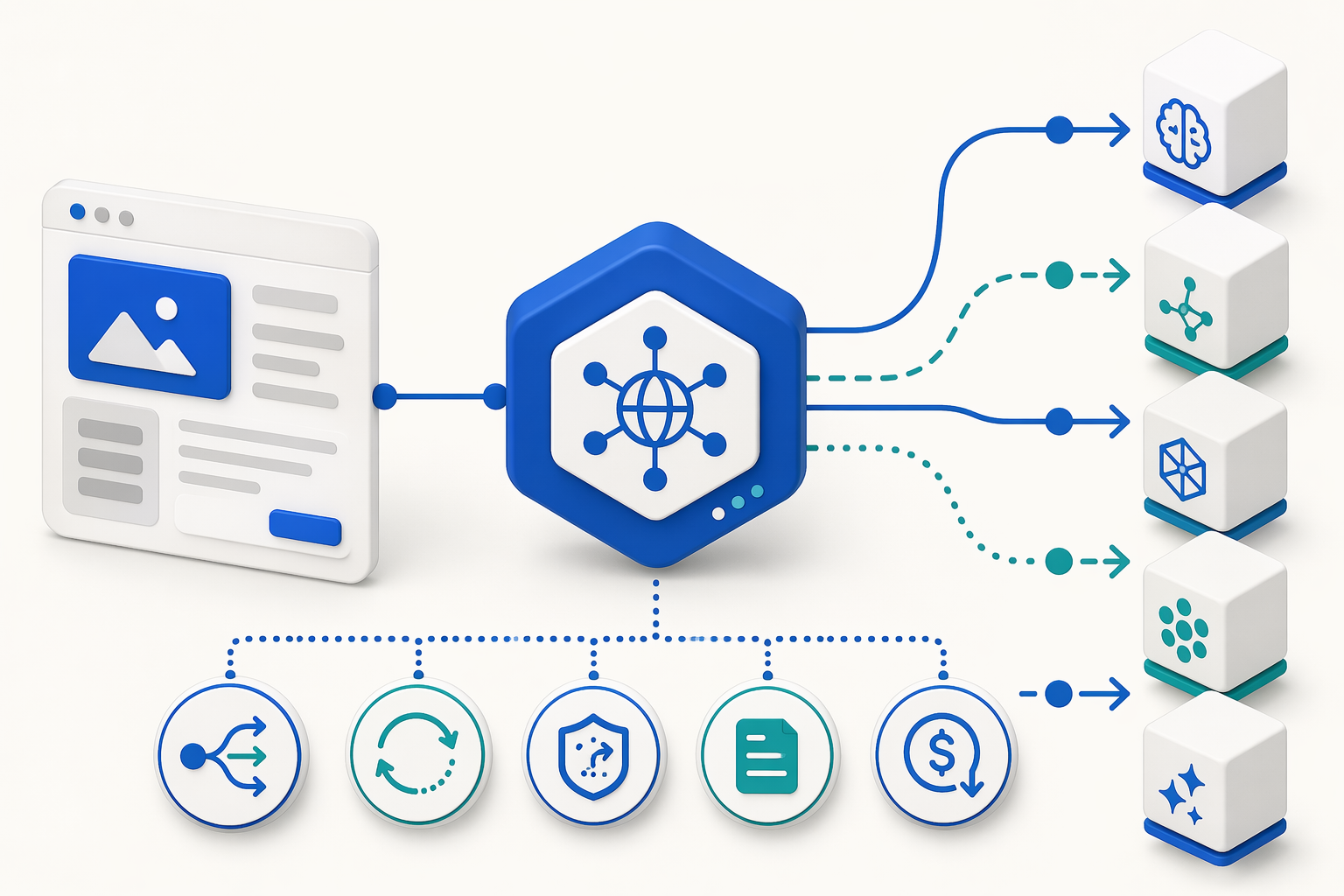
An OpenAI-compatible API gateway with free tier models is a middleware layer that lets your app call many AI models through an OpenAI-style API, often using the same /chat/completions pattern, while offering free models, free credits, or a free plan for testing. In practice, it gives developers one integration point for model access, routing, retries, fallbacks, logging, and cost control.
The simple definition
An AI gateway sits between your application and model providers such as OpenAI, Anthropic, Google, Meta, Mistral, Cohere, or open-source model hosts. Instead of hardcoding every provider SDK, your app sends requests to the gateway, and the gateway decides where those requests go.
OpenRouter’s 2026 explainer defines an LLM gateway as “a middleware layer between your application and multiple AI model providers” that centralizes request handling. That is the core idea: one API surface, many backends.
A basic flow looks like this:
- Your app sends an OpenAI-compatible request.
- The gateway authenticates the request and applies limits.
- The gateway routes the request to a selected model or provider.
- If the provider fails, the gateway can retry or fall back.
- The gateway returns a normalized response to your app.
- Logs, usage, latency, and cost data are recorded in one place.
What “OpenAI-compatible” means
OpenAI-compatible usually means the gateway accepts requests shaped like OpenAI’s API, especially for chat completions. For developers, this matters because many AI SDKs, frameworks, agents, and internal tools already support OpenAI-style request formats.
A good OpenAI-compatible API gateway should support:
- Chat completions for LLM prompts and agent workflows
- Streaming responses for chat apps and copilots
- Model aliases so you can swap models without changing app code
- Embeddings or multimodal APIs, where available
- Consistent errors and response formats across providers
- One API key and one billing layer across multiple models
TECHSY’s 2026 gateway ranking says LiteLLM supports 100+ providers behind a single OpenAI-compatible API. OpenRouter’s 2026 materials position OpenRouter around 300+ AI models. The GitHub project awesome-ai-gateway tracks 100+ AI gateways and LLM proxies in 2026, including LiteLLM, OpenRouter, Portkey, Kong AI Gateway, Higress, new-api, and Bifrost.
What “free tier models” really means
A free LLM gateway can mean three different things, and founders should not confuse them:
- Permanent free models: specific models can be used without payment, usually with rate limits.
- Trial credits: the gateway gives startup credits that expire or run out.
- Bring-your-own-key free gateway: the gateway software is free, but you still pay model providers separately.
OpenRouter’s 2026 free LLM API comparison says it reviewed 13 platforms across permanent free tiers and trial-credit offerings. Future AGI’s 2026 OpenRouter alternatives guide also notes that OpenRouter’s free tier is “real and useful,” but free-tier policies vary by model, provider, and usage pattern.
Why developers use gateways instead of one model API
An AI gateway free plan is useful because model selection is no longer a one-time decision. Startups often need to test cheap models for summaries, stronger models for reasoning, fast models for chat, and speech models for voice features.
The gateway becomes the control plane for:
- Model routing: choose the right model by task, cost, latency, or region.
- Fallbacks: switch to another provider when a model is down or rate-limited.
- Observability: inspect prompts, latency, token usage, errors, and spend.
- Governance: apply API keys, budgets, access rules, and safety filters.
- Product expansion: move from text chat to voice agents, WhatsApp bots, STT, TTS, image, and search.
For example, CallMissed, the OpenAI-compatible AI gateway and communication platform, fits this pattern by combining multi-model API access with speech-to-text, text-to-speech, WhatsApp automation, and AI voice-agent workflows. That matters when a startup wants the same AI infrastructure to support both developer APIs and customer-facing conversations across voice, chat, and regional languages.
What prerequisites and setup details should you compare before testing a free LLM gateway? (TABLE)
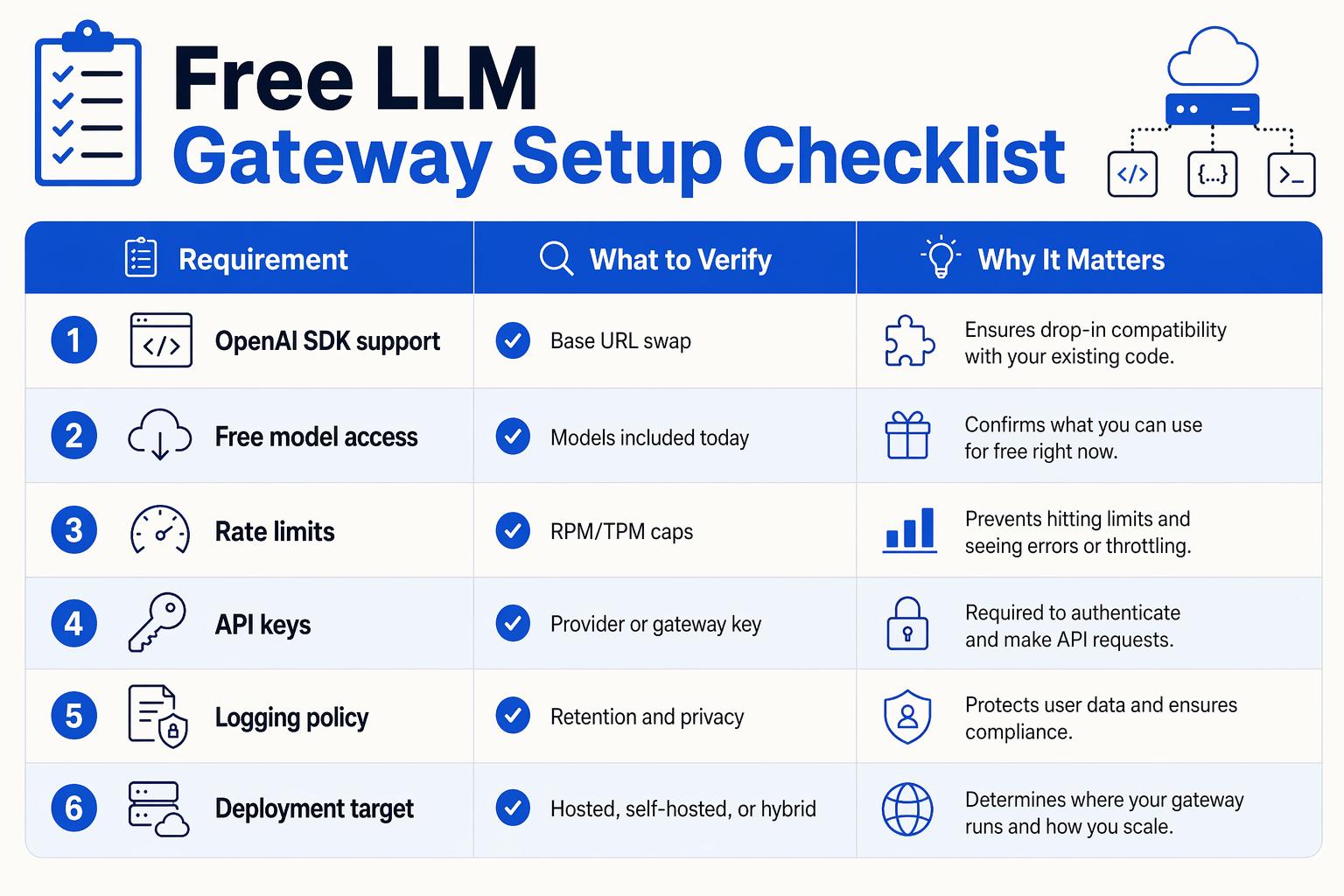
Before you test a free LLM gateway, compare the setup details that affect integration speed, budget risk, and production reliability: API compatibility, free-tier limits, routing controls, observability, modality support, and billing. A gateway that looks “free” in a demo can still create lock-in if it lacks OpenAI-compatible endpoints, transparent rate limits, or usable fallback behavior.
Prerequisites to compare before the first API call
OpenRouter’s 2026 guide defines an LLM gateway as “a middleware layer between your application and multiple AI model providers,” so your first check is whether the gateway can sit cleanly between your app and many providers without code rewrites. TECHSY’s 2026 ranking says LiteLLM supports 100+ providers behind a single OpenAI-compatible API, while OpenRouter positions its marketplace around 300+ AI models. The GitHub project awesome-ai-gateway tracks 100+ AI gateways and LLM proxies in 2026, which means setup discipline matters more than ever.
| Setup detail to compare | Why it matters | What to verify before testing | Red flag |
|---|---|---|---|
| OpenAI-compatible API shape | Lets you reuse existing SDKs, prompts, and /chat/completions logic | Check endpoint paths, request schema, streaming support, tool/function calling, and error format | “Compatible” only for basic chat, not streaming or tools |
| Free tier model access | Determines whether you can prototype without paid spend | Confirm whether free access means permanent free models, trial credits, or bring-your-own-key routing | Free plan exists, but no usable models are included |
| Rate limits and quotas | Prevents surprise failures during demos, cron jobs, or user testing | Look for RPM/TPM limits, daily caps, queueing behavior, and retry-after headers | Vague “fair use” language with no visible quota |
| Routing and fallback controls | Keeps apps running when one model is slow, expensive, or unavailable | Test priority routing, same-tier fallbacks, provider failover, and model allowlists | Fallbacks silently switch to much weaker or pricier models |
| Observability and logs | Helps debug cost, latency, hallucinations, and failures | Check request logs, latency metrics, token usage, prompt tracing, and export options | No per-request visibility or only aggregate billing data |
| Modalities and deployment fit | Real products often need more than text chat | Compare support for LLM chat, STT, TTS, image generation, web search, voice agents, and chatbots | Text-only gateway blocks future voice or WhatsApp workflows |
Minimum setup checklist for developers
Before writing benchmark code, create a small test matrix:
- One simple chat request to confirm OpenAI-style compatibility.
- One streaming request to measure first-token latency.
- One long-context request to expose token limits and truncation behavior.
- One forced-failure test by calling an unavailable model and checking fallback behavior.
- One cost-control test using max tokens, budget caps, or model allowlists.
- One observability test to confirm logs show model name, provider, latency, tokens, and error codes.
For Indian startups or customer-support products, also test language and channel fit early. Platforms such as CallMissed, the OpenAI-compatible AI gateway and customer-engagement platform, are relevant when the same roadmap includes LLM APIs, speech-to-text, text-to-speech, WhatsApp automation, and AI voice agents across Indian languages—not just text completions.
The practical rule
Do not evaluate a free gateway only by “number of models.” In July 2026, model breadth is common: OpenRouter cites 300+ AI models, TECHSY reports 100+ providers for LiteLLM, and awesome-ai-gateway catalogs 100+ gateway/proxy projects. The better comparison is: Can this gateway let my team test for free, observe every request, control spend, and switch models without changing application code?
How do you get started when the OpenAI SDK works out of the box?
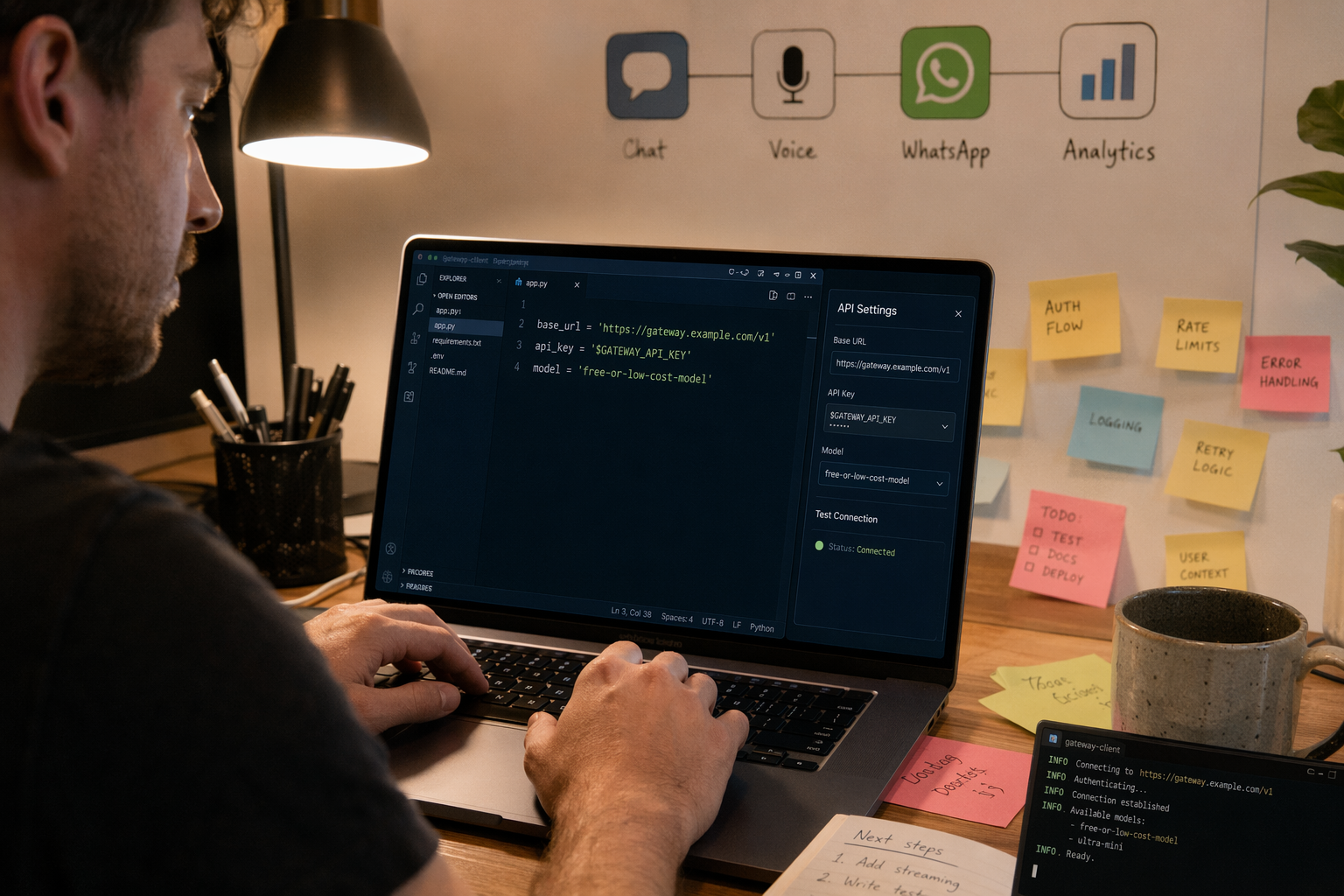
You get started by keeping your existing OpenAI SDK calls and changing only two things: the base URL and the API key. If the gateway is genuinely OpenAI-compatible, your first test should work through the same chat-completions pattern before you add routing, fallbacks, logging, or free-tier model selection.
Start with the smallest possible SDK change
For most developers, the migration path is intentionally boring: point the SDK at the gateway endpoint, choose a model, and send the same message payload your app already uses.
from openai import OpenAI

client = OpenAI(
    api_key="YOUR_GATEWAY_API_KEY",
    base_url="https://api.your-gateway.com/v1"
)

response = client.chat.completions.create(
    model="free-or-low-cost-model-name",
    messages=[
        {"role": "system", "content": "You are a concise support assistant."},
        {"role": "user", "content": "Summarize our refund policy in 3 bullets."}
    ]
)

print(response.choices[0].message.content)
That one-line base_url swap is the main reason OpenAI-compatible API gateway platforms became popular. In 2026, TECHSY reported that LiteLLM supports 100+ providers behind a single OpenAI-compatible API, while OpenRouter’s marketplace materials describe access to 300+ AI models. The GitHub project awesome-ai-gateway also tracks 100+ AI gateways and LLM proxies, which shows why SDK portability now matters as much as raw model quality.
Use a three-step first test
Before comparing advanced routing dashboards, run a controlled test that answers three questions:
- Does the OpenAI SDK work without custom client code?
Your existing chat.completions.create() call should return a valid response with minimal changes.
- Can you select a free-tier or low-cost model explicitly?
A real AI gateway free plan should document model names, usage limits, and whether free access is permanent, promotional, or credit-based.
- Does the response include enough metadata for debugging?
Look for request IDs, model IDs, token usage, latency, error codes, and provider-level failure details.
A free LLM API is useful for prototypes, but production tests need visibility. OpenRouter’s 2026 gateway explainer defines an LLM gateway as middleware that centralizes request handling across model providers; in practice, that centralization is valuable only if your team can inspect what happened when a request fails or slows down.
Add fallback logic only after the first call works
Once the basic SDK call succeeds, test routing with a simple fallback chain:
- Primary model: your preferred model for quality
- Fallback model: cheaper or faster model in the same task category
- Free-tier model: useful for development, evals, and non-critical paths
- Hard budget cap: stop requests before runaway usage
For example, a startup might use a premium model for checkout support, a cheaper model for FAQ summarization, and a free model for internal prompt testing. This is where an LLM router for 400+ models or a multi-provider gateway becomes practical: the application code stays stable while the routing policy changes behind the gateway.
Test the real product surface, not just text chat
Do not stop at a “hello world” chat response. If your roadmap includes voice, support automation, or regional-language users, test those paths early:
- Chat completions for app copilots and support agents
- Speech-to-text for call transcripts and voice notes
- Text-to-speech for AI voice agents
- Image generation for creative workflows
- Web search for retrieval-heavy assistants
For India-focused teams, platforms such as CallMissed, the OpenAI-compatible AI gateway, are relevant because they combine multi-model API access with speech-to-text and text-to-speech across 22 Indian languages, plus WhatsApp chatbots and WhatsApp Business calling connected to AI voice agents. That matters when the same prototype must eventually serve Hindi, Tamil, Bengali, Marathi, Telugu, and other regional audiences—not just English-language chat.
Which free LLM gateways offer the best model access, routing, and limits in July 2026? (TABLE)
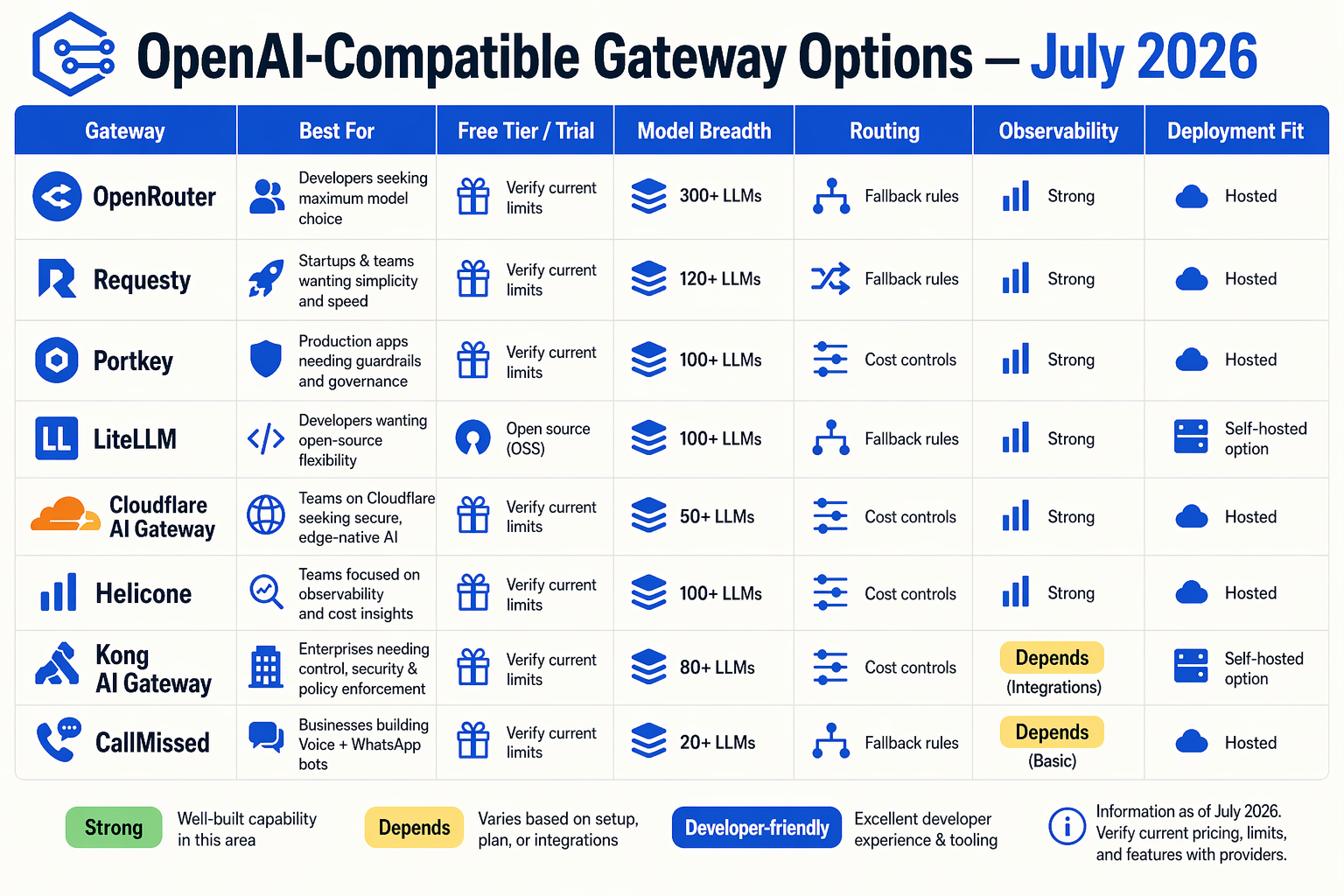
The best free LLM gateway in July 2026 depends on whether you need broad model discovery, self-hosted routing, production observability, or deployment into voice and chat workflows. A practical shortlist is OpenRouter for marketplace breadth, LiteLLM for open-source control, Portkey or Requesty for production routing/governance, Bifrost for deployable performance, and CallMissed for an OpenAI-compatible gateway that also connects LLMs to voice agents, WhatsApp bots, multilingual STT/TTS, and customer-engagement use cases.
OpenRouter’s 2026 LLM gateway guide defines an LLM gateway as “a middleware layer between your application and multiple AI model providers.” TECHSY’s 2026 ranking says LiteLLM supports 100+ providers behind a single OpenAI-compatible API. Maxim AI’s 2026 comparison says Bifrost unifies access to 23+ LLM providers through one OpenAI-compatible API. The GitHub project awesome-ai-gateway tracks 100+ AI gateways and LLM proxies in 2026, which shows how crowded this category has become.
July 2026 comparison table: free-tier AI gateway options
| Gateway | Model access | Routing / fallback | Free-tier or limit style | Best fit |
|---|---|---|---|---|
| OpenRouter | Marketplace access to 300+ AI models, per OpenRouter/Future AGI 2026 materials | Hosted marketplace routing across models and providers; availability varies by model | Free models and paid models coexist; developers should verify per-model rate limits in the dashboard | Developers who want quick experimentation across many hosted LLMs |
| LiteLLM | 100+ providers, per TECHSY’s 2026 ranking | OpenAI-compatible proxy with retries, fallbacks, budgets, and provider abstraction | Open-source gateway can be self-hosted; upstream model, compute, and infra costs are separate | Teams that want maximum control, BYOK, and self-hosted routing |
| Portkey | Multi-provider LLM gateway | Routing, retries, observability, guardrails, logs, prompt management | Free/starter access may apply; quotas and retention should be verified in the active plan | Startups needing governance and production debugging for LLM apps |
| Requesty | Multi-model routing platform compared in Requesty’s 2026 gateway guide | Focus on latency, cost routing, fallbacks, and unified access | Free or trial-style access may vary; verify July 2026 usage limits before launch | Teams optimizing latency, provider choice, and cost-aware routing |
| Bifrost | 23+ LLM providers, per Maxim AI’s 2026 comparison | High-performance OpenAI-compatible gateway built in Go | Open-source/deployable model; provider billing and hosting remain separate | Engineering teams prioritizing deployability and performance control |
| CallMissed | OpenAI-compatible access to 300+ LLMs, plus STT, TTS, image, and search models | Same-endpoint access with same-tier fallbacks; useful for testing models such as GPT-5.6 Sol, GPT-5.6 Terra, and GPT-5.6 Luna without provider lock-in | Transparent credit model where 1 credit = ₹1, with free-tier and pay-as-you-go access; developers should verify live quotas in the dashboard | Indian startups and global developers building AI voice agents, WhatsApp bots, multilingual support, and customer-engagement APIs |
How to read “free” correctly
A gateway’s free plan is not the same as unlimited model usage. In July 2026, most free LLM gateway offers fall into four practical categories:
- Free hosted models: Some gateways expose no-cost models, but they usually carry rate limits, queueing, or availability constraints.
- Trial credits: Teams receive a starting balance, then shift to paid usage once credits expire.
- Bring-your-own-key gateways: The gateway may be free or open source, while OpenAI, Anthropic, Google, Meta, or other upstream providers bill separately.
- Self-hosted gateways: Tools such as LiteLLM or Bifrost can reduce SaaS dependency, but teams still pay for servers, monitoring, security, and model calls.
What should developers verify before choosing?
Before committing to an OpenAI-compatible API gateway free plan, check the operational details that affect production reliability:
- Requests per minute and tokens per minute by model, not just account-level limits.
- Fallback behavior when a free model is unavailable, overloaded, or rate-limited.
- Model lock-in risk, especially if your app may switch between GPT-5.6 Sol, Terra, Luna, open-source models, or provider-hosted alternatives.
- Observability, including logs, traces, cost attribution, and error visibility.
- Deployment path, especially if the LLM output must power voice agents, WhatsApp bots, CRM workflows, or multilingual customer support.
For teams comparing gateways in July 2026, CallMissed is worth evaluating when the API layer must connect directly to real customer channels: OpenAI-compatible LLM access, 300+ models, 22 Indian-language STT/TTS support, WhatsApp Business calling, WhatsApp bots, and voice-agent workflows in one platform.
How do you switch base URLs and route requests step by step?
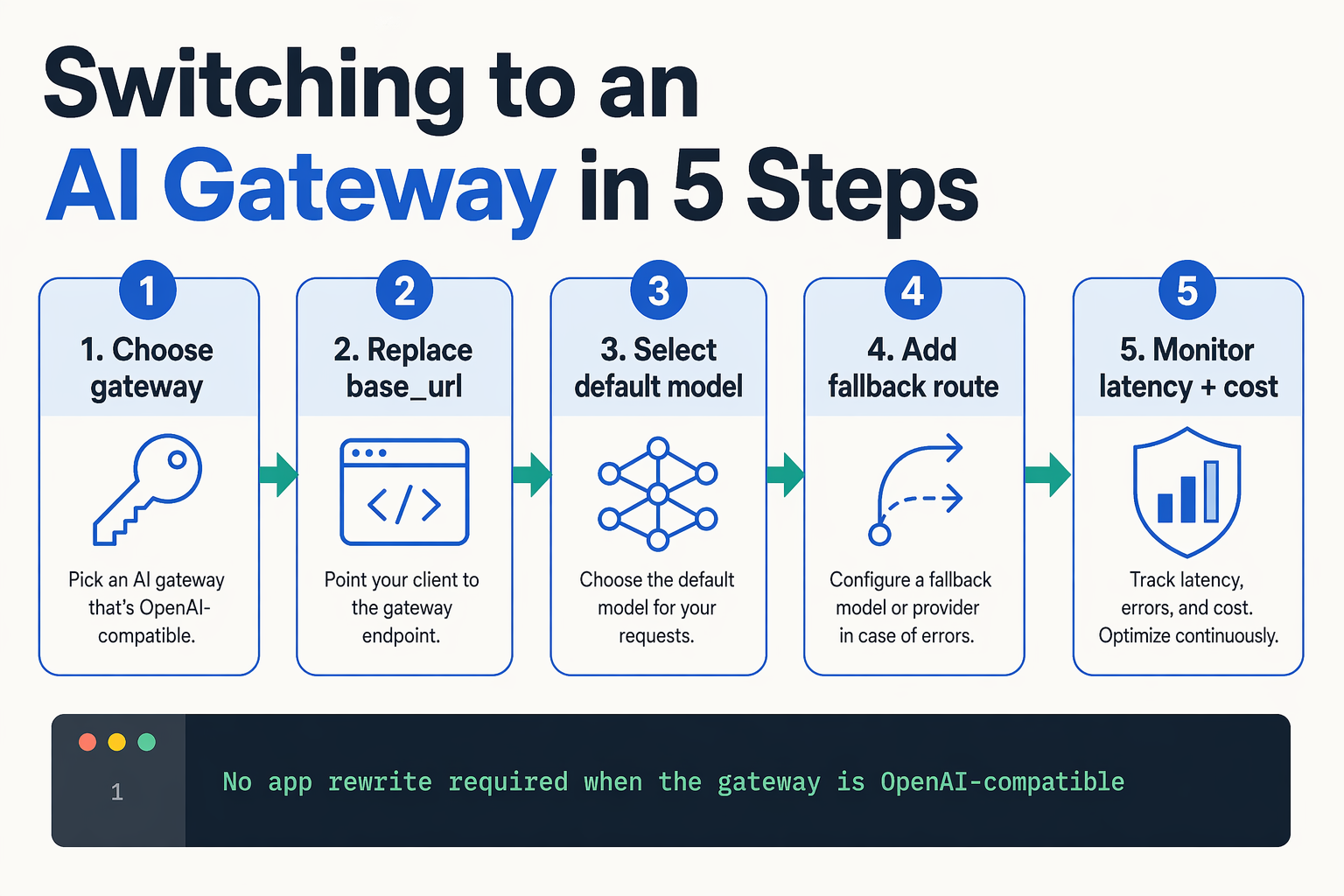
Switching an app to an OpenAI-compatible API gateway usually requires changing only three things: the base URL, the API key, and the model name or routing alias. After that, routing rules decide whether requests go to a free model, a paid frontier model, or a fallback provider.
Step 1: Keep your OpenAI-style request shape
Most gateways preserve the familiar /chat/completions contract, so your app code should stay close to the OpenAI SDK pattern. This is why gateway portability matters: TECHSY’s 2026 ranking says LiteLLM supports 100+ providers behind a single OpenAI-compatible API, while OpenRouter’s 2026 materials describe an LLM gateway as middleware between your app and multiple model providers.
import OpenAI from "openai";

const client = new OpenAI({
  apiKey: process.env.AI_GATEWAY_API_KEY,
  baseURL: "https://your-gateway.example.com/v1"
});

const response = await client.chat.completions.create({
  model: "free-chat-model",
  messages: [
    { role: "system", content: "You are a helpful support assistant." },
    { role: "user", content: "Explain refunds in simple language." }
  ]
});

console.log(response.choices[0].message.content);
The important point: do not hard-code provider-specific SDK logic unless you need a special feature. Keep the request portable first, then add provider extensions later.
Step 2: Replace the base URL
In a direct OpenAI integration, your base URL points to OpenAI. In a gateway setup, it points to the gateway instead.
Typical migration pattern:
- Find the gateway’s documented OpenAI-compatible base URL.
- Replace the old SDK
baseURLvalue. - Replace the API key with the gateway key.
- Keep the same chat-completions request format.
- Test with a low-cost or free-tier model first.
For example, a platform such as CallMissed, the OpenAI-compatible AI gateway, lets developers connect to multiple model types through one API key and billing account, covering LLM chat plus speech-to-text, text-to-speech, image generation, and web search. That matters when the same product roadmap includes chatbots today and voice agents tomorrow.
Step 3: Use model aliases instead of provider names
A good free LLM gateway should let you call a model by a stable alias, not by deeply coupled provider syntax. For example:
{
  "model": "support-fast-free",
  "messages": [
    { "role": "user", "content": "Summarize this ticket." }
  ]
}
Behind that alias, your gateway can route to:
- A free tier model for development and QA
- A faster low-cost model for production support
- A premium model for complex reasoning
- A fallback model during outages or rate limits
OpenRouter says its marketplace covers 300+ AI models in 2026, and the GitHub project awesome-ai-gateway tracks 100+ AI gateways and LLM proxies including LiteLLM, OpenRouter, Portkey, Kong AI Gateway, Higress, new-api, and Bifrost. That scale makes aliases essential; without them, every model experiment becomes an application-code change.
Step 4: Define routing rules outside your app
Once the base URL works, move routing into gateway configuration. Common rules include:
- Cost routing: send routine requests to free or low-cost models.
- Latency routing: prefer the fastest provider for short chatbot replies.
- Capability routing: send long-context or reasoning tasks to stronger models.
- Fallback routing: retry on another same-tier model after timeout, 429, or 5xx errors.
- Environment routing: use free models in staging and paid models in production.
A practical startup pattern is: free model for local development, cheap model for default production, premium model for escalations, and automatic fallback for reliability.
Step 5: Verify routing with logs and test prompts
Do not assume routing works because the response looks correct. Check:
- Which model actually served the request
- Whether fallback triggered
- Token usage and cost
- Latency by provider
- Error rate by route
- Rate-limit headers or dashboard warnings
This turns an AI gateway from a simple proxy into production infrastructure. The base URL switch is the easy part; the real value comes when routing, observability, and fallback policies let your app test new models without rewriting integrations.
Should startups choose hosted or self-hosted AI model routing?
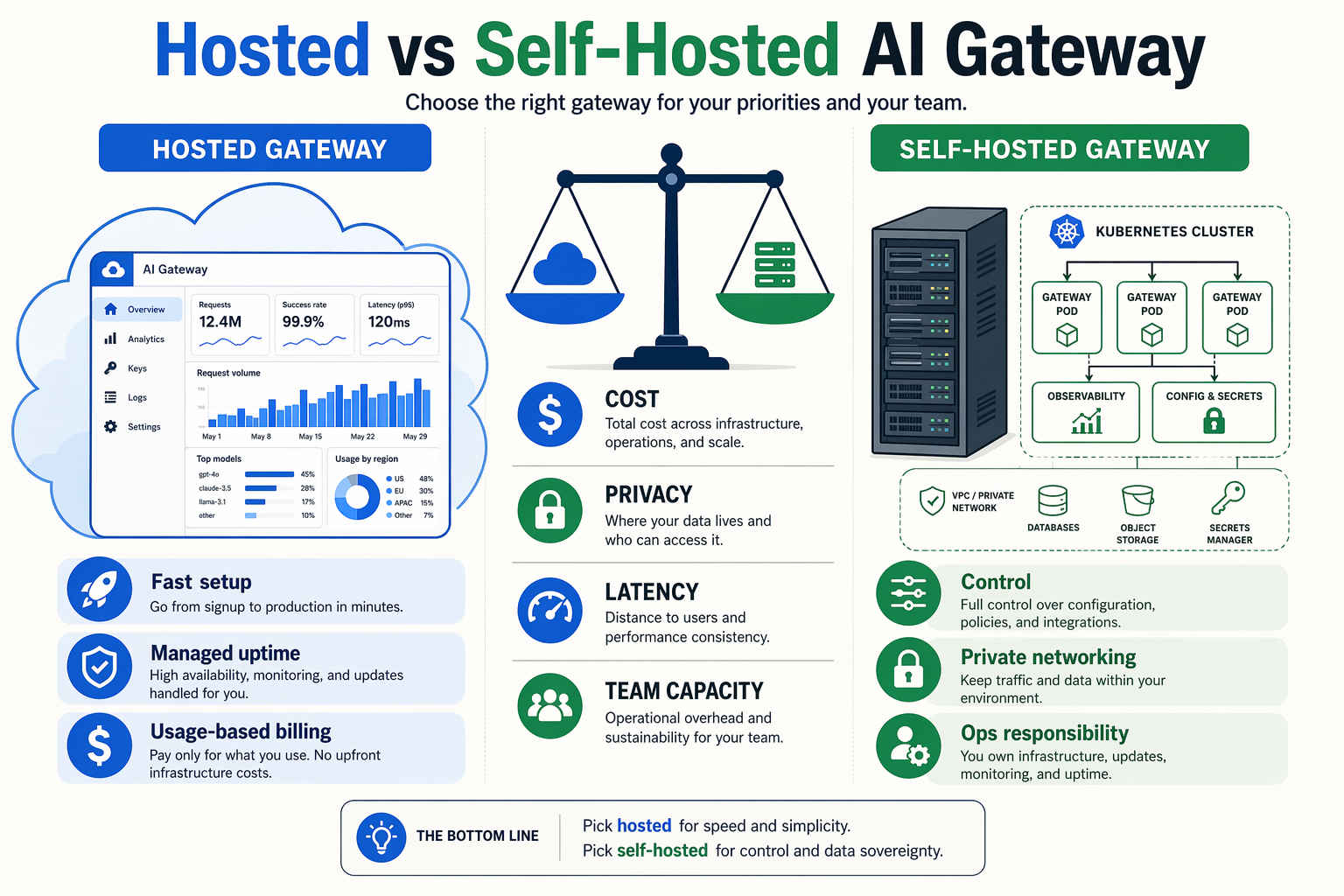
Startups should choose a hosted AI gateway when speed, free-tier testing, observability, and managed reliability matter more than infrastructure control. Choose a self-hosted AI model router when data residency, custom routing logic, private network deployment, or provider-key ownership are non-negotiable.
Hosted gateways: faster path to production
A hosted OpenAI-compatible API gateway is usually the best default for early-stage teams because it removes the operational burden of running routing infrastructure. OpenRouter’s 2026 guide defines an LLM gateway as “a middleware layer between your application and multiple AI model providers,” and that middleware is exactly what founders do not want to rebuild while searching for product-market fit.
Hosted gateways typically give startups:
- One API key and one billing surface across multiple model providers
- Free models, free credits, or an AI gateway free plan for experimentation
- Automatic retries and fallback routing when a model is unavailable
- Usage dashboards, latency traces, logs, and spend controls
- OpenAI-compatible endpoints that reduce migration work
The trade-off is control. A hosted gateway may limit how deeply you can customize routing rules, logging retention, VPC networking, or provider-specific parameters. It may also introduce a dependency on the gateway’s uptime, pricing model, and supported regions.
Self-hosted gateways: more control, more responsibility
Self-hosted routing is attractive when the gateway becomes part of your core infrastructure. TECHSY’s 2026 gateway ranking says LiteLLM supports 100+ providers behind a single OpenAI-compatible API and “runs free on any VPS,” which explains why many engineering-led startups evaluate LiteLLM early.
Self-hosting can make sense when you need:
- Strict data control for regulated workloads or private customer data
- Custom fallbacks based on latency, cost, quality, geography, or tenant tier
- Bring-your-own-key routing across providers without a third-party billing layer
- Private deployment inside your own cloud, Kubernetes cluster, or VPC
- Deep observability integration with your existing logs, metrics, and alerts
The cost is operational complexity. Your team must handle upgrades, security patches, provider API changes, rate-limit behavior, queueing, secrets management, monitoring, and incident response. For a two-person startup, “free on a VPS” can still become expensive if one founder becomes the gateway SRE.
The practical decision framework
Use this rule of thumb: hosted first, self-host later, unless compliance or architecture forces the opposite.
A hosted gateway is usually better if:
- You are still comparing models and prompts
- You need a free LLM gateway to test user flows
- Your team wants model access, billing, and fallbacks quickly
- You are building chatbots, copilots, summarizers, or early MVPs
- You value managed observability more than infrastructure ownership
A self-hosted gateway is usually better if:
- You already have DevOps capacity
- You need private deployment or strict data isolation
- Your routing logic is a competitive advantage
- You must control provider keys and request paths directly
- You expect high volume where gateway margins materially affect unit economics
Hybrid routing is becoming the startup pattern
By July 2026, the ecosystem is large enough that teams do not need to make a permanent binary choice. The GitHub project awesome-ai-gateway tracks 100+ AI gateways and LLM proxies, including LiteLLM, OpenRouter, Portkey, Kong AI Gateway, Higress, new-api, and Bifrost. Maxim’s 2026 comparison says Bifrost unifies access to 23+ LLM providers through a single OpenAI-compatible API, while OpenRouter positions its marketplace around 300+ AI models.
That breadth supports a hybrid approach:
- Use a hosted gateway for prototyping, free-tier testing, and provider discovery
- Move sensitive or high-volume workloads to self-hosted routing
- Keep your app coded against OpenAI-compatible APIs to preserve portability
- Use fallback chains so one model outage does not break the product
For Indian startups building voice agents or WhatsApp automation, platforms such as CallMissed, the OpenAI-compatible AI gateway and customer-engagement platform, fit the hosted side of this pattern by combining multi-model API access with speech-to-text, text-to-speech, WhatsApp bots, and voice-agent workflows across 22 Indian languages. That matters when the product is not just a chat box, but a customer communication system that must work across voice, WhatsApp, and regional-language users.
What advanced routing, observability, and deployment tricks matter most? (TABLE)
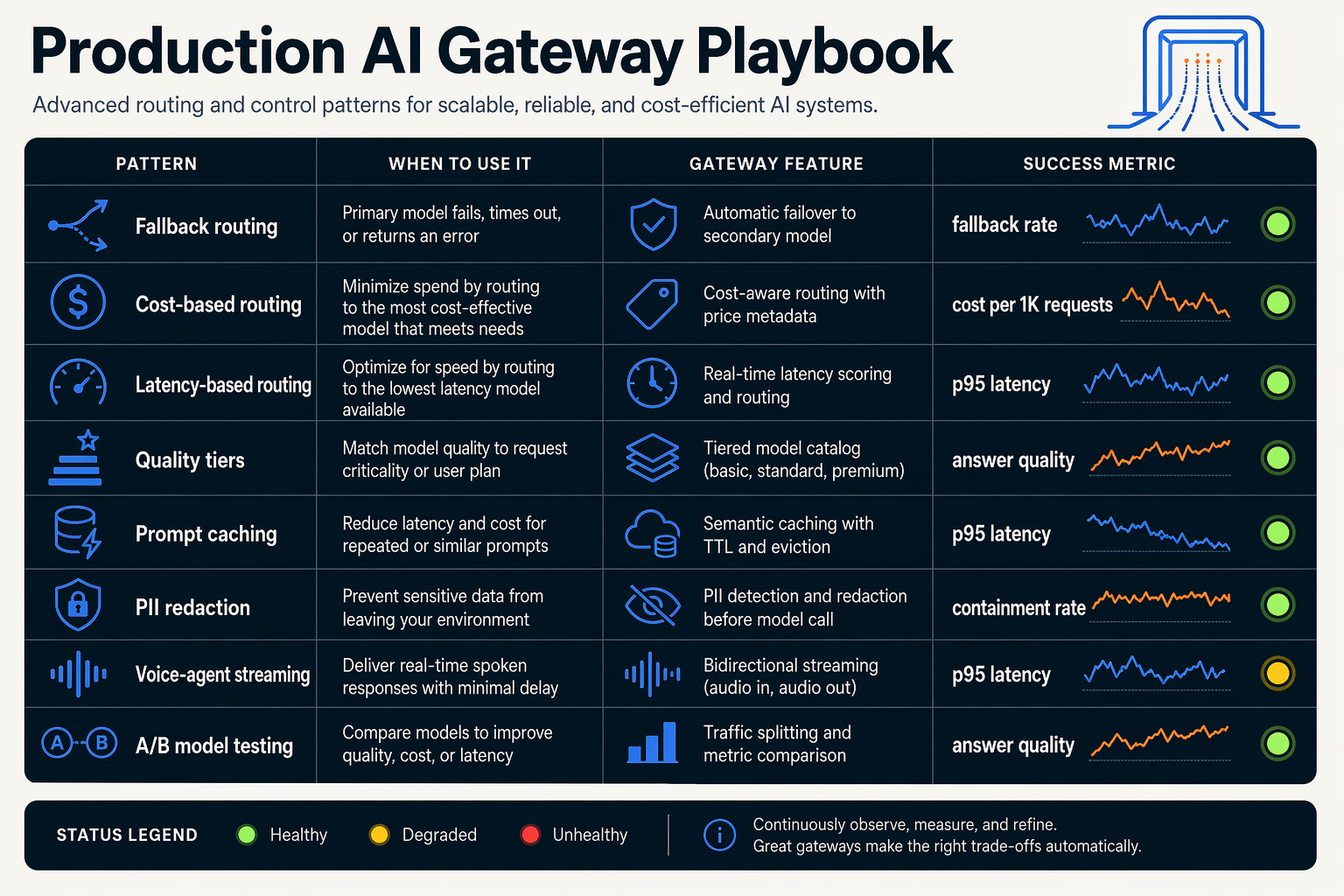
The most important advanced tricks are policy-based routing, automatic fallbacks, full request observability, and safe deployment controls such as canaries and budget limits. In July 2026, the best OpenAI-compatible API gateway is not just a model switcher; it is a production control plane for cost, latency, reliability, and evaluation.
Production features that separate a gateway from a proxy
OpenRouter’s 2026 explainer defines an LLM gateway as “a middleware layer between your application and multiple AI model providers,” but advanced teams should look beyond simple forwarding. A serious free LLM gateway should help you answer: which model handled the request, why it was selected, how much it cost, whether it failed, and what fallback path was used.
| Capability | What it does | Why it matters | What to verify in July 2026 |
|---|---|---|---|
| Policy-based routing | Sends prompts by model tier, task, region, price, latency, or provider health | Lets startups test cheap/free models for low-risk tasks while reserving premium models for high-value workflows | Check whether routing supports rules, weights, model tags, and per-endpoint policies |
| Automatic fallbacks | Retries failed calls on another model or provider | Reduces outages from rate limits, provider downtime, or model-specific errors | Confirm same-tier fallback, timeout controls, retry limits, and error visibility |
| Observability | Logs prompts, completions, latency, token usage, cost, and errors | Debugs hallucinations, slow calls, and unexpected spend | Look for dashboards, trace IDs, export APIs, and OpenTelemetry-style integrations |
| Budget and rate controls | Sets spend caps, request quotas, and user/project limits | Prevents free-tier experiments from becoming surprise bills | Verify per-key, per-user, per-model, and per-environment limits |
| Evaluation and replay | Re-runs the same prompt set across models | Helps compare GPT-5.6 Sol, Terra, Luna, open-weight models, and cheaper alternatives without rewriting code | Check batch testing, stored datasets, scoring, and regression comparison |
| Deployment isolation | Separates dev, staging, production, and customer-specific keys | Keeps tests, logs, and failures from polluting production systems | Confirm environment-level keys, audit logs, and rollback support |
Routing: choose the model for the job, not the brand
A strong AI model routing setup usually combines four strategies:
- Cost-first routing for background summarization, classification, tagging, and extraction.
- Quality-first routing for legal, financial, medical, or executive workflows.
- Latency-first routing for chatbots, voice agents, and user-facing copilots.
- Fallback routing when a provider hits rate limits or returns errors.
The scale of routing choices is now large enough to require tooling. OpenRouter says its marketplace covers 300+ AI models in 2026, TECHSY reports that LiteLLM supports 100+ providers behind one OpenAI-compatible API, and GitHub’s awesome-ai-gateway list tracks 100+ AI gateways and LLM proxies. Maxim AI’s 2026 comparison also notes that Bifrost unifies access to 23+ LLM providers through a single OpenAI-compatible API.
Observability: log the full AI transaction
For production, “the model responded” is not enough. Your gateway should capture:
- Request metadata: user ID, app ID, environment, model, provider, route, and timestamp
- Performance metrics: time to first token, total latency, timeout rate, and retry count
- Cost metrics: input tokens, output tokens, cached tokens, credits consumed, and model price
- Quality signals: user feedback, moderation flags, hallucination reports, and evaluation scores
- Security controls: PII redaction, audit logs, prompt retention policies, and role-based access
This is especially important for voice and chatbot systems, where a slow fallback can create a visibly bad user experience. Platforms such as CallMissed, the OpenAI-compatible AI gateway and customer-engagement platform, are relevant here because production deployments often need more than text routing: developers may also need speech-to-text, text-to-speech, WhatsApp automation, and multilingual support across Indian languages.
Deployment tricks that reduce launch risk
Use canary routing to send 1–5% of traffic to a new model before a full switch. Use shadow traffic to test a new model silently against real prompts without showing responses to users. Use circuit breakers to stop sending requests to a failing provider after repeated errors. Finally, keep a rollback model ready for every production route; free-tier models are excellent for experimentation, but mission-critical workflows need predictable fallbacks and clear rate-limit behavior.
What common mistakes cause free AI gateway projects to fail? (TABLE)
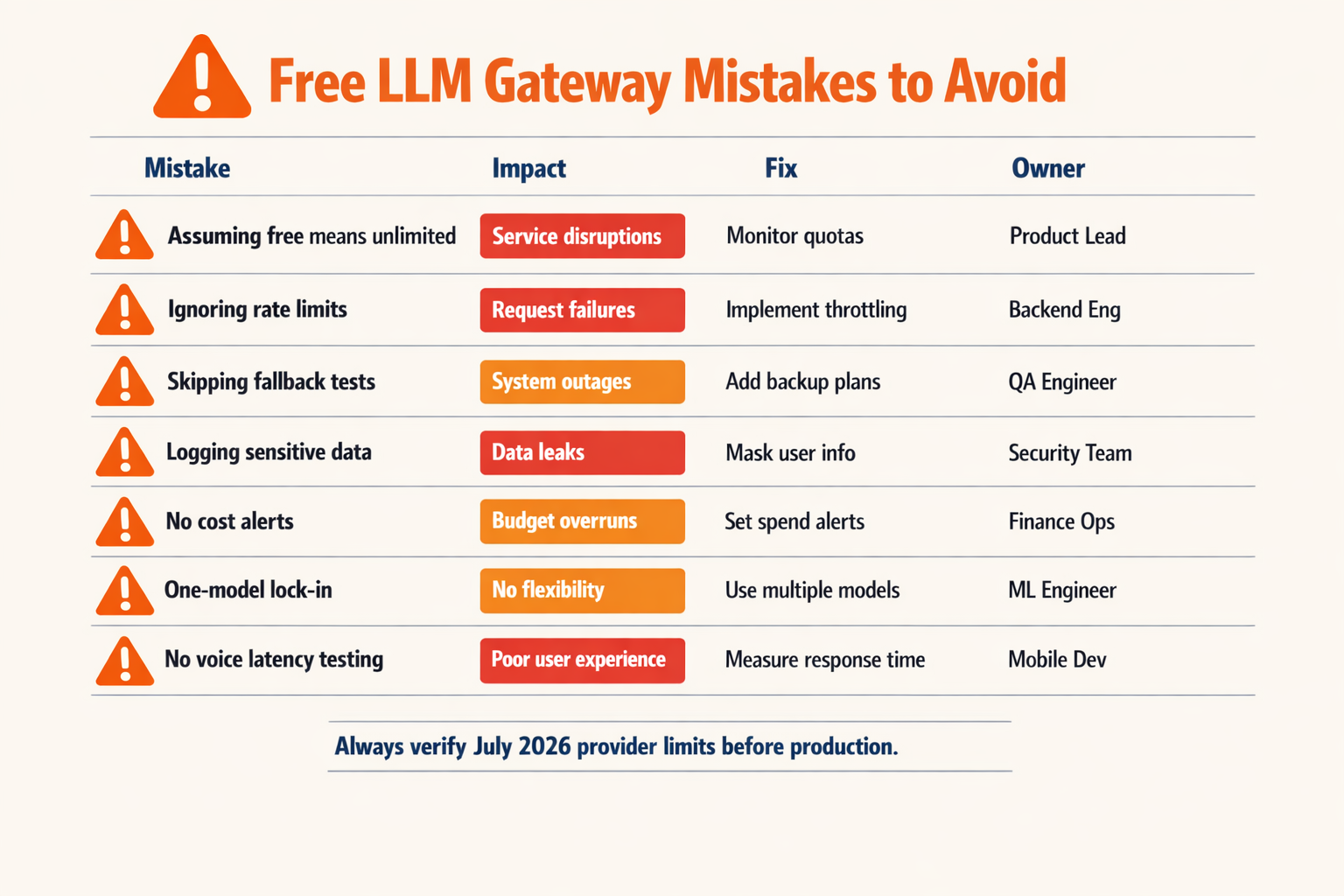
Most free AI gateway projects fail because teams treat “free model access” as production architecture. A free LLM gateway is best used as a testing, routing, and validation layer first—not as an unlimited substitute for reliability engineering, rate-limit planning, observability, and fallback design.
Failure patterns to catch before launch
| Common mistake | Why it breaks the project | 2026 data point | Better approach |
|---|---|---|---|
| Treating free tiers as unlimited infrastructure | Free models may have stricter quotas, variable latency, or changing availability, which can break demos and user-facing flows during traffic spikes. | OpenRouter’s 2026 guide defines an LLM gateway as “a middleware layer between your application and multiple AI model providers,” not a guarantee that every free model is always production-ready. | Use free models for prototyping, evaluation, and low-risk workloads; set paid fallback routes for critical paths. |
| Hard-coding one free model | If the selected model is deprecated, rate-limited, or performs poorly on a task, the whole app fails. | OpenRouter positions its marketplace around 300+ AI models, while TECHSY’s 2026 ranking says LiteLLM supports 100+ providers behind one OpenAI-compatible API. | Abstract model choice behind an OpenAI-compatible API gateway and test multiple models per task. |
| Ignoring rate limits and usage caps | A chatbot or voice agent can hit limits faster than expected because each user session may generate multiple prompts, tool calls, retries, or summaries. | The OpenRouter free LLM API comparison covers 13 platforms across permanent free tiers and trial-credit offerings, showing that “free” models vary widely by limits and policy. | Track requests per minute, tokens per day, retry volume, and cost per successful response before launch. |
| Skipping observability | Without logs, latency traces, and error labels, teams cannot tell whether failures come from prompts, providers, models, network issues, or rate limits. | The GitHub project awesome-ai-gateway tracks 100+ AI gateways and LLM proxies, including tools focused on routing, security, cost, and observability. | Require prompt logs, response metadata, provider status, model-level latency, and error dashboards. |
| No fallback or retry policy | A single provider timeout can turn into a failed user journey, especially in customer support, lead capture, or checkout flows. | Maxim’s 2026 gateway comparison notes that Bifrost unifies access to 23+ LLM providers through a single OpenAI-compatible API, reflecting the market shift toward multi-provider resilience. | Define same-tier fallbacks, retry limits, timeout thresholds, and escalation rules before production. |
| Choosing a text-only gateway for multimodal products | A startup may begin with chat, then need speech-to-text, text-to-speech, WhatsApp, image generation, or search—forcing a second integration later. | Production AI apps increasingly combine LLM chat with STT, TTS, image generation, and web search rather than using text alone. | Pick a gateway that matches the product roadmap, not just today’s prompt test. Platforms such as CallMissed combine OpenAI-compatible APIs with voice agents, WhatsApp bots, STT, TTS, image, and search access. |
The biggest strategic error: optimizing only for “free”
A free plan is valuable, but model access is only one layer of the stack. The real question is whether the gateway helps your team answer production questions:
- Which model gives the best answer quality for this task?
- What happens when the free model is unavailable?
- Can the app fall back without changing code?
- Can founders see cost per user, request, or workflow?
- Can developers debug failed prompts quickly?
- Can the same integration support chat, voice, and multilingual use cases?
For Indian startups, this matters even more when the app serves regional users. A gateway that supports speech-to-text and text-to-speech across Indian languages, WhatsApp automation, and voice workflows can prevent a rebuild when the product moves from English chat demos to real customer engagement.
A safer launch checklist
Before shipping a free AI gateway project, verify these six items:
- OpenAI-compatible endpoints for easy model switching.
- Documented free-tier limits for tokens, requests, and models.
- Automatic fallback routing across comparable models.
- Prompt and response logging with latency and error metadata.
- Budget controls for paid overflow.
- Multimodal support if the roadmap includes voice agents, WhatsApp bots, STT, TTS, image generation, or web search.
The winning pattern in July 2026 is not “use the cheapest model.” It is start free, measure everything, route intelligently, and design for fallback from day one.
Frequently Asked Questions
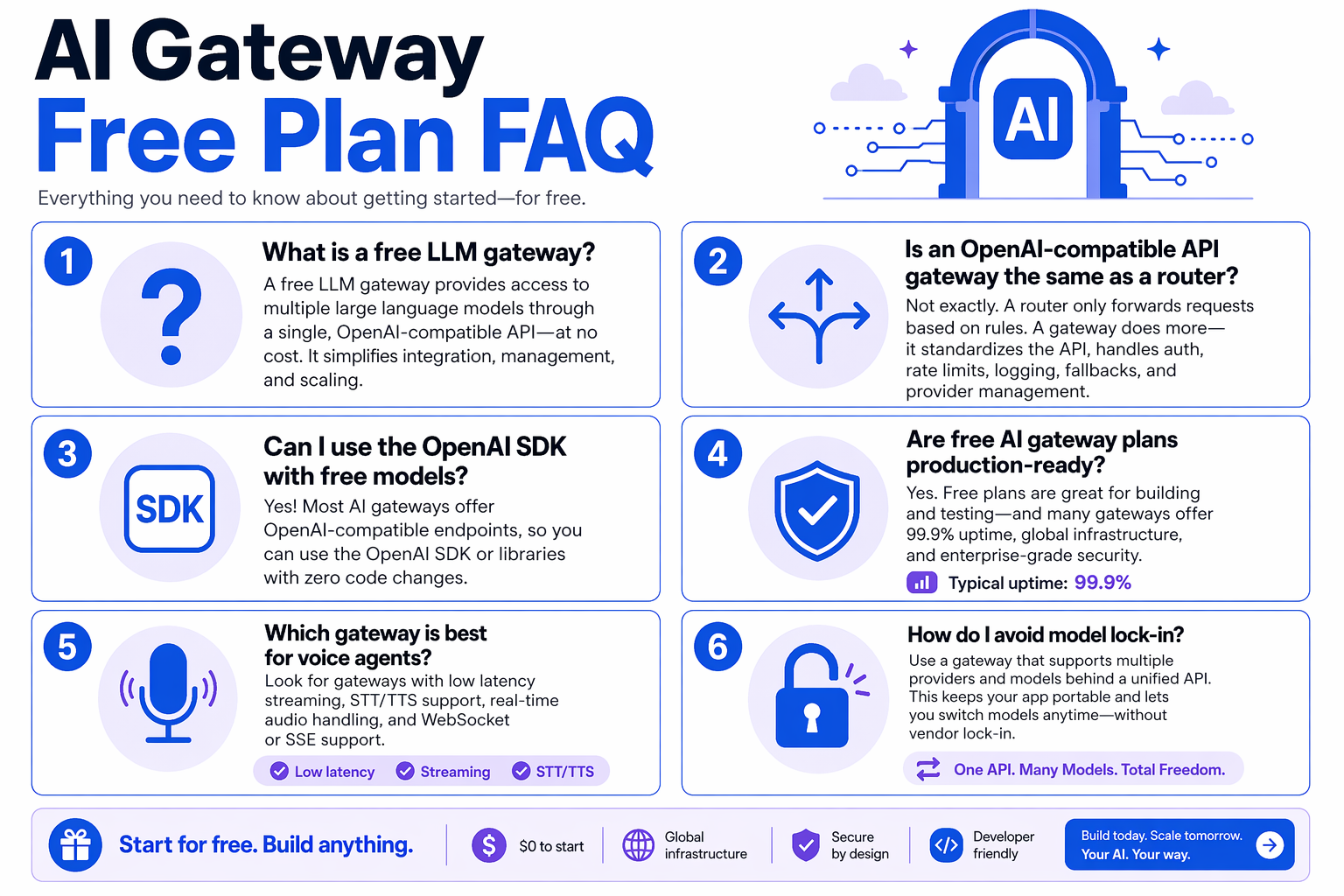
What is an AI gateway with free tier models?
How is an OpenAI-compatible API gateway different from calling OpenAI directly?
/chat/completions-style request across many providers and models. TECHSY’s 2026 ranking says LiteLLM supports 100+ providers behind a single OpenAI-compatible API, which shows why gateways are useful for testing, fallback routing, and avoiding model lock-in.Which AI gateway free plan features should developers check first?
Can a free LLM gateway be used in production apps?
What is the difference between an LLM router and a full AI gateway?
Which OpenAI-compatible API gateway is useful for voice agents and WhatsApp chatbots?
Which resources and next steps help you deploy voice agents and chatbots?
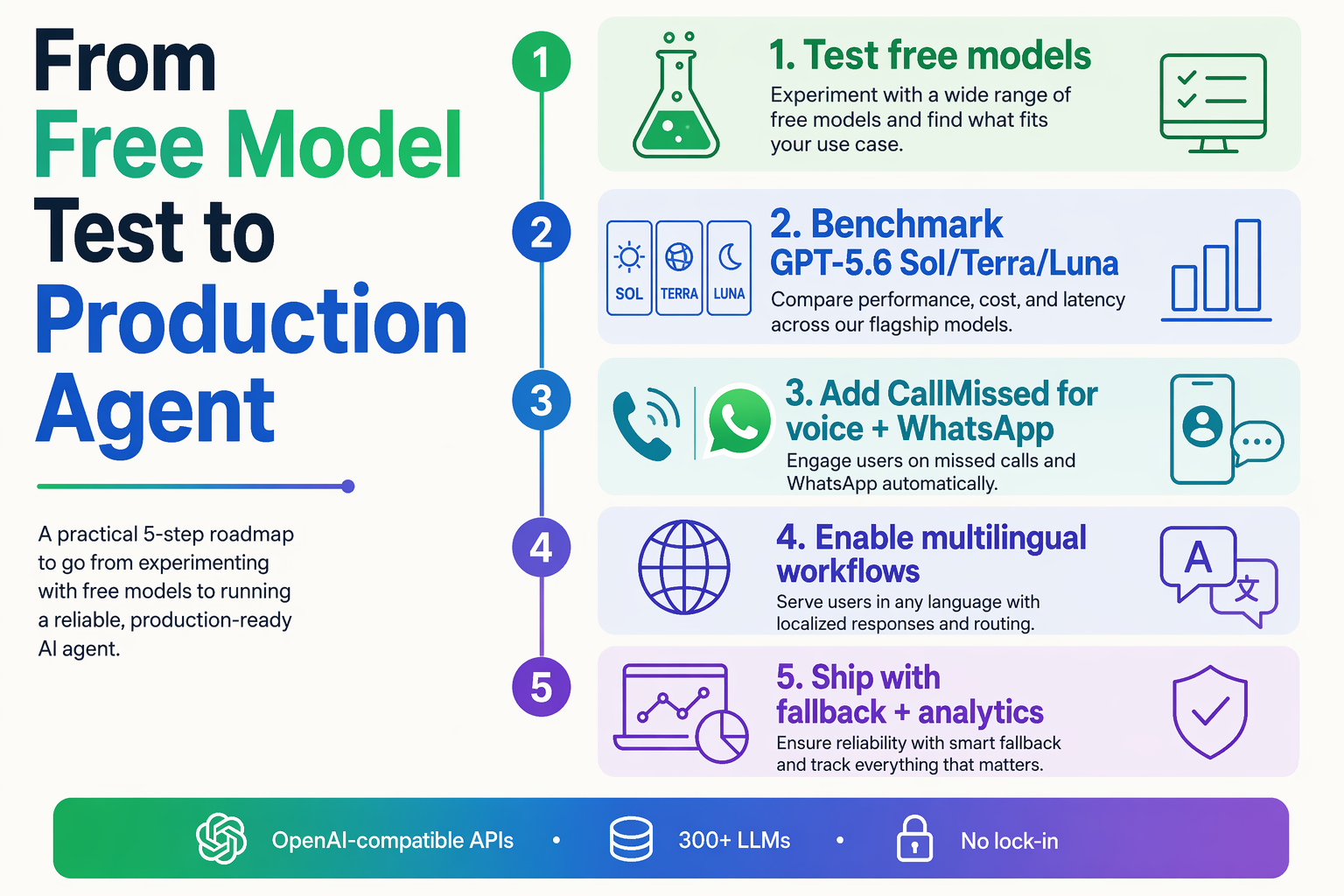
Start deployment by treating the gateway as the control plane and the chatbot or voice agent as the product layer. In July 2026, the safest path is to prototype on free tier models, validate routing and observability, then connect the same OpenAI-compatible workflow to WhatsApp, voice, web chat, or your CRM.
Use these resources before writing production code
A good deployment plan starts with reference material that helps you avoid lock-in and hidden costs:
- Gateway comparison resources: OpenRouter’s 2026 guide defines an LLM gateway as “a middleware layer between your application and multiple AI model providers,” which is the right mental model for routing, retries, and fallback design.
- Model breadth references: OpenRouter says its marketplace includes 300+ AI models in 2026, while TECHSY’s 2026 ranking says LiteLLM supports 100+ providers behind a single OpenAI-compatible API.
- Open-source discovery: The GitHub project awesome-ai-gateway tracks 100+ AI gateways and LLM proxies in 2026, including LiteLLM, OpenRouter, Portkey, Kong AI Gateway, Higress, new-api, and Bifrost.
- Production gateway benchmarks: Maxim AI’s 2026 comparison says Bifrost unifies access to 23+ LLM providers through a single OpenAI-compatible API, showing how enterprise gateways are moving toward multi-provider abstraction.
- Free API research: OpenRouter’s 2026 “Free LLM APIs Compared” guide covers 13 platforms across permanent free tiers and trial-credit offerings.
These resources help you answer the practical questions: Which models are free? Which endpoints are OpenAI-compatible? Which gateway supports retries, logging, rate-limit visibility, and fallback routing?
Follow a 5-step deployment checklist
- Prototype the conversation first.
Build your first bot flow with one or two free LLM models. Test common intents, refusal cases, multilingual prompts, and latency-sensitive paths before connecting customer channels.
- Add the gateway abstraction early.
Use an OpenAI-compatible API gateway so your application code can call a familiar chat-completions-style endpoint while the gateway handles model switching, routing, and usage tracking.
- Design fallbacks before launch.
A production chatbot or voice agent should not fail because one model is overloaded. Configure same-tier fallback models, timeout rules, and retry limits before customers interact with the system.
- Connect the real channel.
For chatbots, connect WhatsApp, web chat, or your app inbox. For voice agents, connect speech-to-text, the LLM, text-to-speech, and telephony or WhatsApp Business calling into one loop.
- Measure cost and quality together.
Track cost per conversation, completion rate, fallback frequency, latency, escalation rate, and customer satisfaction. A “free LLM gateway” is useful only if the production economics still work after usage grows.
Plan voice agents differently from text chatbots
Voice agents need stricter engineering than text bots because users experience delay immediately. A good voice deployment needs:
- Low-latency STT for live transcription
- Fast LLM routing with fallback support
- Natural TTS in the user’s preferred language
- Interruption handling for barge-in and corrections
- Human handoff when confidence drops
- Call logs and transcripts for QA and compliance
For Indian businesses, this is where regional language support becomes strategic. CallMissed, the OpenAI-compatible AI gateway and customer-engagement platform, supports speech-to-text and text-to-speech across 22 Indian languages, alongside AI voice agents, WhatsApp chatbots, WhatsApp Business calling, and an omnichannel inbox. That combination is especially relevant when a startup wants to serve users beyond English-speaking metros.
Final next step
If you are comparing gateways this week, shortlist three options: one broad marketplace, one open-source or self-hosted gateway, and one product-focused platform that supports your actual customer channels. Then run the same chatbot or voice-agent prompt suite across all three using free tier models, record latency and cost, and choose the gateway that gives you the best path from prototype to production without rewriting your integration.
Conclusion
By July 2026, the winning choice is not simply the gateway with the longest model list — it is the OpenAI-compatible API gateway that lets your team test freely, route intelligently, observe usage, and move toward production without lock-in.
Key takeaways:
- OpenAI compatibility is now the baseline. OpenRouter defines an LLM gateway as “a middleware layer between your application and multiple AI model providers,” and most serious gateways now follow that pattern.
- Free access must be production-aware. A useful free LLM gateway should make rate limits, model availability, retries, fallbacks, and pricing transparent before you scale.
- Model breadth is exploding. OpenRouter positions its marketplace around 300+ AI models, TECHSY’s 2026 ranking says LiteLLM supports 100+ providers, and GitHub’s awesome-ai-gateway tracks 100+ AI gateways and LLM proxies.
- Real apps need more than text. Voice agents, WhatsApp bots, STT, TTS, image generation, web search, and multilingual support are becoming part of the gateway decision.
What to watch next: gateways will compete less on “access” and more on routing quality, observability, multimodal support, regional language coverage, and cost governance.
To explore how AI communication is evolving, check out CallMissed — an AI infrastructure platform powering voice agents, WhatsApp automation, OpenAI-compatible APIs, and multilingual chatbots for businesses. Which gateway will still fit your stack when your prototype becomes production traffic?
Related Reading
Related Posts


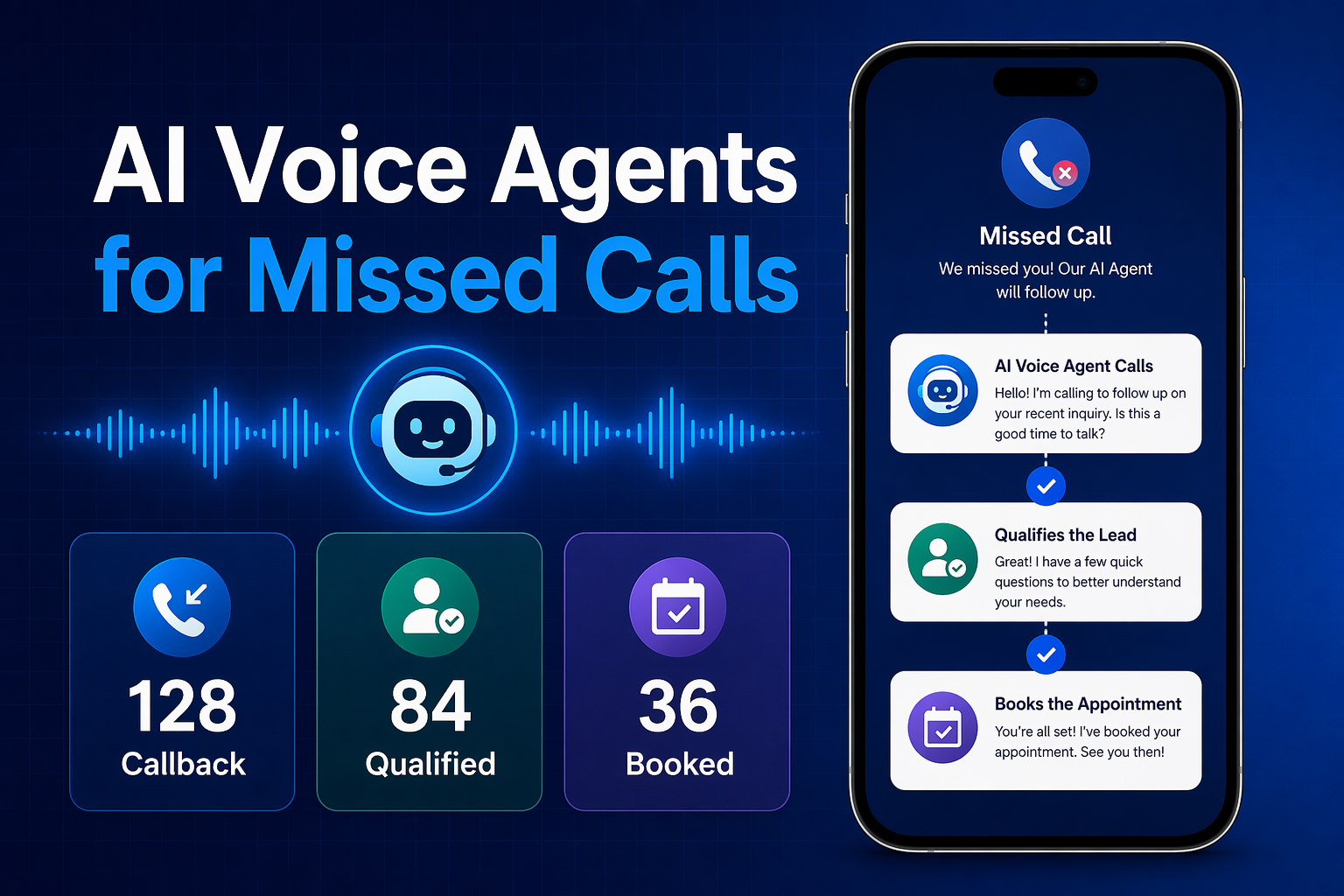
Ready to automate customer conversations?
Launch AI voice agents and WhatsApp bots with CallMissed — one API, 22+ Indian languages.