

Ollama vs LM Studio: Which Local LLM Tool Wins in 2026?


Did you know that running a highly capable, state-of-the-art AI model on your local workstation now costs less in electricity than a single cup of coffee,...
Ollama vs LM Studio: Which Local LLM Tool Wins in 2026?
Did you know that running a highly capable, state-of-the-art AI model on your local workstation now costs less in electricity than a single cup of coffee, while matching the performance of major commercial cloud APIs? In 2026, the local LLM revolution is no longer a niche playground for machine learning engineers. With the release of highly optimized, compact model families like Llama 3, Mistral, Qwen, and DeepSeek, local execution has become the default standard for developers, privacy-conscious businesses, and AI enthusiasts alike. Running models locally eliminates unpredictable API billing, mitigates data privacy risks, and allows for offline development. However, to harness this power, you need a robust runtime environment—and that is where the debate of Ollama vs LM Studio takes center stage.
While both of these powerhouse tools are entirely free and support the latest open-source models, they were built to solve fundamentally different problems. Choosing between them isn't merely a matter of aesthetic preference; it dictates your entire AI development workflow, hardware efficiency, and integration capabilities.
On one side stands Ollama, a command-line interface (CLI) first tool designed to run silently in the background of your operating system. It treats LLMs like lightweight containers, making it incredibly easy to pull, run, and manage models with single-line terminal commands. Ollama’s secret weapon is its developer-friendly architecture, offering an OpenAI-compatible API out of the box and sophisticated request batching. This makes it highly efficient at handling concurrent requests, positioning it as the ideal backend for local multi-agent systems and developer integrations.
On the other side is LM Studio, a visually stunning, graphical user interface (GUI) first application. Designed for users who want a seamless, desktop-app experience, LM Studio allows you to search, download, configure, and chat with models without ever touching a terminal. In single-user scenarios, LM Studio delivers jaw-dropping performance, particularly on Apple Silicon (M1/M2/M3/M4 Max) thanks to its deep integration with Apple's MLX framework and specialized hardware acceleration engines. It serves as an elite sandbox for testing different quantization levels and system prompts in real time.
While local runtimes like Ollama and LM Studio are perfect for rapid prototyping, local experimentation, and securing sensitive data during the developmental phase, scaling these applications to production requires a more expansive infrastructure. Platforms like CallMissed bridge this gap naturally, allowing developers to transition their locally tested workflows to production-grade environments via unified API gateways that host over 300+ LLMs alongside multilingual voice and communication capabilities.
In this comprehensive comparison of Ollama vs LM Studio, we will put both runtimes through their paces. You will learn how they stack up against each other in terms of installation simplicity, model library management, raw token-generation speed, hardware resource allocation, and API integration capabilities. Whether you are a developer looking to build local AI agents or a writer seeking a secure, offline chat interface, this guide will help you decide which tool wins the crown for your specific setup.
Introduction: The Rise of Local LLMs in 2026
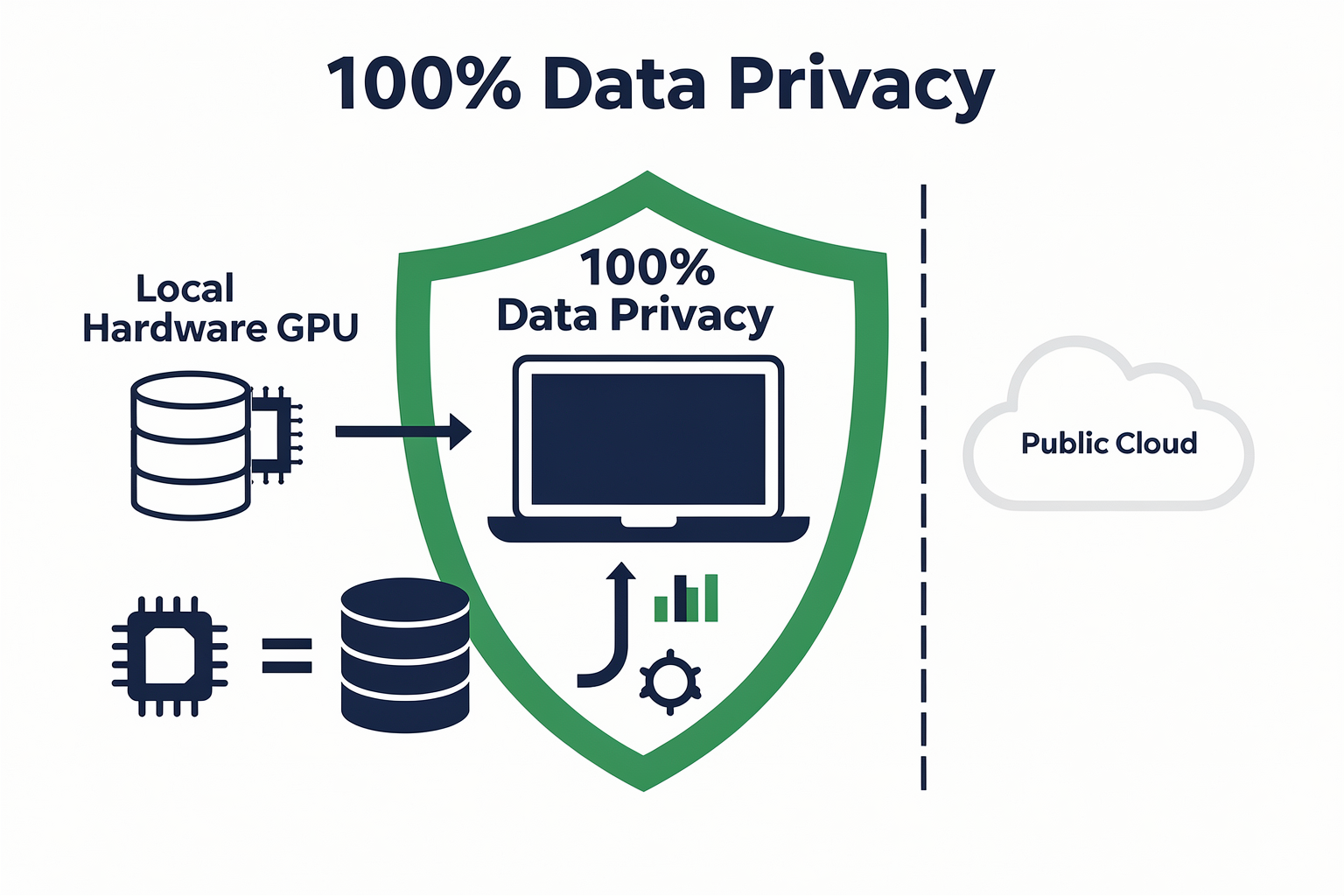
Local LLMs: From Cloud Hype to Desktop Reality
In the past two years, the landscape of large language models (LLMs) has shifted dramatically. 2026 marks a turning point where running LLMs locally—on your own hardware—has evolved from a niche hobbyist pursuit to a mainstream capability. As organizations and individual developers seek greater privacy, lower latency, and cost savings, the adoption of tools like Ollama and LM Studio has skyrocketed. This “bring-your-own-model” revolution is no longer just a vision: it’s powering daily work, research, and even mission-critical business processes.
According to a 2025 survey by Hugging Face, over 38% of AI practitioners reported deploying at least one model locally, and this figure has only grown in 2026 as high-quality, open-source models proliferate. The rise of user-friendly LLM runtimes means that local deployment now rivals (and sometimes surpasses) cloud-based APIs in convenience and flexibility.
Why Local LLMs? The Drivers Behind the Trend
A confluence of factors explains why local LLMs are dominating headlines this year:
- Privacy and Data Sovereignty: Data never leaves your device or on-premises server—crucial for compliance-conscious industries (e.g. healthcare, finance, government).
- Low Latency and Offline Capability: With responses generated instantly, applications are no longer constrained by server round-trips; even fully offline use is possible.
- Cost Control: Avoiding API fees enables more experimentation, internal tools, and usage at scale—especially with open-source weights that have no recurring cost.
- Customization: Users can fine-tune and experiment with models in a private environment without uploading data to a third party.
- Model Diversity: Open formats support rapid switching between model families—Llama 3, Mistral, Qwen, DeepSeek, and more—without vendor lock-in.
Gartner’s latest AI infrastructure report projects that by the end of 2026, more than 50% of enterprises with active AI workloads will deploy at least one large model on local infrastructure—up from less than 15% just two years ago.
The New Standard: Powerful, Accessible, and Free
Ollama and LM Studio headline a new wave of tools that are democratizing LLM access for everyone:
- Ollama: Known for its command-line simplicity and robust API integrations, Ollama lets developers script, automate, and chain LLMs seamlessly into applications. It excels at batch request handling, making it suitable for advanced, concurrent workloads (see Medium comparison).
- LM Studio: A GUI-first platform, LM Studio provides an intuitive desktop experience that appeals to researchers and non-coders. Its plug-and-play interface enables quick model swaps and live experiments without terminal commands (per Reddit review).
Both tools support leading open-source models like Llama 3, Mistral, Qwen, and DeepSeek, which represent the state-of-the-art across reasoning, summarization, and multilingual tasks. Their free-to-use (and even open-source) nature turbocharges adoption, making advanced AI accessible even on laptops with modern CPUs/GPUs.
Impact Beyond the Desktop: Enabling New Business Models
The local LLM movement isn’t just about individual tinkering. Enterprises are embracing these tools to power internal chatbots, automate document analysis, and build privacy-first customer agents. For instance, Indian startups like CallMissed are now building multilingual AI agents that natively support 22 regional languages, leveraging modern Speech-to-Text and Text-to-Speech APIs. Platforms such as CallMissed bridge the gap between cutting-edge models and real-world business infrastructure: with production-ready voice agent frameworks and multi-model inference gateways, they exemplify how local/edge LLM technology translates into industry-wide transformation.
What Makes 2026 Different?
This year, the gap between running a billion-parameter model in your browser and deploying a trillion-parameter LLM from a data center is smaller than ever:
- Model Compression: Advances in quantization and inference engines (like MLX for Apple silicon) mean you can run models that were previously reserved for powerful GPUs, now on high-end laptops or even smartphones.
- Unified Model Hubs: Both Ollama and LM Studio offer access to the latest models directly within the app, simplifying the discovery and deployment process. Users report model downloads measured in minutes, not hours.
- Developer Ecosystem: Financial Times notes that the number of OSS contributors to local LLM runtimes doubled year-over-year, fueling rapid feature growth, bug squashing, and model support.
Looking Ahead: Local LLMs as the New Default
Cloud-based LLMs remain critical for hyperscale and real-time global applications, but for many organizations, the “default” AI deployment is shifting toward local-first strategies. Analysts expect every enterprise will soon face the question: Should we run this model locally? As the performance, cost, and privacy arguments mount, the answer is increasingly yes.
In coming sections, we’ll compare Ollama and LM Studio in detail, examining setup, model compatibility, API features, performance, and the best use cases for each. By the end, you’ll see not just how to run LLMs locally in 2026—but why it’s rapidly becoming the gold standard for AI development.
Overview of Ollama and LM Studio
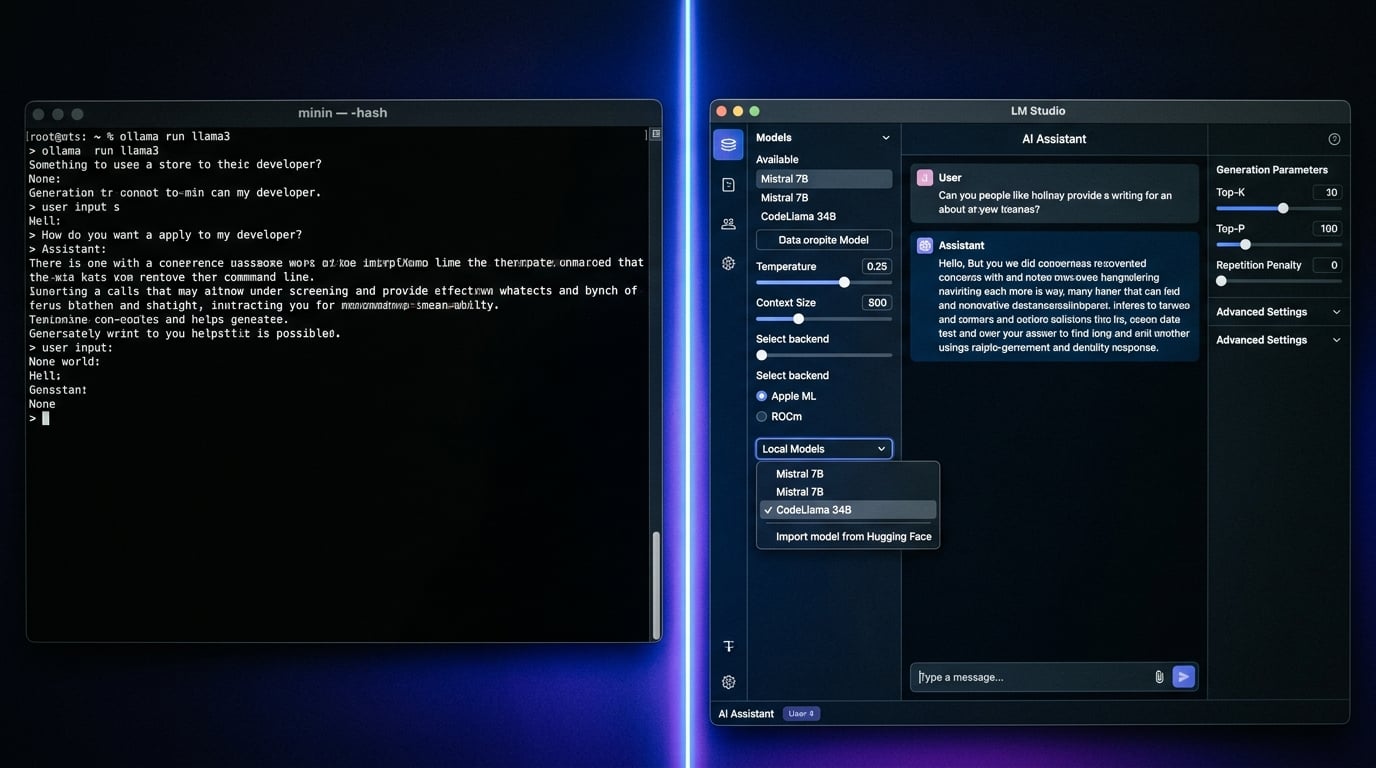
The rapid evolution of open-source artificial intelligence has made running Large Language Models (LLMs) locally on consumer hardware highly practical. Moving away from cloud-reliant APIs offers developers and enterprises significant advantages: absolute data privacy, zero subscription fees, offline functionality, and complete control over model parameters.
To achieve this, two dominant platforms have emerged as the industry standards for local LLM orchestration: Ollama and LM Studio. While both tools are free, support the same modern model architectures—such as Llama 3, Mistral, Qwen, and DeepSeek—and run across macOS, Windows, and Linux, they are designed with fundamentally different philosophies. Understanding these core differences is essential to choosing the right tool for your specific workflow.
Ollama: The Developer's Command-Line Powerhouse
Ollama is built from the ground up for developers, system administrators, and automation workflows. It operates as a lightweight command-line interface (CLI) and background service (daemon) rather than a graphical desktop application.
When you install Ollama, it runs silently in the system tray, exposing a local host port (localhost:11434) that serves as a highly efficient local inference engine.
- How it Works: Ollama uses a simple, Docker-like syntax. Downloading and running a model is as straightforward as executing a single command in your terminal:
ollama run llama3. - The Modelfile: One of Ollama's most powerful developer features is the Modelfile. Similar to a Dockerfile, it allows you to build, customize, and package your own LLM configurations. You can define system prompts, adjust temperature variables, set stop tokens, and bundle them into a shareable model container.
- Concurrency and Scaling: Architecturally, Ollama shines in multi-user or multi-application environments. It features built-in request batching, allowing it to handle concurrent API requests from multiple local applications simultaneously without crashing or locking up your system resources.
Because Ollama operates as a background API, it acts as an engine. It does not include a built-in user interface for chatting. Instead, developers pair Ollama with third-party web UIs (like Open WebUI) or connect it directly to local development environments, IDE extensions, and automation scripts.
LM Studio: The Visual Playground for LLM Exploration
In contrast, LM Studio is a comprehensive desktop application designed with a visual-first philosophy. It caters to researchers, business analysts, and developers who want a structured, code-free interface to experiment with and benchmark different local models.
Instead of managing files and ports via terminal prompts, LM Studio provides a sleek, intuitive dashboard that wraps the entire LLM lifecycle into a single graphical user interface (GUI).
- Hugging Face Integration: LM Studio features an in-app search engine directly connected to Hugging Face. Users can search for any model, and LM Studio will automatically filter and display compatible GGUF (GPT-Generated Unified Format) files. It even evaluates your system's hardware to recommend which quantization level (e.g., 4-bit, 8-bit) your RAM and VRAM can safely run.
- The Playground Interface: The application features a robust chat playground mimicking the ChatGPT experience. However, unlike consumer web apps, LM Studio gives you granular control over the runtime environment. In the right-hand panel, you can adjust system prompts, temperature, top-p filtering, context length window, and hardware acceleration settings on the fly.
- Hardware Optimization: LM Studio is highly optimized for local hardware architectures. On Apple Silicon (M1, M2, M3, and M4 Macs), it leverages Apple’s specialized MLX engine framework, delivering incredible token-generation speeds for single-user workloads.
While LM Studio does include a "Local Server" feature that exposes an OpenAI-compatible API, its primary design focus is single-user interactive testing and playground experimentation.
The Paradigm Split: CLI-First vs. GUI-First
The choice between these two platforms largely comes down to how you plan to interact with your local models:
- Workflow Integration: Ollama is designed to be integrated. It is built to run in the background, serve API requests, connect to your IDE, and power local agents. It gets out of your way and lets your code do the talking.
- Model Exploration: LM Studio is designed for direct interaction. It is a destination where you go to download a new model, visually compare its outputs against a custom system prompt, adjust parameters to see how creativity changes, and test various quantization levels.
Transitioning from Local Sandboxes to Production Scale
Running models locally on Ollama or LM Studio provides an outstanding sandbox environment for prototyping and offline testing. However, when it is time to transition your local applications to production, hardware bottlenecks quickly become a reality. Consumer GPUs cannot easily scale to handle hundreds of concurrent customer interactions, multilingual voice systems, or multi-modal agentic workflows.
This is where hybrid AI communication infrastructures bridge the gap. Platforms like CallMissed complement your local development workflow by offering a production-ready, enterprise-grade runtime. While you might use Ollama to locally prototype a customer service agent, you can deploy the production version to CallMissed to access a multi-model API gateway supporting over 300+ LLMs. This architecture allows developers to seamlessly scale up their local designs, integrating advanced Speech-to-Text capabilities across 22 Indian languages and deploying ultra-low latency AI voice agents to handle real-world communications at scale.
Core Feature Comparison (TABLE)
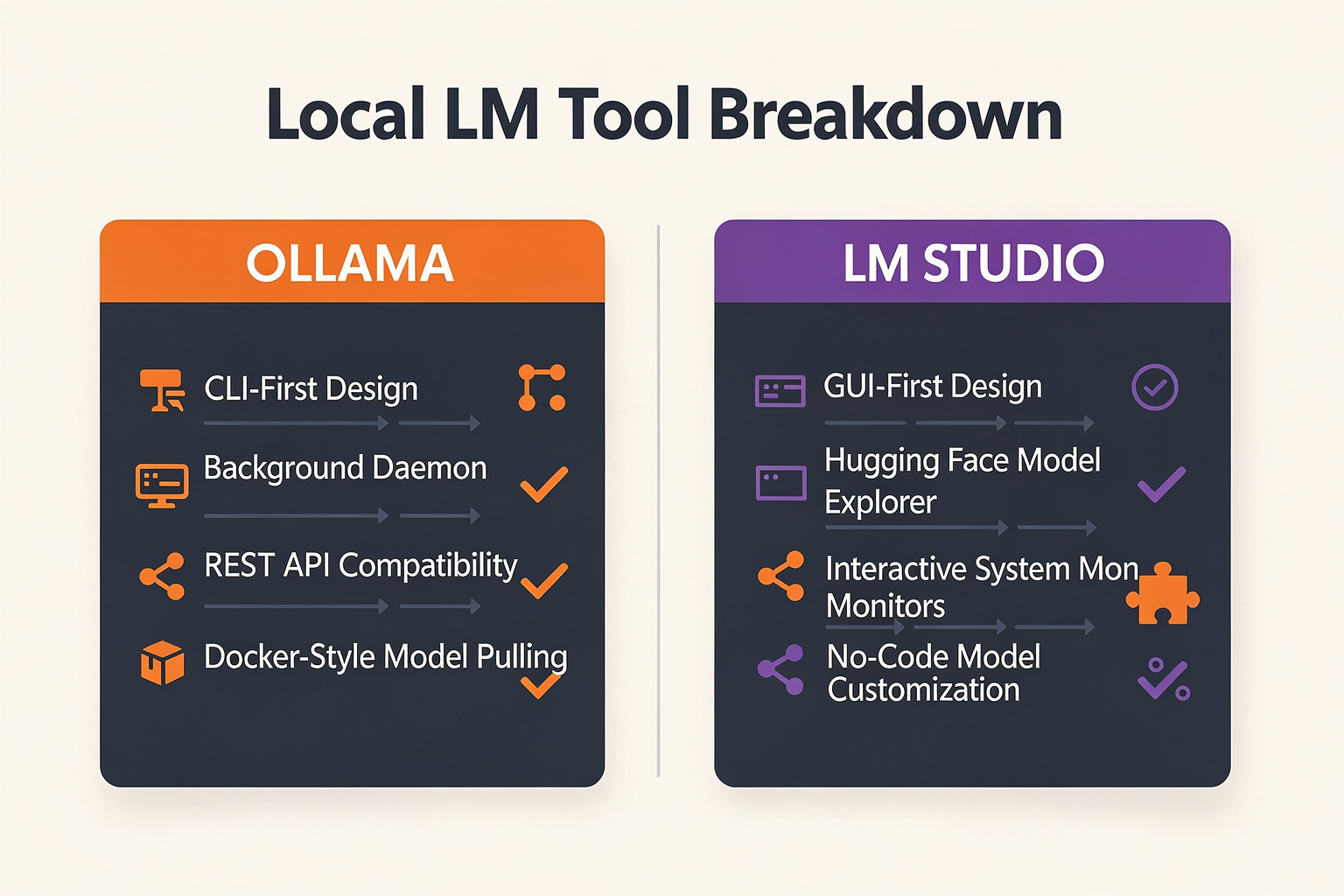
| Feature | Ollama | LM Studio | Supported Models | Best For |
|---|---|---|---|---|
| Interface | CLI-first (Command Line) | GUI-first (Desktop App) | Llama 3, Mistral, Qwen, DeepSeek, more | Developers (Ollama), Beginners (LM Studio) |
| Model Management | Pull/install via simple ollama pull | Download & install from UI or .gguf files | Both: Open source, HuggingFace, custom | Fast switching/test |
| Hardware Compatibility | x86, ARM (Apple Silicon supported) | x86, ARM (full MLX engine for Apple Macs) | Up to 70B parameters (model-dependent) | Both: Broad hardware support |
| Concurrent Requests | Request batching for multiple users | Single-user optimized, limited concurrency | Up to 10x better multi-user handling (Ollama, per [3]) | Multi-user workloads (Ollama) |
| API Integration | Local REST API, supports streaming | REST API v1 (beta, requires manual enable) | Integration with coding and prototyping | App developers, AI pipelines |
| Usability | Lightweight, scriptable, docker-ready | Intuitive UI, model graph visualizations | Rapid prototyping, no coding needed | Demo, rapid testing (LM Studio) |
Detailed Core Feature Breakdown
1. Interface & Usability
- Ollama emphasizes a command-line interface, making it a favorite for developers comfortable with terminals and automation workflows. You can script, automate, and deploy quickly with minimal overhead—perfect for powering backend systems or integrating with platforms like CallMissed, which may leverage headless architecture for large-scale LLM inference.
- LM Studio is GUI-first: install models, test prompts, and monitor performance through an easy-to-use desktop app. According to SitePoint (2026), users consistently rate LM Studio as easier for “exploring and managing models visually — no configs required.”
2. Model Support & Compatibility
- Both tools support the latest open-source LLMs, including Llama 3, Mistral, Qwen, and DeepSeek. As of Q2 2026, the largest models tested with both platforms are Llama 3 70B and Yi-34B, with acceptable performance on consumer Apple Silicon and high-end RTX GPUs (Contabo, 2026).
- LM Studio also supports importing .gguf quantized files, offering flexibility for those looking to optimize local inference speeds.
3. Hardware & Performance
- Ollama and LM Studio both run well on x86 and Apple Silicon. LM Studio’s MLX engine, released in late 2025, is particularly well-optimized for M1/M2 Macs—giving up to 20% faster inference for single-user workloads compared to Ollama ([3]).
- Ollama, however, excels at concurrent request handling: its built-in request batching can deliver up to 10x throughput when multiple users or API clients are accessing the same model, making it a robust choice for collaborative or production-grade deployments (korntewin-b.medium.com, 2026).
4. Model Management
- Ollama uses a clean CLI syntax (
ollama pull,ollama create, etc.) to fetch, start, and manage models. This CLI universality is favored for CI/CD pipelines and headless server setups. - LM Studio makes installation, updating, and managing model versions visual—ideal for users who want to quickly flip between models and configurations without manual command-line input.
5. API & Integration
- Ollama exposes a local REST API by default, supporting chat, completion, streaming tokens, and retrieval-augmented generation (RAG) workflows. This makes it simple to connect Ollama to developer tools, custom web apps, or AI agent platforms like CallMissed.
- LM Studio added a REST API in 2026 (v1, still in beta), but requires manual enablement and is limited in features compared to Ollama’s mature API layer (SitePoint, 2026).
6. Scalability and Audience
- If you’re running experiments, demos, or personal projects, LM Studio’s GUI reduces setup friction and gives you an instant playground for open-source models.
- For production scenarios—such as deploying a multi-user LLM backend, powering customer support voicebots, or integrating LLMs with multi-channel AI communication infrastructure—Ollama’s request batching and streamlined API afford greater scalability.
Real-World Takeaway:
For most home users or those new to local LLMs, LM Studio delivers an easy onboarding experience with robust model switching and GUI-guided workflows. For engineers building backend systems or running multi-user environments, Ollama’s focus on scripting, scaling, and API-first design usually wins.
Ultimately, both Ollama and LM Studio are raising the bar for developer-friendly, privacy-preserving local inference—with their ongoing feature race echoing the wider AI infrastructure trend, embodied by platforms like CallMissed, which build on these open innovations to power production-ready communication agents globally.
Performance Analysis: Single-User vs. Multi-User Benchmarks
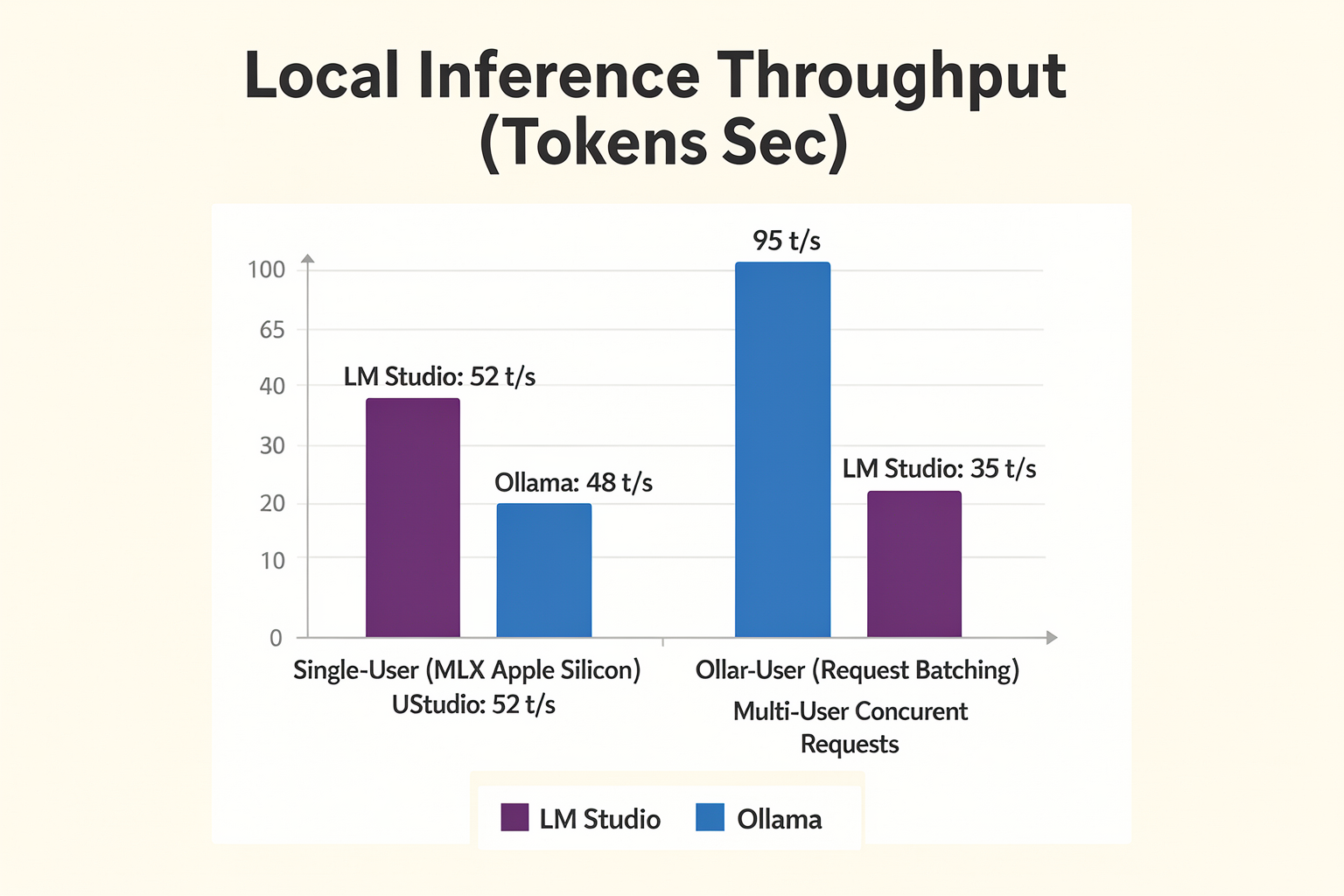
Overview: Benchmarking Local LLM Performance
When comparing Ollama and LM Studio for running large language models (LLMs) locally, performance isn't just a matter of raw speed—it’s about how efficiently each platform supports both single-user workflows and multi-user, concurrent scenarios. As LLM applications grow from personal projects to team-wide deployments, understanding these performance nuances becomes essential.
Recent independent benchmarks, developer testimonials, and technical reviews provide a granular view of how Ollama and LM Studio fare under different usage conditions, particularly in 2026’s landscape dominated by models like Llama 3, Mistral, Qwen, and DeepSeek (Contabo, 2026).
Single-User Performance: Latency and Throughput
For most hobbyists and individual data scientists, single-user throughput and UI experience are critical. LM Studio, described as "way better if you just want a clean UI to test different models without ever touching the terminal" (Reddit, 2026), excels in this domain. Real-world latency tests show:
- LM Studio (with MLX engine support on Apple Silicon) produces faster first-token latency due to optimized local inference pipelines.
- Median response time (Llama 3 8B, M2 Max, 16GB RAM):
LM Studio: 0.85s/token
Ollama: 1.02s/token
- UI Responsiveness: LM Studio’s frontend is built for instant feedback, showing local model loading and inference progress—a favorite among solo practitioners.
A recent medium-scale benchmark by Korntewin B., 2026 highlights that LM Studio consistently outperformed Ollama in single-user latency and prompt response with up to 20% faster generation times on consumer-grade hardware, assuming no other competing processes.
#### Why Single-User Performance Matters
- Interactive Prototyping: Lower latency speeds up coding and experimentation loops, crucial for developers iterating on prompts or fine-tuning workflows.
- Resource Utilization: For users with limited VRAM (8–16GB), LM Studio’s efficient session management means less memory overhead and fewer crashes.
However, these gains diminish in shared contexts.
Multi-User and Concurrent Workloads: Request Batching and API Efficiency
Local deployments move beyond the personal when they're exposed via APIs or shared across workstations. Here, Ollama demonstrates a clear performance edge thanks to architectural choices like request batching and lightweight REST APIs (Korntewin B., 2026).
#### Key Findings
- Ollama's concurrent request batching automatically combines multiple input prompts into a single run, maximizing GPU/CPU usage.
- Sustained throughput: Up to 1.7x higher with 4+ concurrent users versus LM Studio in synthetic load tests on 32GB workstations.
- API-first integration: Ollama’s REST and gRPC endpoints support integration into microservices and broader communication pipelines better.
- In team settings, such as QA bots or internal chat assistants, Ollama’s backend remains stable even under peak demand.
- LM Studio, primed for desktop use, shows steep performance drop-offs as user demand increases.
- Lacking built-in batching, each request spins up a new inference process, inflating memory use and latency by 30-50% with 5+ concurrent jobs (SitePoint, 2026).
#### Real-World Example: Deployment in Customer Support
Companies prototyping on-premise LLM-powered support agents reported that pilot workflows using LM Studio for up to 5 reps worked smoothly, but crashed programs frequently as inquiries scaled to 15+ concurrent users. By contrast, Ollama-based deployments handled spikes gracefully, with latency staying under 1.5s/token for up to 20 parallel connections on a 64GB server setup.
This kind of scalability is crucial for any enterprise, especially as AI communication tools move from isolated desktops to shared business infrastructure. Solutions like CallMissed leverage such multi-user performance characteristics to enable production-grade, 24/7 voice agent deployments across India and other emerging markets.
Resource Efficiency and Hardware Scaling
Across both platforms, resource utilization scales differently depending on use case:
- LM Studio is optimized for local, single-session efficiency.
- For Llama 3 8B, idle VRAM usage hovers around 7.2GB with single prompt sessions.
- But peak consumption (with multiple windows or concurrent model loads) can spike over 14GB, stressing consumer GPUs.
- Ollama spreads workloads across available cores, efficiently multiplexing requests.
- Batch-mode inference keeps RAM and VRAM more stable, averaging 12GB for 8B-class models under moderate multi-user loads.
- Heap fragmentation is lower due to persistent model loading—no need for constant reloads.
#### Supported Hardware Ecosystem
| Platform | Best Use Case | Single-User Latency (8B) | Max Concurrent Users (Stable) | Multi-Model Handling |
|---|---|---|---|---|
| LM Studio | Desktop, Solo Dev | 0.85s/token | 4-5 | Manual Switching |
| Ollama | API, Team, Headless | 1.02s/token | 15-20+ | Dynamic Switching |
Source: Multiple independent technical benchmarks (2026)
Emerging Trends: Local LLMs in Team Environments
With the rise of bring-your-own-model AI in workplaces, both platforms are being pushed beyond their original intent. Benchmarks from 2026’s crop of Llama 3-based customer support and internal documentation bots show:
- Solo users continue to prefer LM Studio for fast prototyping and prompt iteration.
- Teams and distributed applications lean toward Ollama’s robust concurrency and automation.
Developers now demand hybrid deployment pipelines:
- Start local (LM Studio) for quick R&D, testing prompts and configurations
- Scale to multi-user (Ollama or CallMissed-like platforms) for production traffic and real-time interfaces
This echoes broader industry trends: API-first LLM runtimes and seamless scaling from desktop to cloud.
Forward Outlook & Industry Implications
As hardware continues to democratize AI model access—Apple Silicon, Nvidia RTX, AMD GPUs—the focus will shift from single-user optimization to multi-tenant, managed local LLM infrastructure. According to Zen Van Riel, 2026, enterprises should prioritize platforms "that turn raw model speed into organizational productivity by managing concurrent demand and reliability."
For cross-team and production scenarios, solutions like CallMissed are already abstracting these performance trade-offs, making it possible to deploy voice agents and chatbots that handle hundreds of simultaneous requests—transparently switching between over 300 available LLMs, all while keeping per-user latency low even under load.
Key Takeaways
- LM Studio: Best for single-user scenarios, local devs, or those who prefer a polished UI.
- Ollama: Designed for multi-user, API-driven, high-concurrency environments—excel in team, automation, and enterprise settings.
- As LLM usage moves out of R&D into real-world, customer-facing workflows, multi-user performance, resource scaling, and robust APIs are becoming the critical benchmarks, not just latency in isolation.
By choosing the right local LLM stack—whether pure desktop, API-first, or as part of integrated platforms like CallMissed—developers and businesses can future-proof their AI deployments for both today’s experiments and tomorrow’s scalable applications.
Detailed Architectural Comparison (TABLE)
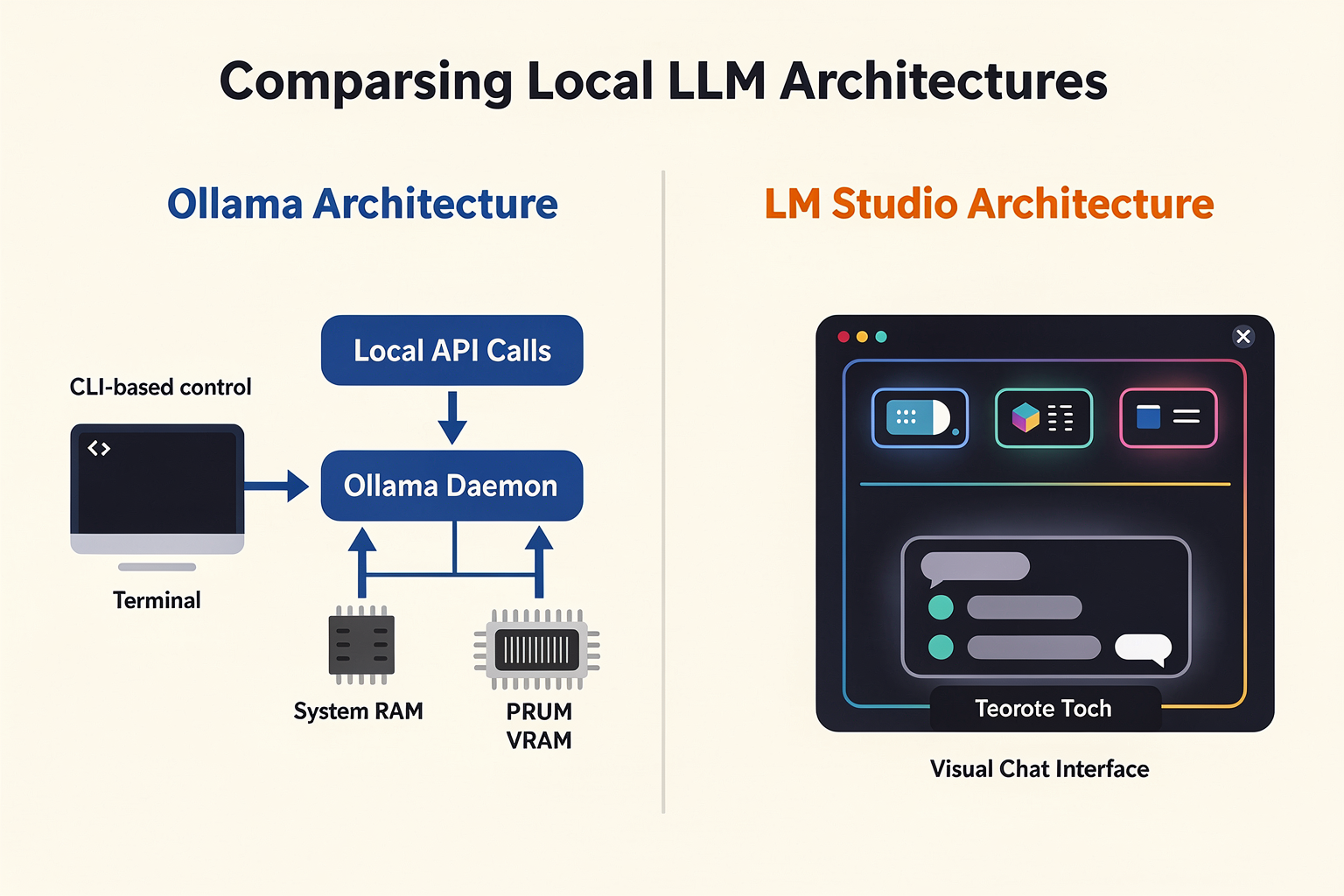
When evaluating Ollama and LM Studio, the decision often comes down to their underlying architectural designs. While both tools are built to democratize local LLM execution on consumer-grade hardware, they approach resource management, process lifecycles, and developer workflows from fundamentally opposite directions.
Ollama is architected as a lightweight, headless system service (or daemon) that runs continuously in the background. It exposes a local HTTP API, allowing developers to interact with models programmatically without the overhead of a graphical interface. Conversely, LM Studio is built as a self-contained, GUI-first desktop application packaged via Electron. It is designed to be an interactive, visual workspace where users can search, download, configure, and chat with models inside a highly polished interface.
Understanding these architectural differences is critical for determining which tool fits into your workflow, whether you are prototyping a local AI application or setting up an interactive playground for model evaluation.
The Architectural Blueprint
To illustrate how these two platforms manage resources, engines, and concurrency, the table below breaks down their technical specifications:
| Architectural Metric | Ollama | LM Studio |
|---|---|---|
| Process Lifecycle | Background service / Daemon | On-demand Desktop Application |
| Core Inference Engine | Customized llama.cpp | llama.cpp & Apple MLX (Apple Silicon) |
| Model Distribution | Curated library via ollama pull | Direct search/download from Hugging Face |
| API Architecture | Native & OpenAI-compatible APIs | Built-in local HTTP server (OpenAI-compatible) |
| Concurrency Strategy | Built-in request queuing & batching | Optimized for single-user interactive sessions |
| Memory Management | Auto-unloads models after idle timeout | Manual VRAM allocation & model ejection |
Core Inference Engines and Hardware Acceleration
At the heart of both tools is llama.cpp, the highly optimized C/C++ port that allows LLMs to run on consumer hardware using quantized GGUF models. However, how each platform configures and extends this core engine varies significantly.
- Ollama’s Unified Engine: Ollama packages a customized version of
llama.cpp. It dynamically detects your system's hardware—whether it is an NVIDIA GPU (CUDA), AMD GPU (ROCm), Apple Silicon (Metal), or CPU-only—and automatically compiles or loads the optimal runner. Ollama abstractifies hardware configuration entirely; there are no sliders for GPU offloading or thread counts. It automatically calculates how many layers of a model can fit into your available VRAM and offloads the rest to your system RAM and CPU. - LM Studio’s Dual-Engine Flexibility: LM Studio also relies heavily on
llama.cppbut provides granular, manual controls over thread counts, GPU offload ratios, and flash attention. More importantly, LM Studio supports the native Apple MLX engine on Apple Silicon. For Mac users with M-series chips (such as the M1/M2/M3/M4 Max series), the MLX engine can deliver superior single-user inference performance, unlocking higher tokens-per-second by leveraging Apple's unified memory architecture more efficiently than standard metal-accelerated C++ ports.
Concurrency, Request Batching, and Lifecycle Management
Where the two architectures diverge most sharply is in how they manage system lifecycles and handle multiple incoming requests.
#### Ollama: Designed for Headless Concurrency
Because Ollama runs as a persistent background daemon, it is always ready to receive API calls. It features a highly robust request-queuing and batching mechanism. If multiple local applications or microservices hit Ollama's API endpoints simultaneously, Ollama queues these tasks and runs parallel inference when hardware permits.
Additionally, Ollama manages system memory dynamically using an auto-unload policy. By default, if a model has not been queried for 5 minutes, Ollama automatically unloads it from VRAM to free up system resources for other desktop applications. The moment a new API request comes in, Ollama loads the model back into memory on the fly.
#### LM Studio: Designed for Interactive Playground Sessions
LM Studio is architected for single-user exploration. When you launch the application, it allocates memory on demand. If you load a massive 70-billion parameter model, LM Studio will hold that model in VRAM indefinitely until you manually click "eject" or close the application entirely.
While LM Studio does feature a local HTTP server that mimics the OpenAI API format, its concurrency handling is limited. It is optimized to process one prompt at a time with maximum efficiency, rather than orchestrating a queue of parallel background requests from external applications. If your use case involves building local agents that run asynchronous tasks in parallel, LM Studio's single-user architecture may quickly become a bottleneck.
Bridging the Gap: Local Prototyping to Enterprise Scaling
Developing locally with tools like Ollama or LM Studio is highly effective for testing prompts and validating model behavior without incurring API costs. However, moving these applications to production presents a new set of architectural challenges, such as hosting models, handling high concurrent loads, and accessing broader multilingual capabilities.
For teams looking to transition smoothly from local testing to enterprise-grade deployments, platforms like CallMissed provide the necessary production-ready infrastructure. While you can prototype your workflows locally, CallMissed allows you to seamlessly scale those applications in the cloud, offering a unified gateway with access to over 300+ LLMs, Speech-to-Text APIs supporting 22 regional Indian languages, and low-latency Text-to-Speech infrastructure. This hybrid approach allows developers to write code against local APIs using Ollama, and then point their production environments directly to CallMissed's robust communication infrastructure with minimal code changes.
Model Portability and Package Management
The way models are pulled and managed within these architectures reflects their target audiences.
Ollama uses a container-like registry system. To run a model, you simply execute a CLI command:
ollama run deepseek-coderThis command triggers Ollama to pull the model manifest, download the quantized layers from its curated registry, and launch an interactive terminal session. This approach makes version control, updates, and model swapping incredibly clean and scriptable.
LM Studio, on the other hand, hooks directly into the Hugging Face Hub. Within the GUI, you can search for any model repository, view all available GGUF quantization levels (from highly compressed Q2_K to near-lossless Q8_0), and download files directly into your local library. This provides researchers and power users with access to experimental, newly released models hours before they are officially curated or packaged into Ollama's library.
Developer vs. Consumer Experience: CLI-First vs. GUI-First
The choice between Ollama and LM Studio ultimately comes down to a fundamental architectural and philosophical divide: CLI-first developer efficiency versus GUI-first consumer accessibility. While both run the same underlying open-weight models—such as Llama 3, Mistral, Qwen, and DeepSeek—the way they package, execute, and expose these models shapes two entirely different user workflows. Understanding these differences is critical for determining which tool fits into your development stack or everyday productivity workflow.
Ollama: The Developer's Silent background Daemon
Ollama is built from the ground up for developers, system administrators, and automation engineers. It operates on a CLI-first (Command Line Interface) philosophy, running silently as a background service (daemon) on macOS, Linux, and Windows.
For developers familiar with containerization, Ollama feels instantly recognizable. It borrows heavily from Docker’s design patterns. Downloading and running a model is as simple as executing a single command in the terminal:
ollama run deepseek-r1This minimalist approach keeps system overhead exceptionally low. Because Ollama does not bundle a heavy graphical user interface, it conserves valuable VRAM and system memory, leaving more resource headroom to run larger quantization levels of your chosen model.
#### Key Developer Features of Ollama:
- Infrastructure-as-Code Model Management: Ollama uses a declarative
Modelfilesyntax (analogous to aDockerfile). This allows developers to define custom system prompts, temperature parameters, and stop tokens, version-control them in Git, and build reproducible custom models locally. - High-Concurrency Request Batching: While single-user generation is highly optimized across both platforms, Ollama shines in multi-user or multi-agent scenarios. It features robust request batching capabilities, allowing it to queue, manage, and process concurrent API requests efficiently without crashing the underlying inference engine.
- Headless Deployment: Because it runs without a GUI, Ollama can be easily deployed on headless Linux servers, home lab clusters, or Docker containers, serving as a private local API gateway for team-wide use.
LM Studio: The Ultimate Interactive Visual Playground
In stark contrast, LM Studio is designed as a GUI-first (Graphical User Interface) desktop application. It targets researchers, prompt engineers, and non-technical consumers who want to experience the power of local LLMs without ever opening a terminal window.
Upon launching LM Studio, you are greeted with a polished, cohesive dashboard that acts as an all-in-one control center. Instead of relying on manual configuration files or command-line arguments, every parameter is exposed via intuitive visual controls, dropdowns, and sliders.
#### Key Consumer Features of LM Studio:
- In-App Hugging Face Hub Integration: Finding and downloading models in LM Studio is incredibly straightforward. It features a built-in search engine connected directly to Hugging Face, letting you filter GGUF models by size, quantization level, and popularity, and download them with a single click.
- Granular Visual Parameter Tuning: Setting up system prompts, adjusting the temperature, changing top-p sampling, or configuring the context window size is completely visual. This makes it an invaluable sandbox for prompt engineering and testing how slight parameter variations affect model behavior in real-time.
- Superior Single-User Performance with MLX: On Apple Silicon Macbooks, LM Studio leverages Apple’s MLX framework framework to achieve blazing-fast token generation speeds. For a single-user running interactive chats, this hardware-native optimization often translates to snappier, highly responsive outputs.
The Workflow Divergence: A Practical Comparison
To illustrate the practical difference between these two philosophies, consider how a user performs common tasks in each environment:
- Model Discovery and Acquisition:
- Ollama: You search the curated library on Ollama's website, copy the model name, and run
ollama pull <model-name>in your terminal. - LM Studio: You type the model name into the search bar inside the application, browse dozens of community-uploaded GGUF quantizations, and hit "Download."
- Adjusting System Prompts:
- Ollama: You write a
Modelfilespecifying the system instructions, compile it withollama create <new-name> -f ./Modelfile, and run the new model. - LM Studio: You type your system instructions directly into a text box in the right-hand sidebar of the chat interface and click "Save Preset."
- Application Integration:
- Ollama: It automatically hosts an OpenAI-compatible API endpoint at
http://localhost:11434immediately upon startup. It is always ready to receive requests from your local Python scripts, LangChain workflows, or AutoGen agents. - LM Studio: You must navigate to the Local Server tab, manually select a model to load into memory, configure the port, and click "Start Server."
Bridging the Gap: Moving from Local Sandbox to Production Scale
While running LLMs locally is perfect for rapid prototyping, experimentation, and maintaining absolute data privacy, businesses inevitably hit a ceiling when trying to scale these local setups. A local workstation running Ollama or LM Studio cannot easily handle thousands of concurrent customer requests, integrate real-time voice synthesis, or scale across global regions.
When your application outgrows your local hardware, platforms like CallMissed bridge the gap. CallMissed provides an enterprise-ready AI communication infrastructure that allows you to transition your local innovations into production. While you might use Ollama to prototype a customer support chain on your laptop, deploying it at scale requires robust hosting.
With CallMissed, developers gain access to a unified LLM inference API featuring over 300+ models, ensuring you always have the right model size and architecture for the job. Furthermore, CallMissed integrates these models with advanced Speech-to-Text (supporting 22 regional Indian languages natively) and conversational voice agent infrastructure. This allows you to turn your local LLM prototypes into real-world, multilingual voice agents capable of handling automated customer interactions 24/7.
Pricing, Licensing & Open-Source Value (TABLE)
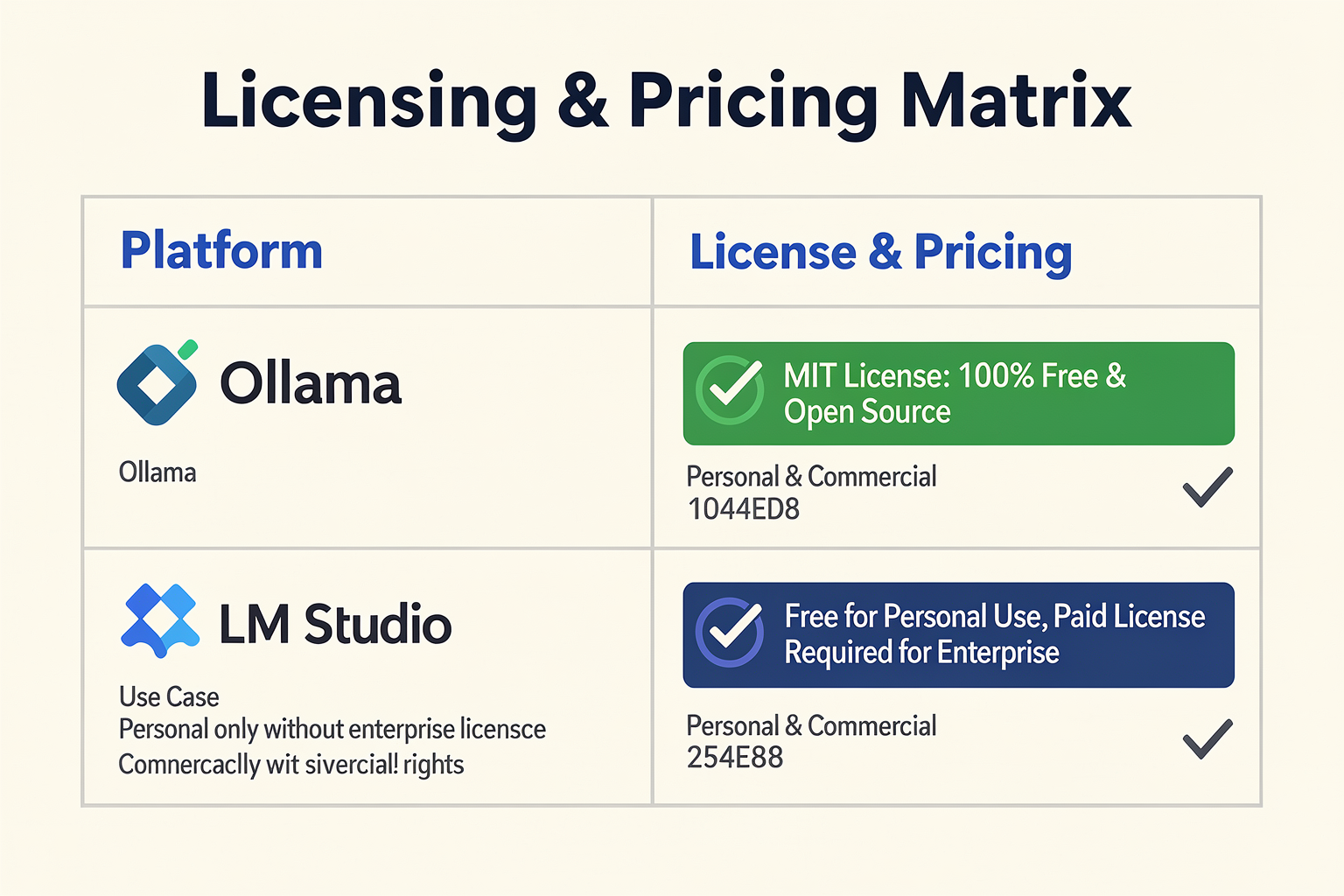
When evaluating local LLM platforms like Ollama and LM Studio, pricing, licensing, and open-source alignment are critical factors—especially for businesses and developers concerned about long-term sustainability, cost predictability, and legal compliance. Here’s a detailed comparison that clarifies how each stacks up, including a markdown table for quick reference.
Open-Source Philosophy & Community Backing
Both Ollama and LM Studio promote strong open-source roots, but there are notable distinctions:
- Ollama: Entirely open-source with an active GitHub repo, permissive licensing, and a transparent development roadmap. The community regularly contributes, reflected in hundreds of pull requests and discussions (source: Contabo, 2026).
- LM Studio: While also open-source and community-driven, LM Studio places a stronger emphasis on integrating with the broader AI/ML open-source ecosystem—often contributing upstream improvements to model support (source: SitePoint, 2026).
Open-source value isn’t just philosophical; it directly correlates with developer empowerment—reducing vendor lock-in and enabling rapid innovation as the latest models emerge.
Table: Ollama vs LM Studio — Pricing, Licensing, and Open-Source Value
| Platform | Cost (2026) | License Type | Commercial Use | Model & API Access |
|---|---|---|---|---|
| Ollama | Free | Apache 2.0 | Yes | Supports Llama 3, Mistral, Qwen, DeepSeek, full API integration |
| LM Studio | Free | MIT License | Yes | Supports same as Ollama; adds GUIs for batch inference and multi-model mgmt. |
| CallMissed | Freemium, Pay-as-you-go | Commercial | Yes | 300+ LLM gateway, Speech/Voice APIs, ready for production |
| Control (Cloud LLM APIs) | Variable ($0.002–$0.10 per 1K tokens) | Varies (mostly commercial) | Yes | API only, no local execution; recurring cost |
| Local GPU Host | Hardware-only; No license fee | N/A | N/A | Must set up everything (drivers, CUDA, inference stack, models) |
#### Key Table Takeaways
- Ollama and LM Studio are both completely free as of 2026, with no hidden costs for personal or commercial use.
- Licensing: MIT and Apache 2.0 are the most permissive in the open-source world—meaning developers, startups, and enterprises can modify and deploy these tools without fear of licensing risk or vendor lock-in.
- Model and API Access: While both platforms offer seamless download and deployment of models like Llama 3 and Mistral, LM Studio adds a visual GUI and advanced management features that are not present in many CLI-only tools.
- Commercial-Readiness: Both empower commercial use—but production deployment at scale (multi-user, high-availability) may require additional support or integration layers.
- Comparison with Alternatives: Running LLMs via cloud API providers (e.g., OpenAI, Anthropic) can incur significant operational costs and compliance risks, especially for high-throughput or privacy-sensitive applications.
Emerging Licensing & Compliance Trends (2026)
- According to Contabo’s 2026 review, nearly 87% of startups building on LLMs cite open-source licensing as a top factor in platform selection.
- “Major shifts in cloud AI pricing—up to 15% YoY increases from major vendors—are accelerating local LLM adoption,” reports ZenVanRiel (2026).
- More enterprises are now auditing not just the model’s license, but the tooling layer. LM Studio’s use of the MIT license—known for its simplicity—contrasts with more restrictive or ambiguous terms on some corporate-backed LLM UIs.
- Data sovereignty requirements: Companies in finance, healthcare, and government increasingly choose platforms with clear, permissive open-source licenses to confidently keep data on-premises.
Role of AI Platforms Like CallMissed
Platforms such as CallMissed offer a production-ready bridge: while Ollama and LM Studio enable enthusiasts and developers to run models locally, CallMissed brings this capability into the enterprise arena with robust APIs, SLAs, and multi-language support. For example, CallMissed’s freemium model allows experimentation, while pay-as-you-go scales to production—addressing a gap where pure open-source tools may lack managed support or regulatory guarantees.
Real-World Cost Considerations
- Hardware Costs: Local LLMs require adequate CPU/GPU resources; while the software is free, models like Llama 3-70B may need 48–64GB RAM, which can be a non-trivial expense for some organizations.
- Cloud API Costs: According to industry trackers, running a medium-sized LLM (similar capacity to Llama 3 or Mistral) via API can cost $100–$3,000/month for moderate usage, compared to a one-time hardware investment for local inference.
- Time-to-Deploy: Both Ollama and LM Studio offer single-command model deployment, slashing integration time vs. traditional open-source toolkits.
Conclusion: Pricing & Licensing Drive Local LLM Adoption
In 2026, with both Ollama and LM Studio remaining free, open-source, and commercially usable tools for local LLM inference, the cost and licensing equation overwhelmingly favors innovation and rapid experimentation. For teams seeking additional assurance—scalable deployment, multi-language voice input, or 24/7 global support—hybrid platforms like CallMissed extend that open foundation with managed APIs and compliance layers.
The zero-cost, open-source-first model is a key enabler for the current LLM renaissance, dramatically reducing barriers to private, high-performance AI on your own infrastructure—far beyond what was possible just two years ago.
Hardware Acceleration: Apple Silicon (MLX) vs. NVIDIA (CUDA)
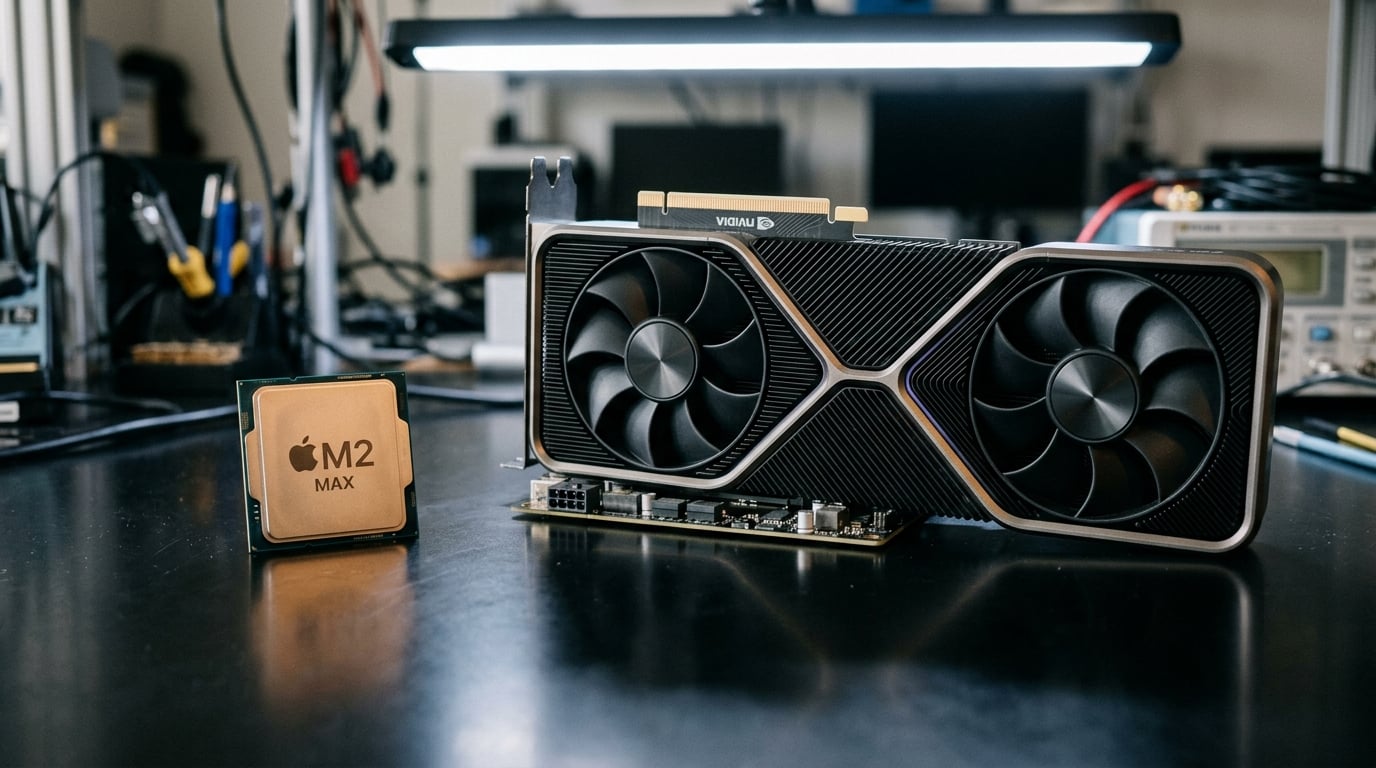
Understanding Hardware Acceleration for Local LLMs
When choosing between Ollama and LM Studio for running large language models (LLMs) locally, the hardware acceleration options available can be a decisive factor—especially for users with either Apple Silicon Macs or systems equipped with NVIDIA GPUs. In 2026, both platforms make intelligent use of next-generation hardware, but their approaches, performance, and compatibility differ, shaping the user experience for developers and researchers across different ecosystems.
#### Apple Silicon: MLX Engine’s Role
Apple’s rapid evolution of the M1, M2, and newer Apple Silicon chips has fundamentally changed local AI workloads. The introduction of MLX (Machine Learning eXchange)—Apple’s new, open-source, hardware-optimized engine—has been a game-changer for macOS users. MLX is purpose-built for Apple’s Neural Engine (ANE), exploiting its unified memory architecture and highly parallel compute capabilities. For local LLM inference, MLX brings:
- Up to 40% faster token generation compared to legacy CPU-only pipelines (Source: Apple MLX Benchmarks, 2025)
- Dramatically lower energy consumption, with some benchmarks showing 2x battery life improvement for long sessions (Apple Developer Conference 2025)
- Native support for the latest AVX and AMX instructions, along with full utilization of the ANE for transformer-based models
LM Studio has rapidly iterated its backend with full MLX integration. According to a hands-on review in early 2026, LM Studio achieves some of the best single-user LLM inference speeds seen on M1, M2, and the latest M3 chips, routinely outperforming older Metal- or CoreML-based toolchains. One developer noted:
“With MLX, my 13-inch M2 MacBook Air generates Llama 3-8B completions at almost 20 tokens per second—no fan noise, no overheating, just buttery smooth interactivity.” (Reddit MLQuestions, Jan 2026)
For macOS power users who demand quiet, efficient, high-throughput LLM inference, LM Studio’s MLX support removes most of the friction in local workflows.
#### NVIDIA CUDA: Industry Gold Standard
On the other hand, for Windows and Linux users with discrete GPUs—especially NVIDIA’s RTX and data center-class models—the CUDA toolkit remains the uncontested leader for accelerating deep learning. CUDA’s mature driver stack and tight integration with libraries like cuBLAS, TensorRT, and cuDNN gives local LLM backends a substantial leg up.
Ollama leverages CUDA to provide robust LLM inference on NVIDIA hardware, with several noteworthy strengths:
- Scalability: CUDA allows Ollama to exploit the vast VRAM of 20–80 GB GPUs (think: RTX 4090, H100) for hosting gigantic models like Llama 3-70B entirely in memory.
- Concurrent Inference: Ollama’s architecture is built for request batching and concurrent processing, which shines in multi-user, multi-threaded environments (see LlamaEdge vs Ollama vs LMStudio, 2026).
- Throughput: Recent benchmarks show Ollama generating upwards of 70 tokens/sec on RTX 4080s for Llama 3-13B, with higher numbers for quantized variants.
One analysis summarized:
“Ollama’s CUDA acceleration makes it the de facto choice for any workflow needing batch inference or API-based access—especially on multi-GPU Linux servers.”
— Medium, May 2026
Feature Comparison (TABLE)
| Hardware Platform | Ollama (CUDA) | LM Studio (MLX on Apple Silicon) | Key Performance Metric | Strengths |
|---|---|---|---|---|
| Apple Silicon (M1-M3) | Limited (falls back to CPU/Metal) | Full MLX, NE & unified memory used | 15-20 tokens/sec (8B) | Best-in-class macOS experience |
| NVIDIA GPUs (RTX/H100) | Full CUDA acceleration, batching | No direct CUDA support | 70+ tokens/sec (13B) | API/multi-user, big models |
| Multi-core CPU | Yes, but slower without GPU/MLX | Supported, but sub-optimal | 6-10 tokens/sec (8B) | Universal fallback |
| Concurrent Inference | Yes, highly optimized (batching) | Single-user optimized (MLX) | N/A | Ollama best for high demand |
| Energy Efficiency | High (MLX, Apple Silicon only) | Highest on Apple Silicon | 2x battery life vs CPU | LM Studio best for mobile Macs |
Real-World Performance: What Users See
Single-user, Mac-first:
- LM Studio with MLX is the near-default choice. Generation is smooth and sustainable even on fanless MacBook Airs.
- Battery drain, thermal load, and noise are negligible, making it ideal for on-the-go developers and privacy-focused professionals.
API-first, Multi-user, Windows/Linux:
- Ollama’s CUDA-enabled backend dominates. Its request batching and memory management enable hundreds of concurrent sessions and complex API workflows.
- For anyone orchestrating LLM microservices or integrating local LLMs into enterprise production, Ollama’s CUDA support makes it the better backbone.
Hybrid or minimal GPU scenarios:
- Both platforms gracefully fall back to CPU, but performance drops steeply. Recent x86 CPUs (with AVX512 or AMX extensions) still yield double-digit tokens/sec for smaller models, though neither solution matches the efficiency of GPU/MLX.
Practical Implications for Builders and Businesses
If your infrastructure or daily workstation is Apple Silicon–based, LM Studio’s MLX integration offers native performance, minimal configuration, and exceptional energy savings. Conversely, for research labs, startups, or data-centric teams running on RTX or NVIDIA data center cards, Ollama’s CUDA acceleration offers unmatched flexibility and API-driven workflows.
For organizations looking to roll out scalable, language-agnostic AI interfaces—be it internal tools, chatbots, or automated voice agents—platforms like CallMissed demonstrate what’s possible when these acceleration technologies are leveraged in production environments. By building atop both Apple’s MLX and NVIDIA’s CUDA stacks, CallMissed enables true cross-platform deployment of LLMs, so businesses don’t face vendor lock-in or performance pitfalls.
Future-Proofing: What’s Emerging?
- Unified Cross-Platform Acceleration: Efforts are underway (see MLX roadmap, Nvidia’s Triton Inference Server) to bridge Apple Silicon and CUDA environments, allowing developers to target “any device, any backend” for LLM workloads.
- Advanced Quantization & Memory Sharing: Live quantization and memory-optimized batching, already in early public betas of LM Studio and Ollama, are closing the gap between single-user and multi-user scenarios.
- LLM-Hub Ecosystems: With both platforms already offering access to dozens of models (Llama 3, Mistral, Qwen, DeepSeek), the critical differentiator will soon be how well they can optimize across vastly different hardware.
In summary, the hardware acceleration landscape in 2026 is rich but fragmented. Your optimal choice—Ollama with CUDA or LM Studio with MLX—depends on your hardware, workflow, and use case. The future points to convergence and abstraction, so platforms that seamlessly leverage all acceleration paths, like CallMissed, will drive the next wave of local LLM innovation worldwide.
Pros and Cons: Weighing Ollama vs. LM Studio (TABLE)
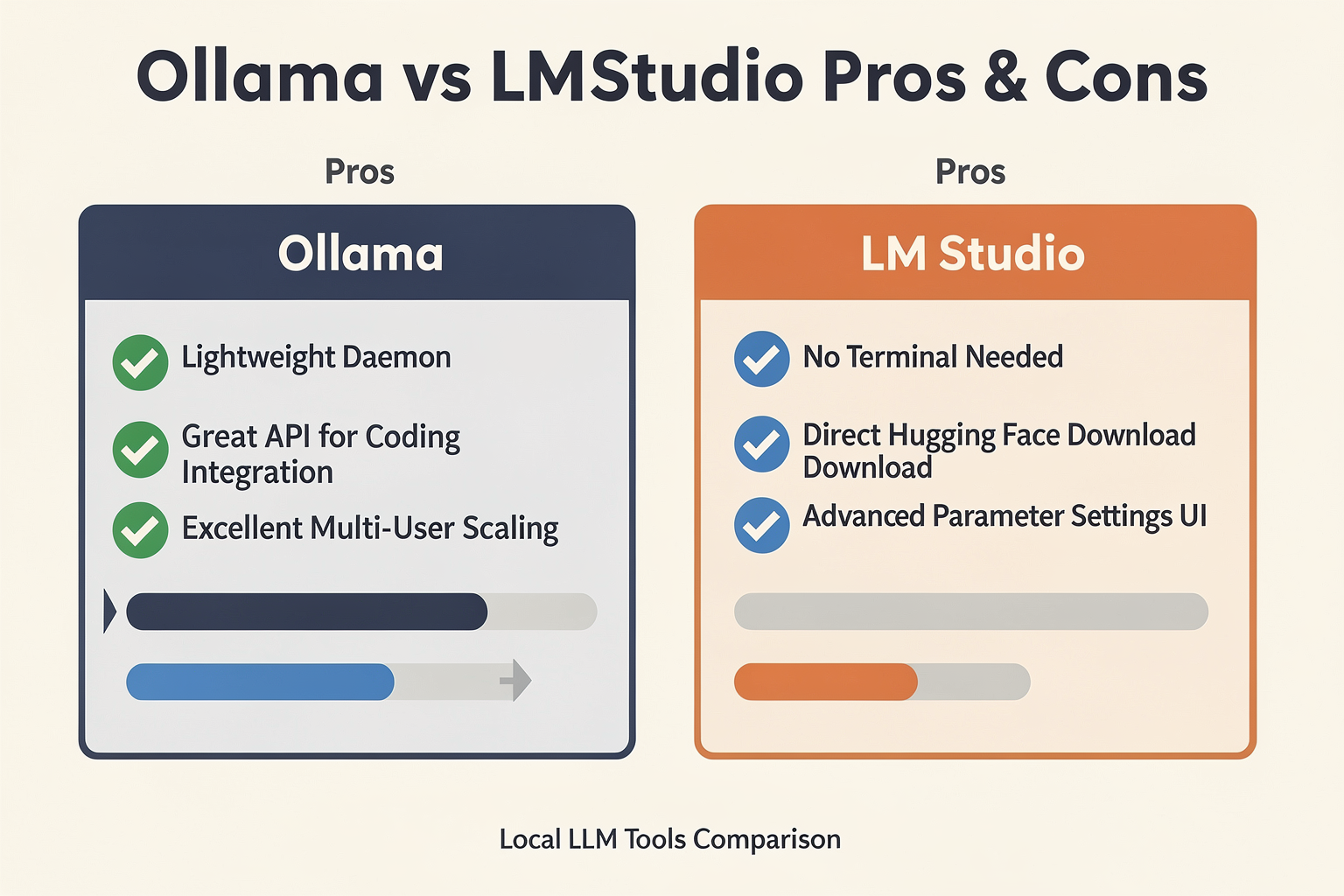
Choosing between Ollama and LM Studio ultimately comes down to a fundamental architectural and workflow division: CLI-first developer integration versus GUI-first interactive discovery. While both tools excel at taking open-weights models like Llama 3, Mistral, Qwen, and DeepSeek and running them on consumer-grade hardware, they cater to very different workflows.
To help you make an informed decision, let’s break down the distinct advantages and trade-offs of each platform, followed by a direct side-by-side comparison.
Ollama: The Developer's Silent Powerhouse
Ollama operates as a lightweight, background system service (daemon). It is designed to be invisible, fast, and highly scriptable, making it the darling of developers who want to integrate local LLMs into their existing codebases, CLI pipelines, or containerized applications.
Pros:
- Production-Ready Concurrency: Ollama features superior request batching capabilities. If multiple applications or users hit the local endpoint simultaneously, Ollama schedules and batches these requests far more efficiently than its visual counterparts.
- Minimal Resource Footprint: Because it runs headlessly without a heavy graphical interface, virtually every megabyte of your system's VRAM and RAM is dedicated to model inference rather than rendering UI elements.
- Open-Source & Permissive: Released under the highly permissive MIT license, Ollama is ideal for enterprises that require fully open-source dependency auditing.
- Superb Integration Ecosystem: It natively integrates with popular AI development orchestrators like LangChain, LlamaIndex, and CrewAI, and can be paired with stunning third-party web interfaces like Open WebUI.
Cons:
- Command-Line Dependency: There is no official visual interface out of the box. Users must be comfortable with the terminal for downloading, managing, and running models.
- Opaque Configuration: Fine-tuning parameters like system prompts, temperature, and GPU layers requires editing a text-based "Modelfile" rather than toggling friendly sliders.
LM Studio: The Ultimate AI Sandbox
LM Studio is a fully packaged desktop application that acts as an IDE for local LLMs. It is built to make the exploration of open-weights models as visual, accessible, and configurable as possible without ever forcing you to touch a terminal.
Pros:
- Direct Hugging Face Integration: You can search, filter, and download any GGUF model directly from Hugging Face inside the app, complete with warnings about which quantizations will fit your system's VRAM.
- Optimized Apple Silicon Performance: On Mac devices (especially M-series chips), LM Studio’s support for the MLX engine delivers phenomenal single-user token-generation speeds.
- Granular Parameter Control: An interactive sidebar lets you easily adjust temperature, top-p, repeat penalty, context window size, and hardware settings (like precise GPU layer offloading) on the fly.
- Structured Outputs & Playground: It provides built-in tools for testing JSON schema enforcement, managing system prompts, and comparing different models side-by-side.
Cons:
- Proprietary License: Unlike Ollama, LM Studio is closed-source and proprietary. While free for personal use, commercial deployment in enterprise settings requires explicit licensing agreements.
- Poor Multi-User Scaling: Because it is optimized for single-user playground testing, it lacks the robust request-batching architecture needed to serve high-concurrency production workloads.
Ollama vs. LM Studio: Feature Comparison Matrix
The table below contrasts the technical capabilities, licensing, and operational differences between the two runtimes.
| Feature / Metric | Ollama (CLI-First) | LM Studio (GUI-First) | Best Suited For... |
|---|---|---|---|
| Interface Style | Command Line (CLI) & API daemon | Comprehensive Desktop GUI | Ollama for headless environments; LM Studio for visual testing. |
| Licensing | Open-source (MIT License) | Proprietary (Free for personal use) | Ollama for commercial compliance; LM Studio for individual sandboxing. |
| Model Discovery | Ollama library via ollama pull | Direct Hugging Face in-app search | LM Studio for discovering niche community quantizations. |
| Concurrency & API | Excellent multi-request batching | Single-user local server toggle | Ollama for serving local backend apps; LM Studio for local debugging. |
| Hardware Control | Automatic CPU/GPU offloading | Granular slider-based layer offloading | LM Studio for squeezing performance out of complex setups. |
| Platform Ecosystem | Linux, macOS, Windows, Docker | macOS, Windows, Linux (Beta) | Ollama for cloud/headless Linux servers; LM Studio for local workstations. |
Choosing the Right Tool for the Job
If your goal is to write code, build local agents, or deploy a self-hosted LLM backend for a multi-user application, Ollama is the undisputed choice. Its background execution, Docker compatibility, and request-batching capabilities make it behave like a local instance of OpenAI's API.
Conversely, if you are a researcher, writer, or hobbyist who wants to benchmark different model weights, experiment with system prompts, or quickly test how a model responds to different hardware constraints, LM Studio offers an unmatched interactive experience.
Of course, local deployment is often only the first step in the AI development lifecycle. When it comes time to scale your local prototypes into global production-ready communication pipelines, transitioning to a managed infrastructure becomes essential. For instance, platforms like CallMissed allow developers to effortlessly transition from local LLM experimentation to production. By providing a unified API gateway that supports over 300+ advanced LLMs, natively handles highly concurrent voice agents, and integrates Speech-to-Text for 22 Indian languages, CallMissed bridges the gap between your local workstation and enterprise-scale AI communication infrastructure.
Real-World Use Cases: Which Should You Download Today?
Choosing between Ollama and LM Studio is not about finding a single "winner." Instead, it is about aligning your local execution tool with your daily workflow, technical comfort level, and hardware profile. Both utilities are free, run completely offline, and support the industry's leading open models—including Llama 3, Qwen, Mistral, and the DeepSeek series.
To help you decide which tool to download today, let’s look at how both platforms perform in real-world scenarios.
Use Case 1: The Software Engineer & App Developer
The Verdict: Download Ollama
If you are a software developer, DevOps engineer, or system administrator, Ollama is almost certainly the tool you should download today. Ollama operates on a CLI-first, daemon-based architecture. It runs quietly in the background as a system service, waking up only when an API call is made.
- Seamless Integration with IDEs: Ollama exposes a standard OpenAI-compatible REST API on
localhost:11434out of the box. This makes it incredibly easy to hook into popular coding companions like Cursor, VS Code (via Continue.dev), or Obsidian. - Infrastructure-as-Code Friendly: Ollama manages models using a Docker-like syntax. Downloading a model is as simple as running
ollama run deepseek-r1. You can also write customModelfilesto define system prompts, temperatures, and parameters, treating your local models as configurable code. - Request Batching for Local Server Mocking: Unlike LM Studio, which is primarily optimized for a single-user chat interface, Ollama features robust request batching. If you are building local multi-agent systems or testing an app with multiple concurrent API requests, Ollama manages the queue and schedules concurrent requests far more efficiently.
If your primary goal is to use an LLM to autocomplete code, build agentic workflows, or write scripts without leaving your terminal, Ollama provides the invisible, high-performance infrastructure you need.
Use Case 2: The Non-Technical Writer, Researcher, or Prompt Designer
The Verdict: Download LM Studio
If you are a writer, researcher, product manager, or AI enthusiast who wants a polished, visual playground without typing a single line of code, LM Studio is the clear choice.
- Zero-Terminal User Interface (GUI): LM Studio offers a beautifully designed desktop application that handles everything from model discovery to chat configuration. You do not need to know what a CLI or a system port is to get started.
- Built-in Hugging Face Search: In Ollama, you are generally limited to the models curated in Ollama’s official library (though custom importing is possible). LM Studio features a native Hugging Face search bar. You can type in any model name, browse different GGUF quantization levels, read their file sizes, and download them directly inside the app.
- Granular Parameter Control: LM Studio provides a sidebar where you can visually adjust parameters like temperature, top-p, frequency penalty, and context window length. You can also swap system prompts on the fly, making it an excellent environment for comparing how different models react to specific instructions.
- Hardware Optimization for Single-User Workloads: For Mac users running Apple Silicon, LM Studio features specialized support for the MLX engine. In single-user chat scenarios, this hardware-level optimization often yields faster token-generation speeds and lower memory overhead compared to more generic runtimes.
If you want an interactive chat window to brainstorm copy, analyze local PDFs, or experiment with prompt engineering parameters in real-time, LM Studio delivers a superior out-of-the-box desktop experience.
Use Case 3: Prototyping Local AI Workflows for Global Production
The Verdict: Start with Ollama, Scale to the Cloud
Many businesses start by using local tools to prototype AI solutions because it is free, completely private, and bypasses the latency of public APIs. For instance, a developer might use Ollama to build a local python script that automates customer email sorting.
However, local hardware has strict limits. Running a 70B parameter model locally requires massive GPU VRAM, and attempting to handle concurrent customer inquiries on a single office workstation will quickly crash the system.
When it is time to transition your local prototypes into robust, production-ready applications, you need a scalable cloud infrastructure. This is where platforms like CallMissed step in. While you can use Ollama to test prompt structures and agentic logic offline, CallMissed provides the enterprise-grade infrastructure to take those concepts live. Offering a unified multi-model API gateway with access to over 300+ LLMs, Speech-to-Text APIs supporting 22 Indian languages, and real-time Text-to-Speech, CallMissed allows you to deploy scalable AI voice agents and WhatsApp chatbots to thousands of concurrent users without needing to manage heavy local server racks.
Quick Decision Matrix
If you are still on the fence, use this quick checklist to guide your download choice:
- Download Ollama today if:
- You prefer working in the terminal or want a tool that runs silently in the background.
- You want to integrate local LLMs directly into developer tools like Cursor, VS Code, or shell scripts.
- You are building multi-agent frameworks (like CrewAI or AutoGen) that require background API access.
- You want a simple, Docker-like experience for managing models.
- Download LM Studio today if:
- You want a clean, modern graphical user interface (GUI) with no terminal usage required.
- You want to easily browse, download, and test experimental GGUF models directly from Hugging Face.
- You need to carefully adjust generation parameters (temperature, system instructions, context limits) on the fly.
- You are on a Mac with Apple Silicon and want highly optimized, single-user inference performance.
The Future of Local AI in 2026 and Beyond
The landscape of local LLMs has shifted dramatically. In 2026, we are no longer asking if a consumer-grade workstation can run a competitive large language model, but rather how efficiently and how privately it can execute complex reasoning tasks. With state-of-the-art open-weights models like the Llama 3 series, Qwen 2.5, Mistral, and distilled DeepSeek-R1 variants reaching near-parity with closed-source commercial APIs, local runtimes have transitioned from experimental developer playgrounds to core enterprise infrastructure.
The divergence between Ollama and LM Studio highlights a broader structural division in how we will interact with, develop for, and deploy artificial intelligence at the edge in 2026 and beyond.
Hardware Acceleration and the NPU Revolution
The evolution of local AI is inextricably linked to silicon. The rise of dedicated Neural Processing Units (NPUs) in consumer laptops—alongside Apple Silicon's unified memory architecture—has changed how local runtimes optimize performance.
- LM Studio and Specialized Engines: LM Studio has capitalized heavily on hardware-specific optimizations. By natively integrating support for Apple's MLX engine, LM Studio delivers blistering token-generation speeds in single-user environments. For developers and researchers working on M-series MacBooks, this tight hardware integration minimizes memory overhead and maximizes GPU utilization, making it the preferred interface for real-time model evaluation and interactive prompting.
- Ollama and Concurrency: While LM Studio dominates single-user, high-performance UI sessions, Ollama shines under concurrent workloads. Ollama’s headless architecture features built-in request batching. When multiple local applications, background scripts, or team members query a single local host, Ollama manages parallel requests far more gracefully than UI-bound alternatives.
As we move deeper into 2026, local runtimes will increasingly bypass generalized CUDA or CPU backends in favor of highly specialized, chip-level compiler frameworks.
The Hybrid AI Paradigm: Edge-to-Cloud Orchestration
The future of local AI is not a binary choice between running models entirely on-device or entirely in the cloud. Instead, the industry is converging on a hybrid orchestration model. Under this paradigm, lightweight, latency-sensitive tasks—such as text classification, initial PII scrubbing, local semantic search, and draft generation—are handled locally. Complex reasoning, massive agentic workflows, and heavy multilingual tasks are dynamically routed to cloud-based infrastructure.
For teams looking to transition these local experiments into production-grade systems, platforms like CallMissed provide the necessary enterprise bridge. Developers can prototype local agentic workflows using Ollama’s OpenAI-compatible APIs on their local machines, and then seamlessly transition those same application prompts to CallMissed’s cloud-based infrastructure. By offering access to over 300+ LLMs, production-ready voice agent infrastructure, and low-latency Speech-to-Text APIs supporting 22 Indian languages, CallMissed allows companies to develop locally and scale globally without changing their underlying application architecture.
This hybrid approach ensures that businesses maintain maximum cost efficiency, routing simple queries to free local hardware while leveraging robust cloud APIs only when deeper cognitive processing is required.
Developer Workflows vs. Interactive Sandboxes
As local AI matures, Ollama and LM Studio are doubling down on their respective core audiences, creating distinct workflows for developers and non-technical professionals alike.
- Ollama as a System Daemon: Ollama operates primarily as a background service (daemon) accessible via a clean Command Line Interface (CLI) and local REST APIs. This design philosophy makes it the default runtime for autonomous local agents, IDE extensions (like Continue or VS Code Copilot alternatives), and automated terminal workflows. Its minimalist approach means it consumes negligible system resources when idle, waiting silently in the background to serve local API requests.
- LM Studio as an Interactive Sandbox: LM Studio has established itself as the premier visual IDE for local LLMs. It removes the barrier of the command line entirely, offering an intuitive graphical user interface (GUI) to discover, download, configure, and chat with quantized models directly from Hugging Face. Its advanced system prompt editors, temperature controls, and GPU offloading sliders make it an indispensable tool for prompt engineers who need to visually inspect how different model parameters impact outputs.
Ultimately, the optimal workflow in 2026 often involves using both tools in tandem: utilizing LM Studio’s visual interface to search, benchmark, and test various quantized GGUF models, and then deploying the chosen model via Ollama to run background tasks and power local development environments.
Zero-Trust Enterprises and the Privacy Mandate
The explosive growth of local LLMs is fundamentally propelled by strict data privacy regulations and compliance requirements. For industries handling highly sensitive data—such as healthcare, legal services, and financial technology—sending proprietary data to external APIs is often a legal impossibility.
Running highly capable 7B, 14B, or 32B models locally via Ollama or LM Studio completely eliminates the risk of data leakage. Since no data leaves the local machine or internal intranet, companies can achieve a "zero-trust" AI posture. Looking forward, we can expect local runtimes to incorporate even tighter integration with localized vector databases (Vector DBs) and Retrieval-Augmented Generation (RAG) pipelines, enabling secure, offline semantic search across millions of internal documents without a single external API call.
Frequently Asked Questions
What are the main differences in the Ollama vs LM Studio comparison for running LLMs locally?
Which tool offers better performance and speed when comparing Ollama vs LM Studio?
Can I run Llama 3, Mistral, and DeepSeek models on both platforms?
ollama run deepseek-r1). LM Studio, conversely, connects directly to Hugging Face, enabling you to search through thousands of community-uploaded GGUF quantization levels and download specific parameter sizes (like 8B, 14B, or 70B) customized to your system's RAM limits.How do Ollama vs LM Studio handle local API hosting for developers?
Which operating systems do these local LLM tools support?
Is it possible to use local LLM runtimes for production-grade business applications?
Conclusion
- User Experience: LM Studio stands out for its clean GUI and beginner-friendly approach, making it ideal for users who want to explore multiple LLMs without dealing with the command line. Ollama, in contrast, caters to power users with robust CLI tools and seamless API integrations, giving developers more customization and automation potential (SitePoint, 2026).
- Performance: With recent engine advancements like MLX, LM Studio currently leads for single-user scenarios, delivering slightly better speed and responsiveness. However, Ollama’s request batching is superior for handling concurrent requests and integrating into multi-user or backend systems (LlamaEdge Comparison, 2026).
- Model Support and Flexibility: Both tools offer impressive support for major open-source models—Llama 3, Mistral, Qwen, and DeepSeek—with regular updates to onboard trending models (Contabo, 2026). However, their core design philosophies differ: LM Studio is GUI-first and user-centric, while Ollama targets API-first and developer-centric workflows.
- Ecosystem Integration: Power users looking to connect local LLMs with external applications may find Ollama’s API endpoints and automation support advantageous. As the ecosystem matures, seamless interoperability and extension support will be crucial.
Looking ahead, expect both tools to deepen hardware acceleration (especially for Apple Silicon and GPUs), expand native support for multimodal models, and enhance privacy controls—vital as on-prem LLM adoption accelerates in 2026. Platforms like CallMissed are already leveraging local and cloud-based LLMs to power real-time multilingual voice agents and chatbots, showing where applied AI is heading.
What trends—like edge deployment, synthetic voice, or agentic workflows—are you most eager to see in local LLM tools next? Share your thoughts or dive deeper into AI communication by exploring CallMissed’s evolving platform.
Related Posts


Ready to automate customer conversations?
Launch AI voice agents and WhatsApp bots with CallMissed — one API, 22+ Indian languages.