

AI Voice Agent WhatsApp Integration: 2026 Deployment Guide


Learn AI voice agent WhatsApp integration for consent, continuity, booking, escalation, testing, data architecture, and KPIs in 2026.
AI Voice Agent WhatsApp Integration: 2026 Deployment Guide
What changes when a customer can move from a WhatsApp message to an AI-powered call without repeating a single detail? AI voice agent WhatsApp integration turns WhatsApp Business from a messaging channel into a continuous engagement layer where customers can chat, speak, qualify their needs, book appointments, and reach a human within one connected journey.
Meta reported in April 2025 that WhatsApp had surpassed 3 billion monthly active users, giving businesses an exceptionally large installed base for conversational engagement. Meta also reported in 2023 that the WhatsApp Business app served more than 200 million monthly active users, demonstrating substantial business adoption even before newer calling and AI capabilities matured. In 2026, the opportunity is no longer limited to sending notifications: WhatsApp Business calling can connect eligible customer conversations directly to AI voice agents, subject to Meta’s account, market, consent, and messaging policies.
Why integration requires more than connecting two APIs
A production deployment must preserve context across channels. If a prospect discusses a home loan over chat and then accepts a voice call, the agent should already know the requested amount, preferred language, consent status, and unresolved questions. That demands a shared customer identity, event-driven data architecture, durable conversation state, and explicit rules governing what the voice agent may retrieve or update.
Successful WhatsApp Business automation must also coordinate:
- Identity and consent, including opt-ins, call permissions, and auditable timestamps
- Message templates for approved business-initiated follow-ups outside applicable service windows
- Lead qualification using consistent fields, scoring rules, and CRM updates
- Appointment booking with real-time calendar availability and confirmation messages
- Human escalation with transcripts, summaries, intent, and urgency carried forward
- Testing and KPIs covering latency, containment, booking conversion, consent failures, and transfer success
This guide explains how to design that system from the first webhook to production monitoring. You will learn how to map chat and call identities, maintain conversation continuity, structure lead and appointment workflows, handle template-based outreach, create safe escalation paths, test edge cases, and measure omnichannel lead follow up without counting channel activity as business success.
Platforms such as CallMissed reflect this shift by combining WhatsApp chat, inbound and business-initiated WhatsApp calls bridged to AI voice agents, an omnichannel inbox, and support for 22 Indian languages. The closing deployment checklist will help product, engineering, operations, and compliance teams verify that every critical layer is ready before launch.
How do you connect an AI voice agent to WhatsApp Business in 2026? The complete seven-step answer
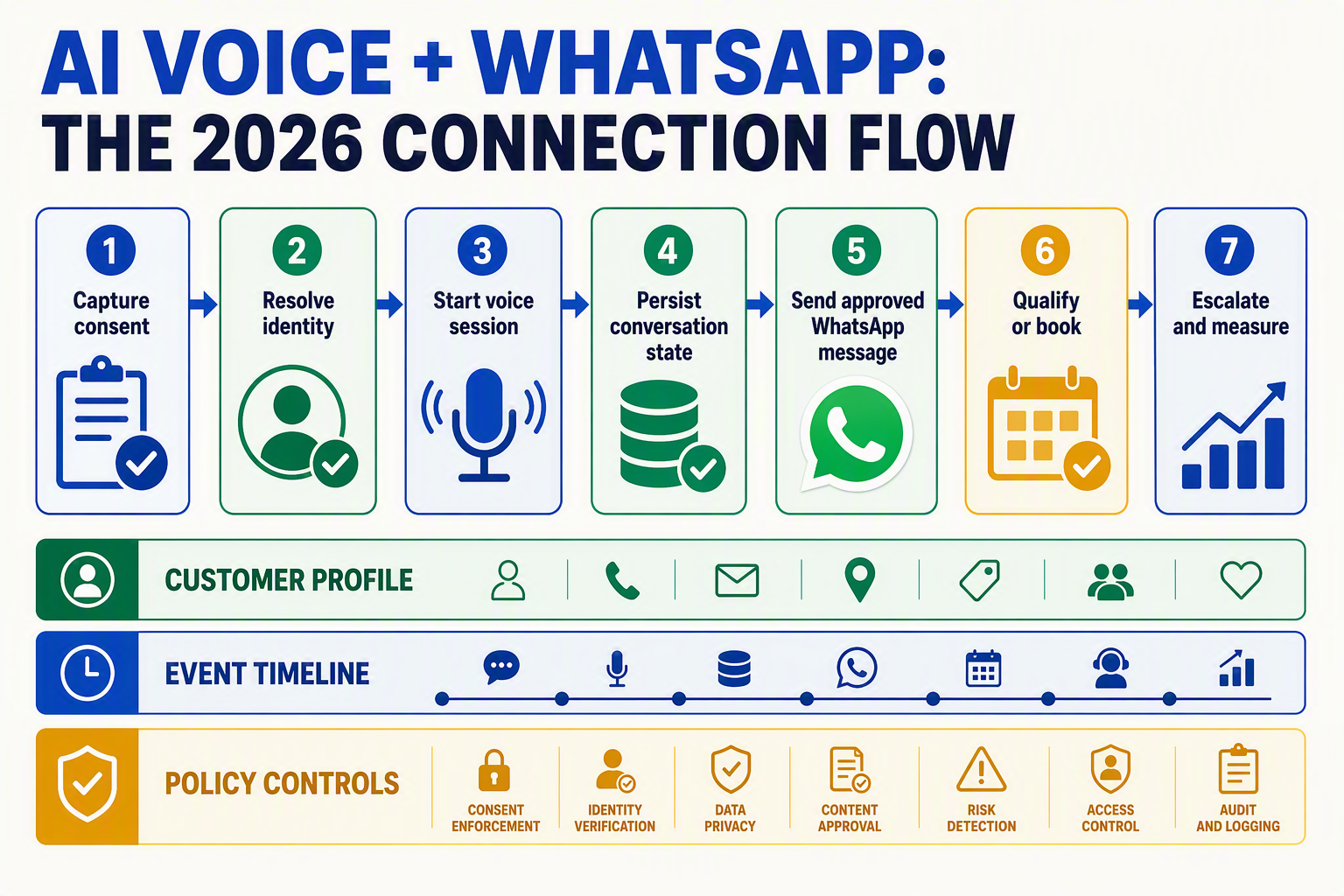
Connect an AI voice agent to WhatsApp Business by linking Meta’s messaging and calling events to a shared identity, consent ledger, conversation store, workflow engine, CRM, calendar, and human-support queue. The following seven-step architecture turns separate chat and voice interactions into one auditable customer journey.
1. Provision WhatsApp messaging and calling
- Configure the WhatsApp Business Platform, business phone number, webhook endpoint, access credentials, and required Meta business verification.
- Request and enable WhatsApp Business calling where the capability is available for the account and market.
- Route inbound messages, call requests, call-status changes, and delivery receipts into one event-processing service.
Meta reported in April 2025 that WhatsApp had exceeded 3 billion monthly active users, making reliability and horizontal webhook scaling important even for businesses targeting a small fraction of its audience. Verify Meta’s current 2026 eligibility, calling, and geographic requirements before deployment.
2. Resolve identity and record consent
Use the customer’s normalized E.164 phone number as a channel identifier, but map it to an internal customer_id rather than treating the number as the permanent primary key. Store consent as structured evidence containing:
- Purpose and permitted channel
- Consent source and exact wording
- Collection timestamp in ISO 8601
- Policy or disclosure version
- Revocation timestamp and suppression status
- Permission for business-initiated calls, where required
Before every outbound action, the orchestration layer should evaluate consent, account eligibility, local regulations, and current Meta policy—not rely on a prompt telling the model to “check consent.”
3. Create a channel-neutral conversation state
Build a durable session object containing the latest intent, verified customer attributes, language, qualification fields, unresolved questions, tool results, and conversation summary. When chat transitions to voice, pass a controlled subset of that state to the agent.
This is the foundation of AI voice agent WhatsApp integration: the voice model receives relevant context without replaying an entire transcript or exposing unnecessary personal data. Use event IDs and idempotency keys to prevent webhook retries from creating duplicate calls, leads, or bookings.
4. Govern message templates and call invitations
Create Meta-approved templates for common transitions such as “Would you like us to call now?”, missed-call recovery, appointment confirmation, and rescheduling. Classify each template using Meta’s current categories and localize the wording rather than mechanically translating it.
The workflow must distinguish customer-initiated conversations from business-initiated outreach and apply the service-window and template rules valid at send time.
5. Qualify leads through shared fields
Define qualification as a deterministic schema—for example, need, budget, location, timeline, and decision_status. The AI agent may collect and clarify these values, while a rules engine calculates the score and writes both evidence and outcome to the CRM.
For omnichannel lead follow up, chat and voice must update the same lead record instead of creating channel-specific duplicates.
6. Book appointments transactionally
Query live calendar availability, present valid slots, collect the customer’s time zone, and recheck availability immediately before committing. Use a unique booking key so repeated events cannot reserve the same appointment twice. Send the confirmed time, location, rescheduling option, and reference number through WhatsApp.
7. Escalate safely and observe outcomes
Define escalation triggers for customer requests, low confidence, repeated tool failures, sensitive topics, and urgent intent. Transfer a concise summary, transcript access, consent state, qualification record, and completed actions to the human agent.
Production-ready WhatsApp Business automation should monitor webhook failures, response latency, consent rejection, call connection, transfer success, qualified-lead rate, booking conversion, and duplicate-action rate—not message volume alone.
What background, platform rules, and channel constraints shape WhatsApp Business automation?

WhatsApp Business automation is governed by Meta’s messaging policies, customer-service windows, template approval, calling eligibility, consent requirements, and technical channel limits. An AI agent must therefore treat WhatsApp chat and voice as policy-controlled interactions—not as unrestricted email, telephony, or web chat.
Start with the WhatsApp Business platform model
A production integration typically involves a WhatsApp Business Account (WABA), a registered business phone number, Meta permissions, webhooks, and either the WhatsApp Cloud API or an approved technology provider. The AI voice platform, CRM, calendar, and customer-data layer sit around that foundation rather than replacing it.
Three identifiers should remain distinct:
- Customer identity: Usually anchored to the customer’s WhatsApp phone number, normalized to an international format.
- Business identity: The WABA, business portfolio, display name, and registered business number.
- Conversation identity: An internal journey or case ID linking messages, calls, lead records, appointments, and human-agent actions.
Do not assume a phone number alone proves the person’s legal identity or authorization to discuss an account. For sensitive workflows, add verification such as a one-time password, date-of-birth check, or authenticated portal step, while avoiding unnecessary collection of personal data.
Messaging windows and templates constrain outreach
WhatsApp distinguishes between user-initiated service conversations and business-initiated communication. When the applicable customer-service window is open—commonly measured as 24 hours from the customer’s latest message—the business can generally send free-form responses that address the active conversation. Outside that window, re-engagement usually requires an approved message template.
Templates are classified by Meta into categories such as:
- Utility: Appointment confirmations, transaction updates, or requested status alerts
- Authentication: One-time passcodes and account-verification flows
- Marketing: Promotions, lead nurturing, and other persuasive outreach
Template text, variables, buttons, language, and declared purpose should match the actual use case. Approval does not remove the obligation to honor opt-outs, avoid misleading content, or monitor quality signals. Meta may pause or disable templates that generate poor feedback or violate policy.
For omnichannel lead follow up, the orchestration layer should check four conditions before every outbound action: the current service-window status, the permitted template category, recorded consent, and channel-specific suppression rules.
Calling introduces a separate permission layer
WhatsApp Business calling should not be treated as ordinary public-switched telephone network dialing. Availability can depend on the business account, phone number, market, integration route, and Meta’s current product rules. Inbound calling and business-initiated calling may also have different eligibility and permission requirements.
Before placing an AI-assisted call:
- Record how, when, and why consent was obtained.
- Confirm that consent applies to the intended business and purpose.
- Disclose that the customer is interacting with an automated or AI-assisted system where required.
- Provide a clear path to decline, end the call, or request a human.
- Store the policy decision and consent evidence with the conversation record.
Design around channel constraints
An AI voice agent WhatsApp integration must tolerate asynchronous messages, delayed webhooks, duplicate events, call rejection, network interruption, template rejection, and unsupported media. Build idempotent event handlers, delivery-state tracking, retries with limits, and fallback routes.
The safest operating principle is simple: policy state is part of conversation state. A technically valid API request should never be sent unless the system has also verified identity confidence, consent, timing, template status, and escalation availability.
Which 2026 platform and policy developments must implementation teams verify? (TABLE)
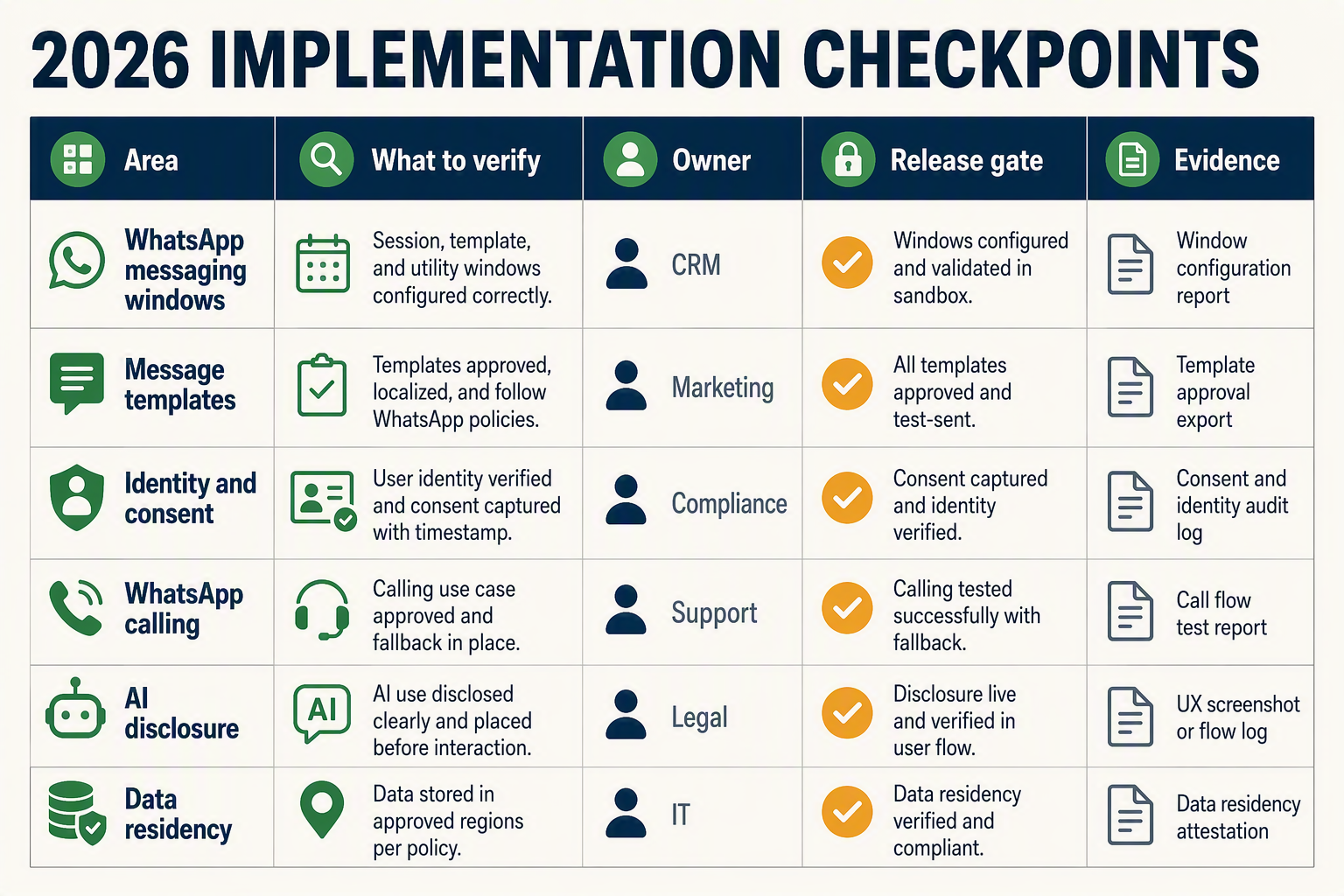
Implementation teams must verify Meta’s current WhatsApp Business Platform documentation, account eligibility, regional availability, and applicable privacy rules immediately before launch. Policies and pricing changed materially during 2025–2026, so designs based on older conversation-based billing or unrestricted AI use may fail compliance or cost reviews.
2026 verification matrix
| Development or policy | Dated fact or specification | What teams must verify | Implementation impact |
|---|---|---|---|
| WhatsApp Business Calling availability | Meta expanded business calling capabilities during 2025, but availability remains dependent on market, account, number, and provider support. | Confirm whether inbound and business-initiated calls are enabled for the exact WhatsApp Business Account, phone number, country, and integration provider. | Build chat-only and PSTN fallback paths when WhatsApp calling is unavailable. |
| Business-initiated call consent | Meta’s WhatsApp Business Calling documentation requires businesses to obtain customer permission before placing a WhatsApp call. | Check current permission-request limits, validity periods, approved user experience, and required audit fields. | Store consent purpose, source, timestamp, expiry, phone number, and policy version before the voice workflow starts. |
| Per-message template pricing | Meta changed WhatsApp Business Platform pricing on July 1, 2025, moving from conversation-based charging to charges for delivered template messages. | Verify current rates by recipient market and template category: marketing, utility, or authentication. | Recalculate campaign budgets and prevent unnecessary templates during an open customer-service window. |
| 24-hour customer-service window | Meta permits free-form business replies within the customer-service window opened by a user message; outside it, an approved template is generally required. | Confirm what events open or refresh the window and whether a call changes its status. | The orchestration layer must decide between a free-form reply, template, or suppressed follow-up after every chat or call. |
| AI provider restrictions | Updated WhatsApp Business Solution Terms took effect on January 15, 2026, restricting AI providers when general-purpose AI assistance is the primary functionality offered through WhatsApp. | Determine whether the agent performs a defined business task—such as support, qualification, or booking—rather than acting as an open-ended consumer assistant. | Constrain prompts, tools, knowledge sources, and intents to the business’s approved use case. |
| API version and template governance | Meta Graph API versions have defined retirement schedules, while templates can be approved, rejected, paused, or recategorized. | Pin a supported API version and monitor template status, quality signals, webhooks, and deprecation notices. | Add deployment alerts, template fallbacks, version-upgrade tests, and graceful handling for rejected sends. |
Translate policy checks into release controls
For a production AI voice agent WhatsApp integration, policy verification should become an automated release gate rather than a document reviewed once. At minimum:
- Run a preflight check for calling eligibility, approved templates, webhook subscriptions, and API-version support.
- Block business-initiated calls unless an unexpired consent record matches the intended number and purpose.
- Preserve the policy decision behind each outbound action, including service-window status and template category.
- Re-test templates after Meta recategorizes or pauses them.
- Route unsupported languages, restricted intents, consent disputes, and failed calls to a human queue.
Indian deployments require an additional legal review. The Digital Personal Data Protection Act, 2023 received presidential assent on August 11, 2023, according to India’s Ministry of Law and Justice; teams should verify the rules and commencement provisions in force at deployment time. Consent withdrawal, retention, call recording, transcript access, and cross-border processing should be mapped to those applicable requirements rather than inferred from Meta approval alone.
Platforms supporting WhatsApp Business automation should expose these controls across both chat and calling. For example, CallMissed can bridge WhatsApp Business calls to an AI voice agent, but implementation teams still need to validate Meta eligibility, customer permission, templates, and local law for each deployment. These checks protect conversation continuity while keeping omnichannel lead follow up auditable and policy-aware.
How should conversation continuity, identity, consent, and message templates work across voice and WhatsApp?
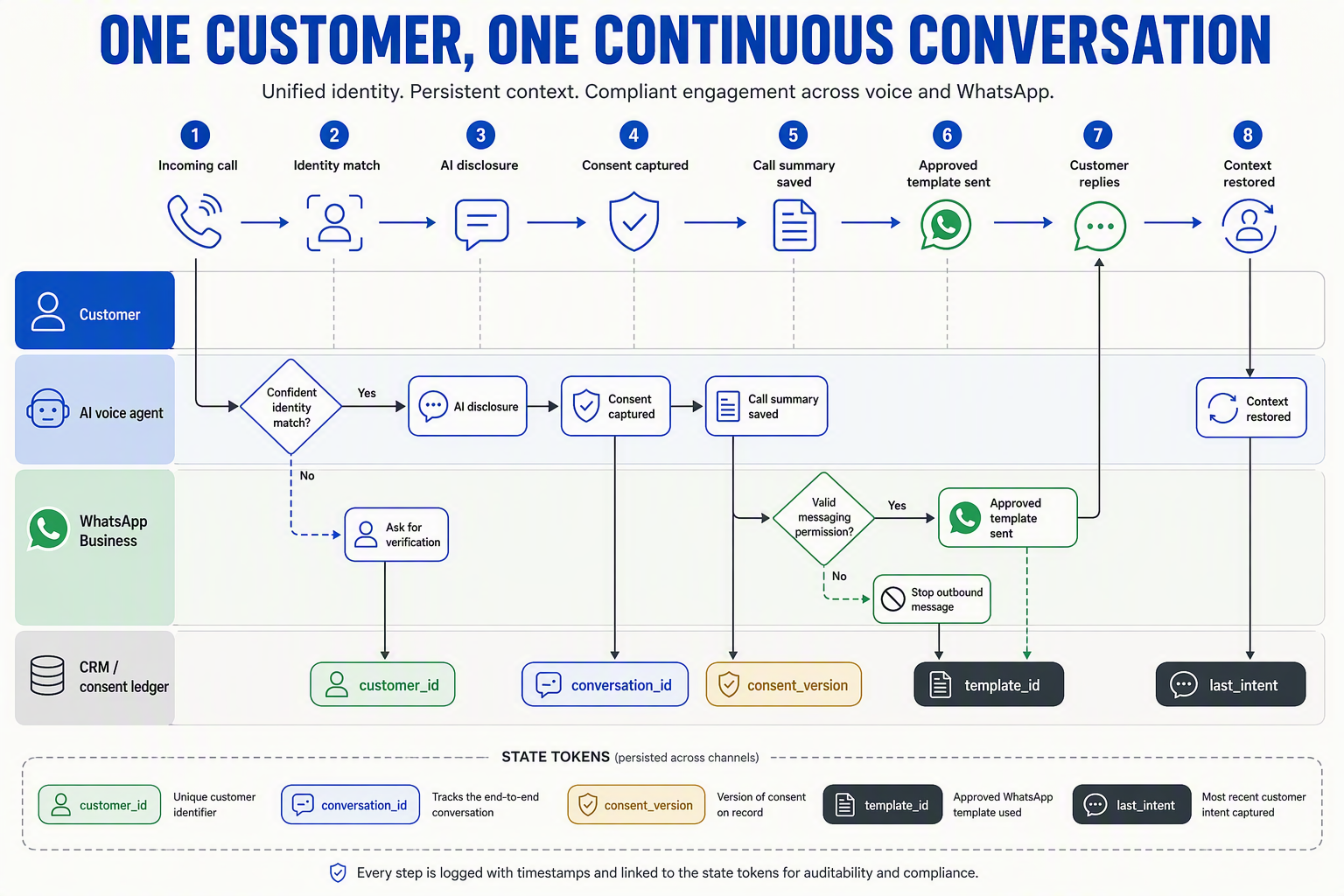
Conversation continuity should rely on a shared customer record and event timeline, not separate chat and call histories. Identity, consent, and template eligibility must be verified at every channel transition so the AI agent can continue the journey without exposing data or initiating unauthorized contact.
Build one cross-channel conversation state
A production AI voice agent WhatsApp integration should assign each customer an internal customer_id and map it to identifiers such as:
- WhatsApp phone number and WhatsApp Business account identifiers
- Chat conversation and message IDs
- Voice call, session, and recording IDs
- CRM lead or contact ID
- Preferred language, timezone, and communication channel
Store normalized events—messages, call requests, consent changes, extracted fields, bookings, and escalations—in chronological order. Before a call begins, the voice agent should receive a compact, permission-aware summary rather than an unlimited transcript.
For example: “Customer requested a ₹20 lakh home loan, prefers Hindi, provided income range, and asked about processing fees; identity remains unverified.” After the call, the agent can add the outcome, unresolved questions, and next permitted action to the same timeline.
Use version numbers or timestamps to prevent chat and voice agents from overwriting each other when both channels are active.
Separate contact matching from identity verification
A matching phone number establishes a likely contact relationship; it does not necessarily prove who is holding the device. Apply verification levels based on risk:
- Matched: WhatsApp and CRM phone numbers correspond.
- Confirmed: The customer confirms basic non-sensitive details.
- Verified: An approved OTP or authentication workflow succeeds.
- Authorized: The verified person has permission to perform the requested action.
An agent may discuss general product information at the matched level but should require stronger verification before revealing account balances, changing bookings, or collecting regulated information. Never place OTPs, payment credentials, or sensitive identity data inside model prompts, summaries, or reusable templates unless the workflow and storage controls explicitly permit it.
Treat consent as structured, channel-specific data
Consent should be stored as an auditable record containing purpose, channel, direction, source, policy version, timestamp, expiry, and revocation status. Consent to receive WhatsApp messages does not automatically mean consent to receive a business-initiated WhatsApp call.
Meta’s WhatsApp Business requirements in 2026 make account eligibility, market availability, user permission, and messaging policy compliance operational dependencies—not optional interface details. Before each outbound action, a policy service should evaluate:
- Whether the customer requested or permitted the call
- Whether permission remains valid for that purpose
- Whether the applicable customer-service window is open
- Whether a pre-approved template is required
- Whether the customer has opted out or requested another channel
This consent check should occur at execution time, not only when a campaign is created.
Use templates as controlled workflow transitions
WhatsApp Business automation should select templates by intent, locale, and lifecycle stage. Maintain a registry containing the Meta approval status, category, language, variables, version, and permitted use case for every template.
A useful pattern is:
- Send an approved follow-up template when required.
- State why the business is contacting the customer.
- Offer explicit actions such as “Call me,” “Continue in chat,” or “Stop.”
- Start the voice workflow only after the relevant permission event is recorded.
- Carry the template response into the shared conversation state.
For reliable omnichannel lead follow up, template delivery is not the goal. The system should measure whether the customer consented, continued the conversation, completed qualification, booked an appointment, or reached a human—with every transition preserved across WhatsApp and voice.
How do lead qualification, appointment booking, and escalation create omnichannel lead follow up?
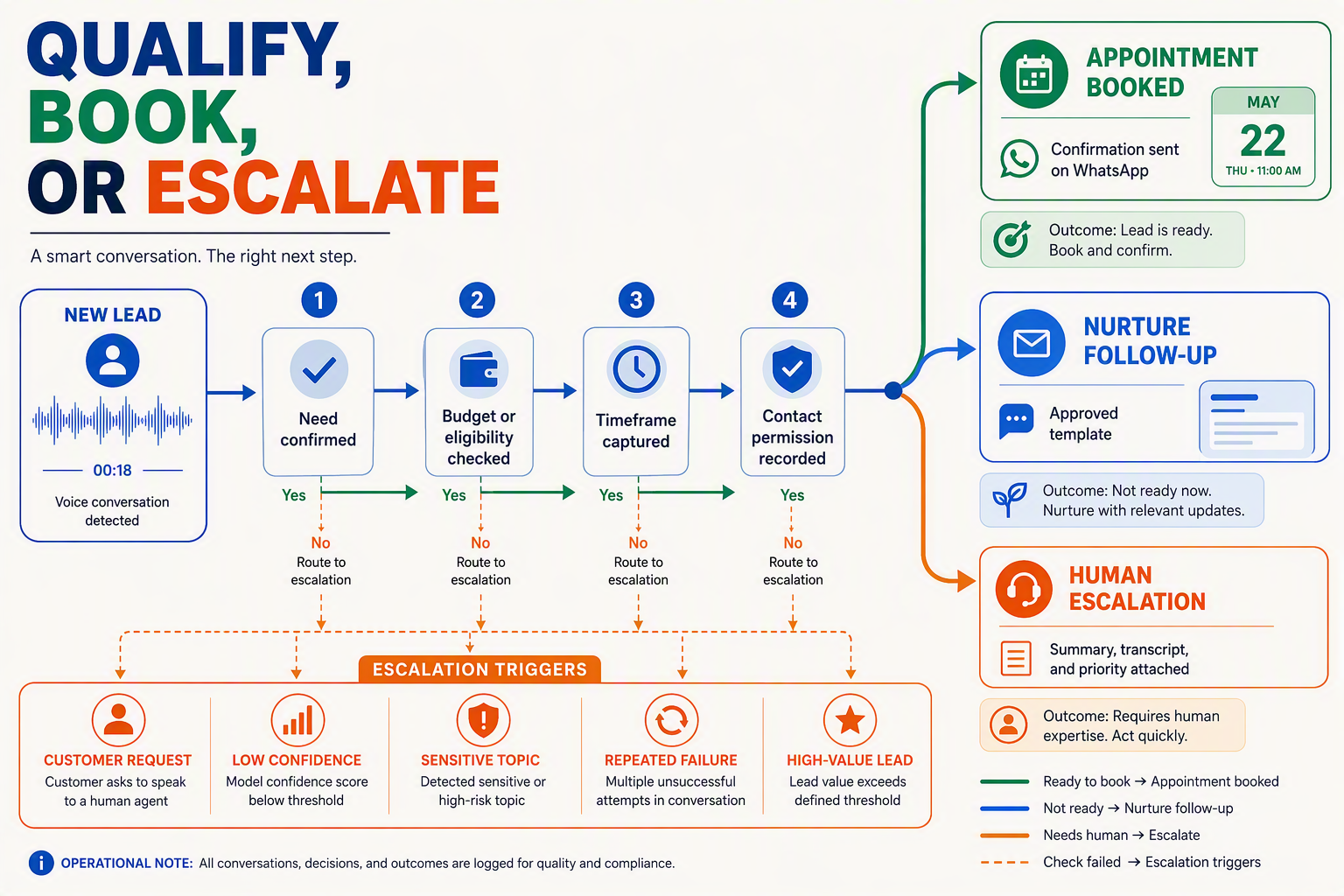
Lead qualification, appointment booking, and escalation create omnichannel lead follow up when they operate as stages in one shared workflow rather than separate chat, calling, calendar, and CRM automations. Every interaction should advance a canonical lead record while preserving identity, consent, context, ownership, and the next required action.
1. Qualify leads with one cross-channel schema
The WhatsApp chatbot and voice agent should collect against the same qualification fields. A prospect may provide location in chat, discuss budget by voice, and confirm purchase timing in a later message; the system should merge those facts rather than restart qualification.
A practical schema includes:
- Need and product intent
- Location, language, and service eligibility
- Budget or transaction range
- Purchase timeline and decision authority
- Consent status and preferred contact channel
- Qualification score, missing fields, and disqualifying conditions
Store both the structured value and its provenance—for example, budget_range, captured_by: voice, and captured_at. Low-confidence speech recognition or contradictory answers should trigger clarification instead of silently overwriting trusted CRM data.
This consistency matters at WhatsApp’s scale: Meta reported in April 2025 that WhatsApp had surpassed 3 billion monthly active users. Businesses therefore need qualification logic that remains reliable across large, multilingual interaction volumes.
2. Convert qualified intent into a confirmed appointment
When a lead reaches the required score or satisfies explicit rules, WhatsApp Business automation should query live calendar availability rather than offering static slots. The booking sequence should:
- Retrieve availability using the correct branch, representative, service duration, and time zone.
- Present a small set of valid slots through chat or voice.
- Place a temporary hold while the customer confirms.
- Create the appointment through an idempotent calendar or CRM request.
- Send the confirmed time, location or meeting link, rescheduling instructions, and reference ID on WhatsApp.
The workflow must recheck availability before committing because another customer may claim the slot during the conversation. Approved WhatsApp message templates may also be required for confirmations, reminders, or re-engagement outside the applicable customer-service window.
3. Escalate with context, not merely a transfer
Escalation is a successful workflow outcome when automation reaches a policy, confidence, or customer-experience boundary. Triggers can include:
- A direct request for a person
- High-value or unusually complex opportunities
- Repeated recognition or intent failures
- Pricing exceptions, complaints, or regulated advice
- Failed booking attempts or unavailable inventory
- Negative sentiment or urgent language
An AI voice agent WhatsApp integration should send the human agent an escalation packet containing the customer identity, consent state, conversation summary, transcript, qualification fields, appointment status, urgency, and recommended next action. The lead should enter a named queue with an owner and service-level deadline—not an unmonitored generic inbox.
If a live transfer is unavailable, the agent should obtain permission for a callback, confirm the expected time, and send a WhatsApp acknowledgement. For Indian regional audiences, platforms such as CallMissed can maintain this workflow across WhatsApp chat, WhatsApp Business calls bridged to AI voice agents, and 22 supported Indian languages.
Close the loop with explicit workflow states
Use auditable states such as New → Qualifying → Qualified → Booking Pending → Booked → Escalated → Resolved. Measure progression between states, booking completion, transfer success, time to human response, and qualified-lead conversion; message counts and call volumes alone do not show whether follow-up produced a business outcome.
What data architecture keeps voice, WhatsApp, CRM, calendars, and human agents synchronized?
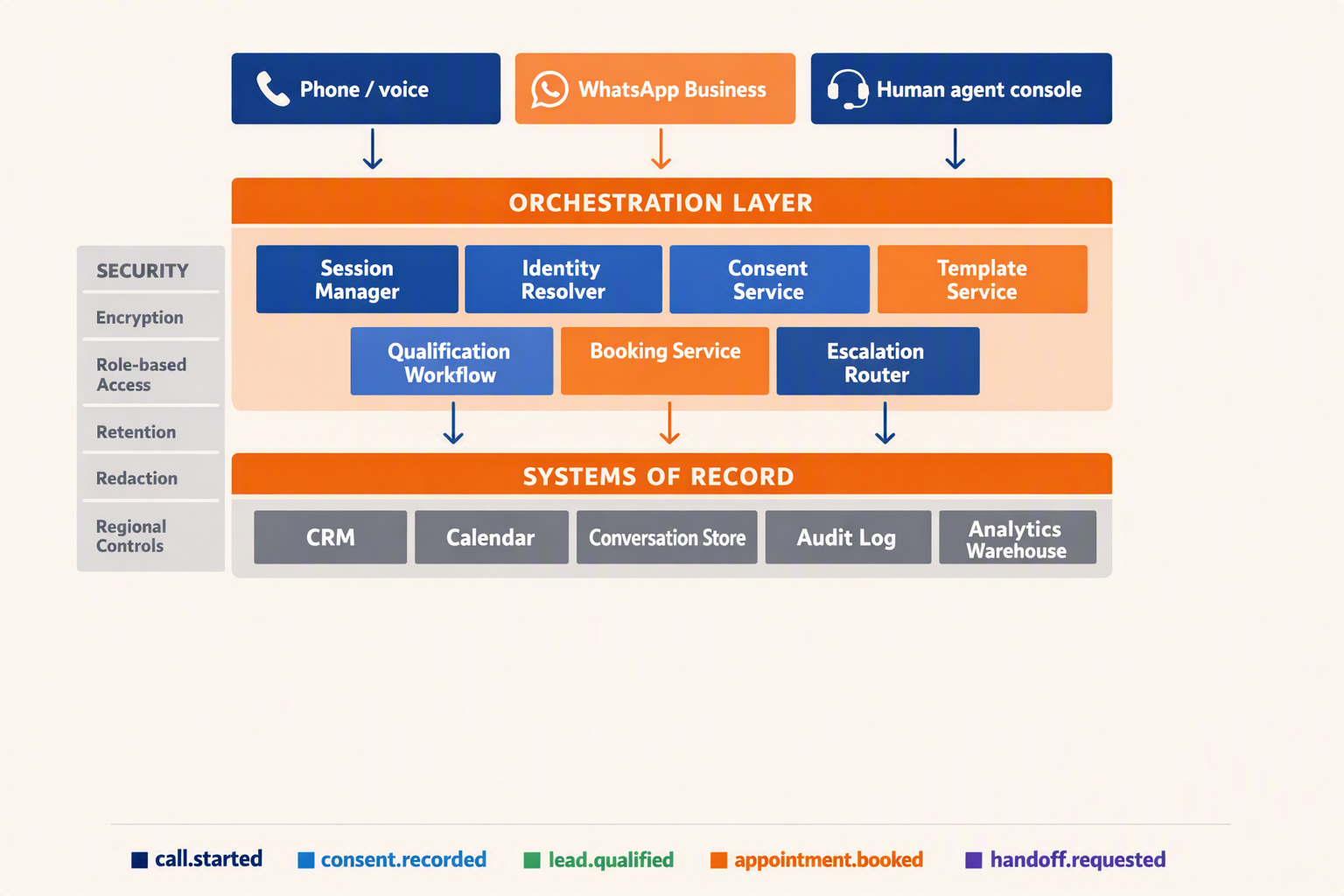
The safest architecture uses a shared customer profile, append-only event stream, and clearly assigned systems of record rather than synchronizing every application directly with every other application. WhatsApp, voice, CRM, calendars, and agent desktops should exchange events through an orchestration layer while reading the same durable conversation state.
Build around a canonical customer and conversation model
Meta reported in April 2025 that WhatsApp exceeded 3 billion monthly active users, so identity and event design must accommodate both high volume and long-running customer relationships.
Create an internal customer_id that maps channel-specific identifiers without treating a phone number as the entire identity:
- WhatsApp user and business phone-number IDs
- An E.164-formatted telephone number
- CRM contact, account, and lead IDs
- Email address, where legitimately collected
- Active conversation, call, appointment, and support-ticket IDs
Keep customer_id separate from conversation_id. One customer may have several enquiries, while one enquiry may span WhatsApp messages, an AI call, and a human-agent session. Identity merges should be reversible and logged because shared family numbers, recycled numbers, and duplicate CRM records can create false matches.
Assign one source of truth per data domain
Bidirectional updates become unreliable when every system can overwrite every field. Define explicit ownership instead:
| Data domain | System of record | Typical writers | Synchronization rule |
|---|---|---|---|
| Identity and channel mapping | Customer profile service | Identity resolver | Merge only with verified evidence |
| Lead stage and owner | CRM | AI workflow, sales agent | Versioned updates with conflict checks |
| Consent and permissions | Consent ledger | Policy service, human agent | Append-only; never silently overwrite |
| Appointment availability | Calendar platform | Booking service | Recheck before committing |
| Messages, calls, and summaries | Conversation store | Channel adapters, AI agent | Append events in timestamp order |
The orchestration layer should project these records into a compact session context containing intent, language, qualification fields, latest summary, consent status, pending action, and assigned human. This context gives an AI voice agent enough continuity without placing an unrestricted CRM export into every model prompt.
Synchronize through events, not polling alone
For reliable AI voice agent WhatsApp integration, publish normalized events such as message.received, call.started, lead.qualified, appointment.held, and handoff.requested. Each event should carry:
- A unique event ID and idempotency key
- Customer, conversation, and correlation IDs
- Source, timestamp, schema version, and processing status
- Consent basis and permitted purpose where applicable
- A reference to encrypted content rather than unnecessary PII
Use retries, dead-letter queues, and an outbox pattern so a CRM update and its corresponding event cannot diverge silently. Consumers must be idempotent because WhatsApp webhooks, calendar callbacks, and telephony status notifications may be delivered more than once or arrive out of order.
Make booking and escalation atomic
Calendar booking requires a short-lived hold, a final availability check, and an idempotent commit before WhatsApp Business automation sends confirmation. If the commit fails, the workflow should offer new slots rather than recording a false booking in the CRM.
Human escalation should create a single work item containing the transcript, call recording reference where permitted, summary, detected intent, lead fields, urgency, and unresolved task. Platforms such as CallMissed support this architecture through WhatsApp chat and calling, AI voice agents, and a shared omnichannel inbox.
This event-driven design makes omnichannel lead follow up measurable: every message, call, qualification decision, booking, and transfer remains attached to one customer journey without allowing one channel to overwrite another’s history.
How should you test, secure, and deploy the integration? A production-readiness checklist
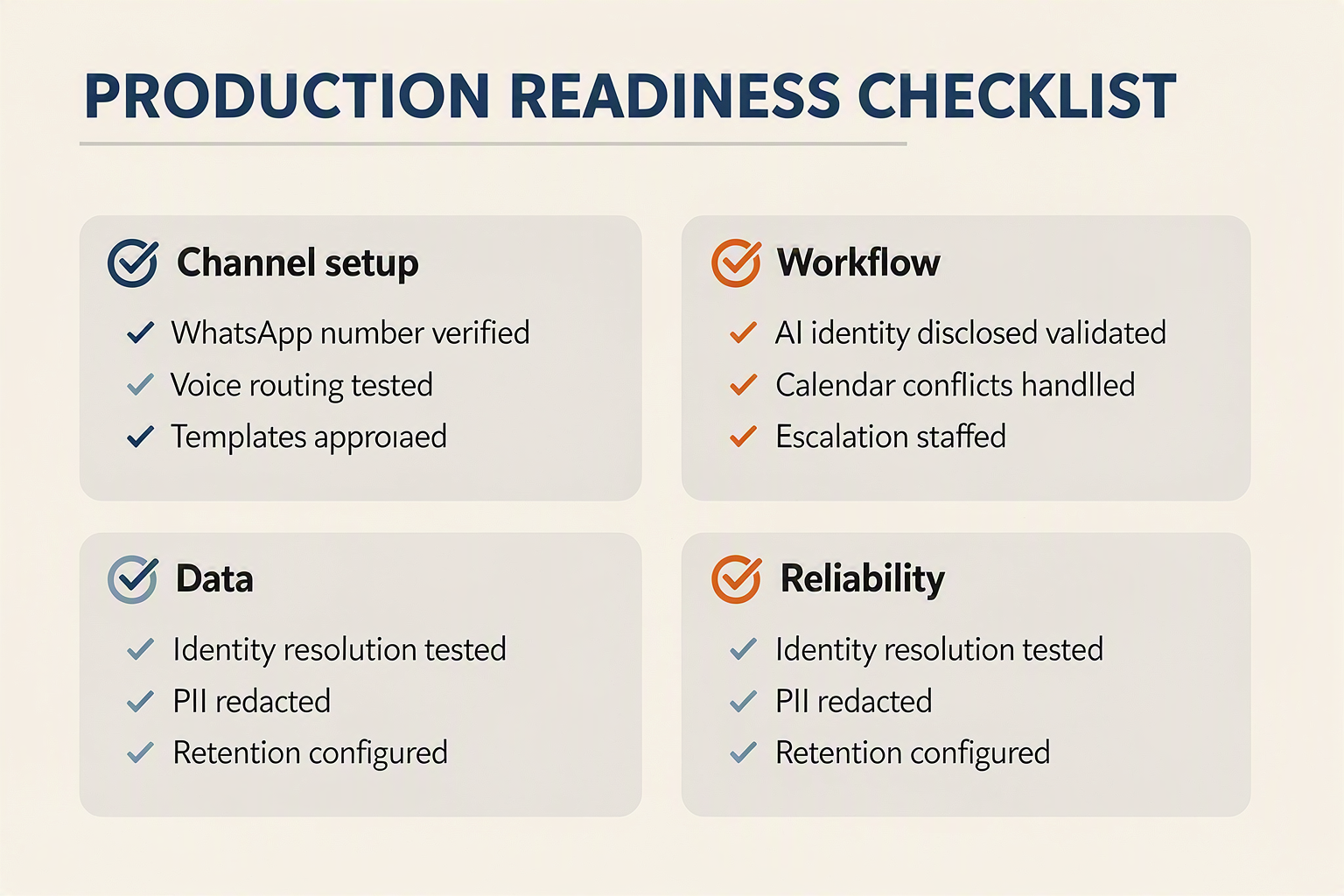
A production-ready AI voice agent WhatsApp integration must pass functional, security, policy, resilience, and operational tests before receiving live traffic. Deploy progressively, define measurable rollback thresholds, and verify that failures never lose consent records, duplicate bookings, or strand customers without human support.
Test the complete customer journey
Test end-to-end journeys rather than validating chat and voice components separately. Use sandbox accounts and synthetic customer records to cover:
- Conversation transitions: Start in chat, enter a call, return to chat, and confirm that language, intent, qualification fields, and prior answers remain available.
- Consent states: Test valid, expired, revoked, missing, and conflicting permissions for messaging and calling.
- Template outcomes: Verify approval status, variable substitution, localization, delivery failure, and customer replies.
- Business actions: Simulate unavailable calendar slots, simultaneous booking attempts, CRM timeouts, duplicate webhook delivery, and payment-tool failures.
- Escalation paths: Confirm that transfers include a summary, transcript, urgency, customer identity, and a fallback when no human agent is available.
Load-test at expected peak traffic and at least one higher stress tier selected by the engineering team. Measure speech-response latency, webhook processing time, concurrent-call stability, tool-call failure rates, and queue growth instead of relying only on average API response time.
Secure every channel and tool
Treat messages, call audio, transcripts, CRM data, and model prompts as sensitive customer information. The OWASP API Security Top 10, published in 2023, identifies risks including broken object-level authorization, unrestricted resource consumption, and unsafe API consumption—all directly relevant to webhook-driven automation.
The security review should confirm:
- TLS is enforced for every API, webhook, media, and dashboard connection.
- Webhook signatures are validated, timestamps are checked, and replayed events are rejected.
- API keys and WhatsApp credentials reside in a secrets manager rather than source code.
- Role-based access limits who can read transcripts, export leads, modify prompts, or initiate calls.
- Personally identifiable information is minimized, encrypted, and deleted according to documented retention rules.
- Tool permissions follow least privilege; the agent cannot arbitrarily alter CRM records or calendar events.
- Prompt-injection tests ensure customer messages cannot reveal system instructions, credentials, or another customer’s data.
Meta’s applicable WhatsApp Business Platform policies should be rechecked immediately before launch because account eligibility, calling permissions, templates, consent requirements, and market availability can change.
Deploy with guardrails and observable rollback criteria
Release WhatsApp Business automation in stages: internal users, a small consenting cohort, one region or language, and then broader traffic. For Indian deployments, a platform such as CallMissed can support testing across 22 Indian languages and bridge eligible WhatsApp Business calls to an AI voice agent, but each language still requires separate transcription, pronunciation, intent, and escalation validation.
Use this final go-live checklist:
- [ ] Production credentials, webhook verification, idempotency, and retry queues tested
- [ ] Consent evidence and audit timestamps retrievable
- [ ] Templates approved and localized
- [ ] CRM and calendar writes protected against duplication
- [ ] Human transfer and after-hours fallback verified
- [ ] Dashboards alert on latency, errors, dropped calls, and failed bookings
- [ ] Incident owner, status communications, and rollback procedure assigned
- [ ] Omnichannel lead follow up reporting deduplicates customers across chat and calls
Define rollback thresholds before deployment—for example, sustained error-rate, latency, transfer, or booking-integrity breaches. Production readiness means the team can detect a failure quickly, contain it safely, and restore service without corrupting customer state.
Which KPIs and expert practices reveal the real impact of the integration?
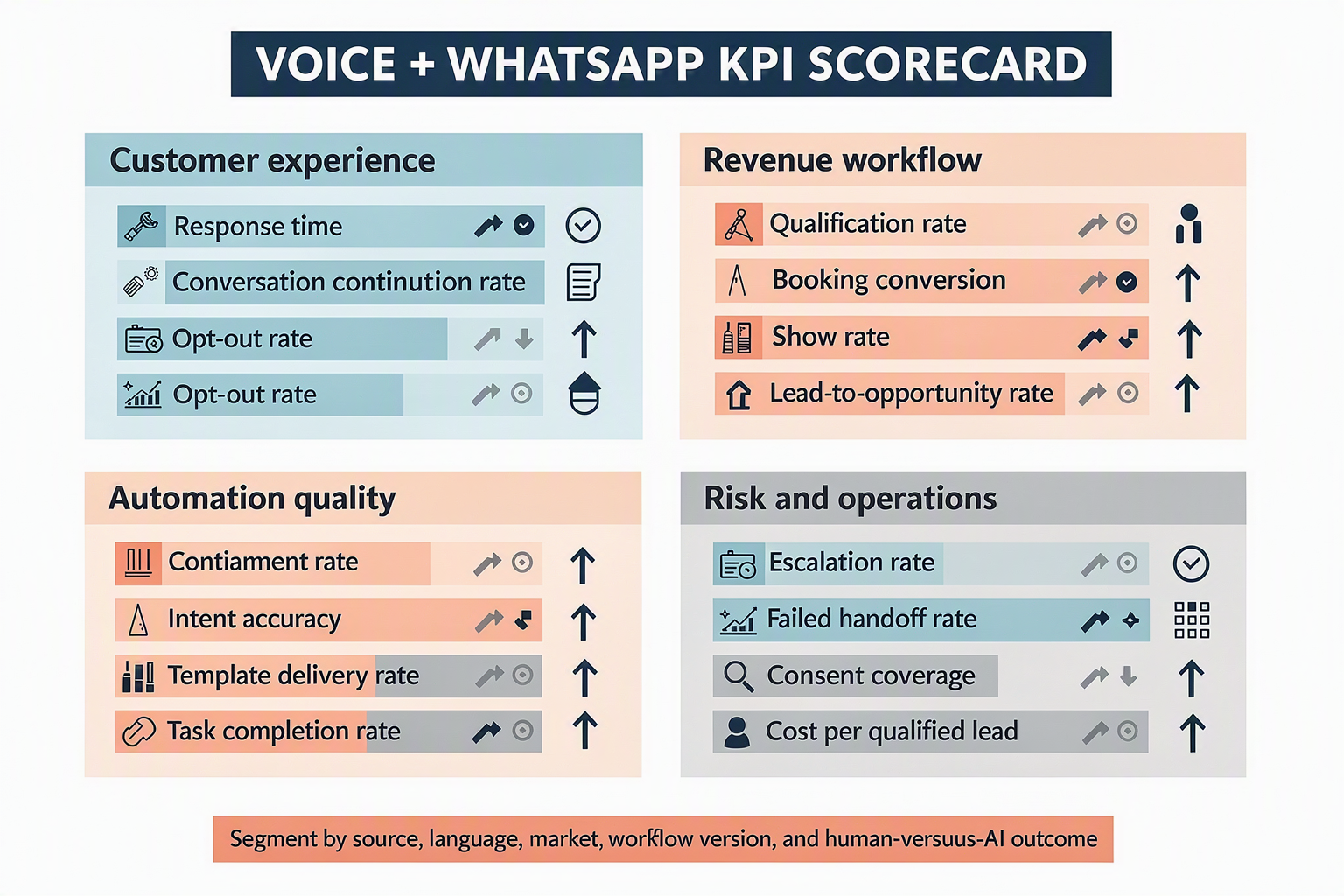
The real impact of an AI voice agent WhatsApp integration is measured by completed customer outcomes—not message volume, call count, or automation rate alone. Track conversion, continuity, customer effort, compliance, reliability, and human-assist quality as one connected funnel.
Build an outcome-based KPI hierarchy
Start with one primary business result, then identify the operational metrics that explain it. For appointment workflows, the hierarchy could be:
- Primary outcome: attended appointments per qualified lead
- Conversion metrics: qualification rate, booking rate, and attendance rate
- Journey metrics: chat-to-call acceptance and cross-channel completion
- Guardrails: consent errors, opt-outs, latency, abandonment, and failed transfers
Core calculations should include:
- Qualified-lead rate = qualified leads ÷ leads engaged
- Booking conversion = confirmed appointments ÷ qualified leads
- Attendance rate = attended appointments ÷ confirmed appointments
- End-to-end conversion = attended appointments ÷ eligible leads
- Human escalation rate = conversations transferred ÷ conversations started
- Successful transfer rate = human-connected transfers ÷ transfer attempts
Do not treat a high containment rate as automatically positive. An agent that prevents escalation but fails to resolve requests may appear efficient while damaging conversion and customer experience.
Measure continuity and customer effort
Omnichannel lead follow up should reduce repetition as customers move between WhatsApp chat, AI calls, and human agents. Measure that promise directly with:
- Context carryover rate: the percentage of channel transitions where required fields remain available
- Repeat-question rate: how often customers must restate previously captured information
- Cross-channel completion rate: journeys completed after moving from chat to voice or voice to chat
- Time to next action: elapsed time from customer intent to call, booking, or human response
- Identity-match failure rate: transitions that cannot be linked confidently to the correct contact
Audit transcripts and event logs weekly. A continuity pass should verify that the same conversation retains its lead stage, language, consent timestamp, qualification fields, booking status, and escalation reason.
Separate automation success from business success
For WhatsApp Business automation, report the complete funnel by intent, source, language, campaign, and agent version. A useful dashboard should show:
| KPI layer | Example measure | What it reveals |
|---|---|---|
| Business | Revenue or attended bookings | Final commercial impact |
| Conversion | Qualified-to-booked rate | Workflow effectiveness |
| Experience | Repeat-question rate | Conversation continuity |
| Compliance | Invalid-consent attempts | Policy-control performance |
| Reliability | Tool-call success rate | Integration health |
For multilingual deployments, segment performance by language rather than averaging everything together. CallMissed supports voice and chat across 22 Indian languages, making language-level analysis especially relevant for regional Indian audiences.
Apply expert measurement practices
Use disciplined evaluation rather than a single launch dashboard:
- Establish a pre-integration baseline using the previous four to eight weeks.
- Compare cohorts with equivalent lead source, intent, geography, and business hours.
- Version prompts, qualification rules, templates, and knowledge bases so changes are attributable.
- Review failed journeys, not just successful ones, using transcript samples and structured error codes.
- Track p50, p95, and p99 latency because averages can hide severe tail delays.
- Run controlled experiments on one variable at a time, such as call timing or booking wording.
- Define thresholds internally; do not copy universal “good” benchmarks without accounting for sector, lead quality, and customer intent.
The strongest 2026 scorecard combines commercial outcomes with safety guardrails. If conversion rises while consent failures, opt-outs, or unsuccessful transfers also rise, the integration is not delivering sustainable impact.
What does this mean for your stack, and where can CallMissed fit? (TABLE)
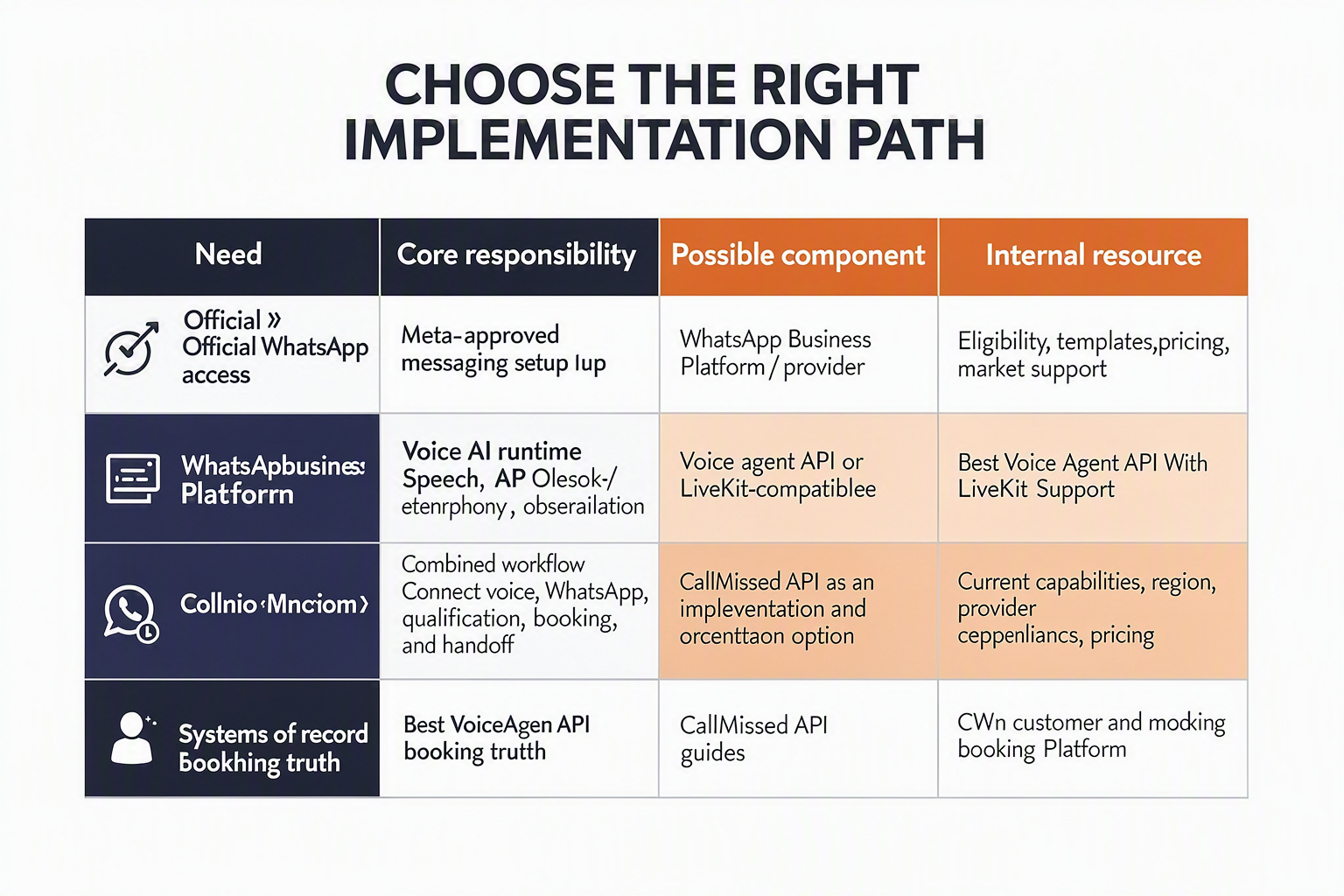
CallMissed may be a good fit when a business wants AI voice agents, WhatsApp chat and calling, Indian-language support, CRM or calendar actions, and human handoff in one engagement layer. In this model, the CRM, booking platform, consent ledger, and other systems of record remain authoritative.
Choose a developer-first platform when engineering teams need custom infrastructure, model selection, data routing, or deeply bespoke workflows. A human-only WhatsApp inbox may be safer for low volumes, highly sensitive interactions, or processes in which every response requires employee judgment.
Use the following questions to decide which AI voice agent WhatsApp integration path fits your stack.
| Decision area | CallMissed | Developer-first alternative | Human-only alternative | Questions to verify before deployment |
|---|---|---|---|---|
| Voice | Connect AI voice agents with supported business workflows | Build with telephony, speech, model, and orchestration APIs | Employees answer calls | Which countries, numbers, and call directions are supported? What are the expected latency, recording, and escalation behaviors? |
| WhatsApp continuity | Bring supported WhatsApp chat, WhatsApp Business calling, AI agents, and inbox workflows into one engagement layer | Maintain identity and context across Meta’s WhatsApp Business Platform and voice services | Agents continue conversations in an inbox | Is the account eligible for calling? Is the feature available in each target region? Does chat context remain visible before and after a call? |
| Indian-language needs | Evaluate CallMissed’s stated Speech-to-Text and Text-to-Speech coverage across 22 Indian languages | Select and integrate regional speech providers | Hire language-matched agents | Which exact languages and accents are supported? How does the AI voice agent WhatsApp integration handle code-switching, low-confidence speech, and fallback? |
| CRM and calendar tools | Pass supported lead details, summaries, appointments, and status updates into connected workflows | Implement custom APIs, webhooks, validation, retries, and monitoring | Employees update systems manually | Are the required connectors and fields available? How are API limits, duplicate writes, failed bookings, and retries handled? |
| Consent | Capture relevant channel events while keeping authoritative consent evidence in the CRM or consent ledger | Build consent storage and policy enforcement | Agents record consent through approved procedures | Does the record include opt-in source, purpose, timestamp, policy version, revocation status, and retention period? |
| Human handoff | Use an omnichannel inbox to provide available transcripts, summaries, and conversation history | Build routing, queues, agent tooling, and context transfer | Human handling is the default | Which events trigger transfer? Who owns each queue? What does the employee see, and what happens after hours? |
| Deployment effort | Potentially lower integration effort when the required channels and business tools are supported | Higher engineering effort with greater architectural control | Lower initial technical effort but higher ongoing staffing needs | Is sandbox access available? Who owns implementation, security review, monitoring, incident response, and rollback? |
A practical AI voice agent WhatsApp integration should be introduced incrementally. First, let the system observe and summarize interactions. Next, allow it to recommend actions. Enable approved CRM or calendar writes only after validation, access controls, and recovery procedures are tested.
Before launch, test whether the AI voice agent WhatsApp integration resolves identities correctly across calls and messages. Ask: Does it enforce consent by channel and purpose? Can it detect duplicate events? What happens when a booking fails, a language is unsupported, or a human transfer is unavailable?
Also verify how the AI voice agent WhatsApp integration behaves during provider outages and partial failures. Confirm queue ownership, audit-log retention, retry limits, escalation paths, and rollback procedures rather than assuming they are included.
WhatsApp Business calling and business-initiated communication remain subject to Meta policies, account eligibility, and regional availability. Confirm these conditions directly for every market before selecting CallMissed or another AI voice agent WhatsApp integration approach.
Frequently asked questions about AI voice agent and WhatsApp Business integration
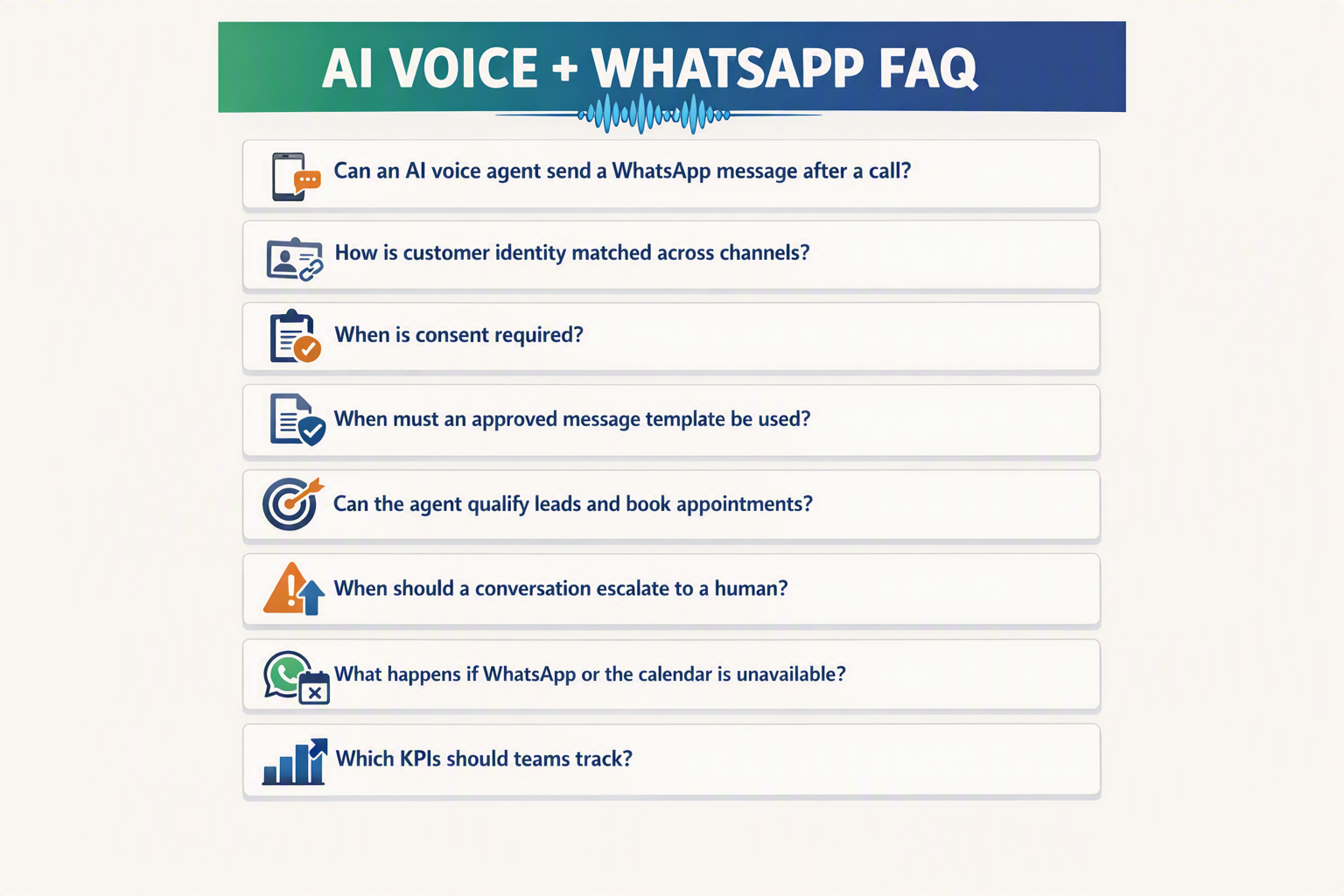
How does an AI voice agent WhatsApp integration work in 2026?
Does WhatsApp Business automation require customer consent for AI calls?
When are approved WhatsApp message templates needed for voice-agent follow-ups?
How can chat and call history stay connected during omnichannel lead follow up?
Can an AI voice agent qualify leads and book appointments through WhatsApp?
What should businesses test before launching WhatsApp Business calling with an AI agent?
Conclusion
A successful AI voice agent WhatsApp integration is not simply a connection between chat and telephony APIs. It is a coordinated customer journey in which identity, consent, context, workflows, and human support remain consistent as a conversation moves between messaging and voice.
Deployment takeaways
- Preserve conversation continuity. Use a shared customer identity, durable conversation state, and event-driven data architecture so the voice agent can access relevant chat history, language preferences, lead details, consent records, and unresolved questions without forcing the customer to repeat information.
- Treat consent and templates as core infrastructure. Store opt-in sources, timestamps, call permissions, and revocations in an auditable form. Approved WhatsApp message templates should govern eligible business-initiated follow-ups outside applicable service windows, while every workflow remains aligned with Meta’s account, market, messaging, and calling policies.
- Connect automation to measurable outcomes. Lead qualification should update standard CRM fields and scoring rules, while appointment booking should check live availability before sending confirmations. Effective omnichannel lead follow up measures booking conversion, qualification completion, transfer success, latency, containment, and consent failures—not merely message or call volume.
- Design human escalation before launch. When automation reaches a confidence, urgency, or policy boundary, the human agent should receive the transcript, concise summary, detected intent, collected fields, and prior actions. This makes escalation a continuation rather than a restart.
The scale behind this opportunity is already significant: Meta reported in April 2025 that WhatsApp had surpassed 3 billion monthly active users. Meta also reported in 2023 that the WhatsApp Business app served more than 200 million monthly active users.
What to watch next
Through 2026, watch how WhatsApp calling eligibility, consent controls, templates, and AI governance evolve across markets. Teams should build configurable policies and test edge cases continuously rather than hard-coding today’s assumptions.
For businesses implementing multilingual WhatsApp Business automation, CallMissed offers WhatsApp chat, inbound and business-initiated WhatsApp calls bridged to AI voice agents, an omnichannel inbox, and support for 22 Indian languages. Is your deployment ready to preserve trust and context from the first message to the final call?
Related Reading
Related Posts

Ready to automate customer conversations?
Launch AI voice agents and WhatsApp bots with CallMissed — one API, 22+ Indian languages.