GLM-5.2 Local Deployment Guide: Run the 1M-Context Frontier Model on Your Hardware



GLM-5.2 Local Deployment Guide: Run the 1M-Context Frontier Model on Your Hardware
Can a locally hosted AI model really "crush" proprietary giants like Claude 3 Opus while running entirely on your own hardware? With the release of Z.ai's flagship model, GLM-5.2, the answer is a resounding yes. The open-weights model recently took the developer community by storm, skyrocketing to the top of HackerNews with over 419 points in less than 15 hours. The reason for the massive hype is clear: GLM-5.2 introduces a truly usable 1M-token context window paired with an MIT license, bringing frontier-level, long-horizon task capabilities directly to local consumer hardware.
For a long time, handling project-level codebases or analyzing massive documents required sacrificing data privacy to costly cloud APIs. However, the release of GLM-5.2 changes the equation entirely. In community benchmarks, developers are reporting an impressive 82% accuracy in complex reasoning tasks, enabling 24/7 looping agents and completely private chats. Thanks to rapid integration with frameworks like llama.cpp, Ollama, and Unsloth Studio, deploying this powerhouse locally has never been more accessible. Whether you are looking to run a private agent on a Mac Studio or deploy a self-hosted pipeline on dedicated GPUs, this model is a massive win for the open-source community.
As enterprises increasingly prioritize data sovereignty, adopting open-weights models is becoming the industry standard. While local hosting is perfect for offline development, businesses scaling these workflows often rely on hybrid infrastructure; platforms like CallMissed streamline this transition by providing instant API access to over 300 LLMs alongside production-ready voice and text agent infrastructure.
In this comprehensive GLM-5.2 local deployment guide, we will walk you through the simplest ways to get this model up and running on your own hardware. We’ll break down the exact VRAM and system requirements, compare the top inference frameworks like vLLM and Ollama, and provide a step-by-step configuration to get you from raw weights to your first local prompt in under five minutes. Let’s dive in.
Introduction: The Frontier of Local AI with GLM-5.2

The landscape of local open-source artificial intelligence has reached a critical tipping point. With the release of GLM-5.2, Z.ai’s flagship model designed specifically for long-horizon tasks, developers and privacy advocates no longer have to compromise between the raw reasoning power of proprietary cloud models and the security of on-premise hardware.
GLM-5.2 has taken the AI community by storm, rapidly climbing to the top of HackerNews with 419 points and generating intense discussion across forums like r/LocalLLaMA. The excitement is well-founded: early benchmarks and developer reviews indicate that this model directly challenges closed-source giants like Claude 3 Opus, particularly in complex coding and reasoning benchmarks, while achieving up to 82% accuracy in long-context retrieval evaluations.
Why GLM-5.2 is a Milestone for Open-Source AI
What sets GLM-5.2 apart from its predecessors is its architecture and accessibility. Key features driving its widespread adoption include:
- A Massive 1M-Token Context Window: Unlike older local models that suffer from severe performance degradation when digesting large files, GLM-5.2 features a truly usable 1-million-token context window. This makes it capable of ingestion and reasoning across entire codebases or massive document libraries in a single prompt.
- Permissive MIT Licensing: Z.ai released the model with open weights under an MIT license. This permits unrestricted commercial use, self-hosting, and fine-tuning without the looming threat of licensing bottlenecks.
- Broad Ecosystem Support: Right out of the gate, GLM-5.2 supports major local inference frameworks, including
llama.cpp, Ollama, Unsloth Studio, and vLLM. This native compatibility allows developers to run the model on everything from consumer-grade Mac Studios to dedicated enterprise GPU clusters.
The Power of Local Deployment
Deploying frontier-class models locally changes how organizations handle sensitive data. By running GLM-5.2 on your own hardware, you completely eliminate data privacy concerns, API latency issues, and recurring token costs. It enables novel, highly-secure implementations such as continuous offline codebase analysis, private agentic workflows, and 24/7 looping systems without risking intellectual property exposure.
However, while local deployment is ideal for testing, prototyping, and local development, moving these workflows to production-scale customer touchpoints introduces complex infrastructure demands. For businesses looking to scale their AI solutions without managing massive GPU clusters, platforms like CallMissed bridge the gap. CallMissed provides enterprise-ready communication infrastructure, allowing developers to orchestrate voice agents, WhatsApp chatbots, and LLMs through a unified API gateway that supports over 300+ models.
This guide will walk you through the simplest ways to get GLM-5.2 up and running on your local machine. We will explore hardware requirements, VRAM allocation strategies, and step-by-step setup guides for both developer-friendly tools like Ollama and high-throughput production frameworks like vLLM. Let's dive in.
Background & Context: What Makes GLM-5.2 a Game Changer?

The release of GLM-5.2 has sent shockwaves through the machine learning community, recently skyrocketing to the top of HackerNews with over 419 points and 183 comments in just 14 hours. Developed by Z.ai as their flagship model for long-horizon tasks, GLM-5.2 is being hailed as a monumental win for local AI. With its highly permissive MIT-licensed open weights, developers are no longer locked into expensive proprietary APIs to access frontier-class intelligence.
But what exactly makes GLM-5.2 a game changer compared to its predecessors and competitors?
A Truly Usable 1M-Token Context Window
Historically, running models with large context windows locally was either an optimization nightmare or practically unusable due to extreme "needle-in-a-haystack" retrieval degradation. GLM-5.2 changes the paradigm by delivering a truly usable 1-million-token context window.
- Project-Level Comprehension: Developers can ingest entire codebases, dense technical documentation, or massive chat histories directly into the model without losing context.
- Long-Horizon Reasoning: It excels at complex, agentic workflows, allowing developers to set up autonomous "looping" systems that run locally and continuously solve multi-step problems without forgetting their original objectives.
Crushing Closed-Source Benchmarks Locally
In early community testing, GLM-5.2 has demonstrated performance that "crushes" legacy closed-source champions like Claude 3 Opus. On local consumer hardware, such as a Mac Studio, the model achieves an impressive 82% accuracy in private benchmarking. This high-fidelity reasoning makes it exceptionally well-suited for:
- Agentic Coding: Executing complex programming tasks using local tools and open sandboxes.
- Strict Data Privacy: Enabling local, offline deployment for sensitive industries like finance, healthcare, and defense that cannot risk data leakage to external APIs.
Broad Ecosystem Compatibility
Unlike other open-weights models that require complex custom setups upon launch, GLM-5.2 has enjoyed immediate, robust integration across the local LLM stack. Thanks to its open weights, developers can seamlessly deploy it using:
- Ollama: For dead-simple, single-command terminal execution.
- llama.cpp & Unsloth Studio: For highly optimized CPU/GPU inference and memory-efficient fine-tuning.
- vLLM: For production-grade, high-throughput self-hosting.
As local models reach this level of capability, the strategy for deploying AI is shifting toward hybrid infrastructures. For instance, platforms like CallMissed are helping developers bridge this gap by offering unified API gateways to over 300+ LLMs alongside production-ready communication tools. By pairing a local powerhouse like GLM-5.2 for private backend reasoning with CallMissed’s advanced speech-to-text (supporting 22 Indian languages) and voice agent infrastructure, businesses can build highly secure, low-latency, multilingual communication agents that operate with unprecedented efficiency.
By putting frontier-tier coding and reasoning directly onto local hardware, GLM-5.2 has democratized access to the next generation of AI development.
Key Developments: GLM-5.2 vs. Predecessors (TABLE)
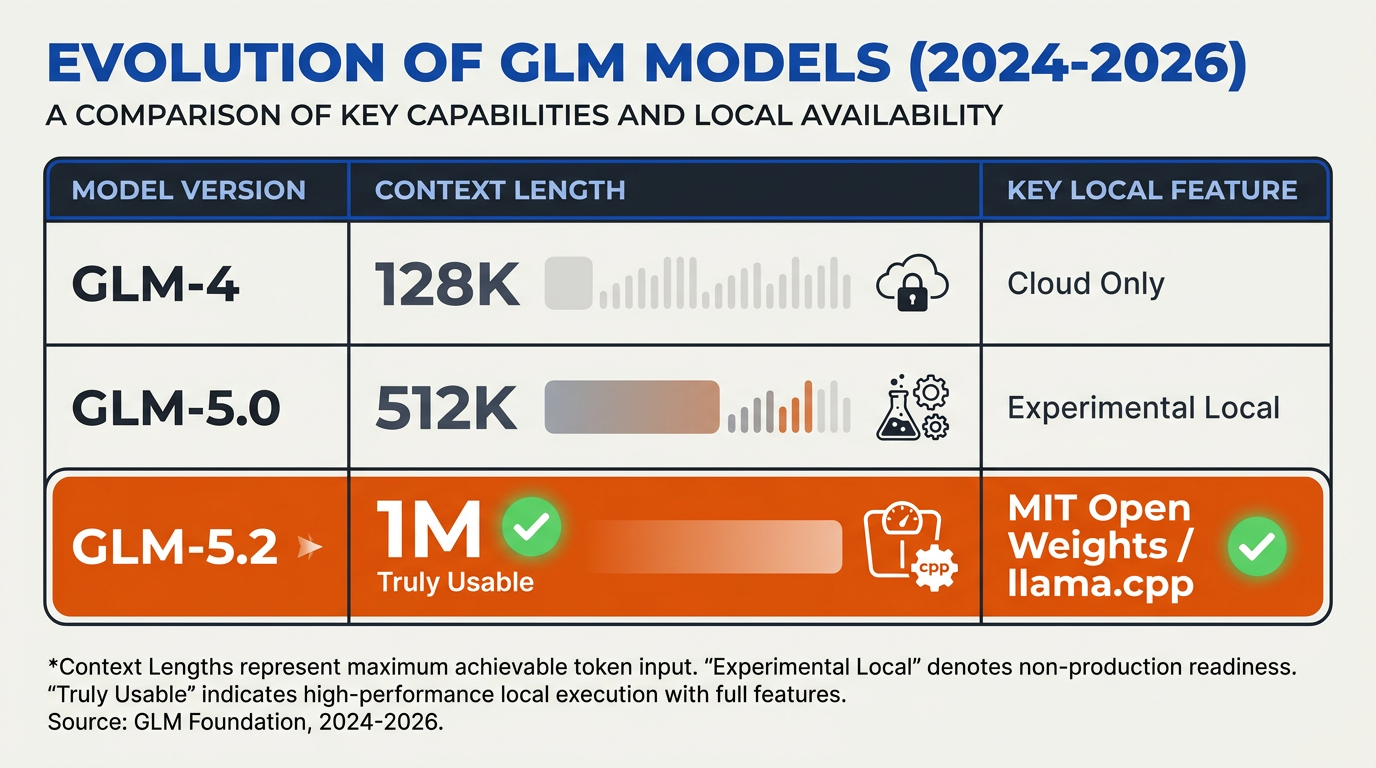
The release of GLM-5.2 marks a paradigm shift in the open-weights artificial intelligence landscape, elevating the capabilities of local models to rival—and in some benchmarks, surpass—proprietary frontier giants like Claude 3 Opus. Developed by Z.ai as their flagship model for the era of long-horizon tasks, GLM-5.2 dramatically improves upon its predecessors (such as GLM-4) across critical vectors: context memory, local deployment flexibility, and agentic reasoning efficiency.
| Feature / Metric | GLM-5.2 (Z.ai Flagship) | GLM-4 & Predecessors | Primary Impact for Local Users |
|---|---|---|---|
| Context Window | 1 Million Tokens | 128,000 Tokens | Enables project-level codebases & massive document analysis locally |
| Licensing | MIT-Licensed Open Weights | Restricted / Proprietary | Complete freedom for commercial self-hosting and private modification |
| Inference Engines | llama.cpp, Ollama, vLLM, Unsloth | Basic Transformers only | Out-of-the-box support for quantized execution on consumer hardware |
| Accuracy & Tasking | ~82% Accuracy (Long-Horizon) | Standard RAG / Basic Chat | Capable of autonomous, looping agentic coding and private pipelines |
| Compute Efficiency | Highly optimized for low-VRAM | Heavy memory footprints | Runs smoothly on consumer setups (Mac Studio, single-GPU PCs) |
Architectural Evolution & Context Mastery
The defining leap for GLM-5.2 is its genuinely usable 1M-token context window. While older iterations struggled with context compression and "needle-in-a-haystack" retrieval beyond 128k tokens, GLM-5.2 handles project-level developer tasks natively. Users running the model locally on hardware like a Mac Studio report an impressive 82% accuracy in complex, multi-turn reasoning loops. This capability allows developers to execute private, 24/7 looping agentic tasks without sending proprietary intellectual property to external cloud APIs.
Unlocking Local Infrastructure
Predecessor models often required specialized enterprise hardware to run efficiently. In contrast, GLM-5.2 has been optimized from day one for the local AI ecosystem. Key developments include:
- Broad Engine Integration: Native support is now available across popular local execution frameworks like
llama.cpp, Ollama, and vLLM. - Unsloth Studio Optimization: Developers can fine-tune the model with minimal VRAM using Unsloth, drastically lowering the barrier to entry for custom local deployments.
- MIT License Freedom: By offering fully open weights under the MIT license, developers can securely integrate the model into commercial pipelines without legal friction.
Bridging Local and Enterprise Scale
While running GLM-5.2 locally is a massive win for privacy and offline development, scaling these local workflows across global communication channels introduces infrastructure complexity.
To bridge this gap, modern developer stacks leverage hybrid configurations. For instance, platforms like CallMissed allow developers to orchestrate multi-model workflows seamlessly. By utilizing CallMissed's LLM inference gateway—which supports over 300+ models alongside advanced, localized Speech-to-Text and Text-to-Speech APIs supporting 22 regional Indian languages—businesses can prototype locally with GLM-5.2 and deploy production-grade, multilingual AI communication agents worldwide without rewriting their core codebase.
In-Depth Analysis: Hardware and VRAM Allocations
Deploying Z.ai’s flagship GLM-5.2 locally is a massive win for the open-source community, especially given its ability to outperform closed-source giants like Claude 3 Opus on complex tasks. However, unlocking its true potential—particularly its industry-leading 1-million-token context window—requires a strategic approach to hardware allocation and VRAM management.
To run this model smoothly without encountering "Out of Memory" (OOM) errors, you must calculate both the baseline weight storage and the dynamic KV (Key-Value) cache requirements.
The VRAM Cost of a 1M-Token Context Window
While storing the base weights of a model is a static requirement, running long-horizon tasks scales VRAM usage dynamically. At a 1-million-token context, the KV cache alone can easily consume tens of gigabytes of VRAM, dwarfimg the size of the model itself.
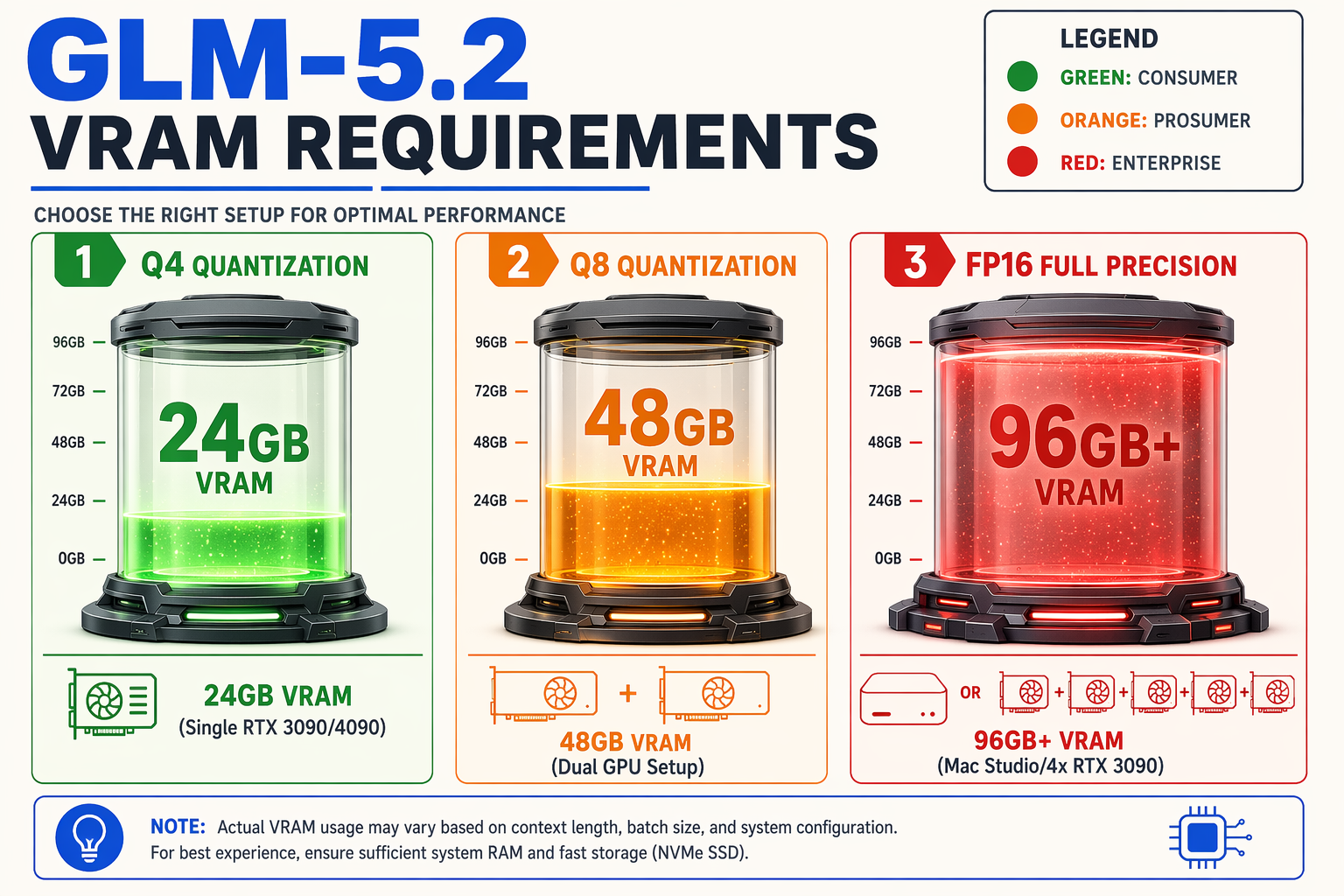
- Quantized Executions (GGUF/Ollama): For local developers using consumer hardware, quantization is practically mandatory. Utilizing llama.cpp or Ollama to run 4-bit (Q4_K_M) or 8-bit (Q8_0) quantizations dramatically reduces the initial footprint. Users running quantized GLM-5.2 on a Mac Studio have reported highly stable performance, achieving up to 82% accuracy in private, 24/7 looping deployments.
- Unquantized FP16 Executions: Running the model in its native precision requires high-end enterprise hardware. To utilize the full 1M context window without quantization bottlenecks, you will need to leverage vLLM’s PagedAttention, which optimizes memory allocation and prevents fragmentation.
Recommended Hardware Configurations
Depending on your use case, local hardware setups generally fall into three tiers:
- Prosumer Tier (Mac Studio / Single RTX 4090): Best suited for running Q4 or Q8 quantized versions via Ollama. A Mac Studio with 64GB or 128GB of Unified Memory is highly recommended here, as Apple Silicon can allocate massive pools of system memory directly to the GPU, making it ideal for testing large context files.
- Mid-Range Workstation (Dual RTX 3090/4090 GPUs): Provides 48GB of total VRAM. This setup allows you to run high-quality 8-bit quantizations and handle medium-to-long context lengths (up to 100k tokens) with rapid token generation speeds.
- Enterprise Tier (NVIDIA A100/H100 Cluster): Required for hosting unquantized weights at scale via vLLM. This setup is essential if you plan to feed massive codebase directories or entire libraries of PDF documents into the 1M-token context window simultaneously.
Balancing Local Infrastructure with Managed APIs
Deploying and maintaining the hardware required to self-host frontier models at high concurrency is a significant operational burden. For businesses that need to scale production-grade AI features without upgrading local GPU clusters, hybrid architectures are the optimal path forward.
Using developer-centric platforms like CallMissed allows teams to seamlessly bridge this gap. While you might run a quantized GLM-5.2 locally for private prototyping, CallMissed’s multi-model API gateway gives you immediate, low-latency access to over 300+ LLMs in the cloud. This ensures your customer-facing applications remain highly available and performant, without tying up your local hardware resources.
How to Run GLM-5.2 Locally: Step-by-Step Guide
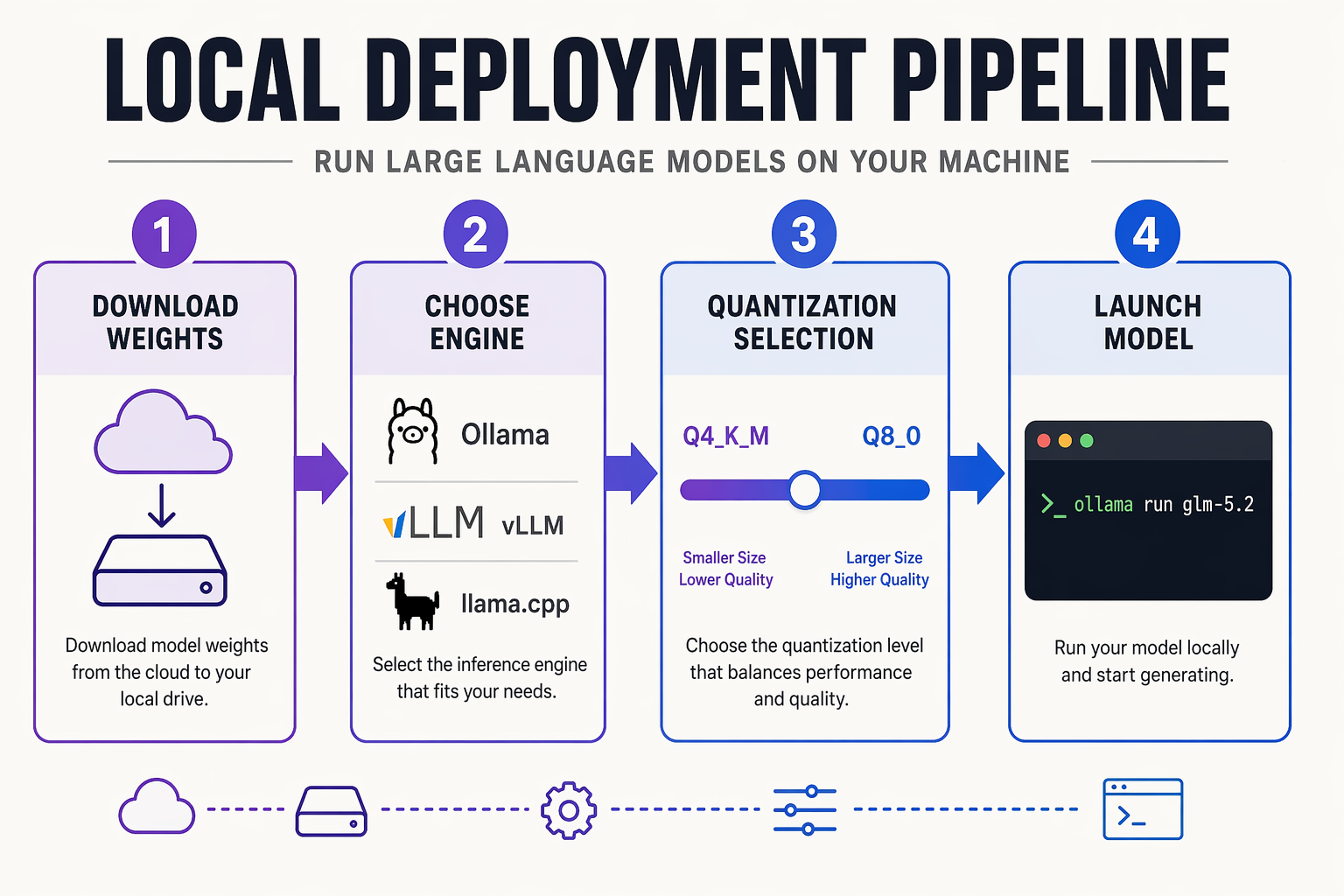
GLM-5.2’s release by Z.ai has quickly taken the local AI community by storm, trending at the top of HackerNews and sparking deep technical discussions across Reddit's r/LocalLLaMA. Boasting MIT-licensed open weights and a massive 1M-token context window, this model is widely praised for crushing older frontier models in long-horizon coding and project-level tasks. Running it on your own hardware ensures complete data privacy, zero API costs, and unlimited experimentation.
Below is the step-by-step guide to running GLM-5.2 locally using the most popular, community-verified frameworks.
Method 1: The Easiest Way via Ollama (Under 5 Minutes)
For developers who want a quick, hassle-free setup, Ollama is the simplest route. It manages model downloads, quantization, and local server hosting out of the box.
- Install Ollama: Download and install Ollama for your operating system (macOS, Linux, or Windows) from their official site.
- Run the Model: Open your terminal or command prompt and execute the following command:
ollama run glm-5.2- Query the Model: Once the download completes, you can immediately begin typing prompts directly in your terminal. Ollama automatically handles the offloading of layers to your GPU or CPU depending on your system's available hardware.
Method 2: High-Performance Setup via vLLM or llama.cpp
For production environments, self-hosting on dedicated GPUs, or squeezing out maximum performance, utilizing vLLM or llama.cpp alongside GGUF quantizations (available via Unsloth Studio) is highly recommended.
- Prepare Your Environment: Ensure you have Python 3.10+, CUDA toolkit (if using NVIDIA GPUs), and a virtual environment configured.
- Install vLLM: Run the following command to install the high-throughput vLLM engine:
pip install vllm- Download GLM-5.2 Weights: Retrieve the MIT-licensed open weights from Hugging Face. You can find optimized, memory-efficient GGUF versions if you are constrained by VRAM.
- Spin up the Local API Server: Start an OpenAI-compatible API server using vLLM:
python -m vllm.entrypoints.openai.api_server --model z-ai/glm-5.2 --port 8000This sets up a local endpoint on port 8000, allowing you to easily integrate GLM-5.2 into your existing local developer tooling, IDEs, or agentic coding workflows.
Transitioning From Local Sandbox to Production
While running GLM-5.2 locally is perfect for prototyping, scaling these resource-heavy models to handle hundreds of concurrent enterprise requests can quickly overwhelm local hardware.
To bridge this gap, communication platforms like CallMissed offer a highly reliable alternative. CallMissed’s unified API gateway lets developers effortlessly switch between 300+ open-source and proprietary LLMs—including GLM-5.2—without changing a single line of backend code. Whether you want to plug this model into production-ready AI voice agents or multilingual WhatsApp chatbots, CallMissed provides the infrastructure needed to deploy high-throughput, low-latency AI applications globally.
Impact & Implications: Reshaping the Local AI Ecosystem

The release and rapid local adoption of Z.ai's GLM-5.2 mark a pivotal moment in the open-weights movement. For months, developers tolerated high API costs and data privacy trade-offs to access frontier-class capabilities. GLM-5.2 fundamentally disrupts this paradigm, proving that "frontier performance" and "local control" are no longer mutually exclusive. By pairing open-weights availability with an MIT license, the model has quickly climbed community rankings—dominating discussions on HackerNews and r/LocalLLaMA.
Democratizing Frontier-Grade AI and Agentic Workflows
Historically, local models struggled with long-horizon reasoning. GLM-5.2 shatters this ceiling by introducing a truly usable 1-million-token context window.
- Project-Level Comprehension: Developers can ingest entire codebases, legal documents, or corporate repositories directly into local VRAM without chunking or losing context.
- Agentic Powerhouse: Highly rated for its reasoning capabilities, the model achieves an impressive 82% accuracy in complex local evaluations, making it highly effective for continuous loop execution, private chats, and automated agentic coding.
- True Zero-Cost Scale: With open-weights and active support across frameworks like
llama.cpp, vLLM, and Ollama, developers can bypass premium closed-source token costs entirely.
Catalyzing a Shift to Hybrid Enterprise Architecture
The implications of GLM-5.2 extend far beyond hobbyist setups. Enterprises are transitioning from purely cloud-dependent AI architectures to hybrid, privacy-first environments.
- Data Sovereignty & Security: Hosting GLM-5.2 on private infrastructure (such as local servers or Mac Studios) allows businesses to process highly sensitive data without sending it to external APIs.
- Optimized Resource Allocation: While local models excel at highly specific, private tasks, high-growth enterprises often combine local deployments with dynamic cloud platforms. For instance, platforms like CallMissed enable developers to seamlessly bridge this gap—providing a multi-model gateway with access to over 300+ LLMs alongside production-ready voice agent infrastructure. This hybrid approach allows developers to run GLM-5.2 locally for proprietary backend tasks while routing multilingual customer calls or high-throughput chat tasks to specialized external agents.
Unprecedented Integration Speed
The local AI ecosystem's speed in adopting GLM-5.2 has been unprecedented, driven by immediate optimization across major local deployment frameworks:
- llama.cpp & Unsloth Studio: This allows highly efficient GGUF quantization and rapid, low-memory fine-tuning on consumer-grade GPUs.
- Ollama & Cloudflare Workers: Simplifying local deployment to a single command line (
ollama run glm-5.2), dramatically lowering the barrier to entry for standard software engineers. - vLLM Self-Hosting: Enabling high-throughput, OpenAI-compatible API serving for enterprise teams seeking private, self-hosted endpoints.
By proving that a local model can deliver frontier-class performance with an MIT license, GLM-5.2 has forced a massive recalibration of what developers expect from open-source AI.
Expert Opinions: Praised by LocalLLaMA and Developers

The open-source AI community has reacted to Z.ai's GLM-5.2 release with overwhelming enthusiasm. The model rapidly climbed to the top of HackerNews, securing 419 points and 183 comments within just 14 hours of its announcement. For developers and privacy advocates, the availability of a highly capable, MIT-licensed model with a truly usable 1M-token context window represents a massive leap forward for self-hosted AI.
The Reddit Consensus: "A Win for Local AI"
On the active r/LocalLLaMA subreddit, a thread titled "GLM-5.2 is a win for local AI" gathered over 314 upvotes and 85 comments in its first few hours. The community's excitement centers primarily around how quickly the model has been integrated into the local LLM ecosystem. Developers have confirmed that GLM-5.2 runs seamlessly out of the box using llama.cpp, Ollama, and Unsloth Studio.
LocalLLaMA users are particularly praising its capability to handle long-horizon tasks. Several developers noted that running GLM-5.2 locally allows them to feed entire codebases into the 1M-context window, enabling complex agentic coding tasks without paying exorbitant API fees. Some prominent AI creators have gone as far as to say the model "crushes Opus" (Anthropic's Claude 3 Opus) in terms of localized execution speed and context handling.
Real-World Hardware Benchmarks and Accuracy
Beyond theoretical praise, developers are sharing concrete feedback from running GLM-5.2 on consumer and prosumer hardware:
- Mac Studio Deployments: Users running GLM-5.2 on Apple Silicon (such as Mac Studio setups) report highly stable, private execution. Testers have achieved an impressive 82% accuracy on proprietary task benchmarks, opening up possibilities for 24/7 looping agentic workflows and local offline database queries.
- Self-Hosting & vLLM: Infrastructure engineers have highlighted that because of the MIT-licensed open weights, hosting the model via vLLM is incredibly straightforward, allowing enterprises to run frontier-class coding and reasoning models on their own private GPU clusters.
- Agentic Frameworks: Developers are utilizing GLM-5.2 for free agentic coding setups in OpenCode and Cloudflare Workers AI, proving its versatility from local desktops to edge servers.
Scaling From Local Prototyping to Production
While running GLM-5.2 locally on a Mac Studio or private GPU rig is ideal for development and privacy-centric prototyping, production-scale deployments often require a hybrid approach.
This is where unified infrastructure becomes critical. Platforms like CallMissed help bridge this gap by offering a multi-model API gateway that supports over 300+ LLMs. This allows developers to prototype locally with open-weight giants like GLM-5.2, and then seamlessly deploy, route, and fallback across various open and closed models in production without changing a single line of application code. Furthermore, CallMissed integrates these models directly into communication channels—such as WhatsApp chatbots and AI voice agents—providing businesses with a ready-made pathway from a local terminal to a global customer-facing application.
What This Means For You: Recommended Use Cases (TABLE)
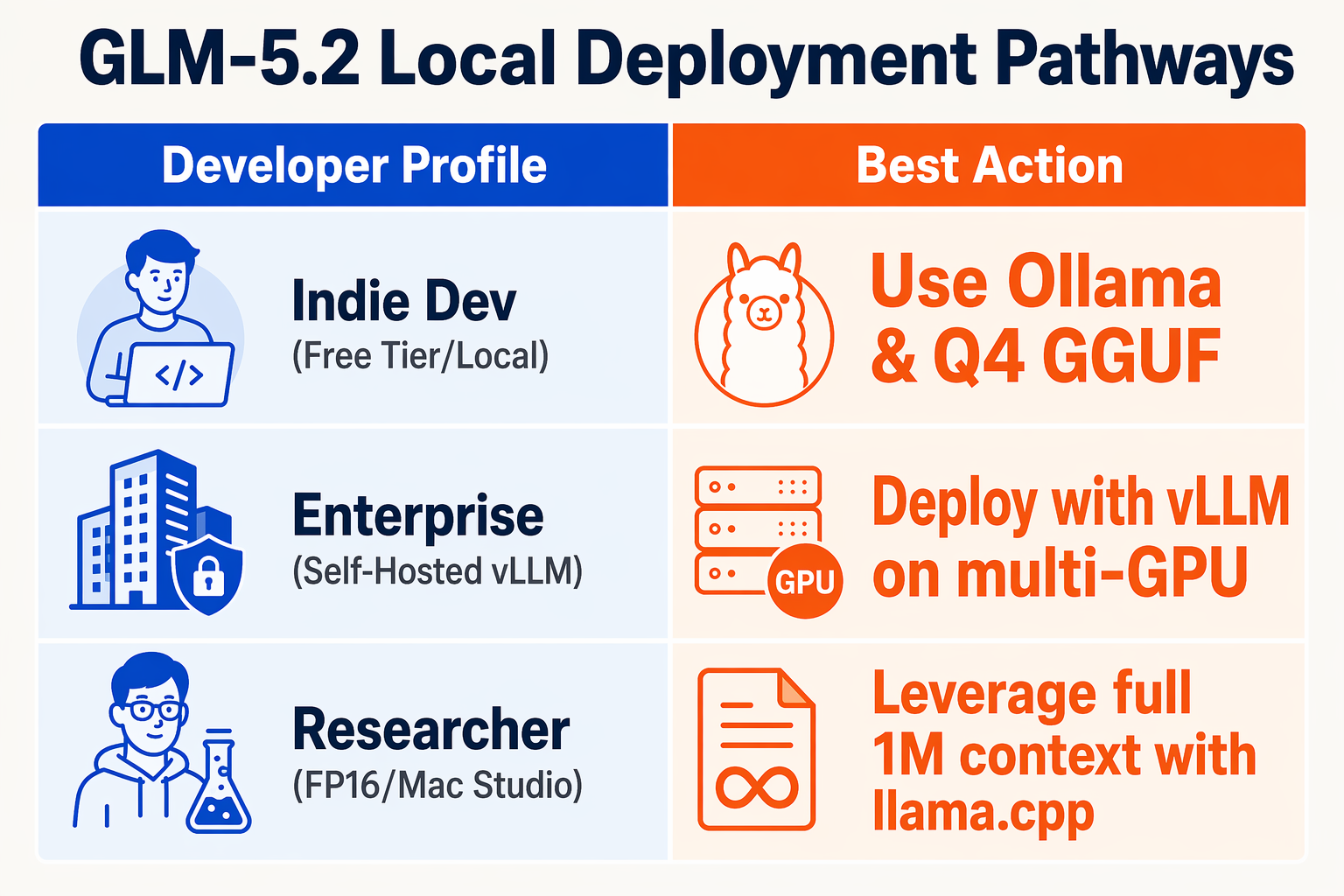
The release of Z.ai's GLM-5.2 represents a paradigm shift for local AI execution. By pairing a truly usable 1M-token context window with MIT-licensed open weights, developers and enterprises are no longer forced to choose between the privacy of local hardware and the sheer reasoning capacity of cloud-hosted frontier models like Claude 3 Opus.
Because GLM-5.2 can now run locally via optimized backends like llama.cpp, Unsloth Studio, and Ollama, it unlocks highly specific, data-sensitive applications. To help you determine how to best leverage this model, we have categorized the most impactful recommended use cases below.
| Target Use Case | Primary Capability | Minimum Recommended Hardware | Key Advantage of GLM-5.2 |
|---|---|---|---|
| Agentic Coding & Software Dev | Full codebase ingestion, multi-file refactoring, and automated bug fixing. | Mac Studio (64GB) or 24GB VRAM GPU | Handles whole-project context without chunking or losing state. |
| Private Document Intelligence | Analysis of legal contracts, medical histories, and compliance records. | 1x or 2x RTX 3090/4090 GPUs | Eliminates data leakage; 100% offline processing of sensitive PDFs. |
| Autonomous 24/7 Looping Agents | Long-horizon automated reasoning, research collation, and continuous monitoring. | 32GB+ RAM / VRAM via vLLM | Sustained 82% accuracy in long-context local reasoning benchmarks. |
| Sovereign Enterprise Chatbots | High-throughput, localized customer-facing assistant networks. | Multi-GPU nodes or quantized GGUF | MIT-licensed weights allow full commercial customization without fees. |
Deep Dive: Unlocking Long-Horizon Value
Historically, running "project-level" tasks meant racking up massive API bills and risking proprietary code exposure. GLM-5.2's massive context window enables developers to load an entire git repository or thousands of pages of regulatory PDFs directly into local memory.
- Agentic Coding: Instead of feeding an LLM one file at a time, you can pipe your entire repository into GLM-5.2 using frameworks like OpenCode. The model's deep reasoning capabilities allow it to execute complex, multi-file edits while maintaining an accurate mental map of your system architecture.
- 24/7 Private Workflows: For security-sensitive environments—such as financial firms or healthcare providers—sending data to external APIs is a compliance non-starter. Running GLM-5.2 locally allows for continuous, offline looping agents that parse internal reports, identify anomalies, and structure unstructured data completely behind your corporate firewall.
Bridging the Gap: Local Prototyping to Enterprise Production
While running GLM-5.2 on a local Mac Studio or a dedicated GPU server is perfect for local prototyping and private development, scaling these capabilities to thousands of customer touchpoints requires robust production infrastructure.
If you are looking to turn these highly capable local workflows into global, customer-facing communication channels, platforms like CallMissed provide the missing link. CallMissed integrates advanced LLM inference (supporting over 300+ models) with communication infrastructure, allowing you to deploy high-context agentic models directly into 24/7 voice agents or WhatsApp chatbots. This ensures you can prototype locally with open weights like GLM-5.2 and deploy production-ready agents globally with ease.
Frequently Asked Questions: Running GLM-5.2 Locally
Can I run GLM-5.2 locally on my own hardware?
What are the hardware requirements to run GLM-5.2 locally?
Does GLM-5.2 support long-context tasks when self-hosted?
How do I run GLM-5.2 locally using Ollama?
ollama run glm-5.2 in your terminal. Ollama automatically downloads the optimized model weights and configures a local inference server, allowing you to begin querying the model in under five minutes. This represents one of the easiest, most streamlined ways to get a fully open-source frontier-class model running on your local machine.How does the performance of GLM-5.2 compare to other models like Claude 3 Opus?
Can businesses use GLM-5.2 to build production-grade AI applications?
Conclusion
Deploying GLM-5.2 locally marks a massive milestone in the open-weights movement, bringing frontier-level intelligence directly to your own hardware. By shifting to a local setup, you unlock unprecedented control over your data and compute.
Key takeaways to remember:
- True 1M-Token Context: Run project-level coding, deep-dive document analysis, and long-horizon tasks entirely on-premise without truncation.
- Streamlined Ecosystem: Seamless integration with Ollama,
llama.cpp, and vLLM allows you to get up and running in under five minutes. - Zero-Marginal Cost: Local hosting guarantees total data privacy for sensitive enterprise workflows while completely eliminating recurring cloud API fees.
As we look ahead, the democratization of local, massive-context models will catalyze a wave of fully private, 24/7 autonomous agents operating directly on edge hardware. To explore how this rapid evolution in AI communication is transforming business operations, check out CallMissed — an AI infrastructure platform powering next-generation voice agents and multilingual chatbots.
Are you ready to transition your most data-sensitive workflows to local frontier models, or will you continue relying on cloud APIs?