

How to Fix the 'Missed Call First, Then Ringing' Bug on iPhone and Android


Get step-by-step troubleshooting to fix the frustrating glitch where your iPhone or Android registers a missed call notification before the phone rings.
How to Fix the 'Missed Call First, Then Ringing' Bug on iPhone and Android
Have you ever looked down at your phone to see a missed call notification flash across your screen, only for the device to suddenly start ringing a second later? This baffling, backward sequence—where your phone registers a missed call first, then ringing occurs—is one of the most frustrating mobile glitches plaguing both iOS and Android users today. Instead of a seamless connection, you are left staring at a chaotic lock screen, scrambling to answer a call that your phone’s software has already prematurely logged as missed.
While it feels like a ghostly technical error, this phenomenon is actually a highly common conflict between modern operating system features, network latency, and carrier synchronization. According to mobile forum data, thousands of users search for solutions to this exact issue every month, often missing critical business inquiries or urgent family updates because their phones fail to ring on the first attempt. In a fast-paced digital world where reliable communication is paramount—and where businesses rely on sophisticated infrastructure like CallMissed to ensure every voice agent and customer interaction is seamlessly connected—having your personal device fail at basic call routing can disrupt your entire day.
Usually, the culprit isn't a broken hardware antenna, but rather a hidden software setting. On iPhones, aggressive Focus Modes or "Do Not Disturb" rules—specifically the "Allow Repeated Calls" feature—are designed to silence the first call but let a rapid second attempt ring through, creating the illusion of a bug. On Android, the issue frequently stems from corrupted phone app caches, misconfigured spam filters, or carrier-side delays.
In this comprehensive troubleshooting guide, we will dissect exactly why your phone is prioritizing the missed call alert over the actual ringtone. You will learn how to audit your iOS Focus settings, clear deep Android system caches, adjust spam-blocking features, and reset your network configuration to restore your phone’s natural calling order. Let’s dive in and fix this glitch once and for all.
Introduction
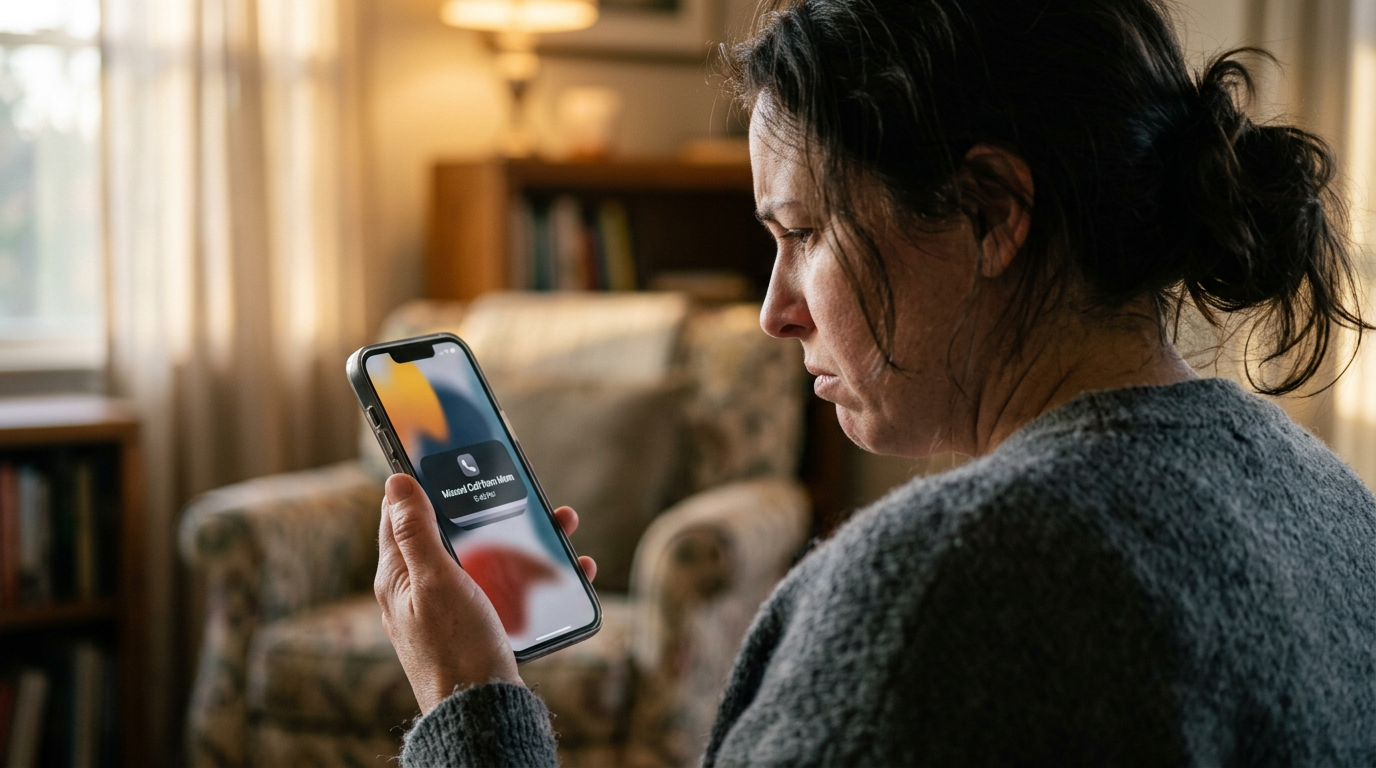
Have you ever looked down at your smartphone to see a missed call notification flash across your screen, only for the device to suddenly start ringing a second later? This baffling, backward sequence—where your phone registers a missed call first, then ringing occurs—is one of the most frustrating mobile glitches plaguing both iOS and Android users today.
Instead of a seamless connection, you are left staring at a chaotic lock screen, scrambling to answer a call that your phone’s software has already prematurely logged as missed. When this happens, it is nearly impossible to pick up the call in time, forcing you to dial back. In a fast-paced digital world where reliable communication is paramount—and where enterprises rely on sophisticated cloud infrastructure like CallMissed to ensure every voice agent and customer interaction connects seamlessly—having your personal device fail at basic call routing is a major disruption.
While it feels like a ghostly hardware error, this phenomenon is actually a highly common software conflict between operating system rules, network latency, and carrier synchronization. According to mobile forum data, thousands of users search for solutions to this exact issue every month, often missing critical business inquiries or urgent family updates because their phones fail to ring on the first attempt.
Why Does My Phone Register a Missed Call Before Ringing?
The culprit behind this frustrating glitch is rarely a broken hardware antenna. Instead, it is usually a conflict between automated software settings:
- Aggressive Focus and "Do Not Disturb" (DND) Rules: On iOS, the system is designed to silence certain notifications. If a specific override is active, the first attempt is blocked (triggering a missed call alert), while a rapid second attempt bypasses the filter to ring.
- Spam Filtering and Caller ID Latency: Both iOS and Android utilize cloud-based spam databases. If the database lookup takes too long, your operating system may flag and temporarily silence the call as "suspected spam," registering it as missed before realizing it is a legitimate caller.
- Carrier Synchronization Delays: If your cellular network or VoLTE (Voice over LTE) connection experiences a momentary routing delay, the network may send the "missed call" packet to your handset before the actual voice channel completes its handshake.
Whether you are running the latest iOS update or an Android device, this guide will walk you through the precise steps to audit your settings, clear corrupted caches, and restore your phone’s natural calling order.
Background & Context
The Mechanics of the Routing Lag
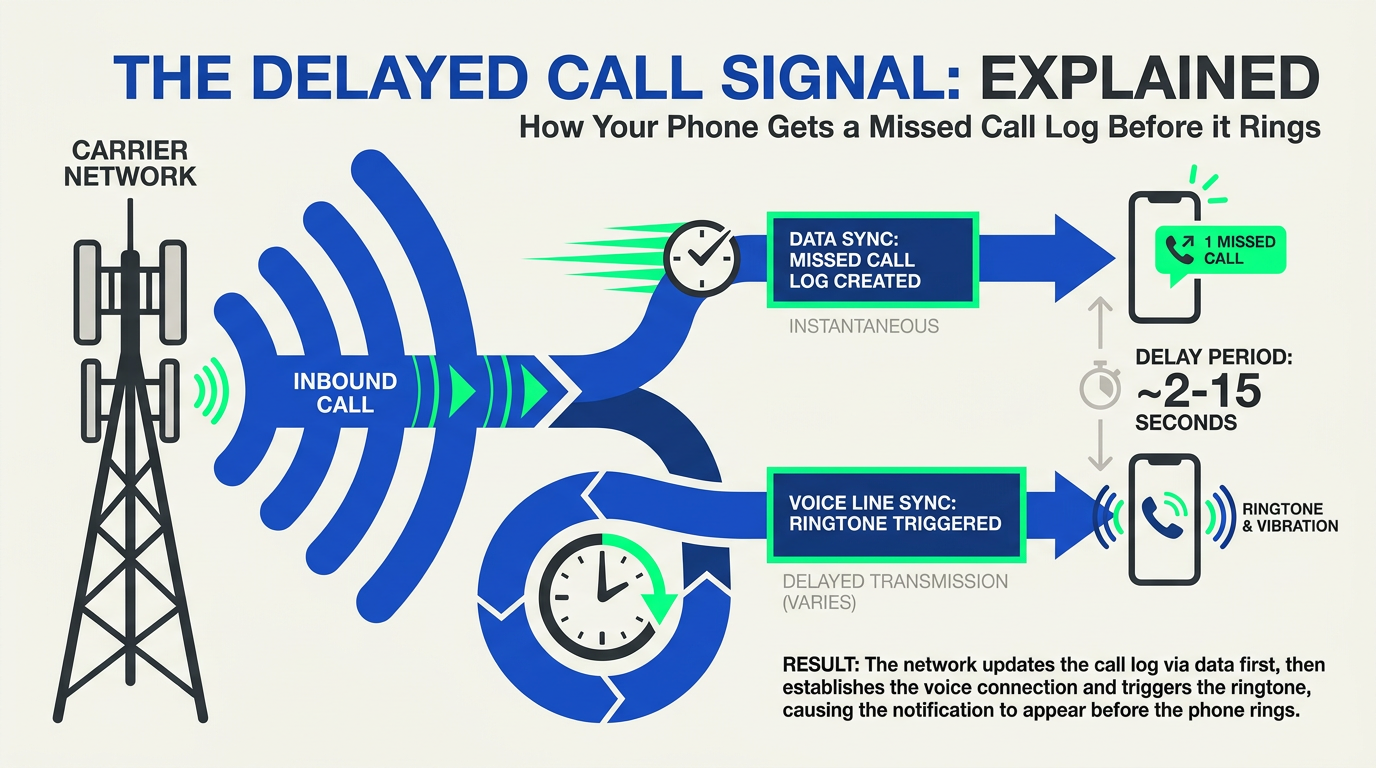
At its core, the "missed call first, then ringing" phenomenon is a synchronization failure between your network carrier and your smartphone’s operating system (OS). When someone dials your number, the carrier sends an invite signal to your device. Under normal circumstances, your phone processes this signal, triggers the ringtone, and updates the user interface (UI) simultaneously.
However, if there is a bottleneck in the software’s decision-making layer, a lag occurs. The carrier’s network may register that the call has gone unanswered for too long—pushing a call missed log to your device—at almost the exact millisecond your phone’s local software finally clears the bottleneck and triggers the physical ringtone.
The iOS Culprit: Focus Modes and "Repeated Calls"
On iPhones, this confusing sequence is frequently a side effect of Apple’s built-in Focus and Do Not Disturb (DND) architecture. Within these settings lies a feature called Allow Repeated Calls, designed to bypass your silence settings during emergencies.
- The Silent First Attempt: When a contact calls you while a Focus Mode is active, iOS immediately silences the call. Because the call is silenced and routed to voicemail or ignored, the OS instantly logs a missed call.
- The Urgent Second Attempt: If the caller dials your number again within three minutes, iOS recognizes this as a potential emergency. It bypasses the silence rule and allows the phone to ring.
If you happen to look at your screen during this rapid sequence, you will see the missed call notification from the first attempt sitting on your lock screen while the device is actively ringing from the second attempt.
The Android Culprit: Spam Filters and Cache Congestion
Android devices experience this glitch through a different technical pipeline, primarily involving system resources and background application layers.
- Spam Filter Latency: Modern Android phones utilize cloud-based Caller ID and Spam protection. When a call arrives, the system pauses the ring sequence to run the number through a spam database. If your network connection is sluggish, this database lookup can take several seconds. By the time the phone determines the call is safe and starts to ring, the carrier has already registered a missed connection.
- Phone App Cache Bloat: The default Android Phone app accumulates temporary data over time. If this cache becomes corrupted or bloated, the app suffers from rendering lag. The network registers the incoming call, but the device’s UI is too slow to display the answering screen, leading to a missed call notification popping up just as the audio ringtone finally kicks in.
The Real-Time Communication Challenge
This consumer-level glitch mirrors the complex routing challenges faced in enterprise communications. Just as a delayed smartphone handoff leads to missed personal connections, businesses face massive drop-off rates if their communication systems lag. This is why forward-thinking organizations utilize platforms like CallMissed, relying on low-latency infrastructure and optimized API routing to ensure that AI voice agents and customer calls connect instantly without carrier-side delay.
On personal devices, fixing this lag requires diving into your local OS settings to streamline how your phone processes incoming network signals.
Key Developments (TABLE)
To understand why your device is experiencing this frustrating "missed call first, then ringing" loop, it helps to look at the underlying technical causes. This issue is rarely a hardware failure. Instead, it is almost always a software conflict, a network latency delay, or an aggressive operating system feature functioning exactly as programmed—even if that programming yields a terrible user experience.
For instance, Apple's Do Not Disturb (DND) and Focus Modes feature an option called "Allow Repeated Calls." When active, this setting silences the first incoming call (logging it instantly as a missed call) but allows a second call from the same number within three minutes to ring through. On Android, aggressive battery optimization, corrupted carrier service caches, or local spam filters can delay the incoming call payload. By the time your phone finally wakes up to ring, the carrier network has already flagged the initial connection attempt as "unanswered," pushing the missed call notification to your screen while the delayed audio signal finally starts playing.
Below is a detailed breakdown of the primary causes behind this glitch across both iOS and Android platforms, along with the technical reasons why they trigger this specific behavior.
| Platform | Root Cause / Feature | Technical Trigger | Resulting Behavior |
|---|---|---|---|
| iOS | Allow Repeated Calls (Focus/DND) | Silences the first ring cycle from any caller; only permits the second attempt within 3 minutes. | First call registers instantly as "Missed," second attempt rings normally. |
| iOS | Silence Unknown Callers | Automatically routes calls from numbers not in your Contacts or Recents directly to voicemail. | Phone displays a missed call notification immediately without ever playing a ringtone. |
| Android | Phone App Cache Corruption | Bloated temporary data in the system dialer delays the execution of the incoming call UI. | Ringtone plays late or physical screen notification pops up seconds after the call has ended. |
| Android | Spam & Caller ID Filters | Google's carrier-database lookup delays the call stream while verifying the caller's reputation. | Severe network latency causes a "missed call" state before the phone decides to ring. |
| Both | Carrier Provisioning / IMS Registration | Network-side delays in Handover (switching between 5G/LTE and Wi-Fi Calling). | The cellular network routes the call to voicemail while the handset is still processing the wake-up signal. |
Why Network Infrastructure Matters
When these delays happen on a personal device, it is a daily nuisance. However, for modern businesses, missed calls represent lost revenue and damaged reputation. While personal phones struggle with local OS settings, enterprise-grade communication systems rely on robust cloud infrastructure to bypass these routing bottlenecks entirely.
To prevent these synchronization errors at scale, platforms like CallMissed utilize advanced AI communication infrastructure, offering direct multi-model API gateways, optimized Speech-to-Text, and instantaneous routing. By deploying resilient virtual voice agents rather than relying on standard consumer cellular handovers, businesses can ensure that customer calls are answered instantly on the very first ring—bypassing the carrier latencies that plague traditional smartphones.
In the following sections, we will walk through the exact step-by-step troubleshooting configurations to eliminate this delay on both iPhone and Android devices.
In-Depth Analysis
To understand why your device displays a missed call first, then ringing sequence, we must look at the underlying software logic of modern mobile operating systems. Rather than a random hardware malfunction, this issue is usually the result of a highly specific conflict between automated notification protocols, network latency, and user-configured privacy features.
The iPhone Culprit: How Focus Modes Mimic a Bug
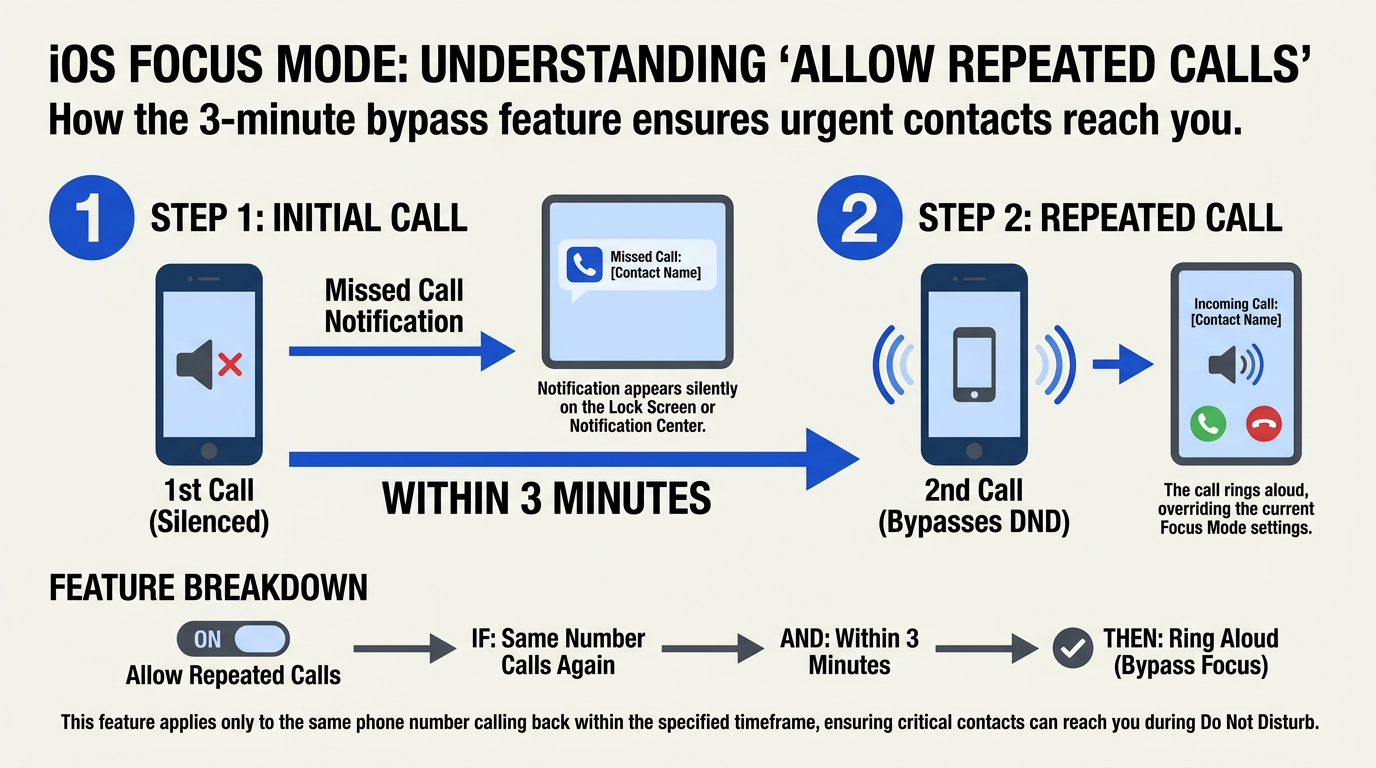
The most common cause of this phenomenon on iOS is a built-in feature designed to protect your peace. When you enable Do Not Disturb (DND) or any customized Focus Mode, Apple's software is programmed to silence incoming alerts. However, to ensure you do not miss critical emergencies, Apple includes a setting called Allow Repeated Calls.
Here is how that logic breaks down in real-time:
- The First Attempt: When a contact dials your number, iOS intercepts the call under active DND rules. It immediately silences the call and logs it, which triggers an instant "missed call" push notification on your lock screen or paired Apple Watch.
- The Second Attempt: If that same caller dials your number again within three minutes, the "Allow Repeated Calls" bypass is triggered. The operating system recognizes the urgency, overrides the silence rule, and allows the phone to ring.
To the user, this sequence appears as an infuriating software bug: you look at your screen, see a missed call alert from a second ago, and suddenly the phone starts vibrating in your hand.
The Secondary iOS Trigger: "Silence Unknown Callers"
Another prominent iOS feature causing this desynchronization is the Silence Unknown Callers utility. When activated, iOS automatically silences calls from numbers not found in your Contacts, Mail, or Messages.
- The carrier routes the call to your device.
- iOS instantly deflects the call to voicemail, generating a missed call log.
- If there is a slight network latency or a carrier-side routing delay, the push notification for the missed call arrives on your screen a split second before the system finished processing the voicemail redirection, occasionally causing a brief, ghost ring after the notification has already populated.
Android's Sync Delays: App Caches and Spam Filters
On Android devices, the "missed call first" behavior is more closely tied to system resource management and carrier communication delays.
- Corrupted Phone App Cache: The default Phone application handles real-time telephony state changes. If the app's cache becomes bloated or corrupted, it fails to transition from an idle state to an active ringing state quickly enough. The network registers that the call was sent (and missed), while the local Android system is still struggling to launch the incoming call UI.
- Aggressive Spam Filtering: Features like Google's Caller ID & Spam filter inspect incoming numbers in real-time. If the lookup database experiences a microsecond of latency, the Android system may preemptively flag the call as missed or blocked, only to let it ring once the spam check clears it as safe.
The Network Latency Factor
For both platforms, carrier-side synchronization plays a massive role. Modern LTE and 5G networks utilize VoLTE (Voice over LTE) to route voice traffic. If your local tower is congested, the data packet carrying the "Missed Call" notification (sent via IP data) can actually travel faster than the cellular signaling protocol required to trigger your phone’s physical ringtone.
For businesses relying on high-volume communication, network discrepancies like this highlight the importance of robust infrastructure. Enterprise platforms like CallMissed bypass these local device bottlenecks by utilizing advanced, multi-channel routing and direct API integrations. While a personal mobile device might stumble over local focus settings or carrier lag, cloud-native AI communication infrastructure ensures that voice agents and automated systems register and route calls with millisecond precision, completely eliminating local handset delays.
Impact & Implications
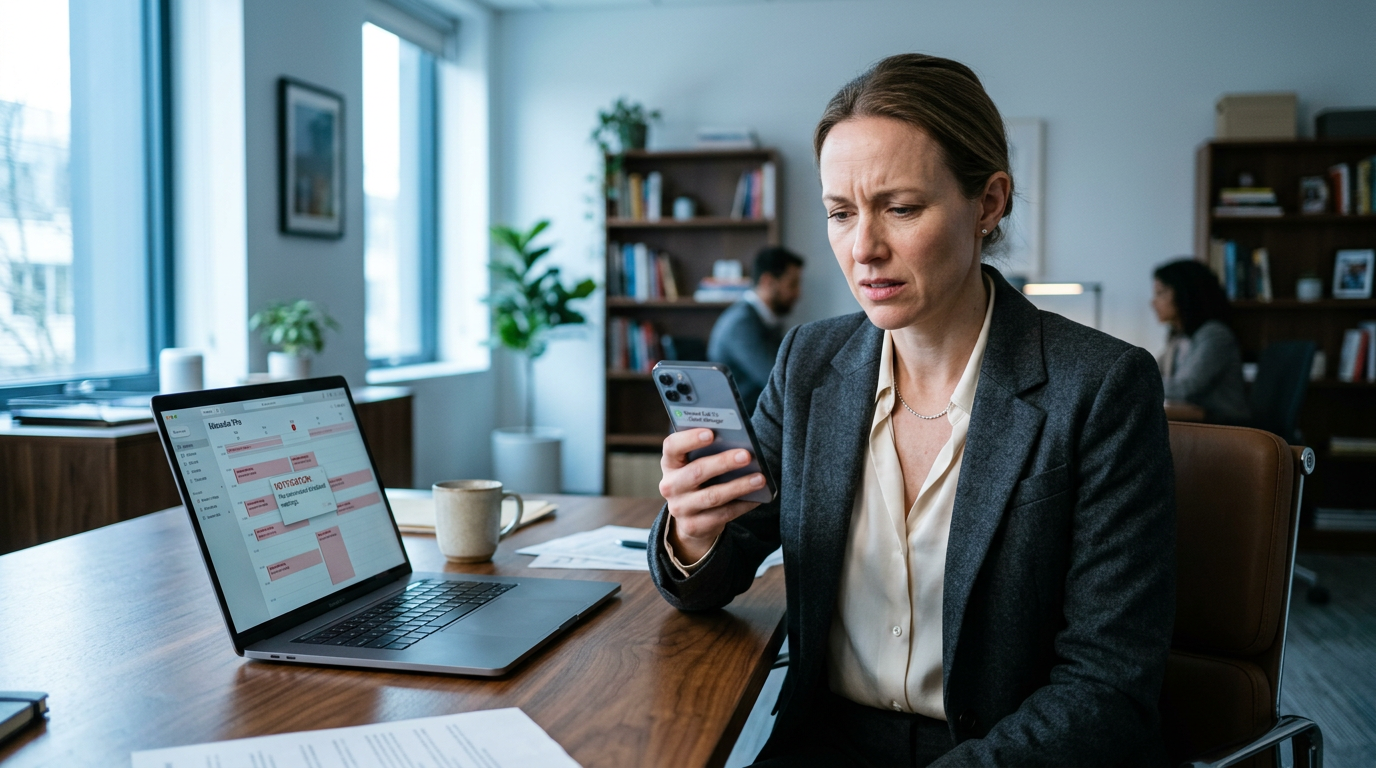
The Professional and Personal Toll of Missed Connections
When your phone logs a missed call first, then ringing occurs, the impact extends far beyond a minor technical annoyance. In today’s hyper-connected environment, a delay of even a few seconds can lead to significant real-world consequences.
For job seekers, this glitch can be particularly damaging. As discussed in career forums, returning a call from a potential employer the same business day is standard practice, but failing to answer a live call because your phone silenced the first attempt can make you appear unreachable or unresponsive. Recruiters operating on tight schedules often move directly to the next candidate on their list if an initial call goes unanswered.
In personal life, the implications of this delay can be stressful, if not outright dangerous. If a family member is calling during an emergency, the "Allow Repeated Calls" feature—which requires a second call within three minutes to bypass Focus mode—can delay your response during critical moments. Relying on a system that intentionally misses the first call before letting the second one ring creates a dangerous gap in urgent situations.
The Downstream Effect on Business Communication
The consequences of this operating system glitch are not one-sided; they create a massive bottleneck for businesses trying to reach their customers. When consumer devices fail to route calls in real time, outbound answer rates plummet, directly impacting sales pipelines, customer support metrics, and operational efficiency.
- Degraded Speed-to-Lead: In modern sales, contacting a lead within five minutes increases qualification rates by nearly 100%. If a prospect's phone silences the initial call due to a Focus Mode or spam-filter sync delay, that critical first-contact window is lost.
- Increased Operational Costs: Customer support agents spend valuable time making repeated callback attempts to users whose devices are stuck in a delayed ringing loop.
- Loss of Trust: If a customer expects a call from a service provider (such as a delivery driver or a bank verification team) and only receives a sudden "missed call" notification, it leads to friction and dissatisfaction.
To bypass these unpredictable local device behaviors, modern enterprises are shifting away from traditional telephony routes. Businesses increasingly leverage intelligent infrastructure, such as CallMissed, to deploy conversational AI voice agents and omnichannel WhatsApp chatbots. By utilizing sophisticated communication platforms like CallMissed, organizations can automatically trigger instant SMS or WhatsApp follow-ups the moment an outbound call fails to connect, ensuring they capture the customer’s attention even if their smartphone's local operating system is experiencing a routing lag.
The Shift Toward Over-The-Top (OTT) Reliability
As cellular network latency and local OS conflicts continue to cause missed call anomalies, user behavior is shifting. Many consumers and businesses are migrating their primary voice communications to Over-The-Top (OTT) data channels like FaceTime, WhatsApp, or proprietary VoIP applications. Because these platforms bypass traditional carrier-side signaling and local "Silence Unknown Callers" databases, they often ring more reliably than standard cellular calls, highlighting a growing trust deficit in legacy telecom routing.
Expert Opinions
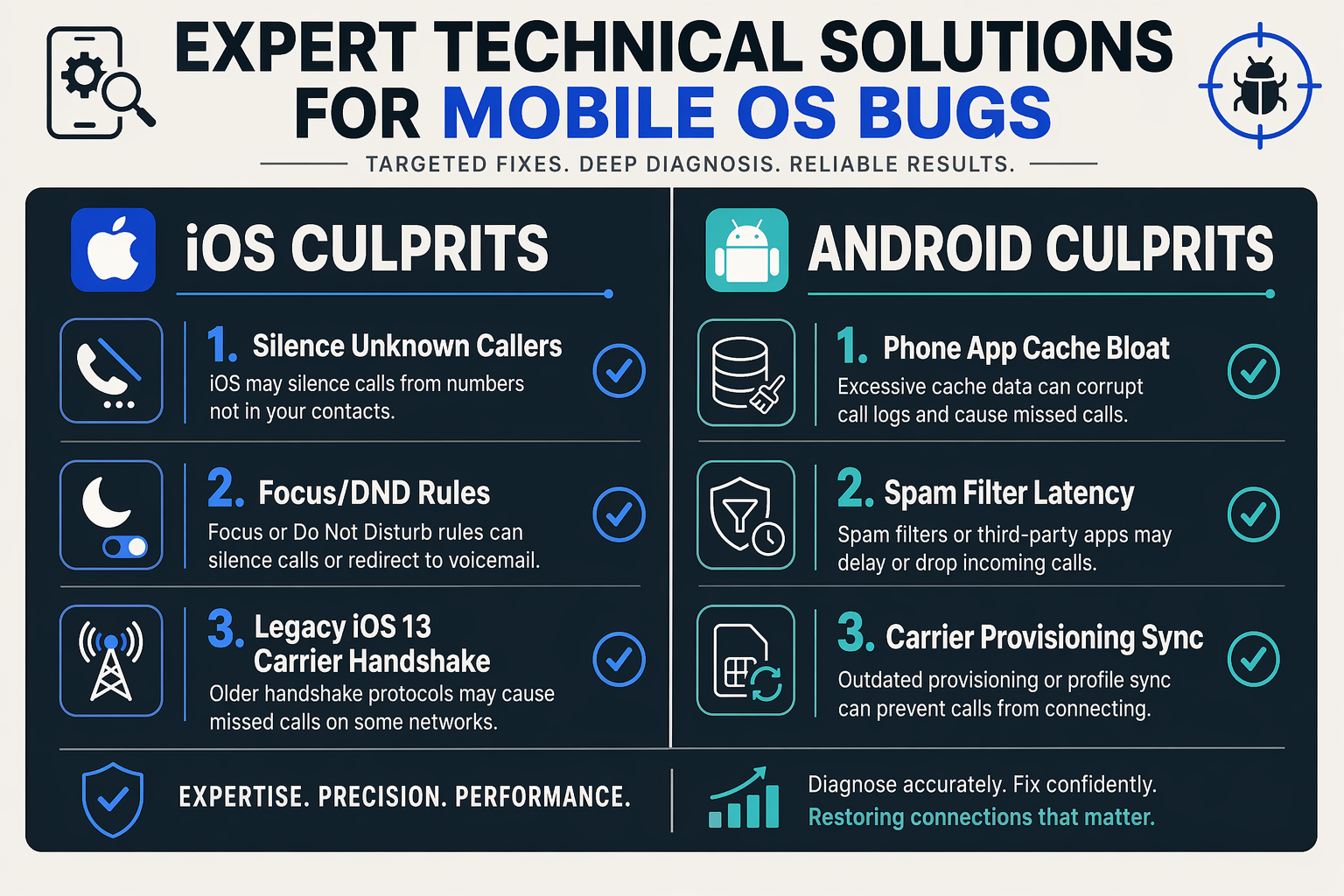
To understand why your device behaves so erratically, it helps to look at the underlying mechanics of modern mobile operating systems and telecommunication networks. Telecommunication analysts and mobile software engineers agree that the "missed call first, then ringing" phenomenon is rarely a random hardware failure. Instead, it is a byproduct of complex network latency, SIP (Session Initiation Protocol) signaling delays, and aggressive background memory management.
The Network Latency and SIP Signaling Gap
Telecom network specialists point out that when someone dials your number, the carrier sends a SIP invite to your device over LTE or 5G networks. Under ideal conditions, this handshake occurs in milliseconds. However, if there is an active network transition—such as your phone switching from Wi-Fi Calling back to cellular, or a processing delay in carrier-side spam screening protocols—the network can experience a critical micro-delay.
During this delay, the carrier network may register that the initial call routing attempt was not answered within the allocated millisecond window, immediately logging a "missed call" packet to your account. Meanwhile, your phone's cellular modem finally receives the delayed connection signal and begins to play the ringtone. This creates the awkward overlap where your OS displays the carrier-relayed missed call notification on your lock screen while the device is actively ringing.
The OS-Level Notification Bottleneck
From an operating system perspective, mobile software developers highlight how modern smartphones prioritize notifications. On both iOS and Android, incoming calls are managed by dedicated system frameworks.
If your device is experiencing high CPU utilization, low available RAM, or a bloated system cache, the operating system may struggle to execute multiple threads simultaneously. The push notification system, which uses lightweight background data channels to show the "missed call" alert, might render on your screen before the heavier system UI thread can spin up the audio drivers required to play your ringtone.
How Cloud Systems Bypass Device Latency
For everyday users, this routing delay is an annoyance, but for businesses, a single delayed or dropped call can mean lost revenue. This is why modern organizations are moving away from traditional on-device cellular routing for critical operations.
Enterprise communication platforms like CallMissed solve this issue by taking the local smartphone hardware out of the critical connection path. By utilizing robust cloud-native AI voice agents and high-availability API gateways, CallMissed processes incoming customer inquiries instantly in the cloud. Instead of waiting for a physical device to struggle through local OS-level latency, RAM bottlenecks, or Focus Mode misconfigurations, AI agents handle and route calls with zero delay, ensuring that no customer is ever left stranded by a localized smartphone glitch.
What This Means For You (TABLE)
Understanding the real-world implications of the "missed call first, then ringing" bug helps clarify why resolving this technical glitch is so critical. Whether you are navigating personal emergencies, waiting on time-sensitive callbacks, or managing daily business operations, an unreliable device notification system can cause immediate disruptions.
For instance, missing an initial call from a potential employer because your phone silenced the ring and registered a missed call can cost you a job opportunity. Industry data shows that recruiters rarely wait; if a candidate does not pick up, they quickly move down their list. Similarly, in high-stakes environments, a delayed ring means critical updates are delayed.
To help you assess how this bug directly impacts your daily life and identify the quickest path to a fix, we have categorized the most common scenarios below:
| Target Scenario | Real-World Impact | Primary Technical Culprit | Direct Resolution |
|---|---|---|---|
| Job Seekers & Recruiting | Missed recruiter callbacks; potential employers move to the next candidate immediately. | iOS "Silence Unknown Callers" or aggressive Android spam filters blocking first-time numbers. | Disable spam filtering temporarily; set caller ID settings to "Always"; whitelist expected area codes. |
| Family & Emergency Contacts | Vital family calls remain silent on the first try, delaying urgent updates. | Focus Mode or "Do Not Disturb" (DND) "Allow Repeated Calls" exception rule. | Add essential family members to your Focus "Allowed" list; toggle off DND during critical windows. |
| B2B & Customer Support | Dropped warm leads; slower response times; decreased customer satisfaction. | Carrier-side synchronization latency during LTE/5G network handovers. | Reset Network Settings; leverage robust cloud routing platforms like CallMissed for business numbers. |
| Daily Communication | Confusion; scrambling to answer a phantom ring; returning calls to parties who have already hung up. | Corrupted system cache (Android Phone App) or outdated carrier settings. | Clear Phone app cache and data; update iOS/Android software and reinstall your SIM card. |
Device-Level Failure vs. Enterprise-Grade Reliability
This bug highlights a fundamental vulnerability in local device architectures. When a smartphone relies on local operating system rules (such as Focus Modes, local spam databases, and carrier-pushed configuration profiles) to determine whether to ring, any microsecond of latency or software conflict can break the calling loop. The device registers the network's incoming payload as a "missed call" before the local UI has time to trigger the ringtone.
For personal use, the troubleshooting steps outlined in this guide will restore your phone's natural calling sequence. However, for businesses that cannot afford to miss a single customer interaction, relying solely on local cellular hardware is a risk.
To mitigate these end-user device limitations, forward-thinking enterprises use platforms like CallMissed to deploy AI-driven voice agents and cloud-native communication infrastructure. Because these platforms manage call logic upstream in the cloud rather than relying on inconsistent local handset settings, they guarantee that customer calls are answered instantly, 24/7, bypassing the cellular glitches that plague individual smartphones.
By understanding the root cause of this sequence error on your individual device, you can take control of your notifications and ensure your phone behaves exactly when you need it to.
Frequently Asked Questions
Why does my iPhone show a missed call first, then ringing starts immediately after?
How can I stop Android from registering a missed call first, then ringing on the second attempt?
Could an outdated SIM card or network latency cause my incoming calls to drop straight to voicemail?
How do enterprise-grade VoIP services avoid the missed call synchronization issues that plague personal mobile devices?
Will disabling "Silence Unknown Callers" on iOS resolve the delayed ringtone glitch?
Why does my phone ring only on the second call when Do Not Disturb is turned on?
Conclusion
Resolving the backward sequence of a missed call notification appearing before your phone actually rings is crucial for maintaining reliable daily communication. By systematically auditing your device’s settings, you can eliminate this frustrating software lag.
Key takeaways to keep your device's calling order in sync include:
- Audit Focus and DND Rules: Disable or adjust the "Allow Repeated Calls" feature in iOS Focus modes, which intentionally silences and logs the first call as missed while letting the second ring through.
- Clear Android Phone App Cache: Routinely clear the system cache and storage of your default Phone app to resolve background data bottlenecks.
- Review Spam and Silence Features: Toggle off aggressive features like "Silence Unknown Callers" on iOS or restrictive "Caller ID and Spam" filters on Android that delay call processing.
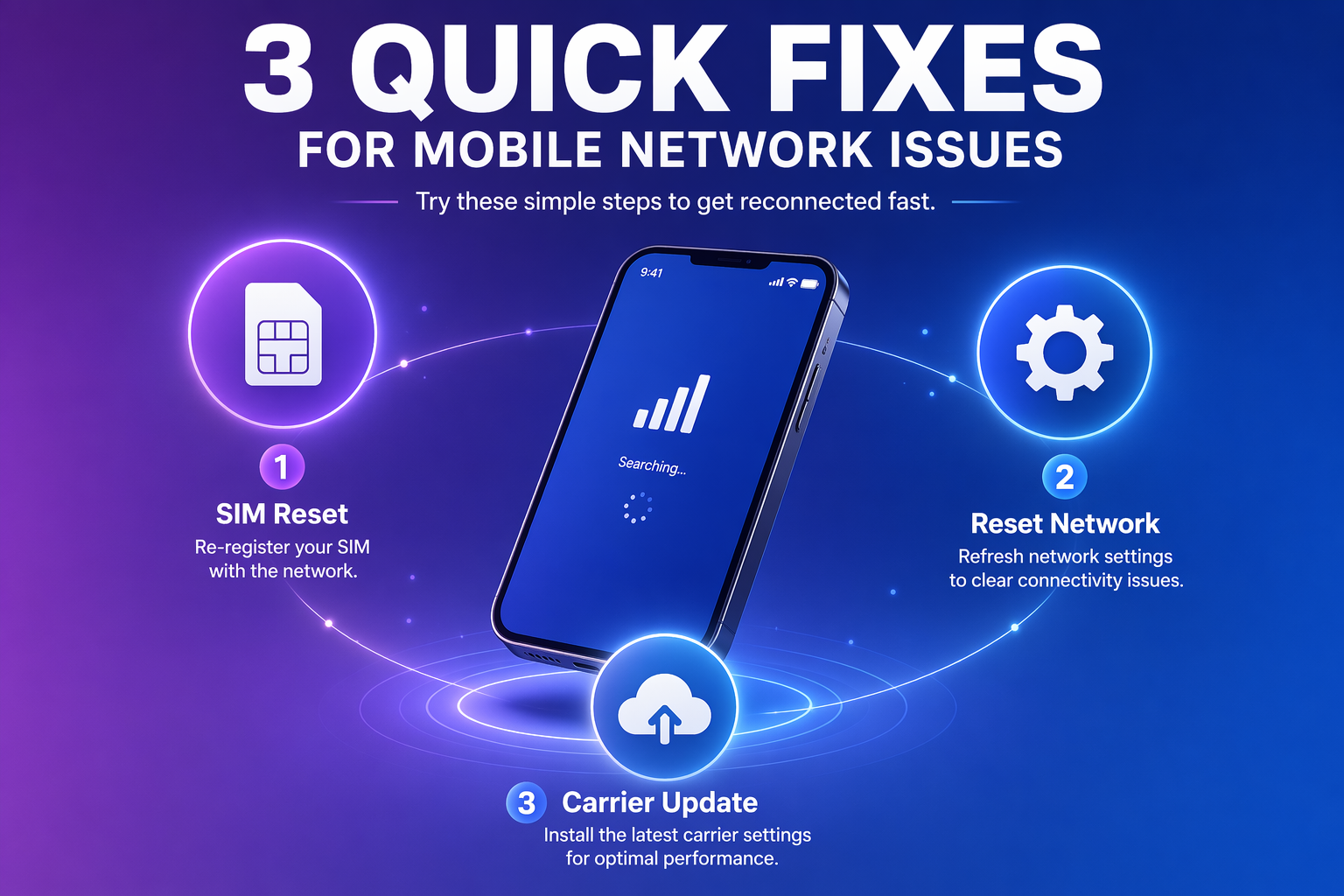
- Refresh Network Configurations: Perform a carrier settings update or reset your network settings to resolve underlying carrier synchronization delays.
As mobile operating systems continue to integrate deeper machine learning to filter out robocalls and spam, watch for how future iOS and Android updates manage real-time call routing. To explore how AI communication is evolving beyond these traditional cellular limitations, check out CallMissed—an AI infrastructure platform powering voice agents and multilingual chatbots for businesses, ensuring seamless, zero-lag customer interactions.
Is your phone finally ringing in the right order, or is it time to reset your network settings?
Related Posts

Never Lose a Lead: How CallMissed is Revolutionizing Inbound Call Automation and Customer Support with Multilingual AI Voice Agents
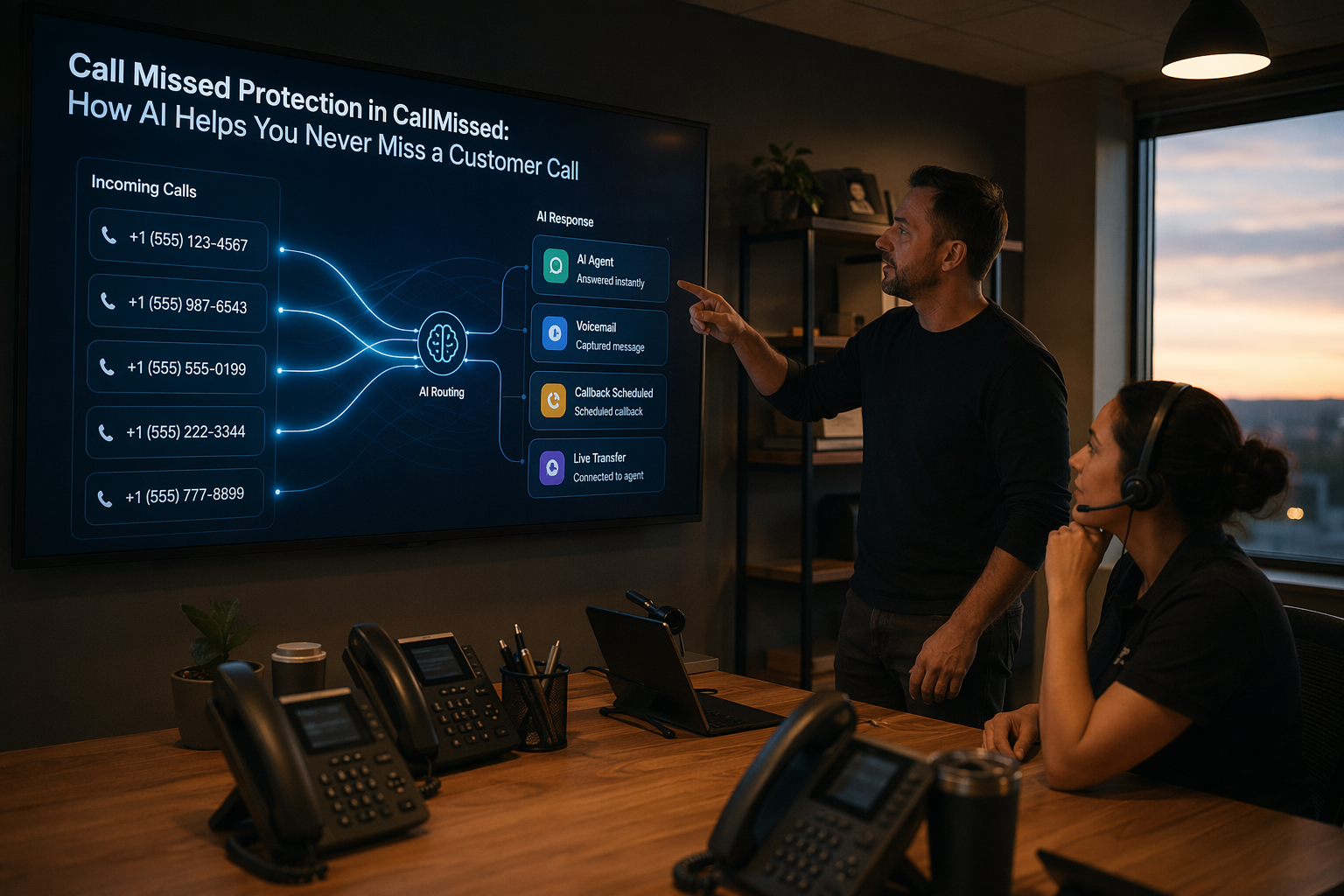
Call Missed Protection in CallMissed: How AI Helps You Never Miss a Customer Call

Anticipating Claude 5 Sonnet: What to Expect from Anthropic’s Next-Gen Mid-Tier Powerhouse
Ready to automate customer conversations?
Launch AI voice agents and WhatsApp bots with CallMissed — one API, 22+ Indian languages.