

Datasette Apps: Host Custom HTML Applications Inside Datasette



What if you could transform a raw SQLite database into a fully custom, interactive web application using nothing more than a single HTML file—completely...
Datasette Apps: Host Custom HTML Applications Inside Datasette
What if you could transform a raw SQLite database into a fully custom, interactive web application using nothing more than a single HTML file—completely bypassing the need to spin up a separate backend server? With the landmark release of Datasette 1.0, this is no longer a hypothetical. The update introduces Datasette Apps, a powerful new capability that allows developers to host custom HTML applications inside Datasette instances natively. Within hours of its announcement, the feature surged to the top of Hacker News, sparking intense discussion across the developer community about the future of lightweight, data-centric web development.
Why does this development matter right now? Historically, Datasette has been celebrated as the ultimate open-source multi-tool for exploring and publishing structured data. Yet, creating highly customized, brand-aligned user interfaces often meant building complex plugins or deploying separate frontend clients that queried Datasette’s JSON API. Datasette Apps radically simplifies this workflow. By allowing arbitrary HTML, CSS, and JavaScript to run securely within the host environment, developers can instantly turn static datasets into bespoke dashboards, interactive charts, and internal tools. Just as communication infrastructure platforms like CallMissed streamline customer operations by allowing businesses to instantly deploy intelligent AI voice agents without managing complex telephony backends, Datasette Apps is removing the operational friction between data storage and frontend deployment.
In this article, we will dive deep into how this new ecosystem works. You will learn the core mechanics behind hosting custom HTML applications inside Datasette, how to properly structure your application files, and the underlying security boundaries that keep your host system safe from unauthorized execution. Finally, we will walk through a practical, step-by-step tutorial to get your first custom app up and running in minutes, showing you how to turn raw databases into interactive, user-ready web experiences.
Introduction
On June 11, 2026, the data-engineering community reached a major milestone with the launch of Datasette 1.0. Alongside this highly anticipated release came a groundbreaking new feature: Datasette Apps. This new capability allows developers to create, deploy, and host custom HTML, CSS, and JavaScript applications directly inside their Datasette instances. The announcement immediately captured the attention of the developer ecosystem, quickly climbing to the top of Hacker News—via a popular thread submitted by user lumpa—generating 70 points and active discussion in under seven hours.
The Evolution of Data Publishing
For years, Datasette has served as an indispensable open-source multi-tool for exploring and publishing structured data. By converting SQLite databases into interactive, explorable web interfaces, it has democratized data analysis for journalists, developers, and researchers alike. Traditionally, if a team wanted to build a tailored dashboard or a custom user interface on top of their Datasette databases, they faced several friction points:
- Fragmented Hosting: Deploying databases using tools like
datasette publishto platforms like Google Cloud or Heroku, while simultaneously maintaining a separate hosting environment for the frontend application. - CORS and API Latency: Configuring Cross-Origin Resource Sharing (CORS) policies to allow a detached frontend to safely query the Datasette JSON API.
- Template Limitations: Overriding default templates via custom Python plugins, which required steep learning curves and server-side deployment overhead.
Datasette Apps completely eliminates these hurdles. By allowing raw HTML, JavaScript, and CSS to live and execute directly inside the native Datasette environment, developers can construct bespoke data applications without the overhead of managing a separate frontend stack.
A Unified Approach to Modern Development
This paradigm shift reflects a broader trend across modern software architecture: the collapse of complex deployment pipelines into streamlined, "batteries-included" platforms. Just as modern communication infrastructures like CallMissed allow developers to deploy advanced AI voice agents and multilingual chatbots without managing fragmented APIs and complex server setups, Datasette Apps brings that same philosophy to data publishing. By simplifying the stack, developers can focus entirely on creating value—whether that means building an interactive data visualization or deploying an AI-driven data exploration interface.
In this comprehensive guide, we will dive deep into Datasette Apps. We will explore how this feature works under the hood, how you can build and structure your first custom HTML application inside a Datasette instance, and the practical use cases that this release unlocks for the developer community. Whether you are looking to build interactive dashboards, internal tools, or public-facing data portals, the combination of Datasette 1.0 and Datasette Apps provides a powerful, lightweight framework to turn your raw databases into fully realized web applications in record time.
Background & Context
The Evolution of Data Publishing
For years, Datasette has served as an essential open-source multi-tool for exploring, querying, and publishing structured data. Created by Simon Willison, the tool’s primary value proposition has always been simplicity: it allows developers, journalists, and data scientists to take a local SQLite database and spin up an interactive, web-accessible interface with a single command.
Over time, the ecosystem expanded to make data distribution increasingly friction-free:
- The Command-Line Publisher: Commands like
datasette publishallowed users to instantly deploy their databases and interactive UIs to hosting providers like Heroku or Google Cloud. - In-Browser Execution: The introduction of Datasette Lite leveraged WebAssembly and Pyodide, running the entire Python web application directly in the user's web browser without requiring any server-side infrastructure.
The Custom Frontend Challenge
While these advancements made it incredibly easy to share raw tables, they fell short when developers needed to present that data to non-technical users. Standard Datasette views are heavily focused on raw database rows, SQL queries, and JSON API endpoints. If a team wanted to build a tailored dashboard, an interactive map, or a bespoke search interface, they faced a difficult choice:
- Build a separate frontend application: Developers had to create and host a standalone frontend (using frameworks like React or Vue) that queried the Datasette JSON API.
- Write custom Python templates: This approach required building custom templates and plugins, which introduced significant deployment and security overhead. Allowing users to run arbitrary HTML and JavaScript on hosted platforms—such as Datasette Cloud—historically presented major security and sandboxing challenges.
This friction often delayed projects, requiring dedicated DevOps resources just to keep a simple, customized data dashboard online.
A Unified Approach to Data and UI
On June 11, 2026, the launch of Datasette Apps alongside the milestone Datasette 1.0 release fundamentally changed this dynamic. By allowing users to host custom HTML and JavaScript applications directly inside their Datasette instances, the platform has closed the loop between database storage and user interaction.
This paradigm shift mirrors a broader software industry trend: the collapse of infrastructure complexity. Just as modern communication platforms like CallMissed enable developers to deploy production-ready voice agents, Speech-to-Text APIs across 22 Indian languages, and LLM backends without managing complex telephony servers, Datasette Apps now empowers data teams to bypass traditional web hosting setups. Developers can now package their data, backend APIs, and custom HTML/JS frontends into a single, cohesive unit—significantly reducing the time and cost required to bring data-driven applications to life.
Key Developments (TABLE)
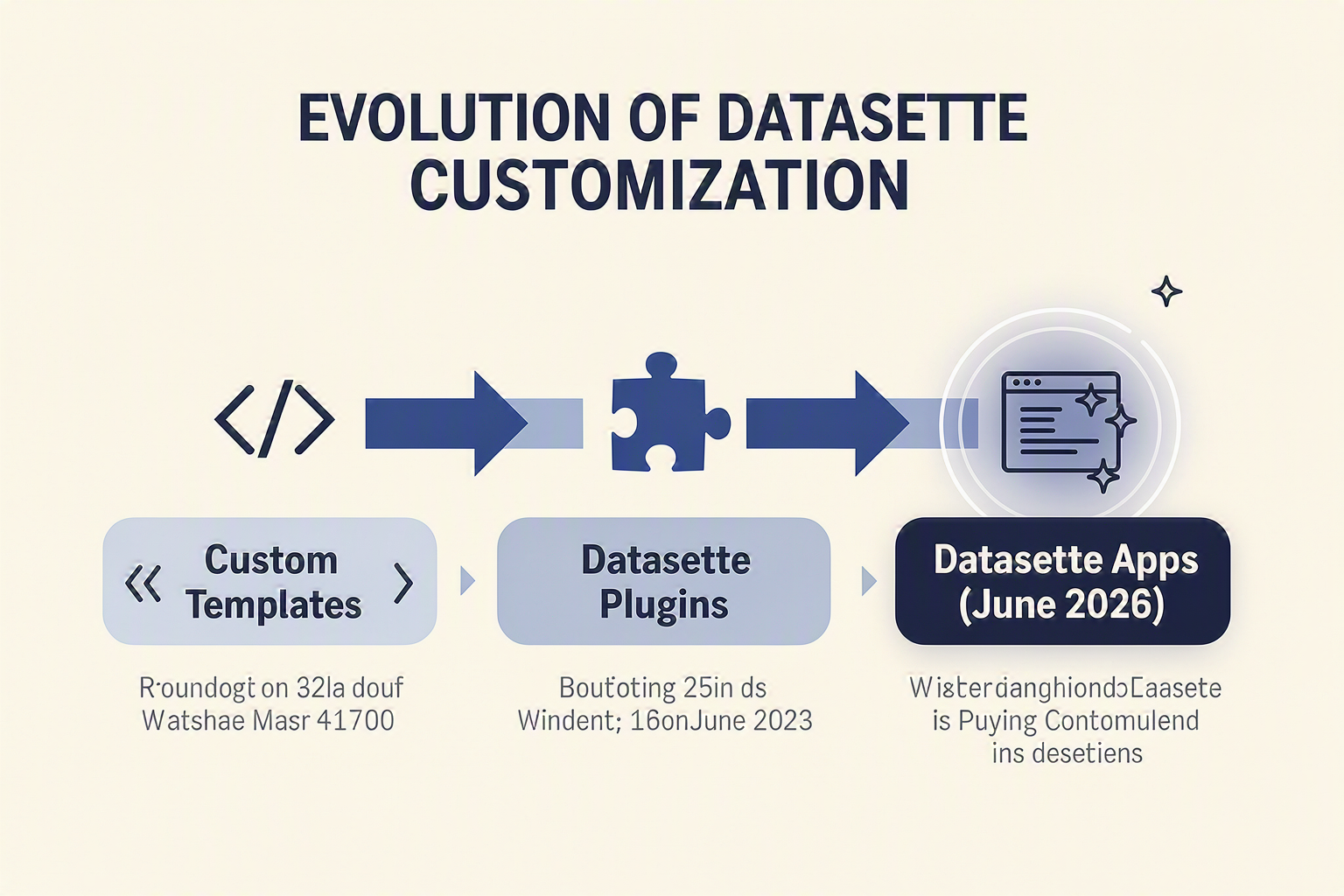
The evolution of Datasette from a lightweight SQLite data-publishing utility into a fully fledged application environment has been a multi-year journey. What started as a simple tool to "explore and publish data in one line of code" has culminated in the recent launch of Datasette Apps alongside Datasette 1.0. This milestone feature allows developers to host custom HTML and JavaScript applications directly inside their Datasette instances, effectively turning Datasette into a powerful backend-as-a-service (BaaS) for data-driven web projects.
To understand how we arrived at this point, it is helpful to trace the technical milestones and architectural breakthroughs that paved the way for this capability.
| Development / Feature | Launch Date | Core Capability | Key Underlying Technology |
|---|---|---|---|
| Datasette Publish | Past Era | Deploy databases directly to Heroku or Google Cloud | Cloud provider CLI integrations |
| Datasette Lite | Past Era | Runs server-side Python directly in the browser | Pyodide (Python compiled to WebAssembly) |
| API & Permission Tweaks | Pre-1.0 (Alpha) | Granular access control and alter-table JSON APIs | SQLite-utils & ASGI permission protocols |
| Datasette Apps | June 11, 2026 | Host custom HTML/JS apps inside Datasette instances | Embedded static file router & Datasette 1.0 core |
From Static Data to Dynamic Web Apps
Historically, Datasette's primary strength was making read-only SQLite databases easily shareable via an interactive, pre-built web UI. However, as developers increasingly built custom frontends on top of Datasette's JSON APIs, the need for a cohesive hosting solution became clear. Instead of maintaining a separate frontend on platforms like Vercel or Netlify and querying a self-hosted Datasette backend, Datasette Apps consolidates these layers. Users can now package arbitrary HTML and JS directly alongside their SQL databases, drastically reducing the friction of building internal tools or public dashboards.
This shift reflects a broader trend in modern software engineering: bringing the application layer as close to the data and infrastructure as possible. For instance, just as Datasette streamlines data hosting by running custom HTML directly on top of SQLite, communication platforms like CallMissed simplify voice and messaging infrastructure by providing production-ready APIs—such as an LLM gateway with access to over 300 models and multi-lingual Speech-to-Text supporting 22 Indian languages—allowing developers to deploy advanced AI agents without managing complex, multi-tiered backend pipelines.
Overcoming the Security Hurdle
The road to hosting custom applications inside Datasette was not without challenges. In managed environments like Datasette Cloud, allowing users to run arbitrary HTML and JavaScript posed significant cross-site scripting (XSS) and data exfiltration risks.
The transition to Datasette 1.0 solved this by introducing robust sandboxing, strict permission protocols, and refined ASGI routing. These security layers ensure that while custom apps can interact with the underlying SQLite database via secure, localized API requests, they cannot compromise the broader host system or access unauthorized database tables. This balance of flexibility and security makes Datasette a formidable competitor in the low-code and internal tools space.
In-Depth Analysis
The Evolution of Datasette: From Data Viewer to App Host
The launch of Datasette 1.0 on June 11, 2026, marked a significant architectural milestone with the introduction of Datasette Apps. Historically, Datasette has been celebrated as an open-source multi-tool that lets developers take SQLite databases of any shape or size and publish them as interactive, explorable websites. Tools like datasette publish allowed users to easily deploy instances directly to Heroku or Google Cloud.
However, customizing the user experience previously required complex template overrides or building a completely separate frontend application that queried Datasette's JSON API. Datasette Apps radically simplifies this paradigm. It allows developers to build, bundle, and host custom HTML, CSS, and JavaScript applications directly inside a Datasette instance. This transition shifts Datasette from a read-only database browser into a fully-fledged, self-contained web application platform.
Solving the Security and Client-Side Execution Challenge
Allowing users to run arbitrary HTML and JavaScript on a hosted platform has historically been a major security bottleneck. When analyzing the evolution of this feature, several architectural steps stand out:
- Sandboxed Custom Templates: In earlier iterations of Datasette Cloud, allowing custom templates required strict guardrails to prevent Cross-Site Scripting (XSS) and unauthorized data access.
- WebAssembly via Pyodide: The development of Datasette Lite—which runs the full server-side Python web application directly in the browser compiled to WebAssembly—proved that client-side execution could be highly isolated and performant.
- Clean API Separation: Datasette Apps leverage secure, authenticated access to the underlying SQLite database via local JSON APIs, ensuring that custom client-side scripts can query data efficiently without exposing write access or administrative credentials.
By streamlining this process, developers can now build bespoke interactive dashboards, data entry forms, and search interfaces without the overhead of spinning up a separate Node.js or React build pipeline.
Extending Datasette Apps with Modern APIs
Because Datasette Apps run standard HTML and JavaScript, they are highly extensible and can easily integrate with external systems. This is particularly valuable for organizations looking to build intelligent, data-driven internal tools.
For instance, developers can connect their custom Datasette interfaces to advanced communication infrastructures. Using platforms like CallMissed, an organization can build a custom CRM directly inside a Datasette App. By integrating CallMissed’s APIs, the custom HTML frontend can trigger automated AI voice agents, query multi-model LLMs (with access to over 300 models), or run Speech-to-Text queries across 22 regional Indian languages to transcribe and analyze voice data.
Ultimately, Datasette Apps democratize the creation of database-driven software. By lowering the barrier to hosting custom code, it enables rapid prototyping where the database, the API layer, and the user interface all live harmoniously in a single, lightweight package.
Impact & Implications
The launch of Datasette Apps on June 11, 2026, alongside the milestone Datasette 1.0 release, marks a fundamental paradigm shift. What began as an open-source multi-tool for exploring and publishing structured data has officially evolved into a lightweight, self-contained application platform. By allowing developers to host custom HTML applications directly inside a Datasette instance, the barrier between raw SQLite databases and rich, interactive user interfaces has been effectively dismantled.
Streamlining the Data-to-App Pipeline
Historically, publishing data-driven websites required a multi-step engineering pipeline. While developers could use the datasette publish command to deploy databases directly to Heroku or Google Cloud, presenting that data to non-technical users still required building and maintaining separate frontend web applications.
With the introduction of Datasette Apps, this friction is eliminated:
- Direct frontend hosting: Custom HTML, CSS, and JavaScript live directly alongside the SQLite database, allowing UI elements to query internal JSON APIs natively.
- Rapid prototyping: Teams can transform a raw database into an interactive internal tool, public directory, or searchable catalog in minutes rather than days.
- Reduced infrastructure overhead: By hosting the frontend and backend in one place, developers bypass the need to manage separate web servers, coordinate CORS configurations, or maintain distinct deployment pipelines.
The Security Frontier: Balancing Flexibility and Risk
Allowing users to execute custom HTML and JavaScript within a database-driven platform introduces complex security challenges. As discussed during the development of custom templates for hosted environments, executing arbitrary script files on a multi-tenant or cloud-hosted instance poses severe security risks, including Cross-Site Scripting (XSS) and unauthorized data exfiltration.
To safely implement Datasette Apps, organizations must adopt a robust security posture focused on:
- Granular Permission Controls: Restricting who can upload and modify custom applications within the Datasette instance.
- Strict Content Security Policies (CSP): Restricting where hosted JavaScript apps can send or fetch data.
- Sandbox Isolation: Ensuring that custom scripts cannot access administrative tokens or modify the underlying database schemas without explicit, audited authorization.
WebAssembly and Serverless Possibilities
The implications of this release stretch even further when paired with Datasette Lite, which runs the full Python application directly in the browser using a Pyodide build compiled to WebAssembly. By combining browser-side Python with custom HTML application hosting, developers can build fully serverless, zero-install interactive tools. Users can upload a local SQLite file, open an HTML app, and manipulate their data in a highly customized interface without any data ever leaving their local machine.
This highly portable, rapid-deployment ecosystem is incredibly valuable for organizations managing dynamic data pipelines. For instance, businesses leveraging communication platforms like CallMissed to run multilingual AI voice agents and WhatsApp chatbots generate vast databases of customer interaction logs. By hosting a custom Datasette App, an organization can instantly spin up a secure, local dashboard to visualize call sentiment, track automated chat success rates, and analyze communication metrics directly from their SQLite exports—all without setting up a heavy, expensive business intelligence suite.
Expert Opinions
The launch of Datasette Apps on June 11, 2026, alongside the milestone release of Datasette 1.0, quickly captured the attention of the developer community, climbing to the top of Hacker News with rapid engagement. Industry experts and database engineers are closely analyzing what this shift means for the future of lightweight, data-driven application delivery.
Streamlining the "Last Mile" of Data Visualization
For years, Datasette has excelled at turning raw SQLite databases into explorable, read-only JSON APIs and web interfaces. However, experts point out that developers still faced a "last-mile" friction: to build a custom dashboard or interactive visual tool, they had to host a separate web application that queried the Datasette API.
With Datasette Apps, developers can now package custom HTML, CSS, and JavaScript directly inside their Datasette instances. Data analysts and software architects have praised this approach for several key reasons:
- Zero-Dependency Frontends: It eliminates the need for separate frontend hosting (like Vercel or Netlify) for simple internal tools.
- Locality of Behavior: The HTML presentation layer resides alongside the SQLite data engine, simplifying deployment to platforms like Google Cloud, Heroku, or Datasette Cloud.
- WebAssembly Synergy: Combined with Datasette Lite—which runs entirely in the browser via Pyodide and WebAssembly—this feature allows developers to distribute complete, self-contained interactive data applications as single-file assets.
The Security and Sandbox Debate
While the developer reception has been overwhelmingly positive, security experts have raised critical questions regarding the risks of hosting arbitrary HTML and JavaScript. Letting users execute custom JavaScript on a hosted domain introduces potential Cross-Site Scripting (XSS) and data exfiltration vectors.
As Simon Willison previously noted during the development of Datasette Cloud, allowing users to run custom templates and arbitrary code on a multi-tenant platform requires robust isolation. Experts suggest that for Datasette Apps to succeed in enterprise environments, organizations must implement strict Content Security Policies (CSP) and sandbox user-generated applications on isolated subdomains to prevent unauthorized credential or data access.
Unifying Lightweight Data and AI Pipelines
The broader consensus among system architects is that Datasette Apps represents a larger industry trend toward highly integrated, low-overhead architectures. Instead of building bloated microservices, developers are looking for lean, API-first ways to serve data directly to users and intelligent agents.
This paradigm shift is particularly evident in how modern communication systems ingest structured data. For example, platforms like CallMissed allow developers to deploy autonomous AI voice agents and WhatsApp chatbots that require immediate access to structured backend data. By hosting lightweight custom HTML dashboards directly within a Datasette instance, teams can easily monitor live call logs, LLM latency metrics, or customer sentiment databases in real-time, leveraging CallMissed's multi-model LLM APIs to query and summarize the SQLite data served by Datasette.
Ultimately, experts view Datasette Apps as a major step forward in democratizing data publishing, proving that you do not need complex web frameworks to build powerful, interactive, and modern data tools.
What This Means For You (TABLE)
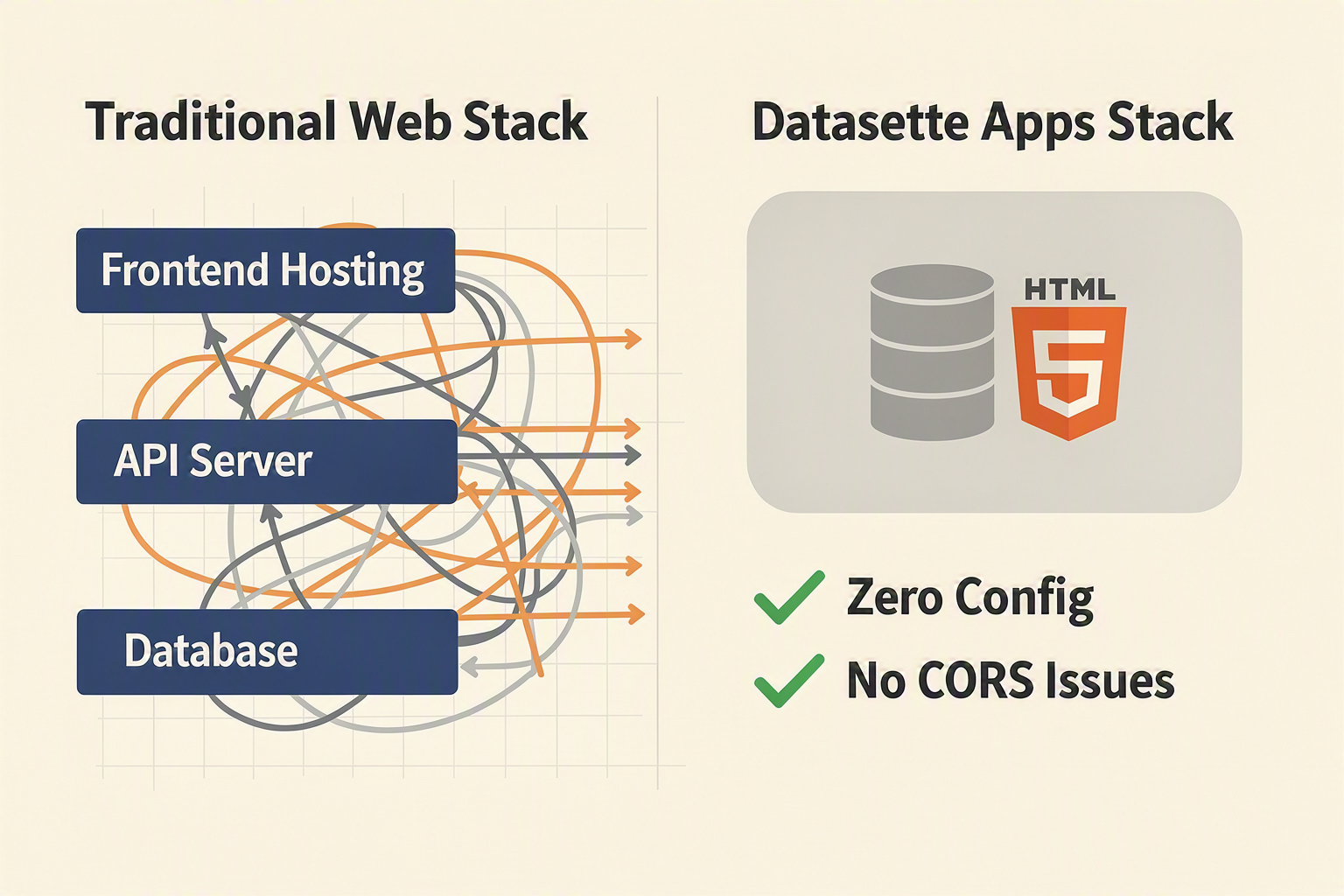
The release of Datasette Apps alongside the milestone Datasette 1.0 launch marks a major paradigm shift for developers, data scientists, and organizations. For years, Datasette has been celebrated as an elite open-source multi-tool for exploring and publishing SQLite databases. However, transforming raw data queries into bespoke, interactive user interfaces still required a separate web development lifecycle. Developers had to spin up external frontend servers, configure CORS, manage API tokens, and maintain complex deployment pipelines.
Datasette Apps completely eliminates this friction. By allowing users to host custom, arbitrary HTML and JavaScript applications directly inside their Datasette instances, the tool transitions from a data viewer into a fully fledged, lightweight application server.
Mapping the Workflow Shift
To understand how this feature changes your day-to-day operations, consider how different roles can leverage this new capability:
| Target Audience | Traditional Workflow | The Datasette Apps Way | Core Advantage |
|---|---|---|---|
| Data Analysts | Relied on heavy BI platforms or separate Python tools like Streamlit | Host custom HTML/JS dashboards directly next to SQLite data | Zero-infra reporting |
| Frontend Developers | Managed separate repos, configured CORS, and deployed to separate hosts | Write clean HTML/JS pages hosted inside the active instance | Instant deployment |
| DevOps Engineers | Monitored multiple application stacks, API gateways, and access tokens | Secure apps natively within Datasette's built-in permission model | Drastically reduced attack surface |
| Product Prototypers | Spent days configuring backend routes and frontend boilerplate | Drop an HTML file into the instance to build a live interface | Minutes from data to demo |
Unlocking Intelligent Data Workflows
This shift to modular, localized web applications aligns perfectly with the broader rise of API-first architectures and conversational AI. When you simplify how frontend tools interact with structured data, you open the door to highly automated, intelligent workflows.
For instance, modern communication infrastructures like CallMissed leverage unified APIs to connect AI voice agents and WhatsApp chatbots to central business databases. By deploying Datasette Apps, developers can quickly build custom, internal HTML monitoring dashboards. This allows operations teams to visualize real-time database updates generated by CallMissed’s AI agents, tracking customer call sentiment or service logs directly from a single, lightweight dashboard—all without writing a single line of backend API boilerplate.
Why This Matters for Your Tech Stack
Whether you are running Datasette locally, utilizing datasette-lite via WebAssembly (Pyodide) in the browser, or deploying to Google Cloud, the architectural benefits are clear:
- Unified Security: Custom apps automatically inherit Datasette’s robust permissions and authentication layers, ensuring sensitive data isn't exposed to unauthorized users.
- Low-Latency Interactions: Because your custom HTML interfaces reside on the same server as the underlying SQLite database, API response times are incredibly fast.
- Simplified Maintenance: You no longer need to keep frontend and backend hosting environments in sync. If your Datasette instance is running, your custom database applications are running too.
Frequently Asked Questions
Understanding how to deploy and manage interactive web components within your database environment is crucial to getting the most out of your data. Below, we address some of the most frequently asked questions about building, securing, and deploying applications with this new feature set.
What are Datasette Apps and how do they work?
How do I install and host custom HTML applications inside Datasette?
pip install datasette. For cloud deployment, you can use the datasette publish command to deploy your entire interactive environment, including SQLite databases and custom apps, directly to hosting providers like Heroku or Google Cloud. This makes publishing fully functional, data-backed web applications incredibly fast and cost-effective.Can I run Datasette Apps in my browser without a server?
What security measures prevent malicious JavaScript execution in hosted environments?
How can I integrate real-time AI and messaging features into my data dashboards?
fetch() requests from your custom HTML templates. For instance, platforms like CallMissed offer developer-friendly APIs for Speech-to-Text (supporting 22 Indian languages), LLM inference across over 300 models, and automated voice agents that can read or update your Datasette backend in real-time. By connecting Datasette's SQLite data structures with CallMissed's AI communication infrastructure, businesses can build highly interactive, voice-enabled CRM tools or automated data reporting assistants.What is the relationship between Datasette, SQLite, and Python?
Conclusion
The launch of Datasette Apps alongside Datasette 1.0 in June 2026 signals a massive paradigm shift in how we build and deploy data-driven tools. By allowing developers to host custom HTML and JavaScript applications directly inside their Datasette instances, the ecosystem bridges the gap between raw databases and interactive user interfaces.
Here are the key takeaways:
- Streamlined Architectures: Host interactive front-ends directly inside your database layer without managing separate hosting environments.
- Rapid Prototyping: Build and deploy tailored data views, tools, and dashboards in a fraction of the time.
- Ecosystem Maturity: The milestone release of Datasette 1.0 solidifies its role as a production-ready, open-source data engine.
Looking ahead, we can expect a future where data exploration, client-side WebAssembly, and automated intelligence merge seamlessly. To explore how AI communication and modern data-driven architectures are evolving, check out CallMissed — an AI infrastructure platform powering voice agents and multilingual chatbots for businesses.
As these technologies converge, are you ready to transition from static dashboards to hosting fully interactive, database-native applications?
Ready to automate customer conversations?
Launch AI voice agents and WhatsApp bots with CallMissed — one API, 22+ Indian languages.